Warm Welcome
SAPEX
The All-in-One Embedded IP-PBX Server
Introduction

   Pure IP-PBX
   Embedded Server Platform
   Registrar, Proxy, Presence and Voice Mail Servers : All-Integrated
   Open-Standard SIP Protocol Support
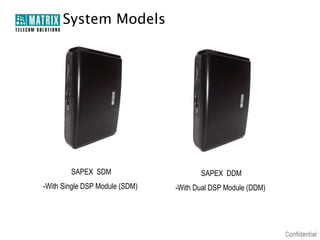
System Models


        SAPEX SDM                      SAPEX DDM
-With Single DSP Module (SDM)   -With Dual DSP Module (DDM)
Server Specifications

 Open-Architecture, Supports SIP v2 Protocol
 Embedded Registrar, Proxy, Voice Mail and Presence Servers
 Back-to-Back User Agent (B2BUA)
 Registration of Multiple SIP Trunks
 Seamless User Connectivity (NAT and STUN Support)
 Dynamic DNS (DDNS) Support
 Presence and Instant Messaging
Open Architecture

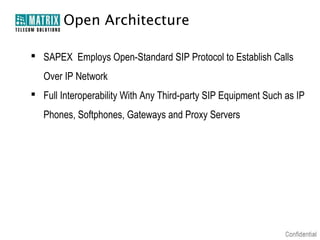
 SAPEX Employs Open-Standard SIP Protocol to Establish Calls
   Over IP Network
 Full Interoperability With Any Third-party SIP Equipment Such as IP
   Phones, Softphones, Gateways and Proxy Servers
Open Architecture

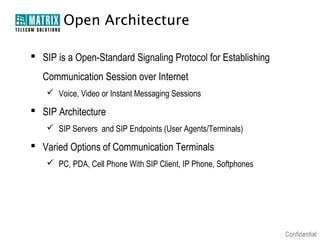
 SIP is a Open-Standard Signaling Protocol for Establishing
   Communication Session over Internet
     Voice, Video or Instant Messaging Sessions

 SIP Architecture
     SIP Servers and SIP Endpoints (User Agents/Terminals)

 Varied Options of Communication Terminals
     PC, PDA, Cell Phone With SIP Client, IP Phone, Softphones
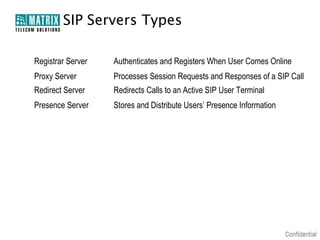
SIP Servers Types

Registrar Server   Authenticates and Registers When User Comes Online
Proxy Server       Processes Session Requests and Responses of a SIP Call
Redirect Server    Redirects Calls to an Active SIP User Terminal
Presence Server    Stores and Distribute Users’ Presence Information
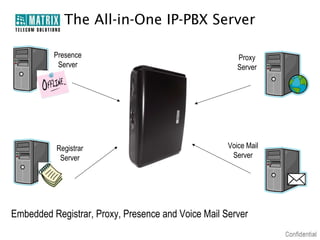
The All-in-One IP-PBX Server

          Presence                                     Proxy
           Server                                      Server


          Registrar                                 Voice Mail
           Server                                    Server


Embedded Registrar, Proxy, Presence and Voice Mail Server
Back-to-Back User Agent (B2BUA)

 Basic Call Services like Call Forwarding, Call Transfer
   Necessitates Call Management and Tracking for Entire Call
   Duration
 SIP Server With B2BUA Becomes an Active Participant in a SIP
   Call, Enabling Many Advanced Services in Addition to Basic
   Telephony Services
     Applications Such as Billing Require Call State Monitoring

 Facilitates Centralized Call Management
Multiple SIP Trunk Support

 SAPEX Supports Registration With Multiple SIP Trunks
 Registration With a Maximum of 10 SIP Servers is Supported
 While Making an Outgoing Call, System Selects a SIP Trunk as per
  the Call Routing Algorithms
Seamless User Connectivity

 A SIP User Located Over Public/Private Network Can be
   Registered Easily With SAPEX
 A Remote User’s Connectivity is Maintained Even When Behind a
   NAT or Firewall
 The Embedded Dynamic DNS Client Ensures Round-the-Clock
   User Connectivity
 A User Can Have Multiple Contact Points (Terminals), Mapped to a
   Common User Identity
 A User Can be Called on Any/All of the Active Terminal at a Given
   Instant
Dynamic DNS (DDNS)

 Automates the Discovery and Registration of the Server’s IP Address on
   the Public Network
 Fluctuating Dynamic IP of the Server is Mapped to a Unique Domain
   Name (DNS)
 Remote Administrator and IP-PBX Clients Can Connect to the Server
   Using the Non-Altering DNS
 Benefit:
     Prevents Reconfiguring of Systems Every Time a Network Infrastructure Changes
     Useful When Remotely Accessing the IP-PBX Connected to Ones Home or Office IP
       Connectivity, Usually Configured for a Dynamic IP
Presence and IM

 Before an Actual Conversation Begins, Presence Determines: :
     The Availability of a User (Such As Online, Offline and Others)
     His Willingness to Participate in a Communication Session (Busy, Available
       on Phone, Out of Office And Others)
     His Preferred Mode of Communication (Call or Instant Messaging)
 The Presence Server Maintains and Distributes Presence Information of
   Users Registered With the IP-PBX
 Instant Messaging (IM) is a Popular Mode of Real-time Communication
 Knowing the Availability Status of Users, Reach a Right Contact, In Right
   Time and on the Right Terminal
Management Features

 Enhanced Administrative Ease
 World-Wide Portability of Extensions
 Busy Lamp Field (BLF)
 Call Detail Records (CDR)
 RADIUS Client
 Call Management
Enhanced Administrative Ease

 Route Calls Also Over IP Network, Besides Data
 Embedded Web Server and Web Based Programming GUI
 With a Few Clicks From the Intuitive GUI (Jeeves) Itself:
     An Administrator Can Remotely Program and Configure the System
     Administrator Can Monitor and Manage User Registration, Feature
       Access in Real-time
     A New User Can be Added
     User’s Calling Rights Can be Defined
     User Groups Can be Formed
     Voice Mail Can be Allocated
Extension Portability

In IP Telephony, a VoIP Call is Established via IP Network
Instead of a Phone Number, An IP User is Identified by SIP URI
An IP User is Free to Port his Extension Anywhere on the IP
   Network
Users Can Establish Calls Retaining the Same Contact Credentials,
   though Registering From Varied Locations
Unlike Traditional Telephony System, SAPEX Does Not Bind
   the User to a Fixed Location
Busy Lamp Field (BLF)

A Busy Lamp Field is An Array of Extension Status Lamps
An Extension Can Bear Different Statuses Such as:
      Busy, Ringing or Idle
If a User’s Class of Service (Cos) is Provisioned, An Extension
   User Can Monitor the Status of Another Extension
Based on Extension Status, the Operator Can Decide to Either
   Transfer a Call Directly or Else Pick Up a Call Incase Called
   Extension is Busy
Call Detail Records (CDR)

 Call Details are Stored in the System’s CDR Buffer
 The Call Log is Stored for Different Types of Calls
     Internal Calls Made Between System Users
     External Calls Made Between System User and External User

 The IP-PBX Can be Configured to Send CDR Text-File as Email
   Attachments
Call Detail Records (CDR)

 CDR Report Details:
    Calling/Called Number
    SIP Trunk Used for External Calls
    Date and Time of Call
    Call Duration
    Call Termination Cause
RADIUS Client

 SAPEX Logs the Details of Calls in CDR Files
 These CDR Files Contain Essential Information to Account a User
  for the Services Utilized by Him
 These CDR Files are Therefore Requiring a Safe and Longer
  Storage
 The Embedded RADIUS Client Facilitates Efficient Call Logging to a
  Remote Server/Database
RADIUS Client

 RADIUS : Remote Authentication Dial In User Service
 Enables the IP-PBX to Send the CDR Files to a Centrally Managed
   Remote Server Called RADIUS Server/Database
 It Employs an Authentication, Authorization And Accounting Client-
   Server Protocol (AAA Client-Server Protocol)
 Further Integration With a Billing Server, Can Benefit the Service
   Providers in Accurate Billing
AAA Procedure

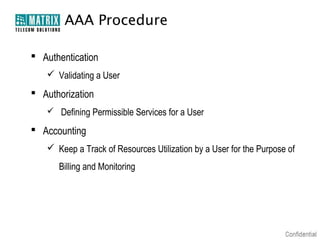
 Authentication
    Validating a User
 Authorization
    Defining Permissible Services for a User

 Accounting
    Keep a Track of Resources Utilization by a User for the Purpose of
      Billing and Monitoring
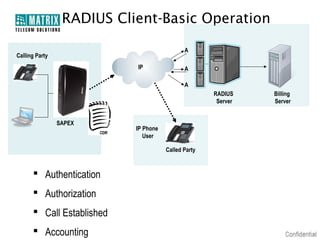
RADIUS Client-Basic Operation

                                             A
Calling Party
                           IP                A

                                             A
                                                     RADIUS    Billing
                                                      Server   Server


                SAPEX
                           IP Phone
                              User

                                      Called Party


       Authentication
       Authorization
       Call Established
       Accounting
Call Management

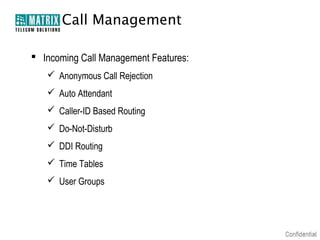
 Incoming Call Management Features:
    Anonymous Call Rejection
    Auto Attendant
    Caller-ID Based Routing
    Do-Not-Disturb
    DDI Routing
    Time Tables
    User Groups
Call Management

 Outgoing Call Management Features:
    Allowed/Denied Number List
    Automatic Number Translation
    Dial Plans
    Emergency Number Dialing
    Peer-to-Peer Calls
    Reverse DDI
Call Management

 Telephony Services:
    Call Forward
    Call Hold
    Call Pickup (Selective and Group)
    Call Park (Personal Orbit), Call Retrieve (Personal and Global Orbit)
    Call Transfer (Blind and Attended)
    CLIR
    Conference
Anonymous Call
        Rejection
 An Incoming Call Without Caller Line Identification (CLI) Number is
  Termed as Anonymous Call
 Instead of Number, the term “Anonymous” is Displayed on the
  Screen
 Offers the Flexibility to Directly Reject Anonymous Calls or Route
  Such Calls to a Specific Extension
Auto Attendant

 The Auto Attendant Informs the Caller of the Way to Reach His
  Ultimate Destination
 Customized Welcome and Guiding Prompts as per Time of the Day,
  Music-on-Hold Can be Played to a Caller
 With the Automated Attendant, a Caller Can Find-his-way to:
     Reach to a Desired Extension
     Retrieve Information
     Leave Back a Message in the Mail Box of the Called Extension
Voice Mail Features

 Configurable Voice Mail Server Size
 Individual Voice Mail for Each User
 Configurable Mailbox Size
 Customizable Greetings
 Voice Mail Notification by E-mail Using SMTP
Caller-ID Based Routing

 Calls Get Routed to Pre-defined Extensions as per CLI of Calling Party
 A Calling Party Number Table Can be Programmed
 The CLI of Calling Party is Tallied With the Table Entries
 Calls are then Routed to Defined Stations as per Routing Groups
 Depending on the Time, Call Can be Routed to Different Destinations
 For example:
     Calls Important to Business May be Directed to Higher Authorities
     Calls With Specific CLI May be Directed to Particular Departments
     While Calls From Anonymous Numbers May be Directed to the Customer
       Support Teams
Do-Not-Disturb

 Do-Not -Disturb (DND) Feature Offers Users With the Flexibility of Not
  Receiving Calls for Particular Time Period
 Outgoing Calls Can be Made When DND is Enabled
DDI Routing

 A Call Landing on SIP Trunk Can be Directly Routed to an Extension
    as per the DDI Numbering
 The DDI Facility Should be Activated on the SIP Trunk by the SIP
    Service Provider
 Unlike Traditional Telephony Services, IP Telephony Does Not Bind
    a Number to its Geographical Location
 Calls are Placed Over Internet and Numbers are Mapped to IP
    Addresses, Which May be Anywhere on the Internet
   An IP Extension Can Always be Called Irrespective of Its Current
    Location
Time Table

 Route Incoming Calls as per ‘Time of the Day’ (Time Zone)
     Defined Schedule for a Day is Called Time Table
     A Timetable Divides Entire Day in to Different Time Zones
 4 Such Timetables Can be Defined
 Provides Flexibility to Receive Ones Calls on Different Terminals as
   per the Time
User Groups

 Multiple Extensions Can be Clustered as One Group
 Defining User Groups, Calls Can be Distributed Between the Group
  Members
 The Group Members Can be Located at Different Geographic
  Locations
 On Reception of a Call, the Extensions Ring as per the Assigned
  Priorities
 Thus Ensuring No Call Remain Unanswered
Allowed and Denied Numbers

 Allow/Deny Dialing of Specific Numbers
 Avoids Misuse and Restricts Unproductive Calls
 16 Such Allowed and Denied Number Lists Can be Programmed
Automatic Number Translation

 SAPEX Supports Registration of Multiple SIP Trunks
 These Trunks Can be Availed From Single or Multiple ITSPs
 While Placing a Call, a Caller is Not Conscious of the Routing Logics
   Defined and the SIP Account in Use
 SAPEX Itself Modifies the Dialed Number or Part Thereof, Such that it
   Matches With the Numbering Plan that Is Understood by the ITSP
 For Example:
     If a User Dials 223344 to Call www.abc.com
     SAPEX Adds the Appropriate Access Code "*777" Specified by the ITSP and
       Dials-Out the Number “*777223344” Instead of 223344
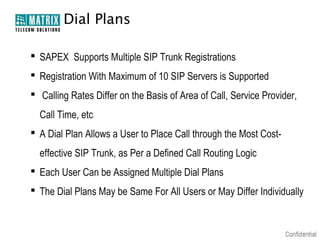
Dial Plans

 SAPEX Supports Multiple SIP Trunk Registrations
 Registration With Maximum of 10 SIP Servers is Supported
 Calling Rates Differ on the Basis of Area of Call, Service Provider,
  Call Time, etc
 A Dial Plan Allows a User to Place Call through the Most Cost-
  effective SIP Trunk, as Per a Defined Call Routing Logic
 Each User Can be Assigned Multiple Dial Plans
 The Dial Plans May be Same For All Users or May Differ Individually
Emergency Number Dialing

 Emergency Calls are Not Subjected to Outgoing Call Management
  Rules
 This Reduces Any Latency While Placing Emergency Calls
 SIP Trunk Can be Specified for Such Calls
 Four Such Numbers Can be Programmed
Peer-to-Peer Calling

 Calls Can be Placed Between Two SIP Devices, Without Going
  through a Proxy Server
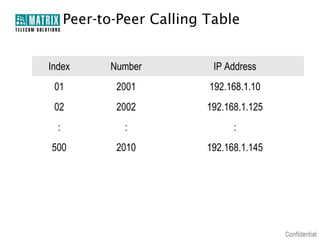
 Fixed IP Addresses of Various SIP Devices Can be Programmed in a
  Peer-to-Peer Table
 500 Such Entries Can be Programmed
Peer-to-Peer Calling Table


Index        Number         IP Address
 01           2001         192.168.1.10
 02           2002         192.168.1.125
  :            :                 :
500           2010         192.168.1.145
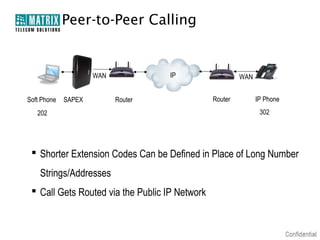
Peer-to-Peer Calling


                     WAN            IP                   WAN


Soft Phone   SAPEX         Router               Router         IP Phone
   202                                                          302


  Shorter Extension Codes Can be Defined in Place of Long Number
    Strings/Addresses
  Call Gets Routed via the Public IP Network
Reverse DDI

 This Feature Activates Carting of DDI Numbers as Caller ID When a
  User Makes a Call via SIP Trunk
 When a Call is Received From the Called Party, the Call Can be
  Directly Routed to the DDI Number Which Placed the Call
 Eliminates the Hassle of Searching the DDI User Who Made the Call
 Saves Time and Enhances Productivity
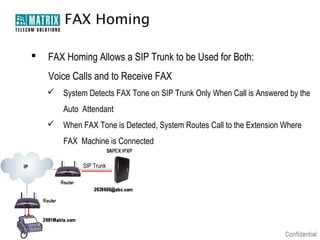
FAX Homing

   FAX Homing Allows a SIP Trunk to be Used for Both:
    Voice Calls and to Receive FAX
     System Detects FAX Tone on SIP Trunk Only When Call is Answered by the
        Auto Attendant
     When FAX Tone is Detected, System Routes Call to the Extension Where
        FAX Machine is Connected

             SIP Trunk
Voice Transcoding

 There is Diversity Among Available SIP Endpoints (Terminals) and
  their Capabilities
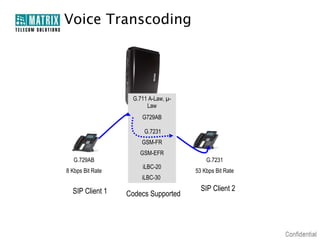
 Audio Transcoding Helps to Establish Communication Between SIP
  Devices With Diverse Audio(Codec) Specifications
 Reduces the Ratio of Dropped Calls
Voice Transcoding


                   G.711 A-Law, µ-
                        Law
                      G729AB

                       G.7231
                      GSM-FR
                      GSM-EFR
   G.729AB                               G.7231
                      iLBC-20
8 Kbps Bit Rate                      53 Kbps Bit Rate
                      iLBC-30

  SIP Client 1                         SIP Client 2
                  Codecs Supported
Applications
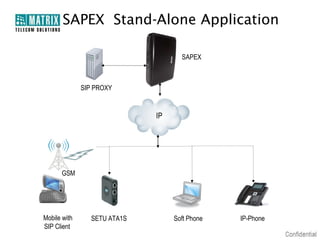
SAPEX Stand-Alone Application

                                     SAPEX


              SIP PROXY


                              IP


      GSM


Mobile with      SETU ATA1S        Soft Phone   IP-Phone
SIP Client
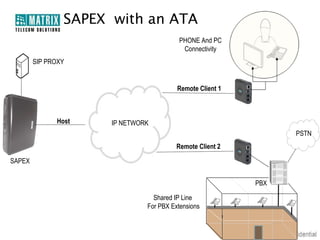
SAPEX with an ATA
                                         PHONE And PC
                                          Connectivity
        SIP PROXY


                                         Remote Client 1


              Host    IP NETWORK
                                                                 PSTN
                                         Remote Client 2

SAPEX


                                                           PBX

                                 Shared IP Line
                               For PBX Extensions
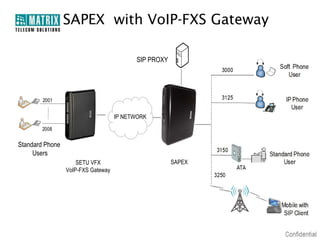
SAPEX with VoIP-FXS Gateway

                                           SIP PROXY


                                    IP NETWORK


Standard Phone
     Users
                     SETU VFX                          SAPEX
                 VoIP-FXS Gateway
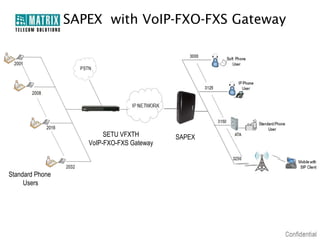
SAPEX with VoIP-FXO-FXS Gateway


                         SETU VFXTH        SAPEX
                    VoIP-FXO-FXS Gateway


Standard Phone
     Users
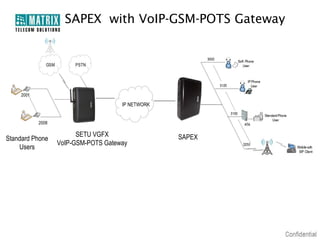
SAPEX with VoIP-GSM-POTS Gateway


                                    IP NETWORK


                       SETU VGFX                 SAPEX
Standard Phone
                 VoIP-GSM-POTS Gateway
    Users
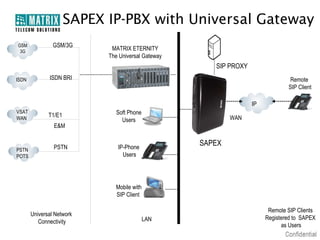
SAPEX IP-PBX with Universal Gateway
GSM             GSM/3G
 3G
                             MATRIX ETERNITY
                            The Universal Gateway
                                                       SIP PROXY
ISDN          ISDN BRI                                                          Remote
                                                                                SIP Client

                                                                   IP
VSAT                          Soft Phone
WAN
              T1/E1                                         WAN
                                Users
                E&M


                PSTN           IP-Phone
                                                    SAPEX
PSTN
POTS                             Users


                              Mobile with
                              SIP Client

                                                                         Remote SIP Clients
       Universal Network
                                            LAN                         Registered to SAPEX
          Connectivity
                                                                              as Users
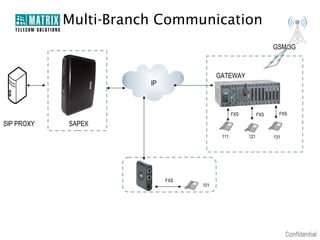
Multi-Branch Communication
                                                                 GSM/3G


                                        GATEWAY
                       IP


                                               FXS         FXS     FXS

SIP PROXY   SAPEX
                                         111         121         131


                            FXS
                                  101
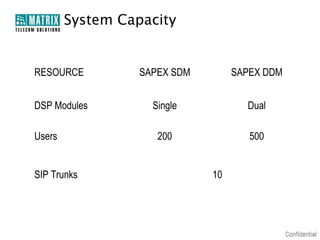
System Capacity


RESOURCE          SAPEX SDM        SAPEX DDM


DSP Modules         Single           Dual

Users                200              500


SIP Trunks                    10
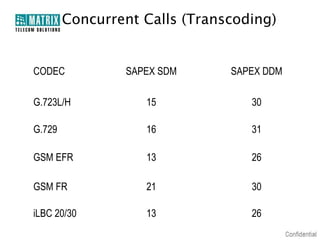
Concurrent Calls (Transcoding)


CODEC           SAPEX SDM      SAPEX DDM

G.723L/H           15             30

G.729              16             31

GSM EFR            13             26

GSM FR             21             30

iLBC 20/30         13             26
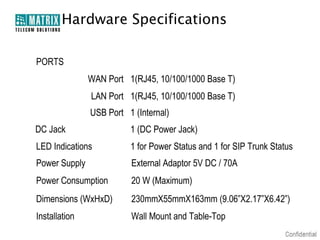
Hardware Specifications

PORTS
               WAN Port 1(RJ45, 10/100/1000 Base T)
               LAN Port 1(RJ45, 10/100/1000 Base T)
               USB Port 1 (Internal)
DC Jack                  1 (DC Power Jack)
LED Indications          1 for Power Status and 1 for SIP Trunk Status
Power Supply             External Adaptor 5V DC / 70A
Power Consumption        20 W (Maximum)
Dimensions (WxHxD)       230mmX55mmX163mm (9.06”X2.17”X6.42”)
Installation             Wall Mount and Table-Top
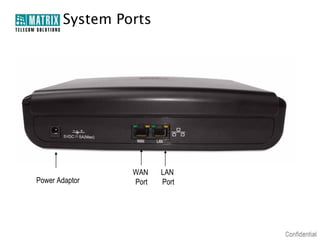
System Ports


                WAN    LAN
Power Adaptor   Port   Port
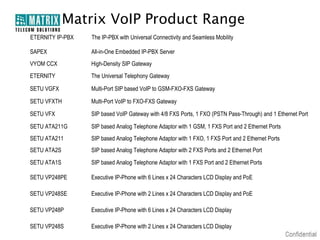
Matrix VoIP Product Range
ETERNITY IP-PBX   The IP-PBX with Universal Connectivity and Seamless Mobility

SAPEX             All-in-One Embedded IP-PBX Server
VYOM CCX          High-Density SIP Gateway
ETERNITY          The Universal Telephony Gateway

SETU VGFX         Multi-Port SIP based VoIP to GSM-FXO-FXS Gateway

SETU VFXTH        Multi-Port VoIP to FXO-FXS Gateway

SETU VFX          SIP based VoIP Gateway with 4/8 FXS Ports, 1 FXO (PSTN Pass-Through) and 1 Ethernet Port

SETU ATA211G      SIP based Analog Telephone Adaptor with 1 GSM, 1 FXS Port and 2 Ethernet Ports
SETU ATA211       SIP based Analog Telephone Adaptor with 1 FXO, 1 FXS Port and 2 Ethernet Ports
SETU ATA2S        SIP based Analog Telephone Adaptor with 2 FXS Ports and 2 Ethernet Port
SETU ATA1S        SIP based Analog Telephone Adaptor with 1 FXS Port and 2 Ethernet Ports

SETU VP248PE      Executive IP-Phone with 6 Lines x 24 Characters LCD Display and PoE

SETU VP248SE      Executive IP-Phone with 2 Lines x 24 Characters LCD Display and PoE

SETU VP248P       Executive IP-Phone with 6 Lines x 24 Characters LCD Display

SETU VP248S       Executive IP-Phone with 2 Lines x 24 Characters LCD Display
Thank You
 Type of Presentation: Product Presentation
 Number of Slides: 61
 Revised On:15th July, 2010
 Version-Release Number: V1R1


For Further Information Please Contact:
Email ID: mt.pbx@matrixcomsec.com
Mobile: +91 9662544401
Visit us at www.MatrixComSec.com

Matrix sapex ip pbx-presentation

  • 1.
  • 2.
  • 3.
    Introduction  Pure IP-PBX  Embedded Server Platform  Registrar, Proxy, Presence and Voice Mail Servers : All-Integrated  Open-Standard SIP Protocol Support
  • 4.
    System Models SAPEX SDM SAPEX DDM -With Single DSP Module (SDM) -With Dual DSP Module (DDM)
  • 5.
    Server Specifications  Open-Architecture,Supports SIP v2 Protocol  Embedded Registrar, Proxy, Voice Mail and Presence Servers  Back-to-Back User Agent (B2BUA)  Registration of Multiple SIP Trunks  Seamless User Connectivity (NAT and STUN Support)  Dynamic DNS (DDNS) Support  Presence and Instant Messaging
  • 6.
    Open Architecture  SAPEXEmploys Open-Standard SIP Protocol to Establish Calls Over IP Network  Full Interoperability With Any Third-party SIP Equipment Such as IP Phones, Softphones, Gateways and Proxy Servers
  • 7.
    Open Architecture  SIPis a Open-Standard Signaling Protocol for Establishing Communication Session over Internet  Voice, Video or Instant Messaging Sessions  SIP Architecture  SIP Servers and SIP Endpoints (User Agents/Terminals)  Varied Options of Communication Terminals  PC, PDA, Cell Phone With SIP Client, IP Phone, Softphones
  • 8.
    SIP Servers Types RegistrarServer Authenticates and Registers When User Comes Online Proxy Server Processes Session Requests and Responses of a SIP Call Redirect Server Redirects Calls to an Active SIP User Terminal Presence Server Stores and Distribute Users’ Presence Information
  • 9.
    The All-in-One IP-PBXServer Presence Proxy Server Server Registrar Voice Mail Server Server Embedded Registrar, Proxy, Presence and Voice Mail Server
  • 10.
    Back-to-Back User Agent(B2BUA)  Basic Call Services like Call Forwarding, Call Transfer Necessitates Call Management and Tracking for Entire Call Duration  SIP Server With B2BUA Becomes an Active Participant in a SIP Call, Enabling Many Advanced Services in Addition to Basic Telephony Services  Applications Such as Billing Require Call State Monitoring  Facilitates Centralized Call Management
  • 11.
    Multiple SIP TrunkSupport  SAPEX Supports Registration With Multiple SIP Trunks  Registration With a Maximum of 10 SIP Servers is Supported  While Making an Outgoing Call, System Selects a SIP Trunk as per the Call Routing Algorithms
  • 12.
    Seamless User Connectivity A SIP User Located Over Public/Private Network Can be Registered Easily With SAPEX  A Remote User’s Connectivity is Maintained Even When Behind a NAT or Firewall  The Embedded Dynamic DNS Client Ensures Round-the-Clock User Connectivity  A User Can Have Multiple Contact Points (Terminals), Mapped to a Common User Identity  A User Can be Called on Any/All of the Active Terminal at a Given Instant
  • 13.
    Dynamic DNS (DDNS) Automates the Discovery and Registration of the Server’s IP Address on the Public Network  Fluctuating Dynamic IP of the Server is Mapped to a Unique Domain Name (DNS)  Remote Administrator and IP-PBX Clients Can Connect to the Server Using the Non-Altering DNS  Benefit:  Prevents Reconfiguring of Systems Every Time a Network Infrastructure Changes  Useful When Remotely Accessing the IP-PBX Connected to Ones Home or Office IP Connectivity, Usually Configured for a Dynamic IP
  • 14.
    Presence and IM Before an Actual Conversation Begins, Presence Determines: :  The Availability of a User (Such As Online, Offline and Others)  His Willingness to Participate in a Communication Session (Busy, Available on Phone, Out of Office And Others)  His Preferred Mode of Communication (Call or Instant Messaging)  The Presence Server Maintains and Distributes Presence Information of Users Registered With the IP-PBX  Instant Messaging (IM) is a Popular Mode of Real-time Communication  Knowing the Availability Status of Users, Reach a Right Contact, In Right Time and on the Right Terminal
  • 15.
    Management Features  EnhancedAdministrative Ease  World-Wide Portability of Extensions  Busy Lamp Field (BLF)  Call Detail Records (CDR)  RADIUS Client  Call Management
  • 16.
    Enhanced Administrative Ease Route Calls Also Over IP Network, Besides Data  Embedded Web Server and Web Based Programming GUI  With a Few Clicks From the Intuitive GUI (Jeeves) Itself:  An Administrator Can Remotely Program and Configure the System  Administrator Can Monitor and Manage User Registration, Feature Access in Real-time  A New User Can be Added  User’s Calling Rights Can be Defined  User Groups Can be Formed  Voice Mail Can be Allocated
  • 17.
    Extension Portability In IPTelephony, a VoIP Call is Established via IP Network Instead of a Phone Number, An IP User is Identified by SIP URI An IP User is Free to Port his Extension Anywhere on the IP Network Users Can Establish Calls Retaining the Same Contact Credentials, though Registering From Varied Locations Unlike Traditional Telephony System, SAPEX Does Not Bind the User to a Fixed Location
  • 18.
    Busy Lamp Field(BLF) A Busy Lamp Field is An Array of Extension Status Lamps An Extension Can Bear Different Statuses Such as:  Busy, Ringing or Idle If a User’s Class of Service (Cos) is Provisioned, An Extension User Can Monitor the Status of Another Extension Based on Extension Status, the Operator Can Decide to Either Transfer a Call Directly or Else Pick Up a Call Incase Called Extension is Busy
  • 19.
    Call Detail Records(CDR)  Call Details are Stored in the System’s CDR Buffer  The Call Log is Stored for Different Types of Calls  Internal Calls Made Between System Users  External Calls Made Between System User and External User  The IP-PBX Can be Configured to Send CDR Text-File as Email Attachments
  • 20.
    Call Detail Records(CDR)  CDR Report Details:  Calling/Called Number  SIP Trunk Used for External Calls  Date and Time of Call  Call Duration  Call Termination Cause
  • 21.
    RADIUS Client  SAPEXLogs the Details of Calls in CDR Files  These CDR Files Contain Essential Information to Account a User for the Services Utilized by Him  These CDR Files are Therefore Requiring a Safe and Longer Storage  The Embedded RADIUS Client Facilitates Efficient Call Logging to a Remote Server/Database
  • 22.
    RADIUS Client  RADIUS: Remote Authentication Dial In User Service  Enables the IP-PBX to Send the CDR Files to a Centrally Managed Remote Server Called RADIUS Server/Database  It Employs an Authentication, Authorization And Accounting Client- Server Protocol (AAA Client-Server Protocol)  Further Integration With a Billing Server, Can Benefit the Service Providers in Accurate Billing
  • 23.
    AAA Procedure  Authentication  Validating a User  Authorization  Defining Permissible Services for a User  Accounting  Keep a Track of Resources Utilization by a User for the Purpose of Billing and Monitoring
  • 24.
    RADIUS Client-Basic Operation A Calling Party IP A A RADIUS Billing Server Server SAPEX IP Phone User Called Party  Authentication  Authorization  Call Established  Accounting
  • 25.
    Call Management  IncomingCall Management Features:  Anonymous Call Rejection  Auto Attendant  Caller-ID Based Routing  Do-Not-Disturb  DDI Routing  Time Tables  User Groups
  • 26.
    Call Management  OutgoingCall Management Features:  Allowed/Denied Number List  Automatic Number Translation  Dial Plans  Emergency Number Dialing  Peer-to-Peer Calls  Reverse DDI
  • 27.
    Call Management  TelephonyServices:  Call Forward  Call Hold  Call Pickup (Selective and Group)  Call Park (Personal Orbit), Call Retrieve (Personal and Global Orbit)  Call Transfer (Blind and Attended)  CLIR  Conference
  • 28.
    Anonymous Call Rejection  An Incoming Call Without Caller Line Identification (CLI) Number is Termed as Anonymous Call  Instead of Number, the term “Anonymous” is Displayed on the Screen  Offers the Flexibility to Directly Reject Anonymous Calls or Route Such Calls to a Specific Extension
  • 29.
    Auto Attendant  TheAuto Attendant Informs the Caller of the Way to Reach His Ultimate Destination  Customized Welcome and Guiding Prompts as per Time of the Day, Music-on-Hold Can be Played to a Caller  With the Automated Attendant, a Caller Can Find-his-way to:  Reach to a Desired Extension  Retrieve Information  Leave Back a Message in the Mail Box of the Called Extension
  • 30.
    Voice Mail Features Configurable Voice Mail Server Size  Individual Voice Mail for Each User  Configurable Mailbox Size  Customizable Greetings  Voice Mail Notification by E-mail Using SMTP
  • 31.
    Caller-ID Based Routing Calls Get Routed to Pre-defined Extensions as per CLI of Calling Party  A Calling Party Number Table Can be Programmed  The CLI of Calling Party is Tallied With the Table Entries  Calls are then Routed to Defined Stations as per Routing Groups  Depending on the Time, Call Can be Routed to Different Destinations  For example:  Calls Important to Business May be Directed to Higher Authorities  Calls With Specific CLI May be Directed to Particular Departments  While Calls From Anonymous Numbers May be Directed to the Customer Support Teams
  • 32.
    Do-Not-Disturb  Do-Not -Disturb(DND) Feature Offers Users With the Flexibility of Not Receiving Calls for Particular Time Period  Outgoing Calls Can be Made When DND is Enabled
  • 33.
    DDI Routing  ACall Landing on SIP Trunk Can be Directly Routed to an Extension as per the DDI Numbering  The DDI Facility Should be Activated on the SIP Trunk by the SIP Service Provider  Unlike Traditional Telephony Services, IP Telephony Does Not Bind a Number to its Geographical Location  Calls are Placed Over Internet and Numbers are Mapped to IP Addresses, Which May be Anywhere on the Internet  An IP Extension Can Always be Called Irrespective of Its Current Location
  • 34.
    Time Table  RouteIncoming Calls as per ‘Time of the Day’ (Time Zone)  Defined Schedule for a Day is Called Time Table  A Timetable Divides Entire Day in to Different Time Zones  4 Such Timetables Can be Defined  Provides Flexibility to Receive Ones Calls on Different Terminals as per the Time
  • 35.
    User Groups  MultipleExtensions Can be Clustered as One Group  Defining User Groups, Calls Can be Distributed Between the Group Members  The Group Members Can be Located at Different Geographic Locations  On Reception of a Call, the Extensions Ring as per the Assigned Priorities  Thus Ensuring No Call Remain Unanswered
  • 36.
    Allowed and DeniedNumbers  Allow/Deny Dialing of Specific Numbers  Avoids Misuse and Restricts Unproductive Calls  16 Such Allowed and Denied Number Lists Can be Programmed
  • 37.
    Automatic Number Translation SAPEX Supports Registration of Multiple SIP Trunks  These Trunks Can be Availed From Single or Multiple ITSPs  While Placing a Call, a Caller is Not Conscious of the Routing Logics Defined and the SIP Account in Use  SAPEX Itself Modifies the Dialed Number or Part Thereof, Such that it Matches With the Numbering Plan that Is Understood by the ITSP  For Example:  If a User Dials 223344 to Call www.abc.com  SAPEX Adds the Appropriate Access Code "*777" Specified by the ITSP and Dials-Out the Number “*777223344” Instead of 223344
  • 38.
    Dial Plans  SAPEXSupports Multiple SIP Trunk Registrations  Registration With Maximum of 10 SIP Servers is Supported  Calling Rates Differ on the Basis of Area of Call, Service Provider, Call Time, etc  A Dial Plan Allows a User to Place Call through the Most Cost- effective SIP Trunk, as Per a Defined Call Routing Logic  Each User Can be Assigned Multiple Dial Plans  The Dial Plans May be Same For All Users or May Differ Individually
  • 39.
    Emergency Number Dialing Emergency Calls are Not Subjected to Outgoing Call Management Rules  This Reduces Any Latency While Placing Emergency Calls  SIP Trunk Can be Specified for Such Calls  Four Such Numbers Can be Programmed
  • 40.
    Peer-to-Peer Calling  CallsCan be Placed Between Two SIP Devices, Without Going through a Proxy Server  Fixed IP Addresses of Various SIP Devices Can be Programmed in a Peer-to-Peer Table  500 Such Entries Can be Programmed
  • 41.
    Peer-to-Peer Calling Table Index Number IP Address 01 2001 192.168.1.10 02 2002 192.168.1.125 : : : 500 2010 192.168.1.145
  • 42.
    Peer-to-Peer Calling WAN IP WAN Soft Phone SAPEX Router Router IP Phone 202 302  Shorter Extension Codes Can be Defined in Place of Long Number Strings/Addresses  Call Gets Routed via the Public IP Network
  • 43.
    Reverse DDI  ThisFeature Activates Carting of DDI Numbers as Caller ID When a User Makes a Call via SIP Trunk  When a Call is Received From the Called Party, the Call Can be Directly Routed to the DDI Number Which Placed the Call  Eliminates the Hassle of Searching the DDI User Who Made the Call  Saves Time and Enhances Productivity
  • 44.
    FAX Homing  FAX Homing Allows a SIP Trunk to be Used for Both: Voice Calls and to Receive FAX  System Detects FAX Tone on SIP Trunk Only When Call is Answered by the Auto Attendant  When FAX Tone is Detected, System Routes Call to the Extension Where FAX Machine is Connected SIP Trunk
  • 45.
    Voice Transcoding  Thereis Diversity Among Available SIP Endpoints (Terminals) and their Capabilities  Audio Transcoding Helps to Establish Communication Between SIP Devices With Diverse Audio(Codec) Specifications  Reduces the Ratio of Dropped Calls
  • 46.
    Voice Transcoding G.711 A-Law, µ- Law G729AB G.7231 GSM-FR GSM-EFR G.729AB G.7231 iLBC-20 8 Kbps Bit Rate 53 Kbps Bit Rate iLBC-30 SIP Client 1 SIP Client 2 Codecs Supported
  • 47.
  • 48.
    SAPEX Stand-Alone Application SAPEX SIP PROXY IP GSM Mobile with SETU ATA1S Soft Phone IP-Phone SIP Client
  • 49.
    SAPEX with anATA PHONE And PC Connectivity SIP PROXY Remote Client 1 Host IP NETWORK PSTN Remote Client 2 SAPEX PBX Shared IP Line For PBX Extensions
  • 50.
    SAPEX with VoIP-FXSGateway SIP PROXY IP NETWORK Standard Phone Users SETU VFX SAPEX VoIP-FXS Gateway
  • 51.
    SAPEX with VoIP-FXO-FXSGateway SETU VFXTH SAPEX VoIP-FXO-FXS Gateway Standard Phone Users
  • 52.
    SAPEX with VoIP-GSM-POTSGateway IP NETWORK SETU VGFX SAPEX Standard Phone VoIP-GSM-POTS Gateway Users
  • 53.
    SAPEX IP-PBX withUniversal Gateway GSM GSM/3G 3G MATRIX ETERNITY The Universal Gateway SIP PROXY ISDN ISDN BRI Remote SIP Client IP VSAT Soft Phone WAN T1/E1 WAN Users E&M PSTN IP-Phone SAPEX PSTN POTS Users Mobile with SIP Client Remote SIP Clients Universal Network LAN Registered to SAPEX Connectivity as Users
  • 54.
    Multi-Branch Communication GSM/3G GATEWAY IP FXS FXS FXS SIP PROXY SAPEX 111 121 131 FXS 101
  • 55.
    System Capacity RESOURCE SAPEX SDM SAPEX DDM DSP Modules Single Dual Users 200 500 SIP Trunks 10
  • 56.
    Concurrent Calls (Transcoding) CODEC SAPEX SDM SAPEX DDM G.723L/H 15 30 G.729 16 31 GSM EFR 13 26 GSM FR 21 30 iLBC 20/30 13 26
  • 57.
    Hardware Specifications PORTS WAN Port 1(RJ45, 10/100/1000 Base T) LAN Port 1(RJ45, 10/100/1000 Base T) USB Port 1 (Internal) DC Jack 1 (DC Power Jack) LED Indications 1 for Power Status and 1 for SIP Trunk Status Power Supply External Adaptor 5V DC / 70A Power Consumption 20 W (Maximum) Dimensions (WxHxD) 230mmX55mmX163mm (9.06”X2.17”X6.42”) Installation Wall Mount and Table-Top
  • 58.
    System Ports WAN LAN Power Adaptor Port Port
  • 59.
    Matrix VoIP ProductRange ETERNITY IP-PBX The IP-PBX with Universal Connectivity and Seamless Mobility SAPEX All-in-One Embedded IP-PBX Server VYOM CCX High-Density SIP Gateway ETERNITY The Universal Telephony Gateway SETU VGFX Multi-Port SIP based VoIP to GSM-FXO-FXS Gateway SETU VFXTH Multi-Port VoIP to FXO-FXS Gateway SETU VFX SIP based VoIP Gateway with 4/8 FXS Ports, 1 FXO (PSTN Pass-Through) and 1 Ethernet Port SETU ATA211G SIP based Analog Telephone Adaptor with 1 GSM, 1 FXS Port and 2 Ethernet Ports SETU ATA211 SIP based Analog Telephone Adaptor with 1 FXO, 1 FXS Port and 2 Ethernet Ports SETU ATA2S SIP based Analog Telephone Adaptor with 2 FXS Ports and 2 Ethernet Port SETU ATA1S SIP based Analog Telephone Adaptor with 1 FXS Port and 2 Ethernet Ports SETU VP248PE Executive IP-Phone with 6 Lines x 24 Characters LCD Display and PoE SETU VP248SE Executive IP-Phone with 2 Lines x 24 Characters LCD Display and PoE SETU VP248P Executive IP-Phone with 6 Lines x 24 Characters LCD Display SETU VP248S Executive IP-Phone with 2 Lines x 24 Characters LCD Display
  • 60.
  • 61.
     Type ofPresentation: Product Presentation  Number of Slides: 61  Revised On:15th July, 2010  Version-Release Number: V1R1 For Further Information Please Contact: Email ID: mt.pbx@matrixcomsec.com Mobile: +91 9662544401 Visit us at www.MatrixComSec.com

Editor's Notes

  • #9 Registrar Server When users come online, they need to make sure that others are aware that they’re available to take and make calls The Registrar authenticates and registers users when they come online, and then stores information on the users’ logical identities and the devices that they can use for communications The devices are identified by their URIs Location Service As users roam, the network needs to be continually aware of their locations The location service is a database that keeps track of users and their locations The location service gets its input from the registrar server and provides key information to the proxy and redirect servers A SIP proxy or redirect server uses this information to obtain the mapping from logical SIP addresses to physical SIP addresses, so that communication sessions can be properly established and maintained Redirect Server If users are not in their home domains, sessions bound for them needs to be redirected to them The redirect server maps a SIP request destined for a user to the URL of the device “closest” to the user For example, if a call is destined for eileendover@companycom and the user is on the road, the company’s redirect server may reply to the caller’s user agent (or to the requesting proxy server) with the contact address of the user’s cell phone, so that the incoming call can be redirected to the cell phone Proxy Server A proxy server takes SIP requests, processes them, and passes them downstream while sending responses upstream to other SIP servers or devices A proxy server may act as both a server and a client, and can modify a SIP request before passing it along A proxy is involved only in the setup and teardown of a communication session After user agents establish a session, communications occur directly between the parties Presence Server In order for users to see the presence of their buddies to improve communication, they often refer to a presence server Presence servers accept, store, and distribute presence information The presence server has two distinct sets of clients: • Presentities (producers of information) provide presence information about themselves to the server to be stored and distributed • Watchers (consumers of information) receive presence information from the server Watchers can subscribe to certain users, much like IM users choose which buddies to add to their list Presence Means: User status (that is, online or offline) User availability (such as available, busy, on the phone, or out to lunch) User’s desired contact means (such as instant messaging, desk phone, cell phone, pager, and so on)
  • #24 If a user wants to refer older call details, user will have to take CDR print out very often as the records get overwritten in case the buffer fills to its maximum capacity In such cases, RADIUS enables the system to send the call details/ logs to a centrally managed remote server called RADIUS server/Database
  • #45 FAX Homing Disabled: Dial 2630666 Wait for FAX Tone on FAX Machine Press “Start” to Send FAX FAX Call is Routed to User 2001 FAX Homing Enabled: Dial Number 2630666 You get FAX prompt for pressing start button on FAX machine to send FAX Wait to time you listen the FAX Tone Press start on your FAX machine FAX Call is routed to 2001