Mastering your Databases
Agenda
●Your Databases in FME
– New in FME 2016.1
●How to extract
differences between
databases/snapshots
– Demo: ArcSDE
Geodatabase versions
Your Databases in FME
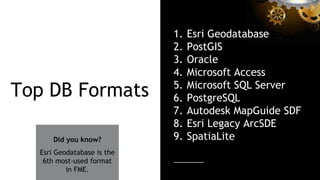
Top DB Formats
1. Esri Geodatabase
2. PostGIS
3. Oracle
4. Microsoft Access
5. Microsoft SQL Server
6. PostgreSQL
7. Autodesk MapGuide SDF
8. Esri Legacy ArcSDE
9. SpatiaLiteDid you know?
Esri Geodatabase is the
6th most-used format
in FME.
safe.com/transformers
New in FME 2016.1
More Formats
● Portal for ArcGIS
● AWS Aurora
● Elasticsearch
● MongoDB
● IBM Cloudant
● Geocouch (i.e. CouchDB spatial)
● Microsoft Azure DocumentDB
New Cross-Platform
Formats
● SAP HANA
● SAP Sybase ASE
● Denodo
● Microsoft Azure
● Microsoft Access
● Microsoft SQL Server
● IBM DB2 Non-spatial
● IBM Informix Non-spatial
Consistent Parameters
Saved Database Connections
SQL Made Easy
SQL Made Easy
Right-click to
automatically
generate scripts.
Quickly see
the table.
Click ‘Run…’ to
execute SQL
immediately.
Extracting differences
between ArcSDE geodatabases
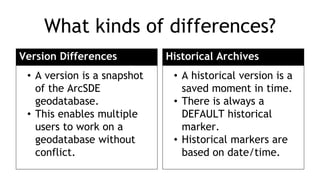
What kinds of differences?
Version Differences
• A version is a snapshot
of the ArcSDE
geodatabase.
• This enables multiple
users to work on a
geodatabase without
conflict.
Historical Archives
• A historical version is a
saved moment in time.
• There is always a
DEFAULT historical
marker.
• Historical markers are
based on date/time.
Versions in FME
1. Open reader parameters.
2. Pick the version type and the
version you want to read.
3. Check ‘Read Version Differences’.
4. Pick the version to compare
against.
You can also access parameters
from the FME Workbench
Navigator Pane once the reader
is already in your workflow.
Transactional version to read
Creates a new version
when you do the read
Baseline, i.e. SDE.DEFAULT
Read Version Differences: Yes|No
Which versions do I compare?
Find differences to the common ancestor.
sde.DEFAULT
WaterUpdates1
WaterUpdates2
WaterUpdates3
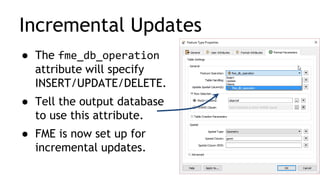
Incremental Updates
● The fme_db_operation
attribute will specify
INSERT/UPDATE/DELETE.
● Tell the output database
to use this attribute.
● FME is now set up for
incremental updates.
● Set Child Version Name to create a
snapshot, which will be used as the
baseline next time.
● Your approach will depend on
your replication scheme.
QAQC
WaterUpdates1
WaterUpdates2
WaterUpdates3
sde.DEFAULT
Automated Synchronization
Demo: Extract Geodatabase differences
● FME 2016.1 enables a range of
database functionality, including
easier SQL editing.
● Use FME to extract differences
between Geodatabase versions or
snapshots.
Resources
knowledge.safe.com
safe.com/webinar
● Tips for PostGIS, Oracle, and SQL Server
● Become a Geodatabase Power User
Thank you!
Questions?
Resources: Databases
Database Ranking: http://db-engines.com/en/ranking
Knowledge Center:
On Esri
FME Compatibility for Retired Esri Software Releases
Notes on FME and Esri Versions and Compatibility
Database updates
Incremental Database Updates using the FME format attribute fme_db_operation
Webinars:
7 Spatial Database Tips for PostGIS, Oracle, and SQL Server
5 Tips to Become an Esri Geodatabase Power User

Mastering your Databases

  • 1.
  • 2.
    Agenda ●Your Databases inFME – New in FME 2016.1 ●How to extract differences between databases/snapshots – Demo: ArcSDE Geodatabase versions
  • 3.
  • 4.
    Top DB Formats 1.Esri Geodatabase 2. PostGIS 3. Oracle 4. Microsoft Access 5. Microsoft SQL Server 6. PostgreSQL 7. Autodesk MapGuide SDF 8. Esri Legacy ArcSDE 9. SpatiaLiteDid you know? Esri Geodatabase is the 6th most-used format in FME.
  • 5.
  • 6.
    New in FME2016.1
  • 7.
    More Formats ● Portalfor ArcGIS ● AWS Aurora ● Elasticsearch ● MongoDB ● IBM Cloudant ● Geocouch (i.e. CouchDB spatial) ● Microsoft Azure DocumentDB
  • 8.
    New Cross-Platform Formats ● SAPHANA ● SAP Sybase ASE ● Denodo ● Microsoft Azure ● Microsoft Access ● Microsoft SQL Server ● IBM DB2 Non-spatial ● IBM Informix Non-spatial
  • 9.
  • 10.
  • 11.
  • 12.
    SQL Made Easy Right-clickto automatically generate scripts. Quickly see the table. Click ‘Run…’ to execute SQL immediately.
  • 13.
  • 14.
    What kinds ofdifferences? Version Differences • A version is a snapshot of the ArcSDE geodatabase. • This enables multiple users to work on a geodatabase without conflict. Historical Archives • A historical version is a saved moment in time. • There is always a DEFAULT historical marker. • Historical markers are based on date/time.
  • 15.
    Versions in FME 1.Open reader parameters. 2. Pick the version type and the version you want to read. 3. Check ‘Read Version Differences’. 4. Pick the version to compare against.
  • 16.
    You can alsoaccess parameters from the FME Workbench Navigator Pane once the reader is already in your workflow. Transactional version to read Creates a new version when you do the read Baseline, i.e. SDE.DEFAULT Read Version Differences: Yes|No
  • 17.
    Which versions doI compare? Find differences to the common ancestor. sde.DEFAULT WaterUpdates1 WaterUpdates2 WaterUpdates3
  • 18.
    Incremental Updates ● Thefme_db_operation attribute will specify INSERT/UPDATE/DELETE. ● Tell the output database to use this attribute. ● FME is now set up for incremental updates.
  • 19.
    ● Set ChildVersion Name to create a snapshot, which will be used as the baseline next time. ● Your approach will depend on your replication scheme. QAQC WaterUpdates1 WaterUpdates2 WaterUpdates3 sde.DEFAULT Automated Synchronization
  • 20.
  • 21.
    ● FME 2016.1enables a range of database functionality, including easier SQL editing. ● Use FME to extract differences between Geodatabase versions or snapshots.
  • 22.
    Resources knowledge.safe.com safe.com/webinar ● Tips forPostGIS, Oracle, and SQL Server ● Become a Geodatabase Power User
  • 23.
  • 24.
    Resources: Databases Database Ranking:http://db-engines.com/en/ranking Knowledge Center: On Esri FME Compatibility for Retired Esri Software Releases Notes on FME and Esri Versions and Compatibility Database updates Incremental Database Updates using the FME format attribute fme_db_operation Webinars: 7 Spatial Database Tips for PostGIS, Oracle, and SQL Server 5 Tips to Become an Esri Geodatabase Power User