Mastering Person Account
Fabrice Cathala
Capgemini Lead Salesforce Architect
fcathala@gmail.com
@fcathala
Salesforce Solution Design in a B2C World
Fabrice Cathala
Capgemini UK
Salesforce Lead Architect
Twitter: @fcathala
Blog: fcathala.com
Newsletter: news.fcathala.com
LinkedIn: linkedin.com/in/fcathala
Introduction
As an out-of-the-box feature it is a critical design component
Still there’s a trend to avoid PA...
• Some think it’s over-engineered, too complex BUT there is a reason for that
• In our growing ecosystem, some new comers just don’t get it BUT we can explain
• Some old posts comment on the (old) “Cons” BUT PA has changed a lot in recent years...
PA, the Sitting Duck...
Why this Session?
Why this Session?
Part I – Under The Hood
Problem
Solution
Activation
Setup
Behaviour
Transformation
Part II – Design Time
Alternatives
Pros & Cons of PA
Tips & Tricks
Roadmap
Part III – Annex
Conversion
IdeaExchange
Resources & References
Part IV – Q&A
Agenda
Under The Hood
Fabrice Cathala
Capgemini Lead Salesforce Architect
fcathala@gmail.com
@fcathala
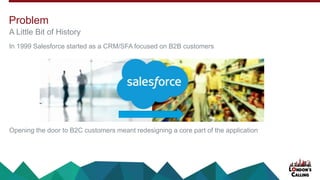
In 1999 Salesforce started as a CRM/SFA focused on B2B customers
Opening the door to B2C customers meant redesigning a core part of the application
A Little Bit of History
Problem
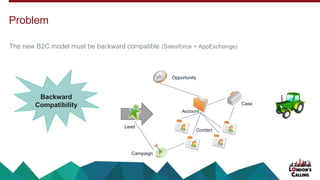
The new B2C model must be backward compatible (Salesforce + AppExchange)
Problem
Account
Contact
Opportunity
Campaign
Case
Lead
Backward
Compatibility
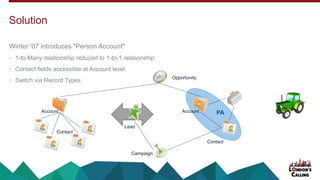
Winter '07 introduces "Person Account"
• 1-to-Many relationship reduced to 1-to-1 relationship
• Contact fields accessible at Account level
• Switch via Record Types
Solution
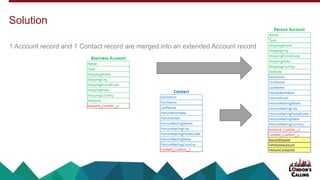
PAAccount
Contact
Opportunity
Account
Contact
Lead
Campaign
1 Account record and 1 Contact record are merged into an extended Account record
Solution
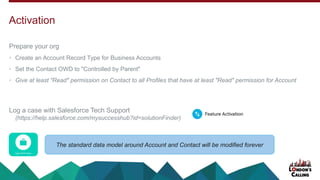
Prepare your org
• Create an Account Record Type for Business Accounts
• Set the Contact OWD to "Controlled by Parent"
• Give at least "Read" permission on Contact to all Profiles that have at least "Read" permission for Account
Log a case with Salesforce Tech Support
(https://help.salesforce.com/mysuccesshub?id=solutionFinder)
Activation
The standard data model around Account and Contact will be modified forever
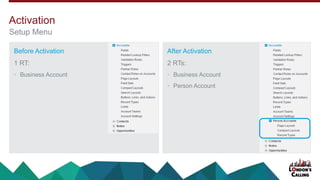
Before Activation
1 RT:
• Business Account
After Activation
2 RTs:
• Business Account
• Person Account
Activation
Setup Menu
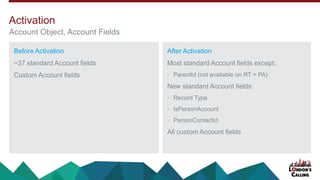
Before Activation
~37 standard Account fields
Custom Account fields
After Activation
Most standard Account fields except:
• ParentId (not available on RT = PA)
New standard Account fields:
• Record Type
• IsPersonAccount
• PersonContactId
All custom Account fields
Activation
Account Object, Account Fields
Before Activation
~46 standard Contact fields
Custom Contact fields
After Activation
Most standard Contact fields except
• ReportsTo
• Phone
• Fax
• Description
• System fields
All Contact custom fields
• API name suffix = "__pc" (instead of "__c")
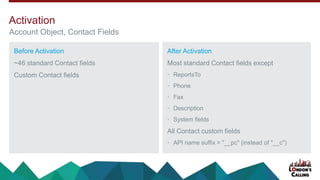
Activation
Account Object, Contact Fields
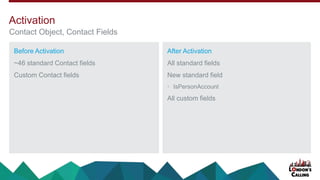
Before Activation
~46 standard Contact fields
Custom Contact fields
After Activation
All standard fields
New standard field
• IsPersonAccount
All custom fields
Activation
Contact Object, Contact Fields
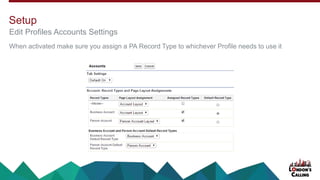
When activated make sure you assign a PA Record Type to whichever Profile needs to use it
Edit Profiles Accounts Settings
Setup
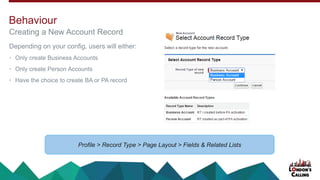
Depending on your config, users will either:
• Only create Business Accounts
• Only create Person Accounts
• Have the choice to create BA or PA record
Creating a New Account Record
Behaviour
Profile > Record Type > Page Layout > Fields & Related Lists
Person Account always behave like an Account and sometimes behave like a Contact
• Records appear in both Account and Contact List Views
• Records do not show on Contact Recently Viewed List (it opens as an Account not a Contact)
• Additional examples: https://goo.gl/1njvJs
Leads convert to PA if Company field is empty
Behaviour
Design Time
Fabrice Cathala
Capgemini Lead Salesforce Architect
fcathala@gmail.com
@fcathala
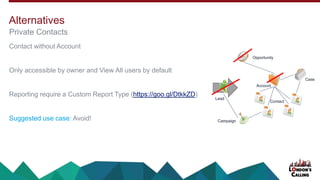
Contact without Account
Only accessible by owner and View All users by default
Reporting require a Custom Report Type (https://goo.gl/DtkkZD)
Suggested use case: Avoid!
Private Contacts
Alternatives
Account
Contact
Opportunity
Campaign
Case
Lead
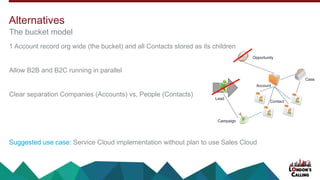
1 Account record org wide (the bucket) and all Contacts stored as its children
Allow B2B and B2C running in parallel
Clear separation Companies (Accounts) vs, People (Contacts)
Suggested use case: Service Cloud implementation without plan to use Sales Cloud
The bucket model
Alternatives
Account
Contact
Opportunity
Campaign
Case
Lead
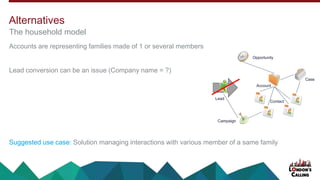
Accounts are representing families made of 1 or several members
Lead conversion can be an issue (Company name = ?)
Suggested use case: Solution managing interactions with various member of a same family
The household model
Alternatives
Account
Contact
Opportunity
Campaign
Case
Lead
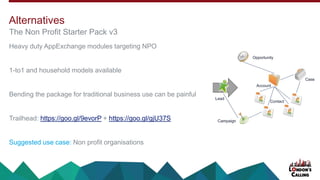
Heavy duty AppExchange modules targeting NPO
1-to1 and household models available
Bending the package for traditional business use can be painful
Trailhead: https://goo.gl/9evorP + https://goo.gl/gjU37S
Suggested use case: Non profit organisations
The Non Profit Starter Pack v3
Alternatives
Account
Contact
Opportunity
Campaign
Case
Lead
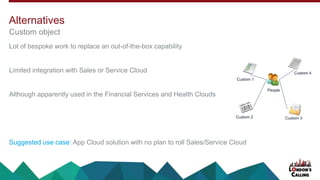
Lot of bespoke work to replace an out-of-the-box capability
Limited integration with Sales or Service Cloud
Although apparently used in the Financial Services and Health Clouds
Suggested use case: App Cloud solution with no plan to roll Sales/Service Cloud
Custom object
Alternatives
People
Custom 2
Custom 1
Custom 4
Custom 3
Simple paradigm for the user
"An Account is the entity we are doing business with, should it be individuals or companies"
Allows B2B to run in parallel with B2C
Out-of-the-box
• Officially supported
• Compatible with existing solutions
• Benefits from future enhancement from Salesforce
Pros (1/1)
Pros & Cons of Person Account
PA support is often late on the Roadmap
• Process Builder (Summer 15)
• Platform Encryption (Winter 16)
• Duplicate Management (Planned)
• Lightning Experience (Work In Progress)
Double Count (*)
• Typical record size in Salesforce = 2 KB. Record size for Person Account 2 x 2 KB = 4 KB
Cons (1/2)
Pros & Cons of Person Account
(*) On the roadmap / #SafeHarbor
No Undo (*)
• Cannot be deactivated.
Limited AppExchange support
• Some AppExchange don't support PA
Mixing B2B and B2C comes with compromises
• 2 Account Types but 1 Security Model = Contacts stuck with Controlled by Parent even for Business Accounts
• 2 Account Types but 1 Tab name = cannot call BA records "Customers" and PA records "Consumers"
Cons (2/2)
Pros & Cons of Person Account
(*) On the roadmap / #SafeHarbor
Design as if you were planning to roll-out Business Account as well
• Account custom fields on Account
• Contact custom fields on Contact (even if now accessed via the Account page)
If only using Person Account, simply the UI and remove the Contact tab
When creating a PA record from the API forget about the Contact record, just set the RT correctly
Tips & Tricks
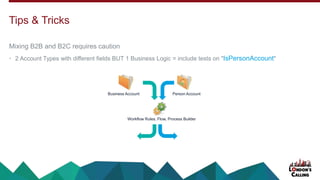
Mixing B2B and B2C requires caution
• 2 Account Types with different fields BUT 1 Business Logic = include tests on "IsPersonAccount"
Tips & Tricks
Business Account Person Account
Workflow Rules, Flow, Process Builder
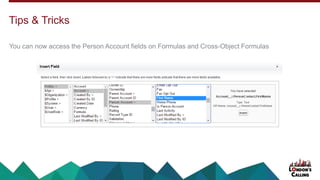
You can now access the Person Account fields on Formulas and Cross-Object Formulas
Tips & Tricks
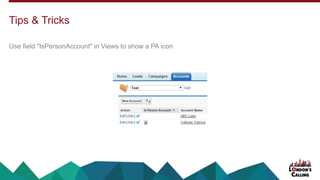
Use field "IsPersonAccount" in Views to show a PA icon
Tips & Tricks
Full Lightning Experience Support
Eliminate Double Storage Count
Admin Enable/Disable PA
Duplicate Management
Roadmap
#SafeHarbor
Insight for PA
New Data Import Wizard
PA as Shared Contacts
Roadmap
#SafeHarbor
Keep an eye on "Shared Contacts" (Pilot)
Annex
Fabrice Cathala
Capgemini Lead Salesforce Architect
fcathala@gmail.com
@fcathala
Conversion between Business and Person Account is possible
• Via Data Loader: https://goo.gl/RV8JtJ
• Via Process Builder & Headless Flows: http://goo.gl/DZwGRI
Conversion
Adding a "Person Account" filter in the AppExchange: https://goo.gl/NLMyyE via
Enable Duplicate Management on "Person Account": https://goo.gl/yqdUT2 via
"Person Account" shouldn't require double storage: https://goo.gl/6cB0zd via
Enable "Person Account" for all editions: https://goo.gl/niYFYo via
IdeaExchange
Vote for your favourite Community Idea (https://goo.gl/YhwjqE)
Salesforce PDF - Setting Up Person Accounts
http://goo.gl/k18HiK + Extract on behaviour: https://goo.gl/w2fFZ6
Salesforce Community - Salesforce People Chatter Group
https://goo.gl/2yckUN
Salesforce Community - Person Account in Spring '16
https://goo.gl/Te3IU1
Salesforce.org – NPSP & Account Models
https://goo.gl/P3b7CO
Jeff Douglas - Working with Person Accounts in Salesforce.com
http://goo.gl/jY18m (June 2010)
Resources & References
Q & A
Continue the conversation on Twitter:
#iLikePA
Fabrice Cathala
Capgemini Lead Salesforce Architect
fcathala@gmail.com
@fcathala
Thank You
Fabrice Cathala
Capgemini Lead Salesforce Architect
fcathala@gmail.com
@fcathala
Remember to tell us what you think in the event survey
www.LondonsCalling.net/survey/

Mastering Salesforce Person Account

  • 1.
    Mastering Person Account FabriceCathala Capgemini Lead Salesforce Architect fcathala@gmail.com @fcathala Salesforce Solution Design in a B2C World
  • 2.
    Fabrice Cathala Capgemini UK SalesforceLead Architect Twitter: @fcathala Blog: fcathala.com Newsletter: news.fcathala.com LinkedIn: linkedin.com/in/fcathala Introduction
  • 3.
    As an out-of-the-boxfeature it is a critical design component Still there’s a trend to avoid PA... • Some think it’s over-engineered, too complex BUT there is a reason for that • In our growing ecosystem, some new comers just don’t get it BUT we can explain • Some old posts comment on the (old) “Cons” BUT PA has changed a lot in recent years... PA, the Sitting Duck... Why this Session?
  • 4.
    Why this Session? PartI – Under The Hood Problem Solution Activation Setup Behaviour Transformation Part II – Design Time Alternatives Pros & Cons of PA Tips & Tricks Roadmap Part III – Annex Conversion IdeaExchange Resources & References Part IV – Q&A Agenda
  • 5.
    Under The Hood FabriceCathala Capgemini Lead Salesforce Architect fcathala@gmail.com @fcathala
  • 6.
    In 1999 Salesforcestarted as a CRM/SFA focused on B2B customers Opening the door to B2C customers meant redesigning a core part of the application A Little Bit of History Problem
  • 7.
    The new B2Cmodel must be backward compatible (Salesforce + AppExchange) Problem Account Contact Opportunity Campaign Case Lead Backward Compatibility
  • 8.
    Winter '07 introduces"Person Account" • 1-to-Many relationship reduced to 1-to-1 relationship • Contact fields accessible at Account level • Switch via Record Types Solution PAAccount Contact Opportunity Account Contact Lead Campaign
  • 9.
    1 Account recordand 1 Contact record are merged into an extended Account record Solution
  • 10.
    Prepare your org •Create an Account Record Type for Business Accounts • Set the Contact OWD to "Controlled by Parent" • Give at least "Read" permission on Contact to all Profiles that have at least "Read" permission for Account Log a case with Salesforce Tech Support (https://help.salesforce.com/mysuccesshub?id=solutionFinder) Activation The standard data model around Account and Contact will be modified forever
  • 11.
    Before Activation 1 RT: •Business Account After Activation 2 RTs: • Business Account • Person Account Activation Setup Menu
  • 12.
    Before Activation ~37 standardAccount fields Custom Account fields After Activation Most standard Account fields except: • ParentId (not available on RT = PA) New standard Account fields: • Record Type • IsPersonAccount • PersonContactId All custom Account fields Activation Account Object, Account Fields
  • 13.
    Before Activation ~46 standardContact fields Custom Contact fields After Activation Most standard Contact fields except • ReportsTo • Phone • Fax • Description • System fields All Contact custom fields • API name suffix = "__pc" (instead of "__c") Activation Account Object, Contact Fields
  • 14.
    Before Activation ~46 standardContact fields Custom Contact fields After Activation All standard fields New standard field • IsPersonAccount All custom fields Activation Contact Object, Contact Fields
  • 15.
    When activated makesure you assign a PA Record Type to whichever Profile needs to use it Edit Profiles Accounts Settings Setup
  • 16.
    Depending on yourconfig, users will either: • Only create Business Accounts • Only create Person Accounts • Have the choice to create BA or PA record Creating a New Account Record Behaviour Profile > Record Type > Page Layout > Fields & Related Lists
  • 17.
    Person Account alwaysbehave like an Account and sometimes behave like a Contact • Records appear in both Account and Contact List Views • Records do not show on Contact Recently Viewed List (it opens as an Account not a Contact) • Additional examples: https://goo.gl/1njvJs Leads convert to PA if Company field is empty Behaviour
  • 18.
    Design Time Fabrice Cathala CapgeminiLead Salesforce Architect fcathala@gmail.com @fcathala
  • 19.
    Contact without Account Onlyaccessible by owner and View All users by default Reporting require a Custom Report Type (https://goo.gl/DtkkZD) Suggested use case: Avoid! Private Contacts Alternatives Account Contact Opportunity Campaign Case Lead
  • 20.
    1 Account recordorg wide (the bucket) and all Contacts stored as its children Allow B2B and B2C running in parallel Clear separation Companies (Accounts) vs, People (Contacts) Suggested use case: Service Cloud implementation without plan to use Sales Cloud The bucket model Alternatives Account Contact Opportunity Campaign Case Lead
  • 21.
    Accounts are representingfamilies made of 1 or several members Lead conversion can be an issue (Company name = ?) Suggested use case: Solution managing interactions with various member of a same family The household model Alternatives Account Contact Opportunity Campaign Case Lead
  • 22.
    Heavy duty AppExchangemodules targeting NPO 1-to1 and household models available Bending the package for traditional business use can be painful Trailhead: https://goo.gl/9evorP + https://goo.gl/gjU37S Suggested use case: Non profit organisations The Non Profit Starter Pack v3 Alternatives Account Contact Opportunity Campaign Case Lead
  • 23.
    Lot of bespokework to replace an out-of-the-box capability Limited integration with Sales or Service Cloud Although apparently used in the Financial Services and Health Clouds Suggested use case: App Cloud solution with no plan to roll Sales/Service Cloud Custom object Alternatives People Custom 2 Custom 1 Custom 4 Custom 3
  • 24.
    Simple paradigm forthe user "An Account is the entity we are doing business with, should it be individuals or companies" Allows B2B to run in parallel with B2C Out-of-the-box • Officially supported • Compatible with existing solutions • Benefits from future enhancement from Salesforce Pros (1/1) Pros & Cons of Person Account
  • 25.
    PA support isoften late on the Roadmap • Process Builder (Summer 15) • Platform Encryption (Winter 16) • Duplicate Management (Planned) • Lightning Experience (Work In Progress) Double Count (*) • Typical record size in Salesforce = 2 KB. Record size for Person Account 2 x 2 KB = 4 KB Cons (1/2) Pros & Cons of Person Account (*) On the roadmap / #SafeHarbor
  • 26.
    No Undo (*) •Cannot be deactivated. Limited AppExchange support • Some AppExchange don't support PA Mixing B2B and B2C comes with compromises • 2 Account Types but 1 Security Model = Contacts stuck with Controlled by Parent even for Business Accounts • 2 Account Types but 1 Tab name = cannot call BA records "Customers" and PA records "Consumers" Cons (2/2) Pros & Cons of Person Account (*) On the roadmap / #SafeHarbor
  • 27.
    Design as ifyou were planning to roll-out Business Account as well • Account custom fields on Account • Contact custom fields on Contact (even if now accessed via the Account page) If only using Person Account, simply the UI and remove the Contact tab When creating a PA record from the API forget about the Contact record, just set the RT correctly Tips & Tricks
  • 28.
    Mixing B2B andB2C requires caution • 2 Account Types with different fields BUT 1 Business Logic = include tests on "IsPersonAccount" Tips & Tricks Business Account Person Account Workflow Rules, Flow, Process Builder
  • 29.
    You can nowaccess the Person Account fields on Formulas and Cross-Object Formulas Tips & Tricks
  • 30.
    Use field "IsPersonAccount"in Views to show a PA icon Tips & Tricks
  • 31.
    Full Lightning ExperienceSupport Eliminate Double Storage Count Admin Enable/Disable PA Duplicate Management Roadmap #SafeHarbor
  • 32.
    Insight for PA NewData Import Wizard PA as Shared Contacts Roadmap #SafeHarbor Keep an eye on "Shared Contacts" (Pilot)
  • 33.
    Annex Fabrice Cathala Capgemini LeadSalesforce Architect fcathala@gmail.com @fcathala
  • 34.
    Conversion between Businessand Person Account is possible • Via Data Loader: https://goo.gl/RV8JtJ • Via Process Builder & Headless Flows: http://goo.gl/DZwGRI Conversion
  • 35.
    Adding a "PersonAccount" filter in the AppExchange: https://goo.gl/NLMyyE via Enable Duplicate Management on "Person Account": https://goo.gl/yqdUT2 via "Person Account" shouldn't require double storage: https://goo.gl/6cB0zd via Enable "Person Account" for all editions: https://goo.gl/niYFYo via IdeaExchange Vote for your favourite Community Idea (https://goo.gl/YhwjqE)
  • 36.
    Salesforce PDF -Setting Up Person Accounts http://goo.gl/k18HiK + Extract on behaviour: https://goo.gl/w2fFZ6 Salesforce Community - Salesforce People Chatter Group https://goo.gl/2yckUN Salesforce Community - Person Account in Spring '16 https://goo.gl/Te3IU1 Salesforce.org – NPSP & Account Models https://goo.gl/P3b7CO Jeff Douglas - Working with Person Accounts in Salesforce.com http://goo.gl/jY18m (June 2010) Resources & References
  • 37.
    Q & A Continuethe conversation on Twitter: #iLikePA Fabrice Cathala Capgemini Lead Salesforce Architect fcathala@gmail.com @fcathala
  • 38.
    Thank You Fabrice Cathala CapgeminiLead Salesforce Architect fcathala@gmail.com @fcathala Remember to tell us what you think in the event survey www.LondonsCalling.net/survey/