Guided by:
Prof. Kanu Patel
( BVM IT Department )
.NET TECHNOLOGY(2160711)
Prepared by:
Modha Sanjay (150083116005)
Parmar Bhavesh (150083116007)
Parmar Bhavesh (150083116008)
MASTER PAGE
 ASP.NET master pages allow you to create a consistent layout for the
pages in your application.
 A single master page defines the look and feel and standard behaviour that
you want for all of the pages (or a group of pages) in your application.
 You can then create individual content pages that contain the content you
want to display. When users request the content pages, they merge with
the master page to produce output that combines the layout of the master
page with the content from the content page.
HOW MASTER PAGES WORK
 A master page is an ASP.NET file with the extension .master (for example,
MySite.master) with a predefined layout that can include static text, HTML
elements, and server controls.
 The master page is identified by a special @Master directive that replaces
the @Page directive that is used for ordinary .aspx pages.The directive
looks like the following.
<%@ Master Language="C#" %>
ADVANTAGES OF MASTER PAGES
 They allow you to centralize the common functionality of your pages so
that you can make updates in just one place.
 They make it easy to create one set of controls and code and apply the
results to a set of pages. For example, you can use controls on the master
page to create a menu that applies to all pages.
 They give you fine-grained control over the layout of the final page by
allowing you to control how the placeholder controls are rendered.
RUN-TIME BEHAVIOUR OF MASTER PAGES
 Users request a page by typing the URL of the content page.
 When the page is fetched, the @ Page directive is read. If the directive
references a master page, the master page is read as well. If this is the first
time the pages have been requested, both pages are compiled.
 The content of individual Content controls is merged into the
corresponding ContentPlaceholder control in the master page.
 The resulting merged page is rendered to the browser.
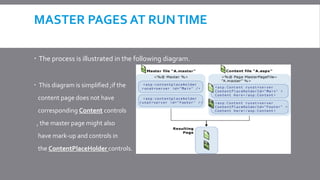
MASTER PAGES AT RUNTIME
 The process is illustrated in the following diagram.
 This diagram is simplified ;if the
content page does not have
corresponding Content controls
, the master page might also
have mark-up and controls in
the ContentPlaceHolder controls.
MASTER PAGE AND CONTENT PAGE PATHS
 When a content page is requested, its content is merged with the master
page, and the page runs in the context of the content page.
 The master page and content page do not have to be in the same folder.
 As long as the MasterPageFile attribute in the content
page's @ Page directive resolves to a .master page, ASP.NET can merge
the content and master pages into a single rendered page.
MASTER PAGES ANDTHEMES
 You cannot directly apply an ASP.NET theme to a master page
 If a theme is defined in the content page. Master pages are resolved in the
context of content pages, so the content page's theme is applied to the
master page as well.
If the site as a whole is configured to use a theme by including a theme
definition in the Pages Element (ASP.NET Settings Schema) element.
Master page

Master page

  • 1.
    Guided by: Prof. KanuPatel ( BVM IT Department ) .NET TECHNOLOGY(2160711) Prepared by: Modha Sanjay (150083116005) Parmar Bhavesh (150083116007) Parmar Bhavesh (150083116008)
  • 2.
    MASTER PAGE  ASP.NETmaster pages allow you to create a consistent layout for the pages in your application.  A single master page defines the look and feel and standard behaviour that you want for all of the pages (or a group of pages) in your application.  You can then create individual content pages that contain the content you want to display. When users request the content pages, they merge with the master page to produce output that combines the layout of the master page with the content from the content page.
  • 3.
    HOW MASTER PAGESWORK  A master page is an ASP.NET file with the extension .master (for example, MySite.master) with a predefined layout that can include static text, HTML elements, and server controls.  The master page is identified by a special @Master directive that replaces the @Page directive that is used for ordinary .aspx pages.The directive looks like the following. <%@ Master Language="C#" %>
  • 4.
    ADVANTAGES OF MASTERPAGES  They allow you to centralize the common functionality of your pages so that you can make updates in just one place.  They make it easy to create one set of controls and code and apply the results to a set of pages. For example, you can use controls on the master page to create a menu that applies to all pages.  They give you fine-grained control over the layout of the final page by allowing you to control how the placeholder controls are rendered.
  • 5.
    RUN-TIME BEHAVIOUR OFMASTER PAGES  Users request a page by typing the URL of the content page.  When the page is fetched, the @ Page directive is read. If the directive references a master page, the master page is read as well. If this is the first time the pages have been requested, both pages are compiled.  The content of individual Content controls is merged into the corresponding ContentPlaceholder control in the master page.  The resulting merged page is rendered to the browser.
  • 6.
    MASTER PAGES ATRUNTIME  The process is illustrated in the following diagram.  This diagram is simplified ;if the content page does not have corresponding Content controls , the master page might also have mark-up and controls in the ContentPlaceHolder controls.
  • 7.
    MASTER PAGE ANDCONTENT PAGE PATHS  When a content page is requested, its content is merged with the master page, and the page runs in the context of the content page.  The master page and content page do not have to be in the same folder.  As long as the MasterPageFile attribute in the content page's @ Page directive resolves to a .master page, ASP.NET can merge the content and master pages into a single rendered page.
  • 8.
    MASTER PAGES ANDTHEMES You cannot directly apply an ASP.NET theme to a master page  If a theme is defined in the content page. Master pages are resolved in the context of content pages, so the content page's theme is applied to the master page as well. If the site as a whole is configured to use a theme by including a theme definition in the Pages Element (ASP.NET Settings Schema) element.