Enhancing	
  the	
  User	
  Interface	
  	
  
  Using	
  Titanium	
  Modules	
  

               Sco8	
  Mason	
  
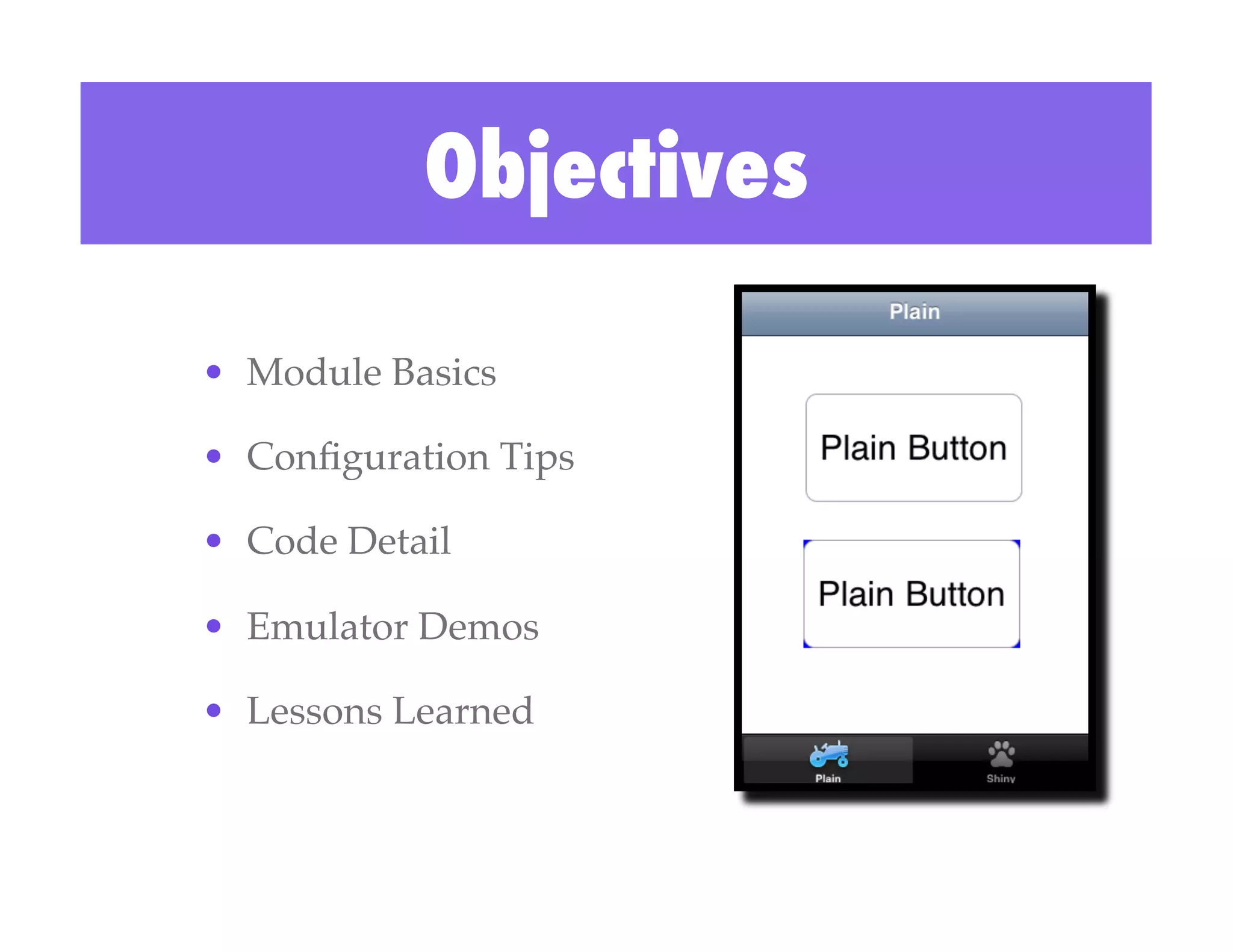
Objectives

•  Module Basics!

•  Configuration Tips!

•  Code Detail!

•  Emulator Demos!

•  Lessons Learned!
Making the
Button Shine

 Technical Diagram
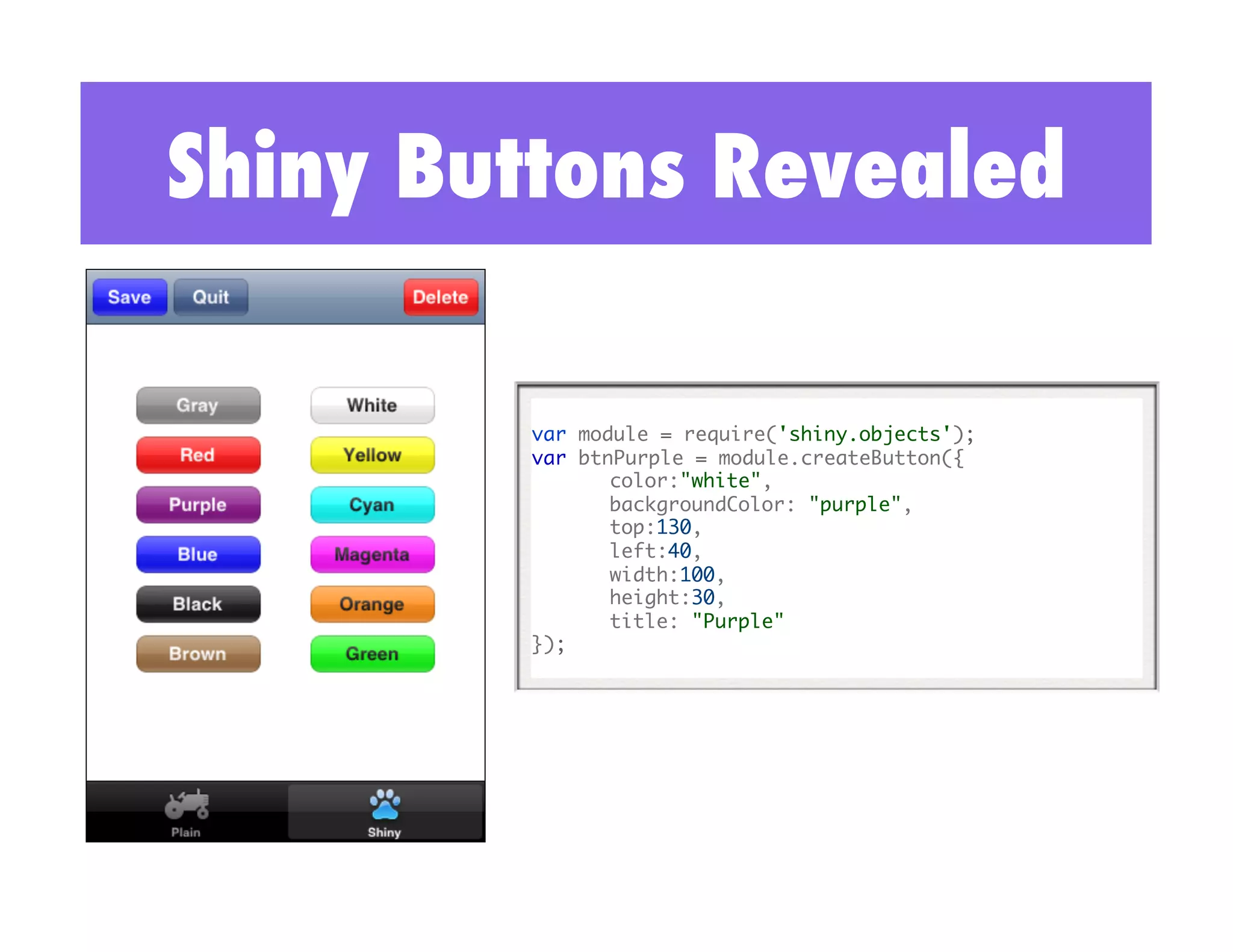
Shiny Buttons Revealed

        var module = require('shiny.objects'); 	
        var btnPurple = module.createButton({ 	
              	color:"white",	
              	backgroundColor: "purple",	
              	top:130,	
              	left:40,	
              	width:100, 	
              	height:30,	
              	title: "Purple"	
        });
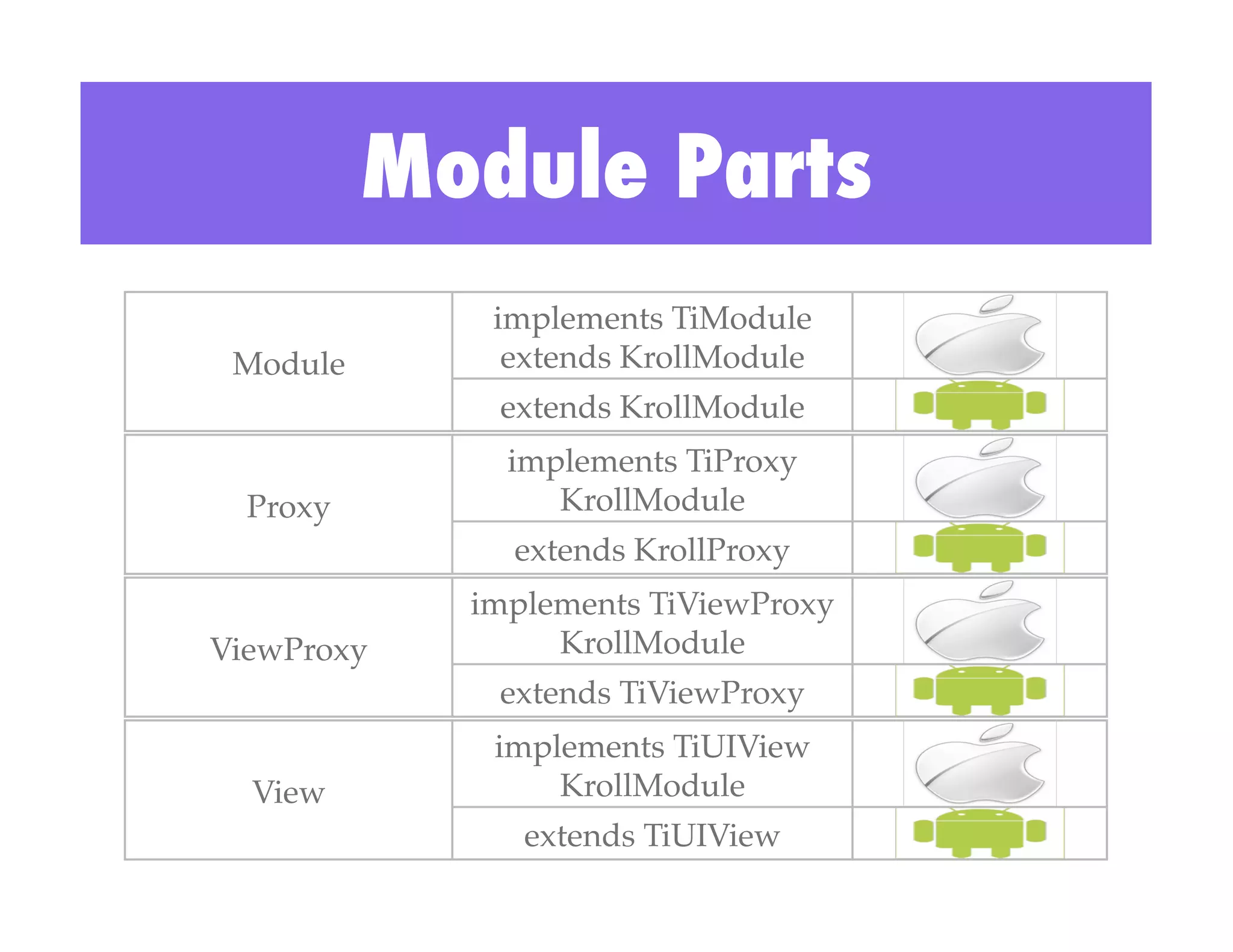
Module Parts
              implements TiModule!
 Module!       extends KrollModule!
              extends KrollModule!
               implements TiProxy
  Proxy!          KrollModule!
               extends KrollProxy!
             implements TiViewProxy
ViewProxy!        KrollModule!
              extends TiViewProxy!
              implements TiUIView
  View!           KrollModule!
                extends TiUIView!
Online Documentation


 Be sure to read and become familiar with the module
                  documentation at:

http://developer.appcelerator.com/doc/mobile/guides
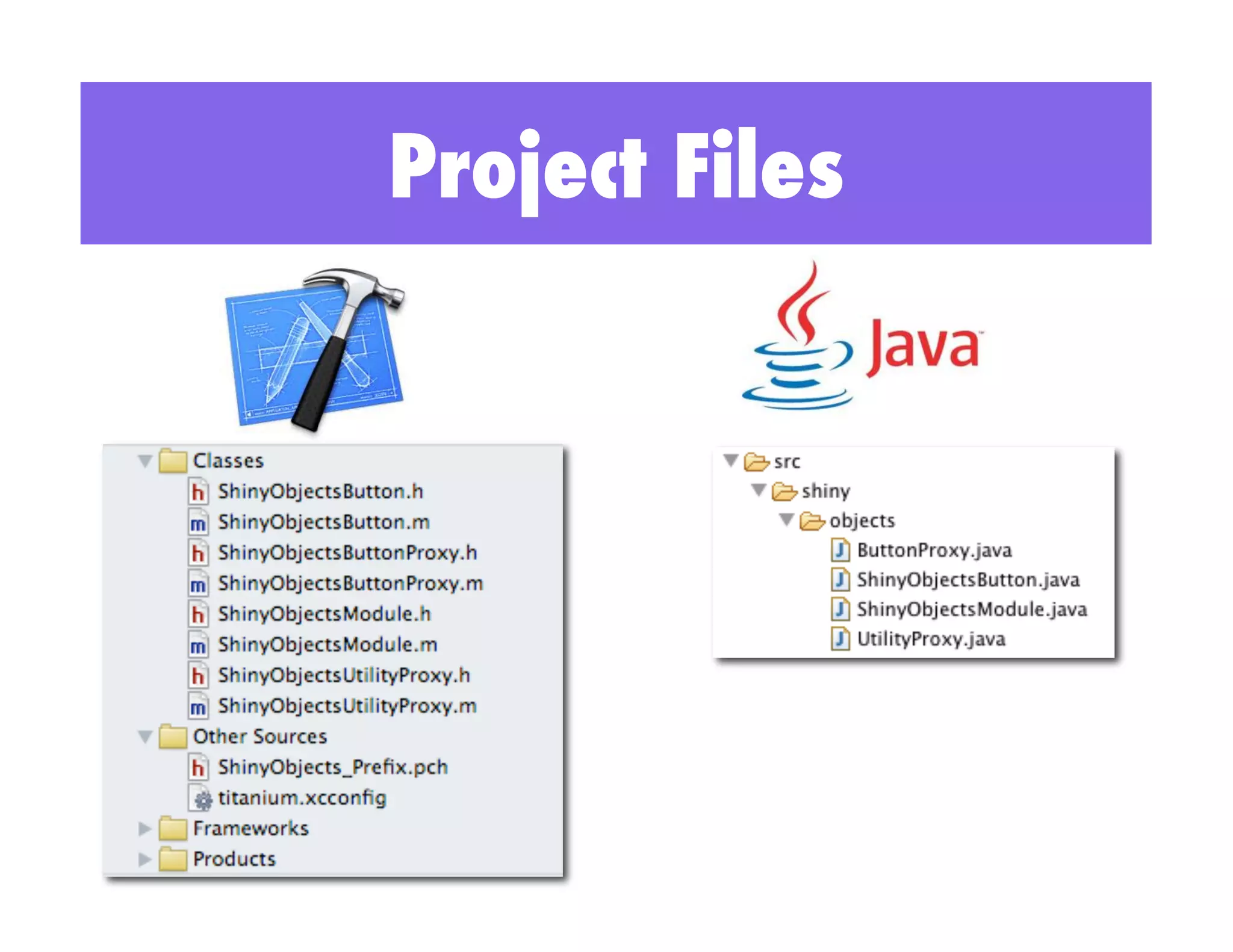
Project Files
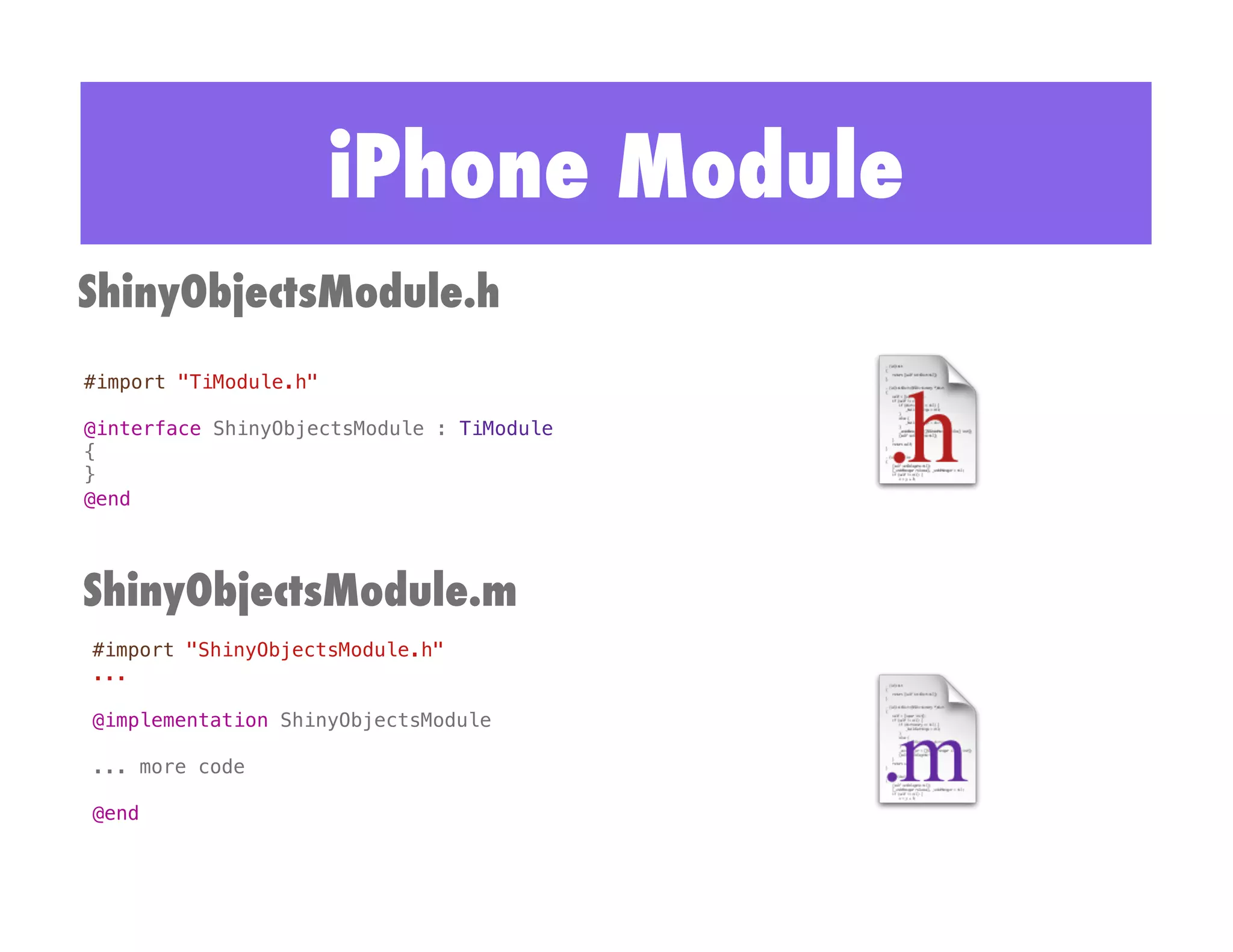
iPhone Module
ShinyObjectsModule.h
#import "TiModule.h"!

@interface ShinyObjectsModule : TiModule !
{!
}!
@end!


ShinyObjectsModule.m
#import "ShinyObjectsModule.h"!
...!

@implementation ShinyObjectsModule!

... more code!

@end!
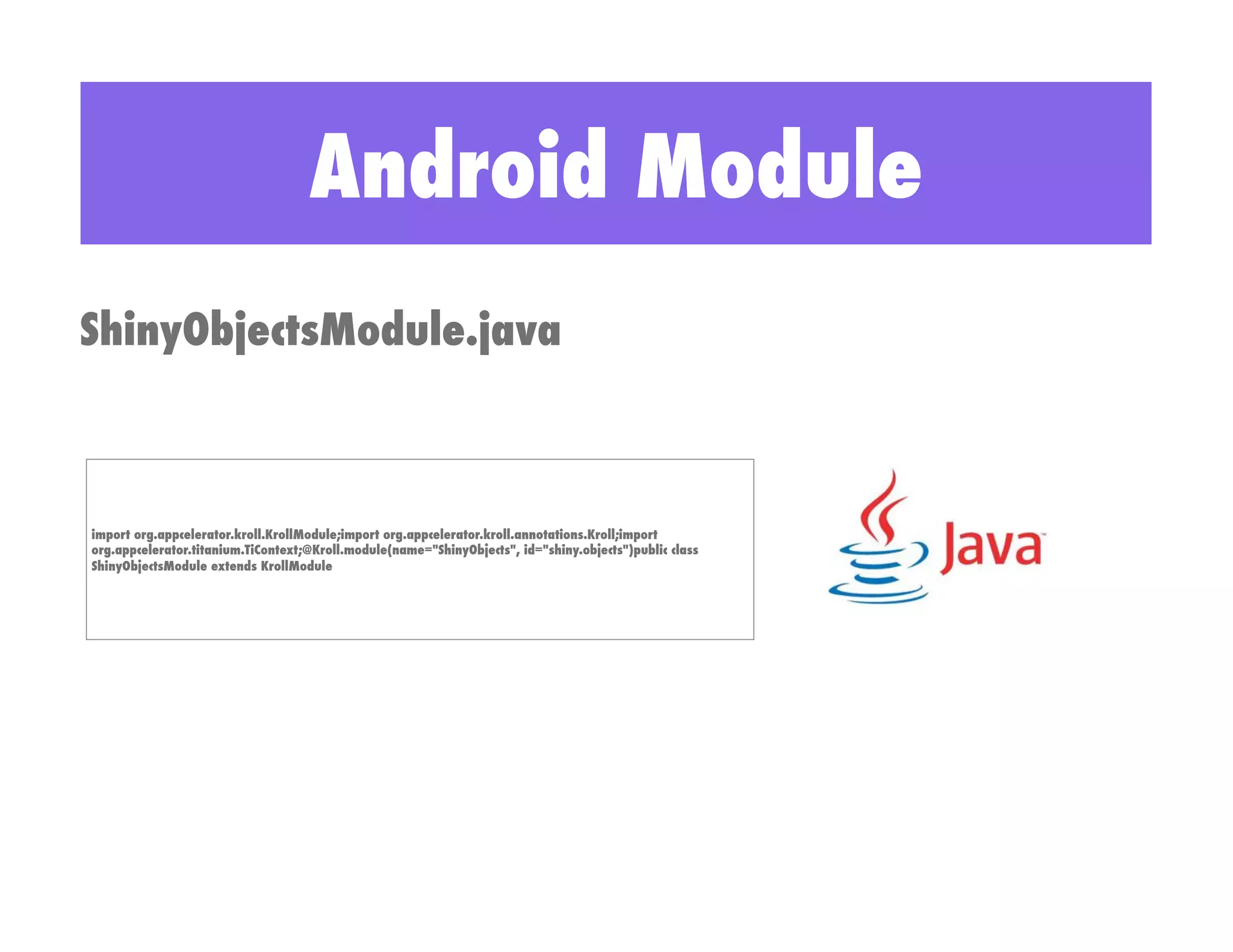
Android Module
ShinyObjectsModule.java


import org.appcelerator.kroll.KrollModule;import org.appcelerator.kroll.annotations.Kroll;import
org.appcelerator.titanium.TiContext;@Kroll.module(name="ShinyObjects", id="shiny.objects")public class
ShinyObjectsModule extends KrollModule
iPhone Proxy Example
        Objective C                                         Titanium
#import "ShinyObjectsUtilityProxy.h"!
#import "TiUtils.h"!
                                                    var module = require('shiny.objects');	
@implementation ShinyObjectsUtilityProxy !          var proxy = module.createUtility();	
                                                    proxy.sleep(sleepDuration);	
...!

-(void)sleep:(id)args!
{!
// ensure we have at least 1 argument !
// and it runs on the UI thread!
ENSURE_UI_THREAD_1_ARG(args);!

   float seconds = [[args objectAtIndex:0] floatValue];!
NSLog(@"Sleeping for %f seconds", seconds);!
[NSThread sleepForTimeInterval:seconds];!
}!

@end!
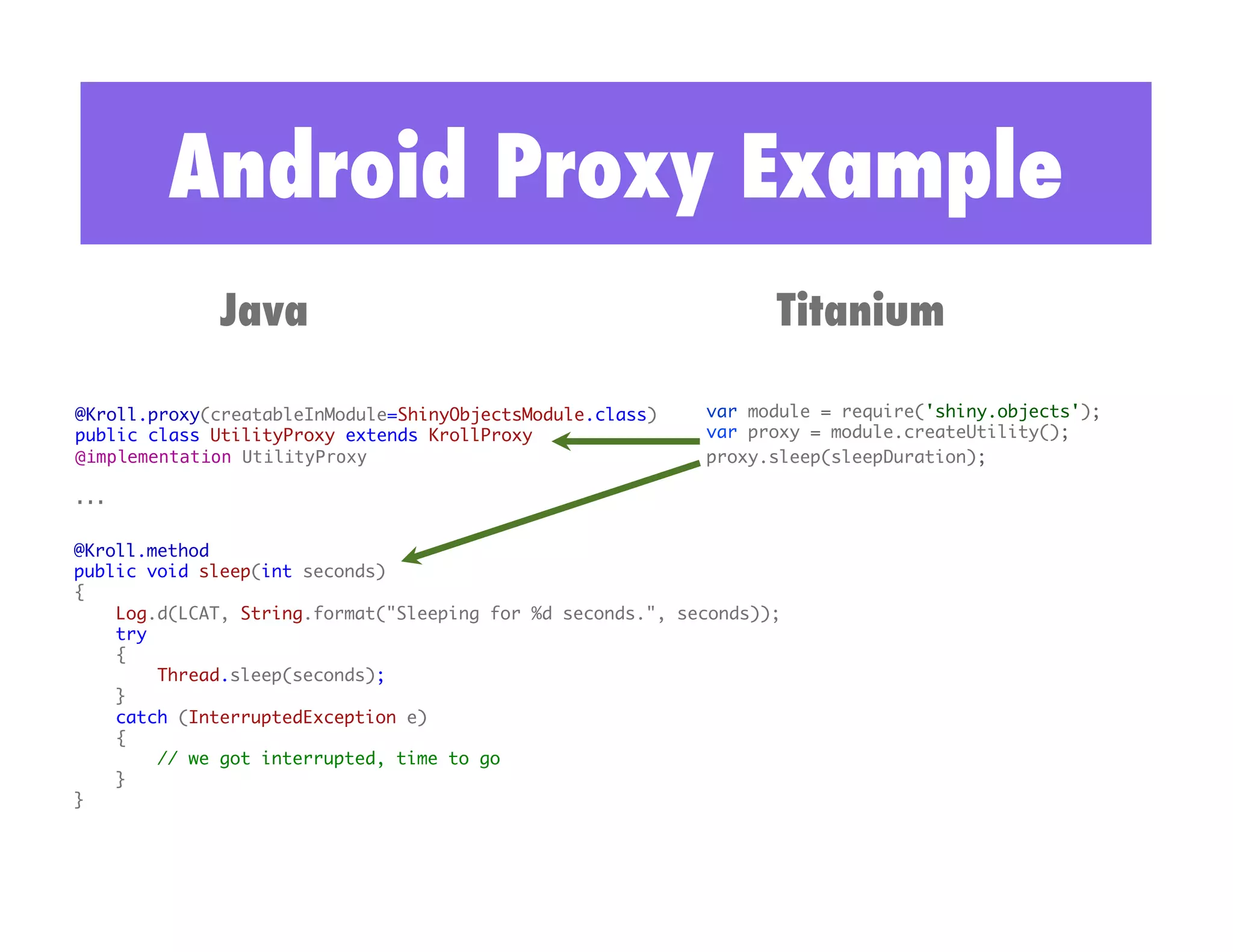
Android Proxy Example
              Java                                                 Titanium

@Kroll.proxy(creatableInModule=ShinyObjectsModule.class)	   var module = require('shiny.objects');	
public class UtilityProxy extends KrollProxy	               var proxy = module.createUtility();	
@implementation UtilityProxy !                              proxy.sleep(sleepDuration);	

...!


@Kroll.method	
public void sleep(int seconds)	
{	
    Log.d(LCAT, String.format("Sleeping for %d seconds.", seconds));	
    try 	
    {	
        Thread.sleep(seconds);	
    } 	
    catch (InterruptedException e) 	
    {	
        // we got interrupted, time to go	
    }	
}
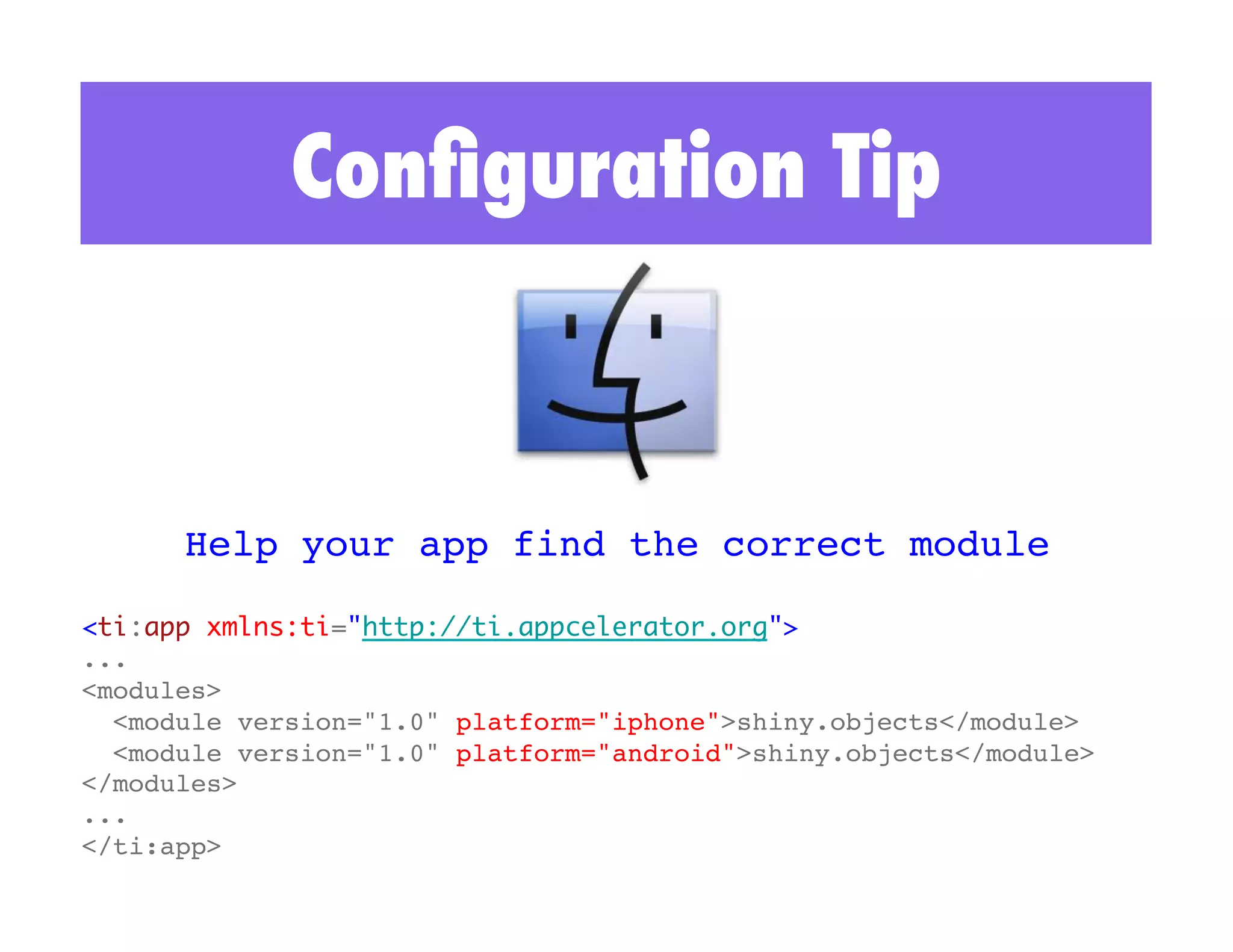
Configuration Tip


      Help your app find the correct module!

<ti:app xmlns:ti="http://ti.appcelerator.org">	
...!
<modules>!
  <module version="1.0" platform="iphone">shiny.objects</module>!
  <module version="1.0" platform="android">shiny.objects</module>!
</modules>!
...!
</ti:app>!
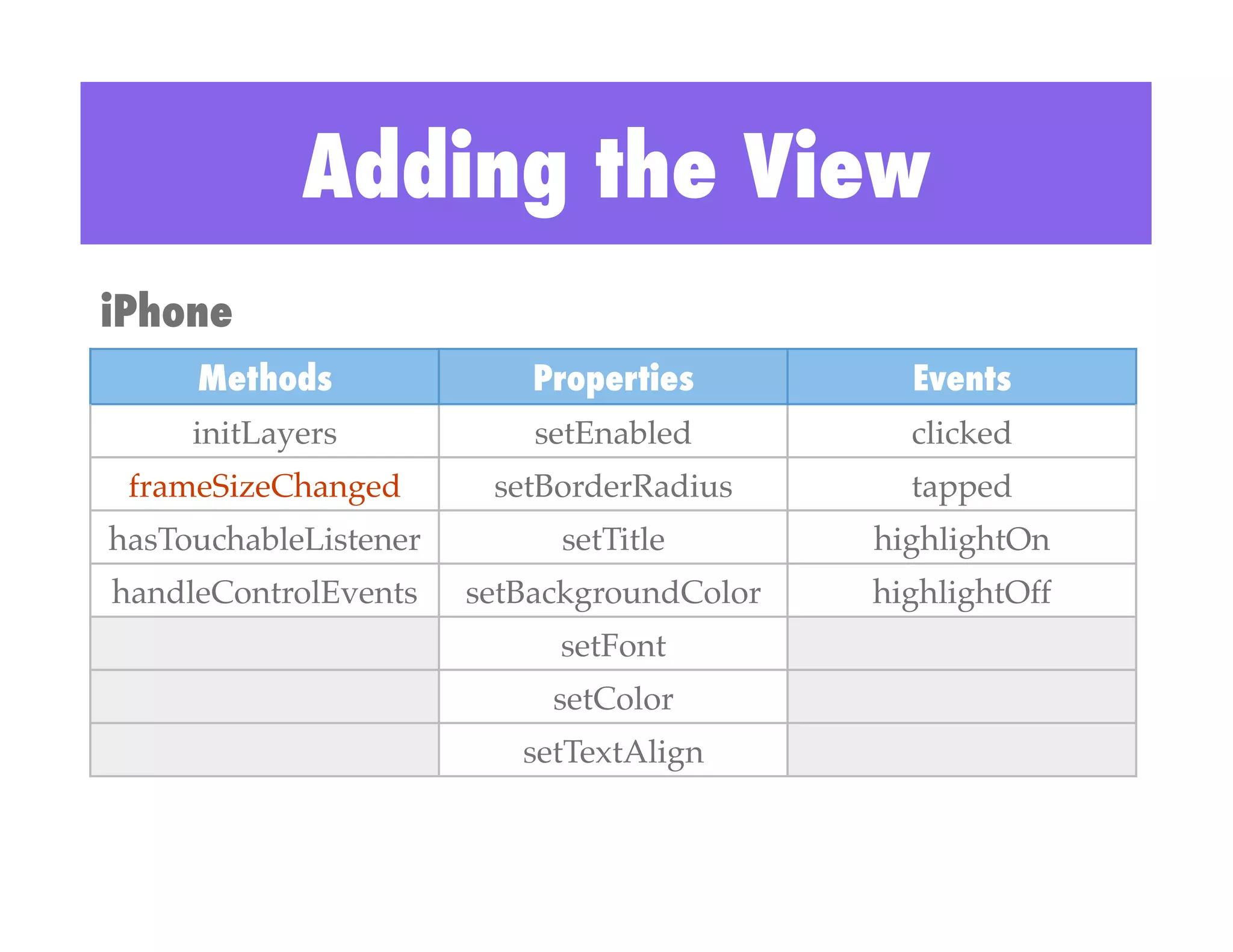
Adding the View
iPhone
     Methods                Properties          Events
     initLayers!            setEnabled!         clicked!
 frameSizeChanged!       setBorderRadius!       tapped!
hasTouchableListener!         setTitle!       highlightOn!
handleControlEvents!    setBackgroundColor!   highlightOff!
                             setFont!
                             setColor!
                           setTextAlign!
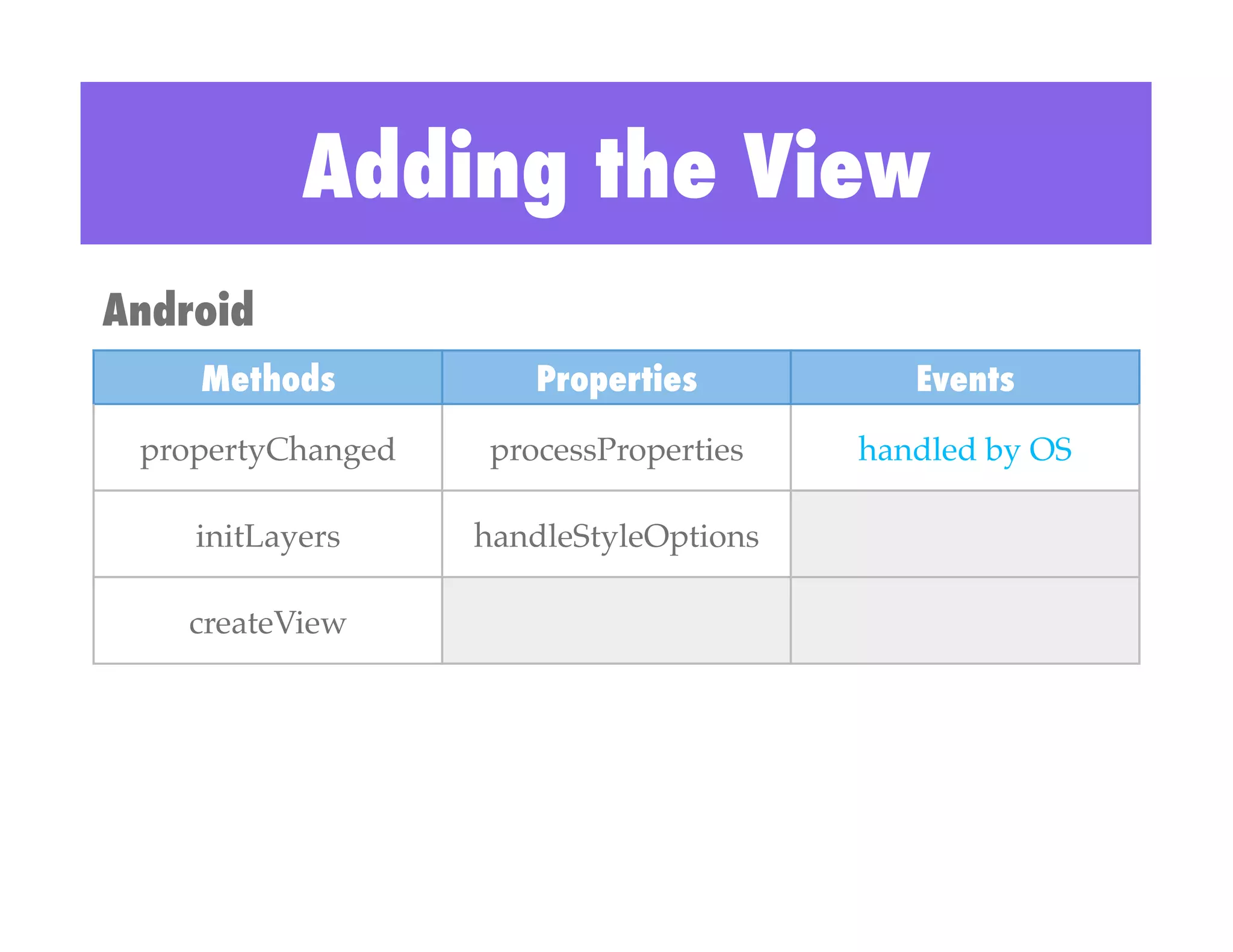
Adding the View
Android
    Methods             Properties           Events
 propertyChanged!    processProperties!   handled by OS!

    initLayers!     handleStyleOptions!

   createView!
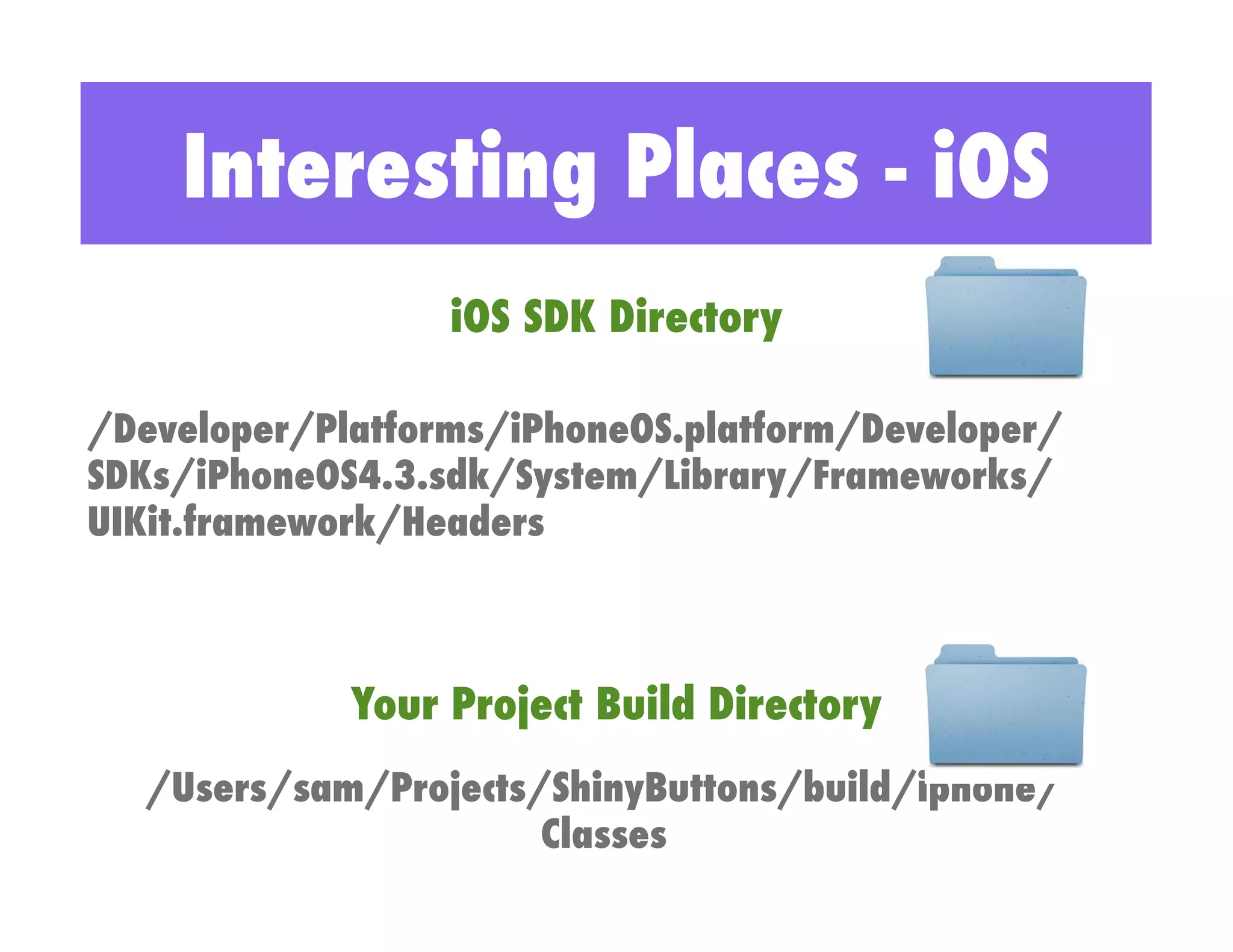
Interesting Places - iOS
                  iOS SDK Directory

/Developer/Platforms/iPhoneOS.platform/Developer/
SDKs/iPhoneOS4.3.sdk/System/Library/Frameworks/
UIKit.framework/Headers


             Your Project Build Directory
  /Users/sam/Projects/ShinyButtons/build/iphone/
                      Classes
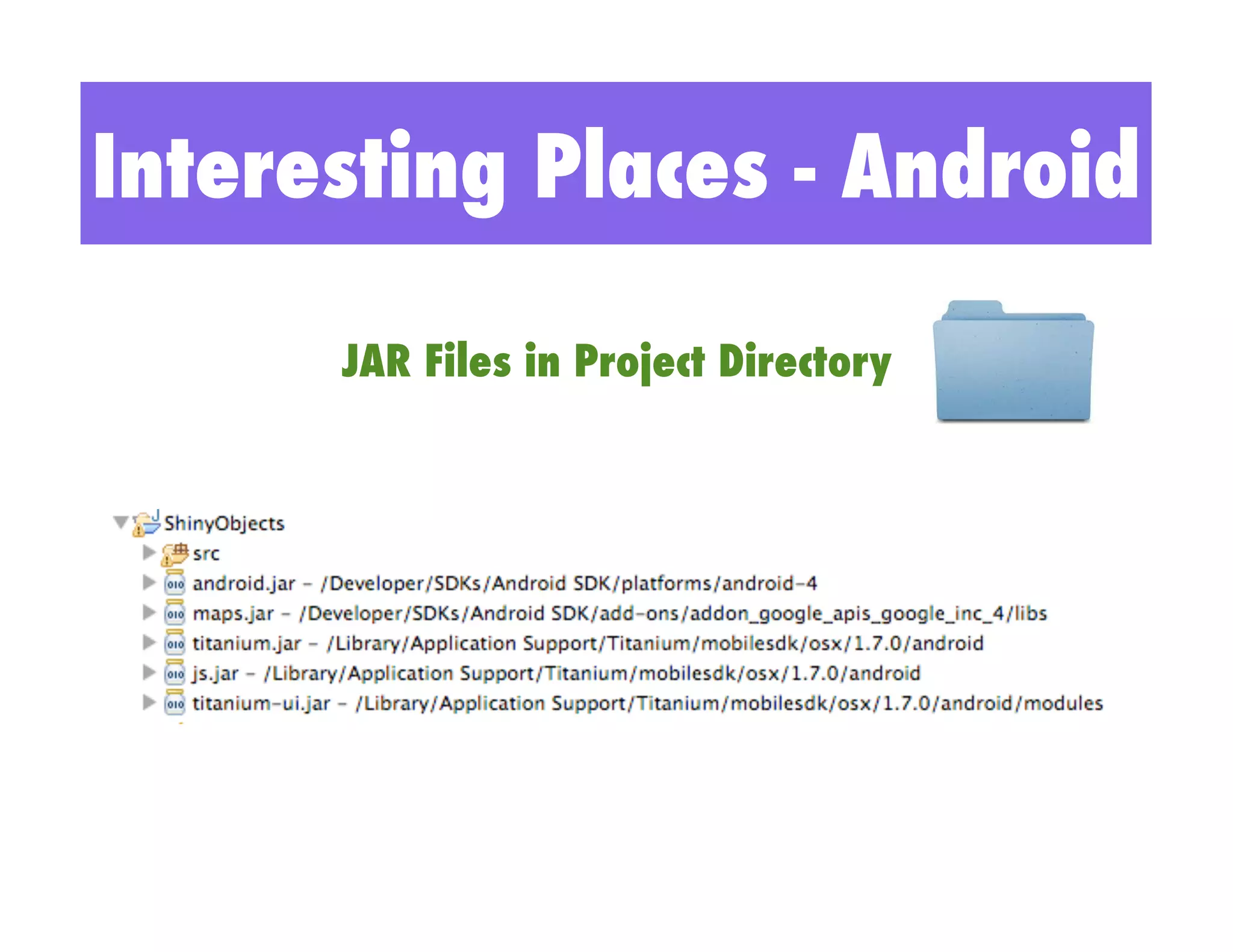
Interesting Places - Android

      JAR Files in Project Directory
iPhone Deployment
•  Edit and correct code in Xcode!
•  Build from Terminal with ./build.py!
•  Test with “titanium run”!
•  Extract zip file contents to Library directory!
 •    /Library/Application Support/Titanium/modules/iphone!

•  Build into your app and distribute!
Android Deployment
•  Edit and correct code in Titanium Studio!
•  Build the code with “ant”!
•  Test with “titanium run”!
•  Extract zip file contents to Library directory!
 •    /Library/Application Support/Titanium/modules/android!

•  Build into your app and distribute!
Emulator Demos
Lessons Learned

•  Be aware of the naming conventions!
•  Specify platform in tiapp.xml!
•  Get comfortable with Terminal!
•  Browse and use existing Titanium code!
•  Deploy into the Library directory!
Questions

Scott Mason: Enhancing the User Interface Using Titanium Modules

  • 1.
    Enhancing  the  User  Interface     Using  Titanium  Modules   Sco8  Mason  
  • 2.
    Objectives •  Module Basics! • Configuration Tips! •  Code Detail! •  Emulator Demos! •  Lessons Learned!
  • 3.
    Making the Button Shine Technical Diagram
  • 4.
    Shiny Buttons Revealed var module = require('shiny.objects'); var btnPurple = module.createButton({ color:"white", backgroundColor: "purple", top:130, left:40, width:100, height:30, title: "Purple" });
  • 5.
    Module Parts implements TiModule! Module! extends KrollModule! extends KrollModule! implements TiProxy Proxy! KrollModule! extends KrollProxy! implements TiViewProxy ViewProxy! KrollModule! extends TiViewProxy! implements TiUIView View! KrollModule! extends TiUIView!
  • 6.
    Online Documentation Besure to read and become familiar with the module documentation at: http://developer.appcelerator.com/doc/mobile/guides
  • 7.
  • 8.
    iPhone Module ShinyObjectsModule.h #import "TiModule.h"! @interfaceShinyObjectsModule : TiModule ! {! }! @end! ShinyObjectsModule.m #import "ShinyObjectsModule.h"! ...! @implementation ShinyObjectsModule! ... more code! @end!
  • 9.
    Android Module ShinyObjectsModule.java import org.appcelerator.kroll.KrollModule;importorg.appcelerator.kroll.annotations.Kroll;import org.appcelerator.titanium.TiContext;@Kroll.module(name="ShinyObjects", id="shiny.objects")public class ShinyObjectsModule extends KrollModule
  • 10.
    iPhone Proxy Example Objective C Titanium #import "ShinyObjectsUtilityProxy.h"! #import "TiUtils.h"! var module = require('shiny.objects'); @implementation ShinyObjectsUtilityProxy ! var proxy = module.createUtility(); proxy.sleep(sleepDuration); ...! -(void)sleep:(id)args! {! // ensure we have at least 1 argument ! // and it runs on the UI thread! ENSURE_UI_THREAD_1_ARG(args);! float seconds = [[args objectAtIndex:0] floatValue];! NSLog(@"Sleeping for %f seconds", seconds);! [NSThread sleepForTimeInterval:seconds];! }! @end!
  • 11.
    Android Proxy Example Java Titanium @Kroll.proxy(creatableInModule=ShinyObjectsModule.class) var module = require('shiny.objects'); public class UtilityProxy extends KrollProxy var proxy = module.createUtility(); @implementation UtilityProxy ! proxy.sleep(sleepDuration); ...! @Kroll.method public void sleep(int seconds) { Log.d(LCAT, String.format("Sleeping for %d seconds.", seconds)); try { Thread.sleep(seconds); } catch (InterruptedException e) { // we got interrupted, time to go } }
  • 12.
    Configuration Tip Help your app find the correct module! <ti:app xmlns:ti="http://ti.appcelerator.org"> ...! <modules>! <module version="1.0" platform="iphone">shiny.objects</module>! <module version="1.0" platform="android">shiny.objects</module>! </modules>! ...! </ti:app>!
  • 13.
    Adding the View iPhone Methods Properties Events initLayers! setEnabled! clicked! frameSizeChanged! setBorderRadius! tapped! hasTouchableListener! setTitle! highlightOn! handleControlEvents! setBackgroundColor! highlightOff! setFont! setColor! setTextAlign!
  • 14.
    Adding the View Android Methods Properties Events propertyChanged! processProperties! handled by OS! initLayers! handleStyleOptions! createView!
  • 15.
    Interesting Places -iOS iOS SDK Directory /Developer/Platforms/iPhoneOS.platform/Developer/ SDKs/iPhoneOS4.3.sdk/System/Library/Frameworks/ UIKit.framework/Headers Your Project Build Directory /Users/sam/Projects/ShinyButtons/build/iphone/ Classes
  • 16.
    Interesting Places -Android JAR Files in Project Directory
  • 17.
    iPhone Deployment •  Editand correct code in Xcode! •  Build from Terminal with ./build.py! •  Test with “titanium run”! •  Extract zip file contents to Library directory! •  /Library/Application Support/Titanium/modules/iphone! •  Build into your app and distribute!
  • 18.
    Android Deployment •  Editand correct code in Titanium Studio! •  Build the code with “ant”! •  Test with “titanium run”! •  Extract zip file contents to Library directory! •  /Library/Application Support/Titanium/modules/android! •  Build into your app and distribute!
  • 19.
  • 20.
    Lessons Learned •  Beaware of the naming conventions! •  Specify platform in tiapp.xml! •  Get comfortable with Terminal! •  Browse and use existing Titanium code! •  Deploy into the Library directory!
  • 21.