The Big Easy: Native Mobile Development
with Appcelerator And JavaScript
Adam Paxton

Jazzcon.tech

March 24th, 2017
Overview
• What is Appcelerator Titanium?
• Why use it?
• Pros
• Cons
• Tools Walkthrough
• Code Demo
Hello
• Adam Paxton
• Mobile App Developer

Polanco Media, LLC

Ft Lauderdale, FL
• condesa.io
• 6+ years working with Titanium
• TCAD, TCMD certified
• Titanium Titan User Group
• South Florida Titanium Meetup
Twitter: @adampax

Github: adampax

adampaxton@polancomedia.com
Presentation Notes
bit.ly/tijazzcon
We are:
• Web developers
• Companies with existing developer teams
• Startups
• Someone with an idea
We want to build:
• App for ourselves (or our community)
• App for our client
• App for our enterprise
What do we use?
• iOS - Objective C / Swift
• Android - Java
• Mobile Web - HTML5
• Windows Phone - C# / JavaScript
Another Option: Appcelerator Titanium
• Appcelerator, Inc - Based in San Jose, CA
• Started with desktop apps in 2008, began focusing on mobile in 2009
• Titanium 1.0 released March 2010
• Acquired by Axway in January 2016
• Enterprise Cloud integration and API management software company
• Based in Phoenix, AZ & France
What’s in a name?
• Appcelerator Titanium used to be one product
• Appcelerator and Titanium now informally (or formally? idk) refer to the paid and
free/OSS products
• Titanium: Core sdk - free!
• Appcelerator: additional paid services/features within the Appcelerator Platform
• Ti == Titanium Appc == Appcelerator
• Alloy is a MVC framework for developing Ti apps
Titanium
• Cross platform development environment for creating native mobile apps
• Program with JavaScript
• Free and open source
• Not a webview wrapper or app generator - builds native apps!
• Builds with platform SDKs
• Android SDK toolset required for Android apps
• Xcode (and a Mac) required for iOS Apps
What’s in Appcelerator?
• Everything in the free version
• Appcelerator Studio IDE
• Debugger
• LiveView / hot reload
• Arrow - API Builder, Backend Storage, push notifications, node.js hosting
• Analytics
• Test runner & crash analytics
• Hyperloop - Direct API access
• App Designer Beta
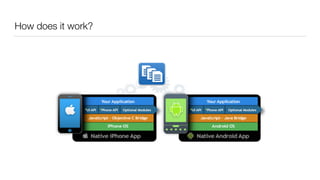
How does it work?
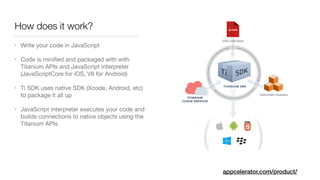
How does it work?
• Write your code in JavaScript

• Code is minified and packaged with with
Titanium APIs and JavaScript interpreter
(JavaScriptCore for iOS, V8 for Android)

• Ti SDK uses native SDK (Xcode, Android, etc)
to package it all up

• JavaScript interpreter executes your code and
builds connections to native objects using the
Titanium APIs
appcelerator.com/product/
Pros
• Maintain a single code base across multiple platforms
• 60% to 90% code re-use across platforms
• Use your or your team’s existing JavaScript skills
• Faster ramp up with JavaScript for new developers
• Native interface, native controls, native experience
appcelerator.com/titanium/titanium-sdk/
Cons
• Does not cover entire API for all platforms
• Over 5000 APIs are supported
• You can extend the API to access any additional APIs you need
• Extra layer of abstraction means more to manage
• New feature release / bug fix in iOS / Android — must wait until supported /
fixed in Titanium (This is getting faster, often same day as iOS release)
• Potential for bugs in Titanium
The Tools
• Titanium SDK
• Appcelerator Studio*
• Titanium CLI
• Arrow Cloud Services*
• Alloy MVC Framework
• Hyperloop*
*Paid
Titanium SDK
• Everything uses the SDK
• Updates usually released monthly
• Current version: 6.0.2.GA
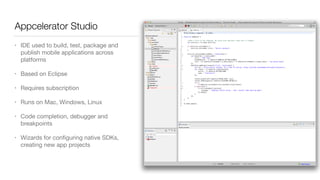
Appcelerator Studio
• IDE used to build, test, package and
publish mobile applications across
platforms

• Based on Eclipse

• Requires subscription

• Runs on Mac, Windows, Linux

• Code completion, debugger and
breakpoints

• Wizards for configuring native SDKs,
creating new app projects
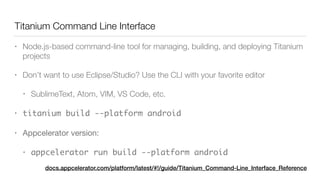
Titanium Command Line Interface	
• Node.js-based command-line tool for managing, building, and deploying Titanium
projects
• Don’t want to use Eclipse/Studio? Use the CLI with your favorite editor
• SublimeText, Atom, VIM, VS Code, etc.
• titanium build --platform android
• Appcelerator version:

• appcelerator run build --platform android
docs.appcelerator.com/platform/latest/#!/guide/Titanium_Command-Line_Interface_Reference
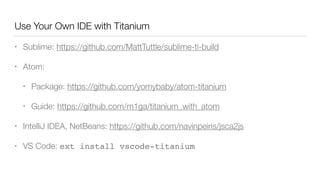
Use Your Own IDE with Titanium
• Sublime: https://github.com/MattTuttle/sublime-ti-build
• Atom:
• Package: https://github.com/yomybaby/atom-titanium
• Guide: https://github.com/m1ga/titanium_with_atom
• IntelliJ IDEA, NetBeans: https://github.com/navinpeiris/jsca2js
• VS Code: ext install vscode-titanium
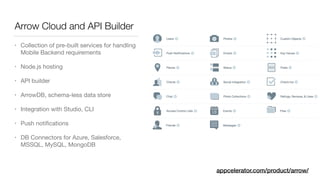
Arrow Cloud and API Builder
• Collection of pre-built services for handling
Mobile Backend requirements

• Node.js hosting

• API builder

• ArrowDB, schema-less data store

• Integration with Studio, CLI

• Push notifications

• DB Connectors for Azure, Salesforce,
MSSQL, MySQL, MongoDB
appcelerator.com/product/arrow/
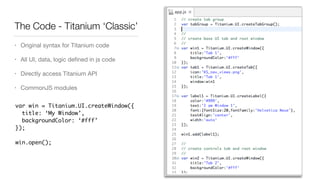
The Code - Titanium ‘Classic’
• Original syntax for Titanium code

• All UI, data, logic defined in js code

• Directly access Titanium API

• CommonJS modules
var win = Titanium.UI.createWindow({
title: ‘My Window’,
backgroundColor: ‘#fff’
});
win.open();
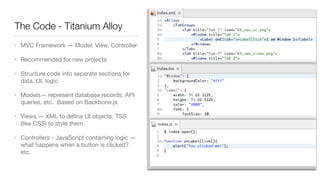
The Code - Titanium Alloy
• MVC Framework — Model, View, Controller

• Recommended for new projects

• Structure code into separate sections for
data, UI, logic

• Models— represent database records, API
queries, etc. Based on Backbone.js

• Views — XML to define UI objects, TSS
(like CSS) to style them

• Controllers - JavaScript containing logic —
what happens when a button is clicked?
etc.
Alloy
• Keeps your code cleaner, enabling re-use
• Can still use CommonJS libraries with Alloy. Popular libraries underscore.js,
moment.js already included
• Built-ins for conditional code
• TSS styling similar to CSS, easy to setup and re-use styling
• Widgets - UI libraries / customer controls, easily transportable
• A lot more features
Hyperloop - New!
• Direct access to every iOS and Android API using JavaScript
• Incorporate 3rd party native libs, pods
• Run Java, Obj-C, Swift alongside Titanium code.
• Don’t need to pre-compile modules
appcelerator.com/mobile-app-development-products/hyperloop/
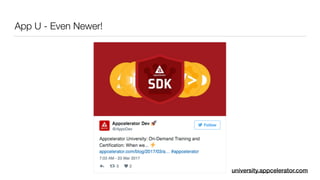
App U - Even Newer!
university.appcelerator.com
Community Tools
• TiShadow - tishadow.yydigital.com - OSS reload for Titanium, very useful!
• TiSlack - tislack.org - community driven Slack channel, 1400 members
• Gittio - gitt.io - search engine for Titanium modules and Alloy Widgets
• Ticons - http://ticons.fokkezb.nl/ - Generate app icons and splash screens for
iOS and Android (as of Ti SDK 5.x this is built-in)
Final Notes
• Use Titanium for faster mobile development
• Use Alloy for faster Titanium development :)
• Try Appcelerator Platform here: http://www.appcelerator.com/signup/
• Or get started w/ Open source:
• [sudo] npm install -g titanium alloy
• titanium setup
• Documentation: docs.appcelerator.com
• Help: tislack.org
The Big Easy Code Demo
• http://docs.appcelerator.com/platform/latest/#!/guide/Titanium_Compatibility_Matrix
• Node and npm installed
• Tip: Use a node version manager like n or nvm!
• Xcode Installed (open at least once to verify it works, accept T&C etc)
• Android SDK download and install
• http://docs.appcelerator.com/platform/latest/#!/guide/Titanium_Command-Line_Interface_Reference
• [sudo] npm install -g titanium alloy

titanium setup

ti create --type=app --id com.polancomedia.tijazzcon --name TiJazzCon --
platforms ios, android --url http://polancomedia.com

cd tiJazzConn

alloy new
Thanks
• adampaxton@polancomedia.com
• @adampax
• Presentation notes: bit.ly/tijazzcon


Show some code: github.com/adampax/TiJazzCon

The Big Easy: Native Mobile App Development with Appcelerator Titanium and JavaScript

  • 1.
    The Big Easy:Native Mobile Development with Appcelerator And JavaScript Adam Paxton Jazzcon.tech March 24th, 2017
  • 2.
    Overview • What isAppcelerator Titanium? • Why use it? • Pros • Cons • Tools Walkthrough • Code Demo
  • 3.
    Hello • Adam Paxton •Mobile App Developer
 Polanco Media, LLC
 Ft Lauderdale, FL • condesa.io • 6+ years working with Titanium • TCAD, TCMD certified • Titanium Titan User Group • South Florida Titanium Meetup Twitter: @adampax
 Github: adampax
 adampaxton@polancomedia.com
  • 4.
  • 5.
    We are: • Webdevelopers • Companies with existing developer teams • Startups • Someone with an idea
  • 6.
    We want tobuild: • App for ourselves (or our community) • App for our client • App for our enterprise
  • 7.
    What do weuse? • iOS - Objective C / Swift • Android - Java • Mobile Web - HTML5 • Windows Phone - C# / JavaScript
  • 8.
    Another Option: AppceleratorTitanium • Appcelerator, Inc - Based in San Jose, CA • Started with desktop apps in 2008, began focusing on mobile in 2009 • Titanium 1.0 released March 2010 • Acquired by Axway in January 2016 • Enterprise Cloud integration and API management software company • Based in Phoenix, AZ & France
  • 9.
    What’s in aname? • Appcelerator Titanium used to be one product • Appcelerator and Titanium now informally (or formally? idk) refer to the paid and free/OSS products • Titanium: Core sdk - free! • Appcelerator: additional paid services/features within the Appcelerator Platform • Ti == Titanium Appc == Appcelerator • Alloy is a MVC framework for developing Ti apps
  • 10.
    Titanium • Cross platformdevelopment environment for creating native mobile apps • Program with JavaScript • Free and open source • Not a webview wrapper or app generator - builds native apps! • Builds with platform SDKs • Android SDK toolset required for Android apps • Xcode (and a Mac) required for iOS Apps
  • 11.
    What’s in Appcelerator? •Everything in the free version • Appcelerator Studio IDE • Debugger • LiveView / hot reload • Arrow - API Builder, Backend Storage, push notifications, node.js hosting • Analytics • Test runner & crash analytics • Hyperloop - Direct API access • App Designer Beta
  • 12.
  • 13.
    How does itwork? • Write your code in JavaScript • Code is minified and packaged with with Titanium APIs and JavaScript interpreter (JavaScriptCore for iOS, V8 for Android) • Ti SDK uses native SDK (Xcode, Android, etc) to package it all up • JavaScript interpreter executes your code and builds connections to native objects using the Titanium APIs appcelerator.com/product/
  • 14.
    Pros • Maintain asingle code base across multiple platforms • 60% to 90% code re-use across platforms • Use your or your team’s existing JavaScript skills • Faster ramp up with JavaScript for new developers • Native interface, native controls, native experience appcelerator.com/titanium/titanium-sdk/
  • 15.
    Cons • Does notcover entire API for all platforms • Over 5000 APIs are supported • You can extend the API to access any additional APIs you need • Extra layer of abstraction means more to manage • New feature release / bug fix in iOS / Android — must wait until supported / fixed in Titanium (This is getting faster, often same day as iOS release) • Potential for bugs in Titanium
  • 16.
    The Tools • TitaniumSDK • Appcelerator Studio* • Titanium CLI • Arrow Cloud Services* • Alloy MVC Framework • Hyperloop* *Paid
  • 17.
    Titanium SDK • Everythinguses the SDK • Updates usually released monthly • Current version: 6.0.2.GA
  • 18.
    Appcelerator Studio • IDEused to build, test, package and publish mobile applications across platforms • Based on Eclipse • Requires subscription • Runs on Mac, Windows, Linux • Code completion, debugger and breakpoints • Wizards for configuring native SDKs, creating new app projects
  • 19.
    Titanium Command LineInterface • Node.js-based command-line tool for managing, building, and deploying Titanium projects • Don’t want to use Eclipse/Studio? Use the CLI with your favorite editor • SublimeText, Atom, VIM, VS Code, etc. • titanium build --platform android • Appcelerator version: • appcelerator run build --platform android docs.appcelerator.com/platform/latest/#!/guide/Titanium_Command-Line_Interface_Reference
  • 20.
    Use Your OwnIDE with Titanium • Sublime: https://github.com/MattTuttle/sublime-ti-build • Atom: • Package: https://github.com/yomybaby/atom-titanium • Guide: https://github.com/m1ga/titanium_with_atom • IntelliJ IDEA, NetBeans: https://github.com/navinpeiris/jsca2js • VS Code: ext install vscode-titanium
  • 21.
    Arrow Cloud andAPI Builder • Collection of pre-built services for handling Mobile Backend requirements • Node.js hosting • API builder • ArrowDB, schema-less data store • Integration with Studio, CLI • Push notifications • DB Connectors for Azure, Salesforce, MSSQL, MySQL, MongoDB appcelerator.com/product/arrow/
  • 22.
    The Code -Titanium ‘Classic’ • Original syntax for Titanium code • All UI, data, logic defined in js code • Directly access Titanium API • CommonJS modules var win = Titanium.UI.createWindow({ title: ‘My Window’, backgroundColor: ‘#fff’ }); win.open();
  • 23.
    The Code -Titanium Alloy • MVC Framework — Model, View, Controller • Recommended for new projects • Structure code into separate sections for data, UI, logic • Models— represent database records, API queries, etc. Based on Backbone.js • Views — XML to define UI objects, TSS (like CSS) to style them • Controllers - JavaScript containing logic — what happens when a button is clicked? etc.
  • 24.
    Alloy • Keeps yourcode cleaner, enabling re-use • Can still use CommonJS libraries with Alloy. Popular libraries underscore.js, moment.js already included • Built-ins for conditional code • TSS styling similar to CSS, easy to setup and re-use styling • Widgets - UI libraries / customer controls, easily transportable • A lot more features
  • 25.
    Hyperloop - New! •Direct access to every iOS and Android API using JavaScript • Incorporate 3rd party native libs, pods • Run Java, Obj-C, Swift alongside Titanium code. • Don’t need to pre-compile modules appcelerator.com/mobile-app-development-products/hyperloop/
  • 26.
    App U -Even Newer! university.appcelerator.com
  • 27.
    Community Tools • TiShadow- tishadow.yydigital.com - OSS reload for Titanium, very useful! • TiSlack - tislack.org - community driven Slack channel, 1400 members • Gittio - gitt.io - search engine for Titanium modules and Alloy Widgets • Ticons - http://ticons.fokkezb.nl/ - Generate app icons and splash screens for iOS and Android (as of Ti SDK 5.x this is built-in)
  • 28.
    Final Notes • UseTitanium for faster mobile development • Use Alloy for faster Titanium development :) • Try Appcelerator Platform here: http://www.appcelerator.com/signup/ • Or get started w/ Open source: • [sudo] npm install -g titanium alloy • titanium setup • Documentation: docs.appcelerator.com • Help: tislack.org
  • 29.
    The Big EasyCode Demo • http://docs.appcelerator.com/platform/latest/#!/guide/Titanium_Compatibility_Matrix • Node and npm installed • Tip: Use a node version manager like n or nvm! • Xcode Installed (open at least once to verify it works, accept T&C etc) • Android SDK download and install • http://docs.appcelerator.com/platform/latest/#!/guide/Titanium_Command-Line_Interface_Reference • [sudo] npm install -g titanium alloy
 titanium setup
 ti create --type=app --id com.polancomedia.tijazzcon --name TiJazzCon -- platforms ios, android --url http://polancomedia.com
 cd tiJazzConn
 alloy new
  • 30.
    Thanks • adampaxton@polancomedia.com • @adampax •Presentation notes: bit.ly/tijazzcon


 Show some code: github.com/adampax/TiJazzCon