Marlabs Automation Framework

© 2010 Marlabs Inc. Proprietary and
Contents of Presentation

.

 Framework Overview
• Project details
• Technology Used for implementation
 Test Link
• Open Source Test Management Tool
 UI Controller
• Java Swings application
 Results
• HTML Results Report
• XML Results Report
• Excel Results Report
• Online Results (Web Application)
 Required Skills
• Core Java (Swings, API)
• Web Application (HTML & JSP)
• Database
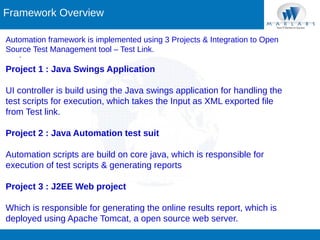
Framework Overview
Automation framework is implemented using 3 Projects & Integration to Open
Source Test Management tool – Test Link.
.

Project 1 : Java Swings Application
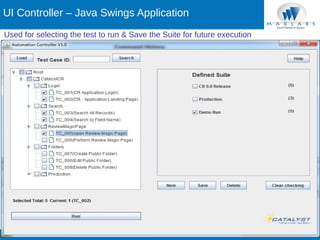
UI controller is build using the Java swings application for handling the
test scripts for execution, which takes the Input as XML exported file
from Test link.
Project 2 : Java Automation test suit
Automation scripts are build on core java, which is responsible for
execution of test scripts & generating reports
Project 3 : J2EE Web project
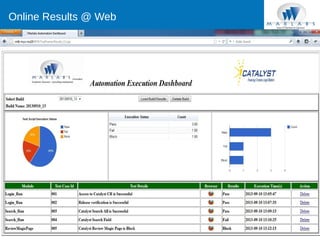
Which is responsible for generating the online results report, which is
deployed using Apache Tomcat, a open source web server.
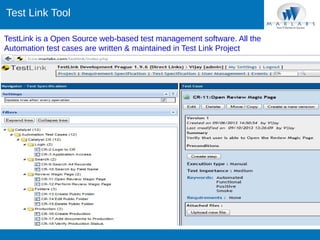
Test Link Tool
TestLink is a Open Source web-based test management software. All the
Automation test cases are written & maintained in Test Link Project
.
UI Controller – Java Swings Application
Used for selecting the test to run & Save the Suite for future execution
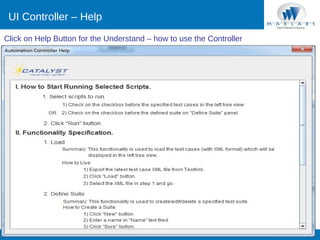
UI Controller – Help
Click on Help Button for the Understand – how to use the Controller
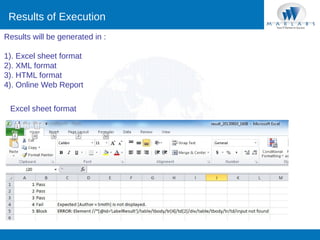
Results of Execution
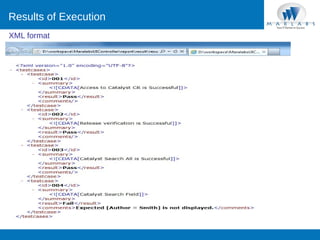
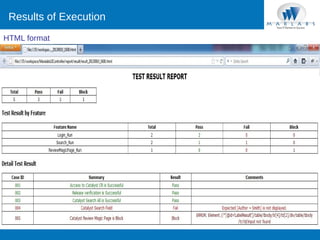
Results will be generated in :
1). Excel sheet format
2). XML format
3). HTML format
4). Online Web Report
Excel sheet format
Results of Execution
XML format
Results of Execution
HTML format
Online Results @ Web
Required Skills

1). Core Java
• Handling UI Controller Swings application
• xls, collection API for framework
• Apache Log4J
2). Web Programming
• HTML
• JSP
• Java Script & Jquery
• Apache Tomcat web server
3). Data Base
• MySQL / MS – SQL
• Create table, insert, select, delete functions
4). Test Link
• Maintain Test case & Test suite
• Export the Test suite to XML format
5). Selenium
• Selenium RC
• Selenium Web Driver
Enhancements
1). Integrating Java Mail for sending the Report after execution
2). Continue integration with Jenkins CI Server

Thank you!

vijay.rangaiah@marlabs.com

© 2010 Marlabs Inc. Proprietary and

automationframework

  • 1.
    Marlabs Automation Framework ©2010 Marlabs Inc. Proprietary and
  • 2.
    Contents of Presentation . Framework Overview • Project details • Technology Used for implementation  Test Link • Open Source Test Management Tool  UI Controller • Java Swings application  Results • HTML Results Report • XML Results Report • Excel Results Report • Online Results (Web Application)  Required Skills • Core Java (Swings, API) • Web Application (HTML & JSP) • Database
  • 3.
    Framework Overview Automation frameworkis implemented using 3 Projects & Integration to Open Source Test Management tool – Test Link. . Project 1 : Java Swings Application UI controller is build using the Java swings application for handling the test scripts for execution, which takes the Input as XML exported file from Test link. Project 2 : Java Automation test suit Automation scripts are build on core java, which is responsible for execution of test scripts & generating reports Project 3 : J2EE Web project Which is responsible for generating the online results report, which is deployed using Apache Tomcat, a open source web server.
  • 4.
    Test Link Tool TestLinkis a Open Source web-based test management software. All the Automation test cases are written & maintained in Test Link Project .
  • 5.
    UI Controller –Java Swings Application Used for selecting the test to run & Save the Suite for future execution
  • 6.
    UI Controller –Help Click on Help Button for the Understand – how to use the Controller
  • 7.
    Results of Execution Resultswill be generated in : 1). Excel sheet format 2). XML format 3). HTML format 4). Online Web Report Excel sheet format
  • 8.
  • 9.
  • 10.
  • 11.
    Required Skills 1). CoreJava • Handling UI Controller Swings application • xls, collection API for framework • Apache Log4J 2). Web Programming • HTML • JSP • Java Script & Jquery • Apache Tomcat web server 3). Data Base • MySQL / MS – SQL • Create table, insert, select, delete functions 4). Test Link • Maintain Test case & Test suite • Export the Test suite to XML format 5). Selenium • Selenium RC • Selenium Web Driver
  • 12.
    Enhancements 1). Integrating JavaMail for sending the Report after execution 2). Continue integration with Jenkins CI Server Thank you! vijay.rangaiah@marlabs.com © 2010 Marlabs Inc. Proprietary and