


krzysztof@severalnines.com
Copyright 2018 Severalnines AB
Presenter
Krzysztof Książek, Senior Support Engineer @Severalnines
MariaDB Performance Tuning
7th November 2018
Copyright 2018 Severalnines AB
•Tuning process - how to make sure you make correct changes
•Configuration tuning for MariaDB
•InnoDB internals and contentions
Agenda
Copyright 2017 Severalnines AB
Copyright 2018 Severalnines AB
Tuning Process
Copyright 2018 Severalnines AB
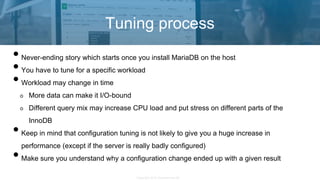
•Never-ending story which starts once you install MariaDB on the host
•You have to tune for a specific workload
•Workload may change in time
More data can make it I/O-bound
Different query mix may increase CPU load and put stress on different parts of the
InnoDB
•Keep in mind that configuration tuning is not likely to give you a huge increase in
performance (except if the server is really badly configured)
•Make sure you understand why a configuration change ended up with a given result
Tuning process
Copyright 2018 Severalnines AB
Tuning process
Copyright 2018 Severalnines AB
•You need a deterministic, test environment to make sure you can measure the impact of the
changes
•Environment should mirror production as close as possible, to make it more relevant
•Changes should be introduced one at a time to ensure you understand the impact of each of
them
•Benchmark the system using queries as close to production as possible
•Restore it to the original state for another round of tweaking
•Rinse and repeat until you are happy with results
Tuning process
Copyright 2018 Severalnines AB
•Grab a backup of your production systems
•Restore it on a host, restart MariaDB or reboot the host itself to clear caches
•Capture real-world queries using slow log or tcpdump
•Do a baseline run, replay queries using Percona Playback or pt-upgrade
•Restore backup again, restart MariaDB or reboot the host itself to clear caches
•Make _one_ change in my.cnf or OS settings
•Replay queries using Percona Playback or pt-upgrade
•Measure the difference, repeat the process by restoring the backup if you want to make one
more change
Tuning process
Copyright 2017 Severalnines AB
Copyright 2018 Severalnines AB
Tuning MariaDB configuration
Copyright 2018 Severalnines AB
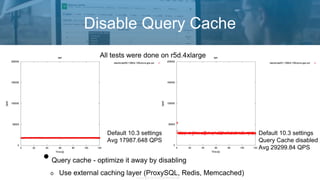
Disable Query Cache
Default 10.3 settings
Avg 17987.648 QPS
Default 10.3 settings
Query Cache disabled
Avg 29299.84 QPS
•Query cache - optimize it away by disabling
Use external caching layer (ProxySQL, Redis, Memcached)
All tests were done on r5d.4xlarge
Copyright 2018 Severalnines AB
•InnoDB buffer pool - used to cache data
and store dirty pages
•More is better but you need to leave some
memory for other buffers
Per join buffers
Per session buffers
Temporary tables
•You may have heard about 80% rule
It’s more like 90% for large (i.e. 128GB)
hosts
Tuning MariaDB configuration - memory
•Make sure you err on the side of ‘too small’
•Unless you run recent MariaDB (10.2 and
up) where you can resize InnoDB buffer
pool dynamically, without restart
•For fairly loaded (~20-30 running threads)
host with 128GB of memory it should be ok
to leave ~15GB of memory free
•All depends on the workload so your
mileage may vary
Copyright 2018 Severalnines AB
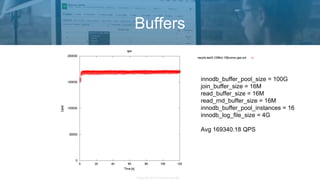
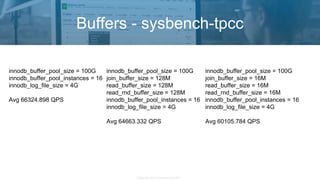
•Per-session buffers in InnoDB:
sort_buffer_size, read_buffer_size, read_rnd_buffer_size
•Per-join buffer: join_buffer_size
•By default - small values
•More _not_ always better
At 256KB the way how memory allocates change
smaller chunks use malloc() which is faster than mmap()
•Make sure to benchmark your system after any change to those settings
Tuning MariaDB configuration - memory
Copyright 2018 Severalnines AB
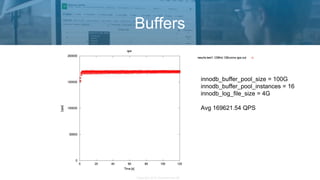
Buffers
innodb_buffer_pool_size = 100G
innodb_buffer_pool_instances = 16
innodb_log_file_size = 4G
Avg 169621.54 QPS
Copyright 2018 Severalnines AB
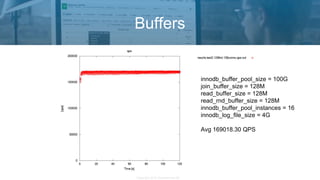
Buffers
innodb_buffer_pool_size = 100G
join_buffer_size = 128M
read_buffer_size = 128M
read_rnd_buffer_size = 128M
innodb_buffer_pool_instances = 16
innodb_log_file_size = 4G
Avg 169018.30 QPS
Copyright 2018 Severalnines AB
Buffers
innodb_buffer_pool_size = 100G
join_buffer_size = 16M
read_buffer_size = 16M
read_rnd_buffer_size = 16M
innodb_buffer_pool_instances = 16
innodb_log_file_size = 4G
Avg 169340.18 QPS
Copyright 2018 Severalnines AB
Buffers - sysbench-tpcc
innodb_buffer_pool_size = 100G
innodb_buffer_pool_instances = 16
innodb_log_file_size = 4G
Avg 66324.898 QPS
innodb_buffer_pool_size = 100G
join_buffer_size = 128M
read_buffer_size = 128M
read_rnd_buffer_size = 128M
innodb_buffer_pool_instances = 16
innodb_log_file_size = 4G
Avg 64663.332 QPS
innodb_buffer_pool_size = 100G
join_buffer_size = 16M
read_buffer_size = 16M
read_rnd_buffer_size = 16M
innodb_buffer_pool_instances = 16
innodb_log_file_size = 4G
Avg 60105.784 QPS
Copyright 2018 Severalnines AB
•innodb_flush_log_at_trx_commit - governs the durability in InnoDB
1 - full ACID compliance
2 - you may lose up to 1s of transactions when hardware crashes
0 - you may lose up to 1s of transactions when MariaDB crashes
•Significant change in the I/O performance - less flushes means less I/O and less overhead
•Pick whatever you like and whatever you need
Slaves may not require full durability if you have many of them
Galera Cluster nodes may also not require full durability
Tuning MariaDB configuration - I/O performance
Copyright 2018 Severalnines AB
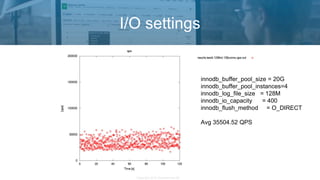
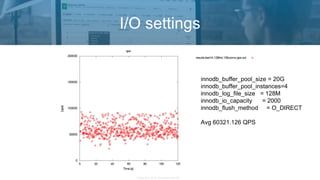
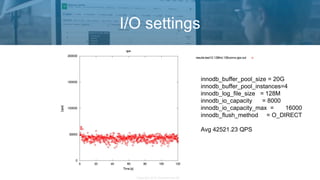
•innodb_io_capacity, innodb_io_capacity_max and innodb_lru_scan_depth - define number
of disk operations InnoDB can execute
•Set it too low and you may not fully utilize your hardware
•More not always better - aggressive flushing is not always the best option
Redo logs are there for a reason - to minimize number of writes to tablespaces
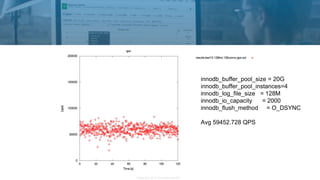
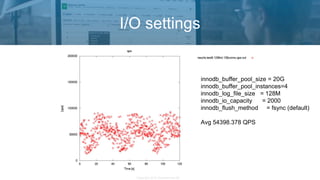
•innodb_flush_method:
O_DIRECT for BBU-backed hardware
O_DSYNC may work better with SAN
Benchmark your setup before you go live
Tuning MariaDB configuration - I/O performance
Copyright 2018 Severalnines AB
I/O settings
innodb_buffer_pool_size = 20G
innodb_buffer_pool_instances=4
innodb_log_file_size = 128M
innodb_io_capacity = 400
innodb_flush_method = O_DIRECT
Avg 35504.52 QPS
Copyright 2018 Severalnines AB
I/O settings
innodb_buffer_pool_size = 20G
innodb_buffer_pool_instances=4
innodb_log_file_size = 128M
innodb_io_capacity = 2000
innodb_flush_method = O_DIRECT
Avg 60321.126 QPS
Copyright 2018 Severalnines AB
innodb_buffer_pool_size = 20G
innodb_buffer_pool_instances=4
innodb_log_file_size = 128M
innodb_io_capacity = 2000
innodb_flush_method = O_DSYNC
Avg 59452.728 QPS
Copyright 2018 Severalnines AB
I/O settings
innodb_buffer_pool_size = 20G
innodb_buffer_pool_instances=4
innodb_log_file_size = 128M
innodb_io_capacity = 2000
innodb_flush_method = fsync (default)
Avg 54398.378 QPS
Copyright 2018 Severalnines AB
I/O settings
innodb_buffer_pool_size = 20G
innodb_buffer_pool_instances=4
innodb_log_file_size = 128M
innodb_io_capacity = 8000
innodb_io_capacity_max = 16000
innodb_flush_method = O_DIRECT
Avg 42521.23 QPS
Copyright 2018 Severalnines AB
•InnoDB Redo Logs are used to store write transactions and they are written sequentially
•MariaDB must not run out of space in them
•Larger logs help with better write merging
•Larger logs help with more stable flushing
•Larger logs may seriously impact recovery time in case of a crash
•The rule of thumb is to make them large enough to store at least 1h of writes
Tuning MariaDB configuration - I/O performance
Copyright 2018 Severalnines AB
•max_connections - keep it large enough to handle incoming connections
•If you need to handle thousands of connections, check the connection pooling options or a
proxy, ideally with connection multiplexing (ProxySQL)
•log_bin - you want to have binlogs enabled
Consider sync_binlog=1 Less performance, more durability
•skip_name_resolve - just to make sure your database won’t suffer when DNS will not be
reachable
Tuning MariaDB configuration
Copyright 2017 Severalnines AB
Copyright 2018 Severalnines AB
InnoDB Internals
Copyright 2018 Severalnines AB
InnoDB Internals
MariaDB [(none)]> select * from performance_schema.events_waits_summary_global_by_event_name WHERE
EVENT_NAME like '%mutex%' and count_star > 0 ORDER BY SUM_TIMER_WAIT DESC LIMIT 10;
+-------------------------------------------+------------+----------------+----------------+----------------+----------------+
| EVENT_NAME | COUNT_STAR | SUM_TIMER_WAIT | MIN_TIMER_WAIT | AVG_TIMER_WAIT | MAX_TIMER_WAIT |
+-------------------------------------------+------------+----------------+----------------+----------------+----------------+
| wait/synch/mutex/sql/THD::LOCK_thd_data | 2508482 | 699876746415 | 17325 | 278740 | 129770289110 |
| wait/synch/mutex/innodb/buf_pool_mutex | 877021 | 357991729095 | 17325 | 408100 | 21343581105 |
| wait/synch/mutex/sql/THD::LOCK_thd_kill | 585288 | 255054289875 | 17325 | 435435 | 62933799005 |
| wait/synch/mutex/sql/LOCK_table_cache | 1170607 | 209109547570 | 17325 | 178255 | 24837530795 |
| wait/synch/mutex/innodb/fil_system_mutex | 625176 | 128177721980 | 17325 | 204820 | 24410468390 |
| wait/synch/mutex/innodb/srv_sys_mutex | 3095 | 32831559145 | 18480 | 10607905 | 31612420455 |
| wait/synch/mutex/innodb/dict_sys_mutex | 405 | 30690657305 | 19635 | 75779165 | 5380793495 |
| wait/synch/mutex/mysys/BITMAP::mutex | 83582 | 19281719380 | 21175 | 230615 | 6739930890 |
| wait/synch/mutex/innodb/srv_threads_mutex | 36193 | 17454819690 | 18480 | 482020 | 9705892735 |
| wait/synch/mutex/innodb/log_sys_mutex | 155877 | 13870954790 | 16170 | 88935 | 4442297475 |
+-------------------------------------------+------------+----------------+----------------+----------------+----------------+
10 rows in set (0.004 sec)
performance_schema=ON
performance-schema-instrument='%=ON'
Copyright 2018 Severalnines AB
InnoDB Internals
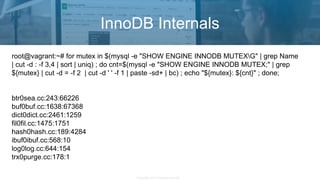
root@vagrant:~# for mutex in $(mysql -e "SHOW ENGINE INNODB MUTEXG" | grep Name
| cut -d : -f 3,4 | sort | uniq) ; do cnt=$(mysql -e "SHOW ENGINE INNODB MUTEX;" | grep
${mutex} | cut -d = -f 2 | cut -d ' ' -f 1 | paste -sd+ | bc) ; echo "${mutex}: ${cnt}" ; done;
btr0sea.cc:243:66226
buf0buf.cc:1638:67368
dict0dict.cc:2461:1259
fil0fil.cc:1475:1751
hash0hash.cc:189:4284
ibuf0ibuf.cc:568:10
log0log.cc:644:154
trx0purge.cc:178:1
Copyright 2018 Severalnines AB
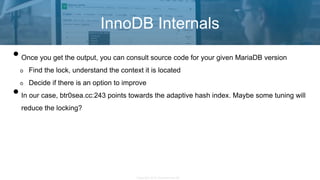
•Once you get the output, you can consult source code for your given MariaDB version
Find the lock, understand the context it is located
Decide if there is an option to improve
•In our case, btr0sea.cc:243 points towards the adaptive hash index. Maybe some tuning will
reduce the locking?
InnoDB Internals
Copyright 2018 Severalnines AB
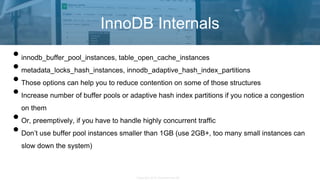
•innodb_buffer_pool_instances, table_open_cache_instances
•metadata_locks_hash_instances, innodb_adaptive_hash_index_partitions
•Those options can help you to reduce contention on some of those structures
•Increase number of buffer pools or adaptive hash index partitions if you notice a congestion
on them
•Or, preemptively, if you have to handle highly concurrent traffic
•Don’t use buffer pool instances smaller than 1GB (use 2GB+, too many small instances can
slow down the system)
InnoDB Internals
Copyright 2017 Severalnines AB
Copyright 2018 Severalnines AB
Summary
Copyright 2018 Severalnines AB
•Make sure you approach the tuning with a correct process
It requires patience
You should understand the results before making another change
•Think before you act
What workload I have?
What is the bottleneck that I’m facing?
•Proper trending system is a great help
•Don’t forget about other areas to improve
SQL, index hints, optimizer switches
Summary
Copyright 2012 Severalnines AB
Thank You!
Contact: krzysztof@severalnines.com
Q&A

MariaDB Performance Tuning Crash Course

  • 1.
    krzysztof@severalnines.com Copyright 2018 SeveralninesAB Presenter Krzysztof Książek, Senior Support Engineer @Severalnines MariaDB Performance Tuning 7th November 2018
  • 2.
    Copyright 2018 SeveralninesAB •Tuning process - how to make sure you make correct changes •Configuration tuning for MariaDB •InnoDB internals and contentions Agenda
  • 3.
    Copyright 2017 SeveralninesAB Copyright 2018 Severalnines AB Tuning Process
  • 4.
    Copyright 2018 SeveralninesAB •Never-ending story which starts once you install MariaDB on the host •You have to tune for a specific workload •Workload may change in time More data can make it I/O-bound Different query mix may increase CPU load and put stress on different parts of the InnoDB •Keep in mind that configuration tuning is not likely to give you a huge increase in performance (except if the server is really badly configured) •Make sure you understand why a configuration change ended up with a given result Tuning process
  • 5.
    Copyright 2018 SeveralninesAB Tuning process
  • 6.
    Copyright 2018 SeveralninesAB •You need a deterministic, test environment to make sure you can measure the impact of the changes •Environment should mirror production as close as possible, to make it more relevant •Changes should be introduced one at a time to ensure you understand the impact of each of them •Benchmark the system using queries as close to production as possible •Restore it to the original state for another round of tweaking •Rinse and repeat until you are happy with results Tuning process
  • 7.
    Copyright 2018 SeveralninesAB •Grab a backup of your production systems •Restore it on a host, restart MariaDB or reboot the host itself to clear caches •Capture real-world queries using slow log or tcpdump •Do a baseline run, replay queries using Percona Playback or pt-upgrade •Restore backup again, restart MariaDB or reboot the host itself to clear caches •Make _one_ change in my.cnf or OS settings •Replay queries using Percona Playback or pt-upgrade •Measure the difference, repeat the process by restoring the backup if you want to make one more change Tuning process
  • 8.
    Copyright 2017 SeveralninesAB Copyright 2018 Severalnines AB Tuning MariaDB configuration
  • 9.
    Copyright 2018 SeveralninesAB Disable Query Cache Default 10.3 settings Avg 17987.648 QPS Default 10.3 settings Query Cache disabled Avg 29299.84 QPS •Query cache - optimize it away by disabling Use external caching layer (ProxySQL, Redis, Memcached) All tests were done on r5d.4xlarge
  • 10.
    Copyright 2018 SeveralninesAB •InnoDB buffer pool - used to cache data and store dirty pages •More is better but you need to leave some memory for other buffers Per join buffers Per session buffers Temporary tables •You may have heard about 80% rule It’s more like 90% for large (i.e. 128GB) hosts Tuning MariaDB configuration - memory •Make sure you err on the side of ‘too small’ •Unless you run recent MariaDB (10.2 and up) where you can resize InnoDB buffer pool dynamically, without restart •For fairly loaded (~20-30 running threads) host with 128GB of memory it should be ok to leave ~15GB of memory free •All depends on the workload so your mileage may vary
  • 11.
    Copyright 2018 SeveralninesAB •Per-session buffers in InnoDB: sort_buffer_size, read_buffer_size, read_rnd_buffer_size •Per-join buffer: join_buffer_size •By default - small values •More _not_ always better At 256KB the way how memory allocates change smaller chunks use malloc() which is faster than mmap() •Make sure to benchmark your system after any change to those settings Tuning MariaDB configuration - memory
  • 12.
    Copyright 2018 SeveralninesAB Buffers innodb_buffer_pool_size = 100G innodb_buffer_pool_instances = 16 innodb_log_file_size = 4G Avg 169621.54 QPS
  • 13.
    Copyright 2018 SeveralninesAB Buffers innodb_buffer_pool_size = 100G join_buffer_size = 128M read_buffer_size = 128M read_rnd_buffer_size = 128M innodb_buffer_pool_instances = 16 innodb_log_file_size = 4G Avg 169018.30 QPS
  • 14.
    Copyright 2018 SeveralninesAB Buffers innodb_buffer_pool_size = 100G join_buffer_size = 16M read_buffer_size = 16M read_rnd_buffer_size = 16M innodb_buffer_pool_instances = 16 innodb_log_file_size = 4G Avg 169340.18 QPS
  • 15.
    Copyright 2018 SeveralninesAB Buffers - sysbench-tpcc innodb_buffer_pool_size = 100G innodb_buffer_pool_instances = 16 innodb_log_file_size = 4G Avg 66324.898 QPS innodb_buffer_pool_size = 100G join_buffer_size = 128M read_buffer_size = 128M read_rnd_buffer_size = 128M innodb_buffer_pool_instances = 16 innodb_log_file_size = 4G Avg 64663.332 QPS innodb_buffer_pool_size = 100G join_buffer_size = 16M read_buffer_size = 16M read_rnd_buffer_size = 16M innodb_buffer_pool_instances = 16 innodb_log_file_size = 4G Avg 60105.784 QPS
  • 16.
    Copyright 2018 SeveralninesAB •innodb_flush_log_at_trx_commit - governs the durability in InnoDB 1 - full ACID compliance 2 - you may lose up to 1s of transactions when hardware crashes 0 - you may lose up to 1s of transactions when MariaDB crashes •Significant change in the I/O performance - less flushes means less I/O and less overhead •Pick whatever you like and whatever you need Slaves may not require full durability if you have many of them Galera Cluster nodes may also not require full durability Tuning MariaDB configuration - I/O performance
  • 17.
    Copyright 2018 SeveralninesAB •innodb_io_capacity, innodb_io_capacity_max and innodb_lru_scan_depth - define number of disk operations InnoDB can execute •Set it too low and you may not fully utilize your hardware •More not always better - aggressive flushing is not always the best option Redo logs are there for a reason - to minimize number of writes to tablespaces •innodb_flush_method: O_DIRECT for BBU-backed hardware O_DSYNC may work better with SAN Benchmark your setup before you go live Tuning MariaDB configuration - I/O performance
  • 18.
    Copyright 2018 SeveralninesAB I/O settings innodb_buffer_pool_size = 20G innodb_buffer_pool_instances=4 innodb_log_file_size = 128M innodb_io_capacity = 400 innodb_flush_method = O_DIRECT Avg 35504.52 QPS
  • 19.
    Copyright 2018 SeveralninesAB I/O settings innodb_buffer_pool_size = 20G innodb_buffer_pool_instances=4 innodb_log_file_size = 128M innodb_io_capacity = 2000 innodb_flush_method = O_DIRECT Avg 60321.126 QPS
  • 20.
    Copyright 2018 SeveralninesAB innodb_buffer_pool_size = 20G innodb_buffer_pool_instances=4 innodb_log_file_size = 128M innodb_io_capacity = 2000 innodb_flush_method = O_DSYNC Avg 59452.728 QPS
  • 21.
    Copyright 2018 SeveralninesAB I/O settings innodb_buffer_pool_size = 20G innodb_buffer_pool_instances=4 innodb_log_file_size = 128M innodb_io_capacity = 2000 innodb_flush_method = fsync (default) Avg 54398.378 QPS
  • 22.
    Copyright 2018 SeveralninesAB I/O settings innodb_buffer_pool_size = 20G innodb_buffer_pool_instances=4 innodb_log_file_size = 128M innodb_io_capacity = 8000 innodb_io_capacity_max = 16000 innodb_flush_method = O_DIRECT Avg 42521.23 QPS
  • 23.
    Copyright 2018 SeveralninesAB •InnoDB Redo Logs are used to store write transactions and they are written sequentially •MariaDB must not run out of space in them •Larger logs help with better write merging •Larger logs help with more stable flushing •Larger logs may seriously impact recovery time in case of a crash •The rule of thumb is to make them large enough to store at least 1h of writes Tuning MariaDB configuration - I/O performance
  • 24.
    Copyright 2018 SeveralninesAB •max_connections - keep it large enough to handle incoming connections •If you need to handle thousands of connections, check the connection pooling options or a proxy, ideally with connection multiplexing (ProxySQL) •log_bin - you want to have binlogs enabled Consider sync_binlog=1 Less performance, more durability •skip_name_resolve - just to make sure your database won’t suffer when DNS will not be reachable Tuning MariaDB configuration
  • 25.
    Copyright 2017 SeveralninesAB Copyright 2018 Severalnines AB InnoDB Internals
  • 26.
    Copyright 2018 SeveralninesAB InnoDB Internals MariaDB [(none)]> select * from performance_schema.events_waits_summary_global_by_event_name WHERE EVENT_NAME like '%mutex%' and count_star > 0 ORDER BY SUM_TIMER_WAIT DESC LIMIT 10; +-------------------------------------------+------------+----------------+----------------+----------------+----------------+ | EVENT_NAME | COUNT_STAR | SUM_TIMER_WAIT | MIN_TIMER_WAIT | AVG_TIMER_WAIT | MAX_TIMER_WAIT | +-------------------------------------------+------------+----------------+----------------+----------------+----------------+ | wait/synch/mutex/sql/THD::LOCK_thd_data | 2508482 | 699876746415 | 17325 | 278740 | 129770289110 | | wait/synch/mutex/innodb/buf_pool_mutex | 877021 | 357991729095 | 17325 | 408100 | 21343581105 | | wait/synch/mutex/sql/THD::LOCK_thd_kill | 585288 | 255054289875 | 17325 | 435435 | 62933799005 | | wait/synch/mutex/sql/LOCK_table_cache | 1170607 | 209109547570 | 17325 | 178255 | 24837530795 | | wait/synch/mutex/innodb/fil_system_mutex | 625176 | 128177721980 | 17325 | 204820 | 24410468390 | | wait/synch/mutex/innodb/srv_sys_mutex | 3095 | 32831559145 | 18480 | 10607905 | 31612420455 | | wait/synch/mutex/innodb/dict_sys_mutex | 405 | 30690657305 | 19635 | 75779165 | 5380793495 | | wait/synch/mutex/mysys/BITMAP::mutex | 83582 | 19281719380 | 21175 | 230615 | 6739930890 | | wait/synch/mutex/innodb/srv_threads_mutex | 36193 | 17454819690 | 18480 | 482020 | 9705892735 | | wait/synch/mutex/innodb/log_sys_mutex | 155877 | 13870954790 | 16170 | 88935 | 4442297475 | +-------------------------------------------+------------+----------------+----------------+----------------+----------------+ 10 rows in set (0.004 sec) performance_schema=ON performance-schema-instrument='%=ON'
  • 27.
    Copyright 2018 SeveralninesAB InnoDB Internals root@vagrant:~# for mutex in $(mysql -e "SHOW ENGINE INNODB MUTEXG" | grep Name | cut -d : -f 3,4 | sort | uniq) ; do cnt=$(mysql -e "SHOW ENGINE INNODB MUTEX;" | grep ${mutex} | cut -d = -f 2 | cut -d ' ' -f 1 | paste -sd+ | bc) ; echo "${mutex}: ${cnt}" ; done; btr0sea.cc:243:66226 buf0buf.cc:1638:67368 dict0dict.cc:2461:1259 fil0fil.cc:1475:1751 hash0hash.cc:189:4284 ibuf0ibuf.cc:568:10 log0log.cc:644:154 trx0purge.cc:178:1
  • 28.
    Copyright 2018 SeveralninesAB •Once you get the output, you can consult source code for your given MariaDB version Find the lock, understand the context it is located Decide if there is an option to improve •In our case, btr0sea.cc:243 points towards the adaptive hash index. Maybe some tuning will reduce the locking? InnoDB Internals
  • 29.
    Copyright 2018 SeveralninesAB •innodb_buffer_pool_instances, table_open_cache_instances •metadata_locks_hash_instances, innodb_adaptive_hash_index_partitions •Those options can help you to reduce contention on some of those structures •Increase number of buffer pools or adaptive hash index partitions if you notice a congestion on them •Or, preemptively, if you have to handle highly concurrent traffic •Don’t use buffer pool instances smaller than 1GB (use 2GB+, too many small instances can slow down the system) InnoDB Internals
  • 30.
    Copyright 2017 SeveralninesAB Copyright 2018 Severalnines AB Summary
  • 31.
    Copyright 2018 SeveralninesAB •Make sure you approach the tuning with a correct process It requires patience You should understand the results before making another change •Think before you act What workload I have? What is the bottleneck that I’m facing? •Proper trending system is a great help •Don’t forget about other areas to improve SQL, index hints, optimizer switches Summary
  • 32.
    Copyright 2012 SeveralninesAB Thank You! Contact: krzysztof@severalnines.com Q&A