MAPERITIVE

CREATING CUSTOM MAP TILES FOR
BOUNDED AREAS
by Calvin Ng / @calvinnwq
BACKGROUND
I've created an app which utilises Twitter's Streaming API
to retrieve real time tweets with geolocation and plot them
onto a map using leaflet.js.
...
Then came the requirement
...

CUSTOM DESIGNED MAP
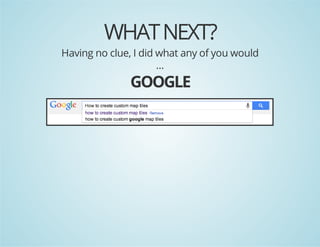
WHAT NEXT?

Having no clue, I did what any of you would
...

GOOGLE
MAPERITIVE

This presentation will go through the solution I stuck with
after a couple others that I've tried
...

SO LET'S BEGIN!
1. MAPERITIVE

“Maperitive is a FREE desktop application for drawing maps
based on OpenStreetMap and GPS data. You can define what
gets on the map and how it is painted. You can also export
these maps into bitmaps and SVG files and print them.”
SYSTEM REQUIREMENTS
Windows: XP SP3 or later with Microsoft.NET 4 installed.
Linux & Mac: latest Mono installed.
WHAT CAN I DO WITH MAPERITIVE?
Make maps with custom content and style
Render relief contours, hillshading, hypsometric tinting
Exporting maps to bitmaps or SVG files
Make map tiles for the web
Automating mapmaking through scripts, Python and
Maperitive command-line console
MAPERITIVE LINKS
Download Link
Ten Minute Intro
Maperitive Documentation
2. STARTING UP MAPERITIVE
OPENING UP MAPERITIVE ON WINDOWS / MAC / LINUX
WINDOWS
Ensure XP SP3 or later with Microsoft.NET 4 installed and
simply run Maperitive.exe
MAC / LINUX
Ensure Mono is installed and assuming Maperitive is
extracted to Desktop, run the following:
$s ~DstpMprtv/aeiies
h /eko/aeiieMprtv.h
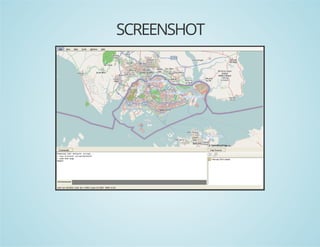
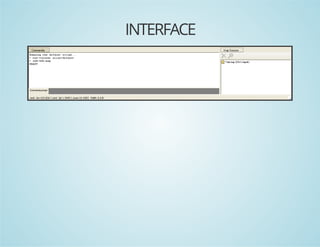
SCREENSHOT
INTERFACE
3. GEO BOUNDING BOX

RETRIEVING GEO COORDINATES AND SETTING UP GEO BOUNDS
CONSIDERATIONS?
Are there any specific countries? (e.g. Singapore)
What are the zoom levels to consider?
Is the map fixed or interactive?
ONLINE TOOLS
1. OpenStreetMap
2. Bounding Box by Klokan Technologies
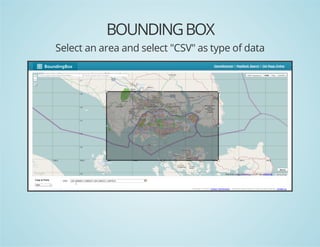
BOUNDING BOX
Select an area and select "CSV" as type of data
4. EXPORTING BITMAP
EXPORTING PNG FOR CUSTOM DESIGNING
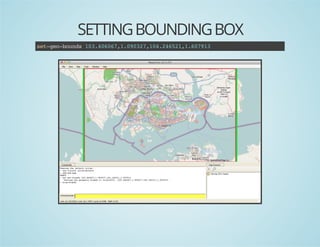
SETTING BOUNDING BOX
stgobud 13466,.93714262,.093
e-e-ons 0.0071002,0.4511671
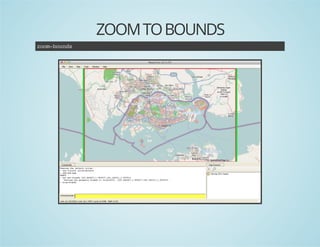
ZOOM TO BOUNDS
zo-ons
ombud
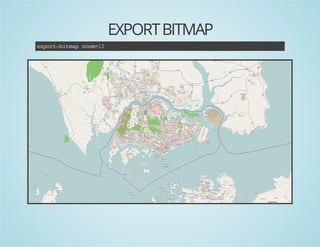
EXPORT BITMAP
epr-impzo=2
xotbta om1
EXPORT BITMAP
2 files will be generated in output folder:
output.png
output.png.georef (required for later steps)
5. EDITING CUSTOM MAP
DESIGNING OF CUSTOM MAP AND CONSTRAINTS
CONSTRAINTS?
output.png should be the template to work upon.
Custom designed map (let's call it map.png) should retain
exact dimensions as output.png
Multiple layers to show terrain / roads / etc.?
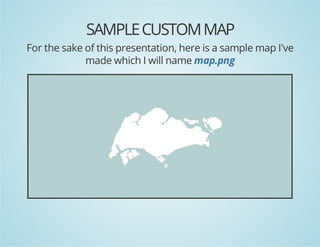
SAMPLE CUSTOM MAP
For the sake of this presentation, here is a sample map I've
made which I will name map.png
6. LOADING CUSTOM MAP
LOAD CUSTOM EDITED MAP IN MAPERITIVE
CUSTOM MAP FILES
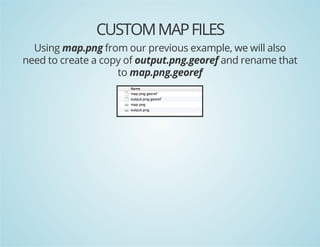
Using map.png from our previous example, we will also
need to create a copy of output.png.georef and rename that
to map.png.georef
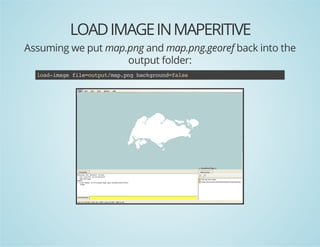
LOAD IMAGE IN MAPERITIVE
Assuming we put map.png and map.png.georef back into the
output folder:
la-mg fl=uptmppgbcgon=as
odiae ieotu/a.n akrudfle
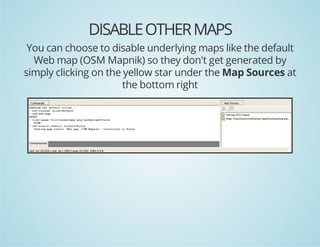
DISABLE OTHER MAPS
You can choose to disable underlying maps like the default
Web map (OSM Mapnik) so they don't get generated by
simply clicking on the yellow star under the Map Sources at
the bottom right
7. GENERATE TILES

GENERATING TILES FOR SPECIFIC ZOOM LEVELS
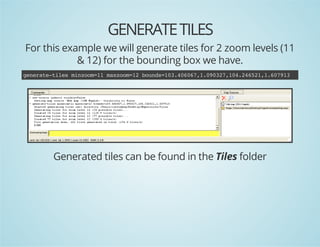
GENERATE TILES
For this example we will generate tiles for 2 zoom levels (11
& 12) for the bounding box we have.
gnrt-ie mnom1 mxom1 bud=0.0071002,0.4511671
eeaetls izo=1 azo=2 ons13466,.93714262,.093

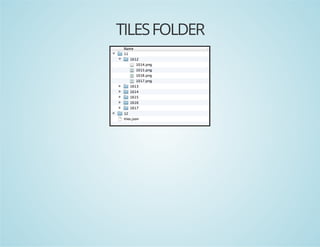
Generated tiles can be found in the Tiles folder
TILES FOLDER
8. MAP TILES
HOW TO USE THEM
HOSTING THEM
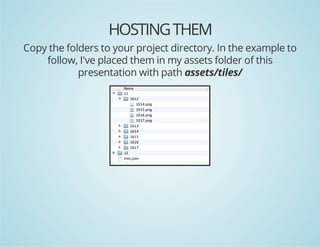
Copy the folders to your project directory. In the example to
follow, I've placed them in my assets folder of this
presentation with path assets/tiles/
REFERENCING THEM IN CODE
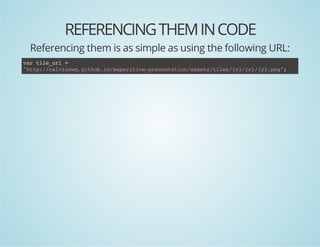
Referencing them is as simple as using the following URL:
vrtl_r =
a ieul
"tp/clinqgtu.omprtv-rsnainast/ie/z/x/y.n"
ht:/avnw.ihbi/aeiiepeetto/sestls{}{}{}pg;
EXAMPLE CODE
In this example, I will make use of leaflet.js.

/ cet bud
/ rae ons
vrbud =nwLLtnBud(
a ons
e .aLgons
nwLLtn(.937 13466)
e .aLg1002, 0.007
,nwLLtn(.093 14262)
e .aLg1671, 0.451
)
;
/ cet ampi te"a"dv stteve t agvnpaeadzo
/ rae
a n h mp i, e h iw o
ie lc n om
vrmp=Lmp'a' {
a a
.a(mp,
"etr :[.3,1380
cne"
135 0.2]
,"om :1
zo"
1
,"iZo":1
mnom
1
,"aZo":1
mxom
2
,"aBud":bud
mxons
ons
};
)

/ ada OeSreMptl lyr
/ d n pnteta ie ae
LtlLyr'tp/clinqgtu.omprtv-rsnainast/ie/z/x/y.n'
.ieae(ht:/avnw.ihbi/aeiiepeetto/sestls{}{}{}pg
atiuin "avnscso mpdsg"
trbto: Cli' utm a ein
,mnom 1
iZo: 1
,mxom 1
aZo: 2
}.dT(a)
)adomp;
EXAMPLE RESULT
Run it!
SUMMARY

WHAT DID WE LEARN TODAY?
MAPERITIVE SUMMARY
What Maperitive is
Starting up Maperitive
STEPS SUMMARY
1.
2.
3.
4.
5.

Obtaining geo bounding box
Exporting bitmap
Editing custom maps
Loading custom maps in Maperitive
Generating map tiles
FIN ~

Thank you for your attention

Maperitive

  • 1.
    MAPERITIVE CREATING CUSTOM MAPTILES FOR BOUNDED AREAS by Calvin Ng / @calvinnwq
  • 2.
    BACKGROUND I've created anapp which utilises Twitter's Streaming API to retrieve real time tweets with geolocation and plot them onto a map using leaflet.js. ... Then came the requirement ... CUSTOM DESIGNED MAP
  • 3.
    WHAT NEXT? Having noclue, I did what any of you would ... GOOGLE
  • 4.
    MAPERITIVE This presentation willgo through the solution I stuck with after a couple others that I've tried ... SO LET'S BEGIN!
  • 5.
    1. MAPERITIVE “Maperitive isa FREE desktop application for drawing maps based on OpenStreetMap and GPS data. You can define what gets on the map and how it is painted. You can also export these maps into bitmaps and SVG files and print them.”
  • 6.
    SYSTEM REQUIREMENTS Windows: XPSP3 or later with Microsoft.NET 4 installed. Linux & Mac: latest Mono installed.
  • 7.
    WHAT CAN IDO WITH MAPERITIVE? Make maps with custom content and style Render relief contours, hillshading, hypsometric tinting Exporting maps to bitmaps or SVG files Make map tiles for the web Automating mapmaking through scripts, Python and Maperitive command-line console
  • 8.
    MAPERITIVE LINKS Download Link TenMinute Intro Maperitive Documentation
  • 9.
    2. STARTING UPMAPERITIVE OPENING UP MAPERITIVE ON WINDOWS / MAC / LINUX
  • 10.
    WINDOWS Ensure XP SP3or later with Microsoft.NET 4 installed and simply run Maperitive.exe
  • 11.
    MAC / LINUX EnsureMono is installed and assuming Maperitive is extracted to Desktop, run the following: $s ~DstpMprtv/aeiies h /eko/aeiieMprtv.h
  • 12.
  • 13.
  • 14.
    3. GEO BOUNDINGBOX RETRIEVING GEO COORDINATES AND SETTING UP GEO BOUNDS
  • 15.
    CONSIDERATIONS? Are there anyspecific countries? (e.g. Singapore) What are the zoom levels to consider? Is the map fixed or interactive?
  • 16.
    ONLINE TOOLS 1. OpenStreetMap 2.Bounding Box by Klokan Technologies
  • 17.
    BOUNDING BOX Select anarea and select "CSV" as type of data
  • 18.
    4. EXPORTING BITMAP EXPORTINGPNG FOR CUSTOM DESIGNING
  • 19.
    SETTING BOUNDING BOX stgobud13466,.93714262,.093 e-e-ons 0.0071002,0.4511671
  • 20.
  • 21.
  • 22.
    EXPORT BITMAP 2 fileswill be generated in output folder: output.png output.png.georef (required for later steps)
  • 23.
    5. EDITING CUSTOMMAP DESIGNING OF CUSTOM MAP AND CONSTRAINTS
  • 24.
    CONSTRAINTS? output.png should bethe template to work upon. Custom designed map (let's call it map.png) should retain exact dimensions as output.png Multiple layers to show terrain / roads / etc.?
  • 25.
    SAMPLE CUSTOM MAP Forthe sake of this presentation, here is a sample map I've made which I will name map.png
  • 26.
    6. LOADING CUSTOMMAP LOAD CUSTOM EDITED MAP IN MAPERITIVE
  • 27.
    CUSTOM MAP FILES Usingmap.png from our previous example, we will also need to create a copy of output.png.georef and rename that to map.png.georef
  • 28.
    LOAD IMAGE INMAPERITIVE Assuming we put map.png and map.png.georef back into the output folder: la-mg fl=uptmppgbcgon=as odiae ieotu/a.n akrudfle
  • 29.
    DISABLE OTHER MAPS Youcan choose to disable underlying maps like the default Web map (OSM Mapnik) so they don't get generated by simply clicking on the yellow star under the Map Sources at the bottom right
  • 30.
    7. GENERATE TILES GENERATINGTILES FOR SPECIFIC ZOOM LEVELS
  • 31.
    GENERATE TILES For thisexample we will generate tiles for 2 zoom levels (11 & 12) for the bounding box we have. gnrt-ie mnom1 mxom1 bud=0.0071002,0.4511671 eeaetls izo=1 azo=2 ons13466,.93714262,.093 Generated tiles can be found in the Tiles folder
  • 32.
  • 33.
    8. MAP TILES HOWTO USE THEM
  • 34.
    HOSTING THEM Copy thefolders to your project directory. In the example to follow, I've placed them in my assets folder of this presentation with path assets/tiles/
  • 35.
    REFERENCING THEM INCODE Referencing them is as simple as using the following URL: vrtl_r = a ieul "tp/clinqgtu.omprtv-rsnainast/ie/z/x/y.n" ht:/avnw.ihbi/aeiiepeetto/sestls{}{}{}pg;
  • 36.
    EXAMPLE CODE In thisexample, I will make use of leaflet.js. / cet bud / rae ons vrbud =nwLLtnBud( a ons e .aLgons nwLLtn(.937 13466) e .aLg1002, 0.007 ,nwLLtn(.093 14262) e .aLg1671, 0.451 ) ; / cet ampi te"a"dv stteve t agvnpaeadzo / rae a n h mp i, e h iw o ie lc n om vrmp=Lmp'a' { a a .a(mp, "etr :[.3,1380 cne" 135 0.2] ,"om :1 zo" 1 ,"iZo":1 mnom 1 ,"aZo":1 mxom 2 ,"aBud":bud mxons ons }; ) / ada OeSreMptl lyr / d n pnteta ie ae LtlLyr'tp/clinqgtu.omprtv-rsnainast/ie/z/x/y.n' .ieae(ht:/avnw.ihbi/aeiiepeetto/sestls{}{}{}pg atiuin "avnscso mpdsg" trbto: Cli' utm a ein ,mnom 1 iZo: 1 ,mxom 1 aZo: 2 }.dT(a) )adomp;
  • 37.
  • 38.
    SUMMARY WHAT DID WELEARN TODAY?
  • 39.
    MAPERITIVE SUMMARY What Maperitiveis Starting up Maperitive
  • 40.
    STEPS SUMMARY 1. 2. 3. 4. 5. Obtaining geobounding box Exporting bitmap Editing custom maps Loading custom maps in Maperitive Generating map tiles
  • 41.
    FIN ~ Thank youfor your attention