
Data + Algorithms = Knowledge


Facebook Analytics


                  With Elastic Map/Reduce
                      – a Hands-on Workshop

                                            November 12, 2012
                                        J Singh, DataThinks.org


                             1
Take-away Messages

• Map Reduce is simple, Hadoop is one implementation of MR…
   – …made even simpler by services like Elastic Map Reduce


• But Map Reduce requires a different style of programming…
   – …and a different set of techniques for debugging


• Facebook data can get big very quickly…
   – …and storage and bandwidth costs can dominate your solution


• Analytics is an iterative (agile) process…
   – …each iteration requires evaluating results, and tuning the algorithms,
     possibly the acquisition of more data

                       © J Singh, 2012                                  2
                                2
Signing Up for AWS

The steps required to obtain an AWS account
   Create an AWS account (http://aws.amazon.com).
    –   http://www.slideshare.net/AmazonWebServices/video-how-to-sign-up-for-
        amazon-web-services-8700872
    –   Requires a valid credit card and a phone based identification.
   Sign in to the AWS Management Console
    – http://aws.amazon.com/console


                          © J Singh, 2012                                   3
                                   3
Elastic Map Reduce Resources

• Summary of the offering

• Elastic MapReduce Training

• Getting Started Guide

• Developers Guide


                     © J Singh, 2012   4
                              4
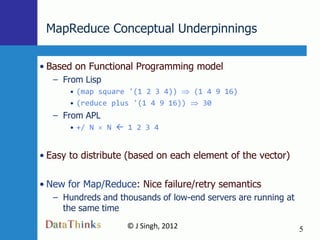
MapReduce Conceptual Underpinnings

• Based on Functional Programming model
   – From Lisp
       • (map square '(1 2 3 4))   (1 4 9 16)
       • (reduce plus '(1 4 9 16))   30
   – From APL
       • +/ N    N  1 2 3 4


• Easy to distribute (based on each element of the vector)

• New for Map/Reduce: Nice failure/retry semantics
   – Hundreds and thousands of low-end servers are running at
     the same time
                     © J Singh, 2012                            5
                              5
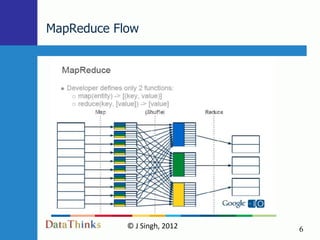
MapReduce Flow


            © J Singh, 2012   6
                     6
Elastic Map Reduce – Summary

• Hadoop installed and maintained by Amazon
   – We can focus on programming
   – Offers a few options on map and reduce programs

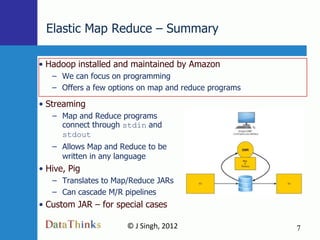
• Streaming
   – Map and Reduce programs
     connect through stdin and
     stdout
   – Allows Map and Reduce to be
     written in any language
• Hive, Pig
   – Translates to Map/Reduce JARs
   – Can cascade M/R pipelines
• Custom JAR – for special cases

                      © J Singh, 2012                  7
                               7
Elastic Map Reduce – Architecture

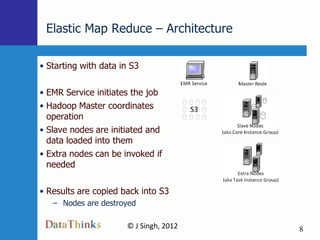
• Starting with data in S3

• EMR Service initiates the job
• Hadoop Master coordinates
  operation
• Slave nodes are initiated and
  data loaded into them
• Extra nodes can be invoked if
  needed

• Results are copied back into S3
   – Nodes are destroyed

                      © J Singh, 2012   8
                               8
Elastic Map Reduce – Word Count

• Use the AWS Management Console >> Elastic MapReduce
  – Define Job Flow
      • Hadoop Version 1.0.3
      • Run your own application
          – Steaming
  – Specify Parameters
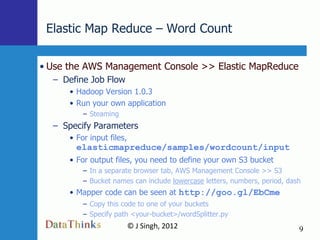
      • For input files,
        elasticmapreduce/samples/wordcount/input
      • For output files, you need to define your own S3 bucket
          – In a separate browser tab, AWS Management Console >> S3
          – Bucket names can include lowercase letters, numbers, period, dash
      • Mapper code can be seen at http://goo.gl/EbCme
          – Copy this code to one of your buckets
          – Specify path <your-bucket>/wordSplitter.py
                           © J Singh, 2012                                  9
                                    9
Elastic Map Reduce – Word Count (p2)

• Configure EC2 Instances
• Advanced Options
   – Optional: Amazon EC2 Key Pair
       • To log into the master and make changes to a running job
          – E.g,, add extra nodes to speed up processing
   – Amazon S3 Log Path
       • <your-bucket>/log-2012-11-12--19-30
• Accept all other defaults and go!


                       © J Singh, 2012                              10
                                10
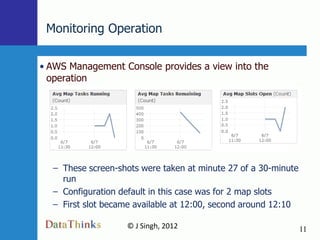
Monitoring Operation

• AWS Management Console provides a view into the
  operation


  – These screen-shots were taken at minute 27 of a 30-minute
    run
  – Configuration default in this case was for 2 map slots
  – First slot became available at 12:00, second around 12:10

                   © J Singh, 2012                              11
                           11
Elastic Map Reduce – Debugging

• AWS console and the log files provide clues on what went
  wrong and how to fix it

• Make a change that will break the operation and examine
  the AWS console to find the error you introduced
   – Introduce a parsing error in the mapper program
   – Uncomment these lines to have it raise an exception
                 import random
                 x = 1 / random.randint(0,1000)
   – Save the file to an S3 bucket and run
   – Can you find where EMR reveals what happened?


                     © J Singh, 2012                         12
                             12
Facebook Analytics – Summary

• Extend the architecture
   – Import Facebook data into S3
   – Change Map Reduce programs as required


                      © J Singh, 2012         13
                              13
Facebook Analytics – Observations

• Fetching and staging data is the real challenge in putting
  together an analytics solution
   – For unstructured data, it requires
       • An understanding of the data model at the source
       • Custom code to read it


   – For structured data, consider Pig/Hive (higher-level Hadoop
     components)
       • Pig/Hive can read/write tables formatted as CSV/TSV files in S3
          – Either we need to bring files into S3
          – Or point Pig/Hive at a JDBC connection
       • An opportunity to rethink the ETL pipeline?


                       © J Singh, 2012                                 14
                                 14
Facebook Analytics – Data Collection

• The exercise is based on everyone‟s Facebook data
• Log into http://apps.facebook.com/map-reduce-workshop
   – Requires permission to get
       • Information about you,
       • Your friends,
       • Your likes, your friends‟ likes.
   – Randomly selects 10 of those friends
   – Randomly selects 25 of their likes
   – Anonymizes your friends‟ Facebook IDs before storing into
     S3
• All data, even though opaque, will be deleted at the end of
 the workshop

                        © J Singh, 2012                          15
                                  15
Facebook Analytics – Data Collected


Original = 75   Friends = 750        Likes = up to about 20,000

• Each user record shows anonymized user ID and their likes
   –   4110002004281   ['21506845769', '345722385482735', '93433060687']


                        © J Singh, 2012                              16
                                16
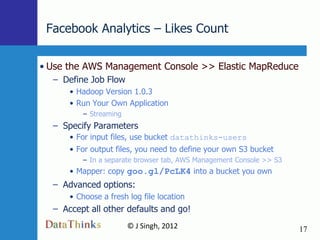
Facebook Analytics – Likes Count

• Use the AWS Management Console >> Elastic MapReduce
  – Define Job Flow
      • Hadoop Version 1.0.3
      • Run Your Own Application
         – Streaming
  – Specify Parameters
      • For input files, use bucket datathinks-users
      • For output files, you need to define your own S3 bucket
         – In a separate browser tab, AWS Management Console >> S3
      • Mapper: copy goo.gl/PcLK4 into a bucket you own
  – Advanced options:
      • Choose a fresh log file location
  – Accept all other defaults and go!
                       © J Singh, 2012                               17
                               17
Viewing the Results

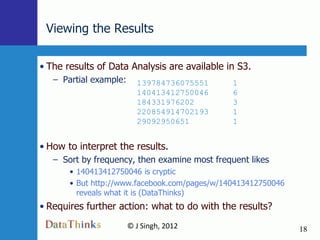
• The results of Data Analysis are available in S3.
   – Partial example:     139784736075551      1
                          140413412750046      6
                          184331976202         3
                          220854914702193      1
                          29092950651          1


• How to interpret the results.
   – Sort by frequency, then examine most frequent likes
       • 140413412750046 is cryptic
       • But http://www.facebook.com/pages/w/140413412750046
         reveals what it is (DataThinks)
• Requires further action: what to do with the results?
                        © J Singh, 2012                        18
                                18
Algorithm Discussion

• The algorithm based on exact matches for likes may be
  too restrictive
  – „Ella Fitzgerald‟ != „Duke Ellington‟
  – But people who like Ella Fitzgerald may be reachable the
    same way as people who like Duke Ellington

  – An idea to explore further:
      • Is there a way to find ID‟s that we might consider equivalent?


                      © J Singh, 2012                                    19
                              19
Data Collected and Embellished


Original = 75   Friends = 750   Likes = 15,000   Similar Likes = 150,000


                         © J Singh, 2012                                   20
                                  20
Extended Facebook Analytics – Summary

• Extend the architecture
   – Get mappers to fetch “similar likes” from the internet


                        © J Singh, 2012                       21
                                21
Facebook Analytics – Showing Results

• The other challenge in putting together an analytics
  solution is displaying results
   – Demo of our results page


                    © J Singh, 2012                      22
                            22
Take-away Messages

• Map Reduce is simple, Hadoop is one implementation of MR…
   – …made even simpler by services like Elastic Map Reduce


• But Map Reduce requires a different style of programming…
   – …and a different set of techniques for debugging


• Facebook data can get big very quickly…
   – …and storage and bandwidth costs can dominate your solution


• Analytics is an iterative (agile) process…
   – …each iteration requires evaluating results, and tuning the algorithms,
     possibly the acquisition of more data

                       © J Singh, 2012                                  23
                                23
Thank you

• J Singh
   – President, Early Stage IT
       • Technology Services and Strategy for Startups


• DataThinks.org is a service of Early Stage IT
   – “Big Data” analytics solutions


                      © J Singh, 2012                    24
                              24

Facebook Analytics with Elastic Map/Reduce

  • 1.
    Data + Algorithms= Knowledge Facebook Analytics With Elastic Map/Reduce – a Hands-on Workshop November 12, 2012 J Singh, DataThinks.org 1
  • 2.
    Take-away Messages • MapReduce is simple, Hadoop is one implementation of MR… – …made even simpler by services like Elastic Map Reduce • But Map Reduce requires a different style of programming… – …and a different set of techniques for debugging • Facebook data can get big very quickly… – …and storage and bandwidth costs can dominate your solution • Analytics is an iterative (agile) process… – …each iteration requires evaluating results, and tuning the algorithms, possibly the acquisition of more data © J Singh, 2012 2 2
  • 3.
    Signing Up forAWS The steps required to obtain an AWS account  Create an AWS account (http://aws.amazon.com). – http://www.slideshare.net/AmazonWebServices/video-how-to-sign-up-for- amazon-web-services-8700872 – Requires a valid credit card and a phone based identification.  Sign in to the AWS Management Console – http://aws.amazon.com/console © J Singh, 2012 3 3
  • 4.
    Elastic Map ReduceResources • Summary of the offering • Elastic MapReduce Training • Getting Started Guide • Developers Guide © J Singh, 2012 4 4
  • 5.
    MapReduce Conceptual Underpinnings •Based on Functional Programming model – From Lisp • (map square '(1 2 3 4)) (1 4 9 16) • (reduce plus '(1 4 9 16)) 30 – From APL • +/ N N  1 2 3 4 • Easy to distribute (based on each element of the vector) • New for Map/Reduce: Nice failure/retry semantics – Hundreds and thousands of low-end servers are running at the same time © J Singh, 2012 5 5
  • 6.
    MapReduce Flow © J Singh, 2012 6 6
  • 7.
    Elastic Map Reduce– Summary • Hadoop installed and maintained by Amazon – We can focus on programming – Offers a few options on map and reduce programs • Streaming – Map and Reduce programs connect through stdin and stdout – Allows Map and Reduce to be written in any language • Hive, Pig – Translates to Map/Reduce JARs – Can cascade M/R pipelines • Custom JAR – for special cases © J Singh, 2012 7 7
  • 8.
    Elastic Map Reduce– Architecture • Starting with data in S3 • EMR Service initiates the job • Hadoop Master coordinates operation • Slave nodes are initiated and data loaded into them • Extra nodes can be invoked if needed • Results are copied back into S3 – Nodes are destroyed © J Singh, 2012 8 8
  • 9.
    Elastic Map Reduce– Word Count • Use the AWS Management Console >> Elastic MapReduce – Define Job Flow • Hadoop Version 1.0.3 • Run your own application – Steaming – Specify Parameters • For input files, elasticmapreduce/samples/wordcount/input • For output files, you need to define your own S3 bucket – In a separate browser tab, AWS Management Console >> S3 – Bucket names can include lowercase letters, numbers, period, dash • Mapper code can be seen at http://goo.gl/EbCme – Copy this code to one of your buckets – Specify path <your-bucket>/wordSplitter.py © J Singh, 2012 9 9
  • 10.
    Elastic Map Reduce– Word Count (p2) • Configure EC2 Instances • Advanced Options – Optional: Amazon EC2 Key Pair • To log into the master and make changes to a running job – E.g,, add extra nodes to speed up processing – Amazon S3 Log Path • <your-bucket>/log-2012-11-12--19-30 • Accept all other defaults and go! © J Singh, 2012 10 10
  • 11.
    Monitoring Operation • AWSManagement Console provides a view into the operation – These screen-shots were taken at minute 27 of a 30-minute run – Configuration default in this case was for 2 map slots – First slot became available at 12:00, second around 12:10 © J Singh, 2012 11 11
  • 12.
    Elastic Map Reduce– Debugging • AWS console and the log files provide clues on what went wrong and how to fix it • Make a change that will break the operation and examine the AWS console to find the error you introduced – Introduce a parsing error in the mapper program – Uncomment these lines to have it raise an exception import random x = 1 / random.randint(0,1000) – Save the file to an S3 bucket and run – Can you find where EMR reveals what happened? © J Singh, 2012 12 12
  • 13.
    Facebook Analytics –Summary • Extend the architecture – Import Facebook data into S3 – Change Map Reduce programs as required © J Singh, 2012 13 13
  • 14.
    Facebook Analytics –Observations • Fetching and staging data is the real challenge in putting together an analytics solution – For unstructured data, it requires • An understanding of the data model at the source • Custom code to read it – For structured data, consider Pig/Hive (higher-level Hadoop components) • Pig/Hive can read/write tables formatted as CSV/TSV files in S3 – Either we need to bring files into S3 – Or point Pig/Hive at a JDBC connection • An opportunity to rethink the ETL pipeline? © J Singh, 2012 14 14
  • 15.
    Facebook Analytics –Data Collection • The exercise is based on everyone‟s Facebook data • Log into http://apps.facebook.com/map-reduce-workshop – Requires permission to get • Information about you, • Your friends, • Your likes, your friends‟ likes. – Randomly selects 10 of those friends – Randomly selects 25 of their likes – Anonymizes your friends‟ Facebook IDs before storing into S3 • All data, even though opaque, will be deleted at the end of the workshop © J Singh, 2012 15 15
  • 16.
    Facebook Analytics –Data Collected Original = 75 Friends = 750 Likes = up to about 20,000 • Each user record shows anonymized user ID and their likes – 4110002004281 ['21506845769', '345722385482735', '93433060687'] © J Singh, 2012 16 16
  • 17.
    Facebook Analytics –Likes Count • Use the AWS Management Console >> Elastic MapReduce – Define Job Flow • Hadoop Version 1.0.3 • Run Your Own Application – Streaming – Specify Parameters • For input files, use bucket datathinks-users • For output files, you need to define your own S3 bucket – In a separate browser tab, AWS Management Console >> S3 • Mapper: copy goo.gl/PcLK4 into a bucket you own – Advanced options: • Choose a fresh log file location – Accept all other defaults and go! © J Singh, 2012 17 17
  • 18.
    Viewing the Results •The results of Data Analysis are available in S3. – Partial example: 139784736075551 1 140413412750046 6 184331976202 3 220854914702193 1 29092950651 1 • How to interpret the results. – Sort by frequency, then examine most frequent likes • 140413412750046 is cryptic • But http://www.facebook.com/pages/w/140413412750046 reveals what it is (DataThinks) • Requires further action: what to do with the results? © J Singh, 2012 18 18
  • 19.
    Algorithm Discussion • Thealgorithm based on exact matches for likes may be too restrictive – „Ella Fitzgerald‟ != „Duke Ellington‟ – But people who like Ella Fitzgerald may be reachable the same way as people who like Duke Ellington – An idea to explore further: • Is there a way to find ID‟s that we might consider equivalent? © J Singh, 2012 19 19
  • 20.
    Data Collected andEmbellished Original = 75 Friends = 750 Likes = 15,000 Similar Likes = 150,000 © J Singh, 2012 20 20
  • 21.
    Extended Facebook Analytics– Summary • Extend the architecture – Get mappers to fetch “similar likes” from the internet © J Singh, 2012 21 21
  • 22.
    Facebook Analytics –Showing Results • The other challenge in putting together an analytics solution is displaying results – Demo of our results page © J Singh, 2012 22 22
  • 23.
    Take-away Messages • MapReduce is simple, Hadoop is one implementation of MR… – …made even simpler by services like Elastic Map Reduce • But Map Reduce requires a different style of programming… – …and a different set of techniques for debugging • Facebook data can get big very quickly… – …and storage and bandwidth costs can dominate your solution • Analytics is an iterative (agile) process… – …each iteration requires evaluating results, and tuning the algorithms, possibly the acquisition of more data © J Singh, 2012 23 23
  • 24.
    Thank you • JSingh – President, Early Stage IT • Technology Services and Strategy for Startups • DataThinks.org is a service of Early Stage IT – “Big Data” analytics solutions © J Singh, 2012 24 24

Editor's Notes

  • #8 Get started with Hadoop
  • #9 Get started with Hadoop