Responsibility of software quality
◌ The individuals, teams and organizations, building softwares, have the responsibility of ensuring its quality by:
◌ Preventing defects entering into the software
◌ Detecting and fixing defects, that are existing, as early as possible.
◌ Ensuring compliance with all the required standards, contractual obligations and legal regulations.
What is software testing
◌ To improve and determine software quality, tests are conducted
◌ On the software
◌ On the processes that are used to build it
◌ Software testing is a set of processes and tasks that takes place throughout software development life cycle. It helps
to reduce the risk of failures that may occur during operational use and, thus, ensure the software system quality.
Objectives of software testing
◌ Preventing defects from entering the system.
◌ Finding defects existing in the system.
◌ Measuring the system quality.
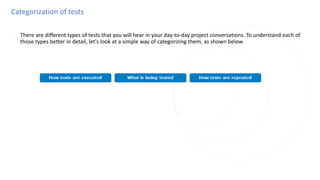
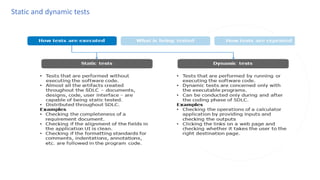
Categorization of tests
◌ There are different types of tests that you will hear in your day-to-day project conversations. To understand each of
those types better in detail, let's look at a simple way of categorizing them, as shown below.
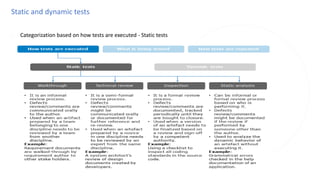
Static and dynamic tests
◌ Categorization based on how tests are executed - Static tests
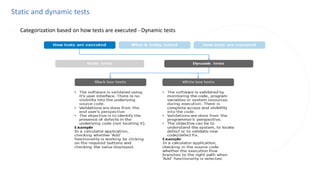
Static and dynamic tests
◌ Categorization based on how tests are executed - Dynamic tests
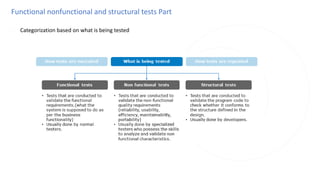
Functional nonfunctional and structural tests Part
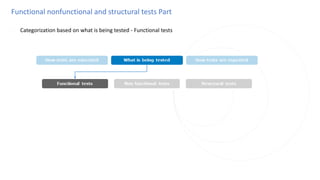
◌ Categorization based on what is being tested
Functional nonfunctional and structural tests Part
◌ Categorization based on what is being tested - Functional tests
Functional nonfunctional and structural tests Part
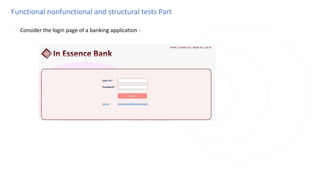
◌ Consider the login page of a banking application -
Functional nonfunctional and structural tests Part
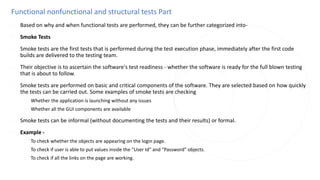
◌ Based on why and when functional tests are performed, they can be further categorized into-
◌ Smoke Tests
◌ Smoke tests are the first tests that is performed during the test execution phase, immediately after the first code
builds are delivered to the testing team.
◌ Their objective is to ascertain the software's test readiness - whether the software is ready for the full blown testing
that is about to follow.
◌ Smoke tests are performed on basic and critical components of the software. They are selected based on how quickly
the tests can be carried out. Some examples of smoke tests are checking
◌ Whether the application is launching without any issues
◌ Whether all the GUI components are available
◌ Smoke tests can be informal (without documenting the tests and their results) or formal.
◌ Example -
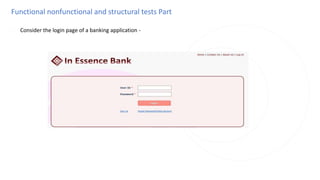
◌ To check whether the objects are appearing on the login page.
◌ To check if user is able to put values inside the "User Id" and "Password" objects.
◌ To check if all the links on the page are working.
Functional nonfunctional and structural tests Part
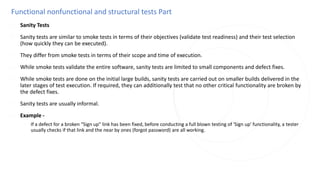
◌ Sanity Tests
◌ Sanity tests are similar to smoke tests in terms of their objectives (validate test readiness) and their test selection
(how quickly they can be executed).
◌ They differ from smoke tests in terms of their scope and time of execution.
◌ While smoke tests validate the entire software, sanity tests are limited to small components and defect fixes.
◌ While smoke tests are done on the initial large builds, sanity tests are carried out on smaller builds delivered in the
later stages of test execution. If required, they can additionally test that no other critical functionality are broken by
the defect fixes.
◌ Sanity tests are usually informal.
◌ Example -
◌ If a defect for a broken "Sign up" link has been fixed, before conducting a full blown testing of 'Sign up' functionality, a tester
usually checks if that link and the near by ones (forgot password) are all working.
Functional nonfunctional and structural tests Part
◌ System Tests
◌ These are the actual tests that have been designed, from the functional requirements, to validate the software.
◌ System tests form the bulk of the functional tests during the testing phase.
◌ They are executed once the smoke/sanity tests confirms test readiness.
◌ They are mandated to be formal (tests and their results have to be documented).
◌ Example -
◌ To check if user is able to login on entering valid "user id" and "password" details.
◌ To check if user is getting appropriate error message as per the requirement on entering invalid "user id" and
"password" details.
Functional nonfunctional and structural tests Part
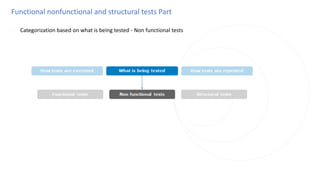
◌ Categorization based on what is being tested - Non functional tests
Functional nonfunctional and structural tests Part
◌ Consider the login page of a banking application -
Functional nonfunctional and structural tests Part
◌ Some of the most prominent types of non-functional tests are:
◌ Performance Tests
◌ Response times of each application component are validated to check if they are under acceptable limits, in different
possible situations.
◌ These tests are conducted in an environment (hardware configuration) resembling the real-time environment as
close as possible.
◌ Specialized skill-sets required to work with performance testing tools, configuring environments, etc.
◌ Example -
◌ Checking that on entering correct login credentials user is able to login within time<=3 sec.
◌ Checking that even 1000 users simultaneously logging in from their terminals with their own valid credentials, they
still are able to login within time<=3 sec.
Functional nonfunctional and structural tests Part
◌ Security Tests
◌ These tests are conducted to check whether the application allows access to only authorized users and withstands
unauthorized attacks.
◌ Specialized skill-sets are required in terms of hacking methods and knowledge of authentication methodologies,
encryption standards, network protocols, etc.
◌ Example -
◌ After logging out of the application, Checking that the user is not taken back to his/her account page on clicking the
back button of the browser .
Functional nonfunctional and structural tests Part
◌ Accessibility Tests
◌ These are tests to establish whether individuals with disabilities will be able to operate the system in question.
◌ Specialized skill-sets are required in terms of knowledge of international accessibility standards for specific disability
types and human behavior sciences.
◌ Example -
◌ Checking that this login page of the application supports disabled users (color blindness, motor deficiency, etc), in
accordance with the W3C Accessibility Standards.
Functional nonfunctional and structural tests Part
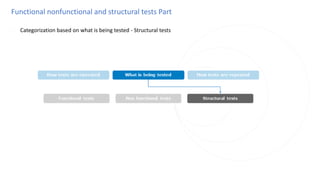
◌ Categorization based on what is being tested - Structural tests
Functional nonfunctional and structural tests Part
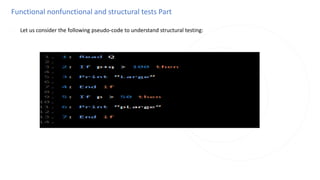
◌ Let us consider the following pseudo-code to understand structural testing:
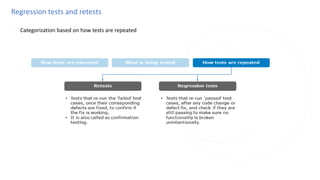
Regression tests and retests
◌ Categorization based on how tests are repeated
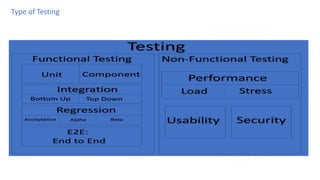
Type of Testing
Type of Testing
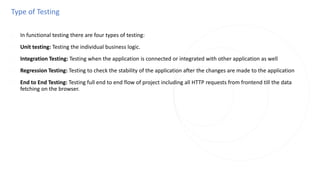
◌ In functional testing there are four types of testing:
◌ Unit testing: Testing the individual business logic.
◌ Integration Testing: Testing when the application is connected or integrated with other application as well
◌ Regression Testing: Testing to check the stability of the application after the changes are made to the application
◌ End to End Testing: Testing full end to end flow of project including all HTTP requests from frontend till the data
fetching on the browser.
Testing Terminologies
◌ Mocking: It might be possible the functionality need to test is dependent on some external medium or service,
so replication of that external dependency so that functionality can be tested isolatedly is termed as Mocking.
◌ Spy: Spy is used as a check on function or component without essentially changing a behavior. Popular used cases
are, to check whether a function was called, how many times it was called, what are number of parameters passed to
it what do the function return.
◌ Stub: Test object used when there is a needs to simulate a specific behavior or result. In a simple term to validate the
predetermined response.
◌ Test Report: It is the report generated after the testing has performed, it consists of information on how many test
cases are passed or failed, if failed then what were the expected output and what the function generated.
◌
Testing Terminologies
◌ Terminologies Related to Testing:
◌ Testing Framework: Set of rules or guiding principles that define how to write a test case. In Javascript, we have,
Jasmine, Mocha, Jest as a popular testing framework.
◌ Test Bed: It is the environment or platform configured for running the test case. It is a mock replica of the actual code
environment on which testing can be done without affecting the actual code block.
◌ Test case: Lines of code testing a particular part of a function or component is called a test case.
◌ Test Suite: The group of test case forms a test suite.
Levels of Testing
◌ Unit Testing (UT)
◌ Entity Tested : Individual units (modules or functions or libraries) of code
◌ Objective : To validate whether the individual units of code return the right outputs for given inputs as specified in
the design and whether they conform to coding standards. It uses white box testing techniques.
◌ Performed by : Development Team
Levels of Testing
◌ Integration Testing (IT)
◌ Entity Tested : Groups of individual units of code that are supposed to work together
◌ Objective : To validate whether all the individual units of code pass the right information to each other to achieve the
objective of the software (or its component) as specified in the design. It uses white box testing techniques.
◌ Performed by : Development team
Levels of Testing
◌ System Testing (ST)
◌ Entity Tested : Software and its components
◌ Objective : To validate whether the software and its components are working as stated in the software requirement
specification. It uses black box testing techniques.
◌ Performed by : Testing team
Levels of Testing
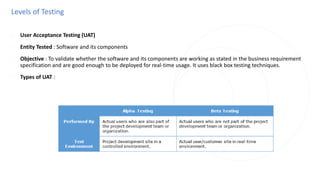
◌ User Acceptance Testing (UAT)
◌ Entity Tested : Software and its components
◌ Objective : To validate whether the software and its components are working as stated in the business requirement
specification and are good enough to be deployed for real-time usage. It uses black box testing techniques.
◌ Types of UAT :
Introduction to TestNG
◌ TestNG (NG stands for Next Generation) is an open-source automation testing framework. It is inspired from testing
frameworks Junit and NUnit (unit testing frameworks for Java and C# respectively).
◌ TestNG framework helps in unit, functional, end to end and integration testing etc.
Major features of TestNG:
◌ Annotations helps in easier differentiation of methods
◌ Helps in prioritizing and grouping of tests
◌ Supports data-driven testing (@Data Provider)
◌ Parallel test execution is possible
◌ Supports parameterizing the test cases
◌ Supported by multiple tools and plugins
TestNG installation
◌ Installation of TestNG in Eclipse can be done in two ways:
◌ 1. Through Eclipse Marketplace
◌ Go to Help
◌ Choose Eclipse Marketplace
◌ Search for TestNG
◌ Click on Install
◌ Click on Confirm checking the checkboxes
◌ Then accept the terms and conditions and click on Finish
◌ Accept the Security Warning pop up by clicking OK.
TestNG installation
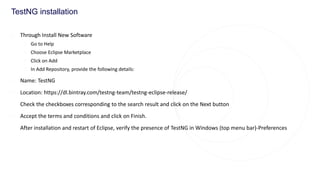
◌ Through Install New Software
◌ Go to Help
◌ Choose Eclipse Marketplace
◌ Click on Add
◌ In Add Repository, provide the following details:
◌ Name: TestNG
◌ Location: https://dl.bintray.com/testng-team/testng-eclipse-release/
◌ Check the checkboxes corresponding to the search result and click on the Next button
◌ Accept the terms and conditions and click on Finish.
◌ After installation and restart of Eclipse, verify the presence of TestNG in Windows (top menu bar)-Preferences
Annotations in TestNG
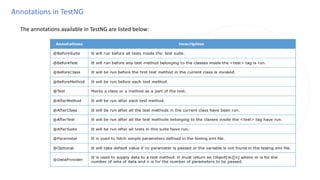
◌ The annotations available in TestNG are listed below:

Manual Testing Test Case To Learn Part-2.pptx

  • 1.
    Responsibility of softwarequality ◌ The individuals, teams and organizations, building softwares, have the responsibility of ensuring its quality by: ◌ Preventing defects entering into the software ◌ Detecting and fixing defects, that are existing, as early as possible. ◌ Ensuring compliance with all the required standards, contractual obligations and legal regulations.
  • 2.
    What is softwaretesting ◌ To improve and determine software quality, tests are conducted ◌ On the software ◌ On the processes that are used to build it ◌ Software testing is a set of processes and tasks that takes place throughout software development life cycle. It helps to reduce the risk of failures that may occur during operational use and, thus, ensure the software system quality.
  • 3.
    Objectives of softwaretesting ◌ Preventing defects from entering the system. ◌ Finding defects existing in the system. ◌ Measuring the system quality.
  • 4.
    Categorization of tests ◌There are different types of tests that you will hear in your day-to-day project conversations. To understand each of those types better in detail, let's look at a simple way of categorizing them, as shown below.
  • 5.
  • 6.
    Static and dynamictests ◌ Categorization based on how tests are executed - Static tests
  • 7.
    Static and dynamictests ◌ Categorization based on how tests are executed - Dynamic tests
  • 8.
    Functional nonfunctional andstructural tests Part ◌ Categorization based on what is being tested
  • 9.
    Functional nonfunctional andstructural tests Part ◌ Categorization based on what is being tested - Functional tests
  • 10.
    Functional nonfunctional andstructural tests Part ◌ Consider the login page of a banking application -
  • 11.
    Functional nonfunctional andstructural tests Part ◌ Based on why and when functional tests are performed, they can be further categorized into- ◌ Smoke Tests ◌ Smoke tests are the first tests that is performed during the test execution phase, immediately after the first code builds are delivered to the testing team. ◌ Their objective is to ascertain the software's test readiness - whether the software is ready for the full blown testing that is about to follow. ◌ Smoke tests are performed on basic and critical components of the software. They are selected based on how quickly the tests can be carried out. Some examples of smoke tests are checking ◌ Whether the application is launching without any issues ◌ Whether all the GUI components are available ◌ Smoke tests can be informal (without documenting the tests and their results) or formal. ◌ Example - ◌ To check whether the objects are appearing on the login page. ◌ To check if user is able to put values inside the "User Id" and "Password" objects. ◌ To check if all the links on the page are working.
  • 12.
    Functional nonfunctional andstructural tests Part ◌ Sanity Tests ◌ Sanity tests are similar to smoke tests in terms of their objectives (validate test readiness) and their test selection (how quickly they can be executed). ◌ They differ from smoke tests in terms of their scope and time of execution. ◌ While smoke tests validate the entire software, sanity tests are limited to small components and defect fixes. ◌ While smoke tests are done on the initial large builds, sanity tests are carried out on smaller builds delivered in the later stages of test execution. If required, they can additionally test that no other critical functionality are broken by the defect fixes. ◌ Sanity tests are usually informal. ◌ Example - ◌ If a defect for a broken "Sign up" link has been fixed, before conducting a full blown testing of 'Sign up' functionality, a tester usually checks if that link and the near by ones (forgot password) are all working.
  • 13.
    Functional nonfunctional andstructural tests Part ◌ System Tests ◌ These are the actual tests that have been designed, from the functional requirements, to validate the software. ◌ System tests form the bulk of the functional tests during the testing phase. ◌ They are executed once the smoke/sanity tests confirms test readiness. ◌ They are mandated to be formal (tests and their results have to be documented). ◌ Example - ◌ To check if user is able to login on entering valid "user id" and "password" details. ◌ To check if user is getting appropriate error message as per the requirement on entering invalid "user id" and "password" details.
  • 14.
    Functional nonfunctional andstructural tests Part ◌ Categorization based on what is being tested - Non functional tests
  • 15.
    Functional nonfunctional andstructural tests Part ◌ Consider the login page of a banking application -
  • 16.
    Functional nonfunctional andstructural tests Part ◌ Some of the most prominent types of non-functional tests are: ◌ Performance Tests ◌ Response times of each application component are validated to check if they are under acceptable limits, in different possible situations. ◌ These tests are conducted in an environment (hardware configuration) resembling the real-time environment as close as possible. ◌ Specialized skill-sets required to work with performance testing tools, configuring environments, etc. ◌ Example - ◌ Checking that on entering correct login credentials user is able to login within time<=3 sec. ◌ Checking that even 1000 users simultaneously logging in from their terminals with their own valid credentials, they still are able to login within time<=3 sec.
  • 17.
    Functional nonfunctional andstructural tests Part ◌ Security Tests ◌ These tests are conducted to check whether the application allows access to only authorized users and withstands unauthorized attacks. ◌ Specialized skill-sets are required in terms of hacking methods and knowledge of authentication methodologies, encryption standards, network protocols, etc. ◌ Example - ◌ After logging out of the application, Checking that the user is not taken back to his/her account page on clicking the back button of the browser .
  • 18.
    Functional nonfunctional andstructural tests Part ◌ Accessibility Tests ◌ These are tests to establish whether individuals with disabilities will be able to operate the system in question. ◌ Specialized skill-sets are required in terms of knowledge of international accessibility standards for specific disability types and human behavior sciences. ◌ Example - ◌ Checking that this login page of the application supports disabled users (color blindness, motor deficiency, etc), in accordance with the W3C Accessibility Standards.
  • 19.
    Functional nonfunctional andstructural tests Part ◌ Categorization based on what is being tested - Structural tests
  • 20.
    Functional nonfunctional andstructural tests Part ◌ Let us consider the following pseudo-code to understand structural testing:
  • 21.
    Regression tests andretests ◌ Categorization based on how tests are repeated
  • 22.
  • 23.
    Type of Testing ◌In functional testing there are four types of testing: ◌ Unit testing: Testing the individual business logic. ◌ Integration Testing: Testing when the application is connected or integrated with other application as well ◌ Regression Testing: Testing to check the stability of the application after the changes are made to the application ◌ End to End Testing: Testing full end to end flow of project including all HTTP requests from frontend till the data fetching on the browser.
  • 24.
    Testing Terminologies ◌ Mocking:It might be possible the functionality need to test is dependent on some external medium or service, so replication of that external dependency so that functionality can be tested isolatedly is termed as Mocking. ◌ Spy: Spy is used as a check on function or component without essentially changing a behavior. Popular used cases are, to check whether a function was called, how many times it was called, what are number of parameters passed to it what do the function return. ◌ Stub: Test object used when there is a needs to simulate a specific behavior or result. In a simple term to validate the predetermined response. ◌ Test Report: It is the report generated after the testing has performed, it consists of information on how many test cases are passed or failed, if failed then what were the expected output and what the function generated. ◌
  • 25.
    Testing Terminologies ◌ TerminologiesRelated to Testing: ◌ Testing Framework: Set of rules or guiding principles that define how to write a test case. In Javascript, we have, Jasmine, Mocha, Jest as a popular testing framework. ◌ Test Bed: It is the environment or platform configured for running the test case. It is a mock replica of the actual code environment on which testing can be done without affecting the actual code block. ◌ Test case: Lines of code testing a particular part of a function or component is called a test case. ◌ Test Suite: The group of test case forms a test suite.
  • 26.
    Levels of Testing ◌Unit Testing (UT) ◌ Entity Tested : Individual units (modules or functions or libraries) of code ◌ Objective : To validate whether the individual units of code return the right outputs for given inputs as specified in the design and whether they conform to coding standards. It uses white box testing techniques. ◌ Performed by : Development Team
  • 27.
    Levels of Testing ◌Integration Testing (IT) ◌ Entity Tested : Groups of individual units of code that are supposed to work together ◌ Objective : To validate whether all the individual units of code pass the right information to each other to achieve the objective of the software (or its component) as specified in the design. It uses white box testing techniques. ◌ Performed by : Development team
  • 28.
    Levels of Testing ◌System Testing (ST) ◌ Entity Tested : Software and its components ◌ Objective : To validate whether the software and its components are working as stated in the software requirement specification. It uses black box testing techniques. ◌ Performed by : Testing team
  • 29.
    Levels of Testing ◌User Acceptance Testing (UAT) ◌ Entity Tested : Software and its components ◌ Objective : To validate whether the software and its components are working as stated in the business requirement specification and are good enough to be deployed for real-time usage. It uses black box testing techniques. ◌ Types of UAT :
  • 30.
    Introduction to TestNG ◌TestNG (NG stands for Next Generation) is an open-source automation testing framework. It is inspired from testing frameworks Junit and NUnit (unit testing frameworks for Java and C# respectively). ◌ TestNG framework helps in unit, functional, end to end and integration testing etc.
  • 31.
    Major features ofTestNG: ◌ Annotations helps in easier differentiation of methods ◌ Helps in prioritizing and grouping of tests ◌ Supports data-driven testing (@Data Provider) ◌ Parallel test execution is possible ◌ Supports parameterizing the test cases ◌ Supported by multiple tools and plugins
  • 32.
    TestNG installation ◌ Installationof TestNG in Eclipse can be done in two ways: ◌ 1. Through Eclipse Marketplace ◌ Go to Help ◌ Choose Eclipse Marketplace ◌ Search for TestNG ◌ Click on Install ◌ Click on Confirm checking the checkboxes ◌ Then accept the terms and conditions and click on Finish ◌ Accept the Security Warning pop up by clicking OK.
  • 33.
    TestNG installation ◌ ThroughInstall New Software ◌ Go to Help ◌ Choose Eclipse Marketplace ◌ Click on Add ◌ In Add Repository, provide the following details: ◌ Name: TestNG ◌ Location: https://dl.bintray.com/testng-team/testng-eclipse-release/ ◌ Check the checkboxes corresponding to the search result and click on the Next button ◌ Accept the terms and conditions and click on Finish. ◌ After installation and restart of Eclipse, verify the presence of TestNG in Windows (top menu bar)-Preferences
  • 34.
    Annotations in TestNG ◌The annotations available in TestNG are listed below:

Editor's Notes

  • #2  At the end of this course, you will understand the inherent complexity involved in software systems and will gain the knowledge of handling such complex software systems be able to differentiate between the two programming styles – Structured Programming and Object Oriented Programming learn the different features of Object Oriented Technology
  • #3  At the end of this course, you will understand the inherent complexity involved in software systems and will gain the knowledge of handling such complex software systems be able to differentiate between the two programming styles – Structured Programming and Object Oriented Programming learn the different features of Object Oriented Technology
  • #4  At the end of this course, you will understand the inherent complexity involved in software systems and will gain the knowledge of handling such complex software systems be able to differentiate between the two programming styles – Structured Programming and Object Oriented Programming learn the different features of Object Oriented Technology
  • #5  At the end of this course, you will understand the inherent complexity involved in software systems and will gain the knowledge of handling such complex software systems be able to differentiate between the two programming styles – Structured Programming and Object Oriented Programming learn the different features of Object Oriented Technology
  • #6  At the end of this course, you will understand the inherent complexity involved in software systems and will gain the knowledge of handling such complex software systems be able to differentiate between the two programming styles – Structured Programming and Object Oriented Programming learn the different features of Object Oriented Technology
  • #7  At the end of this course, you will understand the inherent complexity involved in software systems and will gain the knowledge of handling such complex software systems be able to differentiate between the two programming styles – Structured Programming and Object Oriented Programming learn the different features of Object Oriented Technology
  • #8  At the end of this course, you will understand the inherent complexity involved in software systems and will gain the knowledge of handling such complex software systems be able to differentiate between the two programming styles – Structured Programming and Object Oriented Programming learn the different features of Object Oriented Technology
  • #9  At the end of this course, you will understand the inherent complexity involved in software systems and will gain the knowledge of handling such complex software systems be able to differentiate between the two programming styles – Structured Programming and Object Oriented Programming learn the different features of Object Oriented Technology
  • #10  At the end of this course, you will understand the inherent complexity involved in software systems and will gain the knowledge of handling such complex software systems be able to differentiate between the two programming styles – Structured Programming and Object Oriented Programming learn the different features of Object Oriented Technology
  • #11  At the end of this course, you will understand the inherent complexity involved in software systems and will gain the knowledge of handling such complex software systems be able to differentiate between the two programming styles – Structured Programming and Object Oriented Programming learn the different features of Object Oriented Technology
  • #12  At the end of this course, you will understand the inherent complexity involved in software systems and will gain the knowledge of handling such complex software systems be able to differentiate between the two programming styles – Structured Programming and Object Oriented Programming learn the different features of Object Oriented Technology
  • #13  At the end of this course, you will understand the inherent complexity involved in software systems and will gain the knowledge of handling such complex software systems be able to differentiate between the two programming styles – Structured Programming and Object Oriented Programming learn the different features of Object Oriented Technology
  • #14  At the end of this course, you will understand the inherent complexity involved in software systems and will gain the knowledge of handling such complex software systems be able to differentiate between the two programming styles – Structured Programming and Object Oriented Programming learn the different features of Object Oriented Technology
  • #15  At the end of this course, you will understand the inherent complexity involved in software systems and will gain the knowledge of handling such complex software systems be able to differentiate between the two programming styles – Structured Programming and Object Oriented Programming learn the different features of Object Oriented Technology
  • #16  At the end of this course, you will understand the inherent complexity involved in software systems and will gain the knowledge of handling such complex software systems be able to differentiate between the two programming styles – Structured Programming and Object Oriented Programming learn the different features of Object Oriented Technology
  • #17  At the end of this course, you will understand the inherent complexity involved in software systems and will gain the knowledge of handling such complex software systems be able to differentiate between the two programming styles – Structured Programming and Object Oriented Programming learn the different features of Object Oriented Technology
  • #18  At the end of this course, you will understand the inherent complexity involved in software systems and will gain the knowledge of handling such complex software systems be able to differentiate between the two programming styles – Structured Programming and Object Oriented Programming learn the different features of Object Oriented Technology
  • #19  At the end of this course, you will understand the inherent complexity involved in software systems and will gain the knowledge of handling such complex software systems be able to differentiate between the two programming styles – Structured Programming and Object Oriented Programming learn the different features of Object Oriented Technology
  • #20  At the end of this course, you will understand the inherent complexity involved in software systems and will gain the knowledge of handling such complex software systems be able to differentiate between the two programming styles – Structured Programming and Object Oriented Programming learn the different features of Object Oriented Technology
  • #21  At the end of this course, you will understand the inherent complexity involved in software systems and will gain the knowledge of handling such complex software systems be able to differentiate between the two programming styles – Structured Programming and Object Oriented Programming learn the different features of Object Oriented Technology
  • #22  At the end of this course, you will understand the inherent complexity involved in software systems and will gain the knowledge of handling such complex software systems be able to differentiate between the two programming styles – Structured Programming and Object Oriented Programming learn the different features of Object Oriented Technology
  • #23  At the end of this course, you will understand the inherent complexity involved in software systems and will gain the knowledge of handling such complex software systems be able to differentiate between the two programming styles – Structured Programming and Object Oriented Programming learn the different features of Object Oriented Technology
  • #24  At the end of this course, you will understand the inherent complexity involved in software systems and will gain the knowledge of handling such complex software systems be able to differentiate between the two programming styles – Structured Programming and Object Oriented Programming learn the different features of Object Oriented Technology