1
Copyright © 2021 Infogain Corporation. All Rights Reserved.
Array in Java
Part-001
2
Copyright © 2021 Infogain Corporation. All Rights Reserved.
Objectives
◌ Comparison of various programming techniques
◌ Introduction to Object Oriented Concepts
◌ What is an Object
◌ Abstraction, Encapsulation, Message Passing
◌ Class, Access Specifiers, Examples
◌ Advanced Object-Oriented Concepts
◌ Relationships
◌ Inheritance
◌ Abstract Classes and Polymorphism
◌ Object Oriented Design Methodology
◌ Trends in OO Technology
3
Copyright © 2021 Infogain Corporation. All Rights Reserved.
Arrays in Java
◌ Object Here, we have assumed that a restaurant will have only one contact number.
◌ What if the restaurant has multiple contact numbers?
◌ How can we store multiple contact numbers of a restaurant?
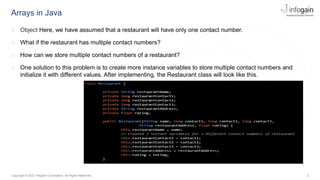
◌ One solution to this problem is to create more instance variables to store multiple contact numbers and
initialize it with different values. After implementing, the Restaurant class will look like this.
4
Copyright © 2021 Infogain Corporation. All Rights Reserved.
Arrays in Java
◌ In order to implement the previous requirement, we can use various collections in Java. Here, to implement
this requirement we will use one of the most common collection called Array.
◌ An array is a collection of values of the same data type, stored in contiguous memory locations and referred
by the same name. It holds a fixed number of values, decided at the time of array declaration.
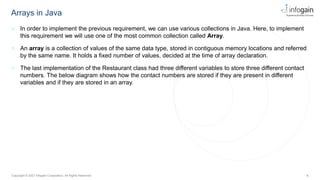
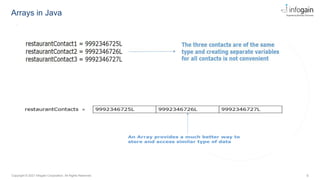
◌ The last implementation of the Restaurant class had three different variables to store three different contact
numbers. The below diagram shows how the contact numbers are stored if they are present in different
variables and if they are stored in an array.
5
Copyright © 2021 Infogain Corporation. All Rights Reserved.
Arrays in Java
6
Copyright © 2021 Infogain Corporation. All Rights Reserved.
Arrays in Java
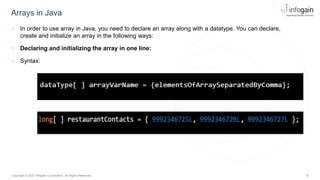
◌ In order to use array in Java, you need to declare an array along with a datatype. You can declare,
create and initialize an array in the following ways:
◌ Declaring and initializing the array in one line:
◌ Syntax:
7
Copyright © 2021 Infogain Corporation. All Rights Reserved.
Arrays in Java
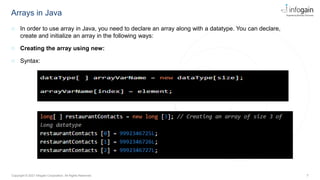
◌ In order to use array in Java, you need to declare an array along with a datatype. You can declare,
create and initialize an array in the following ways:
◌ Creating the array using new:
◌ Syntax:
8
Copyright © 2021 Infogain Corporation. All Rights Reserved.
Arrays in Java
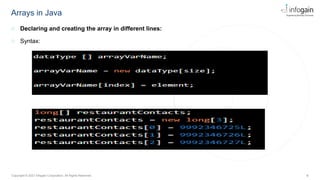
◌ Declaring and creating the array in different lines:
◌ Syntax:
9
Copyright © 2021 Infogain Corporation. All Rights Reserved.
Accessing the elements of an array
◌ Each value stored in an array is called as an element. Each element in an array is accessed, stored and
retrieved using its position in the array, called index. Indexes in Java are zero-based, i.e., the valid range of
indexes for the elements of an array is from 0 to (size of Array-1).
long[] restaurantContacts = new long[3];
restaurantContacts [0] = 9992346725L; // Elements can be updated and accessed with
the help of index
restaurantContacts [1] = 9992346726L;
restaurantContacts [2] = 9992346727L;
System.out.println(restaurantContacts [1]) ;// Accessing and displaying the element
at the 1st index
10
Copyright © 2021 Infogain Corporation. All Rights Reserved.
Accessing the elements of an array using for loop
◌ Instead of writing n number of lines to access n elements of an array, you can use different looping
constructs like for loop, for-each loop, etc.
◌ The below code shows how to access and display the elements of restaurantContacts with the help of for
loop.
public class Tester {
public static void main(String[] args) {
long[] restaurantContacts = { 9992346725L, 9992346726L, 9992346727L };
for (int index = 0; index < restaurantContacts.length; index++) {
// Accessing element at position index
System.out.println(restaurantContacts[index]);
}
}
}
11
Copyright © 2021 Infogain Corporation. All Rights Reserved.
Accessing the elements of an array using for each loop
◌ Java also has another loop known as for-each loop to iterate over collections. This eliminates the use of
indexes. It displays the array elements one by one. It holds an array element in a variable and then
executes the body of the loop.
Syntax
for (dataType variable: array) {
//body of the loop
}
public class Tester {
public static void main(String[] args) {
long[] restaurantContacts = { 9992346725L, 9992346726L, 9992346727L };
for (long contactNumber : restaurantContacts) {
System.out.println(contactNumber);
}
}
}
12
Copyright © 2021 Infogain Corporation. All Rights Reserved.
Multi-dimensional Array
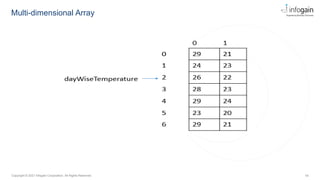
◌ Multi-dimensional arrays are arrays of arrays with each element of the array holding the reference of other
arrays.
◌ A multi-dimensional array is created by appending one set of square brackets ([]) per dimension..
◌ Let's see a simple example to declare, instantiate, initialize and display a 2-dimensional (2D) array.
◌ Syntax for creating 2D array:
dataType[][] arrayVarName = new dataType[rowsize][columnsize];
13
Copyright © 2021 Infogain Corporation. All Rights Reserved.
Multi-dimensional Array
//Here, the row size is 7, and the column size is 2
//The 0th index stores the Max temperature and 1st index stores the Min temperature
int[][] dayWiseTemperature = new int[7][2];
dayWiseTemperature[0][0]=29; // Initialization
dayWiseTemperature[0][1]=21;
//and so on
//Another way of creating and initializing 2D array
int[][] dayWiseTemperature = new int[][] {
{29,21},
{24,23},
{26,22},
{28,23},
{29,24},
{23,20},
{29,21}
};
14
Copyright © 2021 Infogain Corporation. All Rights Reserved.
Multi-dimensional Array
15
Copyright © 2021 Infogain Corporation. All Rights Reserved.
Points to remember
◌ Some of the important points that you should be knowing about arrays are:
◌ An array is a collection of similar data in contiguous memory locations referred by the same name
◌ Can be used to store data of primitive as well as reference types
◌ Holds a fixed number of values, determined at the time of array declaration
◌ Array index always starts from zero
◌ The length attribute of an array can be used to get its size
◌ Once initialized, the size of an array cannot be changed
16
Copyright © 2021 Infogain Corporation. All Rights Reserved.
Infogain Corporation, HQ
485 Alberto Way
Suite 100
Los Gatos, CA 95032
Phone: 408-355-6000
Austin
111 W. Anderson Lane
Suite E336
Austin, TX 78752
Phone: 512-212-4070
Noida
A-16 & 21, Sector 60
Gautam Budh Nagar
Noida – 201 301, India
Phone: +91 12 0244 5144
Mumbai
Unit No. 74, 2nd Floor, SDF 3
SEEPZ, Andheri East
Mumbai – 400 096, India
Phone: +91 22 6114 6969
Irvine
41 Corporate Park
Suite 390
Irvine, CA 92606
Phone: 949-223-5100
Bengaluru
#7, 18th Main Road, 7th Block
Koramangala
Bengaluru - 560 095, India
Phone: +91 80 4110 4560
London
Millbank Tower, Citibase 21-24
Millbank, office no 1.7
London SW1P 4DP
Phone: +44 (0)20 3355 7594
Dubai
Office No. 255, Building No. 17
Dubai Internet City
Dubai, UAE
Phone: +971-4-458-7336
Phoenix
21410 North 19th Ave
Suite 114
Phoenix, AZ 85027
Phone: 602-455-1860
Singapore
144 Robinson Road, #13-01
Robinson Square
Singapore 068908
Phone: +65 62741455
16
Contact :

Arrays are used in java to holding more.pptx

  • 1.
    1 Copyright © 2021Infogain Corporation. All Rights Reserved. Copyright © 2021 Infogain Corporation. All Rights Reserved. Array in Java Part-001
  • 2.
    2 Copyright © 2021Infogain Corporation. All Rights Reserved. Objectives ◌ Comparison of various programming techniques ◌ Introduction to Object Oriented Concepts ◌ What is an Object ◌ Abstraction, Encapsulation, Message Passing ◌ Class, Access Specifiers, Examples ◌ Advanced Object-Oriented Concepts ◌ Relationships ◌ Inheritance ◌ Abstract Classes and Polymorphism ◌ Object Oriented Design Methodology ◌ Trends in OO Technology
  • 3.
    3 Copyright © 2021Infogain Corporation. All Rights Reserved. Arrays in Java ◌ Object Here, we have assumed that a restaurant will have only one contact number. ◌ What if the restaurant has multiple contact numbers? ◌ How can we store multiple contact numbers of a restaurant? ◌ One solution to this problem is to create more instance variables to store multiple contact numbers and initialize it with different values. After implementing, the Restaurant class will look like this.
  • 4.
    4 Copyright © 2021Infogain Corporation. All Rights Reserved. Arrays in Java ◌ In order to implement the previous requirement, we can use various collections in Java. Here, to implement this requirement we will use one of the most common collection called Array. ◌ An array is a collection of values of the same data type, stored in contiguous memory locations and referred by the same name. It holds a fixed number of values, decided at the time of array declaration. ◌ The last implementation of the Restaurant class had three different variables to store three different contact numbers. The below diagram shows how the contact numbers are stored if they are present in different variables and if they are stored in an array.
  • 5.
    5 Copyright © 2021Infogain Corporation. All Rights Reserved. Arrays in Java
  • 6.
    6 Copyright © 2021Infogain Corporation. All Rights Reserved. Arrays in Java ◌ In order to use array in Java, you need to declare an array along with a datatype. You can declare, create and initialize an array in the following ways: ◌ Declaring and initializing the array in one line: ◌ Syntax:
  • 7.
    7 Copyright © 2021Infogain Corporation. All Rights Reserved. Arrays in Java ◌ In order to use array in Java, you need to declare an array along with a datatype. You can declare, create and initialize an array in the following ways: ◌ Creating the array using new: ◌ Syntax:
  • 8.
    8 Copyright © 2021Infogain Corporation. All Rights Reserved. Arrays in Java ◌ Declaring and creating the array in different lines: ◌ Syntax:
  • 9.
    9 Copyright © 2021Infogain Corporation. All Rights Reserved. Accessing the elements of an array ◌ Each value stored in an array is called as an element. Each element in an array is accessed, stored and retrieved using its position in the array, called index. Indexes in Java are zero-based, i.e., the valid range of indexes for the elements of an array is from 0 to (size of Array-1). long[] restaurantContacts = new long[3]; restaurantContacts [0] = 9992346725L; // Elements can be updated and accessed with the help of index restaurantContacts [1] = 9992346726L; restaurantContacts [2] = 9992346727L; System.out.println(restaurantContacts [1]) ;// Accessing and displaying the element at the 1st index
  • 10.
    10 Copyright © 2021Infogain Corporation. All Rights Reserved. Accessing the elements of an array using for loop ◌ Instead of writing n number of lines to access n elements of an array, you can use different looping constructs like for loop, for-each loop, etc. ◌ The below code shows how to access and display the elements of restaurantContacts with the help of for loop. public class Tester { public static void main(String[] args) { long[] restaurantContacts = { 9992346725L, 9992346726L, 9992346727L }; for (int index = 0; index < restaurantContacts.length; index++) { // Accessing element at position index System.out.println(restaurantContacts[index]); } } }
  • 11.
    11 Copyright © 2021Infogain Corporation. All Rights Reserved. Accessing the elements of an array using for each loop ◌ Java also has another loop known as for-each loop to iterate over collections. This eliminates the use of indexes. It displays the array elements one by one. It holds an array element in a variable and then executes the body of the loop. Syntax for (dataType variable: array) { //body of the loop } public class Tester { public static void main(String[] args) { long[] restaurantContacts = { 9992346725L, 9992346726L, 9992346727L }; for (long contactNumber : restaurantContacts) { System.out.println(contactNumber); } } }
  • 12.
    12 Copyright © 2021Infogain Corporation. All Rights Reserved. Multi-dimensional Array ◌ Multi-dimensional arrays are arrays of arrays with each element of the array holding the reference of other arrays. ◌ A multi-dimensional array is created by appending one set of square brackets ([]) per dimension.. ◌ Let's see a simple example to declare, instantiate, initialize and display a 2-dimensional (2D) array. ◌ Syntax for creating 2D array: dataType[][] arrayVarName = new dataType[rowsize][columnsize];
  • 13.
    13 Copyright © 2021Infogain Corporation. All Rights Reserved. Multi-dimensional Array //Here, the row size is 7, and the column size is 2 //The 0th index stores the Max temperature and 1st index stores the Min temperature int[][] dayWiseTemperature = new int[7][2]; dayWiseTemperature[0][0]=29; // Initialization dayWiseTemperature[0][1]=21; //and so on //Another way of creating and initializing 2D array int[][] dayWiseTemperature = new int[][] { {29,21}, {24,23}, {26,22}, {28,23}, {29,24}, {23,20}, {29,21} };
  • 14.
    14 Copyright © 2021Infogain Corporation. All Rights Reserved. Multi-dimensional Array
  • 15.
    15 Copyright © 2021Infogain Corporation. All Rights Reserved. Points to remember ◌ Some of the important points that you should be knowing about arrays are: ◌ An array is a collection of similar data in contiguous memory locations referred by the same name ◌ Can be used to store data of primitive as well as reference types ◌ Holds a fixed number of values, determined at the time of array declaration ◌ Array index always starts from zero ◌ The length attribute of an array can be used to get its size ◌ Once initialized, the size of an array cannot be changed
  • 16.
    16 Copyright © 2021Infogain Corporation. All Rights Reserved. Infogain Corporation, HQ 485 Alberto Way Suite 100 Los Gatos, CA 95032 Phone: 408-355-6000 Austin 111 W. Anderson Lane Suite E336 Austin, TX 78752 Phone: 512-212-4070 Noida A-16 & 21, Sector 60 Gautam Budh Nagar Noida – 201 301, India Phone: +91 12 0244 5144 Mumbai Unit No. 74, 2nd Floor, SDF 3 SEEPZ, Andheri East Mumbai – 400 096, India Phone: +91 22 6114 6969 Irvine 41 Corporate Park Suite 390 Irvine, CA 92606 Phone: 949-223-5100 Bengaluru #7, 18th Main Road, 7th Block Koramangala Bengaluru - 560 095, India Phone: +91 80 4110 4560 London Millbank Tower, Citibase 21-24 Millbank, office no 1.7 London SW1P 4DP Phone: +44 (0)20 3355 7594 Dubai Office No. 255, Building No. 17 Dubai Internet City Dubai, UAE Phone: +971-4-458-7336 Phoenix 21410 North 19th Ave Suite 114 Phoenix, AZ 85027 Phone: 602-455-1860 Singapore 144 Robinson Road, #13-01 Robinson Square Singapore 068908 Phone: +65 62741455 16 Contact :