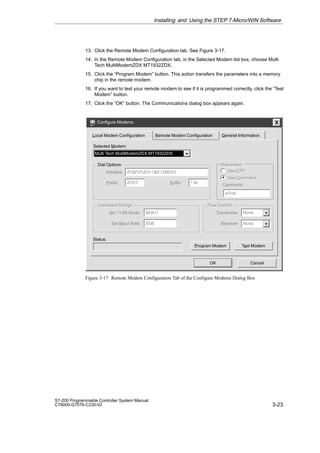
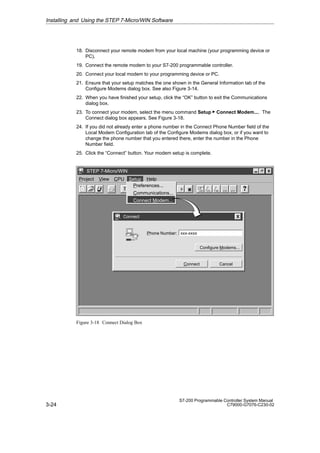
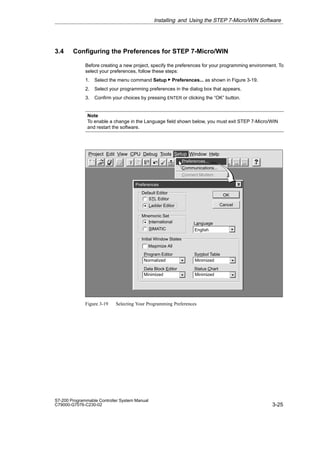
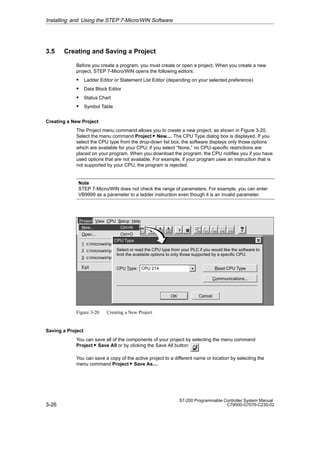
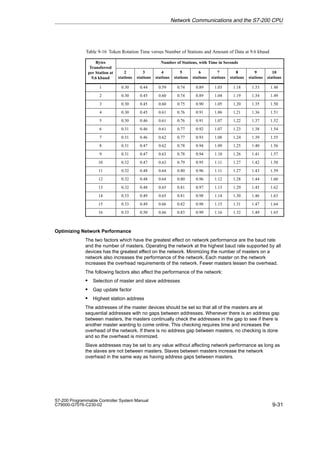
Preface, Contents
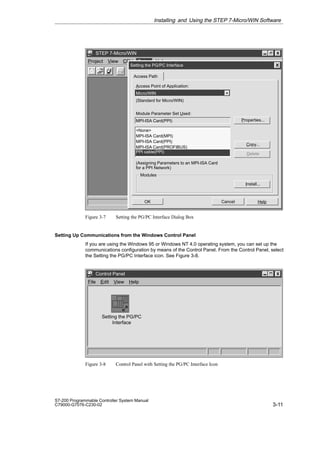
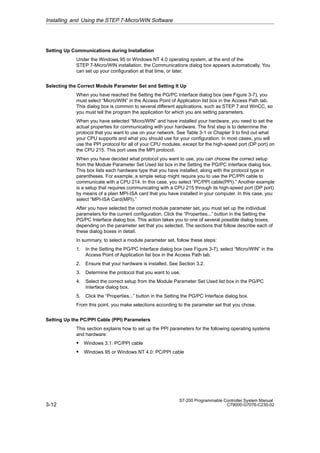
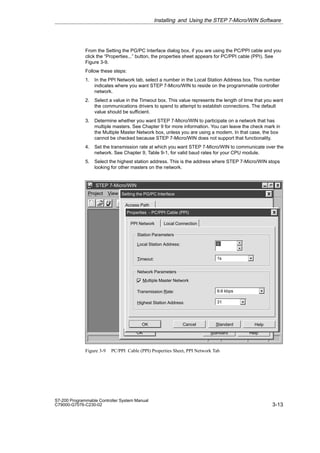
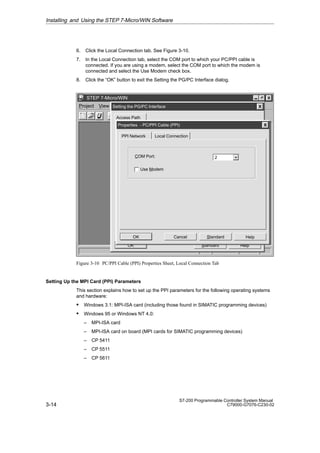
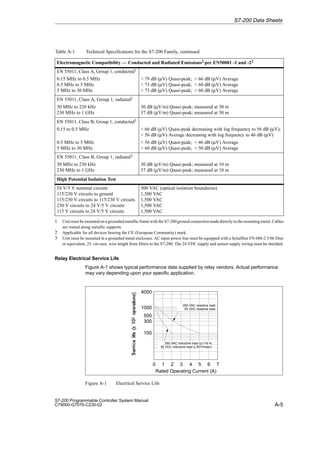
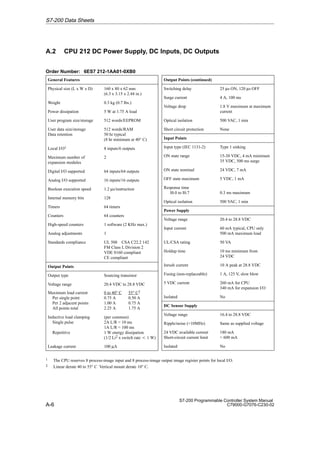
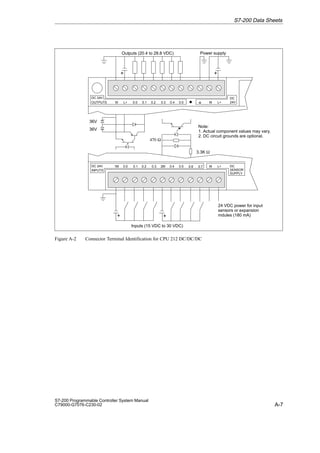
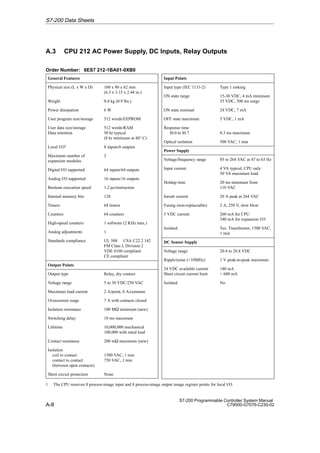
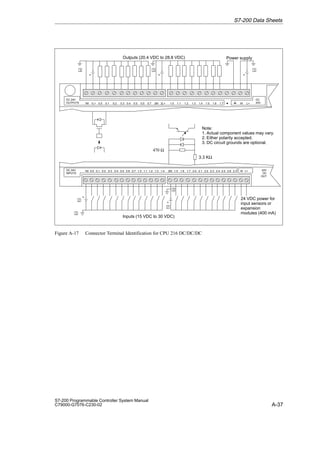
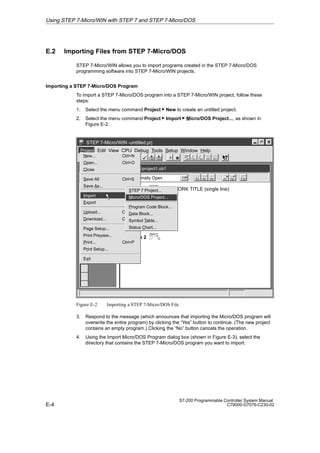
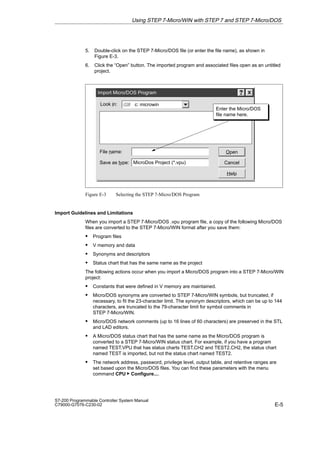
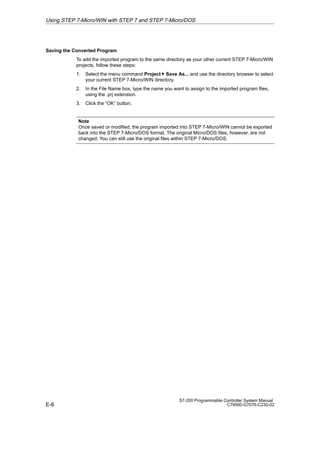
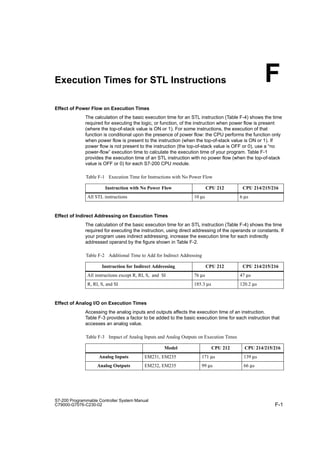
Introducing the
S7-200 Micro PLC
1
Installing an S7-200
Micro PLC
2
Installing and Using the
STEP 7-Micro/WIN Software
3
Getting Started with a
Sample Program
4
Additional Features of
STEP 7-Micro/WIN
5
Basic Concepts for
Programming an S7-200
CPU
6
CPU Memory: Data Types
and Addressing Modes
7
Input/Output Control 8
Network Communications
and the S7-200 CPU
9
Instruction Set 10
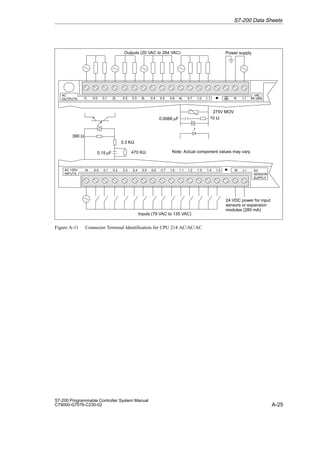
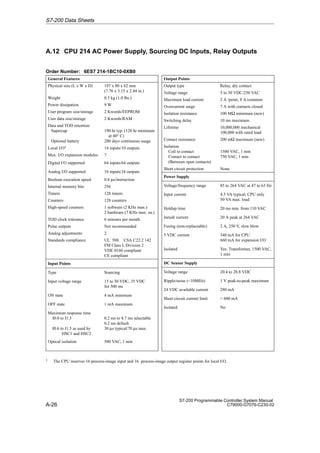
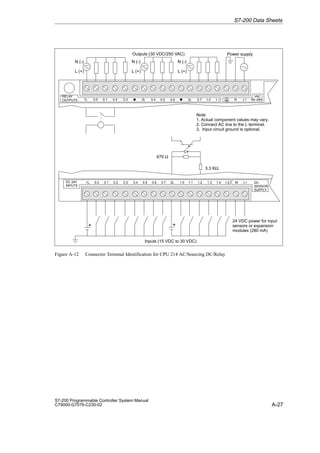
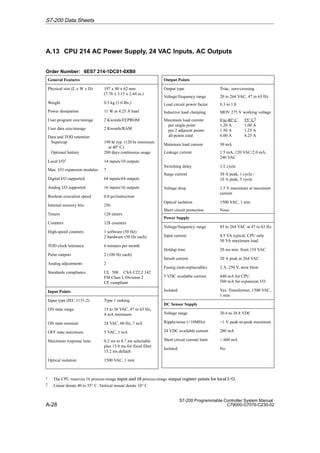
Appendix
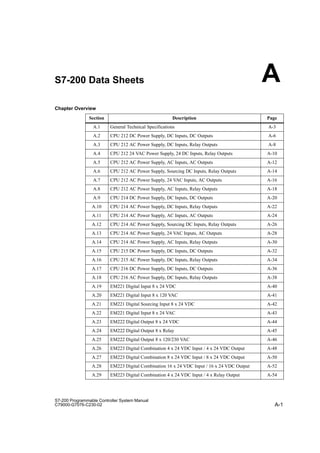
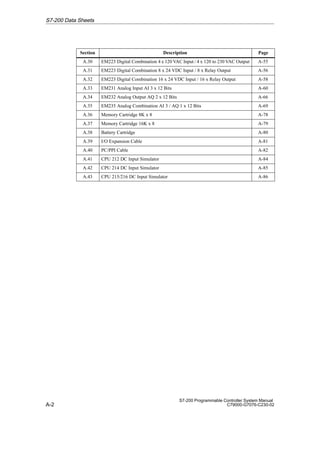
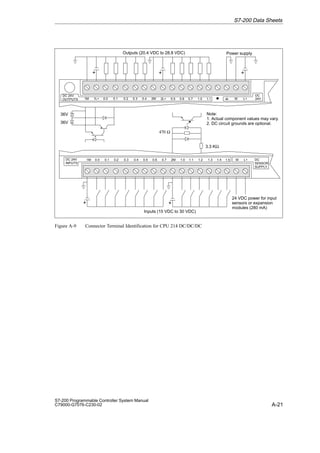
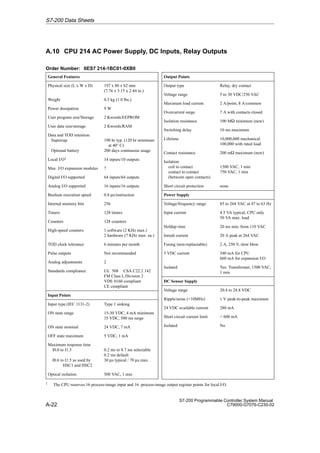
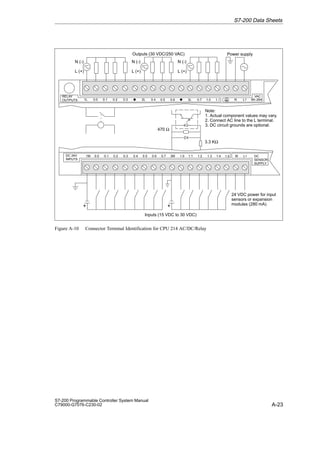
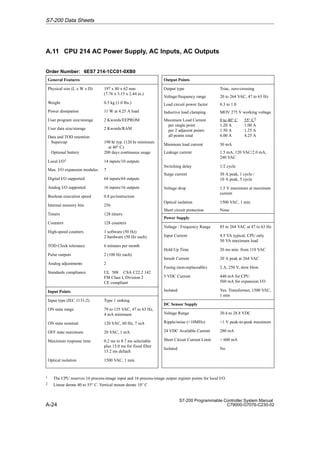
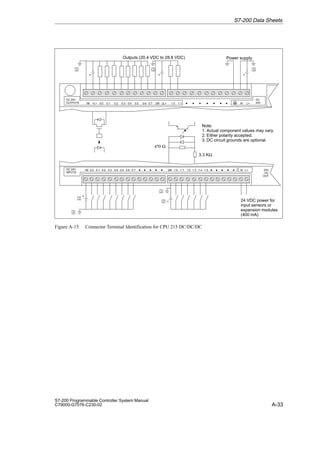
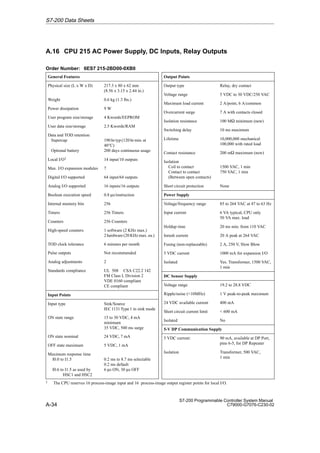
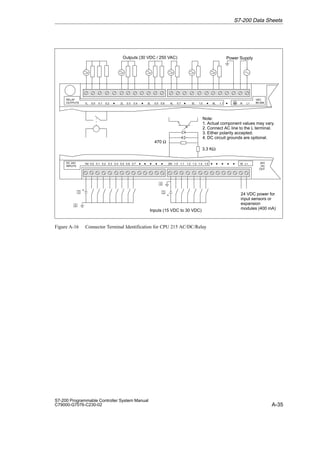
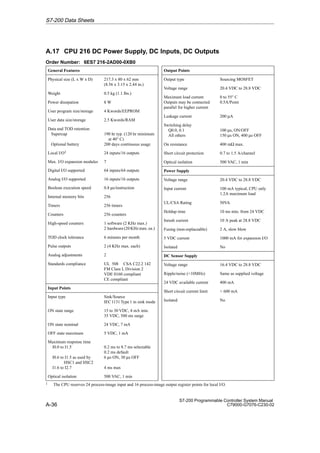
S7-200 Data Sheets A
Power Calculation Table B
Error Codes C
Special Memory (SM) Bits D
How STEP 7-Micro/WIN
Works with Other STEP 7
Programming Products
E
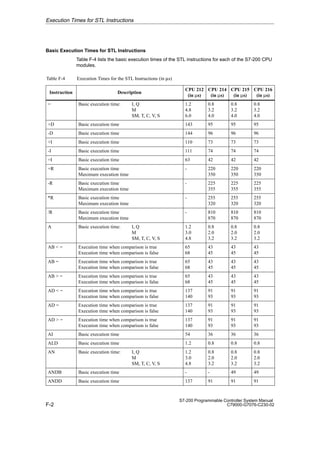
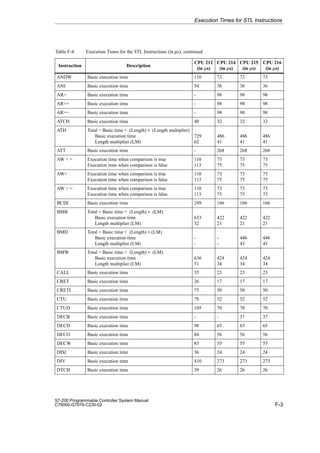
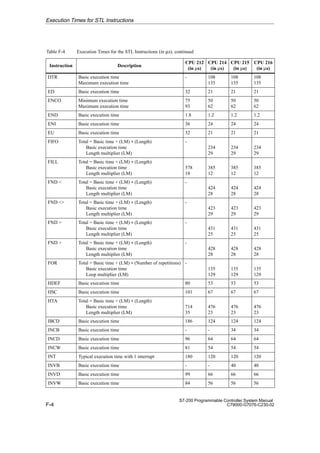
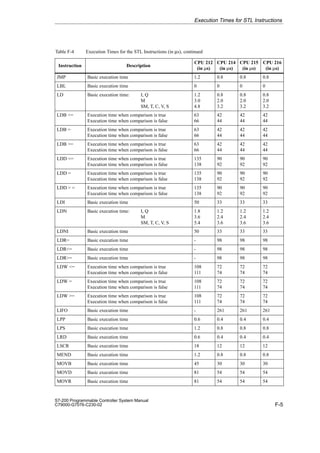
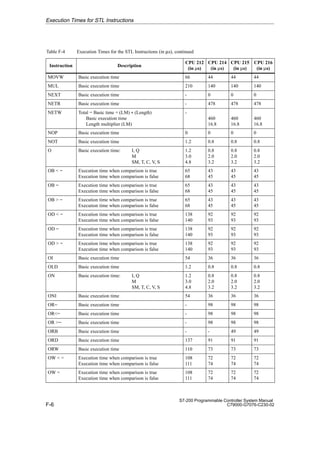
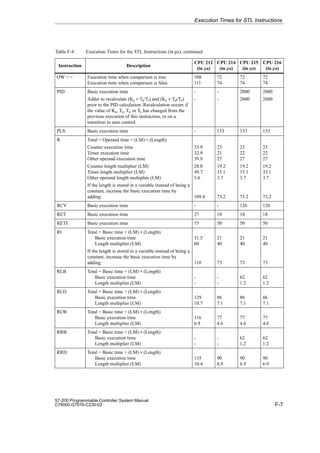
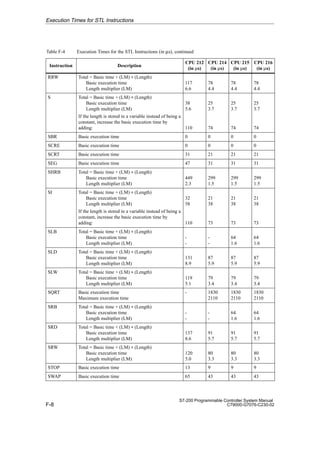
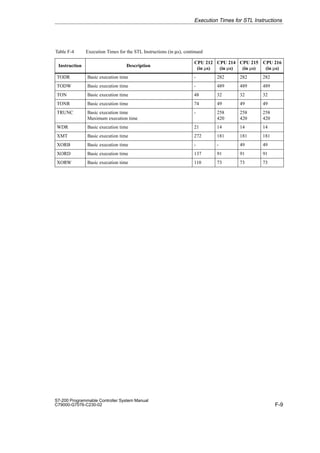
Execution Times for STL
Instructions
F
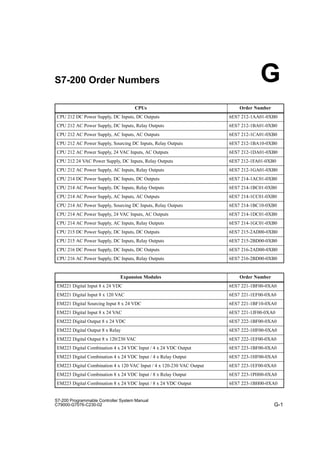
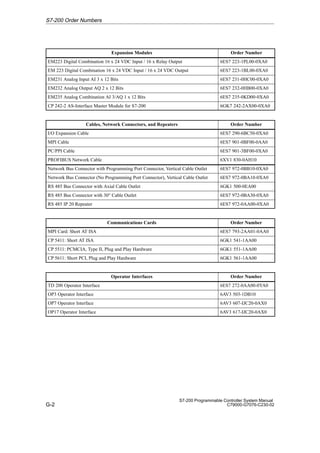
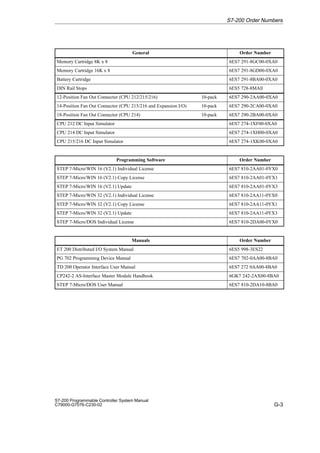
S7-200 Order Numbers G
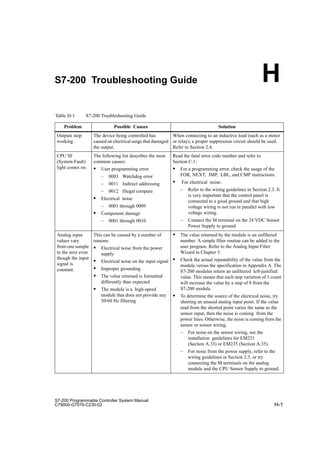
S7-200 Troubleshooting
Guide
H
Index
S7-200 Programmable Controller
System Manual
This manual has the order number:
6ES7298-8FA01-8BH0
SIMATIC
ii
ier tragen Sie Ihren Buchtitel ein ---
C79000 G7076 C230 02
This manual contains notices which you should observe to ensure your own personal safety, as
well as to protect the product and connected equipment. These notices are highlighted in the
manual by a warning triangle and are marked as follows according to the level of danger:
!
Danger
indicates that death, severe personal injury or substantial property damage will result if proper
precautions are not taken.
!
Warning
indicates that death, severe personal injury or substantial property damage can result if proper
precautions are not taken.
!
Caution
indicatesthatminorpersonalinjuryorpropertydamagecanresultifproperprecautionsarenottaken.
The device/system may only be set up and operated in conjunction with this manual.
Only qualified personnel should be allowed to install and work on this equipment. Qualified
persons are defined as persons who are authorized to commission, to ground, and to tag circuits,
equipment, and systems in accordance with established safety practices and standards.
Note the following:
!
Warning
This device and its components may only be used for the applications described in thecatalogorthe
technicaldescription,andonlyinconnectionwithdevicesorcomponentsfromothermanufacturers
which have been approved or recommended by Siemens.
This product can only function correctly and safely if it is transported, stored, set up, and installed
correctly, and operated and maintained as recommended.
SIMATIC, SIMATIC NET and SIMATIC HMI are registered trademarks of Siemens AG.
STEP7 and S7 are trademarks of Siemens AG.
Microsoft, Windows, Windows 95, and Windows NT are registered trademarks of Microsoft
Corporation.
Underwriters Laboratories is a trademark of Underwriters Laboratories, Inc.
Wehavecheckedthecontentsofthismanualforagreementwiththe
hardware and software described. Since deviations cannot be pre-
cluded entirely, we cannot guarantee full agreement. However, the
data in this manual are reviewed regularly and any necessary cor-
rections included in subsequent editions. Suggestions for improve-
ment are welcomed.
Technical data subject to change.
 Siemens AG 1998
Disclaimer of Liability
 Copyright Siemens AG 1998 All rights reserved.
The reproduction, transmission or use of this document or its
contents is not permitted without express written authority.
Offenders will be liable for damages. All rights, including rights
createdbypatentgrantorregistrationofautilitymodelordesign,are
reserved.
Siemens AG
Bereich Automatisierungs- und Antriebstechnik
Geschaeftsgebiet Industrie-Automatisierungssysteme
Postfach 4848, D-90327 Nuernberg
Siemens Aktiengesellschaft 6ES7 298-8FA01-8BH0
Safety Guidelines
Qualified Personnel
Correct Usage
Trademarks
iii
S7-200 Programmable Controller System Manual
C79000-G7076-C230-02
Preface
Purpose
The S7-200 series is a line of micro-programmable logic controllers (Micro PLCs) that can
control a variety of automation applications. Compact design, low cost, and a powerful
instruction set make the S7-200 controllers a perfect solution for controlling small
applications. The wide variety of CPU sizes and voltages, and the multiple programming
options available, give you the flexibility you need to solve your automation problems.
This manual provides information about installing and programming the S7-200 Micro PLCs,
including the following topics:
 Installing and wiring the S7-200 CPU and expansion I/O modules, and installing the
STEP 7-Micro/WIN software
 Designing and entering a program
 Understanding the CPU operations, such as data types and addressing modes, the CPU
scan cycle, password-protection, and network communication
This manual also includes descriptions and examples for the programming instructions,
typical execution times for the instructions, and the data sheets for the S7-200 equipment.
Audience
This manual is designed for engineers, programmers, installers, and electricians who have a
general knowledge of programmable logic controllers.
Scope of the Manual
The information contained in this manual pertains in particular to the following products:
 S7-200 CPU models: CPU 212 Release 1.01, CPU 214 Release 1.01,
CPU 215 Release 1.02, and CPU 216 Release 1.02
 Version 2.1 of STEP 7-Micro/WIN programming software packages:
– STEP 7-Micro/WIN 16 for the 16-bit Windows 3.1x
– STEP 7-Micro/WIN 32 for the 32-bit Windows 95 and Windows NT
Agency Approvals
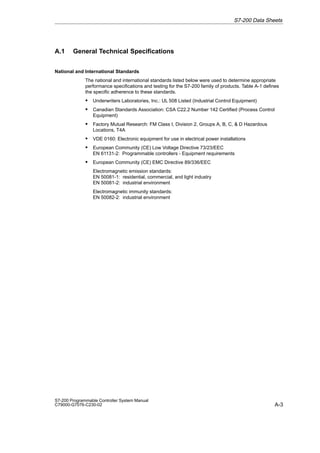
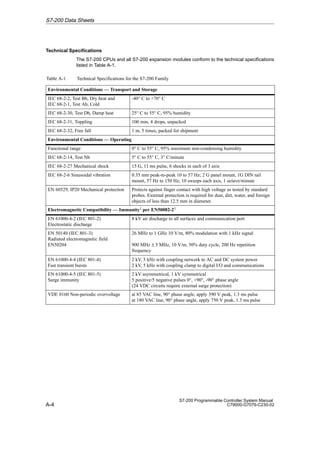
The SIMATIC S7-200 series meets the standards and regulations of the following agencies:
 European Community (CE) Low Voltage Directive 73/23/EEC
 European Community (CE) EMC Directive 89/336/EEC
 Underwriters Laboratories, Inc.: UL 508 Listed (Industrial Control Equipment)
 Canadian Standards Association: CSA C22.2 Number 142 Certified (Process Control
Equipment)
 Factory Mutual Research: FM Class I, Division 2, Groups A, B, C,  D Hazardous
Locations, T4A
 VDE 0160: Electronic equipment for use in electrical power installations
Refer to Appendix A for compliance information.
iv
S7-200 Programmable Controller System Manual
C79000-G7076-C230-02
Related Information
Refer to the following documentation for more detailed information about selected topics:
 ET 200 Distributed I/O System Manual: describes how to install and use the ET 200
products for distributed I/O.
 Process Field Bus (PROFIBUS) standard (EN 50170): describes the standard protocol
for the S7-200 DP communication capability.
 TD 200 Operator Interface User Manual: describes how to install and use the TD 200
with an S7-200 programmable logic controller.
How to Use This Manual
If you are a first-time (novice) user of S7-200 Micro PLCs, you should read the entire manual.
If you are an experienced user, refer to the table of contents or index to find specific
information.
The manual is organized according to the following topics:
 “Introducing the S7-200 Micro PLC” (Chapter 1) provides an overview of some of the
features of the equipment.
 “Installing an S7-200 Micro PLC” (Chapter 2) provides procedures, dimensions, and
basic guidelines for installing the S7-200 CPU modules and expansion I/O modules.
 “Installing and Using the STEP 7-Micro/WIN Software” (Chapter 3) describes how to
install the programming software. It also provides a basic explanation about the features
of the software.
 “Getting Started with a Sample Program” (Chapter 4) helps you enter a sample program,
using the STEP 7-Micro/WIN software.
 “Additional Features of STEP 7-Micro/WIN” (Chapter 5) describes how to use the TD 200
Wizard and the S7-200 Instruction Wizard, and other new features of STEP 7-Micro/WIN.
 “Basic Concepts for Programming an S7-200 CPU” (Chapter 6), “CPU Memory: Data
Types and Addressing Modes” (Chapter 7), and “Input/Output Control” (Chapter 8)
provide information about how the S7-200 CPU processes data and executes your
program.
 “Network Communications and the S7-200 CPU” (Chapter 9) provides information about
how to connect the S7-200 CPU to different types of networks.
 “Instruction Set” (Chapter 10) provides explanations and examples of the programming
instructions used by the S7-200 CPUs.
Additional information (such as the equipment data sheets, error code descriptions,
execution times, and troubleshooting) are provided in the appendices.

Additional Assistance
For assistance in answering technical questions, for training on this product, or for ordering,
contact your Siemens distributor or sales office.
For Internet information about Siemens products and services, technical support, or FAQs
(frequently asked questions) and application tips, use this Internet address:
http://www.ad.siemens.de
Preface
v
S7-200 Programmable Controller System Manual
C79000-G7076-C230-02
Contents
1 Introducing the S7-200 Micro PLC 1-1
. . . . . . . . . . . . . . . . . . . . . . . . . . . . . . . . . . . . . . . .
1.1 Comparing the Features of the S7-200 Micro PLCs 1-2
. . . . . . . . . . . . . . . . . . . . . . . . . .
1.2 Major Components of the S7-200 Micro PLC 1-4
. . . . . . . . . . . . . . . . . . . . . . . . . . . . . . .
2 Installing an S7-200 Micro PLC 2-1
. . . . . . . . . . . . . . . . . . . . . . . . . . . . . . . . . . . . . . . . . . .
2.1 Panel Layout Considerations 2-2
. . . . . . . . . . . . . . . . . . . . . . . . . . . . . . . . . . . . . . . . . . . . .
2.2 Installing and Removing an S7-200 Micro PLC 2-5
. . . . . . . . . . . . . . . . . . . . . . . . . . . . . .
2.3 Installing the Field Wiring 2-8
. . . . . . . . . . . . . . . . . . . . . . . . . . . . . . . . . . . . . . . . . . . . . . . .
2.4 Using Suppression Circuits 2-13
. . . . . . . . . . . . . . . . . . . . . . . . . . . . . . . . . . . . . . . . . . . . . . .
2.5 Power Considerations 2-15
. . . . . . . . . . . . . . . . . . . . . . . . . . . . . . . . . . . . . . . . . . . . . . . . . . .
3 Installing and Using the STEP 7-Micro/WIN Software 3-1
. . . . . . . . . . . . . . . . . . . . . . .
3.1 Installing the STEP 7-Micro/WIN Software 3-2
. . . . . . . . . . . . . . . . . . . . . . . . . . . . . . . . . .
3.2 Using STEP 7-Micro/WIN to Set Up the Communications Hardware 3-4
. . . . . . . . . . .
3.3 Establishing Communication with the S7-200 CPU 3-7
. . . . . . . . . . . . . . . . . . . . . . . . . .
3.4 Configuring the Preferences for STEP 7-Micro/WIN 3-25
. . . . . . . . . . . . . . . . . . . . . . . . . .
3.5 Creating and Saving a Project 3-26
. . . . . . . . . . . . . . . . . . . . . . . . . . . . . . . . . . . . . . . . . . . .
3.6 Creating a Program 3-27
. . . . . . . . . . . . . . . . . . . . . . . . . . . . . . . . . . . . . . . . . . . . . . . . . . . . .
3.7 Creating a Data Block 3-32
. . . . . . . . . . . . . . . . . . . . . . . . . . . . . . . . . . . . . . . . . . . . . . . . . . .
3.8 Using the Status Chart 3-34
. . . . . . . . . . . . . . . . . . . . . . . . . . . . . . . . . . . . . . . . . . . . . . . . . .
3.9 Using Symbolic Addressing 3-36
. . . . . . . . . . . . . . . . . . . . . . . . . . . . . . . . . . . . . . . . . . . . . .
4 Getting Started with a Sample Program 4-1
. . . . . . . . . . . . . . . . . . . . . . . . . . . . . . . . . . .
4.1 Creating a Program for a Sample Application 4-2
. . . . . . . . . . . . . . . . . . . . . . . . . . . . . . .
4.2 Task: Create a Project 4-6
. . . . . . . . . . . . . . . . . . . . . . . . . . . . . . . . . . . . . . . . . . . . . . . . . . .
4.3 Task: Create a Symbol Table 4-8
. . . . . . . . . . . . . . . . . . . . . . . . . . . . . . . . . . . . . . . . . . . . .
4.4 Task: Enter the Program in Ladder Logic 4-10
. . . . . . . . . . . . . . . . . . . . . . . . . . . . . . . . . . .
4.5 Task: Create a Status Chart 4-14
. . . . . . . . . . . . . . . . . . . . . . . . . . . . . . . . . . . . . . . . . . . . . .
4.6 Task: Download and Monitor the Sample Program 4-15
. . . . . . . . . . . . . . . . . . . . . . . . . . .
5 Additional Features of STEP 7-Micro/WIN 5-1
. . . . . . . . . . . . . . . . . . . . . . . . . . . . . . . . .
5.1 Using the TD 200 Wizard to Configure the TD 200 Operator Interface 5-2
. . . . . . . . . .
5.2 Using the S7-200 Instruction Wizard 5-12
. . . . . . . . . . . . . . . . . . . . . . . . . . . . . . . . . . . . . . .
5.3 Using the Analog Input Filtering Instruction Wizard 5-14
. . . . . . . . . . . . . . . . . . . . . . . . . .
5.4 Using Cross Reference 5-17
. . . . . . . . . . . . . . . . . . . . . . . . . . . . . . . . . . . . . . . . . . . . . . . . . .
5.5 Using Element Usage 5-18
. . . . . . . . . . . . . . . . . . . . . . . . . . . . . . . . . . . . . . . . . . . . . . . . . . .
vi
S7-200 Programmable Controller System Manual
C79000-G7076-C230-02
5.6 Using Find/Replace 5-19
. . . . . . . . . . . . . . . . . . . . . . . . . . . . . . . . . . . . . . . . . . . . . . . . . . . . .
5.7 Documenting Your Program 5-21
. . . . . . . . . . . . . . . . . . . . . . . . . . . . . . . . . . . . . . . . . . . . . .
5.8 Printing Your Program 5-23
. . . . . . . . . . . . . . . . . . . . . . . . . . . . . . . . . . . . . . . . . . . . . . . . . . .
6 Basic Concepts for Programming an S7-200 CPU 6-1
. . . . . . . . . . . . . . . . . . . . . . . . . .
6.1 Guidelines for Designing a Micro PLC System 6-2
. . . . . . . . . . . . . . . . . . . . . . . . . . . . . .
6.2 Concepts of an S7-200 Program 6-4
. . . . . . . . . . . . . . . . . . . . . . . . . . . . . . . . . . . . . . . . . .
6.3 Concepts of the S7-200 Programming Languages 6-5
. . . . . . . . . . . . . . . . . . . . . . . . . . .
6.4 Basic Elements for Constructing a Program 6-8
. . . . . . . . . . . . . . . . . . . . . . . . . . . . . . . .
6.5 Understanding the Scan Cycle of the CPU 6-10
. . . . . . . . . . . . . . . . . . . . . . . . . . . . . . . . .
6.6 Selecting the Mode of Operation for the CPU 6-13
. . . . . . . . . . . . . . . . . . . . . . . . . . . . . . .
6.7 Creating a Password for the CPU 6-14
. . . . . . . . . . . . . . . . . . . . . . . . . . . . . . . . . . . . . . . . .
6.8 Debugging and Monitoring Your Program 6-16
. . . . . . . . . . . . . . . . . . . . . . . . . . . . . . . . . .
6.9 Error Handling for the S7-200 CPU 6-19
. . . . . . . . . . . . . . . . . . . . . . . . . . . . . . . . . . . . . . . .
7 CPU Memory: Data Types and Addressing Modes 7-1
. . . . . . . . . . . . . . . . . . . . . . . . .
7.1 Direct Addressing of the CPU Memory Areas 7-2
. . . . . . . . . . . . . . . . . . . . . . . . . . . . . . .
7.2 Indirect Addressing of the CPU Memory Areas 7-9
. . . . . . . . . . . . . . . . . . . . . . . . . . . . . .
7.3 Memory Retention for the S7-200 CPU 7-11
. . . . . . . . . . . . . . . . . . . . . . . . . . . . . . . . . . . .
7.4 Using Your Program to Store Data Permanently 7-16
. . . . . . . . . . . . . . . . . . . . . . . . . . . . .
7.5 Using a Memory Cartridge to Store Your Program 7-17
. . . . . . . . . . . . . . . . . . . . . . . . . . .
8 Input/Output Control 8-1
. . . . . . . . . . . . . . . . . . . . . . . . . . . . . . . . . . . . . . . . . . . . . . . . . . . . .
8.1 Local I/O and Expansion I/O 8-2
. . . . . . . . . . . . . . . . . . . . . . . . . . . . . . . . . . . . . . . . . . . . . .
8.2 Using the Selectable Input Filter to Provide Noise Rejection 8-5
. . . . . . . . . . . . . . . . . .
8.3 Using the Output Table to Configure the States of the Outputs 8-6
. . . . . . . . . . . . . . . .
8.4 High-Speed I/O 8-7
. . . . . . . . . . . . . . . . . . . . . . . . . . . . . . . . . . . . . . . . . . . . . . . . . . . . . . . . .
8.5 Analog Adjustments 8-8
. . . . . . . . . . . . . . . . . . . . . . . . . . . . . . . . . . . . . . . . . . . . . . . . . . . . .
9 Network Communications and the S7-200 CPU 9-1
. . . . . . . . . . . . . . . . . . . . . . . . . . . .
9.1 Communication Capabilities of the S7-200 CPU 9-2
. . . . . . . . . . . . . . . . . . . . . . . . . . . . .
9.2 Communication Network Components 9-6
. . . . . . . . . . . . . . . . . . . . . . . . . . . . . . . . . . . . .
9.3 Data Communications Using the PC/PPI Cable 9-9
. . . . . . . . . . . . . . . . . . . . . . . . . . . . .
9.4 Data Communications Using the MPI or CP Card 9-13
. . . . . . . . . . . . . . . . . . . . . . . . . . .
9.5 Distributed Peripheral (DP) Standard Communications 9-15
. . . . . . . . . . . . . . . . . . . . . . .
9.6 Network Performance 9-28
. . . . . . . . . . . . . . . . . . . . . . . . . . . . . . . . . . . . . . . . . . . . . . . . . . .
10 Instruction Set 10-1
. . . . . . . . . . . . . . . . . . . . . . . . . . . . . . . . . . . . . . . . . . . . . . . . . . . . . . . . . .
10.1 Valid Ranges for the S7-200 CPUs 10-2
. . . . . . . . . . . . . . . . . . . . . . . . . . . . . . . . . . . . . . . .
10.2 Contact Instructions 10-4
. . . . . . . . . . . . . . . . . . . . . . . . . . . . . . . . . . . . . . . . . . . . . . . . . . . . .
10.3 Comparison Contact Instructions 10-7
. . . . . . . . . . . . . . . . . . . . . . . . . . . . . . . . . . . . . . . . . .
10.4 Output Instructions 10-10
. . . . . . . . . . . . . . . . . . . . . . . . . . . . . . . . . . . . . . . . . . . . . . . . . . . . . .
Contents
vii
S7-200 Programmable Controller System Manual
C79000-G7076-C230-02
10.5 Timer, Counter, High-Speed Counter, High-Speed Output, Clock,
and Pulse Instructions 10-13
. . . . . . . . . . . . . . . . . . . . . . . . . . . . . . . . . . . . . . . . . . . . . . . . . . .
10.6 Math and PID Loop Control Instructions 10-50
. . . . . . . . . . . . . . . . . . . . . . . . . . . . . . . . . . . .
10.7 Increment and Decrement Instructions 10-66
. . . . . . . . . . . . . . . . . . . . . . . . . . . . . . . . . . . . .
10.8 Move, Fill, and Table Instructions 10-68
. . . . . . . . . . . . . . . . . . . . . . . . . . . . . . . . . . . . . . . . . .
10.9 Shift and Rotate Instructions 10-78
. . . . . . . . . . . . . . . . . . . . . . . . . . . . . . . . . . . . . . . . . . . . .
10.10 Program Control Instructions 10-84
. . . . . . . . . . . . . . . . . . . . . . . . . . . . . . . . . . . . . . . . . . . . .
10.11 Logic Stack Instructions 10-99
. . . . . . . . . . . . . . . . . . . . . . . . . . . . . . . . . . . . . . . . . . . . . . . . .
10.12 Logic Operations 10-102
. . . . . . . . . . . . . . . . . . . . . . . . . . . . . . . . . . . . . . . . . . . . . . . . . . . . . . .
10.13 Conversion Instructions 10-108
. . . . . . . . . . . . . . . . . . . . . . . . . . . . . . . . . . . . . . . . . . . . . . . . . .
10.14 Interrupt and Communications Instructions 10-114
. . . . . . . . . . . . . . . . . . . . . . . . . . . . . . . . .
A S7-200 Data Sheets A-1
. . . . . . . . . . . . . . . . . . . . . . . . . . . . . . . . . . . . . . . . . . . . . . . . . . . . . .
A.1 General Technical Specifications A-3
. . . . . . . . . . . . . . . . . . . . . . . . . . . . . . . . . . . . . . . . . .
A.2 CPU 212 DC Power Supply, DC Inputs, DC Outputs A-6
. . . . . . . . . . . . . . . . . . . . . . . . .
A.3 CPU 212 AC Power Supply, DC Inputs, Relay Outputs A-8
. . . . . . . . . . . . . . . . . . . . . . .
A.4 CPU 212 24 VAC Power Supply, DC Inputs, Relay Outputs A-10
. . . . . . . . . . . . . . . . . . .
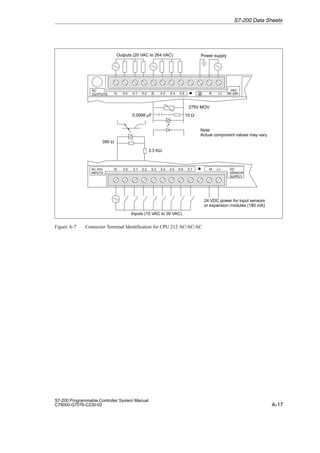
A.5 CPU 212 AC Power Supply, AC Inputs, AC Outputs A-12
. . . . . . . . . . . . . . . . . . . . . . . . .
A.6 CPU 212 AC Power Supply, Sourcing DC Inputs, Relay Outputs A-14
. . . . . . . . . . . . . .
A.7 CPU 212 AC Power Supply, 24 VAC Inputs, AC Outputs A-16
. . . . . . . . . . . . . . . . . . . . .
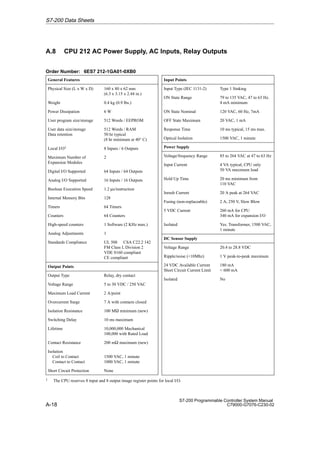
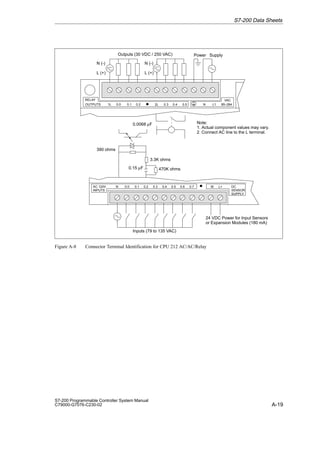
A.8 CPU 212 AC Power Supply, AC Inputs, Relay Outputs A-18
. . . . . . . . . . . . . . . . . . . . . . .
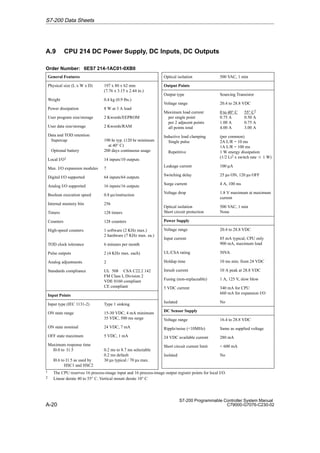
A.9 CPU 214 DC Power Supply, DC Inputs, DC Outputs A-20
. . . . . . . . . . . . . . . . . . . . . . . . .
A.10 CPU 214 AC Power Supply, DC Inputs, Relay Outputs A-22
. . . . . . . . . . . . . . . . . . . . . . .
A.11 CPU 214 AC Power Supply, AC Inputs, AC Outputs A-24
. . . . . . . . . . . . . . . . . . . . . . . . .
A.12 CPU 214 AC Power Supply, Sourcing DC Inputs, Relay Outputs A-26
. . . . . . . . . . . . . .
A.13 CPU 214 AC Power Supply, 24 VAC Inputs, AC Outputs A-28
. . . . . . . . . . . . . . . . . . . . .
A.14 CPU 214 AC Power Supply, AC Inputs, Relay Outputs A-30
. . . . . . . . . . . . . . . . . . . . . . .
A.15 CPU 215 DC Power Supply, DC Inputs, DC Outputs A-32
. . . . . . . . . . . . . . . . . . . . . . . . .
A.16 CPU 215 AC Power Supply, DC Inputs, Relay Outputs A-34
. . . . . . . . . . . . . . . . . . . . . . .
A.17 CPU 216 DC Power Supply, DC Inputs, DC Outputs A-36
. . . . . . . . . . . . . . . . . . . . . . . . .
A.18 CPU 216 AC Power Supply, DC Inputs, Relay Outputs A-38
. . . . . . . . . . . . . . . . . . . . . . .
A.19 Expansion Module EM221 Digital Input 8 x 24 VDC A-40
. . . . . . . . . . . . . . . . . . . . . . . . . .
A.20 Expansion Module EM221 Digital Input 8 x 120 VAC A-41
. . . . . . . . . . . . . . . . . . . . . . . . .
A.21 Expansion Module EM221 Digital Sourcing Input 8 x 24 VDC A-42
. . . . . . . . . . . . . . . . .
A.22 Expansion Module EM221 Digital Input 8 x 24 VAC A-43
. . . . . . . . . . . . . . . . . . . . . . . . . .
A.23 Expansion Module EM222 Digital Output 8 x 24 VDC A-44
. . . . . . . . . . . . . . . . . . . . . . . .
A.24 Expansion Module EM222 Digital Output 8 x Relay A-45
. . . . . . . . . . . . . . . . . . . . . . . . . .
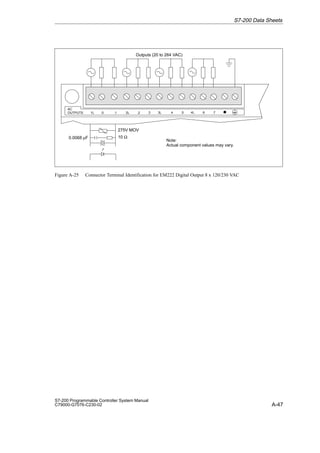
A.25 Expansion Module EM222 Digital Output 8 x 120/230 VAC A-46
. . . . . . . . . . . . . . . . . . .
Contents
viii
S7-200 Programmable Controller System Manual
C79000-G7076-C230-02
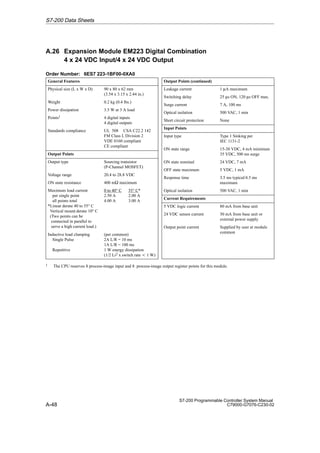
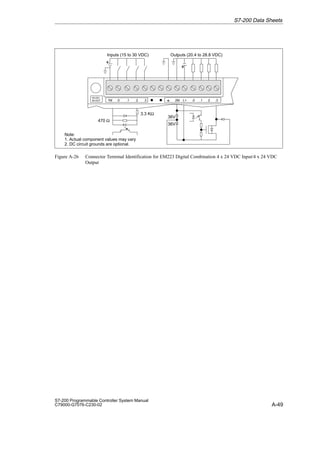
A.26 Expansion Module EM223 Digital Combination
4 x 24 VDC Input/4 x 24 VDC Output A-48
. . . . . . . . . . . . . . . . . . . . . . . . . . . . . . . . . . . . . .
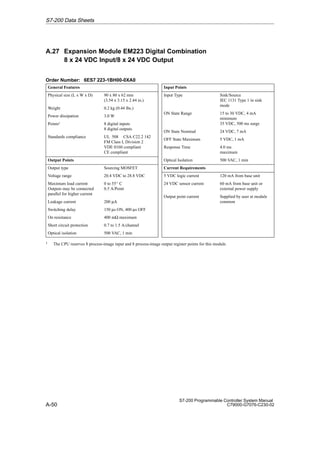
A.27 Expansion Module EM223 Digital Combination
8 x 24 VDC Input/8 x 24 VDC Output A-50
. . . . . . . . . . . . . . . . . . . . . . . . . . . . . . . . . . . . . .
A.28 Expansion Module EM223 Digital Combination
16 x 24 VDC Input/16 x 24 VDC Output A-52
. . . . . . . . . . . . . . . . . . . . . . . . . . . . . . . . . . . .
A.29 Expansion Module EM223 Digital Combination
4 x 24 VDC Input/4 x Relay Output A-54
. . . . . . . . . . . . . . . . . . . . . . . . . . . . . . . . . . . . . . . .
A.30 Expansion Module EM223 Digital Combination
4 x 120 VAC Input/4 x 120 VAC to 230 VAC Output A-55
. . . . . . . . . . . . . . . . . . . . . . . . . .
A.31 Expansion Module EM223 Digital Combination
8 x 24 VDC Input/8 x Relay Output A-56
. . . . . . . . . . . . . . . . . . . . . . . . . . . . . . . . . . . . . . . .
A.32 Expansion Module EM223 Digital Combination
16 x 24 VDC Input/16 x Relay Output A-58
. . . . . . . . . . . . . . . . . . . . . . . . . . . . . . . . . . . . . .
A.33 Expansion Module EM231 Analog Input AI 3 x 12 Bits A-60
. . . . . . . . . . . . . . . . . . . . . . .
A.34 Expansion Module EM232 Analog Output AQ 2 x 12 Bits A-66
. . . . . . . . . . . . . . . . . . . . .
A.35 Expansion Module EM235 Analog Combination AI 3/AQ 1 x 12 Bits A-69
. . . . . . . . . . . .
A.36 Memory Cartridge 8K x 8 A-78
. . . . . . . . . . . . . . . . . . . . . . . . . . . . . . . . . . . . . . . . . . . . . . . .
A.37 Memory Cartridge 16K x 8 A-79
. . . . . . . . . . . . . . . . . . . . . . . . . . . . . . . . . . . . . . . . . . . . . . .
A.38 Battery Cartridge A-80
. . . . . . . . . . . . . . . . . . . . . . . . . . . . . . . . . . . . . . . . . . . . . . . . . . . . . . .
A.39 I/O Expansion Cable A-81
. . . . . . . . . . . . . . . . . . . . . . . . . . . . . . . . . . . . . . . . . . . . . . . . . . . .
A.40 PC/PPI Cable A-82
. . . . . . . . . . . . . . . . . . . . . . . . . . . . . . . . . . . . . . . . . . . . . . . . . . . . . . . . . .
A.41 CPU 212 DC Input Simulator A-84
. . . . . . . . . . . . . . . . . . . . . . . . . . . . . . . . . . . . . . . . . . . . .
A.42 CPU 214 DC Input Simulator A-85
. . . . . . . . . . . . . . . . . . . . . . . . . . . . . . . . . . . . . . . . . . . . .
A.43 CPU 215/216 DC Input Simulator A-86
. . . . . . . . . . . . . . . . . . . . . . . . . . . . . . . . . . . . . . . . .
B Power Calculation Table B-1
. . . . . . . . . . . . . . . . . . . . . . . . . . . . . . . . . . . . . . . . . . . . . . . . .
C Error Codes C-1
. . . . . . . . . . . . . . . . . . . . . . . . . . . . . . . . . . . . . . . . . . . . . . . . . . . . . . . . . . . . .
C.1 Fatal Error Codes and Messages C-2
. . . . . . . . . . . . . . . . . . . . . . . . . . . . . . . . . . . . . . . . .
C.2 Run-Time Programming Problems C-3
. . . . . . . . . . . . . . . . . . . . . . . . . . . . . . . . . . . . . . . .
C.3 Compile Rule Violations C-4
. . . . . . . . . . . . . . . . . . . . . . . . . . . . . . . . . . . . . . . . . . . . . . . . .
D Special Memory (SM) Bits D-1
. . . . . . . . . . . . . . . . . . . . . . . . . . . . . . . . . . . . . . . . . . . . . . . .
E Using STEP 7-Micro/WIN with STEP 7 and STEP 7-Micro/DOS E-1
. . . . . . . . . . . . . .
E.1 Using STEP 7-Micro/WIN with STEP 7 E-2
. . . . . . . . . . . . . . . . . . . . . . . . . . . . . . . . . . . . .
E.2 Importing Files from STEP 7-Micro/DOS E-4
. . . . . . . . . . . . . . . . . . . . . . . . . . . . . . . . . . .
F Execution Times for STL Instructions F-1
. . . . . . . . . . . . . . . . . . . . . . . . . . . . . . . . . . . . .
G S7-200 Order Numbers G-1
. . . . . . . . . . . . . . . . . . . . . . . . . . . . . . . . . . . . . . . . . . . . . . . . . . .
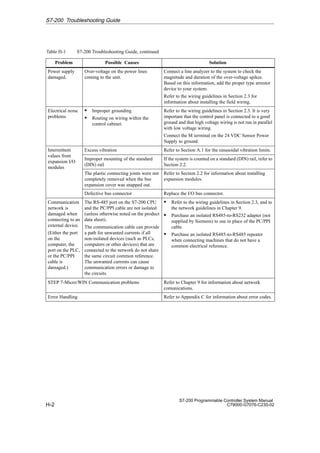
H S7-200 Troubleshooting Guide H-1
. . . . . . . . . . . . . . . . . . . . . . . . . . . . . . . . . . . . . . . . . . .
Index Index-1
. . . . . . . . . . . . . . . . . . . . . . . . . . . . . . . . . . . . . . . . . . . . . . . . . . . . . . . . . . . . . . . . .
Contents
1-1
S7-200 Programmable Controller System Manual
C79000-G7076-C230-02
Introducing the S7-200 Micro PLC
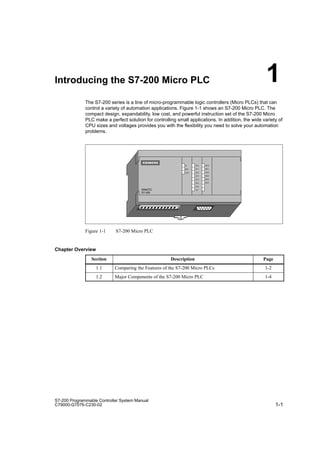
The S7-200 series is a line of micro-programmable logic controllers (Micro PLCs) that can
control a variety of automation applications. Figure 1-1 shows an S7-200 Micro PLC. The
compact design, expandability, low cost, and powerful instruction set of the S7-200 Micro
PLC make a perfect solution for controlling small applications. In addition, the wide variety of
CPU sizes and voltages provides you with the flexibility you need to solve your automation
problems.
SF
RUN
STOP
I0.0 Q0.0
I0.1
I0.2
I0.3
I0.4
I0.5
I0.6
I0.7
Q0.1
Q0.2
Q0.3
Q0.4
Q0.5
SIMATIC
S7-200
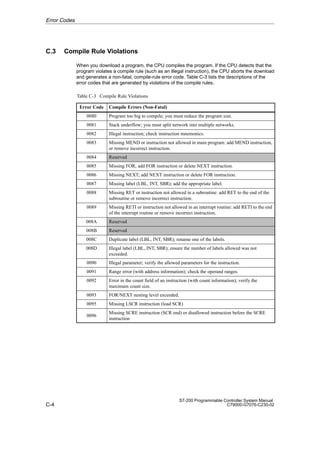
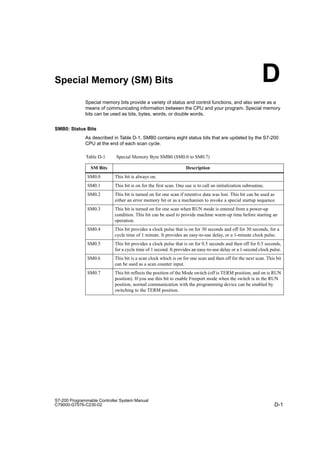
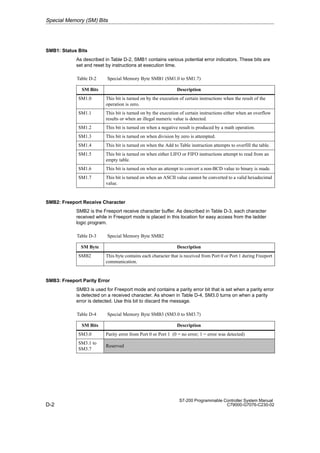
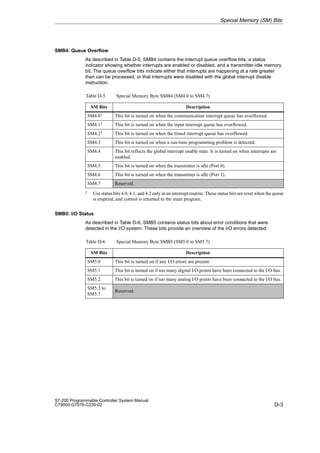
Figure 1-1 S7-200 Micro PLC
Chapter Overview
Section Description Page
1.1 Comparing the Features of the S7-200 Micro PLCs 1-2
1.2 Major Components of the S7-200 Micro PLC 1-4
1
1-2
S7-200 Programmable Controller System Manual
C79000-G7076-C230-02
1.1 Comparing the Features of the S7-200 Micro PLCs
Equipment Requirements
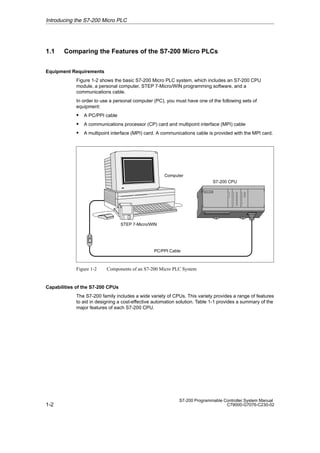
Figure 1-2 shows the basic S7-200 Micro PLC system, which includes an S7-200 CPU
module, a personal computer, STEP 7-Micro/WIN programming software, and a
communications cable.
In order to use a personal computer (PC), you must have one of the following sets of
equipment:
S A PC/PPI cable
S A communications processor (CP) card and multipoint interface (MPI) cable
S A multipoint interface (MPI) card. A communications cable is provided with the MPI card.
S7-200 CPU
PC/PPI Cable
Computer
STEP 7-Micro/WIN
Figure 1-2 Components of an S7-200 Micro PLC System
Capabilities of the S7-200 CPUs
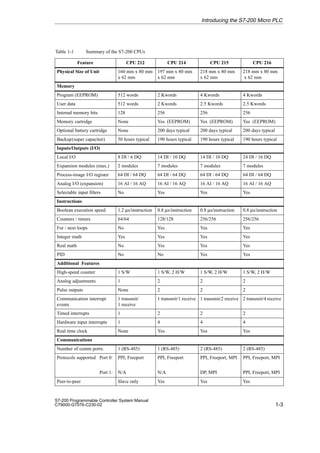
The S7-200 family includes a wide variety of CPUs. This variety provides a range of features
to aid in designing a cost-effective automation solution. Table 1-1 provides a summary of the
major features of each S7-200 CPU.
Introducing the S7-200 Micro PLC
1-3
S7-200 Programmable Controller System Manual
C79000-G7076-C230-02
Table 1-1 Summary of the S7-200 CPUs
Feature CPU 212 CPU 214 CPU 215 CPU 216
Physical Size of Unit 160 mm x 80 mm
x 62 mm
197 mm x 80 mm
x 62 mm
218 mm x 80 mm
x 62 mm
218 mm x 80 mm
x 62 mm
ÁÁÁÁÁÁÁÁÁÁÁÁÁÁÁÁÁÁÁÁÁÁÁÁÁÁÁÁÁ
Memory
ÁÁÁÁÁÁÁÁÁ
ÁÁÁÁÁÁÁÁÁ
ÁÁÁÁÁÁÁÁÁ
Program (EEPROM)
ÁÁÁÁÁ
ÁÁÁÁÁ
ÁÁÁÁÁ
512 words
ÁÁÁÁÁÁ
ÁÁÁÁÁÁ
ÁÁÁÁÁÁ
2 Kwords
ÁÁÁÁÁÁÁ
ÁÁÁÁÁÁÁ
ÁÁÁÁÁÁÁ
4 Kwords
ÁÁÁÁÁÁ
ÁÁÁÁÁÁ
ÁÁÁÁÁÁ
4 Kwords
ÁÁÁÁÁÁÁÁÁ
ÁÁÁÁÁÁÁÁÁ
ÁÁÁÁÁÁÁÁÁ
User data
ÁÁÁÁÁ
ÁÁÁÁÁ
ÁÁÁÁÁ
512 words
ÁÁÁÁÁÁ
ÁÁÁÁÁÁ
ÁÁÁÁÁÁ
2 Kwords
ÁÁÁÁÁÁÁ
ÁÁÁÁÁÁÁ
ÁÁÁÁÁÁÁ
2.5 Kwords
ÁÁÁÁÁÁ
ÁÁÁÁÁÁ
ÁÁÁÁÁÁ
2.5 Kwords
ÁÁÁÁÁÁÁÁÁ
ÁÁÁÁÁÁÁÁÁ
Internal memory bits ÁÁÁÁÁ
ÁÁÁÁÁ
128 ÁÁÁÁÁÁ
ÁÁÁÁÁÁ
256 ÁÁÁÁÁÁÁ
ÁÁÁÁÁÁÁ
256 ÁÁÁÁÁÁ
ÁÁÁÁÁÁ
256
ÁÁÁÁÁÁÁÁÁ
ÁÁÁÁÁÁÁÁÁ
Memory cartridge ÁÁÁÁÁ
ÁÁÁÁÁ
None ÁÁÁÁÁÁ
ÁÁÁÁÁÁ
Yes (EEPROM)ÁÁÁÁÁÁÁ
ÁÁÁÁÁÁÁ
Yes (EEPROM) ÁÁÁÁÁÁ
ÁÁÁÁÁÁ
Yes (EEPROM)
Optional battery cartridge None 200 days typical 200 days typical 200 days typical
ÁÁÁÁÁÁÁÁÁ
ÁÁÁÁÁÁÁÁÁ
Backup(super capacitor) ÁÁÁÁÁ
ÁÁÁÁÁ
50 hours typicalÁÁÁÁÁÁ
ÁÁÁÁÁÁ
190 hours typical
ÁÁÁÁÁÁÁ
ÁÁÁÁÁÁÁ
190 hours typical ÁÁÁÁÁÁ
ÁÁÁÁÁÁ
190 hours typical
ÁÁÁÁÁÁÁÁÁÁÁÁÁÁÁÁÁÁÁÁÁÁÁÁÁÁÁÁÁ
Inputs/Outputs (I/O)
ÁÁÁÁÁÁÁÁÁ
ÁÁÁÁÁÁÁÁÁ
Local I/O ÁÁÁÁÁ
ÁÁÁÁÁ
8 DI / 6 DQ ÁÁÁÁÁÁ
ÁÁÁÁÁÁ
14 DI / 10 DQ ÁÁÁÁÁÁÁ
ÁÁÁÁÁÁÁ
14 DI / 10 DQ ÁÁÁÁÁÁ
ÁÁÁÁÁÁ
24 DI / 16 DQ
ÁÁÁÁÁÁÁÁÁ
ÁÁÁÁÁÁÁÁÁ
Expansion modules (max.) ÁÁÁÁÁ
ÁÁÁÁÁ
2 modules ÁÁÁÁÁÁ
ÁÁÁÁÁÁ
7 modules ÁÁÁÁÁÁÁ
ÁÁÁÁÁÁÁ
7 modules ÁÁÁÁÁÁ
ÁÁÁÁÁÁ
7 modules
ÁÁÁÁÁÁÁÁÁ
ÁÁÁÁÁÁÁÁÁ
Process-image I/O register
ÁÁÁÁÁ
ÁÁÁÁÁ
64 DI / 64 DQ
ÁÁÁÁÁÁ
ÁÁÁÁÁÁ
64 DI / 64 DQ
ÁÁÁÁÁÁÁ
ÁÁÁÁÁÁÁ
64 DI / 64 DQ
ÁÁÁÁÁÁ
ÁÁÁÁÁÁ
64 DI / 64 DQ
ÁÁÁÁÁÁÁÁÁ
ÁÁÁÁÁÁÁÁÁ
Analog I/O (expansion)
ÁÁÁÁÁ
ÁÁÁÁÁ
16 AI / 16 AQ
ÁÁÁÁÁÁ
ÁÁÁÁÁÁ
16 AI / 16 AQ
ÁÁÁÁÁÁÁ
ÁÁÁÁÁÁÁ
16 AI / 16 AQ
ÁÁÁÁÁÁ
ÁÁÁÁÁÁ
16 AI / 16 AQ
Selectable input filters No Yes Yes Yes
ÁÁÁÁÁÁÁÁÁÁÁÁÁÁÁÁÁÁÁÁÁÁÁÁÁÁÁÁÁ
Instructions
ÁÁÁÁÁÁÁÁÁ
ÁÁÁÁÁÁÁÁÁ
Boolean execution speed
ÁÁÁÁÁ
ÁÁÁÁÁ
1.2 µs/instruction
ÁÁÁÁÁÁ
ÁÁÁÁÁÁ
0.8 µs/instruction
ÁÁÁÁÁÁÁ
ÁÁÁÁÁÁÁ
0.8 µs/instruction
ÁÁÁÁÁÁ
ÁÁÁÁÁÁ
0.8 µs/instruction
ÁÁÁÁÁÁÁÁÁ
ÁÁÁÁÁÁÁÁÁ
ÁÁÁÁÁÁÁÁÁ
Counters / timers
ÁÁÁÁÁ
ÁÁÁÁÁ
ÁÁÁÁÁ
64/64
ÁÁÁÁÁÁ
ÁÁÁÁÁÁ
ÁÁÁÁÁÁ
128/128
ÁÁÁÁÁÁÁ
ÁÁÁÁÁÁÁ
ÁÁÁÁÁÁÁ
256/256
ÁÁÁÁÁÁ
ÁÁÁÁÁÁ
ÁÁÁÁÁÁ
256/256
ÁÁÁÁÁÁÁÁÁ
ÁÁÁÁÁÁÁÁÁ
ÁÁÁÁÁÁÁÁÁ
For / next loops
ÁÁÁÁÁ
ÁÁÁÁÁ
ÁÁÁÁÁ
No
ÁÁÁÁÁÁ
ÁÁÁÁÁÁ
ÁÁÁÁÁÁ
Yes
ÁÁÁÁÁÁÁ
ÁÁÁÁÁÁÁ
ÁÁÁÁÁÁÁ
Yes
ÁÁÁÁÁÁ
ÁÁÁÁÁÁ
ÁÁÁÁÁÁ
Yes
ÁÁÁÁÁÁÁÁÁ
ÁÁÁÁÁÁÁÁÁ
Integer math ÁÁÁÁÁ
ÁÁÁÁÁ
Yes ÁÁÁÁÁÁ
ÁÁÁÁÁÁ
Yes ÁÁÁÁÁÁÁ
ÁÁÁÁÁÁÁ
Yes ÁÁÁÁÁÁ
ÁÁÁÁÁÁ
Yes
ÁÁÁÁÁÁÁÁÁ
ÁÁÁÁÁÁÁÁÁ
Real math ÁÁÁÁÁ
ÁÁÁÁÁ
No ÁÁÁÁÁÁ
ÁÁÁÁÁÁ
Yes ÁÁÁÁÁÁÁ
ÁÁÁÁÁÁÁ
Yes ÁÁÁÁÁÁ
ÁÁÁÁÁÁ
Yes
PID No No Yes Yes
ÁÁÁÁÁÁÁÁÁÁÁÁÁÁÁÁÁÁÁÁÁÁÁÁÁÁÁÁÁ
Additional Features
ÁÁÁÁÁÁÁÁÁ
ÁÁÁÁÁÁÁÁÁ
High-speed counter ÁÁÁÁÁ
ÁÁÁÁÁ
1 S/W ÁÁÁÁÁÁ
ÁÁÁÁÁÁ
1 S/W, 2 H/W ÁÁÁÁÁÁÁ
ÁÁÁÁÁÁÁ
1 S/W, 2 H/W ÁÁÁÁÁÁ
ÁÁÁÁÁÁ
1 S/W, 2 H/W
ÁÁÁÁÁÁÁÁÁ
ÁÁÁÁÁÁÁÁÁ
Analog adjustments ÁÁÁÁÁ
ÁÁÁÁÁ
1 ÁÁÁÁÁÁ
ÁÁÁÁÁÁ
2 ÁÁÁÁÁÁÁ
ÁÁÁÁÁÁÁ
2 ÁÁÁÁÁÁ
ÁÁÁÁÁÁ
2
ÁÁÁÁÁÁÁÁÁ
ÁÁÁÁÁÁÁÁÁ
Pulse outputs ÁÁÁÁÁ
ÁÁÁÁÁ
None ÁÁÁÁÁÁ
ÁÁÁÁÁÁ
2 ÁÁÁÁÁÁÁ
ÁÁÁÁÁÁÁ
2 ÁÁÁÁÁÁ
ÁÁÁÁÁÁ
2
ÁÁÁÁÁÁÁÁÁ
ÁÁÁÁÁÁÁÁÁ
ÁÁÁÁÁÁÁÁÁ
Communication interrupt
events
ÁÁÁÁÁ
ÁÁÁÁÁ
ÁÁÁÁÁ
1 transmit/
1 receive
ÁÁÁÁÁÁ
ÁÁÁÁÁÁ
ÁÁÁÁÁÁ
1 transmit/1 receive
ÁÁÁÁÁÁÁ
ÁÁÁÁÁÁÁ
ÁÁÁÁÁÁÁ
1 transmit/2 receive
ÁÁÁÁÁÁ
ÁÁÁÁÁÁ
ÁÁÁÁÁÁ
2 transmit/4 receive
ÁÁÁÁÁÁÁÁÁ
ÁÁÁÁÁÁÁÁÁ
Timed interrupts ÁÁÁÁÁ
ÁÁÁÁÁ
1 ÁÁÁÁÁÁ
ÁÁÁÁÁÁ
2 ÁÁÁÁÁÁÁ
ÁÁÁÁÁÁÁ
2 ÁÁÁÁÁÁ
ÁÁÁÁÁÁ
2
ÁÁÁÁÁÁÁÁÁ
ÁÁÁÁÁÁÁÁÁ
Hardware input interrupts ÁÁÁÁÁ
ÁÁÁÁÁ
1 ÁÁÁÁÁÁ
ÁÁÁÁÁÁ
4 ÁÁÁÁÁÁÁ
ÁÁÁÁÁÁÁ
4 ÁÁÁÁÁÁ
ÁÁÁÁÁÁ
4
ÁÁÁÁÁÁÁÁÁ
ÁÁÁÁÁÁÁÁÁ
Real time clock ÁÁÁÁÁ
ÁÁÁÁÁ
None ÁÁÁÁÁÁ
ÁÁÁÁÁÁ
Yes ÁÁÁÁÁÁÁ
ÁÁÁÁÁÁÁ
Yes ÁÁÁÁÁÁ
ÁÁÁÁÁÁ
Yes
ÁÁÁÁÁÁÁÁÁÁÁÁÁÁÁÁÁÁÁÁÁÁÁÁÁÁÁÁÁ
Communications
ÁÁÁÁÁÁÁÁÁ
ÁÁÁÁÁÁÁÁÁ
Number of comm ports:
ÁÁÁÁÁ
ÁÁÁÁÁ
1 (RS-485)
ÁÁÁÁÁÁ
ÁÁÁÁÁÁ
1 (RS-485)
ÁÁÁÁÁÁÁ
ÁÁÁÁÁÁÁ
2 (RS-485)
ÁÁÁÁÁÁ
ÁÁÁÁÁÁ
2 (RS-485)
ÁÁÁÁÁÁÁÁÁ
ÁÁÁÁÁÁÁÁÁ
ÁÁÁÁÁÁÁÁÁ
ÁÁÁÁÁÁÁÁÁ
Protocols supported Port 0:
Port 1:
ÁÁÁÁÁ
ÁÁÁÁÁ
ÁÁÁÁÁ
ÁÁÁÁÁ
PPI, Freeport
N/A
ÁÁÁÁÁÁ
ÁÁÁÁÁÁ
ÁÁÁÁÁÁ
ÁÁÁÁÁÁ
PPI, Freeport
N/A
ÁÁÁÁÁÁÁ
ÁÁÁÁÁÁÁ
ÁÁÁÁÁÁÁ
ÁÁÁÁÁÁÁ
PPI, Freeport, MPI
DP, MPI
ÁÁÁÁÁÁ
ÁÁÁÁÁÁ
ÁÁÁÁÁÁ
ÁÁÁÁÁÁ
PPI, Freeport, MPI
PPI, Freeport, MPI
Peer-to-peer Slave only Yes Yes Yes
Introducing the S7-200 Micro PLC
1-4
S7-200 Programmable Controller System Manual
C79000-G7076-C230-02
1.2 Major Components of the S7-200 Micro PLC
An S7-200 Micro PLC consists of an S7-200 CPU module alone or with a variety of optional
expansion modules.
S7-200 CPU Module
The S7-200 CPU module combines a central processing unit (CPU), power supply, and
discrete I/O points into a compact, stand-alone device.
S The CPU executes the program and stores the data for controlling the automation task or
process.
S The power supply provides electrical power for the base unit and for any expansion
module that is connected.
S The inputs and outputs are the system control points: the inputs monitor the signals from
the field devices (such as sensors and switches), and the outputs control pumps, motors,
or other devices in your process.
S The communications port allows you to connect the CPU to a programming device or to
other devices. Some S7-200 CPUs have two communications ports.
S Status lights provide visual information about the CPU mode (RUN or STOP), the current
state of the local I/O, and whether a system fault has been detected.
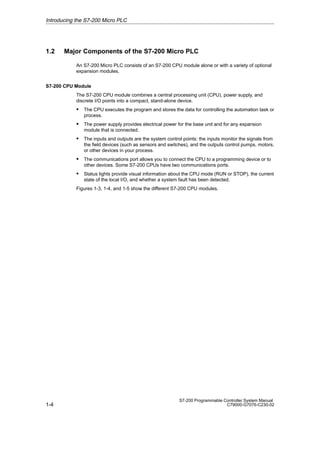
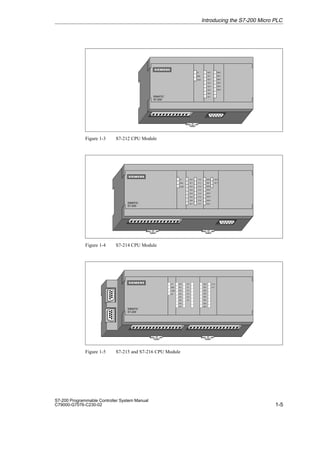
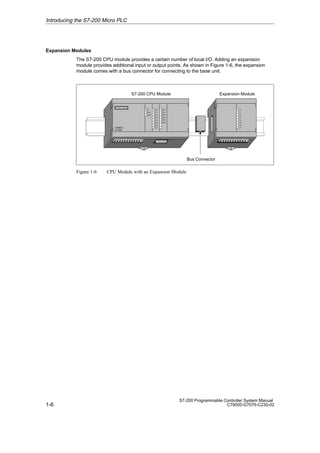
Figures 1-3, 1-4, and 1-5 show the different S7-200 CPU modules.
Introducing the S7-200 Micro PLC
1-5
S7-200 Programmable Controller System Manual
C79000-G7076-C230-02
SF
RUN
STOP
I0.0 Q0.0
I0.1
I0.2
I0.3
I0.4
I0.5
I0.6
I0.7
Q0.1
Q0.2
Q0.3
Q0.4
Q0.5
SIMATIC
S7-200
Figure 1-3 S7-212 CPU Module
SF
RUN
STOP
I0.0 Q0.0
I0.1
I0.2
I0.3
I0.4
I0.5
I0.6
I0.7
Q0.1
Q0.2
Q0.3
Q0.4
Q0.5
SIMATIC
S7-200
I1.0
I1.1
I1.2
I1.3
I1.4
I1.5
I1.6
I1.7
Q1.0
Q1.1
Q0.6
Q0.7
Figure 1-4 S7-214 CPU Module
SIMATIC
S7-200
SF
RUN
STOP
I0.0
I0.1
I0.2
I0.3
I0.4
I0.5
I0.6
I0.7
I1.0
I1.1
I1.2
I1.3
I1.4
I1.5
Q0.0
Q0.1
Q0.2
Q0.3
Q0.4
Q0.5
Q0.6
IQ0.7
Q 1.0
Q 1.1
DP
Figure 1-5 S7-215 and S7-216 CPU Module
Introducing the S7-200 Micro PLC
1-6
S7-200 Programmable Controller System Manual
C79000-G7076-C230-02
Expansion Modules
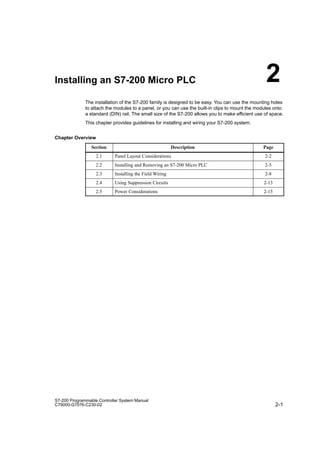
The S7-200 CPU module provides a certain number of local I/O. Adding an expansion
module provides additional input or output points. As shown in Figure 1-6, the expansion
module comes with a bus connector for connecting to the base unit.
S7-200 CPU Module Expansion Module
Bus Connector
SF
RUN
STOP
I0.0 Q0.0
I0.1
I0.2
I0.3
I0.4
I0.5
I0.6
I0.7
Q0.1
Q0.2
Q0.3
Q0.4
Q0.5
SIMATIC
S7-200
I.0
I.1
I.2
I.3
I.4
I.5
I.6
II.7
Figure 1-6 CPU Module with an Expansion Module
Introducing the S7-200 Micro PLC
2-1
S7-200 Programmable Controller System Manual
C79000-G7076-C230-02
Installing an S7-200 Micro PLC
The installation of the S7-200 family is designed to be easy. You can use the mounting holes
to attach the modules to a panel, or you can use the built-in clips to mount the modules onto
a standard (DIN) rail. The small size of the S7-200 allows you to make efficient use of space.
This chapter provides guidelines for installing and wiring your S7-200 system.
Chapter Overview
Section Description Page
2.1 Panel Layout Considerations 2-2
2.2 Installing and Removing an S7-200 Micro PLC 2-5
2.3 Installing the Field Wiring 2-8
2.4 Using Suppression Circuits 2-13
2.5 Power Considerations 2-15
2
2-2
S7-200 Programmable Controller System Manual
C79000-G7076-C230-02
2.1 Panel Layout Considerations
Installation Configuration
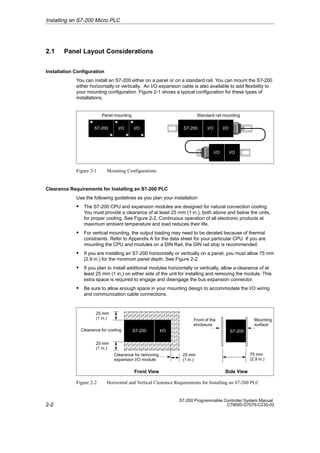
You can install an S7-200 either on a panel or on a standard rail. You can mount the S7-200
either horizontally or vertically. An I/O expansion cable is also available to add flexibility to
your mounting configuration. Figure 2-1 shows a typical configuration for these types of
installations.
S7-200 I/O I/O
Panel mounting Standard rail mounting
S7-200 I/O I/O
I/O I/O
Figure 2-1 Mounting Configurations
Clearance Requirements for Installing an S7-200 PLC
Use the following guidelines as you plan your installation:
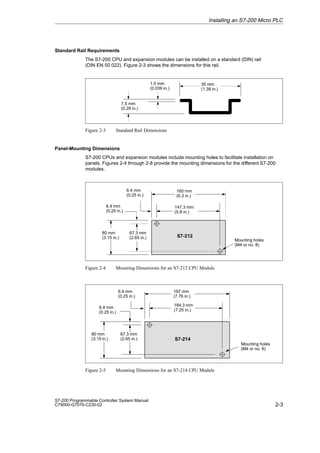
S The S7-200 CPU and expansion modules are designed for natural convection cooling.
You must provide a clearance of at least 25 mm (1 in.), both above and below the units,
for proper cooling. See Figure 2-2. Continuous operation of all electronic products at
maximum ambient temperature and load reduces their life.
S For vertical mounting, the output loading may need to be derated because of thermal
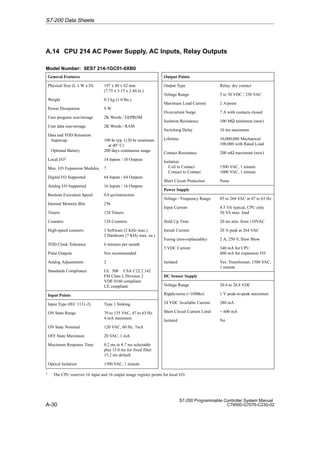
constraints. Refer to Appendix A for the data sheet for your particular CPU. If you are
mounting the CPU and modules on a DIN Rail, the DIN rail stop is recommended.
S If you are installing an S7-200 horizontally or vertically on a panel, you must allow 75 mm
(2.9 in.) for the minimum panel depth. See Figure 2-2.
S If you plan to install additional modules horizontally or vertically, allow a clearance of at
least 25 mm (1 in.) on either side of the unit for installing and removing the module. This
extra space is required to engage and disengage the bus expansion connector.
S Be sure to allow enough space in your mounting design to accommodate the I/O wiring
and communication cable connections.
ÂÂÂÂÂÂÂ
ÂÂÂÂÂÂÂ
ÂÂÂÂÂÂÂ
ÂÂÂÂÂÂÂ
ÂÂÂÂÂÂÂ
ÂÂÂÂÂÂÂ 75 mm
(2.9 in.)
S7-200
Front of the
enclosure
Mounting
surface
25 mm
(1 in.)
25 mm
(1 in.)
25 mm
(1 in.)
Clearance for removing
expansion I/O module
Clearance for cooling
Front View Side View
S7-200 I/O
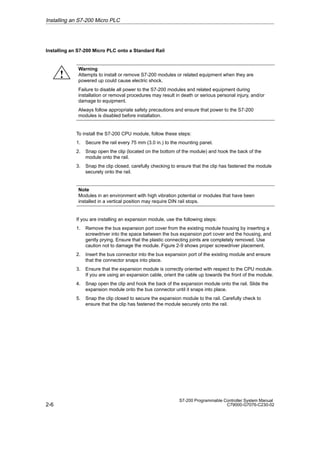
Figure 2-2 Horizontal and Vertical Clearance Requirements for Installing an S7-200 PLC
Installing an S7-200 Micro PLC
2-3
S7-200 Programmable Controller System Manual
C79000-G7076-C230-02
Standard Rail Requirements
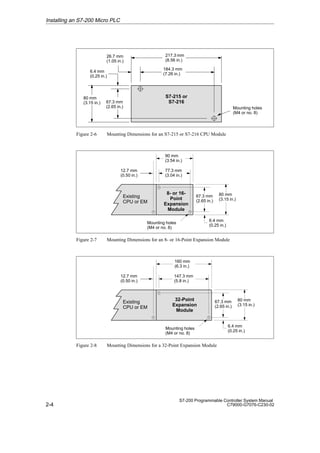
The S7-200 CPU and expansion modules can be installed on a standard (DIN) rail
(DIN EN 50 022). Figure 2-3 shows the dimensions for this rail.
35 mm
(1.38 in.)
1.0 mm
(0.039 in.)
7.5 mm
(0.29 in.)
Figure 2-3 Standard Rail Dimensions
Panel-Mounting Dimensions
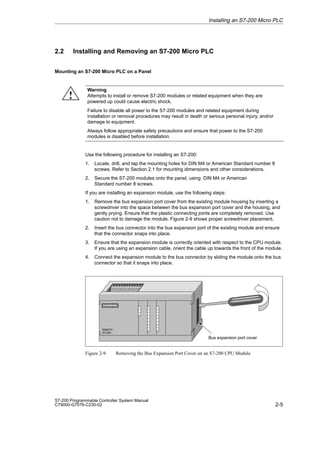
S7-200 CPUs and expansion modules include mounting holes to facilitate installation on
panels. Figures 2-4 through 2-8 provide the mounting dimensions for the different S7-200
modules.
6.4 mm
(0.25 in.)
6.4 mm
(0.25 in.)
147.3 mm
(5.8 in.)
S7-212
Mounting holes
(M4 or no. 8)
80 mm
(3.15 in.)
67.3 mm
(2.65 in.)
160 mm
(6.3 in.)
Figure 2-4 Mounting Dimensions for an S7-212 CPU Module
6.4 mm
(0.25 in.)
184.3 mm
(7.25 in.)
S7-214
Mounting holes
(M4 or no. 8)
197 mm
(7.76 in.)
6.4 mm
(0.25 in.)
80 mm
(3.15 in.)
67.3 mm
(2.65 in.)
Figure 2-5 Mounting Dimensions for an S7-214 CPU Module
Installing an S7-200 Micro PLC
2-4
S7-200 Programmable Controller System Manual
C79000-G7076-C230-02
S7-215 or
S7-216
26.7 mm
(1.05 in.)
184.3 mm
(7.26 in.)
Mounting holes
(M4 or no. 8)
217.3 mm
(8.56 in.)
6.4 mm
(0.25 in.)
80 mm
(3.15 in.) 67.3 mm
(2.65 in.)
Figure 2-6 Mounting Dimensions for an S7-215 or S7-216 CPU Module
12.7 mm
(0.50 in.)
6.4 mm
(0.25 in.)
77.3 mm
(3.04 in.)
8- or 16-
Point
Expansion
Module
Mounting holes
(M4 or no. 8)
80 mm
(3.15 in.)
67.3 mm
(2.65 in.)
90 mm
(3.54 in.)
Existing
CPU or EM
Figure 2-7 Mounting Dimensions for an 8- or 16-Point Expansion Module
12.7 mm
(0.50 in.)
6.4 mm
(0.25 in.)
147.3 mm
(5.8 in.)
32-Point
Expansion
Module
Mounting holes
(M4 or no. 8)
80 mm
(3.15 in.)
67.3 mm
(2.65 in.)
160 mm
(6.3 in.)
Existing
CPU or EM
Figure 2-8 Mounting Dimensions for a 32-Point Expansion Module
Installing an S7-200 Micro PLC
2-5
S7-200 Programmable Controller System Manual
C79000-G7076-C230-02
2.2 Installing and Removing an S7-200 Micro PLC
Mounting an S7-200 Micro PLC on a Panel
Warning
Attempts to install or remove S7-200 modules or related equipment when they are
powered up could cause electric shock.
Failure to disable all power to the S7-200 modules and related equipment during
installation or removal procedures may result in death or serious personal injury, and/or
damage to equipment.
Always follow appropriate safety precautions and ensure that power to the S7-200
modules is disabled before installation.
Use the following procedure for installing an S7-200:
1. Locate, drill, and tap the mounting holes for DIN M4 or American Standard number 8
screws. Refer to Section 2.1 for mounting dimensions and other considerations.
2. Secure the S7-200 modules onto the panel, using DIN M4 or American
Standard number 8 screws.
If you are installing an expansion module, use the following steps:
1. Remove the bus expansion port cover from the existing module housing by inserting a
screwdriver into the space between the bus expansion port cover and the housing, and
gently prying. Ensure that the plastic connecting joints are completely removed. Use
caution not to damage the module. Figure 2-9 shows proper screwdriver placement.
2. Insert the bus connector into the bus expansion port of the existing module and ensure
that the connector snaps into place.
3. Ensure that the expansion module is correctly oriented with respect to the CPU module.
If you are using an expansion cable, orient the cable up towards the front of the module.
4. Connect the expansion module to the bus connector by sliding the module onto the bus
connector so that it snaps into place.
SIMATIC
S7-200
Bus expansion port cover
Figure 2-9 Removing the Bus Expansion Port Cover on an S7-200 CPU Module
Installing an S7-200 Micro PLC
!
2-6
S7-200 Programmable Controller System Manual
C79000-G7076-C230-02
Installing an S7-200 Micro PLC onto a Standard Rail
Warning
Attempts to install or remove S7-200 modules or related equipment when they are
powered up could cause electric shock.
Failure to disable all power to the S7-200 modules and related equipment during
installation or removal procedures may result in death or serious personal injury, and/or
damage to equipment.
Always follow appropriate safety precautions and ensure that power to the S7-200
modules is disabled before installation.
To install the S7-200 CPU module, follow these steps:
1. Secure the rail every 75 mm (3.0 in.) to the mounting panel.
2. Snap open the clip (located on the bottom of the module) and hook the back of the
module onto the rail.
3. Snap the clip closed, carefully checking to ensure that the clip has fastened the module
securely onto the rail.
Note
Modules in an environment with high vibration potential or modules that have been
installed in a vertical position may require DIN rail stops.
If you are installing an expansion module, use the following steps:
1. Remove the bus expansion port cover from the existing module housing by inserting a
screwdriver into the space between the bus expansion port cover and the housing, and
gently prying. Ensure that the plastic connecting joints are completely removed. Use
caution not to damage the module. Figure 2-9 shows proper screwdriver placement.
2. Insert the bus connector into the bus expansion port of the existing module and ensure
that the connector snaps into place.
3. Ensure that the expansion module is correctly oriented with respect to the CPU module.
If you are using an expansion cable, orient the cable up towards the front of the module.
4. Snap open the clip and hook the back of the expansion module onto the rail. Slide the
expansion module onto the bus connector until it snaps into place.
5. Snap the clip closed to secure the expansion module to the rail. Carefully check to
ensure that the clip has fastened the module securely onto the rail.
Installing an S7-200 Micro PLC
!
2-7
S7-200 Programmable Controller System Manual
C79000-G7076-C230-02
Removing the S7-200 Modules
Warning
Attempts to install or remove S7-200 modules or related equipment when they are
powered up could cause electric shock.
Failure to disable all power to the S7-200 modules and related equipment during
installation or removal procedures may result in death or serious personal injury, and/or
damage to equipment.
Always follow appropriate safety precautions and ensure that power to the S7-200
modules is disabled before you install or remove a CPU or expansion module.
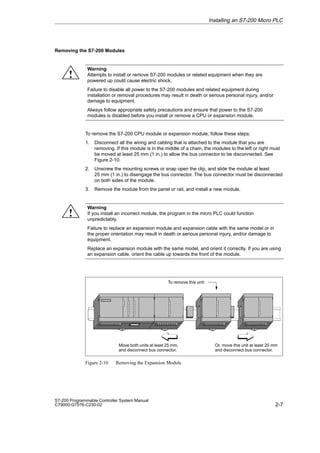
To remove the S7-200 CPU module or expansion module, follow these steps:
1. Disconnect all the wiring and cabling that is attached to the module that you are
removing. If this module is in the middle of a chain, the modules to the left or right must
be moved at least 25 mm (1 in.) to allow the bus connector to be disconnected. See
Figure 2-10.
2. Unscrew the mounting screws or snap open the clip, and slide the module at least
25 mm (1 in.) to disengage the bus connector. The bus connector must be disconnected
on both sides of the module.
3. Remove the module from the panel or rail, and install a new module.
Warning
If you install an incorrect module, the program in the micro PLC could function
unpredictably.
Failure to replace an expansion module and expansion cable with the same model or in
the proper orientation may result in death or serious personal injury, and/or damage to
equipment.
Replace an expansion module with the same model, and orient it correctly. If you are using
an expansion cable, orient the cable up towards the front of the module.
Move both units at least 25 mm,
and disconnect bus connector.
Or, move this unit at least 25 mm
and disconnect bus connector.
To remove this unit:
Figure 2-10 Removing the Expansion Module
Installing an S7-200 Micro PLC
!
!
2-8
S7-200 Programmable Controller System Manual
C79000-G7076-C230-02
2.3 Installing the Field Wiring
Warning
Attempts to install or remove S7-200 modules or related equipment when they are
powered up could cause electric shock.
Failure to disable all power to the S7-200 modules and related equipment during
installation or removal procedures may result in death or serious personal injury, and/or
damage to equipment.
Always follow appropriate safety precautions and ensure that power to the S7-200
modules is disabled before installing field wiring.
General Guidelines
The following items are general guidelines for designing the installation and wiring of your
S7-200 Micro PLC:
S Ensure that you follow all applicable electrical codes when wiring the S7-200 Micro PLC.
Install and operate all equipment according to all applicable national and local standards.
Contact your local authorities to determine which codes and standards apply to your
specific case.
S Always use the proper wire size to carry the required current. The S7-200 modules
accept wire sizes from 1.50 mm2 to 0.50 mm2 (14 AWG to 22 AWG).
S Ensure that you do not overtighten the connector screws. The maximum torque is
0.56 N-m (5 inches-pounds).
S Always use the shortest wire possible (maximum 500 m shielded, 300 m unshielded).
Wiring should be run in pairs, with a neutral or common wire paired with a hot or
signal-carrying wire.
S Separate AC wiring and high-energy, rapidly switched DC wiring from low-energy signal
wiring.
S Properly identify and route the wiring to the S7-200 module, using strain relief for the
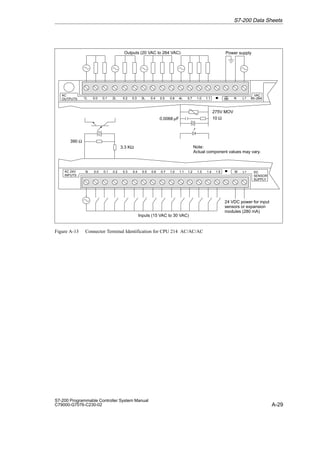
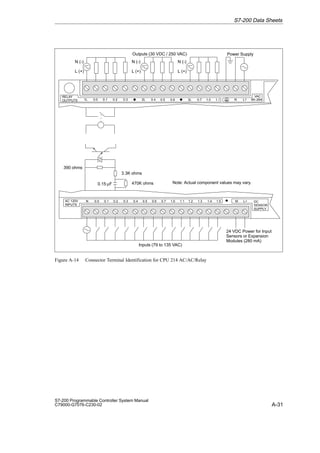
wiring as required. For more information about identifying the terminals, see the data
sheets in Appendix A.
S Install appropriate surge suppression devices for any wiring that is subject to lightning
surges.
S External power should not be applied to an output load in parallel with a DC output point.
This may cause reverse current through the output, unless a diode or other barrier is
provided in the installation.
Warning
Control devices can fail in an unsafe condition, resulting in unexpected operation of
controlled equipment.
Such unexpected action could result in death or serious personal injury, and/or equipment
damage.
Consider using an emergency stop function, electromechanical overrides, or other
redundant safeguards that are independent of the programmable controller.
Installing an S7-200 Micro PLC
!
!
2-9
S7-200 Programmable Controller System Manual
C79000-G7076-C230-02
Grounding and Circuit Reference Point Guidelines for Using Isolated Circuits
The following items are grounding and circuit guidelines for using isolated circuits:
S You should identify the reference point (0 voltage reference) for each circuit in the
installation, and the points at which circuits with possible different references can connect
together. Such connections can result in unwanted current flows that can cause logic
errors or can damage circuits. A common cause of different reference potentials is
grounds which are physically separated by long distances. When devices with widely
separated grounds are connected with a communication or sensor cable, unexpected
currents can flow through the circuit created by the cable and the ground. Even over
short distances, load currents of heavy machinery can cause differences in ground
potential or can directly induce unwanted currents by electromagnetic induction. Power
supplies that are improperly referenced with respect to each other can cause damaging
currents to flow between their associated circuits.
S S7-200 products include isolation boundaries at certain points to help prevent unwanted
current flows in your installation. When you plan your installation, you should consider
where these isolation boundaries are, and where they are not provided. You should also
consider the isolation boundaries in associated power supplies and other equipment, and
where all associated power supplies have their reference points.
S You should choose your ground reference points and use the isolation boundaries
provided to interrupt unneeded circuit loops that could allow unwanted currents to flow.
Remember to consider temporary connections which may introduce a new circuit
reference, such as the connection of a programming device to the CPU.
S When locating grounds, you must also consider safety grounding requirements and the
proper operation of protective interrupting devices.
The following descriptions are an introduction to general isolation characteristics of the
S7-200 family, but some features may be different on specific products. Consult the data
sheet in Appendix A for your product for specifications of which circuits include isolation
boundaries and the ratings of the boundaries. Isolation boundaries rated less than1,500 VAC
are designed as functional isolation only, and should not be depended on as safety
boundaries.
S CPU logic reference is the same as DC sensor supply M.
S CPU logic reference is the same as the input power supply M on a CPU with DC power
supply.
S CPU communication ports have the same reference as CPU logic (except DP ports).
S Analog inputs and outputs are not isolated from CPU logic. Analog inputs are full
differential to provide low voltage common mode rejection.
S CPU logic is isolated from ground to 100 VDC.
S DC digital inputs and outputs are isolated from CPU logic to 500 VAC.
S DC digital I/O groups are isolated from each other by 500 VAC.
S Relay outputs, AC outputs, and AC inputs are isolated from CPU logic to 1,500 VAC.
S AC and relay output groups are isolated from each other by 1,500 VAC.
S AC power supply line and neutral are isolated from ground, the CPU logic, and all I/O to
1500 VAC.
Installing an S7-200 Micro PLC
2-10
S7-200 Programmable Controller System Manual
C79000-G7076-C230-02
Using the Optional Field Wiring Connector
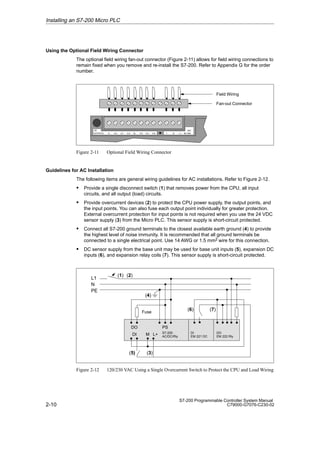
The optional field wiring fan-out connector (Figure 2-11) allows for field wiring connections to
remain fixed when you remove and re-install the S7-200. Refer to Appendix G for the order
number.
Field Wiring
Fan-out Connector
↓ N L1 85–264
VAC
OUTPUTS 1L 0.0 0.1 0.2 2L 0.3 0.4 0.5
AC
Figure 2-11 Optional Field Wiring Connector
Guidelines for AC Installation
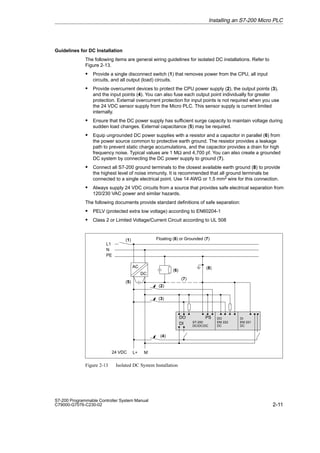
The following items are general wiring guidelines for AC installations. Refer to Figure 2-12.
S Provide a single disconnect switch (1) that removes power from the CPU, all input
circuits, and all output (load) circuits.
S Provide overcurrent devices (2) to protect the CPU power supply, the output points, and
the input points. You can also fuse each output point individually for greater protection.
External overcurrent protection for input points is not required when you use the 24 VDC
sensor supply (3) from the Micro PLC. This sensor supply is short-circuit protected.
S Connect all S7-200 ground terminals to the closest available earth ground (4) to provide
the highest level of noise immunity. It is recommended that all ground terminals be
connected to a single electrical point. Use 14 AWG or 1.5 mm2 wire for this connection.
S DC sensor supply from the base unit may be used for base unit inputs (5), expansion DC
inputs (6), and expansion relay coils (7). This sensor supply is short-circuit protected.
L1
N
PE
(1)
(4)
DO
DI
PS
M L+
(3)
S7-200
AC/DC/Rly
DI
EM 221 DC
DO
EM 222 Rly
(5)
(6) (7)
Fuse
(2)
Figure 2-12 120/230 VAC Using a Single Overcurrent Switch to Protect the CPU and Load Wiring
Installing an S7-200 Micro PLC
2-11
S7-200 Programmable Controller System Manual
C79000-G7076-C230-02
Guidelines for DC Installation
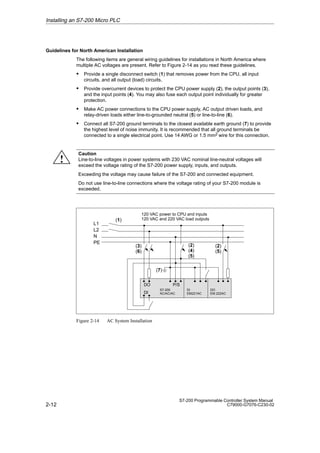
The following items are general wiring guidelines for isolated DC installations. Refer to
Figure 2-13.
S Provide a single disconnect switch (1) that removes power from the CPU, all input
circuits, and all output (load) circuits.
S Provide overcurrent devices to protect the CPU power supply (2), the output points (3),
and the input points (4). You can also fuse each output point individually for greater
protection. External overcurrent protection for input points is not required when you use
the 24 VDC sensor supply from the Micro PLC. This sensor supply is current limited
internally.
S Ensure that the DC power supply has sufficient surge capacity to maintain voltage during
sudden load changes. External capacitance (5) may be required.
S Equip ungrounded DC power supplies with a resistor and a capacitor in parallel (6) from
the power source common to protective earth ground. The resistor provides a leakage
path to prevent static charge accumulations, and the capacitor provides a drain for high
frequency noise. Typical values are 1 MΩ and 4,700 pf. You can also create a grounded
DC system by connecting the DC power supply to ground (7).
S Connect all S7-200 ground terminals to the closest available earth ground (8) to provide
the highest level of noise immunity. It is recommended that all ground terminals be
connected to a single electrical point. Use 14 AWG or 1.5 mm2 wire for this connection.
S Always supply 24 VDC circuits from a source that provides safe electrical separation from
120/230 VAC power and similar hazards.
The following documents provide standard definitions of safe separation:
S PELV (protected extra low voltage) according to EN60204-1
S Class 2 or Limited Voltage/Current Circuit according to UL 508
L1
N
PE
(1)
DO
DI
PS
S7-200
DC/DC/DC
DO
EM 222
DC
DI
EM 221
DC
(5)
(6)
(2)
(3)
(4)
(7)
L+ M
24 VDC
AC
DC
(8)
Floating (6) or Grounded (7)
Figure 2-13 Isolated DC System Installation
Installing an S7-200 Micro PLC
2-12
S7-200 Programmable Controller System Manual
C79000-G7076-C230-02
Guidelines for North American Installation
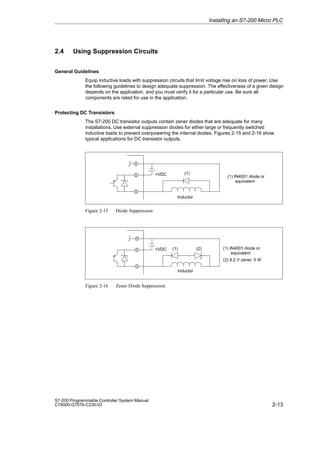
The following items are general wiring guidelines for installations in North America where
multiple AC voltages are present. Refer to Figure 2-14 as you read these guidelines.
S Provide a single disconnect switch (1) that removes power from the CPU, all input
circuits, and all output (load) circuits.
S Provide overcurrent devices to protect the CPU power supply (2), the output points (3),
and the input points (4). You may also fuse each output point individually for greater
protection.
S Make AC power connections to the CPU power supply, AC output driven loads, and
relay-driven loads either line-to-grounded neutral (5) or line-to-line (6).
S Connect all S7-200 ground terminals to the closest available earth ground (7) to provide
the highest level of noise immunity. It is recommended that all ground terminals be
connected to a single electrical point. Use 14 AWG or 1.5 mm2 wire for this connection.
Caution
Line-to-line voltages in power systems with 230 VAC nominal line-neutral voltages will
exceed the voltage rating of the S7-200 power supply, inputs, and outputs.
Exceeding the voltage may cause failure of the S7-200 and connected equipment.
Do not use line-to-line connections where the voltage rating of your S7-200 module is
exceeded.
L1
L2
N
PE
(1)
(3)
(6)
(2)
(4)
(5)
(2)
(5)
DO
DI
P/S
S7-200
AC/AC/AC
DO
EM 222AC
DI
EM221AC
(7)
120 VAC power to CPU and inputs
120 VAC and 220 VAC load outputs
Figure 2-14 AC System Installation
Installing an S7-200 Micro PLC
!
2-13
S7-200 Programmable Controller System Manual
C79000-G7076-C230-02
2.4 Using Suppression Circuits
General Guidelines
Equip inductive loads with suppression circuits that limit voltage rise on loss of power. Use
the following guidelines to design adequate suppression. The effectiveness of a given design
depends on the application, and you must verify it for a particular use. Be sure all
components are rated for use in the application.
Protecting DC Transistors
The S7-200 DC transistor outputs contain zener diodes that are adequate for many
installations. Use external suppression diodes for either large or frequently switched
inductive loads to prevent overpowering the internal diodes. Figures 2-15 and 2-16 show
typical applications for DC transistor outputs.
+VDC (1) IN4001 diode or
equivalent
(1)
Inductor
Figure 2-15 Diode Suppression
(1) IN4001 diode or
equivalent
(2) 8.2 V zener, 5 W
+VDC (1) (2)
Inductor
Figure 2-16 Zener Diode Suppression
Installing an S7-200 Micro PLC
2-14
S7-200 Programmable Controller System Manual
C79000-G7076-C230-02
Protecting Relays That Control DC Power
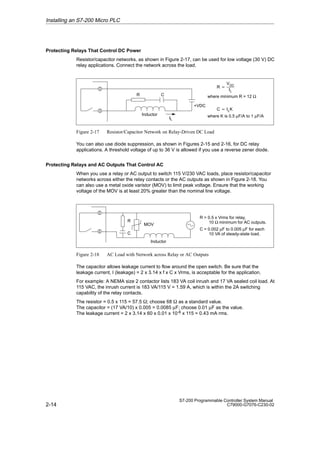
Resistor/capacitor networks, as shown in Figure 2-17, can be used for low voltage (30 V) DC
relay applications. Connect the network across the load.
+VDC
where minimum R = 12 Ω
R C
IL
Inductor
R 
VDC
IL
where K is 0.5 µF/A to 1 µF/A
C  ILK
Figure 2-17 Resistor/Capacitor Network on Relay-Driven DC Load
You can also use diode suppression, as shown in Figures 2-15 and 2-16, for DC relay
applications. A threshold voltage of up to 36 V is allowed if you use a reverse zener diode.
Protecting Relays and AC Outputs That Control AC
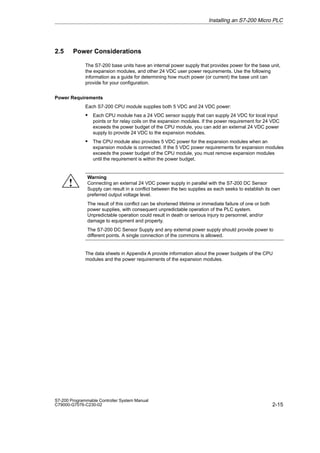
When you use a relay or AC output to switch 115 V/230 VAC loads, place resistor/capacitor
networks across either the relay contacts or the AC outputs as shown in Figure 2-18. You
can also use a metal oxide varistor (MOV) to limit peak voltage. Ensure that the working
voltage of the MOV is at least 20% greater than the nominal line voltage.
R  0.5 x Vrms for relay,
10 Ω minimum for AC outputs.
C = 0.002 µF to 0.005 µF for each
10 VA of steady-state load.
R
C
MOV
Inductor
Figure 2-18 AC Load with Network across Relay or AC Outputs
The capacitor allows leakage current to flow around the open switch. Be sure that the
leakage current, I (leakage) = 2 x 3.14 x f x C x Vrms, is acceptable for the application.
For example: A NEMA size 2 contactor lists 183 VA coil inrush and 17 VA sealed coil load. At
115 VAC, the inrush current is 183 VA/115 V = 1.59 A, which is within the 2A switching
capability of the relay contacts.
The resistor = 0.5 x 115 = 57.5 ; choose 68  as a standard value.
The capacitor = (17 VA/10) x 0.005 = 0.0085 µF; choose 0.01 µF as the value.
The leakage current = 2 x 3.14 x 60 x 0.01 x 10-6 x 115 = 0.43 mA rms.
Installing an S7-200 Micro PLC
2-15
S7-200 Programmable Controller System Manual
C79000-G7076-C230-02
2.5 Power Considerations
The S7-200 base units have an internal power supply that provides power for the base unit,
the expansion modules, and other 24 VDC user power requirements. Use the following
information as a guide for determining how much power (or current) the base unit can
provide for your configuration.
Power Requirements
Each S7-200 CPU module supplies both 5 VDC and 24 VDC power:
S Each CPU module has a 24 VDC sensor supply that can supply 24 VDC for local input
points or for relay coils on the expansion modules. If the power requirement for 24 VDC
exceeds the power budget of the CPU module, you can add an external 24 VDC power
supply to provide 24 VDC to the expansion modules.
S The CPU module also provides 5 VDC power for the expansion modules when an
expansion module is connected. If the 5 VDC power requirements for expansion modules
exceeds the power budget of the CPU module, you must remove expansion modules
until the requirement is within the power budget.
Warning
Connecting an external 24 VDC power supply in parallel with the S7-200 DC Sensor
Supply can result in a conflict between the two supplies as each seeks to establish its own
preferred output voltage level.
The result of this conflict can be shortened lifetime or immediate failure of one or both
power supplies, with consequent unpredictable operation of the PLC system.
Unpredictable operation could result in death or serious injury to personnel, and/or
damage to equipment and property.
The S7-200 DC Sensor Supply and any external power supply should provide power to
different points. A single connection of the commons is allowed.
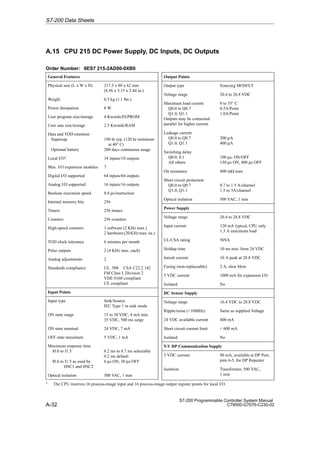
The data sheets in Appendix A provide information about the power budgets of the CPU
modules and the power requirements of the expansion modules.
Installing an S7-200 Micro PLC
!
2-16
S7-200 Programmable Controller System Manual
C79000-G7076-C230-02
Calculating a Sample Power Requirement
Table 2-1 shows a sample calculation of the power requirements for an S7-200 Micro PLC
that includes the following modules:
S CPU 214 DC/DC/DC
S Three EM 221 Digital Input 8 x DC 24 V expansion modules
S Two EM 222 Digital Output 8 x Relay expansion modules
The CPU in this example provides sufficient 5 VDC current for the expansion modules;
however, it requires an additional power supply to provide the 24 VDC power requirement.
(The I/O requires 448 mA of 24 VDC power, but the CPU provides only 280 mA.) Appendix B
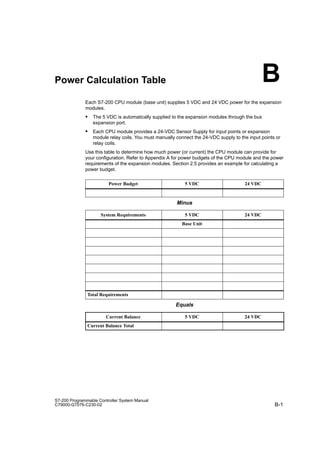
provides a blank power calculation table.
Table 2-1 Power Budget Calculations for a Sample Configuration
CPU Power Budget 5 VDC 24 VDC
CPU 214 DC/DC/DC 660 mA 280 mA
minus
System Requirements 5 VDC 24 VDC
CPU 214 DC/DC/DC BASE UNIT 14 input x 7 mA = 98 mA
Three EM 221 expansion modules 3 x 60 mA = 180 mA 3 x 60 mA = 180 mA
Two EM 222 expansion modules 2 x 80 mA = 160 mA 2 x 85 mA = 170 mA
Total Requirement 340 mA 448 mA
equals
Current Balance 5 VDC 24 VDC
Current Balance Total 320 mA [168 mA]
Installing an S7-200 Micro PLC
3-1
S7-200 Programmable Controller System Manual
C79000-G7076-C230-02
Installing and Using the STEP 7-Micro/WIN
Software
This manual describes Version 2.1 of STEP 7-Micro/WIN. Previous versions of the software
may operate differently.
STEP 7-Micro/WIN is a Windows-based software application that supports both the 16-bit
Windows 3.1 environment (STEP 7-Micro/WIN 16) and the 32-bit Windows 95 and
Windows NT environments (STEP 7-Micro/WIN 32). In order to use STEP 7-Micro/WIN, the
following equipment is recommended:
S Recommended: a personal computer (PC) with an 80586 or greater processor and
16 Mbytes of RAM, or a Siemens programming device (such as a PG 740); minimum
computer requirement: 80486 processor with 8 Mbytes
S One of the following sets of equipment:
– A PC/PPI cable connected to your communications port (PC COM1 or COM2)
– A communications processor (CP) card and multipoint interface (MPI) cable
– A multipoint interface (MPI) card (A communications cable comes with the MPI card.)
S VGA monitor, or any monitor supported by Microsoft Windows
S At least 50 Mbytes of free hard disk space
S Microsoft Windows 3.1, Windows for Workgroups 3.11, Windows 95, or Windows NT 4.0
or greater
S Optional but recommended: any mouse supported by Microsoft Windows
STEP 7-Micro/WIN provides extensive online help. Use the Help menu command or press
F1 to obtain the most current information.
Chapter Overview
Section Description Page
3.1 Installing the STEP 7-Micro/WIN Software 3-2
3.2 Using STEP 7-Micro/WIN to Set Up the Communications Hardware 3-4
3.3 Establishing Communication with the S7-200 CPU 3-7
3.4 Configuring the Preferences for STEP 7-Micro/WIN 3-25
3.5 Creating and Saving a Project 3-26
3.6 Creating a Program 3-27
3.7 Creating a Data Block 3-32
3.8 Using the Status Chart 3-34
3.9 Using Symbolic Addressing 3-36
3
3-2
S7-200 Programmable Controller System Manual
C79000-G7076-C230-02
3.1 Installing the STEP 7-Micro/WIN Software
Pre-Installation Instructions
Before running the setup procedure, do the following:
S If a previous version of STEP 7-Micro/WIN is installed, back up all STEP 7-Micro/WIN
projects to diskette.
S Make sure all applications are closed, including the Microsoft Office toolbar.
Installation may require that you restart your computer.
Installation Instructions for Windows 3.1
If you have Windows 3.1 (Windows for Workgroups 3.11) on your machine, use the following
procedure to install the STEP 7-Micro/WIN 16 software:
1. Start by inserting Disk 1 in the disk drive of your computer (usually drive A or drive B).
2. From the Program Manager, select the menu command File  Run...
3. In the Run dialog box, type a:setup and click “OK” or press ENTER. This starts the
setup procedure.
4. Follow the online setup procedure to complete the installation.
Installation Instructions for Windows 95 or Windows NT 4.0
If you have Windows 95 or Windows NT 4.0 on your machine, use the following procedure to
install the STEP 7-Micro/WIN 32 software:
1. Start by inserting Disk 1 in the disk drive of your computer (usually drive A or drive B).
2. Click once on the “Start” button to open the Windows 95 menu.
3. Click on the Run... menu item.
4. In the Run dialog box, type a:setup and click on “OK” or press ENTER. This starts the
setup procedure.
5. Follow the online setup procedure to complete the installation.
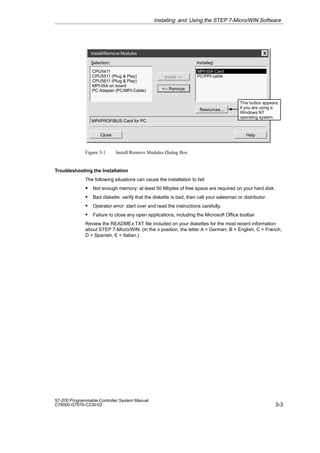
6. At the end of the installation, the Install/Remove Modules dialog box appears
automatically. See Figure 3-1. You can install the hardware for your machine to
communicate now (see Section 3.2), or you can wait until later (see Section 3.3).
Installing and Using the STEP 7-Micro/WIN Software
3-3
S7-200 Programmable Controller System Manual
C79000-G7076-C230-02
Help
Close
Install/Remove Modules
Selection:
CPU5411
CPU5511 (Plug  Play)
CPU5611 (Plug  Play)
MPI-ISA on board
PC Adapter (PC/MPI-Cable)
Installed:
Install --
-- Remove
MPI-ISA Card
PC/PPI cable
MPI/PROFIBUS Card for PC
Resources...
This button appears
if you are using a
Windows NT
operating system.
Figure 3-1 Install/Remove Modules Dialog Box
Troubleshooting the Installation
The following situations can cause the installation to fail:
S Not enough memory: at least 50 Mbytes of free space are required on your hard disk.
S Bad diskette: verify that the diskette is bad, then call your salesman or distributor.
S Operator error: start over and read the instructions carefully.
S Failure to close any open applications, including the Microsoft Office toolbar
Review the READMEx.TXT file included on your diskettes for the most recent information
about STEP 7-Micro/WIN. (In the x position, the letter A = German, B = English, C = French,
D = Spanish, E = Italian.)
Installing and Using the STEP 7-Micro/WIN Software
3-4
S7-200 Programmable Controller System Manual
C79000-G7076-C230-02
3.2 Using STEP 7-Micro/WIN to Set Up the Communications Hardware
General Information for Installing or Removing the Communications Hardware
If you are using Windows 95 or Windows NT 4.0, the Install/Remove Modules dialog box
appears automatically at the end of your software installation. See Figure 3-1. If you are
using Windows 3.1, follow these steps:
1. Select the menu command Setup  Communications.... The Communications dialog
box appears.
2. Click the “PG/PC Interface...” button. The Setting the PG/PC Interface dialog box
appears.
3. Click the “Install...” button. The Install/Remove Modules dialog box appears. See
Figure 3-1.
You will need to base your installation of communications hardware on the following criteria:
S The operating system that you are using (Windows 3.1, Windows 95, or Windows NT 4.0)
S The type of hardware you are using, for example:
– PC with PC/PPI cable
– PC or SIMATIC programming device with multipoint interface (MPI) or
communications processor (CP) card
– CPU 212, CPU 214, CPU 215, CPU 216
– Modem
S The baud rate you are using
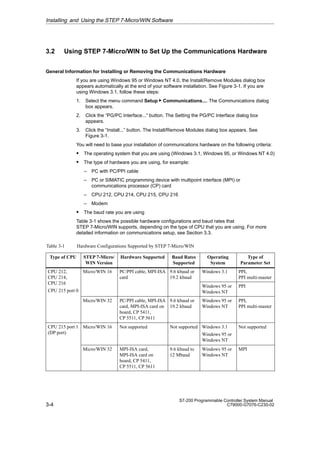
Table 3-1 shows the possible hardware configurations and baud rates that
STEP 7-Micro/WIN supports, depending on the type of CPU that you are using. For more
detailed information on communications setup, see Section 3.3.
Table 3-1 Hardware Configurations Supported by STEP 7-Micro/WIN
Type of CPU STEP 7-Micro/
WIN Version
Hardware Supported Baud Rates
Supported
Operating
System
Type of
Parameter Set
CPU 212,
CPU 214,
CPU 216
Micro/WIN 16 PC/PPI cable, MPI-ISA
card
9.6 kbaud or
19.2 kbaud
Windows 3.1 PPI,
PPI multi-master
CPU 216
CPU 215 port 0
Windows 95 or
Windows NT
PPI
Micro/WIN 32 PC/PPI cable, MPI-ISA
card, MPI-ISA card on
board, CP 5411,
CP 5511, CP 5611
9.6 kbaud or
19.2 kbaud
Windows 95 or
Windows NT
PPI,
PPI multi-master
CPU 215 port 1
(DP port)
Micro/WIN 16 Not supported Not supported Windows 3.1
Windows 95 or
Windows NT
Not supported
Micro/WIN 32 MPI-ISA card,
MPI-ISA card on
board, CP 5411,
CP 5511, CP 5611
9.6 kbaud to
12 Mbaud
Windows 95 or
Windows NT
MPI
Installing and Using the STEP 7-Micro/WIN Software
3-5
S7-200 Programmable Controller System Manual
C79000-G7076-C230-02
Note
STEP 7-Micro/WIN 16 does not support the multi-master parameter set under the
Windows 95 or Windows NT 4.0 operating system.
The following hardware configurations are possible:
S CPU 212, CPU 214, CPU 216, CPU 215 (port 0)
– PC/PPI Cable (PPI), 9.6 kbaud or 19.2 kbaud
– MPI Card (PPI), 9.6 kbaud or 19.2 kbaud
S CPU 215 (port 1, that is, the DP port)
MPI Card (MPI), 9.6 kbaud to 12 Mbaud
Note
STEP 7-Micro/WIN 16 does not support communications on port 1 of the CPU 215.
The selections for MPI Card are different for STEP 7-Micro/WIN 16 and
STEP 7-Micro/WIN 32.
On the left side of the Install/Remove Modules dialog box is a list of hardware types that you
have not installed yet (see Figure 3-1). On the right side is a list of currently installed
hardware types. If you are using the Windows NT 4.0 operating system, there is a
“Resources” button under the Installed list box.
To install the hardware, follow these steps:
1. From the Selection list box, select the hardware type that you have. A description of your
selection is shown in the lower window.
2. Click the “Install --” button.
To remove hardware, follow these steps:
1. Select the hardware from the Installed list box on the right.
2. Click the “-- Remove” button.
When you are finished installing or removing hardware, click the “Close” button. This action
returns you to the Setting the PG/PC Interface dialog box. The selections that you made
appear now in the list box that contains the module parameter sets. See Figure 3-7.
For detailed information on the communications setup for your configuration, see
Section 3.3.
Installing and Using the STEP 7-Micro/WIN Software
3-6
S7-200 Programmable Controller System Manual
C79000-G7076-C230-02
Special Hardware Installation Information for Windows NT Users
Installing hardware modules under the Windows NT operating system is slightly different
from installing hardware modules under Windows 95. Although the hardware modules are
the same for either operating system, installation under Windows NT requires more
knowledge of the hardware that you want to install. Windows 95 tries automatically to set up
system resources for you; however, Windows NT does not. Windows NT provides you with
default values only. These values may or may not match the hardware configuration.
However, these parameters can be modified easily to match the required system settings.
When you have installed a piece of hardware, select it from the Installed list box and click the
“Resources” button. The Resources dialog box appears. See Figure 3-2. The Resources
dialog box allows you to modify the system settings for the actual piece of hardware that you
installed. If this button is unavailable (gray), you do not need to do anything more.
At this point you may need to refer to your hardware manual to determine the setting for each
of the parameters listed in the dialog box, depending on your hardware settings. You may
need to try several different interrupts in order to establish communication correctly.
For detailed information on the communications setup for your configuration, see
Section 3.3.
Help
OK Cancel
Resources - MPI-ISA CardBoard 1
Memory Range:
Input/Output Range:
Interrupt Request: #15
Direct Memory Access:
#000CC000-000CC7FF
# - Current hardware setting
* - Possible conflict with other hardware
Figure 3-2 Resources Dialog Box for Windows NT
Installing and Using the STEP 7-Micro/WIN Software
3-7
S7-200 Programmable Controller System Manual
C79000-G7076-C230-02
3.3 Establishing Communication with the S7-200 CPU
You can arrange the S7-200 CPUs in a variety of configurations to support network
communications. You can install the STEP 7-Micro/WIN software on a personal computer
(PC) that has a Windows 3.1x, Windows 95, or Windows NT operating system, or you can
install it on a SIMATIC programming device (such as a PG 740). You can use the PC or the
programming device as a master device in any of the following communications
configurations:
S A single master device is connected to one or more slave devices. See Figure 3-3.
S A single master device is connected to one or more slave devices and one or more
master devices. See Figure 3-4 and Figure 3-5.
S A CPU 215 functions as a remote I/O module owned by an S7-300 or S7-400
programmable logic controller or by another PROFIBUS master. See Figure 3-13.
S A single master device is connected to one or more slave devices. This master device is
connected by means of 11-bit modems to either one S7-200 CPU functioning as a slave
device or else to a network of S7-200 CPUs functioning as slave devices. See
Figure 3-14.
Connecting Your Computer to the S7-200 CPU Using the PC/PPI Cable
Figure 3-3 shows a typical configuration for connecting your personal computer to your CPU
with the PC/PPI cable. To establish proper communications between the components, follow
these steps:
1. Set the DIP switches on the PC/PPI cable for the baud rate.
2. Connect the RS-232 end of the PC/PPI cable labeled PC to the communications port of
your computer, either COM1 or COM2, and tighten the connecting screws.
3. Connect the other end (RS-485) of the PC/PPI cable to the communications port of the
CPU, and tighten the connecting screws.
For the technical specifications of the PC/PPI cable, see Section A.40; for its order number,
see Appendix G.
RS-232
PC/PPI cable
Computer
DIP switch settings (down = 0, up = 1):
0 1 0 0 = 9600 baud (shown)
0 0 1 0 = 19200 baud
RS-485
S7-200 CPU
1
0
Figure 3-3 Communicating with a CPU in PPI Mode
Installing and Using the STEP 7-Micro/WIN Software
3-8
S7-200 Programmable Controller System Manual
C79000-G7076-C230-02
Figure 3-4 shows a configuration with a personal computer connected to several S7-200
CPU modules. STEP 7-Micro/WIN is designed to communicate with one S7-200 CPU at a
time; however, you can access any CPU on the network. The CPU modules in Figure 3-4
could be either slave or master devices. The TD 200 is a master device. For detailed
information on network communications, see Chapter 9.
Note
Only STEP 7-Micro/WIN 16 with a Windows 3.1 operating system and
STEP 7-Micro/WIN 32 support multiple masters through the PC/PPI cable;
STEP 7-Micro/DOS does not.
S7-200 CPU
Station 2
PC/PPI Cable
Station 0
RS-485
RS-232
S7-200 CPU
Station 3
S7-200 CPU
Station 4
TD 200
Figure 3-4 Using a PC/PPI Cable for Communicating with Several S7-200 CPU Modules
Connecting Your Computer to the S7-200 CPU Using the MPI or CP Card
You can use STEP 7-Micro/WIN with a multipoint interface (MPI) or communications
processor (CP) card. Either card provides a single RS-485 port for connection to the network
using an MPI cable. STEP 7-Micro/WIN 32 (the 32-bit version) supports the MPI parameter
set for an MPI network; STEP 7-Micro/WIN 16 (the 16-bit version) does not. After
establishing MPI communications, you can connect STEP 7-Micro/WIN on a network that
contains other master devices. Each master must have a unique address. Figure 3-5 shows
a sample network with master and slave devices. For detailed information on network
communications, see Chapter 9. For information on the MPI card and the various CP cards
that are available, see Section 9.4. Appendix G lists their order numbers.
Note
If you are using the PPI parameter set, STEP 7-Micro/WIN does not support two different
applications running on the same MPI or CP card at the same time. Close the other
application before connecting STEP 7-Micro/WIN to the network through the MPI or CP
card.
Installing and Using the STEP 7-Micro/WIN Software
3-9
S7-200 Programmable Controller System Manual
C79000-G7076-C230-02
MPI or CP card
CPU 214
Master devices
TD 200 OP15
CPU 212 CPU 214 CPU 212 CPU 214
Slave devices
MPI cable
(RS-485)
Figure 3-5 Example of an MPI or CP Card with Master and Slave Devices
From What Point Do I Set Up Communications?
Depending on the operating system that you are using, you can set up communications from
any of the following points:
S Under Windows 3.1
Within STEP 7-Micro/WIN 16 only
S Under Windows 95 or Windows NT 4.0
– During the final step of the installation (see Section 3.1)
– From the Setting the PG/PC Interface icon, found in the Windows Control Panel
– Within STEP 7-Micro/WIN 32
Installing and Using the STEP 7-Micro/WIN Software
3-10
S7-200 Programmable Controller System Manual
C79000-G7076-C230-02
Setting Up Communications within STEP 7-Micro/WIN
Within STEP 7-Micro/WIN there is a Communications dialog box that you can use to
configure your communications setup. See Figure 3-6. You can use one of the following
ways to find this dialog box:
S Select the menu command Setup  Communications....
S Create a new project and click the “Communications...” button in the CPU Type dialog
box.
S If you have a project open, select the menu command CPU  Type... and click the
“Communications...” button in the CPU Type dialog box.
✂
Project View CPU Setup Help
STEP 7-Micro/WIN
Communications
Close
Modem Setup...
PG/PC Interface...
Test Setup
Current Communication Settings
Remote Station Address 2
Module Parameter
Local Station Address
Transmission Rate
COM Port
PC/PPI cable (PPI)
0
9.6 kbps
2
Figure 3-6 Setting Up the Communications between Programming Device or PC and the CPU
After you have called up the Communications dialog box, click the “PG/PC Interface...”
button. The Setting the PG/PC Interface dialog box appears. See Figure 3-7.
Installing and Using the STEP 7-Micro/WIN Software
3-11
S7-200 Programmable Controller System Manual
C79000-G7076-C230-02
✂
Project View CPU Setup Help
STEP 7-Micro/WIN
Setup
Cancel Help
OK
Modules
Install...
Setting the PG/PC Interface
Access Path
Access Point of Application:
Micro/WIN
(Standard for Micro/WIN)
Module Parameter Set Used:
MPI-ISA Card(PPI)
None
MPI-ISA Card(MPI)
MPI-ISA Card(PPI)
MPI-ISA Card(PROFIBUS) PC/
PPI cable(PPI)
Properties...
Delete
Copy...
(Assigning Parameters to an MPI-ISA Card
for a PPI Network)
Figure 3-7 Setting the PG/PC Interface Dialog Box
Setting Up Communications from the Windows Control Panel
If you are using the Windows 95 or Windows NT 4.0 operating system, you can set up the
communications configuration by means of the Control Panel. From the Control Panel, select
the Setting the PG/PC Interface icon. See Figure 3-8.
File Edit View Help
Control Panel
Setting the PG/PC
Interface
Figure 3-8 Control Panel with Setting the PG/PC Interface Icon
Installing and Using the STEP 7-Micro/WIN Software
3-12
S7-200 Programmable Controller System Manual
C79000-G7076-C230-02
Setting Up Communications during Installation
Under the Windows 95 or Windows NT 4.0 operating system, at the end of the
STEP 7-Micro/WIN installation, the Communications dialog box appears automatically. You
can set up your configuration at that time, or later.
Selecting the Correct Module Parameter Set and Setting It Up
When you have reached the Setting the PG/PC Interface dialog box (see Figure 3-7), you
must select “Micro/WIN” in the Access Point of Application list box in the Access Path tab.
This dialog box is common to several different applications, such as STEP 7 and WinCC, so
you must tell the program the application for which you are setting parameters.
When you have selected “Micro/WIN” and have installed your hardware, you need to set the
actual properties for communicating with your hardware. The first step is to determine the
protocol that you want to use on your network. See Table 3-1 or Chapter 9 to find out what
your CPU supports and what you should use for your configuration. In most cases, you will
use the PPI protocol for all of your CPU modules, except for the high-speed port (DP port) on
the CPU 215. This port uses the MPI protocol.
When you have decided what protocol you want to use, you can choose the correct setup
from the Module Parameter Set Used list box in the Setting the PG/PC Interface dialog box.
This box lists each hardware type that you have installed, along with the protocol type in
parentheses. For example, a simple setup might require you to use the PC/PPI cable to
communicate with a CPU 214. In this case, you select “PC/PPI cable(PPI).” Another example
is a setup that requires communicating with a CPU 215 through its high-speed port (DP port)
by means of a plain MPI-ISA card that you have installed in your computer. In this case, you
select “MPI-ISA Card(MPI).”
After you have selected the correct module parameter set, you must set up the individual
parameters for the current configuration. Click the “Properties...” button in the Setting the
PG/PC Interface dialog box. This action takes you to one of several possible dialog boxes,
depending on the parameter set that you selected. The sections that follow describe each of
these dialog boxes in detail.
In summary, to select a module parameter set, follow these steps:
1. In the Setting the PG/PC Interface dialog box (see Figure 3-7), select “Micro/WIN” in the
Access Point of Application list box in the Access Path tab.
2. Ensure that your hardware is installed. See Section 3.2.
3. Determine the protocol that you want to use.
4. Select the correct setup from the Module Parameter Set Used list box in the PG/PC
Interface dialog box.
5. Click the “Properties...” button in the Setting the PG/PC Interface dialog box.
From this point, you make selections according to the parameter set that you chose.
Setting Up the PC/PPI Cable (PPI) Parameters
This section explains how to set up the PPI parameters for the following operating systems
and hardware:
S Windows 3.1: PC/PPI cable
S Windows 95 or Windows NT 4.0: PC/PPI cable
Installing and Using the STEP 7-Micro/WIN Software
3-13
S7-200 Programmable Controller System Manual
C79000-G7076-C230-02
From the Setting the PG/PC Interface dialog box, if you are using the PC/PPI cable and you
click the “Properties...” button, the properties sheet appears for PC/PPI cable (PPI). See
Figure 3-9.
Follow these steps:
1. In the PPI Network tab, select a number in the Local Station Address box. This number
indicates where you want STEP 7-Micro/WIN to reside on the programmable controller
network.
2. Select a value in the Timeout box. This value represents the length of time that you want
the communications drivers to spend to attempt to establish connections. The default
value should be sufficient.
3. Determine whether you want STEP 7-Micro/WIN to participate on a network that has
multiple masters. See Chapter 9 for more information. You can leave the check mark in
the Multiple Master Network box, unless you are using a modem. In that case, the box
cannot be checked because STEP 7-Micro/WIN does not support that functionality.
4. Set the transmission rate at which you want STEP 7-Micro/WIN to communicate over the
network. See Chapter 9, Table 9-1, for valid baud rates for your CPU module.
5. Select the highest station address. This is the address where STEP 7-Micro/WIN stops
looking for other masters on the network.
✂
Project View CPU Setup Help
STEP 7-Micro/WIN
Access Path
Standard Help
OK
Setting the PG/PC Interface
Standard Help
OK Cancel
Properties - PC/PPI Cable (PPI)
Local Connection
Station Parameters
Local Station Address:
Multiple Master Network
0
Timeout: 1s
Network Parameters
Transmission Rate:
Highest Station Address: 31
9.6 kbps
PPI Network
Figure 3-9 PC/PPI Cable (PPI) Properties Sheet, PPI Network Tab
Installing and Using the STEP 7-Micro/WIN Software
3-14
S7-200 Programmable Controller System Manual
C79000-G7076-C230-02
6. Click the Local Connection tab. See Figure 3-10.
7. In the Local Connection tab, select the COM port to which your PC/PPI cable is
connected. If you are using a modem, select the COM port to which the modem is
connected and select the Use Modem check box.
8. Click the “OK” button to exit the Setting the PG/PC Interface dialog.
✂
Project View CPU Setup Help
STEP 7-Micro/WIN
Access Path
Standard Help
OK
Setting the PG/PC Interface
Standard Help
OK Cancel
Properties - PC/PPI Cable (PPI)
PPI Network Local Connection
COM Port: 2
Use Modem
Figure 3-10 PC/PPI Cable (PPI) Properties Sheet, Local Connection Tab
Setting Up the MPI Card (PPI) Parameters
This section explains how to set up the PPI parameters for the following operating systems
and hardware:
S Windows 3.1: MPI-ISA card (including those found in SIMATIC programming devices)
S Windows 95 or Windows NT 4.0:
– MPI-ISA card
– MPI-ISA card on board (MPI cards for SIMATIC programming devices)
– CP 5411
– CP 5511
– CP 5611
Installing and Using the STEP 7-Micro/WIN Software
3-15
S7-200 Programmable Controller System Manual
C79000-G7076-C230-02
From the Setting the PG/PC Interface dialog box, if you are using any of the MPI or CP cards
listed above along with the PPI protocol, and you click the “Properties...” button, the
properties sheet appears for XXX Card(PPI), where “XXX” stands for the type of card you
installed, for example, MPI-ISA. See Figure 3-11.
Follow these steps:
1. In the PPI Network tab, select a number in the Local Station Address box. This number
indicates where you want STEP 7-Micro/WIN to reside on the programmable controller
network.
2. Select a value in the Timeout box. This value represents the length of time that you want
the communications drivers to spend to attempt to establish connections. The default
value should be sufficient.
3. Determine whether you want STEP 7-Micro/WIN to participate on a network that has
multiple masters. See Chapter 9 for more information. You can leave the check mark in
the Multiple Master Network box.
4. Set the transmission rate at which you want STEP 7-Micro/WIN to communicate over the
network. See Chapter 9, Table 9-1, for valid baud rates for your CPU module.
5. Select the highest station address. This is the address where STEP 7-Micro/WIN stops
looking for other masters on the network.
6. Click the “OK” button to exit the Setting the PG/PC Interface dialog box.
✂
Project View CPU Setup Help
STEP 7-Micro/WIN
Setup
Cancel Help
OK
Setting the PG/PC Interface
Access Path
PPI Network
Standard Help
OK
Station Parameters
Cancel
Local Station Address:
Multiple Master Network
0
Timeout: 1s
Network Parameters
Transmission Rate:
Highest Station Address: 31
9.6 kbps
Properties - MPI-ISA Card(PPI)
Figure 3-11 MPI-ISA Card (PPI) Properties Sheet
Installing and Using the STEP 7-Micro/WIN Software
3-16
S7-200 Programmable Controller System Manual
C79000-G7076-C230-02
Setting Up the MPI Card (MPI) Parameters
This section explains how to set up the MPI parameters for the following operating systems
and hardware:
S Windows 3.1: MPI-ISA card (including those found in SIMATIC programming devices)
S Windows 95 or Windows NT 4.0:
– MPI-ISA card
– MPI-ISA card on board (MPI cards for SIMATIC programming devices)
– CP 5411
– CP 5511
– CP 5611
From the Setting the PG/PC Interface dialog box, if you are using any of the MPI or CP cards
listed above along with the MPI protocol, and you click the “Properties...” button, the
properties sheet appears for XXX Card(MPI), where “XXX” stands for the type of card you
installed, for example, MPI-ISA. See Figure 3-12.
✂
Project View CPU Setup Help
STEP 7-Micro/WIN
Setup
Cancel Help
OK
Setting the PG/PC Interface
Access Path
Properties - MPI-ISA Card(MPI)
MPI Network
Standard Help
OK
Station Parameters
Cancel
Local Station Address:
Not the Only Master Active
0
Timeout: 1s
Network Parameters
Transmission Rate:
Highest Station Address: 31
187.5 kbps
Make sure that
this check box is
empty.
Figure 3-12 MPI-ISA Card (MPI) Properties Sheet
Installing and Using the STEP 7-Micro/WIN Software
3-17
S7-200 Programmable Controller System Manual
C79000-G7076-C230-02
Follow these steps:
1. In the MPI Network tab, select a number in the Local Station Address box. This number
indicates where you want STEP 7-Micro/WIN to reside on the programmable controller
network.
2. Make sure that the Not the Only Master Active check box is cleared, regardless of the
number of masters you have on your network. If the check box contains a check mark,
click the box to clear it. Be sure to connect the communication cable between the
programming device and the CPU before initiating communications. If you start
communications before connecting the programming device to the existing CPU network
including one or more master devices, then communications are disrupted while the
network is being reinitialized.
3. Select a value in the Timeout box. This value represents the length of time that you want
the communications drivers to spend to attempt to establish connections. The default
value should be sufficient.
4. Set the transmission rate at which you want STEP 7-Micro/WIN to communicate over the
network. Because you are probably using the DP port on a CPU 215, you can select any
available transmission rate up to 12 Mbaud. See Chapter 9, Table 9-1, for valid baud
rates for your CPU module.
5. Select the highest station address. This is the address where STEP 7-Micro/WIN stops
looking for other masters on the network.
6. Click the “OK” button to exit the Setting the PG/PC Interface dialog box.
Troubleshooting the MPI Communications Setup for 16-Bit Applications
The MPI Card option activates the MPI drivers in the S7DPMPI.INI configuration file, which
was placed in the Windows directory during the STEP 7-Micro/WIN installation.
If you get an interrupt error, you must set the MPI card to a free hardware interrupt request
(IRQ) line. The default interrupt line is IRQ 5. The IRQ field is used to specify the interrupt
number used by the MPI card. An interrupt error indicates that IRQ 5 is already in use. To
specify a different IRQ line, follow these steps:
1. Select the menu command Setup  Communications.... The communications dialog
box is displayed. Locate the hardware interrupt options and choose an alternate value.
2. Accept your changes by clicking “OK” or pressing ENTER. The software automatically
modifies the S7DPMPI.INI file, and informs you if exiting the application is required.
3. Restart the STEP 7-Micro/WIN application and select the MPI option again.
Note
The following are the default addresses for the S7-200 CPU modules with more than one
communication port:
S CPU 215 Port 0: 2
Port 1: 126
S CPU 216 Port 0: 2
Port 1: 2
Installing and Using the STEP 7-Micro/WIN Software
3-18
S7-200 Programmable Controller System Manual
C79000-G7076-C230-02
Troubleshooting the MPI Communications Setup for Windows NT 4.0
Setting up the MPI card correctly under Windows NT 4.0 is somewhat difficult. If you have
problems with your setup (assuming that you have the MPI card installed in the
communications setup screens), follow these steps:
1. Make sure you have a working MPI card. There are several ways to do this: you can test
it on a Windows 95 machine or check it under STEP 7-Micro/WIN Version 2.0.
2. Check the DIP switches on the side of your MPI card to determine how much memory to
reserve for the card. See Table 3-2.
3. Check to see what resources Windows NT has reserved for the card to make sure that
the reserved resources match the switch configuration. Follow these steps:
a. Open the Setting the PG/PC Interface dialog box.
b. Click the “Install...” button.
c. Select the MPI Card from the Installed list.
d. Click the “Resources” button. This button is available only under Windows NT.
4. If the resource allocation is correct and your card still does not work, try changing the
hardware interrupt request line to which the card is linked. There may be a conflict with
another piece of hardware. You can use the Resources dialog box to make this change.
5. If you have gone through every interrupt and the card still does not work, you must
change the DIP switch settings on the card to a different address. Repeat step 3. Repeat
step 4.
6. If you have tried all of the steps above and your card still does not work, all of your
resources are probably already taken by other pieces of hardware. You can try to
remove or disable some of these other hardware pieces (for example, sound cards) to
try to make some resources available. Then start again with step 2 above.
7. If all else fails, use a different communications driver.
The documentation that comes with the MPI card explains in more detail the hardware
conflicts that may possibly occur.
Table 3-2 Amount of Memory Required for an MPI Card
SW1 SW2 SW3 Memory
ON ON ON #000C8000-000C87FF
ON ON OFF #000C9000-000C97FF
ON OFF ON #000CC000-000CC7FF
ON OFF OFF #000D0000-000D07FF
OFF ON ON #000D1000-000D17FF
OFF ON OFF #000DC000-000DC7FF
OFF OFF ON #000E1000-000E17FF
Installing and Using the STEP 7-Micro/WIN Software
3-19
S7-200 Programmable Controller System Manual
C79000-G7076-C230-02
Connecting a CPU 215 as a Remote I/O Module
You can connect the CPU 215 to a PROFIBUS network, where it can function as a remote
I/O module owned by an S7-300 or S7-400 programmable logic controller or by another
PROFIBUS master. See Figure 3-13.
The CPU 215 has a port marked as DP on the CPU. Use the DP port to connect your
CPU 215 as a remote I/O module on a PROFIBUS network.
The only setting you must make on the CPU 215 to use it as a PROFIBUS slave is the
station address of the DP port of the CPU. This address must match the address in the
configuration of the master. The master device configures the CPU 215. For more
information about distributed peripheral (DP) standard communications, see Section 9.5.
1
CPU 215
MPI
subnet
PROFIBUS
subnet
0 1 2
①
PC
① Terminating resistor on
0 to x MPI addresses of the nodes
0 to x PROFIBUS addresses of the nodes
0
①
S7-300 with CPU 315-2 DP as DP master
Programming Device (PG)
Figure 3-13 CPU 215 on a PROFIBUS Subnetwork, with MPI Subnetwork
Using Modems to Connect an S7-200 CPU to a STEP 7-Micro/WIN Master
Using STEP 7-Micro/WIN on a PC with a Windows 3.1x, Windows 95, or Windows NT
operating system or on a SIMATIC programming device (such as a PG 740) as a
single-master device, you can make connections to the following S7-200 devices by means
of modems:
S A single S7-200 CPU as a slave device
S Multiple S7-200 CPUs as slaves on a network
Installing and Using the STEP 7-Micro/WIN Software
3-20
S7-200 Programmable Controller System Manual
C79000-G7076-C230-02
Depending on whether you want to connect to only one S7-200 CPU or to a network of them,
you need the following cables and adapter (see Figure 3-14):
S A cable with RS-232 capability at each end to connect the PC or SIMATIC programming
device to a full-duplex 11-bit modem at one end of the telephone line
S A null modem adapter to connect the modem at the other end of the telephone line to a
PC/PPI cable
S A PC/PPI cable to connect the null modem adapter to either of the following ports:
– The communications port of the S7-200 CPU (see Figure 3-14)
– A Siemens programming port connector on a PROFIBUS network (see Figure 9-3)
11-bit
modem
RS-232
RS-232
COMx
RS-232
11-bit
modem
Telephone line
PG/
PC
CPU 214
PC/PPI
cable
Null modem
adapter
Local Remote
Full-duplex Full-duplex
Note: x = your port number
Figure 3-14 S7-200 Data Communications Using an 11-Bit Modem
Because these configurations allow only one master device, there is no token passing.
These configurations support only the PPI protocol. In order to communicate through the PPI
interface, the S7-200 programmable logic controller requires that the modem use an 11-bit
data string. The S7-200 controller requires one start bit, eight data bits, one parity bit (even
parity), one stop bit, asynchronous communication, and a transmission speed of 9600 baud
for PPI. Many modems are not capable of supporting this data format. The modem requires
the settings listed in Table 3-3.
Figure 3-15 shows the pin assignments for a null modem adapter. For more information on
network communications using the PC/PPI cable, see Chapter 9.
Table 3-3 Modem Settings Required
Data Format in Bits Transmission Speed
between Modem and PC
Transmission Speed on
the Line
Other Features
8 data Ignore DTR signal
1 start
9600 baud 9600 baud
No hardware flow
control
1 stop
9600 baud 9600 baud control
1 parity (even)
Installing and Using the STEP 7-Micro/WIN Software
3-21
S7-200 Programmable Controller System Manual
C79000-G7076-C230-02
Null Modem Adapter 25-Pin to 9-Pin Adapter
Modem PC/PPI cable
25-pin 25-pin 25-pin 9-pin
2
3
4
5
6
7
8
20
2
3
4
5
6
7
8
20
2
3
2
3
7 5
Figure 3-15 Pin Assignments for a Null Modem Adapter
Setting Up the Communications Parameters When Using Modems
To set up communications parameters between your programming device or PC and the
CPU when using modems, you must use the module parameter set for the PC/PPI cable.
Otherwise, the Configure Modems function is not enabled. Ensure that the Configure
Modems function is enabled and then set up the configuration parameters by following these
steps:
Note
The communications setup described here applies to the Multi Tech
MultiModemZDX MT1932ZDX. If you are not using this type of modem, you must choose
“User-Defined” as the Selected Modem in the Configure Modems dialog box. Your modem
must be an 11-bit modem and must run at 9600 baud. Check the manual for your modem
to determine the parameters to enter in the Configuration tabs of the Configure Modems
dialog box.
1. Select the menu command Setup  Communications....
In the Communications dialog box, if the Current Protocol area shows “PC/PPI
cable(PPI),” click the “PG/PC Interface...” button and go on to step 3.
If the Current Protocol area does not show “PC/PPI cable(PPI),” click the “PG/PC
Interface...” button and continue with step 2.
2. In the Access Path tab, in the Module Parameter Set Used list box, select PC/PPC
cable(PPI). If this selection is not in the list box, you must install it. See Section 3.1.
3. Click the “Properties” button. The PC/PPI cable(PPI) properties sheet appears.
4. In the PC/PPI cable(PPI) properties sheet, click the Local Connection tab.
5. In the COM Port area, ensure that the Use Modem box contains a check mark. If the box
is empty, select it to insert a check mark.
6. Click the “OK” button. The Access Path tab appears again.
7. Click the “OK” button. The Communications dialog box appears again.
Installing and Using the STEP 7-Micro/WIN Software
3-22
S7-200 Programmable Controller System Manual
C79000-G7076-C230-02
8. Click the “Configure Modems...” button. The Configure Modems dialog box appears.
(You can also access the “Configure Modems...” button by selecting the menu command
Setup  Connect Modem.... The button appears in the Connect dialog box.)
The General Information tab of the Configure Modems dialog box provides the 11-bit data
string requirements for the modems and lists the hardware components that you need.
Figure 3-14 shows the same hardware components.
9. Click the Local Modem Configuration tab. See Figure 3-16.
10. In the Local Modem Configuration tab, in the Selected Modem list box, choose Multi
Tech MultiModemZDX MT1932ZDX.
The only other fields that you can edit in this tab are Connect Phone Number and
Timeout. The time-out is the length of time that the local modem attempts to set up a
connection to the remote modem. If the time indicated in seconds in the Timeout field
elapses before the connection is set up, the attempt to connect fails.
11. If you want to test the configuration of your local modem, click the “Test Modem” button
while the modem is connected to your local machine (your programming device or PC).
12. Disconnect your local modem and connect your remote modem to your local machine
(your programming device or PC).
Configure Modems
OK Cancel
Remote Modem Configuration General Information
Local Modem Configuration
Initialize:
None
Selected Modem:
5538
Connect Phone Number:
Multi Tech MultiModemZDX MT1932ZDX
ATF0%E5=1E12M0X3
Prefix: ATDT
Timeout: 30 seconds
Suffix: ^ M Command:
ATH0
Use Command
Use DTP
Use Command
Use DTP
Set 11 Bit Mode: $EB11
Set Baud Rate: $SB
Transmitter
Receiver None
Status:
Test Modem
Program Modem
Disconnect
Disconnect
Dial Options
Command Strings Flow Control
Flow Control
Command Strings
Figure 3-16 Local Modem Configuration Tab of the Configure Modems Dialog Box
Installing and Using the STEP 7-Micro/WIN Software
3-23
S7-200 Programmable Controller System Manual
C79000-G7076-C230-02
13. Click the Remote Modem Configuration tab. See Figure 3-17.
14. In the Remote Modem Configuration tab, in the Selected Modem list box, choose Multi
Tech MultiModemZDX MT1932ZDX.
15. Click the “Program Modem” button. This action transfers the parameters into a memory
chip in the remote modem.
16. If you want to test your remote modem to see if it is programmed correctly, click the “Test
Modem” button.
17. Click the “OK” button. The Communications dialog box appears again.
Configure Modems
OK Cancel
General Information
Local Modem Configuration
Dial Options
Initialize:
None
Selected Modem:
Multi Tech MultiModemZDX MT1932ZDX
ATF0%E5=1E12M0X3
Prefix: ATDT Suffix: ^ M Command:
ATH0
Use Command
Use DTP
Use Command
Use DTP
Set 11 Bit Mode: $EB11
Set Baud Rate: $SB
Transmitter
Receiver None
Status:
Test Modem
Program Modem
Command Strings Flow Control
Disconnect
Disconnect
Remote Modem Configuration
Figure 3-17 Remote Modem Configuration Tab of the Configure Modems Dialog Box
Installing and Using the STEP 7-Micro/WIN Software
3-24
S7-200 Programmable Controller System Manual
C79000-G7076-C230-02
18. Disconnect your remote modem from your local machine (your programming device or
PC).
19. Connect the remote modem to your S7-200 programmable controller.
20. Connect your local modem to your programming device or PC.
21. Ensure that your setup matches the one shown in the General Information tab of the
Configure Modems dialog box. See also Figure 3-14.
22. When you have finished your setup, click the “OK” button to exit the Communications
dialog box.
23. To connect your modem, select the menu command Setup  Connect Modem.... The
Connect dialog box appears. See Figure 3-18.
24. If you did not already enter a phone number in the Connect Phone Number field of the
Local Modem Configuration tab of the Configure Modems dialog box, or if you want to
change the phone number that you entered there, enter the number in the Phone
Number field.
25. Click the “Connect” button. Your modem setup is complete.
✂
Project View CPU Setup Help
STEP 7-Micro/WIN
Setup
Preferences...
Communications...
Connect Modem...
Connect
Cancel
Configure Modems...
xxx-xxxx
Phone Number:
Connect
Figure 3-18 Connect Dialog Box
Installing and Using the STEP 7-Micro/WIN Software
3-25
S7-200 Programmable Controller System Manual
C79000-G7076-C230-02
3.4 Configuring the Preferences for STEP 7-Micro/WIN
Before creating a new project, specify the preferences for your programming environment. To
select your preferences, follow these steps:
1. Select the menu command Setup  Preferences... as shown in Figure 3-19.
2. Select your programming preferences in the dialog box that appears.
3. Confirm your choices by pressing ENTER or clicking the “OK” button.
Note
To enable a change in the Language field shown below, you must exit STEP 7-Micro/WIN
and restart the software.
✂
Preferences
Cancel
OK
English
STL Editor
Ladder Editor
Default Editor
International
SIMATIC
Mnemonic Set
Program Editor
Initial Window States
Language
Data Block Editor
Maximize All
Symbol Table
Status Chart
Project Edit View CPU Debug Tools Setup Window Help
Setup
Preferences...
Communications...
Connect Modem
Normalized
Minimized Minimized
Minimized
Figure 3-19 Selecting Your Programming Preferences
Installing and Using the STEP 7-Micro/WIN Software
3-26
S7-200 Programmable Controller System Manual
C79000-G7076-C230-02
3.5 Creating and Saving a Project
Before you create a program, you must create or open a project. When you create a new
project, STEP 7-Micro/WIN opens the following editors:
S Ladder Editor or Statement List Editor (depending on your selected preference)
S Data Block Editor
S Status Chart
S Symbol Table
Creating a New Project
The Project menu command allows you to create a new project, as shown in Figure 3-20.
Select the menu command Project  New.... The CPU Type dialog box is displayed. If you
select the CPU type from the drop-down list box, the software displays only those options
which are available for your CPU; if you select “None,” no CPU-specific restrictions are
placed on your program. When you download the program, the CPU notifies you if you have
used options that are not available. For example, if your program uses an instruction that is
not supported by your CPU, the program is rejected.
Note
STEP 7-Micro/WIN does not check the range of parameters. For example, you can enter
VB9999 as a parameter to a ladder instruction even though it is an invalid parameter.
✂
Project View CPU Setup Help
Project
LAD STL SYM STAT
DB1
New... Ctrl+N
Open... Ctrl+O
1 c:microwinproject1.prj
2 c:microwinproject2.prj
3 c:microwinproject3.prj
Exit
CPU Type
Cancel
OK
Select or read the CPU type from your PLC if you would like the software to
limit the available options to only those supported by a specific CPU.
Read CPU Type
Communications...
CPU 214
CPU Type:
Figure 3-20 Creating a New Project
Saving a Project
You can save all of the components of your project by selecting the menu command
Project  Save All or by clicking the Save All button:
You can save a copy of the active project to a different name or location by selecting the
menu command Project  Save As....
Installing and Using the STEP 7-Micro/WIN Software
3-27
S7-200 Programmable Controller System Manual
C79000-G7076-C230-02
3.6 Creating a Program
STEP 7-Micro/WIN allows you to create the user program (OB1) with either the Ladder Editor
or the Statement List Editor.
Entering Your Program in Ladder Logic
The Ladder Editor window allows you to write a program using graphical symbols (see
Figure 3-21). The toolbar includes some of the more common ladder elements used to enter
your program. The first (left) drop-down list box contains instruction categories. You can
access these categories by clicking or pressing F2. After a category is selected, the second
drop-down list contains the instructions specific to that category. To display a list of all
instructions in alphabetical order, press F9 or select the All Instructions category. Or you can
select the View  Instruction Toolbar to display the Ladder Instruction Toolbar.
There are two comments associated with each network as described below.
S Single-line network title comments are always visible in the ladder display, and you can
access these by clicking anywhere in the network title region.
S Multi-line network comments are accessed by double-clicking on the network number
region. Multi-line network comments are only visible through a dialog box, but are printed
on all printouts.
To start entering your program, follow these steps:
1. To enter a program title, select the menu command Edit  Program Title.... Type in your
new program title, then click the “OK” button.
2. To enter ladder elements, select the type of element you want by clicking the
corresponding icon button or selecting it from the instruction list.
3. Type the address or parameter in each text field and press ENTER.
Installing and Using the STEP 7-Micro/WIN Software
3-28
S7-200 Programmable Controller System Manual
C79000-G7076-C230-02
✂
Project Edit View CPU Debug Tools Setup Window Help
Contacts Normally Open F5 F8
F7
F6 F10
F3
F2
Ladder Editor - c:microwinproject1.ob1
Instruction Toolbar for
the Ladder Editor
F4
NETWORK TITLE (single line)
Select the instruction from
the drop down list or the
Instruction Toolbar, and
click to place the element.
I0.0
Network 1
Double click here to access
the network title and
comment editor.
/I
NOT
/
P
N
I
Figure 3-21 Ladder Editor Window
Installing and Using the STEP 7-Micro/WIN Software
3-29
S7-200 Programmable Controller System Manual
C79000-G7076-C230-02
Entering Your Program in Statement List
The Statement List (STL) Editor is a free-form text editor which allows a certain degree of
flexibility in the way you choose to enter program instructions. Figure 3-22 shows an
example of a statement list program.
STL Editor - project1.ob1
//Conveyor Line Program
NETWORK 1 //Start Motor:
LD “Start1” //When I0.0 is on
AN “E-Stop1” //and I0.1 is not on,
= Q0.0 //then turn on conveyor motor.
Network 2 //E-stop Conveyor:
LD I0.1 //When E-stop 1 is on
O I0.3 //or when E-stop 2 is on,
R Q0.0, 1 //turn off conveyor motor.
NETWORK 3 //End of Program
MEND
STL
To allow viewing of the
program in Ladder,
divide segments of
code with the keyword
NETWORK.
Figure 3-22 STL Editor Window with Sample Program
To enter an STL program, follow these guidelines:
S To be able to view an STL program in ladder, you must divide segments of code into
separate networks by entering the keyword NETWORK. (Network numbers are
generated automatically after you compile or upload the program.) The Network
declarations must come at appropriate boundaries for ladder representation.
S Start each comment with a double slash (//). Each additional comment line must also
begin with a double slash.
S End each line with a carriage return.
S Separate each instruction from its address or parameter with a space or tab.
S Do not use a space between the operand type and the address (for example, enter I0.0,
not I 0.0).
S Separate each operand within an instruction with a comma, space, or tab.
S Use quotation marks when entering symbol names. For example, if your symbol table
contains the symbol name Start1 for the address I0.0, enter the instruction as follows:
LD “Start1”
Compiling the Program
After completing a network or series of networks, you can check the syntax of your code by
selecting the menu command CPU  Compile or by clicking the Compile button.
Installing and Using the STEP 7-Micro/WIN Software
3-30
S7-200 Programmable Controller System Manual
C79000-G7076-C230-02
Downloading Your Program
After completing your program, you can download the project to the CPU. To download your
program, select the menu command Project  Download... or click the Download button in
the main window.
The Download dialog box that appears allows you to specify the project components that
you want to download, as shown in Figure 3-23.
✂
Project Edit View CPU Debug Tools Setup Window Help
STEP 7-Micro/WIN - c:microwinproject1.prj
Project
New... Ctrl+N
Open... Ctrl+O
Close
Save All Ctrl+S
Save As...
Import
Export
Upload... Ctrl+U
Download... Ctrl+D
Page Setup...
Print Preview...
Print... Ctrl+P
Print Setup...
Exit
Download
Cancel
OK
All
Data Block
CPU Configuration
Program Code Block
Figure 3-23 Downloading Project Components to the CPU
S Program Code Block (OB1) contains your program logic to be executed by the CPU.
S Data Block (DB1) contains the initialization values to be used by your program.
S CPU Configuration (CFG) contains the system setup information, which includes
communication parameters, retentive ranges, input filter selections, password, and output
table definitions.
Click the “OK” button or press ENTER to confirm your choices and to execute the download
operation.
Installing and Using the STEP 7-Micro/WIN Software
3-31
S7-200 Programmable Controller System Manual
C79000-G7076-C230-02
Viewing a Program in Ladder Logic or Statement List
You can view a program in either ladder or STL by selecting the menu command View  STL
or View  Ladder, as shown in Figure 3-24.
When you change the view from STL to ladder and back again to STL, you may notice
changes in the presentation of the STL program, such as:
S Instructions and addresses are changed from lower case to upper case.
S Spaces between instructions and addresses are replaced with tabs.
You can accomplish the same formatting of the STL instructions by selecting the menu
command CPU  Compile while the STL Editor is active.
Note
Certain combinations of statement list instructions cannot be converted successfully to
ladder view. In that case, the message “Illegal Network” marks the section of code that
cannot be represented in ladder.
✂
Project Edit View CPU Debug Tools Setup Window Help
STEP 7-Micro/WIN - c:microwinproject1.prj
View
Ladder Editor - untitled.ob1
Contacts F2 Normally Open
Start/stop switch
“E-Stop1” Q0.0
Network 1
✓
✓
✓
STL
Ladder
Data Block
Symbol Table
Status Chart
Cross Reference
Element Usage
Symbolic Addressing Ctrl+Y
Toolbar
Status Bar
Instruction Toolbar
Zoom...
F4 F5 F8
F7
F6
F3
F10
STL Editor - untitled.ob1
NETWORK 1 //Start/stop switch
LD “Start1”
AN “E-Stop1”
= Q0.0
NETWORK 2 //End
MEND
STL
“Start1”
Figure 3-24 Changing the Program View from Ladder to Statement List
Installing and Using the STEP 7-Micro/WIN Software
3-32
S7-200 Programmable Controller System Manual
C79000-G7076-C230-02
3.7 Creating a Data Block
You can use the Data Block Editor to pre-define or initialize variables to be used in your
program. Usage of the data block is optional.
The Data Block Editor appears by default as a minimized window icon at the bottom of the
main window (if selected in Setup  Preferences... ). To access the data block, double-click
the icon, or click the Restore or Maximize button on the icon (in Windows 95).
Entering Data Block Values
The Data Block Editor is a free-form text editor that allows a certain degree of flexibility in the
format that you choose to enter the data values.
Use the following guidelines when creating a data block:
S Use the first column of each line to specify the data size and starting address of each
value to be stored in V memory.
S Separate the starting address from the data value(s) by a space or tab as shown below.
Figure 3-25 shows a sample data block with comments that describe each data element.
Data Block Editor - untitled.db1
VB0 255 //stored as a byte, starting at VB0
VW2 256 //word value, starting at VW2
VD4 700.50 //double word real number, starting at VD4
VB8 -35 //byte value, stored starting at VB8
VW10 16#0A //word value in HEX, stored starting at VW10
VD14 123456 //double word value, stored starting at VD14
VW20 2 4 8 16 //table of word values, starting at VW20
-2 64 12 56 //(note that data values in 2nd and
85 10 20 40 //3rd line cannot start in column 1)
VB45 ’Up’ //two-byte ASCII string, starting at VB45
V50 ’This is a new message with 40 characters’
//ASCII string starting at VB50 (through VB89)
VW90 65535 //Word value starting at VW90
Address
column
Data values Comments
DB
Figure 3-25 Example of a Data Block
Installing and Using the STEP 7-Micro/WIN Software
3-33
S7-200 Programmable Controller System Manual
C79000-G7076-C230-02
Warning
STEP 7-Micro/WIN uses column 1 of every line in the Data Block Editor to determine the
starting address for the values to be stored in the data block. If you enter a number in
column 1, that number is interpreted as the starting address in V memory for any data that
follow. If you intended the number in column 1 to be a data value and not an address, this
could inadvertently cause data entered in the data block to be overwritten by the new data.
Referencing incorrect data could lead to unpredictable activity within the process when you
download the data block to a CPU. Unpredictable operations could cause death or serious
personal injury and/or damage to equipment.
To help ensure that data are stored in the correct locations in V memory, always specify a
size and address, such as VB100. Also, always proofread carefully to ensure that no data
value was inadvertently entered in column 1.
Table 3-4 gives examples of the notation to be used when entering values for a data block.
Table 3-4 Notation for Entering Values in a Data Block
Data Type Example
Hexadecimal 16#AB
Integer (decimal) 10 or 20
Signed integer (decimal) -10 or +50
Real (floating point): use a period (“.”) and not a comma (“,”) 10.57
Text (ASCII): string text, contained within apostrophes
(Note: “$” is a special character for designating that the following character is an
apostrophe or a dollar sign within a string.)
’Siemens’
’That$’s it’
’Only $$25’
Table 3-5 shows the valid designators for entering the data size and starting address.
Table 3-5 Valid Size Designators
Size of Data Example Description
Byte VB10 Stores the values that follow as bytes of data, starting at the
address specified.
Word VW22 Stores the values that follow as words of data, starting at the
address specified.
Double Word VD100 Stores the values that follow as double words of data, starting
at the address specified.
Auto-size V10 Stores the data in the minimum size (byte, word, or double
word) required for storing the values. The values entered on
that line are stored starting at the specified V address.
Keep the
previous size
(Address column
is empty)
Stores data in byte, word, or double word, depending on the
size specified in the preceding line.
Installing and Using the STEP 7-Micro/WIN Software
!
3-34
S7-200 Programmable Controller System Manual
C79000-G7076-C230-02
3.8 Using the Status Chart
You can use the Status Chart to read, write, or force variables in your program.
The Status Chart editor appears by default as a minimized window icon at the bottom of the
main window (if selected in Setup  Preferences... ). To access the Status Chart,
double-click the icon, or click the Restore or Maximize button on the icon (in Windows 95).
Reading and Writing Variables with the Status Chart
Figure 3-26 shows an example of a Status Chart. To read or write variables using the Status
Chart, follow these steps:
1. In the first cell in the Address column, enter the address or the symbol name of an
element from your program that you want to read or write, and press ENTER. Repeat this
step for all of the additional elements that you want in the chart.
2. If the element is a bit (I, Q, or M, for example), the format is set as bit in the Format
column. If the element is a byte, word, or double word, select the cell in the Format
column and double-click or press the SPACEBAR to cycle through the valid formats.
3. To view the current PLC value of the elements in your chart, click the Single Read
button or the Continuous Read button on the Status Chart.
4. To stop the updating of status, click the Continuous Read button.
5. To change a value, enter the new value in the “Change Value” column and click the
Write button to write the value to the CPU.
Status Chart
Address Format
“Start_1” Bit 2#0
I0.2 Bit 2#0
“Ready_Light_1” Bit 2#0
Change Value
Q1.2 Bit 2#1
VB0 Signed +84
VW2 Unsigned 4400
VW4 Bit 2#0000001000110010
VW6 Hexadecimal 16#0064
VD10 Floating Point 0.0000
VD14 ASCII ‘TEMP’
VW20 Hexadecimal 16#0027
VW24 ASCII ‘AB’
16#65
10.0
16#28
1
‘BA’
Current Value
Press the SPACEBAR or
double-click in the cell to
select valid format.
To change a value,
enter the new value
here and click the
Write button.
Figure 3-26 Example of a Status Chart
Installing and Using the STEP 7-Micro/WIN Software
3-35
S7-200 Programmable Controller System Manual
C79000-G7076-C230-02
Forcing Variables Using the Status Chart
To force a variable in the Status Chart to a specific value, follow these steps:
1. For a cell in the Address column, enter the address or symbol name of the variable that
you want to force.
2. If the element is a bit (I0.0, Q0.1), the format is always bit and cannot be changed. If the
element is a byte, word, or double word, select the format that you wish to use by
double-clicking or pressing the SPACEBAR to cycle through the valid formats.
3. To force the variable to its current value, first read the current values in the PLC by
selecting the menu command Debug  Single Read or clicking the Single Read
button .
Click or scroll to the cell that contains the current value you wish to force. Press the Force
button while positioned on a current value to force the variable to that value.
4. To force a new value for a variable, enter the desired value in the “Change Value”
column and press the Force button.
5. To view all currently forced variables, click the Read Force button.
6. To unforce all currently forced variables in the CPU, click the Unforce All button.
Editing Addresses
To edit an address cell, use the arrow keys or mouse to select the cell you want to edit.
S If you begin typing, the field clears and the new characters are entered.
S If you double-click the mouse or press F2, the field becomes highlighted and you can use
the arrow keys to move the editing cursor to the place that you want to edit.
Installing and Using the STEP 7-Micro/WIN Software
3-36
S7-200 Programmable Controller System Manual
C79000-G7076-C230-02
3.9 Using Symbolic Addressing
The Symbol Table allows you to give symbolic names to inputs, outputs, and internal
memory locations. See Figure 3-27. You can use the symbols that you have assigned to
these addresses in the Ladder Editor, STL Editor, and Status Chart of STEP 7-Micro/WIN.
The Data Block Editor does not support the use of symbolic names.
Guidelines for Entering Symbolic Addresses
The first column of the Symbol Table is used to select a row. The other columns are for the
symbol name, address, and comment. For each row, you assign a symbolic name to the
absolute address of a discrete input, output, memory location, special memory bit, or other
element. A comment for each assigned symbol is optional. Follow these guidelines when
creating a Symbol Table:
S You can enter symbol names and absolute addresses in any order.
S You can use up to 23 characters in the Symbol Name field.
S You can define up to 1,000 symbols.
S The Symbol Table is case-sensitive: for example, “Pump1” is considered a different
symbol from “pump1”.
S All leading and trailing spaces are removed from the symbol name by the Symbol Table
Editor. All adjacent internal spaces are converted to a single underscore. For example,
“Motor starter 2” changes to “Motor_starter_2”.
S If you have duplicate symbol names and/or addresses, they are marked with blue italics
by the Symbol Table Editor These duplicate names are not compiled, and they are not
recognized outside the symbol table. Overlapping addresses are not flagged as
duplicates; for example, VB0 and VW0 overlap in memory but are not flagged as
duplicates.
Starting the Symbol Table Editor
The Symbol Table Editor appears by default as a minimized window icon at the bottom of the
main window. To access the Symbol Table, double-click the icon, or click the Restore or
Maximize button on the icon (in Windows 95).
Symbol Table - untitled.sym
Start1
E-Stop1
ReadyLight1
MotorStarter1
Mixer1_Timer
I0.0
I0.1
Q1.0
Q1.1
T0
Mixer2_Timer
Line1_Counter
T37
C1
Relay_1 M0.0
Relay_1 M0.1
Start Switch for assembly line 1
Assembly Line1 ready light (green)
Assembly Line 1 motor
Emergency Stop for assembly line 1
Duplicate symbols
are displayed in
italics.
Symbol Name Address Comment
To clear a cell, press the
DELETE key or SPACEBAR
when cell is selected.
Figure 3-27 Example of a Symbol Table
Installing and Using the STEP 7-Micro/WIN Software
3-37
S7-200 Programmable Controller System Manual
C79000-G7076-C230-02
Editing Functions within the Symbol Table
The Symbol Table provides the following editing functions:
S Edit  Cut / Copy / Paste within a cell or from one cell to another.
S Edit  Cut / Copy / Paste one or several adjacent rows.
S Edit  Insert Row above the row containing the cursor. You can also use the INSERT or
INS key for this function.
S Edit  Delete Row for one or several highlighted adjacent rows. You can also use the
DELETE or DEL key for this function.
S To edit any cell containing data, use the arrow keys or mouse to select the cell that you
want to edit. If you begin typing, the field clears and the new characters are entered. If
you double-click the mouse or press F2, the field becomes highlighted, and you can use
the arrow keys to move the editing cursor to the place you want to edit.
Sorting Table Entries
After entering symbol names and their associated absolute addresses, you can sort the
Symbol Table alphabetically by symbol names or numerically by addresses in the following
ways:
S Select the menu command View  Sort Symbol Name to sort the symbol names in
alphabetical order.
S Select the menu command View  Sort Symbol Address to sort the absolute addresses
by memory types.
Installing and Using the STEP 7-Micro/WIN Software
3-38
S7-200 Programmable Controller System Manual
C79000-G7076-C230-02
Installing and Using the STEP 7-Micro/WIN Software
4-1
S7-200 Programmable Controller System Manual
C79000-G7076-C230-02
Getting Started with a Sample Program
The examples and descriptions in this manual support Version 2.1 of STEP 7-Micro/WIN
programming software. Previous versions of the programming software may operate
differently.
This chapter describes how to use the STEP 7-Micro/WIN software to perform the following
tasks:
S Entering a sample program for a mixing tank with two supply pumps
S Creating a Symbol Table, Status Chart, and Data Block
S Monitoring the sample program
STEP 7-Micro/WIN provides extensive online help. Use the Help menu command or press
F1 to obtain the most current information.
Chapter Overview
Section Description Page
4.1 Creating a Program for a Sample Application 4-2
4.2 Task: Create a Project 4-6
4.3 Task: Create a Symbol Table 4-8
4.4 Task: Enter the Program in Ladder Logic 4-10
4.5 Task: Create a Status Chart 4-14
4.6 Task: Download and Monitor the Sample Program 4-15
4
4-2
S7-200 Programmable Controller System Manual
C79000-G7076-C230-02
4.1 Creating a Program for a Sample Application
System Requirements for the Sample Program
After you create and download the sample program provided in this chapter, you can run this
program on an S7-200 CPU. Figure 4-1 shows the components that are required to run and
monitor the sample program:
S PC/PPI programming cable, or MPI card installed in your computer and RS-485 cable to
connect to the S7-200 CPU
S S7-200 CPU
S Input simulator
S Power cord and power supply
S STEP 7-Micro/WIN 32 Version 2.1 for the 32-bit Windows 95 and Windows NT, or
STEP 7-Micro/WIN 16 Version 2.1 for the 16-bit Windows 3.1x
S7-200 CPU
PC/PPI Communications Cable
Computer
STEP 7-Micro/WIN
Input Simulator
Figure 4-1 Requirements to Run the Sample Program
Getting Started with a Sample Program
4-3
S7-200 Programmable Controller System Manual
C79000-G7076-C230-02
Tasks for a Sample Mixing Tank Application
Figure 4-2 shows the diagram for a mixing tank. This mixing tank can be used for different
applications, such as for making different colors of paint. In this application, two pipelines
enter the top of the tank; these supply two different ingredients. A single pipeline at the
bottom of the tank transports the finished mixture. The sample program controls the filling
operation, monitors the tank level, and controls a mixing and heating cycle. The following
tasks describe the process:
Step 1: Fill the tank with Ingredient 1.
Step 2: Fill the tank with Ingredient 2.
Step 3: Monitor the tank level for closure of the high-level switch.
Step 4: Maintain the pump status if the start switch opens.
Step 5: Start the mix-and-heat cycle.
Step 6: Turn on the mixer motor and steam valve.
Step 7: Drain the mixing tank.
Step 8: Count each cycle.
Pump_1
Q0.0
Pump_2
Q0.1
Steam_Valve
Q0.3
Drain_Pump
Q0.5
Drain_Valve
Q0.4
Mixer_Motor Q0.2
Low_Level
I0.5
Start_1
I0.0
Stop_1
I0.2
Start_2
I0.1
Stop_2
I0.3
Pump 1 Controls Pump 2 Controls
High_Level
I0.4
Figure 4-2 Program Example: Mixing Tank
Getting Started with a Sample Program
4-4
S7-200 Programmable Controller System Manual
C79000-G7076-C230-02
Sample Program in Statement List (STL) and Ladder Logic
You can enter the sample program in either statement list (STL) or ladder representation.
Table 4-1 provides the STL version of the sample program, and Figure 4-3 shows the same
sample program in ladder. Sections 4.2 to 4.4 guide you through the tasks required to enter
this program in ladder.
Table 4-1 Sample Program in Statement List
STL Description
NETWORK 1
LD “Start_1”
O “Pump_1”
A “Stop_1”
AN “High_Level”
= “Pump_1”
NETWORK 2
LD “Start_2”
O “Pump_2”
A “Stop_2”
AN “High_Level”
= “Pump_2”
NETWORK 3
LD “High_Level”
S “Hi_Lev_Reached”, 1
NETWORK 4
LD “Hi_Lev_Reached”
TON “Mix_Timer”, +100
NETWORK 5
LDN “Mix_Timer”
A “Hi_Lev_Reached”
= “Mixer_Motor”
= “Steam_Valve”
NETWORK 6
LD “Mix_Timer”
AN “Low_Level”
= “Drain_Valve”
= “Drain_Pump”
NETWORK 7
LD “Low_Level”
A “Mix_Timer”
LD “Reset”
CTU “Cycle_Counter”, +12
NETWORK 8
LD “Low_Level”
A “Mix_Timer”
R “Hi_Lev_Reached”, 1
NETWORK 9
MEND
//Fill the tank with Ingredient 1.
//Fill the tank with Ingredient 2.
//Set memory bit if high level is reached.
//Start timer if high level is reached.
//Turn on the mixer motor.
//Drain the mixing tank.
//Count each cycle.
//Reset memory bit if low level or time-out.
//End the main program.
Getting Started with a Sample Program
4-5
S7-200 Programmable Controller System Manual
C79000-G7076-C230-02
“Hi_Lev_Reached”
“Start_1” “Stop_1” “Pump_1”
“High_Level”
“Pump_1”
Network 1 Fill the tank with Ingredient 1.
“Start_2” “Stop_2” “Pump_2”
“High_Level”
“Pump_2”
Network 2 Fill the tank with Ingredient 2.
“High_Level” “Hi_Lev_Reached”
Set memory bit if high level is reached.
S
1
“Mix_Timer”
Network 4 Start timer if high level is reached.
IN
PT
TON
+100
“Mix_Timer” “Hi_Lev_Reached” “Mixer_Motor”
Network 5 Turn on the mixer motor.
“Steam_Valve”
“Mix_Timer” “Low_Level” “Drain_Valve”
Network 6 Drain the mixing tank.
“Drain_Pump”
“Low_Level” “Cycle_Counter”
Network 7 Count each cycle.
CU
R
CTU
“Mix_Timer”
“Reset”
PV
+12
Network 3
“Low_Level” “Hi_Lev_Reached”
Reset memory bit if low level or time-out.
R
1
Network 8
“Mix_Timer”
END
End the main program.
Network 9
Figure 4-3 Sample Program in Ladder Logic
Getting Started with a Sample Program
4-6
S7-200 Programmable Controller System Manual
C79000-G7076-C230-02
4.2 Task: Create a Project
Creating a New Project
When you create or open a project, STEP 7-Micro/WIN starts the Ladder or STL Editor
(OB1), and depending on your selected preference, the Data Block Editor (DB1), the Status
Chart, and the Symbol Table.
To create a new project, select the menu command Project  New..., as shown in Figure 4-4,
or click the New Project toolbar button.
The CPU Type dialog box is displayed. Select your CPU type from the drop-down list box.
✂
Project Edit View CPU Debug Tools Setup Window Help
Project
New... Ctrl+N
Open... Ctrl+O
1 c:microwinproject1.prj
2 c:microwinproject2.prj
3 c:microwinproject3.prj
Exit
CPU Type
Cancel
OK
Select or read the CPU type from your PLC if you would like the software to
limit the available options to only those supported by a specific CPU.
Read CPU Type
Communications...
CPU 212
CPU Type:
Figure 4-4 Creating a New Project and Selecting the CPU Type
Getting Started with a Sample Program
4-7
S7-200 Programmable Controller System Manual
C79000-G7076-C230-02
Naming the Sample Project
You can name your project at any time; for this example, refer to Figure 4-5 and follow these
steps to name the project:
1. Select the menu command Project  Save As... .
2. In the File Name field, type the following: project1.prj
3. Click the “Save” button.
✂
Project Edit View CPU Debug Tools Setup Window Help
Project
New... Ctrl+N
Open... Ctrl+O
Close
Save All Ctrl+S
Save As...
Import
Export
Upload... Ctrl+U
Download... Ctrl+D
Page Setup...
Print Preview...
Print... Ctrl+P
Print Setup...
Exit
Save As Project
Save in:
File name:
sample.prj
Projects
project1.prj
Save as type: Project Cancel
Save
Help
Enter project
name here.
Figure 4-5 Naming the Sample Project
Getting Started with a Sample Program
4-8
S7-200 Programmable Controller System Manual
C79000-G7076-C230-02
4.3 Task: Create a Symbol Table
Opening the Symbol Table Editor
To define the set of symbol names used to represent absolute addresses in the sample
program, open the Symbol Table editor. Double-click the icon, or click the Restore or
Maximize button on the icon (in Windows 95). You can also select the menu command
View  Symbol Table.
Entering the Symbol Names
Figure 4-6 shows the list of symbol names and the corresponding addresses for the sample
program. To enter the symbol names, follow these steps:
1. Select the first cell in the Symbol Name column, and type the following: Start_1
2. Press ENTER to move the focus to the first cell in the Address column. Type the address
I0.0 and press ENTER. The focus moves to the cell in the Comment column.
(Comments are optional, but they are a useful way to document the elements in your
program.)
3. Press ENTER to start the next symbol row, and repeat these steps for each of the
remaining symbol names and addresses.
4. Use the menu command Project  Save All to save your Symbol Table.
Symbol Name Address Comment
Start_1
Start_2
Stop_1
Stop_2
High_Level
I0.0
I0.1
I0.2
I0.3
I0.4
Low_Level
Reset
I0.5
I0.7
Pump_1 Q0.0
Pump_2 Q0.1
Mixer_Motor Q0.2
Start switch for Paint Ingredient 1
Stop switch for Paint Ingredient 1
Stop switch for Paint Ingredient 2
Limit switch for maximum level in tank
Limit switch for minimum level in tank
Reset control for counter
Pump for Paint Ingredient 1
Pump for Paint Ingredient 2
Motor for the tank mixer
Start switch for Paint Ingredient 2
Steam_Valve Q0.3
Drain_Valve
Drain_Pump
Q0.4
Q0.5
Hi_Lev_Reached M0.1
Mix_Timer T37
Cycle_Counter C30
Steam to heat mixture in tank
Valve to allow mixture to drain
Pump to drain mixture out of tank
Memory bit
Timer to control mixing/heating mixture
Counts total mix  heat cyles completed
Symbol Table - c:microwinproject1.sym
Figure 4-6 Symbol Table for the Sample Program
Getting Started with a Sample Program
4-9
S7-200 Programmable Controller System Manual
C79000-G7076-C230-02
Programming with Symbolic Addresses
Before you start entering your program, make sure the ladder view is set for symbolic
addressing. Use the menu command View  Symbolic Addressing and look for a check
mark next to the menu item, which indicates that symbolic addressing is enabled.
Note
Symbol names are case-sensitive. The name you enter must match exactly the uppercase
and lowercase characters entered in the symbol table. If there is any mismatch, the cursor
stays on the element and the message “Invalid parameter” appears in the status bar at the
bottom of the main window.
Getting Started with a Sample Program
4-10
S7-200 Programmable Controller System Manual
C79000-G7076-C230-02
4.4 Task: Enter the Program in Ladder Logic
Opening the Ladder Editor
To access the Ladder Editor, double-click the icon at the bottom of the main window.
Figure 4-7 shows some of the basic tools in the Ladder Editor.
Contacts Normally Open
Network 1
F4 F5 F8
F7
F6 F10
F3
F2
Ladder Editor - c:microwinproject1.ob1
Normally open
contact button
Ladder Editor cursor
Normally closed
contact button
Output coil button
Vertical and
horizontal line
buttons
Family
listing
Instruction
listing
Figure 4-7 Some of the Basic Ladder Editor Tools
Instruction Toolbar in the Ladder Editor
You can also select View  Instruction Toolbar to display the Ladder Instruction Toolbar.
See Figure 4-8.
Contacts Normally Open F4 F5 F8
F7
F6 F10
F3
F2
Ladder Editor - c:microwinproject1.ob1
/I
NOT
/
P
N
I
Instruction Toolbar
for the Ladder Editor
NETWORK TITLE (single line)
I0.0
Network 1
Figure 4-8 Some of the Basic Ladder Editor Tools
Getting Started with a Sample Program
4-11
S7-200 Programmable Controller System Manual
C79000-G7076-C230-02
Entering the First Network Element
Follow these steps to enter the first network of the sample program:
1. Double click on or near the numbered network label to access the Title field in the
Comment Editor. Type the comment shown in Figure 4-9, and click “OK.”
2. Press the down arrow key. The ladder cursor moves down to the first column position on
the left.
3. Select the normally open by selecting “Contacts” from the family listing and then
selecting “Normally Open” from the instruction listing.
4. Press ENTER, and a normally open contact appears with the name “Start_1” highlighted
above it.
(Every time you enter a contact, the software displays the default address of I0.0, which
in this example is defined as Start_1 in the Symbol Table.)
5. “Start_1” is the first element required for Network 1. Press ENTER to confirm the first
element and its symbol name. The ladder cursor moves to the second column position.
Contacts Normally Open
Network 1
F5 F8
F7
F6 F10
F3
F2
Fill the tank with Paint Ingredient 1 and monitor tank.
Enter the network
comment in the title
field. Click “OK.”
Press ENTER to
place element.
“Start_1”
F4
Figure 4-9 Entering the Network Comment and the First Ladder Element
Follow these steps to enter the remaining contacts of the first network:
1. Press ENTER to enter the second element. A normally open contact appears with the
default symbol name “Start_1” highlighted above it.
2. Type Stop_1 and press ENTER. The cursor moves to the next column.
3. Click the normally closed contact button (“F5”). A closed contact appears with the default
symbol name “Start_1” highlighted above it.
4. Type High_Level and press ENTER.
The ladder network should look like the one shown in Figure 4-10.
Contacts Normally Closed
Network 1
F4 F8
F7
F6 F10
F3
F2
Fill the tank with Paint Ingredient 1 and monitor tank.
“Start_1” “Stop_1” “High_Level”
F5
Click normally closed
contact button.
Figure 4-10 Entering the Next Ladder Element
Getting Started with a Sample Program
4-12
S7-200 Programmable Controller System Manual
C79000-G7076-C230-02
The ladder cursor is now positioned to the right of the normally closed “High_Level” input.
Refer to Figure 4-11 and follow these steps to complete the first network:
1. Click the coil button (“F6”) and move the mouse cursor inside the ladder cursor and click.
A coil appears with the name “Pump_1” highlighted above it. (Each coil that you enter is
given the default address of Q0.0, which in this case has been defined as Pump_1 in the
symbol table.)
2. Press ENTER to confirm the coil and its symbol name.
3. Use the mouse or press the left arrow key to move the cursor back to the first element of
the current network.
4. Click the vertical line button (“F7”) to draw a vertical line between the first and second
contacts.
5. Click the normally open contact button (“F4”) on the toolbar, and press ENTER. A contact
with the name “Start_1” appears.
6. Type Pump_1 and press ENTER.
The first network is now complete.
Output Coils Output
Network 1
F4 F5 F8
F7 F10
F3
F2
Fill the tank with Paint Ingredient 1 and monitor tank.
“Start_1” “Stop_1” “High_Level” “Pump_1”
Pump_1
Type symbol
name here.
F6
Coil button
Vertical line
button
Figure 4-11 Completing the First Network
Getting Started with a Sample Program
4-13
S7-200 Programmable Controller System Manual
C79000-G7076-C230-02
Entering the Second Network
Follow these steps to enter the second network of the sample program:
1. Use the mouse or press the down arrow key to move the cursor to Network 2.
2. In the network comment field, type the comment shown in Figure 4-12. (Since the
comment for Network 2 is nearly identical to the one for Network 1, you can also select
and copy the text from Network 1 and paste it into the comment field for Network 2, then
change the paint ingredient number to 2.)
3. Repeat the steps you used to enter the elements of Network 1, using the symbol names
shown in Figure 4-12.
4. After you finish Network 2, move the cursor down to Network 3.
Contacts Normally Open
Network 2
F5 F8
F7
F6 F10
F3
F2
Fill the tank with Paint Ingredient 2 and monitor tank.
“Start_2” “Stop_2” “High_Level” “Pump_2”
“Pump_2”
F4
Figure 4-12 Entering the Second Network
Entering the Remaining Networks
From this point on, you can follow the same general procedures that you have used up to
now to enter the remaining networks. Refer to Figure 4-3 for the remaining networks.
Compiling the Program
After completing the sample program, check the syntax by selecting the menu command
CPU  Compile or by clicking the Compile button.
If you have entered all the networks correctly as shown in the sample program, you get a
“Compile Successful” message that also includes information on the number of networks and
the amount of memory used by the program. Otherwise, the Compile message indicates
which networks contain errors.
Saving the Sample Program
You can save your project by selecting the menu command Project  Save All or by clicking
the Save All button. This action saves all the components of your sample project.
Getting Started with a Sample Program
4-14
S7-200 Programmable Controller System Manual
C79000-G7076-C230-02
4.5 Task: Create a Status Chart
Building Your Status Chart
To monitor the status of selected elements in the sample program, you create a Status Chart
that contains the elements that you want to monitor while running the program. To access the
Status Chart editor, double-click the icon at the bottom of the main window. Then enter the
elements for the sample program by following these steps:
1. Select the first cell in the Address column, and type the following: Start_1
2. Press ENTER to confirm your entry. This element type can only be displayed in bit format
(either 1 or 0), so you cannot change the format type.
3. Select the next row, and repeat these steps for each of the remaining elements, as
shown in Figure 4-13.
When an Address cell is in focus and the row below is empty, pressing ENTER
automatically increments the address for each additional row. Refer to the online Help for
more information about using the Status Chart.
You can use the menu command Edit  Insert Row (or the INSERT or INS key) to insert a
blank row above the row containing the cursor.
4. The timer T37 and the counter C30 can each be displayed in other formats. With the
focus in the Format column cell, press the SPACEBAR to cycle through the formats that
are valid for these element types. For this example, select Signed for the timer and
counter.
Save your Status Chart by selecting the menu command Project  Save All or by clicking
the Save All button.
Status Chart
Address Format Change Value
Current Value
Bit
Bit
Bit
Bit
Bit
“Start_1”
Bit
Bit
Bit
Bit
Bit
2#0
2#0
2#0
2#0
“Start_2”
“Stop_1”
“Stop_2”
“High_Level”
“Low_Level”
“Reset”
“Pump_1”
“Pump_2”
“Mixer_Motor”
“Steam_Valve”
“Drain_Valve”
“Drain_Pump”
“Hi_Lev_Reached”
“Mix_Timer”
“Cycle_Counter”
Bit
Bit
Bit
Bit
Signed
Signed
2#0
2#0
2#0
2#0
2#0
2#0
2#0
2#0
2#0
2#0
+0
+0
Figure 4-13 Status Chart for the Sample Program
Getting Started with a Sample Program
4-15
S7-200 Programmable Controller System Manual
C79000-G7076-C230-02
4.6 Task: Download and Monitor the Sample Program
Next you must download your program to the CPU and place the CPU in RUN mode. You
can then use the Debug features to monitor or debug the operation of your program.
Downloading the Project to the CPU
Before you can download the program to the CPU, the CPU must be in STOP mode. Follow
these steps to select STOP mode and to download the program:
1. Set the CPU mode switch (which is located under the access cover of the CPU module)
to TERM or STOP.
2. Select the menu command CPU  Stop or click the Stop button in the main
window.
3. Answer “Yes” to confirm the action.
4. Select the menu command Project  Download... or click the Download button in the
main window:
5. The Download dialog box allows you to specify the project components you want to
download. Press ENTER or click “OK.”
An information message tells you whether or not the download operation was successful.
Note
STEP 7-Micro/WIN does not verify that your program uses memory or I/O addresses that
are valid for the specific CPU. If you attempt to download a program that uses addresses
beyond the range of the CPU or program instructions that are not supported by the CPU,
the CPU rejects the attempt to download the program and displays an error message.
You must ensure that all memory locations, I/O addresses, and instructions used by your
program are valid for the CPU you are using.
Changing the CPU to RUN Mode
If the download was successful, you can now place the CPU in RUN mode.
1. Select the menu command CPU  Run or click the Run button in the main window.
2. Answer “Yes” to confirm the action.
Getting Started with a Sample Program
4-16
S7-200 Programmable Controller System Manual
C79000-G7076-C230-02
Monitoring Ladder Status
Ladder status shows the current state of events in your program. Reopen the Ladder Editor
window, if necessary, and select the menu command Debug  Ladder Status On.
If you have an input simulator connected to the input terminals on your CPU, you can turn on
switches to see power flow and logic execution. For example, if you turn on switches I0.0
and I0.2, and the switch for I0.4 (“High_Level”) is off, the power flow for Network 1 is
complete. The network looks like the one shown in Figure 4-14.
✂
Project Edit View CPU Debug Tools Setup Window Help
STEP 7-Micro/WIN - c:microwinhouse.prj
Contacts Normally Open F5 F8
F7
F6 F10
F3
F2
Debug
Execute Scans...
Ladder Status On
“Start_1” “Stop_1” “High_Level” “Pump_1”
“Pump_1”
Network 1 Fill the tank with Paint Ingredient 1 and monitor the tank.
F4
Figure 4-14 Monitoring Status of the First Network
If your STEP 7-Micro/WIN program does not match the CPU program, you are notified by the
warning screen shown in Figure 4-15. You are then asked to either compare the program to
the CPU, continue this operation, or cancel the operation.
✂
Project Edit View CPU Debug Tools Setup Window Help
STEP 7-Micro/WIN - c:microwinhouse.prj
Contacts Normally Open F4 F5 F8
F7
F6 F10
F3
F2
“Start_1” “Stop_1” “High_Level” “Pump_1”
“Pump_1”
Network 1 Fill the tank with Paint Ingredient 1 and monitor the tank.
Timestamp Mismatch
Cancel
Continue
Compare
!
The STEP 7-Micro/WIN project timestamps are not the same as the CPU
timestamps. This indicates that the project has been changed.
Continuing this operation may result in unpredictable program behavior.
From Project From CPU
Created: 10/31/97 - 11:59:36 AM 12/31/83 - 11:00:00 PM
10/31/97 - 11:59:37 AM 12/31/83 - 11:00:00 PM
Figure 4-15 Timestamp Mismatch Warning Screen
Getting Started with a Sample Program
4-17
S7-200 Programmable Controller System Manual
C79000-G7076-C230-02
Viewing the Current Status of Program Elements
You can use the Status Chart to monitor or modify the current values of any I/O points or
memory locations. Reopen the Chart window, if necessary, and select the menu command
Debug  Chart Status On, as shown in Figure 4-16. As you switch inputs on or off with the
CPU in RUN mode, the Status Chart shows the current status of each element.
S To view the current PLC value of the elements in your program, click the Single Read
button or the Continuous Read button in the Status Chart window.
S To stop the reading of status, click the Continuous Read button in the Status Chart
window.
✂
Project Edit View CPU Debug Tools Setup Window Help
STEP 7-Micro/WIN - c:microwinproject1.prj
Status Chart
Address Format Change Value
Current Value
Bit
Bit
Bit
Bit
“Start_1”
Bit
Bit
Bit
Bit
Bit
2#1
2#0
2#1
2#0
“Start_2”
“Stop_1”
“Stop_2”
“High_Level”
“Low_Level”
“Reset”
“Pump_1”
“Pump_2”
“Mixer_Motor”
“Steam_Valve”
“Drain_Valve”
“Drain_Pump”
“Hi_Lev_Reached”
“Mix_Timer”
“Cycle_Counter”
Bit
Bit
Bit
Bit
Signed
Signed
2#0
2#0
2#0
2#1
2#0
2#0
2#0
2#0
2#0
2#0
+0
+0
Bit
Debug
Execute Scans...
Single Read
Write
Chart Status On
Mark Forced
Unmark Forced
Force Value
Unforce Value
Read All Forced
Unforce All
Figure 4-16 Monitoring the Status Chart of the Sample Program
Getting Started with a Sample Program
4-18
S7-200 Programmable Controller System Manual
C79000-G7076-C230-02
Getting Started with a Sample Program
5-1
S7-200 Programmable Controller System Manual
C79000-G7076-C230-02
Additional Features of STEP 7-Micro/WIN
This chapter describes how to use the TD 200 Wizard to configure the TD 200 Operator
Interface. It also tells how to use the S7-200 Instruction Wizard to configure complex
operations, and describes other new features of version 2.1 of STEP 7-Micro/WIN.
Chapter Overview
Section Description Page
5.1 Using the TD 200 Wizard to Configure the TD 200 Operator Interface 5-2
5.2 Using the S7-200 Instruction Wizard 5-12
5.3 Using the Analog Input Filtering Instruction Wizard 5-14
5.4 Using Cross Reference 5-17
5.5 Using Element Usage 5-18
5.6 Using Find/Replace 5-19
5.7 Documenting Your Program 5-21
5.8 Printing Your Program 5-23
5
5-2
S7-200 Programmable Controller System Manual
C79000-G7076-C230-02
5.1 Using the TD 200 Wizard to Configure the TD 200 Operator Interface
The TD 200 Operator Interface is a text display device that displays messages enabled by
the S7-200 CPU. See Figure 5-1.You do not have to configure or program the TD 200. The
only operating parameters stored in the TD 200 are the addresses of the TD 200, the
address of the CPU, the baud rate, and the location of the parameter block. The
configuration of the TD 200 is stored in a TD 200 parameter block located in the V memory
(data memory) of the CPU. The operating parameters of the TD 200, such as language,
update rate, messages, and message-enabled bits, are stored in a program in the CPU.
SIEMENS TD 200
F1
F5
F2
F6
F3
F7
F4
F8
SHIFT
ESC ENTER
Figure 5-1 SIMATIC TD 200 Operator Interface
Defining the TD 200 Parameter Block
The parameter block consists of 10 or 12 bytes of memory which define the modes of
operation and point to the location in CPU memory where the actual messages are stored,
as shown in Figure 5-2. When you power up the TD 200, it looks for a parameter block
identifier in the CPU at the offset configured in the TD 200, either the ASCII characters “TD”
or an offset to the parameter block location, and it reads the data contained in the block.
Byte 0 Byte 1 Byte 2 Byte 3 Byte 4 Byte 5 Byte 6 Byte 7 Byte 8 Byte 9
Parameter
Block ID
TD 200
Configuration
No. of
Msgs.
M Area
Address
Message
Address
Message
Enable
Address
Language Display
Update Rate
Display Mode:
20 or 40 characters per message
Disable/Enable Force Function
Disable/Enable Time-of-Day Clock Menu
CPU Memory
“T” “D”
Select Standard or
Alternate (Bar Graph)
Character Set
Disable/Enable Edit Password.
Note: If enabled, password is stored in bytes 10 and 11
of extended parameter block.
Points to messages
A L L L U U U U 0 P C F D
Byte 10 Byte 11
Password
(optional)
7 6 5 4 3 2 1 0 7 6 5 4 3 2 1 0
Figure 5-2 TD 200 Parameter Block
Additional Features of STEP 7-Micro/WIN
5-3
S7-200 Programmable Controller System Manual
C79000-G7076-C230-02
Using the TD 200 Wizard Configuration Tool
STEP 7-Micro/WIN provides a “wizard” that makes it easy to configure the parameter block
and the messages in the data memory area of the S7-200 CPU. The TD 200 Configuration
Wizard automatically writes the parameter block and the message text to the Data Block
Editor after you finish choosing the options and creating the messages. This data block can
then be downloaded to the CPU. For complete information on the TD 200, refer to the
SIMATIC TD 200 Operator Interface User Manual.
To create the parameter block and messages for the TD 200, follow these steps:
1. Select the menu command Tools  TD 200 Wizard... as shown in Figure 5-3.
2. Click on “Next” or select an existing parameter block from the drop-down list, and follow
the step-by-step instructions to create or edit a TD 200 parameter block in V memory.
At any time in the procedure, you can click on the “Prev” button to go back to a previous
dialog box if you need to change or review any of the parameters you have defined.
3. At the end of the procedure, click on “Finish” to validate and save the parameter block.
You can view the configured parameter block by opening the data block editor.
When you download all blocks to the S7-200 CPU, the data block containing the TD 200
parameter block is stored in the CPU memory, where it can be read by the TD 200.
✂
Project Edit View CPU Debug Tools Setup Window Help
STEP 7-Micro/WIN - c:microwinproject1.prj
TD 200 Configuration Wizard
Cancel
Next 
This wizard will help you configure TD 200 messages quickly and
easily. When you are finished, the wizard will generate the supporting
data block code for you.
 Prev
To begin configuring TD 200 messages, click Next.
1, 1
Tools
Instruction Wizard..
TD 200 Wizard...
Project Services ...
Edit/Add Tools...
Figure 5-3 Accessing the TD 200 Configuration Wizard
Additional Features of STEP 7-Micro/WIN
5-4
S7-200 Programmable Controller System Manual
C79000-G7076-C230-02
Selecting Language and Bar Graph Character Set
The first dialog box in the TD 200 Wizard allows you to select the menu language and
character set. Use the drop-down list box shown in Figure 5-4 to select the language in
which the TD 200 menus display. Use the option buttons to select the standard character set
or the alternative character set that allows you to display bar graph charts on the TD 200.
The TD 200 Wizard sets the corresponding bits in byte 2 of the parameter block.
TD 200 Configuration Wizard
Cancel
Next 
You can configure the TD 200 to display menus and prompts in a specific
national language.
 Prev
Would you like to enable the Bar Graph character set?
Yes
No
Which national language would you like your TD 200 to support?
English
Figure 5-4 TD 200 Language and Character Set
Enabling the Time of Day Menu, Force Function, and Password Protection
Use the option buttons to select the modes shown in Figure 5-5. If you select password
protection, a field appears for you to assign a password. Refer to the SIMATIC TD 200
Operator Interface User Manual for more information on these options. The TD 200 Wizard
sets the corresponding bits in byte 3 of the parameter block.
TD 200 Configuration Wizard
Cancel
Next 
You can configure your TD 200 to allow the user to set the Time of Day
clock in the CPU, and to Force I/O in the CPU. You can also password-
protect these options, so that a user may only access them after entering
the correct 4-digit password.
 Prev
Would you like to enable the Time-of-Day (TOD) menu on your TD 200?
Yes
No
Would you like to enable the force menu on your TD 200?
Yes
No
Would you like to enable password protection?
Yes
No 0000
Password (0000 - 9999):
Figure 5-5 TD 200 Time-of-Day Clock, Force I/O, and Password Protection
Additional Features of STEP 7-Micro/WIN
5-5
S7-200 Programmable Controller System Manual
C79000-G7076-C230-02
Specifying Function Key Memory Bits and the Display Update Rate
You must specify a byte address in M memory to reserve eight bits that correspond to the
function keys on the TD 200. Valid address values are 0 to 15 in the CPU 212 and 0 to 31 in
the CPU 214, CPU 215, and CPU 216. The TD 200 Wizard writes the value to byte 5 of the
parameter block. Use the drop-down list box to select the display update rate, as described
in Figure 5-6. The TD 200 Wizard sets the corresponding bits in byte 2 of the parameter
block.
TD 200 Configuration Wizard
Cancel
Next 
The TD 200 has 8 function keys (F1 through F4 and SHIFT F1 through SHIFT F4)
that are used to set memory bits in the CPU. You must reserve eight bits of memory
(M bits) for the TD 200 to set when a function key is pressed. One M bit is set by
the TD 200 each time the corresponding function key is pressed.
 Prev
Which byte of M memory would you like to reserve for the TD 200?
The update rate determines how often the TD 200 polls the CPU for messages to
display. How often would you like the TD 200 to poll for messages?
0
As fast as possible
Figure 5-6 TD 200 Function Key Memory Bits and Update Rate
Warning
The TD 200 sets an M bit each time a function key is pressed. If you do not intend to use
function keys, and so do not assign an M byte address for function keys, the TD 200
defaults to byte M0 for the function keys. If your program uses bits in M0, and a user
presses any function key, the TD 200 sets the corresponding bit in M0, overwriting the
value assigned to that bit by your program.
Inadvertent changes to M bits could cause your program to behave unexpectedly.
Unpredictable controller operation could cause death or serious injury to personnel, and/or
damage to equipment.
Always reserve an M area address, even when your program does not utilize function
keys.
Additional Features of STEP 7-Micro/WIN
!
5-6
S7-200 Programmable Controller System Manual
C79000-G7076-C230-02
Selecting Message Size and Number of Messages
Use the option buttons to select the message size (bit 0 of byte 3 in the parameter block).
Enter a number from 1 to 80 in the text field to specify the number of messages you want to
create. The corresponding value is written to byte 4 in the parameter block. See Figure 5-7.
TD 200 Configuration Wizard
Cancel
Next 
The TD 200 allows two message sizes, please select the message size
you wish to support.
 Prev
1
20 character message mode - displays two messages at a time
40 character message mode - displays one message at a time
The TD 200 allows you to configure up to 80 messages. How many
messages do you wish to configure?
Figure 5-7 TD 200 Message Size and Number of Messages
Additional Features of STEP 7-Micro/WIN
5-7
S7-200 Programmable Controller System Manual
C79000-G7076-C230-02
Specifying the Parameter Block Address, Message Enable Flags, and Message Location
In the dialog box shown in Figure 5-8, you specify addresses for the parameter block itself,
the message enable flags, and the messages.
S The TD 200 always looks for a parameter block identifier at the offset configured in the
CPU. Use the first text field to specify the location of the parameter block if you want it to
reside at a different location than the default address. The value (TD) is written to bytes 0
and 1 of the parameter block.
S Then specify an address in V memory for the message-enable bits to reside. This value
is written to bytes 8 and 9 of the parameter block.
S Finally, specify an address in V memory where the messages are to start in consecutive
bytes. (The value of 32 is only a default.) The address you specify is written to bytes 6
and 7 of the parameter block. The number of bytes required is shown in the dialog
according to how many messages you specified in the previous dialog. Remember that
each 20-character message uses 20 consecutive bytes of V memory, and each
40-character message uses 40 consecutive bytes.
TD 200 Configuration Wizard
Cancel
Next 
You must now define where you would like the 12 byte parameter definition
to reside in your data block. It is usually located at VB0.
 Prev
0
Starting byte for 12 byte parameter block:
12
Starting byte for enable flags:
32
Starting byte for message information:
You have defined 1 messages requiring 1 consecutive bytes for message
enable flags. You must now define where you would like the enable flags to
reside in your data block.
You have defined 1 messages requiring 20 consecutive bytes for the
message information. You must now define where you would like the
message information to reside in your data block.
Figure 5-8 TD 200 Block Address, Enable Flags, and Message Location
Additional Features of STEP 7-Micro/WIN
5-8
S7-200 Programmable Controller System Manual
C79000-G7076-C230-02
Creating TD 200 Messages
The dialog box shown in Figure 5-9 allows you to create each of the 20- or 40-character
messages you specified in Figure 5-8. The messages are stored in V memory, beginning at
the address that you specified in Figure 5-8, as shown in Figure 5-9.
Type in your message, one character per text box. If you have specified more than one
message, click on the “Next Message ” button to enter text for each subsequent message.
TD 200 Configuration Wizard
Cancel
Finish
You have asked to configure 1 message(s). Define your message by
placing your highest priority message first.
 Prev
Embedded Data...
INS
Previous Message Next Message 
VB32
VB12.7
Message beginning address:
Message enabled bit:
10 15 20
T I M E E L A P S E D
Message 1 of 1
Note: This field shows the
address of the particular
message. VB32 is the
address of MSG1, VB52
would be displayed for
MSG2, and so on.
5
Figure 5-9 TD 200 Message Configuration Dialog
Embedding Data Values in a Text Message
You can place a data value within the message that displays on the TD 200. For example,
you can create a message that displays an elapsed time value as it is read by the CPU. In
order to display a data value, you must reserve space in the message.
To insert a place holder for a variable data value, place the cursor at the starting digit position
and click on the “Embedded Data...” button in the lower part of the dialog box. A dialog box
appears in which you define the format of the data value and other options, such as whether
or not the message requires acknowledgement, whether the data value can be edited, and
whether or not editing requires a password.
Additional Features of STEP 7-Micro/WIN
5-9
S7-200 Programmable Controller System Manual
C79000-G7076-C230-02
Typing International and Special Characters
When you enter certain international and special characters in the TD 200 Configuration
Wizard, they may not appear correctly on the TD 200 display. If the characters do not display
correctly, use the ALT key and number combinations shown in Table 5-1 to enter the
characters in the TD 200 Wizard.
Table 5-1 ALT Key Combinations for International and Special Characters
Character ALT Key Combination Character ALT Key Combination
ü ALT+0129 ñ ALT+0164
ä ALT+0132 Ω ALT+0234
æ ALT+0145 Σ ALT+0228
Æ ALT+0146 Π ALT+0227
å ALT+0134 O ALT+0157
ö ALT+0148 Ĉ ALT+0195 (left arrow ←)
Å ALT+0143 ĉ ALT+0180 (right arrow →)
° ALT+0248 ALT+0200 (single bar)
α ALT+0224 ALT+0201 (double bar)
ß ALT+0225 ALT+0202 (triple bar)
e ALT+0238 ALT+0203 (four bars)
m ALT+0230 ALT+0204 (five bars)
s ALT+0229 ↑ ALT+0194 (up arrow)
¢ ALT+0155
Additional Features of STEP 7-Micro/WIN
5-10
S7-200 Programmable Controller System Manual
C79000-G7076-C230-02
Formatting the Embedded Data Value
Figure 5-10 shows the dialog box where you define the parameters of the value to be
displayed. The format and options you specify are written to a format word (two bytes) that
precedes each embedded value. Select the size, display format, number of decimal places,
and other options for the embedded data variable.
Embedded Data
Cancel
OK
Delete
None
Word
Double Word
Signed
Unsigned 2
Digits to the right of the
decimal
User must acknowledge message
Is the user allowed to edit this data?
VD47
Address of Data Value:
Real (floating point)
V45.2
Edit Notification Bit:
Should the user edit of data be Password-protected?
Data Format: Display Format:
Note: Some fields
appear according
to options chosen.
Figure 5-10 TD 200 Message Embedded Data Dialog
Figure 5-11 shows the message dialog box after you have selected the parameters for an
embedded data value. The grayed fields are the place holders for the data value. If you
specified that a user must acknowledge each message, then the acknowledgement
notification bit is displayed in the message dialog.
TD 200 Configuration Wizard
Cancel
Finish
You have asked to configure 1 message(s). Define your message by
placing your highest priority message first.
 Prev
Embedded Data...
INS
Previous Message Next Message 
VB32
VB12.7
Message beginning address:
Message enabled bit:
5 10 15 20
T I M E E L A P S E D
V45.1
Acknowledgement notification bit:
Message 1 of 1
Note: Gray fields are
place holders for
embeddeddata values.
Figure 5-11 TD 200 Embedded Data Value Place Holder in Message
Additional Features of STEP 7-Micro/WIN
5-11
S7-200 Programmable Controller System Manual
C79000-G7076-C230-02
Finishing the TD 200 Parameter Block
Click on the “Next Message ” button to enter text for each subsequent message. After
entering all of your TD 200 messages, click on “Finish” to save your configured parameter
block and messages to the data block.
You can view the TD 200 parameter block as formatted by the TD 200 Wizard by opening
the data block editor. Figure 5-12 shows a sample parameter block for a 40-character
message as it appears in the data block editor.
Data Block Editor
DB
// BEGIN TD200_BLOCK 0
// (Comments within this block should not be edited or removed)
VB0 ‘TD’ // TD 200 Identification
VB2 16#10 // Set Language to English, set Update to As fast as poss
VB3 16#31 // Set the display to 40 character mode; Up key V3.2; Dow
VB4 10 // Set the number of messages
VB5 0 // Set the Function Keys notification bits to M0.0 - M0.7
VW6 32 // Set the starting address for messages to VW32
VW8 12 // Set the starting address for message enable bits to V1
// MESSAGE 1
// Message Enable Bit V12.7
VB32 ‘TIME ELAPSED ’
VB45 16#11 // Edit Notification Bit V45.2; Acknowledgement Notificat
VB46 16#22 // Signed Double Word; 2 Digits to the right of the decim
VD47 16#0000 // Embedded Data Value: Move data for display here.
VB51 ‘ PUMP PRESSURE=’
VB66 16#10 // Edit Notification Bit V66.2; No Acknowledgement; No Pa
VB67 16#52 // Real Double Word; 2 Digits to the right of the decimal
Figure 5-12 Data Block Editor Showing a Sample TD 200 Parameter Block
Additional Features of STEP 7-Micro/WIN
5-12
S7-200 Programmable Controller System Manual
C79000-G7076-C230-02
5.2 Using the S7-200 Instruction Wizard
STEP 7-Micro/WIN provides the S7-200 Instruction Wizard, which lets you configure the
following complex operations quickly and easily.
S Configure the operation of a PID instruction
S Configure the operation of a Network Read or Network Write instruction
S Configure a sampling and averaging algorithm (Analog Input Filtering)
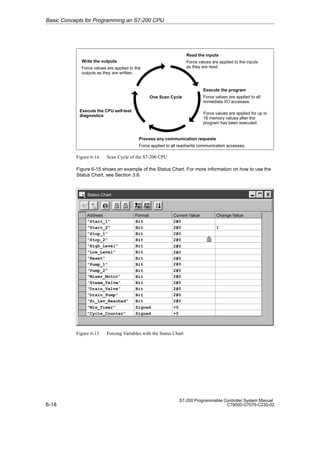
S Configure the operations of a High-Speed Counter
In Section 5.3, an example of the Analog Input Filtering Wizard is shown.
Selecting the S7-200 Instruction Wizard
To select the S7-200 Instruction Wizard, follow these steps:
1. Select the menu command Tools  Instruction Wizard... as shown in Figure 5-13.
2. Click on the instruction formula that you want to configure.
3. Click on “Next”. If you have not compiled your program since the last edit, you must do
so. Since a program compile may take some time (if your program is lengthy), you are
asked if you want to proceed. The message ‘‘Compile Needed. Your program must be
compiled in order to proceed. Compile Now?’’ appears. Click on “OK” to compile, or on
“Cancel” to cancel out of the wizard without compiling.
4. Once you choose an instruction formula and your program has compiled, the specific
formula screens appear.
✂
Project Edit View CPU Debug Tools Setup Window Help
STEP 7-Micro/WIN - c:microwinproject1.prj
S7-200 Instruction Wizard
Cancel
Next 
 Prev
This S7-200 Instruction wizard will allow you to configure complex operations
quickly and easily. The Wizard will present you with a series of options for the
formula that you request. Upon completion, the wizard will generate the program
code for the configuration you have chosen.
Tools
PID
NETR/NETW
Analog Input Filtering
HSC
The following is a list of the instruction formulae that the wizard supports. What
instruction formula would you like to configure?
Configure the operation of a PID instruction.
To begin configuring the formula you have chosen, click Next.
Tools
Instruction Wizard..
TD 200 Wizard...
Project Services ...
Edit/Add Tools...
Figure 5-13 Using the S7-200 Instruction Wizard
Additional Features of STEP 7-Micro/WIN
5-13
S7-200 Programmable Controller System Manual
C79000-G7076-C230-02
After you have answered all the queries for the chosen formula, you are shown the final
screen of the S7-200 Wizard, as shown in Figure 5-14. This screen explains the program
segments to be generated for the configuration you have chosen. It also allows you to
specify where the code should be placed within the main program.
S7-200 Instruction Wizard (Analog Input Filtering)
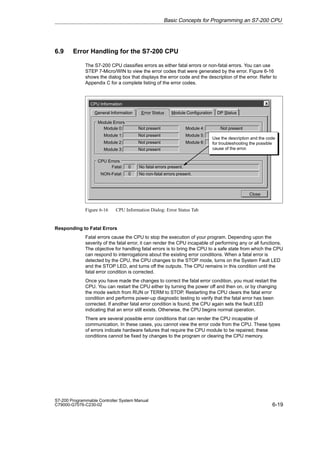
Cancel
Finish
 Prev
This S7-200 Instruction wizard will now generate code for the configuration you
have chosen, and insert that code in your program. The configuration you have
requested consists of:
Subroutines and Interrupt routines will be placed at the end of your program. Calls
to subroutines must be placed in your main program. To view where the call will be
inserted, choose a position, and press Browse. The program editor will then scroll
to the position you have chosen. When you are satisfied with the position, press
Finish.
After what Network should the code for the main program be inserted? 23
Browse
One subroutine at SBR 1
Figure 5-14 Program Segments Generated by the S7-200 Instruction Wizard
Additional Features of STEP 7-Micro/WIN
5-14
S7-200 Programmable Controller System Manual
C79000-G7076-C230-02
5.3 Using the Analog Input Filtering Instruction Wizard
You can use the Analog Input Filtering Wizard to add an averaging routine to your program.
The S7-200 analog module is a high-speed module. It can follow rapid changes in the analog
input signal (including internal and external noise). Reading-to-reading variations caused by
noise for a constant or slowly changing analog input signal can be minimized by averaging a
number of readings. As the number of readings used in computing the average value
increases, a correspondingly slower response time to changes in the input signal can be
observed. An average value computed from a large number of samples can stabilize the
reading while slowing down its response to changes in the input signal.
Basic Filtering
To accomplish basic filtering, you need to answer three questions:
1. Which analog input do you wish to filter? (AIW0, AIW2, AIW4,...)
2. To what address should the filtered value be written? (VWx, AQWx, ...)
3. In what address do you want the scratchpad area for calculations to be placed? The
filtering code requires 12 bytes of data storage for calculations. (VBx, ...)
Additional Filtering Options
You can configure several options for more information about the analog input you are
monitoring,
S Configurable Sample Size
S Error Conditions
Specifying Input and Output
Specify which AIW is to be the input and where the output is to be written, as shown in
Figure 5-15. You can enter either an address or a symbol name for the output.
S7-200 Instruction Wizard (Analog Input Filtering)
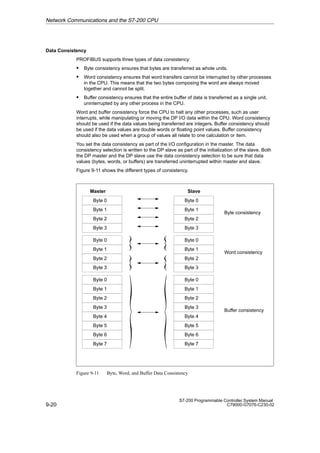
Cancel
Next
 Prev
Which Analog Input would you like to filter?
The filtered output may be written to a word location in V-memory or to an Analog
Output. You may specify a direct address, or a symbol name.
‘‘Filtered Out’’
AIW0
This formula will implement a filtering algorithm for analog inputs. It works by
sampling the input on each scan, and then averaging the values over a given
number of scans to increase stability. This average is output as the filtered value.
The wizard will also allow you to attach error-checking code to the output, so that
module errors can be recognized and handled.
Where would you like the output written?
Figure 5-15 Specifying Input and Output in the Analog Input Filtering Wizard
Additional Features of STEP 7-Micro/WIN
5-15
S7-200 Programmable Controller System Manual
C79000-G7076-C230-02
Choosing the Address for the 12-Byte Scratchpad
Choose the area to begin the 12-byte scratchpad, as shown in Figure 5-16. You must also
choose the subroutine number for code generation and the sample size.
S7-200 Instruction Wizard (Analog Input Filtering)
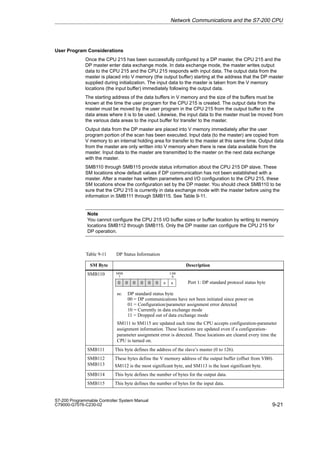
Cancel
Next
 Prev
Where should calculations area begin? VB
You may adjust how many samples are used to determine an average. More
samples will provide better filtering, but will cause the value to respond slower to
changes in the input.
0
12 bytes of V memory are required for calculations. You may specify any V memory
byte address.
The code generated by this formula will be placed in a subroutine. You must
specify which subroutine to use. The wizard will suggest a subroutine number that
is not already in use by your program.
Which subroutine would you like to use: 10
How many samples should be used to determine an average? 256
Figure 5-16 Choosing the Address for the 12-Byte Scratchpad
Additional Features of STEP 7-Micro/WIN
5-16
S7-200 Programmable Controller System Manual
C79000-G7076-C230-02
Module Error Checking
You can select the option of adding module error-checking code to your configuration.You
must specify the position of the analog module you are using in order to generate the code
that checks the correct SM locations.You must also specify a bit to contain the module error
status. In the event of a module error, this bit is set. If you choose to output a specific value
in the event of a module error, you must enter the value to output. See Figure 5-17.
S7-200 Instruction Wizard (Analog Input Filtering)
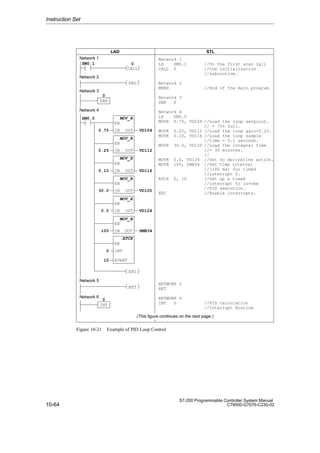
Cancel
Next 
 Prev
At what position is the module attached to the CPU?
In the event of a module error, should the output be forced to a specific value,
or remain at the value of the last calculated average?
0
The wizard can include module error-checking code that will set the output to a
specified value in the event of a module error.
Module Error-Checking
Output the last calculated average.
Output a specific value:
Include module error-checking code.
Value to output:
Module Error Bit:
0
Figure 5-17 Analog Input Filtering - Outputting a Specific Value in the Event of a Module Error
Alternatively, you can choose to ouptut the last calculated average value in the event of a
module error. See Figure 5-18.
S7-200 Instruction Wizard (Analog Input Filtering)
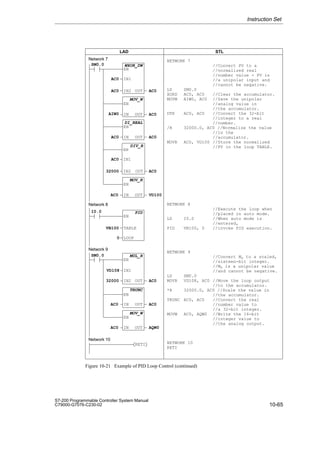
Cancel
Next 
 Prev
At what position is the module attached to the CPU?
In the event of a module error, should the output be forced to a specific value,
or remain at the value of the last calculated average?
0
The wizard can include module error-checking code that will set the output to a
specified value in the event of a module error.
Module Error-Checking
Output the last calculated average.
Output a specific value:
Include module error-checking code.
Module Error Bit:
Figure 5-18 Analog Input Filtering - Outputting the Last Calculated Average in the Event of a Module Error
Additional Features of STEP 7-Micro/WIN
5-17
S7-200 Programmable Controller System Manual
C79000-G7076-C230-02
5.4 Using Cross Reference
Use Cross Reference to generate a list of addresses used in your program. Cross Reference
lets you monitor the addresses as you write your program. When you select Cross
Reference, your program is compiled and the Cross Reference table is generated.
The Cross Reference table shows the element name, the network number, and the
instruction. See Figure 5-19. Indirect addresses in the Cross Reference table are shown with
the symbols (*) or ().
To generate a Cross Reference table, follow these steps:
1. Select View  Cross Reference.
2. Your program is compiled and the Cross Reference table is generated.
3. You can leave the Cross Reference table up while you are entering your program. If you
change the program and then click into the Cross Reference table, you must update the
table by selecting the Refresh option that appears at the top of the Cross Reference
screen.
4. To view an element in your program, double-click on that element in the Cross
Reference table, and that element is highlighted in the Program Editor.
Ladder Editor - untitled.ob1
F4 F5 F8
F7
F6
Contacts Normally Open F3
F10
F2
✂
STEP 7-Micro/WIN - c:microwinproject1.prj
1, 1
Project Edit View CPU Debug Tools Setup Window Help
“Start_1” “Stop_1” “High_Level” “Pump_1”
“Pump_1”
Network 1 Fill the tank with Paint Ingredient 1 and monitor the tank.
✓
✓
✓
STL
Ladder
Data Block
Symbol Table
Status Chart
Cross Reference
Element Usage
Symbolic Addressing Ctrl+Y
Toolbar
Status Bar
Instruction Toolbar
Zoom...
Cross Reference (Compiled LAD View)
Option View
“Start_1”
Element Instruction
Network
1
“Start_2” 2
“Stop_1” 1
“Stop_2” 2
1
“High_Level” 2
3
Figure 5-19 Viewing the Cross Reference List
Additional Features of STEP 7-Micro/WIN
5-18
S7-200 Programmable Controller System Manual
C79000-G7076-C230-02
5.5 Using Element Usage
You can use Element Usage to show the addresses and ranges that you have assigned in
your program. Element Usage shows this information in a more compact form than the
Cross Reference table. The range shown begins with the first used address, and ends with
the last used address. Unused addresses are shown as blank rows. See Figure 5-20.
There are two ways to view Element Usage:
S Bit Format shows I, Q, M, and S
S Byte Format shows V usage, AIW, AQW, MB, SMB, T, C, and HSC
Some considerations:
S Within the Byte view, the double word address shows up as four consecutive D’s. If there
are not four consecutive D’s you may have used this address twice, or it may be a
deliberate programming effort. (A word shows up as two consecutive W’s; a byte is one
B; and a bit is one b.)
S Elements marked in usage with dashes (--) indicate ranged references. A ranged
reference results from addresses that are used by an instruction without being explicitly
stated. For example, the NET READ (NETR) instruction uses an 8-byte table in V
memory; however the first byte is the only explicit reference.
To generate a Element Usage table, select View  Element Usage. Your program is
compiled and the Element Usage table appears. See Figure 5-20.You can leave the Element
Usage table up while you are entering your program. If you change the program, then click
into the Element Usage table, you must update the table by selecting the Refresh option that
appears at the top of the Element Usage screen.
Element Usage (Compiled LAD View)
Option View
7 6 5 4 3 2 1 0
9 8
Byte
VB00000000
VB00000010
VB00000020
VB00000030
VB00000040
VB00000050
VB00000060
VB00000070
VB00000080
VB00000090
SMB000
SMB010
D D W W
-- --
D D D D
W W
W W
-- -- -- --
b
B
B
Bit, Byte, Word, and
Double Word element
usage shown.
Use View menu to
select Bit format
or Byte format.
Figure 5-20 Viewing the Element Usage Table
Additional Features of STEP 7-Micro/WIN
5-19
S7-200 Programmable Controller System Manual
C79000-G7076-C230-02
5.6 Using Find/Replace
You can use Find to search for a specific parameter and Replace to replace that parameter
with another one. See Figure 5-21.
Using Find to Search for a Parameter
To use Find to search for a specific parameter, follow these steps:
1. Select Edit  Find..... Figure 5-21 shows the Find dialog box.
2. Select the parameters that you want to find.
3. Select the Direction in which you want your program to be searched.
4. Press the ‘‘Find Next’’ button to begin the search.
Ladder Editor - untitled.ob1
F5 F8
F7
F6
Contacts Normally Open F3
F10
F2
✂
STEP 7-Micro/WIN - c:microwinproject1.prj
1, 1
Project Edit View CPU Debug Tools Setup Window Help
“Start_1” “Stop_1” “High_Level” “Pump_1”
“Pump_1”
Network 1 Fill the tank with Paint Ingredient 1 and monitor the tank.
Undo Ctrl+Z
Cut Ctrl+X
Copy Ctrl+C
Paste Ctr;+V
Cut Network
Copy Network
Paste Network
Insert... Shift+Ins
Delete... Shift+Del
Find... Ctrl+F
Replace... Ctrl+H
Program Title...
Find
Cancel
Find Next
Text
Find What:
Replace
Match Case
Network
Find Whole Word Only
Instruction
Symbol
Direction All
F4
Figure 5-21 Find Dialog Box
Additional Features of STEP 7-Micro/WIN
5-20
S7-200 Programmable Controller System Manual
C79000-G7076-C230-02
Replacing a Parameter
To replace a specific parameter, follow these steps:
1. Select Edit  Replace.. Figure 5-22 shows the Replace dialog box.
2. You must define the network to replace.
3. Press the ‘‘Replace’’ button to replace an occurrence. When you press the ‘‘Replace’’
button, the first occurrence is found. You must press the ‘‘Replace’’ button again to
replace that occurrence, and to find the next occurrence.
4. The ‘‘Replace All’’ button ignores any set ranges, and replaces all occurrences.
Ladder Editor - untitled.ob1
F5 F8
F7
F6
Contacts Normally Open F3
F10
F2
✂
STEP 7-Micro/WIN - c:microwinproject1.prj
1, 1
Project Edit View CPU Debug Tools Setup Window Help
“Start_1” “Stop_1” “High_Level” “Pump_1”
“Pump_1”
Network 1 Fill the tank with Paint Ingredient 1 and monitor the tank.
Undo Ctrl+Z
Cut Ctrl+X
Copy Ctrl+C
Paste Ctr;+V
Cut Network
Copy Network
Paste Network
Insert... Shift+Ins
Delete... Shift+Del
Find... Ctrl+F
Replace... Ctrl+H
Program Title...
Replace
Cancel
Find Next
Text
Find What:
Replace With: Replace
Replace All
Replacement Range
All
Network to
Match Case
Symbol
Find Whole Word Only
Drain_Pump
Drain_Pump
Use drop-down list
to select symbol.
F4
Figure 5-22 Replace Dialog Box
Additional Features of STEP 7-Micro/WIN
5-21
S7-200 Programmable Controller System Manual
C79000-G7076-C230-02
5.7 Documenting Your Program
You can document your ladder program using program titles, network titles, and network
comments. You can document your STL program with descriptive comments.
Guidelines for Documenting LAD Programs
The ladder program title is used to provide a brief description of your project. To edit the
program title, select Edit  Program Title.... Enter your new program title, then click the
‘‘OK’’ button.
The ladder network title allows you to summarize the function of that network. The single-line
network title is always visible in the ladder display. To edit the network title, double-click on
the ‘‘Network Title’’ field in your program. Enter your summary in the ‘‘Title’’ field of the LAD
Network Title/Comment Editor. Click the ‘‘OK’’ button.
Ladder network comments allow you to describe the function of the network more
completely. To enter network comments, double-click on the ‘‘Network Title’’ field in your
program. Enter your comments in the ‘‘Comment’’ field, then click the ‘‘OK’’ button. Network
comments are not visible on the program screen, but you can view them by double-clicking
on a ‘‘Network Title’’ field.
To print your ladder network comments, select Project  Print.... Click on the ‘‘Page Setup...’’
button, then select the ‘‘Print Network Comments’’ option, and click the ‘‘OK’’ button.
Guidelines for Documenting STL Programs
Any text on a line in an STL program that is preceded by a double slash (//) is considered to
be an STL comment. You can use comments at the beginning of the program to describe it’s
overall purpose. You can also use comments on a line by themselves, or on the same line
as an instruction, to document the details of your program. See Figure 5-23.
// Program for a Home Security System
NETWORK 1 //Sound the alarm!
LD I0.3 // If (the panic alarm has been turned on)
LDW= T0, +600 // or (if the alert timer is = 60 seconds
A I0.2 // and the system is armed)
OLD // then
S M0.1, 1 // set the high-level alarm bit
S Q0.3, 1 // set the modem dialer bit
R M0.2, 1 // reset the low-level alarm bit
NETWORK 2 //Evaluate the system status.
LDN I0.0 // If zone 1 is open
ON I0.1 // or if zone 2 is open
STL Editor - project1.ob1
STL
To allow viewing of the
program in STL or Ladder,
divide segments of code
with keyword NETWORK.
Figure 5-23 Documenting Your STL Program
Additional Features of STEP 7-Micro/WIN
5-22
S7-200 Programmable Controller System Manual
C79000-G7076-C230-02
Viewing an STL Program in Ladder
If you plan to view your STL program in ladder, you should follow these conventions when
writing your STL program. See Figure 5-23.
S You must divide the segments of STL code into separate networks by entering the
keyword, ‘‘Network’’. The network declarations must come at appropriate boundaries for
ladder representation. Network numbers are generated automatically after you compile or
upload your program.
S The STL comment lines that come before the first ‘‘Network’’ keyword become the ladder
program title.
S An STL comment placed on a network line after the ‘‘Network’’ keyword becomes a
ladder network title.
S STL comments that appear between the ‘‘Network’’ line and the first instruction of that
network become ladder network comments. An example is:
NETWORK // NETWORK TITLE
//NETWORK COMMENT LINE 1
//NETWORK COMMENT LINE 2
LD I0.0
Additional Features of STEP 7-Micro/WIN
5-23
S7-200 Programmable Controller System Manual
C79000-G7076-C230-02
5.8 Printing Your Program
You can use the Print function to print your entire program or portions of the program.
S Select Project  Print... to print your program. Select what you want to print, then click
the ‘‘OK’’ button. See Figure 5-24.
S Use Page Setup to select additional printing options: margins, absolute/symbolic
addresses, network comments, and headers/footers.
S Use Setup to select your printer and paper options.
To print your program, follow these steps:
1. Select Project  Print.... The Print dialog box shown in Figure 5-24 appears.
2. Select the options to print from the ‘‘Print What:’’ field.
3. Select the network range to print from the ‘‘LAD Network Range’’ field.
4. If you need to change your printer setup, you can select either Page Setup or Setup.
5. Click ‘‘OK’’.
Note
If you choose to print the Cross Reference table and/or the Element Usage table, you may
be required to compile your program. The time it takes for a program compile depends
upon the size of your program.
STEP 7-Micro/WIN - c:microwinproject1.prj
Ladder Editor - untitled.ob1
Contacts
Network 1
“Start1”
New... Ctrl+N
Open... Ctrl+O
Close
Save All Ctrl+S
Save As...
Import
Export
Upload... Ctrl+U
Download... Ctrl+D
Page Setup...
Print Preview...
Print... Ctrl+P
Print Setup...
Exit
Print
Cancel
OK
Ladder
Print What:
Page Setup...
Setup
LAD Network Range
All
Selection to
Symbol Table
Print Quality
High
Printer: HP LaserJet 4Si
Data Block
Status Chart
Cross Reference
Element Usage
Project Edit View CPU Debug Tools Setup Window Help
Figure 5-24 Print Dialog Box
Additional Features of STEP 7-Micro/WIN
5-24
S7-200 Programmable Controller System Manual
C79000-G7076-C230-02
Additional Features of STEP 7-Micro/WIN
6-1
S7-200 Programmable Controller System Manual
C79000-G7076-C230-02
Basic Concepts for Programming an
S7-200 CPU
Before you start to program your application using the S7-200 CPU, you should become
familiar with some of the basic operational features of the CPU.
Chapter Overview
Section Description Page
6.1 Guidelines for Designing a Micro PLC System 6-2
6.2 Concepts of an S7-200 Program 6-4
6.3 Concepts of the S7-200 Programming Languages 6-5
6.4 Basic Elements for Constructing a Program 6-8
6.5 Understanding the Scan Cycle of the CPU 6-10
6.6 Selecting the Mode of Operation for the CPU 6-13
6.7 Creating a Password for the CPU 6-14
6.8 Debugging and Monitoring Your Program 6-16
6.9 Error Handling for the S7-200 CPU 6-19
6
6-2
S7-200 Programmable Controller System Manual
C79000-G7076-C230-02
6.1 Guidelines for Designing a Micro PLC System
There are many methods for designing a Micro PLC system. This section provides some
general guidelines that can apply to many design projects. Of course, you must follow the
directives of your own company’s procedures and of the accepted practices of your own
training and location. Figure 6-1 shows some of the basic steps in the design process.
Partition your process or machine.
Create the functional specifications of the units.
Specify the operator stations.
Create the PLC configuration drawings.
Create a list of symbolic signal-naming conventions (optional).
Design the hard-wired safety circuits.
Figure 6-1 Basic Steps for Planning a PLC System
Partitioning Your Process or Machine
Divide your process or machine into sections that have a level of independence from each
other. These partitions determine the boundaries between controllers and influence the
functional description specifications and the assignment of resources.
Creating the Functional Specifications
Write the descriptions of operation for each section of the process or machine. Include the
following topics:
S Input/output (I/O) points
S Functional description of the operation
S Permissives (states that must be achieved before allowing action) for each actuator
(solenoids, motors, drives, etc.)
S Description of the operator interface
S Interfaces with other sections of the process or machine
Basic Concepts for Programming an S7-200 CPU
6-3
S7-200 Programmable Controller System Manual
C79000-G7076-C230-02
Designing the Safety Circuits
Identify equipment requiring hard-wired logic for safety. Control devices can fail in an unsafe
manner, producing unexpected startup or change in the operation of machinery. Where
unexpected or incorrect operation of the machinery could result in physical injury to people or
significant property damage, consideration should be given to to the use of
electro-mechanical overrides which operate independently of the CPU to prevent unsafe
operations.
The following tasks should be included in the design of safety circuits:
S Identify improper or unexpected operation of actuators that could be hazardous.
S Identify the conditions that would assure the operation is not hazardous, and determine
how to detect these conditions independently of the CPU.
S Identify how the CPU and I/O affect the process when power is applied and removed,
and when errors are detected. This information should only be used for designing for the
normal and expected abnormal operation, and should not be relied on for safety
purposes.
S Design manual or electro-mechanical safety overrides that block the hazardous operation
independent of the CPU.
S Provide appropriate status information from the independent circuits to the CPU so that
the program and any operator interfaces have necessary information.
S Identify any other safety-related requirements for safe operation of the process.
Specifying the Operator Stations
Based on the requirements of the functional specifications, create drawings of the operator
station. Include the following items:
S Overview showing the location of each operator station in relation to the process or
machine
S Mechanical layout of the devices (display, switches, lights, etc.) for the operator station
S Electrical drawings with the associated I/O of the CPU or expansion module
Creating the PLC Configuration Drawings
Based on the requirements of the functional specification, create configuration drawings of
the control equipment. Include the following items:
S Overview showing the location of each CPU module in relation to the process or machine
S Mechanical layout of the CPU module and expansion I/O modules (including cabinets
and other equipment)
S Electrical drawings for each CPU module and expansion I/O module (including the device
model numbers, communication addresses, and I/O addresses)
Creating a List of Symbolic Names
If you choose to use symbolic names for addressing, create a list of symbolic names for the
absolute addresses. Include not only the physical I/O signals, but also the other elements to
be used in your program.
Basic Concepts for Programming an S7-200 CPU
6-4
S7-200 Programmable Controller System Manual
C79000-G7076-C230-02
6.2 Concepts of an S7-200 Program
Relating the Program to Inputs and Outputs
The basic operation of the S7-200 CPU is very simple:
S The CPU reads the status of the inputs.
S The program that is stored in the CPU uses these inputs to evaluate the control logic. As
the program runs, the CPU updates the data.
S The CPU writes the data to the outputs.
Figure 6-2 shows a simple diagram of how an electrical relay diagram relates to the S7-200
CPU. In this example, the state of the operator panel switch for opening the drain is added to
the states of other inputs. The calculations of these states then determine the state for the
output that goes to the solenoid that closes the drain.
The CPU continuously cycles through the program, reading and writing data.
S
Drain Solenoid
Operator Station
Output
Area
Input
Area
Areas of Memory
in the CPU
S7-200 CPU
Input
Output
Opn_Drn_PB
Drain_Sol
Cls_Drn_PB A_Mtr_Fbk Drain_Sol
E_Stop_On
Figure 6-2 Relating the Program to Inputs and Outputs
Accessing Data in the Memory Areas
The CPU stores the status of the inputs and outputs in specific areas of memory. Figure 6-2
shows a simplified flow of information: input ' memory area ' program ' memory area '
output. Each memory area is assigned an identifier (such as “I” for input and “Q” for output)
that is used for accessing the data stored in that area of memory.
STEP 7-Micro/WIN provides “absolute” addresses for all memory areas. You access a
specific location by entering an address (such as I0.0 for the first input point).
STEP 7-Micro/WIN also allows you to define symbolic names for absolute addresses. An
absolute address for a memory area includes not only the area identifier (such as “V”), but
also the size (up to 4 bytes or 32 bits) of data to be accessed: B (byte), W (word, or two
bytes), or D (double word, or 4 bytes). The absolute address also includes a numeric value:
either the number of bytes from the beginning of the memory area (offset) or the device
number. (This value depends on the area identifier. See Section 7.1.)
Basic Concepts for Programming an S7-200 CPU
6-5
S7-200 Programmable Controller System Manual
C79000-G7076-C230-02
6.3 Concepts of the S7-200 Programming Languages
The S7-200 CPU (and STEP 7-Micro/WIN) supports the following programming languages:
S Statement list (STL) is a set of mnemonic instructions that represent functions of the
CPU.
S Ladder logic (LAD) is a graphical language that resembles the electrical relay diagrams
for the equipment.
STEP 7-Micro/WIN also provides two representations for displaying the addresses and the
programming instructions in the program: international and SIMATIC. Both the international
and SIMATIC representations refer to the same S7-200 instruction set. There is a direct
correspondence between the international and the SIMATIC representation; both
representations have the same functionality.
Understanding the Basic Elements of Ladder Logic
When you write a program in ladder, you create and arrange the graphical components to
form a network of logic. As shown in Figure 6-3, the following types of elements are available
for creating your program:
S Contacts: each of these elements represents a switch through which power can flow
when a switch is closed.
S Coils: each of these elements represents a relay that is energized by power flowing to
that relay.
S Boxes: each of these elements represents a function that is executed when power flows
to the box.
S Networks: each of these elements forms a complete circuit. Power flows from the left
power rail through the closed contacts to energize the coils or boxes.
Output Coils Output F4 F5 F8
F7 F10
F3
F2
I0.0 I0.1 Q0.0
Network
Left Power Rail
T32
I0.0
IN
PT
TON
VW0
Box
Normally Open
Contact
Normally Closed
Contact
Coil
Network
Network 2
Network 1 NETWORK TITLE (single line)
NETWORK TITLE (single line)
F6
Figure 6-3 Basic Elements of Ladder Logic
Basic Concepts for Programming an S7-200 CPU
6-6
S7-200 Programmable Controller System Manual
C79000-G7076-C230-02
Understanding the Statement List Instructions
Statement list (STL) is a programming language in which each statement in your program
includes an instruction that uses a mnemonic abbreviation to represent a function of the
CPU. You combine these instructions into a program to produce the control logic for your
application.
Figure 6-4 shows the basic elements of a statement list program.
STL Editor - project1.ob1
//Conveyor Line Program
NETWORK //Start Motor:
LD “Start1” //When I0.0 is on
AN “E-Stop1” //and I0.1 is not on,
= Q0.0 //then turn on conveyor motor.
NETWORK //E-stop Conveyor:
LD I0.1 //When E-stop 1 is on
O I0.3 //or when E-stop 2 is on,
R Q0.0, 1 //turn off conveyor motor.
NETWORK //End of Program
MEND
STL
Begin each comment with a
double slash (//).
Instruction
Operand
Figure 6-4 STL Editor Window with Sample Program
The STL instructions use a logic stack in the CPU for solving your control logic. As shown in
Figure 6-5, this logic stack is nine bits deep by one bit wide. Most of the STL instructions
work either with the first bit or with the first and the second bits of the logic stack. New values
can be “pushed” (or added) onto the stack; when the top two bits of the stack are combined,
the stack is “popped” (reduced by one bit).
While most STL instructions only read the values in the logic stack, many STL instructions
also modify the values stored in the logic stack. Figure 6-5 shows examples of how three
instructions use the logic stack.
Basic Concepts for Programming an S7-200 CPU
6-7
S7-200 Programmable Controller System Manual
C79000-G7076-C230-02
S0
S1
S2
S3
S4
S5
S6
S7
Stack 0 - First stack level, or top of the stack
Stack 1 - Second stack level
Stack 2 - Third stack level
Stack 3 - Fourth stack level
Stack 4 - Fifth stack level
Stack 5 - Sixth stack level
Stack 6 - Seventh stack level
Stack 7 - Eighth stack level
Bits of the Logic Stack
Load (LD)
Loads a new value (nv) onto the
stack.
Before Load After Load
And (A)
ANDs a new value (nv) with the
initial value (iv) at the top of the
stack.
S0 = iv0 * nv
Or (O)
ORs a new value (nv) with the initial
value (iv) at the top of the stack.
S0 = iv0 + nv
iv0
iv1
iv2
iv3
iv4
iv5
iv6
iv7
nv
iv0
iv1
iv2
iv3
iv4
iv5
iv6
Before And After And
iv0
iv1
iv2
iv3
iv4
iv5
iv6
iv7
S0
iv1
iv2
iv3
iv4
iv5
iv6
iv7
Before Or After Or
iv0
iv1
iv2
iv3
iv4
iv5
iv6
iv7
S0
iv1
iv2
iv3
iv4
iv5
iv6
iv7
In these examples, “iv0” to “iv7” identify the initial values of the logic stack, “nv” identifies a new value provided by the instruction, and
“S0” identifies the calculated value that is stored in the logic stack.
S8 Stack 8 - Ninth stack level
iv8 is lost.
iv8 iv7
iv8 iv8 iv8 iv8
Figure 6-5 Logic Stack of the S7-200 CPU
Basic Concepts for Programming an S7-200 CPU
6-8
S7-200 Programmable Controller System Manual
C79000-G7076-C230-02
6.4 Basic Elements for Constructing a Program
The S7-200 CPU continuously executes your program to control a task or process. You
create this program with STEP 7-Micro/WIN and download it to the CPU. From the main
program, you can call different subroutines or interrupt routines.
Organizing the Program
Programs for an S7-200 CPU are constructed from three basic elements: the main program,
subroutines (optional), and interrupt routines (optional). As shown in Figure 6-6, an S7-200
program is structured into the following organizational elements:
S Main program: The main body of the program is where you place the instructions that
control your application. The instructions in the main program are executed sequentially,
once per scan of the CPU. To terminate the main program, use an Unconditional End coil
in ladder or a Main Program End instruction (MEND) in STL. See (1) in Figure 6-6.
S Subroutines: These optional elements of your program are executed only when called
from the main program. Place the subroutines after the end of the main program
(following the Unconditional End coil in ladder logic or the MEND instruction in STL). Use
a Return (RET) instruction to terminate each subroutine. See (2) in Figure 6-6.
S Interrupt routines: These optional elements of your program are executed on each
occurrence of the interrupt event. Place the interrupt routines after the end of the main
program (following the Unconditional End coil in ladder logic or the MEND instruction in
STL). Use a Return From Interrupt (RETI) instruction to terminate each interrupt routine.
See (3) in Figure 6-6.
Subroutines and interrupt routines follow the Unconditional End coil or MEND instruction of
the main program; there is no other requirement for locating the subroutines and interrupt
routines within your program. You can mix subroutines and interrupt routines following the
main program; however, in order to provide a program structure that is easy to read and
understand, consider grouping all of the subroutines together after the main program, and
then group all of the interrupt routines together after the subroutines.
Main Program
MEND
SBR 0 Subroutine (optional)
RET
SBR 1 Subroutine (optional)
RET
SBR n Subroutine (optional)
RET
INT 0 Interrupt Routine (optional)
RETI
INT 1 Interrupt Routine (optional)
RETI
INT n Interrupt Routine (optional)
RETI
Main Program:
Executed once per scan
Subroutine:
Executed when called
from the main program
Interrupt Routine:
Executed on each
occurrence of the
interrupt event
(1)
(2)
(3)
User Program
Figure 6-6 Program Structure for an S7-200 CPU
Basic Concepts for Programming an S7-200 CPU
6-9
S7-200 Programmable Controller System Manual
C79000-G7076-C230-02
Example Program Using Subroutines and Interrupts
Figure 6-7 shows a sample program for a timed interrupt, which can be used for applications
such as reading the value of an analog input. In this example, the sample rate of the analog
input is set to 100 ms.
Network 1
LD SM0.1 //When first scan bit
//comes on
CALL 0 //Call subroutine 0.
Network 2
MEND
SM0.1 0
Network 1
Network 2
Network 3
SBR 0 //Begin subroutine 0
Network 4
LD SM0.0 //Always on memory bit,
MOVB 100, SMB34 //set timed int. 0.
//interval to 100 ms
ENI //Global Interrupt Enable
ATCH 0, 10 //Attach timed int. 0 to
//int. routine 0.
Network 5
RET //Terminate subroutine.
Network 3
IN
100
MOV_B
OUT SMB34
EN
SM0.0
INT
0
ATCH
EN
EVENT
10
Network 5
SBR
Network 4
Network 6
IN
AIW4
MOV_W
OUT VW100
EN
Network 8
Network 7
Network 6
INT 0 //Begin Int. routine 0.
Network 7
MOVW AIW4,VW100 //Sample Analog Input 4
Network 8
RETI //Terminate interrupt
routine
Ladder Logic Statement List
RETI
RET
ENI
END
CALL
Main Program
Subroutines
Interrupt Routines
0
INT
0
Figure 6-7 Sample Program for Using a Subroutine and an Interrupt Routine
Basic Concepts for Programming an S7-200 CPU
6-10
S7-200 Programmable Controller System Manual
C79000-G7076-C230-02
6.5 Understanding the Scan Cycle of the CPU
The S7-200 CPU is designed to execute a series of tasks, including your program,
repetitively. This cyclical execution of tasks is called the scan cycle. During the scan cycle
shown in Figure 6-8, the CPU performs most or all of the following tasks:
S Reading the inputs
S Executing the program
S Processing any communication requests
S Executing the CPU self-test diagnostics
S Writing to the outputs
Executing the program
Processing any communications requests
Executing the CPU self-test diagnostics
Writing to the outputs Reading the inputs
One Scan Cycle
Figure 6-8 Scan Cycle of the S7-200 CPU
The series of tasks executed during the scan cycle is dependent upon the operating mode of
the CPU. The S7-200 CPU has two modes of operation, STOP mode and RUN mode. With
respect to the scan cycle, the main difference between STOP and RUN mode is that in RUN
mode your program is executed, and in STOP mode your program is not executed.
Reading the Digital Inputs
Each scan cycle begins by reading the current value of the digital inputs and then writing
these values to the process-image input register.
The CPU reserves the process-image input register in increments of eight bits (one byte). If
the CPU or expansion module does not provide a physical input point for each bit of the
reserved byte, you cannot reallocate these bits to subsequent modules in the I/O chain or
use them in your program. The CPU resets these unused inputs to zero in the image register
at the beginning of every scan. However, if your CPU module can accommodate several
expansion modules and you are not using this I/O capacity (have not installed the expansion
modules), you can use the unused expansion input bits as additional memory bits.
The CPU does not automatically update analog inputs as part of the scan cycle and does not
maintain an analog input image register. You must access the analog inputs directly from
your program.
Basic Concepts for Programming an S7-200 CPU
6-11
S7-200 Programmable Controller System Manual
C79000-G7076-C230-02
Executing the Program
During the execution phase of the scan cycle, the CPU executes your program, starting with
the first instruction and proceeding to the end instruction. The immediate I/O instructions give
you immediate access to inputs and outputs during the execution of either the program or an
interrupt routine.
If you use interrupts in your program, the interrupt routines that are associated with the
interrupt events are stored as part of the program. (See Section 6.4.) The interrupt routines
are not executed as part of the normal scan cycle, but are executed when the interrupt event
occurs (which may be at any point in the scan cycle).
Processing the Communication Requests
During the message-processing phase of the scan cycle, the CPU processes any messages
that were received from the communications port.
Executing the CPU Self-Diagnostic Test
During this phase of the scan cycle, the CPU checks its firmware and your program memory
(RUN mode only). It also checks the status of any I/O modules.
Writing to the Digital Outputs
At the end of every scan cycle, the CPU writes the values stored in the process-image output
register to the digital outputs.
The CPU reserves the process-image output register in increments of eight bits (one byte). If
the CPU or expansion module does not provide a physical output point for each bit of the
reserved byte, you cannot reallocate these bits to subsequent modules in the I/O chain.
However, you can use the unused bits of the process-image output register like the internal
memory (M) bits.
The CPU does not automatically update analog outputs as part of the scan cycle and does
not maintain an analog output image register. You must access the analog outputs directly
from your program.
When the CPU operating mode is changed from RUN to STOP, the digital outputs are set to
the values defined in the Output Table, or are left in their current state (see Section 8.3).
Analog outputs remain at the value last written.
Interrupting the Scan Cycle
If you use interrupts, the routines associated with each interrupt event are stored as part of
the program. The interrupt routines are not executed as part of the normal scan cycle, but
are executed when the interrupt event occurs (which may be at any point in the scan cycle).
Interrupts are serviced by the CPU on a first-come-first-served basis within their respective
priority assignments.
Basic Concepts for Programming an S7-200 CPU
6-12
S7-200 Programmable Controller System Manual
C79000-G7076-C230-02
Process-Image Input and Output Registers
It is usually advantageous to use the process-image register rather than to directly access
inputs or outputs during the execution of your program. There are three reasons for using the
image registers:
S The sampling of all inputs at the top of the scan synchronizes and freezes the values of
the inputs for the program execution phase of the scan cycle. The outputs are updated
from the image register after the execution of the program is complete. This provides a
stabilizing effect on the system.
S Your program can access the image register much quicker than it can access I/O points,
allowing faster execution of the program.
S I/O points are bit entities and must be accessed as bits, but you can access the image
register as bits, bytes, words, or double words. Thus, the image registers provide
additional flexibility.
An additional benefit is that the image registers are large enough to handle the maximum
number of input and output points. Since a real system consists of both inputs and outputs,
there is always some number of image register locations not used. You can use the unused
locations as extra internal memory bits. See Section 8.1.
Immediate I/O
Immediate I/O instructions allow direct access to the actual input or output point, even though
the image registers are normally used as either the source or the destination for I/O
accesses. The corresponding process-image input register location is not modified when you
use an immediate instruction to access an input point. The corresponding process-image
output register location is updated simultaneously when you use an immediate instruction to
access an output point.
Basic Concepts for Programming an S7-200 CPU
6-13
S7-200 Programmable Controller System Manual
C79000-G7076-C230-02
6.6 Selecting the Mode of Operation for the CPU
The S7-200 CPU has two modes of operation:
S STOP: The CPU is not executing the program. You can download a program or configure
the CPU when the CPU is in STOP mode.
S RUN: The CPU is running the program. When the CPU is in RUN mode, you cannot
download a program or configure the CPU.
The status LED on the front of the CPU indicates the current mode of operation. You must
place the CPU in the STOP mode to load the program into program memory.
Changing the Operating Mode with the Mode Switch
You can use the mode switch (located under the access door of the CPU module) to select
the operating mode for the CPU manually:
S Setting the mode switch to STOP mode stops the execution of the program.
S Setting the mode switch to RUN mode starts the execution of the program.
S Setting the mode switch to TERM (terminal) mode does not change the CPU operating
mode, but it does allow the programming software (STEP 7-Micro/WIN) to change the
CPU operating mode.
If a power cycle occurs when the mode switch is set to either STOP or TERM, the CPU goes
automatically to STOP mode when power is restored. If a power cycle occurs when the
mode switch is set to RUN, the CPU goes to RUN mode when power is restored.
Changing the Operating Mode with STEP 7-Micro/WIN
As shown in Figure 6-9, you can use STEP 7-Micro/WIN to change the operating mode of
the CPU. To enable the software to change the operating mode, you must set the mode
switch on the CPU to either TERM or RUN.
✂
Project Edit View CPU Debug Tools Setup Window Help
STOP mode
RUN mode
Figure 6-9 Using STEP 7-Micro/WIN to Change the Operating Mode of the CPU
Changing the Operating Mode from the Program
You can insert the STOP instruction in your program to change the CPU to STOP mode. This
allows you to halt the execution of your program based on the program logic. For more
information about the STOP instruction, see Chapter 10.
Basic Concepts for Programming an S7-200 CPU
6-14
S7-200 Programmable Controller System Manual
C79000-G7076-C230-02
6.7 Creating a Password for the CPU
All models of the S7-200 CPU provide password protection for restricting access to specific
CPU functions. A password authorizes access to the CPU functions and memory: without a
password, the CPU provides unrestricted access. When password protected, the CPU
prohibits all restricted operations according to the configuration provided when the password
was installed.
Restricting Access to the CPU
As shown in Table 6-1, S7-200 CPUs provide three levels of restricting access to CPU
functions. Each level allows certain functions to be accessible without a password. For all
three levels of access, entering the correct password provides access to all of the CPU
functions. The default condition for S7-200 CPUs is level 1 (no restriction).
Entering the password over a network does not compromise the password protection for the
CPU. Having one user authorized to access restricted CPU functions does not authorize
other users to access those functions. Only one user is allowed unrestricted access to the
CPU at a time.
Note
After you enter the password, the authorization level for that password remains effective for
up to one minute after the programming device has been disconnected from the CPU.
Table 6-1 Restricting Access to the S7-200 CPU
Task Level 1 Level 2 Level 3
Read and write user data Not restricted Not restricted Not restricted
Start, stop and restart the CPU
Read and write the time-of-day clock
Read the forced data in the CPU Password
required
Upload the user program, data, and the configuration
required
Download to the CPU Password
required
Delete the user program, data, and the configuration1 required
Force data or single/multiple scan
Copy to the memory cartridge
1 The “Delete” protection can be overridden by the Clear password, ‘‘clearplc”.
Configuring the CPU Password
You use STEP 7-Micro/WIN to create the password for the CPU. Select the menu command
CPU  Configure and click the Password tab. See Figure 6-10. Enter the appropriate level
of access for the CPU, then enter and verify the password for the CPU.
Basic Concepts for Programming an S7-200 CPU
6-15
S7-200 Programmable Controller System Manual
C79000-G7076-C230-02
CPU Configure
Password
Port 0
Output Table
Retentive Ranges
OK Cancel
Configuration parameters must be downloaded before they take effect.
Port 1 Input Filters
Password:
Minimum Privileges (Level 3)
Partial Privileges (Level 2)
Verify:
Full Privileges (Level 1)
Figure 6-10 Configuring a Password for the CPU
What to Do If You Forget the Password
If you forget the password, you must clear the CPU memory and reload your program.
Clearing the CPU memory puts the CPU in STOP mode and resets the CPU to the
factory-set defaults, except for the node address and the time-of-day clock.
To clear your program in the CPU, select the CPU  Clear... menu command to display the
Clear dialog box. Select the “All” option and confirm your action by clicking the “OK” button.
This displays a password-authorization dialog box. Entering the Clear password (clearplc)
allows you to continue the Clear All operation.
The Clear All operation does not remove the program from a memory cartridge. Since the
memory cartridge stores the password along with the program, you must also reprogram the
memory cartridge to remove the lost password.
Warning
Clearing the CPU memory causes the outputs to turn off (or in the case of an analog
output, to be frozen at a specific value).
If the S7-200 CPU module is connected to equipment when you clear the CPU memory,
changes in the state of the outputs can be transmitted to the equipment. If you had
configured the “safe state” for the outputs to be different from the factory settings, changes
in the outputs could cause unanticipated activity in the equipment, which could also cause
death or serious injury to personnel, and/or damage to equipment.
Always follow appropriate safety precautions and ensure that your process is in a safe
state before clearing the CPU memory.
Basic Concepts for Programming an S7-200 CPU
!
6-16
S7-200 Programmable Controller System Manual
C79000-G7076-C230-02
6.8 Debugging and Monitoring Your Program
STEP 7-Micro/WIN provides a variety of tools for debugging and monitoring your program.
Using Single/Multiple Scans to Monitor Your Program
You can specify that the CPU execute your program for a limited number of scans (from
1 scan to 65,535 scans). By selecting the number of scans for the CPU to run, you can
monitor the program as it changes the process variables. Use the menu command
Debug  Execute Scans to specify the number of scans to be executed. Figure 6-11 shows
the dialog box for entering the number of scans for the CPU to execute.
Execute Scan
OK
Cancel
1
Execute program scan(s)
Figure 6-11 Executing Your Program for a Specific Number of Scans
Using a Status Chart to Monitor and Modify Your Program
As shown in Figure 6-12, you can use a Status Chart to read, write, force, and monitor
variables while the program is running. For more information about building a chart, see
Section 3.8.
Status Chart
Address Format Change Value
Current Value
Bit
Bit
Bit
Bit
Bit
“Start_1”
Bit
Bit
Bit
Bit
Bit
2#0
2#0
2#0
2#0
“Start_2”
“Stop_1”
“Stop_2”
“High_Level”
“Low_Level”
“Reset”
“Pump_1”
“Pump_2”
“Mixer_Motor”
“Steam_Valve”
“Drain_Valve”
“Drain_Pump”
“Hi_Lev_Reached”
“Mix_Timer”
“Cycle_Counter”
Bit
Bit
Bit
Bit
Signed
Signed
2#0
2#0
2#0
2#0
2#0
2#0
2#0
2#0
2#0
2#0
+0
+0
1
Figure 6-12 Monitoring and Modifying Variables with a Status Chart
Basic Concepts for Programming an S7-200 CPU
6-17
S7-200 Programmable Controller System Manual
C79000-G7076-C230-02
Displaying the Status of the Program in Ladder Logic
As shown in Figure 6-13, the program editor of STEP 7-Micro/WIN allows you to monitor the
status of the online program. (The program must be displaying ladder logic.) This allows you
to monitor the status of the instructions in the program as they are executed by the CPU.
Contacts Normally Open F5 F8
F7
F6 F10
F3
F2
“Start_1” “Stop_1” “High_Level” “Pump_1”
“Pump_1”
Network 1 Fill the tank with Paint Ingredient 1 and monitor the tank.
F4
Figure 6-13 Displaying the Status of a Program in Ladder Logic
Using a Status Chart to Force Specific Values
The S7-200 CPU allows you to force any or all of the I/O points (I and Q bits) and variables to
specific values. In addition, you can also force up to 16 internal memory values (V or M) or
analog I/O values (AI or AQ). V memory or M memory values can be forced in bytes, words,
or double words. Analog values are forced as words only, on even-byte boundaries (such as
AIW6 or AQW14). All forced values are stored in the permanent EEPROM memory of the
CPU.
Because the forced data might be changed during the scan cycle (either by the program, by
the I/O update cycle, or by the communications-processing cycle), the CPU reapplies the
forced values at various times in the scan cycle. Figure 6-14 shows the scan cycle,
highlighting when the CPU updates the forced variables.
The Force function overrides an immediate-read or immediate-write instruction. The Force
function also overrides an output that was configured to go to a specified value on transition
to STOP mode: if the CPU goes to STOP mode, the output reflects the forced value and not
the configured value.
Basic Concepts for Programming an S7-200 CPU
6-18
S7-200 Programmable Controller System Manual
C79000-G7076-C230-02
Read the inputs
Force values are applied to the inputs
as they are read.
Execute the program
Force values are applied to all
immediate I/O accesses.
Force values are applied for up to
16 memory values after the
program has been executed.
Process any communication requests
Force applied to all read/write communication accesses.
Execute the CPU self-test
diagnostics
One Scan Cycle
Write the outputs
Force values are applied to the
outputs as they are written.
Figure 6-14 Scan Cycle of the S7-200 CPU
Figure 6-15 shows an example of the Status Chart. For more information on how to use the
Status Chart, see Section 3.8.
Status Chart
Address Format Change Value
Current Value
Bit
Bit
Bit
Bit
Bit
“Start_1”
Bit
Bit
Bit
Bit
Bit
2#0
2#0
2#0
2#0
“Start_2”
“Stop_1”
“Stop_2”
“High_Level”
“Low_Level”
“Reset”
“Pump_1”
“Pump_2”
“Mixer_Motor”
“Steam_Valve”
“Drain_Valve”
“Drain_Pump”
“Hi_Lev_Reached”
“Mix_Timer”
“Cycle_Counter”
Bit
Bit
Bit
Bit
Signed
Signed
2#0
2#0
2#0
2#0
2#0
2#0
2#0
2#0
2#0
2#0
+0
+0
1
Figure 6-15 Forcing Variables with the Status Chart
Basic Concepts for Programming an S7-200 CPU
6-19
S7-200 Programmable Controller System Manual
C79000-G7076-C230-02
6.9 Error Handling for the S7-200 CPU
The S7-200 CPU classifies errors as either fatal errors or non-fatal errors. You can use
STEP 7-Micro/WIN to view the error codes that were generated by the error. Figure 6-16
shows the dialog box that displays the error code and the description of the error. Refer to
Appendix C for a complete listing of the error codes.
CPU Information
General Information Error Status DP Status
Module Errors
Module 0:
Module 1:
Module 2:
Module 3:
Not present
Not present
Not present
Not present
Module 4:
Module 5:
Module 6:
Not present
Not present
Not present
CPU Errors
Fatal:
NON-Fatal:
0
0
No fatal errors present.
No non-fatal errors present.
Use the description and the code
for troubleshooting the possible
cause of the error.
Module Configuration
Close
Figure 6-16 CPU Information Dialog: Error Status Tab
Responding to Fatal Errors
Fatal errors cause the CPU to stop the execution of your program. Depending upon the
severity of the fatal error, it can render the CPU incapable of performing any or all functions.
The objective for handling fatal errors is to bring the CPU to a safe state from which the CPU
can respond to interrogations about the existing error conditions. When a fatal error is
detected by the CPU, the CPU changes to the STOP mode, turns on the System Fault LED
and the STOP LED, and turns off the outputs. The CPU remains in this condition until the
fatal error condition is corrected.
Once you have made the changes to correct the fatal error condition, you must restart the
CPU. You can restart the CPU either by turning the power off and then on, or by changing
the mode switch from RUN or TERM to STOP. Restarting the CPU clears the fatal error
condition and performs power-up diagnostic testing to verify that the fatal error has been
corrected. If another fatal error condition is found, the CPU again sets the fault LED
indicating that an error still exists. Otherwise, the CPU begins normal operation.
There are several possible error conditions that can render the CPU incapable of
communication. In these cases, you cannot view the error code from the CPU. These types
of errors indicate hardware failures that require the CPU module to be repaired; these
conditions cannot be fixed by changes to the program or clearing the CPU memory.
Basic Concepts for Programming an S7-200 CPU
6-20
S7-200 Programmable Controller System Manual
C79000-G7076-C230-02
Responding to Non-Fatal Errors
Non-fatal errors can degrade some aspect of the CPU performance, but they do not render
the CPU incapable of executing your program or from updating the I/O. As shown in
Figure 6-16, you can use STEP 7-Micro/WIN to view the error codes that were generated by
the non-fatal error. There are three basic categories of non-fatal errors:
S Run-time errors. All non-fatal errors detected in RUN mode are reflected in special
memory (SM) bits. Your program can monitor and evaluate these bits. Refer to
Appendix D for more information about the SM bits used for reporting non-fatal run-time
errors.
At startup, the CPU reads the I/O configuration and stores this information in the system
data memory and in the SM memory. During normal operation, the I/O status is
periodically updated and stored in the SM memory. If the CPU detects a difference in the
I/O configuration, the CPU sets the configuration-changed bit in the module-error byte;
the I/O module is not updated until this bit is reset. For the CPU to reset this bit, the
module I/O must again match the I/O configuration stored in the system data memory.
S Program-compile errors. The CPU compiles the program as it downloads. If the CPU
detects that the program violates a compilation rule, the download is aborted and an error
code is generated. (A program that was already downloaded to the CPU would still exist
in the EEPROM and would not be lost.) After you correct your program, you can
download it again.
S Run-time programming errors. You (or your program) can create error conditions while
the program is being executed. For example, an indirect-address pointer that was valid
when the program compiled may be modified during the execution of the program to point
to an out-of-range address. This is considered a run-time programming error. Use the
dialog box shown in Figure 6-16 to determine what type of error occurred.
The CPU does not change to STOP mode when it detects a non-fatal error. It only logs the
event in SM memory and continues with the execution of your program. However, you can
design your program to force the CPU to STOP mode when a non-fatal error is detected.
Figure 6-17 shows a network of a program that is monitoring an SM bit. This instruction
changes the CPU to STOP mode whenever an I/O error is detected.
Contacts Normally Open F5 F8
F7
F6 F10
F3
F2
STOP
SM5.0
Network 5 When an I/O error occurs (SM5.0), go to STOP mode.
F4
Figure 6-17 Designing Your Program to Detect Non-Fatal Error Conditions
Basic Concepts for Programming an S7-200 CPU
7-1
S7-200 Programmable Controller System Manual
C79000-G7076-C230-02
CPU Memory: Data Types and Addressing
Modes
The S7-200 CPU provides specialized areas of memory to make the processing of the
control data faster and more efficient.
Chapter Overview
Section Description Page
7.1 Direct Addressing of the CPU Memory Areas 7-2
7.2 Indirect Addressing of the CPU Memory Areas 7-9
7.3 Memory Retention for the S7-200 CPU 7-11
7.4 Using Your Program to Store Data Permanently 7-16
7.5 Using a Memory Cartridge to Store Your Program 7-17
7
7-2
S7-200 Programmable Controller System Manual
C79000-G7076-C230-02
7.1 Direct Addressing of the CPU Memory Areas
The S7-200 CPU stores information in different memory locations that have unique
addresses. You can explicitly identify the memory address that you want to access. This
allows your program to have direct access to the information.
Using the Memory Address to Access Data
To access a bit in a memory area, you specify the address, which includes the memory area
identifier, the byte address, and the bit number. Figure 7-1 shows an example of accessing a
bit (which is also called “byte.bit” addressing). In this example, the memory area and byte
address (I=input, and 3=byte 3) are followed by a period (“.”) to separate the bit address
(bit 4).
I 3 4
7 6 5 4 3 2 1 0
MSB LSB
I 0
I 1
I 2
I 3
I 4
I 5
I 6
I 7
MSB = most significant bit
LSB = least significant bit
.
Area identifier (I = input)
Byte address: byte 3 (the fourth byte)
Period separates the byte address
from the bit number
Bit of byte, or bit number: bit 4 of 8 (0 to 7)
Figure 7-1 Accessing a Bit of Data in the CPU Memory (Byte.bit Addressing)
By using the byte address format, you can access data in many CPU memory areas (V, I, Q,
M, and SM) as bytes, words, or double words. To access a byte, word, or double word of
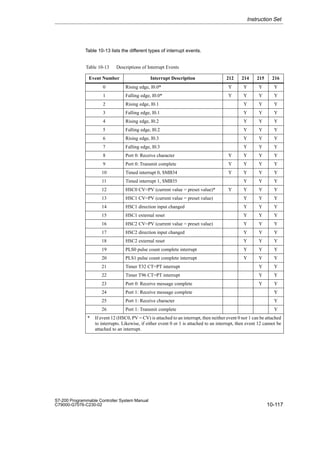
data in the CPU memory, you must specify the address in a way similar to specifying the
address for a bit. This includes an area identifier, data size designation, and the starting byte
address of the byte, word, or double-word value, as shown in Figure 7-2. Data in other CPU
memory areas (such as T, C, HC, and the accumulators) are accessed by using an address
format that includes an area identifier and a device number.
V B 100
Area identifier (V memory)
Access to a byte size
Byte address
7 0
VB100
MSB LSB
V W 100
Area identifier (V memory)
Access to a word size
Byte address
VW100 VB100 VB101
15 8
MSB
7 0
LSB
V D 100
Area identifier (V memory)
Access to a double word size
Byte address
VD100
Most significant byte Least significant byte
VB100 VB103
VB101 VB102
31 8
MSB
7 0
LSB
16 15
24 23
Most significant byte
Least significant byte
VB100
MSB = most significant bit
LSB = least significant bit
Figure 7-2 Comparing Byte, Word, and Double-Word Access to the Same Address
CPU Memory: Data Types and Addressing Modes
7-3
S7-200 Programmable Controller System Manual
C79000-G7076-C230-02
Representation of Numbers
Table 7-1 shows the range of integer values that can be represented by the different sizes of
data.
Real (or floating-point) numbers are represented as 32-bit, single-precision numbers, whose
format is described in the ANSI/IEEE 754-1985 standard. Real number values are accessed
in double-word lengths.
Table 7-1 Data Size Designations and Associated Integer Ranges
Data Size
Unsigned Integer Range Signed Integer Range
Data Size
Decimal Hexadecimal Decimal Hexadecimal
B (Byte): 8-bit value 0 to 255 0 to FF -128 to 127 80 to 7F
W (Word): 16-bit value 0 to 65,535 0 to FFFF -32,768 to 32,767 8000 to 7FFF
D (Double word, Dword):
32-bit value
0 to
4,294,967,295
0 to
FFFF FFFF
-2,147,483,648 to
2,147,483,647
8000 0000 to
7FFF FFFF
Addressing the Process-Image Input Register (I)
As described in Section 6.5, the CPU samples the physical input points at the beginning of
each scan cycle and writes these values to the process-image input register. You can access
the process-image input register in bits, bytes, words, or double words.
Format: Bit I[byte address].[bit address] I0.1
Byte, Word, Double Word I[size][starting byte address] IB4
Addressing the Process-Image Output Register (Q)
At the end of the scan cycle, the CPU copies the values stored in the process-image output
register to the physical output points. You can access the process-image output register in
bits, bytes, words, or double words.
Format: Bit Q[byte address].[bit address] Q1.1
Byte, Word, Double Word Q[size][starting byte address] QB5
Addressing the Variable (V) Memory Area
You can use V memory to store intermediate results of operations being performed by the
control logic in your program. You can also use V memory to store other data pertaining to
your process or task. You can access the V memory area in bits, bytes, words, or double
words.
Format: Bit V[byte address].[bit address] V10.2
Byte, Word, Double Word V[size][starting byte address] VW100
Addressing the Bit Memory (M) Area
You can use the internal memory bits (M memory) as control relays to store the intermediate
status of an operation or other control information. While the name “bit memory area” implies
that this information is stored in bit-length units, you can access the bit memory area not only
in bits, but also in bytes, words, or double words.
Format: Bit M[byte address].[bit address] M26.7
Byte, Word, Double Word M[size][starting byte address] MD20
CPU Memory: Data Types and Addressing Modes
7-4
S7-200 Programmable Controller System Manual
C79000-G7076-C230-02
Addressing the Sequence Control Relay (S) Memory Area
Sequence Control Relay bits (S) are used to organize machine operations or steps into
equivalent program segments. SCRs allow logical segmentation of the control program. You
can access the S bits as bits, bytes, words, or double words.
Format: Bit S[byte address].[bit address] S3.1
Byte, Word, Double Word S[size][starting byte address] SB4
Addressing the Special Memory (SM) Bits
The SM bits provide a means for communicating information between the CPU and your
program. You can use these bits to select and control some of the special functions of the
S7-200 CPU, such as:
S A bit that turns on for the first scan
S Bits that toggle at fixed rates
S Bits that show the status of math or operational instructions
For more information about the SM bits, see Appendix D. While the SM area is based on
bits, you can access the data in this area as bits, bytes, words, or double words.
Format: Bit SM[byte address].[bit address] SM0.1
Byte, Word, Double Word SM[size][starting byte address] SMB86
Addressing the Timer (T) Memory Area
In the S7-200 CPU, timers are devices that count increments of time. The S7-200 timers
have resolutions (time-base increments) of 1 ms, 10 ms, or 100 ms. There are two variables
that are associated with a timer:
S Current value: this 16-bit signed integer stores the amount of time counted by the timer.
S Timer bit: this bit turns on (is set to 1) when the current value of the timer is greater than
or equal to the preset value. (The preset value is entered as part of the timer instruction.)
You access both of these variables by using the timer address (T + timer number). Access to
either the timer bit or the current value is dependent on the instruction used: instructions with
bit operands access the timer bit, while instructions with word operands access the current
value. As shown in Figure 7-3, the Normally Open Contact instruction accesses the timer bit,
while the Move Word (MOV_W) instruction accesses the current value of the timer. For more
information about the S7-200 instruction set, refer to Chapter 10.
Format: T[timer number] T24
CPU Memory: Data Types and Addressing Modes
7-5
S7-200 Programmable Controller System Manual
C79000-G7076-C230-02
Current Value
T0
T3
T0
Timer Bits (Read/Write)
T1
T2
T1
T2
T3
I2.1 MOV_W
EN
OUT VW200
IN
T2
T3
Area identifier (timer)
Timer number (bit address)
Timer number
(current value address)
Area identifier (timer)
15
MSB LSB
0
Current Value of the Timer
(Read/Write)
T0
T3
T0
Timer Bits
T1
T2
T1
T2
T3
Figure 7-3 Accessing the Timer Data
Addressing the Counter (C) Memory Area
In the S7-200 CPU, counters are devices that count each low-to-high transition event on the
counter input(s). The CPU provides two types of counters: one type counts up only, and the
other counts both up and down. There are two variables that are associated with a counter:
S Current value: this 16-bit signed integer stores the accumulated count.
S Counter bit: this bit turns on (is set to 1) when the current value of the counter is greater
than or equal to the preset value. (The preset value is entered as part of the counter
instruction.)
You access both of these variables by using the counter address (C + counter number).
Access to either the counter bit or the current value is dependent on the instruction used:
instructions with bit operands access the counter bit, while instructions with word operands
access the current value. As shown in Figure 7-4, the Normally Open Contact instruction
accesses the counter bit, while the Move Word (MOV_W) instruction accesses the current
value of the counter. For more information about the S7-200 instruction set, refer to
Chapter 10.
Format: C[counter number] C20
Current Value
C0
C3
C0
Counter Bits
(Read/Write)
C1
C2
C1
C2
C3
I2.1 MOV_W
EN
OUT VW200
IN
C2
C3
Counter number
(current value address)
Area identifier (counter)
15
MSB LSB
0
Current Value
(Read/Write)
C0
C3
C0
Counter
Bits
C1
C2
C1
C2
C3
Counter number (bit address)
Area identifier (counter)
Figure 7-4 Accessing the Counter Data
CPU Memory: Data Types and Addressing Modes
7-6
S7-200 Programmable Controller System Manual
C79000-G7076-C230-02
Addressing the Analog Inputs (AI)
The S7-200 converts a real-world, analog value (such as temperature or voltage) into a
word-length (16-bit) digital value. You access these values by the area identifier (AI), size of
the data (W), and the starting byte address. Since analog inputs are words and always start
on even-number bytes (such as 0, 2, or 4), you access them with even-number byte
addresses (such as AIW0, AIW2, or AIW4), as shown in Figure 7-5. Analog input values are
read-only values.
Format: AIW[starting byte address] AIW4
AI W 8
Area identifier (analog input)
Access to a word-size value
Byte address
AIW8 byte 8 byte 9
15 8
MSB
7 0
LSB
Least significant byte
Most significant byte
Figure 7-5 Accessing an Analog Input
Addressing the Analog Outputs (AQ)
The S7-200 converts a word-length (16-bit) digital value into a current or voltage,
proportional to the digital value (such as for a current or voltage). You write these values by
the area identifier (AQ), size of the data (W), and the starting byte address. Since analog
outputs are words and always start on even-number bytes (such as 0, 2, or 4), you write
them with even-number byte addresses (such as AQW0, AQW2, or AQW4), as shown in
Figure 7-6. Your program cannot read the values of the analog outputs.
Format: AQW[starting byte address] AQW4
AQ W 10
Area identifier (analog output)
Access to a word-size value
Byte address
AQW10 byte 10 byte 11
15 8
MSB
7 0
LSB
Least significant byte
Most significant byte
Figure 7-6 Accessing an Analog Output
Addressing the Accumulators (AC)
Accumulators are read/write devices that can be used like memory. For example, you can
use accumulators to pass parameters to and from subroutines and to store intermediate
values used in a calculation. The CPU provides four 32-bit accumulators (AC0, AC1, AC2,
and AC3). You can access the data in the accumulators as bytes, words, or double words.
As shown in Figure 7-7, to access the accumulator as bytes or words you use the least
significant 8 or 16 bits of the value that is stored in the accumulator. To access the
accumulator as a double word, you use all 32 bits. The size of the data being accessed is
determined by the instruction that is used to access the accumulator.
Format: AC[accumulator number] AC0
Note
See Section 10.14 for information about using the accumulators with interrupt routines.
CPU Memory: Data Types and Addressing Modes
7-7
S7-200 Programmable Controller System Manual
C79000-G7076-C230-02
MOV_B
EN
OUT VB200
IN
AC2
MSB
7 0
LSB
DEC_W
EN
OUT VW100
IN
AC1
15 0
LSB
INV_D
EN
OUT VD250
IN
AC3
31
MSB
0
LSB
AC2 (accessed as a byte)
AC1 (accessed as a word)
AC3 (accessed as a double word)
MSB
Accumulator number
Area identifier (Accumulator)
Accumulator number
Area identifier (Accumulator)
Accumulator number
Area identifier (Accumulator)
7
8
7
8
15
16
23
24
Least significant
Most significant
Least significant
Most significant
Byte 0
Byte 1
Byte 0
Byte 1
Byte 2
Byte 3
Figure 7-7 Addressing the Accumulators
Addressing the High-Speed Counters (HC)
High-speed counters are designed to count events faster than the CPU can scan the events.
High-speed counters have a signed, 32-bit integer counting value (or current value). To
access the count value for the high-speed counter, you specify the address of the
high-speed counter, using the memory type (HC) and the counter number (such as HC0).
The current value of the high-speed counter is a read-only value and, as shown in
Figure 7-8, can be addressed only as a double word (32 bits).
Format: HC[high-speed counter number] HC1
HC 2
HC2
31
MSB
0
LSB
High-speed counter number
Area identifier (high-speed counter)
Least significant
Most significant
Byte 0
Byte 1
Byte 2
Byte 3
Figure 7-8 Accessing the High-Speed Counter Current Values
CPU Memory: Data Types and Addressing Modes
7-8
S7-200 Programmable Controller System Manual
C79000-G7076-C230-02
Using Constant Values
You can use a constant value in many of the S7-200 instructions. Constants can be bytes,
words, or double words. The CPU stores all constants as binary numbers, which can then be
represented in decimal, hexadecimal, or ASCII formats.
Decimal Format: [decimal value]
Hexadecimal Format: 16#[hexadecimal value]
ASCII Format: ’[ASCII text]’
The S7-200 CPU does not support “data typing” or data checking (such as specifying that
the constant is stored as an integer, a signed integer, or a double integer). For example, an
Add instruction can use the value in VW100 as a signed integer value, while an Exclusive Or
instruction can use the same value in VW100 as an unsigned binary value.
The following examples show constants for decimal, hexadecimal, and ASCII format:
S Decimal constant: 20047
S Hexadecimal constant: 16#4E4F
S ASCII constant: ·Text goes between single quotes.·
CPU Memory: Data Types and Addressing Modes
7-9
S7-200 Programmable Controller System Manual
C79000-G7076-C230-02
7.2 Indirect Addressing of the CPU Memory Areas
Indirect addressing uses a pointer to access the data in memory. The S7-200 CPU allows
you to use pointers to address the following memory areas indirectly: I, Q, V, M, S, T (current
value only), and C (current value only). You cannot address individual bit or analog values
indirectly.
Creating a Pointer
To address a location in memory indirectly, you must first create a pointer to that location.
Pointers are double word memory locations that contain the address of another memory
location. You can only use V memory locations or accumulator registers (AC1, AC2, AC3) as
pointers. To create a pointer, you must use the Move Double Word (MOVD) instruction to
move the address of the indirectly addressed memory location to the pointer location. The
input operand of the instruction must be preceded with an ampersand () to signify that the
address of a memory location, instead of its contents, is to be moved into the location
identified in the output operand of the instruction (the pointer).
Example: MOVD VB100, VD204
MOVD MB4, AC2
MOVD C4, VD6
Note
If you want to access a word or double word value in the I, Q, V, M, or S memory areas
indirectly, you must specify the address of the value’s initial byte as the input operand of
the MOVD instruction used to create the pointer. For example, VB100 is the address of the
initial byte of VW100, and MB4 is the address of the initial byte of MD4. If a symbol name
was assigned to the word or double word value, then you cannot use that symbol name in
the MOVD instruction used to create the pointer since the address of the value’s initial byte
must be specified in the instruction’s input operand. You must assign a different symbol
name to the address of the initial byte of the word or double word memory location for use
in pointer creation under these circumstances.
Example: ‘‘Pump_Speed’’ assigned as the symbol name for VW100
‘‘Pump_Speed_IB’’ assigned as the symbol name for VB100
(which is the initial byte of the word value stored in VW100)
MOVD ‘‘Pump_Speed’’, AC1 illegal (VW100 is not allowed)
MOVD ‘‘Pump_Speed_IB’’, AC1 correct (VB100 is OK)
Using a Pointer to Access Data
Entering an asterisk (*) in front of an operand for an instruction specifies that the operand is a
pointer. Using the example shown in Figure 7-9, *AC1 specifies that AC1 is a pointer to the
word-length value being referenced by the Move Word (MOVW) instruction. In this example,
the values stored in both V200 and V201 are moved to accumulator AC0.
CPU Memory: Data Types and Addressing Modes
7-10
S7-200 Programmable Controller System Manual
C79000-G7076-C230-02
AC1
address of VW200
AC0
1 2 3 4
1 2
3 4
5 6
7 8
V199
V200
V201
V202
V203
V204
MOVD VB200, AC1
MOVW *AC1, AC0
Creates the pointer by
moving the address of
VB200 (address of
VW200’s initial byte) to
AC1.
Moves the word
value pointed to by
AC1 to AC0.
Figure 7-9 Using a Pointer for Indirect Addressing
Modifying Pointers
You can change the value of a pointer. Since pointers are 32-bit values, use double-word
instructions to modify pointer values. Simple mathematical operations, such as adding or
incrementing, can be used to modify pointer values. Remember to adjust for the size of the
data that you are accessing:
S When accessing bytes, increment the pointer value by one.
S When accessing a word or a current value for a timer or counter, add or increment the
pointer value by two.
S When accessing a double word, add or increment the pointer value by four.
Figure 7-10 shows an example of how you can create an indirect address pointer, how data
is accessed indirectly, and how you can increment the pointer.
AC1
address of VW200
AC0
1 2 3 4
1 2
3 4
5 6
7 8
V199
V200
V201
V202
V203
V204
MOVD VB200, AC1
MOVW *AC1, AC0
Creates the pointer by
moving the address of
VB200 (address of
VW200’s initial byte)
to AC1.
Moves the word value
pointed to by AC1
(VW200) to AC0.
INCD AC1
AC0
5 6 7 8
1 2
3 4
5 6
7 8
V199
V200
V201
V202
V203
V204
MOVW *AC1, AC0 Moves the word value
pointed to by AC1
(VW202) to AC0.
INCD AC1
AC1
address of VW202 Increments the pointer
two times to point to
the next word location.
Figure 7-10 Modifying a Pointer When Accessing a Word Value
CPU Memory: Data Types and Addressing Modes
7-11
S7-200 Programmable Controller System Manual
C79000-G7076-C230-02
7.3 Memory Retention for the S7-200 CPU
The S7-200 CPU provides several methods to ensure that your program, the program data,
and the configuration data for your CPU are properly retained:
S The CPU provides an EEPROM to store permanently all of your program, selected data
areas, and the configuration data for your CPU. See Figure 7-11.
S The CPU provides a super capacitor that maintains the integrity of the RAM after power
has been removed from the CPU. Depending on the CPU module, the super capacitor
can maintain the RAM for several days.
S Some CPU modules support an optional battery cartridge that extends the amount of
time that the RAM can be maintained after power has been removed from the CPU. The
battery cartridge provides power only after the super capacitor has been drained.
This section discusses the permanent storage and retention of the data in RAM under a
variety of circumstances.
RAM: maintained by the super capacitor and the
optional battery cartridge
EEPROM: provides
permanent storage
User program
V memory
(permanent area)
CPU configuration
M memory
(permanent area)
User program
V memory
CPU configuration
M memory
Timer and
Counter current
values
Figure 7-11 Storage Areas of an S7-200 CPU
Downloading and Uploading Your Program
Your program consists of three elements: the user program, the data block (optional), and
the CPU configuration (optional). As shown in Figure 7-12, downloading the program stores
these elements in the RAM area of the CPU memory. The CPU also automatically copies the
user program, data block (DB1), and the CPU configuration to the EEPROM for permanent
storage.
CPU Memory: Data Types and Addressing Modes
7-12
S7-200 Programmable Controller System Manual
C79000-G7076-C230-02
RAM EEPROM
User Program
V memory
(permanent area)
CPU configuration
M memory
(permanent area)
User program
CPU configuration
DB1 (up to the maximum size of the
permanent V memory area)
CPU configuration
Data block (DB1): up to the
maximum V memory range
User Program
V memory
CPU configuration
M memory
Timer and Counter
current values
S7-200 CPU
User program
Figure 7-12 Downloading the Elements of the Program
When you upload a program from the CPU, as shown in Figure 7-13, the user program and
the CPU configuration are uploaded from the RAM to your computer. When you upload the
data block, the permanent area of the data block (stored in the EEPROM) is merged with the
remainder of the data block (if any) that is stored in RAM. The complete data block is then
transferred to your computer. The size of the permanent V memory area depends on your
CPU. See Section 10.1.
CPU configuration
RAM EEPROM
User program
V memory
CPU configuration
M memory
Timer and Counter
current values
User program
S7-200 CPU
User program
V memory
(permanent area)
CPU configuration
M memory
(permanent area)
Remaining parts
of DB1
Permanently stored
part of DB1
Figure 7-13 Uploading the Elements of the Program
CPU Memory: Data Types and Addressing Modes
7-13
S7-200 Programmable Controller System Manual
C79000-G7076-C230-02
Automatically Saving the Data from the Bit Memory (M) Area When the CPU Loses Power
The first 14 bytes of M memory (MB0 to MB13), if configured to be retentive, are permanently
saved to the EEPROM when the CPU module loses power. As shown in Figure 7-14, the
CPU moves these retentive areas of M memory to the EEPROM.
RAM EEPROM (Permanent)
User program
V memory
(permanent area)
CPU configuration
M memory
(permanent area)
First 14 bytes of M memory
(MB0 to MB13), if configured to
be retentive, are copied to the
EEPROM when the CPU loses
power.
User program
V memory
CPU configuration
M memory
Timer and Counter
current values
Figure 7-14 Saving Parts of Bit Memory (M) to EEPROM on Power Off
Retaining Memory on Power On
At power-up, the CPU restores the user program and the CPU configuration from the
EEPROM memory. See Figure 7-15.
RAM EEPROM (Permanent)
User program
V memory
CPU configuration
M memory
Timer and Counter
current values
User program
CPU configuration
User program
V memory
(permanent area)
CPU configuration
M memory
(permanent area)
Figure 7-15 Restoring the User Program and CPU Configuration on Power On
CPU Memory: Data Types and Addressing Modes
7-14
S7-200 Programmable Controller System Manual
C79000-G7076-C230-02
At power on, the CPU checks the RAM to verify that the super capacitor successfully
maintained the data stored in RAM memory. If the RAM was successfully maintained, the
retentive areas of RAM are left unchanged. As shown in Figure 7-16, the non-retentive areas
of V memory are restored from the corresponding permanent area of V memory in the
EEPROM.
RAM EEPROM (Permanent)
User program
V memory
CPU configuration
M memory
Timer and Counter
current values
All other non-retentive
areas of memory are
set to 0.
The corresponding areas of
permanent V memory are copied
to the non-retentive areas of
V memory in RAM.
User program
V memory
(permanent area)
CPU configuration
M memory
(permanent area)
Figure 7-16 Restoring Program Data on Power On (Data Was Successfully Maintained in RAM)
If the contents of the RAM were not maintained (such as after an extended power failure),
the CPU clears the RAM (including both the retentive and non-retentive ranges) and sets the
Retentive Data Lost memory bit (SM0.2) for the first scan following power on. As shown in
Figure 7-17, the data stored in the permanent EEPROM are then copied to the RAM.
RAM EEPROM (Permanent)
User program
V memory
CPU configuration
M memory
Timer and Counter
current values
User program
V memory
(permanent area)
CPU configuration
M memory
(permanent area)
V memory (permanent area)
M memory (permanent area),
if defined as retentive
All other areas of memory
are set to 0.
Figure 7-17 Restoring Program Data on Power On (Data Not Maintained in RAM)
CPU Memory: Data Types and Addressing Modes
7-15
S7-200 Programmable Controller System Manual
C79000-G7076-C230-02
Defining Retentive Ranges of Memory
As shown in Figure 7-18, you can define up to six retentive ranges to select the areas of
memory you want to retain through power cycles. You can define ranges of addresses in the
following memory areas to be retentive: V, M, C, and T. For timers, only the retentive timers
(TONR) can be retained.
Note
Only the current values for timers and counters can be retained: the timer and counter bits
are not retentive.
To define the retentive ranges for the memory areas, select the CPU  Configure menu
command and click the Retentive Ranges tab. The dialog box for defining specific ranges to
be retentive is shown in Figure 7-18. To obtain the default retentive ranges for your CPU,
press the Defaults button.
CPU Configure
Password
Port 0
Output Table
OK Cancel
Port 1 Input Filters
Retentive Ranges
Defaults
Configuration parameters must be downloaded before they take effect.
Range 1: Clear
Range 2: Clear
Range 3: Clear
Range 4: Clear
Range 5: Clear
Range 0: Clear
Data Area Offset
Number of
Elements
Figure 7-18 Configuring the Retentive Ranges for the CPU Memory
CPU Memory: Data Types and Addressing Modes
7-16
S7-200 Programmable Controller System Manual
C79000-G7076-C230-02
7.4 Using Your Program to Store Data Permanently
You can save a value (byte, word, or double word) stored in V memory to EEPROM. This
feature can be used to store a value in any location of the permanent V memory area.
A save-to-EEPROM operation typically affects the scan time by 15 ms to 20 ms. The value
written by the save operation overwrites any previous value stored in the permanent
V memory area of the EEPROM.
Note
The save-to-EEPROM operation does not update the data in the memory cartridge.
Copying V Memory to the EEPROM
Special Memory Byte 31 (SMB31) and Special Memory Word 32 (SMW32) command the
CPU to copy a value in V memory to the permanent V memory area of the EEPROM.
Figure 7-19 shows the format of SMB31 and SMW32. Use the following steps to program the
CPU to save or write a specific value in V memory:
1. Load the V memory address of the value to be saved in SMW32.
2. Load the size of the data in SM31.0 and SM31.1. (See Figure 7-19.)
3. Set SM31.7 to 1.
At the end of every scan, the CPU checks SM31.7; if the SM31.7 equals 1, the specified
value is saved to the EEPROM. The operation is complete when the CPU resets SM31.7
to 0. Do not change the value in V memory until the save operation is complete.
7 0
MSB LSB
sv 0 0 0 0 0 s1 s0
SMB31
Save to EEPROM:
0 = No
1 = Yes
Size of value to be saved:
00 - byte
01 - byte
10 - word
11 - double word
15
MSB LSB
SMW32
0
V memory address
Specify the V memory address as an offset from V0.
The CPU resets SM31.7
after each save operation.
Figure 7-19 Format of SMB31 and SMW32
Limiting the Number of Programmed Saves to EEPROM
Since the number of save operations to the EEPROM is limited (100,000 minimum, and
1,000,000 typical), ensure that only necessary values are saved. Otherwise, the EEPROM
can be worn out and the CPU can fail. Typically, you perform save operations at the
occurrence of specific events that occur rather infrequently.
For example, if the scan time of the S7-200 is 50 ms and a value was saved once per scan,
the EEPROM would last a minimum of 5,000 seconds, which is less than an hour and a half.
On the other hand, if a value were saved once an hour, the EEPROM would last a minimum
of 11 years.
CPU Memory: Data Types and Addressing Modes
7-17
S7-200 Programmable Controller System Manual
C79000-G7076-C230-02
7.5 Using a Memory Cartridge to Store Your Program
Some CPUs support an optional memory cartridge that provides a portable EEPROM
storage for your program.You can use the memory cartridge like a diskette. The CPU stores
the following elements on the memory cartridge:
S User program
S Data stored in the permanent V memory area of the EEPROM
S CPU configuration
For information about the memory cartridge that is appropriate for your CPU, see
Appendix A.
Copying to the Memory Cartridge
You can copy your program to the memory cartridge from the RAM only when the CPU is
powered on and the memory cartridge is installed.
Caution
Electrostatic discharge can damage the memory cartridge or the receptacle on the CPU.
Make contact with a grounded conductive pad and/or wear a grounded wrist strap when
you handle the cartridge. Store the cartridge in a conductive container.
You can install or remove the memory cartridge while the CPU is powered on. To install the
memory cartridge, remove the protective tape from the memory cartridge receptacle, and
insert the memory cartridge into the receptacle located under an access cover of the CPU
module. (The memory cartridge is keyed for proper installation.) After the memory cartridge is
installed, use the following procedure to copy the program.
1. If the program has not already been downloaded to the CPU, download the program.
2. Use the menu command CPU  Program Memory Cartridge to copy the program to the
memory cartridge. Figure 7-20 shows the elements of the CPU memory that are stored
on the memory cartridge.
3. Remove the memory cartridge (optional).
Memory
Cartridge
RAM EEPROM (Permanent)
User program
V memory
CPU configuration
M memory
Timer and counter
current values
User program
CPU configuration
V memory (permanent area)
User program
V memory
(permanent area)
CPU configuration
M memory
(permanent area)
Figure 7-20 Copying the CPU Memory to the Memory Cartridge
CPU Memory: Data Types and Addressing Modes
!
7-18
S7-200 Programmable Controller System Manual
C79000-G7076-C230-02
Restoring the Program and Memory with a Memory Cartridge
To transfer the program from a memory cartridge to the CPU, you must cycle the power to
the CPU with the memory cartridge installed. As shown in Figure 7-21, the CPU performs the
following tasks after a power cycle (when a memory cartridge is installed):
S The RAM is cleared.
S The contents of the memory cartridge are copied to the RAM.
S The user program, the CPU configuration, and the V memory area (up to the maximum
size of the permanent V memory area) are copied to the permanent EEPROM.
Note
Powering on a CPU with a blank memory cartridge, or a memory cartridge that was
programmed in a different model number CPU, causes an error. Remove the memory
cartridge and power on again. The memory cartridge can then be inserted and
programmed.
User program
V memory
(permanent area)
CPU configuration
M memory
(permanent area)
RAM EEPROM (Permanent)
User program
V memory
CPU configuration
M memory
Timer and counter
current values
User program
CPU configuration
V memory (up to the maximum size of
the permanent V memory area)
User program
CPU configuration
V memory (permanent area)
All other areas of
memory are set to 0.
Memory
Cartridge
Figure 7-21 Restoring Memory on Power On (with Memory Cartridge Installed)
CPU Memory: Data Types and Addressing Modes
8-1
S7-200 Programmable Controller System Manual
C79000-G7076-C230-02
Input/Output Control
The inputs and outputs are the system control points: the inputs monitor the signals from the
field devices (such as sensors and switches), and the outputs control pumps, motors, or
other devices in your process. You can have local I/O (provided by the CPU module) or
expansion I/O (provided by an expansion I/O module). The S7-200 CPU modules also
provide high-speed I/O.
Chapter Overview
Section Description Page
8.1 Local I/O and Expansion I/O 8-2
8.2 Using the Selectable Input Filter to Provide Noise Rejection 8-5
8.3 Using the Output Table to Configure the States of the Outputs 8-6
8.4 High-Speed I/O 8-7
8.5 Analog Adjustments 8-8
8
8-2
S7-200 Programmable Controller System Manual
C79000-G7076-C230-02
8.1 Local I/O and Expansion I/O
The inputs and outputs are the system control points: the inputs monitor the signals from the
field devices (such as sensors and switches), and the outputs control pumps, motors, or
other devices in your process. You can have local I/O (provided by the CPU) or expansion
I/O (provided by an expansion I/O module):
S The S7-200 CPU module provides a certain number of digital local I/O points. For more
information about the amount of local I/O provided by your CPU module, refer to the data
sheets in Appendix A.
S The S7-200 CPU modules support the addition of both digital and analog expansion I/O.
For more information about the capabilities of the different expansion I/O modules, refer
to the data sheets in Appendix A.
Addressing the Local and Expansion I/O
The local I/O provided by the CPU module provides a fixed set of I/O addresses. You can
add I/O points to the CPU by connecting expansion I/O modules to the right side of the CPU,
forming an I/O chain. The addresses of the points of the module are determined by the type
of I/O and the position of the module in the chain, with respect to the preceding input or
output module of the same type. For example, an output module does not affect the
addresses of the points on an input module, and vice versa. Likewise, analog modules do
not affect the addressing of digital modules, and vice versa.
Discrete or digital expansion modules always reserve process-image register space in
increments of eight bits (one byte). If a module does not provide a physical point for each bit
of each reserved byte, these unused bits cannot be assigned to subsequent modules in the
I/O chain. For output modules, the unused bits in the reserved bytes can be used like internal
memory bits (M bits). For input modules, the unused bits in reserved bytes are set to zero
with each input update cycle, and therefore cannot be used as internal memory bits.
Analog expansion modules are always allocated in increments of two points. If a module
does not provide physical I/O for each of these points, these I/O points are lost and are not
available for assignment to subsequent modules in the I/O chain. Since there is no image
memory provided for analog I/O, there is no way to use these unused analog I/O points. All
analog I/O accesses are made immediately at the time of instruction execution.
Examples of Local and Expansion I/O
Figures 8-1, 8-2, and 8-3 provide examples that show how different hardware configurations
affect the I/O numbering. Notice that some of the configurations contain gaps in the
addressing that cannot be used by your program, while other I/O addresses can be used in
the same manner as the internal memory (M) bits.
Input/Output Control
8-3
S7-200 Programmable Controller System Manual
C79000-G7076-C230-02
CPU 212
8
Out
8
In
I0.0 Q0.0
I0.1 Q0.1
I0.2 Q0.2
I0.3 Q0.3
I0.4 Q0.4
I0.5 Q0.5
I0.6
I0.7
Q0.6
Q0.7
Process-image I/O register that can be used as internal memory bits:
Q2.0
.
.
.
Q7.7
I2.0
.
.
.
I7.7
Module 0 Module 1
I1.0
I1.1
I1.2
I1.3
I1.4
I1.5
I1.6
I1.7
Q1.0
Q1.1
Q1.2
Q1.3
Q1.4
Q1.5
Q1.6
Q1.7
Process-image I/O register assigned to physical I/O:
Figure 8-1 I/O Numbering Examples for a CPU 212
Module 0 Module 1 Module 2 Module 3 Module 4
I0.0 Q0.0
I0.1 Q0.1
I0.2 Q0.2
I0.3 Q0.3
I0.4 Q0.4
I0.5 Q0.5
I0.6 Q0.6
I0.7 Q0.7
I1.0 Q1.0
I1.1 Q1.1
I1.2
I1.3
I1.4
I1.5
I2.0 Q2.0
I2.1 Q2.1
I2.2 Q2.2
I2.3 Q2.3
I3.0
I3.1
I3.2
I3.3
I3.4
I3.5
I3.6
I3.7
AIW0 AQW0
AIW2
AIW4
Q3.0
Q3.1
Q3.2
Q3.3
Q3.4
Q3.5
Q3.6
Q3.7
AIW8 AQW4
AIW10
AIW12
AIW14 AQW6
CPU 214
or
CPU 215
8
Out
8
In
4 In /
4 Out
3 AI /
1 AQ
3 AI /
1 AQ
Q1.2
Q1.3
Q1.4
Q1.5
Q1.6
Q1.7
Q2.4
Q2.5
Q2.6
Q2.7
I4.0
.
.
.
I7.7
Q4.0
.
.
.
Q7.7
I1.6
I1.7
I2.4
I2.5
I2.6
I2.7
AIW6 AQW2
Process-image I/O register that can be used as internal memory bits:
Process-image I/O register memory that cannot be used:
Process-image I/O register assigned to physical I/O:
Figure 8-2 I/O Numbering Examples for a CPU 214 or CPU 215
Input/Output Control
8-4
S7-200 Programmable Controller System Manual
C79000-G7076-C230-02
Module 0 Module 1 Module 2
I0.0 Q0.0
I0.1 Q0.1
I0.2 Q0.2
I0.3 Q0.3
I0.4 Q0.4
I0.5 Q0.5
I0.6 Q0.6
I0.7 Q0.7
I1.0 Q1.0
I1.1 Q1.1
I1.2 Q1.2
I1.3 Q1.3
I1.4 Q1.4
I1.5 Q1.5
I1.6 Q1.6
I1.7 Q1.7
I2.0
I2.1
I2.2
I2.3
I2.4
I2.5
I2.6
I2.7
I3.0 Q2.0
I3.1 Q2.1
I3.2 Q2.2
I3.3 Q2.3
I3.4 Q2.4
I3.5 Q2.5
I3.6 Q2.6
I3.7 Q2.7
I4.0 Q3.0
I4.1 Q3.1
I4.2 Q3.2
I4.3 Q3.3
I4.4 Q3.4
I4.5 Q3.5
I4.6 Q3.6
I4.7 Q3.7
I5.0 Q4.0
I5.1 Q4.1
I5.2 Q4.2
I5.3 Q4.3
I5.4 Q4.4
I5.5 Q4.5
I5.6 Q4.6
I5.7 Q4.7
CPU 216
16 In /
16 Out
8 In /
8 Out
16 In /
16 Out
I6.0 Q5.0
I6.1 Q5.1
I6.2 Q5.2
I6.3 Q5.3
I6.4 Q5.4
I6.5 Q5.5
I6.6 Q5.6
I6.7 Q5.7
I7.0 Q6.0
I7.1 Q6.1
I7.2 Q6.2
I7.3 Q6.3
I7.4 Q6.4
I7.5 Q6.5
I7.6 Q6.6
I7.7 Q6.7
Process-image I/O register assigned to physical I/O:
Figure 8-3 I/O Numbering Examples for a CPU 216
Input/Output Control
8-5
S7-200 Programmable Controller System Manual
C79000-G7076-C230-02
8.2 Using the Selectable Input Filter to Provide Noise Rejection
Some S7-200 CPUs allow you to select an input filter that defines a delay time (selectable
from 0.2 ms to 8.7 ms) for some or all of the local digital input points.(See Appendix A for
information about your particular CPU.) As shown in Figure 8-4, this delay time is added to
the standard response time for groups of four input points. This delay helps to filter noise on
the input wiring that could cause inadvertent changes to the states of the inputs.
The input filter is part of the CPU configuration data that is downloaded and stored in the
CPU memory.
Use the menu command CPU  Configure... and click on the Input Filters tab to configure
the delay times for the input filter.
CPU Configure
Password
Output Table
Port 0 Retentive Ranges
OK
Defaults
Cancel
0.2
I0.0 - I0.3
Configuration parameters must be downloaded before they take effect.
Port 1 Input Filters
0.2
I0.4 - I0.7
0.2
I1.0 - I1.3
0.2
I1.4 - I1.5
ms
ms
ms
ms
Figure 8-4 Configuring the Input Filters for Rejecting Noise
Input/Output Control
8-6
S7-200 Programmable Controller System Manual
C79000-G7076-C230-02
8.3 Using the Output Table to Configure the States of the Outputs
The S7-200 CPU provides the capability either to set the state of the digital output points to
known values upon a transition to the STOP mode, or to leave the outputs in the state they
were in prior to the transition to the STOP mode.
The output table is part of the CPU configuration data that is downloaded and stored in the
CPU memory.
The configuration of output values applies only to the digital outputs. Analog output values
are effectively frozen upon a transition to the STOP mode. This occurs because your
program is responsible for updating the analog outputs as required. The CPU does not
update the analog inputs or outputs as a system function. No internal memory image is
maintained for these points by the CPU.
Select the menu command CPU  Configure... and click on the Output Table tab to access
the output table configuration dialog. See Figure 8-5. You have two options for configuring
the outputs:
S If you want to freeze the outputs in their last state, choose the Freeze Outputs box and
click on “OK.”
S If you want to copy the table values to the outputs, then enter the output table values.
Click the checkbox for each output bit you want to set to On (1) after a run-to-stop
transition, and click on “OK” to save your selections.
The default setting of the CPU is the mode of copying the output table values to the outputs.
The default values of the table are all zeroes.
CPU Configure
Password
Output Table
Port 0 Retentive Ranges
OK
Defaults
Cancel
Configuration parameters must be downloaded before they take effect.
Port 1 Input Filters
Q1.x
Q2.x
Q3.x
Q4.x
Q5.x
Q6.x
Q0.x
Q7.x
7
7
7
7
7
7
7
7
6
6
6
6
6
6
6
6
5
5
5
5
5
5
5
5
4
4
4
4
4
4
4
4
3
3
3
3
3
3
3
3
2
2
2
2
2
2
2
2
1
1
1
1
1
1
1
1
0
0
0
0
0
0
0
0
Freeze Outputs
These outputs
will be on after
a run-to-stop
transition.
Figure 8-5 Configuring the State of the Outputs
Input/Output Control
8-7
S7-200 Programmable Controller System Manual
C79000-G7076-C230-02
8.4 High-Speed I/O
Your S7-200 CPU module provides high-speed I/O for controlling high-speed events. For
more information about the high-speed I/O provided by each CPU module, refer to the data
sheets in Appendix A.
High-Speed Counters
High-speed counters count high-speed events that cannot be controlled at the scan rates of
the S7-200 CPU modules. Your S7-200 CPU module provides one software high-speed
counter and up to two hardware high-speed counters (depending on your CPU):
S HSC0 is an up/down software counter that accepts a single clock input. The counting
direction (up or down) is controlled by your program, using the direction control bit. The
maximum counting frequency of HSC0 is 2 KHz.
S HSC1 and HSC2 are versatile hardware counters that can be configured for one of
twelve different modes of operation. The counter modes are listed in Table 10-5. The
maximum counting frequency of HSC1 and HSC2 is dependent on your CPU. See
Appendix A.
Each counter has dedicated inputs for clocks, direction control, reset, and start, where these
functions are supported. In quadrature modes, an option is provided to select one or four
times the maximum counting rates. HSC1 and HSC2 are completely independent of each
other and do not affect other high-speed functions. Both counters run at maximum rates
without interfering with one another.
For more information about using the high-speed counters, see Section 10.5.
High-Speed Pulse Output
The S7-200 CPU supports high-speed pulse outputs. In these modules, Q0.0 and Q0.1 can
either generate high-speed pulse train outputs (PTO) or perform pulse width modulation
(PWM) control.
S The pulse train function provides a square wave (50% duty cycle) output for a specified
number of pulses and a specified cycle time. The number of pulses can be specified from
1 to 4,294,967,295 pulses. The cycle time can be specified in either microsecond or
millisecond increments either from 250 µs to 65,535 µs or from 2 ms to 65,535 ms.
Specifying any odd number of microseconds or milliseconds (such as 75 ms) causes
some duty cycle distortion.
S The pulse width modulation function provides a fixed cycle time with a variable duty cycle
output. The cycle time and the pulse width can be specified in either microsecond or
millisecond increments. The cycle time has a range either from 250 µs to 65,535 µs or
from 2 ms to 65,535 ms. The pulse width time has a range either from 0 µs to 65,535 µs
or from 0 ms to 65,535 ms. When the pulse width is equal to the cycle time, the duty
cycle is 100 percent and the output is turned on continuously. When the pulse width is
zero, the duty cycle is 0 percent and the output is turned off.
For more information about the high-speed outputs, see Section 10.5.
Input/Output Control
8-8
S7-200 Programmable Controller System Manual
C79000-G7076-C230-02
8.5 Analog Adjustments
Your S7-200 CPU module provides one or two analog adjustments (potentiometers located
under the access cover of the module). You can adjust these potentiometers to increase or
decrease values that are stored in bytes of Special Memory (SMB28 and SMB29). These
read-only values can be used by the program for a variety of functions, such as updating the
current value for a timer or a counter, entering or changing the preset values, or setting limits.
SMB28 holds the digital value that represents the position of analog adjustment 0. SMB29
holds the digital value that represents the position of analog adjustment 1. The analog
adjustment has a nominal range of 0 to 255 and a guaranteed range of 10 to 200.
You use a small screwdriver to make the adjustments: turn the potentiometer clockwise (to
the right) to increase the value, and counterclockwise (to the left) to decrease the value.
Figure 8-6 shows an example program using the analog adjustment.
STL
LD I0.0
MOVW 0, AC0
MOVB SMB28, AC0
MOVW AC0, VW100
LDN Q0.0
TON T33, VW100
LD T33
= Q0.0
I0.0 MOV_W
EN
OUT AC0
0 IN
MOV_B
EN
SMB28 IN OUT AC0
MOV_W
EN
AC0 IN OUT VW100
Q0.0 TON
IN
VW100 PT
T33
Q0.0
T33
Clear AC0.
Read analog
adjustment 0.
Save the word-based
value in VW100.
Use the word-based
value as a preset for a
timer. Turn on Q0.0
when T33 reaches
preset.
/
LAD
Figure 8-6 Example of Analog Adjustment
Input/Output Control
9-1
S7-200 Programmable Controller System Manual
C79000-G7076-C230-02
Network Communications and the
S7-200 CPU
The S7-200 CPUs support a variety of data communication methods, including the following:
S Communication from point to point (PPI)
S Communication over a multiple-master network
S Communication over a network of distributed peripherals (remote I/O)
Chapter Overview
Section Description Page
9.1 Communication Capabilities of the S7-200 CPU 9-2
9.2 Communication Network Components 9-6
9.3 Data Communications Using the PC/PPI Cable 9-9
9.4 Data Communications Using the MPI or CP Card 9-13
9.5 Distributed Peripheral (DP) Standard Communications 9-15
9.6 Network Performance 9-28
9
9-2
S7-200 Programmable Controller System Manual
C79000-G7076-C230-02
9.1 Communication Capabilities of the S7-200 CPU
Network Communication Protocols
The S7-200 CPUs support a variety of communication capabilities. Depending on the S7-200
CPU that you use, your network can support one or more of the following communication
protocols:
S Point-to-Point Interface (PPI)
S Multipoint Interface (MPI)
S PROFIBUS-DP
See Table 9-1 for details.
Table 9-1 Communication Capabilities for S7-200 CPUs
CPU Port PPI
Slave
PPI
Master
PROFIBUS-DP
Slave
MPI
Slave
Freeport Baud Rate
212 0 Yes No No No Yes 9.6 kbaud, 19.2 kbaud
214 0 Yes Yes No No Yes 9.6 kbaud, 19.2 kbaud
0 Yes Yes No Yes Yes 9.6 kbaud, 19.2 kbaud
215
DP No No Yes Yes No
9.6 kbaud, 19.2 kbaud,
93.75 kbaud, 187.5 kbaud,
500 kbaud, 1 Mbaud,
1.5 Mbaud, 3 Mbaud,
6 Mbaud, 12 Mbaud
216
0 Yes Yes No Yes Yes 9.6 kbaud, 19.2 kbaud
216
1 Yes Yes No Yes Yes 9.6 kbaud, 19.2 kbaud
These protocols are based upon the Open System Interconnection (OSI) seven-layer model
of communications architecture. The PPI, MPI, and PROFIBUS-DP protocols are
implemented on a token ring network which conforms to the Process Field Bus (PROFIBUS)
standard as defined in the European Standard EN 50170.
These protocols are asynchronous, character-based protocols with one start bit, eight data
bits, even parity, and one stop bit. Communication frames depend upon special start and
stop characters, source and destination station addresses, frame length, and a checksum for
data integrity. The three protocols can run on a network simultaneously without interfering
with each other as long as the baud rate is the same for each of them.
The PROFIBUS network uses the RS-485 standard on twisted pair cables. This allows up to
32 devices to be connected together on a network segment. Network segments can be up to
1,200 m (3,936 ft.) in length, depending on the baud rate. Network segments can be
connected with repeaters to allow more devices on a network and greater cable lengths.
Networks can be up to 9,600 m (31,488 ft.) using repeaters, depending on the baud rate.
See Section 9.2.
The protocols define two types of network devices: masters and slaves. Master devices can
initiate a request to another device on the network. Slave devices can only respond to
requests from master devices. Slaves never initiate a request on their own.
Network Communications and the S7-200 CPU
9-3
S7-200 Programmable Controller System Manual
C79000-G7076-C230-02
The protocols support 127 addresses (0 through 126) on a network. There can be up to 32
master devices on a network. All devices on a network must have different addresses in
order to be able to communicate. SIMATIC programming devices and PCs running
STEP 7-Micro/WIN have the default address of 0. Operator panels such as the TD 200, OP3,
and the OP7 default to address 1. The programmable controllers have the default address of
2. The DP port on the CPU 215 has the default address of 126.
PPI Protocol
PPI is a master/slave protocol. In this protocol the master devices (other CPUs, SIMATIC
programming devices, or TD 200s) send requests to the slave devices and the slave devices
respond. Slave devices do not initiate messages, but wait until a master sends them a
request or polls them for a response. All S7-200 CPUs act as slave devices on the network.
Some S7-200 CPUs can act as master devices while they are in RUN mode, if you enable
PPI master mode in the user program. (See the description of SMB30 in Appendix D.) Once
PPI master mode has been enabled, you can read from or write to other CPUs by using the
Network Read (NETR) and Network Write (NETW) instructions. See Chapter 10 for a
description of these instructions. While acting as a PPI master, the S7-200 CPU still
responds as a slave to requests from other masters.
PPI has no limit on how many masters can communicate to any one slave CPU, but there
can be no more than 32 masters on a network.
MPI Protocol
MPI may be either a Master/Master protocol or a Master/Slave protocol. Exactly how the
protocol operates is based on the type of device. If the destination device is an S7-300 CPU,
then a master/master connection is established because all S7-300 CPUs are network
masters. If the destination device is an S7-200 CPU, then a master/slave connection is
established because the S7-200 CPUs are slave devices.
MPI always establishes a connection between the two devices communicating with each
other. A connection is like a private link between the two devices. Another master cannot
interfere with a connection established between two devices. A master can establish a
connection to use for a short period of time, or the connection can remain open indefinitely.
Because the connections are private links between devices and require resources in the
CPU, each CPU can only support a finite number of connections. Table 9-2 lists the number
and type of MPI connections supported by each S7-200 CPU. Each CPU reserves some of
its connections for SIMATIC programming devices and operator panels. The reserved
connection for a SIMATIC programming device or PC running STEP 7-Micro/WIN ensures
that the user is always able to attach at least one SIMATIC programming device to the CPU
and gain access to the CPU. Some CPUs also reserve a connection for an operator panel.
These reserved connections cannot be used by other types of master devices (such as
CPUs).
Network Communications and the S7-200 CPU
9-4
S7-200 Programmable Controller System Manual
C79000-G7076-C230-02
Table 9-2 Number and Type of MPI Logical Connections for S7-200 CPUs
CPU Port Total Number of
Connections
Number and Type of Reserved Logical Connections
215
0 Four
Two:
One for programming device
One for operator panel
215
DP Six
Two:
One for programming device
One for operator panel
216
0 Four
Two:
One for programming device
One for operator panel
216
1 Four
Two:
One for programming device
One for operator panel
The S7-300 and S7-400 CPUs can communicate with the S7-200 CPUs by establishing a
connection on the non-reserved connections of the S7-200 CPU. The S7-300s and S7-400s
can read and write data to the S7-200s using the XGET and XPUT instructions (refer to your
S7-300 or S7-400 programming manuals).
Note
The MPI protocol cannot be used to communicate with S7-200 CPUs in which the PPI
master function has been enabled. The MPI protocol classifies these devices as masters
and attempts to communicate with them by means of a master/master protocol which the
S7-200 CPUs do not support.
PROFIBUS-DP Protocol
The PROFIBUS-DP protocol is designed for high-speed communications with distributed I/O
devices (remote I/O). There are many PROFIBUS devices available from a variety of
manufacturers. These devices range from simple input or output modules to motor
controllers and programmable controllers.
PROFIBUS-DP networks usually have one master and several slave I/O devices. The
master device is configured to know what types of I/O slaves are connected and at what
addresses. The master initializes the network and verifies that the slave devices on the
network match the configuration. The master writes output data to the slaves and reads input
data from them continuously. When a DP master configures a slave device successfully, it
then owns that slave device. If there is a second master device on the network, it has very
limited access to the slaves owned by the first master.
The CPU 215 has one port which functions as a PROFIBUS-DP port. See Figure 9-1. See
Section 9.5 for complete information on the CPU 215 DP function.
Network Communications and the S7-200 CPU
9-5
S7-200 Programmable Controller System Manual
C79000-G7076-C230-02
User-Defined Protocols (Freeport)
Freeport communications is a mode of operation through which the user program can control
the communication port of the S7-200 CPU. Using Freeport mode, you can implement
user-defined communication protocols to interface to many types of intelligent devices.
The user program controls the operation of the communication port through the use of the
receive interrupts, transmit interrupts, the transmit instruction (XMT) and the receive
instruction (RCV). The communication protocol is controlled entirely by the user program
while in Freeport mode. Freeport mode is enabled by means of SMB30 (port 0) and SMB130
(port 1) and is only active when the CPU is in RUN mode. When the CPU returns to STOP
mode, Freeport communications are halted and the communication port reverts to normal
PPI protocol operation. See Section 10.14 for information about using the Freeport mode.
CPU 215
S7-300 with
CPU 315-2 DP
SIMATIC programming device
Figure 9-1 CPU 215 Connected to an S7-300 CPU and a Programming Device by Means of the
DP Port
Network Communications and the S7-200 CPU
9-6
S7-200 Programmable Controller System Manual
C79000-G7076-C230-02
9.2 Communication Network Components
The communication port on each S7-200 enables you to connect it to a network bus. The
information below describes this port, the connectors for the network bus, the network cable,
and repeaters used to extend the network.
Communication Port
The communication ports on the S7-200 CPUs are RS-485 compatible on a nine-pin
subminiature D connector in accordance with the PROFIBUS standard as defined in the
European Standard EN 50170. Figure 9-2 shows the connector that provides the physical
connection for the communication port, and Table 9-3 describes the signals.
Socket 6
Socket 1
Socket 9
Socket 5
Figure 9-2 Pin Assignment for the S7-200 CPU Communication Port
Table 9-3 S7-200 Communication Port Pin Assignments
Socket PROFIBUS
Designation
Port 0 and Port 1 DP Port
1 Shield Logic common Logic common
2 24 V Return Logic common Logic common
3 RS-485 Signal B RS-485 Signal B RS-485 Signal B
4 Request-to-Send No connection Request-to-send1
5 5 V Return Logic common Isolated +5 V Return2
6 +5 V +5 V, 100 Ω series limit Isolated +5 V, 90 mA
7 +24 V +24 V +24 V
8 RS-485 Signal A RS-485 Signal A RS-485 Signal A
9 Not applicable No connection No connection
Connector
shell Shield
Logic common (CPU 212/214)
Chassis ground (CPU 215/216)
Chassis ground
1 VOH =3.5 V, 1.6 mA, VOL=0.6 V, 1.6 mA, Signal = VOH when the CPU is sending.
2 Signals A, B, and Request-to-Send on DP port are isolated from CPU logic and referenced to this isolated 5 V
return.
Network Communications and the S7-200 CPU
9-7
S7-200 Programmable Controller System Manual
C79000-G7076-C230-02
Network Connectors
Siemens offers two types of networking connectors that you can use to connect multiple
devices to a network easily. Both connectors have two sets of terminal screws to allow you to
attach the incoming and outgoing network cables. Both connectors also have switches to
bias and terminate the network selectively. One connector type provides only a connection to
the CPU. The other adds a programming port. See Figure 9-3. See Appendix G for ordering
information.
The connector with the programming port connection allows a SIMATIC programming device
or operator panel to be added to the network without disturbing any existing network
connections. The programming port connector passes all signals from the CPU through to
the programming port. This connector is useful for connecting devices (such as a TD 200 or
an OP3) which draw power from the CPU. The power pins on the communication port
connector of the CPU are passed through to the programming port.
Caution
Interconnecting equipment with different reference potentials can cause unwanted currents
to flow through the interconnecting cable.
These unwanted currents can cause communication errors or can damage equipment.
Be sure all equipment that you are about to connect with a communication cable either
shares a common circuit reference or is isolated to prevent unwanted current flows. See
“Grounding and Circuit Reference Point for Using Isolated Circuits” in Section 2.3.
Ä
A B A B
Ä
ÄÄ
A B A B
On On
Ä
A B A B
Off
Switch position = On
Terminated and biased
Switch position = Off
No termination or bias
Switch position = On
Terminated and biased
Cable must be
terminated and biased
at both ends.
Interconnecting cable
390 Ω
220 Ω
390 Ω
B
A
TxD/RxD +
TxD/RxD -
Cable shield
6
3
8
5
1
Network
connector
Pin #
B
A
TxD/RxD +
TxD/RxD -
Cable shield
Network
connector
A
B
Switch position = Off
No termination or bias
TxD/RxD +
TxD/RxD -
Cable shield
Switch position = On
Terminated and biased
Bare shielding
(~12 mm or 1/2 in.) must
contact the metal guides
of all locations.
6
3
8
5
1
Pin #
Network
connector with
programming
port
Network
connector
Figure 9-3 Bias and Termination of Interconnecting Cable
Network Communications and the S7-200 CPU
!
9-8
S7-200 Programmable Controller System Manual
C79000-G7076-C230-02
Cable for a PROFIBUS Network
Table 9-4 lists the general specifications for a PROFIBUS network cable. See Appendix G for
the Siemens order number for PROFIBUS cable meeting these requirements.
Table 9-4 General Specifications for a PROFIBUS Network Cable
General Features Specification
Type Shielded, twisted pair
Conductor cross section 24 AWG (0.22 mm2) or larger
Cable capacitance  60 pF/m
Nominal impedance 100 Ω to 120 Ω
The maximum length of a PROFIBUS network segment depends on the baud rate and the
type of cable used. Table 9-5 lists the maximum segment lengths for cable matching the
specifications listed in Table 9-4.
Table 9-5 Maximum Cable Length of a Segment in a PROFIBUS Network
Transmission Rate Maximum Cable Length of a Segment
9.6 kbaud to 93.75 kbaud 1,200 m (3,936 ft.)
187.5 kbaud 1,000 m (3,280 ft.)
500 kbaud 400 m (1,312 ft.)
1.5 Mbaud 200 m (656 ft.)
3 Mbaud to 12 Mbaud 100 m (328 ft.)
Network Repeaters
Siemens provides network repeaters to connect PROFIBUS network segments. See
Figure 9-4. The use of repeaters extends the overall network length and/or allows adding
devices to a network. PROFIBUS allows a maximum of 32 devices on a network segment of
up to 1,200 m (3,936 ft.) at 9600 baud. Each repeater allows you to add another 32 devices
to the network and extend the network another 1,200 m (3,936 ft.) at 9600 baud. Up to 9
repeaters may be used in a network. Each repeater provides bias and termination for the
network segment. See Appendix G for ordering information.
CPU CPU CPU CPU
Repeater Repeater
32 Devices/1,200 m (3,936 ft.) 32 Devices/1,200 m (3,936 ft.)
Figure 9-4 Network with Repeaters
Network Communications and the S7-200 CPU
9-9
S7-200 Programmable Controller System Manual
C79000-G7076-C230-02
9.3 Data Communications Using the PC/PPI Cable
PC/PPI Cable
The communication ports of a personal computer are generally ports that are compatible with
the RS-232 standard. The S7-200 CPU communication ports use RS-485 to allow multiple
devices to be attached to the same network. The PC/PPI cable allows you to connect the
RS-232 port of a personal computer to the RS-485 port of an S7-200 CPU. See Figure 9-5.
The PC/PPI cable can also be used to connect the communication port of an S7-200 CPU to
other RS-232 compatible devices.
S7-200 CPU
Station 2
PC/PPI Cable
Station 0
RS-485
RS-232
Figure 9-5 Using a PC/PPI Cable for Communicating with an S7-200 CPU
Using STEP 7-Micro/WIN with a PC/PPI Cable
STEP 7-Micro/WIN can use the PC/PPI cable to communicate with one or more S7-200
CPUs. See Figure 9-6. When using STEP 7-Micro/WIN, be sure that the baud rate selection
on the PC/PPI cable is set to the correct baud rate for your network. STEP 7-Micro/WIN
supports only 9600 baud and 19,200 baud.
S7-200 CPU
Station 2
PC/PPI Cable
Station 0
RS-485
RS-232
S7-200 CPU
Station 3
S7-200 CPU
Station 4
Apply termination and bias at stations 2 and 4. These stations are at the extreme ends of the
network.
The connector used at station 2 has a programming port connector. The connectors at all the other
stations do not have a programming port connector.
Figure 9-6 Using a PC/PPI Cable for Communicating with One CPU at a Time on a Network
Network Communications and the S7-200 CPU
9-10
S7-200 Programmable Controller System Manual
C79000-G7076-C230-02
STEP 7-Micro/WIN defaults to multiple-master PPI protocol when communicating to S7-200
CPUs. This protocol allows STEP 7-Micro/WIN to coexist with other master devices (TD 200s
and operator panels) on a network. This mode is enabled by checking the “Multiple Master
Network” check box on the PC/PPI Cable Properties dialog in the PG/PC Interface. See
Section 3.3.
STEP 7-Micro/WIN also supports a single-master PPI protocol. When using the
single-master protocol, STEP 7-Micro/WIN assumes that it is the only master on the network
and does not cooperate to share the network with other masters. Single-master protocol
should be used when transmitting over modems or over very noisy networks. The
single-master mode is selected by clearing the “Multiple Master Network” check box on the
PC/PPI Cable Properties dialog box in the PG/PC Interface. See Section 3.3.
For the technical specifications of the PC/PPI cable, see Appendix A.40; for its order number,
see Appendix G.
Using the PC/PPI Cable with Other Devices and Freeport
You can use the PC/PPI cable and the Freeport communication functions to connect the
S7-200 CPUs to many devices that are compatible with the RS-232 standard.
The PC/PPI cable supports baud rates between 600 baud and 38,400 baud. Use the DIP
switches on the housing of the PC/PPI cable to configure the cable for the correct baud rate.
Table 9-6 shows the baud rates and switch positions.
Table 9-6 Baud Rate Switch Selections on the PC/PPI Cable
Baud Rate Switch (1 = Up)
38400 0000
19200 0010
9600 0100
4800 0110
2400 1000
1200 1010
600 1100
The RS-232 port of the PC/PPI cable is classified as Data Communications Equipment
(DCE). The only signals present on this port are transmit data, receive data, and ground.
Table 9-7 shows the pin numbers and functions for the RS-232 port of the PC/PPI cable. The
PC/PPI cable does not use or supply any of the RS-232 control signals such as Request to
Send (RTS) and Clear to Send (CTS).
Table 9-7 PC/PPI Cable: Pin Definitions for RS-232 Port
Pin Number Function
2 Receive data (from DCE)
3 Transmit data (from DTE to DCE)
5 Ground
Network Communications and the S7-200 CPU
9-11
S7-200 Programmable Controller System Manual
C79000-G7076-C230-02
The PC/PPI cable is in the transmit mode when data is transmitted from the RS-232 port to
the RS-485 port. The cable is in receive mode when it is idle or is transmitting data from the
RS-485 port to the RS-232 port. The cable changes from receive to transmit mode
immediately when it detects characters on the RS-232 transmit line. The cable switches back
to receive mode when the RS-232 transmit line is in the idle state for a period of time defined
as the turnaround time of the cable. This time depends on the baud rate selection made on
the DIP switches of the cable. See Table 9-8.
If you are using the PC/PPI cable in a system where Freeport communication is also used,
the turnaround time must be comprehended by the user program in the S7-200 CPU for the
following situations:
S The S7-200 CPU responds to messages transmitted by the RS-232 device.
After receiving a request message from the RS-232 device, the transmission of a
response message by the S7-200 CPU must be delayed for a period of time greater
than or equal to the turnaround time of the cable.
S The RS-232 device responds to messages transmitted from the S7-200 CPU.
After receiving a response message from the RS-232 device, the transmission of the
next request message by the S7-200 CPU must be delayed for a period of time
greater than or equal to the turnaround time of the cable.
In both situations, the delay allows the PC/PPI cable sufficient time to switch from transmit
mode to receive mode so that data can be transmitted from the RS-485 port to the RS-232
port.
Table 9-8 PC/PPI Cable Turnaround Time (Transmit to Receive Mode)
Baud Rate Turnaround Time (in Milliseconds)
38400 1
19200 1
9600 2
4800 4
2400 7
1200 14
600 28
Network Communications and the S7-200 CPU
9-12
S7-200 Programmable Controller System Manual
C79000-G7076-C230-02
Using a Modem with a PC/PPI Cable
You can use the PC/PPI cable to connect the RS-232 communication port of a modem to an
S7-200 CPU. Modems normally use the RS-232 control signals (such as RTS, CTS, and
DTR) to allow a PC to control the modem. The PC/PPI cable does not use any of these
signals, so when you use a modem with a PC/PPI cable, the modem must be configured to
operate without these signals. As a minimum, you must configure the modem to ignore RTS
and DTR. Consult the operator manual supplied with the modem to determine the
commands required to configure the modem.
When connecting a modem to a PC/PPI cable, you must use a null modem adapter between
the modem and the RS-232 port of the PC/PPI cable. Modems are classified as Data
Communications Equipment (DCE). The RS-232 port of the PC/PPI cable is also classified
as DCE. When you connect two devices of the same class (both DCE), the transmit data and
receive data pins must be swapped. A null modem adapter swaps the transmit and receive
lines. See Figure 9-7 for a typical setup and the pin assignment for a null modem adapter.
When using STEP 7-Micro/WIN with a modem, you must use a full-duplex modem which
supports 11 bit characters. See Section 3.3 for more information about using
STEP 7-Micro/WIN with a modem. When using a modem with a user-defined Freeport
protocol, you can use any modem which supports the character size of the protocol.
Modem
RS-232
S7-200
PC/PPI
cable
9 pin
2
3
5
25 pin
2 TD
3 RD
4 RTS
5 CTS
6 DSR
8 DCD
20 DTR
7 GND
Null modem adapter
Figure 9-7 Modem with Null Modem Adapter
Network Communications and the S7-200 CPU
9-13
S7-200 Programmable Controller System Manual
C79000-G7076-C230-02
9.4 Data Communications Using the MPI or CP Card
Siemens offers several network interface cards that you can put into a personal computer or
SIMATIC programming device. These cards allow the PC or SIMATIC programming device to
act as a network master. These cards contain dedicated hardware to assist the PC or
programming device in managing a multiple-master network, and can support different
protocols at several baud rates. See Table 9-9.
Table 9-9 Cards for Connecting to a Multiple-Master Network
Name Type Operating
Systems
Supported
Comments
MPI
Short AT ISA
or built into
programming
MS-DOS
Windows 3.1x
Supports PPI protocol, 9600 baud and
19,200 baud
MPI programming
device Windows 95
Windows NT
Supports PPI,1 MPI, and PROFIBUS-DP
protocols, 9600 baud to 1.5 Mbaud for PCs and
programming devices
CP 5411
Short AT ISA Windows 95
Windows NT
Supports PPI,1 MPI, and PROFIBUS-DP
protocols, 9600 baud to 12 Mbaud for PCs and
programming devices
CP 5511
PCMCIA,
type II
Plug and Play
hardware
Windows 95
Windows NT
Supports PPI,1 MPI, and PROFIBUS-DP
protocols, 9600 baud to 12 Mbaud for notebook
PCs
CP 5611
Short PCI
Plug and Play
hardware
Windows 95
Windows NT
Supports PPI,1 MPI, and PROFIBUS-DP
protocols, 9600 baud to 12 Mbaud for PCs
1 At 9600 baud or 19,200 baud only
The specific card and protocol are set up using the PG/PC Interface from within
STEP 7-Micro/WIN or from the Windows Control Panel. See Section 3.3.
When using Windows 95 or Windows NT, you can select any protocol (PPI, MPI, or
PROFIBUS) to be used with any of the network cards. As a general rule, you should select
PPI protocol at 9600 baud or 19200 baud when communicating to S7-200 CPUs. The only
exception is the CPU 215. When communicating to this CPU by means of the DP port, you
must select MPI protocol. The CPU 215 DP port supports baud rates from 9600 baud to
12 Mbaud. This port determines the baud rate of the master (CP or MPI card) automatically
and synchronizes itself to use that baud rate.
Each card provides a single RS-485 port for connection to the PROFIBUS network. The
CP 5511 PCMCIA card has an adapter that provides the 9-pin D port. You connect one end
of an MPI cable to the RS-485 port of the card and connect the other end to a programming
port connector on your network. See Figure 9-8. For more information on the
communications processor cards, see the SIMATIC Components for Totally Integrated
Automation Catalog ST 70.
Network Communications and the S7-200 CPU
9-14
S7-200 Programmable Controller System Manual
C79000-G7076-C230-02
Configurations Using a PC with an MPI or CP Card: Multiple-Master Network
Many configurations are possible when you use a multipoint interface card or
communications processor card. You can have a station running the STEP 7-Micro/WIN
programming software (PC with MPI or CP card, or a SIMATIC programming device)
connected to a network that includes several master devices. (This is also true of the PC/PPI
cable if you have enabled multiple masters.) These master devices include operator panels
and text displays (TD 200 units). Figure 9-8 shows a configuration with two TD 200 units
added to the network.
In this configuration, the communication possibilities are listed below:
S STEP 7-Micro/WIN (on station 0) can be monitoring the status on programming station 2,
while the TD 200 units (stations 5 and 1) communicate with the CPU 214 modules
(stations 3 and 4, respectively).
S Both CPU 214 modules can be enabled to send messages by using network instructions
(NETR and NETW).
S Station 3 can read data from and write data to station 2 (CPU 212) and station 4
(CPU 214).
S Station 4 can read data from and write data to station 2 (CPU 212) and station 3
(CPU 214).
It is possible to connect many master and slave stations to the same network. However, the
performance of the network can be adversely affected as more stations are added.
Apply termination and bias at stations 2 and 4. These stations are at the extreme ends of the network.
The connectors used at stations 2, 3 and 4 have a programming port connector.
MPI cable
(RS-485)
Station 0 CPU 212
Station 2
CPU 214
Station 3
CPU 214
Station 4
TD 200
Station 1
TD 200
Station 5
Figure 9-8 Using an MPI or CP Card to Communicate with S7-200 CPUs
Network Communications and the S7-200 CPU
9-15
S7-200 Programmable Controller System Manual
C79000-G7076-C230-02
9.5 Distributed Peripheral (DP) Standard Communications
The PROFIBUS-DP Standard
PROFIBUS-DP (or DP Standard) is a remote I/O communication protocol defined by the
European Standard EN 50170. Devices that adhere to this standard are compatible even
though they are manufactured by different companies. “DP” stands for “distributed
peripherals,” that is, remote I/O. “PROFIBUS” stands for “Process Field Bus.”
The CPU 215 has implemented the DP Standard protocol as defined for slave devices in the
following communication protocol standards:
S EN 50 170 (PROFIBUS) describes the bus access and transfer protocol and specifies
the properties of the data transfer medium.
S EN 50 170 (DP Standard) describes the high-speed cyclic exchange of data between DP
masters and DP slaves. This standard defines the procedures for configuration and
parameter assignment, explains how cyclic data exchange with distributed I/O functions,
and lists the diagnostic options which are supported.
A DP master is configured to know the addresses, slave device types, and any parameter
assignment information that the slaves require. The master is also told where to place data
that is read from the slaves (inputs) and where to get the data to write to the slaves (outputs).
The DP master establishes the network and then initializes its DP slave devices. The master
writes the parameter assignment information and I/O configuration to the slave. The master
then reads the diagnostics from the slave to verify that the DP slave accepted the
parameters and the I/O configuration. The master then begins to exchange I/O data with the
slave. Each transaction with the slave writes outputs and reads inputs. The data exchange
mode continues indefinitely. The slave devices can notify the master if there is an exception
condition and the master then reads the diagnostic information from the slave.
Once a DP master has written the parameters and I/O configuration to a DP slave, and the
slave has accepted the parameters and configuration from the master, the master now owns
that slave. The slave only accepts write requests from the master that owns it. Other masters
on the network can read the slave’s inputs and outputs, but they cannot write anything to the
slave.
Using the CPU 215 as a DP Slave
The CPU 215 can be connected to a PROFIBUS-DP network, where it functions as a DP
slave device. Port 1 of the CPU 215 (labeled DP on the unit) is the DP port. This port
operates at any baud rate between 9600 baud and 12 Mbaud. As a DP slave device, the
CPU 215 accepts several different I/O configurations from the master to transfer different
amounts of data to and from the master. This feature allows you to tailor the amount of data
transferred to meet the requirements of the application. Unlike many DP devices, the
CPU 215 does not transfer only I/O data. The CPU 215 uses a block of variable memory to
transfer to and from the master. This allows you to exchange any type of data with the
master. Inputs, counter values, timer values, or other calculated values can be transferred to
the master by first moving the data to the variable memory in the CPU 215. Likewise, data
from the master is stored in variable memory in the CPU 215 and can be moved to other
data areas.
Network Communications and the S7-200 CPU
9-16
S7-200 Programmable Controller System Manual
C79000-G7076-C230-02
The DP port of the CPU 215 can be attached to a DP master on the network and still
communicate as an MPI slave with other master devices such as SIMATIC programming
devices or S7-300/S7-400 CPUs on the same network.
Figure 9-9 shows a PROFIBUS network with a CPU 215. In this situation, the CPU 315-2 is
the DP master and has been configured by a SIMATIC programming device with STEP 7
programming software. The CPU 215 is a DP slave owned by the CPU 315-2. The ET 200
I/O module is also a slave owned by the CPU 315-2. The S7-400 CPU is attached to the
PROFIBUS network and is reading data from the CPU 215 by means of XGET instructions in
the S7-400 CPU user program.
CPU 215
S7-300 with
CPU 315-2 DP
SIMATIC
programming
device ET 200B
CPU 400
Figure 9-9 CPU 215 on a PROFIBUS Network
Network Communications and the S7-200 CPU
9-17
S7-200 Programmable Controller System Manual
C79000-G7076-C230-02
Configuration
The only setting you must make on the CPU 215 to use it as a DP slave is the station
address of the DP port of the CPU. This address must match the address in the configuration
of the master. You can use STEP 7-Micro/WIN to modify the CPU configuration for the DP
port address and then download the new configuration to the CPU 215.
The address of the CPU 215 DP port can also be set with a DP configuration device
attached to the DP port. Setting the DP port address with one of these devices is only
possible if the DP port address shown in the STEP 7-Micro/WIN CPU configuration is the
default address of 126. The DP port address set by STEP 7-Micro/WIN overrides an address
that is set by means of a DP configuration device.
Note
To restore the default DP port address once the port address has been changed with a DP
configuration device, you must perform the following steps:
1. Using STEP 7-Micro/WIN, modify the DP port address in the CPU
configuration to an unused value (not 126).
2. Download the CPU configuration to the CPU 215.
3. Again using STEP 7-Micro/WIN, modify the DP port address in the CPU
configuration to the default address (126).
4. Download the CPU configuration to the CPU 215.
The master device exchanges data with each of its slaves by sending information from its
output area to the slave’s output buffer (called a “Receive mailbox”). The slave responds to
the message from the master by returning an input buffer (called a “Send mailbox”) which the
master stores in an input area. See Figure 9-10.
The CPU 215 can be configured by the DP master to accept output data from the master and
return input data to the master. The output and input data buffers reside in the variable
memory (V memory) of the CPU 215. When you configure the DP master, you define the
byte location in V memory where the output data buffer should start as part of the parameter
assignment information for the CPU 215. You also define the I/O configuration as the amount
of output data to be written to the CPU 215 and amount of input data to be returned from the
CPU 215. The CPU 215 determines the size of the input and output buffers from the I/O
configuration. The DP master writes the parameter assignment and I/O configuration
information to the CPU 215.
Network Communications and the S7-200 CPU
9-18
S7-200 Programmable Controller System Manual
C79000-G7076-C230-02
Figure 9-10 shows a memory model of the V memory in a CPU 215 and the I/O address
areas of a DP master CPU. In this example, the DP master has defined an I/O configuration
of 16 output bytes and 16 input bytes, and a V memory offset of 5000. The output buffer and
input buffer lengths in the CPU 215, determined from the I/O configuration, are both 16 bytes
long. The output data buffer starts at V5000 and the input buffer immediately follows the
output buffer and begins at V5016. The output data (from the master) is placed in V memory
at V5000. The input data (to the master) is taken from the V memory at V5016.
Note
If you are working with a data unit (consistent data) of three bytes or data units (consistent
data) greater than four bytes, you must use SFC14 to read the inputs of the DP slave and
SFC15 to address the outputs of the DP slave. For more information, see the System
Software for S7-300 and S7-400 System and Standard Functions Reference Manual.
ÉÉÉÉÉÉÉ
ÉÉÉÉÉÉÉ
ÉÉÉÉÉÉÉ
ÉÉÉÉÉÉÉ
ÉÉÉÉÉÉÉ
ÉÉÉÉÉÉÉ
ÉÉÉÉÉÉÉ
ÉÉÉÉÉÉÉ
ÉÉÉÉÉÉÉ
ÉÉÉÉÉÉÉ
ÉÉÉÉÉÉÉ
CPU 215-2 DP
V memory
Offset:
5000 bytes
Output buffer
(Receive mailbox):
16 bytes
Input buffer
(Send mailbox):
16 bytes
CPU 315-2 DP
I/O address areas
I/O input area:
16 bytes
I/O output area:
16 bytes
VB0
VB5000
VB5015
VB5016
VB5031
VB5119
VB5032
P000
PI256
PI271
PQ256
PQ271
VB: variable memory byte
P: peripheral
PI: peripheral input
PQ: peripheral output
VB4999
Figure 9-10 Example: CPU 215 V Memory and I/O Address Area of a PROFIBUS-DP Master
Network Communications and the S7-200 CPU
9-19
S7-200 Programmable Controller System Manual
C79000-G7076-C230-02
Table 9-10 lists the configurations that are supported by the CPU 215.
Table 9-10 I/O Configurations Supported by the CPU 215
ÁÁÁÁÁ
ÁÁÁÁÁ
ÁÁÁÁÁ
Configuration
ÁÁÁÁÁÁÁÁ
ÁÁÁÁÁÁÁÁ
ÁÁÁÁÁÁÁÁ
Input Buffer Size
(Data to the Master)
ÁÁÁÁÁÁÁ
ÁÁÁÁÁÁÁ
ÁÁÁÁÁÁÁ
Output Buffer Size
(Data from the Master)
ÁÁÁÁÁÁÁÁ
ÁÁÁÁÁÁÁÁ
ÁÁÁÁÁÁÁÁ
Data Consistency
ÁÁÁÁÁ
ÁÁÁÁÁ
1 ÁÁÁÁÁÁÁÁ
ÁÁÁÁÁÁÁÁ
1 word ÁÁÁÁÁÁÁ
ÁÁÁÁÁÁÁ
1 word ÁÁÁÁÁÁÁÁ
ÁÁÁÁÁÁÁÁ
ÁÁÁÁÁ
ÁÁÁÁÁ
2 (default) ÁÁÁÁÁÁÁÁ
ÁÁÁÁÁÁÁÁ
2 words ÁÁÁÁÁÁÁ
ÁÁÁÁÁÁÁ
2 words ÁÁÁÁÁÁÁÁ
ÁÁÁÁÁÁÁÁ
ÁÁÁÁÁ
ÁÁÁÁÁ
3 ÁÁÁÁÁÁÁÁ
ÁÁÁÁÁÁÁÁ
4 words ÁÁÁÁÁÁÁ
ÁÁÁÁÁÁÁ
4 words ÁÁÁÁÁÁÁÁ
ÁÁÁÁÁÁÁÁ
ÁÁÁÁÁ
ÁÁÁÁÁ
4 ÁÁÁÁÁÁÁÁ
ÁÁÁÁÁÁÁÁ
8 words ÁÁÁÁÁÁÁ
ÁÁÁÁÁÁÁ
8 words ÁÁÁÁÁÁÁÁ
ÁÁÁÁÁÁÁÁ
ÁÁÁÁÁ
ÁÁÁÁÁ
5 ÁÁÁÁÁÁÁÁ
ÁÁÁÁÁÁÁÁ
16 words ÁÁÁÁÁÁÁ
ÁÁÁÁÁÁÁ
16 words ÁÁÁÁÁÁÁÁ
ÁÁÁÁÁÁÁÁ
ÁÁÁÁÁ
ÁÁÁÁÁ
6
ÁÁÁÁÁÁÁÁ
ÁÁÁÁÁÁÁÁ
32 words
ÁÁÁÁÁÁÁ
ÁÁÁÁÁÁÁ
32 words
ÁÁÁÁÁÁÁÁ
ÁÁÁÁÁÁÁÁ
ÁÁÁÁÁ
ÁÁÁÁÁ
7
ÁÁÁÁÁÁÁÁ
ÁÁÁÁÁÁÁÁ
8 words
ÁÁÁÁÁÁÁ
ÁÁÁÁÁÁÁ
2 words
ÁÁÁÁÁÁÁÁ
ÁÁÁÁÁÁÁÁ
Word consistency
ÁÁÁÁÁ
ÁÁÁÁÁ
8
ÁÁÁÁÁÁÁÁ
ÁÁÁÁÁÁÁÁ
16 words
ÁÁÁÁÁÁÁ
ÁÁÁÁÁÁÁ
4 words
ÁÁÁÁÁÁÁÁ
ÁÁÁÁÁÁÁÁ
ÁÁÁÁÁ
ÁÁÁÁÁ
9
ÁÁÁÁÁÁÁÁ
ÁÁÁÁÁÁÁÁ
32 words
ÁÁÁÁÁÁÁ
ÁÁÁÁÁÁÁ
8 words
ÁÁÁÁÁÁÁÁ
ÁÁÁÁÁÁÁÁ
ÁÁÁÁÁ
ÁÁÁÁÁ
10
ÁÁÁÁÁÁÁÁ
ÁÁÁÁÁÁÁÁ
2 words
ÁÁÁÁÁÁÁ
ÁÁÁÁÁÁÁ
8 words
ÁÁÁÁÁÁÁÁ
ÁÁÁÁÁÁÁÁ
ÁÁÁÁÁ
ÁÁÁÁÁ
11
ÁÁÁÁÁÁÁÁ
ÁÁÁÁÁÁÁÁ
4 words
ÁÁÁÁÁÁÁ
ÁÁÁÁÁÁÁ
16 words
ÁÁÁÁÁÁÁÁ
ÁÁÁÁÁÁÁÁ
ÁÁÁÁÁ
ÁÁÁÁÁ
ÁÁÁÁÁ
12
ÁÁÁÁÁÁÁÁ
ÁÁÁÁÁÁÁÁ
ÁÁÁÁÁÁÁÁ
8 words
ÁÁÁÁÁÁÁ
ÁÁÁÁÁÁÁ
ÁÁÁÁÁÁÁ
32 words
ÁÁÁÁÁÁÁÁ
ÁÁÁÁÁÁÁÁ
ÁÁÁÁÁÁÁÁ
ÁÁÁÁÁ
ÁÁÁÁÁ
ÁÁÁÁÁ
13
ÁÁÁÁÁÁÁÁ
ÁÁÁÁÁÁÁÁ
ÁÁÁÁÁÁÁÁ
2 bytes
ÁÁÁÁÁÁÁ
ÁÁÁÁÁÁÁ
ÁÁÁÁÁÁÁ
2 bytes
ÁÁÁÁÁÁÁÁ
ÁÁÁÁÁÁÁÁ
ÁÁÁÁÁÁÁÁ
ÁÁÁÁÁ
ÁÁÁÁÁ
14 ÁÁÁÁÁÁÁÁ
ÁÁÁÁÁÁÁÁ
8 bytes ÁÁÁÁÁÁÁ
ÁÁÁÁÁÁÁ
8 bytes ÁÁÁÁÁÁÁÁ
ÁÁÁÁÁÁÁÁ
Byte consistency
ÁÁÁÁÁ
ÁÁÁÁÁ
15 ÁÁÁÁÁÁÁÁ
ÁÁÁÁÁÁÁÁ
32 bytes ÁÁÁÁÁÁÁ
ÁÁÁÁÁÁÁ
32 bytes ÁÁÁÁÁÁÁÁ
ÁÁÁÁÁÁÁÁ
Byte consistency
ÁÁÁÁÁ
ÁÁÁÁÁ
16 ÁÁÁÁÁÁÁÁ
ÁÁÁÁÁÁÁÁ
64 bytes ÁÁÁÁÁÁÁ
ÁÁÁÁÁÁÁ
64 bytes ÁÁÁÁÁÁÁÁ
ÁÁÁÁÁÁÁÁ
ÁÁÁÁÁ
ÁÁÁÁÁ
17 ÁÁÁÁÁÁÁÁ
ÁÁÁÁÁÁÁÁ
4 bytes ÁÁÁÁÁÁÁ
ÁÁÁÁÁÁÁ
4 bytes ÁÁÁÁÁÁÁÁ
ÁÁÁÁÁÁÁÁ
ÁÁÁÁÁ
ÁÁÁÁÁ
18 ÁÁÁÁÁÁÁÁ
ÁÁÁÁÁÁÁÁ
8 bytes ÁÁÁÁÁÁÁ
ÁÁÁÁÁÁÁ
8 bytes ÁÁÁÁÁÁÁÁ
ÁÁÁÁÁÁÁÁ
Buffer consistency
ÁÁÁÁÁ
ÁÁÁÁÁ
19 ÁÁÁÁÁÁÁÁ
ÁÁÁÁÁÁÁÁ
12 bytes ÁÁÁÁÁÁÁ
ÁÁÁÁÁÁÁ
12 bytes ÁÁÁÁÁÁÁÁ
ÁÁÁÁÁÁÁÁ
Buffer consistency
ÁÁÁÁÁ
ÁÁÁÁÁ
20 ÁÁÁÁÁÁÁÁ
ÁÁÁÁÁÁÁÁ
16 bytes ÁÁÁÁÁÁÁ
ÁÁÁÁÁÁÁ
16 bytes ÁÁÁÁÁÁÁÁ
ÁÁÁÁÁÁÁÁ
The location of the input and output buffers may be configured to be anywhere in the V
memory of the CPU 215. The default address for the input and output buffers is VB0. The
location of the input and output buffers is part of the parameter assignment information that
the master writes to the CPU 215. The master must be configured to recognize its slaves
and to write the required parameters and I/O configuration to each of its slaves.
Use the following tools to configure the DP master:
S For SIMATIC S5 masters, use COM ET 200 (COM PROFIBUS) Windows software
S For SIMATIC S7 masters, use STEP 7 programming software
S For SIMATIC 505 masters, use COM ET 200 (COM PROFIBUS) and TISOFT2
For detailed information about using these configuration and programming software
packages, refer to the manuals for these devices. For detailed information about the
PROFIBUS network and its components, refer to the ET 200 Distributed I/O System Manual.
(See Appendix G for the order number of this manual.)
Network Communications and the S7-200 CPU
9-20
S7-200 Programmable Controller System Manual
C79000-G7076-C230-02
Data Consistency
PROFIBUS supports three types of data consistency:
S Byte consistency ensures that bytes are transferred as whole units.
S Word consistency ensures that word transfers cannot be interrupted by other processes
in the CPU. This means that the two bytes composing the word are always moved
together and cannot be split.
S Buffer consistency ensures that the entire buffer of data is transferred as a single unit,
uninterrupted by any other process in the CPU.
Word and buffer consistency force the CPU to halt any other processes, such as user
interrupts, while manipulating or moving the DP I/O data within the CPU. Word consistency
should be used if the data values being transferred are integers. Buffer consistency should
be used if the data values are double words or floating point values. Buffer consistency
should also be used when a group of values all relate to one calculation or item.
You set the data consistency as part of the I/O configuration in the master. The data
consistency selection is written to the DP slave as part of the initialization of the slave. Both
the DP master and the DP slave use the data consistency selection to be sure that data
values (bytes, words, or buffers) are transferred uninterrupted within master and slave.
Figure 9-11 shows the different types of consistency.
Byte 0
Byte 1
Byte 2
Byte 3
Master Slave
Byte 0
Byte 1
Byte 2
Byte 3
Byte 0
Byte 1
Byte 2
Byte 3
Byte 4
Byte 5
Byte 6
Byte 7
Byte consistency
Word consistency
Buffer consistency
Byte 0
Byte 1
Byte 2
Byte 3
Byte 0
Byte 1
Byte 2
Byte 3
Byte 0
Byte 1
Byte 2
Byte 3
Byte 4
Byte 5
Byte 6
Byte 7
Figure 9-11 Byte, Word, and Buffer Data Consistency
Network Communications and the S7-200 CPU
9-21
S7-200 Programmable Controller System Manual
C79000-G7076-C230-02
User Program Considerations
Once the CPU 215 has been successfully configured by a DP master, the CPU 215 and the
DP master enter data exchange mode. In data exchange mode, the master writes output
data to the CPU 215 and the CPU 215 responds with input data. The output data from the
master is placed into V memory (the output buffer) starting at the address that the DP master
supplied during initialization. The input data to the master is taken from the V memory
locations (the input buffer) immediately following the output data.
The starting address of the data buffers in V memory and the size of the buffers must be
known at the time the user program for the CPU 215 is created. The output data from the
master must be moved by the user program in the CPU 215 from the output buffer to the
data areas where it is to be used. Likewise, the input data to the master must be moved from
the various data areas to the input buffer for transfer to the master.
Output data from the DP master are placed into V memory immediately after the user
program portion of the scan has been executed. Input data (to the master) are copied from
V memory to an internal holding area for transfer to the master at this same time. Output data
from the master are only written into V memory when there is new data available from the
master. Input data to the master are transmitted to the master on the next data exchange
with the master.
SMB110 through SMB115 provide status information about the CPU 215 DP slave. These
SM locations show default values if DP communication has not been established with a
master. After a master has written parameters and I/O configuration to the CPU 215, these
SM locations show the configuration set by the DP master. You should check SMB110 to be
sure that the CPU 215 is currently in data exchange mode with the master before using the
information in SMB111 through SMB115. See Table 9-11.
Note
You cannot configure the CPU 215 I/O buffer sizes or buffer location by writing to memory
locations SMB112 through SMB115. Only the DP master can configure the CPU 215 for
DP operation.
Table 9-11 DP Status Information
SM Byte Description
SMB110 7
MSB LSB
0 0 0 0 0 0 s s
0
Port 1: DP standard protocol status byte
ss: DP standard status byte
00 = DP communications have not been initiated since power on
01 = Configuration/parameter assignment error detected
10 = Currently in data exchange mode
11 = Dropped out of data exchange mode
SM111 to SM115 are updated each time the CPU accepts configuration-parameter
assignment information. These locations are updated even if a configuration-
parameter assignment error is detected. These locations are cleared every time the
CPU is turned on.
SMB111 This byte defines the address of the slave’s master (0 to 126).
SMB112
SMB113
These bytes define the V memory address of the output buffer (offset from VB0).
SM112 is the most significant byte, and SM113 is the least significant byte.
SMB114 This byte defines the number of bytes for the output data.
SMB115 This byte defines the number of bytes for the input data.
Network Communications and the S7-200 CPU
9-22
S7-200 Programmable Controller System Manual
C79000-G7076-C230-02
DP LED Status Indicator
The CPU 215 has a status LED on the front panel to indicate the operational state of the DP
port:
S After the CPU is turned on, the DP LED remains off as long as DP communication is not
attempted.
S Once DP communication has been successfully initiated (the CPU 215 has entered data
exchange mode with the master), the DP LED turns green and remains on until data
exchange mode is exited.
S If communication is lost, which forces the CPU 215 to exit data exchange mode, the
DP LED turns red. This condition persists until the CPU 215 is powered off or data
exchange is resumed.
S If there is an error in the I/O configuration or parameter information that the DP master is
writing to the CPU 215, the DP LED flashes red.
Table 9-12 summarizes the status indications signified by the DP LED.
Table 9-12 DP LED Status Indicator
ÁÁÁÁÁ
ÁÁÁÁÁ
LED State
ÁÁÁÁÁÁÁÁÁÁÁÁÁÁÁÁÁÁÁÁÁ
Status Indication Description
ÁÁÁÁÁ
ÁÁÁÁÁ
ÁÁÁÁÁ
Off
ÁÁÁÁÁÁÁÁÁÁÁÁÁÁÁÁÁÁÁÁÁ
No DP standard communication attempted since last power on
ÁÁÁÁÁ
ÁÁÁÁÁ
ÁÁÁÁÁ
Flashing red
ÁÁÁÁÁÁÁÁÁÁÁÁÁÁÁÁÁÁÁÁÁ
Error in parameter assignment or configuration, CPU not in data exchange mode
ÁÁÁÁÁ
ÁÁÁÁÁ
Green ÁÁÁÁÁÁÁÁÁÁÁÁÁÁÁÁÁÁÁÁÁ
ÁÁÁÁÁÁÁÁÁÁÁÁÁÁÁÁÁÁÁÁÁ
Currently in data exchange mode
ÁÁÁÁÁ
ÁÁÁÁÁ
Red ÁÁÁÁÁÁÁÁÁÁÁÁÁÁÁÁÁÁÁÁÁ
ÁÁÁÁÁÁÁÁÁÁÁÁÁÁÁÁÁÁÁÁÁ
Dropped out of data exchange mode
Network Communications and the S7-200 CPU
9-23
S7-200 Programmable Controller System Manual
C79000-G7076-C230-02
Device Database File: GSD
Different PROFIBUS devices have different performance characteristics. These
characteristics differ with respect to functionality (for example, the number of I/O signals and
diagnostic messages) or bus parameters such as transmission speed and time monitoring.
These parameters vary for each device type and vendor and are usually documented in a
technical manual. To help you achieve a simple configuration of PROFIBUS, the
performance characteristics of a particular device are specified in an electronic data sheet
called a device database file, or GSD file. Configuration tools based on GSD files allow
simple integration of devices from different vendors in a single network.
The device database file provides a comprehensive description of the characteristics of a
device in a precisely defined format. These GSD files are prepared by the vendor for each
type of device and made available to the PROFIBUS user. The GSD file allows the
configuration system to read in the characteristics of a PROFIBUS device and use this
information when configuring the network.
The latest versions of the COM ET 200 (now called COM PROFIBUS) or STEP 7 software
include configuration files for the CPU 215. If your version of software does not include a
configuration file for the CPU 215, you can use a modem to access the PROFIBUS Bulletin
Board Service (BBS) and copy the GSD file for the CPU 215. When accessing the bulletin
board, respond to the prompts from the BBS to access the CPU 215 database, and copy the
file. This is a self-extracting file that provides the files required for PROFIBUS. Use the
following telephone numbers to access the BBS:
S In North and South America: (423) 461-2751
File name to copy: S7215.EXE
S In Europe: (49) (911) 73 79 72
File name to copy: W32150AX.200
You can also use the Internet to get the latest GSD file (device database file). The address
is: www.profibus.com
If you are using a non-Siemens master device, refer to the documentation provided by the
manufacturer on how to configure the master device by using the GSD file.
Network Communications and the S7-200 CPU
9-24
S7-200 Programmable Controller System Manual
C79000-G7076-C230-02
Listing of the CPU 215 GSD File
Table 9-13 provides a listing of the current GSD file (the device database file) for the
CPU 215.
Table 9-13 Sample Device Database File for Non-SIMATIC Master Devices
;======================================================
; GSD-Data for the S7-215 DP slave with SPC3
; MLFB : 6ES7 215-2.D00-0XB0
; Date : 05-Oct-1996/release 14-March-97/09/29/97 (45,45)
; Version: 1.2 GSD
; Model-Name, Freeze_Mode_supp, Sync_mode_supp, 45,45k
; File : SIE_2150
;======================================================
#Profibus_DP
; Unit-Definition-List:
GSD_Revision=1
Vendor_Name=”Siemens”
Model_Name=”CPU 215-2 DP”
Revision=”REV 1.00”
Ident_Number=0x2150
Protocol_Ident=0
Station_Type=0
Hardware_Release=”A1.0”
Software_Release=”Z1.0”
9.6_supp=1
19.2_supp=1
45.45_supp=1
93.75_supp=1
187.5_supp=1
500_supp=1
1.5M_supp=1
3M_supp=1
6M_supp=1
12M_supp=1
MaxTsdr_9.6=60
MaxTsdr_19.2=60
MaxTsdr_45.45=250
MaxTsdr_93.75=60
MaxTsdr_187.5=60
MaxTsdr_500=100
MaxTsdr_1.5M=150
MaxTsdr_3M=250
MaxTsdr_6M=450
MaxTsdr_12M=800
Redundancy = 0
Repeater_Ctrl_Sig = 2
24V_Pins = 2
Implementation_Type=”SPC3”
Bitmap_Device=”S7_2150”
;
; Slave-Specification:
OrderNumber=”6ES7 215-2.D00-0XB0”
Periphery=”SIMATIC S5”
;
Freeze_Mode_supp=1
Sync_Mode_supp=1
Set_Slave_Add_supp=1
Min_Slave_Intervall=1
Network Communications and the S7-200 CPU
9-25
S7-200 Programmable Controller System Manual
C79000-G7076-C230-02
Table 9-13 Sample Device Database File for Non-SIMATIC Master Devices, continued
Max_Diag_Data_Len=6
Slave_Family=3@TdF@SIMATIC
;
; UserPrmData-Definition
ExtUserPrmData=1 ”I/O Offset in the V-memory”
Unsigned16 0 0-5119
EndExtUserPrmData
; UserPrmData: Length and Preset:
User_Prm_Data_Len=3
User_Prm_Data= 0,0,0
Ext_User_Prm_Data_Ref(1)=1
;
Modular_Station=1
Max_Module=1
Max_Input_Len=64
Max_Output_Len=64
Max_Data_Len=128
;
; Module-Definitions:
;
Module=”2 Bytes Out/ 2 Bytes In -” 0x31
EndModule
Module=”8 Bytes Out/ 8 Bytes In -” 0x37
EndModule
Module=”32 Bytes Out/ 32 Bytes In -” 0xC0,0x1F,0x1F
EndModule
Module=”64 Bytes Out/ 64 Bytes In -” 0xC0,0x3F,0x3F
EndModule
Module=”1 Word Out/ 1 Word In -” 0x70
EndModule
Module=”2 Word Out/ 2 Word In -” 0x71
EndModule
Module=”4 Word Out/ 4 Word In -” 0x73
EndModule
Module=”8 Word Out/ 8 Word In -” 0x77
EndModule
Module=”16 Word Out/ 16 Word In -” 0x7F
EndModule
Module=”32 Word Out/ 32 Word In -” 0xC0,0x5F,0x5F
EndModule
Module=”2 Word Out/ 8 Word In -” 0xC0,0x41,0x47
EndModule
Module=”4 Word Out/ 16 Word In -” 0xC0,0x43,0x4F
EndModule
Module=”8 Word Out/ 32 Word In -” 0xC0,0x47,0x5F
EndModule
Module=”8 Word Out/ 2 Word In -” 0xC0,0x47,0x41
EndModule
Module=”16 Word Out/ 4 Word In -” 0xC0,0x4F,0x43
EndModule
Module=”32 Word Out/ 8 Word In -” 0xC0,0x5F,0x47
EndModule
Module=”4 Byte buffer I/O -” 0xB3
EndModule
Module=”8 Byte buffer I/O -” 0xB7
EndModule
Module=”12 Byte buffer I/O -” 0xBB
EndModule
Module=”16 Byte buffer I/O -” 0xBF
EndModule
Network Communications and the S7-200 CPU
9-26
S7-200 Programmable Controller System Manual
C79000-G7076-C230-02
Sample Program for DP Communication to a CPU 215 Slave
Table 9-14 provides a listing for a sample program in statement list for a CPU 215 that uses
the DP port information in SM memory. Figure 9-12 shows the same program in ladder logic.
This program determines the location of the DP buffers from SMW112 and the sizes of the
buffers from SMB114 and SMB115. This information is used in the program to copy the data
in the DP output buffer to the process-image output register of the CPU 215. Similarly, the
data in the process-image input register of the CPU 215 are copied into the DP input buffer.
Table 9-14 Sample Statement List Program for DP Communication to a CPU 215 Slave
Program Listing
//The DP configuration data in the SM memory area indicate how the
//master has configured the DP slave. The program uses the following data:
// SMB110 DP status
// SMB111 Master address
// SMB112 V memory offset of outputs (word value)
// SMB114 Number of output bytes
// SMB115 Number of input bytes
// VD1000 Output data pointer
// VD1004 Input data pointer
NETWORK
LD SM0.0 //On every scan:
MOVD VB0, VD1000 //create an output pointer,
MOVW SMW112, VW1002 //add in the output offset,
MOVD VB0, VD1004 //create an input pointer,
MOVW SMW112, VW1006 //add in output offset,
MOVW +0, AC0 //clear the accumulator,
MOVB SMB114, AC0 //load the number of output bytes.
+I AC0, VW1006 //Offset pointer
NETWORK
LDB= SMB114, 9 //If the number of output bytes  8,
MOVB 8, VB1008 //output count = 8
NOT //Else
MOVB SMB114, VB1008 //output count = number of output bytes.
NETWORK
LDB= SMB115, 9 //If the number of input bytes  8,
MOVB 8, VB1009 //input count = 8
NOT //Else
MOVB SMB115, VB1009 //input count = number of input bytes.
NETWORK
LD SM0.0 //On every scan:
BMB *VD1000, QB0, VB1008 //copy the DP outputs to the outputs,
BMB IB0, *VD1004, VB1009 //copy the inputs to the DP inputs.
NETWORK
MEND
Network Communications and the S7-200 CPU
9-27
S7-200 Programmable Controller System Manual
C79000-G7076-C230-02
LAD
VD1000
SM0.0 MOV_DW
EN
IN
VB0 OUT
VW1002
MOV_W
EN
IN
SMW112 OUT
VD1004
MOV_DW
EN
IN
VB0 OUT
VW1006
MOV_W
EN
IN
SMW112 OUT
AC0
MOV_W
EN
IN
+0 OUT
Network 1
AC0
MOV_B
EN
IN
SMB114 OUT
SMB114
NOT
=B
9
Network 2
ladder
continued
IN
N
IB0
VB1009
EN
Network 4
Network 5
END
ADD_I
IN1
IN2
AC0
VW1006
EN
VW1006
VB1008
MOV_B
EN
IN
8 OUT
VB1008
MOV_B
EN
IN
SMB114 OUT
SMB115
NOT
=B
9
Network 3
VB1009
MOV_B
EN
IN
8 OUT
VB1009
MOV_B
EN
IN
SMB115 OUT
*VD1004
BLKMOV_B
IN
N
*VD1000
VB1008
EN
QB0
SM0.0
OUT
OUT
BLKMOV_B
Figure 9-12 Sample Ladder Logic Program for DP Communication to a CPU 215 Slave
Network Communications and the S7-200 CPU
9-28
S7-200 Programmable Controller System Manual
C79000-G7076-C230-02
9.6 Network Performance
Limitations
Network performance is a function of many complex variables, but two basic factors
dominate the performance of any network: baud rate and the number of stations connected
to the network.
Example of a Token-Passing Network
In a token-passing network, the station that holds the token is the only station that has the
right to initiate communication. Therefore, an important performance figure for a
token-passing network is the token rotation time. This is the time required for the token to be
circulated to each of the masters (token holders) in the logical ring. In order to illustrate the
operation of a multiple-master network, consider the example shown in Figure 9-13.
The network in Figure 9-13 has four S7-200 CPU modules, and each has its own TD 200.
Two CPU 214 modules gather data from all the other CPU modules.
Note
The example provided here is based on a network such as the one shown in Figure 9-13.
The configuration includes TD 200 units. The CPU 214 modules are using the NETR and
NETW instructions. The formulas for token hold time and token rotation time shown in
Figure 9-14 are also based on such a configuration.
COM PROFIBUS provides an analyzer to determine network performance.
CPU 212
Station 4
CPU 214
Station 6
CPU 214
Station 8
TD 200
Station 9
TD 200
Station 7
CPU 212
Station 2
TD 200
Station 5
TD 200
Station 3
Figure 9-13 Example of a Token-Passing Network
In this configuration, the TD 200 (station 3) communicates with the CPU 212 (station 2),
TD 200 (station 5) communicates with CPU 212 (station 4), and so on. Also, CPU 214
(station 6) is sending messages to stations 2, 4, and 8, and CPU 214 (station 8) is sending
messages to stations 2, 4, and 6. In this network, there are six master stations (the four
TD 200 units and the two CPU 214 modules) and two slave stations (the two CPU 212
modules).
Network Communications and the S7-200 CPU
9-29
S7-200 Programmable Controller System Manual
C79000-G7076-C230-02
Sending Messages
In order for a master to send a message, it must hold the token. For example: When station 3
has the token, it initiates a request message to station 2 and then it passes the token to
station 5. Station 5 then initiates a request message to station 4 and then passes the token
to station 6. Station 6 then initiates a message to station 2, 4, or 8, and passes the token to
station 7. This process of initiating a message and passing the token continues around the
logical ring from station 3 to station 5, station 6, station 7, station 8, station 9, and finally back
to station 3. The token must rotate completely around the logical ring in order for a master to
be able to send a request for information. For a logical ring of six stations, sending one
request message per token hold to read or write one double-word value (four bytes of data),
the token rotation time is approximately 900 ms at 9600 baud. Increasing the number of
bytes of data accessed per message or increasing the number of stations increases the
token rotation time.
Token Rotation Time
The token rotation time is determined by how long each station holds the token. You can
determine the token rotation time for your S7-200 multiple-master network by adding the
times that each master holds the token. If the PPI master mode has been enabled (under the
PPI protocol on your network), you can send messages to other CPUs by using the Network
Read (NETR) and Network Write (NETW) instructions with CPU 214, CPU 215, or CPU 216.
(See the description of these instructions in Chapter 10.) If you send messages using these
instructions, you can use the formula shown in Figure 9-14 to calculate the approximate
token rotation time when the following assumptions are true:
S Each station sends one request per token hold.
S The request is either a read or write request for consecutive data locations.
S There is no conflict for use of the one communication buffer in the CPU.
S No CPU has a scan time longer than about 10 ms.
Token hold time (Thold) = (128 overhead + n data char)  11 bits/char  1/baud rate
Token rotation time (Trot) = Thold of master 1 + Thold of master 2 + . . . + Thold of master m
where n is the number of data characters (bytes)
and m is the number of masters
Solving for the token rotation time using the example shown above, where each of the six
masters has the same token hold time, yields:
T (token hold time) = (128 + 4 char)  11 bits/char  1/9600 bit times/s
= 151.25 ms/master
T (token rotation time) = 151.25 ms/master  6 masters
= 907.5 ms
(One “bit time” equals the duration of one signaling period.)
Figure 9-14 Formulas for Token Hold Time and Token Rotation Time, Using NETR and NETW
Network Communications and the S7-200 CPU
9-30
S7-200 Programmable Controller System Manual
C79000-G7076-C230-02
Token Rotation Comparison
Table 9-15 and Table 9-16 show comparisons of the token rotation time versus the number of
stations and amount of data at 19.2 kbaud, and 9.6 kbaud, respectively. The times are
figured for a case where you use the Network Read (NETR) and Network Write (NETW)
instructions with CPU 214, CPU 215, or CPU 216.
Table 9-15 Token Rotation Time versus Number of Stations and Amount of Data at 19.2 kbaud
Bytes
Transferred
Number of Stations, with Time in Seconds
Transferred
per Station at
19.2 kbaud
2
stations
3
stations
4
stations
5
stations
6
stations
7
stations
8
stations
9
stations
10
stations
1 0.15 0.22 0.30 0.37 0.44 0.52 0.59 0.67 0.74
2 0.15 0.22 0.30 0.37 0.45 0.52 0.60 0.67 0.74
3 0.15 0.23 0.30 0.38 0.45 0.53 0.60 0.68 0.75
4 0.15 0.23 0.30 0.38 0.45 0.53 0.61 0.68 0.76
5 0.15 0.23 0.30 0.38 0.46 0.53 0.61 0.69 0.76
6 0.15 0.23 0.31 0.38 0.46 0.54 0.61 0.69 0.77
7 0.15 0.23 0.31 0.39 0.46 0.54 0.62 0.70 0.77
8 0.16 0.23 0.31 0.39 0.47 0.55 0.62 0.70 0.78
9 0.16 0.24 0.31 0.39 0.47 0.55 0.63 0.71 0.78
10 0.16 0.24 0.32 0.40 0.47 0.55 0.63 0.71 0.79
11 0.16 0.24 0.32 0.40 0.48 0.56 0.64 0.72 0.80
12 0.16 0.24 0.32 0.40 0.48 0.56 0.64 0.72 0.80
13 0.16 0.24 0.32 0.40 0.48 0.57 0.65 0.73 0.81
14 0.16 0.24 0.33 0.41 0.49 0.57 0.65 0.73 0.81
15 0.16 0.25 0.33 0.41 0.49 0.57 0.66 0.74 0.82
16 0.17 0.25 0.33 0.41 0.50 0.58 0.66 0.74 0.83
Network Communications and the S7-200 CPU
9-31
S7-200 Programmable Controller System Manual
C79000-G7076-C230-02
Table 9-16 Token Rotation Time versus Number of Stations and Amount of Data at 9.6 kbaud
Bytes
Transferred
Number of Stations, with Time in Seconds
Transferred
per Station at
9.6 kbaud
2
stations
3
stations
4
stations
5
stations
6
stations
7
stations
8
stations
9
stations
10
stations
1 0.30 0.44 0.59 0.74 0.89 1.03 1.18 1.33 1.48
2 0.30 0.45 0.60 0.74 0.89 1.04 1.19 1.34 1.49
3 0.30 0.45 0.60 0.75 0.90 1.05 1.20 1.35 1.50
4 0.30 0.45 0.61 0.76 0.91 1.06 1.21 1.36 1.51
5 0.30 0.46 0.61 0.76 0.91 1.07 1.22 1.37 1.52
6 0.31 0.46 0.61 0.77 0.92 1.07 1.23 1.38 1.54
7 0.31 0.46 0.62 0.77 0.93 1.08 1.24 1.39 1.55
8 0.31 0.47 0.62 0.78 0.94 1.09 1.25 1.40 1.56
9 0.31 0.47 0.63 0.78 0.94 1.10 1.26 1.41 1.57
10 0.32 0.47 0.63 0.79 0.95 1.11 1.27 1.42 1.58
11 0.32 0.48 0.64 0.80 0.96 1.11 1.27 1.43 1.59
12 0.32 0.48 0.64 0.80 0.96 1.12 1.28 1.44 1.60
13 0.32 0.48 0.65 0.81 0.97 1.13 1.29 1.45 1.62
14 0.33 0.49 0.65 0.81 0.98 1.14 1.30 1.46 1.63
15 0.33 0.49 0.66 0.82 0.98 1.15 1.31 1.47 1.64
16 0.33 0.50 0.66 0.83 0.99 1.16 1.32 1.49 1.65
Optimizing Network Performance
The two factors which have the greatest effect on network performance are the baud rate
and the number of masters. Operating the network at the highest baud rate supported by all
devices has the greatest effect on the network. Minimizing the number of masters on a
network also increases the performance of the network. Each master on the network
increases the overhead requirements of the network. Fewer masters lessen the overhead.
The following factors also affect the performance of the network:
S Selection of master and slave addresses
S Gap update factor
S Highest station address
The addresses of the master devices should be set so that all of the masters are at
sequential addresses with no gaps between addresses. Whenever there is an address gap
between masters, the masters continually check the addresses in the gap to see if there is
another master wanting to come online. This checking requires time and increases the
overhead of the network. If there is no address gap between masters, no checking is done
and so the overhead is minimized.
Slave addresses may be set to any value without affecting network performance as long as
the slaves are not between masters. Slaves between masters increase the network
overhead in the same way as having address gaps between masters.
Network Communications and the S7-200 CPU
9-32
S7-200 Programmable Controller System Manual
C79000-G7076-C230-02
The S7-200 CPUs can be configured to check address gaps only on a periodic basis. This
checking is accomplished by setting the gap update factor (GUF) in the CPU configuration
for a CPU port with STEP 7-Micro/WIN. The GUF tells the CPU how often to check the
address gap for other masters. A GUF of one tells the CPU to check the address gap every
time it holds the token. A GUF of two tells the CPU to check the address gap once every two
times it holds the token. Setting a higher GUF reduces the network overhead if there are
address gaps between masters. If there are no address gaps between masters, the GUF has
no effect on performance. Setting a large number for the GUF causes long delays in bringing
masters online since addresses are checked less frequently. The GUF is only used when a
CPU is operating as a PPI master.
The highest station address (HSA) defines the highest address at which a master should
look for another master. Setting an HSA limits the address gap which must be checked by
the last master (highest address) in the network. Limiting the size of the address gap
minimizes the time required to find and bring online another master. The highest station
address has no effect on slave addresses. Masters can still communicate with slaves which
have addresses greater than the HSA. The HSA is only used when a CPU is operating as a
PPI master. The HSA can be set in the CPU configuration for a CPU port with
STEP 7-Micro/WIN.
As a general rule, you should set the highest station address on all masters to the same
value. This address should be greater than or equal to the highest master address. The
S7-200 CPUs default to a value of 126 for the highest station address.
Network Communications and the S7-200 CPU
10-1
S7-200 Programmable Controller System Manual
C79000-G7076-C230-02
Instruction Set
The following conventions are used in this chapter to illustrate the equivalent ladder logic and
statement list instructions and the CPUs in which the instructions are available:
L
A
D
S
T
L
= n
n
212 214 215 216
✓ ✓ ✓
✓
Ladder logic
(LAD)
representation
Statement list
(STL)
representation
Available in
these CPUs
END
END
Conditional: executed
according to condition
of preceding logic
Unconditional: executed
without preceding logic
Chapter Overview
Section Description Page
10.1 Valid Ranges for the S7-200 CPUs 10-2
10.2 Contact Instructions 10-4
10.3 Comparison Contact Instructions 10-7
10.4 Output Instructions 10-10
10.5 Timer, Counter, High-Speed Counter, High-Speed Output, Clock,
and Pulse Instructions
10-13
10.6 Math and PID Loop Control Instructions 10-50
10.7 Increment and Decrement Instructions 10-66
10.8 Move, Fill, and Table Instructions 10-68
10.9 Shift and Rotate Instructions 10-78
10.10 Program Control Instructions 10-84
10.11 Logic Stack Instructions 10-99
10.12 Logic Operations 10-102
10.13 Conversion Instructions 10-108
10.14 Interrupt and Communications Instructions 10-114
10
10-2
S7-200 Programmable Controller System Manual
C79000-G7076-C230-02
10.1 Valid Ranges for the S7-200 CPUs
Table 10-1 Summary of S7-200 CPU Memory Ranges and Features
ÁÁÁÁÁÁÁÁ
ÁÁÁÁÁÁÁÁ
Description ÁÁÁÁÁ
ÁÁÁÁÁ
CPU 212 ÁÁÁÁÁÁÁ
ÁÁÁÁÁÁÁ
CPU 214 ÁÁÁÁÁÁ
ÁÁÁÁÁÁ
CPU 215 ÁÁÁÁÁÁÁ
ÁÁÁÁÁÁÁ
CPU 216
ÁÁÁÁÁÁÁÁ
ÁÁÁÁÁÁÁÁ
User program size ÁÁÁÁÁ
ÁÁÁÁÁ
512 words ÁÁÁÁÁÁÁ
ÁÁÁÁÁÁÁ
2 Kwords ÁÁÁÁÁÁ
ÁÁÁÁÁÁ
4 Kwords ÁÁÁÁÁÁÁ
ÁÁÁÁÁÁÁ
4 Kwords
ÁÁÁÁÁÁÁÁ
ÁÁÁÁÁÁÁÁ
User data size ÁÁÁÁÁ
ÁÁÁÁÁ
512 words ÁÁÁÁÁÁÁ
ÁÁÁÁÁÁÁ
2 Kwords ÁÁÁÁÁÁ
ÁÁÁÁÁÁ
2.5 Kwords ÁÁÁÁÁÁÁ
ÁÁÁÁÁÁÁ
2.5 Kwords
ÁÁÁÁÁÁÁÁ
ÁÁÁÁÁÁÁÁ
Process-image input register ÁÁÁÁÁ
ÁÁÁÁÁ
I0.0 to I7.7 ÁÁÁÁÁÁÁ
ÁÁÁÁÁÁÁ
I0.0 to I7.7 ÁÁÁÁÁÁ
ÁÁÁÁÁÁ
I0.0 to I7.7 ÁÁÁÁÁÁÁ
ÁÁÁÁÁÁÁ
I0.0 to I7.7
ÁÁÁÁÁÁÁÁ
ÁÁÁÁÁÁÁÁ
Process-image output
register
ÁÁÁÁÁ
ÁÁÁÁÁ
Q0.0 to Q7.7 ÁÁÁÁÁÁÁ
ÁÁÁÁÁÁÁ
Q0.0 to Q7.7 ÁÁÁÁÁÁ
ÁÁÁÁÁÁ
Q0.0 to Q7.7 ÁÁÁÁÁÁÁ
ÁÁÁÁÁÁÁ
Q0.0 to Q7.7
ÁÁÁÁÁÁÁÁ
ÁÁÁÁÁÁÁÁ
Analog inputs (read only)
ÁÁÁÁÁ
ÁÁÁÁÁ
AIW0 to AIW30
ÁÁÁÁÁÁÁ
ÁÁÁÁÁÁÁ
AIW0 to AIW30
ÁÁÁÁÁÁ
ÁÁÁÁÁÁ
AIW0 to AIW30
ÁÁÁÁÁÁÁ
ÁÁÁÁÁÁÁ
AIW0 to AIW30
ÁÁÁÁÁÁÁÁ
ÁÁÁÁÁÁÁÁ
Analog outputs (write only)
ÁÁÁÁÁ
ÁÁÁÁÁ
AQW0 to AQW30
ÁÁÁÁÁÁÁ
ÁÁÁÁÁÁÁ
AQW0 to AQW30
ÁÁÁÁÁÁ
ÁÁÁÁÁÁ
AQW0 to AQW30
ÁÁÁÁÁÁÁ
ÁÁÁÁÁÁÁ
AQW0 to AQW30
ÁÁÁÁÁÁÁÁ
ÁÁÁÁÁÁÁÁ
ÁÁÁÁÁÁÁÁ
Variable memory (V)
Permanent area (max.)
ÁÁÁÁÁ
ÁÁÁÁÁ
ÁÁÁÁÁ
V0.0 to V1023.7
V0.0 to V199.7
ÁÁÁÁÁÁÁ
ÁÁÁÁÁÁÁ
ÁÁÁÁÁÁÁ
V0.0 to V4095.7
V0.0 to V1023.7
ÁÁÁÁÁÁ
ÁÁÁÁÁÁ
ÁÁÁÁÁÁ
V0.0 to V5119.7
V0.0 to V5119.7
ÁÁÁÁÁÁÁ
ÁÁÁÁÁÁÁ
ÁÁÁÁÁÁÁ
V0.0 to V5119.7
V0.0 to V5119.7
ÁÁÁÁÁÁÁÁ
ÁÁÁÁÁÁÁÁ
ÁÁÁÁÁÁÁÁ
Bit memory (M)
Permanent area (max.)
ÁÁÁÁÁ
ÁÁÁÁÁ
ÁÁÁÁÁ
M0.0 to M15.7
MB0 to MB13
ÁÁÁÁÁÁÁ
ÁÁÁÁÁÁÁ
ÁÁÁÁÁÁÁ
M0.0 to M31.7
MB0 to MB13
ÁÁÁÁÁÁ
ÁÁÁÁÁÁ
ÁÁÁÁÁÁ
M0.0 to M31.7
MB0 to MB13
ÁÁÁÁÁÁÁ
ÁÁÁÁÁÁÁ
ÁÁÁÁÁÁÁ
M0.0 to M31.7
MB0 to MB13
ÁÁÁÁÁÁÁÁ
ÁÁÁÁÁÁÁÁ
ÁÁÁÁÁÁÁÁ
Special Memory (SM)
Read only
ÁÁÁÁÁ
ÁÁÁÁÁ
ÁÁÁÁÁ
SM0.0 to SM45.7
SM0.0 to SM29.7
ÁÁÁÁÁÁÁ
ÁÁÁÁÁÁÁ
ÁÁÁÁÁÁÁ
SM0.0 to SM85.7
SM0.0 to SM29.7
ÁÁÁÁÁÁ
ÁÁÁÁÁÁ
ÁÁÁÁÁÁ
SM0.0 to SM194.7
SM0.0 to SM29.7
ÁÁÁÁÁÁÁ
ÁÁÁÁÁÁÁ
ÁÁÁÁÁÁÁ
SM0.0 to SM194.7
SM0.0 to SM29.7
ÁÁÁÁÁÁÁÁ
ÁÁÁÁÁÁÁÁ
ÁÁÁÁÁÁÁÁ
ÁÁÁÁÁÁÁÁ
ÁÁÁÁÁÁÁÁ
ÁÁÁÁÁÁÁÁ
ÁÁÁÁÁÁÁÁ
ÁÁÁÁÁÁÁÁ
Timers
Retentive on-delay 1 ms
Retentive on-delay 10 ms
Retentive on-delay 100 ms
On-delay 1 ms
On-delay 10 ms
On-delay 100 ms
ÁÁÁÁÁ
ÁÁÁÁÁ
ÁÁÁÁÁ
ÁÁÁÁÁ
ÁÁÁÁÁ
ÁÁÁÁÁ
ÁÁÁÁÁ
ÁÁÁÁÁ
64 (T0 to T63)
T0
T1 to T4
T5 to T31
T32
T33 to T36
T37 to T63
ÁÁÁÁÁÁÁ
ÁÁÁÁÁÁÁ
ÁÁÁÁÁÁÁ
ÁÁÁÁÁÁÁ
ÁÁÁÁÁÁÁ
ÁÁÁÁÁÁÁ
ÁÁÁÁÁÁÁ
ÁÁÁÁÁÁÁ
128 (T0 to T127)
T0, T64
T1 to T4, T65 to T68
T5 to T31, T69 to T95
T32, T96
T33 to T36,
T97 to T100
T37 to T63,
T101 to T127
ÁÁÁÁÁÁ
ÁÁÁÁÁÁ
ÁÁÁÁÁÁ
ÁÁÁÁÁÁ
ÁÁÁÁÁÁ
ÁÁÁÁÁÁ
ÁÁÁÁÁÁ
ÁÁÁÁÁÁ
256 (T0 to T255)
T0, T64
T1 to T4, T65 to T68
T5 to T31, T69 to T95
T32, T96
T33 to T36,
T97 to T100
T37 to T63,
T101 to T255
ÁÁÁÁÁÁÁ
ÁÁÁÁÁÁÁ
ÁÁÁÁÁÁÁ
ÁÁÁÁÁÁÁ
ÁÁÁÁÁÁÁ
ÁÁÁÁÁÁÁ
ÁÁÁÁÁÁÁ
ÁÁÁÁÁÁÁ
256 (T0 to T255)
T0, T64
T1 to T4, T65 to T68
T5 to T31, T69 to T95
T32, T96
T33 to T36,
T97 to T100
T37 to T63,
T101 to T255
ÁÁÁÁÁÁÁÁ
ÁÁÁÁÁÁÁÁ
Counters ÁÁÁÁÁ
ÁÁÁÁÁ
C0 to C63 ÁÁÁÁÁÁÁ
ÁÁÁÁÁÁÁ
C0 to C127 ÁÁÁÁÁÁ
ÁÁÁÁÁÁ
C0 to C255 ÁÁÁÁÁÁÁ
ÁÁÁÁÁÁÁ
C0 to C255
ÁÁÁÁÁÁÁÁ
ÁÁÁÁÁÁÁÁ
High speed counter ÁÁÁÁÁ
ÁÁÁÁÁ
HC0 ÁÁÁÁÁÁÁ
ÁÁÁÁÁÁÁ
HC0 to HC2 ÁÁÁÁÁÁ
ÁÁÁÁÁÁ
HC0 to HC2 ÁÁÁÁÁÁÁ
ÁÁÁÁÁÁÁ
HC0 to HC2
ÁÁÁÁÁÁÁÁ
ÁÁÁÁÁÁÁÁ
Sequential control relays ÁÁÁÁÁ
ÁÁÁÁÁ
S0.0 to S7.7 ÁÁÁÁÁÁÁ
ÁÁÁÁÁÁÁ
S0.0 to S15.7 ÁÁÁÁÁÁ
ÁÁÁÁÁÁ
S0.0 to S31.7 ÁÁÁÁÁÁÁ
ÁÁÁÁÁÁÁ
S0.0 to S31.7
ÁÁÁÁÁÁÁÁ
ÁÁÁÁÁÁÁÁ
Accumulator registers ÁÁÁÁÁ
ÁÁÁÁÁ
AC0 to AC3 ÁÁÁÁÁÁÁ
ÁÁÁÁÁÁÁ
AC0 to AC3 ÁÁÁÁÁÁ
ÁÁÁÁÁÁ
AC0 to AC3 ÁÁÁÁÁÁÁ
ÁÁÁÁÁÁÁ
AC0 to AC3
ÁÁÁÁÁÁÁÁ
ÁÁÁÁÁÁÁÁ
Jumps/Labels ÁÁÁÁÁ
ÁÁÁÁÁ
0 to 63 ÁÁÁÁÁÁÁ
ÁÁÁÁÁÁÁ
0 to 255 ÁÁÁÁÁÁ
ÁÁÁÁÁÁ
0 to 255 ÁÁÁÁÁÁÁ
ÁÁÁÁÁÁÁ
0 to 255
ÁÁÁÁÁÁÁÁ
ÁÁÁÁÁÁÁÁ
Call/Subroutine ÁÁÁÁÁ
ÁÁÁÁÁ
0 to 15 ÁÁÁÁÁÁÁ
ÁÁÁÁÁÁÁ
0 to 63 ÁÁÁÁÁÁ
ÁÁÁÁÁÁ
0 to 63 ÁÁÁÁÁÁÁ
ÁÁÁÁÁÁÁ
0 to 63
ÁÁÁÁÁÁÁÁ
ÁÁÁÁÁÁÁÁ
Interrupt routines ÁÁÁÁÁ
ÁÁÁÁÁ
0 to 31 ÁÁÁÁÁÁÁ
ÁÁÁÁÁÁÁ
0 to 127 ÁÁÁÁÁÁ
ÁÁÁÁÁÁ
0 to 127 ÁÁÁÁÁÁÁ
ÁÁÁÁÁÁÁ
0 to 127
ÁÁÁÁÁÁÁÁ
ÁÁÁÁÁÁÁÁ
Interrupt events ÁÁÁÁÁ
ÁÁÁÁÁ
0, 1, 8 to 10, 12 ÁÁÁÁÁÁÁ
ÁÁÁÁÁÁÁ
0 to 20 ÁÁÁÁÁÁ
ÁÁÁÁÁÁ
0 to 23 ÁÁÁÁÁÁÁ
ÁÁÁÁÁÁÁ
0 to 26
ÁÁÁÁÁÁÁÁ
ÁÁÁÁÁÁÁÁ
PID loops ÁÁÁÁÁ
ÁÁÁÁÁ
Not supported ÁÁÁÁÁÁÁ
ÁÁÁÁÁÁÁ
Not supported ÁÁÁÁÁÁ
ÁÁÁÁÁÁ
0 to 7 ÁÁÁÁÁÁÁ
ÁÁÁÁÁÁÁ
0 to 7
ÁÁÁÁÁÁÁÁ
ÁÁÁÁÁÁÁÁ
Ports ÁÁÁÁÁ
ÁÁÁÁÁ
0 ÁÁÁÁÁÁÁ
ÁÁÁÁÁÁÁ
0 ÁÁÁÁÁÁ
ÁÁÁÁÁÁ
0 ÁÁÁÁÁÁÁ
ÁÁÁÁÁÁÁ
0 and 1
Instruction Set
10-3
S7-200 Programmable Controller System Manual
C79000-G7076-C230-02
Table 10-2 S7-200 CPU Operand Ranges
Access Method CPU 212 CPU 214 CPU 215 CPU 216
Bit access
(byte.bit)
V 0.0 to 1023.7
I 0.0 to 7.7
Q 0.0 to 7.7
M 0.0 to 15.7
SM 0.0 to 45.7
T 0 to 63
C 0 to 63
S 0.0 to 7.7
V 0.0 to 4095.7
I 0.0 to 7.7
Q 0.0 to 7.7
M 0.0 to 31.7
SM 0.0 to 85.7
T 0 to 127
C 0 to 127
S 0.0 to 15.7
V 0.0 to 5119.7
I 0.0 to 7.7
Q 0.0 to 7.7
M 0.0 to 31.7
SM 0.0 to 194.7
T 0 to 255
C 0 to 255
S 0.0 to 31.7
V 0.0 to 5119.7
I 0.0 to 7.7
Q 0.0 to 7.7
M 0.0 to 31.7
SM 0.0 to 194.7
T 0 to 255
C 0 to 255
S 0.0 to 31.7
Byte access VB 0 to 1023
IB 0 to 7
QB 0 to 7
MB 0 to 15
SMB 0 to 45
AC 0 to 3
SB 0 to 7
Constant
VB 0 to 4095
IB 0 to 7
QB 0 to 7
MB 0 to 31
SMB 0 to 85
AC 0 to 3
SB 0 to 15
Constant
VB 0 to 5119
IB 0 to 7
QB 0 to 7
MB 0 to 31
SMB 0 to 194
AC 0 to 3
SB 0 to 31
Constant
VB 0 to 5119
IB 0 to 7
QB 0 to 7
MB 0 to 31
SMB 0 to 194
AC 0 to 3
SB 0 to 31
Constant
Word access VW 0 to 1022
T 0 to 63
C 0 to 63
IW 0 to 6
QW 0 to 6
MW 0 to 14
SMW 0 to 44
AC 0 to 3
AIW 0 to 30
AQW 0 to 30
SW 0 to 6
Constant
VW 0 to 4094
T 0 to 127
C 0 to 127
IW 0 to 6
QW 0 to 6
MW 0 to 30
SMW 0 to 84
AC 0 to 3
AIW 0 to 30
AQW 0 to 30
SW 0 to 14
Constant
VW 0 to 5118
T 0 to 255
C 0 to 255
IW 0 to 6
QW 0 to 6
MW 0 to 30
SMW 0 to 193
AC 0 to 3
AIW 0 to 30
AQW 0 to 30
SW 0 to 30
Constant
VW 0 to 5118
T 0 to 255
C 0 to 255
IW 0 to 6
QW 0 to 6
MW 0 to 30
SMW 0 to 193
AC 0 to 3
AIW 0 to 30
AQW 0 to 30
SW 0 to 30
Constant
Double word
access
VD 0 to 1020
ID 0 to 4
QD 0 to 4
MD 0 to 12
SMD 0 to 42
AC 0 to 3
HC 0
SD 0 to 4
Constant
VD 0 to 4092
ID 0 to 4
QD 0 to 4
MD 0 to 28
SMD 0 to 82
AC 0 to 3
HC 0 to 2
SD 0 to 12
Constant
VD 0 to 5116
ID 0 to 4
QD 0 to 4
MD 0 to 28
SMD 0 to 191
AC 0 to 3
HC 0 to 2
SD 0 to 28
Constant
VD 0 to 5116
ID 0 to 4
QD 0 to 4
MD 0 to 28
SMD 0 to 191
AC 0 to 3
HC 0 to 2
SD 0 to 28
Constant
Instruction Set
10-4
S7-200 Programmable Controller System Manual
C79000-G7076-C230-02
10.2 Contact Instructions
Standard Contacts
The Normally Open contact is closed (on) when the bit value of
address n is equal to 1.
In STL, the normally open contact is represented by the Load,
And, and Or instructions. These instructions Load, AND, or OR
the bit value of address n to the top of the stack.
The Normally Closed contact is closed (on) when the bit value
of address n is equal to 0.
In STL, the normally closed contact is represented by the Load
Not, And Not, and Or Not instructions. These instructions Load,
AND, or OR the logical Not of the bit value of address n to the
top of the stack.
Operands: n: I, Q, M, SM, T, C, V, S
These instructions obtain the referenced value from the
process-image register when it is updated at the beginning of
each CPU scan.
Immediate Contacts
The Normally Open Immediate contact is closed (on) when the
bit value of the referenced physical input point n is equal to 1.
In STL, the Normally Open Immediate contact is represented by
the Load Immediate, And Immediate, and Or Immediate
instructions. These instructions Load, AND, or OR the bit value
of the referenced physical input point n to the top of the stack
immediately.
The Normally Closed Immediate contact is closed (on) when
the bit value of the referenced physical input point n is
equal to 0.
In STL, the Normally Closed Immediate contact is represented
by the Load Not Immediate, And Not Immediate, and Or Not
Immediate instructions. These instructions Load, AND, or OR
the logical Not of the value of the referenced physical input point
n to the top of the stack immediately.
Operands: n: I
The immediate instruction obtains the referenced value from the
physical input point when the instruction is executed, but the
process-image register is not updated.
Instruction Set
L
A
D
S
T
L
LD n
A n
O n
LDN n
AN n
ON n
n
n
/
212 214 215 216
✓ ✓ ✓
✓
L
A
D
S
T
L
LDI n
AI n
OI n
n
I
LDNI n
ANI n
ONI n
n
/I
212 214 215 216
✓ ✓ ✓
✓
10-5
S7-200 Programmable Controller System Manual
C79000-G7076-C230-02
Not
The Not contact changes the state of power flow. When power
flow reaches the Not contact, it stops. When power flow does
not reach the Not contact, it supplies power flow.
In STL, the Not instruction changes the value on the top of the
stack from 0 to 1, or from 1 to 0.
Operands: none
Positive, Negative Transition
The Positive Transition contact allows power to flow for one
scan for each off-to-on transition.
In STL, the Positive Transition contact is represented by the
Edge Up instruction. Upon detection of a 0-to-1 transition in the
value on the top of the stack, the top of the stack value is set to
1; otherwise, it is set to 0.
The Negative Transition contact allows power to flow for one
scan, for each on-to-off transition.
In STL, the Negative Transition contact is represented by the
Edge Down instruction. Upon detection of a 1-to-0 transition in
the value on the top of the stack, the top of the stack value is set
to 1; otherwise, it is set to 0.
Operands: none
Instruction Set
L
A
D
S
T
L
NOT
212 214 215 216
✓ ✓ ✓
✓
NOT
L
A
D
S
T
L
P
N
EU
ED
212 214 215 216
✓ ✓ ✓
✓
10-6
S7-200 Programmable Controller System Manual
C79000-G7076-C230-02
Contact Examples
NETWORK
LD I0.0
A I0.1
= Q0.0
NETWORK
LD I0.0
NOT
= Q0.1
NETWORK
LD I0.1
ED
= Q0.2
Network 1
Q0.0
LAD STL
I0.0 I0.1
Network 2
Q0.1
I0.0
NOT
Network 3
Q0.2
I0.1
N
Timing Diagram
I0.0
I0.1
Q0.0
Q0.1
Q0.2
On for one scan
Figure 10-1 Examples of Boolean Contact Instructions for LAD and STL
Instruction Set
10-7
S7-200 Programmable Controller System Manual
C79000-G7076-C230-02
10.3 Comparison Contact Instructions
Compare Byte
The Compare Byte instruction is used to compare two values:
n1 to n2. A comparison of n1 = n2, n1 = n2, or n1 = n2 can be
made.
Operands: n1, n2: VB, IB, QB, MB, SMB, AC, Constant,
*VD, *AC, SB
In LAD, the contact is on when the comparison is true.
In STL, the instructions Load, AND, or OR a 1 with the top of
stack when the comparison is true.
Byte comparisons are unsigned.
Note: You can create a , , or  comparison by using the Not
instruction with the =, =, or = Compare instruction. The
following sequence is equivalent to a  comparison of VB100
to 50:
LDB= VB100, 50
NOT
Compare Word Integer
The Compare Word Integer instruction is used to compare two
values: n1 to n2. A comparison of n1 = n2, n1 = n2, or
n1 = n2 can be made.
Operands: n1, n2: VW, T, C, IW, QW, MW, SMW, AC,
AIW, Constant, *VD, *AC, SW
In LAD, the contact is on when the comparison is true.
In STL, the instructions Load, AND, or OR a 1 with the top of
stack when the comparison is true.
Word comparisons are signed (16#7FFF  16#8000).
Note: You can create a , , or  comparison by using the Not
instruction with the =, =, or = Compare instruction. The
following sequence is equivalent to a  comparison of VW100
to 50:
LDW= VW100, 50
NOT
Instruction Set
L
A
D
S
T
L
LDB= n1, n2
AB= n1, n2
OB= n1, n2
LDB= n1, n2
AB= n1, n2
OB= n1, n2
LDB= n1, n2
AB= n1, n2
OB= n1, n2
n1
==B
n2
n1
=B
n2
n1
=B
n2
212 214 215 216
✓ ✓ ✓
✓
L
A
D
S
T
L
LDW= n1, n2
AW= n1, n2
OW= n1, n2
LDW= n1, n2
AW= n1, n2
OW= n1, n2
LDW= n1, n2
AW= n1, n2
OW= n1, n2
n1
==I
n2
n1
=I
n2
n1
=I
n2
212 214 215 216
✓ ✓ ✓
✓
10-8
S7-200 Programmable Controller System Manual
C79000-G7076-C230-02
Compare Double Word Integer
The Compare Double Word instruction is used to compare two
values: n1 to n2. A comparison of n1 = n2, n1 = n2, or
n1 = n2 can be made.
Operands: n1, n2: VD, ID, QD, MD, SMD, AC, HC,
Constant, *VD, *AC, SD
In LAD, the contact is on when the comparison is true.
In STL, the instructions Load, AND, or OR a 1 with the top of
stack when the comparison is true.
Double word comparisons are signed (16#7FFFFFFF 
16#80000000).
Note: You can create a , , or  comparison by using the Not
instruction with the =, =, or = Compare instruction. The
following sequence is equivalent to a  comparison of VD100
to 50:
LDD= VD100, 50
NOT
Compare Real
The Compare Real instruction is used to compare two values:
n1 to n2. A comparison of n1 = n2, n1 = n2, or n1 = n2 can
be made.
Operands: n1, n2: VD, ID, QD, MD, SMD, AC, Constant,
*VD, *AC, SD
In LAD, the contact is on when the comparison is true.
In STL, the instructions Load, AND, or OR a 1 with the top of
stack when the comparison is true.
Real comparisons are signed.
Note: You can create a , , or  comparison by using the Not
instruction with the =, =, or = Compare instruction. The
following sequence is equivalent to a  comparison of VD100
to 50:
LDR= VD100, 50.0
NOT
Instruction Set
L
A
D
S
T
L
LDD= n1, n2
AD= n1, n2
OD= n1, n2
LDD= n1, n2
AD= n1, n2
OD= n1, n2
LDD= n1, n2
AD= n1, n2
OD= n1, n2
n1
==D
n2
n1
=D
n2
n1
=D
n2
212 214 215 216
✓ ✓ ✓
✓
L
A
D
S
T
L
LDR= n1, n2
AR= n1, n2
OR= n1, n2
LDR= n1, n2
AR= n1, n2
OR= n1, n2
LDR= n1, n2
AR= n1, n2
OR= n1, n2
n1
==R
n2
n1
=R
n2
n1
=R
n2
212 214 215 216
✓ ✓ ✓
10-9
S7-200 Programmable Controller System Manual
C79000-G7076-C230-02
Comparison Contact Examples
NETWORK
LDW= VW4, VW8
= Q0.3
LAD STL
Network 4
Q0.3
VW4
VW8
=I
Timing Diagram
Q0.3
VW4 = VW8 VW4  VW8
Figure 10-2 Examples of Comparison Contact Instructions for LAD and STL
Instruction Set
10-10
S7-200 Programmable Controller System Manual
C79000-G7076-C230-02
10.4 Output Instructions
Output
When the Output instruction is executed, the specified
parameter (n) is turned on.
In STL, the output instruction copies the top of the stack to the
specified parameter (n).
Operands: n: I, Q, M, SM, T, C, V, S
Output Immediate
When the Output Immediate instruction is executed, the
specified physical output point (n) is turned on immediately.
In STL, the output immediate instruction copies the top of the
stack to the specified physical output point (n) immediately.
Operands: n: Q
The “I” indicates an immediate reference; the new value is
written to both the physical output and the corresponding
process-image register location when the instruction is
executed. This differs from the non-immediate references, which
write the new value to the process-image register only.
Set, Reset
When the Set and Reset instructions are executed, the
specified number of points (N) starting at the S_BIT are set
(turned on) or reset (turned off).
Operands: S_BIT: I, Q, M, SM, T, C, V, S
N: IB, QB, MB, SMB, VB, AC, Constant,
*VD, *AC, SB
The range of points that can be set or reset is 1 to 255. When
using the Reset instruction, if the S_BIT is specified to be either
a T or C bit, then either the timer or counter bit is reset and the
timer/counter current value is cleared.
Instruction Set
L
A
D
S
T
L
= n
n
212 214 215 216
✓ ✓ ✓
✓
L
A
D
S
T
L
=I n
n
I
212 214 215 216
✓ ✓ ✓
✓
L
A
D
S
T
L
212 214 215 216
✓ ✓ ✓
✓
S S_BIT, N
S_BIT
S
N
S_BIT
R
N
R S_BIT, N
10-11
S7-200 Programmable Controller System Manual
C79000-G7076-C230-02
Set, Reset Immediate
When the Set Immediate and Reset Immediate instructions
are executed, the specified number of physical output points (N)
starting at the S_BIT are immediately set (turned on) or
immediately reset (turned off).
Operands: S_BIT: Q
N: IB, QB, MB, SMB, VB, AC, Constant,
*VD, *AC, SB
The range of points that can be set or reset is 1 to 64.
The “I” indicates an immediate reference; the new value is
written to both the physical output point and the corresponding
process-image register location when the instruction is
executed. This differs from the non-immediate references, which
write the new value to the process-image register only.
No Operation
The No Operation instruction has no effect on the user program
execution. The operand N is a number from 0 to 255.
Operands: N: 0 to 255
If you use the NOP instruction, you must place it inside the main
program, a subroutine, or an interrupt routine.
Instruction Set
L
A
D
S
T
L
S_BIT
S_I
N
S_BIT
R_I
N
SI S_BIT, N
RI S_BIT, N
212 214 215 216
✓ ✓ ✓
✓
L
A
D
S
T
L
NOP N
N
NOP
212 214 215 216
✓ ✓ ✓
✓
10-12
S7-200 Programmable Controller System Manual
C79000-G7076-C230-02
Output Examples
NETWORK
LD I0.0
= Q0.0
S Q0.1, 1
R Q0.2, 2
Network 1
Q0.0
LAD STL
I0.0
S
Q0.1
R
Q0.2
Timing Diagram
I0.0
Q0.0
Q0.1
Q0.2
1
2
Figure 10-3 Examples of Output Instructions for LAD and STL
Instruction Set
10-13
S7-200 Programmable Controller System Manual
C79000-G7076-C230-02
10.5 Timer, Counter, High-Speed Counter, High-Speed Output, Clock,
and Pulse Instructions
On-Delay Timer, Retentive On-Delay Timer
The On-Delay Timer and Retentive On-Delay Timer
instructions time up to the maximum value when enabled. When
the current value (Txxx) is = to the Preset Time (PT), the timer
bit turns on.
The On-Delay timer is reset when disabled, while the Retentive
On-Delay timer stops timing when disabled. Both timers stop
timing when they reach the maximum value.
Operands: Txxx: TON TONR
1 ms T32, T96 T0, T64
10 ms T33 to T36 T1 to T4
T97 to T100 T65 to T68
100 ms T37 to T63 T5 to T31
T101 to T255 T69 to T95
PT: VW, T, C, IW, QW, MW, SMW, AC,
AIW, Constant, *VD, *AC, SW
TON and TONR timers are available in three resolutions. The resolution is determined by the
timer number and is shown in Table 10-3. Each count of the current value is a multiple of the
time base. For example, a count of 50 on a 10-millisecond (ms) timer represents 500 ms.
Table 10-3 Timer Numbers and Resolutions
Timer Resolution Maximum Value CPU 212 CPU 214 CPU 215/216
TON 1 ms 32.767 seconds (s) T32 T32, T96 T32, T96
10 ms 327.67 s T33 to T36 T33 to T36,
T97 to T100
T33 to T36,
T97 to T100
100 ms 3276.7 s T37 to T63 T37 to T63,
T101 to T127
T37 to T63,
T101 to T255
TONR 1 ms 32.767 s T0 T0, T64 T0, T64
10 ms 327.67 s T1 to T4 T1 to T4,
T65 to T68
T1 to T4,
T65 to T68
100 ms 3276.7 s T5 to T31 T5 to T31,
T69 to T95
T5 to T31,
T69 to T95
Instruction Set
L
A
D
S
T
L
212 214 215 216
✓ ✓ ✓
TON Txxx, PT
TONR Txxx, PT
TON
IN
PT
Txxx
TONR
IN
PT
Txxx
✓
10-14
S7-200 Programmable Controller System Manual
C79000-G7076-C230-02
Understanding the S7-200 Timer Instructions
You can use timers to implement time-based counting functions. The S7-200 provides two
different timer instructions: the On-Delay Timer (TON), and the Retentive On-Delay Timer
(TONR). The two types of timers (TON and TONR) differ in the ways that they react to the
state of the enabling input. Both TON and TONR timers time up while the enabling input is
on: the timers do not time up while the enabling input is off, but when the enabling input is off,
a TON timer is reset automatically and a TONR timer is not reset and holds its last value.
Therefore, the TON timer is best used when you are timing a single interval. The TONR timer
is appropriate when you need to accumulate a number of timed intervals.
S7-200 timers have the following characteristics:
 Timers are controlled with a single enabling input, and have a current value that
maintains the elapsed time since the timer was enabled. The timers also have a preset
time value (PT) that is compared to the current value each time the current value is
updated and when the timer instruction is executed.
 A timer bit is set or reset based upon the result of the comparison of current value to the
preset time value.
 When the current value is greater than or equal to the preset time value, the timer bit
(T-bit), is turned on.
Note
Some timer current values can be made retentive. The timer bits are not retentive, and are
set only as a result of the comparison between the current value and the preset value.
When you reset a timer, its current value is set to zero and its T-bit is turned off. You can
reset any timer by using the Reset instruction, but using a Reset instruction is the only
method for resetting a TONR timer. Writing a zero to a timer’s current value does not reset its
timer bit. In the same way, writing a zero to the timer’s T-bit does not reset its current value.
Several 1-ms timers can also be used to generate an interrupt event. See Section 10.14 for
information about timed interrupts.
Updating Timers with 1-ms Resolution
The S7-200 CPU provides timers that are updated once per millisecond (1-ms timers) by the
system routine that maintains the system time base. These timers provide precise control of
an operation.
Since the current value of an active 1-ms timer is updated in a system routine, the update is
automatic. Once a 1-ms timer has been enabled, the execution of the timer’s controlling
TON/TONR instruction is required only to control the enabled/disabled state of the timer.
Since the current value and T-bit of a 1-ms timer are updated by a system routine
(independent from the programmable logic controller scan and the user program), the current
value and T-bits of these timers can be updated anywhere in the scan and are updated more
than once per scan if the scan time exceeds one millisecond. Therefore, these values are
not guaranteed to remain constant throughout a given execution of the main user program.
Instruction Set
10-15
S7-200 Programmable Controller System Manual
C79000-G7076-C230-02
Resetting an enabled 1-ms timer turns the timer off, resets the timer’s current value to zero,
and clears the timer T-bit.
Note
The system routine that maintains the 1-ms system time base is independent of the
enabling and disabling of timers. A 1-ms timer is enabled at a point somewhere within the
current 1-ms interval. Therefore, the timed interval for a given 1-ms timer can be up to 1 ms
short. You should program the preset time value to a value that is 1 greater than the
minimum desired timed interval. For example, to guarantee a timed interval of at least
56 ms using a 1-ms timer, you should set the preset time value to 57.
Updating Timers with 10-ms Resolution
The S7-200 CPU provides timers that count the number of 10-ms intervals that have elapsed
since the active 10-ms timer was enabled. These timers are updated at the beginning of
each scan by adding the accumulated number of 10-ms intervals (since the beginning of the
previous scan) to the current value for the timer.
Since the current value of an active 10-ms timer is updated at the beginning of the scan, the
update is automatic. Once a 10-ms timer is enabled, execution of the timer’s controlling
TON/TONR instruction is required only to control the enabled or disabled state of the timer.
Unlike the 1-ms timers, a 10-ms timer’s current value is updated only once per scan and
remains constant throughout a given execution of the main user program.
A reset of an enabled 10-ms timer turns it off, resets its current value to zero, and clears its
T-bit.
Note
The process of accumulating 10-ms intervals is performed independently of the enabling
and disabling of timers, so the enabling of 10-ms timers will fall within a given 10-ms
interval. This means that a timed interval for a given 10-ms timer can be up to 10 ms short.
You should program the preset time value to a value 1 greater than the minimum desired
timed interval. For example, to guarantee a timed interval of at least 140 ms using a 10-ms
timer, you should set the preset time value to 15.
Instruction Set
10-16
S7-200 Programmable Controller System Manual
C79000-G7076-C230-02
Updating Timers with 100-ms Resolution
Most of the timers provided by the S7-200 use a 100-ms resolution. These timers count the
number of 100-ms intervals that have elapsed since the 100-ms timer was last updated.
These timers are updated by adding the accumulated number of 100-ms intervals (since the
beginning of the previous scan) to the timer’s current value when the timer instruction is
executed.
The update of 100-ms timers is not automatic, since the current value of a 100-ms timer is
updated only if the timer instruction is executed. Consequently, if a 100-ms timer is enabled
but the timer instruction is not executed each scan, the current value for that timer is not
updated and it loses time. Likewise, if the same 100-ms timer instruction is executed multiple
times in a single scan, the number of 100-ms intervals are added to the timer’s current value
multiple times, and it gains time. Therefore, 100-ms timers should only be used where the
timer instruction is executed exactly once per scan. A reset of a 100-ms timer sets its current
value to zero and clears its T-bit.
Note
The process of accumulating 100-ms intervals is performed independently of the enabling
and disabling of timers, so a given 100-ms timer will be enabled at a point somewhere
within the current 100-ms interval. This means that a timed interval for a given 100-ms
timer can be up to 100 ms short. You should program the preset time value to a value 1
greater than the minimum desired timed interval. For example, to guarantee a timed
interval of at least 2100 ms using a 100-ms timer, the preset time value should be set to
22.
Updating the Timer Current Value
The effect of the various ways in which current time values are updated depends upon how
the timers are used. For example, consider the timer operation shown in Figure 10-4.
 In the case where the 1-ms timer is used, Q0.0 is turned on for one scan whenever the
timer’s current value is updated after the normally closed contact T32 is executed and
before the normally open contact T32 is executed.
 In the case where the 10-ms timer is used, Q0.0 is never turned on, because the timer bit
T33 is turned on from the top of the scan to the point where the timer box is executed.
Once the timer box has been executed, the timer’s current value and its T-bit is set to
zero. When the normally open contact T33 is executed, T33 is off and Q0.0 is turned off.
 In the case where the 100-ms timer is used, Q0.0 is always turned on for one scan
whenever the timer’s current value reaches the preset value.
By using the normally closed contact Q0.0 instead of the timer bit as the enabling input to the
timer box, the output Q0.0 is guaranteed to be turned on for one scan each time the timer
reaches the preset value (see Figure 10-4). Figure 10-5 and Figure 10-6 show examples of
the Timer instructions for ladder logic and statement list.
Instruction Set
10-17
S7-200 Programmable Controller System Manual
C79000-G7076-C230-02
IN
PT
300
T32
T32
TON
IN
PT
30
T33
T33
TON
IN
PT
3
T37
T37
TON
T32 Q0.0
T33
T37
/
/
/
IN
PT
300
T32
Q0.0
TON
IN
PT
30
T33
Q0.0
TON
IN
PT
3
T37
Q0.0
TON
T32
T33
T37
/
/
/
Corrected
Wrong Using a 1-ms Timer
Wrong
Correct
Corrected
Better
Using a 10-ms Timer
Using a 100-ms Timer
END
Q0.0
END
Q0.0
END
Q0.0
END
Q0.0
END
Q0.0
END
Figure 10-4 Example of Automatically Retriggered One Shot Timer
On-Delay Timer Example
LAD STL
I2.0
LD I2.0
TON T33, 3
I2.0
Timing Diagram
T33 (current)
T33 (bit)
PT
3
IN TON
T33
PT = 3 PT = 3
Figure 10-5 Example of On-Delay Timer Instruction for LAD and STL
Instruction Set
10-18
S7-200 Programmable Controller System Manual
C79000-G7076-C230-02
Retentive On-Delay Timer Example
IN
PT
10
T2
I2.1 LD I2.1
TONR T2, 10
Timing Diagram
TONR
LAD STL
I2.1
T2 (current)
T2 (bit)
PT = 10
Figure 10-6 Example of Retentive On-Delay Timer Instruction for LAD and STL
Instruction Set
10-19
S7-200 Programmable Controller System Manual
C79000-G7076-C230-02
Count Up Counter, Count Up/Down Counter
The Count Up instruction counts up to the maximum value on
the rising edges of the Count Up (CU) input. When the current
value (Cxxx) greater than or equal to the Preset Value (PV), the
counter bit (Cxxx) turns on. The counter is reset when the Reset
(R) input turns on.
In STL, the Reset input is the top of the stack value, while the
Count Up input is the value loaded in the second stack location.
The Count Up/Down instruction counts up on rising edges of
the Count Up (CU) input. It counts down on the rising edges of
the Count Down (CD) input. When the current value (Cxxx) is
greater than or equal to the Preset Value (PV), the counter bit
(Cxxx) turns on. The counter is reset when the Reset (R) input
turns on.
In STL, the Reset input is the top of the stack value, the Count
Down input is the value loaded in the second stack location, and
the Count Up input is the value loaded in the third stack
location.
Operands: Cxxx: 0 to 255
PV: VW, T, C, IW, QW, MW, SMW, AC,
AIW, Constant, *VD, *AC, SW
Understanding the S7-200 Counter Instructions
The Up Counter (CTU) counts up from the current value of that counter each time the
count-up input makes the transition from off to on. The counter is reset when the reset input
turns on, or when the Reset instruction is executed. The counter stops upon reaching the
maximum value (32,767).
The Up/Down Counter (CTUD) counts up each time the count-up input makes the transition
from off to on, and counts down each time the count-down input makes the transition from off
to on. The counter is reset when the reset input turns on, or when the Reset instruction is
executed. Upon reaching maximum value (32,767), the next rising edge at the count-up input
causes the current count to wrap around to the minimum value (-32,768). Likewise on
reaching the minimum value (-32,768), the next rising edge at the count-down input causes
the current count to wrap around to the maximum value (32,767).
When you reset a counter using the Reset instruction, both the counter bit and the counter
current value are reset.
The Up and Up/Down counters have a current value that maintains the current count. They
also have a preset value (PV) that is compared to the current value whenever the counter
instruction is executed. When the current value is greater than or equal to the preset value,
the counter bit (C-bit) turns on. Otherwise, the C-bit turns off.
Use the counter number to reference both the current value and the C-bit of that counter.
Note
Since there is one current value for each counter, do not assign the same number to more
than one counter. (Up Counters and Up/Down Counters access the same current value.)
Instruction Set
L
A
D
S
T
L
212 214 215 216
✓ ✓ ✓
CTU Cxxx, PV
CTUD Cxxx, PV
✓
Cxxx
CTU
CU
R
PV
Cxxx
CTUD
CU
R
PV
CD
10-20
S7-200 Programmable Controller System Manual
C79000-G7076-C230-02
Counter Example
I4.0
Up
LD I4.0 //Count Up Clock
LD I3.0 //Count Down Clock
LD I2.0 //Reset
CTUD C48, 4
Timing Diagram
LAD STL
I3.0
Down
I4.0 C48
I3.0
4
I2.0
CTUD
CU
R
CD
PV
I2.0
Reset
0
1
2
3
4
5
4
3
4
5
0
C48
(current)
C48
(bit)
Figure 10-7 Example of Counter Instruction for LAD and STL
Instruction Set
10-21
S7-200 Programmable Controller System Manual
C79000-G7076-C230-02
High-Speed Counter Definition, High-Speed Counter
The High-Speed Counter Definition instruction assigns a
MODE to the referenced high-speed counter (HSC). See
Table 10-5.
The High-Speed Counter instruction, when executed,
configures and controls the operational mode of the high-speed
counter, based on the state of the HSC special memory bits.
The parameter N specifies the high-speed counter number.
Only one HDEF box may be used per counter.
Operands: HSC: 0 to 2
MODE: 0 (HSC0)
0 to 11 (HSC1 or 2)
N: 0 to 2
Understanding the High-Speed Counter Instructions
High-speed counters count high-speed events that cannot be controlled at CPU scan rates.
 HSC0 is an up/down software counter that accepts a single clock input. The counting
direction (up or down) is controlled by your program, using the direction control bit. The
maximum counting frequency of HSC0 is 2 KHz.
 HSC1 and HSC2 are versatile hardware counters that can be configured for one of
twelve different modes of operation. The counter modes are listed in Table 10-5. The
maximum counting frequency of HSC1 and HSC2 is dependent on your CPU. See
Appendix A.
Each counter has dedicated inputs for clocks, direction control, reset, and start where these
functions are supported. For the two-phase counters, both clocks may run at their maximum
rates. In quadrature modes, an option is provided to select one time (1x) or four times (4x)
the maximum counting rates. HSC1 and HSC2 are completely independent of each other
and do not affect other high-speed functions. Both counters run at maximum rates without
interfering with one another.
Figure 10-16 shows an example of the initialization of HSC1.
Instruction Set
L
A
D
S
T
L
HDEF HSC, MODE
HSC N
HDEF
EN
HSC
MODE
212 214 215 216
✓ ✓ ✓
✓
HSC
EN
N
10-22
S7-200 Programmable Controller System Manual
C79000-G7076-C230-02
Using the High-Speed Counter
Typically, a high-speed counter is used as the drive for a drum timer, where a shaft rotating at
a constant speed is fitted with an incremental shaft encoder. The shaft encoder provides a
specified number of counts per revolution and a reset pulse that occurs once per revolution.
The clock(s) and the reset pulse from the shaft encoder provide the inputs to the high-speed
counter. The high-speed counter is loaded with the first of several presets, and the desired
outputs are activated for the time period where the current count is less than the current
preset. The counter is set up to provide an interrupt when the current count is equal to preset
and also when reset occurs.
As each current-count-value-equals-preset-value interrupt event occurs, a new preset is
loaded and the next state for the outputs is set. When the reset interrupt event occurs, the
first preset and the first output states are set, and the cycle is repeated.
Since the interrupts occur at a much lower rate than the counting rates of the high-speed
counters, precise control of high-speed operations can be implemented with relatively minor
impact to the overall scan cycle of the programmable logic controller. The method of interrupt
attachment allows each load of a new preset to be performed in a separate interrupt routine
for easy state control, making the program very straight forward and easy to follow. Of
course, all interrupt events can be processed in a single interrupt routine. For more
information, see the section on Interrupt Instructions.
Understanding the Detailed Timing for the High-Speed Counters
The following timing diagrams (Figure 10-8, Figure 10-9, Figure 10-10, and Figure 10-11)
show how each counter functions according to category. The operation of the reset and start
inputs is shown in a separate timing diagram and applies to all categories that use reset and
start inputs. In the diagrams for the reset and start inputs, both reset and start are shown with
the active state programmed to a high level.
Reset (Active High) 0
1
+2,147,483,647
-2,147,483,648
0
Counter Current Value
Reset interrupt generated
Counter value is somewhere in this range.
Figure 10-8 Operation Example with Reset and without Start
Instruction Set
10-23
S7-200 Programmable Controller System Manual
C79000-G7076-C230-02
Start (Active High) 0
1
Reset (Active High)
-2,147,483,648
0
+2,147,483,647
Reset interrupt
generated
1
0
Counter
Enabled
Counter
Disabled
Counter
Current Value
Counter
Disabled
Reset interrupt
generated
Counter
Enabled
Current
value
frozen
Counter value is somewhere in this range.
Current
value
frozen
Figure 10-9 Operation Example with Reset and Start
Clock 0
1
Internal
Direction
Control
(1 = Up)
0
1
0
Current value loaded to 0, preset loaded to 4, counting direction set to Up.
Counter enable bit set to enabled.
Counter
Current
Value
PV=CV interrupt generated
Direction changed within interrupt routine
1
2
3
4
3
2
1
0
-1
Figure 10-10 Operation Example of HSC0 Mode 0 and HSC1, or HSC2 Modes 0, 1, or 2
Instruction Set
10-24
S7-200 Programmable Controller System Manual
C79000-G7076-C230-02
Clock 0
1
External
Direction
Control
(1 = Up)
0
1
0
Current value loaded to 0, preset loaded to 4, counting direction set to Up.
Counter enable bit set to enabled.
Counter
Current
Value
PV=CV interrupt generated
1
2
3
4
3
2
1
PV=CV interrupt generated and
Direction Changed interrupt generated
4
5
Figure 10-11 Operation Example of HSC1 or HSC2 Modes 3, 4, or 5
When you use counting modes 6, 7, or 8 in HSC1 or HSC2, and a rising edge on both the up
clock and down clock inputs occurs within 0.3 microseconds of each other, the high-speed
counter may see these events as happening simultaneously to each other. If this happens,
the current value is unchanged and no change in counting direction is indicated. As long as
the separation between rising edges of the up and down clock inputs is greater than this time
period, the high-speed counter captures each event separately. In either case, no error is
generated and the counter maintains the correct count value. See Figure 10-12, Figure
10-13, and Figure 10-14.
Count
Up
Clock
0
1
Count
Down
Clock
0
1
0
Current value loaded to 0, preset loaded to 4, initial counting direction set to Up.
Counter enable bit set to enabled.
Counter
Current
Value
PV=CV interrupt generated
1
2
3
4
5
2
1
4
3
PV=CV interrupt generated and
Direction Changed interrupt generated
Figure 10-12 Operation Example of HSC1 or HSC2 Modes 6, 7, or 8
Instruction Set
10-25
S7-200 Programmable Controller System Manual
C79000-G7076-C230-02
Phase A
Clock 0
1
Phase B
Clock
0
1
0
Current value loaded to 0, preset loaded to 3, initial counting direction set to Up.
Counter enable bit set to enabled.
Counter
Current
Value
PV=CV interrupt
generated
1
2
3
4
3
PV=CV interrupt generated and
Direction Changed interrupt
generated
2
Figure 10-13 Operation Example of HSC1 or HSC2 Modes 9, 10, or 11 (Quadrature 1x Mode)
Phase A
Clock 0
1
Phase B
Clock
0
1
0
Current value loaded to 0, preset loaded to 9, initial counting direction set
to Up. Counter enable bit set to enabled.
Counter Current
Value
PV=CV interrupt generated
1
2
3
4
5
PV=CV
interrupt generated
6
7
8
9
10
12
Direction Changed
interrupt generated
11
6
7
8
9
10
11
Figure 10-14 Operation Example of HSC1 or HSC2 Modes 9, 10, or 11 (Quadrature 4x Mode)
Instruction Set
10-26
S7-200 Programmable Controller System Manual
C79000-G7076-C230-02
Connecting the Input Wiring for the High-Speed Counters
Table 10-4 shows the inputs used for the clock, direction control, reset, and start functions
associated with the high-speed counters. These input functions are described in Table 10-5.
Table 10-4 Dedicated Inputs for High-Speed Counters
High-Speed Counter Inputs Used
HSC0 I0.0
HSC1 I0.6, I0.7, I1.0, I1.1
HSC2 I1.2, I1.3, I1.4, I1.5
Addressing the High-Speed Counters (HC)
To access the count value for the high-speed counter, you specify the address of the
high-speed counter, using the memory type (HC) and the counter number (such as HC0).
The current value of the high-speed counter is a read-only value and can be addressed only
as a double word (32 bits), as shown in Figure 10-15.
Format: HC[high-speed counter number] HC1
HC 2
HC2
31
MSB
0
LSB
High-speed counter number
Area identifier (high-speed counter)
Least significant
Most significant
Byte 0
Byte 1
Byte 2
Byte 3
Figure 10-15 Accessing the High-Speed Counter Current Values
Instruction Set
10-27
S7-200 Programmable Controller System Manual
C79000-G7076-C230-02
Table 10-5 HSC Modes of Operation
HSC0
Mode Description I0.0
0 Single phase up/down counter with internal direction control
SM37.3 = 0, count down
SM37.3 = 1, count up
Clock
HSC1
Mode Description I0.6 I0.7 I1.0 I1.1
0 Single phase up/down counter with internal direction control
SM47 3 = 0 count down Clock
1
SM47.3 = 0, count down
SM47.3 = 1, count up
Clock
Reset
2
, p
Start
3 Single phase up/down counter with external direction control
I0 7 0 count down Clock
Dir.
4
I0.7 = 0, count down
I0.7 = 1, count up
Clock
Reset
5
I0.7 = 1, count up
Start
6 Two-phase counter with count up and count down clock inputs
Clock Clock
7
Clock
(Up)
Clock
(Dn)
Reset
8
(Up) (Dn)
Start
9 A/B phase quadrature counter,
phase A leads B by 90 degrees for clockwise rotation Clock Clock
10
phase A leads B by 90 degrees for clockwise rotation,
phase B leads A by 90 degrees for counterclockwise rotation
Clock
Phase
Clock
Phase Reset
11
p y g
A B Start
HSC2
Mode Description I1.2 I1.3 I1.4 I1.5
0 Single phase up/down counter with internal direction control
SM57 3 0 count down Clock
1
SM57.3 = 0, count down
SM57.3 = 1, count up
Clock
Reset
2
SM57.3 = 1, count up
Start
3 Single phase up/down counter with external direction control
I1 3 0 count down Clock
Dir.
4
I1.3 = 0, count down
I1.3 = 1, count up
Clock
Reset
5
I1.3 = 1, count up
Start
6 Two phase counter with count up and count down clock inputs
Clock Clock
7
Clock
(Up)
Clock
(Dn)
Reset
8
(Up) (Dn)
Start
9 A/B phase quadrature counter,
phase A leads B by 90 degrees for clockwise rotation
Clock
Phase
Clock
Phase
10
phase A leads B by 90 degrees for clockwise rotation,
phase B leads A by 90 degrees for counterclockwise rotation
Phase
A
Phase
B
Reset
11
phase B leads A by 90 degrees for counterclockwise rotation A B
Start
Instruction Set
10-28
S7-200 Programmable Controller System Manual
C79000-G7076-C230-02
Understanding the Different High-Speed Counters (HSC0, HSC1, HSC2)
All counters (HSC0, HSC1, and HSC2) function the same way for the same counter mode of
operation. There are four basic types of counter modes for HSC1 and HSC2 as shown in
Table 10-5. You can use each type: without reset or start inputs, with reset and without start,
or with both start and reset inputs.
When you activate the reset input, it clears the current value and holds it cleared until you
de-activate reset. When you activate the start input, it allows the counter to count. While start
is de-activated, the current value of the counter is held constant and clocking events are
ignored. If reset is activated while start is inactive, the reset is ignored and the current value
is not changed, while the start input remains inactive. If the start input becomes active while
reset remains active, the current value is cleared.
You must select the counter mode before a high-speed counter can be used. You can do this
with the HDEF instruction (High-Speed Counter Definition). HDEF provides the association
between a High-speed Counter (HSC0, HSC1, or HSC2) and a counter mode. You can only
use one HDEF instruction for each high-speed counter. Define a high-speed counter by
using the first scan memory bit, SM0.1 (this bit is turned on for the first scan and is then
turned off), to call a subroutine that contains the HDEF instruction.
Selecting the Active State and 1x/4x Mode
HSC1 and HSC2 have three control bits used to configure the active state of the reset and
start inputs and to select 1x or 4x counting modes (quadrature counters only). These bits are
located in the control byte for the respective counter and are only used when the HDEF
instruction is executed. These bits are defined in Table 10-6.
You must set these control bits to the desired state before the HDEF instruction is executed.
Otherwise, the counter takes on the default configuration for the counter mode selected. The
default setting of reset input and the start input are active high, and the quadrature counting
rate is 4x (or four times the input clock frequency) for HSC1 and HSC2. Once the HDEF
instruction has been executed, you cannot change the counter setup unless you first go to
the STOP mode.
Table 10-6 Active Level Control for Reset and Start; 1x/4x Select Bits for HSC1 and HSC2
HSC1 HSC2 Description (used only when HDEF is executed)
SM47.0 SM57.0 Active level control bit for Reset:
0 = Reset is active high; 1 = Reset is active low
SM47.1 SM57.1 Active level control bit for Start:
0 = Start is active high; 1 = Start is active low
SM47.2 SM57.2 Counting rate selection for Quadrature counters:
0 = 4X counting rate; 1 = 1X counting rate
Control Byte
Once you have defined the counter and the counter mode, you can program the dynamic
parameters of the counter. Each high-speed counter has a control byte that allows the
counter to be enabled or disabled; the direction to be controlled (modes 0, 1, and 2 only), or
the initial counting direction for all other modes; the current value to be loaded; and the
preset value to be loaded. Examination of the control byte and associated current and preset
values is invoked by the execution of the HSC instruction. Table 10-7 describes each of
these control bits.
Instruction Set
10-29
S7-200 Programmable Controller System Manual
C79000-G7076-C230-02
Table 10-7 Control Bits for HSC0, HSC1, and HSC2
HSC0 HSC1 HSC2 Description
SM37.0 SM47.0 SM57.0 Not used after HDEF has been executed (Never used by HSC0)
SM37.1 SM47.1 SM57.1 Not used after HDEF has been executed (Never used by HSC0)
SM37.2 SM47.2 SM57.2 Not used after HDEF has been executed (Never used by HSC0)
SM37.3 SM47.3 SM57.3 Counting direction control bit:
0 = count down; 1 = count up
SM37.4 SM47.4 SM57.4 Write the counting direction to the HSC:
0 = no update; 1 = update direction
SM37.5 SM47.5 SM57.5 Write the new preset value to the HSC:
0 = no update; 1 = update preset
SM37.6 SM47.6 SM57.6 Write the new current value to the HSC:
0 = no update; 1 = update current value
SM37.7 SM47.7 SM57.7 Enable the HSC: 0 = disable the HSC; 1 = enable the HSC
Setting Current Values and Preset Values
Each high-speed counter has a 32-bit current value and a 32-bit preset value. Both the
current and the preset values are signed integer values. To load a new current or preset
value into the high-speed counter, you must set up the control byte and the special memory
bytes that hold the current and/or preset values. You must then execute the HSC instruction
to cause the new values to be transferred to the high-speed counter. Table 10-8 describes
the special memory bytes used to hold the new current and preset values.
In addition to the control bytes and the new preset and current holding bytes, the current
value of each high-speed counter can be read using the data type HC (High-Speed Counter
Current) followed by the number (0, 1, or 2) of the counter. Thus, the current value is directly
accessible for read operations, but can only be written with the HSC instruction described
above.
Table 10-8 Current and Preset Values of HSC0, HSC1, and HSC2
Current Value of HSC0, HSC1, and HSC2
HSC0 HSC1 HSC2 Description
SM38 SM48 SM58 Most significant byte of the new 32-bit current value
SM39 SM49 SM59 The next-to-most significant byte of the new 32-bit current value
SM40 SM50 SM60 The next-to-least significant byte of the new 32-bit current value
SM41 SM51 SM61 The least significant byte of the new 32-bit current value
Preset Value of HSC0, HSC1, and HSC2
HSC0 HSC1 HSC2 Description
SM42 SM52 SM62 Most significant byte of the new 32-bit preset value
SM43 SM53 SM63 The next-to-most significant byte of the new 32-bit preset value
SM44 SM54 SM64 The next-to-least significant byte of the new 32-bit preset value
SM45 SM55 SM65 The least significant byte of the new 32-bit preset value
Instruction Set
10-30
S7-200 Programmable Controller System Manual
C79000-G7076-C230-02
Status Byte
A status byte is provided for each high-speed counter that provides status memory bits that
indicate the current counting direction, if the current value equals preset value, and if the
current value is greater than preset. Table 10-9 defines each of these status bits for each
high-speed counter.
Table 10-9 Status Bits for HSC0, HSC1, and HSC2
HSC0 HSC1 HSC2 Description
SM36.0 SM46.0 SM56.0 Not used
SM36.1 SM46.1 SM56.1 Not used
SM36.2 SM46.2 SM56.2 Not used
SM36.3 SM46.3 SM56.3 Not used
SM36.4 SM46.4 SM56.4 Not used
SM36.5 SM46.5 SM56.5 Current counting direction status bit:
0 = counting down; 1 = counting up
SM36.6 SM46.6 SM56.6 Current value equals preset value status bit:
0 = not equal; 1 = equal
SM36.7 SM46.7 SM56.7 Current value greater than preset value status bit:
0 = less than or equal; 1 = greater than
Note
Status bits for HSC0, HSC1, and HSC2 are valid only while the high-speed counter
interrupt routine is being executed. The purpose of monitoring the state of the high-speed
counter is to enable interrupts for the events that are of consequence to the operation
being performed.
HSC Interrupts
HSC0 supports one interrupting condition: interrupt on current value equal to preset value.
HSC1 and HSC2 provide three interrupting conditions: interrupt on current value equal to
preset value, interrupt on external reset activated, and interrupt on a counting direction
change. Each of these interrupt conditions may be enabled or disabled separately. For a
complete discussion on the use of interrupts, see the Interrupt Instructions.
To help you understand the operation of high-speed counters, the following descriptions of
the initialization and operation sequences are provided. HSC1 is used as the model counter
throughout these sequence descriptions. The initialization descriptions make the assumption
that the S7-200 has just been placed in the RUN mode, and for that reason, the first scan
memory bit is true. If this is not the case, remember that the HDEF instruction can be
executed only one time for each high-speed counter after entering RUN mode. Executing
HDEF for a high-speed counter a second time generates a run-time error and does not
change the counter setup from the way it was set up on the first execution of HDEF for that
counter.
Instruction Set
10-31
S7-200 Programmable Controller System Manual
C79000-G7076-C230-02
Initialization Modes 0, 1, or 2
The following steps describe how to initialize HSC1 for Single Phase Up/Down Counter with
Internal Direction (Modes 0, 1, or 2):
1. Use the first scan memory bit to call a subroutine in which the initialization operation is
performed. Since you use a subroutine call, subsequent scans do not make the call to
the subroutine, which reduces scan time execution and provides a more structured
program.
2. In the initialization subroutine, load SM47 according to the desired control operation. For
example:
SM47 = 16#F8 produces the following results:
Enables the counter
Writes a new current value
Writes a new preset value
Sets the direction to count up
Sets the start and reset inputs to be active high
3. Execute the HDEF instruction with the HSC input set to 1 and the MODE input set to 0
for no external reset or start to 1 for external reset and no start, or to 2 for both external
reset and start.
4. Load SM48 (double word size value) with the desired current value (load with 0 to clear
it).
5. Load SM52 (double word size value) with the desired preset value.
6. In order to capture the event of current value equal to preset, program an interrupt by
attaching the CV = PV interrupt event (event 13) to an interrupt routine. See the section
on Interrupt Instructions in this chapter for complete details on interrupt processing.
7. In order to capture an external reset event, program an interrupt by attaching the
external reset interrupt event (event 15) to an interrupt routine.
8. Execute the global interrupt enable instruction (ENI) to enable HSC1 interrupts.
9. Execute the HSC instruction to cause the S7-200 to program HSC1.
10. Exit the subroutine.
Instruction Set
10-32
S7-200 Programmable Controller System Manual
C79000-G7076-C230-02
Initialization Modes 3, 4, or 5
The following steps describe how to initialize HSC1 for Single Phase Up/Down Counter with
External Direction (Modes 3, 4, or 5):
1. Use the first scan memory bit to call a subroutine in which the initialization operation is
performed. Since you use a subroutine call, subsequent scans do not make the call to
the subroutine, which reduces scan time execution and provides a more structured
program.
2. In the initialization subroutine, load SM47 according to the desired control operation. For
example:
SM47 = 16#F8 produces the following results:
Enables the counter
Writes a new current value
Writes a new preset value
Sets the initial direction of the HSC to count up
Sets the start and reset inputs to be active high
3. Execute the HDEF instruction with the HSC input set to 1 and the MODE input set to 3
for no external reset or start, 4 for external reset and no start, or 5 for both external reset
and start.
4. Load SM48 (double word size value) with the desired current value (load with 0 to clear
it).
5. Load SM52 (double word size value) with the desired preset value.
6. In order to capture the event of current value equal to preset, program an interrupt by
attaching the CV = PV interrupt event (event 13) to an interrupt routine. See Interrupt
Instructions for complete details on interrupt processing.
7. In order to capture direction changes, program an interrupt by attaching the direction
changed interrupt event (event 14) to an interrupt routine.
8. In order to capture an external reset event, program an interrupt by attaching the
external reset interrupt event (event 15) to an interrupt routine.
9. Execute the global interrupt enable instruction (ENI) to enable HSC1 interrupts.
10. Execute the HSC instruction to cause the S7-200 to program HSC1.
11. Exit the subroutine.
Instruction Set
10-33
S7-200 Programmable Controller System Manual
C79000-G7076-C230-02
Initialization Modes 6, 7, or 8
The following steps describe how to initialize HSC1 for Two Phase Up/Down Counter with
Up/Down Clocks (Modes 6, 7, or 8):
1. Use the first scan memory bit to call a subroutine in which the initialization operations are
performed. Since you use a subroutine call, subsequent scans do not make the call to
the subroutine, which reduces scan time execution and provides a more structured
program.
2. In the initialization subroutine, load SM47 according to the desired control operation. For
example:
SM47 = 16#F8 produces the following results:
Enables the counter
Writes a new current value
Writes a new preset value
Sets the initial direction of the HSC to count up
Sets the start and reset inputs to be active high
3. Execute the HDEF instruction with the HSC input set to 1 and the MODE set to 6 for no
external reset or start, 7 for external reset and no start, or 8 for both external reset and
start.
4. Load SM48 (double word size value) with the desired current value (load with 0 to clear
it).
5. Load SM52 (double word size value) with the desired preset value.
6. In order to capture the event of current value equal to preset, program an interrupt by
attaching the CV = PV interrupt event (event 13) to an interrupt routine. See Interrupt
Instructions for complete details on interrupt processing.
7. In order to capture direction changes, program an interrupt by attaching the direction
changed interrupt event (event 14) to an interrupt routine.
8. In order to capture an external reset event, program an interrupt by attaching the
external reset interrupt event (event 15) to an interrupt routine.
9. Execute the global interrupt enable instruction (ENI) to enable HSC1 interrupts.
10. Execute the HSC instruction to cause the S7-200 to program HSC1.
11. Exit the subroutine.
Instruction Set
10-34
S7-200 Programmable Controller System Manual
C79000-G7076-C230-02
Initialization Modes 9, 10, or 11
The following steps describe how to initialize HSC1 for A/B Phase Quadrature Counter
(Modes 9, 10, or 11):
1. Use the first scan memory bit to call a subroutine in which the initialization operations are
performed. Since you use a subroutine call, subsequent scans do not make the call to
the subroutine, which reduces scan time execution and provides a more structured
program.
2. In the initialization subroutine, load SM47 according to the desired control operation.
For example (1x counting mode):
SM47 = 16#FC produces the following results:
Enables the counter
Writes a new current value
Writes a new preset value
Sets the initial direction of the HSC to count up
Sets the start and reset inputs to be active high
For example (4x counting mode):
SM47 = 16#F8 produces the following results:
Enables the counter
Writes a new current value
Writes a new preset value
Sets the initial direction of the HSC to count up
Sets the start and reset inputs to be active high
3. Execute the HDEF instruction with the HSC input set to 1 and the MODE input set to 9
for no external reset or start, 10 for external reset and no start, or 11 for both external
reset and start.
4. Load SM48 (double word size value) with the desired current value (load with 0 to clear
it).
5. Load SM52 (double word size value) with the desired preset value.
6. In order to capture the event of current value equal to preset, program an interrupt by
attaching the CV = PV interrupt event (event 13) to an interrupt routine. See Interrupt
Instructions for complete details on interrupt processing.
7. In order to capture direction changes, program an interrupt by attaching the direction
changed interrupt event (event 14) to an interrupt routine.
8. In order to capture an external reset event, program an interrupt by attaching the
external reset interrupt event (event 15) to an interrupt routine.
9. Execute the global interrupt enable instruction (ENI) to enable HSC1 interrupts.
10. Execute the HSC instruction to cause the S7-200 to program HSC1.
11. Exit the subroutine.
Instruction Set
10-35
S7-200 Programmable Controller System Manual
C79000-G7076-C230-02
Change Direction Modes 0, 1, or 2
The following steps describe how to configure HSC1 for Change Direction for Single Phase
Counter with Internal Direction (Modes 0, 1, or 2):
1. Load SM47 to write the desired direction:
SM47 = 16#90 Enables the counter
Sets the direction of the HSC to count down
SM47 = 16#98 Enables the counter
Sets the direction of the HSC to count up
2. Execute the HSC instruction to cause the S7-200 to program HSC1.
Load a New Current Value (Any Mode)
The following steps describe how to change the counter current value of HSC1 (any mode):
Changing the current value forces the counter to be disabled while the change is made.
While the counter is disabled, it does not count or generate interrupts.
1. Load SM47 to write the desired current value:
SM47 = 16#C0 Enables the counter
Writes the new current value
2. Load SM48 (double word size) with the desired current value (load with 0 to clear it).
3. Execute the HSC instruction to cause the S7-200 to program HSC1.
Load a New Preset Value (Any Mode)
The following steps describe how to change the preset value of HSC1 (any mode):
1. Load SM47 to write the desired preset value:
SM47 = 16#A0 Enables the counter
Writes the new preset value
2. Load SM52 (double word size value) with the desired preset value.
3. Execute the HSC instruction to cause the S7-200 to program HSC1.
Disable a High-Speed Counter (Any Mode)
The following steps describe how to disable the HSC1 high-speed counter (any mode):
1. Load SM47 to disable the counter:
SM47 = 16#00 Disables the counter
2. Execute the HSC instruction to disable the counter.
Although the above sequences show how to change direction, current value, and preset
value individually, you may change all or any combination of them in the same sequence by
setting the value of SM47 appropriately and then executing the HSC instruction.
Instruction Set
10-36
S7-200 Programmable Controller System Manual
C79000-G7076-C230-02
High-Speed Counter Example
LAD STL
HDEF
HSC
MODE
1
11
HSC1 configured for
quadrature mode with
reset and start inputs.
HSC 1 current value = preset
value (EVENT 13) attached
to interrupt routine 0.
Network 1
LD SM0.1
CALL 0
Network 2
MEND
Network 3
SBR 0
Network 4
LD SM0.0
MOVB 16#F8, SMB47
HDEF 1, 11
MOVD 0, SMD48
MOVD 50, SMD52
ATCH 0, 13
ENI
HSC 1
Network 5
RET
Network 6
INT 0
Network 7
LD SM 0.0
MOVD 0, SMD48
MOVB 16#C0, SMB47
HSC 1
Network 8
RETI
EN
Network 1
SM0.1
Network 3
Enable the counter.
Write a new current value.
Write a new preset value.
Set initial direction to count
up. Set start and reset
inputs to be active high.
Set 4x mode.
IN
16#F8
MOV_B
OUT SMB47
EN
SM0.0
IN
0
MOV_DW
OUT SMD48
EN
Set HSC1 preset value to 50.
Clear the current value of
HSC1.
IN
50
MOV_DW
OUT SMD52
EN
INT
0
ATCH
EN
EVENT
13
Global interrupt enable.
HSC
EN Program HSC1.
On the first scan, call
subroutine 0.
SBR
Network 4
Start of subroutine 0.
0
End of main program.
Network 2
N
1
ENI
END
CALL
Network 5
Terminate subroutine.
RET
Network 6
SM0.0
IN
0
MOV_DW
OUT SMD48
EN
Write a new current value
and enable the counter.
Clear the current value
of HSC1.
IN
16#C0
MOV_B
OUT SMB47
EN
Program HSC1.
Terminate interrupt routine.
Network 7
Start of interrupt 0.
HSC
EN
N
1
RETI
Network 8
0
INT
0
Figure 10-16 Example of Initialization of HSC1
Instruction Set
10-37
S7-200 Programmable Controller System Manual
C79000-G7076-C230-02
Pulse
The Pulse instruction examines the special memory bits for the
pulse output (0.x). The pulse operation defined by the special
memory bits is then invoked.
Operands: x: 0 to 1
Understanding the S7-200 High-Speed Output Instructions
Some CPUs allow Q0.0 and Q0.1 either to generate high-speed pulse train outputs (PTO) or
to perform pulse width modulation (PWM) control. The pulse train function provides a square
wave (50% duty cycle) output for a specified number of pulses and a specified cycle time.
The number of pulses can be specified from 1 to 4,294,967,295 pulses. The cycle time can
be specified in either microsecond or millisecond increments either from 250 microseconds
to 65,535 microseconds or from 2 milliseconds to 65,535 milliseconds. Specifying any odd
number of microseconds or milliseconds causes some duty cycle distortion.
The PWM function provides a fixed cycle time with a variable duty cycle output. The cycle
time and the pulse width can be specified in either microsecond or millisecond increments.
The cycle time has a range either from 250 microseconds to 65,535 microseconds or from 2
milliseconds to 65,535 milliseconds.The pulse width time has a range either from 0 to 65,535
microseconds or from 0 to 65,535 milliseconds. When the pulse width is equal to the cycle
time, the duty cycle is 100 percent and the output is turned on continuously. When the pulse
width is zero, the duty cycle is 0 percent and the output is turned off.
If a cycle time of less than two time units is specified, the cycle time defaults to two time
units.
Note
In the PTO and PWM functions, the switching times of the outputs from off to on and from
on to off are not the same. This difference in the switching times manifests itself as duty
cycle distortion. Refer to Appendix A for switching time specifications. The PTO/PWM
outputs must have a minimum load of at least 10 percent of rated load to provide crisp
transitions from off to on and from on to off.
Instruction Set
L
A
D
S
T
L
PLS x
212 214 215 216
✓ ✓ ✓
PLS
EN
Q0.x
10-38
S7-200 Programmable Controller System Manual
C79000-G7076-C230-02
Changing the Pulse Width
PWM is a continuous function. Changing the pulse width causes the PWM function to be
disabled momentarily while the update is made. This is done asynchronously to the PWM
cycle, and could cause undesirable jitter in the controlled device. If synchronous updates to
the pulse width are required, the pulse output is fed back to one of the interrupt input points
(I0.0 to I0.4). By enabling the rising edge interrupt of that input when the pulse width needs to
be changed, you can synchronize the PWM cycle. See Figure 10-19 for an example.
The pulse width is actually changed in the interrupt routine and the interrupt event is
detached or disabled in the interrupt routine. This prevents interrupts from occurring except
when the pulse width is to be changed.
Invoking the PTO/PWM Operation
Each PTO/PWM generator has a control byte (8 bits); a cycle time value and a pulse width
value which are unsigned, 16-bit values; and a pulse count value which is an unsigned,
32-bit value. These values are all stored in designated areas of special memory bit memory.
Once these special memory bit memory locations have been set up to give the desired
operation, the operation is invoked by executing the Pulse instruction (PLS). This instruction
causes the S7-200 to read the special memory bit locations and program the PTO/PWM
generator accordingly.
PTO Pipeline
In addition to the control information, there are two status bits used with the PTO function that
either indicate that the specified number of pulses were generated, or that a pipeline overflow
condition has occurred.
The PTO function allows two pulse output specifications to be either chained together or to
be piped one after the other. By doing this, continuity between subsequent output pulse
trains can be supported. You load the pipeline by setting up the first PTO specification and
then executing the PLS instruction. Immediately after executing the PLS instruction, you can
set up the second specification, and execute another PLS instruction.
If a third specification is made before the first PTO function is completed (before the number
of output pulses of the first specification are generated), the PTO pipeline overflow bit
(SM66.6 or SM76.6) is set to one. This bit is set to zero on entry into RUN mode. It must be
set to zero by the program after an overflow is detected, if subsequent overflows are to be
detected.
The SM locations for pulse outputs 0 and 1 are shown in Table 10-10.
Note
Default values for all control bits, cycle time, pulse width, and pulse count values are zero.
Instruction Set
10-39
S7-200 Programmable Controller System Manual
C79000-G7076-C230-02
Table 10-10 PTO/PWM Locations for Piping Two Pulse Outputs
Q0.0 Q0.1 Status Bit for Pulse Outputs
SM66.6 SM76.6 PTO pipeline overflow 0 = no overflow; 1 = overflow
SM66.7 SM76.7 PTO idle 0 = in progress; 1 = PTO idle
Q0.0 Q0.1 Control Bits for PTO/PWM Outputs
SM67.0 SM77.0 PTO/PWM update cycle time value 0 = no update; 1 = update cycle time
SM67.1 SM77.1 PWM update pulse width time value 0 = no update; 1 = update pulse width
SM67.2 SM77.2 PTO update pulse count value 0 = no update; 1 = update pulse count
SM67.3 SM77.3 PTO/PWM time base select 0 = 1 µs/tick; 1 = 1ms/tick
SM67.4 SM77.4 Not used
SM67.5 SM77.5 Not used
SM67.6 SM77.6 PTO/PWM mode select 0 = selects PTO; 1 = selects PWM
SM67.7 SM77.7 PTO/PWM enable 0 = disables PTO/PWM; 1 = enables PTO/PWM
Q0.0 Q0.1 Cycle Time Values for PTO/PWM Outputs (Range: 2 to 65,535)
SM68 SM78 Most significant byte of the PTO/PWM cycle time value
SM69 SM79 Least significant byte of the PTO/PWM cycle time value
Q0.0 Q0.1 Pulse Width Values for PWM Outputs (Range: 0 to 65,535)
SM70 SM80 Most significant byte of the PWM pulse width value
SM71 SM81 Least significant byte of the PWM pulse width value
Q0.0 Q0.1 Pulse Count Values for Pulse Outputs (Range: 1 to 4,294,967,295)
SM72 SM82 Most significant byte of the PTO pulse count value
SM73 SM83 Next-to-most significant byte of the PTO pulse count value
SM74 SM84 Next-to-least significant byte of the PTO pulse count value
SM75 SM85 Least significant byte of the PTO pulse count value
Instruction Set
10-40
S7-200 Programmable Controller System Manual
C79000-G7076-C230-02
You can use Table 10-11 as a quick reference to determine the value to place in the
PTO/PWM control register to invoke the desired operation. Use SMB67 for PTO/PWM 0, and
SMB77 for PTO/PWM 1. If you are going to load the new pulse count (SMD72 or SMD82),
pulse width (SMW70 or SMW80), or cycle time (SMW68 or SMW78), you should load these
values as well as the control register before you execute the PLS instruction.
Table 10-11 PTO/PWM Hexadecimal Reference Table
Control
Register
Result of executing the PLS instruction
Register
(Hex Value) Enable Select Mode Time Base Pulse Count Pulse Width Cycle Time
16#81 Yes PTO 1 µs/tick Load
16#84 Yes PTO 1 µs/tick Load
16#85 Yes PTO 1 µs/tick Load Load
16#89 Yes PTO 1 ms/tick Load
16#8C Yes PTO 1 ms/tick Load
16#8D Yes PTO 1 ms/tick Load Load
16#C1 Yes PWM 1 µs/tick Load
16#C2 Yes PWM 1 µs/tick Load
16#C3 Yes PWM 1 µs/tick Load Load
16#C9 Yes PWM 1 ms/tick Load
16#CA Yes PWM 1 ms/tick Load
16#CB Yes PWM 1 ms/tick Load Load
PTO/PWM Initialization and Operation Sequences
Descriptions of the initialization and operation sequences follow. They can help you better
understand the operation of PTO and PWM functions. The output Q0.0 is used throughout
these sequence descriptions. The initialization descriptions assume that the S7-200 has just
been placed in RUN mode, and for that reason the first scan memory bit is true. If this is not
the case, or if the PTO/PWM function must be re-initialized, you can call the initialization
routine using a condition other than the first scan memory bit.
Instruction Set
10-41
S7-200 Programmable Controller System Manual
C79000-G7076-C230-02
PWM Initialization
To initialize the PWM for Q0.0, follow these steps:
1. Use the first scan memory bit to set the output to 1, and call the subroutine that you need
in order to perform the initialization operations. When you use the subroutine call,
subsequent scans do not make the call to the subroutine. This reduces scan time
execution and provides a more structured program.
2. In the initialization subroutine, load SM67 with a value of 16#C3 for PWM using
microsecond increments (or 16#CB for PWM using millisecond increments). These
values set the control byte to enable the PTO/PWM function, select PWM operation,
select either microsecond or millisecond increments, and set the update pulse width and
cycle time values.
3. Load SM68 (word size value) with the desired cycle time.
4. Load SM70 (word size value) with the desired pulse width.
5. Execute the PLS instruction so that the S7-200 programs the PTO/PWM generator.
6. Load SM67 with a value of 16#C2 for microsecond increments (or 16#CA for millisecond
increments). This resets the update cycle time value in the control byte and allows the
pulse width to change. A new pulse width value is loaded, and the PLS instruction is
executed without modifying the control byte.
7. Exit the subroutine.
Optional steps for synchronous updates. If synchronous updates are required, follow these
steps:
1. Execute the global interrupt enable instruction (ENI).
2. Using the condition you will use to update pulse width, enable (ATCH) a rising edge
event to an interrupt routine. The condition you use to attach the event should be active
for only one scan.
3. Add an interrupt routine that updates the pulse width, and then disables the edge
interrupt.
Note
The optional steps for synchronous updates require that the PWM output is fed back to
one of the interrupt inputs.
Changing the Pulse Width for PWM Outputs
To change the pulse width for PWM outputs in a subroutine, follow these steps:
1. Call a subroutine to load SM70 (word size value) with the desired pulse width.
2. Execute the PLS instruction to cause the S7-200 to program the PTO/PWM generator.
3. Exit the subroutine.
Instruction Set
10-42
S7-200 Programmable Controller System Manual
C79000-G7076-C230-02
PTO Initialization
To initialize the PTO, follow these steps:
1. Use the first scan memory bit to reset the output to 0, and call the subroutine that you
need to perform the initialization operations. When you call a subroutine, subsequent
scans do not make the call to the subroutine. This reduces scan time execution and
provides a more structured program.
2. In the initialization subroutine, load SM67 with a value of 16#85 for PTO using
microsecond increments (or 16#8D for PTO using millisecond increments). These
values set the control byte to enable the PTO/PWM function, select PTO operation,
select either microsecond or millisecond increments, and set the update pulse count and
cycle time values.
3. Load SM68 (word size value) with the desired cycle time.
4. Load SM72 (double word size value) with the desired pulse count.
5. This is an optional step. If you want to perform a related function as soon as the pulse
train output is complete, you can program an interrupt by attaching the pulse train
complete event (Interrupt Category 19) to an interrupt subroutine, and execute the global
interrupt enable instruction. Refer to Section 10.14 Interrupt Instructions for complete
details on interrupt processing.
6. Execute the PLS instruction to cause the S7-200 to program the PTO/PWM generator.
7. Exit the subroutine.
Changing the PTO Cycle Time
To change the PTO Cycle Time in an interrupt routine or subroutine, follow these steps:
1. Load SM67 with a value of 16#81 for PTO using microsecond increments (or 16#89 for
PTO using millisecond increments). These values set the control byte to enable the
PTO/PWM function, select PTO operation, select either microsecond or millisecond
increments, and set the update cycle time value.
2. Load SM68 (word size value) with the desired cycle time.
3. Execute the PLS instruction to cause the S7-200 to program the PTO/PWM generator.
4. Exit the interrupt routine or the subroutine. (Subroutines cannot be called from interrupt
routines.)
Changing the PTO Count
To change the PTO Count in an interrupt routine or a subroutine, follow these steps:
1. Load SM67 with a value of 16#84 for PTO using microsecond increments (or 16#8C for
PTO using millisecond increments). These values set the control byte to enable the
PTO/PWM function, select PTO operation, select either microsecond or millisecond
increments, and set the update pulse count value.
2. Load SM72 (double word size value) with the desired pulse count.
3. Execute the PLS instruction to cause the S7-200 to program the PTO/PWM generator.
4. Exit the interrupt routine or the subroutine. (Subroutines cannot be called from interrupt
routines.)
Instruction Set
10-43
S7-200 Programmable Controller System Manual
C79000-G7076-C230-02
Changing the PTO Cycle Time and the Pulse Count
To change the PTO Cycle Time and Pulse Count in an interrupt routine or a subroutine,
follow these steps:
1. Load SM67 with a value of 16#85 for PTO using microsecond increments (or 16#8D for
PTO using millisecond increments). These values set the control byte to enable the
PTO/PWM function, select PTO operation, select either microsecond or millisecond
increments, and set the update cycle time and pulse count values.
2. Load SM68 (word size value) with the desired cycle time.
3. Load SM72 (double word size value) with the desired pulse count.
4. Execute the PLS instruction so that the S7-200 programs the PTO/PWM generator.
5. Exit the interrupt routine or the subroutine. (Subroutines cannot be called from interrupt
routines.)
Active PTO/PWM
When a PTO or a PWM function is active on Q0.0 or Q0.1, the normal use of Q0.0 or Q0.1,
respectively, is inhibited. Neither the values stored in the process-image register nor any
forced values for these points are transferred to the output as long as either the PTO or PWM
function is active. A PTO is active when enabled and not complete. Immediate output
instructions, writing to these points while PTO or PWM outputs are active, do not cause
disruptions to either the PTO or PWM wave form.
Note
If a PTO function is disabled before completion, then the current pulse train is terminated,
and the output Q0.0 or Q0.1 reverts to normal image register control. Reenabling the PTO
function causes the pulse train to restart from the beginning using the last pulse output
specification loaded.
Instruction Set
10-44
S7-200 Programmable Controller System Manual
C79000-G7076-C230-02
Effects on Outputs
The PTO/PWM function and the process-image register share the use of the outputs Q0.0
and Q0.1. The initial and final states of the PTO and PWM waveforms are affected by the
value of the corresponding process-image register bit. When a pulse train is output on either
Q0.0 or Q0.1, the process-image register determines the initial and final states of the output,
and causes the pulse output to start from either a high or a low level.
Since both the PTO and PWM functions are disabled momentarily between PTO pipelined
changes and PWM pulse width changes, a small discontinuity in the output waveforms can
exist at the change points. To minimize any adverse effects of this discontinuity, always use
the PTO function with the process-image register bit set to a 0, and use the PWM function
with the process-image register bit set to a 1. The resulting waveforms of both the PTO and
PWM functions are shown in Figure 10-17. Notice that in the case of the PTO function at the
change point, the last half-cycle is shortened to a pulse width of about 120 µs. In the case of
the PWM function using the optional sequence for synchronous update, the first high time
pulse after the change is increased by about 120 µs.
1
0
PWM waveform at the change point
for Q0.0 or Q0.1 when the image
register is a 1.
Extended high pulse at the change point (approximately 120 µs)
1
0
PTO waveform at the change
point for Q0.0 or Q0.1, when the
image register value is a 0.
Short low pulse at the change point (approximately 120 µs)
Figure 10-17 Sample Pulse Train Shapes for Q0.0 or Q0.1
Instruction Set
10-45
S7-200 Programmable Controller System Manual
C79000-G7076-C230-02
Example of Pulse Train Output
Define interrupt routine 3
to be the interrupt for
processing PTO 0
interrupts.
Network 1
LD SM0.1
R Q0.0, 1
CALL 0
Network 2
MEND
Network 3
SBR 0
Network 4
LD SM0.0
MOVB 16#8D, SMB67
MOVW 500, SMW68
MOVD 4, SMD72
ATCH 3, 19
ENI
PLS 0
Network 5
RET
IN
16#8D
MOV_B
OUT SMB67
EN
SM0.0
IN
500
MOV_W
OUT SMW68
EN
Set pulse count to
4 pulses.
Set cycle time to 500 ms.
IN
4
MOV_DW
OUT SMD72
EN
INT
3
ATCH
EN
EVENT
19
Global interrupt enable.
PLS
EN Invoke PTO 0 operation.
PLS 0 = Q0.0
Terminate subroutine.
SBR Start of subroutine 0.
Q0.x
0
Set up PTO 0 control byte:
- select PTO operation
- select ms
increments
- set the pulse count and
cycle time values
- enable the PTO function
LAD STL
SM0.1
On the first scan, reset
image register bit low, and
call subroutine 0.
End of main ladder.
0
Q0.0
R
CALL
END
ENI
RET
Network 3
Network 5
Network 4
Network 1
Network 2
0
1
Figure 10-18 Example of a Pulse Train Output
Instruction Set
10-46
S7-200 Programmable Controller System Manual
C79000-G7076-C230-02
==
SMW68
IN
1000
MOV_W
OUT SMW68
EN
Q0.x
0
PLS
EN
SMW68
IN
500
MOV_W
OUT SMW68
EN
Q0.x
0
PLS
EN
If current cycle time
is 500 ms, then set
cycle time of 1000 ms
and output 4 pulses.
PTO 0 interrupt routine
If current cycle time
is 1000 ms, then set
cycle time of 500 ms
and output 4 pulses.
INT
==
Network 18
INT 3
Network 19
LDW= SMW68, 500
MOVW 1000, SMW68
PLS 0
CRETI
Network 20
LDW= SMW68, 1000
MOVW 500, SMW68
PLS 0
Network 21
RETI
500 ms
1 cycle
4 cycles or 4 pulses
1000 ms
1 cycle
4 cycles or 4 pulses
Timing Diagram
Q0.0
Interrupt 3
occurs
Interrupt 3
occurs
RETI
RETI
Network 18
Network 19
Network 20
Network 21
500
1000
3
LAD STL
Figure 10-18Example of a Pulse Train Output (continued)
Instruction Set
10-47
S7-200 Programmable Controller System Manual
C79000-G7076-C230-02
Example of Pulse Width Modulation
Figure 10-19 shows an example of the Pulse Width Modulation. Changing the pulse width
causes the PWM function to be disabled momentarily while the update is made. This is done
asynchronously to the PWM cycle, and could cause undesirable jitter in the controlled
device. If synchronous updates to the pulse width are required, the pulse output is fed back
to the interrupt input point (I0.0). When the pulse width needs to be changed, the input
interrupt is enabled, and on the next rising edge of I0.0, the pulse width will be changed
synchronously to the PWM cycle.
The pulse width is actually changed in the interrupt routine and the interrupt event is
detached or disabled in the interrupt routine. This prevents interrupts from occurring except
when the pulse width is to be changed.
Network 1
LD SM0.1
S Q0.1, 1
CALL 0
Network 2
LD I0.1
EU
ATCH 1, 0
.
.
Network 49
MEND
Network 50
SBR 0
Network 51
LD SM0.0
MOVB 16#CB, SMB77
MOVW 10000, SMW78
MOVW 1000, SMW80
PLS 1
ENI
.
.
.
Network 59
RET
Network 50
IN
16#CB
MOV_B
OUT SMB77
EN
SM0.0
IN
10000
MOV_W
OUT SMW78
EN
Set pulse width to
1,000 ms.
Set cycle time to
10,000 ms.
IN
1000
MOV_W
OUT SMW80
EN
PLS
EN
Invoke PWM 1 operation.
PLS 1 = Q0.1
SBR
Network 51
Start of subroutine 0.
Q0.x
1
Set up PWM1 control byte:
- select PWM operation
- select ms increments
- set the pulse width and
cycle time values
- enable the PWM function
S
Network 1
SM0.1 On the first scan, set
image register bit high,
and call subroutine 0.
Q0.1
Feedback Q0.1 to I0.0, and
attach a rising edge event to
INT 1. This updates the pulse
width synchronous with the
pulse width cycle after I0.1
turns on.
INT
1
ATCH
EN
EVENT
0
ENI
Network 2
I0.1
CALL
0
END
Network 49
End of main ladder.
Enable all interrupts.
.
.
(Program continues on next page.)
P
RET
Network 59
.
.
1
0
LAD STL
Figure 10-19 Example of High-Speed Output Using Pulse Width Modulation
Instruction Set
10-48
S7-200 Programmable Controller System Manual
C79000-G7076-C230-02
Timing Diagram
Q0.1
I0.0
10% duty cycle 50% duty cycle
VW100 = 4000
50% duty cycle 30% duty cycle
VW100 = -2000
(cycle time = 10,000 ms)
Interrupt 1 occurs Interrupt 1 occurs
SMW80 IN2
VW100
ADD_I
OUT SMW80
IN1
SM0.0
EN
Increase the pulse width by
the value in VW100.
Network 61
PLS
EN
Q0.x
1
Network 60
INT
EVENT
0
DTCH
EN
RETI
Network 62
Disable rising edge interrupt.
Change pulse width.
Network 60
INT 1
Network 61
LD SM0.0
+I VW100, SMW80
PLS 1
DTCH 0
Network 62
RETI
Begin interrupt routine when
I0.0 makes the transition from
off to on.
(Program continued from previous page.)
I0.1
Enable interrupt Enable interrupt
1
LAD STL
Figure 10-19 Example of High-Speed Output Using Pulse Width Modulation (continued)
Instruction Set
10-49
S7-200 Programmable Controller System Manual
C79000-G7076-C230-02
Read Real-Time Clock, Set Real-Time Clock
The Read Real-Time Clock instruction reads the current time
and date from the clock and loads it in an 8-byte buffer (starting
at address T).
The Set Real-Time Clock instruction writes the current time and
date loaded in an 8-byte buffer (starting at address T) to the
clock.
In STL, the Read_RTC and Set_RTC instructions are
represented as Time of Day Read (TODR) and Time of Day
Write (TODW).
Operands: T: VB, IB, QB, MB, SMB, *VD, *AC, SB
The time-of-day clock initializes the following date and time after
extended power outages or memory has been lost:
Date: 01-Jan-90
Time: 00:00:00
Day of Week Sunday
The time-of-day clock in the S7-200 uses only the least significant two digits for the year, so
for the year 2000, the year will be represented as 00 (it will go from 99 to 00).
You must code all date and time values in BCD format (for example, 16#97 for the year
1997). Use the following data formats:
Year/Month yymm yy - 0 to 99 mm - 1 to 12
Day/Hour ddhh dd - 1 to 31 hh - 0 to 23
Minute/Second mmss mm - 0 to 59 ss - 0 to 59
Day of week 000d d - 0 to 7 1 = Sunday
0 = disables day of week (remains 0)
Note
The S7-200 CPU does not perform a check to verify that the day of week is correct based
upon the date. Invalid dates, such as February 30, may be accepted. You should ensure
that the date you enter is correct.
Do not use the TODR/TODW instruction in both the main program and in an interrupt
routine. A TODR/TODW instruction in an interrupt routine which attempts to execute while
another TODR/TODW instruction is in process will not be executed. SM4.3 is set indicating
that two simultaneous accesses to the clock were attempted.
The S7-200 PLC does not use the year information in any way and will not be affected by
the century rollover (year 2000). However, user programs that use arithmetic or compares
with the year’s value must take into account the two-digit representation and the change in
century.
Instruction Set
L
A
D
S
T
L
TODR T
TODW T
212 214 215 216
✓ ✓ ✓
READ_RTC
EN
T
SET_RTC
EN
T
10-50
S7-200 Programmable Controller System Manual
C79000-G7076-C230-02
10.6 Math and PID Loop Control Instructions
Add, Subtract Integer
The Add and Subtract Integer instructions add or subtract two
16-bit integers and produce a 16-bit result (OUT).
Operands: IN1, IN2: VW, T, C, IW, QW, MW, SMW, AC,
AIW, Constant, *VD, *AC, SW
OUT: VW, T, C, IW, QW, MW, SMW, AC,
*VD, *AC, SW
In LAD: IN1 + IN2 = OUT
IN1 - IN2 = OUT
In STL: IN1 + OUT = OUT
OUT - IN1 = OUT
Note: When programming in LAD, if you specify IN1 to be the
same as OUT, you can reduce the amount of memory required.
These instructions affect the following Special Memory bits:
SM1.0 (zero); SM1.1 (overflow); SM1.2 (negative)
Add, Subtract Double Integer
The Add and Subtract Double Integer instructions add or
subtract two 32-bit integers, and produce a 32-bit result (OUT).
Operands: IN1, IN2: VD, ID, QD, MD, SMD, AC, HC,
Constant, *VD, *AC, SD
OUT: VD, ID, QD, MD, SMD, AC, *VD, *AC,
SD
In LAD: IN1 + IN2 = OUT
IN1 - IN2 = OUT
In STL: IN1 + OUT = OUT
OUT - IN1 = OUT
Note: When programming in LAD, if you specify IN1 to be the
same as OUT, you can reduce the amount of memory required.
These instructions affect the following Special Memory bits:
SM1.0 (zero); SM1.1 (overflow); SM1.2 (negative)
Instruction Set
L
A
D
S
T
L
+I IN1, OUT
-I IN1, OUT
OUT
ADD_I
EN
IN1
IN2 OUT
212 214 215 216
✓ ✓ ✓
✓
OUT
SUB_I
EN
IN1
IN2 OUT
L
A
D
S
T
L
+D IN1, OUT
-D IN1, OUT
OUT
ADD_DI
EN
IN1
IN2 OUT
212 214 215 216
✓ ✓ ✓
✓
OUT
SUB_DI
EN
IN1
IN2 OUT
10-51
S7-200 Programmable Controller System Manual
C79000-G7076-C230-02
Add, Subtract Real
The Add and Subtract Real instructions add or subtract two
32-bit real numbers and produce a 32-bit real number result
(OUT).
Operands: IN1, IN2: VD, ID, QD, MD, SMD, AC, Constant
*VD, *AC, SD
OUT: VD, ID, QD, MD, SMD, AC, *VD, *AC,
SD
In LAD: IN1 + IN2 = OUT
IN1 - IN2 = OUT
In STL: IN1 + OUT = OUT
OUT - IN1 = OUT
Note: When programming in LAD, if you specify IN1 to be the
same as OUT, you can reduce the amount of memory required.
These instructions affect the following Special Memory bits:
SM1.0 (zero); SM1.1 (overflow/illegal value); SM1.2 (negative)
Note
Real or floating-point numbers are represented in the format described in the ANSI/IEEE
754-1985 standard (single-precision). Refer to the standard for more information.
Instruction Set
L
A
D
S
T
L
212 214 215 216
✓ ✓ ✓
OUT
ADD_R
EN
IN1
IN2 OUT
OUT
SUB_R
EN
IN1
IN2 OUT
+R IN1, OUT
-R IN1, OUT
10-52
S7-200 Programmable Controller System Manual
C79000-G7076-C230-02
Multiply, Divide Integer
The Multiply instruction multiplies two 16-bit integers and
produces a 32-bit product (OUT).
In STL, the least-significant word (16 bits) of the 32-bit OUT is
used as one of the factors.
The Divide instruction divides two 16-bit integers and produces
a 32-bit result (OUT). The 32-bit result (OUT) is comprised of a
16-bit quotient (least significant) and a 16-bit remainder (most
significant).
In STL, the least-significant word (16 bits) of the 32-bit OUT is
used as the dividend.
Operands: IN1, IN2: VW, T, C, IW, QW, MW, SMW, AC,
AIW, Constant, *VD, *AC, SW
OUT: VD, ID, QD, MD, SMD, AC, *VD, *AC,
SD
In LAD: IN1IN2 = OUT
IN1 / IN2 = OUT
In STL: IN1OUT = OUT
OUT / IN1 = OUT
Note: When programming in LAD, if you specify IN1 to be the same as OUT, you can reduce
the amount of memory required.
These instructions affect the following Special Memory bits:
SM1.0 (zero); SM1.1 (overflow); SM1.2 (negative); SM1.3 (divide-by-zero)
Instruction Set
L
A
D
S
T
L
212 214 215 216
✓ ✓ ✓
OUT
MUL
EN
IN1
IN2 OUT
OUT
DIV
EN
IN1
IN2 OUT
MUL IN1, OUT
DIV IN1, OUT
✓
10-53
S7-200 Programmable Controller System Manual
C79000-G7076-C230-02
Multiply, Divide Real
The Multiply Real instruction multiplies two 32-bit real numbers,
and produces a 32-bit real number result (OUT).
The Divide Real instruction divides two 32-bit real numbers,
and produces a 32-bit real number quotient.
Operands: IN1, IN2: VD, ID, QD, MD, SMD, AC, Constant,
*VD, *AC, SD
OUT: VD, ID, QD, MD, SMD, AC, *VD, *AC,
SD
In LAD: IN1IN2 = OUT
IN1/ IN2 = OUT
In STL: IN1OUT = OUT
OUT / IN1 = OUT
Note: When programming in LAD, if you specify IN1 to be the
same as OUT, you can reduce the amount of memory required.
These instructions affect the following Special Memory bits:
SM1.0 (zero); SM1.1 (overflow); SM1.2 (negative);
SM1.3 (divide-by-zero)
If SM1.1 or SM1.3 are set, then the other math status bits are
left unchanged and the original input operands are not altered.
Note
Real or floating-point numbers are represented in the format described in the ANSI/IEEE
754-1985 standard (single-precision). Refer to the standard for more information.
Square Root
The Square Root of Real Numbers instruction takes the
square root of a 32-bit real number (IN) and produces a 32-bit
real number result (OUT) as shown in the equation:
√ IN = OUT
Operands: IN: VD, ID, QD, MD, SMD, AC, Constant,
*VD, *AC, SD
OUT: VD, ID, QD, MD, SMD AC, *VD, *AC,
SD
This instruction affects the following Special Memory bits:
SM1.0 (zero); SM1.1 (overflow); SM1.2 (negative)
Instruction Set
L
A
D
S
T
L
212 214 215 216
✓ ✓ ✓
OUT
MUL_R
EN
IN1
IN2 OUT
OUT
DIV_R
EN
IN1
IN2 OUT
*R IN1, OUT
/R IN1, OUT
L
A
D
S
T
L
SQRT IN, OUT
212 214 215 216
✓ ✓ ✓
SQRT
EN
IN OUT
10-54
S7-200 Programmable Controller System Manual
C79000-G7076-C230-02
Math Examples
NETWORK
LD I0.0
+I AC1, AC0
MUL AC1, VD100
DIV VW10, VD200
Network 1
LAD STL
I0.0
Application
OUT
ADD_I
EN
IN1
IN2 OUT
OUT
MUL
EN
IN1
IN2 OUT
OUT
DIV
EN
IN1
IN2 OUT
AC1
AC0
AC1
VW102
VW202
VW10
AC0
VD100
VD200
AC1 4000
AC0 6000
AC0 10000
plus
equals
AC1 4000
200
800000
multiplied by
equals
VD100
VD100
4000
41
97
divided by
equals
VW10
VD200
VD200
23
quot.
rem.
VW202
VW200
VD100 contains VW100 and VW102.
VD200 contains VW200 and VW202.
Note:
Add Multiply Divide
Figure 10-20 Examples of Math Instructions for LAD and STL
Instruction Set
10-55
S7-200 Programmable Controller System Manual
C79000-G7076-C230-02
PID Loop Control
The PID Loop instruction executes a PID loop calculation on
the referenced LOOP based on the input and configuration
information in TABLE.
Operands: Table: VB
Loop: 0 to 7
This instruction affects the following Special Memory bits:
SM1.1 (overflow)
The PID loop instruction (Proportional, Integral, Derivative Loop) is provided to perform the
PID calculation. The top of the logic stack (TOS) must be ON (power flow) to enable the PID
calculation. The instruction has two operands: a TABLE address which is the starting
address of the loop table and a LOOP number which is a constant from 0 to 7. Only eight
PID instructions can be used in a program. If two or more PID instructions are used with the
same loop number (even if they have different table addresses), the PID calculations will
interfere with one another and the output will be unpredictable.
The loop table stores nine parameters used for controlling and monitoring the loop operation
and includes the current and previous value of the process variable, the setpoint, output,
gain, sample time, integral time (reset), derivative time (rate), and the integral sum (bias).
To perform the PID calculation at the desired sample rate, the PID instruction must be
executed either from within a timed interrupt routine or from within the main program at a rate
controlled by a timer. The sample time must be supplied as an input to the PID instruction via
the loop table.
PID Algorithm
In steady state operation a PID controller regulates the value of the output so as to drive the
error (e) to zero. A measure of the error is given by the difference between the setpoint (SP)
(the desired operating point) and the process variable (PV) (the actual operating point). The
principle of PID control is based upon the following equation that expresses the output, M(t),
as a function of a proportional term, an integral term, and a differential term:
ÁÁÁÁ
ÁÁÁÁ
ÁÁÁÁ
ÁÁÁÁ
M(t)
ÁÁÁ
ÁÁÁ
ÁÁÁ
ÁÁÁ
=
ÁÁÁÁÁÁ
ÁÁÁÁÁÁ
ÁÁÁÁÁÁ
ÁÁÁÁÁÁ
KC * e
ÁÁ
ÁÁ
ÁÁ
ÁÁ
+
ÁÁÁÁÁÁÁ
ÁÁÁÁÁÁÁ
ÁÁÁÁÁÁÁ
ÁÁÁÁÁÁÁ
KC ŕ
t
0
e dt ) Minitial
ÁÁÁ
ÁÁÁ
ÁÁÁ
ÁÁÁ
+
ÁÁÁÁÁÁ
ÁÁÁÁÁÁ
ÁÁÁÁÁÁ
ÁÁÁÁÁÁ
KC * de/dt
ÁÁÁÁ
ÁÁÁÁ
output ÁÁÁ
ÁÁÁ
= ÁÁÁÁÁÁ
ÁÁÁÁÁÁ
proportional term ÁÁ
ÁÁ
+ÁÁÁÁÁÁÁ
ÁÁÁÁÁÁÁ
integral term ÁÁÁ
ÁÁÁ
+ ÁÁÁÁÁÁ
ÁÁÁÁÁÁ
differential term
where:
M(t) is the loop output as a function of time
KC is the loop gain
e is the loop error (the difference between setpoint and process variable)
Minitial is the initial value of the loop output
Instruction Set
L
A
D
S
T
L
PID TABLE, LOOP
PID
EN
TABLE
LOOP
212 214 215 216
✓ ✓
10-56
S7-200 Programmable Controller System Manual
C79000-G7076-C230-02
In order to implement this control function in a digital computer, the continuous function must
be quantized into periodic samples of the error value with subsequent calculation of the
output. The corresponding equation that is the basis for the digital computer solution is:
ÁÁÁÁ
ÁÁÁÁ
ÁÁÁÁ
Mn
ÁÁ
ÁÁ
ÁÁ
=
ÁÁÁÁÁÁ
ÁÁÁÁÁÁ
ÁÁÁÁÁÁ
KC  en
ÁÁÁ
ÁÁÁ
ÁÁÁ
+
ÁÁÁÁÁÁÁ
ÁÁÁÁÁÁÁ
ÁÁÁÁÁÁÁ
KI  ȍ
n
1
) Minitial
ÁÁ
ÁÁ
ÁÁ
+
ÁÁÁÁÁÁÁ
ÁÁÁÁÁÁÁ
ÁÁÁÁÁÁÁ
KD  (en–en–1)
ÁÁÁÁ
ÁÁÁÁ
output
ÁÁ
ÁÁ
=
ÁÁÁÁÁÁ
ÁÁÁÁÁÁ
proportional term
ÁÁÁ
ÁÁÁ
+
ÁÁÁÁÁÁÁ
ÁÁÁÁÁÁÁ
integral term
ÁÁ
ÁÁ
+
ÁÁÁÁÁÁÁ
ÁÁÁÁÁÁÁ
differential term
where:
Mn is the calculated value of the loop output at sample time n
KC is the loop gain
en is the value of the loop error at sample time n
en - 1 is the previous value of the loop error (at sample time n - 1)
KI is the proportional constant of the integral term
Minitial is the initial value of the loop output
KD is the proportional constant of the differential term
From this equation, the integral term is shown to be a function of all the error terms from the
first sample to the current sample. The differential term is a function of the current sample
and the previous sample, while the proportional term is only a function of the current sample.
In a digital computer it is not practical to store all samples of the error term, nor is it
necessary.
Since the digital computer must calculate the output value each time the error is sampled
beginning with the first sample, it is only necessary to store the previous value of the error
and the previous value of the integral term. As a result of the repetitive nature of the digital
computer solution, a simplification in the equation that must be solved at any sample time
can be made. The simplified equation is:
ÁÁÁÁ
ÁÁÁÁ
Mn
ÁÁ
ÁÁ
=
ÁÁÁÁÁÁ
ÁÁÁÁÁÁ
KC  en
ÁÁÁ
ÁÁÁ
+
ÁÁÁÁÁÁÁ
ÁÁÁÁÁÁÁ
KI  en ) MX
ÁÁ
ÁÁ
+
ÁÁÁÁÁÁÁ
ÁÁÁÁÁÁÁ
KD  (en–en–1)
ÁÁÁÁ
ÁÁÁÁ
ÁÁÁÁ
output
ÁÁ
ÁÁ
ÁÁ
=
ÁÁÁÁÁÁ
ÁÁÁÁÁÁ
ÁÁÁÁÁÁ
proportional term
ÁÁÁ
ÁÁÁ
ÁÁÁ
+
ÁÁÁÁÁÁÁ
ÁÁÁÁÁÁÁ
ÁÁÁÁÁÁÁ
integral term
ÁÁ
ÁÁ
ÁÁ
+
ÁÁÁÁÁÁÁ
ÁÁÁÁÁÁÁ
ÁÁÁÁÁÁÁ
differential term
where:
Mn is the calculated value of the loop output at sample time n
KC is the loop gain
en is the value of the loop error at sample time n
en - 1 is the previous value of the loop error (at sample time n - 1)
KI is the proportional constant of the integral term
MX is the previous value of the integral term (at sample time n - 1)
KD is the proportional constant of the differential term
The CPU uses a modified form of the above simplified equation when calculating the loop
output value. This modified equation is:
ÁÁÁÁ
ÁÁÁÁ
ÁÁÁÁ
Mn
ÁÁÁ
ÁÁÁ
ÁÁÁ
=
ÁÁÁÁÁÁ
ÁÁÁÁÁÁ
ÁÁÁÁÁÁ
MPn
ÁÁ
ÁÁ
ÁÁ
+
ÁÁÁÁÁÁÁ
ÁÁÁÁÁÁÁ
ÁÁÁÁÁÁÁ
MIn
ÁÁ
ÁÁ
ÁÁ
+
ÁÁÁÁÁÁÁ
ÁÁÁÁÁÁÁ
ÁÁÁÁÁÁÁ
MDn
ÁÁÁÁ
ÁÁÁÁ
output ÁÁÁ
ÁÁÁ
= ÁÁÁÁÁÁ
ÁÁÁÁÁÁ
proportional term ÁÁ
ÁÁ
+ÁÁÁÁÁÁÁ
ÁÁÁÁÁÁÁ
integral term ÁÁ
ÁÁ
+
ÁÁÁÁÁÁÁ
ÁÁÁÁÁÁÁ
differential term
where:
Mn is the calculated value of the loop output at sample time n
MPn is the value of the proportional term of the loop output at sample time n
MIn is the value of the integral term of the loop output at sample time n
MDn is the value of the differential term of the loop output at sample time n
Instruction Set
10-57
S7-200 Programmable Controller System Manual
C79000-G7076-C230-02
Proportional Term
The proportional term MP is the product of the gain (KC), which controls the sensitivity of the
output calculation, and the error (e), which is the difference between the setpoint (SP) and
the process variable (PV) at a given sample time. The equation for the proportional term as
solved by the CPU is:
MPn = KC * (SPn - PVn)
where:
MPn is the value of the proportional term of the loop output at sample time n
KC is the loop gain
SPn is the value of the setpoint at sample time n
PVn is the value of the process variable at sample time n
Integral Term
The integral term MI is proportional to the sum of the error over time. The equation for the
integral term as solved by the CPU is:
MIn = KC * TS / TI * (SPn - PVn) + MX
where:
MIn is the value of the integral term of the loop output at sample time n
KC is the loop gain
TS is the loop sample time
TI is the integration period of the loop (also called the integral time or reset)
SPn is the value of the setpoint at sample time n
PVn is the value of the process variable at sample time n
MX is the value of the integral term at sample time n - 1 (also called the integral
sum or the bias)
The integral sum or bias (MX) is the running sum of all previous values of the integral term.
After each calculation of MIn, the bias is updated with the value of MIn which may be
adjusted or clamped (see the section “Variables and Ranges” for details). The initial value of
the bias is typically set to the output value (Minitial) just prior to the first loop output
calculation. Several constants are also part of the integral term, the gain (KC), the sample
time (TS), which is the cycle time at which the PID loop recalculates the output value, and the
integral time or reset (TI), which is a time used to control the influence of the integral term in
the output calculation.
Instruction Set
10-58
S7-200 Programmable Controller System Manual
C79000-G7076-C230-02
Differential Term
The differential term MD is proportional to the change in the error. The equation for the
differential term:
MDn = KC * TD / TS * ((SPn - PVn) - (SPn - 1 - PVn - 1))
To avoid step changes or bumps in the output due to derivative action on setpoint changes,
this equation is modified to assume that the setpoint is a constant (SPn = SPn - 1). This
results in the calculation of the change in the process variable instead of the change in the
error as shown:
MDn = KC * TD / TS * (SPn - PVn - SPn + PVn - 1)
or just:
MDn = KC * TD / TS * (PVn - 1 - PVn)
where:
MDn is the value of the differential term of the loop output at sample time n
KC is the loop gain
TS is the loop sample time
TD is the differentiation period of the loop (also called the derivative time or rate)
SPn is the value of the setpoint at sample time n
SPn - 1 is the value of the setpoint at sample time n - 1
PVn is the value of the process variable at sample time n
PVn - 1 is the value of the process variable at sample time n - 1
The process variable rather than the error must be saved for use in the next calculation of
the differential term. At the time of the first sample, the value of PVn - 1 is initialized to be
equal to PVn.
Selection of Loop Control
In many control systems it may be necessary to employ only one or two methods of loop
control. For example only proportional control or proportional and integral control may be
required. The selection of the type of loop control desired is made by setting the value of the
constant parameters.
If you do not want integral action (no “I” in the PID calculation), then a value of infinity should
be specified for the integral time (reset). Even with no integral action, the value of the integral
term may not be zero, due to the initial value of the integral sum MX.
If you do not want derivative action (no “D” in the PID calculation), then a value of 0.0 should
be specified for the derivative time (rate).
If you do not want proportional action (no “P” in the PID calculation) and you want I or ID
control, then a value of 0.0 should be specified for the gain. Since the loop gain is a factor in
the equations for calculating the integral and differential terms, setting a value of 0.0 for the
loop gain will result in a value of 1.0 being used for the loop gain in the calculation of the
integral and differential terms.
Instruction Set
10-59
S7-200 Programmable Controller System Manual
C79000-G7076-C230-02
Converting and Normalizing the Loop Inputs
A loop has two input variables, the setpoint and the process variable. The setpoint is
generally a fixed value such as the speed setting on the cruise control in your automobile.
The process variable is a value that is related to loop output and therefore measures the
effect that the loop output has on the controlled system. In the example of the cruise control,
the process variable would be a tachometer input that measures the rotational speed of the
tires.
Both the setpoint and the process variable are real world values whose magnitude, range,
and engineering units may be different. Before these real world values can be operated upon
by the PID instruction, the values must be converted to normalized, floating-point
representations.
The first step is to convert the real world value from a 16-bit integer value to a floating-point
or real number value. The following instruction sequence is provided to show how to convert
from an integer value to a real number.
XORD AC0, AC0 // Clear the accumulator.
MOVW AIW0, AC0 // Save the analog value in the accumulator.
LDW= AC0, 0 // If the analog value is positive,
JMP 0 // then convert to a real number.
NOT // Else,
ORD 16#FFFF0000, AC0 // sign extend the value in AC0.
LBL 0
DTR AC0, AC0 // Convert the 32-bit integer to a real number.
The next step is to convert the real number value representation of the real world value to a
normalized value between 0.0 and 1.0. The following equation is used to normalize either the
setpoint or process variable value:
RNorm = (RRaw / Span) + Offset)
where:
RNorm is the normalized, real number value representation of the real world value
RRaw is the un-normalized or raw, real number value representation of the real world
value
Offset is 0.0 for unipolar values
is 0.5 for bipolar values
Span is the maximum possible value minus the minimum possible value
= 32,000 for unipolar values (typical)
= 64,000 for bipolar values (typical)
The following instruction sequence shows how to normalize the bipolar value in AC0 (whose
span is 64,000) as a continuation of the previous instruction sequence:
/R 64000.0, AC0 // Normalize the value in the accumulator
+R 0.5, AC0 // Offset the value to the range from 0.0 to 1.0
MOVR AC0, VD100 // Store the normalized value in the loop TABLE
Instruction Set
10-60
S7-200 Programmable Controller System Manual
C79000-G7076-C230-02
Converting the Loop Output to a Scaled Integer Value
The loop output is the control variable, such as the throttle setting in the example of the
cruise control on the automobile. The loop output is a normalized, real number value
between 0.0 and 1.0. Before the loop output can be used to drive an analog output, the loop
output must be converted to a 16-bit, scaled integer value. This process is the reverse of
converting the PV and SP to a normalized value. The first step is to convert the loop output
to a scaled, real number value using the formula given below:
RScal = (Mn - Offset) * Span
where:
RScal is the scaled, real number value of the loop output
Mn is the normalized, real number value of the loop output
Offset is 0.0 for unipolar values
is 0.5 for bipolar values
Span is the maximum possible value minus the minimum possible value
= 32,000 for unipolar values (typical)
= 64,000 for bipolar values (typical)
The following instruction sequence shows how to scale the loop output:
MOVR VD108, AC0 // Move the loop output to the accumulato.r
-R 0.5, AC0 // Include this statement only if the value is bipolar.
*R 64000.0, AC0 // Scale the value in the accumulator.
Next, the scaled, real number value representing the loop output must be converted to a
16-bit integer. The following instruction sequence shows how to do this conversion:
TRUNC AC0, AC0 // Convert the real number value to a 32-bit integer.
MOVW AC0, AQW0 // Write the 16-bit integer value to the analog output.
Forward- or Reverse-Acting Loops
The loop is forward-acting if the gain is positive and reverse-acting if the gain is negative.
(For I or ID control, where the gain value is 0.0, specifying positive values for integral and
derivative time will result in a forward-acting loop, and specifying negative values will result in
a reverse-acting loop.)
Variables and Ranges
The process variable and setpoint are inputs to the PID calculation. Therefore the loop table
fields for these variables are read but not altered by the PID instruction.
The output value is generated by the PID calculation, so the output value field in the loop
table is updated at the completion of each PID calculation. The output value is clamped
between 0.0 and 1.0. The output value field can be used as an input by the user to specify
an initial output value when making the transition from manual control to PID instruction
(auto) control of the output (see discussion in the Modes section below).
Instruction Set
10-61
S7-200 Programmable Controller System Manual
C79000-G7076-C230-02
If integral control is being used, then the bias value is updated by the PID calculation and the
updated value is used as an input in the next PID calculation. When the calculated output
value goes out of range (output would be less than 0.0 or greater than 1.0), the bias is
adjusted according to the following formulas:
MX = 1.0 - (MPn + MDn) when the calculated output, Mn  1.0
or
MX = - (MPn + MDn) when the calculated output, Mn  0.0
where:
MX is the value of the adjusted bias
MPn is the value of the proportional term of the loop output at sample time n
MDn is the value of the differential term of the loop output at sample time n
Mn is the value of the loop output at sample time n
By adjusting the bias as described, an improvement in system responsiveness is achieved
once the calculated output comes back into the proper range. The calculated bias is also
clamped between 0.0 and 1.0 and then is written to the bias field of the loop table at the
completion of each PID calculation. The value stored in the loop table is used in the next PID
calculation.
The bias value in the loop table can be modified by the user prior to execution of the PID
instruction in order to address bias value problems in certain application situations. Care
must be taken when manually adjusting the bias, and any bias value written into the loop
table must be a real number between 0.0 and 1.0.
A comparison value of the process variable is maintained in the loop table for use in the
derivative action part of the PID calculation. You should not modify this value.
Modes
There is no built-in mode control for S7-200 PID loops. The PID calculation is performed only
when power flows to the PID box. Therefore, “automatic” or “auto” mode exists when the PID
calculation is performed cyclically. “Manual” mode exists when the PID calculation is not
performed.
The PID instruction has a power-flow history bit, similar to a counter instruction. The
instruction uses this history bit to detect a 0-to-1 power flow transition, which when detected
will cause the instruction to perform a series of actions to provide a bumpless change from
manual control to auto control. In order for change to auto mode control to be bumpless, the
value of the output as set by the manual control must be supplied as an input to the PID
instruction (written to the loop table entry for Mn) before switching to auto control. The PID
instruction performs the following actions to values in the loop table to ensure a bumpless
change from manual to auto control when a 0-to-1 power flow transition is detected:
 Sets setpoint (SPn) = process variable (PVn)
 Sets old process variable (PVn-1) = process variable (PVn)
 Sets bias (MX) = output value (Mn)
The default state of the PID history bits is “set” and that state is established at CPU startup
and on every STOP-to-RUN mode transition of the controller. If power flows to the PID box
the first time that it is executed after entering RUN mode, then no power flow transition is
detected and the bumpless mode change actions will not be performed.
Instruction Set
10-62
S7-200 Programmable Controller System Manual
C79000-G7076-C230-02
Alarming and Special Operations
The PID instruction is a simple but powerful instruction that performs the PID calculation. If
other processing is required such as alarming or special calculations on loop variables, these
must be implemented using the basic instructions supported by the CPU.
Error Conditions
When it is time to compile, the CPU will generate a compile error (range error) and the
compilation will fail if the loop table start address or PID loop number operands specified in
the instruction are out of range.
Certain loop table input values are not range checked by the PID instruction. You must take
care to ensure that the process variable and setpoint (as well as the bias and previous
process variable if used as inputs) are real numbers between 0.0 and 1.0.
If any error is encountered while performing the mathematical operations of the PID
calculation, then SM1.1 (overflow or illegal value) will be set and execution of the PID
instruction will be terminated. (Update of the output values in the loop table may be
incomplete, so you should disregard these values and correct the input value causing the
mathematical error before the next execution of the loop’s PID instruction.)
Loop Table
The loop table is 36 bytes long and has the format shown in Table 10-12:
Table 10-12 Format of the Loop Table
Offset Field Format Type Description
0 Process variable
(PVn)
Double word - real in Contains the process variable, which
must be scaled between 0.0 and 1.0.
4 Setpoint
(SPn)
Double word - real in Contains the setpoint, which must be
scaled between 0.0 and 1.0.
8 Output
(Mn)
Double word - real in/out Contains the calculated output, scaled
between 0.0 and 1.0.
12 Gain
(KC)
Double word - real in Contains the gain, which is a
proportional constant. Can be a
positive or negative number.
16 Sample time
(TS)
Double word - real in Contains the sample time, in seconds.
Must be a positive number.
20 Integral time or
reset (TI)
Double word - real in Contains the integral time or reset, in
minutes. Must be a positive number.
24 Derivative time
or rate (TD)
Double word - real in Contains the derivative time or rate, in
minutes. Must be a positive number.
28 Bias
(MX)
Double word - real in/out Contains the bias or integral sum
value between 0.0 and 1.0.
32 Previous
process variable
(PVn-1)
Double word - real in/out Contains the previous value of the
process variable stored from the last
execution of the PID instruction.
Instruction Set
10-63
S7-200 Programmable Controller System Manual
C79000-G7076-C230-02
PID Program Example
In this example, a water tank is used to maintain a constant water pressure. Water is
continuously being taken from the water tank at a varying rate. A variable speed pump is
used to add water to the tank at a rate that will maintain adequate water pressure and also
keep the tank from being emptied.
The setpoint for this system is a water level setting that is equivalent to the tank being 75%
full. The process variable is supplied by a float gauge that provides an equivalent reading of
how full the tank is and which can vary from 0% or empty to 100% or completely full. The
output is a value of pump speed that allows the pump to run from 0% to 100% of maximum
speed.
The setpoint is predetermined and will be entered directly into the loop table. The process
variable will be supplied as a unipolar, analog value from the float gauge. The loop output will
be written to a unipolar, analog output which is used to control the pump speed. The span of
both the analog input and analog output is 32,000.
Only proportional and integral control will be employed in this example. The loop gain and
time constants have been determined from engineering calculations and may be adjusted as
required to achieve optimum control. The calculated values of the time constants are:
KC is 0.25
TS is 0.1 seconds
TI is 30 minutes
The pump speed will be controlled manually until the water tank is 75% full, then the valve
will be opened to allow water to be drained from the tank. At the same time, the pump will be
switched from manual to auto control mode. A digital input will be used to switch the control
from manual to auto. This input is described below:
I0.0 is Manual/Auto control; 0 is manual, 1 is auto
While in manual control mode, the pump speed will be written by the operator to VD108 as a
real number value from 0.0 to 1.0.
Figure 10-21 shows the control program for this application.
Instruction Set
10-64
S7-200 Programmable Controller System Manual
C79000-G7076-C230-02
LAD STL
Network 1
LD SM0.1 //On the first scan call
CALL 0 //the initialization
//subroutine.
Network 2
MEND //End of the main program
Network 3
SBR 0
Network 4
LD SM0.0
MOVR 0.75, VD104 //Load the loop setpoint.
// = 75% full.
MOVR 0.25, VD112 //Load the loop gain=0.25.
MOVR 0.10, VD116 //Load the loop sample
//time = 0.1 seconds.
MOVR 30.0, VD120 //Load the integral time
//= 30 minutes.
//
MOVR 0.0, VD124 //Set no derivative action.
MOVB 100, SMB34 //Set time interval
//(100 ms) for timed
//interrupt 0.
ATCH 0, 10 //Set up a timed
//interrupt to invoke
//PID execution.
ENI //Enable interrupts.
NETWORK 5
RET
NETWORK 6
INT 0 //PID Calculation
//Interrupt Routine
Network 1
SM0.1
Network 3
IN
0.75
MOV_R
OUT VD104
EN
SM0.0
SBR
Network 4
0
Network 2
ENI
END
CALL
Network 5
RET
Network 6
0
INT
0
IN
0.25
MOV_R
OUT VD112
EN
IN
0.10
MOV_R
OUT VD116
EN
IN
30.0
MOV_R
OUT VD120
EN
IN
0.0
MOV_R
OUT VD124
EN
IN
100
MOV_B
OUT SMB34
EN
INT
0
ATCH
EN
EVENT
10
(This figure continues on the next page.)
Figure 10-21 Example of PID Loop Control
Instruction Set
10-65
S7-200 Programmable Controller System Manual
C79000-G7076-C230-02
LAD STL
NETWORK 7
//Convert PV to a
//normalized real
//number value - PV is
//a unipolar input and
//cannot be negative.
LD SM0.0
XORD AC0, AC0 //Clear the accumulator.
MOVW AIW0, AC0 //Save the unipolar
//analog value in
//the accumulator.
DTR AC0, AC0 //Convert the 32-bit
//integer to a real
//number.
/R 32000.0, AC0 //Normalize the value
//in the
//accumulator.
MOVR AC0, VD100 //Store the normalized
//PV in the loop TABLE.
NETWORK 8
//Execute the loop when
//placed in auto mode.
LD I0.0 //When auto mode is
//entered,
PID VB100, 0 //invoke PID execution.
NETWORK 9
//Convert Mn to a scaled,
//sixteen-bit integer.
//Mn is a unipolar value
//and cannot be negative.
LD SM0.0
MOVR VD108, AC0 //Move the loop output
//to the accumulator.
*R 32000.0, AC0 //Scale the value in
//the accumulator.
TRUNC AC0, AC0 //Convert the real
//number value to
//a 32-bit integer.
MOVW AC0, AQW0 //Write the 16-bit
//integer value to
//the analog output.
NETWORK 10
RETI
I0.0
Network 7
RETI
Network 8
WXOR_DW
EN
IN1
IN2 OUT
TRUNC
EN
IN OUT
MOV_W
EN
IN OUT
DI_REAL
EN
IN OUT
DIV_R
EN
IN1
IN2 OUT
PID
EN
TABLE
LOOP
MOV_R
EN
IN OUT
SM0.0
Network 9
SM0.0
OUT
MUL_R
EN
IN1
IN2 OUT
MOV_W
EN
IN OUT
Network 10
AC0
AC0 AC0
AC0
32000 AC0
AIW0 AC0
AC0 AC0
AC0 VD100
VB100
0
VD108
32000 AC0
AC0 AC0
AC0 AQW0
Figure 10-21 Example of PID Loop Control (continued)
Instruction Set
10-66
S7-200 Programmable Controller System Manual
C79000-G7076-C230-02
10.7 Increment and Decrement Instructions
Increment Byte, Decrement Byte
The Increment Byte and Decrement Byte instructions add or
subtract 1 to or from the input byte.
Operands: IN: VB, IB, QB, MB, SMB, AC,
Constant, *VD, *AC, SB
OUT: VB, IB, QB, MB, SMB, AC,
*VD, *AC, SB
In LAD: IN + 1 = OUT
IN - 1 = OUT
In STL: OUT+ 1 = OUT
OUT - 1 = OUT
Increment and decrement byte operations are unsigned.
Note: When programming in LAD, if you specify IN to be the
same as OUT, you can reduce the amount of memory required.
These instructions affect the following Special Memory bits:
SM1.0 (zero); SM1.1 (overflow)
Increment Word, Decrement Word
The Increment Word and Decrement Word instructions add or
subtract 1 to or from the input word.
Operands: IN: VW, T, C, IW, QW, MW, SMW, AC,
AIW, Constant, *VD, *AC, SW
OUT: VW, T, C, IW, QW, MW, SMW, AC,
*VD, *AC, SW
In LAD: IN + 1 = OUT
IN - 1 = OUT
In STL: OUT + 1 = OUT
OUT - 1 = OUT
Increment and decrement word operations are signed
(16#7FFF  16#8000).
Note: When programming in LAD, if you specify IN to be the
same as OUT, you can reduce the amount of memory required.
These instructions affect the following Special Memory bits:
SM1.0 (zero); SM1.1 (overflow); SM1.2 (negative)
Instruction Set
L
A
D
S
T
L
212 214 215 216
✓ ✓
INCB OUT
DECB OUT
INC_B
EN
IN OUT
DEC_B
EN
IN OUT
L
A
D
S
T
L
212 214 215 216
✓ ✓
INCW OUT
DECW OUT
INC_W
EN
IN OUT
DEC_W
EN
IN OUT
✓ ✓
10-67
S7-200 Programmable Controller System Manual
C79000-G7076-C230-02
Increment Double Word, Decrement Double Word
The Increment Double Word and Decrement Double Word
instructions add or subtract 1 to or from the input double word.
Operands: IN: VD, ID, QD, MD, SMD, AC, HC,
Constant, *VD, *AC, SD
OUT: VD, ID, QD, MD, SMD, AC, *VD, *AC,
SD
In LAD: IN + 1 = OUT
IN - 1 = OUT
In STL: OUT + 1 = OUT
OUT - 1 = OUT
Increment and decrement double word operations are signed
(16#7FFFFFFF  16#80000000).
Note: When programming in LAD, if you specify IN to be the
same as OUT, you can reduce the amount of memory required.
These instructions affect the following Special Memory bits:
SM1.0 (zero); SM1.1 (overflow); SM1.2 (negative)
Increment, Decrement Example
LAD STL
LD I4.0
INCW AC0
DECD VD100
INC_W
EN
IN
AC0 OUT AC0
DEC_DW
EN
IN
VD100 OUT VD100
125
increment
AC0
126
AC0
128000
127999
Application
decrement
VD100
VD100
I4.0
Increment Word Decrement Double Word
Figure 10-22 Example of Increment/Decrement Instructions for LAD and STL
Instruction Set
L
A
D
S
T
L
212 214 215 216
✓ ✓
INCD OUT
DECD OUT
INC_DW
EN
IN OUT
DEC_DW
EN
IN OUT
✓ ✓
10-68
S7-200 Programmable Controller System Manual
C79000-G7076-C230-02
10.8 Move, Fill, and Table Instructions
Move Byte
The Move Byte instruction moves the input byte (IN) to the
output byte (OUT). The input byte is not altered by the move.
Operands: IN: VB, IB, QB, MB, SMB, AC, Constant,
*VD, *AC, SB
OUT: VB, IB, QB, MB, SMB, AC, *VD, *AC,
SB
Move Word
The Move Word instruction moves the input word (IN) to the
output word (OUT). The input word is not altered by the move.
Operands: IN: VW, T, C, IW, QW, MW, SMW, AC,
AIW, Constant, *VD, *AC, SW
OUT: VW, T, C, IW, QW, MW, SMW, AC,
AQW, *VD, *AC, SW
Move Double Word
The Move Double Word instruction moves the input double
word (IN) to the output double word (OUT). The input double
word is not altered by the move.
Operands: IN: VD, ID, QD, MD, SMD, AC, HC,
Constant, *VD, *AC, VB, IB, QB,
MB, T, C, SB, SD
OUT: VD, ID, QD, MD, SMD, AC, *VD, *AC,
SD
Move Real
The Move Real instruction moves a 32-bit, real input double
word (IN) to the output double word (OUT). The input double
word is not altered by the move.
Operands: IN: VD, ID, QD, MD, SMD, AC, Constant,
*VD, *AC, SD
OUT: VD, ID, QD, MD, SMD, AC, *VD, *AC,
SD
Instruction Set
L
A
D
S
T
L
MOVB IN, OUT
212 214 215 216
✓ ✓
MOV_B
EN
IN OUT
✓ ✓
L
A
D
S
T
L
MOVW IN, OUT
212 214 215 216
✓ ✓
MOV_W
EN
IN OUT
✓ ✓
L
A
D
S
T
L
MOVD IN, OUT
212 214 215 216
✓ ✓
MOV_DW
EN
IN OUT
✓ ✓
L
A
D
S
T
L
MOVR IN, OUT
212 214 215 216
✓ ✓ ✓
MOV_R
EN
IN OUT
10-69
S7-200 Programmable Controller System Manual
C79000-G7076-C230-02
Block Move Byte
The Block Move Byte instruction moves the number of bytes
specified (N), from the input array starting at IN, to the output
array starting at OUT. N has a range of 1 to 255.
Operands: IN, OUT: VB, IB, QB, MB, SMB, *VD, *AC, SB
N: VB, IB, QB, MB, SMB, AC, Constant,
*VD, *AC, SB
Block Move Word
The Block Move Word instruction moves the number of words
specified (N), from the input array starting at IN, to the output
array starting at OUT. N has a range of 1 to 255.
Operands: IN: VW, T, C, IW, QW, MW, SMW, AIW,
*VD, *AC, SW
OUT: VW, T, C, IW, QW, MW, SMW, AQW,
*VD, *AC, SW
N: VB, IB, QB, MB, SMB, AC, Constant,
*VD, *AC, SB
Block Move Double Word
The Block Move Double Word instruction moves the number
of double words specified (N), from the input array starting at IN,
to the output array starting at OUT. N has a range of 1 to 255.
Operands: IN, OUT: VD, ID, QD, MD, SMD, *VD, *AC, SD
N: VB, IB, QB, MB, SMB, AC, Constant,
*VD, *AC, SB
Instruction Set
L
A
D
S
T
L
BMB IN, OUT, N
BLKMOV_B
EN
IN
N OUT
212 214 215 216
✓ ✓
✓ ✓
L
A
D
S
T
L
BMW IN, OUT, N
BLKMOV_W
EN
IN
N OUT
212 214 215 216
✓ ✓ ✓
✓
L
A
D
S
T
L
BMD IN, OUT, N
BLKMOV_D
EN
IN
N OUT
212 214 215 216
✓ ✓
10-70
S7-200 Programmable Controller System Manual
C79000-G7076-C230-02
Swap Bytes
The Swap Bytes instruction exchanges the most significant
byte with the least significant byte of the word (IN).
Operands: IN: VW, T, C, IW, QW, MW, SMW, AC,
*VD, *AC, SW
Move and Swap Examples
LAD STL
LD I2.1
MOVB VB50, AC0
SWAP AC0
I2.1 MOV_B
EN
OUT AC0
VB50 IN
SWAP
EN
AC0 IN
Application
AC0
AC0
swap
C3 D6
C3
VB50
AC0
move
C3
D6 C3
Move Swap
Figure 10-23 Example of Move and Swap Instructions for LAD and STL
Instruction Set
L
A
D
S
T
L
SWAP IN
212 214 215 216
✓ ✓ ✓
✓
SWAP
EN
IN
10-71
S7-200 Programmable Controller System Manual
C79000-G7076-C230-02
Block Move Example
VB100
LAD STL
I2.1 BLKMOV_B
EN
N
IN
VB20
4 OUT
LD I2.1
BMB VB20, VB100, 4
Move
Array 1 (VB20 to VB23) to
Array 2 (VB100 to VB103)
Application
Array 1
Array 2
30
VB20
31
VB21
32
VB22
33
VB23
30
VB100
31
VB101
32
VB102
33
VB103
block move
Figure 10-24 Example of Block Move Instructions for LAD and STL
Instruction Set
10-72
S7-200 Programmable Controller System Manual
C79000-G7076-C230-02
Memory Fill
The Memory Fill instruction fills the memory starting at the
output word (OUT), with the word input pattern (IN) for the
number of words specified by N. N has a range of 1 to 255.
Operands: IN: VW, T, C, IW, QW, MW, SMW, AIW,
Constant, *VD, *AC, SW
OUT: VW, T, C, IW, QW, MW, SMW, AQW,
*VD, *AC, SW
N: VB, IB, QB, MB, SMB, AC, Constant,
*VD, *AC, SB
Fill Example
VW200
LAD STL
I2.1
0
10
LD I2.1
FILL 0, VW200, 10
Clear VW200 to VW218
0
0
VW200
fill
. . .
0
VW202
0
VW218
Application
FILL_N
EN
IN
N OUT
Figure 10-25 Example of Fill Instructions for LAD and STL
Instruction Set
L
A
D
S
T
L
FILL IN, OUT, N
FILL_N
EN
IN
N OUT
212 214 215 216
✓ ✓ ✓
✓
10-73
S7-200 Programmable Controller System Manual
C79000-G7076-C230-02
Add to Table
The Add To Table instruction adds word values (DATA) to the
table (TABLE).
Operands: DATA: VW, T, C, IW, QW, MW, SMW, AC,
AIW, Constant, *VD, *AC, SW
TABLE: VW, T, C, IW, QW, MW, SMW, *VD,
*AC, SW
The first value of the table is the maximum table length (TL).
The second value is the entry count (EC), which specifies the
number of entries in the table. (See Figure 10-26.) New data are
added to the table after the last entry. Each time new data are
added to the table, the entry count is incremented. A table may
have up to 100 entries, excluding both parameters specifying
the maximum number of entries and the actual number of
entries.
This instruction affects the following Special Memory bits:
SM1.4 is set to 1 if you try to overfill the table.
Add to Table Example
LAD STL
LD I3.0
ATT VW100, VW200
I3.0 AD_T_TBL
EN
DATA
TABLE
VW100
VW200
Application
0006
0002
5431
8942
xxxx
xxxx
xxxx
xxxx
VW200
VW202
VW204
VW206
VW208
VW210
VW212
VW214
TL (max. no. of entries)
EC (entry count)
d0 (data 0)
d1 (data 1)
1234
VW100
0006
0003
1234
5431
8942
xxxx
xxxx
xxxx
VW200
VW202
VW204
VW206
VW208
VW210
VW212
VW214
d2 (data 2)
Before execution of ATT After execution of ATT
TL (max. no. of entries)
EC (entry count)
d0 (data 0)
d1 (data 1)
Figure 10-26 Example of Add To Table Instruction
Instruction Set
L
A
D
S
T
L
ATT DATA, TABLE
AD_T_TBL
EN
DATA
TABLE
212 214 215 216
✓ ✓ ✓
10-74
S7-200 Programmable Controller System Manual
C79000-G7076-C230-02
Last-In-First-Out
The Last-In-First-Out instruction removes the last entry in the
table (TABLE), and outputs the value to a specified location
(DATA). The entry count in the table is decremented for each
instruction execution.
Operands: TABLE: VW, T, C, IW, QW, MW, SMW, *VD,
*AC, SW
DATA: VW, T, C, IW, QW, MW, SMW, AC,
AQW, *VD, *AC, SW
This instruction affects the following Special Memory bits:
SM1.5 is set to 1 if you try to remove an entry from an empty
table.
Last-In-First-Out Example
LAD STL
LD I4.0
LIFO VW200, VW300
I4.0 LIFO
EN
DATA VW300
VW200 TABLE
Application
1234
VW300
After execution of LIFO
Before execution of LIFO
0006
0003
5431
8942
1234
xxxx
xxxx
xxxx
VW200
VW202
VW204
VW206
VW208
VW210
VW212
VW214
TL (max. no. of entries)
EC (entry count)
d0 (data 0)
d1 (data 1)
0006
0002
xxxx
5431
8942
xxxx
xxxx
xxxx
VW200
VW202
VW204
VW206
VW208
VW210
VW212
VW214
d2 (data 2)
TL (max. no. of entries)
EC (entry count)
d0 (data 0)
d1 (data 1)
Figure 10-27 Example of Last-In-First-Out Instruction
Instruction Set
L
A
D
S
T
L
212 214 215 216
✓ ✓ ✓
OUT
LIFO
EN
TABLE
DATA
LIFO TABLE, DATA
10-75
S7-200 Programmable Controller System Manual
C79000-G7076-C230-02
First-In-First-Out
The First-In-First-Out instruction removes the first entry in the
table (TABLE), and outputs the value to a specified location
(DATA). All other entries of the table are shifted up one location.
The entry count in the table is decremented for each instruction
execution.
Operands: TABLE: VW, T, C, IW, QW, MW, SMW, *VD,
*AC, SW
DATA: VW, T, C, IW, QW, MW, SMW, AC,
AQW, *VD, *AC, SW
This instruction affects the following Special Memory bits:
SM1.5 is set to 1 if you try to remove an entry from an empty
table.
First-In-First-Out Example
LAD STL
Application
LD I4.1
FIFO VW200, VW400
I4.1 FIFO
EN
DATA VW400
VW200 TABLE
5431
VW400
After execution of FIFO
Before execution of FIFO
0006
0003
5431
8942
1234
xxxx
xxxx
xxxx
VW200
VW202
VW204
VW206
VW208
VW210
VW212
VW214
TL (max. no. of entries)
EC (entry count)
d0 (data 0)
d1 (data 1)
TL (max. no. of entries)
EC (entry count)
d0 (data 0)
d2 (data 2)
0006
0002
8942
1234
xxxx
xxxx
xxxx
xxxx
VW200
VW202
VW204
VW206
VW208
VW210
VW212
VW214
d1 (data 1)
Figure 10-28 Example of First-In-First-Out Instruction
Instruction Set
L
A
D
S
T
L
212 214 215 216
✓ ✓ ✓
OUT
FIFO
EN
TABLE
DATA
FIFO TABLE, DATA
10-76
S7-200 Programmable Controller System Manual
C79000-G7076-C230-02
Table Find
The Table Find instruction searches the table (SRC), starting
with the table entry specified by INDX, for the data value
(PATRN) that matches the search criteria of =, , , or .
In LAD, the command parameter (CMD) is given a numeric
value of 1 to 4 that corresponds to =, , , and , respectively.
Operands: SRC: VW, T, C, IW, QW, MW, SMW, *VD,
*AC, SW
PATRN: VW, T, C, IW, QW, MW, SMW, AC,
AIW, Constant, *VD, *AC, SW
INDX: VW, T, C, IW, QW, MW, SMW, AC,
*VD, *AC, SW
CMD: 1 (=) 2 () 3 () 4 ()
If a match is found, the INDX points to the matching entry in the
table. To find the next matching entry, the INDX must be
incremented before invoking the Table Find instruction again. If
a match is not found, the INDX has a value equal to the entry
count.
The data entries (area to be searched) are numbered from 0 to
a maximum value of 99. A table may have up to 100 entries,
excluding both the parameters specifying the allowed number of
entries and the actual number of entries.
Note
When you use the Find instructions with tables generated with ATT, LIFO, and FIFO
instructions, the entry count and the data entries correspond directly. The
maximum-number-of-entries word required for ATT, LIFO, and FIFO is not required by the
Find instructions. Consequently, the SRC operand of a Find instruction is one word
address (two bytes) higher than the TABLE operand of a corresponding ATT, LIFO, or
FIFO instruction, as shown in Figure 10-29.
0006
0006
xxxx
xxxx
xxxx
xxxx
xxxx
xxxx
VW200
VW202
VW204
VW206
VW208
VW210
VW212
VW214
TL (max. no. of entries)
EC (entry count)
d0 (data 0)
d1 (data 1)
d2 (data 2)
Table format for ATT, LIFO, and FIFO
d5 (data 5)
d3 (data 3)
d4 (data 4)
0006
xxxx
xxxx
xxxx
xxxx
xxxx
xxxx
VW202
VW204
VW206
VW208
VW210
VW212
VW214
EC (entry count)
d0 (data 0)
d1 (data 1)
d2 (data 2)
d5 (data 5)
d3 (data 3)
d4 (data 4)
Table format for TBL_FIND
Figure 10-29 Difference in Table Format between Find Instructions and ATT, LIFO, and FIFO
Instruction Set
L
A
D
S
T
L
FND= SRC, PATRN,
INDX
FND SRC, PATRN,
INDX
FND SRC, PATRN,
INDX
FND SRC, PATRN,
INDX
TBL_FIND
EN
SRC
PATRN
INDX
CMD
212 214 215 216
✓ ✓ ✓
10-77
S7-200 Programmable Controller System Manual
C79000-G7076-C230-02
Table Find Example
LAD STL
I2.1 TBL_FIND
EN
SRC
PATRN
VW202
16#3130
LD I2.1
FND= VW202, 16#3130, AC1
INDX
AC1
CMD
1
When I2.1 is on, search
the table for a value equal
to 3130 HEX.
Application
0006
VW202
3133
VW204
4142
3130
VW206
VW208
3030
VW210
3130
4541
VW212
VW214
EC (entry count)
d0 (data 0)
d1 (data 1)
d2 (data 2)
d3 (data 3)
d4 (data 4)
d5 (data 5)
This is the table you are searching. If the table was created using ATT, LIFO, and FIFO instructions,
VW200 contains the maximum number of allowed entries and is not required by the Find instructions.
0
AC1 AC1 must be set to 0 to search from the top of table.
2
AC1
AC1 contains the data entry number corresponding to the first
match found in the table (d2).
Execute table search
3
AC1
Increment the INDX by one, before searching the remaining
entries of the table.
4
AC1
AC1 contains the data entry number corresponding to the second
match found in the table (d4).
Execute table search
5
AC1
Increment the INDX by one, before searching the remaining entries
of the table.
6
AC1
AC1 contains a value equal to the entry count. The entire table has
been searched without finding another match.
Execute table search
0
AC1
Before the table can be searched again, the INDX value must be
reset to 0.
Figure 10-30 Example of Find Instructions for LAD and STL
Instruction Set
10-78
S7-200 Programmable Controller System Manual
C79000-G7076-C230-02
10.9 Shift and Rotate Instructions
Shift Register Bit
The Shift Register Bit instruction shifts the value of DATA into
the Shift Register. S_BIT specifies the least significant bit of the
Shift Register. N specifies the length of the Shift Register and
the direction of the shift (Shift Plus = N, Shift Minus = -N).
Operands: DATA, S_BIT: I, Q, M, SM, T, C, V, S
N: VB, IB, QB, MB, SMB, AC,
Constant, *VD, *AC, SB
Understanding the Shift Register Bit Instruction
The Shift Register Bit instruction provides an easy method for the sequencing and controlling
of product flow or data. Use the Shift Register Bit instruction to shift the entire register one bit,
once per scan. The Shift Register Bit instruction is defined by both the least significant bit
(S_BIT) and the number of bits specified by the length (N). Figure 10-32 shows an example
of the Shift Register Bit instruction.
The address of the most significant bit of the Shift Register (MSB.b) can be computed by the
following equation:
MSB.b = [(Byte of S_BIT) + ([N] - 1 + (bit of S_BIT)) / 8] . [remainder of the division by 8]
You must subtract 1 bit because S_BIT is one of the bits of the Shift Register.
For example, if S_BIT is V33.4, and N is 14, then the MSB.b is V35.1, or:
MSB.b = V33 + ([14] - 1 +4)/8
= V33 + 17/8
= V33 + 2 with a remainder of 1
= V35.1
On a Shift Minus, indicated by a negative value of length (N), the input data shifts into the
most significant bit of the Shift Register, and shifts out of the least significant bit (S_BIT).
On a Shift Plus, indicated by a positive value of length (N), the input data (DATA) shifts into
the least significant bit of the Shift Register, specified by the S_BIT, and out of the most
significant bit of the Shift Register.
The data shifted out is then placed in the overflow memory bit (SM1.1). The maximum length
of the shift register is 64 bits, positive or negative. Figure 10-31 shows bit shifting for negative
and positive values of N.
Instruction Set
L
A
D
S
T
L
SHRB DATA, S_BIT, N
212 214 215 216
✓ ✓ ✓
✓
SHRB
EN
S_BIT
N
DATA
10-79
S7-200 Programmable Controller System Manual
C79000-G7076-C230-02
7 4 0
V33
MSB LSB
Shift Plus, Length = 14
S_BIT
7 0
V34
7 0
V35 1
MSB of Shift Register
7 4 0
V33
MSB LSB
Shift Minus, Length = -14
S_BIT
7 0
V34
7 0
V35 1
MSB of Shift Register
Figure 10-31 Shift Register Entry and Exit for Plus and Minus Shifts
Shift Register Bit Example
LAD STL
LD I0.2
EU
SHRB I0.3, V100.0, 4
I0.2 SHRB
EN
DATA
I0.3
P
S_BIT
V100.0
N
4
I0.2
Timing Diagram
I0.3
7
1
V100
MSB LSB
S_BIT
I0.3
0
1
0
0
Overflow (SM1.1) x
1
V100
S_BIT
I0.3
1
0
1
Overflow (SM1.1) 0
0
V100
S_BIT
I0.3
1
1
0
Overflow (SM1.1) 1
First shift Second shift
Before the first shift
After the first shift
After the second shift
Positive transition (P)
Figure 10-32 Example of Bit Shift Register Instruction for LAD and STL
Instruction Set
10-80
S7-200 Programmable Controller System Manual
C79000-G7076-C230-02
Shift Right Byte, Shift Left Byte
The Shift Right Byte and Shift Left Byte instructions shift the
input byte value right or left by the shift count (N), and load the
result in the output byte (OUT).
Operands: IN: VB, IB, QB, MB, SMB, SB, AC, *VD,
*AC
N: VB, IB, QB, MB, SMB, SB, AC,
Constant, *VD, *AC
OUT: VB, IB, QB, MB, SMB, SB, AC, *VD,
*AC
The shift instructions fill with zeros as each bit is shifted out.
If the shift count (N) is greater than or equal to 8, the value is
shifted a maximum of 8 times. If the shift count is greater than 0,
the overflow memory bit takes on the value of the last bit shifted
out.
Shift right and shift left byte operations are unsigned.
Note: When programming in LAD, if you specify IN to be the
same as OUT, you can reduce the amount of memory required.
These instructions affect the following Special Memory bits:
SM1.0 (zero); SM1.1 (overflow)
Shift Right Word, Shift Left Word
The Shift Right Word and Shift Left Word instructions shift the
input word value right or left by the shift count (N), and load the
result in the output word (OUT).
Operands: IN: VW, T, C, IW, MW, SMW, AC, QW,
AIW, Constant, *VD, *AC, SW
N: VB, IB, QB, MB, SMB, AC, Constant,
*VD, *AC, SB
OUT: VW, T, C, IW, QW, MW, SMW, AC,
*VD, *AC, SW
The shift instructions fill with zeros as each bit is shifted out.
If the shift count (N) is greater than or equal to 16, the value is
shifted a maximum of 16 times. If the shift count is greater than
zero, the overflow memory bit takes on the value of the last bit
shifted out.
Shift right and shift left word operations are unsigned.
Note: When programming in LAD, if you specify IN to be the
same as OUT, you can reduce the amount of memory required.
These instructions affect the following Special Memory bits:
SM1.0 (zero); SM1.1 (overflow)
Instruction Set
L
A
D
S
T
L
212 214 215 216
✓ ✓
OUT
SHR_B
EN
IN
N OUT
OUT
SHL_B
EN
IN
N OUT
SRB OUT, N
SLB OUT, N
L
A
D
S
T
L
212 214 215 216
✓ ✓
OUT
SHR_W
EN
IN
N OUT
OUT
SHL_W
EN
IN
N OUT
SRW OUT, N
SLW OUT, N
✓ ✓
10-81
S7-200 Programmable Controller System Manual
C79000-G7076-C230-02
Shift Right Double Word, Shift Left Double Word
The Shift Right Double Word and Shift Left Double Word
instructions shift the input double word value right or left by the
shift count (N), and load the result in the output double word
(OUT).
Operands: IN: VD, ID, QD, MD, SMD, AC, HC,
Constant, *VD, *AC, SD
N: VB, IB, QB, MB, SMB, AC, Constant,
*VD, *AC, SB
OUT: VD, ID, QD, MD, SMD, AC, *VD, *AC,
SD
The shift instructions fill with zeros as each bit is shifted out.
If the shift count (N) is greater than or equal to 32, the value is
shifted a maximum of 32 times. If the shift count is greater than
0, the overflow memory bit takes on the value of the last bit
shifted out.
Shift right and shift left double word operations are unsigned.
Note: When programming in LAD, if you specify IN to be the
same as OUT, you can reduce the amount of memory required.
These instructions affect the following Special Memory bits:
SM1.0 (zero); SM1.1 (overflow)
Rotate Right Byte, Rotate Left Byte
The Rotate Right Byte and Rotate Left Byte instructions rotate
the input byte value right or left by the shift count (N), and load
the result in the output byte (OUT).
Operands: IN: VB, IB, QB, MB, SMB, SB, AC, *VD,
*AC, SB
N: VB, IB, QB, MB, SMB, SB, AC,
Constant, *VD, *AC, SB
OUT: VB, IB, QB, MB, SMB, SB, AC, *VD,
*AC, SB
If the shift count (N) is greater than or equal to 8, a modulo-8
operation is performed on the shift count (N) before the rotate is
executed. This results in a shift count of 0 to 7. If the shift count
is 0, a rotate is not performed. If the rotate is performed, the
value of the last bit rotated is copied to the overflow bit.
Rotate right and rotate left byte operations are unsigned.
Note: When programming in LAD, if you specify IN to be the
same as OUT, you can reduce the amount of memory required.
These instructions affect the following Special Memory bits:
SM1.0 (zero); SM1.1 (overflow)
Instruction Set
L
A
D
S
T
L
212 214 215 216
✓ ✓
OUT
SHR_DW
EN
IN
N OUT
OUT
SHL_DW
EN
IN
N OUT
SRD OUT, N
SLD OUT, N
✓ ✓
L
A
D
S
T
L
212 214 215 216
✓ ✓
OUT
ROR_B
EN
IN
N OUT
OUT
ROL_B
EN
IN
N OUT
RRB OUT, N
RLB OUT, N
10-82
S7-200 Programmable Controller System Manual
C79000-G7076-C230-02
Rotate Right Word, Rotate Left Word
The Rotate Right Word and Rotate Left Word instructions
rotate the input word value right or left by the shift count (N), and
load the result in the output word (OUT).
Operands: IN: VW, T, C, IW, MW, SMW, AC, QW,
AIW, Constant, *VD, *AC, SW
N: VB, IB, QB, MB, SMB, AC, Constant,
*VD, *AC, SB
OUT: VW, T, C, IW, QW, MW, SMW, AC,
*VD, *AC, SW
If the shift count (N) is greater than or equal to 16, a modulo-16
operation is performed on the shift count (N) before the rotation
is executed. This results in a shift count of 0 to 15. If the shift
count is 0, a rotation is not performed. If the rotation is
performed, the value of the last bit rotated is copied to the
overflow bit.
Rotate Right and Rotate Left Word operations are unsigned.
Note: When programming in LAD, if you specify IN to be the
same as OUT, you can reduce the amount of memory required.
These instructions affect the following Special Memory bits:
SM1.0 (zero); SM1.1 (overflow)
Rotate Right Double Word, Rotate Left Double Word
The Rotate Right Double Word and Rotate Left Double Word
instructions rotate the input double word value right or left by the
shift count (N), and load the result in the output double word
(OUT).
Operands: IN: VD, ID, QD, MD, SMD, AC, HC,
Constant, *VD, *AC, SD
N: VB, IB, QB, MB, SMB, AC, Constant,
*VD, *AC, SB
OUT: VD, ID, QD, MD, SMD, AC, *VD, *AC,
SD
If the shift count (N) is greater than or equal to 32, a modulo-32
operation is performed on the shift count (N) before the rotation
is executed. This results in a shift count of 0 to 31. If the shift
count is 0, a rotation is not performed. If the rotation is
performed, the value of the last bit rotated is copied to the
overflow bit.
Rotate Right and Rotate Left Double-Word operations are
unsigned.
Note: When programming in LAD, if you specify IN to be the
same as OUT, you can reduce the amount of memory required.
These instructions affect the following Special Memory bits:
SM1.0 (zero); SM1.1 (overflow)
Instruction Set
L
A
D
S
T
L
212 214 215 216
✓ ✓
OUT
ROR_W
EN
IN
N OUT
OUT
ROL_W
EN
IN
N OUT
RRW OUT, N
RLW OUT, N
✓ ✓
L
A
D
S
T
L
212 214 215 216
✓ ✓
OUT
ROR_DW
EN
IN
N OUT
OUT
ROL_DW
EN
IN
N OUT
RRD OUT, N
RLD OUT, N
✓ ✓
10-83
S7-200 Programmable Controller System Manual
C79000-G7076-C230-02
Shift and Rotate Examples
LAD STL
LD I4.0
RRW AC0, 2
SLW VW200, 3
I4.0 ROR_W
EN
IN
N
AC0
2 OUT AC0
SHL_W
EN
IN
N
VW200
3 OUT VW200
Application
Before Rotate
AC0
Zero Memory Bit (SM1.0) = 0
Overflow Memory Bit (SM1.1) = 0
x
Overflow
1010 0000 0000 0000
After First Rotate
AC0 1
Overflow
0101 0000 0000 0000
After Second Rotate
AC0 0
Overflow
0100 0000 0000 0001
Before Shift
VW200
Zero Memory Bit (SM1.0) = 0
Overflow Memory Bit (SM1.1) = 1
x
Overflow
1100 0101 0101 1010
After First Shift
VW200 1
Overflow
1000 1010 1011 0100
After Second Shift
VW200 1
Overflow
1110 0010 1010 1101
0001 0101 0110 1000
After Third Shift
VW200 1
Overflow
Rotate Shift
Figure 10-33 Example of Shift and Rotate Instructions for LAD and STL
Instruction Set
10-84
S7-200 Programmable Controller System Manual
C79000-G7076-C230-02
10.10 Program Control Instructions
End
The Conditional END instruction terminates the main user
program based upon the condition of the preceding logic.
The Unconditional END coil must be used to terminate the
main user program.
In STL, the unconditional END operation is represented by the
MEND instruction.
Operands: None
All user programs must terminate the main program with an
unconditional END instruction. The conditional END instruction
is used to terminate execution before encountering the
unconditional END instruction.
Note
You can use the Conditional END and Unconditional END instructions in the main
program, but you cannot use them in either subroutines or interrupt routines.
Stop
The STOP instruction terminates the execution of your program
immediately by causing a transition of the CPU from RUN to
STOP mode.
Operands: None
If the STOP instruction is executed in an interrupt routine, the
interrupt routine is terminated immediately, and all pending
interrupts are ignored. The rest of the program is scanned and
the transition from RUN to STOP mode is made at the end of
the current scan.
Instruction Set
L
A
D
S
T
L
212 214 215 216
✓ ✓ ✓
✓
END
END
END
MEND
L
A
D
S
T
L
STOP
STOP
212 214 215 216
✓ ✓ ✓
✓
10-85
S7-200 Programmable Controller System Manual
C79000-G7076-C230-02
Watchdog Reset
The Watchdog Reset instruction allows the CPU system
watchdog timer to be retriggered. This extends the time that the
scan is allowed to take without getting a watchdog error.
Operands: None
Considerations for Using the WDR Instruction to Reset the Watchdog Timer
You should use the Watchdog Reset instruction carefully. If you use looping instructions
either to prevent scan completion, or to delay excessively the completion of the scan, the
following processes are inhibited until the scan cycle is terminated:
 Communication (except Freeport Mode)
 I/O updating (except Immediate I/O)
 Force updating
 SM bit updating (SM0, SM5 to SM29 are not updated)
 Run-time diagnostics
 10-ms and 100-ms timers will not properly accumulate time for scans exceeding 25
seconds
 STOP instruction, when used in an interrupt routine
Note
If you expect your scan time to exceed 300 ms, or if you expect a burst of interrupt activity
that may prevent returning to the main scan for more than 300 ms, you should use the
WDR instruction to re-trigger the watchdog timer.
Changing the switch to the STOP position will cause the CPU to assume the STOP mode
within 1.4 seconds.
Instruction Set
L
A
D
S
T
L
WDR
WDR
212 214 215 216
✓ ✓ ✓
✓
10-86
S7-200 Programmable Controller System Manual
C79000-G7076-C230-02
Stop, End, and WDR Example
SM5.0
.
.
.
M5.6
.
.
.
When an I/O error is detected,
force the transition to STOP mode.
When M5.6 is on, retrigger the
Watchdog Reset (WDR) to allow
the scan time to be extended.
Terminate the main program.
Network
LD SM5.0
STOP
.
.
.
Network
LD M5.6
WDR
.
.
.
Network
MEND
Network 1
Network 15
Network 78
STOP
WDR
END
LAD STL
Figure 10-34 Example of Stop, End, and WDR Instructions for LAD and STL
Instruction Set
10-87
S7-200 Programmable Controller System Manual
C79000-G7076-C230-02
Jump to Label, and Label
The Jump to Label instruction performs a branch to the
specified label (n) within the program. When a jump is taken, the
top of stack value is always a logical 1.
The Label instruction marks the location of the jump destination
(n).
Operands: n: 0 to 255
Both the Jump and corresponding Label must be in the main
program, a subroutine, or an interrupt routine. You cannot jump
from the main program to a label in either a subroutine or an
interrupt routine. Likewise, you cannot jump from a subroutine or
interrupt routine to a label outside that subroutine or interrupt
routine.
Figure 10-35 shows an example of the Jump to Label and Label instructions.
Jump to Label Example
LAD
SM0.2
.
.
.
/
If the retentive data has not been lost,
jump to LBL 4.
Network
LDN SM0.2
JMP 4
.
.
.
Network
LBL 4
You can use the JMP to LBL instruction
in the main program, in subroutines, or
in interrupt routines.The JMP and its
corresponding LBL must always be
located within the same segment of
code (either the main program, a
subroutine, or an interrupt routine).
Network 14
Network 33
LBL
JMP
4
STL
4
Figure 10-35 Example of Jump to Label and Label Instructions for LAD and STL
Instruction Set
L
A
D
S
T
L
212 214 215 216
✓ ✓ ✓
✓
JMP n
JMP
LBL
LBL n
n
n
10-88
S7-200 Programmable Controller System Manual
C79000-G7076-C230-02
Call, Subroutine, and Return from Subroutine
The Call instruction transfers control to the subroutine (n).
The Subroutine instruction marks the beginning of the
subroutine (n).
The Conditional Return from Subroutine instruction is used to
terminate a subroutine based upon the preceding logic.
The Unconditional Return from Subroutine instruction must
be used to terminate each subroutine.
Operands: n: 0 to 63
Once the subroutine completes its execution, control returns to
the instruction that follows the CALL.
You can nest subroutines (place a subroutine call within a
subroutine), to a depth of eight. Recursion (a subroutine that
calls itself) is not prohibited, but you should use caution when
using recursion with subroutines.
When a subroutine is called, the entire logic stack is saved, the
top of stack is set to one, all other stack locations are set to
zero, and control is transferred to the called subroutine. When
this subroutine is completed, the stack is restored with the
values saved at the point of call, and control is returned to the
calling routine.
Also when a subroutine is called, the top of stack value is always a logical 1. Therefore, you
can connect outputs or boxes directly to the left power rail for the network following the SBR
instruction. In STL, the Load instruction can be omitted following the SBR instruction.
Accumulators are passed freely among the main program and subroutines. No save or
restore operation is performed on accumulators due to subroutine use.
Figure 10-36 shows an example of the Call, Subroutine, and Return from Subroutine
instructions.
Restrictions
Restrictions for using subroutines follow:
 Put all subroutines after the end of the main ladder program.
 You cannot use the LSCR, SCRE, SCRT, and END instructions in a subroutine.
 You must terminate each interrupt routine by an unconditional return from subroutine
instruction (RET).
Instruction Set
L
A
D
S
T
L
212 214 215 216
✓ ✓ ✓
✓
CALL n
SBR n
CRET
RET
CALL
SBR
n
n
RET
RET
10-89
S7-200 Programmable Controller System Manual
C79000-G7076-C230-02
Call to Subroutine Example
SM0.1
.
.
.
On the first scan:
Call SBR 10 for initialization.
You must locate all subroutines
after the END instruction.
A conditional return (RET) from
Subroutine 10 may be used.
Each subroutine must be terminated
by an unconditional return (RET).
This terminates Subroutine 10.
Network
LD SM0.1
CALL 10
.
.
.
Network
MEND
.
.
.
Network
SBR 10
.
.
.
Network
LD M14.3
CRET
.
.
.
Network
RET
Network 1
Network 39
M14.3
.
.
.
Network 50
SBR
Network 65
.
.
.
Network 68
.
.
.
Start of Subroutine 10
CALL
END
RET
RET
10
LAD STL
10
Figure 10-36 Example of Subroutine Instructions for LAD and STL
Instruction Set
10-90
S7-200 Programmable Controller System Manual
C79000-G7076-C230-02
For, Next
The FOR instruction executes the instructions between the FOR
and the NEXT. You must specify the current loop count (INDEX),
the starting value (INITIAL), and the ending value (FINAL).
The NEXT instruction marks the end of the FOR loop, and sets
the top of the stack to 1.
Operands: INDEX: VW, T, C, IW, QW, MW, SMW, AC,
*VD, *AC, SW
INITIAL: VW, T, C, IW, QW, MW, SMW, AC,
AIW, Constant, *VD, *AC, SW
FINAL: VW, T, C, IW, QW, MW, SMW, AC,
AIW, Constant, *VD, *AC, SW
For example, given an INITIAL value of 1 and a FINAL value of
10, the instructions between the FOR and the NEXT are
executed 10 times with the INDEX value being incremented
1, 2, 3, ...10.
If the starting value is greater than the final value, the loop is not
executed. After each execution of the instructions between the
FOR and the NEXT instruction, the INDEX value is incremented
and the result is compared to the final value. If the INDEX is
greater than the final value, the loop is terminated.
Use the FOR/NEXT instructions to delineate a loop that is repeated for the specified count.
Each FOR instruction requires a NEXT instruction. You can nest FOR/NEXT loops (place a
FOR/NEXT loop within a FOR/NEXT loop) to a depth of eight.
Figure 10-37 shows an example of the FOR/NEXT instructions.
Instruction Set
L
A
D
S
T
L
FOR
EN
INDEX
INITIAL
FINAL
212 214 215 216
✓ ✓ ✓
FOR INDEX,
INITIAL,
FINAL
NEXT
NEXT
10-91
S7-200 Programmable Controller System Manual
C79000-G7076-C230-02
For/Next Example
I2.0 FOR
EN
INDEX
INITIAL
VW100
1
FINAL
100
I2.1 FOR
EN
INDEX
INITIAL
VW225
1
FINAL
2
Network
LD I2.0
FOR VW100, 1, 100
.
.
.
Network
LD I2.1
FOR VW225, 1, 2
.
.
.
Network
NEXT
.
.
Network
NEXT
When I2.0 comes on,
the outside loop
indicated by arrow 1 is
executed 100 times.
The inside loop
indicated by arrow 2 is
executed twice for each
execution of the outside
loop when I2.1 is on.
2
1
Network 1
Network 10
Network 15
Network 20
NEXT
NEXT
LAD STL
Figure 10-37 Example of For/Next Instructions for LAD and STL
Instruction Set
10-92
S7-200 Programmable Controller System Manual
C79000-G7076-C230-02
Sequence Control Relay Instructions
The Load Sequence Control Relay instruction marks the
beginning of an SCR segment. When n = 1, power flow is
enabled to the SCR segment. The SCR segment must be
terminated with an SCRE instruction.
The Sequence Control Relay Transition instruction identifies
the SCR bit to be enabled (the next S bit to be set). When power
flows to the coil, the referenced S bit is turned on and the S bit
of the LSCR instruction (that enabled this SCR segment) is
turned off.
The Sequence Control Relay End instruction marks the end of
an SCR segment.
Operands: n: S
Understanding SCR Instructions
In ladder logic and statement list, Sequence Control Relays (SCRs) are used to organize
machine operations or steps into equivalent program segments. SCRs allow logical
segmentation of the control program.
The LSCR instruction loads the SCR and logic stacks with the value of the S-bit referenced
by the instruction. The SCR segment is energized or de-energized by the resulting value of
the SCR stack. The top of the logic stack is loaded to the value of the referenced S-bit so
that boxes or output coils can be tied directly to the left power rail without an intervening
contact. Figure 10-38 shows the S stack and the logic stack and the effect of executing the
LSCR instruction.
BEFORE
LSCR
Load the value of Sx.y onto the SCR and logic stacks.
iv0
iv1
iv2
iv3
iv4
iv5
iv6
iv7
iv8
Sx.y
iv1
iv2
iv3
iv4
iv5
iv6
iv7
iv8
Sx.y
AFTER
S stack Logic stack
initial value
of s S-bit
ivs
S stack Logic stack
Figure 10-38 Effect of LSCR on the Logic Stack
Instruction Set
L
A
D
S
T
L
212 214 215 216
✓ ✓ ✓
✓
LSCR n
SCRT n
SCRE
SCRT
SCR
n
n
SCRE
10-93
S7-200 Programmable Controller System Manual
C79000-G7076-C230-02
The following is true of Segmentation instructions:
 All logic between the LSCR and the SCRE instructions make up the SCR segment and
are dependent upon the value of the S stack for its execution. Logic between the SCRE
and the next LSCR instruction have no dependency upon the value of the S stack.
 The SCRT instruction sets an S bit to enable the next SCR and also resets the S bit that
was loaded to enable this section of the SCR segment.
Restrictions
Restrictions for using SCRs follow:
 You can use SCRs in the main program, but you cannot use them in subroutines and
interrupt routines.
 You cannot use the JMP and LBL instructions in an SCR segment. This means that
jumps into, within, or out of an SCR segment are not allowed. You can use jump and
label instructions to jump around SCR segments.
 You cannot use the FOR, NEXT, and END instructions in an SCR segment.
SCR Example
Figure 10-39 shows an example of the operation of SCRs.
 In this example, the first scan bit SM0.1 is used to set S0.1, which will be the active
State 1 on the first scan.
 After a 2-second delay, T37 causes a transition to State 2. This transition deactivates the
State 1 SCR (S0.1) segment and activates the State 2 SCR (S0.2) segment.
SCRT
SCR
S0.2
S0.1
SCRE
S
Q0.4
R
Q0.5
LAD STL
Network 1
LD SM0.1
S S0.1, 1
Network 2
LSCR S0.1
Network 3
LD SM0.0
S Q0.4, 1
R Q0.5, 2
TON T37, 20
Network 1
Network 3
Network 4
Network 5
On the first scan,
enable State 1.
S
S0.1
SM0.1
1
SM0.0
1
2
TON
IN
PT
T37
20
Beginning of State 1
control region
Turn on the red light on
First Street.
Turn off the yellow and
green lights on First
Street.
Start a 2-second timer.
Transition to State 2
after a 2-second delay.
End of SCR region for
State 1
T37
Network 2
Network 4
LD T37
SCRT S0.2
Network 5
SCRE
(Program continued on next page)
Figure 10-39 Example of Sequence Control Relays (SCRs)
Instruction Set
10-94
S7-200 Programmable Controller System Manual
C79000-G7076-C230-02
SCRT
SCR
S0.3
S0.2
SCRE
S
Q0.2
LAD STL
Network 6
LSCR S0.2
Network 7
Network 8
Network 9
SM0.0
1
TON
IN
PT
T38
250
Beginning of State 2
control region
Turn on the green light
on Third Street.
Start a 25-second timer.
Transition to State 3
after a 25-second delay.
End of SCR region for
State 2
T38
Network 6
Network 8
LD T38
SCRT S0.3
Network 9
SCRE
.
.
.
(Program continued from previous page)
Network 7
LD SM0.0
S Q0.2, 1
TON T38, 250
.
.
.
Figure 10-39Example of Sequence Control Relays (SCRs), continued
Divergence Control
In many applications, a single stream of sequential states must be split into two or more
different streams. When a stream of control diverges into multiple streams, all outgoing
streams must be activated simultaneously. This is shown in Figure 10-40.
State L
State M State N
Transition Condition
Figure 10-40 Divergence of Control Stream
Instruction Set
10-95
S7-200 Programmable Controller System Manual
C79000-G7076-C230-02
The divergence of control streams can be implemented in an SCR program by using multiple
SCRT instructions enabled by the same transition condition, as shown in Figure 10-41.
SCRT
SCR
S3.5
S3.4
SCRE
LAD STL
Network
LSCR S3.4
Network
Network
Network
Beginning of State L
control region
Transition to State M
End of SCR region for
State L
M2.3
Network
Network
LD M2.3
A I2.1
SCRT S3.5
SCRT S6.5
Network
SCRE
Network
. . .
. . .
I2.1
SCRT
S6.5
Transition to State N
Figure 10-41 Example of Divergence of Control Streams
Instruction Set
10-96
S7-200 Programmable Controller System Manual
C79000-G7076-C230-02
Convergence Control
A similar situation arises when two or more streams of sequential states must be merged into
a single stream. When multiple streams merge into a single stream, they are said to
converge. When streams converge, all incoming streams must be complete before the next
state is executed. Figure 10-42 depicts the convergence of two control streams.
State N
State L State M
Transition Condition
Figure 10-42 Convergence of Control Streams
Instruction Set
10-97
S7-200 Programmable Controller System Manual
C79000-G7076-C230-02
The convergence of control streams can be implemented in an SCR program by making the
transition from state L to state L’ and by making the transition from state M to state M’. When
both SCR bits representing L’ and M’ are true, state N can the enabled as shown below.
S
SCR
S5.0
S3.4
LAD STL
Network
LSCR S3.4
Network
Network
Beginning of State L
control region
Enable State N
S3.5
Network
Network
LD S3.5
A S6.5
S S5.0, 1
R S3.5, 1
R S6.5, 1
Network
. . .
. . .
S6.5
R
S3.5
Reset State L’
SCRT
S3.5
Network
Transition to State L’
V100.5
Network
LD V100.5
SCRT S3.5
Network
SCRE
SCRE
Network
End of SCR region for
State L
SCR
S6.4
Network
LSCR S6.4
Beginning of State M
control region
Network
Network Network
. . .
. . .
SCRT
S6.5
Network
Transition to State M’
C50
Network
LD C50
SCRT S6.5
Network
SCRE
SCRE
Network
End of SCR region for
State M
1
1
R
S6.5
Reset State M’
1
Figure 10-43 Example of Convergence of Control Streams
Instruction Set
10-98
S7-200 Programmable Controller System Manual
C79000-G7076-C230-02
In other situations, a control stream may be directed into one of several possible control
streams, depending upon which transition condition comes true first. Such a situation is
depicted in Figure 10-44.
State L
State M State N
Transition Condition Transition Condition
Figure 10-44 Divergence of Control Stream, Depending on Transition Condition
An equivalent SCR program is shown in Figure 10-45.
SCRT
SCR
S3.5
S3.4
SCRE
LAD STL
Network
LSCR S3.4
Network
Network
Network
Beginning of State L
control region
Transition to State M
End of SCR region for
State L
M2.3
Network
Network
LD M2.3
SCRT S3.5
Network
LD I3.3
SCRT S6.5
Network
. . .
. . .
SCRT
S6.5
Transition to State N
I3.3
Network
SCRE
Network
Figure 10-45 Example of Conditional Transitions
Instruction Set
10-99
S7-200 Programmable Controller System Manual
C79000-G7076-C230-02
10.11 Logic Stack Instructions
And Load
The And Load instruction combines the values in the first and
second levels of the stack using a logical And operation. The
result is loaded in the top of stack. After the ALD is executed,
the stack depth is decreased by one.
Operands: none
Or Load
The Or Load instruction combines the values in the first and
second levels of the stack, using a logical Or operation. The
result is loaded in the top of stack. After the OLD is executed,
the stack depth is decreased by one.
Operands: none
Logic Push
The Logic Push instruction duplicates the top value on the
stack and pushes this value onto the stack. The bottom of the
stack is pushed off and lost.
Operands: none
Logic Read
The Logic Read instruction copies the second stack value to
the top of stack. The stack is not pushed or popped, but the old
top of stack value is destroyed by the copy.
Operands: none
Logic Pop
The Logic Pop instruction pops one value off of the stack. The
second stack value becomes the new top of stack value.
Operands: none
Instruction Set
S
T
L
ALD
212 214 215 216
✓ ✓ ✓
✓
S
T
L
OLD
212 214 215 216
✓ ✓ ✓
✓
S
T
L
LPS
212 214 215 216
✓ ✓ ✓
✓
S
T
L
LRD
212 214 215 216
✓ ✓ ✓
✓
S
T
L
LPP
212 214 215 216
✓ ✓ ✓
✓
10-100
S7-200 Programmable Controller System Manual
C79000-G7076-C230-02
Logic Stack Operations
Figure 10-46 illustrates the operation of the And Load and Or Load instructions.
ALD
AND the top two stack values
iv0
iv1
iv2
iv3
iv4
iv5
iv6
iv7
iv8
Before
S0
iv2
iv3
iv4
iv5
iv6
iv7
iv8
x
After
S0 = iv0 AND iv1
Note: x means the value is unknown (it may be either a 0 or a 1).
OLD
OR the top two stack values
iv0
iv1
iv2
iv3
iv4
iv5
iv6
iv7
iv8
Before
S0
iv2
iv3
iv4
iv5
iv6
iv7
iv8
x
After
S0 = iv0 OR iv1
Figure 10-46 And Load and Or Load Instructions
Figure 10-47 illustrates the operation of the Logic Push, Logic Read, and Logic Pop
instructions.
LPS
Logic Push
iv0
iv1
iv2
iv3
iv4
iv5
iv6
iv7
iv8
Before
iv0
iv0
iv1
iv2
iv3
iv4
iv5
iv6
iv7
After
LRD
Logic Read
iv0
iv1
iv2
iv3
iv4
iv5
iv6
iv7
iv8
Before
iv1
iv1
iv2
iv3
iv4
iv5
iv6
iv7
iv8
After
iv0
iv1
iv2
iv3
iv4
iv5
iv6
iv7
iv8
Before
iv1
iv2
iv3
iv4
iv5
iv6
iv7
iv8
x
After
LPP
Logic Pop
Note: x means the value is unknown (it may be either a 0 or a 1).
Upon the LPS execution, iv8 is lost.
Figure 10-47 Logic Push, Logic Read, and Logic Pop Instructions
Instruction Set
10-101
S7-200 Programmable Controller System Manual
C79000-G7076-C230-02
Logic Stack Example
LAD STL
NETWORK
LD I0.0
LD I0.1
LD I2.0
A I2.1
OLD
ALD
= Q5.0
I0.0 I0.1
I2.0 I2.1
NETWORK
LD I0.0
LPS
LD I0.5
O I0.6
ALD
= Q7.0
LRD
LD I2.1
O I1.3
ALD
= Q6.0
LPP
A I1.0
= Q3.0
I0.0 I0.5
I0.6
Q6.0
I2.1
I1.3
Q3.0
I1.0
Q7.0
Network 1
Network 2
Q5.0
Figure 10-48 Example of Logic Stack Instructions for LAD and STL
Instruction Set
10-102
S7-200 Programmable Controller System Manual
C79000-G7076-C230-02
10.12 Logic Operations
And Byte, Or Byte, Exclusive Or Byte
The And Byte instruction ANDs the corresponding bits of two
input bytes and loads the result (OUT) in a byte.
The Or Byte instruction ORs the corresponding bits of two input
bytes and loads the result (OUT) in a byte.
The Exclusive Or Byte instruction XORs the corresponding bits
of two input bytes and loads the result (OUT) in a byte.
Operands: IN1, IN2: VB, IB, QB, MB, SMB, AC, Constant,
*VD, *AC, SB
OUT: VB, IB, QB, MB, SMB, AC,
*VD, *AC, SB
Note: When programming in LAD, if you specify IN1 to be the
same as OUT, you can reduce the amount of memory required.
These instructions affect the following Special Memory bits:
SM1.0 (zero)
Instruction Set
L
A
D
S
T
L
ANDB IN1, OUT
WAND_B
EN
IN1
IN2 OUT
212 214 215 216
✓ ✓
WOR_B
EN
IN1
IN2 OUT
WXOR_B
EN
IN1
IN2 OUT
ORB IN1, OUT
XORB IN1, OUT
10-103
S7-200 Programmable Controller System Manual
C79000-G7076-C230-02
And Word, Or Word, Exclusive Or Word
The And Word instruction ANDs the corresponding bits of two
input words and loads the result (OUT) in a word.
The Or Word instruction ORs the corresponding bits of two
input words and loads the result (OUT) in a word.
The Exclusive Or Word instruction XORs the corresponding
bits of two input words and loads the result (OUT) in a word.
Operands: IN1, IN2: VW, T, C, IW, QW, MW, SMW, AC,
AIW, Constant, *VD, *AC, SW
OUT: VW, T, C, IW, QW, MW, SMW, AC,
*VD, *AC, SW
Note: When programming in LAD, if you specify IN1 to be the
same as OUT, you can reduce the amount of memory required.
These instructions affect the following Special Memory bits:
SM1.0 (zero)
Instruction Set
L
A
D
S
T
L
ANDW IN1, OUT
WAND_W
EN
IN1
IN2 OUT
212 214 215 216
✓ ✓
WOR_W
EN
IN1
IN2 OUT
WXOR_W
EN
IN1
IN2 OUT
ORW IN1, OUT
XORW IN1, OUT
✓ ✓
10-104
S7-200 Programmable Controller System Manual
C79000-G7076-C230-02
And Double Word, Or Double Word, Exclusive Or Double Word
The And Double Word instruction ANDs the corresponding bits
of two input double words and loads the result (OUT) in a
double word.
The Or Double Word instruction ORs the corresponding bits of
two input double words and loads the result (OUT) in a double
word.
The Exclusive Or Double Word instruction XORs the
corresponding bits of two input double words and loads the
result (OUT) in a double word.
Operands: IN1, IN2: VD, ID, QD, MD, SMD, AC, HC,
Constant, *VD, *AC, SD
OUT: VD, ID, QD, MD, SMD, AC, *VD, *AC,
SD
Note: When programming in LAD, if you specify IN1 to be the
same as OUT, you can reduce the amount of memory required.
These instructions affect the following Special Memory bits:
SM1.0 (zero)
Instruction Set
L
A
D
S
T
L
ANDD IN1, OUT
WAND_DW
EN
IN1
IN2 OUT
212 214 215 216
✓ ✓
WOR_DW
EN
IN1
IN2 OUT
WXOR_DW
EN
IN1
IN2 OUT
ORD IN1, OUT
XORD IN1, OUT
✓ ✓
10-105
S7-200 Programmable Controller System Manual
C79000-G7076-C230-02
And, Or, and Exclusive Or Instructions Example
LD I4.0
ANDW AC1, AC0
ORW AC1, VW100
XORW AC1, AC0
I4.0 WAND_W
EN
IN1
IN2
AC1
AC0
OUT AC0
WOR_W
EN
IN1
IN2
AC1
VW100
OUT VW100
WXOR_W
EN
IN1
IN2
AC1
AC0
OUT AC0
0001 1111 0110 1101
AC1
1101 0011 1110 0110
AC0
0001 0011 0110 0100
AC0
AND
equals
0001 1111 0110 1101
AC1
1101 0011 1010 0000
VW100
1101 1111 1110 1101
VW100
OR
equals
0001 1111 0110 1101
AC1
AC0
0000 1100 0000 1001
AC0
XOR
equals
0001 0011 0110 0100
LAD STL
Application
And Word Or Word Exclusive Or Word
Figure 10-49 Example of the Logic Operation Instructions
Instruction Set
10-106
S7-200 Programmable Controller System Manual
C79000-G7076-C230-02
Invert Byte
The Invert Byte instruction forms the ones complement of the
input byte value, and loads the result in a byte value (OUT).
Operands: IN: VB, IB, QB, MB, SMB, AC,
*VD, *AC, SB
OUT: VB, IB, QB, MB, SMB, AC,
*VD, *AC, SB
Note: When programming in LAD, if you specify IN to be the
same as OUT, you can reduce the amount of memory required.
This instruction affects the following Special Memory bits:
SM1.0 (zero)
Invert Word
The Invert Word instruction forms the ones complement of the
input word value, and loads the result in a word value (OUT).
Operands: IN: VW, T, C, IW, QW, MW, SMW, AC,
AIW, Constant, *VD, *AC, SW
OUT: VW, T, C, IW, QW, MW, SMW, AC,
*VD, *AC, SW
Note: When programming in LAD, if you specify IN to be the
same as OUT, you can reduce the amount of memory required.
This instruction affects the following Special Memory bits:
SM1.0 (zero)
Invert Double Word
The Invert Double Word instruction forms the ones
complement of the input double word value, and loads the result
in a double word value (OUT).
Operands: IN: VD, ID, QD, MD, SMD, AC, HC,
Constant, *VD, *AC, SD
OUT: VD, ID, QD, MD, SMD, AC, *VD, *AC,
SD
Note: When programming in LAD, if you specify IN to be the
same as OUT, you can reduce the amount of memory required.
This instruction affects the following Special Memory bits:
SM1.0 (zero)
Instruction Set
L
A
D
S
T
L
INVB OUT
INV_B
EN
IN OUT
212 214 215 216
✓ ✓
L
A
D
S
T
L
INVW OUT
INV_W
EN
IN OUT
212 214 215 216
✓ ✓ ✓
✓
L
A
D
S
T
L
INVD OUT
INV_DW
EN
IN OUT
212 214 215 216
✓ ✓ ✓
✓
10-107
S7-200 Programmable Controller System Manual
C79000-G7076-C230-02
Invert Example
LAD STL
LD I4.0
INVW AC0
I4.0 INV_W
EN
IN
AC0 OUT AC0
1101 0111 1001 0101
AC0
complement
0010 1000 0110 1010
AC0
Application
Invert Word
Figure 10-50 Example of Invert Instruction for LAD and STL
Instruction Set
10-108
S7-200 Programmable Controller System Manual
C79000-G7076-C230-02
10.13 Conversion Instructions
BCD to Integer, Integer to BCD Conversion
The BCD to Integer instruction converts the input Binary-Coded
Decimal value and loads the result in OUT.
The Integer to BCD instruction converts the input integer value
to a Binary-Coded Decimal value and loads the result in OUT.
Operands: IN: VW, T, C, IW, QW, MW, SMW, AC,
AIW, Constant, *VD, *AC, SW
OUT: VW, T, C, IW, QW, MW, SMW, AC,
*VD, *AC, SW
Note: When programming in ladder logic, if you specify IN to be
the same as OUT, you can reduce the amount of memory used.
These instructions affect the following Special Memory bits:
SM1.6 (invalid BCD)
Double Word Integer to Real
The Double Word Integer to Real instruction converts a 32-bit,
signed integer (IN) into a 32-bit real number (OUT).
Operands: IN: VD, ID, QD, MD, SMD, AC, HC,
Constant, *VD, *AC, SD
OUT: VD, ID, QD, MD, SMD, AC, *VD, *AC,
SD
Truncate
The Truncate instruction converts a 32-bit, real number (IN) into
a 32-bit signed integer (OUT). Only the whole number portion of
the real number is converted (round-to-zero).
Operands: IN: VD, ID, QD, MD, SMD, AC, Constant,
*VD, *AC, SD
OUT: VD, ID, QD, MD, SMD, AC, *VD, *AC,
SD
This instruction affects the following Special Memory bits:
SM1.1 (overflow)
Instruction Set
L
A
D
S
T
L
BCDI OUT
IBCD OUT
BCD_I
EN
IN OUT
212 214 215 216
✓ ✓ ✓
✓
I_BCD
EN
IN OUT
L
A
D
S
T
L
DTR IN, OUT
DI_REAL
EN
IN OUT
212 214 215 216
✓ ✓ ✓
L
A
D
S
T
L
TRUNC IN, OUT
TRUNC
EN
IN OUT
212 214 215 216
✓ ✓ ✓
10-109
S7-200 Programmable Controller System Manual
C79000-G7076-C230-02
Convert and Truncate Example
LAD STL
LD I0.0
MOVD 0, AC1
MOVW C10, AC1
DTR AC1, VD0
MOVR VD0, VD8
*R VD4, VD8
TRUNC VD8, VD12
LD I3.0
BCDI AC0
I0.0 MOV_DW
EN
IN OUT
MOV_W
EN
IN OUT
DI_REAL
EN
IN OUT
MUL_R
EN
IN1
IN2 OUT
TRUNC
EN
IN OUT
0 AC1
C10 AC1
AC1 VD0
VD0
VD4 VD8
VD8 VD12
Clear accumulator 1.
Load counter value
(number of inches)
into AC1.
Convert to a real number.
Multiply by 2.54 to change
to centimeters.
Convert back to an integer.
Application
101
VD0
C10
101.0
VD4 2.54
VD8 256.54
V12 256
Count = 101 inches
2.54 constant (inches to centimeters)
256.54 centimeters as real number
256 centimeters as integer
I3.0 BCD_I
EN
IN OUT
AC0 AC0
1234
BCDI
AC0
04D2
AC0
Double Word Integer to Real and Truncate BCD to Integer
Figure 10-51 Example of Real Number Conversion Instruction
Instruction Set
10-110
S7-200 Programmable Controller System Manual
C79000-G7076-C230-02
Decode
The Decode instruction sets the bit in the output word (OUT)
that corresponds to the bit number (Bit #), represented by the
least significant “nibble” (4 bits) of the input byte (IN). All other
bits of the output word are set to 0.
Operands: IN: VB, IB, QB, MB, SMB, AC, Constant,
*VD, *AC, SB
OUT: VW, T, C, IW, QW, MW, SMW, AC,
AQW, *VD, *AC, SW
Encode
The Encode instruction writes the bit number (bit #) of the least
significant bit set of the input word (IN) into the least significant
“nibble” (4 bits) of the output byte (OUT).
Operands: IN: VW, T, C, IW, QW, MW, SMW, AC,
AIW, Constant, *VD, *AC, SW
OUT: VB, IB, QB, MB, SMB, AC, *VD, *AC,
SB
Segment
The Segment instruction generates a bit pattern (OUT) that
illuminates the segments of a seven-segment display. The
illuminated segments represent the character in the least
significant digit of the input byte (IN).
Operands: IN: VB, IB, QB, MB, SMB, AC, Constant,
*VD, *AC, SB
OUT: VB, IB, QB, MB, SMB, AC, *VD, *AC,
SB
Figure 10-52 shows the seven segment display coding used by
the Segment instruction.
0 0 0 1 1 1 1 1 1
(IN)
LSD
Segment
Display
(OUT)
8 0 1 1 1 1 1 1 1
(IN)
LSD
Segment
Display
1 0 0 0 0 0 1 1 0 9 0 1 1 0 0 1 1 1
2 0 1 0 1 1 0 1 1 A 0 1 1 1 0 1 1 1
3 0 1 0 0 1 1 1 1 B 0 1 1 1 1 1 0 0
4 0 1 1 0 0 1 1 0 C 0 0 1 1 1 0 0 1
5 0 1 1 0 1 1 0 1 D 0 1 0 1 1 1 1 0
6 0 1 1 1 1 1 0 1 E 0 1 1 1 1 0 0 1
7 0 0 0 0 0 1 1 1 F 0 1 1 1 0 0 0 1
(OUT)
- g f e d c b a
- g f e d c b a
a
b
c
d
e
f g
Figure 10-52 Seven Segment Display Coding
Instruction Set
L
A
D
S
T
L
DECO IN, OUT
DECO
EN
IN OUT
212 214 215 216
✓ ✓ ✓
✓
L
A
D
S
T
L
ENCO IN, OUT
ENCO
EN
IN OUT
212 214 215 216
✓ ✓ ✓
✓
L
A
D
S
T
L
SEG IN, OUT
SEG
EN
IN OUT
212 214 215 216
✓ ✓ ✓
✓
10-111
S7-200 Programmable Controller System Manual
C79000-G7076-C230-02
Decode, Encode Examples
3
VW40
DECO
IN OUT
AC2
LAD STL
LD I3.1
DECO AC2, VW40
I3.1
EN
Application
AC2
DECO
0000 0000 0000 1000
VW40
15 3 0
Set the bit that corresponds
to the error code in AC2.
AC2 contains the error code 3. The DECO instruction
sets the bit in VW40 that corresponds to this error code.
Figure 10-53 Example of Setting an Error Bit Using Decode
9
VB40
ENCO
IN OUT
AC2
LAD STL
LD I3.1
ENCO AC2, VB40
I3.1
EN
Application
VB40
ENCO
1000 0010 0000 0000
AC2
15 9 0
Convert the error bit in AC2
to the error code in VB40.
AC2 contains the error bit. The ENCO instruction converts the
least significant bit set to an error code that is stored in VB40.
Figure 10-54 Example of Converting the Error Bit into an Error Code Using Encode
Segment Example
6D
AC1
SEG
IN OUT
VB48
LAD STL
LD I3.3
SEG VB48, AC1
I3.3
EN
Application
AC1
SEG
05
VB48
(display character)
Figure 10-55 Example of Segment Instruction
Instruction Set
10-112
S7-200 Programmable Controller System Manual
C79000-G7076-C230-02
ASCII to HEX, HEX to ASCII
The ASCII to HEX instruction converts the ASCII string of length
(LEN), starting with the character (IN), to hexadecimal digits
starting at a specified location (OUT). The maximum length of
the ASCII string is 255 characters.
The HEX to ASCII instruction converts the hexadecimal digits,
starting with the input byte (IN), to an ASCII string starting at a
specified location (OUT). The number of hexadecimal digits to
be converted is specified by length (LEN). The maximum
number of the hexadecimal digits that can be converted is 255.
Operands: IN, OUT: VB, IB, QB, MB, SMB, *VD, *AC, SB
LEN: VB, IB, QB, MB, SMB, AC, Constant,
*VD, *AC, SB
Legal ASCII characters are the hexadecimal values 30 to 39,
and 41 to 46.
These instructions affect the following Special Memory bits:
SM1.7 (illegal ASCII)
Instruction Set
L
A
D
S
T
L
ATH IN, OUT, LEN
HTA IN, OUT, LEN
ATH
EN
IN
LEN OUT
212 214 215 216
✓ ✓ ✓
✓
HTA
EN
IN
LEN OUT
10-113
S7-200 Programmable Controller System Manual
C79000-G7076-C230-02
ASCII to HEX Example
LAD STL
3
ATH
LEN OUT VB40
I3.2
EN
VB30 IN
Application
ATH
VB30 33 45 41
VB40 3E AX
Note: The X indicates that the “nibble” (half of a byte) is unchanged.
LD I3.2
ATH VB30, VB40, 3
Figure 10-56 Example of ASCII to HEX Instruction
Instruction Set
10-114
S7-200 Programmable Controller System Manual
C79000-G7076-C230-02
10.14 Interrupt and Communications Instructions
Interrupt Routine, Return from Interrupt Routine
The Interrupt Routine instruction marks the beginning of the
interrupt routine (n).
The Conditional Return from Interrupt instruction may be
used to return from an interrupt, based upon the condition of the
preceding logic.
The Unconditional Return from Interrupt coil must be used to
terminate each interrupt routine.
Operands: n: 0 to 127
Interrupt Routines
You can identify each interrupt routine by an interrupt routine label that marks the entry point
into the routine. The routine consists of all your instructions between the interrupt label and
the unconditional return from interrupt instruction. The interrupt routine is executed in
response to an associated internal or external event. You can exit the routine (thereby
returning control to the main program) by executing the unconditional return from interrupt
instruction (RETI), or by executing a conditional return from an interrupt instruction. The
unconditional return instruction is always required.
Interrupt Use Guidelines
Interrupt processing provides quick reaction to special internal or external events. You should
optimize interrupt routines to perform a specific task, and then return control to the main
routine. By keeping the interrupt routines short and to the point, execution is quick and other
processes are not deferred for long periods of time. If this is not done, unexpected conditions
can cause abnormal operation of equipment controlled by the main program. For interrupts,
the axiom, ‘‘the shorter, the better,’’ is definitely true.
Restrictions
Restrictions for using the interrupt routine follow:
 Put all interrupt routines after the end of the main ladder program.
 You cannot use the DISI, ENI, CALL, HDEF, FOR/NEXT, LSCR, SCRE, SCRT, and END
instructions in an interrupt routine.
 You must terminate each interrupt routine by an unconditional return from interrupt
instruction (RETI).
System Support for Interrupt
Because contact, coil, and accumulator logic may be affected by interrupts, the system
saves and reloads the logic stack, accumulator registers, and the special memory bits (SM)
that indicate the status of accumulator and instruction operations. This avoids disruption to
the main user-program caused by branching to and from an interrupt routine.
Instruction Set
L
A
D
S
T
L
INT n
CRETI
RETI
212 214 215 216
✓ ✓ ✓
✓
INT
n
RETI
RETI
10-115
S7-200 Programmable Controller System Manual
C79000-G7076-C230-02
Sharing Data Between the Main Program and Interrupt Routines
You can share data between the main program and one or more interrupt routines. For
example, a part of your main program may provide data to be used by an interrupt routine, or
vice versa. If your program is sharing data, you must also consider the effect of the
asynchronous nature of interrupt events, which can occur at any point during the execution
of your main program. Problems with the consistency of shared data can result due to the
actions of interrupt routines when the execution of instructions in your main program is
interrupted by interrupt events.
There are a number of programming techniques you can use to ensure that data is correctly
shared between your main program and interrupt routines. These techniques either restrict
the way access is made to shared memory locations, or prevent interruption of instruction
sequences using shared memory locations.
 For an STL program that is sharing a single variable: If the shared data is a single byte,
word, or double-word variable and your program is written in STL, then correct shared
access can be ensured by storing the intermediate values from operations on shared
data only in non-shared memory locations or accumulators.
 For a LAD program that is sharing a single variable: If the shared data is a single byte,
word, or double-word variable and your program is written in ladder logic, then correct
shared access can be ensured by establishing the convention that access to shared
memory locations be made using only Move instructions (MOV_B, MOV_W, MOV_DW,
MOV_R). While many LAD instructions are composed of interruptible sequences of STL
instructions, these Move instructions are composed of a single STL instruction whose
execution cannot be affected by interrupt events.
 For an STL or LAD program that is sharing multiple variables: If the shared data is
composed of a number of related bytes, words, or double-words, then the interrupt
disable/enable instructions (DISI and ENI) can be used to control interrupt routine
execution. At the point in your main program where operations on shared memory
locations are to begin, disable the interrupts. Once all actions affecting the shared
locations are complete, re-enable the interrupts. During the time that interrupts are
disabled, interrupt routines cannot be executed and therefore cannot access shared
memory locations; however, this approach can result in delayed response to interrupt
events.
Instruction Set
10-116
S7-200 Programmable Controller System Manual
C79000-G7076-C230-02
Enable Interrupt, Disable Interrupt
The Enable Interrupt instruction globally enables processing of
all attached interrupt events.
The Disable Interrupt instruction globally disables processing
of all interrupt events.
Operands: None
When you make the transition to the RUN mode, you disable
the interrupts. Once in RUN mode, you can enable all interrupts
by executing the global Enable Interrupt instruction. The global
Disable Interrupt instruction allows interrupts to be queued, but
does not allow the interrupt routines to be invoked.
Attach Interrupt, Detach Interrupt
The Attach Interrupt instruction associates an interrupt event
(EVENT) with an interrupt routine number (INT), and enables
the interrupt event.
The Detach Interrupt instruction disassociates an interrupt
event (EVENT) from all interrupt routines, and disables the
interrupt event.
Operands: INT : 0 to 127
EVENT: 0 to 26
Understanding Attach and Detach Interrupt Instructions
Before an interrupt routine can be invoked, an association must be established between the
interrupt event and the program segment that you want to execute when the event occurs.
Use the Attach Interrupt instruction (ATCH) to associate an interrupt event (specified by the
interrupt event number) and the program segment (specified by an interrupt routine number).
You can attach multiple interrupt events to one interrupt routine, but one event cannot be
concurrently attached to multiple interrupt routines. When an event occurs with interrupts
enabled, only the last interrupt routine attached to this event is executed.
When you attach an interrupt event to an interrupt routine, that interrupt is automatically
enabled. If you disable all interrupts using the global disable interrupt instruction, each
occurrence of the interrupt event is queued until interrupts are re-enabled, using the global
enable interrupt instruction.
You can disable individual interrupt events by breaking the association between the interrupt
event and the interrupt routine with the Detach Interrupt instruction (DTCH). The Detach
instruction returns the interrupt to an inactive or ignored state.
Instruction Set
L
A
D
S
T
L
212 214 215 216
✓ ✓ ✓
✓
ENI
ENI
DISI
DISI
L
A
D
S
T
L
ATCH INT, EVENT
DTCH EVENT
ATCH
EN
INT
EVENT
212 214 215 216
✓ ✓ ✓
✓
DTCH
EN
EVENT
10-117
S7-200 Programmable Controller System Manual
C79000-G7076-C230-02
Table 10-13 lists the different types of interrupt events.
Table 10-13 Descriptions of Interrupt Events
Event Number Interrupt Description 212 214 215 216
0 Rising edge, I0.0* Y Y Y Y
1 Falling edge, I0.0* Y Y Y Y
2 Rising edge, I0.1 Y Y Y
3 Falling edge, I0.1 Y Y Y
4 Rising edge, I0.2 Y Y Y
5 Falling edge, I0.2 Y Y Y
6 Rising edge, I0.3 Y Y Y
7 Falling edge, I0.3 Y Y Y
8 Port 0: Receive character Y Y Y Y
9 Port 0: Transmit complete Y Y Y Y
10 Timed interrupt 0, SMB34 Y Y Y Y
11 Timed interrupt 1, SMB35 Y Y Y
12 HSC0 CV=PV (current value = preset value)* Y Y Y Y
13 HSC1 CV=PV (current value = preset value) Y Y Y
14 HSC1 direction input changed Y Y Y
15 HSC1 external reset Y Y Y
16 HSC2 CV=PV (current value = preset value) Y Y Y
17 HSC2 direction input changed Y Y Y
18 HSC2 external reset Y Y Y
19 PLS0 pulse count complete interrupt Y Y Y
20 PLS1 pulse count complete interrupt Y Y Y
21 Timer T32 CT=PT interrupt Y Y
22 Timer T96 CT=PT interrupt Y Y
23 Port 0: Receive message complete Y Y
24 Port 1: Receive message complete Y
25 Port 1: Receive character Y
26 Port 1: Transmit complete Y
* If event 12 (HSC0, PV = CV) is attached to an interrupt, then neither event 0 nor 1 can be attached
to interrupts. Likewise, if either event 0 or 1 is attached to an interrupt, then event 12 cannot be
attached to an interrupt.
Instruction Set
10-118
S7-200 Programmable Controller System Manual
C79000-G7076-C230-02
Communication Port Interrupts
The serial communications port of the programmable logic controller can be controlled by the
ladder logic or statement list program. This mode of operating the communications port is
called Freeport mode. In Freeport mode, your program defines the baud rate, bits per
character, parity, and protocol. The receive and transmit interrupts are available to facilitate
your program-controlled communications. Refer to the transmit/receive instructions for more
information.
I/O Interrupts
I/O interrupts include rising/falling edge interrupts, high-speed counter interrupts, and pulse
train output interrupts. The CPU can generate an interrupt on rising and/or falling edges of an
input. See Table 10-14 for the inputs available for the interrupts. The rising edge and the
falling edge events can be captured for each of these input points. These rising/falling edge
events can be used to signify an error condition that must receive immediate attention when
the event happens.
Table 10-14 Rising/Falling Edge Interrupts Supported
I/O Interrupts CPU 212 CPU 214 CPU 215 CPU 216
I/O Points I0.0 I0.0 to I0.3 I0.0 to I0.3 I0.0 to I0.3
The high-speed counter interrupts allow you to respond to conditions such as the current
value reaching the preset value, a change in counting direction that might correspond to a
reversal in the direction in which a shaft is turning, or an external reset of the counter. Each
of these high-speed counter events allows action to be taken in real time in response to
high-speed events that cannot be controlled at programmable logic controller scan speeds.
The pulse train output interrupts provide immediate notification of completion of outputting
the prescribed number of pulses. A typical use of pulse train outputs is stepper motor control.
You can enable each of the above interrupts by attaching an interrupt routine to the related
I/O event.
Instruction Set
10-119
S7-200 Programmable Controller System Manual
C79000-G7076-C230-02
Time-Based Interrupts
Time-based interrupts include timed interrupts and the Timer T32/T96 interrupts. The CPU
can support one or more timed interrupts (see Table 10-15). You can specify actions to be
taken on a cyclic basis using a timed interrupt. The cycle time is set in 1-ms increments from
5 ms to 255 ms. You must write the cycle time in SMB34 for timed interrupt 0, and in SMB35
for timed interrupt 1.
Table 10-15 Timed Interrupts Supported
Timed Interrupts CPU 212 CPU 214 CPU 215 CPU 216
Number of timed interrupts supported 1 2 2 2
The timed interrupt event transfers control to the appropriate interrupt routine each time the
timer expires. Typically, you use timed interrupts to control the sampling of analog inputs at
regular intervals.
A timed interrupt is enabled and timing begins when you attach an interrupt routine to a timed
interrupt event. During the attachment, the system captures the cycle time value, so
subsequent changes do not affect the cycle time. To change the cycle time, you must modify
the cycle time value, and then re-attach the interrupt routine to the timed interrupt event.
When the re-attachment occurs, the timed interrupt function clears any accumulated time
from the previous attachment, and begins timing with the new value.
Once enabled, the timed interrupt runs continuously, executing the attached interrupt routine
on each expiration of the specified time interval. If you exit the RUN mode or detach the
timed interrupt, the timed interrupt is disabled. If the global disable interrupt instruction is
executed, timed interrupts continue to occur. Each occurrence of the timed interrupt is
queued (until either interrupts are enabled, or the queue is full). See Figure 10-58 for an
example of using a timed interrupt.
The timer T32/T96 interrupts allow timely response to the completion of a specified time
interval. These interrupts are only supported for the 1-ms resolution on-delay timers (TON)
T32 and T96. The T32 and T96 timers otherwise behave normally. Once the interrupt is
enabled, the attached interrupt routine is executed when the active timer’s current value
becomes equal to the preset time value during the normal 1-ms timer update performed in
the CPU (refer to section 10.5). You enable these interrupts by attaching an interrupt routine
to the T32/T96 interrupt events.
Instruction Set
10-120
S7-200 Programmable Controller System Manual
C79000-G7076-C230-02
Understanding the Interrupt Priority and Queuing
Interrupts are prioritized according to the fixed priority scheme shown below:
 Communication (highest priority)
 I/O interrupts
 Time-based interrupts (lowest priority)
Interrupts are serviced by the CPU on a first-come-first-served basis within their respective
priority assignments. Only one user-interrupt routine is ever being executed at any point in
time. Once the execution of an interrupt routine begins, the routine is executed to completion.
It cannot be pre-empted by another interrupt routine, even by a higher priority routine.
Interrupts that occur while another interrupt is being processed are queued for later
processing.
The three interrupt queues and the maximum number of interrupts they can store are shown
in Table 10-16.
Table 10-16 Interrupt Queues and Maximum Number of Entries per Queue
Queue CPU 212 CPU 214 CPU 215 CPU 216
Communications queue 4 4 4 8
I/O Interrupt queue 4 16 16 16
Timed Interrupt queue 2 4 8 8
Potentially, more interrupts can occur than the queue can hold. Therefore, queue overflow
memory bits (identifying the type of interrupt events that have been lost) are maintained by
the system. The interrupt queue overflow bits are shown in Table 10-17. You should use
these bits only in an interrupt routine because they are reset when the queue is emptied, and
control is returned to the main program.
Table 10-17 Special Memory Bit Definitions for Interrupt Queue Overflow Bits
Description (0 = no overflow, 1 = overflow) SM Bit
Communication interrupt queue overflow SM4.0
I/O interrupt queue overflow SM4.1
Timed interrupt queue overflow SM4.2
Instruction Set
10-121
S7-200 Programmable Controller System Manual
C79000-G7076-C230-02
Table 10-18 shows the interrupt event, priority, and assigned event number.
Table 10-18 Descriptions of Interrupt Events
Event Number Interrupt Description Priority Group Priority
in Group
8 Port 0: Receive character Communications
(highest)
0
9 Port 0: Transmit complete 0*
23 Port 0: Receive message complete 0*
24 Port 1: Receive message complete 1
25 Port 1: Receive character 1*
26 Port 1: Transmit complete 1*
0 Rising edge, I0.0** I/O (middle) 0
2 Rising edge, I0.1 1
4 Rising edge, I0.2 2
6 Rising edge, I0.3 3
1 Falling edge, I0.0** 4
3 Falling edge, I0.1 5
5 Falling edge, I0.2 6
7 Falling edge, I0.3 7
12 HSC0 CV=PV (current value = preset value)** 0
13 HSC1 CV=PV (current value = preset value) 8
14 HSC1 direction input changed 9
15 HSC1 external reset 10
16 HSC2 CV=PV (current value = preset value) 11
17 HSC2 direction input changed 12
18 HSC2 external reset 13
19 PLS0 pulse count complete interrupt 14
20 PLS1 pulse count complete interrupt 15
10 Timed interrupt 0 Timed (lowest) 0
11 Timed interrupt 1 1
21 Timer T32 CT=PT interrupt 2
22 Timer T96 CT=PT interrupt 3
* Since communication is inherently half-duplex, both transmit and receive are the same priority.
** If event 12 (HSC0, PV = CV) is attached to an interrupt, then neither event 0 nor 1 can be attached
to interrupts. Likewise, if either event 0 or 1 is attached to an interrupt, then event 12 cannot be
attached to an interrupt.
Instruction Set
10-122
S7-200 Programmable Controller System Manual
C79000-G7076-C230-02
Interrupt Examples
Figure 10-57 shows an example of the Interrupt Routine instructions.
ATCH
INT
EVENT
SM0.1
4
0
On the first scan:
Define interrupt routine 4
to be a rising edge
interrupt routine for I0.0.
Disable all interrupts
when M5.0 is on.
Network 1
LD SM0.1
ATCH 4, 0
ENI
Network 2
LD SM5.0
DTCH 0
Network 3
LD M5.0
DISI
.
.
.
Network 50
MEND
.
.
.
Network 60
INT 4
.
.
.
Network 65
LD SM5.0
CRETI
Network 66
RETI
M5.0
Globally enable
interrupts.
INT
I/0 rising edge interrupt
subroutine.
End of I0.0 rising edge
interrupt routine.
SM5.0
EVENT
0
DTCH If an I/O error is detected,
disable the rising edge
interrupt for I0.0.
(This rung is optional.)
End of main ladder.
EN
EN
Network 1
Network 2
Network 3
Network 50
.
.
.
Network 60
.
.
.
Network 65
.
.
.
SM5.0
Network 66
Conditional return based
on I/O error
DISI
END
RETI
RETI
ENI
4
LAD STL
Figure 10-57 Example of Interrupt Instructions
Instruction Set
10-123
S7-200 Programmable Controller System Manual
C79000-G7076-C230-02
Figure 10-58 shows how to set up a timed interrupt to read the value of an analog input.
Network 1
LD SM0.1
CALL 0
SM0.1 0
Network 1
Network 2
Network 3
SBR 0
Network 3
IN
100
MOV_B
OUT SMB34
EN
SM0.0
INT
0
ATCH
EN
EVENT
10
Network 5
SBR
Network 4
Network 6
IN
AIW4
MOV_W
OUT VW100
EN
Network 8
Network 7
Network 6
INT 0
RETI
RET
ENI
END
CALL
0
INT
0
LAD STL
Main Program
Subroutines
Interrupt Routines
First scan memory bit:
Call Subroutine 0.
Begin Subroutine 0.
Always on memory bit:
Set timed interrupt 0
interval to 100 ms.
Network 4
LD SM0.0
MOVB 100, SMB34
ENI
ATCH 0, 10
Network 5
RET
Global Interrupt Enable
Attach timed interrupt 0 to
Interrupt routine 0.
Terminate Subroutine
Begin Interrupt routine 0.
Sample AIW4.
Terminate Interrupt routine.
Network 7
MOVW AIW4, VW100
Network 8
RETI
Network 2
MEND
Figure 10-58 Example of How to Set Up a Timed Interrupt to Read the Value of an Analog Input
Instruction Set
10-124
S7-200 Programmable Controller System Manual
C79000-G7076-C230-02
Transmit, Receive
The Transmit instruction invokes the transmission of the data
buffer (TABLE). The first entry in the data buffer specifies the
number of bytes to be transmitted. PORT specifies the
communication port to be used for transmission.
Operands: TABLE: VB, IB, QB, MB, SMB, *VD, *AC, SB
PORT: 0 to 1
The XMT instruction is used in Freeport mode to transmit data
by means of the communication port(s).
The Receive instruction invokes setup changes that initiate or
terminate the Receive Message service. You must specify a
start and an end condition for the Receive box to operate.
Messages received through the specified port (PORT) are
stored in the data buffer (TABLE). The first entry in the data
buffer specifies the number of bytes received.
Operands: TABLE: VB, IB, QB, MB, SMB, *VD, *AC, SB
PORT: 0 to 1
The RCV instruction is used in Freeport mode to receive data by
means of the communication port(s).
Understanding Freeport Mode
You can select the Freeport mode to control the serial communication port of the CPU by
means of the user program. When you select Freeport mode, the ladder logic program
controls the operation of the communication port through the use of the receive interrupts,
the transmit interrupts, the transmit instruction (XMT), and the receive instruction (RCV). The
communication protocol is entirely controlled by the ladder program while in Freeport mode.
SMB30 (for port 0) and SMB130 (for port 1 if your CPU has two ports) are used to select the
baud rate and parity.
The Freeport mode is disabled and normal communication is re-established (for example,
programming device access) when the CPU is in the STOP mode.
In the simplest case, you can send a message to a printer or a display using only the
Transmit (XMT) instruction. Other examples include a connection to a bar code reader, a
weighing scale, and a welder. In each case, you must write your program to support the
protocol that is used by the device with which the CPU communicates while in Freeport
mode.
Instruction Set
L
A
D
S
T
L
XMT TABLE, PORT
XMT
EN
TABLE
PORT
212 214 215 216
✓ ✓ ✓
✓
L
A
D
S
T
L
RCV TABLE, PORT
RCV
EN
TABLE
PORT
212 214 215 216
✓ ✓
10-125
S7-200 Programmable Controller System Manual
C79000-G7076-C230-02
Freeport communication is possible only when the CPU is in the RUN mode. Enable the
Freeport mode by setting a value of 01 in the protocol select field of SMB30 (Port 0) or
SMB130 (Port 1). While in Freeport mode, communication with the programming device is
not possible.
Note
Entering Freeport mode can be controlled using special memory bit SM0.7, which reflects
the current position of the mode switch. When SM0.7 is equal to 0, the switch is in TERM
position; when SM0.7 = 1, the switch is in RUN position. If you enable Freeport mode only
when the switch is in RUN position, you can use the programming device to monitor or
control the CPU operation by changing the switch to any other position.
Instruction Set
10-126
S7-200 Programmable Controller System Manual
C79000-G7076-C230-02
Freeport Initialization
SMB30 and SMB130 configure the communication ports, 0 and 1, respectively, for Freeport
operation and provide selection of baud rate, parity, and number of data bits. The Freeport
control byte(s) description is shown in Table 10-19.
Table 10-19 Special Memory Bytes SMB30 and SMB130
Port 0 Port 1 Description
Format of
SMB30
Format of
SMB130
7
MSB LSB
Freeport mode control byte
p p d b b b m m
0
SM30.6
and
SM30.7
SM130.6
and
SM130.7
pp Parity select
00 = no parity
01 = even parity
10 = no parity
11 = odd parity
SM30.5 SM130.5 d Data bits per character
0 = 8 bits per character
1 = 7 bits per character
SM30.2 to
SM30.4
SM130.2 to
SM130.4
bbb Freeport Baud rate
000 = 38,400 baud (for CPU 212: = 19,200 baud)
001 = 19,200 baud
010 = 9,600 baud
011 = 4,800 baud
100 = 2,400 baud
101 = 1,200 baud
110 = 600 baud
111 = 300 baud
SM30.0
and
SM30.1
SM130.0
and
SM130.1
mm Protocol selection
00 = Point-to-Point Interface protocol (PPI/slave mode)
01 = Freeport protocol
10 = PPI/master mode
11 = Reserved (defaults to PPI/slave mode)
Note: For Port 0 operation, one stop bit is generated for all configurations except for the 7 bits per
character, no parity case, where two stop bits are generated. For Port 1 operation, one stop bit is
generated for all configurations.
Instruction Set
10-127
S7-200 Programmable Controller System Manual
C79000-G7076-C230-02
Using the XMT Instruction to Transmit Data
You can use the XMT instruction to facilitate transmission. The XMT instruction lets you send
a buffer of one or more characters, up to a maximum of 255. An interrupt is generated
(interrupt event 9 for port 0 and interrupt event 26 for port 1) after the last character of the
buffer is sent, if an interrupt routine is attached to the transmit complete event. You can make
transmissions without using interrupts (for example, sending a message to a printer) by
monitoring SM4.5 or SM4.6 to signal when transmission is complete.
Using the RCV Instruction to Receive Data
You can use the RCV instruction to facilitate receiving messages. The RCV instruction lets
you receive a buffer of one or more characters, up to a maximum of 255. An interrupt is
generated (interrupt event 23 for port 0 and interrupt event 24 for port 1) after the last
character of the buffer is received, if an interrupt routine is attached to the receive message
complete event. You can receive messages without using interrupts by monitoring SM86.
SMB86 (or SMB186) will be non-zero when the RCV box is inactive. It will be zero when a
receive is in progress.
The RCV instruction allows you to select the message start and message end conditions.
See Table 10-20 (SM86 through SM94 for port 0, and SM186 through SM194 for port 1) for
descriptions of the start and end message conditions.
Note
The Receive Message function is automatically terminated by an overrun or a parity error.
You must define a start condition (x or z), and an end condition (y, t, or maximum character
count) for the Receive Message function to operate.
Instruction Set
10-128
S7-200 Programmable Controller System Manual
C79000-G7076-C230-02
Table 10-20 Special Memory Bytes SMB86 to SMB94, and SMB186 to SMB194
Port 0 Port 1 Description
SMB86 SMB186 7
MSB LSB
n r e 0 0 t c p
0
Receive message status byte
n: 1 = Receive message terminated by user disable command
r: 1 = Receive message terminated: error in input parameters or
missing start or end condition
e: 1 = End character received
t: 1 = Receive message terminated: timer expired
c: 1 = Receive message terminated: maximum character count achieved
p 1 = Receive message terminated because of a parity error
SMB87 SMB187 7
MSB LSB
n x y z m t 0 0
0
Receive message control byte
n: 0 = Receive Message function is disabled.
1 = Receive Message function is enabled .
The enable/disable receive message bit is checked each time the RCV
instruction is executed.
x: 0 = Ignore SMB88 or SMB188.
1 = Use the value of SMB88 or SMB188 to detect start of message.
y; 0 = Ignore SMB89 or SMB189.
1 = Use the value of SMB89 or SMB189 to detect end of message.
z: 0 = Ignore SMW90 or SMB190.
1 = Use the value of SMW90 to detect an idle line condition.
m: 0 = Timer is an inter-character timer.
1 = Timer is a message timer.
t: 0 = Ignore SMW92 or SMW192.
1 = Terminate receive if the time period in SMW92 or SMW192
is exceeded.
These bits define the criteria for identifying the message (including both the
start-of-message and end-of-message criteria). To determine the start of a
message, the enabled start of message criteria are logically ANDed, and must
occur in sequence (idle line followed by a start character). To determine the
end of a message, the enabled end of message criteria are logically ORed.
Equations for start and stop criteria:
Start of Message = z  x
End of Message = y + t + maximum character count reached
Note: The Receive Message function is automatically terminated by an
overrun or a parity error. You must define a start condition (x or z), and an
end condition (y, t, or maximum character count) for the receive message
function to operate.
SMB88 SMB188 Start of message character
SMB89 SMB189 End of message character
SMB90
SMB91
SMB190
SMB191
Idle line time period given in milliseconds. The first character received after
idle line time has expired is the start of a new message. SM90 (or SM190) is
the most significant byte and SM91 (or SM191) is the least significant byte.
Instruction Set
10-129
S7-200 Programmable Controller System Manual
C79000-G7076-C230-02
Table 10-20 Special Memory Bytes SMB86 to SMB94, and SMB186 to SMB194
Port 0 Description
Port 1
SMB92
SMB93
SMB192
SMB193
Inter-character/message timer time-out value given in milliseconds. If the
time period is exceeded, the receive message is terminated. SM92 (or
SM192) is the most significant byte, and SM93 (or SM193) is the least
significant byte.
SMB94 SMB194 Maximum number of characters to be received (1 to 255 bytes).
Note: This range must be set to the expected maximum buffer size, even if
the character count message termination is not used.
Using Character Interrupt Control to Receive Data
To allow complete flexibility in protocol support, you can also receive data using character
interrupt control. Each character received generates an interrupt. The received character is
placed in SMB2, and the parity status (if enabled) is placed in SM3.0 just prior to execution of
the interrupt routine attached to the receive character event.
 SMB2 is the Freeport receive character buffer. Each character received while in Freeport
mode is placed in this location for easy access from the user program.
 SMB3 is used for Freeport mode and contains a parity error bit that is turned on when a
parity error is detected on a received character. All other bits of the byte are reserved.
Use this bit either to discard the message or to generate a negative acknowledge to the
message.
Note
SMB2 and SMB3 are shared between Port 0 and Port 1. When the reception of a
character on Port 0 results in the execution of the interrupt routine attached to that event
(interrupt event 8), SMB2 contains the character received on Port 0, and SMB3 contains
the parity status of that character. When the reception of a character on Port 1 results in
the execution of the interrupt routine attached to that event (interrupt event 25), SMB2
contains the character received on Port 1 and SMB3 contains the parity status of that
character.
Instruction Set
10-130
S7-200 Programmable Controller System Manual
C79000-G7076-C230-02
Receive and Transmit Example
This sample program shows the use of Receive and Transmit. This program will receive a
string of characters until a line feed character is received. The message is then transmitted
back to the sender.
LAD STL
SMB30
SM0.1 MOV_B
EN
IN
16#9 OUT
Network 1
LD SM0.1
MOVB 16#9, SMB30
MOVB 16#B0, SMB87
MOVB 16#0A, SMB89
MOVW +5, SMW90
MOVB 100, SMB94
ATCH 0, 23
ATCH 1, 9
ENI
RCV VB100, 0
On the first scan:
- Initialize freeport
- Select 9600 baud
- Select 8 data bits
- Select no parity
RCV
TABLE
VB100
EN
SMB87
MOV_B
EN
IN
16#B0 OUT
Network 1
PORT
0
Initialize RCV message
control byte
- RCV enabled
- Detect end of message
character
- Detect idle line condition
as message start
condition
SMB89
MOV_B
EN
IN
16#A OUT
SMW90
MOV_W
EN
IN
+5 OUT
SMB94
MOV_B
EN
IN
100 OUT
ATCH
INT
0
EN
EVENT
23
ATCH
INT
1
EN
EVENT
9
Set end of message
character to hex 0A
(line feed)
Set idle line timeout to
5 ms
Set maximum number of
characters to 100
Attach interrupt to
receive complete event
Attach interrupt to
transmit complete event
ENI Enable user interrupts
Enable receive box with
buffer at VB100 for port 0
Figure 10-59Example of Transmit Instruction
Instruction Set
10-131
S7-200 Programmable Controller System Manual
C79000-G7076-C230-02
LAD STL
Network 2
MEND
Receive complete interrupt
If receive complete for
any other reason, then
start a new receive.
Timer interrupt
Network 3
INT 0
Network 4
LDB= SMB86, 16#20
MOVB 10, SMB34
ATCH 2, 10
CRETI
NOT
RCV VB100, 0
Network 5
RETI
Network 6
INT 2
Network 7
LD SM0.0
DTCH 10
XMT VB100, 0
END
Network 2
INT
Network 3
0
RETI
MOV_B
IN
SMB86
10
EN
RETI
Network 4
RCV
TABLE
PORT
VB100
0
EN
NOT
Network 5
INT
Network 6
2
Detach timer interrupt
DTCH
EVENT
SM0.0
10
EN
XMT
TABLE
PORT
VB100
0
EN
Network 7
==B
16#20
If receive status shows
receive of end character,
then attach a 10 ms timer
to trigger a transmit, then
return.
Transmit message back
to user on port 0
ATCH
INT
EVENT
2
10
EN
OUT SMB34
Figure 10-60 Example of Transmit Instruction (continued)
Instruction Set
10-132
S7-200 Programmable Controller System Manual
C79000-G7076-C230-02
Network 8
RETI
Network 9
INT 1
Network 10
LD SM0.0
RCV VB100, 0
Network 11
RETI
RETI
RCV
TABLE
PORT
VB100
0
EN
INT
1
SM0.0
RETI
Transmit complete
interrupt
Enable another receive
Network 8
Network 9
Network 10
Network 11
LAD STL
Figure 10-60 Example of Transmit Instruction (continued)
Instruction Set
10-133
S7-200 Programmable Controller System Manual
C79000-G7076-C230-02
Network Read, Network Write
The Network Read instruction initiates a communication
operation to gather data from a remote device through the
specified port (PORT), as defined by the table (TABLE).
The Network Write instruction initiates a communication
operation to write data to a remote device through the specified
port (PORT), as defined by the table (TABLE).
Operands: Table: VB, MB, *VD, *AC
Port: 0 to 1
The NETR instruction can read up to 16 bytes of information
from a remote station, and the NETW instruction can write up to
16 bytes of information to a remote station. A maximum of eight
NETR and NETW instructions may be activated at any one time.
For example, you can have four NETRs and four NETWs, or
two NETRs and six NETWs in a given S7-200 programmable
logic controller.
Figure 10-60 defines the table that is referenced by the TABLE
parameter in the NETR and NETW instructions.
Remote station address
Pointer to the data
area in the
remote station
(I, Q, M, S, or V)
Data length
Data byte 0
Data byte 15
D A E 0 Error code
7 0
Byte
Offset
0
1
2
3
4
5
6
7
8
22
D Done (function has been completed): 0 = not done 1 = done
A Active (function has been queued): 0 = not active 1 = active
E Error (function returned an error): 0 = no error 1 = error
0 No error
1 Time-out error; remote station not responding
2 Receive error; parity, framing or checksum error in the response
3 Offline error; collisions caused by duplicate station addresses or failed hardware
4 Queue overflow error; more than eight NETR/NETW boxes have been activated
5 Protocol violation; attempt execute NETR/NETW without enabling PPI+ in SMB30
6 Illegal parameter; the NETR/NETW table contains an illegal or invalid value
7 No resource; remote station is busy (upload or download sequence in process)
8 Layer 7 error; application protocol violation
9 Message error; wrong data address or incorrect data length
A-F Not used; (reserved for future use)
For NETR, this data area is where the values that are read
from the remote station are stored after execution of the
NETR.
For NETW, this data area is where the values to be sent to
the remote station are stored before execution of the NETW.
Error Code Definition
Remote station address: the address of the PLC whose data is
to be accessed.
Pointer to the data area in the remote station: an indirect
pointer to the data that is to be accessed.
Data length: the number of bytes of data that is to be accessed
in the remote station (1 to 16 bytes).
Receive or transmit data area: 1 to 16 bytes reserved for the
data, as described below:
Data byte 1
Figure 10-60 Definition of TABLE for NETR and NETW
Instruction Set
L
A
D
S
T
L
NETR Table, Port
NETW Table, Port
NETR
EN
TABLE
PORT
212 214 215 216
✓ ✓ ✓
NETW
EN
TABLE
PORT
10-134
S7-200 Programmable Controller System Manual
C79000-G7076-C230-02
Example of Network Read and Network Write
Figure 10-61 shows an example to illustrate the utility of the NETR and NETW instructions.
For this example, consider a production line where tubs of butter are being filled and sent to
one of four boxing machines (case packers). The case packer packs eight tubs of butter into
a single cardboard box. A diverter machine controls the flow of butter tubs to each of the
case packers. Four CPU 212 modules are used to control the case packers and a CPU 214
module equipped with a TD 200 operator interface is used to control the diverter.
Figure 10-61 shows the network setup.
Case
Packer #2
CPU 212
Station 3
Case
Packer #3
CPU 212
Station 4
Case
Packer #4
CPU 212
Station 5
TD 200
Station 1
Case
Packer #1
CPU 212
Station 2
Diverter
CPU 214
Station 6
VB100
VW101
Control
Status
VB100
VW101
Control
Status
VB100
VW101
Control
Status
VB100
VW101
VB200 VB300
VB200 Receive buffer
Station 2
VB300 Transmit buffer
Station 2
Rcv
Buffers
Xmt
Buffers
Control
Status
f fault indicator; f=1, the case packer has detected an error
g glue supply is low; g=1, must add glue in the next 30 minutes
b box supply is low; b=1, must add boxes in the next 30 minutes
t out of butter tubs to pack; t=1, out of butter tubs
eee error code identifying the type of fault experienced
VB230 Receive buffer
Station 5
VB210 Receive buffer
Station 3
VB220 Receive buffer
Station 4
VB330 Transmit buffer
Station
VB310 Transmit buffer
Station
VB320 Transmit buffer
Station 4
f e e e 0 g b t
Number of
cases packed
VB100
VB101
VB102
Control
Status
MSB
LSB
Figure 10-61 Example of NETR and NETW Instructions
Instruction Set
10-135
S7-200 Programmable Controller System Manual
C79000-G7076-C230-02
The receive and transmit buffers for accessing the data in station 2 (located at VB200 and
VB300, respectively) are shown in detail in Figure 10-62.
The CPU 214 uses a NETR instruction to read the control and status information on a
continuous basis from each of the case packers. Each time a case packer has packed 100
cases, the diverter notes this and sends a message to clear the status word using a NETW
instruction.
The program required to read the control byte, the number of cases packed and to reset the
number of cases packed for a single case packer (case packer #1 ) is shown in
Figure 10-63.
Remote station address
Pointer to the
data area
in the
Remote station = (VB100)
Data length = 3 bytes
Control
Status (LSB)
D A E 0 Error code
7 0
VB200
VB201
VB202
VB203
VB204
VB205
VB206
VB207
VB208 Status (MSB)
Diverter’s Receive Buffer
for reading from Case Packer #1
Diverter’s Transmit Buffer
for clearing the count of Case Packer #1
VB209
Remote station address
Pointer to the
data area
in the
Remote station = (VB101)
Data length = 2 bytes
0
D A E 0 ErrorcCode
7 0
VB300
VB301
VB302
VB303
VB304
VB305
VB306
VB307
VB308 0
Figure 10-62 Sample TABLE Data for NETR and NETW Example
Instruction Set
10-136
S7-200 Programmable Controller System Manual
C79000-G7076-C230-02
Network 1
LD SM0.1
MOVB 2, SMB30
FILL 0, VW200, 68
Network 2
LD V200.7
AW= VW208, 100
MOVB 2, VB301
MOVD VB101, VD302
MOVB 2, VB306
MOVW 0, VW307
NETW VB300, 0
Network 3
LD V200.7
MOVB VB207, VB400
Network 4
LDN SM0.1
AN V200.6
AN V200.5
MOVB 2, VB201
MOVD VB100, VD202
MOVB 3, VB206
NETR VB200, 0
IN
2
MOV_B
OUT VB301
EN
V200.7
IN
2
MOV_B
OUT VB306
EN
IN
0
MOV_W
OUT VW307
EN
TABLE
VB300
NETW
EN
PORT
0
FILL_N
IN
N
0
68
Clear all receive and
transmit buffers.
EN
On the first scan,
enable the PPI+
protocol.
IN
2
MOV_B
OUT SMB30
EN
SM0.1
Network 1
VW200
OUT
VW208
==I
IN
VB101
MOV_D
OUT VD302
EN
IN
VB207
MOV_B
OUT VB400
EN
V200.7
When the NETR
Done bit is set and
100 cases have
been packed, load
the station address
of case packer #1.
Load a pointer to the
data in the remote
station.
Load the length of
the data to be
transmitted.
Load the data to be
transmitted.
Reset the number of
cases packed by
case packer #1.
When the NETR is
not active and there
is no error, load the
station address of
case packer #1.
IN
2
MOV_B
OUT VB201
EN
SM0.1
IN
3
MOV_B
OUT
EN
TABLE
VB200
NETR
EN
V200.5
IN
VB100
MOV_D
OUT VD202
EN Load a pointer to the
data in the remote
station.
Load the length of
the data to be
received.
Read the control and
status data in case
packer #1.
V200.6
VB206
PORT
0
When the Done bit is
set, save the control
data from case
packer #1.
/ / /
100
Network 2
Network 4
Network 3
LAD STL
Figure 10-63 Example of NETR and NETW Instructions
Instruction Set
A-1
S7-200 Programmable Controller System Manual
C79000-G7076-C230-02
S7-200 Data Sheets
Chapter Overview
Section Description Page
A.1 General Technical Specifications A-3
A.2 CPU 212 DC Power Supply, DC Inputs, DC Outputs A-6
A.3 CPU 212 AC Power Supply, DC Inputs, Relay Outputs A-8
A.4 CPU 212 24 VAC Power Supply, 24 DC Inputs, Relay Outputs A-10
A.5 CPU 212 AC Power Supply, AC Inputs, AC Outputs A-12
A.6 CPU 212 AC Power Supply, Sourcing DC Inputs, Relay Outputs A-14
A.7 CPU 212 AC Power Supply, 24 VAC Inputs, AC Outputs A-16
A.8 CPU 212 AC Power Supply, AC Inputs, Relay Outputs A-18
A.9 CPU 214 DC Power Supply, DC Inputs, DC Outputs A-20
A.10 CPU 214 AC Power Supply, DC Inputs, Relay Outputs A-22
A.11 CPU 214 AC Power Supply, AC Inputs, AC Outputs A-24
A.12 CPU 214 AC Power Supply, Sourcing DC Inputs, Relay Outputs A-26
A.13 CPU 214 AC Power Supply, 24 VAC Inputs, AC Outputs A-28
A.14 CPU 214 AC Power Supply, AC Inputs, Relay Outputs A-30
A.15 CPU 215 DC Power Supply, DC Inputs, DC Outputs A-32
A.16 CPU 215 AC Power Supply, DC Inputs, Relay Outputs A-34
A.17 CPU 216 DC Power Supply, DC Inputs, DC Outputs A-36
A.18 CPU 216 AC Power Supply, DC Inputs, Relay Outputs A-38
A.19 EM221 Digital Input 8 x 24 VDC A-40
A.20 EM221 Digital Input 8 x 120 VAC A-41
A.21 EM221 Digital Sourcing Input 8 x 24 VDC A-42
A.22 EM221 Digital Input 8 x 24 VAC A-43
A.23 EM222 Digital Output 8 x 24 VDC A-44
A.24 EM222 Digital Output 8 x Relay A-45
A.25 EM222 Digital Output 8 x 120/230 VAC A-46
A.26 EM223 Digital Combination 4 x 24 VDC Input / 4 x 24 VDC Output A-48
A.27 EM223 Digital Combination 8 x 24 VDC Input / 8 x 24 VDC Output A-50
A.28 EM223 Digital Combination 16 x 24 VDC Input / 16 x 24 VDC Output A-52
A.29 EM223 Digital Combination 4 x 24 VDC Input / 4 x Relay Output A-54
A
A-2
S7-200 Programmable Controller System Manual
C79000-G7076-C230-02
Section Page
Description
A.30 EM223 Digital Combination 4 x 120 VAC Input / 4 x 120 to 230 VAC Output A-55
A.31 EM223 Digital Combination 8 x 24 VDC Input / 8 x Relay Output A-56
A.32 EM223 Digital Combination 16 x 24 VDC Input / 16 x Relay Output A-58
A.33 EM231 Analog Input AI 3 x 12 Bits A-60
A.34 EM232 Analog Output AQ 2 x 12 Bits A-66
A.35 EM235 Analog Combination AI 3 / AQ 1 x 12 Bits A-69
A.36 Memory Cartridge 8K x 8 A-78
A.37 Memory Cartridge 16K x 8 A-79
A.38 Battery Cartridge A-80
A.39 I/O Expansion Cable A-81
A.40 PC/PPI Cable A-82
A.41 CPU 212 DC Input Simulator A-84
A.42 CPU 214 DC Input Simulator A-85
A.43 CPU 215/216 DC Input Simulator A-86
S7-200 Data Sheets
A-3
S7-200 Programmable Controller System Manual
C79000-G7076-C230-02
A.1 General Technical Specifications
National and International Standards
The national and international standards listed below were used to determine appropriate
performance specifications and testing for the S7-200 family of products. Table A-1 defines
the specific adherence to these standards.
S Underwriters Laboratories, Inc.: UL 508 Listed (Industrial Control Equipment)
S Canadian Standards Association: CSA C22.2 Number 142 Certified (Process Control
Equipment)
S Factory Mutual Research: FM Class I, Division 2, Groups A, B, C,  D Hazardous
Locations, T4A
S VDE 0160: Electronic equipment for use in electrical power installations
S European Community (CE) Low Voltage Directive 73/23/EEC
EN 61131-2: Programmable controllers - Equipment requirements
S European Community (CE) EMC Directive 89/336/EEC
Electromagnetic emission standards:
EN 50081-1: residential, commercial, and light industry
EN 50081-2: industrial environment
Electromagnetic immunity standards:
EN 50082-2: industrial environment
S7-200 Data Sheets
A-4
S7-200 Programmable Controller System Manual
C79000-G7076-C230-02
Technical Specifications
The S7-200 CPUs and all S7-200 expansion modules conform to the technical specifications
listed in Table A-1.
Table A-1 Technical Specifications for the S7-200 Family
Environmental Conditions — Transport and Storage
IEC 68-2-2, Test Bb, Dry heat and
IEC 68-2-1, Test Ab, Cold
-40° C to +70° C
IEC 68-2-30, Test Db, Damp heat 25° C to 55° C, 95% humidity
IEC 68-2-31, Toppling 100 mm, 4 drops, unpacked
IEC 68-2-32, Free fall 1 m, 5 times, packed for shipment
Environmental Conditions — Operating
Functional range 0° C to 55° C, 95% maximum non-condensing humidity
IEC 68-2-14, Test Nb 5° C to 55° C, 3° C/minute
IEC 68-2-27 Mechanical shock 15 G, 11 ms pulse, 6 shocks in each of 3 axis
IEC 68-2-6 Sinusoidal vibration 0.35 mm peak-to-peak 10 to 57 Hz; 2 G panel mount, 1G DIN rail
mount, 57 Hz to 150 Hz; 10 sweeps each axis, 1 octave/minute
EN 60529, IP20 Mechanical protection Protects against finger contact with high voltage as tested by standard
probes. External protection is required for dust, dirt, water, and foreign
objects of less than 12.5 mm in diameter.
Electromagnetic Compatibility — Immunity1 per EN50082-21
EN 61000-4-2 (IEC 801-2)
Electrostatic discharge
8 kV air discharge to all surfaces and communication port
EN 50140 (IEC 801-3)
Radiated electromagnetic field
EN50204
26 MHz to 1 GHz 10 V/m, 80% modulation with 1 kHz signal
900 MHz ± 5 MHz, 10 V/m, 50% duty cycle, 200 Hz repetition
frequency
EN 61000-4-4 (IEC 801-4)
Fast transient bursts
2 kV, 5 kHz with coupling network to AC and DC system power
2 kV, 5 kHz with coupling clamp to digital I/O and communications
EN 61000-4-5 (IEC 801-5)
Surge immunity
2 kV asymmetrical, 1 kV symmetrical
5 positive/5 negative pulses 0°, +90°, -90° phase angle
(24 VDC circuits require external surge protection)
VDE 0160 Non-periodic overvoltage at 85 VAC line, 90° phase angle, apply 390 V peak, 1.3 ms pulse
at 180 VAC line, 90° phase angle, apply 750 V peak, 1.3 ms pulse
S7-200 Data Sheets
A-5
S7-200 Programmable Controller System Manual
C79000-G7076-C230-02
Table A-1 Technical Specifications for the S7-200 Family, continued
Electromagnetic Compatibility — Conducted and Radiated Emissions2 per EN50081 -1 and -22
EN 55011, Class A, Group 1, conducted1
0.15 MHz to 0.5 MHz
0.5 MHz to 5 MHz
5 MHz to 30 MHz
 79 dB (µV) Quasi-peak;  66 dB (µV) Average
 73 dB (µV) Quasi-peak;  60 dB (µV) Average
 73 dB (µV) Quasi-peak;  60 dB (µV) Average
EN 55011, Class A, Group 1, radiated1
30 MHz to 230 kHz
230 MHz to 1 GHz
30 dB (µV/m) Quasi-peak; measured at 30 m
37 dB (µV/m) Quasi-peak; measured at 30 m
EN 55011, Class B, Group 1, conducted3
0.15 to 0.5 MHz
0.5 MHz to 5 MHz
5 MHz to 30 MHz
 66 dB (µV) Quasi-peak decreasing with log frequency to 56 dB (µV);
 56 dB (µV) Average decreasing with log frequency to 46 dB (µV)
 56 dB (µV) Quasi-peak;  46 dB (µV) Average
 60 dB (µV) Quasi-peak;  50 dB (µV) Average
EN 55011, Class B, Group 1, radiated3
30 MHz to 230 kHz
230 MHz to 1 GHz
30 dB (µV/m) Quasi-peak; measured at 10 m
37 dB (µV/m) Quasi-peak; measured at 10 m
High Potential Isolation Test
24 V/5 V nominal circuits
115/230 V circuits to ground
115/230 V circuits to 115/230 V circuits
230 V circuits to 24 V/5 V circuits
115 V circuits to 24 V/5 V circuits
500 VAC (optical isolation boundaries)
1,500 VAC
1,500 VAC
1,500 VAC
1,500 VAC
1 Unit must be mounted on a grounded metallic frame with the S7-200 ground connection made directly to the mounting metal. Cables
are routed along metallic supports.
2 Applicable for all devices bearing the CE (European Community) mark.
3 Unit must be mounted in a grounded metal enclosure. AC input power line must be equipped with a Schaffner FN 680-2.5/06 filter
or equivalent, 25. cm max. wire length from filters to the S7-200. The 24 VDC supply and sensor supply wiring must be shielded.
Relay Electrical Service Life
Figure A-1 shows typical performance data supplied by relay vendors. Actual performance
may vary depending upon your specific application.
0 1 2 3 4 5 6 7
100
300
500
1000
4000
250 VAC resistive load
30 VDC resistive load
250 VAC inductive load (p.f.=0.4)
30 VDC inductive load (L/R=7msec)
Rated Operating Current (A)
Figure A-1 Electrical Service Life
S7-200 Data Sheets
A-6
S7-200 Programmable Controller System Manual
C79000-G7076-C230-02
A.2 CPU 212 DC Power Supply, DC Inputs, DC Outputs
Order Number: 6ES7 212-1AA01-0XB0
General Features
Physical size (L x W x D) 160 x 80 x 62 mm
(6.3 x 3.15 x 2.44 in.)
Weight 0.3 kg (0.7 lbs.)
Power dissipation 5 W at 1.75 A load
User program size/storage 512 words/EEPROM
User data size/storage
Data retention
512 words/RAM
50 hr typical
(8 hr minimum at 40° C)
Local I/O1 8 inputs/6 outputs
Maximum number of
expansion modules
2
Digital I/O supported 64 inputs/64 outputs
Analog I/O supported 16 inputs/16 outputs
Boolean execution speed 1.2 µs/instruction
Internal memory bits 128
Timers 64 timers
Counters 64 counters
High-speed counters 1 software (2 KHz max.)
Analog adjustments 1
Standards compliance UL 508 CSA C22.2 142
FM Class I, Division 2
VDE 0160 compliant
CE compliant
Output Points
Output type Sourcing transistor
Voltage range 20.4 VDC to 28.8 VDC
Maximum load current
Per single point
Per 2 adjacent points
All points total
0 to 40° C 55° C2
0.75 A 0.50 A
1.00 A 0.75 A
2.25 A 1.75 A
Inductive load clamping
Single pulse
Repetitive
(per common)
2A L/R = 10 ms
1A L/R = 100 ms
1 W energy dissipation
(1/2 Li2 x switch rate t 1 W)
Leakage current 100 µA
Output Points (continued)
Switching delay 25 µs ON, 120 µs OFF
Surge current 4 A, 100 ms
Voltage drop 1.8 V maximum at maximum
current
Optical isolation 500 VAC, 1 min
Short circuit protection None
Input Points
Input type (IEC 1131-2) Type 1 sinking
ON state range 15-30 VDC, 4 mA minimum
35 VDC, 500 ms surge
ON state nominal 24 VDC, 7 mA
OFF state maximum 5 VDC, 1 mA
Response time
I0.0 to I0.7 0.3 ms maximum
Optical isolation 500 VAC, 1 min
Power Supply
Voltage range 20.4 to 28.8 VDC
Input current 60 mA typical, CPU only
500 mA maximum load
UL/CSA rating 50 VA
Holdup time 10 ms minimum from
24 VDC
Inrush current 10 A peak at 28.8 VDC
Fusing (non-replaceable) 1 A, 125 V, slow blow
5 VDC current 260 mA for CPU
340 mA for expansion I/O
Isolated No
DC Sensor Supply
Voltage range 16.4 to 28.8 VDC
Ripple/noise (10MHz) Same as supplied voltage
24 VDC available current
Short-circuit current limit
180 mA
 600 mA
Isolated No
1 The CPU reserves 8 process-image input and 8 process-image output image register points for local I/O.
2 Linear derate 40 to 55° C Vertical mount derate 10° C.
S7-200 Data Sheets
A-7
S7-200 Programmable Controller System Manual
C79000-G7076-C230-02
OUTPUTS M L+ 0.0 0.1 0.2 0.3 0.4 0.5 M L+ 24V
DC
INPUTS
1M 0.0 0.1 0.2 0.3 2M 0.4 0.5 M L+
0.6
Inputs (15 VDC to 30 VDC)
24 VDC power for input
sensors or expansion
mdules (180 mA)
+
Outputs (20.4 to 28.8 VDC)
+
0.7
+
+
3.3K Ω
470 Ω
DC 24V DC
SENSOR
SUPPLY
Power supply
Note:
1. Actual component values may vary.
2. DC circuit grounds are optional.
DC 24V
36V
36V
Figure A-2 Connector Terminal Identification for CPU 212 DC/DC/DC
S7-200 Data Sheets
A-8
S7-200 Programmable Controller System Manual
C79000-G7076-C230-02
A.3 CPU 212 AC Power Supply, DC Inputs, Relay Outputs
Order Number: 6ES7 212-1BA01-0XB0
General Features
Physical size (L x W x D) 160 x 80 x 62 mm
(6.3 x 3.15 x 2.44 in.)
Weight 0.4 kg (0.9 lbs.)
Power dissipation 6 W
User program size/storage 512 words/EEPROM
User data size/storage
Data retention
512 words/RAM
50 hr typical
(8 hr minimum at 40° C)
Local I/O1 8 inputs/6 outputs
Maximum number of
expansion modules
2
Digital I/O supported 64 inputs/64 outputs
Analog I/O supported 16 inputs/16 outputs
Boolean execution speed 1.2 µs/instruction
Internal memory bits 128
Timers 64 timers
Counters 64 counters
High-speed counters 1 software (2 KHz max.)
Analog adjustments 1
Standards compliance UL 508 CSA C22.2 142
FM Class I, Division 2
VDE 0160 compliant
CE compliant
Output Points
Output type Relay, dry contact
Voltage range 5 to 30 VDC/250 VAC
Maximum load current 2 A/point, 6 A/common
Overcurrent surge 7 A with contacts closed
Isolation resistance 100 MW minimum (new)
Switching delay 10 ms maximum
Lifetime 10,000,000 mechanical
100,000 with rated load
Contact resistance 200 mW maximum (new)
Isolation
coil to contact
contact to contact
(between open contacts)
1500 VAC, 1 min
750 VAC, 1 min
Short circuit protection None
Input Points
Input type (IEC 1131-2) Type 1 sinking
ON state range 15-30 VDC, 4 mA minimum
35 VDC, 500 ms surge
ON state nominal 24 VDC, 7 mA
OFF state maximum 5 VDC, 1 mA
Response time
I0.0 to I0.7 0.3 ms maximum
Optical isolation 500 VAC, 1 min
Power Supply
Voltage/frequency range 85 to 264 VAC at 47 to 63 Hz
Input current 4 VA typical, CPU only
50 VA maximum load
Holdup time 20 ms minimum from
110 VAC
Inrush current 20 A peak at 264 VAC
Fusing (non-replaceable) 2 A, 250 V, slow blow
5 VDC current 260 mA for CPU
340 mA for expansion I/O
Isolated Yes. Transformer, 1500 VAC,
1 min
DC Sensor Supply
Voltage range 20.4 to 28.8 VDC
Ripple/noise (10MHz) 1 V peak-to-peak maximum
24 VDC available current
Short circuit current limit
180 mA
 600 mA
Isolated No
1 The CPU reserves 8 process-image input and 8 process-image output image register points for local I/O.
S7-200 Data Sheets
A-9
S7-200 Programmable Controller System Manual
C79000-G7076-C230-02
OUTPUTS 1L 0.0 0.1 0.2 2L 0.3 0.4 0.5 N L1 85–264
VAC
INPUTS
1M 0.0 0.1 0.2 0.3 0.4 0.5 0.6 M L+
0.7
Outputs (30 VDC/250 VAC) Power supply
Inputs (15 VDC to 30 VDC)
24 VDC power for input sensors
or expansion modules (180 mA)
2M
+ +
RELAY
DC
SENSOR
SUPPLY
DC 24V
3.3 KΩ
470 Ω
N (-)
L (+)
Note:
1. Actual component values may vary.
2. Connect AC line to the L terminal.
3. DC circuit grounds are optional.
N (-)
L (+)
Figure A-3 Connector Terminal Identification for CPU 212 AC/DC/Relay
S7-200 Data Sheets
A-10
S7-200 Programmable Controller System Manual
C79000-G7076-C230-02
A.4 CPU 212 24 VAC Power Supply, DC Inputs, Relay Outputs
Order Number: 6ES7 212-1FA01-0XB0
General Features
Physical size (L x W x D) 160 x 80 x 62 mm
(6.3 x 3.15 x 2.44 in.)
Weight 0.4 kg (0.9 lbs.)
Power dissipation 6 W
User program size/storage 512 words/EEPROM
User data size/storage
Data retention
512 words/RAM
50 hr typical
(8 hr minimum at 40° C)
Local I/O1 8 inputs/6 outputs
Maximum number of
expansion modules
2
Digital I/O supported 64 inputs/64 outputs
Analog I/O supported 16 inputs/16 outputs
Boolean execution speed 1.2 µs/instruction
Internal memory bits 128
Timers 64 timers
Counters 64 counters
High-speed counters 1 software (2 KHz max.)
Analog adjustments 1
Standards compliance UL 508 CSA C22.2 142
FM Class I, Division 2
VDE 0160 compliant
CE compliant
Output Points
Output type Relay, dry contact
Voltage range 5 to 30 VDC/250 VAC
Maximum load current 2 A /point, 6 A /common
Overcurrent surge 7 A with contacts closed
Isolation resistance 100 MW minimum (new)
Switching delay 10 ms maximum
Lifetime 10,000,000 mechanical
100,000 with rated load
Contact resistance 200 mW maximum (new)
Isolation
coil to contact
contact to contact
(between open contacts)
1500 VAC, 1 min
750 VAC, 1 min
Short circuit protection None
Input Points
Input type (IEC 1131-2) Type 1 sinking
ON state range 15-30 VDC, 4 mA minimum
35 VDC, 500 ms surge
ON state nominal 24 VDC, 7 mA
OFF state maximum 5 VDC, 1 mA
Response time
I0.0 to I0.7 0.3 ms maximum
Optical isolation 500 VAC, 1 min
Power Supply
Voltage/frequency range 20 to 29 VAC at 47 to 63 Hz
Input current 4 VA typical, CPU only
50 VA maximum load
Holdup time 20 ms minimum from
24 VAC
Inrush current 20 A peak at 29 VAC
Fusing (non-replaceable) 2 A, 250 V, slow blow
5 VDC current 260 mA for CPU
340 mA for expansion I/O
Isolated Yes. Transformer, 500 VAC,
1 min
DC Sensor Supply
Voltage range 20.4 to 28.8 VDC
Ripple/noise (10MHz) 1 V peak-to-peak maximum
24 VDC available current
Short circuit current limit
180 mA
 600 mA
Isolated No
1 The CPU reserves 8 process-image input and 8 process-image output image register points for local I/O.
S7-200 Data Sheets
A-11
S7-200 Programmable Controller System Manual
C79000-G7076-C230-02
OUTPUTS 1L 0.0 0.1 0.2 2L 0.3 0.4 0.5 N L1 20–29
VAC
INPUTS
1M 0.0 0.1 0.2 0.3 0.4 0.5 0.6 M L+
0.7
Outputs (30 VDC/250 VAC) Power supply
Inputs (15 VDC to 30 VDC)
24 VDC power for input sensors
or expansion modules (180 mA)
2M
+ +
RELAY
DC
SENSOR
SUPPLY
DC 24V
3.3 KΩ
470 Ω
N (-)
L (+)
Note:
1. Actual component values may vary.
2. Connect AC line to the L terminal.
3. DC circuit grounds are optional.
N (-)
L (+)
Figure A-4 Connector Terminal Identification for CPU 212 24 VAC/DC/Relay
S7-200 Data Sheets
A-12
S7-200 Programmable Controller System Manual
C79000-G7076-C230-02
A.5 CPU 212 AC Power Supply, AC Inputs, AC Outputs
Order Number: 6ES7 212-1CA01-0XB0
General Features
Physical size (L x W x D) 160 x 80 x 62 mm
(6.3 x 3.15 x 2.44 in.)
Weight 0.4 kg (0.9 lbs.)
Power dissipation 7 W at 2.5 A load
User program size/storage 512 words/EEPROM
User data size/storage
Data retention
512 words/RAM
50 hr typical
(8 hr minimum at 40° C)
Local I/O1 8 inputs/6 outputs
Maximum number of
expansion modules
2
Digital I/O supported 64 inputs/64 outputs
Analog I/O supported 16 inputs/16 outputs
Boolean execution speed 1.2 µs/instruction
Internal memory bits 128
Timers 64 timers
Counters 64 counters
High-speed counters 1 software (50 Hz max.)
Analog adjustments 1
Standards compliance UL 508 CSA C22.2 142
FM Class I, Division 2
CE compliant
Output Points
Output type Triac, zero-crossing
Voltage/frequency range 20 to 264 VAC, 47 to 63 Hz
Load circuit power factor 0.3 to 1.0
Inductive load clamping MOV 275 V working voltage
Maximum load current
per single point
per 2 adjacent points
all points total*
0 to 40° C 55° C2
1.20 A 1.00 A
1.50 A 1.25 A
3.50 A 2.50 A
Minimum load current 30 mA
Leakage current 1.5 mA, 120 VAC/2.0 mA,
240 VAC
Output Points (continued)
Switching delay 1/2 cycle
Surge current 30 A peak, 1 cycle /
10 A peak, 5 cycle
Voltage drop 1.5 V maximum at maximum
current
Optical isolation 1500 VAC, 1 min
Short circuit protection None
Input Points
Input type (IEC 1131-2) Type 1 sinking
ON state range 79 to 135 VAC, 47 to 63 Hz,
4 mA minimum
ON state nominal 120 VAC, 60 Hz, 7 mA
OFF state maximum 20 VAC, 1 mA
Response time 10 ms typical, 15 ms max.
Optical isolation 1500 VAC, 1 min
Power Supply
Voltage/frequency range 85 to 264 VAC at 47 to 63 Hz
Input current 4 VA typical, CPU only
50 VA maximum load
Holdup time 20 ms minimum from
110 VAC
Inrush current 20 A peak at 264 VAC
Fusing (non-replaceable) 2 A, 250 V, slow blow
5 VDC current 320 mA for CPU
280 mA for expansion I/O
Isolated Yes. Transformer, 1500 VAC,
1 min
DC Sensor Supply
Voltage range 20.4 to 28.8 VDC
Ripple/noise (10MHz) 1 V peak-to-peak maximum
24 VDC available current 180 mA
Short circuit current limit  600 mA
Isolated No
1 The CPU reserves 8 process-image input and 8 process-image output register points for local I/O.
2 Linear derate 40 to 55° C. Vertical mount derate 10° C.
S7-200 Data Sheets
A-13
S7-200 Programmable Controller System Manual
C79000-G7076-C230-02
1L 0.0 0.1 0.2 2L 0.3 0.4 0.5 N L1 85–264
VAC
N 0.0 0.1 0.2 0.3 0.4 0.5 0.6 M L+
0.7
Outputs (20 VAC to 264 VAC) Power supply
Inputs (79 VAC to 135 VAC)
24 VDC power for input sensors
or expansion modules (180 mA)
10 Ω
0.0068 µF
275V MOV
0.15 µF 470 KΩ
390 Ω
AC
OUTPUTS
DC
SENSOR
SUPPLY
AC 120V
INPUTS
3.3 KΩ
Note:
Actual component values may vary.
Figure A-5 Connector Terminal Identification for CPU 212 AC/AC/AC
S7-200 Data Sheets
A-14
S7-200 Programmable Controller System Manual
C79000-G7076-C230-02
A.6 CPU 212 AC Power Supply, Sourcing DC Inputs, Relay Outputs
Order Number: 6ES7 212-1BA10-0XB0
General Features
Physical size (L x W x D) 160 x 80 x 62 mm
(6.3 x 3.15 x 2.44 in.)
Weight 0.4 kg (0.9 lbs.)
Power dissipation 6 W
User program size/storage 512 words/EEPROM
User data size/storage
Data retention
512 words/RAM
50 hr typical
(8 hr minimum at 40° C)
Local I/O1 8 inputs/6 outputs
Maximum number of
expansion modules
2
Digital I/O supported 64 inputs/64 outputs
Analog I/O supported 16 inputs/16 outputs
Boolean execution speed 1.2 µs/instruction
Internal memory bits 128
Timers 64 timers
Counters 64 counters
High-speed counters 1 software (2 KHz max.)
Analog adjustments 1
Standards compliance UL 508 CSA C22.2 142
FM Class I, Division 2
VDE 0160 compliant
CE compliant
Output Points
Output type Relay, dry contact
Voltage range 5 to 30 VDC/250 VAC
Maximum load current 2 A /point, 6 A/common
Overcurrent surge 7 A with contacts closed
Isolation resistance 100 MW minimum (new)
Switching delay 10 ms maximum
Lifetime 10,000,000 mechanical
100,000 with rated load
Contact resistance 200 mW maximum (new)
Isolation
coil to contact
contact to contact
(between open contacts)
1500 VAC, 1 min
750 VAC, 1 min
Short circuit protection None
Input Points
Type Sourcing
Input voltage range 15 to 30 VDC, 35 VDC
for 500 ms
ON state 4 mA minimum
OFF state 1 mA maximum
Response time
I0.0 to I0.7 0.3 ms maximum
Optical isolation 500 VAC, 1 min
Power Supply
Voltage/frequency range 85 to 264 VAC at 47 to 63 Hz
Input current 4 VA typical, CPU only
50 VA maximum load
Holdup time 20 ms minimum from
110 VAC
Inrush current 20 A peak at 264 VAC
Fusing (non-replaceable) 2 A, 250 V, slow blow
5 VDC available current 260 mA for CPU
340 mA for expansion I/O
Isolated Yes. Transformer, 1500 VAC,
1 min
DC Sensor Supply
Voltage range 20.4 to 28.8 VDC
Ripple/noise (10MHz) 1 V peak-to-peak maximum
24 VDC available current
short circuit current limit
180 mA
 600 mA
Isolated No
1 The CPU reserves 8 process-image input and 8 process-image output register points for local I/O.
S7-200 Data Sheets
A-15
S7-200 Programmable Controller System Manual
C79000-G7076-C230-02
1L 0.0 0.1 0.2 2L 0.3 0.4 0.5 N L1 85–264
VAC
1L 0.0 0.1 0.2 0.3 0.4 0.5 0.6 M L+
0.7
Outputs (30 VDC/250 VAC) Power supply
Inputs (15 VDC to 30 VDC)
24 VDC power for input sensors
or expansion modules (180 mA)
2L
+
RELAY
OUTPUTS
DC
SENSOR
SUPPLY
DC 24V
INPUTS
3.3 KΩ
470 Ω
N (-)
L (+)
Note:
1. Actual component values may vary.
2. Connect AC line to the L terminal.
3. Input circuit ground is optional.
N (-)
L (+)
+
Figure A-6 Connector Terminal Identification for CPU 212 AC/Sourcing DC/Relay
S7-200 Data Sheets
A-16
S7-200 Programmable Controller System Manual
C79000-G7076-C230-02
A.7 CPU 212 AC Power Supply, 24 VAC Inputs, AC Outputs
Order Number: 6ES7 212-1DA01-0XB0
General Features
Physical size (L x W x D) 160 x 80 x 62 mm
(6.3 x 3.15 x 2.44 in.)
Weight 0.4 kg (0.9 lbs.)
Power dissipation 7 W at 2.5 A load
User program size/storage 512 words/EEPROM
User sata size/storage
Data retention
512 words/RAM
50 hr typical
(8 hr minimum at 40° C)
Local I/O1 8 inputs/6 outputs
Maximum number of
expansion modules
2
Digital I/O supported 64 inputs/64 outputs
Analog I/O supported 16 inputs/16 outputs
Boolean execution speed 1.2 µs/instruction
Internal memory bits 128
Timers 64 timers
Counters 64 counters
High-speed counters 1 software (50 Hz max.)
Analog adjustments 1
Standards compliance UL 508 CSA C22.2 142
FM Class I, Division 2
CE compliant
Output Points
Output type Triac, zero-crossing
Voltage/frequency range 20 to 264 VAC, 47 to 63 Hz
Load circuit power factor 0.3 to 1.0
Inductive load clamping MOV 275 V working voltage
Maximum load current
per single point
per 2 adjacent points
all points total
0 to 40° C 55° C 2
1.20 A 1.00 A
1.50 A 1.25 A
3.50 A 2.50 A
Minimum load current 30 mA
Leakage current 1.5 mA, 120 VAC/2.0 mA,
240 VAC
Output Points (continued)
Switching delay 1/2 cycle
Surge current 30 A peak, 1 cycle /
10 A peak, 5 cycle
Voltage drop 1.5 V maximum at maximum
current
Optical isolation 1500 VAC, 1 min
Short circuit protection None
Input Points
Input type (IEC 1131-2) Type 1 sinking
ON state range 15 to 30 VAC, 47 to 63 Hz,
4 mA minimum
ON state nominal 24 VAC, 60 Hz, 7 mA
OFF state maximum 5 VAC, 1 mA
Response time 10 ms typical, 15 ms max.
Optical isolation 1500 VAC, 1 min
Power Supply
Voltage/frequency range 85 to 264 VAC at 47 to 63 Hz
Input current 4 VA typical, CPU only
50 VA maximum load
Holdup time 20 ms minimum from
110 VAC
Inrush current 20 A peak at 264 VAC
Fusing (non-replaceable) 2 A, 250 V, slow blow
5 VDC current 320 mA for CPU
280 mA for expansion I/O
Isolated Yes. Transformer, 1500 VAC,
1 min
DC Sensor Supply
Voltage range 20.4 to 28.8 VDC
Ripple/noise (10MHz) 1 V peak-to-peak maximum
24 VDC available current 180 mA
Short circuit current limit  600 mA
Isolated No
1 The CPU reserves 8 process-image input and 8 process-image output register points for local I/O.
2 Linear derate 40 to 55° C. Vertical mount derate 10° C
S7-200 Data Sheets
A-17
S7-200 Programmable Controller System Manual
C79000-G7076-C230-02
1L 0.0 0.1 0.2 2L 0.3 0.4 0.5 N L1 85–264
VAC
N 0.0 0.1 0.2 0.3 0.4 0.5 0.6 M L+
0.7
Outputs (20 VAC to 264 VAC) Power supply
Inputs (15 VAC to 30 VAC)
24 VDC power for input sensors
or expansion modules (180 mA)
10 Ω
0.0068 µF
275V MOV
390 Ω
AC
OUTPUTS
DC
SENSOR
SUPPLY
AC 24V
INPUTS
3.3 KΩ
Note:
Actual component values may vary.
Figure A-7 Connector Terminal Identification for CPU 212 AC/AC/AC
S7-200 Data Sheets
A-18
S7-200 Programmable Controller System Manual
C79000-G7076-C230-02
A.8 CPU 212 AC Power Supply, AC Inputs, Relay Outputs
Order Number: 6ES7 212-1GA01-0XB0
General Features
Physical Size (L x W x D) 160 x 80 x 62 mm
(6.3 x 3.15 x 2.44 in.)
Weight 0.4 kg (0.9 lbs.)
Power Dissipation 6 W
User program size/storage 512 Words / EEPROM
User data size/storage
Data retention
512 Words / RAM
50 hr typical
(8 hr minimum at 40° C)
Local I/O1 8 Inputs / 6 Outputs
Maximum Number of
Expansion Modules
2
Digital I/O Supported 64 Inputs / 64 Outputs
Analog I/O Supported 16 Inputs / 16 Outputs
Boolean Execution Speed 1.2 µs/instruction
Internal Memory Bits 128
Timers 64 Timers
Counters 64 Counters
High-speed counters 1 Software (2 KHz max.)
Analog Adjustments 1
Standards Compliance UL 508 CSA C22.2 142
FM Class I, Division 2
VDE 0160 compliant
CE compliant
Output Points
Output Type Relay, dry contact
Voltage Range 5 to 30 VDC / 250 VAC
Maximum Load Current 2 A/point
Overcurrent Surge 7 A with contacts closed
Isolation Resistance 100 MW minimum (new)
Switching Delay 10 ms maximum
Lifetime 10,000,000 Mechanical
100,000 with Rated Load
Contact Resistance 200 mW maximum (new)
Isolation
Coil to Contact
Contact to Contact
1500 VAC, 1 minute
1000 VAC, 1 minute
Short Circuit Protection None
Input Points
Input Type (IEC 1131-2) Type 1 Sinking
ON State Range 79 to 135 VAC, 47 to 63 Hz.
4 mA minimum
ON State Nominal 120 VAC, 60 Hz, 7mA
OFF State Maximum 20 VAC, 1 mA
Response Time 10 ms typical, 15 ms max.
Optical Isolation 1500 VAC, 1 minute
Power Supply
Voltage/frequency Range 85 to 264 VAC at 47 to 63 Hz
Input Current 4 VA typical, CPU only
50 VA maximum load
Hold Up Time 20 ms minimum from
110 VAC
Inrush Current 20 A peak at 264 VAC
Fusing (non-replaceable) 2 A, 250 V, Slow Blow
5 VDC Current 260 mA for CPU
340 mA for expansion I/O
Isolated Yes. Transformer, 1500 VAC,
1 minute
DC Sensor Supply
Voltage Range 20.4 to 28.8 VDC
Ripple/noise (10Mhz) 1 V peak-to-peak maximum
24 VDC Available Current
Short Circuit Current Limit
180 mA
 600 mA
Isolated No
1 The CPU reserves 8 input and 8 output image register points for local I/O.
S7-200 Data Sheets
A-19
S7-200 Programmable Controller System Manual
C79000-G7076-C230-02
OUTPUTS 1L 0.0 0.1 0.2 2L 0.3 0.4 0.5 N L1 85–264
VAC
Outputs (30 VDC / 250 VAC) Power Supply
RELAY
N (-)
L (+)
Note:
1. Actual component values may vary.
2. Connect AC line to the L terminal.
N (-)
L (+)
N 0.0 0.1 0.2 0.3 0.4 0.5 0.6 M L+
0.7
Inputs (79 to 135 VAC)
24 VDC Power for Input Sensors
or Expansion Modules (180 mA)
0.0068 µF
0.15 µF 470K ohms
390 ohms
DC
SENSOR
SUPPLY
AC 120V
INPUTS
3.3K ohms
Figure A-8 Connector Terminal Identification for CPU 212 AC/AC/Relay
S7-200 Data Sheets
A-20
S7-200 Programmable Controller System Manual
C79000-G7076-C230-02
A.9 CPU 214 DC Power Supply, DC Inputs, DC Outputs
Order Number: 6ES7 214-1AC01-0XB0
General Features
Physical size (L x W x D) 197 x 80 x 62 mm
(7.76 x 3.15 x 2.44 in.)
Weight 0.4 kg (0.9 lbs.)
Power dissipation 8 W at 3 A load
User program size/storage 2 Kwords/EEPROM
User data size/storage 2 Kwords/RAM
Data and TOD retention
Supercap
Optional battery
190 hr typ. (120 hr minimum
at 40° C)
200 days continuous usage
Local I/O1 14 inputs/10 outputs
Max. I/O expansion modules 7
Digital I/O supported 64 inputs/64 outputs
Analog I/O supported 16 inputs/16 outputs
Boolean execution speed 0.8 µs/instruction
Internal memory bits 256
Timers 128 timers
Counters 128 counters
High-speed counters 1 software (2 KHz max.)
2 hardware (7 KHz max. ea.)
TOD clock tolerance 6 minutes per month
Pulse outputs 2 (4 KHz max. each)
Analog adjustments 2
Standards compliance UL 508 CSA C22.2 142
FM Class I, Division 2
VDE 0160 compliant
CE compliant
Input Points
Input type (IEC 1131-2) Type 1 sinking
ON state range 15-30 VDC, 4 mA minimum
35 VDC, 500 ms surge
ON state nominal 24 VDC, 7 mA
OFF state maximum 5 VDC, 1 mA
Maximum response time
I0.0 to I1.5
I0.6 to I1.5 as used by
HSC1 and HSC2
0.2 ms to 8.7 ms selectable
0.2 ms default
30 µs typical / 70 µs max.
Optical isolation 500 VAC, 1 min
Output Points
Output type Sourcing Transistor
Voltage range 20.4 to 28.8 VDC
Maximum load current
per single point
per 2 adjacent points
all points total
0 to 40° C 55° C2
0.75 A 0.50 A
1.00 A 0.75 A
4.00 A 3.00 A
Inductive load clamping
Single pulse
Repetitive
(per common)
2A L/R = 10 ms
1A L/R = 100 ms
1 W energy dissipation
(1/2 Li2 x switch rate t 1 W)
Leakage current 100 µA
Switching delay 25 µs ON, 120 µs OFF
Surge current 4 A, 100 ms
Voltage drop 1.8 V maximum at maximum
current
Optical isolation
Short circuit protection
500 VAC, 1 min
None
Power Supply
Voltage range 20.4 to 28.8 VDC
Input current 85 mA typical, CPU only
900 mA, maximum load
UL/CSA rating 50VA
Holdup time 10 ms min. from 24 VDC
Inrush current 10 A peak at 28.8 VDC
Fusing (non-replaceable) 1 A, 125 V, slow blow
5 VDC current 340 mA for CPU
660 mA for expansion I/O
Isolated No
DC Sensor Supply
Voltage range 16.4 to 28.8 VDC
Ripple/noise (10MHz) Same as supplied voltage
24 VDC available current 280 mA
Short circuit current limit  600 mA
Isolated No
1 The CPU reserves 16 process-image input and 16 process-image output register points for local I/O.
2 Linear derate 40 to 55° C. Vertical mount derate 10° C
S7-200 Data Sheets
A-21
S7-200 Programmable Controller System Manual
C79000-G7076-C230-02
1M 0.0 0.1 0.2 0.3 0.4 0.5 0.6 M L+
0.7 DC
SENSOR
SUPPLY
DC 24V
INPUTS
2M 1.0 1.1 1.2 1.3 1.4 1.5
+
+
+
+
Inputs (15 VDC to 30 VDC)
24 VDC power for input
sensors or expansion
modules (280 mA)
+
Outputs (20.4 VDC to 28.8 VDC)
3.3 KΩ
470 Ω
Power supply
1M 1L+ 0.0 0.1 0.2 0.3 0.4 2M M L+ 24V
DC
DC 24V
OUTPUTS 2L+ 0.5 0.6 0.7 1.0 1.1
Note:
1. Actual component values may vary.
2. DC circuit grounds are optional.
36V
36V
Figure A-9 Connector Terminal Identification for CPU 214 DC/DC/DC
S7-200 Data Sheets
A-22
S7-200 Programmable Controller System Manual
C79000-G7076-C230-02
A.10 CPU 214 AC Power Supply, DC Inputs, Relay Outputs
Order Number: 6ES7 214-1BC01-0XB0
General Features
Physical size (L x W x D) 197 x 80 x 62 mm
(7.76 x 3.15 x 2.44 in.)
Weight 0.5 kg (1.0 lbs.)
Power dissipation 9 W
User program size/Storage 2 Kwords/EEPROM
User data size/storage 2 Kwords/RAM
Data and TOD retention
Supercap
Optional battery
190 hr typ. (120 hr minimum
at 40° C)
200 days continuous usage
Local I/O1 14 inputs/10 outputs
Max. I/O expansion modules 7
Digital I/O supported 64 inputs/64 outputs
Analog I/O supported 16 inputs/16 outputs
Boolean execution speed 0.8 µs/instruction
Internal memory bits 256
Timers 128 timers
Counters 128 counters
High-speed counters 1 software (2 KHz max.)
2 hardware (7 KHz max. ea.)
TOD clock tolerance 6 minutes per month
Pulse outputs Not recommended
Analog adjustments 2
Standards compliance UL 508 CSA C22.2 142
FM Class I, Division 2
VDE 0160 compliant
CE compliant
Input Points
Input type (IEC 1131-2) Type 1 sinking
ON state range 15-30 VDC, 4 mA minimum
35 VDC, 500 ms surge
ON state nominal 24 VDC, 7 mA
OFF state maximum 5 VDC, 1 mA
Maximum response time
I0.0 to I1.5
I0.6 to I1.5 as used by
HSC1 and HSC2
0.2 ms to 8.7 ms selectable
0.2 ms default
30 µs typical / 70 µs max.
Optical isolation 500 VAC, 1 min
Output Points
Output type Relay, dry contact
Voltage range 5 to 30 VDC/250 VAC
Maximum load current 2 A/point, 8 A/common
Overcurrent surge 7 A with contacts closed
Isolation resistance 100 M minimum (new)
Switching delay 10 ms maximum
Lifetime 10,000,000 mechanical
100,000 with rated load
Contact resistance 200 m maximum (new)
Isolation
coil to contact
contact to contact
(between open contacts)
1500 VAC, 1 min
750 VAC, 1 min
Short circuit protection none
Power Supply
Voltage/frequency range 85 to 264 VAC at 47 to 63 Hz
Input current 4.5 VA typical, CPU only
50 VA max. load
Holdup time 20 ms min. from 110 VAC
Inrush current 20 A peak at 264 VAC
Fusing (non-replaceable) 2 A, 250 V, slow blow
5 VDC current 340 mA for CPU
660 mA for expansion I/O
Isolated Yes. Transformer, 1500 VAC,
1 min
DC Sensor Supply
Voltage range 20.4 to 28.8 VDC
Ripple/noise (10MHz) 1 V peak-to-peak maximum
24 VDC available current 280 mA
Short circuit current limit  600 mA
Isolated No
1 The CPU reserves 16 process-image input and 16 process-image output register points for local I/O.
S7-200 Data Sheets
A-23
S7-200 Programmable Controller System Manual
C79000-G7076-C230-02
Outputs (30 VDC/250 VAC)
Inputs (15 VDC to 30 VDC)
24 VDC power for input
sensors or expansion
modules (280 mA)
+ +
3.3 KΩ
470 Ω
Power supply
1L 0.0 0.1 0.2 0.3 2L 0.4 N L1 85–264
VAC
RELAY
OUTPUTS 0.5 0.6 3L 0.7 1.0
1M 0.0 0.1 0.2 0.3 0.4 0.5 0.6 M L+
0.7 DC
SENSOR
SUPPLY
DC 24V
INPUTS
2M 1.0 1.1 1.2 1.3 1.4 1.5
1.1
Note:
1. Actual component values may vary.
2. Connect AC line to the L terminal.
3. DC circuit grounds are optional.
N (-)
L (+)
N (-)
L (+)
N (-)
L (+)
Figure A-10 Connector Terminal Identification for CPU 214 AC/DC/Relay
S7-200 Data Sheets
A-24
S7-200 Programmable Controller System Manual
C79000-G7076-C230-02
A.11 CPU 214 AC Power Supply, AC Inputs, AC Outputs
Order Number: 6ES7 214-1CC01-0XB0
General Features
Physical size (L x W x D) 197 x 80 x 62 mm
(7.76 x 3.15 x 2.44 in.)
Weight 0.5 kg (1.0 lbs.)
Power dissipation 11 W at 4.25 A load
User program size/storage 2 Kwords/EEPROM
User data size/storage 2 Kwords/RAM
Data and TOD retention
Supercap
Optional battery
190 hr typ. (120 hr minimum
at 40° C)
200 days continuous usage
Local I/O1 14 inputs/10 outputs
Max. I/O expansion modules 7
Digital I/O supported 64 inputs/64 outputs
Analog I/O supported 16 inputs/16 outputs
Boolean execution speed 0.8 µs/instruction
Internal memory bits 256
Timers 128 timers
Counters 128 counters
High-speed counters 1 software (50 Hz)
2 hardware (50 Hz each)
TOD Clock tolerance 6 minutes per month
Pulse outputs 2 (100 Hz each)
Analog adjustments 2
Standards compliance UL 508 CSA C22.2 142
FM Class I, Division 2
CE compliant
Input Points
Input type (IEC 1131-2) Type 1 sinking
ON state range 79 to 135 VAC, 47 to 63 Hz,
4 mA minimum
ON state nominal 120 VAC, 60 Hz, 7 mA
OFF state maximum 20 VAC, 1 mA
Maximum response time 0.2 ms to 8.7 ms selectable
plus 15.0 ms for fixed filter
15.2 ms default
Optical isolation 1500 VAC, 1 min
Output Points
Output type Triac, zero-crossing
Voltage/frequency range 20 to 264 VAC, 47 to 63 Hz
Load circuit power factor 0.3 to 1.0
Inductive load clamping MOV 275 V working voltage
Maximum Load Current
per single point
per 2 adjacent points
all points total
0 to 40° C 55° C2
1.20 A 1.00 A
1.50 A 1.25 A
6.00 A 4.25 A
Minimum load current 30 mA
Leakage current 1.5 mA, 120 VAC/2.0 mA,
240 VAC
Switching delay 1/2 cycle
Surge current 30 A peak, 1 cycle /
10 A peak, 5 cycle
Voltage drop 1.5 V maximum at maximum
current
Optical isolation 1500 VAC, 1 min
Short circuit protection None
Power Supply
Voltage / Frequency Range 85 to 264 VAC at 47 to 63 Hz
Input Current 4.5 VA typical, CPU only
50 VA maximum load
Hold Up Time 20 ms min. from 110 VAC
Inrush Current 20 A peak at 264 VAC
Fusing (non-replaceable) 2 A, 250 V, slow blow
5 VDC Current 440 mA for CPU
560 mA for expansion I/O
Isolated Yes. Transformer, 1500 VAC,
1 min
DC Sensor Supply
Voltage Range 20.4 to 28.8 VDC
Ripple/noise (10MHz) 1 V peak-to-peak maximum
24 VDC Available Current 280 mA
Short Circuit Current Limit  600 mA
Isolated No
1 The CPU reserves 16 process-image input and 16 process-image output register points for local I/O.
2 Linear derate 40 to 55° C. Vertical mount derate 10° C
S7-200 Data Sheets
A-25
S7-200 Programmable Controller System Manual
C79000-G7076-C230-02
1L 0.0 0.1 2L 0.2 0.3 3L 0.4 N L1 85–264
VAC
N 0.0 0.1 0.2 0.3 0.4 0.5 0.6 M L+
0.7
Outputs (20 VAC to 264 VAC) Power supply
Inputs (79 VAC to 135 VAC)
24 VDC power for input
sensors or expansion
modules (280 mA)
10 Ω
0.0068 µF
275V MOV
0.15 µF 470 KΩ
390 Ω
AC
OUTPUTS
DC
SENSOR
SUPPLY
AC 120V
INPUTS
3.3 KΩ
0.5 0.6 4L 0.7 1.0 1.1
1.0 1.1 1.2 1.3 1.4 1.5
Note: Actual component values may vary.
Figure A-11 Connector Terminal Identification for CPU 214 AC/AC/AC
S7-200 Data Sheets
A-26
S7-200 Programmable Controller System Manual
C79000-G7076-C230-02
A.12 CPU 214 AC Power Supply, Sourcing DC Inputs, Relay Outputs
Order Number: 6ES7 214-1BC10-0XB0
General Features
Physical size (L x W x D) 197 x 80 x 62 mm
(7.76 x 3.15 x 2.44 in.)
Weight 0.5 kg (1.0 lbs.)
Power dissipation 9 W
User program size/storage 2 Kwords/EEPROM
User data size/storage 2 Kwords/RAM
Data and TOD retention
Supercap
Optional battery
190 hr typ. (120 hr minimum
at 40° C)
200 days continuous usage
Local I/O1 14 inputs/10 outputs
Max. I/O expansion modules 7
Digital I/O supported 64 inputs/64 outputs
Analog I/O supported 16 inputs/16 outputs
Boolean execution speed 0.8 µs/instruction
Internal memory bits 256
Timers 128 timers
Counters 128 counters
High-speed counters 1 software (2 KHz max.)
2 hardware (7 KHz max. ea.)
TOD clock tolerance 6 minutes per month
Pulse outputs Not recommended
Analog adjustments 2
Standards compliance UL 508 CSA C22.2 142
FM Class I, Division 2
VDE 0160 compliant
CE compliant
Input Points
Type Sourcing
Input voltage range 15 to 30 VDC, 35 VDC
for 500 ms
ON state 4 mA minimum
OFF state 1 mA maximum
Maximum response time
I0.0 to I1.5
I0.6 to I1.5 as used by
HSC1 and HSC2
0.2 ms to 8.7 ms selectable
0.2 ms default
30 µs typical/70 µs max.
Optical isolation 500 VAC, 1 min
Output Points
Output type Relay, dry contact
Voltage range 5 to 30 VDC/250 VAC
Maximum load current 2 A /point, 8 A/common
Overcurrent surge 7 A with contacts closed
Isolation resistance 100 M minimum (new)
Switching delay 10 ms maximum
Lifetime 10,000,000 mechanical
100,000 with rated load
Contact resistance 200 m maximum (new)
Isolation
Coil to contact
Contact to contact
(Between open contacts)
1500 VAC, 1 min
750 VAC, 1 min
Short circuit protection None
Power Supply
Voltage/frequency range 85 to 264 VAC at 47 to 63 Hz
Input current 4.5 VA typical, CPU only
50 VA max. load
Holdup time 20 ms min. from 110 VAC
Inrush current 20 A peak at 264 VAC
Fusing (non-replaceable) 2 A, 250 V, slow blow
5 VDC current 340 mA for CPU
660 mA for expansion I/O
Isolated Yes. Transformer, 1500 VAC,
1 min
DC Sensor Supply
Voltage range 20.4 to 28.8 VDC
Ripple/noise (10MHz) 1 V peak-to-peak maximum
24 VDC available current 280 mA
Short circuit current limit  600 mA
Isolated No
1 The CPU reserves 16 process-image input and 16 process-image output register points for local I/O.
S7-200 Data Sheets
A-27
S7-200 Programmable Controller System Manual
C79000-G7076-C230-02
Outputs (30 VDC/250 VAC)
Inputs (15 VDC to 30 VDC)
24 VDC power for input
sensors or expansion
modules (280 mA)
+ +
3.3 KΩ
470 Ω
Power supply
1L 0.0 0.1 0.2 0.3 2L 0.4 N L1 85–264
VAC
RELAY
OUTPUTS 0.5 0.6 3L 0.7 1.0
1L 0.0 0.1 0.2 0.3 0.4 0.5 0.6 M L+
0.7 DC
SENSOR
SUPPLY
DC 24V
INPUTS
2L 1.0 1.1 1.2 1.3 1.4 1.5
1.1
Note:
1. Actual component values may vary.
2. Connect AC line to the L terminal.
3. Input circuit ground is optional.
N (-)
L (+)
N (-)
L (+)
N (-)
L (+)
Figure A-12 Connector Terminal Identification for CPU 214 AC/Sourcing DC/Relay
S7-200 Data Sheets
A-28
S7-200 Programmable Controller System Manual
C79000-G7076-C230-02
A.13 CPU 214 AC Power Supply, 24 VAC Inputs, AC Outputs
Order Number: 6ES7 214-1DC01-0XB0
General Features
Physical size (L x W x D) 197 x 80 x 62 mm
(7.76 x 3.15 x 2.44 in.)
Weight 0.5 kg (1.0 lbs.)
Power dissipation 11 W at 4.25 A load
User program size/storage 2 Kwords/EEPROM
User data size/storage 2 Kwords/RAM
Data and TOD retention
Supercap
Optional battery
190 hr typ. (120 hr minimum
at 40° C)
200 days continuous usage
Local I/O1 14 inputs/10 outputs
Max. I/O expansion modules 7
Digital I/O supported 64 inputs/64 outputs
Analog I/O supported 16 inputs/16 outputs
Boolean execution speed 0.8 µs/instruction
Internal memory bits 256
Timers 128 timers
Counters 128 counters
High-speed counters 1 software (50 Hz)
2 hardware (50 Hz each)
TOD clock tolerance 6 minutes per month
Pulse outputs 2 (100 Hz each)
Analog adjustments 2
Standards compliance UL 508 CSA C22.2 142
FM Class I, Division 2
CE compliant
Input Points
Input type (IEC 1131-2) Type 1 sinking
ON state range 15 to 30 VAC, 47 to 63 Hz,
4 mA minimum
ON state nominal 24 VAC, 60 Hz, 7 mA
OFF state maximum 5 VAC, 1 mA
Maximum response time 0.2 ms to 8.7 ms selectable
plus 15.0 ms for fixed filter
15.2 ms default
Optical isolation 1500 VAC, 1 min
Output Points
Output type Triac, zero-crossing
Voltage/frequency range 20 to 264 VAC, 47 to 63 Hz
Load circuit power factor 0.3 to 1.0
Inductive load clamping MOV 275 V working voltage
Maximum load current
per single point
per 2 adjacent points
all points total
0 to 40° C 55° C2
1.20 A 1.00 A
1.50 A 1.25 A
6.00 A 4.25 A
Minimum load current 30 mA
Leakage current 1.5 mA, 120 VAC/2.0 mA,
240 VAC
Switching delay 1/2 cycle
Surge current 30 A peak, 1 cycle /
10 A peak, 5 cycle
Voltage drop 1.5 V maximum at maximum
current
Optical isolation 1500 VAC, 1 min
Short circuit protection None
Power Supply
Voltage/frequency range 85 to 264 VAC at 47 to 63 Hz
Input current 4.5 VA typical, CPU only
50 VA maximum load
Holdup time 20 ms min. from 110 VAC
Inrush current 20 A peak at 264 VAC
Fusing (non-replaceable) 2 A, 250 V, slow blow
5 VDC available current 440 mA for CPU
560 mA for expansion I/O
Isolated Yes. Transformer, 1500 VAC,
1 min
DC Sensor Supply
Voltage range 20.4 to 28.8 VDC
Ripple/noise (10MHz) 1 V peak-to-peak maximum
24 VDC available current 280 mA
Short circuit current limit  600 mA
Isolated No
1 The CPU reserves 16 process-image input and 16 process-image output register points for local I/O.
2 Linear derate 40 to 55° C. Vertical mount derate 10° C
S7-200 Data Sheets
A-29
S7-200 Programmable Controller System Manual
C79000-G7076-C230-02
1L 0.0 0.1 2L 0.2 0.3 3L 0.4 N L1 85–264
VAC
N 0.0 0.1 0.2 0.3 0.4 0.5 0.6 M L+
0.7
Outputs (20 VAC to 264 VAC) Power supply
Inputs (15 VAC to 30 VAC)
24 VDC power for input
sensors or expansion
modules (280 mA)
10 Ω
0.0068 µF
275V MOV
390 Ω
AC
OUTPUTS
DC
SENSOR
SUPPLY
AC 24V
INPUTS
3.3 KΩ
0.5 0.6 4L 0.7 1.0 1.1
1.0 1.1 1.2 1.3 1.4 1.5
Note:
Actual component values may vary.
Figure A-13 Connector Terminal Identification for CPU 214 AC/AC/AC
S7-200 Data Sheets
A-30
S7-200 Programmable Controller System Manual
C79000-G7076-C230-02
A.14 CPU 214 AC Power Supply, AC Inputs, Relay Outputs
Model Number: 6ES7 214-1GC01-0XB0
General Features
Physical Size (L x W x D) 197 x 80 x 62 mm
(7.75 x 3.15 x 2.44 in.)
Weight 0.5 kg (1.0 lbs.)
Power Dissipation 9 W
User program size/storage 2K Words / EEPROM
User data size/storage 2K Words / RAM
Data and TOD Retention
Supercap
Optional Battery
190 hr typ. (120 hr minimum
at 40° C)
200 days continuous usage
Local I/O1 14 Inputs / 10 Outputs
Max. I/O Expansion Modules 7
Digital I/O Supported 64 Inputs / 64 Outputs
Analog I/O Supported 16 Inputs / 16 Outputs
Boolean Execution Speed 0.8 µs/instruction
Internal Memory Bits 256
Timers 128 Timers
Counters 128 Counters
High-speed counters 1 Software (2 KHz max.)
2 Hardware (7 KHz max. ea.)
TOD Clock Tolerance 6 minutes per month
Pulse Outputs Not recommended
Analog Adjustments 2
Standards Compliance UL 508 CSA C22.2 142
FM Class I, Division 2
VDE 0160 compliant
CE compliant
Input Points
Input Type (IEC 1131-2) Type 1 Sinking
ON State Range 79 to 135 VAC, 47 to 63 Hz
4 mA minimum
ON State Nominal 120 VAC, 60 Hz. 7mA
OFF State Maximum 20 VAC, 1 mA
Maximum Response Time 0.2 ms to 8.7 ms selectable
plus 15.0 ms for fixed filter
15.2 ms default
Optical Isolation 1500 VAC, 1 minute
Output Points
Output Type Relay, dry contact
Voltage Range 5 to 30 VDC / 250 VAC
Maximum Load Current 2 A/point
Overcurrent Surge 7 A with contacts closed
Isolation Resistance 100 M minimum (new)
Switching Delay 10 ms maximum
Lifetime 10,000,000 Mechanical
100,000 with Rated Load
Contact Resistance 200 m maximum (new)
Isolation
Coil to Contact
Contact to Contact
1500 VAC, 1 minute
1000 VAC, 1 minute
Short Circuit Protection None
Power Supply
Voltage / Frequency Range 85 to 264 VAC at 47 to 63 Hz
Input Current 4.5 VA typical, CPU only
50 VA max. load
Hold Up Time 20 ms min. from 110VAC
Inrush Current 20 A peak at 264 VAC
Fusing (non-replaceable) 2 A, 250 V, Slow Blow
5 VDC Current 340 mA for CPU
660 mA for expansion I/O
Isolated Yes. Transformer, 1500 VAC,
1 minute
DC Sensor Supply
Voltage Range 20.4 to 28.8 VDC
Ripple/noise (10Mhz) 1 V peak-to-peak maximum
24 VDC Available Current 280 mA
Short Circuit Current Limit  600 mA
Isolated No
1 The CPU reserves 16 input and 16 output image register points for local I/O.
S7-200 Data Sheets
A-31
S7-200 Programmable Controller System Manual
C79000-G7076-C230-02
Outputs (30 VDC / 250 VAC) Power Supply
1L 0.0 0.1 0.2 0.3 2L 0.4 N L1 85–264
VAC
RELAY
OUTPUTS 0.5 0.6 3L 0.7 1.0 1.1
N (-)
L (+)
N (-)
L (+)
N (-)
L (+)
N 0.0 0.1 0.2 0.3 0.4 0.5 0.6 M L+
0.7
Inputs (79 to 135 VAC)
24 VDC Power for Input
Sensors or Expansion
Modules (280 mA)
0.15 µF 470K ohms
390 ohms
DC
SENSOR
SUPPLY
AC 120V
INPUTS
3.3K ohms
1.0 1.1 1.2 1.3 1.4 1.5
Note: Actual component values may vary.
Figure A-14 Connector Terminal Identification for CPU 214 AC/AC/Relay
S7-200 Data Sheets
A-32
S7-200 Programmable Controller System Manual
C79000-G7076-C230-02
A.15 CPU 215 DC Power Supply, DC Inputs, DC Outputs
Order Number: 6ES7 215-2AD00-0XB0
General Features
Physical size (L x W x D) 217.3 x 80 x 62 mm
(8.56 x 3.15 x 2.44 in.)
Weight 0.5 kg (1.1 lbs.)
Power dissipation 8 W
User program size/storage 4 Kwords/EEPROM
User sata size/storage 2.5 Kwords/RAM
Data and TOD retention
Supercap
Optional battery
190 hr typ. (120 hr minimum
at 40° C)
200 days continuous usage
Local I/O1 14 inputs/10 outputs
Max. I/O expansion modules 7
Digital I/O supported 64 inputs/64 outputs
Analog I/O supported 16 inputs/16 outputs
Boolean execution speed 0.8 µs/instruction
Internal memory bits 256
Timers 256 timers
Counters 256 counters
High-speed counters 1 software (2 KHz max.)
2 hardware (20 KHz max. ea.)
TOD clock tolerance 6 minutes per month
Pulse outputs 2 (4 KHz max. each)
Analog adjustments 2
Standards compliance UL 508 CSA C22.2 142
FM Class I, Division 2
VDE 0160 compliant
CE compliant
Input Points
Input type Sink/Source
IEC Type 1 in sink mode
ON state range 15 to 30 VDC, 4 mA min.
35 VDC, 500 ms surge
ON state nominal 24 VDC, 7 mA
OFF state maximum 5 VDC, 1 mA
Maximum response time
I0.0 to I1.5
I0.6 to I1.5 as used by
HSC1 and HSC2
0.2 ms to 8.7 ms selectable
0.2 ms default
6 µs ON, 30 µs OFF
Optical isolation 500 VAC, 1 min
Output Points
Output type Sourcing MOSFET
Voltage range 20.4 to 28.8 VDC
Maximum load current
Q0.0 to Q0.7
Q1.0, Q1.1
Outputs may be connected
parallel for higher current
0 to 55° C
0.5A/Point
1.0A/Point
Leakage current
Q0.0 to Q0.7
Q1.0, Q1.1
200 µA
400 µA
Switching delay
Q0.0, 0.1
All others
100 µs, ON/OFF
150 µs ON, 400 µs OFF
On resistance 400 mΩ max.
Short circuit protection
Q0.0 to Q0.7
Q1.0, Q1.1
0.7 to 1.5 A/channel
1.5 to 3A/channel
Optical isolation 500 VAC, 1 min
Power Supply
Voltage range 20.4 to 28.8 VDC
Input current 120 mA typical, CPU only
1.3 A maximum load
UL/CSA rating 50VA
Holdup time 10 ms min. from 24 VDC
Inrush current 10 A peak at 28.8 VDC
Fusing (non-replaceable) 2 A, slow blow
5 VDC current 1000 mA for expansion I/O
Isolated No
DC Sensor Supply
Voltage range 16.4 VDC to 28.8 VDC
Ripple/noise (10MHz) Same as supplied Voltage
24 VDC available current 400 mA
Short circuit current limit  600 mA
Isolated No
5-V DP Communication Supply
5 VDC current: 90 mA, available at DP Port,
pins 6-5, for DP Repeater
Isolation Transformer, 500 VAC,
1 min
1 The CPU reserves 16 process-image input and 16 process-image output register points for local I/O.
S7-200 Data Sheets
A-33
S7-200 Programmable Controller System Manual
C79000-G7076-C230-02
24 VDC power for
input sensors or
expansion modules
(400 mA)
Outputs (20.4 VDC to 28.8 VDC) Power supply
+
M L+ 24V
DC
OUT
DC 24V
INPUTS
+
M L+
DC 24V
OUTPUTS
DC
24V
+ + +
1M 0.0 0.1 0.2 0.3 0.4 0.5 0.6 0.7 2M 1.0 1.1 1.2 1.3 1.4 1.5
D
D
D
D
D D
D
D
D
D
1M 1L+ 0.0 0.1 0.4 0.5 0.7 2M 2L+ 1.0 1.1
0.3 D
0.2 0.6 D D
D
D D
D
3.3 KΩ
470 Ω
Note:
1. Actual component values may vary.
2. Either polarity accepted.
3. DC circuit grounds are optional.


Figure A-15 Connector Terminal Identification for CPU 215 DC/DC/DC
S7-200 Data Sheets
A-34
S7-200 Programmable Controller System Manual
C79000-G7076-C230-02
A.16 CPU 215 AC Power Supply, DC Inputs, Relay Outputs
Order Number: 6ES7 215-2BD00-0XB0
General Features
Physical size (L x W x D) 217.3 x 80 x 62 mm
(8.56 x 3.15 x 2.44 in.)
Weight 0.6 kg (1.3 lbs.)
Power dissipation 9 W
User program size/storage 4 Kwords/EEPROM
User data size/storage 2.5 Kwords/RAM
Data and TOD retention
Supercap
Optional battery
190 hr typ (120 hr min. at
40°C)
200 days continuous usage
Local I/O1 14 input/10 outputs
Max. I/O expansion modules 7
Digital I/O supported 64 input/64 outputs
Analog I/O supported 16 inputs/16 outputs
Boolean execution speed 0.8 µs/instruction
Internal memory bits 256
Timers 256 Timers
Counters 256 Counters
High-speed counters 1 software (2 KHz max.)
2 hardware (20 KHz max. ea.)
TOD clock tolerance 6 minutes per month
Pulse outputs Not recommended
Analog adjustments 2
Standards compliance UL 508 CSA C22.2 142
FM Class I, Division 2
VDE 0160 compliant
CE compliant
Input Points
Input type Sink/Source
IEC1131 Type 1 in sink mode
ON state range 15 to 30 VDC, 4 mA
minimum
35 VDC, 500 ms surge
ON state nominal 24 VDC, 7 mA
OFF state maximum 5 VDC, 1 mA
Maximum response time
I0.0 to I1.5
I0.6 to I1.5 as used by
HSC1 and HSC2
0.2 ms to 8.7 ms selectable
0.2 ms default
6 µs ON, 30 µs OFF
Output Points
Output type Relay, dry contact
Voltage range 5 VDC to 30 VDC/250 VAC
Maximum load current 2 A/point, 6 A/common
Overcurrent surge 7 A with contacts closed
Isolation resistance 100 M minimum (new)
Switching delay 10 ms maximum
Lifetime 10,000,000 mechanical
100,000 with rated load
Contact resistance 200 m maximum (new)
Isolation
Coil to contact
Contact to contact
(Between open contacts)
1500 VAC, 1 min
750 VAC, 1 min
Short circuit protection None
Power Supply
Voltage/frequency range 85 to 264 VAC at 47 to 63 Hz
Input current 6 VA typical, CPU only
50 VA max. load
Holdup time 20 ms min. from 110 VAC
Inrush current 20 A peak at 264 VAC
Fusing (non-replaceable) 2 A, 250 V, Slow Blow
5 VDC current 1000 mA for expansion I/O
Isolated Yes. Transformer, 1500 VAC,
1 min
DC Sensor Supply
Voltage range 19.2 to 28.8 VDC
Ripple/noise (10MHz) 1 V peak-to-peak maximum
24 VDC available current 400 mA
Short circuit current limit  600 mA
Isolated No
5-V DP Communication Supply
5 VDC current: 90 mA, available at DP Port,
pins 6-5, for DP Repeater
Isolation Transformer, 500 VAC,
1 min
1 The CPU reserves 16 process-image input and 16 process-image output register points for local I/O.
S7-200 Data Sheets
A-35
S7-200 Programmable Controller System Manual
C79000-G7076-C230-02
24 VDC power for
input sensors or
expansion
modules (400 mA)
Outputs (30 VDC / 250 VAC) Power Supply
+
1M 0.0 0.1 0.2 0.3 0.4 0.5 0.6 M L+
0.7 24V
DC
OUT
DC 24V
INPUTS
2M 1.0 1.1 1.2 1.3 1.4 1.5
+
1L 0.0 0.1 0.2 0.3 0.4 N L1
RELAY
OUTPUTS 3L 0.5 0.6 4L 0.7 5L 1.0 6L 1.1
2L D
VAC
85-264
D
D
D
D
D D
D
D
D
D
D D D D
Inputs (15 VDC to 30 VDC)
3.3 KΩ
470 Ω

Note:
1. Actual component values may vary.
2. Connect AC line to the L terminal.
3. Either polarity accepted.
4. DC circuit grounds are optional.


Figure A-16 Connector Terminal Identification for CPU 215 AC/DC/Relay
S7-200 Data Sheets
A-36
S7-200 Programmable Controller System Manual
C79000-G7076-C230-02
A.17 CPU 216 DC Power Supply, DC Inputs, DC Outputs
Order Number: 6ES7 216-2AD00-0XB0
General Features
Physical size (L x W x D) 217.3 x 80 x 62 mm
(8.56 x 3.15 x 2.44 in.)
Weight 0.5 kg (1.1 lbs.)
Power dissipation 8 W
User program size/storage 4 Kwords/EEPROM
User data size/storage 2.5 Kwords/RAM
Data and TOD retention
Supercap
Optional battery
190 hr typ. (120 hr minimum
at 40° C)
200 days continuous usage
Local I/O1 24 inputs/16 outputs
Max. I/O expansion modules 7
Digital I/O supported 64 inputs/64 outputs
Analog I/O supported 16 inputs/16 outputs
Boolean execution speed 0.8 µs/instruction
Internal memory bits 256
Timers 256 timers
Counters 256 counters
High-speed counters 1 software (2 KHz max.)
2 hardware (20 KHz max. ea.)
TOD clock tolerance 6 minutes per month
Pulse outputs 2 (4 KHz max. each)
Analog adjustments 2
Standards compliance UL 508 CSA C22.2 142
FM Class I, Division 2
VDE 0160 compliant
CE compliant
Input Points
Input type Sink/Source
IEC1131 Type 1 in sink mode
ON state range 15 to 30 VDC, 4 mA min.
35 VDC, 500 ms surge
ON state nominal 24 VDC, 7 mA
OFF state maximum 5 VDC, 1 mA
Maximum response time
I0.0 to I1.5
I0.6 to I1.5 as used by
HSC1 and HSC2
I1.6 to I2.7
0.2 ms to 8.7 ms selectable
0.2 ms default
6 µs ON, 30 µs OFF
4 ms max
Optical isolation 500 VAC, 1 min
Output Points
Output type Sourcing MOSFET
Voltage range 20.4 VDC to 28.8 VDC
Maximum load current
Outputs may be connected
parallel for higher current
0 to 55° C
0.5A/Point
Leakage current 200 µA
Switching delay
Q0.0, 0.1
All others
100 µs, ON/OFF
150 µs ON, 400 µs OFF
On resistance 400 mΩ max.
Short circuit protection 0.7 to 1.5 A/channel
Optical isolation 500 VAC, 1 min
Power Supply
Voltage range 20.4 VDC to 28.8 VDC
Input current 100 mA typical, CPU only
1.2A maximum load
UL/CSA Rating 50VA
Holdup time 10 ms min. from 24 VDC
Inrush current 10 A peak at 28.8 VDC
Fusing (non-replaceable) 2 A, slow blow
5 VDC current 1000 mA for expansion I/O
Isolated No
DC Sensor Supply
Voltage range 16.4 VDC to 28.8 VDC
Ripple/noise (10MHz) Same as supplied voltage
24 VDC available current 400 mA
Short circuit current limit  600 mA
Isolated No
1 The CPU reserves 24 process-image input and 16 process-image output register points for local I/O.
S7-200 Data Sheets
A-37
S7-200 Programmable Controller System Manual
C79000-G7076-C230-02
Outputs (20.4 VDC to 28.8 VDC)
3.3 KΩ
470 Ω
Power supply
+
1M 0.0 0.1 0.2 0.3 0.4 0.5 0.6 M L+
0.7 24V
DC
OUT
DC 24V
INPUTS
1.0 1.1 1.2 1.3 1.4 2M 1.5 1.6 1.7 2.0 2.1 2.2 2.3 2.4 2.5 2.6 2.7
+
1M 1L+ 0.0 0.1 0.2 0.4 0.5 M L+
0.5
DC 24V
OUTPUTS 0.7 2M 2L+ 1.0 1.1 1.2 1.3 1.4 1.5 1.6 1.7
0.3 D
DC
24V
+ + +
Note:
1. Actual component values may vary.
2. Either polarity accepted.
3. DC circuit grounds are optional.

 24 VDC power for
input sensors or
expansion
modules (400 mA)


Inputs (15 VDC to 30 VDC)
Figure A-17 Connector Terminal Identification for CPU 216 DC/DC/DC
S7-200 Data Sheets
A-38
S7-200 Programmable Controller System Manual
C79000-G7076-C230-02
A.18 CPU 216 AC Power Supply, DC Inputs, Relay Outputs
Order Number: 6ES7 216-2BD00-0XB0
General Features
Physical size (L x W x D) 217.3 x 80 x 62 mm
(8.56 x 3.15 x 2.44 in.)
Weight 0.6 kg (1.3 lbs.)
Power dissipation 9 W
User program size/storage 4 Kwords/EEPROM
User data size/storage 2.5 Kwords/RAM
Data and TOD retention
Supercap
Optional battery
190 hr typ. (120 hr min. at 40°C)
200 days continuous usage
Local I/O1 24 inputs/16 outputs
Max. I/O expansion
modules
7
Digital I/O supported 64 inputs/64 outputs
Analog I/O supported 16 inputs/16 outputs
Boolean execution speed 0.8 µs/instruction
Internal memory bits 256
Timers 256 timers
Counters 256 counters
High-speed counters 1 software (2 KHz max.)
2 hardware (20 KHz max. ea.)
TOD clock tolerance 6 minutes per month
Pulse outputs Not recommended
Analog adjustments 2
Standards compliance UL 508 CSA C22.2 142
FM Class I, Division 2
VDE 0160 compliant
CE compliant
Input Points
Input type Sink/Source
IEC Type 1131 in sink mode
ON state range 15 to 30 VDC, 4 mA minimum
35 VDC, 500 ms surge
ON state nominal 24 VDC, 7 mA
OFF state maximum 5 VDC, 1 mA
Maximum response time
I0.0 to I1.5
I0.6 to I1.5 as used by
HSC1 and HSC2
I1.6 to I2.7
0.2 ms to 8.7 ms selectable
0.2 ms default
6 µs ON, 30 µs OFF
4 ms maximum
Optical isolation 500 VAC, 1 min
Output Points
Output type Relay, dry contact
Voltage range 5 to 30 VDC/250 VAC
Maximum load current 2 A/point, 10 A/common
Overcurrent surge 7 A with contacts closed
Isolation resistance 100 M minimum (new)
Switching delay 10 ms maximum
Lifetime 10,000,000 mechanical
100,000 with rated load
Contact resistance 200 m maximum (new)
Isolation
Coil to contact
Contact to contact
(Between open contacts)
1500 VAC, 1 min
750 VAC, 1 min
Short circuit protection None
Power Supply
Voltage/frequency range 85 to 264 VAC at 47 to 63 Hz
Input current 6 VA typical, CPU only
50 VA max. load
Holdup time 20 ms min. from 110 VAC
Inrush current 20 A peak at 264 VAC
Fusing (non-replaceable) 2 A, 250 V, Slow Blow
5 VDC current 1000 mA for expansion I/O
Isolated Yes. Transformer, 1500 VAC,
1 min
DC Sensor Supply
Voltage range 19.2 VDC to 28.8 VDC
Ripple/noise (10MHz) 1 V peak-to-peak maximum
24 VDC available current 400 mA
Short circuit current limit  600 mA
Isolated No
1 The CPU reserves 24 process-image input and 16 process-image output register points for local I/O.
S7-200 Data Sheets
A-39
S7-200 Programmable Controller System Manual
C79000-G7076-C230-02
Outputs (30 VDC/250 VAC)
Inputs (15 VDC to 30 VDC)
24 VDC power for
input sensors or
expansion modules
(400 mA)
+
3.3 KΩ
470 Ω
Power supply
85–264
VAC
Note:
1. Actual component values may vary.
2. Connect AC line to the L terminal.
3. Either polarity accepted.
4. DC circuit grounds are optional.
N (-)
L (+)
1M 0.0 0.1 0.2 0.3 0.4 0.5 0.6 M L+
0.7 24V
DC
OUT
DC 24V
INPUTS
1.0 1.1 1.2 1.3 1.4 2M 1.5 1.6 1.7 2.0 2.1 2.2 2.3 2.4 2.5 2.6 2.7
+

1L 0.0 0.1 0.2 0.3 2L 0.4 N L1
0.5
RELAY
OUTPUTS 0.6 0.7 1.0 3L 1.1 1.2 1.3 1.4 1.5 1.6 1.7
D D


Figure A-18 Connector Terminal Identification for CPU 216 AC/DC/Relay
S7-200 Data Sheets
A-40
S7-200 Programmable Controller System Manual
C79000-G7076-C230-02
A.19 Expansion Module EM221 Digital Input 8 x 24 VDC
Order Number: 6ES7 221-1BF00-0XA0
General Features
Physical size (L x W x D) 90 x 80 x 62 mm
(3.54 x 3.15 x 2.44 in.)
Weight 0.2 kg (0.4 lbs.)
Power dissipation 2 W
Points1 8 digital inputs
Standards compliance UL 508 CSA C22.2 142
FM Class I, Division 2
VDE 0160 compliant
CE compliant
Input Points
Input type Type 1 Sinking per
IEC 1131-2
ON state range 15-30 VDC, 4 mA minimum
35 VDC, 500 ms surge
ON state nominal 24 VDC, 7 mA
OFF state maximum 5 VDC, 1 mA
Response time 3.5 ms typical/4.5 ms max.
Optical isolation 500 VAC, 1 min
Current Requirements
5 VDC logic current 60 mA from base unit
24 VDC sensor current 60 mA from base unit or
external power supply
1 The CPU reserves 8 process-image input register points for this module.
+
+
1M .0 .1 .2 2M
.3 .4 .5
Inputs (15 VDC to 30 VDC)
.6 .7
Note:
1. Actual component values may vary.
2. DC circuit grounds are optional.
3.3 KΩ
470 Ω
DC 24V
INPUTS
Figure A-19 Connector Terminal Identification for EM221 Digital Input 8 x 24 VDC
S7-200 Data Sheets
A-41
S7-200 Programmable Controller System Manual
C79000-G7076-C230-02
A.20 Expansion Module EM221 Digital Input 8 x 120 VAC
Order Number: 6ES7 221-1EF00-0XA0
General Features
Physical size (L x W x D) 90 x 80 x 62 mm
(3.54 x 3.15 x 2.44 in.)
Weight 0.2 kg (0.4 lbs.)
Power dissipation 2 W
Points1 8 digital inputs
Standards compliance UL 508 CSA C22.2 142
FM Class I, Division 2
CE compliant
Input Points
Input type Type 1 sinking per
IEC 1131-2
ON state range 79 to 135 VAC, 47 to 63 Hz,
4 mA minimum
ON state nominal 120 VAC, 60 Hz, 7 mA
OFF state maximum 20 VAC, 1 mA
Response time 15 ms maximum
Optical isolation 1500 VAC, 1 min
Current Requirements
5 VDC logic current 70 mA from base unit
1 The CPU reserves 8 process-image input register points for this module.
N .0 .1 .2 .5 .6 .7
.3 .4
Note:
Actual component values may vary.
AC 120V
INPUTS
0.15 µF 470 KΩ
390 Ω
3.3 KΩ
Inputs (79 VAC to 135 VAC)
Figure A-20 Connector Terminal Identification for EM221 Digital Input 8 x 120 VAC
S7-200 Data Sheets
A-42
S7-200 Programmable Controller System Manual
C79000-G7076-C230-02
A.21 Expansion Module EM221 Digital Sourcing Input 8 x 24 VDC
Order Number: 6ES7 221-1BF10-0XA0
General Features
Physical size (L x W x D) 90 x 80 x 62 mm
(3.54 x 3.15 x 2.44 in.)
Weight 0.2 kg (0.4 lbs.)
Power dissipation 2 W
Points1 8 digital inputs
Standards compliance UL 508 CSA C22.2 142
FM Class I, Division 2
VDE 0160 compliant
CE compliant
Input Points
Type Sourcing
Input voltage range 15 VDC to 30 VDC, 35 VDC
for 500 ms.
ON state 4 mA minimum
OFF state 1 mA maximum
Response time 3.5 ms typical/4.5 ms max.
Optical isolation 500 VAC, 1 min
Current Requirements
5 VDC logic current 60 mA from base unit
24 VDC sensor current 60 mA from base unit or
external power supply
1 The CPU reserves 8 process-image input register points for this module.
+
1L .0 .1 .2 2L
.3 .4 .5
Inputs (15 VDC to 30 VDC)
.6 .7
Note:
1. Actual component values may vary.
2. Input circuit ground is optional.
3.3 KΩ
470 Ω
DC 24V
INPUTS
+
Figure A-21 Connector Terminal Identification for EM221 Digital Sourcing Input 8 x 24 VDC
S7-200 Data Sheets
A-43
S7-200 Programmable Controller System Manual
C79000-G7076-C230-02
A.22 Expansion Module EM221 Digital Input 8 x 24 VAC
Order Number: 6ES7 221-1JF00-0XA0
General Features
Physical size (L x W x D) 90 x 80 x 62 mm
(3.54 x 3.15 x 2.44 in.)
Weight 0.2 kg (0.4 lbs.)
Power dissipation 2 W
Points1 8 digital inputs
Standards compliance
(pending)
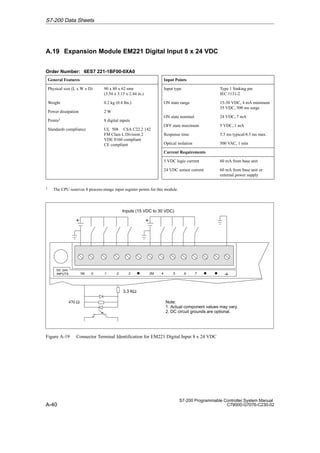
UL 508 CSA C22.2 142
FM Class I, Division 2
CE compliant
Input Points
Input type Type 1 sinking per
IEC 1131-2
ON state range 15 to 30 VAC, 47 to 63 Hz,
4 mA minimum
ON state nominal 24 VAC, 60 Hz, 7 mA
OFF state maximum 5 VAC, 1 mA
Response time 15 ms maximum
Optical isolation 1500 VAC, 1 min
Current Requirements
5 VDC logic current 70 mA from base unit
1 The CPU reserves 8 process-image input register points for this module.
N .0 .1 .2 .5 .6 .7
.3 .4
Note:
Actual component values may vary.
AC 24V
INPUTS
390 Ω
3.3 KΩ
Inputs (15 VDC to 30 VAC)
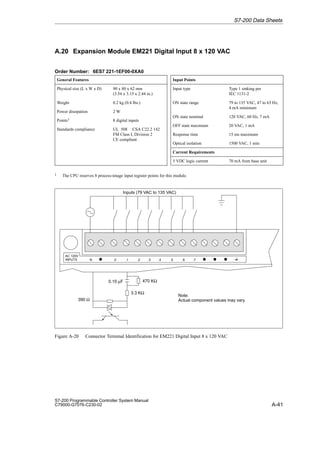
Figure A-22 Connector Terminal Identification for EM221 Digital Input 8 x 24 VAC
S7-200 Data Sheets
A-44
S7-200 Programmable Controller System Manual
C79000-G7076-C230-02
A.23 Expansion Module EM222 Digital Output 8 x 24 VDC
Order Number: 6ES7 222-1BF00-0XA0
General Features
Physical size (L x W x D) 90 x 80 x 62 mm
(3.54 x 3.15 x 2.44 in.)
Weight 0.2 kg (0.4 lbs.)
Power dissipation 4 W at 3 A load
Points1 8 digital outputs
Standards compliance UL 508 CSA C22.2 142
FM Class I, Division 2
VDE 0160 compliant
CE compliant
Output Points
Output type Sourcing transistor
Voltage range 20.4 VDC to 28.8 VDC
Maximum load current
per single point
per 2 adjacent points
all points total
0 to 40° C 55° C2
0.75 A 0.50 A
1.00 A 0.75 A
4.00 A 3.00 A
Output Points (continued)
Inductive load clamping
Single Pulse
Repetitive
(per common)
2A L/R = 10 ms
1A L/R = 100 ms
1 W energy dissipation
(1/2 Li2 x switch rate t 1 W)
Leakage current 100 µA
Switching delay 50 µs ON, 200 µs OFF
Surge current 4 A, 100 ms
Voltage drop 1.8 V maximum at maximum
current
Optical isolation 500 VAC, 1 min
Short circuit protection None
Current Requirements
5 VDC logic current 80 mA from base unit
Output point current Supplied by user at module
common
1 The CPU reserves 8 process-image output register points for this module.
2 Linear derate 40 to 55° C. Vertical mount derate 10° C
+
1M 1L+ .0 .1 .2 2M 2L+ .4 .5
.3 .6 .7
+
Outputs (20.4 to 28.8 VDC)
Note:
1. Actual component values may vary.
2. DC circuit grounds are optional.
DC 24V
OUTPUTS
36V
36V
Figure A-23 Connector Terminal Identification for EM222 Digital Output 8 x 24 VDC
S7-200 Data Sheets
A-45
S7-200 Programmable Controller System Manual
C79000-G7076-C230-02
A.24 Expansion Module EM222 Digital Output 8 x Relay
Order Number: 6ES7 222-1HF00-0XA0
General Features
Physical size (L x W x D) 90 x 80 x 62 mm
(3.54 x 3.15 x 2.44 in.)
Weight 0.2 kg (0.4 lbs.)
Power dissipation 3 W
Points1 8 digital relay outputs
Standards compliance UL 508 CSA C22.2 142
FM Class I, Division 2
VDE 0160 compliant
CE compliant
Output Points
Output type Relay, dry contact
Voltage range 5 to 30 VDC/250 VAC
Maximum load current 2 A/point, 8 A/common
Overcurrent surge 7 A with contacts closed
Isolation resistance 100 MW minimum (new)
Output Points (continued)
Switching delay 10 ms maximum
Lifetime 10,000,000 mechanical
100,000 with rated load
Contact resistance 200 mW maximum (new)
Isolation
Coil to contact
Contact to contact
(between open contacts)
1500 VAC, 1 min
750 VAC, 1 min
Short circuit protection None
Current Requirements
5 VDC logic current 80 mA from base unit
24 VDC coil current 85 mA from base unit or
external power supply
Output point current Supplied by user at module
common
1 The CPU reserves 8 process-image output register points for this module.
M L+ 1L .0 2L .4 .5
+
.1 .6 .7
.2 .3
Note:
1. Actual component values may vary.
2. Connect AC line to the L terminal.
3. DC circuit grounds are optional.
RELAY
OUTPUTS
Outputs (30 VDC/250 VAC)
24-VDC
Relay coil
N (-)
L (+)
N (-)
L (+)
Figure A-24 Connector Terminal Identification for EM222 Digital Output 8 x Relay
S7-200 Data Sheets
A-46
S7-200 Programmable Controller System Manual
C79000-G7076-C230-02
A.25 Expansion Module EM222 Digital Output 8 x 120/230 VAC
Order Number: 6ES7 222-1EF00-0XA0
General Features
Physical size (L x W x D) 90 x 80 x 62 mm
(3.54 x 3.15 x 2.44 in.)
Weight 0.2 kg (0.4 lbs.)
Power dissipation 5 W at 3.5 A load
Points1 8 digital outputs
Standards compliance UL 508 CSA C22.2 142
FM Class I, Division 2
CE compliant
Output Points
Output type Triac, zero-cross turn on
Voltage/frequency range 20 to 264 VAC, 47 to 63 Hz
Load circuit power factor 0.3 to 1.0
Maximum load current
per single point
per 2 adjacent points
all points total
0 to 40° C 55° C2
1.20 A 1.00 A
1.50 A 1.25 A
4.75 A 3.50 A
Output Points (continued)
Minimum load current 30 mA
Leakage current 1.5 mA, 120 VAC/2.0 mA,
240 VAC
Switching delay 1/2 cycle
Surge current 30 A peak 1 cycle,
10 A peak 5 cycle
Voltage drop 1.5 V maximum at maximum
current
Optical isolation 1500 VAC, 1 min
Short circuit protection None
Current Requirements
5 VDC logic current 120 mA from base unit
Output point current Supplied by user at module
common
1 The CPU reserves 8 process-image output register points for this module.
2 Linear derate 40 to 55° C. Vertical mount derate 10° C
S7-200 Data Sheets
A-47
S7-200 Programmable Controller System Manual
C79000-G7076-C230-02
1L .0 .1 2L .2 3L .4 .5
.3 4L .6
Outputs (20 to 264 VAC)
.7
AC
OUTPUTS
Note:
Actual component values may vary.
10 Ω
0.0068 µF
275V MOV
Figure A-25 Connector Terminal Identification for EM222 Digital Output 8 x 120/230 VAC
S7-200 Data Sheets
A-48
S7-200 Programmable Controller System Manual
C79000-G7076-C230-02
A.26 Expansion Module EM223 Digital Combination
4 x 24 VDC Input/4 x 24 VDC Output
Order Number: 6ES7 223-1BF00-0XA0
General Features
Physical size (L x W x D) 90 x 80 x 62 mm
(3.54 x 3.15 x 2.44 in.)
Weight 0.2 kg (0.4 lbs.)
Power dissipation 3.5 W at 3 A load
Points1 4 digital inputs
4 digital outputs
Standards compliance UL 508 CSA C22.2 142
FM Class I, Division 2
VDE 0160 compliant
CE compliant
Output Points
Output type Sourcing transistor
(P-Channel MOSFET)
Voltage range 20.4 to 28.8 VDC
ON state resistance 400 mW maximum
Maximum load current
per single point
all points total
*Linear derate 40 to 55° C
Vertical mount derate 10° C
(Two points can be
connected in parallel to
serve a high current load.)
0 to 40° C 55° C*
2.50 A 2.00 A
4.00 A 3.00 A
Inductive load clamping
Single Pulse
Repetitive
(per common)
2A L/R = 10 ms
1A L/R = 100 ms
1 W energy dissipation
(1/2 Li2 x switch rate t 1 W)
Output Points (continued)
Leakage current 1 µA maximum
Switching delay 25 µs ON, 120 µs OFF max.
Surge current 7 A, 100 ms
Optical isolation 500 VAC, 1 min
Short circuit protection None
Input Points
Input type Type 1 Sinking per
IEC 1131-2
ON state range 15-30 VDC, 4 mA minimum
35 VDC, 500 ms surge
ON state nominal 24 VDC, 7 mA
OFF state maximum 5 VDC, 1 mA
Response time 3.5 ms typical/4.5 ms
maximum
Optical isolation 500 VAC, 1 min
Current Requirements
5 VDC logic current 80 mA from base unit
24 VDC sensor current 30 mA from base unit or
external power supply
Output point current Supplied by user at module
common
1 The CPU reserves 8 process-image input and 8 process-image output register points for this module.
S7-200 Data Sheets
A-49
S7-200 Programmable Controller System Manual
C79000-G7076-C230-02
+
+
1M .0 .1 .2 .3 2M
Inputs (15 to 30 VDC)
L+ .0
Note:
1. Actual component values may vary
2. DC circuit grounds are optional.
3.3 KΩ
470 Ω
DC/DC
IN-OUT .1 .2 .3
36V
36V
Outputs (20.4 to 28.8 VDC)
Figure A-26 Connector Terminal Identification for EM223 Digital Combination 4 x 24 VDC Input/4 x 24 VDC
Output
S7-200 Data Sheets
A-50
S7-200 Programmable Controller System Manual
C79000-G7076-C230-02
A.27 Expansion Module EM223 Digital Combination
8 x 24 VDC Input/8 x 24 VDC Output
Order Number: 6ES7 223-1BH00-0XA0
General Features
Physical size (L x W x D) 90 x 80 x 62 mm
(3.54 x 3.15 x 2.44 in.)
Weight 0.2 kg (0.44 lbs.)
Power dissipation 3.0 W
Points1 8 digital inputs
8 digital outputs
Standards compliance UL 508 CSA C22.2 142
FM Class I, Division 2
VDE 0160 compliant
CE compliant
Output Points
Output type Sourcing MOSFET
Voltage range 20.4 VDC to 28.8 VDC
Maximum load current
Outputs may be connected
parallel for higher current
0 to 55_ C
0.5 A/Point
Leakage current 200 µΑ
Switching delay 150 µs ON, 400 µs OFF
On resistance 400 mΩ maximum
Short circuit protection 0.7 to 1.5 A/channel
Optical isolation 500 VAC, 1 min
Input Points
Input Type Sink/Source
IEC 1131 Type 1 in sink
mode
ON State Range 15 to 30 VDC, 4 mA
minimum
35 VDC, 500 ms surge
ON State Nominal 24 VDC, 7 mA
OFF State Maximum 5 VDC, 1 mA
Response Time 4.0 ms
maximum
Optical Isolation 500 VAC, 1 min
Current Requirements
5 VDC logic current 120 mA from base unit
24 VDC sensor current 60 mA from base unit or
external power supply
Output point current Supplied by user at module
common
1 The CPU reserves 8 process-image input and 8 process-image output register points for this module.
S7-200 Data Sheets
A-51
S7-200 Programmable Controller System Manual
C79000-G7076-C230-02
Outputs (20.4 - 28.8 VDC)
1M .0 .1 .2 .3 DC
INPUTS
1M 1L .2 .3
DC
OUTPUTS 2L .4 .5 .6 .7
.1
D
.0 D
Inputs (15 - 30 VDC)
3.3 KΩ
Note:
1. Actual component values may vary.
2. Either polarity accepted
3. Optional ground.
+

+

D D D
2M .4 .5 .6 .7


+ +
2M
470 Ω
Figure A-27 Connector Terminal Identification for EM223 Digital Combination 8 x 24 VDC Inputs/8 x 24 VDC
Outputs
S7-200 Data Sheets
A-52
S7-200 Programmable Controller System Manual
C79000-G7076-C230-02
A.28 Expansion Module EM223 Digital Combination
16 x 24 VDC Input/16 x 24 VDC Output
Order Number: 6ES7 223-1BL00-0XA0
General Features
Physical size (L x W x D) 160 x 80 x 62 mm
(6.30 x 3.15 x 2.44 in.)
Weight 0.4 kg (0.9 lbs.)
Power dissipation 5.5 W
Points1 16 Digital inputs
16 Digital outputs
Standards compliance UL 508 CSA C22.2 142
FM Class I, Division 2
VDE 0160 compliant
CE compliant
Output Points
Output type Sourcing MOSFET
Voltage range 20.4 VDC to 28.8 VDC
Maximum load current
Outputs may be connected
parallel for higher current
0 to 55_ C
0.5 A/Point
Leakage current 200 µΑ
Switching delay 150 µs ON, 400 µs OFF
On resistance 400 mΩ maximum
Short circuit protection 0.7 to 1.5 A/channel
Optical isolation 500 VAC, 1 minute
Input Points
Input type Sink/Source
IEC 1131 Type 1 in sink
mode
ON state range 15 to 30 VDC, 4 mA
minimum
35 VDC, 500 ms surge
ON state nominal 24 VDC, 7 mA
OFF state maximum 5 VDC, 1 mA
Response time 4.0 ms maximum
Optical isolation 500 VAC, 1 minute
Current Requirements
5 VDC logic current 210 mA from base unit
24 VDC sensor current 120 mA from base unit or
external power supply
Output point current Supplied by user at module
common
1 The CPU reserves 16 process-image input and 16 process-image output register points for this module.
S7-200 Data Sheets
A-53
S7-200 Programmable Controller System Manual
C79000-G7076-C230-02
+
Outputs (20.4 - 28.8 VDC)
1M .0 .1 .2 .3 .4 .5 .6 .7 DC
INPUTS
x.1 x.2 x.3 x.4 x.5 x.6 x.7
1M 1L .2 .3
DC
OUTPUTS 2L .4 .5 .6 .7
.1
D
D
D D
D
D
D
D
.0 D
Inputs (15 - 30 VDC)
3.3K Ω
470 Ω

Note:
1. Actual component values may
vary.
2. Either polarity accepted
3. Optional ground.
+
+

2M x.0
3L x.0 x.1 x.2 x.3 x.4 x.5 x.6 x.7 D


+ +
2M 3M D
Figure A-28 Connector Terminal Identification for EM223 Digital Combination 16 x 24 VDC Inputs/16 x 24 VDC
Outputs
S7-200 Data Sheets
A-54
S7-200 Programmable Controller System Manual
C79000-G7076-C230-02
A.29 Expansion Module EM223 Digital Combination
4 x 24 VDC Input/4 x Relay Output
Order Number: 6ES7 223-1HF00-0XA0
General Features
Physical size (L x W x D) 90 x 80 x 62 mm
(3.54 x 3.15 x 2.44 in.)
Weight 0.2 kg (0.4 lbs.)
Power dissipation 2 W
Points1 4 digital inputs
4 digital relay outputs
Standards compliance UL 508 CSA C22.2 142
FM Class I, Division 2
VDE 0160 compliant
CE compliant
Output Points
Output type Relay, dry contact
Voltage range 5 to 30 VDC/250 VAC
Maximum load current 2 A/Point
Isolation resistance 100 MW maximum (new)
Switching delay 10 ms maximum
Lifetime 10,000,000 mechanical
100,000 with rated load
Isolation
Coil to contact
Contact to contact
(between open contacts)
1500 VAC, 1 min
750 VAC, 1 min
Output Points (continued)
Contact resistance 200 mW maximum (new)
Short circuit protection None
Input Points
Input type Type 1 Sinking per
IEC 1131-2
ON state range 15 to 30 VDC, 4 mA min.
35 VDC, 500 ms surge
ON state nominal 24 VDC, 7 mA
OFF state maximum 5 VDC, 1 mA
Response time 3.5 ms typical / 4.5 ms
maximum
Optical isolation 500 VAC, 1 min
Current Requirements
5 VDC Logic current 80 mA from base unit
24 VDC Sensor current 30 mA from base unit or
external power supply
24 VDC Coil current 35 mA from base unit or
external power supply
Output point current Supplied by user at module
common
1 The CPU reserves 8 process-image input and 8 process-image output register points for this module.
+
+
1M .0 .1 .2 .3 2M
Inputs (15 VDC to 30 VDC)
L+ .0
3.3 KΩ
470 Ω
DC/RLY
IN - OUT .1 .2 .3
L
N (-)
L (+)
Note:
1. Actual component values may vary.
2. Connect AC line to the L terminal.
3. DC circuit grounds are optional.
Outputs (5 to 30 VDC/250 VAC)
24 VDC Relay Coil
Figure A-29 Connector Terminal Identification for EM223 Digital Combination 4 x 24 VDC Input/4 x Relay
Output
S7-200 Data Sheets
A-55
S7-200 Programmable Controller System Manual
C79000-G7076-C230-02
A.30 Expansion Module EM223 Digital Combination
4 x 120 VAC Input/4 x 120 VAC to 230 VAC Output
Order Number: 6ES7 223-1EF00-0XA0
General Features
Physical size (L x W x D) 90 x 80 x 62 mm
(3.54 x 3.15 x 2.44 in.)
Weight 0.2 kg (0.4 lbs.)
Power dissipation 5.5 W at 3 A load
Points1 4 digital inputs
4 digital outputs
Standards compliance UL 508 CSA C22.2 142
FM Class I, Division 2
CE compliant
Output Points
Output type Triac, zero-cross turn on
Voltage/frequency range 70 to 264 VAC, 47 to 63 Hz
Load circuit power factor 0.3 to 1.0
Maximum load current
per single point
all points total
0 to 40° C 55° C2
2.40 A 2.00 A
4.00 A 3.00 A
Minimum load current 10 mA
Leakage current 2.5 mA, 120 V
4.0 mA, 230 V
Switching delay 1/2 cycle
Output Points (continued)
Surge current 50 A peak, 1 cycle
15 A peak, 5 cycle
Voltage drop 1.8 V maximum at maximum
current
Optical isolation 1500 VAC, 1 min
Short circuit protection None
Input Points
Input type Type 1 Sinking per
IEC 1131-2
ON state range 79 to 135 VAC, 47 to 63 Hz
4 mA minimum
ON state nominal 120 VAC, 60 Hz, 7 mA
OFF state maximum 20 VAC, 1 mA
Response time 15 ms maximum
Optical isolation 1500 VAC, 1 min
Current Requirements
5 VDC logic current 100 mA from base unit
Output point current Supplied by user at module
common
1 The CPU reserves 8 process-image input and 8 output process-image register points for this module.
2 Linear derate 40 to 55° C. Vertical mount derate 10° C
N .0 .1 .2 .3
Inputs (79 to 135 VAC)
L .0
Note: Actual component values may vary.
AC/AC
IN - OUT .1 .2 .3
Outputs (70 to 264 VAC)
10 Ω
0.022 µF
0.15 µF 470 KΩ
390 Ω
3.3 KΩ
Figure A-30 Connector Terminal Identification for EM223 Digital 4 x 120 VAC Input/
4 x 120 VAC to 230 VAC Output
S7-200 Data Sheets
A-56
S7-200 Programmable Controller System Manual
C79000-G7076-C230-02
A.31 Expansion Module EM223 Digital Combination
8 x 24 VDC Input/8 x Relay Output
Order Number: 6ES7 223-1PH00-0XA0
General Features
Physical size (L x W x D) 90 x 80 x 62 mm
(3.54 x 3.15 x 2.44 in.)
Weight 0.3 kg (0.7 lbs.)
Power dissipation 2.5 W
Points1 8 digital inputs
8 digital outputs
Standards compliance UL 508 CSA C22.2 142
FM Class I, Division 2
VDE 0160 compliant
CE compliant
Output Points
Output type Relay, dry contact
Voltage range 5 to 30 VDC/250 VAC
Maximum load current 2 A /point, 8 A/common
Isolation resistance 100 MΩ maximum (new)
Switching delay 10 ms maximum
Lifetime 10,000,000 mechanical
100,000 with rated load
Contact resistance 200 mΩ maximum (new)
Isolation
Coil to contact
Contact to contact
(Between open contacts)
1500 VAC, 1 min
750 VAC, 1 min
Short circuit protection None
Input Points
Input Type Sink/Source
IEC 1131 Type 1 in sink
mode
ON State Range 15 to 30 VDC, 4 mA
minimum
35 VDC, 500 ms surge
ON State Nominal 24 VDC, 7 mA
OFF State Maximum 5 VDC, 1 mA
Response Time 4.0 ms
maximum
Optical Isolation 500 VAC, 1 min
Current Requirements
5 VDC logic current 100 mA from base unit
24 VDC sensor current 90 mA from base unit or
external power supply
Output point current Supplied by user at module
common
1 The CPU reserves 8 process-image input and 8 process-image output register points for this module.
S7-200 Data Sheets
A-57
S7-200 Programmable Controller System Manual
C79000-G7076-C230-02
DC
INPUTS
Outputs (30 VDC/250 VAC)
1M .0 .1 .2 .3
+
M L+ 1L .2 .3
RELAY
OUTPUTS 2L .4 .5 .6 .7
.1
D
.0 D
Inputs (15 to 30 VDC)
3.3 KΩ
470 Ω

Note:
1. Actual component values may vary.
2. Either polarity accepted
3. DC circuit grounds are optional.
4. Relay coil power M must connect to
sensor supply M of CPU.
24 VDC
+

+

D D D
2M .4 .5 .6 .7


Figure A-31 Connector Terminal Identification for EM223 Digital 8 x 24 VDC Input/8 x Relay Output
S7-200 Data Sheets
A-58
S7-200 Programmable Controller System Manual
C79000-G7076-C230-02
A.32 Expansion Module EM223 Digital Combination
16 x 24 VDC Input/16 x Relay Output
Order Number: 6ES7 223-1PL00-0XA0
General Features
Physical size (L x W x D) 160 x 80 x 62 mm
(6.30 x 3.15 x 2.44 in.)
Weight 0.45 kg (1.0 lbs.)
Power dissipation 7 W
Points1 16 Digital inputs
16 Digital relay outputs
Standards compliance UL 508 CSA C22.2 142
FM Class I, Division 2
VDE 0160 compliant
CE compliant
Output Points
Output type Relay, dry contact
Voltage range 5 to 30 VDC/250 VAC
Maximum load current 2 A/point, 8 A/common
Isolation resistance 100 MΩ maximum (new)
Switching delay 10 ms maximum
Lifetime 10,000,000 Mechanical
100,000 with rated load
Contact resistance 200 mΩ maximum (new)
Isolation
Coil to contact
Contact to contact
(between open contacts)
1500 VAC, 1 min
750 VAC, 1 min
Short circuit protection None
Input Points
Input type Sink/Source
IEC 1131 Type 1 in sink
mode
ON state range 15 to 30 VDC, 4 mA
minimum
35 VDC, 500 ms surge
ON state nominal 24 VDC, 7 mA
OFF state maximum 5 VDC, 1 mA
Response time 3.5 ms typical/4.5 ms
maximum
Optical isolation 500 VAC, 1 minute
Current Requirements
5 VDC logic current 160 mA from base unit
24 VDC sensor current 120 mA from base unit or
external power supply
24 VDC coil current2 130 mA from base unit or
external power supply
Output point current Supplied by user at module
common
1 The CPU reserves 16 process-image input and 16 process-image output register points for this module.
2 Coil power must connect to common sensor supply M on the CPU.
S7-200 Data Sheets
A-59
S7-200 Programmable Controller System Manual
C79000-G7076-C230-02
Outputs (30 VDC/250 VAC)
1M .0 .1 .2 .3 .4 .5 .6 .7 DC
INPUTS
x.1 x.2 x.3 x.4 x.5 x.6 x.7
+
M L+ 1L .2 .3
RELAY
OUTPUTS 2L .4 .5 .6 .7
.1
D
D
D D
D
D
D
D
.0 D
Inputs (15 to 30 VDC)
3.3K Ω
470 Ω


Note:
1. Actual component values may
vary.
2. Either polarity accepted
3. DC circuit grounds are optional.
4. Relay coil power M must connect
to sensor supply M of CPU.
24 VDC
+
+

2M x.0
3L x.0 x.1 x.2 x.3 D 4L x.4 x.5 x.6 x.7 D


To Coils
Figure A-32 Connector Terminal Identification for
EM223 Digital Combination 16 x 24 VDC Input/16 x Relay Output
S7-200 Data Sheets
A-60
S7-200 Programmable Controller System Manual
C79000-G7076-C230-02
A.33 Expansion Module EM231 Analog Input AI 3 x 12 Bits
Order Number: 6ES7 231-0HC00-0XA0
General Features
Physical size (L x W x D) 90 x 80 x 62 mm
(3.54 x 3.15 x 2.44 in)
Weight 0.2 kg (0.4 lbs.)
Power dissipation 2 W
Points1 3 Analog inputs
Standards compliance UL 508 CSA C22.2 142
FM Class I, Division 2
VDE 0160 compliant
CE compliant
Input Points
Input type Differential
Input impedance w 10 MΩ
Input filter attenuation -3 db @ 3.1 kHz
Maximum input voltage 30 V
Maximum input current 32 mA
Resolution 12 bit A/D converter
Isolation Non-isolated
Input Points (continued)
Analog-to-digital
conversion time  250 µs
Analog step response 1.5 ms to 95%
Common mode rejection 40 dB, DC to 60 Hz
Common mode voltage Signal voltage plus common
mode voltage, less than or
equal to 12 V
Data word format2
Unipolar, full-scale range 0 to 32000
Current Requirements
5 VDC logic current 70 mA from base unit
External power supply 60 mA from base unit or
external power supply
(24 VDC nominal, Class 2
or DC sensor supply)
Indicator LED, EXTF
Power Supply Fault Low voltage, on external
24 VDC
1 The CPU reserves 4 analog input points for this module.
2 Data Word increments in 8 count steps, left justified values. See Figure A-35.
RA A+ A – RB B+
ANALOG
IN - PS L+ M
B – RC C+ C –
EM231
AI 3 x 12 Bit
EXTF
Voltage transmitter
Current transmitter
Unused
input
24V
+ -
+
-
Figure A-33 Connector Terminal Identification for Expansion Module EM231 Analog Input AI 3 x 12 Bits
S7-200 Data Sheets
A-61
S7-200 Programmable Controller System Manual
C79000-G7076-C230-02
Calibration and Configuration Location
The calibration potentiometer and configuration DIP switches are accessed through the
ventilation slots of the module, as shown in Figure A-34.
Expansion module
Gain
OFF
ON
1 2 3 4
Figure A-34 Calibration Potentiometer and Configuration DIP Switches
Configuration
Table A-2 shows how to configure the module using the configuration DIP switches.
Switches 1 and 3 select the analog input range. All inputs are set to the same analog input
range.
Table A-2 Configuration Switch Table for EM231 Analog Input
Configuration Switch
Full Scale Input Resolution
1 3
Full-Scale Input Resolution
ON OFF 0 to 5 V 1.25 mV
ON OFF 0 to 20 mA1 5 µA
OFF ON 0 to 10 V 2.5 mV
1 0 to 20 mA measurements were made using the internal 250-Ω current-sense resistor.
S7-200 Data Sheets
A-62
S7-200 Programmable Controller System Manual
C79000-G7076-C230-02
Input Calibration
The module calibration is used to correct the gain error at full scale. Offset error is not
compensated. The calibration affects all three input channels, and there may be a difference
in the readings between channels after calibration.
To calibrate the module accurately, you must use a program designed to average the values
read from the module. Use the Analog Input Filtering wizard provided in STEP 7-Micro/WIN
to create this program (see Section 5.3). Use 64 or more samples to calculate the average
value.
To calibrate the input, use the following steps.
1. Turn off the power to the module. Select the desired input range.
2. Turn on the power to the CPU and module. Allow the module to stabilize for 15 minutes.
3. Using a transmitter, a voltage source, or a current source, apply a zero value signal to
one of the input terminals.
4. Read the value reported to the CPU by the appropriate input channel. The reading with a
zero value input indicates the magnitude of the offset error. This error cannot be
corrected by calibration.
5. Connect a full-scale value signal to one of the input terminals. Read the value reported
to the CPU.
6. Adjust the GAIN potentiometer until the reading is 32,000, or the desired digital data
value.
Data Word Format
Figure A-35 shows where the 12-bit data value is placed within the analog input word of the
CPU.
A variance in repeatability of only ±0.45% of full scale can give a variance of ±144 counts in
the value read from the analog input.
15 3
MSB LSB
0
AIW XX
0
0 0 0
2
14
Data value 12 Bits
Unipolar data
Figure A-35 Data Word Format
Note
The 12 bits of the analog-to-digital converter (ADC) readings are left-justified in the data
word format. The MSB is the sign bit: zero indicates a positive data word value. The three
trailing zeros cause the data word to change by a count of eight for each one count
change in the ADC value.
S7-200 Data Sheets
A-63
S7-200 Programmable Controller System Manual
C79000-G7076-C230-02
Input Block Diagram
Figure A-36 shows the EM231 input block diagram.
R
R
C
C
C
A+
RA
A-
Rloop
R
R
C
C
C
B+
RB
B-
Rloop
R
R
C
C
C
C+
RC
C-
Rloop
A=0
A=1
A=2
A=3
Buffer
+
-
R
R
R
R
R
Input differential and
common-mode filter Input selector
SW3
SW1
Attenuation stage
xGAIN
DATA
DATA
0
11
Vref
A/D Converter
Analog-to-digital converter
Gain stage
Gain
x1
AGND
Figure A-36 EM231 Input Block Diagram
S7-200 Data Sheets
A-64
S7-200 Programmable Controller System Manual
C79000-G7076-C230-02
Installation Guidelines for EM231
Use the following guidelines to ensure accuracy and repeatability:
S Ensure that the 24-VDC Sensor Supply is free of noise and is stable.
S Calibrate the module.
S Use the shortest possible sensor wires.
S Use shielded twisted pair wiring for sensor wires.
S Terminate the shield at the sensor location only.
S Short the inputs for any unused channels, as shown in Figure A-33.
S Avoid bending the wires into sharp angles.
S Use wireways for wire routing.
S Ensure that input signals are floating or referenced to the external 24V common of the
analog module.
Understanding and Using the Analog Input Module: Accuracy and Repeatability
The EM231 analog input module is a low-cost, high-speed 12 bit analog input module. The
module is capable of converting an analog input to its corresponding digital value in
171 µsec for the CPU 212 and 139 µsec for all other S7-200 CPUs. Conversion of the
analog signal input is performed each time the analog point is accessed by your program.
These times must be added to the basic execution time of the instruction used to access the
analog input.
The EM231 provides an unprocessed digital value (no linearization or filtering) that
corresponds to the analog voltage or current presented at the module’s input terminals.
Since the module is a high-speed module, it can follow rapid changes in the analog input
signal (including internal and external noise). Reading-to-reading variations caused by noise
for a constant or slowly changing analog input signal can be minimized by averaging a
number of readings. As the number of readings used in computing the average value
increases, a correspondingly slower response time to changes in the input signal can be
observed.
You can use the STEP 7-Micro/WIN Analog Input Filtering wizard (see Section 5.3). to add
an averaging routine to your program. Remember that an average value computed from a
large number of samples stabilizes the reading while slowing down its response to changes
in the input signal. For slowly changing analog input signals, a sample size of 64 or greater is
recommended for the averaging routine.
The specifications for repeatability describe the reading-to-reading variations of the module
for an input signal that is not changing. The repeatability specification defines the limits within
which 99% of the readings will fall. The mean accuracy specification describes the average
value of the error (the difference between the average value of individual readings and the
exact value of the actual analog input signal). The repeatability is described in the
Figure A-37 by the bell curve. This figure shows the 99% repeatability limits, the mean or
average value of the individual readings, and the mean accuracy in a graphical form.
Table A-3 gives the repeatability specifications and the mean accuracy as they relate to each
of the configurable ranges.
S7-200 Data Sheets
A-65
S7-200 Programmable Controller System Manual
C79000-G7076-C230-02
Repeatability limits
(99% of all readings fall within these limits)
Average
Value
Mean(average)
Accuracy
Signal
Input
Figure A-37 Accuracy Definitions
Table A-3 Specifications for DC and AC Powered S7-200 CPUs
Full Scale Input
Range
Repeatability1 Mean (average) Accuracy1, 2, 3, 4
Range
% of Full Scale Counts % of Full Scale Counts
Specifications for DC Powered S7-200 CPUs
0 to 5 V
± 24 ± 0 1% ± 32
0 to 20 mA ± 0.075% ± 24 ± 0.1% ± 32
0 to 10 V
Specifications for AC Powered S7-200 CPUs
0 to 5 V
± 0 15% ± 48 ± 0 1% ± 64
0 to 20 mA
± 0.15% ± 48 ± 0.1% ± 64
0 to 10 V
1 Measurements made after the selected input range has been calibrated.
2 The offset error in the signal near zero analog input is not corrected, and is not included in the accuracy specifications.
3 There is a channel-to-channel carryover conversion error, due to the finite settling time of the analog multiplexer. The
maximum carryover error is 0.1% of the difference between channels.
4 Mean accuracy includes effects of non-linearity and drift from 0 to 55 degrees C.
S7-200 Data Sheets
A-66
S7-200 Programmable Controller System Manual
C79000-G7076-C230-02
A.34 Expansion Module EM232 Analog Output AQ 2 x 12 Bits
Order Number: 6ES7 232-0HB00-0XA0
General Features
Physical size (L x W x D) 90 x 80 x 62 mm
(3.54 x 3.15 x 2.44 in.)
Weight 0.2 kg (0.4 lbs.)
Power dissipation 2 W
Points1 2 analog outputs
Standards compliance UL 508 CSA C22.2 142
FM Class I, Division 2
VDE 0160 compliant
CE compliant
Output Points
Signal range
Voltage output
Current output
± 10 V
0 to 20 mA
Resolution, full-range
Voltage
Current
12 bits
11 bits
Resolution, full-scale
Voltage, bipolar
Current, unipolar
1 in 2000 counts, 0.5% of
full-scale per count
1 in 2000 counts, 0.5% of
full-scale per count
Datawordformat
Full-range
Voltage, bipolar
Current, unipolar
Full-scale
Bipolar
Unipolar
-32768 to + 32752
0 to +32752
-32000 to +32000
0 to + 32000
Accuracy
Worst case, 0 to 55° C
Voltage output
Current output
Typical, 25° C
Voltage output
Current output
± 2% of full-scale
± 2% of full-scale
± 0.5% of full-scale
Settling time
Voltage output
Current output
100 µs
2 ms
Maximum drive
@ 24 V user supply
Voltage output
Current output
5000Ω minimum
500Ω maximum
Current Requirements
5 VDC logic current 70 mA from Base Unit
External power supply 60 mA, plus output current
of 40 mA from Base Unit or
External Supply
(24 VDC nominal, Class 2 or
DC Sensor Supply)
Indicator LED, EXTF
Power supply fault Low voltage, out-of-range
1 The CPU reserves 2 analog output points for this module.
S7-200 Data Sheets
A-67
S7-200 Programmable Controller System Manual
C79000-G7076-C230-02
Figure A-38 shows the Connector Terminal Identification for EM232 Analog Output AQ 2 x 12
Bits.
V0 I0 M V1 I1
ANALOG
OUTPUT-PS L+ M
M
EM232
AQ 2 x 12 Bit
EXTF
+
-
24V
VLoad ILoad
Figure A-38 Connector Terminal Identification for Expansion Module EM232 Analog Output
AQ 2 x 12 Bits
Output Data Word Format
Figure A-39 shows where the 12-bit data value is placed within the analog output word of the
CPU.
15 4
MSB LSB
0
AQW XX
0
0 0 0
3
14
Data value 11 Bits
Current output data format
15 3
MSB LSB
AQW XX
0
0 0 0
Data value 12 Bits
Voltage output data format
4
0
0 Bipolar
(voltage mode)
Bipolar
(current mode)
Figure A-39 Output Data Word Format
Note
The 12 bits of the digital-to-analog converter (DAC) readings are left-justified in the output
data word format. The MSB is the sign bit: zero indicates a positive data word value. The
four trailing zeros are truncated before being loaded into the DAC registers. These bits
have no effect on the output signal value.
S7-200 Data Sheets
A-68
S7-200 Programmable Controller System Manual
C79000-G7076-C230-02
Output Block Diagram
Figure A-40 shows the EM232 output block diagram.
DATA
11 0
Vref
D/A converter
Digital-to-analog converter
+
-
R
R
Vout
-10.. +10 Volts
M
Voltage output buffer
+/- 2V
+
-
R
M
+
-
R
Iout
0..20 mA
100
+24 Volt
Voltage-to-current converter
1/4
Figure A-40 EM232 Output Block Diagram
Installation Guidelines for EM232
Use the following guidelines to ensure accuracy:
S Ensure that the 24-VDC Sensor Supply is free of noise and is stable.
S Use the shortest possible sensor wires.
S Use shielded twisted pair wiring for sensor wires.
S Terminate the shield at the sensor location only.
S Avoid bending the wires into sharp angles.
S Use wireways for wire routing.
S Avoid placing signal wires parallel to high-energy wires. If the two wires must meet, cross
them at right angles.
Definitions of the Analog Specifications
S Accuracy: deviation from the expected value on a given point.
S Resolution: the effect of an LSB change reflected on the output.
S7-200 Data Sheets
A-69
S7-200 Programmable Controller System Manual
C79000-G7076-C230-02
A.35 Expansion Module EM235 Analog Combination AI 3/AQ 1 x 12 Bits
Order Number: 6ES7 235-0KD00-0XA0
General Features
Physical size (L x W x D) 90 x 80 x 62 mm
(3.54 x 3.15 x 2.44 in.)
Weight 0.2 kg (0.4 lbs.)
Power dissipation 2 W
Points1 3 analog inputs
1 analog output
Standards compliance UL 508 CSA C22.2 142
FM Class I, Division 2
VDE 0160 compliant
CE compliant
Output Points
Signal range
Voltage output
Current output
± 10 V
0 to 20 mA
Resolution, full-range
Voltage
Current
12 bits
11 bits
Datawordformat2
Bipolar range3
Unipolar range2
-32000 to +32000
0 to + 32000
Accuracy
Worst case, 0 to 60° c
Voltage output
Current output
Typical, 25° c
Voltage output
Current output
± 2% of full-scale
± 2% of full-scale
± 0.5% of full-scale
Settling time
Voltage output
Current output
100 µs
2 ms
Maximum drive
@ 24 V user supply
Voltage output
Current output
5000Ω minimum
500Ω maximum
Input Points
Input type Differential
Input impedance w 10 MΩ
Input filter attenuation -3db @ 3.1 kHz
Maximum input voltage 30 V
Maximum input current 32 mA
Resolution 12 bit A/D converter
Isolation Non-isolated
Analog-to-digital
conversion time  250 µsec
Analog step response 1.5 ms to 95%
Common mode voltage Signal voltage plus common
mode voltage, less than or
equal to 12 V
Common mode rejection 40 dB, DC to 60 Hz
Data word format2
Bipolar range3
Unipolar range2
-32000 to +32000
0 to + 32000
Current Requirements
5 VDC logic current 70 mA from Base Unit
External power supply 60 mA, plus output current
of 20 mA, from Base Unit
or External Supply
(24 VDC nominal, Class 2 or
DC Sensor Supply)
Indicator LED, EXTF
Power supply fault Low voltage, on
external 24 VDC
1 The CPU reserves 4 analog input points and 2 analog output points for this module.
2 Data word increments in 16 count steps, left justified ADC values. See Figure A-43 and Figure A-45.
3 Data word increments in 8 count steps, left justified ADC values. See Figure A-43.
S7-200 Data Sheets
A-70
S7-200 Programmable Controller System Manual
C79000-G7076-C230-02
RA A+ A – RB B+
ANALOG
IN -OUT-PS L+ M
B – RC C+ C – Vo Io
EM235
AI 3 x 12 Bit
AQ 1 x 12 Bit
EXTF
Voltage transmitter
Current transmitter
Unused
input
+ -
+
-
V load
I load
24V
Figure A-41 Connector Terminal Identification for Expansion Module EM235 Analog Combination
AI 3/AQ 1 x 12 Bits
Calibration and Configuration Location
The calibration potentiometers and configuration DIP switches are accessed through the
ventilation slots of the module, as shown in Figure A-42.
Expansion module
Offset Gain
OFF
ON
1 2 3 4 5 6 7 8 9 10 11
Figure A-42 Calibration Potentiometers and Configuration DIP Switches
S7-200 Data Sheets
A-71
S7-200 Programmable Controller System Manual
C79000-G7076-C230-02
Configuration
Table A-4 shows how to configure the module using the configuration DIP switches.
Switches 1, 3, 5, 7, 9, and 11 select the analog input range and data format. All inputs are set
to the same input range and format.
Table A-4 Configuration Switch Table for EM235 Analog Combination
Configuration Switch
Full-Scale Input Resolution
11 3 5 7 9 11
Full-Scale Input Resolution
ON ON OFF ON OFF OFF 0 to 50 mV 12.5 mV
ON ON OFF OFF ON OFF 0 to100 mV 25 mV
ON OFF ON ON OFF OFF 0 to 500 mV 125 mV
ON OFF ON OFF ON OFF 0 to 1 V 250 mV
ON OFF OFF ON OFF OFF 0 to 5 V 1.25 mV
ON OFF OFF ON OFF OFF 0to 20 mA2 5 mA
ON OFF OFF OFF ON OFF 0 to 10 V 2.5 mV
OFF ON OFF ON OFF OFF +25 mV 12.5 mV
OFF ON OFF OFF ON OFF +50 mV 25 mV
OFF ON OFF OFF OFF ON +100 mV 50 mV
OFF OFF ON ON OFF OFF +250 mV 125 mV
OFF OFF ON OFF ON OFF +500 mV 250 mV
OFF OFF ON OFF OFF ON +1 V 500 mV
OFF OFF OFF ON OFF OFF +2.5 V 1.25 mV
OFF OFF OFF OFF ON OFF +5 V 2.5 mV
OFF OFF OFF OFF OFF ON +10 V 5 mV
1 Switch 1 selects the input polarity: ON for unipolar and OFF for bipolar. CPU power cycle
required when switching between unipolar and bipolar data formats. Switches 3, 5, 7, 9 and
11 select voltage range.
2 0 to 20 mA measurements were made using the internal 250 current-sense resistor.
S7-200 Data Sheets
A-72
S7-200 Programmable Controller System Manual
C79000-G7076-C230-02
Input Calibration
The calibration affects all three input channels, and there may be a difference in the readings
between the channels after calibration.
To calibrate the module accurately, you must use a program designed to average the values
read from the module. Use the Analog Input Filtering wizard provided in STEP 7-Micro/WIN
to create this program (see Section 5.3). Use 64 or more samples in calculating the average
value.
To calibrate the input, use the following steps.
1. Turn off the power to the module. Select the desired input range.
2. Turn on the power to the CPU and module. Allow the module to stabilize for 15 minutes.
3. Using a transmitter, a voltage source, or a current source, apply a zero value signal to
one of the input terminals.
4. Read the value reported to the CPU by the appropriate input channel.
5. Adjust the OFFSET potentiometer until the reading is zero, or the desired digital data
value.
6. Connect a full-scale value signal to one of the input terminals. Read the value reported
to the CPU.
7. Adjust the GAIN potentiometer until the reading is 32000, or the desired digital data
value.
8. Repeat OFFSET and GAIN calibration as required.
Input Data Word Format
Figure A-43 shows where the 12-bit data value is placed within the analog input word of the
CPU.
A variance in repeatability of only ±0.50% of full scale can give a variance of ±160 counts in
the value read from the analog input.
15 3
MSB LSB
0
AIW XX
0
0 0 0
2
14
Data value 12 Bits
Unipolar data
15 3
MSB LSB
AIW XX
0
0 0 0
Data value 12 Bits
Bipolar data
4
0
Figure A-43 Input Data Word Format
Note
The 12 bits of the analog-to-digital converter (ADC) readings are left-justified in the data
word format. The MSB is the sign bit: zero indicates a positive data word value. In the
unipolar format, the three trailing zeros cause the data word to change by a count of eight
for each one-count change in the ADC value. In the bipolar format, the four trailing zeros
cause the data word to change by a count of sixteen for each one count change in the
ADC value.
S7-200 Data Sheets
A-73
S7-200 Programmable Controller System Manual
C79000-G7076-C230-02
Input Block Diagram
Figure A-44 shows the EM235 input block diagram.
R
R
C
C
C
A+
RA
A-
Rloop
R
R
C
C
C
B+
RB
B-
Rloop
R
R
C
C
C
C+
RC
C-
Rloop
A=0
A=1
A=2
A=3
Buffer
+
-
R
R
R
R
R
Input ifferential and
common-mode filter Input selector
AGND
SW11
SW9
SW7
Attenuation stage
xGAIN
DATA
DATA
0
11
Vref
A/D Converter
BIPOLAR UNIPOLAR
SW1
Analog-to-digital converter
SW3
OFF
ON
OFF
ON
SW5
OFF
OFF
ON
ON
GAIN
x1
x10
x100
Not Valid
Gain stage
Figure A-44 EM235 Input Block Diagram
S7-200 Data Sheets
A-74
S7-200 Programmable Controller System Manual
C79000-G7076-C230-02
Output Data Word Format
Figure A-45 shows where the 12-bit data value is placed within the analog output word of the
CPU. Figure A-46 shows the EM235 output block diagram.
15 4
MSB LSB
0
AQW XX
0
0 0 0
3
14
Data value 11 Bits
Current output data format
15 3
MSB LSB
AQW XX
0
0 0 0
Data value 12 Bits
Voltage output data format
4
0
0
Figure A-45 Output Data Word Format
Note
The 12 bits of the digital-to-analog converter (DAC) readings are left-justified in the output
data word format. The MSB is the sign bit: zero indicates a positive data word value. The
four trailing zeros are truncated before being loaded into the DAC registers. These bits
have no effect on the output signal value.
Output Block Diagram
Figure A-46 shows the EM235 output block diagram.
DATA
11 0
Vref
D/A converter
Digital-to-analog converter
+
-
R
R
Vout
-10.. +10 Volts
M
Voltage output buffer
+/- 2V
+
-
R
M
+
-
R
Iout
0..20 mA
100
+24 Volt
Voltage-to-current converter
1/4
Figure A-46 EM235 Output Block Diagram
S7-200 Data Sheets
A-75
S7-200 Programmable Controller System Manual
C79000-G7076-C230-02
Installation Guidelines for EM235
Use the following guidelines to ensure good accuracy and repeatability:
S Ensure that the 24-VDC Sensor Supply is free of noise and is stable.
S Calibrate the module.
S Use the shortest possible sensor wires.
S Use shielded twisted pair wiring for sensor wires.
S Terminate the shield at the Sensor location only.
S Short the inputs for any unused channels, as shown in Figure A-41.
S Avoid bending the wires into sharp angles.
S Use wireways for wire routing.
S Avoid placing signal wires parallel to high-energy wires. If the two wires must meet, cross
them at right angles.
S Ensure that the input signals are floating, or referenced to the external 24V common of
the analog module.
Note
This expansion module is not recommended for use with thermocouples.
S7-200 Data Sheets
A-76
S7-200 Programmable Controller System Manual
C79000-G7076-C230-02
Understanding and Using the Analog Inputs: Accuracy and Repeatability
The EM235 combination input/output module is a low-cost, high-speed 12 bit analog input
module. The module is capable of converting an analog input to its corresponding digital
value in 171 µsec for the CPU 212, and 139 µsec for all other S7-200 CPUs. Conversion of
the analog signal input is performed each time the analog point is accessed by the user
program. These times must be added to the basic execution time of the instruction used to
access the analog input.
The EM235 provides an unprocessed digital value (no linearization or filtering) that
corresponds to the analog voltage or current presented at the modules input terminals. Since
the module is a high-speed module, it can follow rapid changes in the analog input signal
(including internal and external noise). Reading-to-reading variations caused by noise for a
constant or slowly changing analog input signal can be minimized by averaging a number of
readings. As the number of readings used in computing the average value increases, a
correspondingly slower response time to changes in the input signal will be observed.
You may use the STEP 7-Micro/WIN Analog Input Filtering wizard to add an averaging
routine to your program. Remember that an average value computed from a large number of
samples will stabilize the reading while slowing down its response to changes in the input
signal. For slowly changing analog input signals, a sample size of 64 or greater is
recommended for the averaging routine.
The specifications for repeatability describe the reading-to-reading variations of the module
for an input signal that is not changing. The repeatability specification defines the limits within
which 99% of the readings will fall. The mean accuracy specification describes the average
value of the error (the difference between the average value of individual readings and the
exact value of the actual analog input signal). The repeatability is described in Figure A-47
by the bell curve. This figure shows the 99% repeatability limits, the mean or average value
of the individual readings and the mean accuracy in a graphical form. Table A-5 gives the
repeatability specifications and the mean accuracy as they relate to each of the configurable
ranges.
Repeatability limits
(99% of all readings fall within these limits)
Average
Value
Mean(average)
Accuracy
Signal
Input
Figure A-47 Accuracy Definitions
S7-200 Data Sheets
A-77
S7-200 Programmable Controller System Manual
C79000-G7076-C230-02
Table A-5 Specifications for DC and AC Powered S7-200 CPUs
Full Scale Input
Range
Repeatability1 Mean (average) Accuracy1, 2, 3, 4
Range
% of Full Scale Counts % of Full Scale Counts
Specifications for DC Powered S7-200 CPUs
0 to 50 mV ± 0.25% ± 80
0 to 100 mV ± 0.2% ± 64
0 to 500 mV
0 to 1 V
± 0 075% ± 24 ± 0.05% ± 16
0 to 5 V
± 0.075% ± 24 ± 0.05% ± 16
0 to 20 mA
0 to 10 V
± 25 mV ± 0.25% ± 160
± 50 mV ± 0.2% ± 128
± 100 mV ± 0.1% ± 64
± 250 mV
± 500 mV ± 0.075% ± 48 ± 0.05% ± 32
± 1 V
± 0.05% ± 32
± 2.5 V
± 5 V
± 10 V
Specifications for AC Powered S7-200 CPUs
0 to 50 mV ± 0.25% ± 80
0 to 100 mV ± 0.2% ± 64
0 to 500 mV
0 to 1 V
± 0 15% ± 48 ± 0.05% ± 16
0 to 5 V
± 0.15% ± 48 ± 0.05% ± 16
0 to 20 mA
0 to 10 V
± 25 mV ± 0.25% ± 160
± 50 mV ± 0.2% ± 128
± 100 mV ± 0.1% ± 64
± 250 mV
± 500 mV ± 0.15% ± 96 ± 0.05% ± 32
± 1 V
± 0.05% ± 32
± 2.5 V
± 5 V
± 10 V
1 Measurements made after the selected input range has been calibrated.
2 The offset error in the signal near zero analog input is not corrected, and is not included in the accuracy specifications.
3 There is a channel-to-channel carryover conversion error, due to the finite settling time of the analog multiplexer. The
maximum carryover error is 0.1% of the difference between channels.
4 Mean accuracy includes effects of non-linearity and drift from 0 to 55 degrees C.
S7-200 Data Sheets
A-78
S7-200 Programmable Controller System Manual
C79000-G7076-C230-02
A.36 Memory Cartridge 8K x 8
Order Number: 6ES7 291-8GC00-0XA0
General Features
Physical size (L x W x D) 28 x 10 x 16 mm (1.1 x 0.4 x 0.6 in.)
Weight 3.6 g (0.01 lbs.)
Power dissipation 0.5 mW
Memory type EEPROM
User storage 4096 bytes program + 1024 bytes user data
+ internal system data
Standards compliance UL 508 CSA C22.2 142
FM Class I, Division 2
VDE 0160 compliant
CE compliant
Note
The 8K memory cartridge is produced in 4-pin and 5-pin versions. These versions are
entirely compatible.
This memory cartridge can be used in any S7-200 CPU model, but the 8K memory
cartridge will not store the maximum size program that is found in the CPU 215 or the
CPU 216. To avoid problems with program size, it is recommended that you use the 8K
memory cartridge only with the CPU 214 or the PDS 210.
Memory cartridges can only be used to transport programs betwen CPUs of the same
CPU type. (For example, a memory cartridge programmed by a CPU 214 can be used only
on another CPU 214.)
Memory Cartridge Dimensions
28.5 mm
(1.12 in.)
16.5 mm
(0.65 in.)
11 mm
(0.42 in.)
Figure A-48 Memory Cartridge Dimensions - 8K x 8
S7-200 Data Sheets
A-79
S7-200 Programmable Controller System Manual
C79000-G7076-C230-02
A.37 Memory Cartridge 16K x 8
Order Number: 6ES7 291-8GD00-0XA0
General Features
Physical size (L x W x D) 28 x 10 x 16 mm (1.1 x 0.4 x 0.6 in.)
Weight 3.6 g (0.01 lbs.)
Power dissipation 0.5 mW
Memory type EEPROM
User storage 8192 bytes program + 5120 bytes user data
+ internal system data
Standards compliance UL 508 CSA C22.2 142
FM Class I, Division 2
VDE 0160 compliant
CE compliant
Note
The 16K memory cartridge can be used in the PDS 210, the CPU 214, CPU 215, or the
CPU 216.
Memory cartridges can only be used to transport programs betwen CPUs of the same
CPU type. (For example, a memory cartridge programmed by a CPU 214 can only be used
on another CPU 214).
Memory Cartridge Dimensions
28.5 mm
(1.12 in.)
16.5 mm
(0.65 in.)
11 mm
(0.42 in.)
Figure A-49 Memory Cartridge Dimensions - 16K x 8
S7-200 Data Sheets
A-80
S7-200 Programmable Controller System Manual
C79000-G7076-C230-02
A.38 Battery Cartridge
Order Number: 6ES7 291-8BA00-0XA0
General Features
Physical size (L x W x D) 28 x 10 x 16 mm (1.1 x 0.4 x 0.6 in.)
Weight 3.6 g (0.01 lbs.)
Battery
Size (dia. x ht.)
Type
Shelf life
Typical life
Replacement
9.9 x 2.5 mm (0.39 x 0.10 in.)
Lithium ( 0.6 grams)
10 years
200 days continuous usage*
3V 30 mA/hr.(Renata CR 1025)
1 year interval recommended
Standards compliance UL 508 CSA C22.2 142
FM Class I, Division 2
VDE 0160 compliant
CE compliant
*The battery is operational only after the super capacitor in the CPU has discharged. Power outages that are
shorter than the super capacitor’s data retention time will not subtract from the useful battery life.
Battery Cartridge Dimensions
28.5 mm
(1.12 in.)
16.5 mm
(0.65 in.)
11 mm
(0.42 in.)
Figure A-50 Battery Cartridge Dimensions
S7-200 Data Sheets
A-81
S7-200 Programmable Controller System Manual
C79000-G7076-C230-02
A.39 I/O Expansion Cable
Order Number: 6ES7 290-6BC50-0XA0
General Features
Cable length 0.8 m (32 in.)
Weight 0.2 kg (0.5 lbs.)
Connector type Edge card
Typical Installation of the I/O Expansion Cable
Ground wire
UP
UP
0.8 m (32 in.)
Figure A-51 Typical Installation of an I/O Expansion Cable
Caution
Incorrectly installing the I/O expansion cable can damage the equipment.
If you connect the I/O expansion cable incorrectly, the electrical current flowing through the
cable can damage the expansion module.
Always orient the expansion cable so that the word “UP” on the connector of the cable
faces the front of the module, as shown in Figure A-51.
S7-200 Data Sheets
!
A-82
S7-200 Programmable Controller System Manual
C79000-G7076-C230-02
A.40 PC/PPI Cable
Order Number: 6ES7 901-3BF00-0XA0
General Features
Cable length 5 m (197 in.)
Weight 0.3 kg (0.7 lbs.)
Power dissipation 0.5 W
Connector type PC
PLC
9 pin Sub D (socket)
9 pin Sub D (pins)
Cable type RS-232 to RS-485 non-isolated
Cable receive/transmit turn-around time 2 character times
Baud rate supported
(selected by DIP switch)
Switch
38.4 k 0000
19.2 k 0010
9.6 k 0100
2.4 k 1000
1.2 k 1010
600 1100
Standards compliance UL 508 CSA C22.2 142
FM Class I, Division 2
VDE 0160 compliant; CE compliant
Table A-6 Cable Pin Assignment
RS-232
Pin
Function
Computer End
RS-485
Pin
Function
CPU S7-200 End
2 Received data (PC listens) 8 Signal A
3 Transmitted data (PC sends) 3 Signal B
5 Signal common 7 +24 V
2 +24 V Return (PLC logic common)
1 Shield (PLC logic common)
S7-200 Data Sheets
A-83
S7-200 Programmable Controller System Manual
C79000-G7076-C230-02
Caution
Interconnecting equipment with different reference potentials can cause unwanted currents
to flow through the interconnecting cable.
These unwanted currents can cause communication errors or can damage equipment.
Be sure all equipment that you are about to connect with a communication cable either
shares a common circuit reference or is isolated to prevent unwanted current flows. See
“Grounding and Circuit Referencing Guidelines for Using Isolated Circuits” in Section 2.3.
PC/PPI Cable Dimensions
0.1 m
(4 in.)
0.3 m
(12 in.)
RS-232 COMM RS-485 COMM
4.6 m
(181 in.)
40 mm
(1.6 in.)
Figure A-52 PC/PPI Cable Dimensions
S7-200 Data Sheets
!
A-84
S7-200 Programmable Controller System Manual
C79000-G7076-C230-02
A.41 CPU 212 DC Input Simulator
Order Number: 6ES7 274-1XF00-0XA0
General Features
Physical size (L x W x D) 61 x 36 x 22 mm (2.4 x 1.4 x 0.85 in.)
Weight 0.02 Kg (0.04 lb.)
Points 8
User Installation
1
0
DC 24V
INPUTS
DC
SENSOR
SUPPLY
23 mm
(0.9 in.)
1M 0.0 0.1 0.2 0.3 2M 0.4 0.5 M
0.6 0.7 L+
Figure A-53 Installation of the CPU 212 DC Input Simulator
S7-200 Data Sheets
A-85
S7-200 Programmable Controller System Manual
C79000-G7076-C230-02
A.42 CPU 214 DC Input Simulator
Order Number: 6ES7 274-1XH00-0XA0
General Features
Physical size (L x W x D) 91 x 36 x 22 mm (3.6 x 1.4 x 0.85 in.)
Weight 0.03 Kg (0.06 lb.)
Points 14
User Installation
23 mm
(0.9 in.) 1
0
DC 24V
INPUTS
0.0 0.1 0.2 0.3 0.4 0.5 M
0.6 0.7 L+ DC
SENSOR
SUPPLY
2M 1.0 1.1 1.2 1.3 1.4 1.5
1M
Figure A-54 Installation of the CPU 214 DC Input Simulator
S7-200 Data Sheets
A-86
S7-200 Programmable Controller System Manual
C79000-G7076-C230-02
A.43 CPU 215/216 DC Input Simulator
Order Number: 6ES7 274-1XK00-0XA0
General Features
Physical size (L x W x D) 147 x 36 x 25 mm (3.6 x 1.4 x 0.85 in.)
Weight 0.04 Kg (0.08 lb.)
Points 24
User Installation
L+
1.4
1
0
DC 24V
INPUTS
0.0 0.1 0.2 0.3 0.4 0.5 M
0.6 0.7 DC 24V
1.0 1.1 1.2 1.3 2M 1.5
1M
23 mm
(0.9 in.)
0 1
1.6 1.7 2.0 2.1 2.2 2.3 2.4 2.5 2.6 2.7
Figure A-55 Installation of the CPU 215/216 DC Input Simulator
S7-200 Data Sheets
B-1
S7-200 Programmable Controller System Manual
C79000-G7076-C230-02
Power Calculation Table
Each S7-200 CPU module (base unit) supplies 5 VDC and 24 VDC power for the expansion
modules.
S The 5 VDC is automatically supplied to the expansion modules through the bus
expansion port.
S Each CPU module provides a 24-VDC Sensor Supply for input points or expansion
module relay coils. You must manually connect the 24-VDC supply to the input points or
relay coils.
Use this table to determine how much power (or current) the CPU module can provide for
your configuration. Refer to Appendix A for power budgets of the CPU module and the power
requirements of the expansion modules. Section 2.5 provides an example for calculating a
power budget.
Power Budget 5 VDC 24 VDC
Minus
System Requirements 5 VDC 24 VDC
Base Unit
Total Requirements
Equals
Current Balance 5 VDC 24 VDC
Current Balance Total
B
B-2
S7-200 Programmable Controller System Manual
C79000-G7076-C230-02
Power Calculation Table
C-1
S7-200 Programmable Controller System Manual
C79000-G7076-C230-02
Error Codes
The information about error codes is provided to help you identify problems with your S7-200
CPU module.
Chapter Overview
Section Description Page
C.1 Fatal Error Codes and Messages C-2
C.2 Run-Time Programming Problems C-3
C.3 Compile Rule Violations C-4
C
C-2
S7-200 Programmable Controller System Manual
C79000-G7076-C230-02
C.1 Fatal Error Codes and Messages
Fatal errors cause the CPU to stop the execution of your program. Depending on the severity
of the error, a fatal error can render the CPU incapable of performing any or all functions. The
objective for handling fatal errors is to bring the CPU to a safe state from which the CPU can
respond to interrogations about the existing error conditions.
The CPU performs the following tasks when a fatal error is detected:
S Changes to STOP mode
S Turns on both the System Fault LED and the Stop LED
S Turns off the outputs
The CPU remains in this condition until the fatal error is corrected. Table C-1 provides a list
with descriptions for the fatal error codes that can be read from the CPU.
Table C-1 Fatal Error Codes and Messages Read from the CPU
Error Code Description
0000 No fatal errors present
0001 User program checksum error
0002 Compiled ladder program checksum error
0003 Scan watchdog time-out error
0004 Internal EEPROM failed
0005 Internal EEPROM checksum error on user program
0006 Internal EEPROM checksum error on configuration parameters
0007 Internal EEPROM checksum error on force data
0008 Internal EEPROM checksum error on default output table values
0009 Internal EEPROM checksum error on user data, DB1
000A Memory cartridge failed
000B Memory cartridge checksum error on user program.
000C Memory cartridge checksum error on configuration parameters
000D Memory cartridge checksum error on force data
000E Memory cartridge checksum error on default output table values
000F Memory cartridge checksum error on user data, DB1
0010 Internal software error
0011 Compare contact indirect addressing error
0012 Compare contact illegal value error
0013 Memory cartridge is blank, or the program is not understood by this CPU
Error Codes
C-3
S7-200 Programmable Controller System Manual
C79000-G7076-C230-02
C.2 Run-Time Programming Problems
Your program can create non-fatal error conditions (such as addressing errors) during the
normal execution of the program. In this case, the CPU generates a non-fatal run-time error
code. Table C-2 lists the descriptions of the non-fatal error codes.
Table C-2 Run-Time Programming Problems
Error Code Run-Time Programming Problem (Non-Fatal)
0000 No error
0001 HSC box enabled before executing HDEF box
0002 Conflicting assignment of input interrupt to a point already assigned to a HSC
0003 Conflicting assignment of inputs to a HSC already assigned to input interrupt
0004 Attempted execution of ENI, DISI, or HDEF instructions in an interrupt routine
0005 Attempted execution of a second HSC with the same number before completing the
first (HSC in an interrupt routine conflicts with HSC in main program)
0006 Indirect addressing error
0007 TODW (Time-of-Day Write) data error
0008 Maximum user subroutine nesting level exceeded
0009 Execution of a XMT or RCV instruction while a different XMT or RCV instruction
is in progress
000A Attempt to redefine a HSC by executing another HDEF instruction for the same HSC
0091 Range error (with address information): check the operand ranges
0092 Error in count field of an instruction (with count information): verify the maximum
count size
0094 Range error writing to non-volatile memory with address information
Error Codes
C-4
S7-200 Programmable Controller System Manual
C79000-G7076-C230-02
C.3 Compile Rule Violations
When you download a program, the CPU compiles the program. If the CPU detects that the
program violates a compile rule (such as an illegal instruction), the CPU aborts the download
and generates a non-fatal, compile-rule error code. Table C-3 lists the descriptions of the
error codes that are generated by violations of the compile rules.
Table C-3 Compile Rule Violations
Error Code Compile Errors (Non-Fatal)
0080 Program too big to compile; you must reduce the program size.
0081 Stack underflow; you must split network into multiple networks.
0082 Illegal instruction; check instruction mnemonics.
0083 Missing MEND or instruction not allowed in main program: add MEND instruction,
or remove incorrect instruction.
0084 Reserved
0085 Missing FOR; add FOR instruction or delete NEXT instruction.
0086 Missing NEXT; add NEXT instruction or delete FOR instruction.
0087 Missing label (LBL, INT, SBR); add the appropriate label.
0088 Missing RET or instruction not allowed in a subroutine: add RET to the end of the
subroutine or remove incorrect instruction.
0089 Missing RETI or instruction not allowed in an interrupt routine: add RETI to the end
of the interrupt routine or remove incorrect instruction.
008A Reserved
008B Reserved
008C Duplicate label (LBL, INT, SBR); rename one of the labels.
008D Illegal label (LBL, INT, SBR); ensure the number of labels allowed was not
exceeded.
0090 Illegal parameter; verify the allowed parameters for the instruction.
0091 Range error (with address information); check the operand ranges.
0092 Error in the count field of an instruction (with count information); verify the
maximum count size.
0093 FOR/NEXT nesting level exceeded.
0095 Missing LSCR instruction (load SCR)
0096
Missing SCRE instruction (SCR end) or disallowed instruction before the SCRE
instruction
Error Codes
D-1
S7-200 Programmable Controller System Manual
C79000-G7076-C230-02
Special Memory (SM) Bits
Special memory bits provide a variety of status and control functions, and also serve as a
means of communicating information between the CPU and your program. Special memory
bits can be used as bits, bytes, words, or double words.
SMB0: Status Bits
As described in Table D-1, SMB0 contains eight status bits that are updated by the S7-200
CPU at the end of each scan cycle.
Table D-1 Special Memory Byte SMB0 (SM0.0 to SM0.7)
SM Bits Description
SM0.0 This bit is always on.
SM0.1 This bit is on for the first scan. One use is to call an initialization subroutine.
SM0.2 This bit is turned on for one scan if retentive data was lost. This bit can be used as
either an error memory bit or as a mechanism to invoke a special startup sequence.
SM0.3 This bit is turned on for one scan when RUN mode is entered from a power-up
condition. This bit can be used to provide machine warm-up time before starting an
operation.
SM0.4 This bit provides a clock pulse that is on for 30 seconds and off for 30 seconds, for a
cycle time of 1 minute. It provides an easy-to-use delay, or a 1-minute clock pulse.
SM0.5 This bit provides a clock pulse that is on for 0.5 seconds and then off for 0.5 seconds,
for a cycle time of 1 second. It provides an easy-to-use delay or a 1-second clock pulse.
SM0.6 This bit is a scan clock which is on for one scan and then off for the next scan. This bit
can be used as a scan counter input.
SM0.7 This bit reflects the position of the Mode switch (off is TERM position, and on is RUN
position). If you use this bit to enable Freeport mode when the switch is in the RUN
position, normal communication with the programming device can be enabled by
switching to the TERM position.
D
D-2
S7-200 Programmable Controller System Manual
C79000-G7076-C230-02
SMB1: Status Bits
As described in Table D-2, SMB1 contains various potential error indicators. These bits are
set and reset by instructions at execution time.
Table D-2 Special Memory Byte SMB1 (SM1.0 to SM1.7)
SM Bits Description
SM1.0 This bit is turned on by the execution of certain instructions when the result of the
operation is zero.
SM1.1 This bit is turned on by the execution of certain instructions either when an overflow
results or when an illegal numeric value is detected.
SM1.2 This bit is turned on when a negative result is produced by a math operation.
SM1.3 This bit is turned on when division by zero is attempted.
SM1.4 This bit is turned on when the Add to Table instruction attempts to overfill the table.
SM1.5 This bit is turned on when either LIFO or FIFO instructions attempt to read from an
empty table.
SM1.6 This bit is turned on when an attempt to convert a non-BCD value to binary is made.
SM1.7 This bit is turned on when an ASCII value cannot be converted to a valid hexadecimal
value.
SMB2: Freeport Receive Character
SMB2 is the Freeport receive character buffer. As described in Table D-3, each character
received while in Freeport mode is placed in this location for easy access from the ladder
logic program.
Table D-3 Special Memory Byte SMB2
SM Byte Description
SMB2 This byte contains each character that is received from Port 0 or Port 1 during Freeport
communication.
SMB3: Freeport Parity Error
SMB3 is used for Freeport mode and contains a parity error bit that is set when a parity error
is detected on a received character. As shown in Table D-4, SM3.0 turns on when a parity
error is detected. Use this bit to discard the message.
Table D-4 Special Memory Byte SMB3 (SM3.0 to SM3.7)
SM Bits Description
SM3.0 Parity error from Port 0 or Port 1 (0 = no error; 1 = error was detected)
SM3.1 to
SM3.7
Reserved
Special Memory (SM) Bits
D-3
S7-200 Programmable Controller System Manual
C79000-G7076-C230-02
SMB4: Queue Overflow
As described in Table D-5, SMB4 contains the interrupt queue overflow bits, a status
indicator showing whether interrupts are enabled or disabled, and a transmitter-idle memory
bit. The queue overflow bits indicate either that interrupts are happening at a rate greater
than can be processed, or that interrupts were disabled with the global interrupt disable
instruction.
Table D-5 Special Memory Byte SMB4 (SM4.0 to SM4.7)
SM Bits Description
SM4.01 This bit is turned on when the communication interrupt queue has overflowed.
SM4.11 This bit is turned on when the input interrupt queue has overflowed.
SM4.21 This bit is turned on when the timed interrupt queue has overflowed.
SM4.3 This bit is turned on when a run-time programming problem is detected.
SM4.4 This bit reflects the global interrupt enable state. It is turned on when interrupts are
enabled.
SM4.5 This bit is turned on when the transmitter is idle (Port 0).
SM4.6 This bit is turned on when the transmitter is idle (Port 1).
SM4.7 Reserved.
1 Use status bits 4.0, 4.1, and 4.2 only in an interrupt routine. These status bits are reset when the queue
is emptied, and control is returned to the main program.
SMB5: I/O Status
As described in Table D-6, SMB5 contains status bits about error conditions that were
detected in the I/O system. These bits provide an overview of the I/O errors detected.
Table D-6 Special Memory Byte SMB5 (SM5.0 to SM5.7)
SM Bits Description
SM5.0 This bit is turned on if any I/O errors are present.
SM5.1 This bit is turned on if too many digital I/O points have been connected to the I/O bus.
SM5.2 This bit is turned on if too many analog I/O points have been connected to the I/O bus.
SM5.3 to
SM5.7
Reserved.
Special Memory (SM) Bits
D-4
S7-200 Programmable Controller System Manual
C79000-G7076-C230-02
SMB6: CPU ID Register
As described in Table D-7, SMB6 is the CPU identification register. SM6.4 to SM6.7 identify
the type of CPU. SM6.0 to SM6.3 are reserved for future use.
Table D-7 Special Memory Byte SMB6
SM Bits Description
Format
7
MSB LSB
CPU ID register
x x x x r r r r
0
SM6.4 to
SM6.7
xxxx = 0000 = CPU 212
0010 = CPU 214
1000 = CPU 215
1001 = CPU 216
SM6.0 to
SM6.3
Reserved
SMB7: Reserved
SMB7 is reserved for future use.
SMB8 to SMB21: I/O Module ID and Error Registers
SMB8 through SMB21 are organized in byte pairs for expansion modules 0 to 6. As
described in Table D-8, the even-numbered byte of each pair is the module-identification
register. These bytes identify the module type, the I/O type, and the number of inputs and
outputs. The odd-numbered byte of each pair is the module error register. These bytes
provide an indication of any errors detected in the I/O for that module.
Table D-8 Special Memory Bytes SMB8 to SMB21
SM Byte Description
Format
7
MSB LSB
Even-Number Byte: Module ID Register
M t t A i i Q Q
0 7
MSB LSB
Odd-Number Byte: Module Error
Register
C 0 0 0 R P r r
0
M: Module present 0 = Present
1 = Not present
tt: 00 I/O module
01 Reserved
10 Reserved
11 Reserved
A I/O type 0 = Discrete
1 = Analog
ii 00 No inputs QQ 00 No outputs
01 2 AI or 8 DI 01 2 AQ or 8 DQ
10 4 AI or 16 DI 10 4 AQ or 16 DQ
11 8 AI or 32 DI 11 8 AQ or 32 DQ
C: Configuration error
R: Out-of-range error
P: No user power
rr: Reserved
SMB8
SMB9
Module 0 ID register
Module 0 error register
SMB10
SMB11
Module 1 ID register
Module 1 error register
Special Memory (SM) Bits
D-5
S7-200 Programmable Controller System Manual
C79000-G7076-C230-02
Table D-8 Special Memory Bytes SMB8 to SMB21, continued
SM Byte Description
SMB12
SMB13
Module 2 ID register
Module 2 error register
SMB14
SMB15
Module 3 ID register
Module 3 error register
SMB16
SMB17
Module 4 ID register
Module 4 error register
SMB18
SMB19
Module 5 ID register
Module 5 error register
SMB20
SMB21
Module 6 ID register
Module 6 error register
SMW22 to SMW26: Scan Times
As described in Table D-9, SMW22, SMW24, and SMW26 provide scan time information:
minimum scan time, maximum scan time, and last scan time in milliseconds.
Table D-9 Special Memory Words SMW22 to SMW26
SM Word Description
SMW22 This word provides the scan time of the last scan.
SMW24 This word provides the minimum scan time recorded since entering the RUN mode.
SMW26 This word provides the maximum scan time recorded since entering the RUN mode.
SMB28 and SMB29: Analog Adjustment
As described in Table D-10, SMB28 holds the digital value that represents the position of
analog adjustment 0. SMB29 holds the digital value that represents the position of analog
adjustment 1.
Table D-10 Special Memory Bytes SMB28 and SMB29
SM Byte Description
SMB28 This byte stores the value entered with analog adjustment 0. This value is updated
once per scan in STOP/RUN.
SMB29 This byte stores the value entered with analog adjustment 1. This value is updated
once per scan in STOP/RUN.
Special Memory (SM) Bits
D-6
S7-200 Programmable Controller System Manual
C79000-G7076-C230-02
SMB30 and SMB130: Freeport Control Registers
SMB30 controls the Freeport communication for port 0; SMB130 controls the Freeport
communication for port 1. You can read and write to SMB30 and SMB130. As described in
Table D-11, these bytes configure the respective communication port for Freeport operation
and provide selection of either Freeport or system protocol support.
Table D-11 Special Memory Byte SMB30
Port 0 Port 1 Description
Format of
SMB30
Format of
SMB130
7
MSB LSB
Freeport mode control byte
p p d b b b m m
0
SM30.6
and
SM30.7
SM130.6
and
SM130.7
pp Parity select
00 = no parity
01 = even parity
10 = no parity
11 = odd parity
SM30.5 SM130.5 d Data bits per character
0 = 8 bits per character
1 = 7 bits per character
SM30.2 to
SM30.4
SM130.2 to
SM130.4
bbb Freeport Baud rate
000 = 38,400 baud (for CPU 212: = 19,200 baud)
001 = 19,200 baud
010 = 9,600 baud
011 = 4,800 baud
100 = 2,400 baud
101 = 1,200 baud
110 = 600 baud
111 = 300 baud
SM30.0
and
SM30.1
SM130.0
and
SM130.1
mm Protocol selection
00 = Point-to-Point Interface protocol (PPI/slave mode)
01 = Freeport protocol
10 = PPI/master mode
11 = Reserved (defaults to PPI/slave mode)
SMB31 and SMW32: Permanent Memory (EEPROM) Write Control
You can save a value stored in V memory to permanent memory (EEPROM) under the
control of your program. To do this, load the address of the location to be saved in SMW32.
Then, load SMB31 with the command to save the value. Once you have loaded the
command to save the value, you do not change the value in V memory until the CPU resets
SM31.7, indicating that the save operation is complete.
At the end of each scan, the CPU checks to see if a command to save a value to permanent
memory was issued. If the command was issued, the specified value is saved to permanent
memory.
As described in Table D-12, SMB31 defines the size of the data to be saved to permanent
memory and also provides the command that initiates the execution of a save operation.
SMW32 stores the starting address in V memory for the data to be saved to permanent
memory.
Special Memory (SM) Bits
D-7
S7-200 Programmable Controller System Manual
C79000-G7076-C230-02
Table D-12 Special Memory Byte SMB31 and Special Memory Word SMW32
SM Byte Description
Format
7
MSB LSB
SMB31:
Software
command c 0 0 0 0 0 s s
0
15
MSB
V memory address
LSB
0
SMW32:
V memory
address
SM31.0
and
SM31.1
ss: Size of the value to be saved
00 = byte
01 = byte
10 = word
11 = double word
SM30.7 c: Save to permanent memory (EEPROM)
0 = No request for a save operation to be performed
1 = User program requests that the CPU save data to permanent memory.
The CPU resets this bit after each save operation.
SMW32 The V memory address for the data to be saved is stored in SMW32. This value is
entered as an offset from V0. When a save operation is executed, the value in this
V memory address is saved to the corresponding V memory location in the permanent
memory (EEPROM).
SMB34 and SMB35: Time Interval Registers for Timed Interrupts
As described in Table D-13, SMB34 specifies the time interval for timed interrupt 0, and
SMB35 specifies the time interval for timed interrupt 1. You can specify the time interval (in
1-ms increments) from 5 ms to 255 ms. The time-interval value is captured by the CPU at the
time the corresponding timed interrupt event is attached to an interrupt routine. To change
the time interval, you must reattach the timed interrupt event to the same or to a different
interrupt routine. You can terminate the timed interrupt event by detaching the event.
Table D-13 Special Memory Bytes SMB34 and SMB35
SM Byte Description
SMB34 This byte specifies the time interval (in 1-ms increments from 5 ms to 255 ms) for
timed interrupt 0.
SMB35 This byte specifies the time interval (in 1-ms increments from 5 ms to 255 ms) for
timed interrupt 1.
Special Memory (SM) Bits
D-8
S7-200 Programmable Controller System Manual
C79000-G7076-C230-02
SMB36 to SMB65: HSC Register
As described in Table D-14, SMB36 through SM65 are used to monitor and control the
operation of the high-speed counters.
Table D-14 Special Memory Bytes SMB36 to SMB65
SM Byte Description
SM36.0 to
SM36.4
Reserved
SM36.5 HSC0 current counting direction status bit: 1 = counting up
SM36.6 HSC0 current value equals preset value status bit: 1 = equal
SM36.7 HSC0 current value is greater than preset value status bit: 1 = greater than
SM37.0 to
SM37.2
Reserved
SM37.3 HSC0 direction control bit: 1 = count up
SM37.4 HSC0 update direction: 1 = update direction
SM37.5 HSC0 update preset value: 1 = write new preset value to HSC0 preset
SM37.6 HSC0 update current value: 1 = write new current value to HSC0 current
SM37.7 HSC0 enable bit: 1 = enable
SMB38
SMB39
SMB40
SMB41
HSC0 new current value
SMB38 is most significant byte, and SMB41 is least significant byte.
SMB42
SMB43
SMB44
SMB45
HSC0 new preset value
SMB42 is most significant byte, and SMB45 is least significant byte.
SM46.0 to
SM46.4
Reserved
SM46.5 HSC1 current counting direction status bit: 1 = counting up
SM46.6 HSC1 current value equals preset value status bit: 1 = equal
SM46.7 HSC1 current value is greater than preset value status bit: 1 = greater than
SM47.0 HSC1 active level control bit for reset: 0 = active high, 1 = active low
SM47.1 HSC1 active level control bit for start: 0 = active high, 1 = active low
SM47.2 HSC1 quadrature counter rate selection: 0 = 4x rate, 1 = 1x rate
SM47.3 HSC1 direction control bit: 1 = count up
SM47.4 HSC1 update direction: 1 = update direction
SM47.5 HSC1 update preset value: 1 = write new preset value to HSC1 preset
SM47.6 HSC1 update current value: 1 = write new current value to HSC1 current
SM47.7 HSC1 enable bit: 1 = enable
SMB48
SMB49
SMB50
SMB51
HSC1 new current value
SMB48 is most significant byte, and SMB51 is least significant byte.
Special Memory (SM) Bits
D-9
S7-200 Programmable Controller System Manual
C79000-G7076-C230-02
Table D-14 Special Memory Bytes SMB36 to SMB65, continued
SM Byte Description
SMB52 to
SMB55
HSC1 new preset value
SMB52 is most significant byte, and SMB55 is least significant byte.
SM56.0 to
SM56.4
Reserved
SM56.5 HSC2 current counting direction status bit: 1 = counting up
SM56.6 HSC2 current value equals preset value status bit: 1 = equal
SM56.7 HSC2 current value is greater than preset value status bit: 1 = greater than
SM57.0 HSC2 active level control bit for reset: 0 = active high, 1 = active low
SM57.1 HSC2 active level control bit for start: 0 = active high, 1 = active low
SM57.2 HSC2 quadrature counter rate selection: 0 = 4x rate, 1 = 1x rate
SM57.3 HSC2 direction control bit: 1 = count up
SM57.4 HSC2 update direction: 1 = update direction
SM57.5 HSC2 update preset value: 1 = write new preset value to HSC2 preset
SM57.6 HSC2 update current value: 1 = write new current value to HSC2 current
SM57.7 HSC2 enable bit: 1 = enable
SMB58
SMB59
SMB60
SMB61
HSC2 new current value
SMB58 is most significant byte, and SMB61 is least significant byte.
SMB62
SMB63
SMB64
SMB65
HSC2 new preset value
SMB62 is most significant byte, and SMB65 is least significant byte.
SMB66 to SMB85: PTO/PWM Registers
As described in Table D-15, SMB66 through SMB85 are used to monitor and control the
pulse output and pulse width modulation functions. See the information on high-speed output
instructions in Chapter 10 for a complete description of these bits.
Table D-15 Special Memory Bytes SMB66 to SMB85
SM Byte Description
SM66.0 to
SM66.5
Reserved
SM66.6 PTO0 pipeline overflow: 0 = no overflow, 1 = overflow
SM66.7 PTO0 idle bit: 0 = PTO in progress, 1 = PTO idle
SM67.0 PTO0/PWM0 update cycle time value: 1 = write new cycle time
SM67.1 PWM0 update pulse width value: 1 = write new pulse width
SM67.2 PTO0 update pulse count value: 1 = write new pulse count
SM67.3 PTO0/PWM0 time base: 0 = 1 µs/tick, 1 = 1 ms/tick
Special Memory (SM) Bits
D-10
S7-200 Programmable Controller System Manual
C79000-G7076-C230-02
Table D-15 Special Memory Bytes SMB66 to SMB85, continued
SM Byte Description
SM67.4 and
SM67.5
Reserved
SM67.6 PTO0/PWM0 mode select: 0 = PTO, 1 = PWM
SM67.7 PTO0/PWM0 enable bit: 1 = enable
SMB68
SMB69
PTO0/PWM0 cycle time value
SMB68 is most significant byte, and SMB69 is least significant byte.
SMB70
SMB71
PWM0 pulse width value
SMB70 is most significant byte, and SMB71 is least significant byte.
SMB72
SMB73
SMB74
SMB75
PTO0 pulse count value
SMB72 is most significant byte, and SMB75 is least significant byte.
SM76.0 to
SM76.5
Reserved
SM76.6 PTO1 pipeline overflow: 0 = no overflow, 1 = overflow
SM76.7 PTO1 idle bit: 0 = PTO in progress, 1 = PTO idle
SM77.0 PTO1/PWM1 update cycle time value: 1 = write new cycle time
SM77.1 PWM1 update pulse width value: 1 = write new pulse width
SM77.2 PTO1 update pulse count value: 1 = write new pulse count
SM77.3 PTO1/PWM1 time base: 0 = 1 µs/tick, 1 = 1 ms/tick
SM77.4 and
SM77.5
Reserved
SM77.6 PTO1/PWM1 mode select: 0 = PTO, 1 = PWM
SM77.7 PTO1/PWM1 enable bit: 1 = enable
SMB78
SMB79
PTO1/PWM1 cycle time value
SMB78 is most significant byte, and SMB79 is least significant byte.
SMB80
SMB81
PWM1 pulse width value
SMB80 is most significant byte, and SMB81 is least significant byte.
SMB82
SMB83
SMB84
SMB85
PTO1 pulse count value
SMB82 is most significant byte, and SMB85 is least significant byte.
SMB86 to SMB94, and SMB186 to SMB194: Receive Message Control
As described in Table D-16, SMB86 through SMB94 and SMB186 through SMB194 are used
to control and read the status of the Receive Message instruction.
Special Memory (SM) Bits
D-11
S7-200 Programmable Controller System Manual
C79000-G7076-C230-02
Table D-16 Special Memory Bytes SMB86 to SMB94, and SMB186 to SMB194
Port 0 Port 1 Description
SMB86 SMB186 7
MSB LSB
n r e 0 0 t c p
0
Receive Message status byte
n: 1 = Receive message terminated by user disable command
r: 1 = Receive message terminated: error in input parameters or
missing start or end condition
e: 1 = End character received
t: 1 = Receive message terminated: timer expired
c: 1 = Receive message terminated: maximum character count achieved
p 1 = Receive message terminated because of a parity error
SMB87 SMB187 7
MSB LSB
n x y z m t 0 0
0
Receive Message control byte
n: 0 = Receive Message function is disabled.
1 = Receive Message function is enabled.
The enable/disable receive message bit is checked each time the RCV
instruction is executed.
x: 0 = Ignore SMB88 or SMB188.
1 = Use the value of SMB88 or SMB188 to detect start of message.
y; 0 = Ignore SMB89 or SMB189.
1 = Use the value of SMB89 or SMB189 to detect end of message.
z: 0 = Ignore SMW90 or SMB190.
1 = Use the value of SMW90 to detect an idle line condition.
m: 0 = Timer is an inter-character timer.
1 = Timer is a message timer.
t: 0 = Ignore SMW92 or SMW192.
1 = Terminate receive if the time period in SMW92 or SMW192
is exceeded.
These bits define the criteria for identifying the message (including both the
start-of-message and end-of-message criteria). To determine the start of a
message, the enabled start-of-message criteria are logically ANDed, and must
occur in sequence (idle line followed by a start character). To determine the
end of a message, the enabled end-of-message criteria are logically ORed.
Equations for start and stop criteria:
Start of Message = z  x
End of Message = y + t + maximum character count reached
Note: The Receive Message function is automatically terminated by an over-
run or a parity error. You must define a start condition (x or z), and an end
condition (y, t, or maximum character count) for the receive message function
to operate.
SMB88 SMB188 Start of message character
SMB89 SMB189 End of message character
SMB90
SMB91
SMB190
SMB191
Idle line time period given in milliseconds. The first character received after
idle line time has expired is the start of a new message. SM90 (or SM190) is
the most significant byte and SM91 (or SM191) is the least significant byte.
Special Memory (SM) Bits
D-12
S7-200 Programmable Controller System Manual
C79000-G7076-C230-02
SMB92
SMB93
SMB192
SMB193
Inter-character/message timer time-out value (in milliseconds). If the time
period is exceeded, the receive message is terminated.
SM92 (or SM192) is the most significant byte, and SM93 (or SM193) is the
least significant byte.
SMB94 SMB194 Maximum number of characters to be received (1 to 255 bytes).
Note: This range must be set to the expected maximum buffer size, even if
the character count message termination is not used.
SMB110 to SMB115: DP Standard Protocol Status
As described in Table D-17, SMB110 through SMB115 are used to monitor the status of the
DP standard portocol.
Note
These locations are for status only. Do not write to them. The locations show values set by
the DP master device during the configuration process.
Table D-17 Special Memory Bytes SMB110 to SMB115
SM Byte Description
SMB110 7
MSB LSB
0 0 0 0 0 0 s s
0
Port 1: DP standard protocol status byte
ss: DP standard status byte
00 = DP communications have not been initiated since power on
01 = Configuration/parameter assignment error detected
10 = Currently in data exchange mode
11 = Dropped out of data exchange mode
SM111 to SM115 are updated each time the CPU accepts configuration-parameter
assignment information. These locations are updated even if a configuration-
parameter assignment error is detected. These locations are cleared every time the
CPU is turned on.
SMB111 This byte defines the address of the slave’s master (0 to 126).
SMB112
SMB113
These bytes define the V memory address of the output buffer (offset from VB0).
SM112 is the most significant byte, and SM113 is the least significant byte.
SMB114 This byte defines the number of bytes for the output data.
SMB115 This byte defines the number of bytes for the input data.
Special Memory (SM) Bits
E-1
S7-200 Programmable Controller System Manual
C79000-G7076-C230-02
Using STEP 7-Micro/WIN with STEP 7 and
STEP 7-Micro/DOS
STEP 7-Micro/WIN 32 works as an integrated product in conjunction with STEP 7. From
within the STEP 7 software, you can use STEP 7-Micro/WIN in the same manner as any of
the other STEP 7 applications (such as the symbol editor or the program editor). For more
information about the STEP 7 programming software, refer to either online help or the
SIMATIC STEP 7 User Manual.
You can also import program files which were created with STEP 7-Micro/DOS. These files
can be edited and downloaded by STEP 7-Micro/WIN. For more information about
STEP 7-Micro/DOS, refer to either the online help or the SIMATIC STEP 7-Micro/DOS User
Manual.
Chapter Overview
Section Description Page
E.1 Using STEP 7-Micro/WIN with STEP 7 E-2
E.2 Importing Files from STEP 7-Micro/DOS E-4
E
E-2
S7-200 Programmable Controller System Manual
C79000-G7076-C230-02
E.1 Using STEP 7-Micro/WIN with STEP 7
You can use STEP 7-Micro/WIN within the STEP 7 software to access your S7-200 program:
S Off-line: You can insert a SIMATIC 200 Station into a STEP 7 project.
S Online: You can access the S7-200 CPU in the online “life-list” of the active stations on
the network.
Running the STEP 7-Micro/WIN programming software from within the STEP 7 software can
cause slight differences in the appearance from when STEP 7-Micro/WIN is running as a
stand-alone application:
S Browsers: If STEP 7-Micro/WIN is running within the STEP 7 software, you use the
STEP 7 browsers to navigate to the S7-200 station objects in the STEP 7 hierarchy. You
can only navigate to the S7-200 objects within the STEP 7 hierarchy; you cannot open
any objects (projects, programs, data blocks, or status charts) which are stored under the
STEP 7-Micro/WIN project hierarchy.
S Language and mnemonics: If STEP 7-Micro/WIN is running within the STEP 7 software,
you use the language and mnemonics settings for STEP 7.
Creating an S7-200 CPU within a STEP 7 Project
To create an S7-200 CPU with the STEP 7 programming software, you insert a SIMATIC 200
Station into a STEP 7 project. STEP 7 creates the 200 station. Unlike the S7-300 and S7-400
stations, there are no other objects (such as CPUs or networks) associated with the S7-200
station. A single S7-200 station represents an entire STEP 7-Micro/WIN project, which
includes the program, data block, symbols table, and status chart.
You can use the STEP 7 programming software to copy, move, delete, or rename the S7-200
project.
Note
You can insert an S7-200 CPU (“SIMATIC 200 Station”) only in the root of the STEP 7
project; you cannot insert a SIMATIC 200 Station under any other object type. There is no
interaction between the SIMATIC 200 station and any of the other STEP 7 objects.
To create an S7-200 station, follow these steps:
1. Use the menu command File  New to create a new project in the project window of the
SIMATIC Manager.
2. Use the menu command Insert  Station  SIMATIC 200 Station to create an S7-200
object.
3. To edit the S7-200 station, double-click on the S7-200 object to open the station. STEP 7
starts the STEP 7-Micro/WIN programming software.
Note
You can have only one window running the STEP 7-Micro/WIN programming software at
any time. If you already have another S7-200 project open, you must close the first project
before you can open the second S7-200 project.
Using STEP 7-Micro/WIN with STEP 7 and STEP 7-Micro/DOS
E-3
S7-200 Programmable Controller System Manual
C79000-G7076-C230-02
Using STEP 7 to Edit an Online S7-200 CPU
The SIMATIC Manager provides an online life-list of S7 nodes or stations on the network.
This life-list includes any S7-200 nodes (stations) which have been connected to the
network. When you select the S7-200 node from the life-list, STEP 7 starts the
STEP 7-Micro/WIN programming software. STEP 7-Micro/WIN opens an empty (untitled)
project and uploads the user program, the data block, and the CPU configuration from the
S7-200 CPU.
Note
You can have different networks which can be accessed only through STEP 7 or only
through STEP 7-Micro/WIN. When STEP 7-Micro/WIN is running within the STEP 7
software, the life-list of the network shows only those stations which are accessible
through STEP 7.
Opening a STEP 7 Project from STEP 7-Micro/WIN
You can access the user program for an S7-200 station stored in STEP 7 projects even
when STEP 7-Micro/WIN is not running within the STEP 7 software. To edit the user
program, follow these steps:
1. From the STEP 7-Micro/WIN programming software, use the menu command
Project  New to create a new project.
2. Use the menu command Project  Import  STEP 7 Project, as shown in Figure E-1.
3. From the STEP 7 project browser, select the S7-200 station from the STEP 7 project and
click the “Open” button.
The user program and other elements (data block, status chart, and symbol table) open
under the STEP 7-Micro/WIN project. See FIgure E-1.
✂
Project Edit View CPU Debug Tools Setup Window Help
STEP 7-Micro/WIN -untitled.prj
Contacts Normally Open F5 F8
F7
F6 F10
F3
F2
Ladder Editor - c:microwinproject1.ob1
WXOR_W
WXOR_B
WOR_DW
WOR_W
WOR_B
WAND_DW
WAND_W
WAND_B
WXOR_DW
INV_B
F4
NETWORK TITLE (single line)
I0.0
Network 1
Project
Network 2
New... Ctrl+N
Open... Ctrl+O
Close
Save All Ctrl+S
Save As...
Import
Export
Upload... Ctrl+U
Download... Ctrl+D
Page Setup...
Print Preview...
Print... Ctrl+P
Print Setup...
Exit
STEP 7 Project...
Micro/DOS Project...
Program Code Block...
Data Block...
Symbol Table...
Status Chart...
Figure E-1 Opening a STEP 7 Project from STEP 7-Micro/WIN
Using STEP 7-Micro/WIN with STEP 7 and STEP 7-Micro/DOS
E-4
S7-200 Programmable Controller System Manual
C79000-G7076-C230-02
E.2 Importing Files from STEP 7-Micro/DOS
STEP 7-Micro/WIN allows you to import programs created in the STEP 7-Micro/DOS
programming software into STEP 7-Micro/WIN projects.
Importing a STEP 7-Micro/DOS Program
To import a STEP 7-Micro/DOS program into a STEP 7-Micro/WIN project, follow these
steps:
1. Select the menu command Project  New to create an untitled project.
2. Select the menu command Project  Import  Micro/DOS Project..., as shown in
Figure E-2.
✂
Project Edit View CPU Debug Tools Setup Window Help
STEP 7-Micro/WIN -untitled.prj
Contacts Normally Open F5 F8
F7
F6 F10
F3
F2
Ladder Editor - c:microwinproject1.ob1
WXOR_W
WXOR_B
WOR_DW
WOR_W
WOR_B
WAND_DW
WAND_W
WAND_B
WXOR_DW
INV_B
F4
NETWORK TITLE (single line)
I0.0
Network 1
Project
Network 2
New... Ctrl+N
Open... Ctrl+O
Close
Save All Ctrl+S
Save As...
Import
Export
Upload... Ctrl+U
Download... Ctrl+D
Page Setup...
Print Preview...
Print... Ctrl+P
Print Setup...
Exit
STEP 7 Project...
Micro/DOS Project...
Program Code Block...
Data Block...
Symbol Table...
Status Chart...
Figure E-2 Importing a STEP 7-Micro/DOS File
3. Respond to the message (which announces that importing the Micro/DOS program will
overwrite the entire program) by clicking the “Yes” button to continue. (The new project
contains an empty program.) Clicking the “No” button cancels the operation.
4. Using the Import Micro/DOS Program dialog box (shown in Figure E-3), select the
directory that contains the STEP 7-Micro/DOS program you want to import.
Using STEP 7-Micro/WIN with STEP 7 and STEP 7-Micro/DOS
E-5
S7-200 Programmable Controller System Manual
C79000-G7076-C230-02
5. Double-click on the STEP 7-Micro/DOS file (or enter the file name), as shown in
Figure E-3.
6. Click the “Open” button. The imported program and associated files open as an untitled
project.
Import Micro/DOS Program
Look in:
File name:
c: microwin
Save as type: MicroDos Project (*.vpu) Cancel
Open
Help
Enter the Micro/DOS
file name here.
Figure E-3 Selecting the STEP 7-Micro/DOS Program
Import Guidelines and Limitations
When you import a STEP 7-Micro/DOS .vpu program file, a copy of the following Micro/DOS
files are converted to the STEP 7-Micro/WIN format after you save them:
S Program files
S V memory and data
S Synonyms and descriptors
S Status chart that has the same name as the project
The following actions occur when you import a Micro/DOS program into a STEP 7-Micro/WIN
project:
S Constants that were defined in V memory are maintained.
S Micro/DOS synonyms are converted to STEP 7-Micro/WIN symbols, but truncated, if
necessary, to fit the 23-character limit. The synonym descriptors, which can be up to 144
characters, are truncated to the 79-character limit for symbol comments in
STEP 7-Micro/WIN.
S Micro/DOS network comments (up to 16 lines of 60 characters) are preserved in the STL
and LAD editors.
S A Micro/DOS status chart that has the same name as the Micro/DOS program is
converted to a STEP 7-Micro/WIN status chart. For example, if you have a program
named TEST.VPU that has status charts TEST.CH2 and TEST2.CH2, the status chart
named TEST is imported, but not the status chart named TEST2.
S The network address, password, privilege level, output table, and retentive ranges are
set based upon the Micro/DOS files. You can find these parameters with the menu
command CPU  Configure....
Using STEP 7-Micro/WIN with STEP 7 and STEP 7-Micro/DOS
E-6
S7-200 Programmable Controller System Manual
C79000-G7076-C230-02
Saving the Converted Program
To add the imported program to the same directory as your other current STEP 7-Micro/WIN
projects, follow these steps:
1. Select the menu command Project  Save As... and use the directory browser to select
your current STEP 7-Micro/WIN directory.
2. In the File Name box, type the name you want to assign to the imported program files,
using the .prj extension.
3. Click the “OK” button.
Note
Once saved or modified, the program imported into STEP 7-Micro/WIN cannot be exported
back into the STEP 7-Micro/DOS format. The original Micro/DOS files, however, are not
changed. You can still use the original files within STEP 7-Micro/DOS.
Using STEP 7-Micro/WIN with STEP 7 and STEP 7-Micro/DOS
F-1
S7-200 Programmable Controller System Manual
C79000-G7076-C230-02
Execution Times for STL Instructions
Effect of Power Flow on Execution Times
The calculation of the basic execution time for an STL instruction (Table F-4) shows the time
required for executing the logic, or function, of the instruction when power flow is present
(where the top-of-stack value is ON or 1). For some instructions, the execution of that
function is conditional upon the presence of power flow: the CPU performs the function only
when power flow is present to the instruction (when the top-of-stack value is ON or 1). If
power flow is not present to the instruction (the top-of-stack value is OFF or 0), use a “no
power-flow” execution time to calculate the execution time of your program. Table F-1
provides the execution time of an STL instruction with no power flow (when the top-of-stack
value is OFF or 0) for each S7-200 CPU module.
Table F-1 Execution Time for Instructions with No Power Flow
Instruction with No Power Flow CPU 212 CPU 214/215/216
All STL instructions 10 µs 6 µs
Effect of Indirect Addressing on Execution Times
The calculation of the basic execution time for an STL instruction (Table F-4) shows the time
required for executing the instruction, using direct addressing of the operands or constants. If
your program uses indirect addressing, increase the execution time for each indirectly
addressed operand by the figure shown in Table F-2.
Table F-2 Additional Time to Add for Indirect Addressing
Instruction for Indirect Addressing CPU 212 CPU 214/215/216
All instructions except R, RI, S, and SI 76 µs 47 µs
R, RI, S, and SI 185.3 µs 120.2 µs
Effect of Analog I/O on Execution Times
Accessing the analog inputs and outputs affects the execution time of an instruction.
Table F-3 provides a factor to be added to the basic execution time for each instruction that
accesses an analog value.
Table F-3 Impact of Analog Inputs and Analog Outputs on Execution Times
Model CPU 212 CPU 214/215/216
Analog Inputs EM231, EM235 171 µs 139 µs
Analog Outputs EM232, EM235 99 µs 66 µs
F
F-2
S7-200 Programmable Controller System Manual
C79000-G7076-C230-02
Basic Execution Times for STL Instructions
Table F-4 lists the basic execution times of the STL instructions for each of the S7-200 CPU
modules.
Table F-4 Execution Times for the STL Instructions (in µs)
Instruction Description
CPU 212
(in µs)
CPU 214
(in µs)
CPU 215
(in µs)
CPU 216
(in µs)
= Basic execution time: I, Q
M
SM, T, C, V, S
1.2
4.8
6.0
0.8
3.2
4.0
0.8
3.2
4.0
0.8
3.2
4.0
+D Basic execution time 143 95 95 95
-D Basic execution time 144 96 96 96
+I Basic execution time 110 73 73 73
-I Basic execution time 111 74 74 74
=I Basic execution time 63 42 42 42
+R Basic execution time
Maximum execution time
- 220
350
220
350
220
350
-R Basic execution time
Maximum execution time
- 225
355
225
355
225
355
*R Basic execution time
Maximum execution time
- 255
320
255
320
255
320
/R Basic execution time
Maximum execution time
- 810
870
810
870
810
870
A Basic execution time: I, Q
M
SM, T, C, V, S
1.2
3.0
4.8
0.8
2.0
3.2
0.8
2.0
3.2
0.8
2.0
3.2
AB  = Execution time when comparison is true
Execution time when comparison is false
65
68
43
45
43
45
43
45
AB = Execution time when comparison is true
Execution time when comparison is false
65
68
43
45
43
45
43
45
AB  = Execution time when comparison is true
Execution time when comparison is false
65
68
43
45
43
45
43
45
AD  = Execution time when comparison is true
Execution time when comparison is false
137
140
91
93
91
93
91
93
AD = Execution time when comparison is true
Execution time when comparison is false
137
140
91
93
91
93
91
93
AD  = Execution time when comparison is true
Execution time when comparison is false
137
140
91
93
91
93
91
93
AI Basic execution time 54 36 36 36
ALD Basic execution time 1.2 0.8 0.8 0.8
AN Basic execution time: I, Q
M
SM, T, C, V, S
1.2
3.0
4.8
0.8
2.0
3.2
0.8
2.0
3.2
0.8
2.0
3.2
ANDB Basic execution time - - 49 49
ANDD Basic execution time 137 91 91 91
Execution Times for STL Instructions
F-3
S7-200 Programmable Controller System Manual
C79000-G7076-C230-02
Table F-4 Execution Times for the STL Instructions (in µs), continued
Instruction
CPU 216
(in µs)
CPU 215
(in µs)
CPU 214
(in µs)
CPU 212
(in µs)
Description
ANDW Basic execution time 110 73 73 73
ANI Basic execution time 54 36 36 36
AR= Basic execution time - 98 98 98
ATCH Basic execution time 48 32 32 32
ATH Total = Basic time + (Length) (Length multiplier)
Basic execution time
Length multiplier (LM)
729
62
486
41
486
41
486
41
ATT Basic execution time - 268 268 268
AW  = Execution time when comparison is true
Execution time when comparison is false
110
113
73
75
73
75
73
75
AW= Execution time when comparison is true
Execution time when comparison is false
110
113
73
75
73
75
73
75
AW  = Execution time when comparison is true
Execution time when comparison is false
110
113
73
75
73
75
73
75
BCDI Basic execution time 249 166 166 166
BMB Total = Basic time + (Length) (LM)
Basic execution time
Length multiplier (LM)
633
32
422
21
422
21
422
21
BMD Total = Basic time + (Length)(LM)
Basic execution time
Length multiplier (LM)
-
-
-
-
446
43
446
43
BMW Total = Basic time + (Length) (LM)
Basic execution time
Length multiplier (LM)
636
51
424
34
424
34
424
34
CALL Basic execution time 35 23 23 23
CRET Basic execution time 26 17 17 17
CRETI Basic execution time 75 50 50 50
CTU Basic execution time 78 52 52 52
CTUD Basic execution time 105 70 70 70
DECB Basic execution time - - 37 37
DECD Basic execution time 98 65 65 65
DECO Basic execution time 84 56 56 56
DECW Basic execution time 83 55 55 55
DISI Basic execution time 36 24 24 24
DIV Basic execution time 410 273 273 273
DTCH Basic execution time 39 26 26 26
Execution Times for STL Instructions
F-4
S7-200 Programmable Controller System Manual
C79000-G7076-C230-02
Table F-4 Execution Times for the STL Instructions (in µs), continued
Instruction
CPU 216
(in µs)
CPU 215
(in µs)
CPU 214
(in µs)
CPU 212
(in µs)
Description
DTR Basic execution time
Maximum execution time
- 108
135
108
135
108
135
ED Basic execution time 32 21 21 21
ENCO Minimum execution time
Maximum execution time
75
93
50
62
50
62
50
62
END Basic execution time 1.8 1.2 1.2 1.2
ENI Basic execution time 36 24 24 24
EU Basic execution time 32 21 21 21
FIFO Total = Basic time + (LM)(Length)
Basic execution time
Length multiplier (LM)
-
234
29
234
29
234
29
FILL Total = Basic time + (LM)(Length)
Basic execution time
Length multiplier (LM)
578
18
385
12
385
12
385
12
FND  Total = Basic time + (LM)(Length)
Basic execution time
Length multiplier (LM)
-
424
28
424
28
424
28
FND  Total = Basic time + (LM)(Length)
Basic execution time
Length multiplier (LM)
-
423
29
423
29
423
29
FND = Total = Basic time + (LM)(Length)
Basic execution time
Length multiplier (LM)
-
431
25
431
25
431
25
FND  Total = Basic time + (LM)(Length)
Basic execution time
Length multiplier (LM)
-
428
28
428
28
428
28
FOR Total = Basic time + (LM)(Number of repetitions)
Basic execution time
Loop multiplier (LM)
-
135
129
135
129
135
129
HDEF Basic execution time 80 53 53 53
HSC Basic execution time 101 67 67 67
HTA Total = Basic time + (LM)(Length)
Basic execution time
Length multiplier (LM)
714
35
476
23
476
23
476
23
IBCD Basic execution time 186 124 124 124
INCB Basic execution time - - 34 34
INCD Basic execution time 96 64 64 64
INCW Basic execution time 81 54 54 54
INT Typical execution time with 1 interrupt 180 120 120 120
INVB Basic execution time - - 40 40
INVD Basic execution time 99 66 66 66
INVW Basic execution time 84 56 56 56
Execution Times for STL Instructions
F-5
S7-200 Programmable Controller System Manual
C79000-G7076-C230-02
Table F-4 Execution Times for the STL Instructions (in µs), continued
Instruction
CPU 216
(in µs)
CPU 215
(in µs)
CPU 214
(in µs)
CPU 212
(in µs)
Description
JMP Basic execution time 1.2 0.8 0.8 0.8
LBL Basic execution time 0 0 0 0
LD Basic execution time: I, Q
M
SM, T, C, V, S
1.2
3.0
4.8
0.8
2.0
3.2
0.8
2.0
3.2
0.8
2.0
3.2
LDB = Execution time when comparison is true
Execution time when comparison is false
63
66
42
44
42
44
42
44
LDB = Execution time when comparison is true
Execution time when comparison is false
63
66
42
44
42
44
42
44
LDB = Execution time when comparison is true
Execution time when comparison is false
63
66
42
44
42
44
42
44
LDD = Execution time when comparison is true
Execution time when comparison is false
135
138
90
92
90
92
90
92
LDD = Execution time when comparison is true
Execution time when comparison is false
135
138
90
92
90
92
90
92
LDD  = Execution time when comparison is true
Execution time when comparison is false
135
138
90
92
90
92
90
92
LDI Basic execution time 50 33 33 33
LDN Basic execution time: I, Q
M
SM, T, C, V, S
1.8
3.6
5.4
1.2
2.4
3.6
1.2
2.4
3.6
1.2
2.4
3.6
LDNI Basic execution time 50 33 33 33
LDR= Basic execution time - 98 98 98
LDW = Execution time when comparison is true
Execution time when comparison is false
108
111
72
74
72
74
72
74
LDW = Execution time when comparison is true
Execution time when comparison is false
108
111
72
74
72
74
72
74
LDW = Execution time when comparison is true
Execution time when comparison is false
108
111
72
74
72
74
72
74
LIFO Basic execution time - 261 261 261
LPP Basic execution time 0.6 0.4 0.4 0.4
LPS Basic execution time 1.2 0.8 0.8 0.8
LRD Basic execution time 0.6 0.4 0.4 0.4
LSCR Basic execution time 18 12 12 12
MEND Basic execution time 1.2 0.8 0.8 0.8
MOVB Basic execution time 45 30 30 30
MOVD Basic execution time 81 54 54 54
MOVR Basic execution time 81 54 54 54
Execution Times for STL Instructions
F-6
S7-200 Programmable Controller System Manual
C79000-G7076-C230-02
Table F-4 Execution Times for the STL Instructions (in µs), continued
Instruction
CPU 216
(in µs)
CPU 215
(in µs)
CPU 214
(in µs)
CPU 212
(in µs)
Description
MOVW Basic execution time 66 44 44 44
MUL Basic execution time 210 140 140 140
NEXT Basic execution time - 0 0 0
NETR Basic execution time - 478 478 478
NETW Total = Basic time + (LM)(Length)
Basic execution time
Length multiplier (LM)
-
460
16.8
460
16.8
460
16.8
NOP Basic execution time 0 0 0 0
NOT Basic execution time 1.2 0.8 0.8 0.8
O Basic execution time: I, Q
M
SM, T, C, V, S
1.2
3.0
4.8
0.8
2.0
3.2
0.8
2.0
3.2
0.8
2.0
3.2
OB  = Execution time when comparison is true
Execution time when comparison is false
65
68
43
45
43
45
43
45
OB = Execution time when comparison is true
Execution time when comparison is false
65
68
43
45
43
45
43
45
OB  = Execution time when comparison is true
Execution time when comparison is false
65
68
43
45
43
45
43
45
OD  = Execution time when comparison is true
Execution time when comparison is false
138
140
92
93
92
93
92
93
OD = Execution time when comparison is true
Execution time when comparison is false
138
140
92
93
92
93
92
93
OD  = Execution time when comparison is true
Execution time when comparison is false
138
140
92
93
92
93
92
93
OI Basic execution time 54 36 36 36
OLD Basic execution time 1.2 0.8 0.8 0.8
ON Basic execution time: I, Q
M
SM, T, C, V, S
1.2
3.0
4.8
0.8
2.0
3.2
0.8
2.0
3.2
0.8
2.0
3.2
ONI Basic execution time 54 36 36 36
OR= Basic execution time - 98 98 98
OR = Basic execution time - 98 98 98
ORB Basic execution time - - 49 49
ORD Basic execution time 137 91 91 91
ORW Basic execution time 110 73 73 73
OW  = Execution time when comparison is true
Execution time when comparison is false
108
111
72
74
72
74
72
74
OW = Execution time when comparison is true
Execution time when comparison is false
108
111
72
74
72
74
72
74
Execution Times for STL Instructions
F-7
S7-200 Programmable Controller System Manual
C79000-G7076-C230-02
Table F-4 Execution Times for the STL Instructions (in µs), continued
Instruction
CPU 216
(in µs)
CPU 215
(in µs)
CPU 214
(in µs)
CPU 212
(in µs)
Description
OW  = Execution time when comparison is true
Execution time when comparison is false
108
111
72
74
72
74
72
74
PID Basic execution time
Adder to recalculate (KcTs/Ti) and (KcTd/Ts)
prior to the PID calculation. Recalculation occurs if
the value of Kc, Ts, Ti, or Ts has changed from the
previous execution of this instruction, or on a
transition to auto control.
-
-
-
-
2000
2600
2000
2600
PLS Basic execution time - 153 153 153
R Total = Operand time + (LM)(Length)
Counter execution time
Timer execution time
Other operand execution time
Counter length multiplier (LM)
Timer length multiplier (LM)
Other operand length multiplier (LM)
If the length is stored in a variable instead of being a
constant, increase the basic execution time by
adding:
33.9
32.9
39.9
28.8
49.7
5.6
109.8
23
21
27
19.2
33.1
3.7
73.2
23
22
27
19.2
33.1
3.7
73.2
23
22
27
19.2
33.1
3.7
73.2
RCV Basic execution time - - 126 126
RET Basic execution time 27 18 18 18
RETI Basic execution time 75 50 50 50
RI Total = Basic time + (LM)(Length)
Basic execution time
Length multiplier (LM)
If the length is stored in a variable instead of being a
constant, increase the basic execution time by
adding:
31.5
60
110
21
40
73
21
40
73
21
40
73
RLB Total = Basic time + (LM)(Length)
Basic execution time
Length multiplier (LM)
-
-
-
-
62
1.2
62
1.2
RLD Total = Basic time + (LM)(Length)
Basic execution time
Length multiplier (LM)
129
10.7
86
7.1
86
7.1
86
7.1
RLW Total = Basic time + (LM)(Length)
Basic execution time
Length multiplier (LM)
116
6.9
77
4.6
77
4.6
77
4.6
RRB Total = Basic time + (LM)(Length)
Basic execution time
Length multiplier (LM)
-
-
-
-
62
1.2
62
1.2
RRD Total = Basic time + (LM)(Length)
Basic execution time
Length multiplier (LM)
135
10.4
90
6.9
90
6.9
90
6.9
Execution Times for STL Instructions
F-8
S7-200 Programmable Controller System Manual
C79000-G7076-C230-02
Table F-4 Execution Times for the STL Instructions (in µs), continued
Instruction
CPU 216
(in µs)
CPU 215
(in µs)
CPU 214
(in µs)
CPU 212
(in µs)
Description
RRW Total = Basic time + (LM)(Length)
Basic execution time
Length multiplier (LM)
117
6.6
78
4.4
78
4.4
78
4.4
S Total = Basic time + (LM)(Length)
Basic execution time
Length multiplier (LM)
If the length is stored in a variable instead of being a
constant, increase the basic execution time by
adding:
38
5.6
110
25
3.7
74
25
3.7
74
25
3.7
74
SBR Basic execution time 0 0 0 0
SCRE Basic execution time 0 0 0 0
SCRT Basic execution time 31 21 21 21
SEG Basic execution time 47 31 31 31
SHRB Total = Basic time + (LM)(Length)
Basic execution time
Length multiplier (LM)
449
2.3
299
1.5
299
1.5
299
1.5
SI Total = Basic time + (LM)(Length)
Basic execution time
Length multiplier (LM)
If the length is stored in a variable instead of being a
constant, increase the basic execution time by
adding:
32
58
110
21
38
73
21
38
73
21
38
73
SLB Total = Basic time + (LM)(Length)
Basic execution time
Length multiplier (LM)
-
-
-
-
64
1.6
64
1.6
SLD Total = Basic time + (LM)(Length)
Basic execution time
Length multiplier (LM)
131
8.9
87
5.9
87
5.9
87
5.9
SLW Total = Basic time + (LM)(Length)
Basic execution time
Length multiplier (LM)
119
5.1
79
3.4
79
3.4
79
3.4
SQRT Basic execution time
Maximum execution time
- 1830
2110
1830
2110
1830
2110
SRB Total = Basic time + (LM)(Length)
Basic execution time
Length multiplier (LM)
-
-
-
-
64
1.6
64
1.6
SRD Total = Basic time + (LM)(Length)
Basic execution time
Length multiplier (LM)
137
8.6
91
5.7
91
5.7
91
5.7
SRW Total = Basic time + (LM)(Length)
Basic execution time
Length multiplier (LM)
120
5.0
80
3.3
80
3.3
80
3.3
STOP Basic execution time 13 9 9 9
SWAP Basic execution time 65 43 43 43
Execution Times for STL Instructions
F-9
S7-200 Programmable Controller System Manual
C79000-G7076-C230-02
Table F-4 Execution Times for the STL Instructions (in µs), continued
Instruction
CPU 216
(in µs)
CPU 215
(in µs)
CPU 214
(in µs)
CPU 212
(in µs)
Description
TODR Basic execution time - 282 282 282
TODW Basic execution time - 489 489 489
TON Basic execution time 48 32 32 32
TONR Basic execution time 74 49 49 49
TRUNC Basic execution time
Maximum execution time
- 258
420
258
420
258
420
WDR Basic execution time 21 14 14 14
XMT Basic execution time 272 181 181 181
XORB Basic execution time - - 49 49
XORD Basic execution time 137 91 91 91
XORW Basic execution time 110 73 73 73
Execution Times for STL Instructions
F-10
S7-200 Programmable Controller System Manual
C79000-G7076-C230-02
Execution Times for STL Instructions
G-1
S7-200 Programmable Controller System Manual
C79000-G7076-C230-02
S7-200 Order Numbers
CPUs Order Number
CPU 212 DC Power Supply, DC Inputs, DC Outputs 6ES7 212-1AA01-0XB0
CPU 212 AC Power Supply, DC Inputs, Relay Outputs 6ES7 212-1BA01-0XB0
CPU 212 AC Power Supply, AC Inputs, AC Outputs 6ES7 212-1CA01-0XB0
CPU 212 AC Power Supply, Sourcing DC Inputs, Relay Outputs 6ES7 212-1BA10-0XB0
CPU 212 AC Power Supply, 24 VAC Inputs, AC Outputs 6ES7 212-1DA01-0XB0
CPU 212 24 VAC Power Supply, DC Inputs, Relay Outputs 6ES7 212-1FA01-0XB0
CPU 212 AC Power Supply, AC Inputs, Relay Outputs 6ES7 212-1GA01-0XB0
CPU 214 DC Power Supply, DC Inputs, DC Outputs 6ES7 214-1AC01-0XB0
CPU 214 AC Power Supply, DC Inputs, Relay Outputs 6ES7 214-1BC01-0XB0
CPU 214 AC Power Supply, AC Inputs, AC Outputs 6ES7 214-1CC01-0XB0
CPU 214 AC Power Supply, Sourcing DC Inputs, Relay Outputs 6ES7 214-1BC10-0XB0
CPU 214 AC Power Supply, 24 VAC Inputs, AC Outputs 6ES7 214-1DC01-0XB0
CPU 214 AC Power Supply, AC Inputs, Relay Outputs 6ES7 214-1GC01-0XB0
CPU 215 DC Power Supply, DC Inputs, DC Outputs 6ES7 215-2AD00-0XB0
CPU 215 AC Power Supply, DC Inputs, Relay Outputs 6ES7 215-2BD00-0XB0
CPU 216 DC Power Supply, DC Inputs, DC Outputs 6ES7 216-2AD00-0XB0
CPU 216 AC Power Supply, DC Inputs, Relay Outputs 6ES7 216-2BD00-0XB0
Expansion Modules Order Number
EM221 Digital Input 8 x 24 VDC 6ES7 221-1BF00-0XA0
EM221 Digital Input 8 x 120 VAC 6ES7 221-1EF00-0XA0
EM221 Digital Sourcing Input 8 x 24 VDC 6ES7 221-1BF10-0XA0
EM221 Digital Input 8 x 24 VAC 6ES7 221-1JF00-0XA0
EM222 Digital Output 8 x 24 VDC 6ES7 222-1BF00-0XA0
EM222 Digital Output 8 x Relay 6ES7 222-1HF00-0XA0
EM222 Digital Output 8 x 120/230 VAC 6ES7 222-1EF00-0XA0
EM223 Digital Combination 4 x 24 VDC Input / 4 x 24 VDC Output 6ES7 223-1BF00-0XA0
EM223 Digital Combination 4 x 24 VDC Input / 4 x Relay Output 6ES7 223-1HF00-0XA0
EM223 Digital Combination 4 x 120 VAC Input / 4 x 120-230 VAC Output 6ES7 223-1EF00-0XA0
EM223 Digital Combination 8 x 24 VDC Input / 8 x Relay Output 6ES7 223-1PH00-0XA0
EM223 Digital Combination 8 x 24 VDC Input / 8 x 24 VDC Output 6ES7 223-1BH00-0XA0
G
G-2
S7-200 Programmable Controller System Manual
C79000-G7076-C230-02
Expansion Modules Order Number
EM223 Digital Combination 16 x 24 VDC Input / 16 x Relay Output 6ES7 223-1PL00-0XA0
EM 223 Digital Combination 16 x 24 VDC Input / 16 x 24 VDC Output 6ES7 223-1BL00-0XA0
EM231 Analog Input AI 3 x 12 Bits 6ES7 231-0HC00-0XA0
EM232 Analog Output AQ 2 x 12 Bits 6ES7 232-0HB00-0XA0
EM235 Analog Combination AI 3/AQ 1 x 12 Bits 6ES7 235-0KD00-0XA0
CP 242-2 AS-Interface Master Module for S7-200 6GK7 242-2AX00-0XA0
Cables, Network Connectors, and Repeaters Order Number
I/O Expansion Cable 6ES7 290-6BC50-0XA0
MPI Cable 6ES7 901-0BF00-0AA0
PC/PPI Cable 6ES7 901-3BF00-0XA0
PROFIBUS Network Cable 6XV1 830-0AH10
Network Bus Connector with Programming Port Connector, Vertical Cable Outlet 6ES7 972-0BB10-0XA0
Network Bus Connector (No Programming Port Connector), Vertical Cable Outlet 6ES7 972-0BA10-0XA0
RS 485 Bus Connector with Axial Cable Outlet 6GK1 500-0EA00
RS 485 Bus Connector with 30° Cable Outlet 6ES7 972-0BA30-0XA0
RS 485 IP 20 Repeater 6ES7 972-0AA00-0XA0
Communications Cards Order Number
MPI Card: Short AT ISA 6ES7 793-2AA01-0AA0
CP 5411: Short AT ISA 6GK1 541-1AA00
CP 5511: PCMCIA, Type II, Plug and Play Hardware 6GK1 551-1AA00
CP 5611: Short PCI, Plug and Play Hardware 6GK1 561-1AA00
Operator Interfaces Order Number
TD 200 Operator Interface 6ES7 272-0AA00-0YA0
OP3 Operator Interface 6AV3 503-1DB10
OP7 Operator Interface 6AV3 607-IJC20-0AX0
OP17 Operator Interface 6AV3 617-IJC20-0AX0
S7-200 Order Numbers
G-3
S7-200 Programmable Controller System Manual
C79000-G7076-C230-02
General Order Number
Memory Cartridge 8K x 8 6ES7 291-8GC00-0XA0
Memory Cartridge 16K x 8 6ES7 291-8GD00-0XA0
Battery Cartridge 6ES7 291-8BA00-0XA0
DIN Rail Stops 6ES5 728-8MAll
12-Position Fan Out Connector (CPU 212/215/216) 10-pack 6ES7 290-2AA00-0XA0
14-Position Fan Out Connector (CPU 215/216 and Expansion I/O) 10-pack 6ES7 290-2CA00-0XA0
18-Position Fan Out Connector (CPU 214) 10-pack 6ES7 290-2BA00-0XA0
CPU 212 DC Input Simulator 6ES7 274-1XF00-0XA0
CPU 214 DC Input Simulator 6ES7 274-1XH00-0XA0
CPU 215/216 DC Input Simulator 6ES7 274-1XK00-0XA0
Programming Software Order Number
STEP 7-Micro/WIN 16 (V2.1) Individual License 6ES7 810-2AA01-0YX0
STEP 7-Micro/WIN 16 (V2.1) Copy License 6ES7 810-2AA01-0YX1
STEP 7-Micro/WIN 16 (V2.1) Update 6ES7 810-2AA01-0YX3
STEP 7-Micro/WIN 32 (V2.1) Individual License 6ES7 810-2AA11-0YX0
STEP 7-Micro/WIN 32 (V2.1) Copy License 6ES7 810-2AA11-0YX1
STEP 7-Micro/WIN 32 (V2.1) Update 6ES7 810-2AA11-0YX3
STEP 7-Micro/DOS Individual License 6ES7 810-2DA00-0YX0
Manuals Order Number
ET 200 Distributed I/O System Manual 6ES5 998-3ES22
PG 702 Programming Device Manual 6ES7 702-0AA00-8BA0
TD 200 Operator Interface User Manual 6ES7 272 0AA00-8BA0
CP242-2 AS-Interface Master Module Handbook 6GK7 242-2AX00-8BA0
STEP 7-Micro/DOS User Manual 6ES7 810-2DA10-8BA0
S7-200 Order Numbers
G-4
S7-200 Programmable Controller System Manual
C79000-G7076-C230-02
S7-200 Order Numbers
H-1
S7-200 Programmable Controller System Manual
C79000-G7076-C230-02
S7-200 Troubleshooting Guide
Table H-1 S7-200 Troubleshooting Guide
Problem Possible Causes Solution
Outputs stop
working.
The device being controlled has
caused an electrical surge that damaged
the output.
When connecting to an inductive load (such as a motor
or relay), a proper suppression circuit should be used.
Refer to Section 2.4.
CPU SF
(System Fault)
light comes on.
The following list describes the most
common causes:
 User programming error
– 0003 Watchdog error
– 0011 Indirect addressing
– 0012 Illegal compare
 Electrical noise
– 0001 through 0009
 Component damage
– 0001 through 0010
Read the fatal error code number and refer to
Section C.1:
 For a programming error, check the usage of the
FOR, NEXT, JMP, LBL, and CMP instructions.
 For electrical noise:
– Refer to the wiring guidelines in Section 2.3. It
is very important that the control panel is
connected to a good ground and that high
voltage wiring is not run in parallel with low
voltage wiring.
– Connect the M terminal on the 24 VDC Sensor
Power Supply to ground.
Analog input
values vary
from one sample
to the next even
though the input
signal is
constant.
This can be caused by a number of
reasons:
 Electrical noise from the power
supply
 Electrical noise on the input signal
 Improper grounding
 The value returned is formatted
differently than expected
 The module is a high-speed
module that does not provide any
50/60 Hz filtering
 The value returned by the module is an unfiltered
number. A simple filter routine can be added to the
user program. Refer to the Analog Input Filter
Wizard in Chapter 5.
 Check the actual repeatability of the value from the
module versus the specification in Appendix A. The
S7-200 modules return an unfiltered left-justified
value. This means that each step variation of 1 count
will increase the value by a step of 8 from the
S7-200 module.
 To determine the source of the electrical noise, try
shorting an unused analog input point. If the value
read from the shorted point varies the same as the
sensor input, then the noise is coming from the
power lines. Otherwise, the noise is coming from the
sensor or sensor wiring.
– For noise on the sensor wiring, see the
installation guidelines for EM231
(Section A.33) or EM235 (Section A.35).
– For noise from the power supply, refer to the
wiring guidelines in Section 2.3, or try
connecting the M terminals on the analog
module and the CPU Sensor Supply to ground.
H
H-2
S7-200 Programmable Controller System Manual
C79000-G7076-C230-02
Table H-1 S7-200 Troubleshooting Guide, continued
Problem Solution
Possible Causes
Power supply
damaged.
Over-voltage on the power lines
coming to the unit.
Connect a line analyzer to the system to check the
magnitude and duration of the over-voltage spikes.
Based on this information, add the proper type arrestor
device to your system.
Refer to the wiring guidelines in Section 2.3 for
information about installing the field wiring.
Electrical noise
problems
 Improper grounding
 Routing on wiring within the
control cabinet.
Refer to the wiring guidelines in Section 2.3. It is very
important that the control panel is connected to a good
ground and that high voltage wiring is not run in parallel
with low voltage wiring.
Connect the M terminal on the 24 VDC Sensor Power
Supply to ground.
Intermittent
values from
Excess vibration Refer to Section A.1 for the sinusoidal vibration limits.
values from
expansion I/O
modules
Improper mounting of the standard
(DIN) rail
If the system is counted on a standard (DIN) rail, refer to
Section 2.2.
modules
The plastic connecting joints were not
completely removed when the bus
expansion cover was snapped out.
Refer to Section 2.2 for information about installing
expansion modules.
Defective bus connector Replace the I/O bus connector.
Communication
network is
damaged when
connecting to an
external device.
(Either the port
on the
computer, the
port on the PLC,
or the PC/PPI
cable is
damaged.)
The RS-485 port on the S7-200 CPU
and the PC/PPI cable are not isolated
(unless otherwise noted on the product
data sheet).
The communication cable can provide
a path for unwanted currents if all
non-isolated devices (such as PLCs,
computers or other devices) that are
connected to the network do not share
the same circuit common reference.
The unwanted currents can cause
communication errors or damage to
the circuits.
 Refer to the wiring guidelines in Section 2.3, and to
the network guidelines in Chapter 9.
 Purchase an isolated RS485-to-RS232 adapter (not
supplied by Siemens) to use in place of the PC/PPI
cable.
 Purchase an isolated RS485-to-RS485 repeater
when connecting machines that do not have a
common electrical reference.
STEP 7-Micro/WIN Communication problems Refer to Chapter 9 for information about network
comunications.
Error Handling Refer to Appendix C for information about error codes.
S7-200 Troubleshooting Guide
Index-1
S7-200 Programmable Controller System Manual
C79000-G7076-C230-02
Index
A
AC installation, guidelines, 2-10
AC outputs, 2-14
Access restriction. See Password
Accessing
direct addressing, 7-2
memory areas
 and *, 7-9
indirect addressing, 7-9–7-11
modifying a pointer, 7-10
operand ranges, 10-3
Accumulators, addressing, 7-6
Adapter, null modem, 3-19–3-20, 9-12
Add Double Integer instruction, 10-50
Add Integer instruction, 10-50
Add Real instruction, 10-51
Add to Table instruction, 10-73
Address, Status/Force Chart, 3-35
Addresses
absolute, 6-4
monitoring, 5-17, 5-18
MPI communications, 3-17
symbolic, 6-4
Addressing
accumulators, 7-6
analog inputs, 7-6
analog outputs, 7-6
bit memory area, 7-3
byte:bit addressing, 7-2
counter memory area, 7-5
Element Usage Table, 5-18
expansion I/O, 8-2
high-speed counter memory area, 7-7
indirect (pointers), 7-9–7-11
 and *, 7-9
modifying a pointer, 7-10
local I/O, 8-2
memory areas, 7-2
network devices, 9-2
process-image input register, 7-3
process-image output register, 7-3
range, viewing, 5-18
sequence control relay memory area, 7-4
special memory bits, 7-4
timer, 7-4
using symbolic, 3-36
variable memory, 7-3
Agency approvals, A-3
Algorithm for PID loop control, 10-55–10-59
ALT key combinations, 5-9
Analog adjustment, 8-8
SMB28, SMB29, D-5
Analog expansion module, addressing, 8-2
Analog I/O, effect on execution times, F-1
Analog Input Filtering Wizard, 5-14–5-16
Analog inputs
accessing, 6-10
addressing, 7-6
read value interrupt routine, 10-123
Analog outputs
accessing, 6-11
addressing, 7-6
And Byte instruction, 10-102
And Double Word instruction, 10-104
And Load instruction, 10-99–10-101
And Word instruction, 10-103
ASCII to HEX instruction, 10-112
Attach Interrupt instruction, 10-116
Index-2
S7-200 Programmable Controller System Manual
C79000-G7076-C230-02
B
Bar graph character set, TD 200, 5-4
Battery cartridge, 7-11
dimensions, A-80
order number, G-3
specifications, A-80
Baud rates
communication ports, 9-2
CPUs, 9-2
PC/PPI cable, A-82
switch selections on the PC/PPI cable, 3-7,
9-10
BCD to Integer instruction, 10-108
Bias
adjustment, PID loop control, 10-61
PID algorithm, 10-57
Biasing, network, 9-7
Bit access, 7-2
CPU 212/214/215/216, 10-3
Bit memory, 7-2
addressing, 7-3
Bits, special memory, D-1–D-13
Block Move Byte instruction, 10-69
Block Move Double Word instruction, 10-69
Block Move Word instruction, 10-69
Boolean contact instructions, example, 10-6
Buffer consistency, 9-20
Bus connector, 2-5–2-7
removing expansion modules, 2-7
Bus expansion port, removing breakaway cover,
2-5–2-7
Byte, and integer range, 7-3
Byte access, 7-2
CPU 212/214/215/216, 10-3
using pointer, 7-10
Byte address format, 7-2
Byte consistency, 9-20
Byte memory, 7-2
C
Cables
I/O expansion cable, specifications, A-81
installing the expansion cable, 2-5–2-7
MPI, 3-8
order number, G-2
PC/PPI, 9-9–9-11
baud rates, A-82
pin assignment, A-82
setting parameters, 3-12
specifications, A-82
PROFIBUS network, 9-8
removing modules, 2-7
Calculating power requirements, 2-15
Calibration
EM231, A-61
EM235, A-70, A-72
Call instruction, 10-88
CE certification, A-3
Changing a pointer, 7-10
Character interrupt control, 10-129
Characters, TD 200 Wizard, 5-9
Clearance requirements, 2-2
Clock
enabling, 5-4
status bits, D-1
Clock instructions, 10-13
Clock, Real-Time, 10-49
Communication instructions, 10-124–10-136
Network Read, 10-133
Network Write, 10-133
Receive, 10-124
Transmit, 10-124
Communication port
interrupts, 10-118
pin assignment, 9-6
Index
Index-3
S7-200 Programmable Controller System Manual
C79000-G7076-C230-02
Communications
baud rates, 9-2
capabilities, 9-2
checking setup, 3-9
configuration of CPU 215 as DP slave,
9-17–9-19
configurations, 9-2
connecting computer for, 3-7
DP (distributed peripheral) standard,
9-15–9-26
using the CPU 215 as slave, 3-19, 9-15
Freeport mode, 10-124, D-6
hardware
installing with Windows NT, 3-6
installing/removing, 3-4–3-6
master/slave devices, 9-9
modem, 3-19–3-24
MPI, 3-8, 9-3
network components, 9-6
PPI, 3-7, 9-3
processing requests, 6-11
PROFIBUS-DP protocol, 9-4
protocols supported, 9-2
remote I/O, 3-19, 9-15
sample program for CPU 215 as DP slave,
9-26
selecting a module parameter set, 3-12–3-13
setting up during installation, 3-12
setting up from the Windows Control Panel,
3-11
setting up parameters, 3-9
setup, 3-7–3-24
troubleshooting, 3-17
using a CP card, 3-8, 9-13–9-14
using the MPI card, 3-8, 9-13–9-14
using the PC/PPI cable, 9-9–9-11
Communications processor (CP), order number,
G-2
Compare Byte instruction, 10-7
Compare contact instructions
Compare Double Word Integer, 10-8
Compare Word Integer, 10-7
Compare Double Word Integer instruction, 10-8
Compare Real instruction, 10-8
Compare Word instruction, 10-7
Comparison, S7-200 CPUs, 1-3
Comparison contact, example, 10-9
Comparison contact instructions
Compare Byte, 10-7
Compare Real, 10-8
example, 10-9
Compiling
errors
rule violations, C-4
system response, 6-20
STEP 7-Micro/WIN program, 3-29
Configuration
calculating power requirements, B-1
communications hardware, 3-4
creating drawings, 6-3
DP master, 9-19
EM231, A-61
EM235, A-71
messages (TD 200), 5-3, 5-6–5-10
of CPU 215 as DP slave, 9-17–9-19
of PC with CP card and programming de-
vice, 9-14
of PC with MPI card and programming de-
vice, 9-14
output states, 8-6
parameter block, 5-3
PROFIBUS device database (GSD) file,
9-23–9-25
programming preferences, 3-25
retentive ranges of memory, 7-15
Connections, MPI logical, 9-3, 9-4
Index
Index-4
S7-200 Programmable Controller System Manual
C79000-G7076-C230-02
Connector terminal identification
CPU 212 24VAC/DC/Relay, A-11
CPU 212 AC/AC/AC, A-13, A-17
CPU 212 AC/DC/Relay, A-9
CPU 212 AC/Sourcing DC/Relay, A-15
CPU 212 DC/DC/DC, A-7
CPU 214 AC/AC/AC, A-25, A-29
CPU 214 AC/DC/Relay, A-23
CPU 214 AC/Sourcing DC/Relay, A-27
CPU 214 DC/DC/DC, A-21
CPU 215 AC/DC/Relay, A-35
CPU 215 DC/DC/DC, A-33
CPU 216 AC/DC/Relay, A-39
CPU 216 DC/DC/DC, A-37
EM221 Digital Input 8 x 120 VAC, A-41
EM221 Digital Input 8 x 24 VAC, A-43
EM221 Digital Input 8 x 24VDC, A-40
EM221 Digital Sourcing Input 8 x 24 VDC,
A-42
EM222 Digital Output 8 x 120/230 VAC,
A-47
EM222 Digital Output 8 x 24 VDC, A-44
EM222 Digital Output 8 x Relay, A-45
EM223 Digital Combination 16 x 24
VDC/16 x Relay, A-59
EM223 Digital Combination 4 x 120VAC/4
x 120 to 230 VAC, A-55
EM223 Digital Combination 4 x 24 VDC/4
x 24 VDC, A-49
EM223 Digital Combination 4 x 24 VDC/4
x Relay, A-54
EM223 Digital Combination 4 x 24 VDC/8
x Relay, A-57
EM231 Analog Input AI 3 x 12 Bits, A-60
EM235 Analog Combination AI 3/AQ 1 x
12 Bits, A-70
Connectors
bus expansion port, 2-5–2-7
removing cover, 2-7
network, 9-7
order number, G-2
Considerations
hardware installation, 2-2–2-4
high-vibration environment, 2-6
using DIN rail stops, 2-6
using Watchdog Reset instruction, 10-85
vertical installations, 2-6
Consistency, data, 9-20
Constants, 7-8
Contact instructions, 10-4–10-6
example, 10-6
immediate contacts, 10-4
Negative Transition, 10-5
Not, 10-5
Positive Transition, 10-5
standard contacts, 10-4
Control bits, High-Speed Counter, 10-28
Conversion instructions, 10-108–10-113
ASCII to HEX, 10-112
BCD to Integer, 10-108
Decode, 10-110
Double Word Integer to Real, 10-108
Encode, 10-110
HEX to ASCII, 10-112
Integer to BCD, 10-108
Segment, 10-110
Truncate, 10-108
Converting
integer to real number, 10-59
loop inputs, 10-59
real number to normalized value, 10-59
saving a converted program, E-6
STEP7-Micro/DOS files, E-4
Correct orientation of the module, 2-5–2-8
Count Up Counter instruction, 10-19
Count Up/Down Counter instruction, 10-19
Counter instructions, 10-13–10-49
Count Up, 10-19
Count Up/Down, 10-19
example, 10-20
operation, 10-19
Counters
addressing memory area, 7-5
CPU 212/214/215/216, 10-2
types, 7-5
variables, 7-5
CP (communications processor) card, 9-13
configuration with PC, 9-14
connection procedure, 3-8
CP 5411, 9-13
order number, G-2
setting up the MPI Card (MPI) parameters,
3-16–3-17
setting up the MPI Card (PPI) parameters,
3-14
Index
Index-5
S7-200 Programmable Controller System Manual
C79000-G7076-C230-02
CP 5511, 9-13
order number, G-2
setting up the MPI Card (MPI) parameters,
3-16–3-17
setting up the MPI Card (PPI) parameters,
3-14
CP 5611, 9-13
order number, G-2
setting up the MPI Card (MPI) parameters,
3-16–3-17
setting up the MPI Card (PPI) parameters,
3-14
CPU
basic operation, 6-4
clearing memory, 6-15
communication capabilities, 9-2
downloading STEP 7-Micro/WIN program,
3-30
error handling, 6-19
fatal errors, C-2
general technical specifications, A-4
ID register (SMB6), D-4
logic stack, 6-6
memory areas, 7-2
modem connection, 3-19–3-24
operand ranges, 10-3
order numbers, G-1
password, 6-14
scan cycle, 6-10
selecting mode, 6-13
CPU 212
backup, 1-3
baud rates supported, 9-2
comm ports, 1-3
communication, 9-2
expansion modules, 1-3
features, 10-2
hardware supported for network communica-
tions, 3-4
I/O, 1-3
I/O numbering example, 8-3
input filters, 1-3
instructions, execution times, F-1–F-10
instructions supported, 1-3
Add Double Integer, 10-50
Add Integer, 10-50
And Double Word, 10-104
And Immediate/And Not Immediate,
10-4
And Load, 10-99
And Word, 10-103
And/And Not, 10-4
ASCII to HEX, 10-112
Attach Interrupt/Detach Interrupt, 10-116
BCD to Integer, 10-108
Block Move Byte, 10-69
Block Move Word, 10-69
Call, 10-88
Compare Byte, 10-7
Compare Double Word Integer, 10-8
Compare Word Integer, 10-7
Conditional End/Unconditional End,
10-84
Conditional/Unconditional Return from
Interrupt, 10-114
Conditional/Unconditional Return from
Subroutine, 10-88
Count Up, 10-19
Count Up/Down, 10-19
Decode, 10-110
Decrement Double Word, 10-67
Decrement Word, 10-66
Divide Integer, 10-52
Edge Up/Edge Down, 10-5
Enable Interrupt/Disable Interrupt,
10-116
Encode, 10-110
END/MEND, 10-84
Exclusive Or Double Word, 10-104
Exclusive Or Word, 10-103
HEX to ASCII, 10-112
High-Speed Counter Definition, 10-21
immediate contacts, 10-4
Increment Double Word, 10-67
Increment Word, 10-66
Integer to BCD, 10-108
Interrupt Routine, 10-114
Invert Double Word, 10-106
Invert Word, 10-106
Jump to Label/Label, 10-87
Load Immediate/Load Not Immediate,
10-4
Load Sequence Control Relay, 10-92
Load/Load Not, 10-4
Logic Pop, 10-99
Logic Push, 10-99
Logic Read, 10-99
Memory Fill, 10-72
Move Byte, 10-68
Move Double Word, 10-68
Move Word, 10-68
Multiply Integer, 10-52
No Operation, 10-11
Not, 10-5
Index
Index-6
S7-200 Programmable Controller System Manual
C79000-G7076-C230-02
On-Delay Timer, 10-13
Or Double Word, 10-104
Or Immediate/Or Not Immediate, 10-4
Or Load, 10-99
Or Word, 10-103
Or/Or Not, 10-4
Output, 10-10
Output Immediate, 10-10
Positive Transition/Negative Transition,
10-5
Retentive On-Delay Timer, 10-13
Rotate Right Double Word/Rotate Left
Double Word, 10-82
Rotate Right Word/Rotate Left Word,
10-82
Segment, 10-110
Sequence Control Relay End, 10-92
Sequence Control Relay Transition,
10-92
Set Immediate/Reset Immediate, 10-11
Set/Reset, 10-10
Shift Register Bit, 10-78
Shift Right Double Word/Shift Left
Double Word, 10-81
Shift Right Word/Shift Left Word, 10-80
standard contacts, 10-4
STOP, 10-84
Subroutine, 10-88
Subtract Double Integer, 10-50
Subtract Integer, 10-50
Swap Bytes, 10-70
transition, 10-5
Transmit, 10-124
Watchdog Reset, 10-85
interrupt events, 10-117
interrupts, maximum, 10-120
interrupts supported, 1-3, 10-118
memory, 1-3
ranges, 10-2
module, 1-5
operand ranges, 10-3
order number, G-1
protocols supported, 1-3
specifications, A-6–A-15
input simulator, A-84
summary, 1-3
CPU 212 DC input simulator, installation, A-84
CPU 214
backup, 1-3
baud rates supported, 9-2
comm ports, 1-3
communication, 9-2
expansion modules, 1-3
features, 10-2
hardware supported for network communica-
tions, 3-4
I/O, 1-3
I/O numbering example, 8-3
input filters, 1-3
instructions, execution times, F-1–F-10
instructions supported, 1-3
Add Double Integer, 10-50
Add Integer, 10-50
Add Real, 10-51
Add To Table, 10-73
And Double Word, 10-104
And Immediate/And Not Immediate,
10-4
And Load, 10-99
And Word, 10-103
And/And Not, 10-4
ASCII to HEX, 10-112
Attach Interrupt/Detach Interrupt, 10-116
BCD to Integer, 10-108
Block Move Byte, 10-69
Block Move Word, 10-69
Call, 10-88
Compare Byte, 10-7
Compare Double Word Integer, 10-8
Compare Real, 10-8
Compare Word Integer, 10-7
Conditional End/Unconditional End,
10-84
Conditional/Unconditional Return from
Interrupt, 10-114
Conditional/Unconditional Return from
Subroutine, 10-88
Count Up, 10-19
Count Up/Down, 10-19
Decode, 10-110
Decrement Double Word, 10-67
Decrement Word, 10-66
Divide Integer, 10-52
Divide Real, 10-53
Double Word Integer to Real, 10-108
Edge Up/Edge Down, 10-5
Enable Interrupt/Disable Interrupt,
10-116
Index
Index-7
S7-200 Programmable Controller System Manual
C79000-G7076-C230-02
Encode, 10-110
END/MEND, 10-84
Exclusive Or Double Word, 10-104
Exclusive Or Word, 10-103
First-In-First-Out, 10-75
For/Next, 10-90
HEX to ASCII, 10-112
High-Speed Counter Definition, 10-21
immediate contacts, 10-4
Increment Double Word, 10-67
Increment Word, 10-66
Integer to BCD, 10-108
Interrupt Routine, 10-114
Invert Double Word, 10-106
Invert Word, 10-106
Jump to Label/Label, 10-87
Last-In-First-Out, 10-74
Load Immediate/Load Not Immediate,
10-4
Load Sequence Control Relay, 10-92
Load/Load Not, 10-4
Logic Pop, 10-99
Logic Push, 10-99
Logic Read, 10-99
Memory Fill, 10-72
Move Byte, 10-68
Move Double Word, 10-68
Move Real, 10-68
Move Word, 10-68
Multiply Integer, 10-52
Multiply Real, 10-53
Network Read/Network Write, 10-133
Next, 10-90
No Operation, 10-11
Not, 10-5
On-Delay Timer, 10-13
Or Double Word, 10-104
Or Immediate/Or Not Immediate, 10-4
Or Load, 10-99
Or Word, 10-103
Or/Or Not, 10-4
Output, 10-10
Output Immediate, 10-10
Positive Transition/Negative Transition,
10-5
Pulse, 10-37
Read Real-Time Clock, 10-49
Retentive On-Delay Timer, 10-13
Rotate Right Double Word/Rotate Left
Double Word, 10-82
Rotate Right Word/Rotate Left Word,
10-82
Segment, 10-110
Sequence Control Relay End, 10-92
Sequence Control Relay Transition,
10-92
Set Immediate/Reset Immediate, 10-11
Set Real-Time Clock, 10-49
Set/Reset, 10-10
Shift Register Bit, 10-78
Shift Right Double Word/Shift Left
Double Word, 10-81
Shift Right Word/Shift Left Word, 10-80
Square Root, 10-53
standard contacts, 10-4
STOP, 10-84
Subroutine, 10-88
Subtract Double Integer, 10-50
Subtract Integer, 10-50
Subtract Real, 10-51
Swap Bytes, 10-70
Table Find, 10-76
transition, 10-5
Transmit, 10-124
Truncate, 10-108
Watchdog Reset, 10-85
interrupt events, 10-117
interrupts, maximum, 10-120
interrupts supported, 1-3, 10-118
memory, 1-3
ranges, 10-2
module, 1-5
operand ranges, 10-3
order number, G-1
protocols supported, 1-3
specifications, A-20–A-29
input simulator, A-85
summary, 1-3
CPU 214 DC input simulator, installation, A-85
CPU 215
as DP slave, 3-19, 9-15
as remote I/O module, 3-19
backup, 1-3
baud rates supported, 9-2
comm ports, 1-3
communication, 9-2
configuration guidelines, 9-19
configuring as DP slave, 9-17–9-19
data buffer size, 9-19
data consistency, 9-20
data exchange mode with DP master, 9-21
DP LED status, 9-22
DP port, 3-19
expansion modules, 1-3
Index
Index-8
S7-200 Programmable Controller System Manual
C79000-G7076-C230-02
features, 10-2
hardware supported for network communica-
tions, 3-4
I/O, 1-3
I/O configurations supported, 9-19
I/O numbering example, 8-3
input buffer, 9-18, 9-21
input filters, 1-3
instructions, execution times, F-1–F-10
instructions supported, 1-3
Add Double Integer, 10-50
Add Integer, 10-50
Add Real, 10-51
Add To Table, 10-73
And Byte, 10-102
And Double Word, 10-104
And Immediate/And Not Immediate,
10-4
And Load, 10-99
And Word, 10-103
And/And Not, 10-4
ASCII to HEX, 10-112
Attach Interrupt/Detach Interrupt, 10-116
BCD to Integer, 10-108
Block Move Byte, 10-69
Block Move Double Word, 10-69
Block Move Word, 10-69
Call, 10-88
Compare Byte, 10-7
Compare Double Word Integer, 10-8
Compare Real, 10-8
Compare Word Integer, 10-7
Conditional End/Unconditional End,
10-84
Conditional/Unconditional Return from
Interrupt, 10-114
Conditional/Unconditional Return from
Subroutine, 10-88
Count Up, 10-19
Count Up/Down, 10-19
Decode, 10-110
Decrement Byte, 10-66
Decrement Double Word, 10-67
Decrement Word, 10-66
Divide Integer, 10-52
Divide Real, 10-53
Double Word Integer to Real, 10-108
Edge Up/Edge Down, 10-5
Enable Interrupt/Disable Interrupt,
10-116
Encode, 10-110
END/MEND, 10-84
Exclusive Or Byte, 10-102
Exclusive Or Double Word, 10-104
Exclusive Or Word, 10-103
First-In-First-Out, 10-75
For/Next, 10-90
HEX to ASCII, 10-112
High-Speed Counter, 10-21
immediate contacts, 10-4
Increment Byte, 10-66
Increment Double Word, 10-67
Increment Word, 10-66
Integer to BCD, 10-108
Interrupt Routine, 10-114
Invert Byte, 10-106
Invert Double Word, 10-106
Invert Word, 10-106
Jump to Label/Label, 10-87
Last-In-First-Out, 10-74
Load Immediate/Load Not Immediate,
10-4
Load Sequence Control Relay, 10-92
Load/Load Not, 10-4
Logic Pop, 10-99
Logic Push, 10-99
Logic Read, 10-99
Memory Fill, 10-72
Move Byte, 10-68
Move Double Word, 10-68
Move Real, 10-68
Move Word, 10-68
Multiply Integer, 10-52
Multiply Real, 10-53
Network Read/Network Write, 10-133
Next, 10-90
No Operation, 10-11
Not, 10-5
On-Delay Timer, 10-13
Or Byte, 10-102
Or Double Word, 10-104
Or Immediate/Or Not Immediate, 10-4
Or Load, 10-99
Or Word, 10-103
Or/Or Not, 10-4
Output, 10-10
Output Immediate, 10-10
PID Loop, 10-55
Positive Transition/Negative Transition,
10-5
Pulse, 10-37
Read Real-Time Clock, 10-49
Receive, 10-124
Retentive On-Delay Timer, 10-13
Index
Index-9
S7-200 Programmable Controller System Manual
C79000-G7076-C230-02
Rotate Right Byte/Rotate Left Byte,
10-81
Rotate Right Double Word/Rotate Left
Double Word, 10-82
Rotate Right Word/Rotate Left Word,
10-82
Segment, 10-110
Sequence Control Relay End, 10-92
Sequence Control Relay Transition,
10-92
Set Immediate/Reset Immediate, 10-11
Set Real-Time Clock, 10-49
Set/Reset, 10-10
Shift Register Bit, 10-78
Shift Right Byte/Shift Left Byte, 10-80
Shift Right Double Word/Shift Left
Double Word, 10-81
Shift Right Word/Shift Left Word, 10-80
Square Root, 10-53
standard contacts, 10-4
STOP, 10-84
Subroutine, 10-88
Subtract Double Integer, 10-50
Subtract Integer, 10-50
Subtract Real, 10-51
Swap Bytes, 10-70
Table Find, 10-76
transition, 10-5
Transmit, 10-124
Truncate, 10-108
Watchdog Reset, 10-85
interrupt events, 10-117
interrupts, maximum, 10-120
interrupts supported, 1-3, 10-118
memory, 1-3
ranges, 10-2
module, 1-5
operand ranges, 10-3
order number, G-1
output buffer, 9-18, 9-21
protocols supported, 1-3
sample program for DP slave, 9-26
specifications, A-32–A-35
input simulator, A-86
status information as DP slave, 9-21
summary, 1-3
CPU 215/216 DC input simulator, installation,
A-86
CPU 216
backup, 1-3
baud rates supported, 9-2
comm ports, 1-3
communication, 9-2
expansion modules, 1-3
features, 10-2
hardware supported for network communica-
tions, 3-4
I/O, 1-3
I/O numbering example, 8-4
input filters, 1-3
instructions, execution times, F-1–F-10
instructions supported, 1-3
Add Double Integer, 10-50
Add Integer, 10-50
Add Real, 10-51
Add To Table, 10-73
And Byte, 10-102
And Double Word, 10-104
And Immediate/And Not Immediate,
10-4
And Load, 10-99
And Word, 10-103
And/And Not, 10-4
ASCII to HEX, 10-112
Attach Interrupt/Detach Interrupt, 10-116
BCD to Integer, 10-108
Block Move Byte, 10-69
Block Move Double Word, 10-69
Block Move Word, 10-69
Call, 10-88
Compare Byte, 10-7
Compare Double Word Integer, 10-8
Compare Real, 10-8
Compare Word Integer, 10-7
Conditional End/Unconditional End,
10-84
Conditional/Unconditional Return from
Interrupt, 10-114
Conditional/Unconditional Return from
Subroutine, 10-88
Count Up, 10-19
Count Up/Down, 10-19
Decode, 10-110
Decrement Byte, 10-66
Decrement Double Word, 10-67
Decrement Word, 10-66
Divide Integer, 10-52
Divide Real, 10-53
Index
Index-10
S7-200 Programmable Controller System Manual
C79000-G7076-C230-02
Double Word Integer to Real, 10-108
Edge Up/Edge Down, 10-5
Enable Interrupt/Disable Interrupt,
10-116
Encode, 10-110
END/MEND, 10-84
Exclusive Or Byte, 10-102
Exclusive Or Double Word, 10-104
Exclusive Or Word, 10-103
First-In-First-Out, 10-75
For/Next, 10-90
HEX to ASCII, 10-112
High-Speed Counter Definition, 10-21
immediate contacts, 10-4
Increment Byte, 10-66
Increment Double Word, 10-67
Increment Word, 10-66
Integer to BCD, 10-108
Interrupt Routine, 10-114
Invert Byte, 10-106
Invert Double Word, 10-106
Invert Word, 10-106
Jump to Label/Label, 10-87
Last-In-First-Out, 10-74
Load Immediate/Load Not Immediate,
10-4
Load Sequence Control Relay, 10-92
Load/Load Not, 10-4
Logic Pop, 10-99
Logic Push, 10-99
Logic Read, 10-99
Memory Fill, 10-72
Move Byte, 10-68
Move Double Word, 10-68
Move Real, 10-68
Move Word, 10-68
Multiply Integer, 10-52
Multiply Real, 10-53
Network Read/Network Write, 10-133
Next, 10-90
No Operation, 10-11
Not, 10-5
On-Delay Timer, 10-13
Or Byte, 10-102
Or Double Word, 10-104
Or Immediate/Or Not Immediate, 10-4
Or Load, 10-99
Or Word, 10-103
Or/Or Not, 10-4
Output, 10-10
Output Immediate, 10-10
PID Loop, 10-55
Positive Transition/Negative Transition,
10-5
Pulse, 10-37
Read Real-Time Clock, 10-49
Receive, 10-124
Retentive On-Delay Timer, 10-13
Rotate Right Byte/Rotate Left Byte,
10-81
Rotate Right Double Word/Rotate Left
Double Word, 10-82
Rotate Right Word/Rotate Left Word,
10-82
Segment, 10-110
Sequence Control Relay End, 10-92
Sequence Control Relay Transition,
10-92
Set Immediate/Reset Immediate, 10-11
Set Real-Time Clock, 10-49
Set/Reset, 10-10
Shift Register Bit, 10-78
Shift Right Byte/Shift Left Byte, 10-80
Shift Right Double Word/Shift Left
Double Word, 10-81
Shift Right Word/Shift Left Word, 10-80
Square Root, 10-53
standard contacts, 10-4
STOP, 10-84
Subroutine, 10-88
Subtract Double Integer, 10-50
Subtract Integer, 10-50
Subtract Real, 10-51
Swap Bytes, 10-70
Table Find, 10-76
transition, 10-5
Transmit, 10-124
Truncate, 10-108
Watchdog Reset, 10-85
interrupt events, 10-117
interrupts, maximum, 10-120
interrupts supported, 1-3, 10-118
memory, 1-3
ranges, 10-2
module, 1-5
operand ranges, 10-3
order number, G-1
protocols supported, 1-3
specifications, A-36–A-39
input simulator, A-86
summary, 1-3
Index
Index-11
S7-200 Programmable Controller System Manual
C79000-G7076-C230-02
CPU modules
clearance requirements, 2-2
dimensions
CPU 212, 2-3
CPU 214, 2-3
CPU 215, 2-4
CPU 216, 2-4
expansion I/O modules, 2-4
screw sizes for installation, 2-3–2-5
installation procedure
correct orientation of module, 2-5–2-8
expansion cable, 2-5–2-7
panel, 2-5
rail, 2-6
power requirements, 2-15
procedure, removing, 2-7
removal procedure, 2-7
screw sizes for installation, 2-3–2-5
Creating, STEP 7-Micro/WIN project, 3-26
Creating a program, example: set up timed in-
terrupt, 6-9
Cross-Reference Table, 5-17
printing, 5-23
Current time values, updating, 10-16
Cycle time, Pulse train output (PTO) function,
10-42
D
Data block
creating in STEP 7-Micro/WIN, 3-32
data type, 3-33
examples, 3-32
valid size designators, 3-33
Data Block Editor, 3-32
Data checking, 7-8
Data consistency, CPU 215, 9-20
Data exchange mode, DP master and CPU 215,
9-21
Data sheets. See Specifications
Data typing, 7-8
Data word format
EM231, A-62
EM235, A-72, A-74
Date, setting, 10-49
DC input simulator, installation, A-84, A-85,
A-86
DC installation, guidelines, 2-11
DC relay, 2-14
DC transistor, protecting, 2-13
Debugging, program, 6-16–6-18
Decode instruction, 10-110
Decrement Byte instruction, 10-66
Decrement Double Word instruction, 10-67
Decrement instructions, 10-50–10-65
Decrement Byte, 10-66
Decrement Double Word, 10-67
Decrement Word, 10-66
example, 10-67
Subtract Double Integer, 10-50
Subtract Integer, 10-50
Subtract Real, 10-51
Decrement Word instruction, 10-66
Defining messages (TD 200), 5-8
Designing a Micro PLC system, 6-2
Detach Interrupt instruction, 10-116
Device database (GSD) file, 9-23–9-25
locating, 9-23
using for non-SIMATIC master devices, 9-24
Devices, using non-SIMATIC master, 9-24
Differential term, PID algorithm, 10-58
Digital expansion module, addressing, 8-2
Digital inputs, reading, 6-10
Digital outputs, writing to, 6-11
Dimensions
battery cartridge, A-80
CPU 212, 2-3
CPU 214, 2-3
CPU 215, 2-4
CPU 216, 2-4
expansion I/O modules, 2-4
memory cartridge, A-78
PC/PPI cable, A-83
screw sizes for installation, 2-3–2-5
DIN rail
clearance requirements, 2-2–2-4
dimensions, 2-3
high-vibration installations, 2-6
installation procedure, 2-6
order number, G-3
removal procedure, 2-7
using DIN rail stops, 2-6
vertical installations, 2-6
Diode suppression, 2-13
DIP switch settings, PC/PPI cable, 3-7
DIP switches
EM 231 configuration, A-61
EM235 configuration, A-70, A-71
Direct addressing, 7-2
Disable Interrupt instruction, 10-116
Display update rate, selecting, 5-5
Distributed peripheral (DP) standard commu-
nications, 9-15–9-26
Divide Integer instruction, 10-52
Index
Index-12
S7-200 Programmable Controller System Manual
C79000-G7076-C230-02
Divide Real instruction, 10-53
Double word, and integer range, 7-3
Double word access, CPU 212/214/215/216,
10-3
Double Word Integer to Real instruction, 10-108
Downloading
error message, 4-15
mode requirements, 6-13
program, 3-30, 7-11
requirements for, 4-15
sample program, 4-15
DP (distributed peripheral) communications,
9-15–9-26
See also Remote I/O
sample program, 9-26
using the CPU 215 as slave, 3-19, 9-15
DP LED status indicator, CPU 215 as DP slave,
9-22
DP master
configuration tools, 9-19
data exchange mode with CPU 215, 9-21
DP port, CPU 215, 3-19
DP Standard, monitoring status, D-12
DP status information, CPU 215 as DP slave,
9-21
E
EEPROM, 7-11, 7-13
copying V memory, 7-16
error codes, C-2
saving from V memory, D-6
Electromagnetic compatibility, S7-200, A-5
Element Usage Table, 5-18
printing, 5-23
EM221, specifications, A-40–A-43
EM222, specifications, A-44–A-46
EM223, specifications, A-48–A-54
EM231
calibration, A-61
configuration, analog input range, A-61
data word format, A-62
DIP switches, A-61
location, A-61
input block diagram, A-63
installation guidelines, A-64
specifications, A-60–A-64
EM235
calibration, A-70
configuration, analog input range, A-71
data word format, A-72, A-74
DIP switches
location, A-70
setting, A-71
input block diagram, A-73
installation guidelines, A-75
output block diagram, A-74
specifications, A-69–A-75
Embedded data values (text messages), 5-8
formatting, 5-10
Enable Interrupt instruction, 10-116
Encode instruction, 10-110
End instruction, 10-84
Environmental specifications, A-4
Equipment requirements
S7-200, 1-2
STEP 7-Micro/WIN, 3-1
Error handling
fatal errors, 6-19
non-fatal errors, 6-20
responding to errors, 6-19
restarting the CPU after a fatal error, 6-19
Index
Index-13
S7-200 Programmable Controller System Manual
C79000-G7076-C230-02
Errors
compile rule violations, C-4
fatal, C-2
Network Read/Network Write, 10-133
non-fatal, C-3, C-4
PID loop, 10-62
run-time programming, C-3
SMB1, execution errors, D-2
ET 200, manual, G-3
European Community (EC) certification, A-3
Examples
Add to Table, 10-73
analog adjustment, 8-8
And, Or, Exclusive Or, 10-105–10-107
ASCII to HEX, 10-113
block move, 10-71–10-73
calculating power requirements, 2-15
call to subroutine, 10-89–10-91
comparison contact instructions, 10-9
contact instructions, 10-6
Convert and Truncate, 10-109
counter, 10-20
data block, 3-32
Decode/Encode, 10-111
decrement, 10-67
First-In-First-Out, 10-75
For/Next, 10-91–10-93
GSD file, 9-24
High-Speed Counter, 10-36
high-speed counter
operation of HSC0 Mode 0 and HSC1 or
HSC2 Modes 0, 1, or 2, 10-23
operation of HSC1 or HSC2 Modes 3, 4,
or 5, 10-24
operation of HSC1 or HSC2, Modes 6, 7
or 8, 10-24
operation of HSC1 or HSC2, Modes 9,
10, or 11, 10-25
operation with Reset and Start, 10-23
operation with Reset and without Start,
10-22
I/O numbering, 8-2, 8-3
increment, 10-67
initialization of HSC1, 10-21
Interrupt Routine instructions, 10-122
Invert, 10-107–10-109
Jump to Label, 10-87–10-89
Last-In-First-Out, 10-74
logic stack, 10-101–10-103
loop control (PID), 10-63–10-65
math, 10-54
memory fill, 10-72–10-74
move and swap, 10-70–10-72
MPI card with master/slave, 3-9
Network Read/Network Write,
10-134–10-136
on-delay timer, 10-17
output instructions, 10-12
parameter block, 5-11
program for DP communications, 9-26
Pulse Train Output, 10-45
Pulse width modulation, 10-47
Real number conversion instruction, 10-109
retentive on-delay timer, 10-18
sample program, 4-2
Segment, 10-111
Sequence Control Relay, 10-93–10-98
conditional transitions, 10-98
convergence control, 10-96–10-99
divergence control, 10-94
set up timed interrupt, 6-9
shift and rotate, 10-83–10-85
shift register bit, 10-79–10-81
Status/Force Chart, 3-34
Stop, End, and Watchdog Reset,
10-86–10-88
Symbol Table, 3-36
Table Find, 10-77
TD 200s added to network, 9-14
token passing network, 9-28
transmit instructions, 10-130
Truncate, 10-109
Exclusive Or Byte instruction, 10-102
Exclusive Or Double Word instruction, 10-104
Exclusive Or Word instruction, 10-103
Execution times
effect of analog I/O, F-1
effect of indirect addressing, F-1
effect of power flow, F-1
statement list instructions, F-1–F-11
Expansion cable
See also I/O expansion cable
installation procedure, 2-5–2-7
Expansion module. See EM231, etc.
Index
Index-14
S7-200 Programmable Controller System Manual
C79000-G7076-C230-02
Expansion modules, 1-4
addressing I/O points, 8-2
clearance requirements, 2-2
dimensions
8-, 16-, and 32-point I/O modules, 2-4
CPU 212, 2-3
CPU 214, 2-3
CPU 215, 2-4
CPU 216, 2-4
screw sizes for installation, 2-3–2-5
expansion cable, installing, 2-5–2-7
ID and error register (SMB8 to SMB21), D-4
installation procedure
correct orientation of module, 2-5–2-8
expansion cable, 2-5–2-7
panel, 2-5
rail, 2-6
removing the bus expansion port connec-
tor, 2-5–2-7
order numbers, G-1
power requirements, 2-15
removal procedure, 2-7
screw sizes for installation, 2-3–2-5
F
Fatal errors, C-2
and CPU operation, 6-19
Field wiring
installation procedure, 2-8
optional connector, 2-10
wire sizes, 2-8
Fill instructions, 10-68–10-77
example, 10-72–10-74
Memory Fill, 10-72
Filtering analog input, 5-14–5-16
Find instructions, 10-73–10-77
Add to Table, 10-73
First-In-First-Out, 10-75
Last-In-First-Out, 10-74
Table Find, 10-76
Find/Replace tool, 5-19
First-In-First-Out instruction, 10-75
Floating-point values, loop control, 10-59
Floating-point values, representing, 7-3
For instruction, 10-90
Force function, 6-17
enabling, 5-4
Forcing variables, Status/Force Chart, 3-35
Formatting, data values in text, 5-10
Freeport mode
and operation modes, 10-124
character interrupt control, 10-129
definition, 10-118
enabling, 10-125
initializing, 10-126
operation, 10-124
SMB2, freeport receive character, D-2
SMB3, freeport parity error, D-2
SMB30, SMB130 freeport control registers,
10-126, D-6
Freeport mode of communication
user-defined protocol, 9-5
using the PC/PPI cable, 9-10–9-11
Freeze outputs, 8-6
Function keys, enabling, 5-5
G
Gap update factor (GUF), 9-31
Grounding and circuit, wiring guidelines, 2-9
GSD file
See also Device database file
locating, 9-23
using for non-SIMATIC master devices, 9-24
GUF. See Gap update factor
Guidelines
AC installation, 2-10
DC installation, 2-11
designing a PLC system, 6-2–6-4
entering symbolic addresses, 3-36
grounding and circuit, 2-9
high-vibration environment, 2-6
installing EM235, A-75
modifying a pointer for indirect addressing,
7-10
North American installation, 2-12
suppression circuits, 2-13
AC output, 2-14
DC relay, 2-14
using DIN rail stops, 2-6
vertical installations, 2-6
wiring, 2-8
isolation, 2-9
H
Help. See Online help
HEX PTO/PWM Reference Table, 10-40
Index
Index-15
S7-200 Programmable Controller System Manual
C79000-G7076-C230-02
HEX to ASCII instruction, 10-112
High potential isolation test, A-5
High-Speed Counter, SMB36 - SMB 65 HSC
register, D-8
High-Speed Counter Definition instruction,
10-21
counter mode, 10-28
High-Speed Output
changing pulse width, 8-7, 10-38
operation, 10-37
PTO/PWM operation, 10-38–10-44
SMB66-SMB85 special memory bytes,
D-9
High-Speed Output instructions, 10-37–10-49
See also PTO/PWM functions
Pulse, 10-37
High-vibration environment, using DIN rail
stops, 2-6
Highest station address (HSA), 9-31
High-Speed Counter, 8-7, 10-21–10-40
changing direction, 10-35
control byte, 10-28
disabling, 10-35
examples, 10-22–10-25, 10-36
HSC interrupts, 10-30
initialization modes, 10-31–10-34
input wiring, 10-26
loading new current/preset value, 10-35
modes of operation, 10-27
operation, 10-22
selecting active state, 10-28
setting current and preset values, 10-29
status byte, 10-30
timing diagrams, 10-22–10-25
High-Speed Counter (HSC) box, 10-21
High-Speed Counter Definition (HDEF) box,
10-21
High-Speed Counter instructions, 10-13,
10-21–10-49
High-Speed Counter Definition, 10-21
High-Speed Counter, 10-21
High-Speed Counter memory area, addressing
HC memory area, 7-7
High-speed I/O, 8-7
High-Speed Pulse Output, 8-7
HSA. See Highest station address
HSC register, D-8
I
I/O address, of a PROFIBUS-DP master, 9-18
I/O configurations supported by the CPU 215,
9-19
I/O expansion cable
installation, A-81
specifications, A-81
I/O status, SMB5, D-3
Immediate contact instructions, 10-4
Immediate I/O, 6-12
Importing
guidelines and limitations, E-5
STEP 7-Micro/DOS files, E-4
Increment Byte instruction, 10-66
Increment Double Word instruction, 10-67
Increment instructions, 10-50–10-65
Add Double Integer, 10-50
Add Integer, 10-50
Add Real, 10-51
example, 10-67
Increment Byte, 10-66
Increment Double Word, 10-67
Increment Word, 10-66
Increment Word instruction, 10-66
Incrementing a pointer, 7-10
Indirect addressing, 7-9–7-11
 and *, 7-9
effect on execution times, F-1
modifying a pointer, 7-10
Initialization
freeport mode, 10-126
High-Speed Counters, 10-31–10-34
PTO/PWM functions, 10-40
Pulse train output (PTO) function, 10-42
PWM function, 10-41
Input block diagram, EM231, A-63, A-73
Input buffer, CPU 215, 9-18, 9-21
Input calibration
EM231, A-62
EM235, A-72
Input data word format, EM235, A-72
Input filter, noise rejection, 8-5
Index
Index-16
S7-200 Programmable Controller System Manual
C79000-G7076-C230-02
Input image register, 6-12
Input simulator
CPU 212, A-84
CPU 214, A-85
CPU 215/216, A-86
order number, G-3
Inputs, basic operation, 6-4
Install/Remove dialog box, 3-3
Installation
clearance requirements, 2-2
communications hardware, 3-4–3-6
special instructions for Windows NT us-
ers, 3-6
configurations, 2-2
CPU 212 DC input simulator, A-84
CPU 214 DC input simulator, A-85
CPU 215/216 DC input simulator, A-86
dimensions
CPU 212, 2-3
CPU 214, 2-3
CPU 215, 2-4
CPU 216, 2-4
expansion I/O modules, 2-4
screw sizes for installation, 2-3–2-5
standard rail, 2-3
EM231, A-64
EM235, A-75
high-vibration environment, using DIN rail
stops, 2-6
I/O expansion cable, A-81
memory cartridge, 7-17
procedure
correct orientation of module, 2-5–2-8
expansion module, 2-5–2-7
panel, 2-5
rail, 2-6
removal procedure, 2-7
screw sizes for installation, 2-3–2-5
STEP 7-Micro/WIN
Windows 3.1, 3-2
Windows 95, 3-2
Windows NT, 3-2
vertical positioning, using DIN rail stops,
2-6
Instruction Wizard, S7-200
accessing/using, 5-12–5-14
analog input filtering, 5-14–5-16
Instructions
Add Double Integer, 10-50
Add Integer, 10-50
Add Real, 10-51
Add to Table, 10-73
And Byte, 10-102
And Double word, 10-104
And Load, 10-99–10-101
And Word, 10-103
ASCII to HEX, 10-112
Attach Interrupt, 10-116
BCD to Integer, 10-108
Block Move Byte, 10-69
Block Move Double Word, 10-69
Block Move Word, 10-69
Call, 10-88
clock, 10-13
Communication, 10-124–10-136
Compare Byte, 10-7
Compare Double Word Integer, 10-8
Compare Real, 10-8
Compare Word Integer, 10-7
Contacts, 10-4–10-6
Conversion, 10-108–10-113
Count Up, 10-19
Count Up/Down, 10-19
Counter, 10-13–10-49
counter, 10-19
Decode, 10-110
Decrement, 10-50–10-65
Decrement Byte, 10-66
Decrement Double Word, 10-67
Decrement Word, 10-66
Detach Interrupt, 10-116
Disable Interrupt, 10-116
Divide Integer, 10-52
Divide Real, 10-53
Double Word Integer to Real, 10-108
Enable Interrupt, 10-116
Encode, 10-110
End, 10-84
Exclusive Or Byte, 10-102
Exclusive Or Double Word, 10-104
Exclusive Or Word, 10-103
execution times, F-1–F-9
Fill, 10-68–10-77
Find, 10-73–10-77
Find/Replace, 5-19
First-In-First-Out, 10-75
Index
Index-17
S7-200 Programmable Controller System Manual
C79000-G7076-C230-02
For, 10-90
HEX to ASCII, 10-112
High-Speed Counter, 10-13, 10-21–10-49
High-Speed Counter Definition, 10-21
High-Speed Counter, 8-7
High-Speed Counter (HSC) box, 10-21
High-Speed Counter Definition (HDEF) box,
10-21
High-Speed Output, 8-7, 10-37–10-49
immediate contacts, 10-4
Increment, 10-50–10-65
Increment Byte, 10-66
Increment Double Word, 10-67
Increment Word, 10-66
incrementing a pointer, 7-10
Integer to BCD, 10-108
Interrupt, 10-114–10-136
Interrupt Routine, 10-114
Invert Byte, 10-106
Invert Double Word, 10-106
Invert Word, 10-106
Jump to Label, 10-87
Last-In-First-Out, 10-74
Logic Operations, 10-102–10-107
Logic Pop, 10-99–10-101
Logic Push, 10-99–10-101
Logic Read, 10-99–10-101
Logic stack, 10-99–10-101
Loop Control (PID), 10-55–10-65
Math, 10-50–10-65
Memory Fill, 10-72
modifying a pointer, 7-10
Move, 10-68–10-77
Move Byte, 10-68
Move Double Word, 10-68
Move Real, 10-68
Move Word, 10-68
Multiply Integer, 10-52
Multiply Real, 10-53
Negative Transition, 10-5
Network Read, 10-133
Network Write, 10-133
Next, 10-90
No Operation, 10-11
Not, 10-5
On-Delay Timer, 10-13
On-Delay Timer Retentive, 10-13
Or Byte, 10-102
Or Double Word, 10-104
Or Load, 10-99–10-101
Or Word, 10-103
Output (coil), 10-10
Output immediate, 10-10
Outputs, 10-10–10-12
PID, 10-55–10-65
Positive Transition, 10-5
Program Control, 10-84–10-98
Pulse, 10-37
Pulse (PLS), 8-7, 10-37
Pulse (PLS) box, 8-7, 10-37
Read Real-Time Clock, 10-49
Real-Time Clock, 10-49
Receive, 10-124
Reset, 10-10
Reset Immediate, 10-11
Return from Interrupt Routine, 10-114
Return from Subroutine, 10-88
Rotate, 10-68–10-77
Rotate Left Byte, 10-81
Rotate Left Double Word, 10-82
Rotate Left Word, 10-82
Rotate Right Byte, 10-81
Rotate Right Double Word, 10-82
Rotate Right Word, 10-82
Segment, 10-110
Sequence Control Relay, 10-92
Set, 10-10
Set Immediate, 10-11
Set Real-Time Clock, 10-49
Shift, 10-68–10-77
Shift Left Byte, 10-80
Shift Left Double Word, 10-81
Shift Left Word, 10-80
Shift Register Bit, 10-78
Shift Register Bit (SHRB), 10-78
Shift Register Bit (SHRB) box, 10-78
Shift Right Byte, 10-80
Shift Right Double Word, 10-81
Shift Right Word, 10-80
Square Root, 10-53
standard contacts, 10-4
Stop, 10-84
Subroutine, 10-88
Subtract Double Integer, 10-50
Subtract Integer, 10-50
Subtract Real, 10-51
Swap Bytes, 10-70
Table, 10-73–10-77
Table Find, 10-76
Timer, 10-13–10-49
Transmit, 10-124
Truncate, 10-108
Watchdog Reset, 10-85–10-87
Integer, converting to real number, 10-59
Index
Index-18
S7-200 Programmable Controller System Manual
C79000-G7076-C230-02
Integer to BCD instruction, 10-108
Integral term, PID algorithm, 10-57
International characters, TD 200 Wizard, 5-9
Interrupt instructions, 10-114–10-136
Attach Interrupt, 10-116
Detach Interrupt, 10-116
Disable Interrupt, 10-116
Enable Interrupt, 10-116
example, 10-122
Interrupt Routine, 10-114
operation, 10-116
Return from Interrupt Routine, 10-114
Interrupt Routine instruction, 10-114
Interrupt routines, guidelines, 6-8
Interrupts
and scan cycle, 6-11
bit definitions for queue overflow, 10-120
CPU 212/214/215/216, 10-2
data shared with main program, 10-115
enabling and disabling, 10-116
event types and numbers
CPU 212/214/215/216, 10-117
priority, 10-121
High-Speed Counters, 10-30
I/O, 10-118
priority, 10-120
queues, 10-120
restrictions for using, 10-114
rising/falling edge, 10-118
routines, 10-114
setting up, 10-116
system support, 10-114
timed, 10-119, D-7
set up to read analog input, 10-123
Invert Byte instruction, 10-106
Invert Double Word instruction, 10-106
Invert Word instruction, 10-106
Isolated DC wiring guidelines, 2-11
J
Jump to Label instruction, 10-87
L
Label instruction, 10-87
Ladder logic
basic elements, 6-5
changing to statement list, 3-31
editor, 3-27
entering program, 5-21
printing program, 5-23
program, entering in STEP 7-Micro/WIN,
3-27
program status, 6-17
sample program, 4-5, 4-10
viewing STEP 7-Micro/WIN program, 3-31
Language, operator interface, 5-4
Last-In-First-Out instruction, 10-74
Local I/O, addressing, 8-2
Logic Operations instructions, 10-102–10-107
And Byte, 10-102
And Double Word, 10-104
And Word, 10-103
example
And, Or, Exclusive Or, 10-105–10-107
Invert, 10-107–10-109
Exclusive Or Byte, 10-102
Exclusive Or Double Word, 10-104
Exclusive Or Word, 10-103
Invert Byte, 10-106
Invert Double Word, 10-106
Invert Word, 10-106
Or Byte, 10-102
Or Double Word, 10-104
Or Word, 10-103
Logic Pop instruction, 10-99–10-101
Logic Push instruction, 10-99–10-101
Logic Read instruction, 10-99–10-101
Logic stack
operation, 6-6
Sequence Control Relays (SCRs), 10-92
Logic Stack instructions, 10-99–10-101
And Load, 10-99–10-101
example, 10-101–10-103
Logic Pop, 10-99–10-101
Logic Push, 10-99–10-101
Logic Read, 10-99–10-101
operation, 10-100
Or Load, 10-99–10-101
Logical connections, MPI, 9-3, 9-4
Index
Index-19
S7-200 Programmable Controller System Manual
C79000-G7076-C230-02
Loop control
adjusting bias, 10-61
converting inputs, 10-59
converting outputs, 10-60
error conditions, 10-62
forward/reverse, 10-60
loop table, 10-62
modes, 10-61
program example, 10-63–10-65
ranges/variables, 10-60
selecting type, 10-58
Loop Control (PID) instructions, 10-55–10-65
example, 10-63–10-65
Loop table, 10-62
M
Manuals, order number, G-3
Master devices
GSD file, 9-24
in communications, 9-9
modem, 3-19
MPI protocol, 9-3, 9-13
PPI protocol, 9-3
PROFIBUS-DP protocol, 9-4
using non-SIMATIC, 9-24
Math instructions, 10-50–10-65
Add Double Integer, 10-50
Add Integer, 10-50
Add Real, 10-51
Divide Integer, 10-52
Divide Real, 10-53
example, 10-54
Multiply Integer, 10-52
Multiply Real, 10-53
Square Root, 10-53
Subtract Double Integer, 10-50
Subtract Integer, 10-50
Subtract Real, 10-51
Memory
clearing, 6-15
Element Usage Table, 5-18
Memory areas, 6-4
accessing data, 6-4, 7-2
bit memory, 7-2
byte memory, 7-2
CPU, 7-2
operand ranges, 10-3
Memory cartridge
copying to, 7-17
dimensions, A-78
error codes, C-2
installing, 7-17
order number, G-3
removing, 7-17
restoring the program, 7-18
specifications, A-78
using, 7-17
Memory Fill instruction, 10-72
Memory ranges, CPU 212/214/215/216, 10-2
Memory retention, 7-11–7-16
battery cartridge (optional), 7-11
EEPROM, 7-11, 7-13, 7-16
power-on, 7-13–7-17
ranges, 7-15
super capacitor, 7-11
Message enable flags (TD 200), 5-7
Messages
defining, 5-8
embedding values, 5-8
enable flags, TD 200, 5-7
formatting embedded data value, 5-10
location, 5-7
size/number, 5-6
token-passing network, 9-29
Mode control, PID loops, 10-61
Mode switch, operation, 6-13
Modem
cable requirements, 3-19
network communications, 3-19–3-24
null modem adapter, 9-12
PC/PG to CPU connection, 3-19–3-20
using with the PC/PPI cable, 9-12
Modes. See Operation modes
Modes of operation, High-Speed Counters,
10-27
Modifying a pointer (indirect addressing), 7-10
Monitoring
addresses, 5-17
addresses/range, 5-18
program, 6-16–6-18
program status, 6-17
sample program, 4-16
Index
Index-20
S7-200 Programmable Controller System Manual
C79000-G7076-C230-02
Moudule parameter set
MPI Card (MPI), 3-16–3-17
MPI Card (PPI), 3-14
PC/PPI Cable (PPI), 3-12–3-13
selecting, 3-12–3-13
Mounting
clearance requirements, 2-2
dimensions
CPU 212, 2-3
CPU 214, 2-3
CPU 215, 2-4
CPU 216, 2-4
expansion I/O modules, 2-4
screw sizes for installation, 2-3–2-5
standard rail, 2-3
high-vibration environment, using DIN rail
stops, 2-6
procedure
correct orientation of module, 2-5–2-8
expansion module, 2-5–2-7
panel, 2-5
rail, 2-6
removal procedure, 2-7
screw sizes for installation, 2-3–2-5
vertical positioning, using DIN rail stops,
2-6
Move Byte instruction, 10-68
Move Double Word instruction, 10-68
Move instructions, 10-68–10-77
Block Move Byte, 10-69
Block Move Double Word, 10-69
Block Move Word, 10-69
example of block move, 10-71–10-73
example of move and swap, 10-70–10-72
Move Byte, 10-68
Move Double Word, 10-68
Move Real, 10-68
Move Word, 10-68
Swap Bytes, 10-70
Move Real instruction, 10-68
Move Word instruction, 10-68
MPI (multipoint interface), protocol, 9-3
baud rate, 9-13
MPI (Multipoint Interface) card, order number,
G-2
MPI cable, 3-8
MPI card, 3-8, 9-13
configuration with PC, 9-14
connection procedure, 3-8
MPI parameters, 3-16
PPI parameters, 3-14
setting up the MPI Card (MPI) parameters,
3-16–3-17
setting up the MPI Card (PPI) parameters,
3-14
MPI communications, 3-8, 9-3
CP cards, 9-13
default addresses, 3-17
troubleshooting, 3-17
MPI logical connections, 9-3, 9-4
Multi Master Network check box, 3-13
Multiple Master network
CP cards, 9-13
MPI card, 9-13
Multiple master network, 9-13
Multiply Integer instruction, 10-52
Multiply Real instruction, 10-53
N
Negative Transition instruction, 10-5
Index
Index-21
S7-200 Programmable Controller System Manual
C79000-G7076-C230-02
Network
biasing, 9-7
cable connections, 9-9
cable specifications, 9-8
communication port, 9-6
communications setup, 3-7–3-24
components, 9-6
connectors, 9-7
device address, 9-2
find/replace, 5-19
gap update factor (GUF), 9-31
highest station address (HSA), 9-31
installing communications hardware,
3-4–3-6
limitations, 9-28
master devices, 9-2
multiple master, 9-13
optimizing performance, 9-31
performance, 9-28
repeaters, 9-8
segments, 9-2
selecting the parameter set, 3-12
sending messages, 9-29
slave devices, 9-2
terminating, 9-7
token rotation time, 9-29–9-32
using non-SIMATIC master devices, 9-24
Network Read instruction, 10-133
errors, 10-133
example, 10-134–10-136
Network Write instruction, 10-133
errors, 10-133
example, 10-134–10-136
Next instruction, 10-90
No Operation instruction, 10-11
Noise rejection, input filter, 8-5
Non-fatal errors
and CPU operation, 6-20
system response, 6-20
North American installation, guidelines, 2-12
Not instruction, 10-5
Not the Only Master Active check box, 3-17
Null modem adapter, 3-19–3-20, 9-12
Numbers
representation of, 7-3
using constant values, 7-8
O
OB1 (user program), 3-27
On-Delay Timer instruction, 10-13
On-Delay Timer Retentive instruction, 10-13
Online help, STEP 7-Micro/WIN, 3-1
Operand ranges, CPU 212/214/215/216, 10-3
Operation modes
and force function, 6-17
and Freeport communication, 10-124
changing, 6-13
changing CPU to RUN in sample program,
4-15
status bits, D-1
Operator interface, TD 200, 5-2
Operator stations, specifying, 6-3
Or Byte instruction, 10-102
Or Double Word instruction, 10-104
Or Load instruction, 10-99–10-101
Or Word instruction, 10-103
Order numbers, G-1
Orientation of the module, 2-5–2-8
Output (coil) instruction, 10-10
Output block diagram, EM235, A-74
Output buffer, CPU 215, 9-18, 9-21
Output data word format, EM235, A-74
Output image register, 6-12
Output immediate instruction, 10-10
Output instructions, 10-10–10-12
example, 10-12
No Operation, 10-11
Output (coil), 10-10
Output immediate, 10-10
Reset, 10-10
Reset Immediate, 10-11
Set, 10-10
Set immediate, 10-11
Output table, configure output states, 8-6
Outputs
basic operation, 6-4
freezing, 8-6
high-speed pulse, 8-7
P
Panel
dimensions
CPU 212, 2-3
CPU 214, 2-3
CPU 215, 2-4
CPU 216, 2-4
expansion modules, 2-4
installation procedure, 2-5
expansion cable, 2-5–2-7
removal procedure, 2-7
Index
Index-22
S7-200 Programmable Controller System Manual
C79000-G7076-C230-02
Parameter, find/replace, 5-19
Parameter block (TD 200), 5-2
address, 5-7
configuring, 5-3
sample, 5-11
saving/viewing, 5-11
Parameter set, module
MPI Card (MPI), 3-16–3-17
MPI Card (PPI), 3-14
PC/PPI Cable (PPI), 3-12–3-13
selecting, 3-12–3-13
Password
clearing, 6-15
configuring, 6-14
CPU, 6-14
enabling password protection (TD 200), 5-4
lost, 6-15
privilege level, 6-14
restricting access, 6-14
PC/PPI cable, 9-9–9-11
baud rate switch selections, 9-10
connection procedure, 3-7
dimensions, A-83
DIP switch settings, 3-7
pin definitions for RS-232 port, 9-10
setting up parameters, 3-12
specifications, A-82
using with a modem, 3-19–3-20, 9-12
using with the Freeport communication
mode, 9-10–9-11
PC/PPI network, 9-9
Peer-to-peer communications, 1-3
Permanent program storage, 7-16
PG/PC Interface dialog box, 3-10
Physical size
CPU 212, 2-3
CPU 214, 2-3
CPU 215, 2-4
CPU 216, 2-4
expansion I/O modules, 2-4
screw sizes for installation, 2-3–2-5
PID algorithm, 10-55–10-59
PID instructions, 10-55–10-65
example, 10-63–10-65
PID Loop instruction
history bits, 10-61
modes, 10-61
PID loop table, 10-62
PID loops
adjusting bias, 10-61
converting inputs, 10-59
converting outputs, 10-60
CPU 212/214/215/216, 10-2
error conditions, 10-62
forward/reverse, 10-60
loop table, 10-62
modes, 10-61
program example, 10-63–10-65
ranges, variables, 10-60
selecting loop control type, 10-58
Pin assignment
communication port, 9-6
PC/PPI, A-82
Pointers, 7-9–7-11
 and *, 7-9
modifying a pointer, 7-10
Positive Transition instruction, 10-5
Potentiometer location
EM231, A-61
EM235, A-70
Potentiometers, and SMB28, SMB29, 8-8
Power flow, effect on execution times, F-1
Power requirements
calculating, 2-15
calculation table, B-1
CPU, 2-15
expansion module, 2-15
Power-on, memory retention, 7-13–7-17
PPI (point-to-point interface)
cable connections, 9-9
communications, 3-7
network connection, 9-9
protocol, 9-3
PPI communications, 9-3
Preferences, setting, 3-25
Printing, STL or LAD program, 5-23
Process variable, converting, 10-59
Process-image input register
addressing, 7-3
operation, 6-10
Process-image output register, 6-11
addressing, 7-3
and PTO/PWM function, 10-44
Index
Index-23
S7-200 Programmable Controller System Manual
C79000-G7076-C230-02
PROFIBUS
data consistency, 9-20
device database (GSD) file, 9-23–9-25
network cable specifications, 9-8
network repeaters, 9-8
PROFIBUS standard, pin assignment, 9-6
PROFIBUS-DP, 9-17
See also DP (distributed peripheral) standard
protocol, 9-4
PROFIBUS-DP master, I/O address area, 9-18
PROFIBUS-DP standard, 9-15
PROFIBUS-DP communications, 9-4
Program
analog inputs, 6-10
basic elements, 6-8
compiling in STEP 7-Micro/WIN, 3-29
creating in STEP 7-Micro/WIN, 3-27–3-31
debugging, 6-16–6-18
downloading, 7-11
downloading in STEP 7-Micro/WIN, 3-30
entering, 5-21
entering comments, 5-21
executing, 6-11
importing a STEP 7-Micro/DOS, E-4
importing guidelines and limitations, E-5
inputs/outputs, 6-4
monitoring, 6-16–6-18
monitoring status, 6-17
printing, 5-23
restoring from memory cartridge, 7-18
sample program, 4-2–4-19
saving permanently, 7-16
STEP 7-Micro/WIN preferences, 3-25
storage, 7-11–7-14, 7-17
structure, 6-8
uploading, 7-11
using Status/Force Chart, 6-16
using subroutines, 10-88
viewing a STEP 7-Micro/WIN, 3-31
Program Control instructions, 10-84–10-98
Call, 10-88
example, 10-89–10-91
End, 10-84
example, 10-86–10-88
For, 10-90
For/Next, example, 10-91–10-93
Jump to Label, 10-87
example, 10-87–10-89
Next, 10-90
Return from Subroutine, 10-88
Sequence Control Relay, 10-92
Stop, 10-84
example, 10-86–10-88
Subroutine, 10-88
Watchdog Reset, 10-85–10-87
example, 10-86–10-88
Programming concepts, 6-4
Programming language, concepts, 6-5
Programming software, order numbers, G-3
Project
components, 3-30
creating, 4-6
creating in STEP 7-Micro/WIN, 3-26
download to CPU, 3-30
sample program, 4-6
saving in STEP 7-Micro/WIN, 3-26
Proportional term, PID algorithm, 10-57
Protocols. See Communications, protocols;
Module parameter set
Index
Index-24
S7-200 Programmable Controller System Manual
C79000-G7076-C230-02
PTO/PWM functions, 10-38–10-44
and process image register, 10-44
control bits, 10-39
control byte, 10-38
control register, 10-40
SMB66-SMB85, D-9
cycle time, 10-39
effects on outputs, 10-43
hexadecimal reference table, 10-40
initialization, 10-40
PTO pipeline, 10-38
pulse width/pulse count, 10-39
status bit, 10-39
PTO/PWM HEX Reference Table, 10-40
Pulse (PLS), 8-7, 10-37
Pulse (PLS) box, 8-7, 10-37
Pulse instruction, 10-37
Pulse outputs, 8-7
Pulse train output (PTO) function, 8-7, 10-37
changing cycle time, 10-42
changing cycle time and pulse count, 10-43
changing pulse count, 10-42
example, 10-45
initializing, 10-42
Pulse width modulation (PWM) function, 8-7,
10-37
changing pulse width, 10-38, 10-41
example, 10-47
initializing, 10-41
R
Rail
clearance requirements, 2-2–2-4
dimensions, 2-3
high-vibration installations, 2-6
installation procedure, 2-6
removal procedure, 2-7
using DIN rail stops, 2-6
vertical installations, 2-6
Read Real-Time Clock instruction, 10-49
Real-Time Clock instructions, 10-49
Read Real-Time Clock, 10-49
Set Real-Time Clock, 10-49
Receive instruction, 10-124, 10-127
SMB86-SMB94, SMB186-SMB194, D-10
Relays, resistor/capacitor networks, 2-14
Remote I/O, communications, 3-19, 9-15
Remote I/O module, CPU 215, 3-19
Removal
bus connector port cover, 2-5–2-7
clearance requirements, 2-2
correct orientation of module, 2-7
CPU, 2-7
dimensions
CPU 212, 2-3
CPU 214, 2-3
CPU 215, 2-4
CPU 216, 2-4
expansion I/O modules, 2-4
screw sizes for installation, 2-3–2-5
expansion module, 2-7
memory cartridge, 7-17
screw sizes for installation, 2-3–2-5
Repeater, order number, G-2
Repeaters, PROFIBUS network, 9-8
Replace tool, 5-19
Reset Immediate instruction, 10-11
Reset instruction, 10-10
Resistor/capacitor networks, relay applications,
2-14
Resources dialog box for Windows NT, 3-6
Restarting the CPU, after a fatal error, 6-19
Retaining memory, 7-11–7-16
Retentive On-Delay Timer instruction, 10-13
Retentive ranges of memory, defining, 7-15
Return from Interrupt Routine instruction,
10-114
Return from Subroutine instruction, 10-88
Rotate instructions, 10-68–10-77
example of shift and rotate, 10-83–10-85
Rotate Left Byte, 10-81
Rotate Left Double Word, 10-82
Rotate Left Word, 10-82
Rotate Right Byte, 10-81
Rotate Right Double Word, 10-82
Rotate Right Word, 10-82
Rotate Left Byte instruction, 10-81
Rotate Left Double Word instruction, 10-82
Rotate Left Word instruction, 10-82
Rotate Right Byte instruction, 10-81
Rotate Right Double Word instruction, 10-82
Rotate Right Word instruction, 10-82
RUN mode, 6-13
Index
Index-25
S7-200 Programmable Controller System Manual
C79000-G7076-C230-02
Run-time errors, C-3
system response, 6-20
S
S7-200
clearance requirements, 2-2
components, 1-4
CPU modules, removal procedure, 2-7
CPU summary, 1-3
dimensions
CPU 212, 2-3
CPU 214, 2-3
CPU 215, 2-4
CPU 216, 2-4
expansion I/O modules, 2-4
screw sizes for installation, 2-3–2-5
electromagnetic compatibility, A-5
environmental conditions, A-4
expansion modules, 1-4
removal procedure, 2-7
installation procedure
correct orientation of module, 2-5–2-8
expansion cable, 2-5–2-7
panel, 2-5
rail, 2-6
Instruction Wizard, 5-12–5-16
analog input filtering, 5-14–5-16
removal procedure, 2-7
screw sizes for installation, 2-3–2-5
system components, 1-2
technical specifications, A-4
Safety circuits, designing, 6-3
Sample program
changing modes, 4-15
compiling, 4-13
creating a project, 4-6
creating a Status Chart, 4-14
creating symbol table, 4-8
downloading, 4-15
how to enter ladder logic, 4-10–4-14
ladder logic, 4-5
monitoring, 4-16
saving, 4-13
statement list, 4-4
system requirements, 4-2
tasks, 4-3
Sampling analog input, 5-14–5-16
Saving
program permanently, 7-16
STEP 7-Micro/WIN project, 3-26
value to EEPROM, D-6
Scaling loop outputs, 10-60
Scan cycle
and force function, 6-18
and Status/Force Chart, 6-17
interrupting, 6-11
status bits, D-1
tasks, 6-10
Scan time, SMW22 to SMW26), D-5
Screw sizes (for installation), 2-3–2-5
Segment instruction (Conversion instructions),
10-110
Segmentation instructions (SCR instructions),
10-93
Segments, network, 9-2
Sequence Control Relay instructions, 10-92
examples, 10-93–10-97
Sequence control relays
addressing memory area, 7-4
CPU 212/214/215/216, 10-2
Set Immediate instruction, 10-11
Set instruction, 10-10
Set Real-Time Clock instruction, 10-49
Setpoint, converting, 10-59
Setting the PG/PC interface dialog box, 3-10
Setting up
communications, 3-7–3-24
communications during installation, 3-12
communications from the Windows Control
Panel, 3-11
communications parameters, 3-9
Shift instructions, 10-68–10-77
example of shift and rotate, 10-83–10-85
example of shift register bit, 10-79–10-81
Shift Left Byte, 10-80
Shift Left Double Word, 10-81
Shift Left Word, 10-80
Shift Register Bit, 10-78
Shift Right Byte, 10-80
Shift Right Double Word, 10-81
Shift Right Word, 10-80
Shift Left Byte instruction, 10-80
Shift Left Double Word instruction, 10-81
Shift Left Word instruction, 10-80
Shift register, 10-78
Index
Index-26
S7-200 Programmable Controller System Manual
C79000-G7076-C230-02
Shift Register Bit (SHRB), 10-78
Shift Register Bit (SHRB) box, 10-78
Shift Register Bit instruction, 10-78
Shift Right Byte instruction, 10-80
Shift Right Double Word instruction, 10-81
Shift Right Word instruction, 10-80
Simulator. See Input simulator
Single-phase wiring guidelines, 2-10
Size of the modules
CPU 212, 2-3
CPU 214, 2-3
CPU 215, 2-4
CPU 216, 2-4
expansion I/O modules, 2-4
screw sizes for installation, 2-3–2-5
Slave devices
communications, 9-9
CPU 215 as DP slave, 3-19, 9-15
SM0.2 retentive data lost memory bit, 7-14
SMB0 status bits, D-1
SMB1 status bits, D-2
SMB110-SMB115 standard protocol status,
D-12
SMB186-SMB194 receive message control,
D-10
SMB2 freeport receive character, D-2
character interrupt control, 10-129
SMB28, SMB29 analog adjustment, 8-8, D-5
SMB3 freeport parity error, D-2
character interrupt control, 10-129
SMB30, SMB130 freeport control registers,
10-126, D-6
SMB34/SMB35 time-interval registers, D-7
SMB36-SMB65 HSC register, D-8
SMB4 queue overflow, D-3
SMB5 I/O status, D-3
SMB6 CPU ID register, D-4
SMB66-SMB85 PTO/PWM registers, D-9
SMB7 reserved, D-4
SMB8-SMB21 I/O module ID and error regis-
ters, D-4
SMB86-SMB94 receive message control, D-10
SMW22-SMW26 scan times, D-5
Special memory bits, D-1–D-13
addressing, 7-4
SMB0 status bits, D-1
SMB1 status bits, D-2
SMB110-SMB115 DP standard protocol sta-
tus, D-12
SMB186-SMB194 receive message control,
D-10
SMB2 freeport receive character, D-2
SMB28, SMB29 analog adjustment, D-5
SMB3 freeport parity error, D-2
SMB30, SMB130 freeport control registers,
10-126, D-6
SMB31 permanent memory (EEPROM)
write control, D-6
SMB34/SMB35 time interval registers, D-7
SMB36-SMB65 HSC register, D-8
SMB4 queue overflow, D-3
SMB5 I/O status, D-3
SMB6 CPU ID register, D-4
SMB66-SMB85 PTO/PWM registers, D-9
SMB7 reserved, D-4
SMB8-SMB21 I/O module ID and error reg-
isters, D-4
SMB86-SMB94 receive message control,
D-10
SMW222-SMW26 scan times, D-5
SMW32 permanent memory (EEPROM)
write control, D-6
Index
Index-27
S7-200 Programmable Controller System Manual
C79000-G7076-C230-02
Specifications
battery cartridge, A-80
CPU 212, A-6–A-15
CPU 214, A-20–A-29
CPU 215, A-32–A-35
CPU 216, A-36–A-39
creating functional, 6-2
EM221, A-40–A-43
EM222, A-44–A-46
EM223, A-48–A-54
EM231, A-60–A-64
EM235, A-69–A-75
I/O expansion cable, A-81
Input simulator
CPU 212, A-84
CPU 214, A-85
CPU 215/216, A-86
memory cartridge, A-78
PC/PPI cable, A-82
S7-200 family, A-4
Square Root instruction, 10-53
Standard contact instructions, 10-4
Standard rail
clearance requirements, 2-2–2-4
dimensions, 2-3
high-vibration installations, 2-6
installation procedure, 2-6
removal procedure, 2-7
using DIN rail stops, 2-6
vertical installations, 2-6
Standards, national and international, A-3
Statement list, 6-5
allow viewing in ladder logic, 3-29
basic elements, 6-6
changing to ladder logic, 3-31
editor, 3-29
entering program, 5-21
execution times, F-1–F-11
program
entering in STEP 7-Micro/WIN, 3-29
printing, 5-23
sample program, 4-4
viewing STEP 7-Micro/WIN program, 3-31
Status bits (SMB0), D-1
Status byte, High-Speed Counter, 10-30
Status Chart
building for sample program, 4-14
sample program, 4-14
Status information, CPU 215 as DP slave, 9-21
Status LED, CPU 215 as DP slave, 9-22
Status/Force Chart
and scan cycle, 6-17
editing addresses, 3-35
forcing variables, 3-35
modifying program, 6-16
monitor/modify values, 4-17
reading and writing variables, 3-34
STEP 7-Micro/WIN, 3-34
STEP 7-Micro/DOS
converting files, E-4
importing files, E-4
STEP 7-Micro/WIN
compiling a program, 3-29
converting STEP 7-Micro/DOS files to, E-4
copy license order number, G-3
creating a data block, 3-32
creating a program, 3-27–3-31
creating a project, 3-26
Data Block Editor, 3-32
downloading a program, 3-30
equipment requirements, 3-1
hardware for network communications, 3-4
installing, 3-2
installing communications hardware,
3-4–3-6
modem communications, 3-19–3-24
online help, 3-1
order number, G-3
programming preferences, 3-25
saving a project, 3-26
setting up communications within, 3-10
Status/Force Chart, 3-34
troubleshooting installation, 3-2
update order number, G-3
viewing a program, 3-31
Stop instruction, 10-84
STOP mode, 6-13
Subroutine
example, 6-9
guidelines, 6-8
Subroutine instruction, 10-88
Subtract Double Integer instruction, 10-50
Subtract Integer instruction, 10-50
Subtract Real instruction, 10-51
Summary of S7-200 CPU
features, 1-3
memory ranges, 10-2
operand ranges, 10-3
Super capacitor, 7-11
Index
Index-28
S7-200 Programmable Controller System Manual
C79000-G7076-C230-02
Suppression circuits, guidelines
AC output, 2-14
DC relay, 2-14
DC transistor, 2-13
Swap Bytes instruction, 10-70
Symbol, find/replace, 5-19
Symbol Table
creating, 4-8
edit functions, 3-37
sample program, 4-8
sort by name/address, 3-37
STEP 7-Micro/WIN, 3-36
Symbolic Addressing, 3-36
Symbolic names, creating, 6-3
Synchronous updates, PWM function, 10-41
System design, Micro PLC, 6-2
T
Table Find instruction, 10-76
Table instructions, 10-73–10-77
Add to Table, 10-73
First-In-First-Out, 10-75
Last-In-First-Out, 10-74
Table Find, 10-76
TD 200, 5-2–5-9
bar graph character set, 5-4
configuring parameter block, 5-3
creating messages, 5-8
display update rate, 5-5
force function, 5-4
function keys, 5-5
menu language, 5-4
messages, 5-6–5-10
parameter block, 5-2
password protection, 5-4
Wizard configuration tool, 5-3
TERM mode, 6-13
Terminating, network, 9-7
Three-phase wiring guidelines, 2-12
Time-based interrupts, 10-119
Time-of-Day (TOD) menu, enabling, 5-4
Time, setting, 10-49
Timed interrupt
example, 6-9, 10-123
SMB34, SMB35, D-7
Timer instructions, 10-13–10-49
example of on-delay timer, 10-17
example of retentive on-delay timer, 10-18
On-Delay Timer, 10-13
On-Delay Timer Retentive, 10-13
Timer T32/T96, interrupts, 10-119
Timers
addressing memory area, 7-4
CPU 212/214/215/216, 10-2
number, 10-13
operation, 10-13
resolution, 10-13
updating, 10-14–10-18
Token rotation comparison, 9-30
Token rotation time, 9-29–9-32
Token-passing network, example, 9-28
Transmit instruction, 10-124, 10-127
example, 10-130
Troubleshooting
compile errors, C-4
error handling, 6-19
fatal errors, C-2
MPI communications, 3-17
network read/network write errors, 10-133
non-fatal errors, 6-20
password lost, 6-15
PID loop, 10-62
run-time programming errors, C-3
STEP 7-Micro/WIN installation, 3-2
Truncate instruction, 10-108
U
Updating, timers, 10-14
Uploading, program, 7-11
User program (OB1), 3-27
User-defined protocol, Freeport mode of com-
munication, 9-5
Using pointers, 7-9
 and *, 7-9
modifying a pointer, 7-10
Using subroutines, 10-88
V
V memory, copying using EEPROM, 7-16
Valid ranges for CPUs, 10-2
Values
data block, 3-33
in text messages, 5-8
Variable memory area, addressing, 7-3
Variables, forcing, 3-35, 6-17
Vertical positioning, using DIN rail stops, 2-6
Vibration potential on installation, using DIN
rail stops, 2-6
Index
Index-29
S7-200 Programmable Controller System Manual
C79000-G7076-C230-02
Viewing, program, 3-31
W
Watchdog Reset instruction, 10-85–10-87
Watchdog Timer instruction, considerations,
10-85
Windows 3.1
installing STEP 7-Micro/WIN, 3-2
troubleshooting the MPI communications
setup, 3-17
Windows 95, installing STEP 7-Micro/WIN, 3-2
Windows NT
installing hardware, 3-6
installing STEP 7-Micro/WIN, 3-2
troubleshooting the MPI communications
setup, 3-18
Wiring
guidelines, 2-8–2-13
AC installation, 2-10
DC installation, 2-11
North American installation, 2-12
inputs, High-Speed Counters, 10-26
optional field wiring connector, 2-10
removing modules, 2-7
suppression circuits, 2-13–2-14
Wiring diagram
CPU 212 24VAC/DC/Relay, A-11
CPU 212 AC/AC/AC, A-13, A-17
CPU 212 AC/DC/Relay, A-9
CPU 212 AC/Sourcing DC/Relay, A-15
CPU 212 DC/DC/DC, A-7
CPU 214 AC/AC/AC, A-25, A-29
CPU 214 AC/DC/Relay, A-23
CPU 214 AC/Sourcing DC/Relay, A-27
CPU 214 DC/DC/DC, A-21
CPU 215 AC/DC/Relay, A-35
CPU 215 DC/DC/DC, A-33
CPU 216 AC/DC/Relay, A-39
CPU 216 DC/DC/DC, A-37
EM221 Digital Input 8 x 120 VAC, A-41
EM221 Digital Input 8 x 24 VAC, A-43
EM221 Digital Input 8 x 24VDC, A-40
EM221 Digital Sourcing Input 8 x 24 VDC,
A-42
EM222 Digital Output 8 x 120/230 VAC,
A-47
EM222 Digital Output 8 x 24 VDC, A-44
EM222 Digital Output 8 x Relay, A-45
EM223 Digital Combination 16 x 24
VDC/16 x Relay, A-59
EM223 Digital Combination 4 x 120 VAC/4
x 120 to 230 VAC, A-55
EM223 Digital Combination 4 x 24 VDC/4
x 24 VDC, A-49
EM223 Digital Combination 4 x 24 VDC/4
x Relay, A-54
EM223 Digital Combination 4 x 24 VDC/8
x Relay, A-57
EM231 Analog Input AI 3 x 12 Bits, A-60
EM235 Analog Combination AI 3/AQ 1 x
12 Bits, A-70
Wizard, TD 200, 5-3
international and special characters, 5-9
Word, and integer range, 7-3
Word access, 7-2
CPU 212/214/215/216, 10-3
using pointer, 7-10
Word consistency, 9-20
Write control, D-6
Index
Index-30
S7-200 Programmable Controller System Manual
C79000-G7076-C230-02
Index
S7-200 Programmable Controller System Manual
6ES7298-8FA01-8BH0-02 1
✄
Siemens AG
AD AS E 46
Östliche Rheinbrückenstr. 50
D-76181 Karlsruhe
Federal Republic of Germany
Please check any industry that applies to you:
❒ Automotive
❒ Chemical
❒ Electrical Machinery
❒ Food
❒ Instrument and Control
❒ Nonelectrical Machinery
❒ Petrochemical
❒ Pharmaceutical
❒ Plastic
❒ Pulp and Paper
❒ Textiles
❒ Transportation
❒ Other _ _ _ _ _ _ _ _ _ _ _
From:
Your Name: _ _ _ _ _ _ _ _ _ _ _ _ _ _ _ _ _ _ _ _ _ _ _ _ _ _ _ _ _
Your Title: _ _ _ _ _ _ _ _ _ _ _ _ _ _ _ _ _ _ _ _ _ _ _ _ _ _ _ _ _
Company Name: _ _ _ _ _ _ _ _ _ _ _ _ _ _ _ _ _ _ _ _ _ _ _ _ _ _
Street: _ _ _ _ _ _ _ _ _ _ _ _ _ _ _ _ _ _ _ _ _ _ _ _ _ _
City, Zip Code_ _ _ _ _ _ _ _ _ _ _ _ _ _ _ _ _ _ _ _ _ _ _ _ _ _
Country: _ _ _ _ _ _ _ _ _ _ _ _ _ _ _ _ _ _ _ _ _ _ _ _ _ _
Phone: _ _ _ _ _ _ _ _ _ _ _ _ _ _ _ _ _ _ _ _ _ _ _ _ _ _
2
S7-200 Programmable Controller System Manual
6ES7298-8FA01-8BH0-02
Additional comments:
_ _ _ _ _ _ _ _ _ _ _ _ _ _ _ _ _ _ _ _ _ _ _ _ _ _ _ _ _ _ _ _ _ _ _
_ _ _ _ _ _ _ _ _ _ _ _ _ _ _ _ _ _ _ _ _ _ _ _ _ _ _ _ _ _ _ _ _ _ _
_ _ _ _ _ _ _ _ _ _ _ _ _ _ _ _ _ _ _ _ _ _ _ _ _ _ _ _ _ _ _ _ _ _ _
_ _ _ _ _ _ _ _ _ _ _ _ _ _ _ _ _ _ _ _ _ _ _ _ _ _ _ _ _ _ _ _ _ _ _
_ _ _ _ _ _ _ _ _ _ _ _ _ _ _ _ _ _ _ _ _ _ _ _ _ _ _ _ _ _ _ _ _ _ _
_ _ _ _ _ _ _ _ _ _ _ _ _ _ _ _ _ _ _ _ _ _ _ _ _ _ _ _ _ _ _ _ _ _ _
_ _ _ _ _ _ _ _ _ _ _ _ _ _ _ _ _ _ _ _ _ _ _ _ _ _ _ _ _ _ _ _ _ _ _
_ _ _ _ _ _ _ _ _ _ _ _ _ _ _ _ _ _ _ _ _ _ _ _ _ _ _ _ _ _ _ _ _ _ _
Remarks Form
Your comments and recommendations will help us to improve the quality and usefulness
of our publications. Please take the first available opportunity to fill out this questionnaire
and return it to Siemens.
Please give each of the following questions your own personal mark within the range
from 1 (very good) to 5 (poor).
1. Do the contents meet your requirements?
2. Is the information you need easy to find?
3. Is the text easy to understand?
4. Does the level of technical detail meet your requirements?
5. Please rate the quality of the graphics/tables:

Manual del sistema del controlador programable S7-200 CPU21x

  • 1.
    Preface, Contents Introducing the S7-200Micro PLC 1 Installing an S7-200 Micro PLC 2 Installing and Using the STEP 7-Micro/WIN Software 3 Getting Started with a Sample Program 4 Additional Features of STEP 7-Micro/WIN 5 Basic Concepts for Programming an S7-200 CPU 6 CPU Memory: Data Types and Addressing Modes 7 Input/Output Control 8 Network Communications and the S7-200 CPU 9 Instruction Set 10 Appendix S7-200 Data Sheets A Power Calculation Table B Error Codes C Special Memory (SM) Bits D How STEP 7-Micro/WIN Works with Other STEP 7 Programming Products E Execution Times for STL Instructions F S7-200 Order Numbers G S7-200 Troubleshooting Guide H Index S7-200 Programmable Controller System Manual This manual has the order number: 6ES7298-8FA01-8BH0 SIMATIC
  • 2.
    ii ier tragen SieIhren Buchtitel ein --- C79000 G7076 C230 02 This manual contains notices which you should observe to ensure your own personal safety, as well as to protect the product and connected equipment. These notices are highlighted in the manual by a warning triangle and are marked as follows according to the level of danger: ! Danger indicates that death, severe personal injury or substantial property damage will result if proper precautions are not taken. ! Warning indicates that death, severe personal injury or substantial property damage can result if proper precautions are not taken. ! Caution indicatesthatminorpersonalinjuryorpropertydamagecanresultifproperprecautionsarenottaken. The device/system may only be set up and operated in conjunction with this manual. Only qualified personnel should be allowed to install and work on this equipment. Qualified persons are defined as persons who are authorized to commission, to ground, and to tag circuits, equipment, and systems in accordance with established safety practices and standards. Note the following: ! Warning This device and its components may only be used for the applications described in thecatalogorthe technicaldescription,andonlyinconnectionwithdevicesorcomponentsfromothermanufacturers which have been approved or recommended by Siemens. This product can only function correctly and safely if it is transported, stored, set up, and installed correctly, and operated and maintained as recommended. SIMATIC, SIMATIC NET and SIMATIC HMI are registered trademarks of Siemens AG. STEP7 and S7 are trademarks of Siemens AG. Microsoft, Windows, Windows 95, and Windows NT are registered trademarks of Microsoft Corporation. Underwriters Laboratories is a trademark of Underwriters Laboratories, Inc. Wehavecheckedthecontentsofthismanualforagreementwiththe hardware and software described. Since deviations cannot be pre- cluded entirely, we cannot guarantee full agreement. However, the data in this manual are reviewed regularly and any necessary cor- rections included in subsequent editions. Suggestions for improve- ment are welcomed. Technical data subject to change. Siemens AG 1998 Disclaimer of Liability Copyright Siemens AG 1998 All rights reserved. The reproduction, transmission or use of this document or its contents is not permitted without express written authority. Offenders will be liable for damages. All rights, including rights createdbypatentgrantorregistrationofautilitymodelordesign,are reserved. Siemens AG Bereich Automatisierungs- und Antriebstechnik Geschaeftsgebiet Industrie-Automatisierungssysteme Postfach 4848, D-90327 Nuernberg Siemens Aktiengesellschaft 6ES7 298-8FA01-8BH0 Safety Guidelines Qualified Personnel Correct Usage Trademarks
  • 3.
    iii S7-200 Programmable ControllerSystem Manual C79000-G7076-C230-02 Preface Purpose The S7-200 series is a line of micro-programmable logic controllers (Micro PLCs) that can control a variety of automation applications. Compact design, low cost, and a powerful instruction set make the S7-200 controllers a perfect solution for controlling small applications. The wide variety of CPU sizes and voltages, and the multiple programming options available, give you the flexibility you need to solve your automation problems. This manual provides information about installing and programming the S7-200 Micro PLCs, including the following topics: Installing and wiring the S7-200 CPU and expansion I/O modules, and installing the STEP 7-Micro/WIN software Designing and entering a program Understanding the CPU operations, such as data types and addressing modes, the CPU scan cycle, password-protection, and network communication This manual also includes descriptions and examples for the programming instructions, typical execution times for the instructions, and the data sheets for the S7-200 equipment. Audience This manual is designed for engineers, programmers, installers, and electricians who have a general knowledge of programmable logic controllers. Scope of the Manual The information contained in this manual pertains in particular to the following products: S7-200 CPU models: CPU 212 Release 1.01, CPU 214 Release 1.01, CPU 215 Release 1.02, and CPU 216 Release 1.02 Version 2.1 of STEP 7-Micro/WIN programming software packages: – STEP 7-Micro/WIN 16 for the 16-bit Windows 3.1x – STEP 7-Micro/WIN 32 for the 32-bit Windows 95 and Windows NT Agency Approvals The SIMATIC S7-200 series meets the standards and regulations of the following agencies: European Community (CE) Low Voltage Directive 73/23/EEC European Community (CE) EMC Directive 89/336/EEC Underwriters Laboratories, Inc.: UL 508 Listed (Industrial Control Equipment) Canadian Standards Association: CSA C22.2 Number 142 Certified (Process Control Equipment) Factory Mutual Research: FM Class I, Division 2, Groups A, B, C, D Hazardous Locations, T4A VDE 0160: Electronic equipment for use in electrical power installations Refer to Appendix A for compliance information.
  • 4.
    iv S7-200 Programmable ControllerSystem Manual C79000-G7076-C230-02 Related Information Refer to the following documentation for more detailed information about selected topics: ET 200 Distributed I/O System Manual: describes how to install and use the ET 200 products for distributed I/O. Process Field Bus (PROFIBUS) standard (EN 50170): describes the standard protocol for the S7-200 DP communication capability. TD 200 Operator Interface User Manual: describes how to install and use the TD 200 with an S7-200 programmable logic controller. How to Use This Manual If you are a first-time (novice) user of S7-200 Micro PLCs, you should read the entire manual. If you are an experienced user, refer to the table of contents or index to find specific information. The manual is organized according to the following topics: “Introducing the S7-200 Micro PLC” (Chapter 1) provides an overview of some of the features of the equipment. “Installing an S7-200 Micro PLC” (Chapter 2) provides procedures, dimensions, and basic guidelines for installing the S7-200 CPU modules and expansion I/O modules. “Installing and Using the STEP 7-Micro/WIN Software” (Chapter 3) describes how to install the programming software. It also provides a basic explanation about the features of the software. “Getting Started with a Sample Program” (Chapter 4) helps you enter a sample program, using the STEP 7-Micro/WIN software. “Additional Features of STEP 7-Micro/WIN” (Chapter 5) describes how to use the TD 200 Wizard and the S7-200 Instruction Wizard, and other new features of STEP 7-Micro/WIN. “Basic Concepts for Programming an S7-200 CPU” (Chapter 6), “CPU Memory: Data Types and Addressing Modes” (Chapter 7), and “Input/Output Control” (Chapter 8) provide information about how the S7-200 CPU processes data and executes your program. “Network Communications and the S7-200 CPU” (Chapter 9) provides information about how to connect the S7-200 CPU to different types of networks. “Instruction Set” (Chapter 10) provides explanations and examples of the programming instructions used by the S7-200 CPUs. Additional information (such as the equipment data sheets, error code descriptions, execution times, and troubleshooting) are provided in the appendices. Additional Assistance For assistance in answering technical questions, for training on this product, or for ordering, contact your Siemens distributor or sales office. For Internet information about Siemens products and services, technical support, or FAQs (frequently asked questions) and application tips, use this Internet address: http://www.ad.siemens.de Preface
  • 5.
    v S7-200 Programmable ControllerSystem Manual C79000-G7076-C230-02 Contents 1 Introducing the S7-200 Micro PLC 1-1 . . . . . . . . . . . . . . . . . . . . . . . . . . . . . . . . . . . . . . . . 1.1 Comparing the Features of the S7-200 Micro PLCs 1-2 . . . . . . . . . . . . . . . . . . . . . . . . . . 1.2 Major Components of the S7-200 Micro PLC 1-4 . . . . . . . . . . . . . . . . . . . . . . . . . . . . . . . 2 Installing an S7-200 Micro PLC 2-1 . . . . . . . . . . . . . . . . . . . . . . . . . . . . . . . . . . . . . . . . . . . 2.1 Panel Layout Considerations 2-2 . . . . . . . . . . . . . . . . . . . . . . . . . . . . . . . . . . . . . . . . . . . . . 2.2 Installing and Removing an S7-200 Micro PLC 2-5 . . . . . . . . . . . . . . . . . . . . . . . . . . . . . . 2.3 Installing the Field Wiring 2-8 . . . . . . . . . . . . . . . . . . . . . . . . . . . . . . . . . . . . . . . . . . . . . . . . 2.4 Using Suppression Circuits 2-13 . . . . . . . . . . . . . . . . . . . . . . . . . . . . . . . . . . . . . . . . . . . . . . . 2.5 Power Considerations 2-15 . . . . . . . . . . . . . . . . . . . . . . . . . . . . . . . . . . . . . . . . . . . . . . . . . . . 3 Installing and Using the STEP 7-Micro/WIN Software 3-1 . . . . . . . . . . . . . . . . . . . . . . . 3.1 Installing the STEP 7-Micro/WIN Software 3-2 . . . . . . . . . . . . . . . . . . . . . . . . . . . . . . . . . . 3.2 Using STEP 7-Micro/WIN to Set Up the Communications Hardware 3-4 . . . . . . . . . . . 3.3 Establishing Communication with the S7-200 CPU 3-7 . . . . . . . . . . . . . . . . . . . . . . . . . . 3.4 Configuring the Preferences for STEP 7-Micro/WIN 3-25 . . . . . . . . . . . . . . . . . . . . . . . . . . 3.5 Creating and Saving a Project 3-26 . . . . . . . . . . . . . . . . . . . . . . . . . . . . . . . . . . . . . . . . . . . . 3.6 Creating a Program 3-27 . . . . . . . . . . . . . . . . . . . . . . . . . . . . . . . . . . . . . . . . . . . . . . . . . . . . . 3.7 Creating a Data Block 3-32 . . . . . . . . . . . . . . . . . . . . . . . . . . . . . . . . . . . . . . . . . . . . . . . . . . . 3.8 Using the Status Chart 3-34 . . . . . . . . . . . . . . . . . . . . . . . . . . . . . . . . . . . . . . . . . . . . . . . . . . 3.9 Using Symbolic Addressing 3-36 . . . . . . . . . . . . . . . . . . . . . . . . . . . . . . . . . . . . . . . . . . . . . . 4 Getting Started with a Sample Program 4-1 . . . . . . . . . . . . . . . . . . . . . . . . . . . . . . . . . . . 4.1 Creating a Program for a Sample Application 4-2 . . . . . . . . . . . . . . . . . . . . . . . . . . . . . . . 4.2 Task: Create a Project 4-6 . . . . . . . . . . . . . . . . . . . . . . . . . . . . . . . . . . . . . . . . . . . . . . . . . . . 4.3 Task: Create a Symbol Table 4-8 . . . . . . . . . . . . . . . . . . . . . . . . . . . . . . . . . . . . . . . . . . . . . 4.4 Task: Enter the Program in Ladder Logic 4-10 . . . . . . . . . . . . . . . . . . . . . . . . . . . . . . . . . . . 4.5 Task: Create a Status Chart 4-14 . . . . . . . . . . . . . . . . . . . . . . . . . . . . . . . . . . . . . . . . . . . . . . 4.6 Task: Download and Monitor the Sample Program 4-15 . . . . . . . . . . . . . . . . . . . . . . . . . . . 5 Additional Features of STEP 7-Micro/WIN 5-1 . . . . . . . . . . . . . . . . . . . . . . . . . . . . . . . . . 5.1 Using the TD 200 Wizard to Configure the TD 200 Operator Interface 5-2 . . . . . . . . . . 5.2 Using the S7-200 Instruction Wizard 5-12 . . . . . . . . . . . . . . . . . . . . . . . . . . . . . . . . . . . . . . . 5.3 Using the Analog Input Filtering Instruction Wizard 5-14 . . . . . . . . . . . . . . . . . . . . . . . . . . 5.4 Using Cross Reference 5-17 . . . . . . . . . . . . . . . . . . . . . . . . . . . . . . . . . . . . . . . . . . . . . . . . . . 5.5 Using Element Usage 5-18 . . . . . . . . . . . . . . . . . . . . . . . . . . . . . . . . . . . . . . . . . . . . . . . . . . .
  • 6.
    vi S7-200 Programmable ControllerSystem Manual C79000-G7076-C230-02 5.6 Using Find/Replace 5-19 . . . . . . . . . . . . . . . . . . . . . . . . . . . . . . . . . . . . . . . . . . . . . . . . . . . . . 5.7 Documenting Your Program 5-21 . . . . . . . . . . . . . . . . . . . . . . . . . . . . . . . . . . . . . . . . . . . . . . 5.8 Printing Your Program 5-23 . . . . . . . . . . . . . . . . . . . . . . . . . . . . . . . . . . . . . . . . . . . . . . . . . . . 6 Basic Concepts for Programming an S7-200 CPU 6-1 . . . . . . . . . . . . . . . . . . . . . . . . . . 6.1 Guidelines for Designing a Micro PLC System 6-2 . . . . . . . . . . . . . . . . . . . . . . . . . . . . . . 6.2 Concepts of an S7-200 Program 6-4 . . . . . . . . . . . . . . . . . . . . . . . . . . . . . . . . . . . . . . . . . . 6.3 Concepts of the S7-200 Programming Languages 6-5 . . . . . . . . . . . . . . . . . . . . . . . . . . . 6.4 Basic Elements for Constructing a Program 6-8 . . . . . . . . . . . . . . . . . . . . . . . . . . . . . . . . 6.5 Understanding the Scan Cycle of the CPU 6-10 . . . . . . . . . . . . . . . . . . . . . . . . . . . . . . . . . 6.6 Selecting the Mode of Operation for the CPU 6-13 . . . . . . . . . . . . . . . . . . . . . . . . . . . . . . . 6.7 Creating a Password for the CPU 6-14 . . . . . . . . . . . . . . . . . . . . . . . . . . . . . . . . . . . . . . . . . 6.8 Debugging and Monitoring Your Program 6-16 . . . . . . . . . . . . . . . . . . . . . . . . . . . . . . . . . . 6.9 Error Handling for the S7-200 CPU 6-19 . . . . . . . . . . . . . . . . . . . . . . . . . . . . . . . . . . . . . . . . 7 CPU Memory: Data Types and Addressing Modes 7-1 . . . . . . . . . . . . . . . . . . . . . . . . . 7.1 Direct Addressing of the CPU Memory Areas 7-2 . . . . . . . . . . . . . . . . . . . . . . . . . . . . . . . 7.2 Indirect Addressing of the CPU Memory Areas 7-9 . . . . . . . . . . . . . . . . . . . . . . . . . . . . . . 7.3 Memory Retention for the S7-200 CPU 7-11 . . . . . . . . . . . . . . . . . . . . . . . . . . . . . . . . . . . . 7.4 Using Your Program to Store Data Permanently 7-16 . . . . . . . . . . . . . . . . . . . . . . . . . . . . . 7.5 Using a Memory Cartridge to Store Your Program 7-17 . . . . . . . . . . . . . . . . . . . . . . . . . . . 8 Input/Output Control 8-1 . . . . . . . . . . . . . . . . . . . . . . . . . . . . . . . . . . . . . . . . . . . . . . . . . . . . . 8.1 Local I/O and Expansion I/O 8-2 . . . . . . . . . . . . . . . . . . . . . . . . . . . . . . . . . . . . . . . . . . . . . . 8.2 Using the Selectable Input Filter to Provide Noise Rejection 8-5 . . . . . . . . . . . . . . . . . . 8.3 Using the Output Table to Configure the States of the Outputs 8-6 . . . . . . . . . . . . . . . . 8.4 High-Speed I/O 8-7 . . . . . . . . . . . . . . . . . . . . . . . . . . . . . . . . . . . . . . . . . . . . . . . . . . . . . . . . . 8.5 Analog Adjustments 8-8 . . . . . . . . . . . . . . . . . . . . . . . . . . . . . . . . . . . . . . . . . . . . . . . . . . . . . 9 Network Communications and the S7-200 CPU 9-1 . . . . . . . . . . . . . . . . . . . . . . . . . . . . 9.1 Communication Capabilities of the S7-200 CPU 9-2 . . . . . . . . . . . . . . . . . . . . . . . . . . . . . 9.2 Communication Network Components 9-6 . . . . . . . . . . . . . . . . . . . . . . . . . . . . . . . . . . . . . 9.3 Data Communications Using the PC/PPI Cable 9-9 . . . . . . . . . . . . . . . . . . . . . . . . . . . . . 9.4 Data Communications Using the MPI or CP Card 9-13 . . . . . . . . . . . . . . . . . . . . . . . . . . . 9.5 Distributed Peripheral (DP) Standard Communications 9-15 . . . . . . . . . . . . . . . . . . . . . . . 9.6 Network Performance 9-28 . . . . . . . . . . . . . . . . . . . . . . . . . . . . . . . . . . . . . . . . . . . . . . . . . . . 10 Instruction Set 10-1 . . . . . . . . . . . . . . . . . . . . . . . . . . . . . . . . . . . . . . . . . . . . . . . . . . . . . . . . . . 10.1 Valid Ranges for the S7-200 CPUs 10-2 . . . . . . . . . . . . . . . . . . . . . . . . . . . . . . . . . . . . . . . . 10.2 Contact Instructions 10-4 . . . . . . . . . . . . . . . . . . . . . . . . . . . . . . . . . . . . . . . . . . . . . . . . . . . . . 10.3 Comparison Contact Instructions 10-7 . . . . . . . . . . . . . . . . . . . . . . . . . . . . . . . . . . . . . . . . . . 10.4 Output Instructions 10-10 . . . . . . . . . . . . . . . . . . . . . . . . . . . . . . . . . . . . . . . . . . . . . . . . . . . . . . Contents
  • 7.
    vii S7-200 Programmable ControllerSystem Manual C79000-G7076-C230-02 10.5 Timer, Counter, High-Speed Counter, High-Speed Output, Clock, and Pulse Instructions 10-13 . . . . . . . . . . . . . . . . . . . . . . . . . . . . . . . . . . . . . . . . . . . . . . . . . . . 10.6 Math and PID Loop Control Instructions 10-50 . . . . . . . . . . . . . . . . . . . . . . . . . . . . . . . . . . . . 10.7 Increment and Decrement Instructions 10-66 . . . . . . . . . . . . . . . . . . . . . . . . . . . . . . . . . . . . . 10.8 Move, Fill, and Table Instructions 10-68 . . . . . . . . . . . . . . . . . . . . . . . . . . . . . . . . . . . . . . . . . . 10.9 Shift and Rotate Instructions 10-78 . . . . . . . . . . . . . . . . . . . . . . . . . . . . . . . . . . . . . . . . . . . . . 10.10 Program Control Instructions 10-84 . . . . . . . . . . . . . . . . . . . . . . . . . . . . . . . . . . . . . . . . . . . . . 10.11 Logic Stack Instructions 10-99 . . . . . . . . . . . . . . . . . . . . . . . . . . . . . . . . . . . . . . . . . . . . . . . . . 10.12 Logic Operations 10-102 . . . . . . . . . . . . . . . . . . . . . . . . . . . . . . . . . . . . . . . . . . . . . . . . . . . . . . . 10.13 Conversion Instructions 10-108 . . . . . . . . . . . . . . . . . . . . . . . . . . . . . . . . . . . . . . . . . . . . . . . . . . 10.14 Interrupt and Communications Instructions 10-114 . . . . . . . . . . . . . . . . . . . . . . . . . . . . . . . . . A S7-200 Data Sheets A-1 . . . . . . . . . . . . . . . . . . . . . . . . . . . . . . . . . . . . . . . . . . . . . . . . . . . . . . A.1 General Technical Specifications A-3 . . . . . . . . . . . . . . . . . . . . . . . . . . . . . . . . . . . . . . . . . . A.2 CPU 212 DC Power Supply, DC Inputs, DC Outputs A-6 . . . . . . . . . . . . . . . . . . . . . . . . . A.3 CPU 212 AC Power Supply, DC Inputs, Relay Outputs A-8 . . . . . . . . . . . . . . . . . . . . . . . A.4 CPU 212 24 VAC Power Supply, DC Inputs, Relay Outputs A-10 . . . . . . . . . . . . . . . . . . . A.5 CPU 212 AC Power Supply, AC Inputs, AC Outputs A-12 . . . . . . . . . . . . . . . . . . . . . . . . . A.6 CPU 212 AC Power Supply, Sourcing DC Inputs, Relay Outputs A-14 . . . . . . . . . . . . . . A.7 CPU 212 AC Power Supply, 24 VAC Inputs, AC Outputs A-16 . . . . . . . . . . . . . . . . . . . . . A.8 CPU 212 AC Power Supply, AC Inputs, Relay Outputs A-18 . . . . . . . . . . . . . . . . . . . . . . . A.9 CPU 214 DC Power Supply, DC Inputs, DC Outputs A-20 . . . . . . . . . . . . . . . . . . . . . . . . . A.10 CPU 214 AC Power Supply, DC Inputs, Relay Outputs A-22 . . . . . . . . . . . . . . . . . . . . . . . A.11 CPU 214 AC Power Supply, AC Inputs, AC Outputs A-24 . . . . . . . . . . . . . . . . . . . . . . . . . A.12 CPU 214 AC Power Supply, Sourcing DC Inputs, Relay Outputs A-26 . . . . . . . . . . . . . . A.13 CPU 214 AC Power Supply, 24 VAC Inputs, AC Outputs A-28 . . . . . . . . . . . . . . . . . . . . . A.14 CPU 214 AC Power Supply, AC Inputs, Relay Outputs A-30 . . . . . . . . . . . . . . . . . . . . . . . A.15 CPU 215 DC Power Supply, DC Inputs, DC Outputs A-32 . . . . . . . . . . . . . . . . . . . . . . . . . A.16 CPU 215 AC Power Supply, DC Inputs, Relay Outputs A-34 . . . . . . . . . . . . . . . . . . . . . . . A.17 CPU 216 DC Power Supply, DC Inputs, DC Outputs A-36 . . . . . . . . . . . . . . . . . . . . . . . . . A.18 CPU 216 AC Power Supply, DC Inputs, Relay Outputs A-38 . . . . . . . . . . . . . . . . . . . . . . . A.19 Expansion Module EM221 Digital Input 8 x 24 VDC A-40 . . . . . . . . . . . . . . . . . . . . . . . . . . A.20 Expansion Module EM221 Digital Input 8 x 120 VAC A-41 . . . . . . . . . . . . . . . . . . . . . . . . . A.21 Expansion Module EM221 Digital Sourcing Input 8 x 24 VDC A-42 . . . . . . . . . . . . . . . . . A.22 Expansion Module EM221 Digital Input 8 x 24 VAC A-43 . . . . . . . . . . . . . . . . . . . . . . . . . . A.23 Expansion Module EM222 Digital Output 8 x 24 VDC A-44 . . . . . . . . . . . . . . . . . . . . . . . . A.24 Expansion Module EM222 Digital Output 8 x Relay A-45 . . . . . . . . . . . . . . . . . . . . . . . . . . A.25 Expansion Module EM222 Digital Output 8 x 120/230 VAC A-46 . . . . . . . . . . . . . . . . . . . Contents
  • 8.
    viii S7-200 Programmable ControllerSystem Manual C79000-G7076-C230-02 A.26 Expansion Module EM223 Digital Combination 4 x 24 VDC Input/4 x 24 VDC Output A-48 . . . . . . . . . . . . . . . . . . . . . . . . . . . . . . . . . . . . . . A.27 Expansion Module EM223 Digital Combination 8 x 24 VDC Input/8 x 24 VDC Output A-50 . . . . . . . . . . . . . . . . . . . . . . . . . . . . . . . . . . . . . . A.28 Expansion Module EM223 Digital Combination 16 x 24 VDC Input/16 x 24 VDC Output A-52 . . . . . . . . . . . . . . . . . . . . . . . . . . . . . . . . . . . . A.29 Expansion Module EM223 Digital Combination 4 x 24 VDC Input/4 x Relay Output A-54 . . . . . . . . . . . . . . . . . . . . . . . . . . . . . . . . . . . . . . . . A.30 Expansion Module EM223 Digital Combination 4 x 120 VAC Input/4 x 120 VAC to 230 VAC Output A-55 . . . . . . . . . . . . . . . . . . . . . . . . . . A.31 Expansion Module EM223 Digital Combination 8 x 24 VDC Input/8 x Relay Output A-56 . . . . . . . . . . . . . . . . . . . . . . . . . . . . . . . . . . . . . . . . A.32 Expansion Module EM223 Digital Combination 16 x 24 VDC Input/16 x Relay Output A-58 . . . . . . . . . . . . . . . . . . . . . . . . . . . . . . . . . . . . . . A.33 Expansion Module EM231 Analog Input AI 3 x 12 Bits A-60 . . . . . . . . . . . . . . . . . . . . . . . A.34 Expansion Module EM232 Analog Output AQ 2 x 12 Bits A-66 . . . . . . . . . . . . . . . . . . . . . A.35 Expansion Module EM235 Analog Combination AI 3/AQ 1 x 12 Bits A-69 . . . . . . . . . . . . A.36 Memory Cartridge 8K x 8 A-78 . . . . . . . . . . . . . . . . . . . . . . . . . . . . . . . . . . . . . . . . . . . . . . . . A.37 Memory Cartridge 16K x 8 A-79 . . . . . . . . . . . . . . . . . . . . . . . . . . . . . . . . . . . . . . . . . . . . . . . A.38 Battery Cartridge A-80 . . . . . . . . . . . . . . . . . . . . . . . . . . . . . . . . . . . . . . . . . . . . . . . . . . . . . . . A.39 I/O Expansion Cable A-81 . . . . . . . . . . . . . . . . . . . . . . . . . . . . . . . . . . . . . . . . . . . . . . . . . . . . A.40 PC/PPI Cable A-82 . . . . . . . . . . . . . . . . . . . . . . . . . . . . . . . . . . . . . . . . . . . . . . . . . . . . . . . . . . A.41 CPU 212 DC Input Simulator A-84 . . . . . . . . . . . . . . . . . . . . . . . . . . . . . . . . . . . . . . . . . . . . . A.42 CPU 214 DC Input Simulator A-85 . . . . . . . . . . . . . . . . . . . . . . . . . . . . . . . . . . . . . . . . . . . . . A.43 CPU 215/216 DC Input Simulator A-86 . . . . . . . . . . . . . . . . . . . . . . . . . . . . . . . . . . . . . . . . . B Power Calculation Table B-1 . . . . . . . . . . . . . . . . . . . . . . . . . . . . . . . . . . . . . . . . . . . . . . . . . C Error Codes C-1 . . . . . . . . . . . . . . . . . . . . . . . . . . . . . . . . . . . . . . . . . . . . . . . . . . . . . . . . . . . . . C.1 Fatal Error Codes and Messages C-2 . . . . . . . . . . . . . . . . . . . . . . . . . . . . . . . . . . . . . . . . . C.2 Run-Time Programming Problems C-3 . . . . . . . . . . . . . . . . . . . . . . . . . . . . . . . . . . . . . . . . C.3 Compile Rule Violations C-4 . . . . . . . . . . . . . . . . . . . . . . . . . . . . . . . . . . . . . . . . . . . . . . . . . D Special Memory (SM) Bits D-1 . . . . . . . . . . . . . . . . . . . . . . . . . . . . . . . . . . . . . . . . . . . . . . . . E Using STEP 7-Micro/WIN with STEP 7 and STEP 7-Micro/DOS E-1 . . . . . . . . . . . . . . E.1 Using STEP 7-Micro/WIN with STEP 7 E-2 . . . . . . . . . . . . . . . . . . . . . . . . . . . . . . . . . . . . . E.2 Importing Files from STEP 7-Micro/DOS E-4 . . . . . . . . . . . . . . . . . . . . . . . . . . . . . . . . . . . F Execution Times for STL Instructions F-1 . . . . . . . . . . . . . . . . . . . . . . . . . . . . . . . . . . . . . G S7-200 Order Numbers G-1 . . . . . . . . . . . . . . . . . . . . . . . . . . . . . . . . . . . . . . . . . . . . . . . . . . . H S7-200 Troubleshooting Guide H-1 . . . . . . . . . . . . . . . . . . . . . . . . . . . . . . . . . . . . . . . . . . . Index Index-1 . . . . . . . . . . . . . . . . . . . . . . . . . . . . . . . . . . . . . . . . . . . . . . . . . . . . . . . . . . . . . . . . . Contents
  • 9.
    1-1 S7-200 Programmable ControllerSystem Manual C79000-G7076-C230-02 Introducing the S7-200 Micro PLC The S7-200 series is a line of micro-programmable logic controllers (Micro PLCs) that can control a variety of automation applications. Figure 1-1 shows an S7-200 Micro PLC. The compact design, expandability, low cost, and powerful instruction set of the S7-200 Micro PLC make a perfect solution for controlling small applications. In addition, the wide variety of CPU sizes and voltages provides you with the flexibility you need to solve your automation problems. SF RUN STOP I0.0 Q0.0 I0.1 I0.2 I0.3 I0.4 I0.5 I0.6 I0.7 Q0.1 Q0.2 Q0.3 Q0.4 Q0.5 SIMATIC S7-200 Figure 1-1 S7-200 Micro PLC Chapter Overview Section Description Page 1.1 Comparing the Features of the S7-200 Micro PLCs 1-2 1.2 Major Components of the S7-200 Micro PLC 1-4 1
  • 10.
    1-2 S7-200 Programmable ControllerSystem Manual C79000-G7076-C230-02 1.1 Comparing the Features of the S7-200 Micro PLCs Equipment Requirements Figure 1-2 shows the basic S7-200 Micro PLC system, which includes an S7-200 CPU module, a personal computer, STEP 7-Micro/WIN programming software, and a communications cable. In order to use a personal computer (PC), you must have one of the following sets of equipment: S A PC/PPI cable S A communications processor (CP) card and multipoint interface (MPI) cable S A multipoint interface (MPI) card. A communications cable is provided with the MPI card. S7-200 CPU PC/PPI Cable Computer STEP 7-Micro/WIN Figure 1-2 Components of an S7-200 Micro PLC System Capabilities of the S7-200 CPUs The S7-200 family includes a wide variety of CPUs. This variety provides a range of features to aid in designing a cost-effective automation solution. Table 1-1 provides a summary of the major features of each S7-200 CPU. Introducing the S7-200 Micro PLC
  • 11.
    1-3 S7-200 Programmable ControllerSystem Manual C79000-G7076-C230-02 Table 1-1 Summary of the S7-200 CPUs Feature CPU 212 CPU 214 CPU 215 CPU 216 Physical Size of Unit 160 mm x 80 mm x 62 mm 197 mm x 80 mm x 62 mm 218 mm x 80 mm x 62 mm 218 mm x 80 mm x 62 mm ÁÁÁÁÁÁÁÁÁÁÁÁÁÁÁÁÁÁÁÁÁÁÁÁÁÁÁÁÁ ÁÁÁÁÁÁÁÁÁÁÁÁÁÁÁÁÁÁÁÁÁÁÁÁÁÁÁÁÁ Memory ÁÁÁÁÁÁÁÁÁ ÁÁÁÁÁÁÁÁÁ ÁÁÁÁÁÁÁÁÁ Program (EEPROM) ÁÁÁÁÁ ÁÁÁÁÁ ÁÁÁÁÁ 512 words ÁÁÁÁÁÁ ÁÁÁÁÁÁ ÁÁÁÁÁÁ 2 Kwords ÁÁÁÁÁÁÁ ÁÁÁÁÁÁÁ ÁÁÁÁÁÁÁ 4 Kwords ÁÁÁÁÁÁ ÁÁÁÁÁÁ ÁÁÁÁÁÁ 4 Kwords ÁÁÁÁÁÁÁÁÁ ÁÁÁÁÁÁÁÁÁ ÁÁÁÁÁÁÁÁÁ User data ÁÁÁÁÁ ÁÁÁÁÁ ÁÁÁÁÁ 512 words ÁÁÁÁÁÁ ÁÁÁÁÁÁ ÁÁÁÁÁÁ 2 Kwords ÁÁÁÁÁÁÁ ÁÁÁÁÁÁÁ ÁÁÁÁÁÁÁ 2.5 Kwords ÁÁÁÁÁÁ ÁÁÁÁÁÁ ÁÁÁÁÁÁ 2.5 Kwords ÁÁÁÁÁÁÁÁÁ ÁÁÁÁÁÁÁÁÁ Internal memory bits ÁÁÁÁÁ ÁÁÁÁÁ 128 ÁÁÁÁÁÁ ÁÁÁÁÁÁ 256 ÁÁÁÁÁÁÁ ÁÁÁÁÁÁÁ 256 ÁÁÁÁÁÁ ÁÁÁÁÁÁ 256 ÁÁÁÁÁÁÁÁÁ ÁÁÁÁÁÁÁÁÁ Memory cartridge ÁÁÁÁÁ ÁÁÁÁÁ None ÁÁÁÁÁÁ ÁÁÁÁÁÁ Yes (EEPROM)ÁÁÁÁÁÁÁ ÁÁÁÁÁÁÁ Yes (EEPROM) ÁÁÁÁÁÁ ÁÁÁÁÁÁ Yes (EEPROM) Optional battery cartridge None 200 days typical 200 days typical 200 days typical ÁÁÁÁÁÁÁÁÁ ÁÁÁÁÁÁÁÁÁ Backup(super capacitor) ÁÁÁÁÁ ÁÁÁÁÁ 50 hours typicalÁÁÁÁÁÁ ÁÁÁÁÁÁ 190 hours typical ÁÁÁÁÁÁÁ ÁÁÁÁÁÁÁ 190 hours typical ÁÁÁÁÁÁ ÁÁÁÁÁÁ 190 hours typical ÁÁÁÁÁÁÁÁÁÁÁÁÁÁÁÁÁÁÁÁÁÁÁÁÁÁÁÁÁ ÁÁÁÁÁÁÁÁÁÁÁÁÁÁÁÁÁÁÁÁÁÁÁÁÁÁÁÁÁ Inputs/Outputs (I/O) ÁÁÁÁÁÁÁÁÁ ÁÁÁÁÁÁÁÁÁ Local I/O ÁÁÁÁÁ ÁÁÁÁÁ 8 DI / 6 DQ ÁÁÁÁÁÁ ÁÁÁÁÁÁ 14 DI / 10 DQ ÁÁÁÁÁÁÁ ÁÁÁÁÁÁÁ 14 DI / 10 DQ ÁÁÁÁÁÁ ÁÁÁÁÁÁ 24 DI / 16 DQ ÁÁÁÁÁÁÁÁÁ ÁÁÁÁÁÁÁÁÁ Expansion modules (max.) ÁÁÁÁÁ ÁÁÁÁÁ 2 modules ÁÁÁÁÁÁ ÁÁÁÁÁÁ 7 modules ÁÁÁÁÁÁÁ ÁÁÁÁÁÁÁ 7 modules ÁÁÁÁÁÁ ÁÁÁÁÁÁ 7 modules ÁÁÁÁÁÁÁÁÁ ÁÁÁÁÁÁÁÁÁ Process-image I/O register ÁÁÁÁÁ ÁÁÁÁÁ 64 DI / 64 DQ ÁÁÁÁÁÁ ÁÁÁÁÁÁ 64 DI / 64 DQ ÁÁÁÁÁÁÁ ÁÁÁÁÁÁÁ 64 DI / 64 DQ ÁÁÁÁÁÁ ÁÁÁÁÁÁ 64 DI / 64 DQ ÁÁÁÁÁÁÁÁÁ ÁÁÁÁÁÁÁÁÁ Analog I/O (expansion) ÁÁÁÁÁ ÁÁÁÁÁ 16 AI / 16 AQ ÁÁÁÁÁÁ ÁÁÁÁÁÁ 16 AI / 16 AQ ÁÁÁÁÁÁÁ ÁÁÁÁÁÁÁ 16 AI / 16 AQ ÁÁÁÁÁÁ ÁÁÁÁÁÁ 16 AI / 16 AQ Selectable input filters No Yes Yes Yes ÁÁÁÁÁÁÁÁÁÁÁÁÁÁÁÁÁÁÁÁÁÁÁÁÁÁÁÁÁ ÁÁÁÁÁÁÁÁÁÁÁÁÁÁÁÁÁÁÁÁÁÁÁÁÁÁÁÁÁ Instructions ÁÁÁÁÁÁÁÁÁ ÁÁÁÁÁÁÁÁÁ Boolean execution speed ÁÁÁÁÁ ÁÁÁÁÁ 1.2 µs/instruction ÁÁÁÁÁÁ ÁÁÁÁÁÁ 0.8 µs/instruction ÁÁÁÁÁÁÁ ÁÁÁÁÁÁÁ 0.8 µs/instruction ÁÁÁÁÁÁ ÁÁÁÁÁÁ 0.8 µs/instruction ÁÁÁÁÁÁÁÁÁ ÁÁÁÁÁÁÁÁÁ ÁÁÁÁÁÁÁÁÁ Counters / timers ÁÁÁÁÁ ÁÁÁÁÁ ÁÁÁÁÁ 64/64 ÁÁÁÁÁÁ ÁÁÁÁÁÁ ÁÁÁÁÁÁ 128/128 ÁÁÁÁÁÁÁ ÁÁÁÁÁÁÁ ÁÁÁÁÁÁÁ 256/256 ÁÁÁÁÁÁ ÁÁÁÁÁÁ ÁÁÁÁÁÁ 256/256 ÁÁÁÁÁÁÁÁÁ ÁÁÁÁÁÁÁÁÁ ÁÁÁÁÁÁÁÁÁ For / next loops ÁÁÁÁÁ ÁÁÁÁÁ ÁÁÁÁÁ No ÁÁÁÁÁÁ ÁÁÁÁÁÁ ÁÁÁÁÁÁ Yes ÁÁÁÁÁÁÁ ÁÁÁÁÁÁÁ ÁÁÁÁÁÁÁ Yes ÁÁÁÁÁÁ ÁÁÁÁÁÁ ÁÁÁÁÁÁ Yes ÁÁÁÁÁÁÁÁÁ ÁÁÁÁÁÁÁÁÁ Integer math ÁÁÁÁÁ ÁÁÁÁÁ Yes ÁÁÁÁÁÁ ÁÁÁÁÁÁ Yes ÁÁÁÁÁÁÁ ÁÁÁÁÁÁÁ Yes ÁÁÁÁÁÁ ÁÁÁÁÁÁ Yes ÁÁÁÁÁÁÁÁÁ ÁÁÁÁÁÁÁÁÁ Real math ÁÁÁÁÁ ÁÁÁÁÁ No ÁÁÁÁÁÁ ÁÁÁÁÁÁ Yes ÁÁÁÁÁÁÁ ÁÁÁÁÁÁÁ Yes ÁÁÁÁÁÁ ÁÁÁÁÁÁ Yes PID No No Yes Yes ÁÁÁÁÁÁÁÁÁÁÁÁÁÁÁÁÁÁÁÁÁÁÁÁÁÁÁÁÁ ÁÁÁÁÁÁÁÁÁÁÁÁÁÁÁÁÁÁÁÁÁÁÁÁÁÁÁÁÁ Additional Features ÁÁÁÁÁÁÁÁÁ ÁÁÁÁÁÁÁÁÁ High-speed counter ÁÁÁÁÁ ÁÁÁÁÁ 1 S/W ÁÁÁÁÁÁ ÁÁÁÁÁÁ 1 S/W, 2 H/W ÁÁÁÁÁÁÁ ÁÁÁÁÁÁÁ 1 S/W, 2 H/W ÁÁÁÁÁÁ ÁÁÁÁÁÁ 1 S/W, 2 H/W ÁÁÁÁÁÁÁÁÁ ÁÁÁÁÁÁÁÁÁ Analog adjustments ÁÁÁÁÁ ÁÁÁÁÁ 1 ÁÁÁÁÁÁ ÁÁÁÁÁÁ 2 ÁÁÁÁÁÁÁ ÁÁÁÁÁÁÁ 2 ÁÁÁÁÁÁ ÁÁÁÁÁÁ 2 ÁÁÁÁÁÁÁÁÁ ÁÁÁÁÁÁÁÁÁ Pulse outputs ÁÁÁÁÁ ÁÁÁÁÁ None ÁÁÁÁÁÁ ÁÁÁÁÁÁ 2 ÁÁÁÁÁÁÁ ÁÁÁÁÁÁÁ 2 ÁÁÁÁÁÁ ÁÁÁÁÁÁ 2 ÁÁÁÁÁÁÁÁÁ ÁÁÁÁÁÁÁÁÁ ÁÁÁÁÁÁÁÁÁ Communication interrupt events ÁÁÁÁÁ ÁÁÁÁÁ ÁÁÁÁÁ 1 transmit/ 1 receive ÁÁÁÁÁÁ ÁÁÁÁÁÁ ÁÁÁÁÁÁ 1 transmit/1 receive ÁÁÁÁÁÁÁ ÁÁÁÁÁÁÁ ÁÁÁÁÁÁÁ 1 transmit/2 receive ÁÁÁÁÁÁ ÁÁÁÁÁÁ ÁÁÁÁÁÁ 2 transmit/4 receive ÁÁÁÁÁÁÁÁÁ ÁÁÁÁÁÁÁÁÁ Timed interrupts ÁÁÁÁÁ ÁÁÁÁÁ 1 ÁÁÁÁÁÁ ÁÁÁÁÁÁ 2 ÁÁÁÁÁÁÁ ÁÁÁÁÁÁÁ 2 ÁÁÁÁÁÁ ÁÁÁÁÁÁ 2 ÁÁÁÁÁÁÁÁÁ ÁÁÁÁÁÁÁÁÁ Hardware input interrupts ÁÁÁÁÁ ÁÁÁÁÁ 1 ÁÁÁÁÁÁ ÁÁÁÁÁÁ 4 ÁÁÁÁÁÁÁ ÁÁÁÁÁÁÁ 4 ÁÁÁÁÁÁ ÁÁÁÁÁÁ 4 ÁÁÁÁÁÁÁÁÁ ÁÁÁÁÁÁÁÁÁ Real time clock ÁÁÁÁÁ ÁÁÁÁÁ None ÁÁÁÁÁÁ ÁÁÁÁÁÁ Yes ÁÁÁÁÁÁÁ ÁÁÁÁÁÁÁ Yes ÁÁÁÁÁÁ ÁÁÁÁÁÁ Yes ÁÁÁÁÁÁÁÁÁÁÁÁÁÁÁÁÁÁÁÁÁÁÁÁÁÁÁÁÁ ÁÁÁÁÁÁÁÁÁÁÁÁÁÁÁÁÁÁÁÁÁÁÁÁÁÁÁÁÁ Communications ÁÁÁÁÁÁÁÁÁ ÁÁÁÁÁÁÁÁÁ Number of comm ports: ÁÁÁÁÁ ÁÁÁÁÁ 1 (RS-485) ÁÁÁÁÁÁ ÁÁÁÁÁÁ 1 (RS-485) ÁÁÁÁÁÁÁ ÁÁÁÁÁÁÁ 2 (RS-485) ÁÁÁÁÁÁ ÁÁÁÁÁÁ 2 (RS-485) ÁÁÁÁÁÁÁÁÁ ÁÁÁÁÁÁÁÁÁ ÁÁÁÁÁÁÁÁÁ ÁÁÁÁÁÁÁÁÁ Protocols supported Port 0: Port 1: ÁÁÁÁÁ ÁÁÁÁÁ ÁÁÁÁÁ ÁÁÁÁÁ PPI, Freeport N/A ÁÁÁÁÁÁ ÁÁÁÁÁÁ ÁÁÁÁÁÁ ÁÁÁÁÁÁ PPI, Freeport N/A ÁÁÁÁÁÁÁ ÁÁÁÁÁÁÁ ÁÁÁÁÁÁÁ ÁÁÁÁÁÁÁ PPI, Freeport, MPI DP, MPI ÁÁÁÁÁÁ ÁÁÁÁÁÁ ÁÁÁÁÁÁ ÁÁÁÁÁÁ PPI, Freeport, MPI PPI, Freeport, MPI Peer-to-peer Slave only Yes Yes Yes Introducing the S7-200 Micro PLC
  • 12.
    1-4 S7-200 Programmable ControllerSystem Manual C79000-G7076-C230-02 1.2 Major Components of the S7-200 Micro PLC An S7-200 Micro PLC consists of an S7-200 CPU module alone or with a variety of optional expansion modules. S7-200 CPU Module The S7-200 CPU module combines a central processing unit (CPU), power supply, and discrete I/O points into a compact, stand-alone device. S The CPU executes the program and stores the data for controlling the automation task or process. S The power supply provides electrical power for the base unit and for any expansion module that is connected. S The inputs and outputs are the system control points: the inputs monitor the signals from the field devices (such as sensors and switches), and the outputs control pumps, motors, or other devices in your process. S The communications port allows you to connect the CPU to a programming device or to other devices. Some S7-200 CPUs have two communications ports. S Status lights provide visual information about the CPU mode (RUN or STOP), the current state of the local I/O, and whether a system fault has been detected. Figures 1-3, 1-4, and 1-5 show the different S7-200 CPU modules. Introducing the S7-200 Micro PLC
  • 13.
    1-5 S7-200 Programmable ControllerSystem Manual C79000-G7076-C230-02 SF RUN STOP I0.0 Q0.0 I0.1 I0.2 I0.3 I0.4 I0.5 I0.6 I0.7 Q0.1 Q0.2 Q0.3 Q0.4 Q0.5 SIMATIC S7-200 Figure 1-3 S7-212 CPU Module SF RUN STOP I0.0 Q0.0 I0.1 I0.2 I0.3 I0.4 I0.5 I0.6 I0.7 Q0.1 Q0.2 Q0.3 Q0.4 Q0.5 SIMATIC S7-200 I1.0 I1.1 I1.2 I1.3 I1.4 I1.5 I1.6 I1.7 Q1.0 Q1.1 Q0.6 Q0.7 Figure 1-4 S7-214 CPU Module SIMATIC S7-200 SF RUN STOP I0.0 I0.1 I0.2 I0.3 I0.4 I0.5 I0.6 I0.7 I1.0 I1.1 I1.2 I1.3 I1.4 I1.5 Q0.0 Q0.1 Q0.2 Q0.3 Q0.4 Q0.5 Q0.6 IQ0.7 Q 1.0 Q 1.1 DP Figure 1-5 S7-215 and S7-216 CPU Module Introducing the S7-200 Micro PLC
  • 14.
    1-6 S7-200 Programmable ControllerSystem Manual C79000-G7076-C230-02 Expansion Modules The S7-200 CPU module provides a certain number of local I/O. Adding an expansion module provides additional input or output points. As shown in Figure 1-6, the expansion module comes with a bus connector for connecting to the base unit. S7-200 CPU Module Expansion Module Bus Connector SF RUN STOP I0.0 Q0.0 I0.1 I0.2 I0.3 I0.4 I0.5 I0.6 I0.7 Q0.1 Q0.2 Q0.3 Q0.4 Q0.5 SIMATIC S7-200 I.0 I.1 I.2 I.3 I.4 I.5 I.6 II.7 Figure 1-6 CPU Module with an Expansion Module Introducing the S7-200 Micro PLC
  • 15.
    2-1 S7-200 Programmable ControllerSystem Manual C79000-G7076-C230-02 Installing an S7-200 Micro PLC The installation of the S7-200 family is designed to be easy. You can use the mounting holes to attach the modules to a panel, or you can use the built-in clips to mount the modules onto a standard (DIN) rail. The small size of the S7-200 allows you to make efficient use of space. This chapter provides guidelines for installing and wiring your S7-200 system. Chapter Overview Section Description Page 2.1 Panel Layout Considerations 2-2 2.2 Installing and Removing an S7-200 Micro PLC 2-5 2.3 Installing the Field Wiring 2-8 2.4 Using Suppression Circuits 2-13 2.5 Power Considerations 2-15 2
  • 16.
    2-2 S7-200 Programmable ControllerSystem Manual C79000-G7076-C230-02 2.1 Panel Layout Considerations Installation Configuration You can install an S7-200 either on a panel or on a standard rail. You can mount the S7-200 either horizontally or vertically. An I/O expansion cable is also available to add flexibility to your mounting configuration. Figure 2-1 shows a typical configuration for these types of installations. S7-200 I/O I/O Panel mounting Standard rail mounting S7-200 I/O I/O I/O I/O Figure 2-1 Mounting Configurations Clearance Requirements for Installing an S7-200 PLC Use the following guidelines as you plan your installation: S The S7-200 CPU and expansion modules are designed for natural convection cooling. You must provide a clearance of at least 25 mm (1 in.), both above and below the units, for proper cooling. See Figure 2-2. Continuous operation of all electronic products at maximum ambient temperature and load reduces their life. S For vertical mounting, the output loading may need to be derated because of thermal constraints. Refer to Appendix A for the data sheet for your particular CPU. If you are mounting the CPU and modules on a DIN Rail, the DIN rail stop is recommended. S If you are installing an S7-200 horizontally or vertically on a panel, you must allow 75 mm (2.9 in.) for the minimum panel depth. See Figure 2-2. S If you plan to install additional modules horizontally or vertically, allow a clearance of at least 25 mm (1 in.) on either side of the unit for installing and removing the module. This extra space is required to engage and disengage the bus expansion connector. S Be sure to allow enough space in your mounting design to accommodate the I/O wiring and communication cable connections. ÂÂÂÂÂÂÂ ÂÂÂÂÂÂÂ ÂÂÂÂÂÂÂ ÂÂÂÂÂÂÂ ÂÂÂÂÂÂÂ ÂÂÂÂÂÂÂ 75 mm (2.9 in.) S7-200 Front of the enclosure Mounting surface 25 mm (1 in.) 25 mm (1 in.) 25 mm (1 in.) Clearance for removing expansion I/O module Clearance for cooling Front View Side View S7-200 I/O Figure 2-2 Horizontal and Vertical Clearance Requirements for Installing an S7-200 PLC Installing an S7-200 Micro PLC
  • 17.
    2-3 S7-200 Programmable ControllerSystem Manual C79000-G7076-C230-02 Standard Rail Requirements The S7-200 CPU and expansion modules can be installed on a standard (DIN) rail (DIN EN 50 022). Figure 2-3 shows the dimensions for this rail. 35 mm (1.38 in.) 1.0 mm (0.039 in.) 7.5 mm (0.29 in.) Figure 2-3 Standard Rail Dimensions Panel-Mounting Dimensions S7-200 CPUs and expansion modules include mounting holes to facilitate installation on panels. Figures 2-4 through 2-8 provide the mounting dimensions for the different S7-200 modules. 6.4 mm (0.25 in.) 6.4 mm (0.25 in.) 147.3 mm (5.8 in.) S7-212 Mounting holes (M4 or no. 8) 80 mm (3.15 in.) 67.3 mm (2.65 in.) 160 mm (6.3 in.) Figure 2-4 Mounting Dimensions for an S7-212 CPU Module 6.4 mm (0.25 in.) 184.3 mm (7.25 in.) S7-214 Mounting holes (M4 or no. 8) 197 mm (7.76 in.) 6.4 mm (0.25 in.) 80 mm (3.15 in.) 67.3 mm (2.65 in.) Figure 2-5 Mounting Dimensions for an S7-214 CPU Module Installing an S7-200 Micro PLC
  • 18.
    2-4 S7-200 Programmable ControllerSystem Manual C79000-G7076-C230-02 S7-215 or S7-216 26.7 mm (1.05 in.) 184.3 mm (7.26 in.) Mounting holes (M4 or no. 8) 217.3 mm (8.56 in.) 6.4 mm (0.25 in.) 80 mm (3.15 in.) 67.3 mm (2.65 in.) Figure 2-6 Mounting Dimensions for an S7-215 or S7-216 CPU Module 12.7 mm (0.50 in.) 6.4 mm (0.25 in.) 77.3 mm (3.04 in.) 8- or 16- Point Expansion Module Mounting holes (M4 or no. 8) 80 mm (3.15 in.) 67.3 mm (2.65 in.) 90 mm (3.54 in.) Existing CPU or EM Figure 2-7 Mounting Dimensions for an 8- or 16-Point Expansion Module 12.7 mm (0.50 in.) 6.4 mm (0.25 in.) 147.3 mm (5.8 in.) 32-Point Expansion Module Mounting holes (M4 or no. 8) 80 mm (3.15 in.) 67.3 mm (2.65 in.) 160 mm (6.3 in.) Existing CPU or EM Figure 2-8 Mounting Dimensions for a 32-Point Expansion Module Installing an S7-200 Micro PLC
  • 19.
    2-5 S7-200 Programmable ControllerSystem Manual C79000-G7076-C230-02 2.2 Installing and Removing an S7-200 Micro PLC Mounting an S7-200 Micro PLC on a Panel Warning Attempts to install or remove S7-200 modules or related equipment when they are powered up could cause electric shock. Failure to disable all power to the S7-200 modules and related equipment during installation or removal procedures may result in death or serious personal injury, and/or damage to equipment. Always follow appropriate safety precautions and ensure that power to the S7-200 modules is disabled before installation. Use the following procedure for installing an S7-200: 1. Locate, drill, and tap the mounting holes for DIN M4 or American Standard number 8 screws. Refer to Section 2.1 for mounting dimensions and other considerations. 2. Secure the S7-200 modules onto the panel, using DIN M4 or American Standard number 8 screws. If you are installing an expansion module, use the following steps: 1. Remove the bus expansion port cover from the existing module housing by inserting a screwdriver into the space between the bus expansion port cover and the housing, and gently prying. Ensure that the plastic connecting joints are completely removed. Use caution not to damage the module. Figure 2-9 shows proper screwdriver placement. 2. Insert the bus connector into the bus expansion port of the existing module and ensure that the connector snaps into place. 3. Ensure that the expansion module is correctly oriented with respect to the CPU module. If you are using an expansion cable, orient the cable up towards the front of the module. 4. Connect the expansion module to the bus connector by sliding the module onto the bus connector so that it snaps into place. SIMATIC S7-200 Bus expansion port cover Figure 2-9 Removing the Bus Expansion Port Cover on an S7-200 CPU Module Installing an S7-200 Micro PLC !
  • 20.
    2-6 S7-200 Programmable ControllerSystem Manual C79000-G7076-C230-02 Installing an S7-200 Micro PLC onto a Standard Rail Warning Attempts to install or remove S7-200 modules or related equipment when they are powered up could cause electric shock. Failure to disable all power to the S7-200 modules and related equipment during installation or removal procedures may result in death or serious personal injury, and/or damage to equipment. Always follow appropriate safety precautions and ensure that power to the S7-200 modules is disabled before installation. To install the S7-200 CPU module, follow these steps: 1. Secure the rail every 75 mm (3.0 in.) to the mounting panel. 2. Snap open the clip (located on the bottom of the module) and hook the back of the module onto the rail. 3. Snap the clip closed, carefully checking to ensure that the clip has fastened the module securely onto the rail. Note Modules in an environment with high vibration potential or modules that have been installed in a vertical position may require DIN rail stops. If you are installing an expansion module, use the following steps: 1. Remove the bus expansion port cover from the existing module housing by inserting a screwdriver into the space between the bus expansion port cover and the housing, and gently prying. Ensure that the plastic connecting joints are completely removed. Use caution not to damage the module. Figure 2-9 shows proper screwdriver placement. 2. Insert the bus connector into the bus expansion port of the existing module and ensure that the connector snaps into place. 3. Ensure that the expansion module is correctly oriented with respect to the CPU module. If you are using an expansion cable, orient the cable up towards the front of the module. 4. Snap open the clip and hook the back of the expansion module onto the rail. Slide the expansion module onto the bus connector until it snaps into place. 5. Snap the clip closed to secure the expansion module to the rail. Carefully check to ensure that the clip has fastened the module securely onto the rail. Installing an S7-200 Micro PLC !
  • 21.
    2-7 S7-200 Programmable ControllerSystem Manual C79000-G7076-C230-02 Removing the S7-200 Modules Warning Attempts to install or remove S7-200 modules or related equipment when they are powered up could cause electric shock. Failure to disable all power to the S7-200 modules and related equipment during installation or removal procedures may result in death or serious personal injury, and/or damage to equipment. Always follow appropriate safety precautions and ensure that power to the S7-200 modules is disabled before you install or remove a CPU or expansion module. To remove the S7-200 CPU module or expansion module, follow these steps: 1. Disconnect all the wiring and cabling that is attached to the module that you are removing. If this module is in the middle of a chain, the modules to the left or right must be moved at least 25 mm (1 in.) to allow the bus connector to be disconnected. See Figure 2-10. 2. Unscrew the mounting screws or snap open the clip, and slide the module at least 25 mm (1 in.) to disengage the bus connector. The bus connector must be disconnected on both sides of the module. 3. Remove the module from the panel or rail, and install a new module. Warning If you install an incorrect module, the program in the micro PLC could function unpredictably. Failure to replace an expansion module and expansion cable with the same model or in the proper orientation may result in death or serious personal injury, and/or damage to equipment. Replace an expansion module with the same model, and orient it correctly. If you are using an expansion cable, orient the cable up towards the front of the module. Move both units at least 25 mm, and disconnect bus connector. Or, move this unit at least 25 mm and disconnect bus connector. To remove this unit: Figure 2-10 Removing the Expansion Module Installing an S7-200 Micro PLC ! !
  • 22.
    2-8 S7-200 Programmable ControllerSystem Manual C79000-G7076-C230-02 2.3 Installing the Field Wiring Warning Attempts to install or remove S7-200 modules or related equipment when they are powered up could cause electric shock. Failure to disable all power to the S7-200 modules and related equipment during installation or removal procedures may result in death or serious personal injury, and/or damage to equipment. Always follow appropriate safety precautions and ensure that power to the S7-200 modules is disabled before installing field wiring. General Guidelines The following items are general guidelines for designing the installation and wiring of your S7-200 Micro PLC: S Ensure that you follow all applicable electrical codes when wiring the S7-200 Micro PLC. Install and operate all equipment according to all applicable national and local standards. Contact your local authorities to determine which codes and standards apply to your specific case. S Always use the proper wire size to carry the required current. The S7-200 modules accept wire sizes from 1.50 mm2 to 0.50 mm2 (14 AWG to 22 AWG). S Ensure that you do not overtighten the connector screws. The maximum torque is 0.56 N-m (5 inches-pounds). S Always use the shortest wire possible (maximum 500 m shielded, 300 m unshielded). Wiring should be run in pairs, with a neutral or common wire paired with a hot or signal-carrying wire. S Separate AC wiring and high-energy, rapidly switched DC wiring from low-energy signal wiring. S Properly identify and route the wiring to the S7-200 module, using strain relief for the wiring as required. For more information about identifying the terminals, see the data sheets in Appendix A. S Install appropriate surge suppression devices for any wiring that is subject to lightning surges. S External power should not be applied to an output load in parallel with a DC output point. This may cause reverse current through the output, unless a diode or other barrier is provided in the installation. Warning Control devices can fail in an unsafe condition, resulting in unexpected operation of controlled equipment. Such unexpected action could result in death or serious personal injury, and/or equipment damage. Consider using an emergency stop function, electromechanical overrides, or other redundant safeguards that are independent of the programmable controller. Installing an S7-200 Micro PLC ! !
  • 23.
    2-9 S7-200 Programmable ControllerSystem Manual C79000-G7076-C230-02 Grounding and Circuit Reference Point Guidelines for Using Isolated Circuits The following items are grounding and circuit guidelines for using isolated circuits: S You should identify the reference point (0 voltage reference) for each circuit in the installation, and the points at which circuits with possible different references can connect together. Such connections can result in unwanted current flows that can cause logic errors or can damage circuits. A common cause of different reference potentials is grounds which are physically separated by long distances. When devices with widely separated grounds are connected with a communication or sensor cable, unexpected currents can flow through the circuit created by the cable and the ground. Even over short distances, load currents of heavy machinery can cause differences in ground potential or can directly induce unwanted currents by electromagnetic induction. Power supplies that are improperly referenced with respect to each other can cause damaging currents to flow between their associated circuits. S S7-200 products include isolation boundaries at certain points to help prevent unwanted current flows in your installation. When you plan your installation, you should consider where these isolation boundaries are, and where they are not provided. You should also consider the isolation boundaries in associated power supplies and other equipment, and where all associated power supplies have their reference points. S You should choose your ground reference points and use the isolation boundaries provided to interrupt unneeded circuit loops that could allow unwanted currents to flow. Remember to consider temporary connections which may introduce a new circuit reference, such as the connection of a programming device to the CPU. S When locating grounds, you must also consider safety grounding requirements and the proper operation of protective interrupting devices. The following descriptions are an introduction to general isolation characteristics of the S7-200 family, but some features may be different on specific products. Consult the data sheet in Appendix A for your product for specifications of which circuits include isolation boundaries and the ratings of the boundaries. Isolation boundaries rated less than1,500 VAC are designed as functional isolation only, and should not be depended on as safety boundaries. S CPU logic reference is the same as DC sensor supply M. S CPU logic reference is the same as the input power supply M on a CPU with DC power supply. S CPU communication ports have the same reference as CPU logic (except DP ports). S Analog inputs and outputs are not isolated from CPU logic. Analog inputs are full differential to provide low voltage common mode rejection. S CPU logic is isolated from ground to 100 VDC. S DC digital inputs and outputs are isolated from CPU logic to 500 VAC. S DC digital I/O groups are isolated from each other by 500 VAC. S Relay outputs, AC outputs, and AC inputs are isolated from CPU logic to 1,500 VAC. S AC and relay output groups are isolated from each other by 1,500 VAC. S AC power supply line and neutral are isolated from ground, the CPU logic, and all I/O to 1500 VAC. Installing an S7-200 Micro PLC
  • 24.
    2-10 S7-200 Programmable ControllerSystem Manual C79000-G7076-C230-02 Using the Optional Field Wiring Connector The optional field wiring fan-out connector (Figure 2-11) allows for field wiring connections to remain fixed when you remove and re-install the S7-200. Refer to Appendix G for the order number. Field Wiring Fan-out Connector ↓ N L1 85–264 VAC OUTPUTS 1L 0.0 0.1 0.2 2L 0.3 0.4 0.5 AC Figure 2-11 Optional Field Wiring Connector Guidelines for AC Installation The following items are general wiring guidelines for AC installations. Refer to Figure 2-12. S Provide a single disconnect switch (1) that removes power from the CPU, all input circuits, and all output (load) circuits. S Provide overcurrent devices (2) to protect the CPU power supply, the output points, and the input points. You can also fuse each output point individually for greater protection. External overcurrent protection for input points is not required when you use the 24 VDC sensor supply (3) from the Micro PLC. This sensor supply is short-circuit protected. S Connect all S7-200 ground terminals to the closest available earth ground (4) to provide the highest level of noise immunity. It is recommended that all ground terminals be connected to a single electrical point. Use 14 AWG or 1.5 mm2 wire for this connection. S DC sensor supply from the base unit may be used for base unit inputs (5), expansion DC inputs (6), and expansion relay coils (7). This sensor supply is short-circuit protected. L1 N PE (1) (4) DO DI PS M L+ (3) S7-200 AC/DC/Rly DI EM 221 DC DO EM 222 Rly (5) (6) (7) Fuse (2) Figure 2-12 120/230 VAC Using a Single Overcurrent Switch to Protect the CPU and Load Wiring Installing an S7-200 Micro PLC
  • 25.
    2-11 S7-200 Programmable ControllerSystem Manual C79000-G7076-C230-02 Guidelines for DC Installation The following items are general wiring guidelines for isolated DC installations. Refer to Figure 2-13. S Provide a single disconnect switch (1) that removes power from the CPU, all input circuits, and all output (load) circuits. S Provide overcurrent devices to protect the CPU power supply (2), the output points (3), and the input points (4). You can also fuse each output point individually for greater protection. External overcurrent protection for input points is not required when you use the 24 VDC sensor supply from the Micro PLC. This sensor supply is current limited internally. S Ensure that the DC power supply has sufficient surge capacity to maintain voltage during sudden load changes. External capacitance (5) may be required. S Equip ungrounded DC power supplies with a resistor and a capacitor in parallel (6) from the power source common to protective earth ground. The resistor provides a leakage path to prevent static charge accumulations, and the capacitor provides a drain for high frequency noise. Typical values are 1 MΩ and 4,700 pf. You can also create a grounded DC system by connecting the DC power supply to ground (7). S Connect all S7-200 ground terminals to the closest available earth ground (8) to provide the highest level of noise immunity. It is recommended that all ground terminals be connected to a single electrical point. Use 14 AWG or 1.5 mm2 wire for this connection. S Always supply 24 VDC circuits from a source that provides safe electrical separation from 120/230 VAC power and similar hazards. The following documents provide standard definitions of safe separation: S PELV (protected extra low voltage) according to EN60204-1 S Class 2 or Limited Voltage/Current Circuit according to UL 508 L1 N PE (1) DO DI PS S7-200 DC/DC/DC DO EM 222 DC DI EM 221 DC (5) (6) (2) (3) (4) (7) L+ M 24 VDC AC DC (8) Floating (6) or Grounded (7) Figure 2-13 Isolated DC System Installation Installing an S7-200 Micro PLC
  • 26.
    2-12 S7-200 Programmable ControllerSystem Manual C79000-G7076-C230-02 Guidelines for North American Installation The following items are general wiring guidelines for installations in North America where multiple AC voltages are present. Refer to Figure 2-14 as you read these guidelines. S Provide a single disconnect switch (1) that removes power from the CPU, all input circuits, and all output (load) circuits. S Provide overcurrent devices to protect the CPU power supply (2), the output points (3), and the input points (4). You may also fuse each output point individually for greater protection. S Make AC power connections to the CPU power supply, AC output driven loads, and relay-driven loads either line-to-grounded neutral (5) or line-to-line (6). S Connect all S7-200 ground terminals to the closest available earth ground (7) to provide the highest level of noise immunity. It is recommended that all ground terminals be connected to a single electrical point. Use 14 AWG or 1.5 mm2 wire for this connection. Caution Line-to-line voltages in power systems with 230 VAC nominal line-neutral voltages will exceed the voltage rating of the S7-200 power supply, inputs, and outputs. Exceeding the voltage may cause failure of the S7-200 and connected equipment. Do not use line-to-line connections where the voltage rating of your S7-200 module is exceeded. L1 L2 N PE (1) (3) (6) (2) (4) (5) (2) (5) DO DI P/S S7-200 AC/AC/AC DO EM 222AC DI EM221AC (7) 120 VAC power to CPU and inputs 120 VAC and 220 VAC load outputs Figure 2-14 AC System Installation Installing an S7-200 Micro PLC !
  • 27.
    2-13 S7-200 Programmable ControllerSystem Manual C79000-G7076-C230-02 2.4 Using Suppression Circuits General Guidelines Equip inductive loads with suppression circuits that limit voltage rise on loss of power. Use the following guidelines to design adequate suppression. The effectiveness of a given design depends on the application, and you must verify it for a particular use. Be sure all components are rated for use in the application. Protecting DC Transistors The S7-200 DC transistor outputs contain zener diodes that are adequate for many installations. Use external suppression diodes for either large or frequently switched inductive loads to prevent overpowering the internal diodes. Figures 2-15 and 2-16 show typical applications for DC transistor outputs. +VDC (1) IN4001 diode or equivalent (1) Inductor Figure 2-15 Diode Suppression (1) IN4001 diode or equivalent (2) 8.2 V zener, 5 W +VDC (1) (2) Inductor Figure 2-16 Zener Diode Suppression Installing an S7-200 Micro PLC
  • 28.
    2-14 S7-200 Programmable ControllerSystem Manual C79000-G7076-C230-02 Protecting Relays That Control DC Power Resistor/capacitor networks, as shown in Figure 2-17, can be used for low voltage (30 V) DC relay applications. Connect the network across the load. +VDC where minimum R = 12 Ω R C IL Inductor R VDC IL where K is 0.5 µF/A to 1 µF/A C ILK Figure 2-17 Resistor/Capacitor Network on Relay-Driven DC Load You can also use diode suppression, as shown in Figures 2-15 and 2-16, for DC relay applications. A threshold voltage of up to 36 V is allowed if you use a reverse zener diode. Protecting Relays and AC Outputs That Control AC When you use a relay or AC output to switch 115 V/230 VAC loads, place resistor/capacitor networks across either the relay contacts or the AC outputs as shown in Figure 2-18. You can also use a metal oxide varistor (MOV) to limit peak voltage. Ensure that the working voltage of the MOV is at least 20% greater than the nominal line voltage. R 0.5 x Vrms for relay, 10 Ω minimum for AC outputs. C = 0.002 µF to 0.005 µF for each 10 VA of steady-state load. R C MOV Inductor Figure 2-18 AC Load with Network across Relay or AC Outputs The capacitor allows leakage current to flow around the open switch. Be sure that the leakage current, I (leakage) = 2 x 3.14 x f x C x Vrms, is acceptable for the application. For example: A NEMA size 2 contactor lists 183 VA coil inrush and 17 VA sealed coil load. At 115 VAC, the inrush current is 183 VA/115 V = 1.59 A, which is within the 2A switching capability of the relay contacts. The resistor = 0.5 x 115 = 57.5 ; choose 68 as a standard value. The capacitor = (17 VA/10) x 0.005 = 0.0085 µF; choose 0.01 µF as the value. The leakage current = 2 x 3.14 x 60 x 0.01 x 10-6 x 115 = 0.43 mA rms. Installing an S7-200 Micro PLC
  • 29.
    2-15 S7-200 Programmable ControllerSystem Manual C79000-G7076-C230-02 2.5 Power Considerations The S7-200 base units have an internal power supply that provides power for the base unit, the expansion modules, and other 24 VDC user power requirements. Use the following information as a guide for determining how much power (or current) the base unit can provide for your configuration. Power Requirements Each S7-200 CPU module supplies both 5 VDC and 24 VDC power: S Each CPU module has a 24 VDC sensor supply that can supply 24 VDC for local input points or for relay coils on the expansion modules. If the power requirement for 24 VDC exceeds the power budget of the CPU module, you can add an external 24 VDC power supply to provide 24 VDC to the expansion modules. S The CPU module also provides 5 VDC power for the expansion modules when an expansion module is connected. If the 5 VDC power requirements for expansion modules exceeds the power budget of the CPU module, you must remove expansion modules until the requirement is within the power budget. Warning Connecting an external 24 VDC power supply in parallel with the S7-200 DC Sensor Supply can result in a conflict between the two supplies as each seeks to establish its own preferred output voltage level. The result of this conflict can be shortened lifetime or immediate failure of one or both power supplies, with consequent unpredictable operation of the PLC system. Unpredictable operation could result in death or serious injury to personnel, and/or damage to equipment and property. The S7-200 DC Sensor Supply and any external power supply should provide power to different points. A single connection of the commons is allowed. The data sheets in Appendix A provide information about the power budgets of the CPU modules and the power requirements of the expansion modules. Installing an S7-200 Micro PLC !
  • 30.
    2-16 S7-200 Programmable ControllerSystem Manual C79000-G7076-C230-02 Calculating a Sample Power Requirement Table 2-1 shows a sample calculation of the power requirements for an S7-200 Micro PLC that includes the following modules: S CPU 214 DC/DC/DC S Three EM 221 Digital Input 8 x DC 24 V expansion modules S Two EM 222 Digital Output 8 x Relay expansion modules The CPU in this example provides sufficient 5 VDC current for the expansion modules; however, it requires an additional power supply to provide the 24 VDC power requirement. (The I/O requires 448 mA of 24 VDC power, but the CPU provides only 280 mA.) Appendix B provides a blank power calculation table. Table 2-1 Power Budget Calculations for a Sample Configuration CPU Power Budget 5 VDC 24 VDC CPU 214 DC/DC/DC 660 mA 280 mA minus System Requirements 5 VDC 24 VDC CPU 214 DC/DC/DC BASE UNIT 14 input x 7 mA = 98 mA Three EM 221 expansion modules 3 x 60 mA = 180 mA 3 x 60 mA = 180 mA Two EM 222 expansion modules 2 x 80 mA = 160 mA 2 x 85 mA = 170 mA Total Requirement 340 mA 448 mA equals Current Balance 5 VDC 24 VDC Current Balance Total 320 mA [168 mA] Installing an S7-200 Micro PLC
  • 31.
    3-1 S7-200 Programmable ControllerSystem Manual C79000-G7076-C230-02 Installing and Using the STEP 7-Micro/WIN Software This manual describes Version 2.1 of STEP 7-Micro/WIN. Previous versions of the software may operate differently. STEP 7-Micro/WIN is a Windows-based software application that supports both the 16-bit Windows 3.1 environment (STEP 7-Micro/WIN 16) and the 32-bit Windows 95 and Windows NT environments (STEP 7-Micro/WIN 32). In order to use STEP 7-Micro/WIN, the following equipment is recommended: S Recommended: a personal computer (PC) with an 80586 or greater processor and 16 Mbytes of RAM, or a Siemens programming device (such as a PG 740); minimum computer requirement: 80486 processor with 8 Mbytes S One of the following sets of equipment: – A PC/PPI cable connected to your communications port (PC COM1 or COM2) – A communications processor (CP) card and multipoint interface (MPI) cable – A multipoint interface (MPI) card (A communications cable comes with the MPI card.) S VGA monitor, or any monitor supported by Microsoft Windows S At least 50 Mbytes of free hard disk space S Microsoft Windows 3.1, Windows for Workgroups 3.11, Windows 95, or Windows NT 4.0 or greater S Optional but recommended: any mouse supported by Microsoft Windows STEP 7-Micro/WIN provides extensive online help. Use the Help menu command or press F1 to obtain the most current information. Chapter Overview Section Description Page 3.1 Installing the STEP 7-Micro/WIN Software 3-2 3.2 Using STEP 7-Micro/WIN to Set Up the Communications Hardware 3-4 3.3 Establishing Communication with the S7-200 CPU 3-7 3.4 Configuring the Preferences for STEP 7-Micro/WIN 3-25 3.5 Creating and Saving a Project 3-26 3.6 Creating a Program 3-27 3.7 Creating a Data Block 3-32 3.8 Using the Status Chart 3-34 3.9 Using Symbolic Addressing 3-36 3
  • 32.
    3-2 S7-200 Programmable ControllerSystem Manual C79000-G7076-C230-02 3.1 Installing the STEP 7-Micro/WIN Software Pre-Installation Instructions Before running the setup procedure, do the following: S If a previous version of STEP 7-Micro/WIN is installed, back up all STEP 7-Micro/WIN projects to diskette. S Make sure all applications are closed, including the Microsoft Office toolbar. Installation may require that you restart your computer. Installation Instructions for Windows 3.1 If you have Windows 3.1 (Windows for Workgroups 3.11) on your machine, use the following procedure to install the STEP 7-Micro/WIN 16 software: 1. Start by inserting Disk 1 in the disk drive of your computer (usually drive A or drive B). 2. From the Program Manager, select the menu command File Run... 3. In the Run dialog box, type a:setup and click “OK” or press ENTER. This starts the setup procedure. 4. Follow the online setup procedure to complete the installation. Installation Instructions for Windows 95 or Windows NT 4.0 If you have Windows 95 or Windows NT 4.0 on your machine, use the following procedure to install the STEP 7-Micro/WIN 32 software: 1. Start by inserting Disk 1 in the disk drive of your computer (usually drive A or drive B). 2. Click once on the “Start” button to open the Windows 95 menu. 3. Click on the Run... menu item. 4. In the Run dialog box, type a:setup and click on “OK” or press ENTER. This starts the setup procedure. 5. Follow the online setup procedure to complete the installation. 6. At the end of the installation, the Install/Remove Modules dialog box appears automatically. See Figure 3-1. You can install the hardware for your machine to communicate now (see Section 3.2), or you can wait until later (see Section 3.3). Installing and Using the STEP 7-Micro/WIN Software
  • 33.
    3-3 S7-200 Programmable ControllerSystem Manual C79000-G7076-C230-02 Help Close Install/Remove Modules Selection: CPU5411 CPU5511 (Plug Play) CPU5611 (Plug Play) MPI-ISA on board PC Adapter (PC/MPI-Cable) Installed: Install -- -- Remove MPI-ISA Card PC/PPI cable MPI/PROFIBUS Card for PC Resources... This button appears if you are using a Windows NT operating system. Figure 3-1 Install/Remove Modules Dialog Box Troubleshooting the Installation The following situations can cause the installation to fail: S Not enough memory: at least 50 Mbytes of free space are required on your hard disk. S Bad diskette: verify that the diskette is bad, then call your salesman or distributor. S Operator error: start over and read the instructions carefully. S Failure to close any open applications, including the Microsoft Office toolbar Review the READMEx.TXT file included on your diskettes for the most recent information about STEP 7-Micro/WIN. (In the x position, the letter A = German, B = English, C = French, D = Spanish, E = Italian.) Installing and Using the STEP 7-Micro/WIN Software
  • 34.
    3-4 S7-200 Programmable ControllerSystem Manual C79000-G7076-C230-02 3.2 Using STEP 7-Micro/WIN to Set Up the Communications Hardware General Information for Installing or Removing the Communications Hardware If you are using Windows 95 or Windows NT 4.0, the Install/Remove Modules dialog box appears automatically at the end of your software installation. See Figure 3-1. If you are using Windows 3.1, follow these steps: 1. Select the menu command Setup Communications.... The Communications dialog box appears. 2. Click the “PG/PC Interface...” button. The Setting the PG/PC Interface dialog box appears. 3. Click the “Install...” button. The Install/Remove Modules dialog box appears. See Figure 3-1. You will need to base your installation of communications hardware on the following criteria: S The operating system that you are using (Windows 3.1, Windows 95, or Windows NT 4.0) S The type of hardware you are using, for example: – PC with PC/PPI cable – PC or SIMATIC programming device with multipoint interface (MPI) or communications processor (CP) card – CPU 212, CPU 214, CPU 215, CPU 216 – Modem S The baud rate you are using Table 3-1 shows the possible hardware configurations and baud rates that STEP 7-Micro/WIN supports, depending on the type of CPU that you are using. For more detailed information on communications setup, see Section 3.3. Table 3-1 Hardware Configurations Supported by STEP 7-Micro/WIN Type of CPU STEP 7-Micro/ WIN Version Hardware Supported Baud Rates Supported Operating System Type of Parameter Set CPU 212, CPU 214, CPU 216 Micro/WIN 16 PC/PPI cable, MPI-ISA card 9.6 kbaud or 19.2 kbaud Windows 3.1 PPI, PPI multi-master CPU 216 CPU 215 port 0 Windows 95 or Windows NT PPI Micro/WIN 32 PC/PPI cable, MPI-ISA card, MPI-ISA card on board, CP 5411, CP 5511, CP 5611 9.6 kbaud or 19.2 kbaud Windows 95 or Windows NT PPI, PPI multi-master CPU 215 port 1 (DP port) Micro/WIN 16 Not supported Not supported Windows 3.1 Windows 95 or Windows NT Not supported Micro/WIN 32 MPI-ISA card, MPI-ISA card on board, CP 5411, CP 5511, CP 5611 9.6 kbaud to 12 Mbaud Windows 95 or Windows NT MPI Installing and Using the STEP 7-Micro/WIN Software
  • 35.
    3-5 S7-200 Programmable ControllerSystem Manual C79000-G7076-C230-02 Note STEP 7-Micro/WIN 16 does not support the multi-master parameter set under the Windows 95 or Windows NT 4.0 operating system. The following hardware configurations are possible: S CPU 212, CPU 214, CPU 216, CPU 215 (port 0) – PC/PPI Cable (PPI), 9.6 kbaud or 19.2 kbaud – MPI Card (PPI), 9.6 kbaud or 19.2 kbaud S CPU 215 (port 1, that is, the DP port) MPI Card (MPI), 9.6 kbaud to 12 Mbaud Note STEP 7-Micro/WIN 16 does not support communications on port 1 of the CPU 215. The selections for MPI Card are different for STEP 7-Micro/WIN 16 and STEP 7-Micro/WIN 32. On the left side of the Install/Remove Modules dialog box is a list of hardware types that you have not installed yet (see Figure 3-1). On the right side is a list of currently installed hardware types. If you are using the Windows NT 4.0 operating system, there is a “Resources” button under the Installed list box. To install the hardware, follow these steps: 1. From the Selection list box, select the hardware type that you have. A description of your selection is shown in the lower window. 2. Click the “Install --” button. To remove hardware, follow these steps: 1. Select the hardware from the Installed list box on the right. 2. Click the “-- Remove” button. When you are finished installing or removing hardware, click the “Close” button. This action returns you to the Setting the PG/PC Interface dialog box. The selections that you made appear now in the list box that contains the module parameter sets. See Figure 3-7. For detailed information on the communications setup for your configuration, see Section 3.3. Installing and Using the STEP 7-Micro/WIN Software
  • 36.
    3-6 S7-200 Programmable ControllerSystem Manual C79000-G7076-C230-02 Special Hardware Installation Information for Windows NT Users Installing hardware modules under the Windows NT operating system is slightly different from installing hardware modules under Windows 95. Although the hardware modules are the same for either operating system, installation under Windows NT requires more knowledge of the hardware that you want to install. Windows 95 tries automatically to set up system resources for you; however, Windows NT does not. Windows NT provides you with default values only. These values may or may not match the hardware configuration. However, these parameters can be modified easily to match the required system settings. When you have installed a piece of hardware, select it from the Installed list box and click the “Resources” button. The Resources dialog box appears. See Figure 3-2. The Resources dialog box allows you to modify the system settings for the actual piece of hardware that you installed. If this button is unavailable (gray), you do not need to do anything more. At this point you may need to refer to your hardware manual to determine the setting for each of the parameters listed in the dialog box, depending on your hardware settings. You may need to try several different interrupts in order to establish communication correctly. For detailed information on the communications setup for your configuration, see Section 3.3. Help OK Cancel Resources - MPI-ISA CardBoard 1 Memory Range: Input/Output Range: Interrupt Request: #15 Direct Memory Access: #000CC000-000CC7FF # - Current hardware setting * - Possible conflict with other hardware Figure 3-2 Resources Dialog Box for Windows NT Installing and Using the STEP 7-Micro/WIN Software
  • 37.
    3-7 S7-200 Programmable ControllerSystem Manual C79000-G7076-C230-02 3.3 Establishing Communication with the S7-200 CPU You can arrange the S7-200 CPUs in a variety of configurations to support network communications. You can install the STEP 7-Micro/WIN software on a personal computer (PC) that has a Windows 3.1x, Windows 95, or Windows NT operating system, or you can install it on a SIMATIC programming device (such as a PG 740). You can use the PC or the programming device as a master device in any of the following communications configurations: S A single master device is connected to one or more slave devices. See Figure 3-3. S A single master device is connected to one or more slave devices and one or more master devices. See Figure 3-4 and Figure 3-5. S A CPU 215 functions as a remote I/O module owned by an S7-300 or S7-400 programmable logic controller or by another PROFIBUS master. See Figure 3-13. S A single master device is connected to one or more slave devices. This master device is connected by means of 11-bit modems to either one S7-200 CPU functioning as a slave device or else to a network of S7-200 CPUs functioning as slave devices. See Figure 3-14. Connecting Your Computer to the S7-200 CPU Using the PC/PPI Cable Figure 3-3 shows a typical configuration for connecting your personal computer to your CPU with the PC/PPI cable. To establish proper communications between the components, follow these steps: 1. Set the DIP switches on the PC/PPI cable for the baud rate. 2. Connect the RS-232 end of the PC/PPI cable labeled PC to the communications port of your computer, either COM1 or COM2, and tighten the connecting screws. 3. Connect the other end (RS-485) of the PC/PPI cable to the communications port of the CPU, and tighten the connecting screws. For the technical specifications of the PC/PPI cable, see Section A.40; for its order number, see Appendix G. RS-232 PC/PPI cable Computer DIP switch settings (down = 0, up = 1): 0 1 0 0 = 9600 baud (shown) 0 0 1 0 = 19200 baud RS-485 S7-200 CPU 1 0 Figure 3-3 Communicating with a CPU in PPI Mode Installing and Using the STEP 7-Micro/WIN Software
  • 38.
    3-8 S7-200 Programmable ControllerSystem Manual C79000-G7076-C230-02 Figure 3-4 shows a configuration with a personal computer connected to several S7-200 CPU modules. STEP 7-Micro/WIN is designed to communicate with one S7-200 CPU at a time; however, you can access any CPU on the network. The CPU modules in Figure 3-4 could be either slave or master devices. The TD 200 is a master device. For detailed information on network communications, see Chapter 9. Note Only STEP 7-Micro/WIN 16 with a Windows 3.1 operating system and STEP 7-Micro/WIN 32 support multiple masters through the PC/PPI cable; STEP 7-Micro/DOS does not. S7-200 CPU Station 2 PC/PPI Cable Station 0 RS-485 RS-232 S7-200 CPU Station 3 S7-200 CPU Station 4 TD 200 Figure 3-4 Using a PC/PPI Cable for Communicating with Several S7-200 CPU Modules Connecting Your Computer to the S7-200 CPU Using the MPI or CP Card You can use STEP 7-Micro/WIN with a multipoint interface (MPI) or communications processor (CP) card. Either card provides a single RS-485 port for connection to the network using an MPI cable. STEP 7-Micro/WIN 32 (the 32-bit version) supports the MPI parameter set for an MPI network; STEP 7-Micro/WIN 16 (the 16-bit version) does not. After establishing MPI communications, you can connect STEP 7-Micro/WIN on a network that contains other master devices. Each master must have a unique address. Figure 3-5 shows a sample network with master and slave devices. For detailed information on network communications, see Chapter 9. For information on the MPI card and the various CP cards that are available, see Section 9.4. Appendix G lists their order numbers. Note If you are using the PPI parameter set, STEP 7-Micro/WIN does not support two different applications running on the same MPI or CP card at the same time. Close the other application before connecting STEP 7-Micro/WIN to the network through the MPI or CP card. Installing and Using the STEP 7-Micro/WIN Software
  • 39.
    3-9 S7-200 Programmable ControllerSystem Manual C79000-G7076-C230-02 MPI or CP card CPU 214 Master devices TD 200 OP15 CPU 212 CPU 214 CPU 212 CPU 214 Slave devices MPI cable (RS-485) Figure 3-5 Example of an MPI or CP Card with Master and Slave Devices From What Point Do I Set Up Communications? Depending on the operating system that you are using, you can set up communications from any of the following points: S Under Windows 3.1 Within STEP 7-Micro/WIN 16 only S Under Windows 95 or Windows NT 4.0 – During the final step of the installation (see Section 3.1) – From the Setting the PG/PC Interface icon, found in the Windows Control Panel – Within STEP 7-Micro/WIN 32 Installing and Using the STEP 7-Micro/WIN Software
  • 40.
    3-10 S7-200 Programmable ControllerSystem Manual C79000-G7076-C230-02 Setting Up Communications within STEP 7-Micro/WIN Within STEP 7-Micro/WIN there is a Communications dialog box that you can use to configure your communications setup. See Figure 3-6. You can use one of the following ways to find this dialog box: S Select the menu command Setup Communications.... S Create a new project and click the “Communications...” button in the CPU Type dialog box. S If you have a project open, select the menu command CPU Type... and click the “Communications...” button in the CPU Type dialog box. ✂ Project View CPU Setup Help STEP 7-Micro/WIN Communications Close Modem Setup... PG/PC Interface... Test Setup Current Communication Settings Remote Station Address 2 Module Parameter Local Station Address Transmission Rate COM Port PC/PPI cable (PPI) 0 9.6 kbps 2 Figure 3-6 Setting Up the Communications between Programming Device or PC and the CPU After you have called up the Communications dialog box, click the “PG/PC Interface...” button. The Setting the PG/PC Interface dialog box appears. See Figure 3-7. Installing and Using the STEP 7-Micro/WIN Software
  • 41.
    3-11 S7-200 Programmable ControllerSystem Manual C79000-G7076-C230-02 ✂ Project View CPU Setup Help STEP 7-Micro/WIN Setup Cancel Help OK Modules Install... Setting the PG/PC Interface Access Path Access Point of Application: Micro/WIN (Standard for Micro/WIN) Module Parameter Set Used: MPI-ISA Card(PPI) None MPI-ISA Card(MPI) MPI-ISA Card(PPI) MPI-ISA Card(PROFIBUS) PC/ PPI cable(PPI) Properties... Delete Copy... (Assigning Parameters to an MPI-ISA Card for a PPI Network) Figure 3-7 Setting the PG/PC Interface Dialog Box Setting Up Communications from the Windows Control Panel If you are using the Windows 95 or Windows NT 4.0 operating system, you can set up the communications configuration by means of the Control Panel. From the Control Panel, select the Setting the PG/PC Interface icon. See Figure 3-8. File Edit View Help Control Panel Setting the PG/PC Interface Figure 3-8 Control Panel with Setting the PG/PC Interface Icon Installing and Using the STEP 7-Micro/WIN Software
  • 42.
    3-12 S7-200 Programmable ControllerSystem Manual C79000-G7076-C230-02 Setting Up Communications during Installation Under the Windows 95 or Windows NT 4.0 operating system, at the end of the STEP 7-Micro/WIN installation, the Communications dialog box appears automatically. You can set up your configuration at that time, or later. Selecting the Correct Module Parameter Set and Setting It Up When you have reached the Setting the PG/PC Interface dialog box (see Figure 3-7), you must select “Micro/WIN” in the Access Point of Application list box in the Access Path tab. This dialog box is common to several different applications, such as STEP 7 and WinCC, so you must tell the program the application for which you are setting parameters. When you have selected “Micro/WIN” and have installed your hardware, you need to set the actual properties for communicating with your hardware. The first step is to determine the protocol that you want to use on your network. See Table 3-1 or Chapter 9 to find out what your CPU supports and what you should use for your configuration. In most cases, you will use the PPI protocol for all of your CPU modules, except for the high-speed port (DP port) on the CPU 215. This port uses the MPI protocol. When you have decided what protocol you want to use, you can choose the correct setup from the Module Parameter Set Used list box in the Setting the PG/PC Interface dialog box. This box lists each hardware type that you have installed, along with the protocol type in parentheses. For example, a simple setup might require you to use the PC/PPI cable to communicate with a CPU 214. In this case, you select “PC/PPI cable(PPI).” Another example is a setup that requires communicating with a CPU 215 through its high-speed port (DP port) by means of a plain MPI-ISA card that you have installed in your computer. In this case, you select “MPI-ISA Card(MPI).” After you have selected the correct module parameter set, you must set up the individual parameters for the current configuration. Click the “Properties...” button in the Setting the PG/PC Interface dialog box. This action takes you to one of several possible dialog boxes, depending on the parameter set that you selected. The sections that follow describe each of these dialog boxes in detail. In summary, to select a module parameter set, follow these steps: 1. In the Setting the PG/PC Interface dialog box (see Figure 3-7), select “Micro/WIN” in the Access Point of Application list box in the Access Path tab. 2. Ensure that your hardware is installed. See Section 3.2. 3. Determine the protocol that you want to use. 4. Select the correct setup from the Module Parameter Set Used list box in the PG/PC Interface dialog box. 5. Click the “Properties...” button in the Setting the PG/PC Interface dialog box. From this point, you make selections according to the parameter set that you chose. Setting Up the PC/PPI Cable (PPI) Parameters This section explains how to set up the PPI parameters for the following operating systems and hardware: S Windows 3.1: PC/PPI cable S Windows 95 or Windows NT 4.0: PC/PPI cable Installing and Using the STEP 7-Micro/WIN Software
  • 43.
    3-13 S7-200 Programmable ControllerSystem Manual C79000-G7076-C230-02 From the Setting the PG/PC Interface dialog box, if you are using the PC/PPI cable and you click the “Properties...” button, the properties sheet appears for PC/PPI cable (PPI). See Figure 3-9. Follow these steps: 1. In the PPI Network tab, select a number in the Local Station Address box. This number indicates where you want STEP 7-Micro/WIN to reside on the programmable controller network. 2. Select a value in the Timeout box. This value represents the length of time that you want the communications drivers to spend to attempt to establish connections. The default value should be sufficient. 3. Determine whether you want STEP 7-Micro/WIN to participate on a network that has multiple masters. See Chapter 9 for more information. You can leave the check mark in the Multiple Master Network box, unless you are using a modem. In that case, the box cannot be checked because STEP 7-Micro/WIN does not support that functionality. 4. Set the transmission rate at which you want STEP 7-Micro/WIN to communicate over the network. See Chapter 9, Table 9-1, for valid baud rates for your CPU module. 5. Select the highest station address. This is the address where STEP 7-Micro/WIN stops looking for other masters on the network. ✂ Project View CPU Setup Help STEP 7-Micro/WIN Access Path Standard Help OK Setting the PG/PC Interface Standard Help OK Cancel Properties - PC/PPI Cable (PPI) Local Connection Station Parameters Local Station Address: Multiple Master Network 0 Timeout: 1s Network Parameters Transmission Rate: Highest Station Address: 31 9.6 kbps PPI Network Figure 3-9 PC/PPI Cable (PPI) Properties Sheet, PPI Network Tab Installing and Using the STEP 7-Micro/WIN Software
  • 44.
    3-14 S7-200 Programmable ControllerSystem Manual C79000-G7076-C230-02 6. Click the Local Connection tab. See Figure 3-10. 7. In the Local Connection tab, select the COM port to which your PC/PPI cable is connected. If you are using a modem, select the COM port to which the modem is connected and select the Use Modem check box. 8. Click the “OK” button to exit the Setting the PG/PC Interface dialog. ✂ Project View CPU Setup Help STEP 7-Micro/WIN Access Path Standard Help OK Setting the PG/PC Interface Standard Help OK Cancel Properties - PC/PPI Cable (PPI) PPI Network Local Connection COM Port: 2 Use Modem Figure 3-10 PC/PPI Cable (PPI) Properties Sheet, Local Connection Tab Setting Up the MPI Card (PPI) Parameters This section explains how to set up the PPI parameters for the following operating systems and hardware: S Windows 3.1: MPI-ISA card (including those found in SIMATIC programming devices) S Windows 95 or Windows NT 4.0: – MPI-ISA card – MPI-ISA card on board (MPI cards for SIMATIC programming devices) – CP 5411 – CP 5511 – CP 5611 Installing and Using the STEP 7-Micro/WIN Software
  • 45.
    3-15 S7-200 Programmable ControllerSystem Manual C79000-G7076-C230-02 From the Setting the PG/PC Interface dialog box, if you are using any of the MPI or CP cards listed above along with the PPI protocol, and you click the “Properties...” button, the properties sheet appears for XXX Card(PPI), where “XXX” stands for the type of card you installed, for example, MPI-ISA. See Figure 3-11. Follow these steps: 1. In the PPI Network tab, select a number in the Local Station Address box. This number indicates where you want STEP 7-Micro/WIN to reside on the programmable controller network. 2. Select a value in the Timeout box. This value represents the length of time that you want the communications drivers to spend to attempt to establish connections. The default value should be sufficient. 3. Determine whether you want STEP 7-Micro/WIN to participate on a network that has multiple masters. See Chapter 9 for more information. You can leave the check mark in the Multiple Master Network box. 4. Set the transmission rate at which you want STEP 7-Micro/WIN to communicate over the network. See Chapter 9, Table 9-1, for valid baud rates for your CPU module. 5. Select the highest station address. This is the address where STEP 7-Micro/WIN stops looking for other masters on the network. 6. Click the “OK” button to exit the Setting the PG/PC Interface dialog box. ✂ Project View CPU Setup Help STEP 7-Micro/WIN Setup Cancel Help OK Setting the PG/PC Interface Access Path PPI Network Standard Help OK Station Parameters Cancel Local Station Address: Multiple Master Network 0 Timeout: 1s Network Parameters Transmission Rate: Highest Station Address: 31 9.6 kbps Properties - MPI-ISA Card(PPI) Figure 3-11 MPI-ISA Card (PPI) Properties Sheet Installing and Using the STEP 7-Micro/WIN Software
  • 46.
    3-16 S7-200 Programmable ControllerSystem Manual C79000-G7076-C230-02 Setting Up the MPI Card (MPI) Parameters This section explains how to set up the MPI parameters for the following operating systems and hardware: S Windows 3.1: MPI-ISA card (including those found in SIMATIC programming devices) S Windows 95 or Windows NT 4.0: – MPI-ISA card – MPI-ISA card on board (MPI cards for SIMATIC programming devices) – CP 5411 – CP 5511 – CP 5611 From the Setting the PG/PC Interface dialog box, if you are using any of the MPI or CP cards listed above along with the MPI protocol, and you click the “Properties...” button, the properties sheet appears for XXX Card(MPI), where “XXX” stands for the type of card you installed, for example, MPI-ISA. See Figure 3-12. ✂ Project View CPU Setup Help STEP 7-Micro/WIN Setup Cancel Help OK Setting the PG/PC Interface Access Path Properties - MPI-ISA Card(MPI) MPI Network Standard Help OK Station Parameters Cancel Local Station Address: Not the Only Master Active 0 Timeout: 1s Network Parameters Transmission Rate: Highest Station Address: 31 187.5 kbps Make sure that this check box is empty. Figure 3-12 MPI-ISA Card (MPI) Properties Sheet Installing and Using the STEP 7-Micro/WIN Software
  • 47.
    3-17 S7-200 Programmable ControllerSystem Manual C79000-G7076-C230-02 Follow these steps: 1. In the MPI Network tab, select a number in the Local Station Address box. This number indicates where you want STEP 7-Micro/WIN to reside on the programmable controller network. 2. Make sure that the Not the Only Master Active check box is cleared, regardless of the number of masters you have on your network. If the check box contains a check mark, click the box to clear it. Be sure to connect the communication cable between the programming device and the CPU before initiating communications. If you start communications before connecting the programming device to the existing CPU network including one or more master devices, then communications are disrupted while the network is being reinitialized. 3. Select a value in the Timeout box. This value represents the length of time that you want the communications drivers to spend to attempt to establish connections. The default value should be sufficient. 4. Set the transmission rate at which you want STEP 7-Micro/WIN to communicate over the network. Because you are probably using the DP port on a CPU 215, you can select any available transmission rate up to 12 Mbaud. See Chapter 9, Table 9-1, for valid baud rates for your CPU module. 5. Select the highest station address. This is the address where STEP 7-Micro/WIN stops looking for other masters on the network. 6. Click the “OK” button to exit the Setting the PG/PC Interface dialog box. Troubleshooting the MPI Communications Setup for 16-Bit Applications The MPI Card option activates the MPI drivers in the S7DPMPI.INI configuration file, which was placed in the Windows directory during the STEP 7-Micro/WIN installation. If you get an interrupt error, you must set the MPI card to a free hardware interrupt request (IRQ) line. The default interrupt line is IRQ 5. The IRQ field is used to specify the interrupt number used by the MPI card. An interrupt error indicates that IRQ 5 is already in use. To specify a different IRQ line, follow these steps: 1. Select the menu command Setup Communications.... The communications dialog box is displayed. Locate the hardware interrupt options and choose an alternate value. 2. Accept your changes by clicking “OK” or pressing ENTER. The software automatically modifies the S7DPMPI.INI file, and informs you if exiting the application is required. 3. Restart the STEP 7-Micro/WIN application and select the MPI option again. Note The following are the default addresses for the S7-200 CPU modules with more than one communication port: S CPU 215 Port 0: 2 Port 1: 126 S CPU 216 Port 0: 2 Port 1: 2 Installing and Using the STEP 7-Micro/WIN Software
  • 48.
    3-18 S7-200 Programmable ControllerSystem Manual C79000-G7076-C230-02 Troubleshooting the MPI Communications Setup for Windows NT 4.0 Setting up the MPI card correctly under Windows NT 4.0 is somewhat difficult. If you have problems with your setup (assuming that you have the MPI card installed in the communications setup screens), follow these steps: 1. Make sure you have a working MPI card. There are several ways to do this: you can test it on a Windows 95 machine or check it under STEP 7-Micro/WIN Version 2.0. 2. Check the DIP switches on the side of your MPI card to determine how much memory to reserve for the card. See Table 3-2. 3. Check to see what resources Windows NT has reserved for the card to make sure that the reserved resources match the switch configuration. Follow these steps: a. Open the Setting the PG/PC Interface dialog box. b. Click the “Install...” button. c. Select the MPI Card from the Installed list. d. Click the “Resources” button. This button is available only under Windows NT. 4. If the resource allocation is correct and your card still does not work, try changing the hardware interrupt request line to which the card is linked. There may be a conflict with another piece of hardware. You can use the Resources dialog box to make this change. 5. If you have gone through every interrupt and the card still does not work, you must change the DIP switch settings on the card to a different address. Repeat step 3. Repeat step 4. 6. If you have tried all of the steps above and your card still does not work, all of your resources are probably already taken by other pieces of hardware. You can try to remove or disable some of these other hardware pieces (for example, sound cards) to try to make some resources available. Then start again with step 2 above. 7. If all else fails, use a different communications driver. The documentation that comes with the MPI card explains in more detail the hardware conflicts that may possibly occur. Table 3-2 Amount of Memory Required for an MPI Card SW1 SW2 SW3 Memory ON ON ON #000C8000-000C87FF ON ON OFF #000C9000-000C97FF ON OFF ON #000CC000-000CC7FF ON OFF OFF #000D0000-000D07FF OFF ON ON #000D1000-000D17FF OFF ON OFF #000DC000-000DC7FF OFF OFF ON #000E1000-000E17FF Installing and Using the STEP 7-Micro/WIN Software
  • 49.
    3-19 S7-200 Programmable ControllerSystem Manual C79000-G7076-C230-02 Connecting a CPU 215 as a Remote I/O Module You can connect the CPU 215 to a PROFIBUS network, where it can function as a remote I/O module owned by an S7-300 or S7-400 programmable logic controller or by another PROFIBUS master. See Figure 3-13. The CPU 215 has a port marked as DP on the CPU. Use the DP port to connect your CPU 215 as a remote I/O module on a PROFIBUS network. The only setting you must make on the CPU 215 to use it as a PROFIBUS slave is the station address of the DP port of the CPU. This address must match the address in the configuration of the master. The master device configures the CPU 215. For more information about distributed peripheral (DP) standard communications, see Section 9.5. 1 CPU 215 MPI subnet PROFIBUS subnet 0 1 2 ① PC ① Terminating resistor on 0 to x MPI addresses of the nodes 0 to x PROFIBUS addresses of the nodes 0 ① S7-300 with CPU 315-2 DP as DP master Programming Device (PG) Figure 3-13 CPU 215 on a PROFIBUS Subnetwork, with MPI Subnetwork Using Modems to Connect an S7-200 CPU to a STEP 7-Micro/WIN Master Using STEP 7-Micro/WIN on a PC with a Windows 3.1x, Windows 95, or Windows NT operating system or on a SIMATIC programming device (such as a PG 740) as a single-master device, you can make connections to the following S7-200 devices by means of modems: S A single S7-200 CPU as a slave device S Multiple S7-200 CPUs as slaves on a network Installing and Using the STEP 7-Micro/WIN Software
  • 50.
    3-20 S7-200 Programmable ControllerSystem Manual C79000-G7076-C230-02 Depending on whether you want to connect to only one S7-200 CPU or to a network of them, you need the following cables and adapter (see Figure 3-14): S A cable with RS-232 capability at each end to connect the PC or SIMATIC programming device to a full-duplex 11-bit modem at one end of the telephone line S A null modem adapter to connect the modem at the other end of the telephone line to a PC/PPI cable S A PC/PPI cable to connect the null modem adapter to either of the following ports: – The communications port of the S7-200 CPU (see Figure 3-14) – A Siemens programming port connector on a PROFIBUS network (see Figure 9-3) 11-bit modem RS-232 RS-232 COMx RS-232 11-bit modem Telephone line PG/ PC CPU 214 PC/PPI cable Null modem adapter Local Remote Full-duplex Full-duplex Note: x = your port number Figure 3-14 S7-200 Data Communications Using an 11-Bit Modem Because these configurations allow only one master device, there is no token passing. These configurations support only the PPI protocol. In order to communicate through the PPI interface, the S7-200 programmable logic controller requires that the modem use an 11-bit data string. The S7-200 controller requires one start bit, eight data bits, one parity bit (even parity), one stop bit, asynchronous communication, and a transmission speed of 9600 baud for PPI. Many modems are not capable of supporting this data format. The modem requires the settings listed in Table 3-3. Figure 3-15 shows the pin assignments for a null modem adapter. For more information on network communications using the PC/PPI cable, see Chapter 9. Table 3-3 Modem Settings Required Data Format in Bits Transmission Speed between Modem and PC Transmission Speed on the Line Other Features 8 data Ignore DTR signal 1 start 9600 baud 9600 baud No hardware flow control 1 stop 9600 baud 9600 baud control 1 parity (even) Installing and Using the STEP 7-Micro/WIN Software
  • 51.
    3-21 S7-200 Programmable ControllerSystem Manual C79000-G7076-C230-02 Null Modem Adapter 25-Pin to 9-Pin Adapter Modem PC/PPI cable 25-pin 25-pin 25-pin 9-pin 2 3 4 5 6 7 8 20 2 3 4 5 6 7 8 20 2 3 2 3 7 5 Figure 3-15 Pin Assignments for a Null Modem Adapter Setting Up the Communications Parameters When Using Modems To set up communications parameters between your programming device or PC and the CPU when using modems, you must use the module parameter set for the PC/PPI cable. Otherwise, the Configure Modems function is not enabled. Ensure that the Configure Modems function is enabled and then set up the configuration parameters by following these steps: Note The communications setup described here applies to the Multi Tech MultiModemZDX MT1932ZDX. If you are not using this type of modem, you must choose “User-Defined” as the Selected Modem in the Configure Modems dialog box. Your modem must be an 11-bit modem and must run at 9600 baud. Check the manual for your modem to determine the parameters to enter in the Configuration tabs of the Configure Modems dialog box. 1. Select the menu command Setup Communications.... In the Communications dialog box, if the Current Protocol area shows “PC/PPI cable(PPI),” click the “PG/PC Interface...” button and go on to step 3. If the Current Protocol area does not show “PC/PPI cable(PPI),” click the “PG/PC Interface...” button and continue with step 2. 2. In the Access Path tab, in the Module Parameter Set Used list box, select PC/PPC cable(PPI). If this selection is not in the list box, you must install it. See Section 3.1. 3. Click the “Properties” button. The PC/PPI cable(PPI) properties sheet appears. 4. In the PC/PPI cable(PPI) properties sheet, click the Local Connection tab. 5. In the COM Port area, ensure that the Use Modem box contains a check mark. If the box is empty, select it to insert a check mark. 6. Click the “OK” button. The Access Path tab appears again. 7. Click the “OK” button. The Communications dialog box appears again. Installing and Using the STEP 7-Micro/WIN Software
  • 52.
    3-22 S7-200 Programmable ControllerSystem Manual C79000-G7076-C230-02 8. Click the “Configure Modems...” button. The Configure Modems dialog box appears. (You can also access the “Configure Modems...” button by selecting the menu command Setup Connect Modem.... The button appears in the Connect dialog box.) The General Information tab of the Configure Modems dialog box provides the 11-bit data string requirements for the modems and lists the hardware components that you need. Figure 3-14 shows the same hardware components. 9. Click the Local Modem Configuration tab. See Figure 3-16. 10. In the Local Modem Configuration tab, in the Selected Modem list box, choose Multi Tech MultiModemZDX MT1932ZDX. The only other fields that you can edit in this tab are Connect Phone Number and Timeout. The time-out is the length of time that the local modem attempts to set up a connection to the remote modem. If the time indicated in seconds in the Timeout field elapses before the connection is set up, the attempt to connect fails. 11. If you want to test the configuration of your local modem, click the “Test Modem” button while the modem is connected to your local machine (your programming device or PC). 12. Disconnect your local modem and connect your remote modem to your local machine (your programming device or PC). Configure Modems OK Cancel Remote Modem Configuration General Information Local Modem Configuration Initialize: None Selected Modem: 5538 Connect Phone Number: Multi Tech MultiModemZDX MT1932ZDX ATF0%E5=1E12M0X3 Prefix: ATDT Timeout: 30 seconds Suffix: ^ M Command: ATH0 Use Command Use DTP Use Command Use DTP Set 11 Bit Mode: $EB11 Set Baud Rate: $SB Transmitter Receiver None Status: Test Modem Program Modem Disconnect Disconnect Dial Options Command Strings Flow Control Flow Control Command Strings Figure 3-16 Local Modem Configuration Tab of the Configure Modems Dialog Box Installing and Using the STEP 7-Micro/WIN Software
  • 53.
    3-23 S7-200 Programmable ControllerSystem Manual C79000-G7076-C230-02 13. Click the Remote Modem Configuration tab. See Figure 3-17. 14. In the Remote Modem Configuration tab, in the Selected Modem list box, choose Multi Tech MultiModemZDX MT1932ZDX. 15. Click the “Program Modem” button. This action transfers the parameters into a memory chip in the remote modem. 16. If you want to test your remote modem to see if it is programmed correctly, click the “Test Modem” button. 17. Click the “OK” button. The Communications dialog box appears again. Configure Modems OK Cancel General Information Local Modem Configuration Dial Options Initialize: None Selected Modem: Multi Tech MultiModemZDX MT1932ZDX ATF0%E5=1E12M0X3 Prefix: ATDT Suffix: ^ M Command: ATH0 Use Command Use DTP Use Command Use DTP Set 11 Bit Mode: $EB11 Set Baud Rate: $SB Transmitter Receiver None Status: Test Modem Program Modem Command Strings Flow Control Command Strings Flow Control Disconnect Disconnect Remote Modem Configuration Figure 3-17 Remote Modem Configuration Tab of the Configure Modems Dialog Box Installing and Using the STEP 7-Micro/WIN Software
  • 54.
    3-24 S7-200 Programmable ControllerSystem Manual C79000-G7076-C230-02 18. Disconnect your remote modem from your local machine (your programming device or PC). 19. Connect the remote modem to your S7-200 programmable controller. 20. Connect your local modem to your programming device or PC. 21. Ensure that your setup matches the one shown in the General Information tab of the Configure Modems dialog box. See also Figure 3-14. 22. When you have finished your setup, click the “OK” button to exit the Communications dialog box. 23. To connect your modem, select the menu command Setup Connect Modem.... The Connect dialog box appears. See Figure 3-18. 24. If you did not already enter a phone number in the Connect Phone Number field of the Local Modem Configuration tab of the Configure Modems dialog box, or if you want to change the phone number that you entered there, enter the number in the Phone Number field. 25. Click the “Connect” button. Your modem setup is complete. ✂ Project View CPU Setup Help STEP 7-Micro/WIN Setup Preferences... Communications... Connect Modem... Connect Cancel Configure Modems... xxx-xxxx Phone Number: Connect Figure 3-18 Connect Dialog Box Installing and Using the STEP 7-Micro/WIN Software
  • 55.
    3-25 S7-200 Programmable ControllerSystem Manual C79000-G7076-C230-02 3.4 Configuring the Preferences for STEP 7-Micro/WIN Before creating a new project, specify the preferences for your programming environment. To select your preferences, follow these steps: 1. Select the menu command Setup Preferences... as shown in Figure 3-19. 2. Select your programming preferences in the dialog box that appears. 3. Confirm your choices by pressing ENTER or clicking the “OK” button. Note To enable a change in the Language field shown below, you must exit STEP 7-Micro/WIN and restart the software. ✂ Preferences Cancel OK English STL Editor Ladder Editor Default Editor International SIMATIC Mnemonic Set Program Editor Initial Window States Language Data Block Editor Maximize All Symbol Table Status Chart Project Edit View CPU Debug Tools Setup Window Help Setup Preferences... Communications... Connect Modem Normalized Minimized Minimized Minimized Figure 3-19 Selecting Your Programming Preferences Installing and Using the STEP 7-Micro/WIN Software
  • 56.
    3-26 S7-200 Programmable ControllerSystem Manual C79000-G7076-C230-02 3.5 Creating and Saving a Project Before you create a program, you must create or open a project. When you create a new project, STEP 7-Micro/WIN opens the following editors: S Ladder Editor or Statement List Editor (depending on your selected preference) S Data Block Editor S Status Chart S Symbol Table Creating a New Project The Project menu command allows you to create a new project, as shown in Figure 3-20. Select the menu command Project New.... The CPU Type dialog box is displayed. If you select the CPU type from the drop-down list box, the software displays only those options which are available for your CPU; if you select “None,” no CPU-specific restrictions are placed on your program. When you download the program, the CPU notifies you if you have used options that are not available. For example, if your program uses an instruction that is not supported by your CPU, the program is rejected. Note STEP 7-Micro/WIN does not check the range of parameters. For example, you can enter VB9999 as a parameter to a ladder instruction even though it is an invalid parameter. ✂ Project View CPU Setup Help Project LAD STL SYM STAT DB1 New... Ctrl+N Open... Ctrl+O 1 c:microwinproject1.prj 2 c:microwinproject2.prj 3 c:microwinproject3.prj Exit CPU Type Cancel OK Select or read the CPU type from your PLC if you would like the software to limit the available options to only those supported by a specific CPU. Read CPU Type Communications... CPU 214 CPU Type: Figure 3-20 Creating a New Project Saving a Project You can save all of the components of your project by selecting the menu command Project Save All or by clicking the Save All button: You can save a copy of the active project to a different name or location by selecting the menu command Project Save As.... Installing and Using the STEP 7-Micro/WIN Software
  • 57.
    3-27 S7-200 Programmable ControllerSystem Manual C79000-G7076-C230-02 3.6 Creating a Program STEP 7-Micro/WIN allows you to create the user program (OB1) with either the Ladder Editor or the Statement List Editor. Entering Your Program in Ladder Logic The Ladder Editor window allows you to write a program using graphical symbols (see Figure 3-21). The toolbar includes some of the more common ladder elements used to enter your program. The first (left) drop-down list box contains instruction categories. You can access these categories by clicking or pressing F2. After a category is selected, the second drop-down list contains the instructions specific to that category. To display a list of all instructions in alphabetical order, press F9 or select the All Instructions category. Or you can select the View Instruction Toolbar to display the Ladder Instruction Toolbar. There are two comments associated with each network as described below. S Single-line network title comments are always visible in the ladder display, and you can access these by clicking anywhere in the network title region. S Multi-line network comments are accessed by double-clicking on the network number region. Multi-line network comments are only visible through a dialog box, but are printed on all printouts. To start entering your program, follow these steps: 1. To enter a program title, select the menu command Edit Program Title.... Type in your new program title, then click the “OK” button. 2. To enter ladder elements, select the type of element you want by clicking the corresponding icon button or selecting it from the instruction list. 3. Type the address or parameter in each text field and press ENTER. Installing and Using the STEP 7-Micro/WIN Software
  • 58.
    3-28 S7-200 Programmable ControllerSystem Manual C79000-G7076-C230-02 ✂ Project Edit View CPU Debug Tools Setup Window Help Contacts Normally Open F5 F8 F7 F6 F10 F3 F2 Ladder Editor - c:microwinproject1.ob1 Instruction Toolbar for the Ladder Editor F4 NETWORK TITLE (single line) Select the instruction from the drop down list or the Instruction Toolbar, and click to place the element. I0.0 Network 1 Double click here to access the network title and comment editor. /I NOT / P N I Figure 3-21 Ladder Editor Window Installing and Using the STEP 7-Micro/WIN Software
  • 59.
    3-29 S7-200 Programmable ControllerSystem Manual C79000-G7076-C230-02 Entering Your Program in Statement List The Statement List (STL) Editor is a free-form text editor which allows a certain degree of flexibility in the way you choose to enter program instructions. Figure 3-22 shows an example of a statement list program. STL Editor - project1.ob1 //Conveyor Line Program NETWORK 1 //Start Motor: LD “Start1” //When I0.0 is on AN “E-Stop1” //and I0.1 is not on, = Q0.0 //then turn on conveyor motor. Network 2 //E-stop Conveyor: LD I0.1 //When E-stop 1 is on O I0.3 //or when E-stop 2 is on, R Q0.0, 1 //turn off conveyor motor. NETWORK 3 //End of Program MEND STL To allow viewing of the program in Ladder, divide segments of code with the keyword NETWORK. Figure 3-22 STL Editor Window with Sample Program To enter an STL program, follow these guidelines: S To be able to view an STL program in ladder, you must divide segments of code into separate networks by entering the keyword NETWORK. (Network numbers are generated automatically after you compile or upload the program.) The Network declarations must come at appropriate boundaries for ladder representation. S Start each comment with a double slash (//). Each additional comment line must also begin with a double slash. S End each line with a carriage return. S Separate each instruction from its address or parameter with a space or tab. S Do not use a space between the operand type and the address (for example, enter I0.0, not I 0.0). S Separate each operand within an instruction with a comma, space, or tab. S Use quotation marks when entering symbol names. For example, if your symbol table contains the symbol name Start1 for the address I0.0, enter the instruction as follows: LD “Start1” Compiling the Program After completing a network or series of networks, you can check the syntax of your code by selecting the menu command CPU Compile or by clicking the Compile button. Installing and Using the STEP 7-Micro/WIN Software
  • 60.
    3-30 S7-200 Programmable ControllerSystem Manual C79000-G7076-C230-02 Downloading Your Program After completing your program, you can download the project to the CPU. To download your program, select the menu command Project Download... or click the Download button in the main window. The Download dialog box that appears allows you to specify the project components that you want to download, as shown in Figure 3-23. ✂ Project Edit View CPU Debug Tools Setup Window Help STEP 7-Micro/WIN - c:microwinproject1.prj Project New... Ctrl+N Open... Ctrl+O Close Save All Ctrl+S Save As... Import Export Upload... Ctrl+U Download... Ctrl+D Page Setup... Print Preview... Print... Ctrl+P Print Setup... Exit Download Cancel OK All Data Block CPU Configuration Program Code Block Figure 3-23 Downloading Project Components to the CPU S Program Code Block (OB1) contains your program logic to be executed by the CPU. S Data Block (DB1) contains the initialization values to be used by your program. S CPU Configuration (CFG) contains the system setup information, which includes communication parameters, retentive ranges, input filter selections, password, and output table definitions. Click the “OK” button or press ENTER to confirm your choices and to execute the download operation. Installing and Using the STEP 7-Micro/WIN Software
  • 61.
    3-31 S7-200 Programmable ControllerSystem Manual C79000-G7076-C230-02 Viewing a Program in Ladder Logic or Statement List You can view a program in either ladder or STL by selecting the menu command View STL or View Ladder, as shown in Figure 3-24. When you change the view from STL to ladder and back again to STL, you may notice changes in the presentation of the STL program, such as: S Instructions and addresses are changed from lower case to upper case. S Spaces between instructions and addresses are replaced with tabs. You can accomplish the same formatting of the STL instructions by selecting the menu command CPU Compile while the STL Editor is active. Note Certain combinations of statement list instructions cannot be converted successfully to ladder view. In that case, the message “Illegal Network” marks the section of code that cannot be represented in ladder. ✂ Project Edit View CPU Debug Tools Setup Window Help STEP 7-Micro/WIN - c:microwinproject1.prj View Ladder Editor - untitled.ob1 Contacts F2 Normally Open Start/stop switch “E-Stop1” Q0.0 Network 1 ✓ ✓ ✓ STL Ladder Data Block Symbol Table Status Chart Cross Reference Element Usage Symbolic Addressing Ctrl+Y Toolbar Status Bar Instruction Toolbar Zoom... F4 F5 F8 F7 F6 F3 F10 STL Editor - untitled.ob1 NETWORK 1 //Start/stop switch LD “Start1” AN “E-Stop1” = Q0.0 NETWORK 2 //End MEND STL “Start1” Figure 3-24 Changing the Program View from Ladder to Statement List Installing and Using the STEP 7-Micro/WIN Software
  • 62.
    3-32 S7-200 Programmable ControllerSystem Manual C79000-G7076-C230-02 3.7 Creating a Data Block You can use the Data Block Editor to pre-define or initialize variables to be used in your program. Usage of the data block is optional. The Data Block Editor appears by default as a minimized window icon at the bottom of the main window (if selected in Setup Preferences... ). To access the data block, double-click the icon, or click the Restore or Maximize button on the icon (in Windows 95). Entering Data Block Values The Data Block Editor is a free-form text editor that allows a certain degree of flexibility in the format that you choose to enter the data values. Use the following guidelines when creating a data block: S Use the first column of each line to specify the data size and starting address of each value to be stored in V memory. S Separate the starting address from the data value(s) by a space or tab as shown below. Figure 3-25 shows a sample data block with comments that describe each data element. Data Block Editor - untitled.db1 VB0 255 //stored as a byte, starting at VB0 VW2 256 //word value, starting at VW2 VD4 700.50 //double word real number, starting at VD4 VB8 -35 //byte value, stored starting at VB8 VW10 16#0A //word value in HEX, stored starting at VW10 VD14 123456 //double word value, stored starting at VD14 VW20 2 4 8 16 //table of word values, starting at VW20 -2 64 12 56 //(note that data values in 2nd and 85 10 20 40 //3rd line cannot start in column 1) VB45 ’Up’ //two-byte ASCII string, starting at VB45 V50 ’This is a new message with 40 characters’ //ASCII string starting at VB50 (through VB89) VW90 65535 //Word value starting at VW90 Address column Data values Comments DB Figure 3-25 Example of a Data Block Installing and Using the STEP 7-Micro/WIN Software
  • 63.
    3-33 S7-200 Programmable ControllerSystem Manual C79000-G7076-C230-02 Warning STEP 7-Micro/WIN uses column 1 of every line in the Data Block Editor to determine the starting address for the values to be stored in the data block. If you enter a number in column 1, that number is interpreted as the starting address in V memory for any data that follow. If you intended the number in column 1 to be a data value and not an address, this could inadvertently cause data entered in the data block to be overwritten by the new data. Referencing incorrect data could lead to unpredictable activity within the process when you download the data block to a CPU. Unpredictable operations could cause death or serious personal injury and/or damage to equipment. To help ensure that data are stored in the correct locations in V memory, always specify a size and address, such as VB100. Also, always proofread carefully to ensure that no data value was inadvertently entered in column 1. Table 3-4 gives examples of the notation to be used when entering values for a data block. Table 3-4 Notation for Entering Values in a Data Block Data Type Example Hexadecimal 16#AB Integer (decimal) 10 or 20 Signed integer (decimal) -10 or +50 Real (floating point): use a period (“.”) and not a comma (“,”) 10.57 Text (ASCII): string text, contained within apostrophes (Note: “$” is a special character for designating that the following character is an apostrophe or a dollar sign within a string.) ’Siemens’ ’That$’s it’ ’Only $$25’ Table 3-5 shows the valid designators for entering the data size and starting address. Table 3-5 Valid Size Designators Size of Data Example Description Byte VB10 Stores the values that follow as bytes of data, starting at the address specified. Word VW22 Stores the values that follow as words of data, starting at the address specified. Double Word VD100 Stores the values that follow as double words of data, starting at the address specified. Auto-size V10 Stores the data in the minimum size (byte, word, or double word) required for storing the values. The values entered on that line are stored starting at the specified V address. Keep the previous size (Address column is empty) Stores data in byte, word, or double word, depending on the size specified in the preceding line. Installing and Using the STEP 7-Micro/WIN Software !
  • 64.
    3-34 S7-200 Programmable ControllerSystem Manual C79000-G7076-C230-02 3.8 Using the Status Chart You can use the Status Chart to read, write, or force variables in your program. The Status Chart editor appears by default as a minimized window icon at the bottom of the main window (if selected in Setup Preferences... ). To access the Status Chart, double-click the icon, or click the Restore or Maximize button on the icon (in Windows 95). Reading and Writing Variables with the Status Chart Figure 3-26 shows an example of a Status Chart. To read or write variables using the Status Chart, follow these steps: 1. In the first cell in the Address column, enter the address or the symbol name of an element from your program that you want to read or write, and press ENTER. Repeat this step for all of the additional elements that you want in the chart. 2. If the element is a bit (I, Q, or M, for example), the format is set as bit in the Format column. If the element is a byte, word, or double word, select the cell in the Format column and double-click or press the SPACEBAR to cycle through the valid formats. 3. To view the current PLC value of the elements in your chart, click the Single Read button or the Continuous Read button on the Status Chart. 4. To stop the updating of status, click the Continuous Read button. 5. To change a value, enter the new value in the “Change Value” column and click the Write button to write the value to the CPU. Status Chart Address Format “Start_1” Bit 2#0 I0.2 Bit 2#0 “Ready_Light_1” Bit 2#0 Change Value Q1.2 Bit 2#1 VB0 Signed +84 VW2 Unsigned 4400 VW4 Bit 2#0000001000110010 VW6 Hexadecimal 16#0064 VD10 Floating Point 0.0000 VD14 ASCII ‘TEMP’ VW20 Hexadecimal 16#0027 VW24 ASCII ‘AB’ 16#65 10.0 16#28 1 ‘BA’ Current Value Press the SPACEBAR or double-click in the cell to select valid format. To change a value, enter the new value here and click the Write button. Figure 3-26 Example of a Status Chart Installing and Using the STEP 7-Micro/WIN Software
  • 65.
    3-35 S7-200 Programmable ControllerSystem Manual C79000-G7076-C230-02 Forcing Variables Using the Status Chart To force a variable in the Status Chart to a specific value, follow these steps: 1. For a cell in the Address column, enter the address or symbol name of the variable that you want to force. 2. If the element is a bit (I0.0, Q0.1), the format is always bit and cannot be changed. If the element is a byte, word, or double word, select the format that you wish to use by double-clicking or pressing the SPACEBAR to cycle through the valid formats. 3. To force the variable to its current value, first read the current values in the PLC by selecting the menu command Debug Single Read or clicking the Single Read button . Click or scroll to the cell that contains the current value you wish to force. Press the Force button while positioned on a current value to force the variable to that value. 4. To force a new value for a variable, enter the desired value in the “Change Value” column and press the Force button. 5. To view all currently forced variables, click the Read Force button. 6. To unforce all currently forced variables in the CPU, click the Unforce All button. Editing Addresses To edit an address cell, use the arrow keys or mouse to select the cell you want to edit. S If you begin typing, the field clears and the new characters are entered. S If you double-click the mouse or press F2, the field becomes highlighted and you can use the arrow keys to move the editing cursor to the place that you want to edit. Installing and Using the STEP 7-Micro/WIN Software
  • 66.
    3-36 S7-200 Programmable ControllerSystem Manual C79000-G7076-C230-02 3.9 Using Symbolic Addressing The Symbol Table allows you to give symbolic names to inputs, outputs, and internal memory locations. See Figure 3-27. You can use the symbols that you have assigned to these addresses in the Ladder Editor, STL Editor, and Status Chart of STEP 7-Micro/WIN. The Data Block Editor does not support the use of symbolic names. Guidelines for Entering Symbolic Addresses The first column of the Symbol Table is used to select a row. The other columns are for the symbol name, address, and comment. For each row, you assign a symbolic name to the absolute address of a discrete input, output, memory location, special memory bit, or other element. A comment for each assigned symbol is optional. Follow these guidelines when creating a Symbol Table: S You can enter symbol names and absolute addresses in any order. S You can use up to 23 characters in the Symbol Name field. S You can define up to 1,000 symbols. S The Symbol Table is case-sensitive: for example, “Pump1” is considered a different symbol from “pump1”. S All leading and trailing spaces are removed from the symbol name by the Symbol Table Editor. All adjacent internal spaces are converted to a single underscore. For example, “Motor starter 2” changes to “Motor_starter_2”. S If you have duplicate symbol names and/or addresses, they are marked with blue italics by the Symbol Table Editor These duplicate names are not compiled, and they are not recognized outside the symbol table. Overlapping addresses are not flagged as duplicates; for example, VB0 and VW0 overlap in memory but are not flagged as duplicates. Starting the Symbol Table Editor The Symbol Table Editor appears by default as a minimized window icon at the bottom of the main window. To access the Symbol Table, double-click the icon, or click the Restore or Maximize button on the icon (in Windows 95). Symbol Table - untitled.sym Start1 E-Stop1 ReadyLight1 MotorStarter1 Mixer1_Timer I0.0 I0.1 Q1.0 Q1.1 T0 Mixer2_Timer Line1_Counter T37 C1 Relay_1 M0.0 Relay_1 M0.1 Start Switch for assembly line 1 Assembly Line1 ready light (green) Assembly Line 1 motor Emergency Stop for assembly line 1 Duplicate symbols are displayed in italics. Symbol Name Address Comment To clear a cell, press the DELETE key or SPACEBAR when cell is selected. Figure 3-27 Example of a Symbol Table Installing and Using the STEP 7-Micro/WIN Software
  • 67.
    3-37 S7-200 Programmable ControllerSystem Manual C79000-G7076-C230-02 Editing Functions within the Symbol Table The Symbol Table provides the following editing functions: S Edit Cut / Copy / Paste within a cell or from one cell to another. S Edit Cut / Copy / Paste one or several adjacent rows. S Edit Insert Row above the row containing the cursor. You can also use the INSERT or INS key for this function. S Edit Delete Row for one or several highlighted adjacent rows. You can also use the DELETE or DEL key for this function. S To edit any cell containing data, use the arrow keys or mouse to select the cell that you want to edit. If you begin typing, the field clears and the new characters are entered. If you double-click the mouse or press F2, the field becomes highlighted, and you can use the arrow keys to move the editing cursor to the place you want to edit. Sorting Table Entries After entering symbol names and their associated absolute addresses, you can sort the Symbol Table alphabetically by symbol names or numerically by addresses in the following ways: S Select the menu command View Sort Symbol Name to sort the symbol names in alphabetical order. S Select the menu command View Sort Symbol Address to sort the absolute addresses by memory types. Installing and Using the STEP 7-Micro/WIN Software
  • 68.
    3-38 S7-200 Programmable ControllerSystem Manual C79000-G7076-C230-02 Installing and Using the STEP 7-Micro/WIN Software
  • 69.
    4-1 S7-200 Programmable ControllerSystem Manual C79000-G7076-C230-02 Getting Started with a Sample Program The examples and descriptions in this manual support Version 2.1 of STEP 7-Micro/WIN programming software. Previous versions of the programming software may operate differently. This chapter describes how to use the STEP 7-Micro/WIN software to perform the following tasks: S Entering a sample program for a mixing tank with two supply pumps S Creating a Symbol Table, Status Chart, and Data Block S Monitoring the sample program STEP 7-Micro/WIN provides extensive online help. Use the Help menu command or press F1 to obtain the most current information. Chapter Overview Section Description Page 4.1 Creating a Program for a Sample Application 4-2 4.2 Task: Create a Project 4-6 4.3 Task: Create a Symbol Table 4-8 4.4 Task: Enter the Program in Ladder Logic 4-10 4.5 Task: Create a Status Chart 4-14 4.6 Task: Download and Monitor the Sample Program 4-15 4
  • 70.
    4-2 S7-200 Programmable ControllerSystem Manual C79000-G7076-C230-02 4.1 Creating a Program for a Sample Application System Requirements for the Sample Program After you create and download the sample program provided in this chapter, you can run this program on an S7-200 CPU. Figure 4-1 shows the components that are required to run and monitor the sample program: S PC/PPI programming cable, or MPI card installed in your computer and RS-485 cable to connect to the S7-200 CPU S S7-200 CPU S Input simulator S Power cord and power supply S STEP 7-Micro/WIN 32 Version 2.1 for the 32-bit Windows 95 and Windows NT, or STEP 7-Micro/WIN 16 Version 2.1 for the 16-bit Windows 3.1x S7-200 CPU PC/PPI Communications Cable Computer STEP 7-Micro/WIN Input Simulator Figure 4-1 Requirements to Run the Sample Program Getting Started with a Sample Program
  • 71.
    4-3 S7-200 Programmable ControllerSystem Manual C79000-G7076-C230-02 Tasks for a Sample Mixing Tank Application Figure 4-2 shows the diagram for a mixing tank. This mixing tank can be used for different applications, such as for making different colors of paint. In this application, two pipelines enter the top of the tank; these supply two different ingredients. A single pipeline at the bottom of the tank transports the finished mixture. The sample program controls the filling operation, monitors the tank level, and controls a mixing and heating cycle. The following tasks describe the process: Step 1: Fill the tank with Ingredient 1. Step 2: Fill the tank with Ingredient 2. Step 3: Monitor the tank level for closure of the high-level switch. Step 4: Maintain the pump status if the start switch opens. Step 5: Start the mix-and-heat cycle. Step 6: Turn on the mixer motor and steam valve. Step 7: Drain the mixing tank. Step 8: Count each cycle. Pump_1 Q0.0 Pump_2 Q0.1 Steam_Valve Q0.3 Drain_Pump Q0.5 Drain_Valve Q0.4 Mixer_Motor Q0.2 Low_Level I0.5 Start_1 I0.0 Stop_1 I0.2 Start_2 I0.1 Stop_2 I0.3 Pump 1 Controls Pump 2 Controls High_Level I0.4 Figure 4-2 Program Example: Mixing Tank Getting Started with a Sample Program
  • 72.
    4-4 S7-200 Programmable ControllerSystem Manual C79000-G7076-C230-02 Sample Program in Statement List (STL) and Ladder Logic You can enter the sample program in either statement list (STL) or ladder representation. Table 4-1 provides the STL version of the sample program, and Figure 4-3 shows the same sample program in ladder. Sections 4.2 to 4.4 guide you through the tasks required to enter this program in ladder. Table 4-1 Sample Program in Statement List STL Description NETWORK 1 LD “Start_1” O “Pump_1” A “Stop_1” AN “High_Level” = “Pump_1” NETWORK 2 LD “Start_2” O “Pump_2” A “Stop_2” AN “High_Level” = “Pump_2” NETWORK 3 LD “High_Level” S “Hi_Lev_Reached”, 1 NETWORK 4 LD “Hi_Lev_Reached” TON “Mix_Timer”, +100 NETWORK 5 LDN “Mix_Timer” A “Hi_Lev_Reached” = “Mixer_Motor” = “Steam_Valve” NETWORK 6 LD “Mix_Timer” AN “Low_Level” = “Drain_Valve” = “Drain_Pump” NETWORK 7 LD “Low_Level” A “Mix_Timer” LD “Reset” CTU “Cycle_Counter”, +12 NETWORK 8 LD “Low_Level” A “Mix_Timer” R “Hi_Lev_Reached”, 1 NETWORK 9 MEND //Fill the tank with Ingredient 1. //Fill the tank with Ingredient 2. //Set memory bit if high level is reached. //Start timer if high level is reached. //Turn on the mixer motor. //Drain the mixing tank. //Count each cycle. //Reset memory bit if low level or time-out. //End the main program. Getting Started with a Sample Program
  • 73.
    4-5 S7-200 Programmable ControllerSystem Manual C79000-G7076-C230-02 “Hi_Lev_Reached” “Start_1” “Stop_1” “Pump_1” “High_Level” “Pump_1” Network 1 Fill the tank with Ingredient 1. “Start_2” “Stop_2” “Pump_2” “High_Level” “Pump_2” Network 2 Fill the tank with Ingredient 2. “High_Level” “Hi_Lev_Reached” Set memory bit if high level is reached. S 1 “Mix_Timer” Network 4 Start timer if high level is reached. IN PT TON +100 “Mix_Timer” “Hi_Lev_Reached” “Mixer_Motor” Network 5 Turn on the mixer motor. “Steam_Valve” “Mix_Timer” “Low_Level” “Drain_Valve” Network 6 Drain the mixing tank. “Drain_Pump” “Low_Level” “Cycle_Counter” Network 7 Count each cycle. CU R CTU “Mix_Timer” “Reset” PV +12 Network 3 “Low_Level” “Hi_Lev_Reached” Reset memory bit if low level or time-out. R 1 Network 8 “Mix_Timer” END End the main program. Network 9 Figure 4-3 Sample Program in Ladder Logic Getting Started with a Sample Program
  • 74.
    4-6 S7-200 Programmable ControllerSystem Manual C79000-G7076-C230-02 4.2 Task: Create a Project Creating a New Project When you create or open a project, STEP 7-Micro/WIN starts the Ladder or STL Editor (OB1), and depending on your selected preference, the Data Block Editor (DB1), the Status Chart, and the Symbol Table. To create a new project, select the menu command Project New..., as shown in Figure 4-4, or click the New Project toolbar button. The CPU Type dialog box is displayed. Select your CPU type from the drop-down list box. ✂ Project Edit View CPU Debug Tools Setup Window Help Project New... Ctrl+N Open... Ctrl+O 1 c:microwinproject1.prj 2 c:microwinproject2.prj 3 c:microwinproject3.prj Exit CPU Type Cancel OK Select or read the CPU type from your PLC if you would like the software to limit the available options to only those supported by a specific CPU. Read CPU Type Communications... CPU 212 CPU Type: Figure 4-4 Creating a New Project and Selecting the CPU Type Getting Started with a Sample Program
  • 75.
    4-7 S7-200 Programmable ControllerSystem Manual C79000-G7076-C230-02 Naming the Sample Project You can name your project at any time; for this example, refer to Figure 4-5 and follow these steps to name the project: 1. Select the menu command Project Save As... . 2. In the File Name field, type the following: project1.prj 3. Click the “Save” button. ✂ Project Edit View CPU Debug Tools Setup Window Help Project New... Ctrl+N Open... Ctrl+O Close Save All Ctrl+S Save As... Import Export Upload... Ctrl+U Download... Ctrl+D Page Setup... Print Preview... Print... Ctrl+P Print Setup... Exit Save As Project Save in: File name: sample.prj Projects project1.prj Save as type: Project Cancel Save Help Enter project name here. Figure 4-5 Naming the Sample Project Getting Started with a Sample Program
  • 76.
    4-8 S7-200 Programmable ControllerSystem Manual C79000-G7076-C230-02 4.3 Task: Create a Symbol Table Opening the Symbol Table Editor To define the set of symbol names used to represent absolute addresses in the sample program, open the Symbol Table editor. Double-click the icon, or click the Restore or Maximize button on the icon (in Windows 95). You can also select the menu command View Symbol Table. Entering the Symbol Names Figure 4-6 shows the list of symbol names and the corresponding addresses for the sample program. To enter the symbol names, follow these steps: 1. Select the first cell in the Symbol Name column, and type the following: Start_1 2. Press ENTER to move the focus to the first cell in the Address column. Type the address I0.0 and press ENTER. The focus moves to the cell in the Comment column. (Comments are optional, but they are a useful way to document the elements in your program.) 3. Press ENTER to start the next symbol row, and repeat these steps for each of the remaining symbol names and addresses. 4. Use the menu command Project Save All to save your Symbol Table. Symbol Name Address Comment Start_1 Start_2 Stop_1 Stop_2 High_Level I0.0 I0.1 I0.2 I0.3 I0.4 Low_Level Reset I0.5 I0.7 Pump_1 Q0.0 Pump_2 Q0.1 Mixer_Motor Q0.2 Start switch for Paint Ingredient 1 Stop switch for Paint Ingredient 1 Stop switch for Paint Ingredient 2 Limit switch for maximum level in tank Limit switch for minimum level in tank Reset control for counter Pump for Paint Ingredient 1 Pump for Paint Ingredient 2 Motor for the tank mixer Start switch for Paint Ingredient 2 Steam_Valve Q0.3 Drain_Valve Drain_Pump Q0.4 Q0.5 Hi_Lev_Reached M0.1 Mix_Timer T37 Cycle_Counter C30 Steam to heat mixture in tank Valve to allow mixture to drain Pump to drain mixture out of tank Memory bit Timer to control mixing/heating mixture Counts total mix heat cyles completed Symbol Table - c:microwinproject1.sym Figure 4-6 Symbol Table for the Sample Program Getting Started with a Sample Program
  • 77.
    4-9 S7-200 Programmable ControllerSystem Manual C79000-G7076-C230-02 Programming with Symbolic Addresses Before you start entering your program, make sure the ladder view is set for symbolic addressing. Use the menu command View Symbolic Addressing and look for a check mark next to the menu item, which indicates that symbolic addressing is enabled. Note Symbol names are case-sensitive. The name you enter must match exactly the uppercase and lowercase characters entered in the symbol table. If there is any mismatch, the cursor stays on the element and the message “Invalid parameter” appears in the status bar at the bottom of the main window. Getting Started with a Sample Program
  • 78.
    4-10 S7-200 Programmable ControllerSystem Manual C79000-G7076-C230-02 4.4 Task: Enter the Program in Ladder Logic Opening the Ladder Editor To access the Ladder Editor, double-click the icon at the bottom of the main window. Figure 4-7 shows some of the basic tools in the Ladder Editor. Contacts Normally Open Network 1 F4 F5 F8 F7 F6 F10 F3 F2 Ladder Editor - c:microwinproject1.ob1 Normally open contact button Ladder Editor cursor Normally closed contact button Output coil button Vertical and horizontal line buttons Family listing Instruction listing Figure 4-7 Some of the Basic Ladder Editor Tools Instruction Toolbar in the Ladder Editor You can also select View Instruction Toolbar to display the Ladder Instruction Toolbar. See Figure 4-8. Contacts Normally Open F4 F5 F8 F7 F6 F10 F3 F2 Ladder Editor - c:microwinproject1.ob1 /I NOT / P N I Instruction Toolbar for the Ladder Editor NETWORK TITLE (single line) I0.0 Network 1 Figure 4-8 Some of the Basic Ladder Editor Tools Getting Started with a Sample Program
  • 79.
    4-11 S7-200 Programmable ControllerSystem Manual C79000-G7076-C230-02 Entering the First Network Element Follow these steps to enter the first network of the sample program: 1. Double click on or near the numbered network label to access the Title field in the Comment Editor. Type the comment shown in Figure 4-9, and click “OK.” 2. Press the down arrow key. The ladder cursor moves down to the first column position on the left. 3. Select the normally open by selecting “Contacts” from the family listing and then selecting “Normally Open” from the instruction listing. 4. Press ENTER, and a normally open contact appears with the name “Start_1” highlighted above it. (Every time you enter a contact, the software displays the default address of I0.0, which in this example is defined as Start_1 in the Symbol Table.) 5. “Start_1” is the first element required for Network 1. Press ENTER to confirm the first element and its symbol name. The ladder cursor moves to the second column position. Contacts Normally Open Network 1 F5 F8 F7 F6 F10 F3 F2 Fill the tank with Paint Ingredient 1 and monitor tank. Enter the network comment in the title field. Click “OK.” Press ENTER to place element. “Start_1” F4 Figure 4-9 Entering the Network Comment and the First Ladder Element Follow these steps to enter the remaining contacts of the first network: 1. Press ENTER to enter the second element. A normally open contact appears with the default symbol name “Start_1” highlighted above it. 2. Type Stop_1 and press ENTER. The cursor moves to the next column. 3. Click the normally closed contact button (“F5”). A closed contact appears with the default symbol name “Start_1” highlighted above it. 4. Type High_Level and press ENTER. The ladder network should look like the one shown in Figure 4-10. Contacts Normally Closed Network 1 F4 F8 F7 F6 F10 F3 F2 Fill the tank with Paint Ingredient 1 and monitor tank. “Start_1” “Stop_1” “High_Level” F5 Click normally closed contact button. Figure 4-10 Entering the Next Ladder Element Getting Started with a Sample Program
  • 80.
    4-12 S7-200 Programmable ControllerSystem Manual C79000-G7076-C230-02 The ladder cursor is now positioned to the right of the normally closed “High_Level” input. Refer to Figure 4-11 and follow these steps to complete the first network: 1. Click the coil button (“F6”) and move the mouse cursor inside the ladder cursor and click. A coil appears with the name “Pump_1” highlighted above it. (Each coil that you enter is given the default address of Q0.0, which in this case has been defined as Pump_1 in the symbol table.) 2. Press ENTER to confirm the coil and its symbol name. 3. Use the mouse or press the left arrow key to move the cursor back to the first element of the current network. 4. Click the vertical line button (“F7”) to draw a vertical line between the first and second contacts. 5. Click the normally open contact button (“F4”) on the toolbar, and press ENTER. A contact with the name “Start_1” appears. 6. Type Pump_1 and press ENTER. The first network is now complete. Output Coils Output Network 1 F4 F5 F8 F7 F10 F3 F2 Fill the tank with Paint Ingredient 1 and monitor tank. “Start_1” “Stop_1” “High_Level” “Pump_1” Pump_1 Type symbol name here. F6 Coil button Vertical line button Figure 4-11 Completing the First Network Getting Started with a Sample Program
  • 81.
    4-13 S7-200 Programmable ControllerSystem Manual C79000-G7076-C230-02 Entering the Second Network Follow these steps to enter the second network of the sample program: 1. Use the mouse or press the down arrow key to move the cursor to Network 2. 2. In the network comment field, type the comment shown in Figure 4-12. (Since the comment for Network 2 is nearly identical to the one for Network 1, you can also select and copy the text from Network 1 and paste it into the comment field for Network 2, then change the paint ingredient number to 2.) 3. Repeat the steps you used to enter the elements of Network 1, using the symbol names shown in Figure 4-12. 4. After you finish Network 2, move the cursor down to Network 3. Contacts Normally Open Network 2 F5 F8 F7 F6 F10 F3 F2 Fill the tank with Paint Ingredient 2 and monitor tank. “Start_2” “Stop_2” “High_Level” “Pump_2” “Pump_2” F4 Figure 4-12 Entering the Second Network Entering the Remaining Networks From this point on, you can follow the same general procedures that you have used up to now to enter the remaining networks. Refer to Figure 4-3 for the remaining networks. Compiling the Program After completing the sample program, check the syntax by selecting the menu command CPU Compile or by clicking the Compile button. If you have entered all the networks correctly as shown in the sample program, you get a “Compile Successful” message that also includes information on the number of networks and the amount of memory used by the program. Otherwise, the Compile message indicates which networks contain errors. Saving the Sample Program You can save your project by selecting the menu command Project Save All or by clicking the Save All button. This action saves all the components of your sample project. Getting Started with a Sample Program
  • 82.
    4-14 S7-200 Programmable ControllerSystem Manual C79000-G7076-C230-02 4.5 Task: Create a Status Chart Building Your Status Chart To monitor the status of selected elements in the sample program, you create a Status Chart that contains the elements that you want to monitor while running the program. To access the Status Chart editor, double-click the icon at the bottom of the main window. Then enter the elements for the sample program by following these steps: 1. Select the first cell in the Address column, and type the following: Start_1 2. Press ENTER to confirm your entry. This element type can only be displayed in bit format (either 1 or 0), so you cannot change the format type. 3. Select the next row, and repeat these steps for each of the remaining elements, as shown in Figure 4-13. When an Address cell is in focus and the row below is empty, pressing ENTER automatically increments the address for each additional row. Refer to the online Help for more information about using the Status Chart. You can use the menu command Edit Insert Row (or the INSERT or INS key) to insert a blank row above the row containing the cursor. 4. The timer T37 and the counter C30 can each be displayed in other formats. With the focus in the Format column cell, press the SPACEBAR to cycle through the formats that are valid for these element types. For this example, select Signed for the timer and counter. Save your Status Chart by selecting the menu command Project Save All or by clicking the Save All button. Status Chart Address Format Change Value Current Value Bit Bit Bit Bit Bit “Start_1” Bit Bit Bit Bit Bit 2#0 2#0 2#0 2#0 “Start_2” “Stop_1” “Stop_2” “High_Level” “Low_Level” “Reset” “Pump_1” “Pump_2” “Mixer_Motor” “Steam_Valve” “Drain_Valve” “Drain_Pump” “Hi_Lev_Reached” “Mix_Timer” “Cycle_Counter” Bit Bit Bit Bit Signed Signed 2#0 2#0 2#0 2#0 2#0 2#0 2#0 2#0 2#0 2#0 +0 +0 Figure 4-13 Status Chart for the Sample Program Getting Started with a Sample Program
  • 83.
    4-15 S7-200 Programmable ControllerSystem Manual C79000-G7076-C230-02 4.6 Task: Download and Monitor the Sample Program Next you must download your program to the CPU and place the CPU in RUN mode. You can then use the Debug features to monitor or debug the operation of your program. Downloading the Project to the CPU Before you can download the program to the CPU, the CPU must be in STOP mode. Follow these steps to select STOP mode and to download the program: 1. Set the CPU mode switch (which is located under the access cover of the CPU module) to TERM or STOP. 2. Select the menu command CPU Stop or click the Stop button in the main window. 3. Answer “Yes” to confirm the action. 4. Select the menu command Project Download... or click the Download button in the main window: 5. The Download dialog box allows you to specify the project components you want to download. Press ENTER or click “OK.” An information message tells you whether or not the download operation was successful. Note STEP 7-Micro/WIN does not verify that your program uses memory or I/O addresses that are valid for the specific CPU. If you attempt to download a program that uses addresses beyond the range of the CPU or program instructions that are not supported by the CPU, the CPU rejects the attempt to download the program and displays an error message. You must ensure that all memory locations, I/O addresses, and instructions used by your program are valid for the CPU you are using. Changing the CPU to RUN Mode If the download was successful, you can now place the CPU in RUN mode. 1. Select the menu command CPU Run or click the Run button in the main window. 2. Answer “Yes” to confirm the action. Getting Started with a Sample Program
  • 84.
    4-16 S7-200 Programmable ControllerSystem Manual C79000-G7076-C230-02 Monitoring Ladder Status Ladder status shows the current state of events in your program. Reopen the Ladder Editor window, if necessary, and select the menu command Debug Ladder Status On. If you have an input simulator connected to the input terminals on your CPU, you can turn on switches to see power flow and logic execution. For example, if you turn on switches I0.0 and I0.2, and the switch for I0.4 (“High_Level”) is off, the power flow for Network 1 is complete. The network looks like the one shown in Figure 4-14. ✂ Project Edit View CPU Debug Tools Setup Window Help STEP 7-Micro/WIN - c:microwinhouse.prj Contacts Normally Open F5 F8 F7 F6 F10 F3 F2 Debug Execute Scans... Ladder Status On “Start_1” “Stop_1” “High_Level” “Pump_1” “Pump_1” Network 1 Fill the tank with Paint Ingredient 1 and monitor the tank. F4 Figure 4-14 Monitoring Status of the First Network If your STEP 7-Micro/WIN program does not match the CPU program, you are notified by the warning screen shown in Figure 4-15. You are then asked to either compare the program to the CPU, continue this operation, or cancel the operation. ✂ Project Edit View CPU Debug Tools Setup Window Help STEP 7-Micro/WIN - c:microwinhouse.prj Contacts Normally Open F4 F5 F8 F7 F6 F10 F3 F2 “Start_1” “Stop_1” “High_Level” “Pump_1” “Pump_1” Network 1 Fill the tank with Paint Ingredient 1 and monitor the tank. Timestamp Mismatch Cancel Continue Compare ! The STEP 7-Micro/WIN project timestamps are not the same as the CPU timestamps. This indicates that the project has been changed. Continuing this operation may result in unpredictable program behavior. From Project From CPU Created: 10/31/97 - 11:59:36 AM 12/31/83 - 11:00:00 PM 10/31/97 - 11:59:37 AM 12/31/83 - 11:00:00 PM Figure 4-15 Timestamp Mismatch Warning Screen Getting Started with a Sample Program
  • 85.
    4-17 S7-200 Programmable ControllerSystem Manual C79000-G7076-C230-02 Viewing the Current Status of Program Elements You can use the Status Chart to monitor or modify the current values of any I/O points or memory locations. Reopen the Chart window, if necessary, and select the menu command Debug Chart Status On, as shown in Figure 4-16. As you switch inputs on or off with the CPU in RUN mode, the Status Chart shows the current status of each element. S To view the current PLC value of the elements in your program, click the Single Read button or the Continuous Read button in the Status Chart window. S To stop the reading of status, click the Continuous Read button in the Status Chart window. ✂ Project Edit View CPU Debug Tools Setup Window Help STEP 7-Micro/WIN - c:microwinproject1.prj Status Chart Address Format Change Value Current Value Bit Bit Bit Bit “Start_1” Bit Bit Bit Bit Bit 2#1 2#0 2#1 2#0 “Start_2” “Stop_1” “Stop_2” “High_Level” “Low_Level” “Reset” “Pump_1” “Pump_2” “Mixer_Motor” “Steam_Valve” “Drain_Valve” “Drain_Pump” “Hi_Lev_Reached” “Mix_Timer” “Cycle_Counter” Bit Bit Bit Bit Signed Signed 2#0 2#0 2#0 2#1 2#0 2#0 2#0 2#0 2#0 2#0 +0 +0 Bit Debug Execute Scans... Single Read Write Chart Status On Mark Forced Unmark Forced Force Value Unforce Value Read All Forced Unforce All Figure 4-16 Monitoring the Status Chart of the Sample Program Getting Started with a Sample Program
  • 86.
    4-18 S7-200 Programmable ControllerSystem Manual C79000-G7076-C230-02 Getting Started with a Sample Program
  • 87.
    5-1 S7-200 Programmable ControllerSystem Manual C79000-G7076-C230-02 Additional Features of STEP 7-Micro/WIN This chapter describes how to use the TD 200 Wizard to configure the TD 200 Operator Interface. It also tells how to use the S7-200 Instruction Wizard to configure complex operations, and describes other new features of version 2.1 of STEP 7-Micro/WIN. Chapter Overview Section Description Page 5.1 Using the TD 200 Wizard to Configure the TD 200 Operator Interface 5-2 5.2 Using the S7-200 Instruction Wizard 5-12 5.3 Using the Analog Input Filtering Instruction Wizard 5-14 5.4 Using Cross Reference 5-17 5.5 Using Element Usage 5-18 5.6 Using Find/Replace 5-19 5.7 Documenting Your Program 5-21 5.8 Printing Your Program 5-23 5
  • 88.
    5-2 S7-200 Programmable ControllerSystem Manual C79000-G7076-C230-02 5.1 Using the TD 200 Wizard to Configure the TD 200 Operator Interface The TD 200 Operator Interface is a text display device that displays messages enabled by the S7-200 CPU. See Figure 5-1.You do not have to configure or program the TD 200. The only operating parameters stored in the TD 200 are the addresses of the TD 200, the address of the CPU, the baud rate, and the location of the parameter block. The configuration of the TD 200 is stored in a TD 200 parameter block located in the V memory (data memory) of the CPU. The operating parameters of the TD 200, such as language, update rate, messages, and message-enabled bits, are stored in a program in the CPU. SIEMENS TD 200 F1 F5 F2 F6 F3 F7 F4 F8 SHIFT ESC ENTER Figure 5-1 SIMATIC TD 200 Operator Interface Defining the TD 200 Parameter Block The parameter block consists of 10 or 12 bytes of memory which define the modes of operation and point to the location in CPU memory where the actual messages are stored, as shown in Figure 5-2. When you power up the TD 200, it looks for a parameter block identifier in the CPU at the offset configured in the TD 200, either the ASCII characters “TD” or an offset to the parameter block location, and it reads the data contained in the block. Byte 0 Byte 1 Byte 2 Byte 3 Byte 4 Byte 5 Byte 6 Byte 7 Byte 8 Byte 9 Parameter Block ID TD 200 Configuration No. of Msgs. M Area Address Message Address Message Enable Address Language Display Update Rate Display Mode: 20 or 40 characters per message Disable/Enable Force Function Disable/Enable Time-of-Day Clock Menu CPU Memory “T” “D” Select Standard or Alternate (Bar Graph) Character Set Disable/Enable Edit Password. Note: If enabled, password is stored in bytes 10 and 11 of extended parameter block. Points to messages A L L L U U U U 0 P C F D Byte 10 Byte 11 Password (optional) 7 6 5 4 3 2 1 0 7 6 5 4 3 2 1 0 Figure 5-2 TD 200 Parameter Block Additional Features of STEP 7-Micro/WIN
  • 89.
    5-3 S7-200 Programmable ControllerSystem Manual C79000-G7076-C230-02 Using the TD 200 Wizard Configuration Tool STEP 7-Micro/WIN provides a “wizard” that makes it easy to configure the parameter block and the messages in the data memory area of the S7-200 CPU. The TD 200 Configuration Wizard automatically writes the parameter block and the message text to the Data Block Editor after you finish choosing the options and creating the messages. This data block can then be downloaded to the CPU. For complete information on the TD 200, refer to the SIMATIC TD 200 Operator Interface User Manual. To create the parameter block and messages for the TD 200, follow these steps: 1. Select the menu command Tools TD 200 Wizard... as shown in Figure 5-3. 2. Click on “Next” or select an existing parameter block from the drop-down list, and follow the step-by-step instructions to create or edit a TD 200 parameter block in V memory. At any time in the procedure, you can click on the “Prev” button to go back to a previous dialog box if you need to change or review any of the parameters you have defined. 3. At the end of the procedure, click on “Finish” to validate and save the parameter block. You can view the configured parameter block by opening the data block editor. When you download all blocks to the S7-200 CPU, the data block containing the TD 200 parameter block is stored in the CPU memory, where it can be read by the TD 200. ✂ Project Edit View CPU Debug Tools Setup Window Help STEP 7-Micro/WIN - c:microwinproject1.prj TD 200 Configuration Wizard Cancel Next This wizard will help you configure TD 200 messages quickly and easily. When you are finished, the wizard will generate the supporting data block code for you. Prev To begin configuring TD 200 messages, click Next. 1, 1 Tools Instruction Wizard.. TD 200 Wizard... Project Services ... Edit/Add Tools... Figure 5-3 Accessing the TD 200 Configuration Wizard Additional Features of STEP 7-Micro/WIN
  • 90.
    5-4 S7-200 Programmable ControllerSystem Manual C79000-G7076-C230-02 Selecting Language and Bar Graph Character Set The first dialog box in the TD 200 Wizard allows you to select the menu language and character set. Use the drop-down list box shown in Figure 5-4 to select the language in which the TD 200 menus display. Use the option buttons to select the standard character set or the alternative character set that allows you to display bar graph charts on the TD 200. The TD 200 Wizard sets the corresponding bits in byte 2 of the parameter block. TD 200 Configuration Wizard Cancel Next You can configure the TD 200 to display menus and prompts in a specific national language. Prev Would you like to enable the Bar Graph character set? Yes No Which national language would you like your TD 200 to support? English Figure 5-4 TD 200 Language and Character Set Enabling the Time of Day Menu, Force Function, and Password Protection Use the option buttons to select the modes shown in Figure 5-5. If you select password protection, a field appears for you to assign a password. Refer to the SIMATIC TD 200 Operator Interface User Manual for more information on these options. The TD 200 Wizard sets the corresponding bits in byte 3 of the parameter block. TD 200 Configuration Wizard Cancel Next You can configure your TD 200 to allow the user to set the Time of Day clock in the CPU, and to Force I/O in the CPU. You can also password- protect these options, so that a user may only access them after entering the correct 4-digit password. Prev Would you like to enable the Time-of-Day (TOD) menu on your TD 200? Yes No Would you like to enable the force menu on your TD 200? Yes No Would you like to enable password protection? Yes No 0000 Password (0000 - 9999): Figure 5-5 TD 200 Time-of-Day Clock, Force I/O, and Password Protection Additional Features of STEP 7-Micro/WIN
  • 91.
    5-5 S7-200 Programmable ControllerSystem Manual C79000-G7076-C230-02 Specifying Function Key Memory Bits and the Display Update Rate You must specify a byte address in M memory to reserve eight bits that correspond to the function keys on the TD 200. Valid address values are 0 to 15 in the CPU 212 and 0 to 31 in the CPU 214, CPU 215, and CPU 216. The TD 200 Wizard writes the value to byte 5 of the parameter block. Use the drop-down list box to select the display update rate, as described in Figure 5-6. The TD 200 Wizard sets the corresponding bits in byte 2 of the parameter block. TD 200 Configuration Wizard Cancel Next The TD 200 has 8 function keys (F1 through F4 and SHIFT F1 through SHIFT F4) that are used to set memory bits in the CPU. You must reserve eight bits of memory (M bits) for the TD 200 to set when a function key is pressed. One M bit is set by the TD 200 each time the corresponding function key is pressed. Prev Which byte of M memory would you like to reserve for the TD 200? The update rate determines how often the TD 200 polls the CPU for messages to display. How often would you like the TD 200 to poll for messages? 0 As fast as possible Figure 5-6 TD 200 Function Key Memory Bits and Update Rate Warning The TD 200 sets an M bit each time a function key is pressed. If you do not intend to use function keys, and so do not assign an M byte address for function keys, the TD 200 defaults to byte M0 for the function keys. If your program uses bits in M0, and a user presses any function key, the TD 200 sets the corresponding bit in M0, overwriting the value assigned to that bit by your program. Inadvertent changes to M bits could cause your program to behave unexpectedly. Unpredictable controller operation could cause death or serious injury to personnel, and/or damage to equipment. Always reserve an M area address, even when your program does not utilize function keys. Additional Features of STEP 7-Micro/WIN !
  • 92.
    5-6 S7-200 Programmable ControllerSystem Manual C79000-G7076-C230-02 Selecting Message Size and Number of Messages Use the option buttons to select the message size (bit 0 of byte 3 in the parameter block). Enter a number from 1 to 80 in the text field to specify the number of messages you want to create. The corresponding value is written to byte 4 in the parameter block. See Figure 5-7. TD 200 Configuration Wizard Cancel Next The TD 200 allows two message sizes, please select the message size you wish to support. Prev 1 20 character message mode - displays two messages at a time 40 character message mode - displays one message at a time The TD 200 allows you to configure up to 80 messages. How many messages do you wish to configure? Figure 5-7 TD 200 Message Size and Number of Messages Additional Features of STEP 7-Micro/WIN
  • 93.
    5-7 S7-200 Programmable ControllerSystem Manual C79000-G7076-C230-02 Specifying the Parameter Block Address, Message Enable Flags, and Message Location In the dialog box shown in Figure 5-8, you specify addresses for the parameter block itself, the message enable flags, and the messages. S The TD 200 always looks for a parameter block identifier at the offset configured in the CPU. Use the first text field to specify the location of the parameter block if you want it to reside at a different location than the default address. The value (TD) is written to bytes 0 and 1 of the parameter block. S Then specify an address in V memory for the message-enable bits to reside. This value is written to bytes 8 and 9 of the parameter block. S Finally, specify an address in V memory where the messages are to start in consecutive bytes. (The value of 32 is only a default.) The address you specify is written to bytes 6 and 7 of the parameter block. The number of bytes required is shown in the dialog according to how many messages you specified in the previous dialog. Remember that each 20-character message uses 20 consecutive bytes of V memory, and each 40-character message uses 40 consecutive bytes. TD 200 Configuration Wizard Cancel Next You must now define where you would like the 12 byte parameter definition to reside in your data block. It is usually located at VB0. Prev 0 Starting byte for 12 byte parameter block: 12 Starting byte for enable flags: 32 Starting byte for message information: You have defined 1 messages requiring 1 consecutive bytes for message enable flags. You must now define where you would like the enable flags to reside in your data block. You have defined 1 messages requiring 20 consecutive bytes for the message information. You must now define where you would like the message information to reside in your data block. Figure 5-8 TD 200 Block Address, Enable Flags, and Message Location Additional Features of STEP 7-Micro/WIN
  • 94.
    5-8 S7-200 Programmable ControllerSystem Manual C79000-G7076-C230-02 Creating TD 200 Messages The dialog box shown in Figure 5-9 allows you to create each of the 20- or 40-character messages you specified in Figure 5-8. The messages are stored in V memory, beginning at the address that you specified in Figure 5-8, as shown in Figure 5-9. Type in your message, one character per text box. If you have specified more than one message, click on the “Next Message ” button to enter text for each subsequent message. TD 200 Configuration Wizard Cancel Finish You have asked to configure 1 message(s). Define your message by placing your highest priority message first. Prev Embedded Data... INS Previous Message Next Message VB32 VB12.7 Message beginning address: Message enabled bit: 10 15 20 T I M E E L A P S E D Message 1 of 1 Note: This field shows the address of the particular message. VB32 is the address of MSG1, VB52 would be displayed for MSG2, and so on. 5 Figure 5-9 TD 200 Message Configuration Dialog Embedding Data Values in a Text Message You can place a data value within the message that displays on the TD 200. For example, you can create a message that displays an elapsed time value as it is read by the CPU. In order to display a data value, you must reserve space in the message. To insert a place holder for a variable data value, place the cursor at the starting digit position and click on the “Embedded Data...” button in the lower part of the dialog box. A dialog box appears in which you define the format of the data value and other options, such as whether or not the message requires acknowledgement, whether the data value can be edited, and whether or not editing requires a password. Additional Features of STEP 7-Micro/WIN
  • 95.
    5-9 S7-200 Programmable ControllerSystem Manual C79000-G7076-C230-02 Typing International and Special Characters When you enter certain international and special characters in the TD 200 Configuration Wizard, they may not appear correctly on the TD 200 display. If the characters do not display correctly, use the ALT key and number combinations shown in Table 5-1 to enter the characters in the TD 200 Wizard. Table 5-1 ALT Key Combinations for International and Special Characters Character ALT Key Combination Character ALT Key Combination ü ALT+0129 ñ ALT+0164 ä ALT+0132 Ω ALT+0234 æ ALT+0145 Σ ALT+0228 Æ ALT+0146 Π ALT+0227 å ALT+0134 O ALT+0157 ö ALT+0148 Ĉ ALT+0195 (left arrow ←) Å ALT+0143 ĉ ALT+0180 (right arrow →) ° ALT+0248 ALT+0200 (single bar) α ALT+0224 ALT+0201 (double bar) ß ALT+0225 ALT+0202 (triple bar) e ALT+0238 ALT+0203 (four bars) m ALT+0230 ALT+0204 (five bars) s ALT+0229 ↑ ALT+0194 (up arrow) ¢ ALT+0155 Additional Features of STEP 7-Micro/WIN
  • 96.
    5-10 S7-200 Programmable ControllerSystem Manual C79000-G7076-C230-02 Formatting the Embedded Data Value Figure 5-10 shows the dialog box where you define the parameters of the value to be displayed. The format and options you specify are written to a format word (two bytes) that precedes each embedded value. Select the size, display format, number of decimal places, and other options for the embedded data variable. Embedded Data Cancel OK Delete None Word Double Word Signed Unsigned 2 Digits to the right of the decimal User must acknowledge message Is the user allowed to edit this data? VD47 Address of Data Value: Real (floating point) V45.2 Edit Notification Bit: Should the user edit of data be Password-protected? Data Format: Display Format: Note: Some fields appear according to options chosen. Figure 5-10 TD 200 Message Embedded Data Dialog Figure 5-11 shows the message dialog box after you have selected the parameters for an embedded data value. The grayed fields are the place holders for the data value. If you specified that a user must acknowledge each message, then the acknowledgement notification bit is displayed in the message dialog. TD 200 Configuration Wizard Cancel Finish You have asked to configure 1 message(s). Define your message by placing your highest priority message first. Prev Embedded Data... INS Previous Message Next Message VB32 VB12.7 Message beginning address: Message enabled bit: 5 10 15 20 T I M E E L A P S E D V45.1 Acknowledgement notification bit: Message 1 of 1 Note: Gray fields are place holders for embeddeddata values. Figure 5-11 TD 200 Embedded Data Value Place Holder in Message Additional Features of STEP 7-Micro/WIN
  • 97.
    5-11 S7-200 Programmable ControllerSystem Manual C79000-G7076-C230-02 Finishing the TD 200 Parameter Block Click on the “Next Message ” button to enter text for each subsequent message. After entering all of your TD 200 messages, click on “Finish” to save your configured parameter block and messages to the data block. You can view the TD 200 parameter block as formatted by the TD 200 Wizard by opening the data block editor. Figure 5-12 shows a sample parameter block for a 40-character message as it appears in the data block editor. Data Block Editor DB // BEGIN TD200_BLOCK 0 // (Comments within this block should not be edited or removed) VB0 ‘TD’ // TD 200 Identification VB2 16#10 // Set Language to English, set Update to As fast as poss VB3 16#31 // Set the display to 40 character mode; Up key V3.2; Dow VB4 10 // Set the number of messages VB5 0 // Set the Function Keys notification bits to M0.0 - M0.7 VW6 32 // Set the starting address for messages to VW32 VW8 12 // Set the starting address for message enable bits to V1 // MESSAGE 1 // Message Enable Bit V12.7 VB32 ‘TIME ELAPSED ’ VB45 16#11 // Edit Notification Bit V45.2; Acknowledgement Notificat VB46 16#22 // Signed Double Word; 2 Digits to the right of the decim VD47 16#0000 // Embedded Data Value: Move data for display here. VB51 ‘ PUMP PRESSURE=’ VB66 16#10 // Edit Notification Bit V66.2; No Acknowledgement; No Pa VB67 16#52 // Real Double Word; 2 Digits to the right of the decimal Figure 5-12 Data Block Editor Showing a Sample TD 200 Parameter Block Additional Features of STEP 7-Micro/WIN
  • 98.
    5-12 S7-200 Programmable ControllerSystem Manual C79000-G7076-C230-02 5.2 Using the S7-200 Instruction Wizard STEP 7-Micro/WIN provides the S7-200 Instruction Wizard, which lets you configure the following complex operations quickly and easily. S Configure the operation of a PID instruction S Configure the operation of a Network Read or Network Write instruction S Configure a sampling and averaging algorithm (Analog Input Filtering) S Configure the operations of a High-Speed Counter In Section 5.3, an example of the Analog Input Filtering Wizard is shown. Selecting the S7-200 Instruction Wizard To select the S7-200 Instruction Wizard, follow these steps: 1. Select the menu command Tools Instruction Wizard... as shown in Figure 5-13. 2. Click on the instruction formula that you want to configure. 3. Click on “Next”. If you have not compiled your program since the last edit, you must do so. Since a program compile may take some time (if your program is lengthy), you are asked if you want to proceed. The message ‘‘Compile Needed. Your program must be compiled in order to proceed. Compile Now?’’ appears. Click on “OK” to compile, or on “Cancel” to cancel out of the wizard without compiling. 4. Once you choose an instruction formula and your program has compiled, the specific formula screens appear. ✂ Project Edit View CPU Debug Tools Setup Window Help STEP 7-Micro/WIN - c:microwinproject1.prj S7-200 Instruction Wizard Cancel Next Prev This S7-200 Instruction wizard will allow you to configure complex operations quickly and easily. The Wizard will present you with a series of options for the formula that you request. Upon completion, the wizard will generate the program code for the configuration you have chosen. Tools PID NETR/NETW Analog Input Filtering HSC The following is a list of the instruction formulae that the wizard supports. What instruction formula would you like to configure? Configure the operation of a PID instruction. To begin configuring the formula you have chosen, click Next. Tools Instruction Wizard.. TD 200 Wizard... Project Services ... Edit/Add Tools... Figure 5-13 Using the S7-200 Instruction Wizard Additional Features of STEP 7-Micro/WIN
  • 99.
    5-13 S7-200 Programmable ControllerSystem Manual C79000-G7076-C230-02 After you have answered all the queries for the chosen formula, you are shown the final screen of the S7-200 Wizard, as shown in Figure 5-14. This screen explains the program segments to be generated for the configuration you have chosen. It also allows you to specify where the code should be placed within the main program. S7-200 Instruction Wizard (Analog Input Filtering) Cancel Finish Prev This S7-200 Instruction wizard will now generate code for the configuration you have chosen, and insert that code in your program. The configuration you have requested consists of: Subroutines and Interrupt routines will be placed at the end of your program. Calls to subroutines must be placed in your main program. To view where the call will be inserted, choose a position, and press Browse. The program editor will then scroll to the position you have chosen. When you are satisfied with the position, press Finish. After what Network should the code for the main program be inserted? 23 Browse One subroutine at SBR 1 Figure 5-14 Program Segments Generated by the S7-200 Instruction Wizard Additional Features of STEP 7-Micro/WIN
  • 100.
    5-14 S7-200 Programmable ControllerSystem Manual C79000-G7076-C230-02 5.3 Using the Analog Input Filtering Instruction Wizard You can use the Analog Input Filtering Wizard to add an averaging routine to your program. The S7-200 analog module is a high-speed module. It can follow rapid changes in the analog input signal (including internal and external noise). Reading-to-reading variations caused by noise for a constant or slowly changing analog input signal can be minimized by averaging a number of readings. As the number of readings used in computing the average value increases, a correspondingly slower response time to changes in the input signal can be observed. An average value computed from a large number of samples can stabilize the reading while slowing down its response to changes in the input signal. Basic Filtering To accomplish basic filtering, you need to answer three questions: 1. Which analog input do you wish to filter? (AIW0, AIW2, AIW4,...) 2. To what address should the filtered value be written? (VWx, AQWx, ...) 3. In what address do you want the scratchpad area for calculations to be placed? The filtering code requires 12 bytes of data storage for calculations. (VBx, ...) Additional Filtering Options You can configure several options for more information about the analog input you are monitoring, S Configurable Sample Size S Error Conditions Specifying Input and Output Specify which AIW is to be the input and where the output is to be written, as shown in Figure 5-15. You can enter either an address or a symbol name for the output. S7-200 Instruction Wizard (Analog Input Filtering) Cancel Next Prev Which Analog Input would you like to filter? The filtered output may be written to a word location in V-memory or to an Analog Output. You may specify a direct address, or a symbol name. ‘‘Filtered Out’’ AIW0 This formula will implement a filtering algorithm for analog inputs. It works by sampling the input on each scan, and then averaging the values over a given number of scans to increase stability. This average is output as the filtered value. The wizard will also allow you to attach error-checking code to the output, so that module errors can be recognized and handled. Where would you like the output written? Figure 5-15 Specifying Input and Output in the Analog Input Filtering Wizard Additional Features of STEP 7-Micro/WIN
  • 101.
    5-15 S7-200 Programmable ControllerSystem Manual C79000-G7076-C230-02 Choosing the Address for the 12-Byte Scratchpad Choose the area to begin the 12-byte scratchpad, as shown in Figure 5-16. You must also choose the subroutine number for code generation and the sample size. S7-200 Instruction Wizard (Analog Input Filtering) Cancel Next Prev Where should calculations area begin? VB You may adjust how many samples are used to determine an average. More samples will provide better filtering, but will cause the value to respond slower to changes in the input. 0 12 bytes of V memory are required for calculations. You may specify any V memory byte address. The code generated by this formula will be placed in a subroutine. You must specify which subroutine to use. The wizard will suggest a subroutine number that is not already in use by your program. Which subroutine would you like to use: 10 How many samples should be used to determine an average? 256 Figure 5-16 Choosing the Address for the 12-Byte Scratchpad Additional Features of STEP 7-Micro/WIN
  • 102.
    5-16 S7-200 Programmable ControllerSystem Manual C79000-G7076-C230-02 Module Error Checking You can select the option of adding module error-checking code to your configuration.You must specify the position of the analog module you are using in order to generate the code that checks the correct SM locations.You must also specify a bit to contain the module error status. In the event of a module error, this bit is set. If you choose to output a specific value in the event of a module error, you must enter the value to output. See Figure 5-17. S7-200 Instruction Wizard (Analog Input Filtering) Cancel Next Prev At what position is the module attached to the CPU? In the event of a module error, should the output be forced to a specific value, or remain at the value of the last calculated average? 0 The wizard can include module error-checking code that will set the output to a specified value in the event of a module error. Module Error-Checking Output the last calculated average. Output a specific value: Include module error-checking code. Value to output: Module Error Bit: 0 Figure 5-17 Analog Input Filtering - Outputting a Specific Value in the Event of a Module Error Alternatively, you can choose to ouptut the last calculated average value in the event of a module error. See Figure 5-18. S7-200 Instruction Wizard (Analog Input Filtering) Cancel Next Prev At what position is the module attached to the CPU? In the event of a module error, should the output be forced to a specific value, or remain at the value of the last calculated average? 0 The wizard can include module error-checking code that will set the output to a specified value in the event of a module error. Module Error-Checking Output the last calculated average. Output a specific value: Include module error-checking code. Module Error Bit: Figure 5-18 Analog Input Filtering - Outputting the Last Calculated Average in the Event of a Module Error Additional Features of STEP 7-Micro/WIN
  • 103.
    5-17 S7-200 Programmable ControllerSystem Manual C79000-G7076-C230-02 5.4 Using Cross Reference Use Cross Reference to generate a list of addresses used in your program. Cross Reference lets you monitor the addresses as you write your program. When you select Cross Reference, your program is compiled and the Cross Reference table is generated. The Cross Reference table shows the element name, the network number, and the instruction. See Figure 5-19. Indirect addresses in the Cross Reference table are shown with the symbols (*) or (). To generate a Cross Reference table, follow these steps: 1. Select View Cross Reference. 2. Your program is compiled and the Cross Reference table is generated. 3. You can leave the Cross Reference table up while you are entering your program. If you change the program and then click into the Cross Reference table, you must update the table by selecting the Refresh option that appears at the top of the Cross Reference screen. 4. To view an element in your program, double-click on that element in the Cross Reference table, and that element is highlighted in the Program Editor. Ladder Editor - untitled.ob1 F4 F5 F8 F7 F6 Contacts Normally Open F3 F10 F2 ✂ STEP 7-Micro/WIN - c:microwinproject1.prj 1, 1 Project Edit View CPU Debug Tools Setup Window Help “Start_1” “Stop_1” “High_Level” “Pump_1” “Pump_1” Network 1 Fill the tank with Paint Ingredient 1 and monitor the tank. ✓ ✓ ✓ STL Ladder Data Block Symbol Table Status Chart Cross Reference Element Usage Symbolic Addressing Ctrl+Y Toolbar Status Bar Instruction Toolbar Zoom... Cross Reference (Compiled LAD View) Option View “Start_1” Element Instruction Network 1 “Start_2” 2 “Stop_1” 1 “Stop_2” 2 1 “High_Level” 2 3 Figure 5-19 Viewing the Cross Reference List Additional Features of STEP 7-Micro/WIN
  • 104.
    5-18 S7-200 Programmable ControllerSystem Manual C79000-G7076-C230-02 5.5 Using Element Usage You can use Element Usage to show the addresses and ranges that you have assigned in your program. Element Usage shows this information in a more compact form than the Cross Reference table. The range shown begins with the first used address, and ends with the last used address. Unused addresses are shown as blank rows. See Figure 5-20. There are two ways to view Element Usage: S Bit Format shows I, Q, M, and S S Byte Format shows V usage, AIW, AQW, MB, SMB, T, C, and HSC Some considerations: S Within the Byte view, the double word address shows up as four consecutive D’s. If there are not four consecutive D’s you may have used this address twice, or it may be a deliberate programming effort. (A word shows up as two consecutive W’s; a byte is one B; and a bit is one b.) S Elements marked in usage with dashes (--) indicate ranged references. A ranged reference results from addresses that are used by an instruction without being explicitly stated. For example, the NET READ (NETR) instruction uses an 8-byte table in V memory; however the first byte is the only explicit reference. To generate a Element Usage table, select View Element Usage. Your program is compiled and the Element Usage table appears. See Figure 5-20.You can leave the Element Usage table up while you are entering your program. If you change the program, then click into the Element Usage table, you must update the table by selecting the Refresh option that appears at the top of the Element Usage screen. Element Usage (Compiled LAD View) Option View 7 6 5 4 3 2 1 0 9 8 Byte VB00000000 VB00000010 VB00000020 VB00000030 VB00000040 VB00000050 VB00000060 VB00000070 VB00000080 VB00000090 SMB000 SMB010 D D W W -- -- D D D D W W W W -- -- -- -- b B B Bit, Byte, Word, and Double Word element usage shown. Use View menu to select Bit format or Byte format. Figure 5-20 Viewing the Element Usage Table Additional Features of STEP 7-Micro/WIN
  • 105.
    5-19 S7-200 Programmable ControllerSystem Manual C79000-G7076-C230-02 5.6 Using Find/Replace You can use Find to search for a specific parameter and Replace to replace that parameter with another one. See Figure 5-21. Using Find to Search for a Parameter To use Find to search for a specific parameter, follow these steps: 1. Select Edit Find..... Figure 5-21 shows the Find dialog box. 2. Select the parameters that you want to find. 3. Select the Direction in which you want your program to be searched. 4. Press the ‘‘Find Next’’ button to begin the search. Ladder Editor - untitled.ob1 F5 F8 F7 F6 Contacts Normally Open F3 F10 F2 ✂ STEP 7-Micro/WIN - c:microwinproject1.prj 1, 1 Project Edit View CPU Debug Tools Setup Window Help “Start_1” “Stop_1” “High_Level” “Pump_1” “Pump_1” Network 1 Fill the tank with Paint Ingredient 1 and monitor the tank. Undo Ctrl+Z Cut Ctrl+X Copy Ctrl+C Paste Ctr;+V Cut Network Copy Network Paste Network Insert... Shift+Ins Delete... Shift+Del Find... Ctrl+F Replace... Ctrl+H Program Title... Find Cancel Find Next Text Find What: Replace Match Case Network Find Whole Word Only Find Whole Word Only Instruction Symbol Direction All F4 Figure 5-21 Find Dialog Box Additional Features of STEP 7-Micro/WIN
  • 106.
    5-20 S7-200 Programmable ControllerSystem Manual C79000-G7076-C230-02 Replacing a Parameter To replace a specific parameter, follow these steps: 1. Select Edit Replace.. Figure 5-22 shows the Replace dialog box. 2. You must define the network to replace. 3. Press the ‘‘Replace’’ button to replace an occurrence. When you press the ‘‘Replace’’ button, the first occurrence is found. You must press the ‘‘Replace’’ button again to replace that occurrence, and to find the next occurrence. 4. The ‘‘Replace All’’ button ignores any set ranges, and replaces all occurrences. Ladder Editor - untitled.ob1 F5 F8 F7 F6 Contacts Normally Open F3 F10 F2 ✂ STEP 7-Micro/WIN - c:microwinproject1.prj 1, 1 Project Edit View CPU Debug Tools Setup Window Help “Start_1” “Stop_1” “High_Level” “Pump_1” “Pump_1” Network 1 Fill the tank with Paint Ingredient 1 and monitor the tank. Undo Ctrl+Z Cut Ctrl+X Copy Ctrl+C Paste Ctr;+V Cut Network Copy Network Paste Network Insert... Shift+Ins Delete... Shift+Del Find... Ctrl+F Replace... Ctrl+H Program Title... Replace Cancel Find Next Text Find What: Replace With: Replace Replace All Replacement Range All Network to Match Case Symbol Find Whole Word Only Find Whole Word Only Drain_Pump Drain_Pump Use drop-down list to select symbol. F4 Figure 5-22 Replace Dialog Box Additional Features of STEP 7-Micro/WIN
  • 107.
    5-21 S7-200 Programmable ControllerSystem Manual C79000-G7076-C230-02 5.7 Documenting Your Program You can document your ladder program using program titles, network titles, and network comments. You can document your STL program with descriptive comments. Guidelines for Documenting LAD Programs The ladder program title is used to provide a brief description of your project. To edit the program title, select Edit Program Title.... Enter your new program title, then click the ‘‘OK’’ button. The ladder network title allows you to summarize the function of that network. The single-line network title is always visible in the ladder display. To edit the network title, double-click on the ‘‘Network Title’’ field in your program. Enter your summary in the ‘‘Title’’ field of the LAD Network Title/Comment Editor. Click the ‘‘OK’’ button. Ladder network comments allow you to describe the function of the network more completely. To enter network comments, double-click on the ‘‘Network Title’’ field in your program. Enter your comments in the ‘‘Comment’’ field, then click the ‘‘OK’’ button. Network comments are not visible on the program screen, but you can view them by double-clicking on a ‘‘Network Title’’ field. To print your ladder network comments, select Project Print.... Click on the ‘‘Page Setup...’’ button, then select the ‘‘Print Network Comments’’ option, and click the ‘‘OK’’ button. Guidelines for Documenting STL Programs Any text on a line in an STL program that is preceded by a double slash (//) is considered to be an STL comment. You can use comments at the beginning of the program to describe it’s overall purpose. You can also use comments on a line by themselves, or on the same line as an instruction, to document the details of your program. See Figure 5-23. // Program for a Home Security System NETWORK 1 //Sound the alarm! LD I0.3 // If (the panic alarm has been turned on) LDW= T0, +600 // or (if the alert timer is = 60 seconds A I0.2 // and the system is armed) OLD // then S M0.1, 1 // set the high-level alarm bit S Q0.3, 1 // set the modem dialer bit R M0.2, 1 // reset the low-level alarm bit NETWORK 2 //Evaluate the system status. LDN I0.0 // If zone 1 is open ON I0.1 // or if zone 2 is open STL Editor - project1.ob1 STL To allow viewing of the program in STL or Ladder, divide segments of code with keyword NETWORK. Figure 5-23 Documenting Your STL Program Additional Features of STEP 7-Micro/WIN
  • 108.
    5-22 S7-200 Programmable ControllerSystem Manual C79000-G7076-C230-02 Viewing an STL Program in Ladder If you plan to view your STL program in ladder, you should follow these conventions when writing your STL program. See Figure 5-23. S You must divide the segments of STL code into separate networks by entering the keyword, ‘‘Network’’. The network declarations must come at appropriate boundaries for ladder representation. Network numbers are generated automatically after you compile or upload your program. S The STL comment lines that come before the first ‘‘Network’’ keyword become the ladder program title. S An STL comment placed on a network line after the ‘‘Network’’ keyword becomes a ladder network title. S STL comments that appear between the ‘‘Network’’ line and the first instruction of that network become ladder network comments. An example is: NETWORK // NETWORK TITLE //NETWORK COMMENT LINE 1 //NETWORK COMMENT LINE 2 LD I0.0 Additional Features of STEP 7-Micro/WIN
  • 109.
    5-23 S7-200 Programmable ControllerSystem Manual C79000-G7076-C230-02 5.8 Printing Your Program You can use the Print function to print your entire program or portions of the program. S Select Project Print... to print your program. Select what you want to print, then click the ‘‘OK’’ button. See Figure 5-24. S Use Page Setup to select additional printing options: margins, absolute/symbolic addresses, network comments, and headers/footers. S Use Setup to select your printer and paper options. To print your program, follow these steps: 1. Select Project Print.... The Print dialog box shown in Figure 5-24 appears. 2. Select the options to print from the ‘‘Print What:’’ field. 3. Select the network range to print from the ‘‘LAD Network Range’’ field. 4. If you need to change your printer setup, you can select either Page Setup or Setup. 5. Click ‘‘OK’’. Note If you choose to print the Cross Reference table and/or the Element Usage table, you may be required to compile your program. The time it takes for a program compile depends upon the size of your program. STEP 7-Micro/WIN - c:microwinproject1.prj Ladder Editor - untitled.ob1 Contacts Network 1 “Start1” New... Ctrl+N Open... Ctrl+O Close Save All Ctrl+S Save As... Import Export Upload... Ctrl+U Download... Ctrl+D Page Setup... Print Preview... Print... Ctrl+P Print Setup... Exit Print Cancel OK Ladder Print What: Page Setup... Setup LAD Network Range All Selection to Symbol Table Print Quality High Printer: HP LaserJet 4Si Data Block Status Chart Cross Reference Element Usage Project Edit View CPU Debug Tools Setup Window Help Figure 5-24 Print Dialog Box Additional Features of STEP 7-Micro/WIN
  • 110.
    5-24 S7-200 Programmable ControllerSystem Manual C79000-G7076-C230-02 Additional Features of STEP 7-Micro/WIN
  • 111.
    6-1 S7-200 Programmable ControllerSystem Manual C79000-G7076-C230-02 Basic Concepts for Programming an S7-200 CPU Before you start to program your application using the S7-200 CPU, you should become familiar with some of the basic operational features of the CPU. Chapter Overview Section Description Page 6.1 Guidelines for Designing a Micro PLC System 6-2 6.2 Concepts of an S7-200 Program 6-4 6.3 Concepts of the S7-200 Programming Languages 6-5 6.4 Basic Elements for Constructing a Program 6-8 6.5 Understanding the Scan Cycle of the CPU 6-10 6.6 Selecting the Mode of Operation for the CPU 6-13 6.7 Creating a Password for the CPU 6-14 6.8 Debugging and Monitoring Your Program 6-16 6.9 Error Handling for the S7-200 CPU 6-19 6
  • 112.
    6-2 S7-200 Programmable ControllerSystem Manual C79000-G7076-C230-02 6.1 Guidelines for Designing a Micro PLC System There are many methods for designing a Micro PLC system. This section provides some general guidelines that can apply to many design projects. Of course, you must follow the directives of your own company’s procedures and of the accepted practices of your own training and location. Figure 6-1 shows some of the basic steps in the design process. Partition your process or machine. Create the functional specifications of the units. Specify the operator stations. Create the PLC configuration drawings. Create a list of symbolic signal-naming conventions (optional). Design the hard-wired safety circuits. Figure 6-1 Basic Steps for Planning a PLC System Partitioning Your Process or Machine Divide your process or machine into sections that have a level of independence from each other. These partitions determine the boundaries between controllers and influence the functional description specifications and the assignment of resources. Creating the Functional Specifications Write the descriptions of operation for each section of the process or machine. Include the following topics: S Input/output (I/O) points S Functional description of the operation S Permissives (states that must be achieved before allowing action) for each actuator (solenoids, motors, drives, etc.) S Description of the operator interface S Interfaces with other sections of the process or machine Basic Concepts for Programming an S7-200 CPU
  • 113.
    6-3 S7-200 Programmable ControllerSystem Manual C79000-G7076-C230-02 Designing the Safety Circuits Identify equipment requiring hard-wired logic for safety. Control devices can fail in an unsafe manner, producing unexpected startup or change in the operation of machinery. Where unexpected or incorrect operation of the machinery could result in physical injury to people or significant property damage, consideration should be given to to the use of electro-mechanical overrides which operate independently of the CPU to prevent unsafe operations. The following tasks should be included in the design of safety circuits: S Identify improper or unexpected operation of actuators that could be hazardous. S Identify the conditions that would assure the operation is not hazardous, and determine how to detect these conditions independently of the CPU. S Identify how the CPU and I/O affect the process when power is applied and removed, and when errors are detected. This information should only be used for designing for the normal and expected abnormal operation, and should not be relied on for safety purposes. S Design manual or electro-mechanical safety overrides that block the hazardous operation independent of the CPU. S Provide appropriate status information from the independent circuits to the CPU so that the program and any operator interfaces have necessary information. S Identify any other safety-related requirements for safe operation of the process. Specifying the Operator Stations Based on the requirements of the functional specifications, create drawings of the operator station. Include the following items: S Overview showing the location of each operator station in relation to the process or machine S Mechanical layout of the devices (display, switches, lights, etc.) for the operator station S Electrical drawings with the associated I/O of the CPU or expansion module Creating the PLC Configuration Drawings Based on the requirements of the functional specification, create configuration drawings of the control equipment. Include the following items: S Overview showing the location of each CPU module in relation to the process or machine S Mechanical layout of the CPU module and expansion I/O modules (including cabinets and other equipment) S Electrical drawings for each CPU module and expansion I/O module (including the device model numbers, communication addresses, and I/O addresses) Creating a List of Symbolic Names If you choose to use symbolic names for addressing, create a list of symbolic names for the absolute addresses. Include not only the physical I/O signals, but also the other elements to be used in your program. Basic Concepts for Programming an S7-200 CPU
  • 114.
    6-4 S7-200 Programmable ControllerSystem Manual C79000-G7076-C230-02 6.2 Concepts of an S7-200 Program Relating the Program to Inputs and Outputs The basic operation of the S7-200 CPU is very simple: S The CPU reads the status of the inputs. S The program that is stored in the CPU uses these inputs to evaluate the control logic. As the program runs, the CPU updates the data. S The CPU writes the data to the outputs. Figure 6-2 shows a simple diagram of how an electrical relay diagram relates to the S7-200 CPU. In this example, the state of the operator panel switch for opening the drain is added to the states of other inputs. The calculations of these states then determine the state for the output that goes to the solenoid that closes the drain. The CPU continuously cycles through the program, reading and writing data. S Drain Solenoid Operator Station Output Area Input Area Areas of Memory in the CPU S7-200 CPU Input Output Opn_Drn_PB Drain_Sol Cls_Drn_PB A_Mtr_Fbk Drain_Sol E_Stop_On Figure 6-2 Relating the Program to Inputs and Outputs Accessing Data in the Memory Areas The CPU stores the status of the inputs and outputs in specific areas of memory. Figure 6-2 shows a simplified flow of information: input ' memory area ' program ' memory area ' output. Each memory area is assigned an identifier (such as “I” for input and “Q” for output) that is used for accessing the data stored in that area of memory. STEP 7-Micro/WIN provides “absolute” addresses for all memory areas. You access a specific location by entering an address (such as I0.0 for the first input point). STEP 7-Micro/WIN also allows you to define symbolic names for absolute addresses. An absolute address for a memory area includes not only the area identifier (such as “V”), but also the size (up to 4 bytes or 32 bits) of data to be accessed: B (byte), W (word, or two bytes), or D (double word, or 4 bytes). The absolute address also includes a numeric value: either the number of bytes from the beginning of the memory area (offset) or the device number. (This value depends on the area identifier. See Section 7.1.) Basic Concepts for Programming an S7-200 CPU
  • 115.
    6-5 S7-200 Programmable ControllerSystem Manual C79000-G7076-C230-02 6.3 Concepts of the S7-200 Programming Languages The S7-200 CPU (and STEP 7-Micro/WIN) supports the following programming languages: S Statement list (STL) is a set of mnemonic instructions that represent functions of the CPU. S Ladder logic (LAD) is a graphical language that resembles the electrical relay diagrams for the equipment. STEP 7-Micro/WIN also provides two representations for displaying the addresses and the programming instructions in the program: international and SIMATIC. Both the international and SIMATIC representations refer to the same S7-200 instruction set. There is a direct correspondence between the international and the SIMATIC representation; both representations have the same functionality. Understanding the Basic Elements of Ladder Logic When you write a program in ladder, you create and arrange the graphical components to form a network of logic. As shown in Figure 6-3, the following types of elements are available for creating your program: S Contacts: each of these elements represents a switch through which power can flow when a switch is closed. S Coils: each of these elements represents a relay that is energized by power flowing to that relay. S Boxes: each of these elements represents a function that is executed when power flows to the box. S Networks: each of these elements forms a complete circuit. Power flows from the left power rail through the closed contacts to energize the coils or boxes. Output Coils Output F4 F5 F8 F7 F10 F3 F2 I0.0 I0.1 Q0.0 Network Left Power Rail T32 I0.0 IN PT TON VW0 Box Normally Open Contact Normally Closed Contact Coil Network Network 2 Network 1 NETWORK TITLE (single line) NETWORK TITLE (single line) F6 Figure 6-3 Basic Elements of Ladder Logic Basic Concepts for Programming an S7-200 CPU
  • 116.
    6-6 S7-200 Programmable ControllerSystem Manual C79000-G7076-C230-02 Understanding the Statement List Instructions Statement list (STL) is a programming language in which each statement in your program includes an instruction that uses a mnemonic abbreviation to represent a function of the CPU. You combine these instructions into a program to produce the control logic for your application. Figure 6-4 shows the basic elements of a statement list program. STL Editor - project1.ob1 //Conveyor Line Program NETWORK //Start Motor: LD “Start1” //When I0.0 is on AN “E-Stop1” //and I0.1 is not on, = Q0.0 //then turn on conveyor motor. NETWORK //E-stop Conveyor: LD I0.1 //When E-stop 1 is on O I0.3 //or when E-stop 2 is on, R Q0.0, 1 //turn off conveyor motor. NETWORK //End of Program MEND STL Begin each comment with a double slash (//). Instruction Operand Figure 6-4 STL Editor Window with Sample Program The STL instructions use a logic stack in the CPU for solving your control logic. As shown in Figure 6-5, this logic stack is nine bits deep by one bit wide. Most of the STL instructions work either with the first bit or with the first and the second bits of the logic stack. New values can be “pushed” (or added) onto the stack; when the top two bits of the stack are combined, the stack is “popped” (reduced by one bit). While most STL instructions only read the values in the logic stack, many STL instructions also modify the values stored in the logic stack. Figure 6-5 shows examples of how three instructions use the logic stack. Basic Concepts for Programming an S7-200 CPU
  • 117.
    6-7 S7-200 Programmable ControllerSystem Manual C79000-G7076-C230-02 S0 S1 S2 S3 S4 S5 S6 S7 Stack 0 - First stack level, or top of the stack Stack 1 - Second stack level Stack 2 - Third stack level Stack 3 - Fourth stack level Stack 4 - Fifth stack level Stack 5 - Sixth stack level Stack 6 - Seventh stack level Stack 7 - Eighth stack level Bits of the Logic Stack Load (LD) Loads a new value (nv) onto the stack. Before Load After Load And (A) ANDs a new value (nv) with the initial value (iv) at the top of the stack. S0 = iv0 * nv Or (O) ORs a new value (nv) with the initial value (iv) at the top of the stack. S0 = iv0 + nv iv0 iv1 iv2 iv3 iv4 iv5 iv6 iv7 nv iv0 iv1 iv2 iv3 iv4 iv5 iv6 Before And After And iv0 iv1 iv2 iv3 iv4 iv5 iv6 iv7 S0 iv1 iv2 iv3 iv4 iv5 iv6 iv7 Before Or After Or iv0 iv1 iv2 iv3 iv4 iv5 iv6 iv7 S0 iv1 iv2 iv3 iv4 iv5 iv6 iv7 In these examples, “iv0” to “iv7” identify the initial values of the logic stack, “nv” identifies a new value provided by the instruction, and “S0” identifies the calculated value that is stored in the logic stack. S8 Stack 8 - Ninth stack level iv8 is lost. iv8 iv7 iv8 iv8 iv8 iv8 Figure 6-5 Logic Stack of the S7-200 CPU Basic Concepts for Programming an S7-200 CPU
  • 118.
    6-8 S7-200 Programmable ControllerSystem Manual C79000-G7076-C230-02 6.4 Basic Elements for Constructing a Program The S7-200 CPU continuously executes your program to control a task or process. You create this program with STEP 7-Micro/WIN and download it to the CPU. From the main program, you can call different subroutines or interrupt routines. Organizing the Program Programs for an S7-200 CPU are constructed from three basic elements: the main program, subroutines (optional), and interrupt routines (optional). As shown in Figure 6-6, an S7-200 program is structured into the following organizational elements: S Main program: The main body of the program is where you place the instructions that control your application. The instructions in the main program are executed sequentially, once per scan of the CPU. To terminate the main program, use an Unconditional End coil in ladder or a Main Program End instruction (MEND) in STL. See (1) in Figure 6-6. S Subroutines: These optional elements of your program are executed only when called from the main program. Place the subroutines after the end of the main program (following the Unconditional End coil in ladder logic or the MEND instruction in STL). Use a Return (RET) instruction to terminate each subroutine. See (2) in Figure 6-6. S Interrupt routines: These optional elements of your program are executed on each occurrence of the interrupt event. Place the interrupt routines after the end of the main program (following the Unconditional End coil in ladder logic or the MEND instruction in STL). Use a Return From Interrupt (RETI) instruction to terminate each interrupt routine. See (3) in Figure 6-6. Subroutines and interrupt routines follow the Unconditional End coil or MEND instruction of the main program; there is no other requirement for locating the subroutines and interrupt routines within your program. You can mix subroutines and interrupt routines following the main program; however, in order to provide a program structure that is easy to read and understand, consider grouping all of the subroutines together after the main program, and then group all of the interrupt routines together after the subroutines. Main Program MEND SBR 0 Subroutine (optional) RET SBR 1 Subroutine (optional) RET SBR n Subroutine (optional) RET INT 0 Interrupt Routine (optional) RETI INT 1 Interrupt Routine (optional) RETI INT n Interrupt Routine (optional) RETI Main Program: Executed once per scan Subroutine: Executed when called from the main program Interrupt Routine: Executed on each occurrence of the interrupt event (1) (2) (3) User Program Figure 6-6 Program Structure for an S7-200 CPU Basic Concepts for Programming an S7-200 CPU
  • 119.
    6-9 S7-200 Programmable ControllerSystem Manual C79000-G7076-C230-02 Example Program Using Subroutines and Interrupts Figure 6-7 shows a sample program for a timed interrupt, which can be used for applications such as reading the value of an analog input. In this example, the sample rate of the analog input is set to 100 ms. Network 1 LD SM0.1 //When first scan bit //comes on CALL 0 //Call subroutine 0. Network 2 MEND SM0.1 0 Network 1 Network 2 Network 3 SBR 0 //Begin subroutine 0 Network 4 LD SM0.0 //Always on memory bit, MOVB 100, SMB34 //set timed int. 0. //interval to 100 ms ENI //Global Interrupt Enable ATCH 0, 10 //Attach timed int. 0 to //int. routine 0. Network 5 RET //Terminate subroutine. Network 3 IN 100 MOV_B OUT SMB34 EN SM0.0 INT 0 ATCH EN EVENT 10 Network 5 SBR Network 4 Network 6 IN AIW4 MOV_W OUT VW100 EN Network 8 Network 7 Network 6 INT 0 //Begin Int. routine 0. Network 7 MOVW AIW4,VW100 //Sample Analog Input 4 Network 8 RETI //Terminate interrupt routine Ladder Logic Statement List RETI RET ENI END CALL Main Program Subroutines Interrupt Routines 0 INT 0 Figure 6-7 Sample Program for Using a Subroutine and an Interrupt Routine Basic Concepts for Programming an S7-200 CPU
  • 120.
    6-10 S7-200 Programmable ControllerSystem Manual C79000-G7076-C230-02 6.5 Understanding the Scan Cycle of the CPU The S7-200 CPU is designed to execute a series of tasks, including your program, repetitively. This cyclical execution of tasks is called the scan cycle. During the scan cycle shown in Figure 6-8, the CPU performs most or all of the following tasks: S Reading the inputs S Executing the program S Processing any communication requests S Executing the CPU self-test diagnostics S Writing to the outputs Executing the program Processing any communications requests Executing the CPU self-test diagnostics Writing to the outputs Reading the inputs One Scan Cycle Figure 6-8 Scan Cycle of the S7-200 CPU The series of tasks executed during the scan cycle is dependent upon the operating mode of the CPU. The S7-200 CPU has two modes of operation, STOP mode and RUN mode. With respect to the scan cycle, the main difference between STOP and RUN mode is that in RUN mode your program is executed, and in STOP mode your program is not executed. Reading the Digital Inputs Each scan cycle begins by reading the current value of the digital inputs and then writing these values to the process-image input register. The CPU reserves the process-image input register in increments of eight bits (one byte). If the CPU or expansion module does not provide a physical input point for each bit of the reserved byte, you cannot reallocate these bits to subsequent modules in the I/O chain or use them in your program. The CPU resets these unused inputs to zero in the image register at the beginning of every scan. However, if your CPU module can accommodate several expansion modules and you are not using this I/O capacity (have not installed the expansion modules), you can use the unused expansion input bits as additional memory bits. The CPU does not automatically update analog inputs as part of the scan cycle and does not maintain an analog input image register. You must access the analog inputs directly from your program. Basic Concepts for Programming an S7-200 CPU
  • 121.
    6-11 S7-200 Programmable ControllerSystem Manual C79000-G7076-C230-02 Executing the Program During the execution phase of the scan cycle, the CPU executes your program, starting with the first instruction and proceeding to the end instruction. The immediate I/O instructions give you immediate access to inputs and outputs during the execution of either the program or an interrupt routine. If you use interrupts in your program, the interrupt routines that are associated with the interrupt events are stored as part of the program. (See Section 6.4.) The interrupt routines are not executed as part of the normal scan cycle, but are executed when the interrupt event occurs (which may be at any point in the scan cycle). Processing the Communication Requests During the message-processing phase of the scan cycle, the CPU processes any messages that were received from the communications port. Executing the CPU Self-Diagnostic Test During this phase of the scan cycle, the CPU checks its firmware and your program memory (RUN mode only). It also checks the status of any I/O modules. Writing to the Digital Outputs At the end of every scan cycle, the CPU writes the values stored in the process-image output register to the digital outputs. The CPU reserves the process-image output register in increments of eight bits (one byte). If the CPU or expansion module does not provide a physical output point for each bit of the reserved byte, you cannot reallocate these bits to subsequent modules in the I/O chain. However, you can use the unused bits of the process-image output register like the internal memory (M) bits. The CPU does not automatically update analog outputs as part of the scan cycle and does not maintain an analog output image register. You must access the analog outputs directly from your program. When the CPU operating mode is changed from RUN to STOP, the digital outputs are set to the values defined in the Output Table, or are left in their current state (see Section 8.3). Analog outputs remain at the value last written. Interrupting the Scan Cycle If you use interrupts, the routines associated with each interrupt event are stored as part of the program. The interrupt routines are not executed as part of the normal scan cycle, but are executed when the interrupt event occurs (which may be at any point in the scan cycle). Interrupts are serviced by the CPU on a first-come-first-served basis within their respective priority assignments. Basic Concepts for Programming an S7-200 CPU
  • 122.
    6-12 S7-200 Programmable ControllerSystem Manual C79000-G7076-C230-02 Process-Image Input and Output Registers It is usually advantageous to use the process-image register rather than to directly access inputs or outputs during the execution of your program. There are three reasons for using the image registers: S The sampling of all inputs at the top of the scan synchronizes and freezes the values of the inputs for the program execution phase of the scan cycle. The outputs are updated from the image register after the execution of the program is complete. This provides a stabilizing effect on the system. S Your program can access the image register much quicker than it can access I/O points, allowing faster execution of the program. S I/O points are bit entities and must be accessed as bits, but you can access the image register as bits, bytes, words, or double words. Thus, the image registers provide additional flexibility. An additional benefit is that the image registers are large enough to handle the maximum number of input and output points. Since a real system consists of both inputs and outputs, there is always some number of image register locations not used. You can use the unused locations as extra internal memory bits. See Section 8.1. Immediate I/O Immediate I/O instructions allow direct access to the actual input or output point, even though the image registers are normally used as either the source or the destination for I/O accesses. The corresponding process-image input register location is not modified when you use an immediate instruction to access an input point. The corresponding process-image output register location is updated simultaneously when you use an immediate instruction to access an output point. Basic Concepts for Programming an S7-200 CPU
  • 123.
    6-13 S7-200 Programmable ControllerSystem Manual C79000-G7076-C230-02 6.6 Selecting the Mode of Operation for the CPU The S7-200 CPU has two modes of operation: S STOP: The CPU is not executing the program. You can download a program or configure the CPU when the CPU is in STOP mode. S RUN: The CPU is running the program. When the CPU is in RUN mode, you cannot download a program or configure the CPU. The status LED on the front of the CPU indicates the current mode of operation. You must place the CPU in the STOP mode to load the program into program memory. Changing the Operating Mode with the Mode Switch You can use the mode switch (located under the access door of the CPU module) to select the operating mode for the CPU manually: S Setting the mode switch to STOP mode stops the execution of the program. S Setting the mode switch to RUN mode starts the execution of the program. S Setting the mode switch to TERM (terminal) mode does not change the CPU operating mode, but it does allow the programming software (STEP 7-Micro/WIN) to change the CPU operating mode. If a power cycle occurs when the mode switch is set to either STOP or TERM, the CPU goes automatically to STOP mode when power is restored. If a power cycle occurs when the mode switch is set to RUN, the CPU goes to RUN mode when power is restored. Changing the Operating Mode with STEP 7-Micro/WIN As shown in Figure 6-9, you can use STEP 7-Micro/WIN to change the operating mode of the CPU. To enable the software to change the operating mode, you must set the mode switch on the CPU to either TERM or RUN. ✂ Project Edit View CPU Debug Tools Setup Window Help STOP mode RUN mode Figure 6-9 Using STEP 7-Micro/WIN to Change the Operating Mode of the CPU Changing the Operating Mode from the Program You can insert the STOP instruction in your program to change the CPU to STOP mode. This allows you to halt the execution of your program based on the program logic. For more information about the STOP instruction, see Chapter 10. Basic Concepts for Programming an S7-200 CPU
  • 124.
    6-14 S7-200 Programmable ControllerSystem Manual C79000-G7076-C230-02 6.7 Creating a Password for the CPU All models of the S7-200 CPU provide password protection for restricting access to specific CPU functions. A password authorizes access to the CPU functions and memory: without a password, the CPU provides unrestricted access. When password protected, the CPU prohibits all restricted operations according to the configuration provided when the password was installed. Restricting Access to the CPU As shown in Table 6-1, S7-200 CPUs provide three levels of restricting access to CPU functions. Each level allows certain functions to be accessible without a password. For all three levels of access, entering the correct password provides access to all of the CPU functions. The default condition for S7-200 CPUs is level 1 (no restriction). Entering the password over a network does not compromise the password protection for the CPU. Having one user authorized to access restricted CPU functions does not authorize other users to access those functions. Only one user is allowed unrestricted access to the CPU at a time. Note After you enter the password, the authorization level for that password remains effective for up to one minute after the programming device has been disconnected from the CPU. Table 6-1 Restricting Access to the S7-200 CPU Task Level 1 Level 2 Level 3 Read and write user data Not restricted Not restricted Not restricted Start, stop and restart the CPU Read and write the time-of-day clock Read the forced data in the CPU Password required Upload the user program, data, and the configuration required Download to the CPU Password required Delete the user program, data, and the configuration1 required Force data or single/multiple scan Copy to the memory cartridge 1 The “Delete” protection can be overridden by the Clear password, ‘‘clearplc”. Configuring the CPU Password You use STEP 7-Micro/WIN to create the password for the CPU. Select the menu command CPU Configure and click the Password tab. See Figure 6-10. Enter the appropriate level of access for the CPU, then enter and verify the password for the CPU. Basic Concepts for Programming an S7-200 CPU
  • 125.
    6-15 S7-200 Programmable ControllerSystem Manual C79000-G7076-C230-02 CPU Configure Password Port 0 Output Table Retentive Ranges OK Cancel Configuration parameters must be downloaded before they take effect. Port 1 Input Filters Password: Minimum Privileges (Level 3) Partial Privileges (Level 2) Verify: Full Privileges (Level 1) Figure 6-10 Configuring a Password for the CPU What to Do If You Forget the Password If you forget the password, you must clear the CPU memory and reload your program. Clearing the CPU memory puts the CPU in STOP mode and resets the CPU to the factory-set defaults, except for the node address and the time-of-day clock. To clear your program in the CPU, select the CPU Clear... menu command to display the Clear dialog box. Select the “All” option and confirm your action by clicking the “OK” button. This displays a password-authorization dialog box. Entering the Clear password (clearplc) allows you to continue the Clear All operation. The Clear All operation does not remove the program from a memory cartridge. Since the memory cartridge stores the password along with the program, you must also reprogram the memory cartridge to remove the lost password. Warning Clearing the CPU memory causes the outputs to turn off (or in the case of an analog output, to be frozen at a specific value). If the S7-200 CPU module is connected to equipment when you clear the CPU memory, changes in the state of the outputs can be transmitted to the equipment. If you had configured the “safe state” for the outputs to be different from the factory settings, changes in the outputs could cause unanticipated activity in the equipment, which could also cause death or serious injury to personnel, and/or damage to equipment. Always follow appropriate safety precautions and ensure that your process is in a safe state before clearing the CPU memory. Basic Concepts for Programming an S7-200 CPU !
  • 126.
    6-16 S7-200 Programmable ControllerSystem Manual C79000-G7076-C230-02 6.8 Debugging and Monitoring Your Program STEP 7-Micro/WIN provides a variety of tools for debugging and monitoring your program. Using Single/Multiple Scans to Monitor Your Program You can specify that the CPU execute your program for a limited number of scans (from 1 scan to 65,535 scans). By selecting the number of scans for the CPU to run, you can monitor the program as it changes the process variables. Use the menu command Debug Execute Scans to specify the number of scans to be executed. Figure 6-11 shows the dialog box for entering the number of scans for the CPU to execute. Execute Scan OK Cancel 1 Execute program scan(s) Figure 6-11 Executing Your Program for a Specific Number of Scans Using a Status Chart to Monitor and Modify Your Program As shown in Figure 6-12, you can use a Status Chart to read, write, force, and monitor variables while the program is running. For more information about building a chart, see Section 3.8. Status Chart Address Format Change Value Current Value Bit Bit Bit Bit Bit “Start_1” Bit Bit Bit Bit Bit 2#0 2#0 2#0 2#0 “Start_2” “Stop_1” “Stop_2” “High_Level” “Low_Level” “Reset” “Pump_1” “Pump_2” “Mixer_Motor” “Steam_Valve” “Drain_Valve” “Drain_Pump” “Hi_Lev_Reached” “Mix_Timer” “Cycle_Counter” Bit Bit Bit Bit Signed Signed 2#0 2#0 2#0 2#0 2#0 2#0 2#0 2#0 2#0 2#0 +0 +0 1 Figure 6-12 Monitoring and Modifying Variables with a Status Chart Basic Concepts for Programming an S7-200 CPU
  • 127.
    6-17 S7-200 Programmable ControllerSystem Manual C79000-G7076-C230-02 Displaying the Status of the Program in Ladder Logic As shown in Figure 6-13, the program editor of STEP 7-Micro/WIN allows you to monitor the status of the online program. (The program must be displaying ladder logic.) This allows you to monitor the status of the instructions in the program as they are executed by the CPU. Contacts Normally Open F5 F8 F7 F6 F10 F3 F2 “Start_1” “Stop_1” “High_Level” “Pump_1” “Pump_1” Network 1 Fill the tank with Paint Ingredient 1 and monitor the tank. F4 Figure 6-13 Displaying the Status of a Program in Ladder Logic Using a Status Chart to Force Specific Values The S7-200 CPU allows you to force any or all of the I/O points (I and Q bits) and variables to specific values. In addition, you can also force up to 16 internal memory values (V or M) or analog I/O values (AI or AQ). V memory or M memory values can be forced in bytes, words, or double words. Analog values are forced as words only, on even-byte boundaries (such as AIW6 or AQW14). All forced values are stored in the permanent EEPROM memory of the CPU. Because the forced data might be changed during the scan cycle (either by the program, by the I/O update cycle, or by the communications-processing cycle), the CPU reapplies the forced values at various times in the scan cycle. Figure 6-14 shows the scan cycle, highlighting when the CPU updates the forced variables. The Force function overrides an immediate-read or immediate-write instruction. The Force function also overrides an output that was configured to go to a specified value on transition to STOP mode: if the CPU goes to STOP mode, the output reflects the forced value and not the configured value. Basic Concepts for Programming an S7-200 CPU
  • 128.
    6-18 S7-200 Programmable ControllerSystem Manual C79000-G7076-C230-02 Read the inputs Force values are applied to the inputs as they are read. Execute the program Force values are applied to all immediate I/O accesses. Force values are applied for up to 16 memory values after the program has been executed. Process any communication requests Force applied to all read/write communication accesses. Execute the CPU self-test diagnostics One Scan Cycle Write the outputs Force values are applied to the outputs as they are written. Figure 6-14 Scan Cycle of the S7-200 CPU Figure 6-15 shows an example of the Status Chart. For more information on how to use the Status Chart, see Section 3.8. Status Chart Address Format Change Value Current Value Bit Bit Bit Bit Bit “Start_1” Bit Bit Bit Bit Bit 2#0 2#0 2#0 2#0 “Start_2” “Stop_1” “Stop_2” “High_Level” “Low_Level” “Reset” “Pump_1” “Pump_2” “Mixer_Motor” “Steam_Valve” “Drain_Valve” “Drain_Pump” “Hi_Lev_Reached” “Mix_Timer” “Cycle_Counter” Bit Bit Bit Bit Signed Signed 2#0 2#0 2#0 2#0 2#0 2#0 2#0 2#0 2#0 2#0 +0 +0 1 Figure 6-15 Forcing Variables with the Status Chart Basic Concepts for Programming an S7-200 CPU
  • 129.
    6-19 S7-200 Programmable ControllerSystem Manual C79000-G7076-C230-02 6.9 Error Handling for the S7-200 CPU The S7-200 CPU classifies errors as either fatal errors or non-fatal errors. You can use STEP 7-Micro/WIN to view the error codes that were generated by the error. Figure 6-16 shows the dialog box that displays the error code and the description of the error. Refer to Appendix C for a complete listing of the error codes. CPU Information General Information Error Status DP Status Module Errors Module 0: Module 1: Module 2: Module 3: Not present Not present Not present Not present Module 4: Module 5: Module 6: Not present Not present Not present CPU Errors Fatal: NON-Fatal: 0 0 No fatal errors present. No non-fatal errors present. Use the description and the code for troubleshooting the possible cause of the error. Module Configuration Close Figure 6-16 CPU Information Dialog: Error Status Tab Responding to Fatal Errors Fatal errors cause the CPU to stop the execution of your program. Depending upon the severity of the fatal error, it can render the CPU incapable of performing any or all functions. The objective for handling fatal errors is to bring the CPU to a safe state from which the CPU can respond to interrogations about the existing error conditions. When a fatal error is detected by the CPU, the CPU changes to the STOP mode, turns on the System Fault LED and the STOP LED, and turns off the outputs. The CPU remains in this condition until the fatal error condition is corrected. Once you have made the changes to correct the fatal error condition, you must restart the CPU. You can restart the CPU either by turning the power off and then on, or by changing the mode switch from RUN or TERM to STOP. Restarting the CPU clears the fatal error condition and performs power-up diagnostic testing to verify that the fatal error has been corrected. If another fatal error condition is found, the CPU again sets the fault LED indicating that an error still exists. Otherwise, the CPU begins normal operation. There are several possible error conditions that can render the CPU incapable of communication. In these cases, you cannot view the error code from the CPU. These types of errors indicate hardware failures that require the CPU module to be repaired; these conditions cannot be fixed by changes to the program or clearing the CPU memory. Basic Concepts for Programming an S7-200 CPU
  • 130.
    6-20 S7-200 Programmable ControllerSystem Manual C79000-G7076-C230-02 Responding to Non-Fatal Errors Non-fatal errors can degrade some aspect of the CPU performance, but they do not render the CPU incapable of executing your program or from updating the I/O. As shown in Figure 6-16, you can use STEP 7-Micro/WIN to view the error codes that were generated by the non-fatal error. There are three basic categories of non-fatal errors: S Run-time errors. All non-fatal errors detected in RUN mode are reflected in special memory (SM) bits. Your program can monitor and evaluate these bits. Refer to Appendix D for more information about the SM bits used for reporting non-fatal run-time errors. At startup, the CPU reads the I/O configuration and stores this information in the system data memory and in the SM memory. During normal operation, the I/O status is periodically updated and stored in the SM memory. If the CPU detects a difference in the I/O configuration, the CPU sets the configuration-changed bit in the module-error byte; the I/O module is not updated until this bit is reset. For the CPU to reset this bit, the module I/O must again match the I/O configuration stored in the system data memory. S Program-compile errors. The CPU compiles the program as it downloads. If the CPU detects that the program violates a compilation rule, the download is aborted and an error code is generated. (A program that was already downloaded to the CPU would still exist in the EEPROM and would not be lost.) After you correct your program, you can download it again. S Run-time programming errors. You (or your program) can create error conditions while the program is being executed. For example, an indirect-address pointer that was valid when the program compiled may be modified during the execution of the program to point to an out-of-range address. This is considered a run-time programming error. Use the dialog box shown in Figure 6-16 to determine what type of error occurred. The CPU does not change to STOP mode when it detects a non-fatal error. It only logs the event in SM memory and continues with the execution of your program. However, you can design your program to force the CPU to STOP mode when a non-fatal error is detected. Figure 6-17 shows a network of a program that is monitoring an SM bit. This instruction changes the CPU to STOP mode whenever an I/O error is detected. Contacts Normally Open F5 F8 F7 F6 F10 F3 F2 STOP SM5.0 Network 5 When an I/O error occurs (SM5.0), go to STOP mode. F4 Figure 6-17 Designing Your Program to Detect Non-Fatal Error Conditions Basic Concepts for Programming an S7-200 CPU
  • 131.
    7-1 S7-200 Programmable ControllerSystem Manual C79000-G7076-C230-02 CPU Memory: Data Types and Addressing Modes The S7-200 CPU provides specialized areas of memory to make the processing of the control data faster and more efficient. Chapter Overview Section Description Page 7.1 Direct Addressing of the CPU Memory Areas 7-2 7.2 Indirect Addressing of the CPU Memory Areas 7-9 7.3 Memory Retention for the S7-200 CPU 7-11 7.4 Using Your Program to Store Data Permanently 7-16 7.5 Using a Memory Cartridge to Store Your Program 7-17 7
  • 132.
    7-2 S7-200 Programmable ControllerSystem Manual C79000-G7076-C230-02 7.1 Direct Addressing of the CPU Memory Areas The S7-200 CPU stores information in different memory locations that have unique addresses. You can explicitly identify the memory address that you want to access. This allows your program to have direct access to the information. Using the Memory Address to Access Data To access a bit in a memory area, you specify the address, which includes the memory area identifier, the byte address, and the bit number. Figure 7-1 shows an example of accessing a bit (which is also called “byte.bit” addressing). In this example, the memory area and byte address (I=input, and 3=byte 3) are followed by a period (“.”) to separate the bit address (bit 4). I 3 4 7 6 5 4 3 2 1 0 MSB LSB I 0 I 1 I 2 I 3 I 4 I 5 I 6 I 7 MSB = most significant bit LSB = least significant bit . Area identifier (I = input) Byte address: byte 3 (the fourth byte) Period separates the byte address from the bit number Bit of byte, or bit number: bit 4 of 8 (0 to 7) Figure 7-1 Accessing a Bit of Data in the CPU Memory (Byte.bit Addressing) By using the byte address format, you can access data in many CPU memory areas (V, I, Q, M, and SM) as bytes, words, or double words. To access a byte, word, or double word of data in the CPU memory, you must specify the address in a way similar to specifying the address for a bit. This includes an area identifier, data size designation, and the starting byte address of the byte, word, or double-word value, as shown in Figure 7-2. Data in other CPU memory areas (such as T, C, HC, and the accumulators) are accessed by using an address format that includes an area identifier and a device number. V B 100 Area identifier (V memory) Access to a byte size Byte address 7 0 VB100 MSB LSB V W 100 Area identifier (V memory) Access to a word size Byte address VW100 VB100 VB101 15 8 MSB 7 0 LSB V D 100 Area identifier (V memory) Access to a double word size Byte address VD100 Most significant byte Least significant byte VB100 VB103 VB101 VB102 31 8 MSB 7 0 LSB 16 15 24 23 Most significant byte Least significant byte VB100 MSB = most significant bit LSB = least significant bit Figure 7-2 Comparing Byte, Word, and Double-Word Access to the Same Address CPU Memory: Data Types and Addressing Modes
  • 133.
    7-3 S7-200 Programmable ControllerSystem Manual C79000-G7076-C230-02 Representation of Numbers Table 7-1 shows the range of integer values that can be represented by the different sizes of data. Real (or floating-point) numbers are represented as 32-bit, single-precision numbers, whose format is described in the ANSI/IEEE 754-1985 standard. Real number values are accessed in double-word lengths. Table 7-1 Data Size Designations and Associated Integer Ranges Data Size Unsigned Integer Range Signed Integer Range Data Size Decimal Hexadecimal Decimal Hexadecimal B (Byte): 8-bit value 0 to 255 0 to FF -128 to 127 80 to 7F W (Word): 16-bit value 0 to 65,535 0 to FFFF -32,768 to 32,767 8000 to 7FFF D (Double word, Dword): 32-bit value 0 to 4,294,967,295 0 to FFFF FFFF -2,147,483,648 to 2,147,483,647 8000 0000 to 7FFF FFFF Addressing the Process-Image Input Register (I) As described in Section 6.5, the CPU samples the physical input points at the beginning of each scan cycle and writes these values to the process-image input register. You can access the process-image input register in bits, bytes, words, or double words. Format: Bit I[byte address].[bit address] I0.1 Byte, Word, Double Word I[size][starting byte address] IB4 Addressing the Process-Image Output Register (Q) At the end of the scan cycle, the CPU copies the values stored in the process-image output register to the physical output points. You can access the process-image output register in bits, bytes, words, or double words. Format: Bit Q[byte address].[bit address] Q1.1 Byte, Word, Double Word Q[size][starting byte address] QB5 Addressing the Variable (V) Memory Area You can use V memory to store intermediate results of operations being performed by the control logic in your program. You can also use V memory to store other data pertaining to your process or task. You can access the V memory area in bits, bytes, words, or double words. Format: Bit V[byte address].[bit address] V10.2 Byte, Word, Double Word V[size][starting byte address] VW100 Addressing the Bit Memory (M) Area You can use the internal memory bits (M memory) as control relays to store the intermediate status of an operation or other control information. While the name “bit memory area” implies that this information is stored in bit-length units, you can access the bit memory area not only in bits, but also in bytes, words, or double words. Format: Bit M[byte address].[bit address] M26.7 Byte, Word, Double Word M[size][starting byte address] MD20 CPU Memory: Data Types and Addressing Modes
  • 134.
    7-4 S7-200 Programmable ControllerSystem Manual C79000-G7076-C230-02 Addressing the Sequence Control Relay (S) Memory Area Sequence Control Relay bits (S) are used to organize machine operations or steps into equivalent program segments. SCRs allow logical segmentation of the control program. You can access the S bits as bits, bytes, words, or double words. Format: Bit S[byte address].[bit address] S3.1 Byte, Word, Double Word S[size][starting byte address] SB4 Addressing the Special Memory (SM) Bits The SM bits provide a means for communicating information between the CPU and your program. You can use these bits to select and control some of the special functions of the S7-200 CPU, such as: S A bit that turns on for the first scan S Bits that toggle at fixed rates S Bits that show the status of math or operational instructions For more information about the SM bits, see Appendix D. While the SM area is based on bits, you can access the data in this area as bits, bytes, words, or double words. Format: Bit SM[byte address].[bit address] SM0.1 Byte, Word, Double Word SM[size][starting byte address] SMB86 Addressing the Timer (T) Memory Area In the S7-200 CPU, timers are devices that count increments of time. The S7-200 timers have resolutions (time-base increments) of 1 ms, 10 ms, or 100 ms. There are two variables that are associated with a timer: S Current value: this 16-bit signed integer stores the amount of time counted by the timer. S Timer bit: this bit turns on (is set to 1) when the current value of the timer is greater than or equal to the preset value. (The preset value is entered as part of the timer instruction.) You access both of these variables by using the timer address (T + timer number). Access to either the timer bit or the current value is dependent on the instruction used: instructions with bit operands access the timer bit, while instructions with word operands access the current value. As shown in Figure 7-3, the Normally Open Contact instruction accesses the timer bit, while the Move Word (MOV_W) instruction accesses the current value of the timer. For more information about the S7-200 instruction set, refer to Chapter 10. Format: T[timer number] T24 CPU Memory: Data Types and Addressing Modes
  • 135.
    7-5 S7-200 Programmable ControllerSystem Manual C79000-G7076-C230-02 Current Value T0 T3 T0 Timer Bits (Read/Write) T1 T2 T1 T2 T3 I2.1 MOV_W EN OUT VW200 IN T2 T3 Area identifier (timer) Timer number (bit address) Timer number (current value address) Area identifier (timer) 15 MSB LSB 0 Current Value of the Timer (Read/Write) T0 T3 T0 Timer Bits T1 T2 T1 T2 T3 Figure 7-3 Accessing the Timer Data Addressing the Counter (C) Memory Area In the S7-200 CPU, counters are devices that count each low-to-high transition event on the counter input(s). The CPU provides two types of counters: one type counts up only, and the other counts both up and down. There are two variables that are associated with a counter: S Current value: this 16-bit signed integer stores the accumulated count. S Counter bit: this bit turns on (is set to 1) when the current value of the counter is greater than or equal to the preset value. (The preset value is entered as part of the counter instruction.) You access both of these variables by using the counter address (C + counter number). Access to either the counter bit or the current value is dependent on the instruction used: instructions with bit operands access the counter bit, while instructions with word operands access the current value. As shown in Figure 7-4, the Normally Open Contact instruction accesses the counter bit, while the Move Word (MOV_W) instruction accesses the current value of the counter. For more information about the S7-200 instruction set, refer to Chapter 10. Format: C[counter number] C20 Current Value C0 C3 C0 Counter Bits (Read/Write) C1 C2 C1 C2 C3 I2.1 MOV_W EN OUT VW200 IN C2 C3 Counter number (current value address) Area identifier (counter) 15 MSB LSB 0 Current Value (Read/Write) C0 C3 C0 Counter Bits C1 C2 C1 C2 C3 Counter number (bit address) Area identifier (counter) Figure 7-4 Accessing the Counter Data CPU Memory: Data Types and Addressing Modes
  • 136.
    7-6 S7-200 Programmable ControllerSystem Manual C79000-G7076-C230-02 Addressing the Analog Inputs (AI) The S7-200 converts a real-world, analog value (such as temperature or voltage) into a word-length (16-bit) digital value. You access these values by the area identifier (AI), size of the data (W), and the starting byte address. Since analog inputs are words and always start on even-number bytes (such as 0, 2, or 4), you access them with even-number byte addresses (such as AIW0, AIW2, or AIW4), as shown in Figure 7-5. Analog input values are read-only values. Format: AIW[starting byte address] AIW4 AI W 8 Area identifier (analog input) Access to a word-size value Byte address AIW8 byte 8 byte 9 15 8 MSB 7 0 LSB Least significant byte Most significant byte Figure 7-5 Accessing an Analog Input Addressing the Analog Outputs (AQ) The S7-200 converts a word-length (16-bit) digital value into a current or voltage, proportional to the digital value (such as for a current or voltage). You write these values by the area identifier (AQ), size of the data (W), and the starting byte address. Since analog outputs are words and always start on even-number bytes (such as 0, 2, or 4), you write them with even-number byte addresses (such as AQW0, AQW2, or AQW4), as shown in Figure 7-6. Your program cannot read the values of the analog outputs. Format: AQW[starting byte address] AQW4 AQ W 10 Area identifier (analog output) Access to a word-size value Byte address AQW10 byte 10 byte 11 15 8 MSB 7 0 LSB Least significant byte Most significant byte Figure 7-6 Accessing an Analog Output Addressing the Accumulators (AC) Accumulators are read/write devices that can be used like memory. For example, you can use accumulators to pass parameters to and from subroutines and to store intermediate values used in a calculation. The CPU provides four 32-bit accumulators (AC0, AC1, AC2, and AC3). You can access the data in the accumulators as bytes, words, or double words. As shown in Figure 7-7, to access the accumulator as bytes or words you use the least significant 8 or 16 bits of the value that is stored in the accumulator. To access the accumulator as a double word, you use all 32 bits. The size of the data being accessed is determined by the instruction that is used to access the accumulator. Format: AC[accumulator number] AC0 Note See Section 10.14 for information about using the accumulators with interrupt routines. CPU Memory: Data Types and Addressing Modes
  • 137.
    7-7 S7-200 Programmable ControllerSystem Manual C79000-G7076-C230-02 MOV_B EN OUT VB200 IN AC2 MSB 7 0 LSB DEC_W EN OUT VW100 IN AC1 15 0 LSB INV_D EN OUT VD250 IN AC3 31 MSB 0 LSB AC2 (accessed as a byte) AC1 (accessed as a word) AC3 (accessed as a double word) MSB Accumulator number Area identifier (Accumulator) Accumulator number Area identifier (Accumulator) Accumulator number Area identifier (Accumulator) 7 8 7 8 15 16 23 24 Least significant Most significant Least significant Most significant Byte 0 Byte 1 Byte 0 Byte 1 Byte 2 Byte 3 Figure 7-7 Addressing the Accumulators Addressing the High-Speed Counters (HC) High-speed counters are designed to count events faster than the CPU can scan the events. High-speed counters have a signed, 32-bit integer counting value (or current value). To access the count value for the high-speed counter, you specify the address of the high-speed counter, using the memory type (HC) and the counter number (such as HC0). The current value of the high-speed counter is a read-only value and, as shown in Figure 7-8, can be addressed only as a double word (32 bits). Format: HC[high-speed counter number] HC1 HC 2 HC2 31 MSB 0 LSB High-speed counter number Area identifier (high-speed counter) Least significant Most significant Byte 0 Byte 1 Byte 2 Byte 3 Figure 7-8 Accessing the High-Speed Counter Current Values CPU Memory: Data Types and Addressing Modes
  • 138.
    7-8 S7-200 Programmable ControllerSystem Manual C79000-G7076-C230-02 Using Constant Values You can use a constant value in many of the S7-200 instructions. Constants can be bytes, words, or double words. The CPU stores all constants as binary numbers, which can then be represented in decimal, hexadecimal, or ASCII formats. Decimal Format: [decimal value] Hexadecimal Format: 16#[hexadecimal value] ASCII Format: ’[ASCII text]’ The S7-200 CPU does not support “data typing” or data checking (such as specifying that the constant is stored as an integer, a signed integer, or a double integer). For example, an Add instruction can use the value in VW100 as a signed integer value, while an Exclusive Or instruction can use the same value in VW100 as an unsigned binary value. The following examples show constants for decimal, hexadecimal, and ASCII format: S Decimal constant: 20047 S Hexadecimal constant: 16#4E4F S ASCII constant: ·Text goes between single quotes.· CPU Memory: Data Types and Addressing Modes
  • 139.
    7-9 S7-200 Programmable ControllerSystem Manual C79000-G7076-C230-02 7.2 Indirect Addressing of the CPU Memory Areas Indirect addressing uses a pointer to access the data in memory. The S7-200 CPU allows you to use pointers to address the following memory areas indirectly: I, Q, V, M, S, T (current value only), and C (current value only). You cannot address individual bit or analog values indirectly. Creating a Pointer To address a location in memory indirectly, you must first create a pointer to that location. Pointers are double word memory locations that contain the address of another memory location. You can only use V memory locations or accumulator registers (AC1, AC2, AC3) as pointers. To create a pointer, you must use the Move Double Word (MOVD) instruction to move the address of the indirectly addressed memory location to the pointer location. The input operand of the instruction must be preceded with an ampersand () to signify that the address of a memory location, instead of its contents, is to be moved into the location identified in the output operand of the instruction (the pointer). Example: MOVD VB100, VD204 MOVD MB4, AC2 MOVD C4, VD6 Note If you want to access a word or double word value in the I, Q, V, M, or S memory areas indirectly, you must specify the address of the value’s initial byte as the input operand of the MOVD instruction used to create the pointer. For example, VB100 is the address of the initial byte of VW100, and MB4 is the address of the initial byte of MD4. If a symbol name was assigned to the word or double word value, then you cannot use that symbol name in the MOVD instruction used to create the pointer since the address of the value’s initial byte must be specified in the instruction’s input operand. You must assign a different symbol name to the address of the initial byte of the word or double word memory location for use in pointer creation under these circumstances. Example: ‘‘Pump_Speed’’ assigned as the symbol name for VW100 ‘‘Pump_Speed_IB’’ assigned as the symbol name for VB100 (which is the initial byte of the word value stored in VW100) MOVD ‘‘Pump_Speed’’, AC1 illegal (VW100 is not allowed) MOVD ‘‘Pump_Speed_IB’’, AC1 correct (VB100 is OK) Using a Pointer to Access Data Entering an asterisk (*) in front of an operand for an instruction specifies that the operand is a pointer. Using the example shown in Figure 7-9, *AC1 specifies that AC1 is a pointer to the word-length value being referenced by the Move Word (MOVW) instruction. In this example, the values stored in both V200 and V201 are moved to accumulator AC0. CPU Memory: Data Types and Addressing Modes
  • 140.
    7-10 S7-200 Programmable ControllerSystem Manual C79000-G7076-C230-02 AC1 address of VW200 AC0 1 2 3 4 1 2 3 4 5 6 7 8 V199 V200 V201 V202 V203 V204 MOVD VB200, AC1 MOVW *AC1, AC0 Creates the pointer by moving the address of VB200 (address of VW200’s initial byte) to AC1. Moves the word value pointed to by AC1 to AC0. Figure 7-9 Using a Pointer for Indirect Addressing Modifying Pointers You can change the value of a pointer. Since pointers are 32-bit values, use double-word instructions to modify pointer values. Simple mathematical operations, such as adding or incrementing, can be used to modify pointer values. Remember to adjust for the size of the data that you are accessing: S When accessing bytes, increment the pointer value by one. S When accessing a word or a current value for a timer or counter, add or increment the pointer value by two. S When accessing a double word, add or increment the pointer value by four. Figure 7-10 shows an example of how you can create an indirect address pointer, how data is accessed indirectly, and how you can increment the pointer. AC1 address of VW200 AC0 1 2 3 4 1 2 3 4 5 6 7 8 V199 V200 V201 V202 V203 V204 MOVD VB200, AC1 MOVW *AC1, AC0 Creates the pointer by moving the address of VB200 (address of VW200’s initial byte) to AC1. Moves the word value pointed to by AC1 (VW200) to AC0. INCD AC1 AC0 5 6 7 8 1 2 3 4 5 6 7 8 V199 V200 V201 V202 V203 V204 MOVW *AC1, AC0 Moves the word value pointed to by AC1 (VW202) to AC0. INCD AC1 AC1 address of VW202 Increments the pointer two times to point to the next word location. Figure 7-10 Modifying a Pointer When Accessing a Word Value CPU Memory: Data Types and Addressing Modes
  • 141.
    7-11 S7-200 Programmable ControllerSystem Manual C79000-G7076-C230-02 7.3 Memory Retention for the S7-200 CPU The S7-200 CPU provides several methods to ensure that your program, the program data, and the configuration data for your CPU are properly retained: S The CPU provides an EEPROM to store permanently all of your program, selected data areas, and the configuration data for your CPU. See Figure 7-11. S The CPU provides a super capacitor that maintains the integrity of the RAM after power has been removed from the CPU. Depending on the CPU module, the super capacitor can maintain the RAM for several days. S Some CPU modules support an optional battery cartridge that extends the amount of time that the RAM can be maintained after power has been removed from the CPU. The battery cartridge provides power only after the super capacitor has been drained. This section discusses the permanent storage and retention of the data in RAM under a variety of circumstances. RAM: maintained by the super capacitor and the optional battery cartridge EEPROM: provides permanent storage User program V memory (permanent area) CPU configuration M memory (permanent area) User program V memory CPU configuration M memory Timer and Counter current values Figure 7-11 Storage Areas of an S7-200 CPU Downloading and Uploading Your Program Your program consists of three elements: the user program, the data block (optional), and the CPU configuration (optional). As shown in Figure 7-12, downloading the program stores these elements in the RAM area of the CPU memory. The CPU also automatically copies the user program, data block (DB1), and the CPU configuration to the EEPROM for permanent storage. CPU Memory: Data Types and Addressing Modes
  • 142.
    7-12 S7-200 Programmable ControllerSystem Manual C79000-G7076-C230-02 RAM EEPROM User Program V memory (permanent area) CPU configuration M memory (permanent area) User program CPU configuration DB1 (up to the maximum size of the permanent V memory area) CPU configuration Data block (DB1): up to the maximum V memory range User Program V memory CPU configuration M memory Timer and Counter current values S7-200 CPU User program Figure 7-12 Downloading the Elements of the Program When you upload a program from the CPU, as shown in Figure 7-13, the user program and the CPU configuration are uploaded from the RAM to your computer. When you upload the data block, the permanent area of the data block (stored in the EEPROM) is merged with the remainder of the data block (if any) that is stored in RAM. The complete data block is then transferred to your computer. The size of the permanent V memory area depends on your CPU. See Section 10.1. CPU configuration RAM EEPROM User program V memory CPU configuration M memory Timer and Counter current values User program S7-200 CPU User program V memory (permanent area) CPU configuration M memory (permanent area) Remaining parts of DB1 Permanently stored part of DB1 Figure 7-13 Uploading the Elements of the Program CPU Memory: Data Types and Addressing Modes
  • 143.
    7-13 S7-200 Programmable ControllerSystem Manual C79000-G7076-C230-02 Automatically Saving the Data from the Bit Memory (M) Area When the CPU Loses Power The first 14 bytes of M memory (MB0 to MB13), if configured to be retentive, are permanently saved to the EEPROM when the CPU module loses power. As shown in Figure 7-14, the CPU moves these retentive areas of M memory to the EEPROM. RAM EEPROM (Permanent) User program V memory (permanent area) CPU configuration M memory (permanent area) First 14 bytes of M memory (MB0 to MB13), if configured to be retentive, are copied to the EEPROM when the CPU loses power. User program V memory CPU configuration M memory Timer and Counter current values Figure 7-14 Saving Parts of Bit Memory (M) to EEPROM on Power Off Retaining Memory on Power On At power-up, the CPU restores the user program and the CPU configuration from the EEPROM memory. See Figure 7-15. RAM EEPROM (Permanent) User program V memory CPU configuration M memory Timer and Counter current values User program CPU configuration User program V memory (permanent area) CPU configuration M memory (permanent area) Figure 7-15 Restoring the User Program and CPU Configuration on Power On CPU Memory: Data Types and Addressing Modes
  • 144.
    7-14 S7-200 Programmable ControllerSystem Manual C79000-G7076-C230-02 At power on, the CPU checks the RAM to verify that the super capacitor successfully maintained the data stored in RAM memory. If the RAM was successfully maintained, the retentive areas of RAM are left unchanged. As shown in Figure 7-16, the non-retentive areas of V memory are restored from the corresponding permanent area of V memory in the EEPROM. RAM EEPROM (Permanent) User program V memory CPU configuration M memory Timer and Counter current values All other non-retentive areas of memory are set to 0. The corresponding areas of permanent V memory are copied to the non-retentive areas of V memory in RAM. User program V memory (permanent area) CPU configuration M memory (permanent area) Figure 7-16 Restoring Program Data on Power On (Data Was Successfully Maintained in RAM) If the contents of the RAM were not maintained (such as after an extended power failure), the CPU clears the RAM (including both the retentive and non-retentive ranges) and sets the Retentive Data Lost memory bit (SM0.2) for the first scan following power on. As shown in Figure 7-17, the data stored in the permanent EEPROM are then copied to the RAM. RAM EEPROM (Permanent) User program V memory CPU configuration M memory Timer and Counter current values User program V memory (permanent area) CPU configuration M memory (permanent area) V memory (permanent area) M memory (permanent area), if defined as retentive All other areas of memory are set to 0. Figure 7-17 Restoring Program Data on Power On (Data Not Maintained in RAM) CPU Memory: Data Types and Addressing Modes
  • 145.
    7-15 S7-200 Programmable ControllerSystem Manual C79000-G7076-C230-02 Defining Retentive Ranges of Memory As shown in Figure 7-18, you can define up to six retentive ranges to select the areas of memory you want to retain through power cycles. You can define ranges of addresses in the following memory areas to be retentive: V, M, C, and T. For timers, only the retentive timers (TONR) can be retained. Note Only the current values for timers and counters can be retained: the timer and counter bits are not retentive. To define the retentive ranges for the memory areas, select the CPU Configure menu command and click the Retentive Ranges tab. The dialog box for defining specific ranges to be retentive is shown in Figure 7-18. To obtain the default retentive ranges for your CPU, press the Defaults button. CPU Configure Password Port 0 Output Table OK Cancel Port 1 Input Filters Retentive Ranges Defaults Configuration parameters must be downloaded before they take effect. Range 1: Clear Range 2: Clear Range 3: Clear Range 4: Clear Range 5: Clear Range 0: Clear Data Area Offset Number of Elements Figure 7-18 Configuring the Retentive Ranges for the CPU Memory CPU Memory: Data Types and Addressing Modes
  • 146.
    7-16 S7-200 Programmable ControllerSystem Manual C79000-G7076-C230-02 7.4 Using Your Program to Store Data Permanently You can save a value (byte, word, or double word) stored in V memory to EEPROM. This feature can be used to store a value in any location of the permanent V memory area. A save-to-EEPROM operation typically affects the scan time by 15 ms to 20 ms. The value written by the save operation overwrites any previous value stored in the permanent V memory area of the EEPROM. Note The save-to-EEPROM operation does not update the data in the memory cartridge. Copying V Memory to the EEPROM Special Memory Byte 31 (SMB31) and Special Memory Word 32 (SMW32) command the CPU to copy a value in V memory to the permanent V memory area of the EEPROM. Figure 7-19 shows the format of SMB31 and SMW32. Use the following steps to program the CPU to save or write a specific value in V memory: 1. Load the V memory address of the value to be saved in SMW32. 2. Load the size of the data in SM31.0 and SM31.1. (See Figure 7-19.) 3. Set SM31.7 to 1. At the end of every scan, the CPU checks SM31.7; if the SM31.7 equals 1, the specified value is saved to the EEPROM. The operation is complete when the CPU resets SM31.7 to 0. Do not change the value in V memory until the save operation is complete. 7 0 MSB LSB sv 0 0 0 0 0 s1 s0 SMB31 Save to EEPROM: 0 = No 1 = Yes Size of value to be saved: 00 - byte 01 - byte 10 - word 11 - double word 15 MSB LSB SMW32 0 V memory address Specify the V memory address as an offset from V0. The CPU resets SM31.7 after each save operation. Figure 7-19 Format of SMB31 and SMW32 Limiting the Number of Programmed Saves to EEPROM Since the number of save operations to the EEPROM is limited (100,000 minimum, and 1,000,000 typical), ensure that only necessary values are saved. Otherwise, the EEPROM can be worn out and the CPU can fail. Typically, you perform save operations at the occurrence of specific events that occur rather infrequently. For example, if the scan time of the S7-200 is 50 ms and a value was saved once per scan, the EEPROM would last a minimum of 5,000 seconds, which is less than an hour and a half. On the other hand, if a value were saved once an hour, the EEPROM would last a minimum of 11 years. CPU Memory: Data Types and Addressing Modes
  • 147.
    7-17 S7-200 Programmable ControllerSystem Manual C79000-G7076-C230-02 7.5 Using a Memory Cartridge to Store Your Program Some CPUs support an optional memory cartridge that provides a portable EEPROM storage for your program.You can use the memory cartridge like a diskette. The CPU stores the following elements on the memory cartridge: S User program S Data stored in the permanent V memory area of the EEPROM S CPU configuration For information about the memory cartridge that is appropriate for your CPU, see Appendix A. Copying to the Memory Cartridge You can copy your program to the memory cartridge from the RAM only when the CPU is powered on and the memory cartridge is installed. Caution Electrostatic discharge can damage the memory cartridge or the receptacle on the CPU. Make contact with a grounded conductive pad and/or wear a grounded wrist strap when you handle the cartridge. Store the cartridge in a conductive container. You can install or remove the memory cartridge while the CPU is powered on. To install the memory cartridge, remove the protective tape from the memory cartridge receptacle, and insert the memory cartridge into the receptacle located under an access cover of the CPU module. (The memory cartridge is keyed for proper installation.) After the memory cartridge is installed, use the following procedure to copy the program. 1. If the program has not already been downloaded to the CPU, download the program. 2. Use the menu command CPU Program Memory Cartridge to copy the program to the memory cartridge. Figure 7-20 shows the elements of the CPU memory that are stored on the memory cartridge. 3. Remove the memory cartridge (optional). Memory Cartridge RAM EEPROM (Permanent) User program V memory CPU configuration M memory Timer and counter current values User program CPU configuration V memory (permanent area) User program V memory (permanent area) CPU configuration M memory (permanent area) Figure 7-20 Copying the CPU Memory to the Memory Cartridge CPU Memory: Data Types and Addressing Modes !
  • 148.
    7-18 S7-200 Programmable ControllerSystem Manual C79000-G7076-C230-02 Restoring the Program and Memory with a Memory Cartridge To transfer the program from a memory cartridge to the CPU, you must cycle the power to the CPU with the memory cartridge installed. As shown in Figure 7-21, the CPU performs the following tasks after a power cycle (when a memory cartridge is installed): S The RAM is cleared. S The contents of the memory cartridge are copied to the RAM. S The user program, the CPU configuration, and the V memory area (up to the maximum size of the permanent V memory area) are copied to the permanent EEPROM. Note Powering on a CPU with a blank memory cartridge, or a memory cartridge that was programmed in a different model number CPU, causes an error. Remove the memory cartridge and power on again. The memory cartridge can then be inserted and programmed. User program V memory (permanent area) CPU configuration M memory (permanent area) RAM EEPROM (Permanent) User program V memory CPU configuration M memory Timer and counter current values User program CPU configuration V memory (up to the maximum size of the permanent V memory area) User program CPU configuration V memory (permanent area) All other areas of memory are set to 0. Memory Cartridge Figure 7-21 Restoring Memory on Power On (with Memory Cartridge Installed) CPU Memory: Data Types and Addressing Modes
  • 149.
    8-1 S7-200 Programmable ControllerSystem Manual C79000-G7076-C230-02 Input/Output Control The inputs and outputs are the system control points: the inputs monitor the signals from the field devices (such as sensors and switches), and the outputs control pumps, motors, or other devices in your process. You can have local I/O (provided by the CPU module) or expansion I/O (provided by an expansion I/O module). The S7-200 CPU modules also provide high-speed I/O. Chapter Overview Section Description Page 8.1 Local I/O and Expansion I/O 8-2 8.2 Using the Selectable Input Filter to Provide Noise Rejection 8-5 8.3 Using the Output Table to Configure the States of the Outputs 8-6 8.4 High-Speed I/O 8-7 8.5 Analog Adjustments 8-8 8
  • 150.
    8-2 S7-200 Programmable ControllerSystem Manual C79000-G7076-C230-02 8.1 Local I/O and Expansion I/O The inputs and outputs are the system control points: the inputs monitor the signals from the field devices (such as sensors and switches), and the outputs control pumps, motors, or other devices in your process. You can have local I/O (provided by the CPU) or expansion I/O (provided by an expansion I/O module): S The S7-200 CPU module provides a certain number of digital local I/O points. For more information about the amount of local I/O provided by your CPU module, refer to the data sheets in Appendix A. S The S7-200 CPU modules support the addition of both digital and analog expansion I/O. For more information about the capabilities of the different expansion I/O modules, refer to the data sheets in Appendix A. Addressing the Local and Expansion I/O The local I/O provided by the CPU module provides a fixed set of I/O addresses. You can add I/O points to the CPU by connecting expansion I/O modules to the right side of the CPU, forming an I/O chain. The addresses of the points of the module are determined by the type of I/O and the position of the module in the chain, with respect to the preceding input or output module of the same type. For example, an output module does not affect the addresses of the points on an input module, and vice versa. Likewise, analog modules do not affect the addressing of digital modules, and vice versa. Discrete or digital expansion modules always reserve process-image register space in increments of eight bits (one byte). If a module does not provide a physical point for each bit of each reserved byte, these unused bits cannot be assigned to subsequent modules in the I/O chain. For output modules, the unused bits in the reserved bytes can be used like internal memory bits (M bits). For input modules, the unused bits in reserved bytes are set to zero with each input update cycle, and therefore cannot be used as internal memory bits. Analog expansion modules are always allocated in increments of two points. If a module does not provide physical I/O for each of these points, these I/O points are lost and are not available for assignment to subsequent modules in the I/O chain. Since there is no image memory provided for analog I/O, there is no way to use these unused analog I/O points. All analog I/O accesses are made immediately at the time of instruction execution. Examples of Local and Expansion I/O Figures 8-1, 8-2, and 8-3 provide examples that show how different hardware configurations affect the I/O numbering. Notice that some of the configurations contain gaps in the addressing that cannot be used by your program, while other I/O addresses can be used in the same manner as the internal memory (M) bits. Input/Output Control
  • 151.
    8-3 S7-200 Programmable ControllerSystem Manual C79000-G7076-C230-02 CPU 212 8 Out 8 In I0.0 Q0.0 I0.1 Q0.1 I0.2 Q0.2 I0.3 Q0.3 I0.4 Q0.4 I0.5 Q0.5 I0.6 I0.7 Q0.6 Q0.7 Process-image I/O register that can be used as internal memory bits: Q2.0 . . . Q7.7 I2.0 . . . I7.7 Module 0 Module 1 I1.0 I1.1 I1.2 I1.3 I1.4 I1.5 I1.6 I1.7 Q1.0 Q1.1 Q1.2 Q1.3 Q1.4 Q1.5 Q1.6 Q1.7 Process-image I/O register assigned to physical I/O: Figure 8-1 I/O Numbering Examples for a CPU 212 Module 0 Module 1 Module 2 Module 3 Module 4 I0.0 Q0.0 I0.1 Q0.1 I0.2 Q0.2 I0.3 Q0.3 I0.4 Q0.4 I0.5 Q0.5 I0.6 Q0.6 I0.7 Q0.7 I1.0 Q1.0 I1.1 Q1.1 I1.2 I1.3 I1.4 I1.5 I2.0 Q2.0 I2.1 Q2.1 I2.2 Q2.2 I2.3 Q2.3 I3.0 I3.1 I3.2 I3.3 I3.4 I3.5 I3.6 I3.7 AIW0 AQW0 AIW2 AIW4 Q3.0 Q3.1 Q3.2 Q3.3 Q3.4 Q3.5 Q3.6 Q3.7 AIW8 AQW4 AIW10 AIW12 AIW14 AQW6 CPU 214 or CPU 215 8 Out 8 In 4 In / 4 Out 3 AI / 1 AQ 3 AI / 1 AQ Q1.2 Q1.3 Q1.4 Q1.5 Q1.6 Q1.7 Q2.4 Q2.5 Q2.6 Q2.7 I4.0 . . . I7.7 Q4.0 . . . Q7.7 I1.6 I1.7 I2.4 I2.5 I2.6 I2.7 AIW6 AQW2 Process-image I/O register that can be used as internal memory bits: Process-image I/O register memory that cannot be used: Process-image I/O register assigned to physical I/O: Figure 8-2 I/O Numbering Examples for a CPU 214 or CPU 215 Input/Output Control
  • 152.
    8-4 S7-200 Programmable ControllerSystem Manual C79000-G7076-C230-02 Module 0 Module 1 Module 2 I0.0 Q0.0 I0.1 Q0.1 I0.2 Q0.2 I0.3 Q0.3 I0.4 Q0.4 I0.5 Q0.5 I0.6 Q0.6 I0.7 Q0.7 I1.0 Q1.0 I1.1 Q1.1 I1.2 Q1.2 I1.3 Q1.3 I1.4 Q1.4 I1.5 Q1.5 I1.6 Q1.6 I1.7 Q1.7 I2.0 I2.1 I2.2 I2.3 I2.4 I2.5 I2.6 I2.7 I3.0 Q2.0 I3.1 Q2.1 I3.2 Q2.2 I3.3 Q2.3 I3.4 Q2.4 I3.5 Q2.5 I3.6 Q2.6 I3.7 Q2.7 I4.0 Q3.0 I4.1 Q3.1 I4.2 Q3.2 I4.3 Q3.3 I4.4 Q3.4 I4.5 Q3.5 I4.6 Q3.6 I4.7 Q3.7 I5.0 Q4.0 I5.1 Q4.1 I5.2 Q4.2 I5.3 Q4.3 I5.4 Q4.4 I5.5 Q4.5 I5.6 Q4.6 I5.7 Q4.7 CPU 216 16 In / 16 Out 8 In / 8 Out 16 In / 16 Out I6.0 Q5.0 I6.1 Q5.1 I6.2 Q5.2 I6.3 Q5.3 I6.4 Q5.4 I6.5 Q5.5 I6.6 Q5.6 I6.7 Q5.7 I7.0 Q6.0 I7.1 Q6.1 I7.2 Q6.2 I7.3 Q6.3 I7.4 Q6.4 I7.5 Q6.5 I7.6 Q6.6 I7.7 Q6.7 Process-image I/O register assigned to physical I/O: Figure 8-3 I/O Numbering Examples for a CPU 216 Input/Output Control
  • 153.
    8-5 S7-200 Programmable ControllerSystem Manual C79000-G7076-C230-02 8.2 Using the Selectable Input Filter to Provide Noise Rejection Some S7-200 CPUs allow you to select an input filter that defines a delay time (selectable from 0.2 ms to 8.7 ms) for some or all of the local digital input points.(See Appendix A for information about your particular CPU.) As shown in Figure 8-4, this delay time is added to the standard response time for groups of four input points. This delay helps to filter noise on the input wiring that could cause inadvertent changes to the states of the inputs. The input filter is part of the CPU configuration data that is downloaded and stored in the CPU memory. Use the menu command CPU Configure... and click on the Input Filters tab to configure the delay times for the input filter. CPU Configure Password Output Table Port 0 Retentive Ranges OK Defaults Cancel 0.2 I0.0 - I0.3 Configuration parameters must be downloaded before they take effect. Port 1 Input Filters 0.2 I0.4 - I0.7 0.2 I1.0 - I1.3 0.2 I1.4 - I1.5 ms ms ms ms Figure 8-4 Configuring the Input Filters for Rejecting Noise Input/Output Control
  • 154.
    8-6 S7-200 Programmable ControllerSystem Manual C79000-G7076-C230-02 8.3 Using the Output Table to Configure the States of the Outputs The S7-200 CPU provides the capability either to set the state of the digital output points to known values upon a transition to the STOP mode, or to leave the outputs in the state they were in prior to the transition to the STOP mode. The output table is part of the CPU configuration data that is downloaded and stored in the CPU memory. The configuration of output values applies only to the digital outputs. Analog output values are effectively frozen upon a transition to the STOP mode. This occurs because your program is responsible for updating the analog outputs as required. The CPU does not update the analog inputs or outputs as a system function. No internal memory image is maintained for these points by the CPU. Select the menu command CPU Configure... and click on the Output Table tab to access the output table configuration dialog. See Figure 8-5. You have two options for configuring the outputs: S If you want to freeze the outputs in their last state, choose the Freeze Outputs box and click on “OK.” S If you want to copy the table values to the outputs, then enter the output table values. Click the checkbox for each output bit you want to set to On (1) after a run-to-stop transition, and click on “OK” to save your selections. The default setting of the CPU is the mode of copying the output table values to the outputs. The default values of the table are all zeroes. CPU Configure Password Output Table Port 0 Retentive Ranges OK Defaults Cancel Configuration parameters must be downloaded before they take effect. Port 1 Input Filters Q1.x Q2.x Q3.x Q4.x Q5.x Q6.x Q0.x Q7.x 7 7 7 7 7 7 7 7 6 6 6 6 6 6 6 6 5 5 5 5 5 5 5 5 4 4 4 4 4 4 4 4 3 3 3 3 3 3 3 3 2 2 2 2 2 2 2 2 1 1 1 1 1 1 1 1 0 0 0 0 0 0 0 0 Freeze Outputs These outputs will be on after a run-to-stop transition. Figure 8-5 Configuring the State of the Outputs Input/Output Control
  • 155.
    8-7 S7-200 Programmable ControllerSystem Manual C79000-G7076-C230-02 8.4 High-Speed I/O Your S7-200 CPU module provides high-speed I/O for controlling high-speed events. For more information about the high-speed I/O provided by each CPU module, refer to the data sheets in Appendix A. High-Speed Counters High-speed counters count high-speed events that cannot be controlled at the scan rates of the S7-200 CPU modules. Your S7-200 CPU module provides one software high-speed counter and up to two hardware high-speed counters (depending on your CPU): S HSC0 is an up/down software counter that accepts a single clock input. The counting direction (up or down) is controlled by your program, using the direction control bit. The maximum counting frequency of HSC0 is 2 KHz. S HSC1 and HSC2 are versatile hardware counters that can be configured for one of twelve different modes of operation. The counter modes are listed in Table 10-5. The maximum counting frequency of HSC1 and HSC2 is dependent on your CPU. See Appendix A. Each counter has dedicated inputs for clocks, direction control, reset, and start, where these functions are supported. In quadrature modes, an option is provided to select one or four times the maximum counting rates. HSC1 and HSC2 are completely independent of each other and do not affect other high-speed functions. Both counters run at maximum rates without interfering with one another. For more information about using the high-speed counters, see Section 10.5. High-Speed Pulse Output The S7-200 CPU supports high-speed pulse outputs. In these modules, Q0.0 and Q0.1 can either generate high-speed pulse train outputs (PTO) or perform pulse width modulation (PWM) control. S The pulse train function provides a square wave (50% duty cycle) output for a specified number of pulses and a specified cycle time. The number of pulses can be specified from 1 to 4,294,967,295 pulses. The cycle time can be specified in either microsecond or millisecond increments either from 250 µs to 65,535 µs or from 2 ms to 65,535 ms. Specifying any odd number of microseconds or milliseconds (such as 75 ms) causes some duty cycle distortion. S The pulse width modulation function provides a fixed cycle time with a variable duty cycle output. The cycle time and the pulse width can be specified in either microsecond or millisecond increments. The cycle time has a range either from 250 µs to 65,535 µs or from 2 ms to 65,535 ms. The pulse width time has a range either from 0 µs to 65,535 µs or from 0 ms to 65,535 ms. When the pulse width is equal to the cycle time, the duty cycle is 100 percent and the output is turned on continuously. When the pulse width is zero, the duty cycle is 0 percent and the output is turned off. For more information about the high-speed outputs, see Section 10.5. Input/Output Control
  • 156.
    8-8 S7-200 Programmable ControllerSystem Manual C79000-G7076-C230-02 8.5 Analog Adjustments Your S7-200 CPU module provides one or two analog adjustments (potentiometers located under the access cover of the module). You can adjust these potentiometers to increase or decrease values that are stored in bytes of Special Memory (SMB28 and SMB29). These read-only values can be used by the program for a variety of functions, such as updating the current value for a timer or a counter, entering or changing the preset values, or setting limits. SMB28 holds the digital value that represents the position of analog adjustment 0. SMB29 holds the digital value that represents the position of analog adjustment 1. The analog adjustment has a nominal range of 0 to 255 and a guaranteed range of 10 to 200. You use a small screwdriver to make the adjustments: turn the potentiometer clockwise (to the right) to increase the value, and counterclockwise (to the left) to decrease the value. Figure 8-6 shows an example program using the analog adjustment. STL LD I0.0 MOVW 0, AC0 MOVB SMB28, AC0 MOVW AC0, VW100 LDN Q0.0 TON T33, VW100 LD T33 = Q0.0 I0.0 MOV_W EN OUT AC0 0 IN MOV_B EN SMB28 IN OUT AC0 MOV_W EN AC0 IN OUT VW100 Q0.0 TON IN VW100 PT T33 Q0.0 T33 Clear AC0. Read analog adjustment 0. Save the word-based value in VW100. Use the word-based value as a preset for a timer. Turn on Q0.0 when T33 reaches preset. / LAD Figure 8-6 Example of Analog Adjustment Input/Output Control
  • 157.
    9-1 S7-200 Programmable ControllerSystem Manual C79000-G7076-C230-02 Network Communications and the S7-200 CPU The S7-200 CPUs support a variety of data communication methods, including the following: S Communication from point to point (PPI) S Communication over a multiple-master network S Communication over a network of distributed peripherals (remote I/O) Chapter Overview Section Description Page 9.1 Communication Capabilities of the S7-200 CPU 9-2 9.2 Communication Network Components 9-6 9.3 Data Communications Using the PC/PPI Cable 9-9 9.4 Data Communications Using the MPI or CP Card 9-13 9.5 Distributed Peripheral (DP) Standard Communications 9-15 9.6 Network Performance 9-28 9
  • 158.
    9-2 S7-200 Programmable ControllerSystem Manual C79000-G7076-C230-02 9.1 Communication Capabilities of the S7-200 CPU Network Communication Protocols The S7-200 CPUs support a variety of communication capabilities. Depending on the S7-200 CPU that you use, your network can support one or more of the following communication protocols: S Point-to-Point Interface (PPI) S Multipoint Interface (MPI) S PROFIBUS-DP See Table 9-1 for details. Table 9-1 Communication Capabilities for S7-200 CPUs CPU Port PPI Slave PPI Master PROFIBUS-DP Slave MPI Slave Freeport Baud Rate 212 0 Yes No No No Yes 9.6 kbaud, 19.2 kbaud 214 0 Yes Yes No No Yes 9.6 kbaud, 19.2 kbaud 0 Yes Yes No Yes Yes 9.6 kbaud, 19.2 kbaud 215 DP No No Yes Yes No 9.6 kbaud, 19.2 kbaud, 93.75 kbaud, 187.5 kbaud, 500 kbaud, 1 Mbaud, 1.5 Mbaud, 3 Mbaud, 6 Mbaud, 12 Mbaud 216 0 Yes Yes No Yes Yes 9.6 kbaud, 19.2 kbaud 216 1 Yes Yes No Yes Yes 9.6 kbaud, 19.2 kbaud These protocols are based upon the Open System Interconnection (OSI) seven-layer model of communications architecture. The PPI, MPI, and PROFIBUS-DP protocols are implemented on a token ring network which conforms to the Process Field Bus (PROFIBUS) standard as defined in the European Standard EN 50170. These protocols are asynchronous, character-based protocols with one start bit, eight data bits, even parity, and one stop bit. Communication frames depend upon special start and stop characters, source and destination station addresses, frame length, and a checksum for data integrity. The three protocols can run on a network simultaneously without interfering with each other as long as the baud rate is the same for each of them. The PROFIBUS network uses the RS-485 standard on twisted pair cables. This allows up to 32 devices to be connected together on a network segment. Network segments can be up to 1,200 m (3,936 ft.) in length, depending on the baud rate. Network segments can be connected with repeaters to allow more devices on a network and greater cable lengths. Networks can be up to 9,600 m (31,488 ft.) using repeaters, depending on the baud rate. See Section 9.2. The protocols define two types of network devices: masters and slaves. Master devices can initiate a request to another device on the network. Slave devices can only respond to requests from master devices. Slaves never initiate a request on their own. Network Communications and the S7-200 CPU
  • 159.
    9-3 S7-200 Programmable ControllerSystem Manual C79000-G7076-C230-02 The protocols support 127 addresses (0 through 126) on a network. There can be up to 32 master devices on a network. All devices on a network must have different addresses in order to be able to communicate. SIMATIC programming devices and PCs running STEP 7-Micro/WIN have the default address of 0. Operator panels such as the TD 200, OP3, and the OP7 default to address 1. The programmable controllers have the default address of 2. The DP port on the CPU 215 has the default address of 126. PPI Protocol PPI is a master/slave protocol. In this protocol the master devices (other CPUs, SIMATIC programming devices, or TD 200s) send requests to the slave devices and the slave devices respond. Slave devices do not initiate messages, but wait until a master sends them a request or polls them for a response. All S7-200 CPUs act as slave devices on the network. Some S7-200 CPUs can act as master devices while they are in RUN mode, if you enable PPI master mode in the user program. (See the description of SMB30 in Appendix D.) Once PPI master mode has been enabled, you can read from or write to other CPUs by using the Network Read (NETR) and Network Write (NETW) instructions. See Chapter 10 for a description of these instructions. While acting as a PPI master, the S7-200 CPU still responds as a slave to requests from other masters. PPI has no limit on how many masters can communicate to any one slave CPU, but there can be no more than 32 masters on a network. MPI Protocol MPI may be either a Master/Master protocol or a Master/Slave protocol. Exactly how the protocol operates is based on the type of device. If the destination device is an S7-300 CPU, then a master/master connection is established because all S7-300 CPUs are network masters. If the destination device is an S7-200 CPU, then a master/slave connection is established because the S7-200 CPUs are slave devices. MPI always establishes a connection between the two devices communicating with each other. A connection is like a private link between the two devices. Another master cannot interfere with a connection established between two devices. A master can establish a connection to use for a short period of time, or the connection can remain open indefinitely. Because the connections are private links between devices and require resources in the CPU, each CPU can only support a finite number of connections. Table 9-2 lists the number and type of MPI connections supported by each S7-200 CPU. Each CPU reserves some of its connections for SIMATIC programming devices and operator panels. The reserved connection for a SIMATIC programming device or PC running STEP 7-Micro/WIN ensures that the user is always able to attach at least one SIMATIC programming device to the CPU and gain access to the CPU. Some CPUs also reserve a connection for an operator panel. These reserved connections cannot be used by other types of master devices (such as CPUs). Network Communications and the S7-200 CPU
  • 160.
    9-4 S7-200 Programmable ControllerSystem Manual C79000-G7076-C230-02 Table 9-2 Number and Type of MPI Logical Connections for S7-200 CPUs CPU Port Total Number of Connections Number and Type of Reserved Logical Connections 215 0 Four Two: One for programming device One for operator panel 215 DP Six Two: One for programming device One for operator panel 216 0 Four Two: One for programming device One for operator panel 216 1 Four Two: One for programming device One for operator panel The S7-300 and S7-400 CPUs can communicate with the S7-200 CPUs by establishing a connection on the non-reserved connections of the S7-200 CPU. The S7-300s and S7-400s can read and write data to the S7-200s using the XGET and XPUT instructions (refer to your S7-300 or S7-400 programming manuals). Note The MPI protocol cannot be used to communicate with S7-200 CPUs in which the PPI master function has been enabled. The MPI protocol classifies these devices as masters and attempts to communicate with them by means of a master/master protocol which the S7-200 CPUs do not support. PROFIBUS-DP Protocol The PROFIBUS-DP protocol is designed for high-speed communications with distributed I/O devices (remote I/O). There are many PROFIBUS devices available from a variety of manufacturers. These devices range from simple input or output modules to motor controllers and programmable controllers. PROFIBUS-DP networks usually have one master and several slave I/O devices. The master device is configured to know what types of I/O slaves are connected and at what addresses. The master initializes the network and verifies that the slave devices on the network match the configuration. The master writes output data to the slaves and reads input data from them continuously. When a DP master configures a slave device successfully, it then owns that slave device. If there is a second master device on the network, it has very limited access to the slaves owned by the first master. The CPU 215 has one port which functions as a PROFIBUS-DP port. See Figure 9-1. See Section 9.5 for complete information on the CPU 215 DP function. Network Communications and the S7-200 CPU
  • 161.
    9-5 S7-200 Programmable ControllerSystem Manual C79000-G7076-C230-02 User-Defined Protocols (Freeport) Freeport communications is a mode of operation through which the user program can control the communication port of the S7-200 CPU. Using Freeport mode, you can implement user-defined communication protocols to interface to many types of intelligent devices. The user program controls the operation of the communication port through the use of the receive interrupts, transmit interrupts, the transmit instruction (XMT) and the receive instruction (RCV). The communication protocol is controlled entirely by the user program while in Freeport mode. Freeport mode is enabled by means of SMB30 (port 0) and SMB130 (port 1) and is only active when the CPU is in RUN mode. When the CPU returns to STOP mode, Freeport communications are halted and the communication port reverts to normal PPI protocol operation. See Section 10.14 for information about using the Freeport mode. CPU 215 S7-300 with CPU 315-2 DP SIMATIC programming device Figure 9-1 CPU 215 Connected to an S7-300 CPU and a Programming Device by Means of the DP Port Network Communications and the S7-200 CPU
  • 162.
    9-6 S7-200 Programmable ControllerSystem Manual C79000-G7076-C230-02 9.2 Communication Network Components The communication port on each S7-200 enables you to connect it to a network bus. The information below describes this port, the connectors for the network bus, the network cable, and repeaters used to extend the network. Communication Port The communication ports on the S7-200 CPUs are RS-485 compatible on a nine-pin subminiature D connector in accordance with the PROFIBUS standard as defined in the European Standard EN 50170. Figure 9-2 shows the connector that provides the physical connection for the communication port, and Table 9-3 describes the signals. Socket 6 Socket 1 Socket 9 Socket 5 Figure 9-2 Pin Assignment for the S7-200 CPU Communication Port Table 9-3 S7-200 Communication Port Pin Assignments Socket PROFIBUS Designation Port 0 and Port 1 DP Port 1 Shield Logic common Logic common 2 24 V Return Logic common Logic common 3 RS-485 Signal B RS-485 Signal B RS-485 Signal B 4 Request-to-Send No connection Request-to-send1 5 5 V Return Logic common Isolated +5 V Return2 6 +5 V +5 V, 100 Ω series limit Isolated +5 V, 90 mA 7 +24 V +24 V +24 V 8 RS-485 Signal A RS-485 Signal A RS-485 Signal A 9 Not applicable No connection No connection Connector shell Shield Logic common (CPU 212/214) Chassis ground (CPU 215/216) Chassis ground 1 VOH =3.5 V, 1.6 mA, VOL=0.6 V, 1.6 mA, Signal = VOH when the CPU is sending. 2 Signals A, B, and Request-to-Send on DP port are isolated from CPU logic and referenced to this isolated 5 V return. Network Communications and the S7-200 CPU
  • 163.
    9-7 S7-200 Programmable ControllerSystem Manual C79000-G7076-C230-02 Network Connectors Siemens offers two types of networking connectors that you can use to connect multiple devices to a network easily. Both connectors have two sets of terminal screws to allow you to attach the incoming and outgoing network cables. Both connectors also have switches to bias and terminate the network selectively. One connector type provides only a connection to the CPU. The other adds a programming port. See Figure 9-3. See Appendix G for ordering information. The connector with the programming port connection allows a SIMATIC programming device or operator panel to be added to the network without disturbing any existing network connections. The programming port connector passes all signals from the CPU through to the programming port. This connector is useful for connecting devices (such as a TD 200 or an OP3) which draw power from the CPU. The power pins on the communication port connector of the CPU are passed through to the programming port. Caution Interconnecting equipment with different reference potentials can cause unwanted currents to flow through the interconnecting cable. These unwanted currents can cause communication errors or can damage equipment. Be sure all equipment that you are about to connect with a communication cable either shares a common circuit reference or is isolated to prevent unwanted current flows. See “Grounding and Circuit Reference Point for Using Isolated Circuits” in Section 2.3. Ä A B A B Ä ÄÄ A B A B On On Ä A B A B Off Switch position = On Terminated and biased Switch position = Off No termination or bias Switch position = On Terminated and biased Cable must be terminated and biased at both ends. Interconnecting cable 390 Ω 220 Ω 390 Ω B A TxD/RxD + TxD/RxD - Cable shield 6 3 8 5 1 Network connector Pin # B A TxD/RxD + TxD/RxD - Cable shield Network connector A B Switch position = Off No termination or bias TxD/RxD + TxD/RxD - Cable shield Switch position = On Terminated and biased Bare shielding (~12 mm or 1/2 in.) must contact the metal guides of all locations. 6 3 8 5 1 Pin # Network connector with programming port Network connector Figure 9-3 Bias and Termination of Interconnecting Cable Network Communications and the S7-200 CPU !
  • 164.
    9-8 S7-200 Programmable ControllerSystem Manual C79000-G7076-C230-02 Cable for a PROFIBUS Network Table 9-4 lists the general specifications for a PROFIBUS network cable. See Appendix G for the Siemens order number for PROFIBUS cable meeting these requirements. Table 9-4 General Specifications for a PROFIBUS Network Cable General Features Specification Type Shielded, twisted pair Conductor cross section 24 AWG (0.22 mm2) or larger Cable capacitance 60 pF/m Nominal impedance 100 Ω to 120 Ω The maximum length of a PROFIBUS network segment depends on the baud rate and the type of cable used. Table 9-5 lists the maximum segment lengths for cable matching the specifications listed in Table 9-4. Table 9-5 Maximum Cable Length of a Segment in a PROFIBUS Network Transmission Rate Maximum Cable Length of a Segment 9.6 kbaud to 93.75 kbaud 1,200 m (3,936 ft.) 187.5 kbaud 1,000 m (3,280 ft.) 500 kbaud 400 m (1,312 ft.) 1.5 Mbaud 200 m (656 ft.) 3 Mbaud to 12 Mbaud 100 m (328 ft.) Network Repeaters Siemens provides network repeaters to connect PROFIBUS network segments. See Figure 9-4. The use of repeaters extends the overall network length and/or allows adding devices to a network. PROFIBUS allows a maximum of 32 devices on a network segment of up to 1,200 m (3,936 ft.) at 9600 baud. Each repeater allows you to add another 32 devices to the network and extend the network another 1,200 m (3,936 ft.) at 9600 baud. Up to 9 repeaters may be used in a network. Each repeater provides bias and termination for the network segment. See Appendix G for ordering information. CPU CPU CPU CPU Repeater Repeater 32 Devices/1,200 m (3,936 ft.) 32 Devices/1,200 m (3,936 ft.) Figure 9-4 Network with Repeaters Network Communications and the S7-200 CPU
  • 165.
    9-9 S7-200 Programmable ControllerSystem Manual C79000-G7076-C230-02 9.3 Data Communications Using the PC/PPI Cable PC/PPI Cable The communication ports of a personal computer are generally ports that are compatible with the RS-232 standard. The S7-200 CPU communication ports use RS-485 to allow multiple devices to be attached to the same network. The PC/PPI cable allows you to connect the RS-232 port of a personal computer to the RS-485 port of an S7-200 CPU. See Figure 9-5. The PC/PPI cable can also be used to connect the communication port of an S7-200 CPU to other RS-232 compatible devices. S7-200 CPU Station 2 PC/PPI Cable Station 0 RS-485 RS-232 Figure 9-5 Using a PC/PPI Cable for Communicating with an S7-200 CPU Using STEP 7-Micro/WIN with a PC/PPI Cable STEP 7-Micro/WIN can use the PC/PPI cable to communicate with one or more S7-200 CPUs. See Figure 9-6. When using STEP 7-Micro/WIN, be sure that the baud rate selection on the PC/PPI cable is set to the correct baud rate for your network. STEP 7-Micro/WIN supports only 9600 baud and 19,200 baud. S7-200 CPU Station 2 PC/PPI Cable Station 0 RS-485 RS-232 S7-200 CPU Station 3 S7-200 CPU Station 4 Apply termination and bias at stations 2 and 4. These stations are at the extreme ends of the network. The connector used at station 2 has a programming port connector. The connectors at all the other stations do not have a programming port connector. Figure 9-6 Using a PC/PPI Cable for Communicating with One CPU at a Time on a Network Network Communications and the S7-200 CPU
  • 166.
    9-10 S7-200 Programmable ControllerSystem Manual C79000-G7076-C230-02 STEP 7-Micro/WIN defaults to multiple-master PPI protocol when communicating to S7-200 CPUs. This protocol allows STEP 7-Micro/WIN to coexist with other master devices (TD 200s and operator panels) on a network. This mode is enabled by checking the “Multiple Master Network” check box on the PC/PPI Cable Properties dialog in the PG/PC Interface. See Section 3.3. STEP 7-Micro/WIN also supports a single-master PPI protocol. When using the single-master protocol, STEP 7-Micro/WIN assumes that it is the only master on the network and does not cooperate to share the network with other masters. Single-master protocol should be used when transmitting over modems or over very noisy networks. The single-master mode is selected by clearing the “Multiple Master Network” check box on the PC/PPI Cable Properties dialog box in the PG/PC Interface. See Section 3.3. For the technical specifications of the PC/PPI cable, see Appendix A.40; for its order number, see Appendix G. Using the PC/PPI Cable with Other Devices and Freeport You can use the PC/PPI cable and the Freeport communication functions to connect the S7-200 CPUs to many devices that are compatible with the RS-232 standard. The PC/PPI cable supports baud rates between 600 baud and 38,400 baud. Use the DIP switches on the housing of the PC/PPI cable to configure the cable for the correct baud rate. Table 9-6 shows the baud rates and switch positions. Table 9-6 Baud Rate Switch Selections on the PC/PPI Cable Baud Rate Switch (1 = Up) 38400 0000 19200 0010 9600 0100 4800 0110 2400 1000 1200 1010 600 1100 The RS-232 port of the PC/PPI cable is classified as Data Communications Equipment (DCE). The only signals present on this port are transmit data, receive data, and ground. Table 9-7 shows the pin numbers and functions for the RS-232 port of the PC/PPI cable. The PC/PPI cable does not use or supply any of the RS-232 control signals such as Request to Send (RTS) and Clear to Send (CTS). Table 9-7 PC/PPI Cable: Pin Definitions for RS-232 Port Pin Number Function 2 Receive data (from DCE) 3 Transmit data (from DTE to DCE) 5 Ground Network Communications and the S7-200 CPU
  • 167.
    9-11 S7-200 Programmable ControllerSystem Manual C79000-G7076-C230-02 The PC/PPI cable is in the transmit mode when data is transmitted from the RS-232 port to the RS-485 port. The cable is in receive mode when it is idle or is transmitting data from the RS-485 port to the RS-232 port. The cable changes from receive to transmit mode immediately when it detects characters on the RS-232 transmit line. The cable switches back to receive mode when the RS-232 transmit line is in the idle state for a period of time defined as the turnaround time of the cable. This time depends on the baud rate selection made on the DIP switches of the cable. See Table 9-8. If you are using the PC/PPI cable in a system where Freeport communication is also used, the turnaround time must be comprehended by the user program in the S7-200 CPU for the following situations: S The S7-200 CPU responds to messages transmitted by the RS-232 device. After receiving a request message from the RS-232 device, the transmission of a response message by the S7-200 CPU must be delayed for a period of time greater than or equal to the turnaround time of the cable. S The RS-232 device responds to messages transmitted from the S7-200 CPU. After receiving a response message from the RS-232 device, the transmission of the next request message by the S7-200 CPU must be delayed for a period of time greater than or equal to the turnaround time of the cable. In both situations, the delay allows the PC/PPI cable sufficient time to switch from transmit mode to receive mode so that data can be transmitted from the RS-485 port to the RS-232 port. Table 9-8 PC/PPI Cable Turnaround Time (Transmit to Receive Mode) Baud Rate Turnaround Time (in Milliseconds) 38400 1 19200 1 9600 2 4800 4 2400 7 1200 14 600 28 Network Communications and the S7-200 CPU
  • 168.
    9-12 S7-200 Programmable ControllerSystem Manual C79000-G7076-C230-02 Using a Modem with a PC/PPI Cable You can use the PC/PPI cable to connect the RS-232 communication port of a modem to an S7-200 CPU. Modems normally use the RS-232 control signals (such as RTS, CTS, and DTR) to allow a PC to control the modem. The PC/PPI cable does not use any of these signals, so when you use a modem with a PC/PPI cable, the modem must be configured to operate without these signals. As a minimum, you must configure the modem to ignore RTS and DTR. Consult the operator manual supplied with the modem to determine the commands required to configure the modem. When connecting a modem to a PC/PPI cable, you must use a null modem adapter between the modem and the RS-232 port of the PC/PPI cable. Modems are classified as Data Communications Equipment (DCE). The RS-232 port of the PC/PPI cable is also classified as DCE. When you connect two devices of the same class (both DCE), the transmit data and receive data pins must be swapped. A null modem adapter swaps the transmit and receive lines. See Figure 9-7 for a typical setup and the pin assignment for a null modem adapter. When using STEP 7-Micro/WIN with a modem, you must use a full-duplex modem which supports 11 bit characters. See Section 3.3 for more information about using STEP 7-Micro/WIN with a modem. When using a modem with a user-defined Freeport protocol, you can use any modem which supports the character size of the protocol. Modem RS-232 S7-200 PC/PPI cable 9 pin 2 3 5 25 pin 2 TD 3 RD 4 RTS 5 CTS 6 DSR 8 DCD 20 DTR 7 GND Null modem adapter Figure 9-7 Modem with Null Modem Adapter Network Communications and the S7-200 CPU
  • 169.
    9-13 S7-200 Programmable ControllerSystem Manual C79000-G7076-C230-02 9.4 Data Communications Using the MPI or CP Card Siemens offers several network interface cards that you can put into a personal computer or SIMATIC programming device. These cards allow the PC or SIMATIC programming device to act as a network master. These cards contain dedicated hardware to assist the PC or programming device in managing a multiple-master network, and can support different protocols at several baud rates. See Table 9-9. Table 9-9 Cards for Connecting to a Multiple-Master Network Name Type Operating Systems Supported Comments MPI Short AT ISA or built into programming MS-DOS Windows 3.1x Supports PPI protocol, 9600 baud and 19,200 baud MPI programming device Windows 95 Windows NT Supports PPI,1 MPI, and PROFIBUS-DP protocols, 9600 baud to 1.5 Mbaud for PCs and programming devices CP 5411 Short AT ISA Windows 95 Windows NT Supports PPI,1 MPI, and PROFIBUS-DP protocols, 9600 baud to 12 Mbaud for PCs and programming devices CP 5511 PCMCIA, type II Plug and Play hardware Windows 95 Windows NT Supports PPI,1 MPI, and PROFIBUS-DP protocols, 9600 baud to 12 Mbaud for notebook PCs CP 5611 Short PCI Plug and Play hardware Windows 95 Windows NT Supports PPI,1 MPI, and PROFIBUS-DP protocols, 9600 baud to 12 Mbaud for PCs 1 At 9600 baud or 19,200 baud only The specific card and protocol are set up using the PG/PC Interface from within STEP 7-Micro/WIN or from the Windows Control Panel. See Section 3.3. When using Windows 95 or Windows NT, you can select any protocol (PPI, MPI, or PROFIBUS) to be used with any of the network cards. As a general rule, you should select PPI protocol at 9600 baud or 19200 baud when communicating to S7-200 CPUs. The only exception is the CPU 215. When communicating to this CPU by means of the DP port, you must select MPI protocol. The CPU 215 DP port supports baud rates from 9600 baud to 12 Mbaud. This port determines the baud rate of the master (CP or MPI card) automatically and synchronizes itself to use that baud rate. Each card provides a single RS-485 port for connection to the PROFIBUS network. The CP 5511 PCMCIA card has an adapter that provides the 9-pin D port. You connect one end of an MPI cable to the RS-485 port of the card and connect the other end to a programming port connector on your network. See Figure 9-8. For more information on the communications processor cards, see the SIMATIC Components for Totally Integrated Automation Catalog ST 70. Network Communications and the S7-200 CPU
  • 170.
    9-14 S7-200 Programmable ControllerSystem Manual C79000-G7076-C230-02 Configurations Using a PC with an MPI or CP Card: Multiple-Master Network Many configurations are possible when you use a multipoint interface card or communications processor card. You can have a station running the STEP 7-Micro/WIN programming software (PC with MPI or CP card, or a SIMATIC programming device) connected to a network that includes several master devices. (This is also true of the PC/PPI cable if you have enabled multiple masters.) These master devices include operator panels and text displays (TD 200 units). Figure 9-8 shows a configuration with two TD 200 units added to the network. In this configuration, the communication possibilities are listed below: S STEP 7-Micro/WIN (on station 0) can be monitoring the status on programming station 2, while the TD 200 units (stations 5 and 1) communicate with the CPU 214 modules (stations 3 and 4, respectively). S Both CPU 214 modules can be enabled to send messages by using network instructions (NETR and NETW). S Station 3 can read data from and write data to station 2 (CPU 212) and station 4 (CPU 214). S Station 4 can read data from and write data to station 2 (CPU 212) and station 3 (CPU 214). It is possible to connect many master and slave stations to the same network. However, the performance of the network can be adversely affected as more stations are added. Apply termination and bias at stations 2 and 4. These stations are at the extreme ends of the network. The connectors used at stations 2, 3 and 4 have a programming port connector. MPI cable (RS-485) Station 0 CPU 212 Station 2 CPU 214 Station 3 CPU 214 Station 4 TD 200 Station 1 TD 200 Station 5 Figure 9-8 Using an MPI or CP Card to Communicate with S7-200 CPUs Network Communications and the S7-200 CPU
  • 171.
    9-15 S7-200 Programmable ControllerSystem Manual C79000-G7076-C230-02 9.5 Distributed Peripheral (DP) Standard Communications The PROFIBUS-DP Standard PROFIBUS-DP (or DP Standard) is a remote I/O communication protocol defined by the European Standard EN 50170. Devices that adhere to this standard are compatible even though they are manufactured by different companies. “DP” stands for “distributed peripherals,” that is, remote I/O. “PROFIBUS” stands for “Process Field Bus.” The CPU 215 has implemented the DP Standard protocol as defined for slave devices in the following communication protocol standards: S EN 50 170 (PROFIBUS) describes the bus access and transfer protocol and specifies the properties of the data transfer medium. S EN 50 170 (DP Standard) describes the high-speed cyclic exchange of data between DP masters and DP slaves. This standard defines the procedures for configuration and parameter assignment, explains how cyclic data exchange with distributed I/O functions, and lists the diagnostic options which are supported. A DP master is configured to know the addresses, slave device types, and any parameter assignment information that the slaves require. The master is also told where to place data that is read from the slaves (inputs) and where to get the data to write to the slaves (outputs). The DP master establishes the network and then initializes its DP slave devices. The master writes the parameter assignment information and I/O configuration to the slave. The master then reads the diagnostics from the slave to verify that the DP slave accepted the parameters and the I/O configuration. The master then begins to exchange I/O data with the slave. Each transaction with the slave writes outputs and reads inputs. The data exchange mode continues indefinitely. The slave devices can notify the master if there is an exception condition and the master then reads the diagnostic information from the slave. Once a DP master has written the parameters and I/O configuration to a DP slave, and the slave has accepted the parameters and configuration from the master, the master now owns that slave. The slave only accepts write requests from the master that owns it. Other masters on the network can read the slave’s inputs and outputs, but they cannot write anything to the slave. Using the CPU 215 as a DP Slave The CPU 215 can be connected to a PROFIBUS-DP network, where it functions as a DP slave device. Port 1 of the CPU 215 (labeled DP on the unit) is the DP port. This port operates at any baud rate between 9600 baud and 12 Mbaud. As a DP slave device, the CPU 215 accepts several different I/O configurations from the master to transfer different amounts of data to and from the master. This feature allows you to tailor the amount of data transferred to meet the requirements of the application. Unlike many DP devices, the CPU 215 does not transfer only I/O data. The CPU 215 uses a block of variable memory to transfer to and from the master. This allows you to exchange any type of data with the master. Inputs, counter values, timer values, or other calculated values can be transferred to the master by first moving the data to the variable memory in the CPU 215. Likewise, data from the master is stored in variable memory in the CPU 215 and can be moved to other data areas. Network Communications and the S7-200 CPU
  • 172.
    9-16 S7-200 Programmable ControllerSystem Manual C79000-G7076-C230-02 The DP port of the CPU 215 can be attached to a DP master on the network and still communicate as an MPI slave with other master devices such as SIMATIC programming devices or S7-300/S7-400 CPUs on the same network. Figure 9-9 shows a PROFIBUS network with a CPU 215. In this situation, the CPU 315-2 is the DP master and has been configured by a SIMATIC programming device with STEP 7 programming software. The CPU 215 is a DP slave owned by the CPU 315-2. The ET 200 I/O module is also a slave owned by the CPU 315-2. The S7-400 CPU is attached to the PROFIBUS network and is reading data from the CPU 215 by means of XGET instructions in the S7-400 CPU user program. CPU 215 S7-300 with CPU 315-2 DP SIMATIC programming device ET 200B CPU 400 Figure 9-9 CPU 215 on a PROFIBUS Network Network Communications and the S7-200 CPU
  • 173.
    9-17 S7-200 Programmable ControllerSystem Manual C79000-G7076-C230-02 Configuration The only setting you must make on the CPU 215 to use it as a DP slave is the station address of the DP port of the CPU. This address must match the address in the configuration of the master. You can use STEP 7-Micro/WIN to modify the CPU configuration for the DP port address and then download the new configuration to the CPU 215. The address of the CPU 215 DP port can also be set with a DP configuration device attached to the DP port. Setting the DP port address with one of these devices is only possible if the DP port address shown in the STEP 7-Micro/WIN CPU configuration is the default address of 126. The DP port address set by STEP 7-Micro/WIN overrides an address that is set by means of a DP configuration device. Note To restore the default DP port address once the port address has been changed with a DP configuration device, you must perform the following steps: 1. Using STEP 7-Micro/WIN, modify the DP port address in the CPU configuration to an unused value (not 126). 2. Download the CPU configuration to the CPU 215. 3. Again using STEP 7-Micro/WIN, modify the DP port address in the CPU configuration to the default address (126). 4. Download the CPU configuration to the CPU 215. The master device exchanges data with each of its slaves by sending information from its output area to the slave’s output buffer (called a “Receive mailbox”). The slave responds to the message from the master by returning an input buffer (called a “Send mailbox”) which the master stores in an input area. See Figure 9-10. The CPU 215 can be configured by the DP master to accept output data from the master and return input data to the master. The output and input data buffers reside in the variable memory (V memory) of the CPU 215. When you configure the DP master, you define the byte location in V memory where the output data buffer should start as part of the parameter assignment information for the CPU 215. You also define the I/O configuration as the amount of output data to be written to the CPU 215 and amount of input data to be returned from the CPU 215. The CPU 215 determines the size of the input and output buffers from the I/O configuration. The DP master writes the parameter assignment and I/O configuration information to the CPU 215. Network Communications and the S7-200 CPU
  • 174.
    9-18 S7-200 Programmable ControllerSystem Manual C79000-G7076-C230-02 Figure 9-10 shows a memory model of the V memory in a CPU 215 and the I/O address areas of a DP master CPU. In this example, the DP master has defined an I/O configuration of 16 output bytes and 16 input bytes, and a V memory offset of 5000. The output buffer and input buffer lengths in the CPU 215, determined from the I/O configuration, are both 16 bytes long. The output data buffer starts at V5000 and the input buffer immediately follows the output buffer and begins at V5016. The output data (from the master) is placed in V memory at V5000. The input data (to the master) is taken from the V memory at V5016. Note If you are working with a data unit (consistent data) of three bytes or data units (consistent data) greater than four bytes, you must use SFC14 to read the inputs of the DP slave and SFC15 to address the outputs of the DP slave. For more information, see the System Software for S7-300 and S7-400 System and Standard Functions Reference Manual. ÉÉÉÉÉÉÉ ÉÉÉÉÉÉÉ ÉÉÉÉÉÉÉ ÉÉÉÉÉÉÉ ÉÉÉÉÉÉÉ ÉÉÉÉÉÉÉ ÉÉÉÉÉÉÉ ÉÉÉÉÉÉÉ ÉÉÉÉÉÉÉ ÉÉÉÉÉÉÉ ÉÉÉÉÉÉÉ CPU 215-2 DP V memory Offset: 5000 bytes Output buffer (Receive mailbox): 16 bytes Input buffer (Send mailbox): 16 bytes CPU 315-2 DP I/O address areas I/O input area: 16 bytes I/O output area: 16 bytes VB0 VB5000 VB5015 VB5016 VB5031 VB5119 VB5032 P000 PI256 PI271 PQ256 PQ271 VB: variable memory byte P: peripheral PI: peripheral input PQ: peripheral output VB4999 Figure 9-10 Example: CPU 215 V Memory and I/O Address Area of a PROFIBUS-DP Master Network Communications and the S7-200 CPU
  • 175.
    9-19 S7-200 Programmable ControllerSystem Manual C79000-G7076-C230-02 Table 9-10 lists the configurations that are supported by the CPU 215. Table 9-10 I/O Configurations Supported by the CPU 215 ÁÁÁÁÁ ÁÁÁÁÁ ÁÁÁÁÁ Configuration ÁÁÁÁÁÁÁÁ ÁÁÁÁÁÁÁÁ ÁÁÁÁÁÁÁÁ Input Buffer Size (Data to the Master) ÁÁÁÁÁÁÁ ÁÁÁÁÁÁÁ ÁÁÁÁÁÁÁ Output Buffer Size (Data from the Master) ÁÁÁÁÁÁÁÁ ÁÁÁÁÁÁÁÁ ÁÁÁÁÁÁÁÁ Data Consistency ÁÁÁÁÁ ÁÁÁÁÁ 1 ÁÁÁÁÁÁÁÁ ÁÁÁÁÁÁÁÁ 1 word ÁÁÁÁÁÁÁ ÁÁÁÁÁÁÁ 1 word ÁÁÁÁÁÁÁÁ ÁÁÁÁÁÁÁÁ ÁÁÁÁÁ ÁÁÁÁÁ 2 (default) ÁÁÁÁÁÁÁÁ ÁÁÁÁÁÁÁÁ 2 words ÁÁÁÁÁÁÁ ÁÁÁÁÁÁÁ 2 words ÁÁÁÁÁÁÁÁ ÁÁÁÁÁÁÁÁ ÁÁÁÁÁ ÁÁÁÁÁ 3 ÁÁÁÁÁÁÁÁ ÁÁÁÁÁÁÁÁ 4 words ÁÁÁÁÁÁÁ ÁÁÁÁÁÁÁ 4 words ÁÁÁÁÁÁÁÁ ÁÁÁÁÁÁÁÁ ÁÁÁÁÁ ÁÁÁÁÁ 4 ÁÁÁÁÁÁÁÁ ÁÁÁÁÁÁÁÁ 8 words ÁÁÁÁÁÁÁ ÁÁÁÁÁÁÁ 8 words ÁÁÁÁÁÁÁÁ ÁÁÁÁÁÁÁÁ ÁÁÁÁÁ ÁÁÁÁÁ 5 ÁÁÁÁÁÁÁÁ ÁÁÁÁÁÁÁÁ 16 words ÁÁÁÁÁÁÁ ÁÁÁÁÁÁÁ 16 words ÁÁÁÁÁÁÁÁ ÁÁÁÁÁÁÁÁ ÁÁÁÁÁ ÁÁÁÁÁ 6 ÁÁÁÁÁÁÁÁ ÁÁÁÁÁÁÁÁ 32 words ÁÁÁÁÁÁÁ ÁÁÁÁÁÁÁ 32 words ÁÁÁÁÁÁÁÁ ÁÁÁÁÁÁÁÁ ÁÁÁÁÁ ÁÁÁÁÁ 7 ÁÁÁÁÁÁÁÁ ÁÁÁÁÁÁÁÁ 8 words ÁÁÁÁÁÁÁ ÁÁÁÁÁÁÁ 2 words ÁÁÁÁÁÁÁÁ ÁÁÁÁÁÁÁÁ Word consistency ÁÁÁÁÁ ÁÁÁÁÁ 8 ÁÁÁÁÁÁÁÁ ÁÁÁÁÁÁÁÁ 16 words ÁÁÁÁÁÁÁ ÁÁÁÁÁÁÁ 4 words ÁÁÁÁÁÁÁÁ ÁÁÁÁÁÁÁÁ ÁÁÁÁÁ ÁÁÁÁÁ 9 ÁÁÁÁÁÁÁÁ ÁÁÁÁÁÁÁÁ 32 words ÁÁÁÁÁÁÁ ÁÁÁÁÁÁÁ 8 words ÁÁÁÁÁÁÁÁ ÁÁÁÁÁÁÁÁ ÁÁÁÁÁ ÁÁÁÁÁ 10 ÁÁÁÁÁÁÁÁ ÁÁÁÁÁÁÁÁ 2 words ÁÁÁÁÁÁÁ ÁÁÁÁÁÁÁ 8 words ÁÁÁÁÁÁÁÁ ÁÁÁÁÁÁÁÁ ÁÁÁÁÁ ÁÁÁÁÁ 11 ÁÁÁÁÁÁÁÁ ÁÁÁÁÁÁÁÁ 4 words ÁÁÁÁÁÁÁ ÁÁÁÁÁÁÁ 16 words ÁÁÁÁÁÁÁÁ ÁÁÁÁÁÁÁÁ ÁÁÁÁÁ ÁÁÁÁÁ ÁÁÁÁÁ 12 ÁÁÁÁÁÁÁÁ ÁÁÁÁÁÁÁÁ ÁÁÁÁÁÁÁÁ 8 words ÁÁÁÁÁÁÁ ÁÁÁÁÁÁÁ ÁÁÁÁÁÁÁ 32 words ÁÁÁÁÁÁÁÁ ÁÁÁÁÁÁÁÁ ÁÁÁÁÁÁÁÁ ÁÁÁÁÁ ÁÁÁÁÁ ÁÁÁÁÁ 13 ÁÁÁÁÁÁÁÁ ÁÁÁÁÁÁÁÁ ÁÁÁÁÁÁÁÁ 2 bytes ÁÁÁÁÁÁÁ ÁÁÁÁÁÁÁ ÁÁÁÁÁÁÁ 2 bytes ÁÁÁÁÁÁÁÁ ÁÁÁÁÁÁÁÁ ÁÁÁÁÁÁÁÁ ÁÁÁÁÁ ÁÁÁÁÁ 14 ÁÁÁÁÁÁÁÁ ÁÁÁÁÁÁÁÁ 8 bytes ÁÁÁÁÁÁÁ ÁÁÁÁÁÁÁ 8 bytes ÁÁÁÁÁÁÁÁ ÁÁÁÁÁÁÁÁ Byte consistency ÁÁÁÁÁ ÁÁÁÁÁ 15 ÁÁÁÁÁÁÁÁ ÁÁÁÁÁÁÁÁ 32 bytes ÁÁÁÁÁÁÁ ÁÁÁÁÁÁÁ 32 bytes ÁÁÁÁÁÁÁÁ ÁÁÁÁÁÁÁÁ Byte consistency ÁÁÁÁÁ ÁÁÁÁÁ 16 ÁÁÁÁÁÁÁÁ ÁÁÁÁÁÁÁÁ 64 bytes ÁÁÁÁÁÁÁ ÁÁÁÁÁÁÁ 64 bytes ÁÁÁÁÁÁÁÁ ÁÁÁÁÁÁÁÁ ÁÁÁÁÁ ÁÁÁÁÁ 17 ÁÁÁÁÁÁÁÁ ÁÁÁÁÁÁÁÁ 4 bytes ÁÁÁÁÁÁÁ ÁÁÁÁÁÁÁ 4 bytes ÁÁÁÁÁÁÁÁ ÁÁÁÁÁÁÁÁ ÁÁÁÁÁ ÁÁÁÁÁ 18 ÁÁÁÁÁÁÁÁ ÁÁÁÁÁÁÁÁ 8 bytes ÁÁÁÁÁÁÁ ÁÁÁÁÁÁÁ 8 bytes ÁÁÁÁÁÁÁÁ ÁÁÁÁÁÁÁÁ Buffer consistency ÁÁÁÁÁ ÁÁÁÁÁ 19 ÁÁÁÁÁÁÁÁ ÁÁÁÁÁÁÁÁ 12 bytes ÁÁÁÁÁÁÁ ÁÁÁÁÁÁÁ 12 bytes ÁÁÁÁÁÁÁÁ ÁÁÁÁÁÁÁÁ Buffer consistency ÁÁÁÁÁ ÁÁÁÁÁ 20 ÁÁÁÁÁÁÁÁ ÁÁÁÁÁÁÁÁ 16 bytes ÁÁÁÁÁÁÁ ÁÁÁÁÁÁÁ 16 bytes ÁÁÁÁÁÁÁÁ ÁÁÁÁÁÁÁÁ The location of the input and output buffers may be configured to be anywhere in the V memory of the CPU 215. The default address for the input and output buffers is VB0. The location of the input and output buffers is part of the parameter assignment information that the master writes to the CPU 215. The master must be configured to recognize its slaves and to write the required parameters and I/O configuration to each of its slaves. Use the following tools to configure the DP master: S For SIMATIC S5 masters, use COM ET 200 (COM PROFIBUS) Windows software S For SIMATIC S7 masters, use STEP 7 programming software S For SIMATIC 505 masters, use COM ET 200 (COM PROFIBUS) and TISOFT2 For detailed information about using these configuration and programming software packages, refer to the manuals for these devices. For detailed information about the PROFIBUS network and its components, refer to the ET 200 Distributed I/O System Manual. (See Appendix G for the order number of this manual.) Network Communications and the S7-200 CPU
  • 176.
    9-20 S7-200 Programmable ControllerSystem Manual C79000-G7076-C230-02 Data Consistency PROFIBUS supports three types of data consistency: S Byte consistency ensures that bytes are transferred as whole units. S Word consistency ensures that word transfers cannot be interrupted by other processes in the CPU. This means that the two bytes composing the word are always moved together and cannot be split. S Buffer consistency ensures that the entire buffer of data is transferred as a single unit, uninterrupted by any other process in the CPU. Word and buffer consistency force the CPU to halt any other processes, such as user interrupts, while manipulating or moving the DP I/O data within the CPU. Word consistency should be used if the data values being transferred are integers. Buffer consistency should be used if the data values are double words or floating point values. Buffer consistency should also be used when a group of values all relate to one calculation or item. You set the data consistency as part of the I/O configuration in the master. The data consistency selection is written to the DP slave as part of the initialization of the slave. Both the DP master and the DP slave use the data consistency selection to be sure that data values (bytes, words, or buffers) are transferred uninterrupted within master and slave. Figure 9-11 shows the different types of consistency. Byte 0 Byte 1 Byte 2 Byte 3 Master Slave Byte 0 Byte 1 Byte 2 Byte 3 Byte 0 Byte 1 Byte 2 Byte 3 Byte 4 Byte 5 Byte 6 Byte 7 Byte consistency Word consistency Buffer consistency Byte 0 Byte 1 Byte 2 Byte 3 Byte 0 Byte 1 Byte 2 Byte 3 Byte 0 Byte 1 Byte 2 Byte 3 Byte 4 Byte 5 Byte 6 Byte 7 Figure 9-11 Byte, Word, and Buffer Data Consistency Network Communications and the S7-200 CPU
  • 177.
    9-21 S7-200 Programmable ControllerSystem Manual C79000-G7076-C230-02 User Program Considerations Once the CPU 215 has been successfully configured by a DP master, the CPU 215 and the DP master enter data exchange mode. In data exchange mode, the master writes output data to the CPU 215 and the CPU 215 responds with input data. The output data from the master is placed into V memory (the output buffer) starting at the address that the DP master supplied during initialization. The input data to the master is taken from the V memory locations (the input buffer) immediately following the output data. The starting address of the data buffers in V memory and the size of the buffers must be known at the time the user program for the CPU 215 is created. The output data from the master must be moved by the user program in the CPU 215 from the output buffer to the data areas where it is to be used. Likewise, the input data to the master must be moved from the various data areas to the input buffer for transfer to the master. Output data from the DP master are placed into V memory immediately after the user program portion of the scan has been executed. Input data (to the master) are copied from V memory to an internal holding area for transfer to the master at this same time. Output data from the master are only written into V memory when there is new data available from the master. Input data to the master are transmitted to the master on the next data exchange with the master. SMB110 through SMB115 provide status information about the CPU 215 DP slave. These SM locations show default values if DP communication has not been established with a master. After a master has written parameters and I/O configuration to the CPU 215, these SM locations show the configuration set by the DP master. You should check SMB110 to be sure that the CPU 215 is currently in data exchange mode with the master before using the information in SMB111 through SMB115. See Table 9-11. Note You cannot configure the CPU 215 I/O buffer sizes or buffer location by writing to memory locations SMB112 through SMB115. Only the DP master can configure the CPU 215 for DP operation. Table 9-11 DP Status Information SM Byte Description SMB110 7 MSB LSB 0 0 0 0 0 0 s s 0 Port 1: DP standard protocol status byte ss: DP standard status byte 00 = DP communications have not been initiated since power on 01 = Configuration/parameter assignment error detected 10 = Currently in data exchange mode 11 = Dropped out of data exchange mode SM111 to SM115 are updated each time the CPU accepts configuration-parameter assignment information. These locations are updated even if a configuration- parameter assignment error is detected. These locations are cleared every time the CPU is turned on. SMB111 This byte defines the address of the slave’s master (0 to 126). SMB112 SMB113 These bytes define the V memory address of the output buffer (offset from VB0). SM112 is the most significant byte, and SM113 is the least significant byte. SMB114 This byte defines the number of bytes for the output data. SMB115 This byte defines the number of bytes for the input data. Network Communications and the S7-200 CPU
  • 178.
    9-22 S7-200 Programmable ControllerSystem Manual C79000-G7076-C230-02 DP LED Status Indicator The CPU 215 has a status LED on the front panel to indicate the operational state of the DP port: S After the CPU is turned on, the DP LED remains off as long as DP communication is not attempted. S Once DP communication has been successfully initiated (the CPU 215 has entered data exchange mode with the master), the DP LED turns green and remains on until data exchange mode is exited. S If communication is lost, which forces the CPU 215 to exit data exchange mode, the DP LED turns red. This condition persists until the CPU 215 is powered off or data exchange is resumed. S If there is an error in the I/O configuration or parameter information that the DP master is writing to the CPU 215, the DP LED flashes red. Table 9-12 summarizes the status indications signified by the DP LED. Table 9-12 DP LED Status Indicator ÁÁÁÁÁ ÁÁÁÁÁ LED State ÁÁÁÁÁÁÁÁÁÁÁÁÁÁÁÁÁÁÁÁÁ ÁÁÁÁÁÁÁÁÁÁÁÁÁÁÁÁÁÁÁÁÁ Status Indication Description ÁÁÁÁÁ ÁÁÁÁÁ ÁÁÁÁÁ Off ÁÁÁÁÁÁÁÁÁÁÁÁÁÁÁÁÁÁÁÁÁ ÁÁÁÁÁÁÁÁÁÁÁÁÁÁÁÁÁÁÁÁÁ ÁÁÁÁÁÁÁÁÁÁÁÁÁÁÁÁÁÁÁÁÁ No DP standard communication attempted since last power on ÁÁÁÁÁ ÁÁÁÁÁ ÁÁÁÁÁ Flashing red ÁÁÁÁÁÁÁÁÁÁÁÁÁÁÁÁÁÁÁÁÁ ÁÁÁÁÁÁÁÁÁÁÁÁÁÁÁÁÁÁÁÁÁ ÁÁÁÁÁÁÁÁÁÁÁÁÁÁÁÁÁÁÁÁÁ Error in parameter assignment or configuration, CPU not in data exchange mode ÁÁÁÁÁ ÁÁÁÁÁ Green ÁÁÁÁÁÁÁÁÁÁÁÁÁÁÁÁÁÁÁÁÁ ÁÁÁÁÁÁÁÁÁÁÁÁÁÁÁÁÁÁÁÁÁ Currently in data exchange mode ÁÁÁÁÁ ÁÁÁÁÁ Red ÁÁÁÁÁÁÁÁÁÁÁÁÁÁÁÁÁÁÁÁÁ ÁÁÁÁÁÁÁÁÁÁÁÁÁÁÁÁÁÁÁÁÁ Dropped out of data exchange mode Network Communications and the S7-200 CPU
  • 179.
    9-23 S7-200 Programmable ControllerSystem Manual C79000-G7076-C230-02 Device Database File: GSD Different PROFIBUS devices have different performance characteristics. These characteristics differ with respect to functionality (for example, the number of I/O signals and diagnostic messages) or bus parameters such as transmission speed and time monitoring. These parameters vary for each device type and vendor and are usually documented in a technical manual. To help you achieve a simple configuration of PROFIBUS, the performance characteristics of a particular device are specified in an electronic data sheet called a device database file, or GSD file. Configuration tools based on GSD files allow simple integration of devices from different vendors in a single network. The device database file provides a comprehensive description of the characteristics of a device in a precisely defined format. These GSD files are prepared by the vendor for each type of device and made available to the PROFIBUS user. The GSD file allows the configuration system to read in the characteristics of a PROFIBUS device and use this information when configuring the network. The latest versions of the COM ET 200 (now called COM PROFIBUS) or STEP 7 software include configuration files for the CPU 215. If your version of software does not include a configuration file for the CPU 215, you can use a modem to access the PROFIBUS Bulletin Board Service (BBS) and copy the GSD file for the CPU 215. When accessing the bulletin board, respond to the prompts from the BBS to access the CPU 215 database, and copy the file. This is a self-extracting file that provides the files required for PROFIBUS. Use the following telephone numbers to access the BBS: S In North and South America: (423) 461-2751 File name to copy: S7215.EXE S In Europe: (49) (911) 73 79 72 File name to copy: W32150AX.200 You can also use the Internet to get the latest GSD file (device database file). The address is: www.profibus.com If you are using a non-Siemens master device, refer to the documentation provided by the manufacturer on how to configure the master device by using the GSD file. Network Communications and the S7-200 CPU
  • 180.
    9-24 S7-200 Programmable ControllerSystem Manual C79000-G7076-C230-02 Listing of the CPU 215 GSD File Table 9-13 provides a listing of the current GSD file (the device database file) for the CPU 215. Table 9-13 Sample Device Database File for Non-SIMATIC Master Devices ;====================================================== ; GSD-Data for the S7-215 DP slave with SPC3 ; MLFB : 6ES7 215-2.D00-0XB0 ; Date : 05-Oct-1996/release 14-March-97/09/29/97 (45,45) ; Version: 1.2 GSD ; Model-Name, Freeze_Mode_supp, Sync_mode_supp, 45,45k ; File : SIE_2150 ;====================================================== #Profibus_DP ; Unit-Definition-List: GSD_Revision=1 Vendor_Name=”Siemens” Model_Name=”CPU 215-2 DP” Revision=”REV 1.00” Ident_Number=0x2150 Protocol_Ident=0 Station_Type=0 Hardware_Release=”A1.0” Software_Release=”Z1.0” 9.6_supp=1 19.2_supp=1 45.45_supp=1 93.75_supp=1 187.5_supp=1 500_supp=1 1.5M_supp=1 3M_supp=1 6M_supp=1 12M_supp=1 MaxTsdr_9.6=60 MaxTsdr_19.2=60 MaxTsdr_45.45=250 MaxTsdr_93.75=60 MaxTsdr_187.5=60 MaxTsdr_500=100 MaxTsdr_1.5M=150 MaxTsdr_3M=250 MaxTsdr_6M=450 MaxTsdr_12M=800 Redundancy = 0 Repeater_Ctrl_Sig = 2 24V_Pins = 2 Implementation_Type=”SPC3” Bitmap_Device=”S7_2150” ; ; Slave-Specification: OrderNumber=”6ES7 215-2.D00-0XB0” Periphery=”SIMATIC S5” ; Freeze_Mode_supp=1 Sync_Mode_supp=1 Set_Slave_Add_supp=1 Min_Slave_Intervall=1 Network Communications and the S7-200 CPU
  • 181.
    9-25 S7-200 Programmable ControllerSystem Manual C79000-G7076-C230-02 Table 9-13 Sample Device Database File for Non-SIMATIC Master Devices, continued Max_Diag_Data_Len=6 Slave_Family=3@TdF@SIMATIC ; ; UserPrmData-Definition ExtUserPrmData=1 ”I/O Offset in the V-memory” Unsigned16 0 0-5119 EndExtUserPrmData ; UserPrmData: Length and Preset: User_Prm_Data_Len=3 User_Prm_Data= 0,0,0 Ext_User_Prm_Data_Ref(1)=1 ; Modular_Station=1 Max_Module=1 Max_Input_Len=64 Max_Output_Len=64 Max_Data_Len=128 ; ; Module-Definitions: ; Module=”2 Bytes Out/ 2 Bytes In -” 0x31 EndModule Module=”8 Bytes Out/ 8 Bytes In -” 0x37 EndModule Module=”32 Bytes Out/ 32 Bytes In -” 0xC0,0x1F,0x1F EndModule Module=”64 Bytes Out/ 64 Bytes In -” 0xC0,0x3F,0x3F EndModule Module=”1 Word Out/ 1 Word In -” 0x70 EndModule Module=”2 Word Out/ 2 Word In -” 0x71 EndModule Module=”4 Word Out/ 4 Word In -” 0x73 EndModule Module=”8 Word Out/ 8 Word In -” 0x77 EndModule Module=”16 Word Out/ 16 Word In -” 0x7F EndModule Module=”32 Word Out/ 32 Word In -” 0xC0,0x5F,0x5F EndModule Module=”2 Word Out/ 8 Word In -” 0xC0,0x41,0x47 EndModule Module=”4 Word Out/ 16 Word In -” 0xC0,0x43,0x4F EndModule Module=”8 Word Out/ 32 Word In -” 0xC0,0x47,0x5F EndModule Module=”8 Word Out/ 2 Word In -” 0xC0,0x47,0x41 EndModule Module=”16 Word Out/ 4 Word In -” 0xC0,0x4F,0x43 EndModule Module=”32 Word Out/ 8 Word In -” 0xC0,0x5F,0x47 EndModule Module=”4 Byte buffer I/O -” 0xB3 EndModule Module=”8 Byte buffer I/O -” 0xB7 EndModule Module=”12 Byte buffer I/O -” 0xBB EndModule Module=”16 Byte buffer I/O -” 0xBF EndModule Network Communications and the S7-200 CPU
  • 182.
    9-26 S7-200 Programmable ControllerSystem Manual C79000-G7076-C230-02 Sample Program for DP Communication to a CPU 215 Slave Table 9-14 provides a listing for a sample program in statement list for a CPU 215 that uses the DP port information in SM memory. Figure 9-12 shows the same program in ladder logic. This program determines the location of the DP buffers from SMW112 and the sizes of the buffers from SMB114 and SMB115. This information is used in the program to copy the data in the DP output buffer to the process-image output register of the CPU 215. Similarly, the data in the process-image input register of the CPU 215 are copied into the DP input buffer. Table 9-14 Sample Statement List Program for DP Communication to a CPU 215 Slave Program Listing //The DP configuration data in the SM memory area indicate how the //master has configured the DP slave. The program uses the following data: // SMB110 DP status // SMB111 Master address // SMB112 V memory offset of outputs (word value) // SMB114 Number of output bytes // SMB115 Number of input bytes // VD1000 Output data pointer // VD1004 Input data pointer NETWORK LD SM0.0 //On every scan: MOVD VB0, VD1000 //create an output pointer, MOVW SMW112, VW1002 //add in the output offset, MOVD VB0, VD1004 //create an input pointer, MOVW SMW112, VW1006 //add in output offset, MOVW +0, AC0 //clear the accumulator, MOVB SMB114, AC0 //load the number of output bytes. +I AC0, VW1006 //Offset pointer NETWORK LDB= SMB114, 9 //If the number of output bytes 8, MOVB 8, VB1008 //output count = 8 NOT //Else MOVB SMB114, VB1008 //output count = number of output bytes. NETWORK LDB= SMB115, 9 //If the number of input bytes 8, MOVB 8, VB1009 //input count = 8 NOT //Else MOVB SMB115, VB1009 //input count = number of input bytes. NETWORK LD SM0.0 //On every scan: BMB *VD1000, QB0, VB1008 //copy the DP outputs to the outputs, BMB IB0, *VD1004, VB1009 //copy the inputs to the DP inputs. NETWORK MEND Network Communications and the S7-200 CPU
  • 183.
    9-27 S7-200 Programmable ControllerSystem Manual C79000-G7076-C230-02 LAD VD1000 SM0.0 MOV_DW EN IN VB0 OUT VW1002 MOV_W EN IN SMW112 OUT VD1004 MOV_DW EN IN VB0 OUT VW1006 MOV_W EN IN SMW112 OUT AC0 MOV_W EN IN +0 OUT Network 1 AC0 MOV_B EN IN SMB114 OUT SMB114 NOT =B 9 Network 2 ladder continued IN N IB0 VB1009 EN Network 4 Network 5 END ADD_I IN1 IN2 AC0 VW1006 EN VW1006 VB1008 MOV_B EN IN 8 OUT VB1008 MOV_B EN IN SMB114 OUT SMB115 NOT =B 9 Network 3 VB1009 MOV_B EN IN 8 OUT VB1009 MOV_B EN IN SMB115 OUT *VD1004 BLKMOV_B IN N *VD1000 VB1008 EN QB0 SM0.0 OUT OUT BLKMOV_B Figure 9-12 Sample Ladder Logic Program for DP Communication to a CPU 215 Slave Network Communications and the S7-200 CPU
  • 184.
    9-28 S7-200 Programmable ControllerSystem Manual C79000-G7076-C230-02 9.6 Network Performance Limitations Network performance is a function of many complex variables, but two basic factors dominate the performance of any network: baud rate and the number of stations connected to the network. Example of a Token-Passing Network In a token-passing network, the station that holds the token is the only station that has the right to initiate communication. Therefore, an important performance figure for a token-passing network is the token rotation time. This is the time required for the token to be circulated to each of the masters (token holders) in the logical ring. In order to illustrate the operation of a multiple-master network, consider the example shown in Figure 9-13. The network in Figure 9-13 has four S7-200 CPU modules, and each has its own TD 200. Two CPU 214 modules gather data from all the other CPU modules. Note The example provided here is based on a network such as the one shown in Figure 9-13. The configuration includes TD 200 units. The CPU 214 modules are using the NETR and NETW instructions. The formulas for token hold time and token rotation time shown in Figure 9-14 are also based on such a configuration. COM PROFIBUS provides an analyzer to determine network performance. CPU 212 Station 4 CPU 214 Station 6 CPU 214 Station 8 TD 200 Station 9 TD 200 Station 7 CPU 212 Station 2 TD 200 Station 5 TD 200 Station 3 Figure 9-13 Example of a Token-Passing Network In this configuration, the TD 200 (station 3) communicates with the CPU 212 (station 2), TD 200 (station 5) communicates with CPU 212 (station 4), and so on. Also, CPU 214 (station 6) is sending messages to stations 2, 4, and 8, and CPU 214 (station 8) is sending messages to stations 2, 4, and 6. In this network, there are six master stations (the four TD 200 units and the two CPU 214 modules) and two slave stations (the two CPU 212 modules). Network Communications and the S7-200 CPU
  • 185.
    9-29 S7-200 Programmable ControllerSystem Manual C79000-G7076-C230-02 Sending Messages In order for a master to send a message, it must hold the token. For example: When station 3 has the token, it initiates a request message to station 2 and then it passes the token to station 5. Station 5 then initiates a request message to station 4 and then passes the token to station 6. Station 6 then initiates a message to station 2, 4, or 8, and passes the token to station 7. This process of initiating a message and passing the token continues around the logical ring from station 3 to station 5, station 6, station 7, station 8, station 9, and finally back to station 3. The token must rotate completely around the logical ring in order for a master to be able to send a request for information. For a logical ring of six stations, sending one request message per token hold to read or write one double-word value (four bytes of data), the token rotation time is approximately 900 ms at 9600 baud. Increasing the number of bytes of data accessed per message or increasing the number of stations increases the token rotation time. Token Rotation Time The token rotation time is determined by how long each station holds the token. You can determine the token rotation time for your S7-200 multiple-master network by adding the times that each master holds the token. If the PPI master mode has been enabled (under the PPI protocol on your network), you can send messages to other CPUs by using the Network Read (NETR) and Network Write (NETW) instructions with CPU 214, CPU 215, or CPU 216. (See the description of these instructions in Chapter 10.) If you send messages using these instructions, you can use the formula shown in Figure 9-14 to calculate the approximate token rotation time when the following assumptions are true: S Each station sends one request per token hold. S The request is either a read or write request for consecutive data locations. S There is no conflict for use of the one communication buffer in the CPU. S No CPU has a scan time longer than about 10 ms. Token hold time (Thold) = (128 overhead + n data char) 11 bits/char 1/baud rate Token rotation time (Trot) = Thold of master 1 + Thold of master 2 + . . . + Thold of master m where n is the number of data characters (bytes) and m is the number of masters Solving for the token rotation time using the example shown above, where each of the six masters has the same token hold time, yields: T (token hold time) = (128 + 4 char) 11 bits/char 1/9600 bit times/s = 151.25 ms/master T (token rotation time) = 151.25 ms/master 6 masters = 907.5 ms (One “bit time” equals the duration of one signaling period.) Figure 9-14 Formulas for Token Hold Time and Token Rotation Time, Using NETR and NETW Network Communications and the S7-200 CPU
  • 186.
    9-30 S7-200 Programmable ControllerSystem Manual C79000-G7076-C230-02 Token Rotation Comparison Table 9-15 and Table 9-16 show comparisons of the token rotation time versus the number of stations and amount of data at 19.2 kbaud, and 9.6 kbaud, respectively. The times are figured for a case where you use the Network Read (NETR) and Network Write (NETW) instructions with CPU 214, CPU 215, or CPU 216. Table 9-15 Token Rotation Time versus Number of Stations and Amount of Data at 19.2 kbaud Bytes Transferred Number of Stations, with Time in Seconds Transferred per Station at 19.2 kbaud 2 stations 3 stations 4 stations 5 stations 6 stations 7 stations 8 stations 9 stations 10 stations 1 0.15 0.22 0.30 0.37 0.44 0.52 0.59 0.67 0.74 2 0.15 0.22 0.30 0.37 0.45 0.52 0.60 0.67 0.74 3 0.15 0.23 0.30 0.38 0.45 0.53 0.60 0.68 0.75 4 0.15 0.23 0.30 0.38 0.45 0.53 0.61 0.68 0.76 5 0.15 0.23 0.30 0.38 0.46 0.53 0.61 0.69 0.76 6 0.15 0.23 0.31 0.38 0.46 0.54 0.61 0.69 0.77 7 0.15 0.23 0.31 0.39 0.46 0.54 0.62 0.70 0.77 8 0.16 0.23 0.31 0.39 0.47 0.55 0.62 0.70 0.78 9 0.16 0.24 0.31 0.39 0.47 0.55 0.63 0.71 0.78 10 0.16 0.24 0.32 0.40 0.47 0.55 0.63 0.71 0.79 11 0.16 0.24 0.32 0.40 0.48 0.56 0.64 0.72 0.80 12 0.16 0.24 0.32 0.40 0.48 0.56 0.64 0.72 0.80 13 0.16 0.24 0.32 0.40 0.48 0.57 0.65 0.73 0.81 14 0.16 0.24 0.33 0.41 0.49 0.57 0.65 0.73 0.81 15 0.16 0.25 0.33 0.41 0.49 0.57 0.66 0.74 0.82 16 0.17 0.25 0.33 0.41 0.50 0.58 0.66 0.74 0.83 Network Communications and the S7-200 CPU
  • 187.
    9-31 S7-200 Programmable ControllerSystem Manual C79000-G7076-C230-02 Table 9-16 Token Rotation Time versus Number of Stations and Amount of Data at 9.6 kbaud Bytes Transferred Number of Stations, with Time in Seconds Transferred per Station at 9.6 kbaud 2 stations 3 stations 4 stations 5 stations 6 stations 7 stations 8 stations 9 stations 10 stations 1 0.30 0.44 0.59 0.74 0.89 1.03 1.18 1.33 1.48 2 0.30 0.45 0.60 0.74 0.89 1.04 1.19 1.34 1.49 3 0.30 0.45 0.60 0.75 0.90 1.05 1.20 1.35 1.50 4 0.30 0.45 0.61 0.76 0.91 1.06 1.21 1.36 1.51 5 0.30 0.46 0.61 0.76 0.91 1.07 1.22 1.37 1.52 6 0.31 0.46 0.61 0.77 0.92 1.07 1.23 1.38 1.54 7 0.31 0.46 0.62 0.77 0.93 1.08 1.24 1.39 1.55 8 0.31 0.47 0.62 0.78 0.94 1.09 1.25 1.40 1.56 9 0.31 0.47 0.63 0.78 0.94 1.10 1.26 1.41 1.57 10 0.32 0.47 0.63 0.79 0.95 1.11 1.27 1.42 1.58 11 0.32 0.48 0.64 0.80 0.96 1.11 1.27 1.43 1.59 12 0.32 0.48 0.64 0.80 0.96 1.12 1.28 1.44 1.60 13 0.32 0.48 0.65 0.81 0.97 1.13 1.29 1.45 1.62 14 0.33 0.49 0.65 0.81 0.98 1.14 1.30 1.46 1.63 15 0.33 0.49 0.66 0.82 0.98 1.15 1.31 1.47 1.64 16 0.33 0.50 0.66 0.83 0.99 1.16 1.32 1.49 1.65 Optimizing Network Performance The two factors which have the greatest effect on network performance are the baud rate and the number of masters. Operating the network at the highest baud rate supported by all devices has the greatest effect on the network. Minimizing the number of masters on a network also increases the performance of the network. Each master on the network increases the overhead requirements of the network. Fewer masters lessen the overhead. The following factors also affect the performance of the network: S Selection of master and slave addresses S Gap update factor S Highest station address The addresses of the master devices should be set so that all of the masters are at sequential addresses with no gaps between addresses. Whenever there is an address gap between masters, the masters continually check the addresses in the gap to see if there is another master wanting to come online. This checking requires time and increases the overhead of the network. If there is no address gap between masters, no checking is done and so the overhead is minimized. Slave addresses may be set to any value without affecting network performance as long as the slaves are not between masters. Slaves between masters increase the network overhead in the same way as having address gaps between masters. Network Communications and the S7-200 CPU
  • 188.
    9-32 S7-200 Programmable ControllerSystem Manual C79000-G7076-C230-02 The S7-200 CPUs can be configured to check address gaps only on a periodic basis. This checking is accomplished by setting the gap update factor (GUF) in the CPU configuration for a CPU port with STEP 7-Micro/WIN. The GUF tells the CPU how often to check the address gap for other masters. A GUF of one tells the CPU to check the address gap every time it holds the token. A GUF of two tells the CPU to check the address gap once every two times it holds the token. Setting a higher GUF reduces the network overhead if there are address gaps between masters. If there are no address gaps between masters, the GUF has no effect on performance. Setting a large number for the GUF causes long delays in bringing masters online since addresses are checked less frequently. The GUF is only used when a CPU is operating as a PPI master. The highest station address (HSA) defines the highest address at which a master should look for another master. Setting an HSA limits the address gap which must be checked by the last master (highest address) in the network. Limiting the size of the address gap minimizes the time required to find and bring online another master. The highest station address has no effect on slave addresses. Masters can still communicate with slaves which have addresses greater than the HSA. The HSA is only used when a CPU is operating as a PPI master. The HSA can be set in the CPU configuration for a CPU port with STEP 7-Micro/WIN. As a general rule, you should set the highest station address on all masters to the same value. This address should be greater than or equal to the highest master address. The S7-200 CPUs default to a value of 126 for the highest station address. Network Communications and the S7-200 CPU
  • 189.
    10-1 S7-200 Programmable ControllerSystem Manual C79000-G7076-C230-02 Instruction Set The following conventions are used in this chapter to illustrate the equivalent ladder logic and statement list instructions and the CPUs in which the instructions are available: L A D S T L = n n 212 214 215 216 ✓ ✓ ✓ ✓ Ladder logic (LAD) representation Statement list (STL) representation Available in these CPUs END END Conditional: executed according to condition of preceding logic Unconditional: executed without preceding logic Chapter Overview Section Description Page 10.1 Valid Ranges for the S7-200 CPUs 10-2 10.2 Contact Instructions 10-4 10.3 Comparison Contact Instructions 10-7 10.4 Output Instructions 10-10 10.5 Timer, Counter, High-Speed Counter, High-Speed Output, Clock, and Pulse Instructions 10-13 10.6 Math and PID Loop Control Instructions 10-50 10.7 Increment and Decrement Instructions 10-66 10.8 Move, Fill, and Table Instructions 10-68 10.9 Shift and Rotate Instructions 10-78 10.10 Program Control Instructions 10-84 10.11 Logic Stack Instructions 10-99 10.12 Logic Operations 10-102 10.13 Conversion Instructions 10-108 10.14 Interrupt and Communications Instructions 10-114 10
  • 190.
    10-2 S7-200 Programmable ControllerSystem Manual C79000-G7076-C230-02 10.1 Valid Ranges for the S7-200 CPUs Table 10-1 Summary of S7-200 CPU Memory Ranges and Features ÁÁÁÁÁÁÁÁ ÁÁÁÁÁÁÁÁ Description ÁÁÁÁÁ ÁÁÁÁÁ CPU 212 ÁÁÁÁÁÁÁ ÁÁÁÁÁÁÁ CPU 214 ÁÁÁÁÁÁ ÁÁÁÁÁÁ CPU 215 ÁÁÁÁÁÁÁ ÁÁÁÁÁÁÁ CPU 216 ÁÁÁÁÁÁÁÁ ÁÁÁÁÁÁÁÁ User program size ÁÁÁÁÁ ÁÁÁÁÁ 512 words ÁÁÁÁÁÁÁ ÁÁÁÁÁÁÁ 2 Kwords ÁÁÁÁÁÁ ÁÁÁÁÁÁ 4 Kwords ÁÁÁÁÁÁÁ ÁÁÁÁÁÁÁ 4 Kwords ÁÁÁÁÁÁÁÁ ÁÁÁÁÁÁÁÁ User data size ÁÁÁÁÁ ÁÁÁÁÁ 512 words ÁÁÁÁÁÁÁ ÁÁÁÁÁÁÁ 2 Kwords ÁÁÁÁÁÁ ÁÁÁÁÁÁ 2.5 Kwords ÁÁÁÁÁÁÁ ÁÁÁÁÁÁÁ 2.5 Kwords ÁÁÁÁÁÁÁÁ ÁÁÁÁÁÁÁÁ Process-image input register ÁÁÁÁÁ ÁÁÁÁÁ I0.0 to I7.7 ÁÁÁÁÁÁÁ ÁÁÁÁÁÁÁ I0.0 to I7.7 ÁÁÁÁÁÁ ÁÁÁÁÁÁ I0.0 to I7.7 ÁÁÁÁÁÁÁ ÁÁÁÁÁÁÁ I0.0 to I7.7 ÁÁÁÁÁÁÁÁ ÁÁÁÁÁÁÁÁ Process-image output register ÁÁÁÁÁ ÁÁÁÁÁ Q0.0 to Q7.7 ÁÁÁÁÁÁÁ ÁÁÁÁÁÁÁ Q0.0 to Q7.7 ÁÁÁÁÁÁ ÁÁÁÁÁÁ Q0.0 to Q7.7 ÁÁÁÁÁÁÁ ÁÁÁÁÁÁÁ Q0.0 to Q7.7 ÁÁÁÁÁÁÁÁ ÁÁÁÁÁÁÁÁ Analog inputs (read only) ÁÁÁÁÁ ÁÁÁÁÁ AIW0 to AIW30 ÁÁÁÁÁÁÁ ÁÁÁÁÁÁÁ AIW0 to AIW30 ÁÁÁÁÁÁ ÁÁÁÁÁÁ AIW0 to AIW30 ÁÁÁÁÁÁÁ ÁÁÁÁÁÁÁ AIW0 to AIW30 ÁÁÁÁÁÁÁÁ ÁÁÁÁÁÁÁÁ Analog outputs (write only) ÁÁÁÁÁ ÁÁÁÁÁ AQW0 to AQW30 ÁÁÁÁÁÁÁ ÁÁÁÁÁÁÁ AQW0 to AQW30 ÁÁÁÁÁÁ ÁÁÁÁÁÁ AQW0 to AQW30 ÁÁÁÁÁÁÁ ÁÁÁÁÁÁÁ AQW0 to AQW30 ÁÁÁÁÁÁÁÁ ÁÁÁÁÁÁÁÁ ÁÁÁÁÁÁÁÁ Variable memory (V) Permanent area (max.) ÁÁÁÁÁ ÁÁÁÁÁ ÁÁÁÁÁ V0.0 to V1023.7 V0.0 to V199.7 ÁÁÁÁÁÁÁ ÁÁÁÁÁÁÁ ÁÁÁÁÁÁÁ V0.0 to V4095.7 V0.0 to V1023.7 ÁÁÁÁÁÁ ÁÁÁÁÁÁ ÁÁÁÁÁÁ V0.0 to V5119.7 V0.0 to V5119.7 ÁÁÁÁÁÁÁ ÁÁÁÁÁÁÁ ÁÁÁÁÁÁÁ V0.0 to V5119.7 V0.0 to V5119.7 ÁÁÁÁÁÁÁÁ ÁÁÁÁÁÁÁÁ ÁÁÁÁÁÁÁÁ Bit memory (M) Permanent area (max.) ÁÁÁÁÁ ÁÁÁÁÁ ÁÁÁÁÁ M0.0 to M15.7 MB0 to MB13 ÁÁÁÁÁÁÁ ÁÁÁÁÁÁÁ ÁÁÁÁÁÁÁ M0.0 to M31.7 MB0 to MB13 ÁÁÁÁÁÁ ÁÁÁÁÁÁ ÁÁÁÁÁÁ M0.0 to M31.7 MB0 to MB13 ÁÁÁÁÁÁÁ ÁÁÁÁÁÁÁ ÁÁÁÁÁÁÁ M0.0 to M31.7 MB0 to MB13 ÁÁÁÁÁÁÁÁ ÁÁÁÁÁÁÁÁ ÁÁÁÁÁÁÁÁ Special Memory (SM) Read only ÁÁÁÁÁ ÁÁÁÁÁ ÁÁÁÁÁ SM0.0 to SM45.7 SM0.0 to SM29.7 ÁÁÁÁÁÁÁ ÁÁÁÁÁÁÁ ÁÁÁÁÁÁÁ SM0.0 to SM85.7 SM0.0 to SM29.7 ÁÁÁÁÁÁ ÁÁÁÁÁÁ ÁÁÁÁÁÁ SM0.0 to SM194.7 SM0.0 to SM29.7 ÁÁÁÁÁÁÁ ÁÁÁÁÁÁÁ ÁÁÁÁÁÁÁ SM0.0 to SM194.7 SM0.0 to SM29.7 ÁÁÁÁÁÁÁÁ ÁÁÁÁÁÁÁÁ ÁÁÁÁÁÁÁÁ ÁÁÁÁÁÁÁÁ ÁÁÁÁÁÁÁÁ ÁÁÁÁÁÁÁÁ ÁÁÁÁÁÁÁÁ ÁÁÁÁÁÁÁÁ Timers Retentive on-delay 1 ms Retentive on-delay 10 ms Retentive on-delay 100 ms On-delay 1 ms On-delay 10 ms On-delay 100 ms ÁÁÁÁÁ ÁÁÁÁÁ ÁÁÁÁÁ ÁÁÁÁÁ ÁÁÁÁÁ ÁÁÁÁÁ ÁÁÁÁÁ ÁÁÁÁÁ 64 (T0 to T63) T0 T1 to T4 T5 to T31 T32 T33 to T36 T37 to T63 ÁÁÁÁÁÁÁ ÁÁÁÁÁÁÁ ÁÁÁÁÁÁÁ ÁÁÁÁÁÁÁ ÁÁÁÁÁÁÁ ÁÁÁÁÁÁÁ ÁÁÁÁÁÁÁ ÁÁÁÁÁÁÁ 128 (T0 to T127) T0, T64 T1 to T4, T65 to T68 T5 to T31, T69 to T95 T32, T96 T33 to T36, T97 to T100 T37 to T63, T101 to T127 ÁÁÁÁÁÁ ÁÁÁÁÁÁ ÁÁÁÁÁÁ ÁÁÁÁÁÁ ÁÁÁÁÁÁ ÁÁÁÁÁÁ ÁÁÁÁÁÁ ÁÁÁÁÁÁ 256 (T0 to T255) T0, T64 T1 to T4, T65 to T68 T5 to T31, T69 to T95 T32, T96 T33 to T36, T97 to T100 T37 to T63, T101 to T255 ÁÁÁÁÁÁÁ ÁÁÁÁÁÁÁ ÁÁÁÁÁÁÁ ÁÁÁÁÁÁÁ ÁÁÁÁÁÁÁ ÁÁÁÁÁÁÁ ÁÁÁÁÁÁÁ ÁÁÁÁÁÁÁ 256 (T0 to T255) T0, T64 T1 to T4, T65 to T68 T5 to T31, T69 to T95 T32, T96 T33 to T36, T97 to T100 T37 to T63, T101 to T255 ÁÁÁÁÁÁÁÁ ÁÁÁÁÁÁÁÁ Counters ÁÁÁÁÁ ÁÁÁÁÁ C0 to C63 ÁÁÁÁÁÁÁ ÁÁÁÁÁÁÁ C0 to C127 ÁÁÁÁÁÁ ÁÁÁÁÁÁ C0 to C255 ÁÁÁÁÁÁÁ ÁÁÁÁÁÁÁ C0 to C255 ÁÁÁÁÁÁÁÁ ÁÁÁÁÁÁÁÁ High speed counter ÁÁÁÁÁ ÁÁÁÁÁ HC0 ÁÁÁÁÁÁÁ ÁÁÁÁÁÁÁ HC0 to HC2 ÁÁÁÁÁÁ ÁÁÁÁÁÁ HC0 to HC2 ÁÁÁÁÁÁÁ ÁÁÁÁÁÁÁ HC0 to HC2 ÁÁÁÁÁÁÁÁ ÁÁÁÁÁÁÁÁ Sequential control relays ÁÁÁÁÁ ÁÁÁÁÁ S0.0 to S7.7 ÁÁÁÁÁÁÁ ÁÁÁÁÁÁÁ S0.0 to S15.7 ÁÁÁÁÁÁ ÁÁÁÁÁÁ S0.0 to S31.7 ÁÁÁÁÁÁÁ ÁÁÁÁÁÁÁ S0.0 to S31.7 ÁÁÁÁÁÁÁÁ ÁÁÁÁÁÁÁÁ Accumulator registers ÁÁÁÁÁ ÁÁÁÁÁ AC0 to AC3 ÁÁÁÁÁÁÁ ÁÁÁÁÁÁÁ AC0 to AC3 ÁÁÁÁÁÁ ÁÁÁÁÁÁ AC0 to AC3 ÁÁÁÁÁÁÁ ÁÁÁÁÁÁÁ AC0 to AC3 ÁÁÁÁÁÁÁÁ ÁÁÁÁÁÁÁÁ Jumps/Labels ÁÁÁÁÁ ÁÁÁÁÁ 0 to 63 ÁÁÁÁÁÁÁ ÁÁÁÁÁÁÁ 0 to 255 ÁÁÁÁÁÁ ÁÁÁÁÁÁ 0 to 255 ÁÁÁÁÁÁÁ ÁÁÁÁÁÁÁ 0 to 255 ÁÁÁÁÁÁÁÁ ÁÁÁÁÁÁÁÁ Call/Subroutine ÁÁÁÁÁ ÁÁÁÁÁ 0 to 15 ÁÁÁÁÁÁÁ ÁÁÁÁÁÁÁ 0 to 63 ÁÁÁÁÁÁ ÁÁÁÁÁÁ 0 to 63 ÁÁÁÁÁÁÁ ÁÁÁÁÁÁÁ 0 to 63 ÁÁÁÁÁÁÁÁ ÁÁÁÁÁÁÁÁ Interrupt routines ÁÁÁÁÁ ÁÁÁÁÁ 0 to 31 ÁÁÁÁÁÁÁ ÁÁÁÁÁÁÁ 0 to 127 ÁÁÁÁÁÁ ÁÁÁÁÁÁ 0 to 127 ÁÁÁÁÁÁÁ ÁÁÁÁÁÁÁ 0 to 127 ÁÁÁÁÁÁÁÁ ÁÁÁÁÁÁÁÁ Interrupt events ÁÁÁÁÁ ÁÁÁÁÁ 0, 1, 8 to 10, 12 ÁÁÁÁÁÁÁ ÁÁÁÁÁÁÁ 0 to 20 ÁÁÁÁÁÁ ÁÁÁÁÁÁ 0 to 23 ÁÁÁÁÁÁÁ ÁÁÁÁÁÁÁ 0 to 26 ÁÁÁÁÁÁÁÁ ÁÁÁÁÁÁÁÁ PID loops ÁÁÁÁÁ ÁÁÁÁÁ Not supported ÁÁÁÁÁÁÁ ÁÁÁÁÁÁÁ Not supported ÁÁÁÁÁÁ ÁÁÁÁÁÁ 0 to 7 ÁÁÁÁÁÁÁ ÁÁÁÁÁÁÁ 0 to 7 ÁÁÁÁÁÁÁÁ ÁÁÁÁÁÁÁÁ Ports ÁÁÁÁÁ ÁÁÁÁÁ 0 ÁÁÁÁÁÁÁ ÁÁÁÁÁÁÁ 0 ÁÁÁÁÁÁ ÁÁÁÁÁÁ 0 ÁÁÁÁÁÁÁ ÁÁÁÁÁÁÁ 0 and 1 Instruction Set
  • 191.
    10-3 S7-200 Programmable ControllerSystem Manual C79000-G7076-C230-02 Table 10-2 S7-200 CPU Operand Ranges Access Method CPU 212 CPU 214 CPU 215 CPU 216 Bit access (byte.bit) V 0.0 to 1023.7 I 0.0 to 7.7 Q 0.0 to 7.7 M 0.0 to 15.7 SM 0.0 to 45.7 T 0 to 63 C 0 to 63 S 0.0 to 7.7 V 0.0 to 4095.7 I 0.0 to 7.7 Q 0.0 to 7.7 M 0.0 to 31.7 SM 0.0 to 85.7 T 0 to 127 C 0 to 127 S 0.0 to 15.7 V 0.0 to 5119.7 I 0.0 to 7.7 Q 0.0 to 7.7 M 0.0 to 31.7 SM 0.0 to 194.7 T 0 to 255 C 0 to 255 S 0.0 to 31.7 V 0.0 to 5119.7 I 0.0 to 7.7 Q 0.0 to 7.7 M 0.0 to 31.7 SM 0.0 to 194.7 T 0 to 255 C 0 to 255 S 0.0 to 31.7 Byte access VB 0 to 1023 IB 0 to 7 QB 0 to 7 MB 0 to 15 SMB 0 to 45 AC 0 to 3 SB 0 to 7 Constant VB 0 to 4095 IB 0 to 7 QB 0 to 7 MB 0 to 31 SMB 0 to 85 AC 0 to 3 SB 0 to 15 Constant VB 0 to 5119 IB 0 to 7 QB 0 to 7 MB 0 to 31 SMB 0 to 194 AC 0 to 3 SB 0 to 31 Constant VB 0 to 5119 IB 0 to 7 QB 0 to 7 MB 0 to 31 SMB 0 to 194 AC 0 to 3 SB 0 to 31 Constant Word access VW 0 to 1022 T 0 to 63 C 0 to 63 IW 0 to 6 QW 0 to 6 MW 0 to 14 SMW 0 to 44 AC 0 to 3 AIW 0 to 30 AQW 0 to 30 SW 0 to 6 Constant VW 0 to 4094 T 0 to 127 C 0 to 127 IW 0 to 6 QW 0 to 6 MW 0 to 30 SMW 0 to 84 AC 0 to 3 AIW 0 to 30 AQW 0 to 30 SW 0 to 14 Constant VW 0 to 5118 T 0 to 255 C 0 to 255 IW 0 to 6 QW 0 to 6 MW 0 to 30 SMW 0 to 193 AC 0 to 3 AIW 0 to 30 AQW 0 to 30 SW 0 to 30 Constant VW 0 to 5118 T 0 to 255 C 0 to 255 IW 0 to 6 QW 0 to 6 MW 0 to 30 SMW 0 to 193 AC 0 to 3 AIW 0 to 30 AQW 0 to 30 SW 0 to 30 Constant Double word access VD 0 to 1020 ID 0 to 4 QD 0 to 4 MD 0 to 12 SMD 0 to 42 AC 0 to 3 HC 0 SD 0 to 4 Constant VD 0 to 4092 ID 0 to 4 QD 0 to 4 MD 0 to 28 SMD 0 to 82 AC 0 to 3 HC 0 to 2 SD 0 to 12 Constant VD 0 to 5116 ID 0 to 4 QD 0 to 4 MD 0 to 28 SMD 0 to 191 AC 0 to 3 HC 0 to 2 SD 0 to 28 Constant VD 0 to 5116 ID 0 to 4 QD 0 to 4 MD 0 to 28 SMD 0 to 191 AC 0 to 3 HC 0 to 2 SD 0 to 28 Constant Instruction Set
  • 192.
    10-4 S7-200 Programmable ControllerSystem Manual C79000-G7076-C230-02 10.2 Contact Instructions Standard Contacts The Normally Open contact is closed (on) when the bit value of address n is equal to 1. In STL, the normally open contact is represented by the Load, And, and Or instructions. These instructions Load, AND, or OR the bit value of address n to the top of the stack. The Normally Closed contact is closed (on) when the bit value of address n is equal to 0. In STL, the normally closed contact is represented by the Load Not, And Not, and Or Not instructions. These instructions Load, AND, or OR the logical Not of the bit value of address n to the top of the stack. Operands: n: I, Q, M, SM, T, C, V, S These instructions obtain the referenced value from the process-image register when it is updated at the beginning of each CPU scan. Immediate Contacts The Normally Open Immediate contact is closed (on) when the bit value of the referenced physical input point n is equal to 1. In STL, the Normally Open Immediate contact is represented by the Load Immediate, And Immediate, and Or Immediate instructions. These instructions Load, AND, or OR the bit value of the referenced physical input point n to the top of the stack immediately. The Normally Closed Immediate contact is closed (on) when the bit value of the referenced physical input point n is equal to 0. In STL, the Normally Closed Immediate contact is represented by the Load Not Immediate, And Not Immediate, and Or Not Immediate instructions. These instructions Load, AND, or OR the logical Not of the value of the referenced physical input point n to the top of the stack immediately. Operands: n: I The immediate instruction obtains the referenced value from the physical input point when the instruction is executed, but the process-image register is not updated. Instruction Set L A D S T L LD n A n O n LDN n AN n ON n n n / 212 214 215 216 ✓ ✓ ✓ ✓ L A D S T L LDI n AI n OI n n I LDNI n ANI n ONI n n /I 212 214 215 216 ✓ ✓ ✓ ✓
  • 193.
    10-5 S7-200 Programmable ControllerSystem Manual C79000-G7076-C230-02 Not The Not contact changes the state of power flow. When power flow reaches the Not contact, it stops. When power flow does not reach the Not contact, it supplies power flow. In STL, the Not instruction changes the value on the top of the stack from 0 to 1, or from 1 to 0. Operands: none Positive, Negative Transition The Positive Transition contact allows power to flow for one scan for each off-to-on transition. In STL, the Positive Transition contact is represented by the Edge Up instruction. Upon detection of a 0-to-1 transition in the value on the top of the stack, the top of the stack value is set to 1; otherwise, it is set to 0. The Negative Transition contact allows power to flow for one scan, for each on-to-off transition. In STL, the Negative Transition contact is represented by the Edge Down instruction. Upon detection of a 1-to-0 transition in the value on the top of the stack, the top of the stack value is set to 1; otherwise, it is set to 0. Operands: none Instruction Set L A D S T L NOT 212 214 215 216 ✓ ✓ ✓ ✓ NOT L A D S T L P N EU ED 212 214 215 216 ✓ ✓ ✓ ✓
  • 194.
    10-6 S7-200 Programmable ControllerSystem Manual C79000-G7076-C230-02 Contact Examples NETWORK LD I0.0 A I0.1 = Q0.0 NETWORK LD I0.0 NOT = Q0.1 NETWORK LD I0.1 ED = Q0.2 Network 1 Q0.0 LAD STL I0.0 I0.1 Network 2 Q0.1 I0.0 NOT Network 3 Q0.2 I0.1 N Timing Diagram I0.0 I0.1 Q0.0 Q0.1 Q0.2 On for one scan Figure 10-1 Examples of Boolean Contact Instructions for LAD and STL Instruction Set
  • 195.
    10-7 S7-200 Programmable ControllerSystem Manual C79000-G7076-C230-02 10.3 Comparison Contact Instructions Compare Byte The Compare Byte instruction is used to compare two values: n1 to n2. A comparison of n1 = n2, n1 = n2, or n1 = n2 can be made. Operands: n1, n2: VB, IB, QB, MB, SMB, AC, Constant, *VD, *AC, SB In LAD, the contact is on when the comparison is true. In STL, the instructions Load, AND, or OR a 1 with the top of stack when the comparison is true. Byte comparisons are unsigned. Note: You can create a , , or comparison by using the Not instruction with the =, =, or = Compare instruction. The following sequence is equivalent to a comparison of VB100 to 50: LDB= VB100, 50 NOT Compare Word Integer The Compare Word Integer instruction is used to compare two values: n1 to n2. A comparison of n1 = n2, n1 = n2, or n1 = n2 can be made. Operands: n1, n2: VW, T, C, IW, QW, MW, SMW, AC, AIW, Constant, *VD, *AC, SW In LAD, the contact is on when the comparison is true. In STL, the instructions Load, AND, or OR a 1 with the top of stack when the comparison is true. Word comparisons are signed (16#7FFF 16#8000). Note: You can create a , , or comparison by using the Not instruction with the =, =, or = Compare instruction. The following sequence is equivalent to a comparison of VW100 to 50: LDW= VW100, 50 NOT Instruction Set L A D S T L LDB= n1, n2 AB= n1, n2 OB= n1, n2 LDB= n1, n2 AB= n1, n2 OB= n1, n2 LDB= n1, n2 AB= n1, n2 OB= n1, n2 n1 ==B n2 n1 =B n2 n1 =B n2 212 214 215 216 ✓ ✓ ✓ ✓ L A D S T L LDW= n1, n2 AW= n1, n2 OW= n1, n2 LDW= n1, n2 AW= n1, n2 OW= n1, n2 LDW= n1, n2 AW= n1, n2 OW= n1, n2 n1 ==I n2 n1 =I n2 n1 =I n2 212 214 215 216 ✓ ✓ ✓ ✓
  • 196.
    10-8 S7-200 Programmable ControllerSystem Manual C79000-G7076-C230-02 Compare Double Word Integer The Compare Double Word instruction is used to compare two values: n1 to n2. A comparison of n1 = n2, n1 = n2, or n1 = n2 can be made. Operands: n1, n2: VD, ID, QD, MD, SMD, AC, HC, Constant, *VD, *AC, SD In LAD, the contact is on when the comparison is true. In STL, the instructions Load, AND, or OR a 1 with the top of stack when the comparison is true. Double word comparisons are signed (16#7FFFFFFF 16#80000000). Note: You can create a , , or comparison by using the Not instruction with the =, =, or = Compare instruction. The following sequence is equivalent to a comparison of VD100 to 50: LDD= VD100, 50 NOT Compare Real The Compare Real instruction is used to compare two values: n1 to n2. A comparison of n1 = n2, n1 = n2, or n1 = n2 can be made. Operands: n1, n2: VD, ID, QD, MD, SMD, AC, Constant, *VD, *AC, SD In LAD, the contact is on when the comparison is true. In STL, the instructions Load, AND, or OR a 1 with the top of stack when the comparison is true. Real comparisons are signed. Note: You can create a , , or comparison by using the Not instruction with the =, =, or = Compare instruction. The following sequence is equivalent to a comparison of VD100 to 50: LDR= VD100, 50.0 NOT Instruction Set L A D S T L LDD= n1, n2 AD= n1, n2 OD= n1, n2 LDD= n1, n2 AD= n1, n2 OD= n1, n2 LDD= n1, n2 AD= n1, n2 OD= n1, n2 n1 ==D n2 n1 =D n2 n1 =D n2 212 214 215 216 ✓ ✓ ✓ ✓ L A D S T L LDR= n1, n2 AR= n1, n2 OR= n1, n2 LDR= n1, n2 AR= n1, n2 OR= n1, n2 LDR= n1, n2 AR= n1, n2 OR= n1, n2 n1 ==R n2 n1 =R n2 n1 =R n2 212 214 215 216 ✓ ✓ ✓
  • 197.
    10-9 S7-200 Programmable ControllerSystem Manual C79000-G7076-C230-02 Comparison Contact Examples NETWORK LDW= VW4, VW8 = Q0.3 LAD STL Network 4 Q0.3 VW4 VW8 =I Timing Diagram Q0.3 VW4 = VW8 VW4 VW8 Figure 10-2 Examples of Comparison Contact Instructions for LAD and STL Instruction Set
  • 198.
    10-10 S7-200 Programmable ControllerSystem Manual C79000-G7076-C230-02 10.4 Output Instructions Output When the Output instruction is executed, the specified parameter (n) is turned on. In STL, the output instruction copies the top of the stack to the specified parameter (n). Operands: n: I, Q, M, SM, T, C, V, S Output Immediate When the Output Immediate instruction is executed, the specified physical output point (n) is turned on immediately. In STL, the output immediate instruction copies the top of the stack to the specified physical output point (n) immediately. Operands: n: Q The “I” indicates an immediate reference; the new value is written to both the physical output and the corresponding process-image register location when the instruction is executed. This differs from the non-immediate references, which write the new value to the process-image register only. Set, Reset When the Set and Reset instructions are executed, the specified number of points (N) starting at the S_BIT are set (turned on) or reset (turned off). Operands: S_BIT: I, Q, M, SM, T, C, V, S N: IB, QB, MB, SMB, VB, AC, Constant, *VD, *AC, SB The range of points that can be set or reset is 1 to 255. When using the Reset instruction, if the S_BIT is specified to be either a T or C bit, then either the timer or counter bit is reset and the timer/counter current value is cleared. Instruction Set L A D S T L = n n 212 214 215 216 ✓ ✓ ✓ ✓ L A D S T L =I n n I 212 214 215 216 ✓ ✓ ✓ ✓ L A D S T L 212 214 215 216 ✓ ✓ ✓ ✓ S S_BIT, N S_BIT S N S_BIT R N R S_BIT, N
  • 199.
    10-11 S7-200 Programmable ControllerSystem Manual C79000-G7076-C230-02 Set, Reset Immediate When the Set Immediate and Reset Immediate instructions are executed, the specified number of physical output points (N) starting at the S_BIT are immediately set (turned on) or immediately reset (turned off). Operands: S_BIT: Q N: IB, QB, MB, SMB, VB, AC, Constant, *VD, *AC, SB The range of points that can be set or reset is 1 to 64. The “I” indicates an immediate reference; the new value is written to both the physical output point and the corresponding process-image register location when the instruction is executed. This differs from the non-immediate references, which write the new value to the process-image register only. No Operation The No Operation instruction has no effect on the user program execution. The operand N is a number from 0 to 255. Operands: N: 0 to 255 If you use the NOP instruction, you must place it inside the main program, a subroutine, or an interrupt routine. Instruction Set L A D S T L S_BIT S_I N S_BIT R_I N SI S_BIT, N RI S_BIT, N 212 214 215 216 ✓ ✓ ✓ ✓ L A D S T L NOP N N NOP 212 214 215 216 ✓ ✓ ✓ ✓
  • 200.
    10-12 S7-200 Programmable ControllerSystem Manual C79000-G7076-C230-02 Output Examples NETWORK LD I0.0 = Q0.0 S Q0.1, 1 R Q0.2, 2 Network 1 Q0.0 LAD STL I0.0 S Q0.1 R Q0.2 Timing Diagram I0.0 Q0.0 Q0.1 Q0.2 1 2 Figure 10-3 Examples of Output Instructions for LAD and STL Instruction Set
  • 201.
    10-13 S7-200 Programmable ControllerSystem Manual C79000-G7076-C230-02 10.5 Timer, Counter, High-Speed Counter, High-Speed Output, Clock, and Pulse Instructions On-Delay Timer, Retentive On-Delay Timer The On-Delay Timer and Retentive On-Delay Timer instructions time up to the maximum value when enabled. When the current value (Txxx) is = to the Preset Time (PT), the timer bit turns on. The On-Delay timer is reset when disabled, while the Retentive On-Delay timer stops timing when disabled. Both timers stop timing when they reach the maximum value. Operands: Txxx: TON TONR 1 ms T32, T96 T0, T64 10 ms T33 to T36 T1 to T4 T97 to T100 T65 to T68 100 ms T37 to T63 T5 to T31 T101 to T255 T69 to T95 PT: VW, T, C, IW, QW, MW, SMW, AC, AIW, Constant, *VD, *AC, SW TON and TONR timers are available in three resolutions. The resolution is determined by the timer number and is shown in Table 10-3. Each count of the current value is a multiple of the time base. For example, a count of 50 on a 10-millisecond (ms) timer represents 500 ms. Table 10-3 Timer Numbers and Resolutions Timer Resolution Maximum Value CPU 212 CPU 214 CPU 215/216 TON 1 ms 32.767 seconds (s) T32 T32, T96 T32, T96 10 ms 327.67 s T33 to T36 T33 to T36, T97 to T100 T33 to T36, T97 to T100 100 ms 3276.7 s T37 to T63 T37 to T63, T101 to T127 T37 to T63, T101 to T255 TONR 1 ms 32.767 s T0 T0, T64 T0, T64 10 ms 327.67 s T1 to T4 T1 to T4, T65 to T68 T1 to T4, T65 to T68 100 ms 3276.7 s T5 to T31 T5 to T31, T69 to T95 T5 to T31, T69 to T95 Instruction Set L A D S T L 212 214 215 216 ✓ ✓ ✓ TON Txxx, PT TONR Txxx, PT TON IN PT Txxx TONR IN PT Txxx ✓
  • 202.
    10-14 S7-200 Programmable ControllerSystem Manual C79000-G7076-C230-02 Understanding the S7-200 Timer Instructions You can use timers to implement time-based counting functions. The S7-200 provides two different timer instructions: the On-Delay Timer (TON), and the Retentive On-Delay Timer (TONR). The two types of timers (TON and TONR) differ in the ways that they react to the state of the enabling input. Both TON and TONR timers time up while the enabling input is on: the timers do not time up while the enabling input is off, but when the enabling input is off, a TON timer is reset automatically and a TONR timer is not reset and holds its last value. Therefore, the TON timer is best used when you are timing a single interval. The TONR timer is appropriate when you need to accumulate a number of timed intervals. S7-200 timers have the following characteristics: Timers are controlled with a single enabling input, and have a current value that maintains the elapsed time since the timer was enabled. The timers also have a preset time value (PT) that is compared to the current value each time the current value is updated and when the timer instruction is executed. A timer bit is set or reset based upon the result of the comparison of current value to the preset time value. When the current value is greater than or equal to the preset time value, the timer bit (T-bit), is turned on. Note Some timer current values can be made retentive. The timer bits are not retentive, and are set only as a result of the comparison between the current value and the preset value. When you reset a timer, its current value is set to zero and its T-bit is turned off. You can reset any timer by using the Reset instruction, but using a Reset instruction is the only method for resetting a TONR timer. Writing a zero to a timer’s current value does not reset its timer bit. In the same way, writing a zero to the timer’s T-bit does not reset its current value. Several 1-ms timers can also be used to generate an interrupt event. See Section 10.14 for information about timed interrupts. Updating Timers with 1-ms Resolution The S7-200 CPU provides timers that are updated once per millisecond (1-ms timers) by the system routine that maintains the system time base. These timers provide precise control of an operation. Since the current value of an active 1-ms timer is updated in a system routine, the update is automatic. Once a 1-ms timer has been enabled, the execution of the timer’s controlling TON/TONR instruction is required only to control the enabled/disabled state of the timer. Since the current value and T-bit of a 1-ms timer are updated by a system routine (independent from the programmable logic controller scan and the user program), the current value and T-bits of these timers can be updated anywhere in the scan and are updated more than once per scan if the scan time exceeds one millisecond. Therefore, these values are not guaranteed to remain constant throughout a given execution of the main user program. Instruction Set
  • 203.
    10-15 S7-200 Programmable ControllerSystem Manual C79000-G7076-C230-02 Resetting an enabled 1-ms timer turns the timer off, resets the timer’s current value to zero, and clears the timer T-bit. Note The system routine that maintains the 1-ms system time base is independent of the enabling and disabling of timers. A 1-ms timer is enabled at a point somewhere within the current 1-ms interval. Therefore, the timed interval for a given 1-ms timer can be up to 1 ms short. You should program the preset time value to a value that is 1 greater than the minimum desired timed interval. For example, to guarantee a timed interval of at least 56 ms using a 1-ms timer, you should set the preset time value to 57. Updating Timers with 10-ms Resolution The S7-200 CPU provides timers that count the number of 10-ms intervals that have elapsed since the active 10-ms timer was enabled. These timers are updated at the beginning of each scan by adding the accumulated number of 10-ms intervals (since the beginning of the previous scan) to the current value for the timer. Since the current value of an active 10-ms timer is updated at the beginning of the scan, the update is automatic. Once a 10-ms timer is enabled, execution of the timer’s controlling TON/TONR instruction is required only to control the enabled or disabled state of the timer. Unlike the 1-ms timers, a 10-ms timer’s current value is updated only once per scan and remains constant throughout a given execution of the main user program. A reset of an enabled 10-ms timer turns it off, resets its current value to zero, and clears its T-bit. Note The process of accumulating 10-ms intervals is performed independently of the enabling and disabling of timers, so the enabling of 10-ms timers will fall within a given 10-ms interval. This means that a timed interval for a given 10-ms timer can be up to 10 ms short. You should program the preset time value to a value 1 greater than the minimum desired timed interval. For example, to guarantee a timed interval of at least 140 ms using a 10-ms timer, you should set the preset time value to 15. Instruction Set
  • 204.
    10-16 S7-200 Programmable ControllerSystem Manual C79000-G7076-C230-02 Updating Timers with 100-ms Resolution Most of the timers provided by the S7-200 use a 100-ms resolution. These timers count the number of 100-ms intervals that have elapsed since the 100-ms timer was last updated. These timers are updated by adding the accumulated number of 100-ms intervals (since the beginning of the previous scan) to the timer’s current value when the timer instruction is executed. The update of 100-ms timers is not automatic, since the current value of a 100-ms timer is updated only if the timer instruction is executed. Consequently, if a 100-ms timer is enabled but the timer instruction is not executed each scan, the current value for that timer is not updated and it loses time. Likewise, if the same 100-ms timer instruction is executed multiple times in a single scan, the number of 100-ms intervals are added to the timer’s current value multiple times, and it gains time. Therefore, 100-ms timers should only be used where the timer instruction is executed exactly once per scan. A reset of a 100-ms timer sets its current value to zero and clears its T-bit. Note The process of accumulating 100-ms intervals is performed independently of the enabling and disabling of timers, so a given 100-ms timer will be enabled at a point somewhere within the current 100-ms interval. This means that a timed interval for a given 100-ms timer can be up to 100 ms short. You should program the preset time value to a value 1 greater than the minimum desired timed interval. For example, to guarantee a timed interval of at least 2100 ms using a 100-ms timer, the preset time value should be set to 22. Updating the Timer Current Value The effect of the various ways in which current time values are updated depends upon how the timers are used. For example, consider the timer operation shown in Figure 10-4. In the case where the 1-ms timer is used, Q0.0 is turned on for one scan whenever the timer’s current value is updated after the normally closed contact T32 is executed and before the normally open contact T32 is executed. In the case where the 10-ms timer is used, Q0.0 is never turned on, because the timer bit T33 is turned on from the top of the scan to the point where the timer box is executed. Once the timer box has been executed, the timer’s current value and its T-bit is set to zero. When the normally open contact T33 is executed, T33 is off and Q0.0 is turned off. In the case where the 100-ms timer is used, Q0.0 is always turned on for one scan whenever the timer’s current value reaches the preset value. By using the normally closed contact Q0.0 instead of the timer bit as the enabling input to the timer box, the output Q0.0 is guaranteed to be turned on for one scan each time the timer reaches the preset value (see Figure 10-4). Figure 10-5 and Figure 10-6 show examples of the Timer instructions for ladder logic and statement list. Instruction Set
  • 205.
    10-17 S7-200 Programmable ControllerSystem Manual C79000-G7076-C230-02 IN PT 300 T32 T32 TON IN PT 30 T33 T33 TON IN PT 3 T37 T37 TON T32 Q0.0 T33 T37 / / / IN PT 300 T32 Q0.0 TON IN PT 30 T33 Q0.0 TON IN PT 3 T37 Q0.0 TON T32 T33 T37 / / / Corrected Wrong Using a 1-ms Timer Wrong Correct Corrected Better Using a 10-ms Timer Using a 100-ms Timer END Q0.0 END Q0.0 END Q0.0 END Q0.0 END Q0.0 END Figure 10-4 Example of Automatically Retriggered One Shot Timer On-Delay Timer Example LAD STL I2.0 LD I2.0 TON T33, 3 I2.0 Timing Diagram T33 (current) T33 (bit) PT 3 IN TON T33 PT = 3 PT = 3 Figure 10-5 Example of On-Delay Timer Instruction for LAD and STL Instruction Set
  • 206.
    10-18 S7-200 Programmable ControllerSystem Manual C79000-G7076-C230-02 Retentive On-Delay Timer Example IN PT 10 T2 I2.1 LD I2.1 TONR T2, 10 Timing Diagram TONR LAD STL I2.1 T2 (current) T2 (bit) PT = 10 Figure 10-6 Example of Retentive On-Delay Timer Instruction for LAD and STL Instruction Set
  • 207.
    10-19 S7-200 Programmable ControllerSystem Manual C79000-G7076-C230-02 Count Up Counter, Count Up/Down Counter The Count Up instruction counts up to the maximum value on the rising edges of the Count Up (CU) input. When the current value (Cxxx) greater than or equal to the Preset Value (PV), the counter bit (Cxxx) turns on. The counter is reset when the Reset (R) input turns on. In STL, the Reset input is the top of the stack value, while the Count Up input is the value loaded in the second stack location. The Count Up/Down instruction counts up on rising edges of the Count Up (CU) input. It counts down on the rising edges of the Count Down (CD) input. When the current value (Cxxx) is greater than or equal to the Preset Value (PV), the counter bit (Cxxx) turns on. The counter is reset when the Reset (R) input turns on. In STL, the Reset input is the top of the stack value, the Count Down input is the value loaded in the second stack location, and the Count Up input is the value loaded in the third stack location. Operands: Cxxx: 0 to 255 PV: VW, T, C, IW, QW, MW, SMW, AC, AIW, Constant, *VD, *AC, SW Understanding the S7-200 Counter Instructions The Up Counter (CTU) counts up from the current value of that counter each time the count-up input makes the transition from off to on. The counter is reset when the reset input turns on, or when the Reset instruction is executed. The counter stops upon reaching the maximum value (32,767). The Up/Down Counter (CTUD) counts up each time the count-up input makes the transition from off to on, and counts down each time the count-down input makes the transition from off to on. The counter is reset when the reset input turns on, or when the Reset instruction is executed. Upon reaching maximum value (32,767), the next rising edge at the count-up input causes the current count to wrap around to the minimum value (-32,768). Likewise on reaching the minimum value (-32,768), the next rising edge at the count-down input causes the current count to wrap around to the maximum value (32,767). When you reset a counter using the Reset instruction, both the counter bit and the counter current value are reset. The Up and Up/Down counters have a current value that maintains the current count. They also have a preset value (PV) that is compared to the current value whenever the counter instruction is executed. When the current value is greater than or equal to the preset value, the counter bit (C-bit) turns on. Otherwise, the C-bit turns off. Use the counter number to reference both the current value and the C-bit of that counter. Note Since there is one current value for each counter, do not assign the same number to more than one counter. (Up Counters and Up/Down Counters access the same current value.) Instruction Set L A D S T L 212 214 215 216 ✓ ✓ ✓ CTU Cxxx, PV CTUD Cxxx, PV ✓ Cxxx CTU CU R PV Cxxx CTUD CU R PV CD
  • 208.
    10-20 S7-200 Programmable ControllerSystem Manual C79000-G7076-C230-02 Counter Example I4.0 Up LD I4.0 //Count Up Clock LD I3.0 //Count Down Clock LD I2.0 //Reset CTUD C48, 4 Timing Diagram LAD STL I3.0 Down I4.0 C48 I3.0 4 I2.0 CTUD CU R CD PV I2.0 Reset 0 1 2 3 4 5 4 3 4 5 0 C48 (current) C48 (bit) Figure 10-7 Example of Counter Instruction for LAD and STL Instruction Set
  • 209.
    10-21 S7-200 Programmable ControllerSystem Manual C79000-G7076-C230-02 High-Speed Counter Definition, High-Speed Counter The High-Speed Counter Definition instruction assigns a MODE to the referenced high-speed counter (HSC). See Table 10-5. The High-Speed Counter instruction, when executed, configures and controls the operational mode of the high-speed counter, based on the state of the HSC special memory bits. The parameter N specifies the high-speed counter number. Only one HDEF box may be used per counter. Operands: HSC: 0 to 2 MODE: 0 (HSC0) 0 to 11 (HSC1 or 2) N: 0 to 2 Understanding the High-Speed Counter Instructions High-speed counters count high-speed events that cannot be controlled at CPU scan rates. HSC0 is an up/down software counter that accepts a single clock input. The counting direction (up or down) is controlled by your program, using the direction control bit. The maximum counting frequency of HSC0 is 2 KHz. HSC1 and HSC2 are versatile hardware counters that can be configured for one of twelve different modes of operation. The counter modes are listed in Table 10-5. The maximum counting frequency of HSC1 and HSC2 is dependent on your CPU. See Appendix A. Each counter has dedicated inputs for clocks, direction control, reset, and start where these functions are supported. For the two-phase counters, both clocks may run at their maximum rates. In quadrature modes, an option is provided to select one time (1x) or four times (4x) the maximum counting rates. HSC1 and HSC2 are completely independent of each other and do not affect other high-speed functions. Both counters run at maximum rates without interfering with one another. Figure 10-16 shows an example of the initialization of HSC1. Instruction Set L A D S T L HDEF HSC, MODE HSC N HDEF EN HSC MODE 212 214 215 216 ✓ ✓ ✓ ✓ HSC EN N
  • 210.
    10-22 S7-200 Programmable ControllerSystem Manual C79000-G7076-C230-02 Using the High-Speed Counter Typically, a high-speed counter is used as the drive for a drum timer, where a shaft rotating at a constant speed is fitted with an incremental shaft encoder. The shaft encoder provides a specified number of counts per revolution and a reset pulse that occurs once per revolution. The clock(s) and the reset pulse from the shaft encoder provide the inputs to the high-speed counter. The high-speed counter is loaded with the first of several presets, and the desired outputs are activated for the time period where the current count is less than the current preset. The counter is set up to provide an interrupt when the current count is equal to preset and also when reset occurs. As each current-count-value-equals-preset-value interrupt event occurs, a new preset is loaded and the next state for the outputs is set. When the reset interrupt event occurs, the first preset and the first output states are set, and the cycle is repeated. Since the interrupts occur at a much lower rate than the counting rates of the high-speed counters, precise control of high-speed operations can be implemented with relatively minor impact to the overall scan cycle of the programmable logic controller. The method of interrupt attachment allows each load of a new preset to be performed in a separate interrupt routine for easy state control, making the program very straight forward and easy to follow. Of course, all interrupt events can be processed in a single interrupt routine. For more information, see the section on Interrupt Instructions. Understanding the Detailed Timing for the High-Speed Counters The following timing diagrams (Figure 10-8, Figure 10-9, Figure 10-10, and Figure 10-11) show how each counter functions according to category. The operation of the reset and start inputs is shown in a separate timing diagram and applies to all categories that use reset and start inputs. In the diagrams for the reset and start inputs, both reset and start are shown with the active state programmed to a high level. Reset (Active High) 0 1 +2,147,483,647 -2,147,483,648 0 Counter Current Value Reset interrupt generated Counter value is somewhere in this range. Figure 10-8 Operation Example with Reset and without Start Instruction Set
  • 211.
    10-23 S7-200 Programmable ControllerSystem Manual C79000-G7076-C230-02 Start (Active High) 0 1 Reset (Active High) -2,147,483,648 0 +2,147,483,647 Reset interrupt generated 1 0 Counter Enabled Counter Disabled Counter Current Value Counter Disabled Reset interrupt generated Counter Enabled Current value frozen Counter value is somewhere in this range. Current value frozen Figure 10-9 Operation Example with Reset and Start Clock 0 1 Internal Direction Control (1 = Up) 0 1 0 Current value loaded to 0, preset loaded to 4, counting direction set to Up. Counter enable bit set to enabled. Counter Current Value PV=CV interrupt generated Direction changed within interrupt routine 1 2 3 4 3 2 1 0 -1 Figure 10-10 Operation Example of HSC0 Mode 0 and HSC1, or HSC2 Modes 0, 1, or 2 Instruction Set
  • 212.
    10-24 S7-200 Programmable ControllerSystem Manual C79000-G7076-C230-02 Clock 0 1 External Direction Control (1 = Up) 0 1 0 Current value loaded to 0, preset loaded to 4, counting direction set to Up. Counter enable bit set to enabled. Counter Current Value PV=CV interrupt generated 1 2 3 4 3 2 1 PV=CV interrupt generated and Direction Changed interrupt generated 4 5 Figure 10-11 Operation Example of HSC1 or HSC2 Modes 3, 4, or 5 When you use counting modes 6, 7, or 8 in HSC1 or HSC2, and a rising edge on both the up clock and down clock inputs occurs within 0.3 microseconds of each other, the high-speed counter may see these events as happening simultaneously to each other. If this happens, the current value is unchanged and no change in counting direction is indicated. As long as the separation between rising edges of the up and down clock inputs is greater than this time period, the high-speed counter captures each event separately. In either case, no error is generated and the counter maintains the correct count value. See Figure 10-12, Figure 10-13, and Figure 10-14. Count Up Clock 0 1 Count Down Clock 0 1 0 Current value loaded to 0, preset loaded to 4, initial counting direction set to Up. Counter enable bit set to enabled. Counter Current Value PV=CV interrupt generated 1 2 3 4 5 2 1 4 3 PV=CV interrupt generated and Direction Changed interrupt generated Figure 10-12 Operation Example of HSC1 or HSC2 Modes 6, 7, or 8 Instruction Set
  • 213.
    10-25 S7-200 Programmable ControllerSystem Manual C79000-G7076-C230-02 Phase A Clock 0 1 Phase B Clock 0 1 0 Current value loaded to 0, preset loaded to 3, initial counting direction set to Up. Counter enable bit set to enabled. Counter Current Value PV=CV interrupt generated 1 2 3 4 3 PV=CV interrupt generated and Direction Changed interrupt generated 2 Figure 10-13 Operation Example of HSC1 or HSC2 Modes 9, 10, or 11 (Quadrature 1x Mode) Phase A Clock 0 1 Phase B Clock 0 1 0 Current value loaded to 0, preset loaded to 9, initial counting direction set to Up. Counter enable bit set to enabled. Counter Current Value PV=CV interrupt generated 1 2 3 4 5 PV=CV interrupt generated 6 7 8 9 10 12 Direction Changed interrupt generated 11 6 7 8 9 10 11 Figure 10-14 Operation Example of HSC1 or HSC2 Modes 9, 10, or 11 (Quadrature 4x Mode) Instruction Set
  • 214.
    10-26 S7-200 Programmable ControllerSystem Manual C79000-G7076-C230-02 Connecting the Input Wiring for the High-Speed Counters Table 10-4 shows the inputs used for the clock, direction control, reset, and start functions associated with the high-speed counters. These input functions are described in Table 10-5. Table 10-4 Dedicated Inputs for High-Speed Counters High-Speed Counter Inputs Used HSC0 I0.0 HSC1 I0.6, I0.7, I1.0, I1.1 HSC2 I1.2, I1.3, I1.4, I1.5 Addressing the High-Speed Counters (HC) To access the count value for the high-speed counter, you specify the address of the high-speed counter, using the memory type (HC) and the counter number (such as HC0). The current value of the high-speed counter is a read-only value and can be addressed only as a double word (32 bits), as shown in Figure 10-15. Format: HC[high-speed counter number] HC1 HC 2 HC2 31 MSB 0 LSB High-speed counter number Area identifier (high-speed counter) Least significant Most significant Byte 0 Byte 1 Byte 2 Byte 3 Figure 10-15 Accessing the High-Speed Counter Current Values Instruction Set
  • 215.
    10-27 S7-200 Programmable ControllerSystem Manual C79000-G7076-C230-02 Table 10-5 HSC Modes of Operation HSC0 Mode Description I0.0 0 Single phase up/down counter with internal direction control SM37.3 = 0, count down SM37.3 = 1, count up Clock HSC1 Mode Description I0.6 I0.7 I1.0 I1.1 0 Single phase up/down counter with internal direction control SM47 3 = 0 count down Clock 1 SM47.3 = 0, count down SM47.3 = 1, count up Clock Reset 2 , p Start 3 Single phase up/down counter with external direction control I0 7 0 count down Clock Dir. 4 I0.7 = 0, count down I0.7 = 1, count up Clock Reset 5 I0.7 = 1, count up Start 6 Two-phase counter with count up and count down clock inputs Clock Clock 7 Clock (Up) Clock (Dn) Reset 8 (Up) (Dn) Start 9 A/B phase quadrature counter, phase A leads B by 90 degrees for clockwise rotation Clock Clock 10 phase A leads B by 90 degrees for clockwise rotation, phase B leads A by 90 degrees for counterclockwise rotation Clock Phase Clock Phase Reset 11 p y g A B Start HSC2 Mode Description I1.2 I1.3 I1.4 I1.5 0 Single phase up/down counter with internal direction control SM57 3 0 count down Clock 1 SM57.3 = 0, count down SM57.3 = 1, count up Clock Reset 2 SM57.3 = 1, count up Start 3 Single phase up/down counter with external direction control I1 3 0 count down Clock Dir. 4 I1.3 = 0, count down I1.3 = 1, count up Clock Reset 5 I1.3 = 1, count up Start 6 Two phase counter with count up and count down clock inputs Clock Clock 7 Clock (Up) Clock (Dn) Reset 8 (Up) (Dn) Start 9 A/B phase quadrature counter, phase A leads B by 90 degrees for clockwise rotation Clock Phase Clock Phase 10 phase A leads B by 90 degrees for clockwise rotation, phase B leads A by 90 degrees for counterclockwise rotation Phase A Phase B Reset 11 phase B leads A by 90 degrees for counterclockwise rotation A B Start Instruction Set
  • 216.
    10-28 S7-200 Programmable ControllerSystem Manual C79000-G7076-C230-02 Understanding the Different High-Speed Counters (HSC0, HSC1, HSC2) All counters (HSC0, HSC1, and HSC2) function the same way for the same counter mode of operation. There are four basic types of counter modes for HSC1 and HSC2 as shown in Table 10-5. You can use each type: without reset or start inputs, with reset and without start, or with both start and reset inputs. When you activate the reset input, it clears the current value and holds it cleared until you de-activate reset. When you activate the start input, it allows the counter to count. While start is de-activated, the current value of the counter is held constant and clocking events are ignored. If reset is activated while start is inactive, the reset is ignored and the current value is not changed, while the start input remains inactive. If the start input becomes active while reset remains active, the current value is cleared. You must select the counter mode before a high-speed counter can be used. You can do this with the HDEF instruction (High-Speed Counter Definition). HDEF provides the association between a High-speed Counter (HSC0, HSC1, or HSC2) and a counter mode. You can only use one HDEF instruction for each high-speed counter. Define a high-speed counter by using the first scan memory bit, SM0.1 (this bit is turned on for the first scan and is then turned off), to call a subroutine that contains the HDEF instruction. Selecting the Active State and 1x/4x Mode HSC1 and HSC2 have three control bits used to configure the active state of the reset and start inputs and to select 1x or 4x counting modes (quadrature counters only). These bits are located in the control byte for the respective counter and are only used when the HDEF instruction is executed. These bits are defined in Table 10-6. You must set these control bits to the desired state before the HDEF instruction is executed. Otherwise, the counter takes on the default configuration for the counter mode selected. The default setting of reset input and the start input are active high, and the quadrature counting rate is 4x (or four times the input clock frequency) for HSC1 and HSC2. Once the HDEF instruction has been executed, you cannot change the counter setup unless you first go to the STOP mode. Table 10-6 Active Level Control for Reset and Start; 1x/4x Select Bits for HSC1 and HSC2 HSC1 HSC2 Description (used only when HDEF is executed) SM47.0 SM57.0 Active level control bit for Reset: 0 = Reset is active high; 1 = Reset is active low SM47.1 SM57.1 Active level control bit for Start: 0 = Start is active high; 1 = Start is active low SM47.2 SM57.2 Counting rate selection for Quadrature counters: 0 = 4X counting rate; 1 = 1X counting rate Control Byte Once you have defined the counter and the counter mode, you can program the dynamic parameters of the counter. Each high-speed counter has a control byte that allows the counter to be enabled or disabled; the direction to be controlled (modes 0, 1, and 2 only), or the initial counting direction for all other modes; the current value to be loaded; and the preset value to be loaded. Examination of the control byte and associated current and preset values is invoked by the execution of the HSC instruction. Table 10-7 describes each of these control bits. Instruction Set
  • 217.
    10-29 S7-200 Programmable ControllerSystem Manual C79000-G7076-C230-02 Table 10-7 Control Bits for HSC0, HSC1, and HSC2 HSC0 HSC1 HSC2 Description SM37.0 SM47.0 SM57.0 Not used after HDEF has been executed (Never used by HSC0) SM37.1 SM47.1 SM57.1 Not used after HDEF has been executed (Never used by HSC0) SM37.2 SM47.2 SM57.2 Not used after HDEF has been executed (Never used by HSC0) SM37.3 SM47.3 SM57.3 Counting direction control bit: 0 = count down; 1 = count up SM37.4 SM47.4 SM57.4 Write the counting direction to the HSC: 0 = no update; 1 = update direction SM37.5 SM47.5 SM57.5 Write the new preset value to the HSC: 0 = no update; 1 = update preset SM37.6 SM47.6 SM57.6 Write the new current value to the HSC: 0 = no update; 1 = update current value SM37.7 SM47.7 SM57.7 Enable the HSC: 0 = disable the HSC; 1 = enable the HSC Setting Current Values and Preset Values Each high-speed counter has a 32-bit current value and a 32-bit preset value. Both the current and the preset values are signed integer values. To load a new current or preset value into the high-speed counter, you must set up the control byte and the special memory bytes that hold the current and/or preset values. You must then execute the HSC instruction to cause the new values to be transferred to the high-speed counter. Table 10-8 describes the special memory bytes used to hold the new current and preset values. In addition to the control bytes and the new preset and current holding bytes, the current value of each high-speed counter can be read using the data type HC (High-Speed Counter Current) followed by the number (0, 1, or 2) of the counter. Thus, the current value is directly accessible for read operations, but can only be written with the HSC instruction described above. Table 10-8 Current and Preset Values of HSC0, HSC1, and HSC2 Current Value of HSC0, HSC1, and HSC2 HSC0 HSC1 HSC2 Description SM38 SM48 SM58 Most significant byte of the new 32-bit current value SM39 SM49 SM59 The next-to-most significant byte of the new 32-bit current value SM40 SM50 SM60 The next-to-least significant byte of the new 32-bit current value SM41 SM51 SM61 The least significant byte of the new 32-bit current value Preset Value of HSC0, HSC1, and HSC2 HSC0 HSC1 HSC2 Description SM42 SM52 SM62 Most significant byte of the new 32-bit preset value SM43 SM53 SM63 The next-to-most significant byte of the new 32-bit preset value SM44 SM54 SM64 The next-to-least significant byte of the new 32-bit preset value SM45 SM55 SM65 The least significant byte of the new 32-bit preset value Instruction Set
  • 218.
    10-30 S7-200 Programmable ControllerSystem Manual C79000-G7076-C230-02 Status Byte A status byte is provided for each high-speed counter that provides status memory bits that indicate the current counting direction, if the current value equals preset value, and if the current value is greater than preset. Table 10-9 defines each of these status bits for each high-speed counter. Table 10-9 Status Bits for HSC0, HSC1, and HSC2 HSC0 HSC1 HSC2 Description SM36.0 SM46.0 SM56.0 Not used SM36.1 SM46.1 SM56.1 Not used SM36.2 SM46.2 SM56.2 Not used SM36.3 SM46.3 SM56.3 Not used SM36.4 SM46.4 SM56.4 Not used SM36.5 SM46.5 SM56.5 Current counting direction status bit: 0 = counting down; 1 = counting up SM36.6 SM46.6 SM56.6 Current value equals preset value status bit: 0 = not equal; 1 = equal SM36.7 SM46.7 SM56.7 Current value greater than preset value status bit: 0 = less than or equal; 1 = greater than Note Status bits for HSC0, HSC1, and HSC2 are valid only while the high-speed counter interrupt routine is being executed. The purpose of monitoring the state of the high-speed counter is to enable interrupts for the events that are of consequence to the operation being performed. HSC Interrupts HSC0 supports one interrupting condition: interrupt on current value equal to preset value. HSC1 and HSC2 provide three interrupting conditions: interrupt on current value equal to preset value, interrupt on external reset activated, and interrupt on a counting direction change. Each of these interrupt conditions may be enabled or disabled separately. For a complete discussion on the use of interrupts, see the Interrupt Instructions. To help you understand the operation of high-speed counters, the following descriptions of the initialization and operation sequences are provided. HSC1 is used as the model counter throughout these sequence descriptions. The initialization descriptions make the assumption that the S7-200 has just been placed in the RUN mode, and for that reason, the first scan memory bit is true. If this is not the case, remember that the HDEF instruction can be executed only one time for each high-speed counter after entering RUN mode. Executing HDEF for a high-speed counter a second time generates a run-time error and does not change the counter setup from the way it was set up on the first execution of HDEF for that counter. Instruction Set
  • 219.
    10-31 S7-200 Programmable ControllerSystem Manual C79000-G7076-C230-02 Initialization Modes 0, 1, or 2 The following steps describe how to initialize HSC1 for Single Phase Up/Down Counter with Internal Direction (Modes 0, 1, or 2): 1. Use the first scan memory bit to call a subroutine in which the initialization operation is performed. Since you use a subroutine call, subsequent scans do not make the call to the subroutine, which reduces scan time execution and provides a more structured program. 2. In the initialization subroutine, load SM47 according to the desired control operation. For example: SM47 = 16#F8 produces the following results: Enables the counter Writes a new current value Writes a new preset value Sets the direction to count up Sets the start and reset inputs to be active high 3. Execute the HDEF instruction with the HSC input set to 1 and the MODE input set to 0 for no external reset or start to 1 for external reset and no start, or to 2 for both external reset and start. 4. Load SM48 (double word size value) with the desired current value (load with 0 to clear it). 5. Load SM52 (double word size value) with the desired preset value. 6. In order to capture the event of current value equal to preset, program an interrupt by attaching the CV = PV interrupt event (event 13) to an interrupt routine. See the section on Interrupt Instructions in this chapter for complete details on interrupt processing. 7. In order to capture an external reset event, program an interrupt by attaching the external reset interrupt event (event 15) to an interrupt routine. 8. Execute the global interrupt enable instruction (ENI) to enable HSC1 interrupts. 9. Execute the HSC instruction to cause the S7-200 to program HSC1. 10. Exit the subroutine. Instruction Set
  • 220.
    10-32 S7-200 Programmable ControllerSystem Manual C79000-G7076-C230-02 Initialization Modes 3, 4, or 5 The following steps describe how to initialize HSC1 for Single Phase Up/Down Counter with External Direction (Modes 3, 4, or 5): 1. Use the first scan memory bit to call a subroutine in which the initialization operation is performed. Since you use a subroutine call, subsequent scans do not make the call to the subroutine, which reduces scan time execution and provides a more structured program. 2. In the initialization subroutine, load SM47 according to the desired control operation. For example: SM47 = 16#F8 produces the following results: Enables the counter Writes a new current value Writes a new preset value Sets the initial direction of the HSC to count up Sets the start and reset inputs to be active high 3. Execute the HDEF instruction with the HSC input set to 1 and the MODE input set to 3 for no external reset or start, 4 for external reset and no start, or 5 for both external reset and start. 4. Load SM48 (double word size value) with the desired current value (load with 0 to clear it). 5. Load SM52 (double word size value) with the desired preset value. 6. In order to capture the event of current value equal to preset, program an interrupt by attaching the CV = PV interrupt event (event 13) to an interrupt routine. See Interrupt Instructions for complete details on interrupt processing. 7. In order to capture direction changes, program an interrupt by attaching the direction changed interrupt event (event 14) to an interrupt routine. 8. In order to capture an external reset event, program an interrupt by attaching the external reset interrupt event (event 15) to an interrupt routine. 9. Execute the global interrupt enable instruction (ENI) to enable HSC1 interrupts. 10. Execute the HSC instruction to cause the S7-200 to program HSC1. 11. Exit the subroutine. Instruction Set
  • 221.
    10-33 S7-200 Programmable ControllerSystem Manual C79000-G7076-C230-02 Initialization Modes 6, 7, or 8 The following steps describe how to initialize HSC1 for Two Phase Up/Down Counter with Up/Down Clocks (Modes 6, 7, or 8): 1. Use the first scan memory bit to call a subroutine in which the initialization operations are performed. Since you use a subroutine call, subsequent scans do not make the call to the subroutine, which reduces scan time execution and provides a more structured program. 2. In the initialization subroutine, load SM47 according to the desired control operation. For example: SM47 = 16#F8 produces the following results: Enables the counter Writes a new current value Writes a new preset value Sets the initial direction of the HSC to count up Sets the start and reset inputs to be active high 3. Execute the HDEF instruction with the HSC input set to 1 and the MODE set to 6 for no external reset or start, 7 for external reset and no start, or 8 for both external reset and start. 4. Load SM48 (double word size value) with the desired current value (load with 0 to clear it). 5. Load SM52 (double word size value) with the desired preset value. 6. In order to capture the event of current value equal to preset, program an interrupt by attaching the CV = PV interrupt event (event 13) to an interrupt routine. See Interrupt Instructions for complete details on interrupt processing. 7. In order to capture direction changes, program an interrupt by attaching the direction changed interrupt event (event 14) to an interrupt routine. 8. In order to capture an external reset event, program an interrupt by attaching the external reset interrupt event (event 15) to an interrupt routine. 9. Execute the global interrupt enable instruction (ENI) to enable HSC1 interrupts. 10. Execute the HSC instruction to cause the S7-200 to program HSC1. 11. Exit the subroutine. Instruction Set
  • 222.
    10-34 S7-200 Programmable ControllerSystem Manual C79000-G7076-C230-02 Initialization Modes 9, 10, or 11 The following steps describe how to initialize HSC1 for A/B Phase Quadrature Counter (Modes 9, 10, or 11): 1. Use the first scan memory bit to call a subroutine in which the initialization operations are performed. Since you use a subroutine call, subsequent scans do not make the call to the subroutine, which reduces scan time execution and provides a more structured program. 2. In the initialization subroutine, load SM47 according to the desired control operation. For example (1x counting mode): SM47 = 16#FC produces the following results: Enables the counter Writes a new current value Writes a new preset value Sets the initial direction of the HSC to count up Sets the start and reset inputs to be active high For example (4x counting mode): SM47 = 16#F8 produces the following results: Enables the counter Writes a new current value Writes a new preset value Sets the initial direction of the HSC to count up Sets the start and reset inputs to be active high 3. Execute the HDEF instruction with the HSC input set to 1 and the MODE input set to 9 for no external reset or start, 10 for external reset and no start, or 11 for both external reset and start. 4. Load SM48 (double word size value) with the desired current value (load with 0 to clear it). 5. Load SM52 (double word size value) with the desired preset value. 6. In order to capture the event of current value equal to preset, program an interrupt by attaching the CV = PV interrupt event (event 13) to an interrupt routine. See Interrupt Instructions for complete details on interrupt processing. 7. In order to capture direction changes, program an interrupt by attaching the direction changed interrupt event (event 14) to an interrupt routine. 8. In order to capture an external reset event, program an interrupt by attaching the external reset interrupt event (event 15) to an interrupt routine. 9. Execute the global interrupt enable instruction (ENI) to enable HSC1 interrupts. 10. Execute the HSC instruction to cause the S7-200 to program HSC1. 11. Exit the subroutine. Instruction Set
  • 223.
    10-35 S7-200 Programmable ControllerSystem Manual C79000-G7076-C230-02 Change Direction Modes 0, 1, or 2 The following steps describe how to configure HSC1 for Change Direction for Single Phase Counter with Internal Direction (Modes 0, 1, or 2): 1. Load SM47 to write the desired direction: SM47 = 16#90 Enables the counter Sets the direction of the HSC to count down SM47 = 16#98 Enables the counter Sets the direction of the HSC to count up 2. Execute the HSC instruction to cause the S7-200 to program HSC1. Load a New Current Value (Any Mode) The following steps describe how to change the counter current value of HSC1 (any mode): Changing the current value forces the counter to be disabled while the change is made. While the counter is disabled, it does not count or generate interrupts. 1. Load SM47 to write the desired current value: SM47 = 16#C0 Enables the counter Writes the new current value 2. Load SM48 (double word size) with the desired current value (load with 0 to clear it). 3. Execute the HSC instruction to cause the S7-200 to program HSC1. Load a New Preset Value (Any Mode) The following steps describe how to change the preset value of HSC1 (any mode): 1. Load SM47 to write the desired preset value: SM47 = 16#A0 Enables the counter Writes the new preset value 2. Load SM52 (double word size value) with the desired preset value. 3. Execute the HSC instruction to cause the S7-200 to program HSC1. Disable a High-Speed Counter (Any Mode) The following steps describe how to disable the HSC1 high-speed counter (any mode): 1. Load SM47 to disable the counter: SM47 = 16#00 Disables the counter 2. Execute the HSC instruction to disable the counter. Although the above sequences show how to change direction, current value, and preset value individually, you may change all or any combination of them in the same sequence by setting the value of SM47 appropriately and then executing the HSC instruction. Instruction Set
  • 224.
    10-36 S7-200 Programmable ControllerSystem Manual C79000-G7076-C230-02 High-Speed Counter Example LAD STL HDEF HSC MODE 1 11 HSC1 configured for quadrature mode with reset and start inputs. HSC 1 current value = preset value (EVENT 13) attached to interrupt routine 0. Network 1 LD SM0.1 CALL 0 Network 2 MEND Network 3 SBR 0 Network 4 LD SM0.0 MOVB 16#F8, SMB47 HDEF 1, 11 MOVD 0, SMD48 MOVD 50, SMD52 ATCH 0, 13 ENI HSC 1 Network 5 RET Network 6 INT 0 Network 7 LD SM 0.0 MOVD 0, SMD48 MOVB 16#C0, SMB47 HSC 1 Network 8 RETI EN Network 1 SM0.1 Network 3 Enable the counter. Write a new current value. Write a new preset value. Set initial direction to count up. Set start and reset inputs to be active high. Set 4x mode. IN 16#F8 MOV_B OUT SMB47 EN SM0.0 IN 0 MOV_DW OUT SMD48 EN Set HSC1 preset value to 50. Clear the current value of HSC1. IN 50 MOV_DW OUT SMD52 EN INT 0 ATCH EN EVENT 13 Global interrupt enable. HSC EN Program HSC1. On the first scan, call subroutine 0. SBR Network 4 Start of subroutine 0. 0 End of main program. Network 2 N 1 ENI END CALL Network 5 Terminate subroutine. RET Network 6 SM0.0 IN 0 MOV_DW OUT SMD48 EN Write a new current value and enable the counter. Clear the current value of HSC1. IN 16#C0 MOV_B OUT SMB47 EN Program HSC1. Terminate interrupt routine. Network 7 Start of interrupt 0. HSC EN N 1 RETI Network 8 0 INT 0 Figure 10-16 Example of Initialization of HSC1 Instruction Set
  • 225.
    10-37 S7-200 Programmable ControllerSystem Manual C79000-G7076-C230-02 Pulse The Pulse instruction examines the special memory bits for the pulse output (0.x). The pulse operation defined by the special memory bits is then invoked. Operands: x: 0 to 1 Understanding the S7-200 High-Speed Output Instructions Some CPUs allow Q0.0 and Q0.1 either to generate high-speed pulse train outputs (PTO) or to perform pulse width modulation (PWM) control. The pulse train function provides a square wave (50% duty cycle) output for a specified number of pulses and a specified cycle time. The number of pulses can be specified from 1 to 4,294,967,295 pulses. The cycle time can be specified in either microsecond or millisecond increments either from 250 microseconds to 65,535 microseconds or from 2 milliseconds to 65,535 milliseconds. Specifying any odd number of microseconds or milliseconds causes some duty cycle distortion. The PWM function provides a fixed cycle time with a variable duty cycle output. The cycle time and the pulse width can be specified in either microsecond or millisecond increments. The cycle time has a range either from 250 microseconds to 65,535 microseconds or from 2 milliseconds to 65,535 milliseconds.The pulse width time has a range either from 0 to 65,535 microseconds or from 0 to 65,535 milliseconds. When the pulse width is equal to the cycle time, the duty cycle is 100 percent and the output is turned on continuously. When the pulse width is zero, the duty cycle is 0 percent and the output is turned off. If a cycle time of less than two time units is specified, the cycle time defaults to two time units. Note In the PTO and PWM functions, the switching times of the outputs from off to on and from on to off are not the same. This difference in the switching times manifests itself as duty cycle distortion. Refer to Appendix A for switching time specifications. The PTO/PWM outputs must have a minimum load of at least 10 percent of rated load to provide crisp transitions from off to on and from on to off. Instruction Set L A D S T L PLS x 212 214 215 216 ✓ ✓ ✓ PLS EN Q0.x
  • 226.
    10-38 S7-200 Programmable ControllerSystem Manual C79000-G7076-C230-02 Changing the Pulse Width PWM is a continuous function. Changing the pulse width causes the PWM function to be disabled momentarily while the update is made. This is done asynchronously to the PWM cycle, and could cause undesirable jitter in the controlled device. If synchronous updates to the pulse width are required, the pulse output is fed back to one of the interrupt input points (I0.0 to I0.4). By enabling the rising edge interrupt of that input when the pulse width needs to be changed, you can synchronize the PWM cycle. See Figure 10-19 for an example. The pulse width is actually changed in the interrupt routine and the interrupt event is detached or disabled in the interrupt routine. This prevents interrupts from occurring except when the pulse width is to be changed. Invoking the PTO/PWM Operation Each PTO/PWM generator has a control byte (8 bits); a cycle time value and a pulse width value which are unsigned, 16-bit values; and a pulse count value which is an unsigned, 32-bit value. These values are all stored in designated areas of special memory bit memory. Once these special memory bit memory locations have been set up to give the desired operation, the operation is invoked by executing the Pulse instruction (PLS). This instruction causes the S7-200 to read the special memory bit locations and program the PTO/PWM generator accordingly. PTO Pipeline In addition to the control information, there are two status bits used with the PTO function that either indicate that the specified number of pulses were generated, or that a pipeline overflow condition has occurred. The PTO function allows two pulse output specifications to be either chained together or to be piped one after the other. By doing this, continuity between subsequent output pulse trains can be supported. You load the pipeline by setting up the first PTO specification and then executing the PLS instruction. Immediately after executing the PLS instruction, you can set up the second specification, and execute another PLS instruction. If a third specification is made before the first PTO function is completed (before the number of output pulses of the first specification are generated), the PTO pipeline overflow bit (SM66.6 or SM76.6) is set to one. This bit is set to zero on entry into RUN mode. It must be set to zero by the program after an overflow is detected, if subsequent overflows are to be detected. The SM locations for pulse outputs 0 and 1 are shown in Table 10-10. Note Default values for all control bits, cycle time, pulse width, and pulse count values are zero. Instruction Set
  • 227.
    10-39 S7-200 Programmable ControllerSystem Manual C79000-G7076-C230-02 Table 10-10 PTO/PWM Locations for Piping Two Pulse Outputs Q0.0 Q0.1 Status Bit for Pulse Outputs SM66.6 SM76.6 PTO pipeline overflow 0 = no overflow; 1 = overflow SM66.7 SM76.7 PTO idle 0 = in progress; 1 = PTO idle Q0.0 Q0.1 Control Bits for PTO/PWM Outputs SM67.0 SM77.0 PTO/PWM update cycle time value 0 = no update; 1 = update cycle time SM67.1 SM77.1 PWM update pulse width time value 0 = no update; 1 = update pulse width SM67.2 SM77.2 PTO update pulse count value 0 = no update; 1 = update pulse count SM67.3 SM77.3 PTO/PWM time base select 0 = 1 µs/tick; 1 = 1ms/tick SM67.4 SM77.4 Not used SM67.5 SM77.5 Not used SM67.6 SM77.6 PTO/PWM mode select 0 = selects PTO; 1 = selects PWM SM67.7 SM77.7 PTO/PWM enable 0 = disables PTO/PWM; 1 = enables PTO/PWM Q0.0 Q0.1 Cycle Time Values for PTO/PWM Outputs (Range: 2 to 65,535) SM68 SM78 Most significant byte of the PTO/PWM cycle time value SM69 SM79 Least significant byte of the PTO/PWM cycle time value Q0.0 Q0.1 Pulse Width Values for PWM Outputs (Range: 0 to 65,535) SM70 SM80 Most significant byte of the PWM pulse width value SM71 SM81 Least significant byte of the PWM pulse width value Q0.0 Q0.1 Pulse Count Values for Pulse Outputs (Range: 1 to 4,294,967,295) SM72 SM82 Most significant byte of the PTO pulse count value SM73 SM83 Next-to-most significant byte of the PTO pulse count value SM74 SM84 Next-to-least significant byte of the PTO pulse count value SM75 SM85 Least significant byte of the PTO pulse count value Instruction Set
  • 228.
    10-40 S7-200 Programmable ControllerSystem Manual C79000-G7076-C230-02 You can use Table 10-11 as a quick reference to determine the value to place in the PTO/PWM control register to invoke the desired operation. Use SMB67 for PTO/PWM 0, and SMB77 for PTO/PWM 1. If you are going to load the new pulse count (SMD72 or SMD82), pulse width (SMW70 or SMW80), or cycle time (SMW68 or SMW78), you should load these values as well as the control register before you execute the PLS instruction. Table 10-11 PTO/PWM Hexadecimal Reference Table Control Register Result of executing the PLS instruction Register (Hex Value) Enable Select Mode Time Base Pulse Count Pulse Width Cycle Time 16#81 Yes PTO 1 µs/tick Load 16#84 Yes PTO 1 µs/tick Load 16#85 Yes PTO 1 µs/tick Load Load 16#89 Yes PTO 1 ms/tick Load 16#8C Yes PTO 1 ms/tick Load 16#8D Yes PTO 1 ms/tick Load Load 16#C1 Yes PWM 1 µs/tick Load 16#C2 Yes PWM 1 µs/tick Load 16#C3 Yes PWM 1 µs/tick Load Load 16#C9 Yes PWM 1 ms/tick Load 16#CA Yes PWM 1 ms/tick Load 16#CB Yes PWM 1 ms/tick Load Load PTO/PWM Initialization and Operation Sequences Descriptions of the initialization and operation sequences follow. They can help you better understand the operation of PTO and PWM functions. The output Q0.0 is used throughout these sequence descriptions. The initialization descriptions assume that the S7-200 has just been placed in RUN mode, and for that reason the first scan memory bit is true. If this is not the case, or if the PTO/PWM function must be re-initialized, you can call the initialization routine using a condition other than the first scan memory bit. Instruction Set
  • 229.
    10-41 S7-200 Programmable ControllerSystem Manual C79000-G7076-C230-02 PWM Initialization To initialize the PWM for Q0.0, follow these steps: 1. Use the first scan memory bit to set the output to 1, and call the subroutine that you need in order to perform the initialization operations. When you use the subroutine call, subsequent scans do not make the call to the subroutine. This reduces scan time execution and provides a more structured program. 2. In the initialization subroutine, load SM67 with a value of 16#C3 for PWM using microsecond increments (or 16#CB for PWM using millisecond increments). These values set the control byte to enable the PTO/PWM function, select PWM operation, select either microsecond or millisecond increments, and set the update pulse width and cycle time values. 3. Load SM68 (word size value) with the desired cycle time. 4. Load SM70 (word size value) with the desired pulse width. 5. Execute the PLS instruction so that the S7-200 programs the PTO/PWM generator. 6. Load SM67 with a value of 16#C2 for microsecond increments (or 16#CA for millisecond increments). This resets the update cycle time value in the control byte and allows the pulse width to change. A new pulse width value is loaded, and the PLS instruction is executed without modifying the control byte. 7. Exit the subroutine. Optional steps for synchronous updates. If synchronous updates are required, follow these steps: 1. Execute the global interrupt enable instruction (ENI). 2. Using the condition you will use to update pulse width, enable (ATCH) a rising edge event to an interrupt routine. The condition you use to attach the event should be active for only one scan. 3. Add an interrupt routine that updates the pulse width, and then disables the edge interrupt. Note The optional steps for synchronous updates require that the PWM output is fed back to one of the interrupt inputs. Changing the Pulse Width for PWM Outputs To change the pulse width for PWM outputs in a subroutine, follow these steps: 1. Call a subroutine to load SM70 (word size value) with the desired pulse width. 2. Execute the PLS instruction to cause the S7-200 to program the PTO/PWM generator. 3. Exit the subroutine. Instruction Set
  • 230.
    10-42 S7-200 Programmable ControllerSystem Manual C79000-G7076-C230-02 PTO Initialization To initialize the PTO, follow these steps: 1. Use the first scan memory bit to reset the output to 0, and call the subroutine that you need to perform the initialization operations. When you call a subroutine, subsequent scans do not make the call to the subroutine. This reduces scan time execution and provides a more structured program. 2. In the initialization subroutine, load SM67 with a value of 16#85 for PTO using microsecond increments (or 16#8D for PTO using millisecond increments). These values set the control byte to enable the PTO/PWM function, select PTO operation, select either microsecond or millisecond increments, and set the update pulse count and cycle time values. 3. Load SM68 (word size value) with the desired cycle time. 4. Load SM72 (double word size value) with the desired pulse count. 5. This is an optional step. If you want to perform a related function as soon as the pulse train output is complete, you can program an interrupt by attaching the pulse train complete event (Interrupt Category 19) to an interrupt subroutine, and execute the global interrupt enable instruction. Refer to Section 10.14 Interrupt Instructions for complete details on interrupt processing. 6. Execute the PLS instruction to cause the S7-200 to program the PTO/PWM generator. 7. Exit the subroutine. Changing the PTO Cycle Time To change the PTO Cycle Time in an interrupt routine or subroutine, follow these steps: 1. Load SM67 with a value of 16#81 for PTO using microsecond increments (or 16#89 for PTO using millisecond increments). These values set the control byte to enable the PTO/PWM function, select PTO operation, select either microsecond or millisecond increments, and set the update cycle time value. 2. Load SM68 (word size value) with the desired cycle time. 3. Execute the PLS instruction to cause the S7-200 to program the PTO/PWM generator. 4. Exit the interrupt routine or the subroutine. (Subroutines cannot be called from interrupt routines.) Changing the PTO Count To change the PTO Count in an interrupt routine or a subroutine, follow these steps: 1. Load SM67 with a value of 16#84 for PTO using microsecond increments (or 16#8C for PTO using millisecond increments). These values set the control byte to enable the PTO/PWM function, select PTO operation, select either microsecond or millisecond increments, and set the update pulse count value. 2. Load SM72 (double word size value) with the desired pulse count. 3. Execute the PLS instruction to cause the S7-200 to program the PTO/PWM generator. 4. Exit the interrupt routine or the subroutine. (Subroutines cannot be called from interrupt routines.) Instruction Set
  • 231.
    10-43 S7-200 Programmable ControllerSystem Manual C79000-G7076-C230-02 Changing the PTO Cycle Time and the Pulse Count To change the PTO Cycle Time and Pulse Count in an interrupt routine or a subroutine, follow these steps: 1. Load SM67 with a value of 16#85 for PTO using microsecond increments (or 16#8D for PTO using millisecond increments). These values set the control byte to enable the PTO/PWM function, select PTO operation, select either microsecond or millisecond increments, and set the update cycle time and pulse count values. 2. Load SM68 (word size value) with the desired cycle time. 3. Load SM72 (double word size value) with the desired pulse count. 4. Execute the PLS instruction so that the S7-200 programs the PTO/PWM generator. 5. Exit the interrupt routine or the subroutine. (Subroutines cannot be called from interrupt routines.) Active PTO/PWM When a PTO or a PWM function is active on Q0.0 or Q0.1, the normal use of Q0.0 or Q0.1, respectively, is inhibited. Neither the values stored in the process-image register nor any forced values for these points are transferred to the output as long as either the PTO or PWM function is active. A PTO is active when enabled and not complete. Immediate output instructions, writing to these points while PTO or PWM outputs are active, do not cause disruptions to either the PTO or PWM wave form. Note If a PTO function is disabled before completion, then the current pulse train is terminated, and the output Q0.0 or Q0.1 reverts to normal image register control. Reenabling the PTO function causes the pulse train to restart from the beginning using the last pulse output specification loaded. Instruction Set
  • 232.
    10-44 S7-200 Programmable ControllerSystem Manual C79000-G7076-C230-02 Effects on Outputs The PTO/PWM function and the process-image register share the use of the outputs Q0.0 and Q0.1. The initial and final states of the PTO and PWM waveforms are affected by the value of the corresponding process-image register bit. When a pulse train is output on either Q0.0 or Q0.1, the process-image register determines the initial and final states of the output, and causes the pulse output to start from either a high or a low level. Since both the PTO and PWM functions are disabled momentarily between PTO pipelined changes and PWM pulse width changes, a small discontinuity in the output waveforms can exist at the change points. To minimize any adverse effects of this discontinuity, always use the PTO function with the process-image register bit set to a 0, and use the PWM function with the process-image register bit set to a 1. The resulting waveforms of both the PTO and PWM functions are shown in Figure 10-17. Notice that in the case of the PTO function at the change point, the last half-cycle is shortened to a pulse width of about 120 µs. In the case of the PWM function using the optional sequence for synchronous update, the first high time pulse after the change is increased by about 120 µs. 1 0 PWM waveform at the change point for Q0.0 or Q0.1 when the image register is a 1. Extended high pulse at the change point (approximately 120 µs) 1 0 PTO waveform at the change point for Q0.0 or Q0.1, when the image register value is a 0. Short low pulse at the change point (approximately 120 µs) Figure 10-17 Sample Pulse Train Shapes for Q0.0 or Q0.1 Instruction Set
  • 233.
    10-45 S7-200 Programmable ControllerSystem Manual C79000-G7076-C230-02 Example of Pulse Train Output Define interrupt routine 3 to be the interrupt for processing PTO 0 interrupts. Network 1 LD SM0.1 R Q0.0, 1 CALL 0 Network 2 MEND Network 3 SBR 0 Network 4 LD SM0.0 MOVB 16#8D, SMB67 MOVW 500, SMW68 MOVD 4, SMD72 ATCH 3, 19 ENI PLS 0 Network 5 RET IN 16#8D MOV_B OUT SMB67 EN SM0.0 IN 500 MOV_W OUT SMW68 EN Set pulse count to 4 pulses. Set cycle time to 500 ms. IN 4 MOV_DW OUT SMD72 EN INT 3 ATCH EN EVENT 19 Global interrupt enable. PLS EN Invoke PTO 0 operation. PLS 0 = Q0.0 Terminate subroutine. SBR Start of subroutine 0. Q0.x 0 Set up PTO 0 control byte: - select PTO operation - select ms increments - set the pulse count and cycle time values - enable the PTO function LAD STL SM0.1 On the first scan, reset image register bit low, and call subroutine 0. End of main ladder. 0 Q0.0 R CALL END ENI RET Network 3 Network 5 Network 4 Network 1 Network 2 0 1 Figure 10-18 Example of a Pulse Train Output Instruction Set
  • 234.
    10-46 S7-200 Programmable ControllerSystem Manual C79000-G7076-C230-02 == SMW68 IN 1000 MOV_W OUT SMW68 EN Q0.x 0 PLS EN SMW68 IN 500 MOV_W OUT SMW68 EN Q0.x 0 PLS EN If current cycle time is 500 ms, then set cycle time of 1000 ms and output 4 pulses. PTO 0 interrupt routine If current cycle time is 1000 ms, then set cycle time of 500 ms and output 4 pulses. INT == Network 18 INT 3 Network 19 LDW= SMW68, 500 MOVW 1000, SMW68 PLS 0 CRETI Network 20 LDW= SMW68, 1000 MOVW 500, SMW68 PLS 0 Network 21 RETI 500 ms 1 cycle 4 cycles or 4 pulses 1000 ms 1 cycle 4 cycles or 4 pulses Timing Diagram Q0.0 Interrupt 3 occurs Interrupt 3 occurs RETI RETI Network 18 Network 19 Network 20 Network 21 500 1000 3 LAD STL Figure 10-18Example of a Pulse Train Output (continued) Instruction Set
  • 235.
    10-47 S7-200 Programmable ControllerSystem Manual C79000-G7076-C230-02 Example of Pulse Width Modulation Figure 10-19 shows an example of the Pulse Width Modulation. Changing the pulse width causes the PWM function to be disabled momentarily while the update is made. This is done asynchronously to the PWM cycle, and could cause undesirable jitter in the controlled device. If synchronous updates to the pulse width are required, the pulse output is fed back to the interrupt input point (I0.0). When the pulse width needs to be changed, the input interrupt is enabled, and on the next rising edge of I0.0, the pulse width will be changed synchronously to the PWM cycle. The pulse width is actually changed in the interrupt routine and the interrupt event is detached or disabled in the interrupt routine. This prevents interrupts from occurring except when the pulse width is to be changed. Network 1 LD SM0.1 S Q0.1, 1 CALL 0 Network 2 LD I0.1 EU ATCH 1, 0 . . Network 49 MEND Network 50 SBR 0 Network 51 LD SM0.0 MOVB 16#CB, SMB77 MOVW 10000, SMW78 MOVW 1000, SMW80 PLS 1 ENI . . . Network 59 RET Network 50 IN 16#CB MOV_B OUT SMB77 EN SM0.0 IN 10000 MOV_W OUT SMW78 EN Set pulse width to 1,000 ms. Set cycle time to 10,000 ms. IN 1000 MOV_W OUT SMW80 EN PLS EN Invoke PWM 1 operation. PLS 1 = Q0.1 SBR Network 51 Start of subroutine 0. Q0.x 1 Set up PWM1 control byte: - select PWM operation - select ms increments - set the pulse width and cycle time values - enable the PWM function S Network 1 SM0.1 On the first scan, set image register bit high, and call subroutine 0. Q0.1 Feedback Q0.1 to I0.0, and attach a rising edge event to INT 1. This updates the pulse width synchronous with the pulse width cycle after I0.1 turns on. INT 1 ATCH EN EVENT 0 ENI Network 2 I0.1 CALL 0 END Network 49 End of main ladder. Enable all interrupts. . . (Program continues on next page.) P RET Network 59 . . 1 0 LAD STL Figure 10-19 Example of High-Speed Output Using Pulse Width Modulation Instruction Set
  • 236.
    10-48 S7-200 Programmable ControllerSystem Manual C79000-G7076-C230-02 Timing Diagram Q0.1 I0.0 10% duty cycle 50% duty cycle VW100 = 4000 50% duty cycle 30% duty cycle VW100 = -2000 (cycle time = 10,000 ms) Interrupt 1 occurs Interrupt 1 occurs SMW80 IN2 VW100 ADD_I OUT SMW80 IN1 SM0.0 EN Increase the pulse width by the value in VW100. Network 61 PLS EN Q0.x 1 Network 60 INT EVENT 0 DTCH EN RETI Network 62 Disable rising edge interrupt. Change pulse width. Network 60 INT 1 Network 61 LD SM0.0 +I VW100, SMW80 PLS 1 DTCH 0 Network 62 RETI Begin interrupt routine when I0.0 makes the transition from off to on. (Program continued from previous page.) I0.1 Enable interrupt Enable interrupt 1 LAD STL Figure 10-19 Example of High-Speed Output Using Pulse Width Modulation (continued) Instruction Set
  • 237.
    10-49 S7-200 Programmable ControllerSystem Manual C79000-G7076-C230-02 Read Real-Time Clock, Set Real-Time Clock The Read Real-Time Clock instruction reads the current time and date from the clock and loads it in an 8-byte buffer (starting at address T). The Set Real-Time Clock instruction writes the current time and date loaded in an 8-byte buffer (starting at address T) to the clock. In STL, the Read_RTC and Set_RTC instructions are represented as Time of Day Read (TODR) and Time of Day Write (TODW). Operands: T: VB, IB, QB, MB, SMB, *VD, *AC, SB The time-of-day clock initializes the following date and time after extended power outages or memory has been lost: Date: 01-Jan-90 Time: 00:00:00 Day of Week Sunday The time-of-day clock in the S7-200 uses only the least significant two digits for the year, so for the year 2000, the year will be represented as 00 (it will go from 99 to 00). You must code all date and time values in BCD format (for example, 16#97 for the year 1997). Use the following data formats: Year/Month yymm yy - 0 to 99 mm - 1 to 12 Day/Hour ddhh dd - 1 to 31 hh - 0 to 23 Minute/Second mmss mm - 0 to 59 ss - 0 to 59 Day of week 000d d - 0 to 7 1 = Sunday 0 = disables day of week (remains 0) Note The S7-200 CPU does not perform a check to verify that the day of week is correct based upon the date. Invalid dates, such as February 30, may be accepted. You should ensure that the date you enter is correct. Do not use the TODR/TODW instruction in both the main program and in an interrupt routine. A TODR/TODW instruction in an interrupt routine which attempts to execute while another TODR/TODW instruction is in process will not be executed. SM4.3 is set indicating that two simultaneous accesses to the clock were attempted. The S7-200 PLC does not use the year information in any way and will not be affected by the century rollover (year 2000). However, user programs that use arithmetic or compares with the year’s value must take into account the two-digit representation and the change in century. Instruction Set L A D S T L TODR T TODW T 212 214 215 216 ✓ ✓ ✓ READ_RTC EN T SET_RTC EN T
  • 238.
    10-50 S7-200 Programmable ControllerSystem Manual C79000-G7076-C230-02 10.6 Math and PID Loop Control Instructions Add, Subtract Integer The Add and Subtract Integer instructions add or subtract two 16-bit integers and produce a 16-bit result (OUT). Operands: IN1, IN2: VW, T, C, IW, QW, MW, SMW, AC, AIW, Constant, *VD, *AC, SW OUT: VW, T, C, IW, QW, MW, SMW, AC, *VD, *AC, SW In LAD: IN1 + IN2 = OUT IN1 - IN2 = OUT In STL: IN1 + OUT = OUT OUT - IN1 = OUT Note: When programming in LAD, if you specify IN1 to be the same as OUT, you can reduce the amount of memory required. These instructions affect the following Special Memory bits: SM1.0 (zero); SM1.1 (overflow); SM1.2 (negative) Add, Subtract Double Integer The Add and Subtract Double Integer instructions add or subtract two 32-bit integers, and produce a 32-bit result (OUT). Operands: IN1, IN2: VD, ID, QD, MD, SMD, AC, HC, Constant, *VD, *AC, SD OUT: VD, ID, QD, MD, SMD, AC, *VD, *AC, SD In LAD: IN1 + IN2 = OUT IN1 - IN2 = OUT In STL: IN1 + OUT = OUT OUT - IN1 = OUT Note: When programming in LAD, if you specify IN1 to be the same as OUT, you can reduce the amount of memory required. These instructions affect the following Special Memory bits: SM1.0 (zero); SM1.1 (overflow); SM1.2 (negative) Instruction Set L A D S T L +I IN1, OUT -I IN1, OUT OUT ADD_I EN IN1 IN2 OUT 212 214 215 216 ✓ ✓ ✓ ✓ OUT SUB_I EN IN1 IN2 OUT L A D S T L +D IN1, OUT -D IN1, OUT OUT ADD_DI EN IN1 IN2 OUT 212 214 215 216 ✓ ✓ ✓ ✓ OUT SUB_DI EN IN1 IN2 OUT
  • 239.
    10-51 S7-200 Programmable ControllerSystem Manual C79000-G7076-C230-02 Add, Subtract Real The Add and Subtract Real instructions add or subtract two 32-bit real numbers and produce a 32-bit real number result (OUT). Operands: IN1, IN2: VD, ID, QD, MD, SMD, AC, Constant *VD, *AC, SD OUT: VD, ID, QD, MD, SMD, AC, *VD, *AC, SD In LAD: IN1 + IN2 = OUT IN1 - IN2 = OUT In STL: IN1 + OUT = OUT OUT - IN1 = OUT Note: When programming in LAD, if you specify IN1 to be the same as OUT, you can reduce the amount of memory required. These instructions affect the following Special Memory bits: SM1.0 (zero); SM1.1 (overflow/illegal value); SM1.2 (negative) Note Real or floating-point numbers are represented in the format described in the ANSI/IEEE 754-1985 standard (single-precision). Refer to the standard for more information. Instruction Set L A D S T L 212 214 215 216 ✓ ✓ ✓ OUT ADD_R EN IN1 IN2 OUT OUT SUB_R EN IN1 IN2 OUT +R IN1, OUT -R IN1, OUT
  • 240.
    10-52 S7-200 Programmable ControllerSystem Manual C79000-G7076-C230-02 Multiply, Divide Integer The Multiply instruction multiplies two 16-bit integers and produces a 32-bit product (OUT). In STL, the least-significant word (16 bits) of the 32-bit OUT is used as one of the factors. The Divide instruction divides two 16-bit integers and produces a 32-bit result (OUT). The 32-bit result (OUT) is comprised of a 16-bit quotient (least significant) and a 16-bit remainder (most significant). In STL, the least-significant word (16 bits) of the 32-bit OUT is used as the dividend. Operands: IN1, IN2: VW, T, C, IW, QW, MW, SMW, AC, AIW, Constant, *VD, *AC, SW OUT: VD, ID, QD, MD, SMD, AC, *VD, *AC, SD In LAD: IN1IN2 = OUT IN1 / IN2 = OUT In STL: IN1OUT = OUT OUT / IN1 = OUT Note: When programming in LAD, if you specify IN1 to be the same as OUT, you can reduce the amount of memory required. These instructions affect the following Special Memory bits: SM1.0 (zero); SM1.1 (overflow); SM1.2 (negative); SM1.3 (divide-by-zero) Instruction Set L A D S T L 212 214 215 216 ✓ ✓ ✓ OUT MUL EN IN1 IN2 OUT OUT DIV EN IN1 IN2 OUT MUL IN1, OUT DIV IN1, OUT ✓
  • 241.
    10-53 S7-200 Programmable ControllerSystem Manual C79000-G7076-C230-02 Multiply, Divide Real The Multiply Real instruction multiplies two 32-bit real numbers, and produces a 32-bit real number result (OUT). The Divide Real instruction divides two 32-bit real numbers, and produces a 32-bit real number quotient. Operands: IN1, IN2: VD, ID, QD, MD, SMD, AC, Constant, *VD, *AC, SD OUT: VD, ID, QD, MD, SMD, AC, *VD, *AC, SD In LAD: IN1IN2 = OUT IN1/ IN2 = OUT In STL: IN1OUT = OUT OUT / IN1 = OUT Note: When programming in LAD, if you specify IN1 to be the same as OUT, you can reduce the amount of memory required. These instructions affect the following Special Memory bits: SM1.0 (zero); SM1.1 (overflow); SM1.2 (negative); SM1.3 (divide-by-zero) If SM1.1 or SM1.3 are set, then the other math status bits are left unchanged and the original input operands are not altered. Note Real or floating-point numbers are represented in the format described in the ANSI/IEEE 754-1985 standard (single-precision). Refer to the standard for more information. Square Root The Square Root of Real Numbers instruction takes the square root of a 32-bit real number (IN) and produces a 32-bit real number result (OUT) as shown in the equation: √ IN = OUT Operands: IN: VD, ID, QD, MD, SMD, AC, Constant, *VD, *AC, SD OUT: VD, ID, QD, MD, SMD AC, *VD, *AC, SD This instruction affects the following Special Memory bits: SM1.0 (zero); SM1.1 (overflow); SM1.2 (negative) Instruction Set L A D S T L 212 214 215 216 ✓ ✓ ✓ OUT MUL_R EN IN1 IN2 OUT OUT DIV_R EN IN1 IN2 OUT *R IN1, OUT /R IN1, OUT L A D S T L SQRT IN, OUT 212 214 215 216 ✓ ✓ ✓ SQRT EN IN OUT
  • 242.
    10-54 S7-200 Programmable ControllerSystem Manual C79000-G7076-C230-02 Math Examples NETWORK LD I0.0 +I AC1, AC0 MUL AC1, VD100 DIV VW10, VD200 Network 1 LAD STL I0.0 Application OUT ADD_I EN IN1 IN2 OUT OUT MUL EN IN1 IN2 OUT OUT DIV EN IN1 IN2 OUT AC1 AC0 AC1 VW102 VW202 VW10 AC0 VD100 VD200 AC1 4000 AC0 6000 AC0 10000 plus equals AC1 4000 200 800000 multiplied by equals VD100 VD100 4000 41 97 divided by equals VW10 VD200 VD200 23 quot. rem. VW202 VW200 VD100 contains VW100 and VW102. VD200 contains VW200 and VW202. Note: Add Multiply Divide Figure 10-20 Examples of Math Instructions for LAD and STL Instruction Set
  • 243.
    10-55 S7-200 Programmable ControllerSystem Manual C79000-G7076-C230-02 PID Loop Control The PID Loop instruction executes a PID loop calculation on the referenced LOOP based on the input and configuration information in TABLE. Operands: Table: VB Loop: 0 to 7 This instruction affects the following Special Memory bits: SM1.1 (overflow) The PID loop instruction (Proportional, Integral, Derivative Loop) is provided to perform the PID calculation. The top of the logic stack (TOS) must be ON (power flow) to enable the PID calculation. The instruction has two operands: a TABLE address which is the starting address of the loop table and a LOOP number which is a constant from 0 to 7. Only eight PID instructions can be used in a program. If two or more PID instructions are used with the same loop number (even if they have different table addresses), the PID calculations will interfere with one another and the output will be unpredictable. The loop table stores nine parameters used for controlling and monitoring the loop operation and includes the current and previous value of the process variable, the setpoint, output, gain, sample time, integral time (reset), derivative time (rate), and the integral sum (bias). To perform the PID calculation at the desired sample rate, the PID instruction must be executed either from within a timed interrupt routine or from within the main program at a rate controlled by a timer. The sample time must be supplied as an input to the PID instruction via the loop table. PID Algorithm In steady state operation a PID controller regulates the value of the output so as to drive the error (e) to zero. A measure of the error is given by the difference between the setpoint (SP) (the desired operating point) and the process variable (PV) (the actual operating point). The principle of PID control is based upon the following equation that expresses the output, M(t), as a function of a proportional term, an integral term, and a differential term: ÁÁÁÁ ÁÁÁÁ ÁÁÁÁ ÁÁÁÁ M(t) ÁÁÁ ÁÁÁ ÁÁÁ ÁÁÁ = ÁÁÁÁÁÁ ÁÁÁÁÁÁ ÁÁÁÁÁÁ ÁÁÁÁÁÁ KC * e ÁÁ ÁÁ ÁÁ ÁÁ + ÁÁÁÁÁÁÁ ÁÁÁÁÁÁÁ ÁÁÁÁÁÁÁ ÁÁÁÁÁÁÁ KC ŕ t 0 e dt ) Minitial ÁÁÁ ÁÁÁ ÁÁÁ ÁÁÁ + ÁÁÁÁÁÁ ÁÁÁÁÁÁ ÁÁÁÁÁÁ ÁÁÁÁÁÁ KC * de/dt ÁÁÁÁ ÁÁÁÁ output ÁÁÁ ÁÁÁ = ÁÁÁÁÁÁ ÁÁÁÁÁÁ proportional term ÁÁ ÁÁ +ÁÁÁÁÁÁÁ ÁÁÁÁÁÁÁ integral term ÁÁÁ ÁÁÁ + ÁÁÁÁÁÁ ÁÁÁÁÁÁ differential term where: M(t) is the loop output as a function of time KC is the loop gain e is the loop error (the difference between setpoint and process variable) Minitial is the initial value of the loop output Instruction Set L A D S T L PID TABLE, LOOP PID EN TABLE LOOP 212 214 215 216 ✓ ✓
  • 244.
    10-56 S7-200 Programmable ControllerSystem Manual C79000-G7076-C230-02 In order to implement this control function in a digital computer, the continuous function must be quantized into periodic samples of the error value with subsequent calculation of the output. The corresponding equation that is the basis for the digital computer solution is: ÁÁÁÁ ÁÁÁÁ ÁÁÁÁ Mn ÁÁ ÁÁ ÁÁ = ÁÁÁÁÁÁ ÁÁÁÁÁÁ ÁÁÁÁÁÁ KC en ÁÁÁ ÁÁÁ ÁÁÁ + ÁÁÁÁÁÁÁ ÁÁÁÁÁÁÁ ÁÁÁÁÁÁÁ KI ȍ n 1 ) Minitial ÁÁ ÁÁ ÁÁ + ÁÁÁÁÁÁÁ ÁÁÁÁÁÁÁ ÁÁÁÁÁÁÁ KD (en–en–1) ÁÁÁÁ ÁÁÁÁ output ÁÁ ÁÁ = ÁÁÁÁÁÁ ÁÁÁÁÁÁ proportional term ÁÁÁ ÁÁÁ + ÁÁÁÁÁÁÁ ÁÁÁÁÁÁÁ integral term ÁÁ ÁÁ + ÁÁÁÁÁÁÁ ÁÁÁÁÁÁÁ differential term where: Mn is the calculated value of the loop output at sample time n KC is the loop gain en is the value of the loop error at sample time n en - 1 is the previous value of the loop error (at sample time n - 1) KI is the proportional constant of the integral term Minitial is the initial value of the loop output KD is the proportional constant of the differential term From this equation, the integral term is shown to be a function of all the error terms from the first sample to the current sample. The differential term is a function of the current sample and the previous sample, while the proportional term is only a function of the current sample. In a digital computer it is not practical to store all samples of the error term, nor is it necessary. Since the digital computer must calculate the output value each time the error is sampled beginning with the first sample, it is only necessary to store the previous value of the error and the previous value of the integral term. As a result of the repetitive nature of the digital computer solution, a simplification in the equation that must be solved at any sample time can be made. The simplified equation is: ÁÁÁÁ ÁÁÁÁ Mn ÁÁ ÁÁ = ÁÁÁÁÁÁ ÁÁÁÁÁÁ KC en ÁÁÁ ÁÁÁ + ÁÁÁÁÁÁÁ ÁÁÁÁÁÁÁ KI en ) MX ÁÁ ÁÁ + ÁÁÁÁÁÁÁ ÁÁÁÁÁÁÁ KD (en–en–1) ÁÁÁÁ ÁÁÁÁ ÁÁÁÁ output ÁÁ ÁÁ ÁÁ = ÁÁÁÁÁÁ ÁÁÁÁÁÁ ÁÁÁÁÁÁ proportional term ÁÁÁ ÁÁÁ ÁÁÁ + ÁÁÁÁÁÁÁ ÁÁÁÁÁÁÁ ÁÁÁÁÁÁÁ integral term ÁÁ ÁÁ ÁÁ + ÁÁÁÁÁÁÁ ÁÁÁÁÁÁÁ ÁÁÁÁÁÁÁ differential term where: Mn is the calculated value of the loop output at sample time n KC is the loop gain en is the value of the loop error at sample time n en - 1 is the previous value of the loop error (at sample time n - 1) KI is the proportional constant of the integral term MX is the previous value of the integral term (at sample time n - 1) KD is the proportional constant of the differential term The CPU uses a modified form of the above simplified equation when calculating the loop output value. This modified equation is: ÁÁÁÁ ÁÁÁÁ ÁÁÁÁ Mn ÁÁÁ ÁÁÁ ÁÁÁ = ÁÁÁÁÁÁ ÁÁÁÁÁÁ ÁÁÁÁÁÁ MPn ÁÁ ÁÁ ÁÁ + ÁÁÁÁÁÁÁ ÁÁÁÁÁÁÁ ÁÁÁÁÁÁÁ MIn ÁÁ ÁÁ ÁÁ + ÁÁÁÁÁÁÁ ÁÁÁÁÁÁÁ ÁÁÁÁÁÁÁ MDn ÁÁÁÁ ÁÁÁÁ output ÁÁÁ ÁÁÁ = ÁÁÁÁÁÁ ÁÁÁÁÁÁ proportional term ÁÁ ÁÁ +ÁÁÁÁÁÁÁ ÁÁÁÁÁÁÁ integral term ÁÁ ÁÁ + ÁÁÁÁÁÁÁ ÁÁÁÁÁÁÁ differential term where: Mn is the calculated value of the loop output at sample time n MPn is the value of the proportional term of the loop output at sample time n MIn is the value of the integral term of the loop output at sample time n MDn is the value of the differential term of the loop output at sample time n Instruction Set
  • 245.
    10-57 S7-200 Programmable ControllerSystem Manual C79000-G7076-C230-02 Proportional Term The proportional term MP is the product of the gain (KC), which controls the sensitivity of the output calculation, and the error (e), which is the difference between the setpoint (SP) and the process variable (PV) at a given sample time. The equation for the proportional term as solved by the CPU is: MPn = KC * (SPn - PVn) where: MPn is the value of the proportional term of the loop output at sample time n KC is the loop gain SPn is the value of the setpoint at sample time n PVn is the value of the process variable at sample time n Integral Term The integral term MI is proportional to the sum of the error over time. The equation for the integral term as solved by the CPU is: MIn = KC * TS / TI * (SPn - PVn) + MX where: MIn is the value of the integral term of the loop output at sample time n KC is the loop gain TS is the loop sample time TI is the integration period of the loop (also called the integral time or reset) SPn is the value of the setpoint at sample time n PVn is the value of the process variable at sample time n MX is the value of the integral term at sample time n - 1 (also called the integral sum or the bias) The integral sum or bias (MX) is the running sum of all previous values of the integral term. After each calculation of MIn, the bias is updated with the value of MIn which may be adjusted or clamped (see the section “Variables and Ranges” for details). The initial value of the bias is typically set to the output value (Minitial) just prior to the first loop output calculation. Several constants are also part of the integral term, the gain (KC), the sample time (TS), which is the cycle time at which the PID loop recalculates the output value, and the integral time or reset (TI), which is a time used to control the influence of the integral term in the output calculation. Instruction Set
  • 246.
    10-58 S7-200 Programmable ControllerSystem Manual C79000-G7076-C230-02 Differential Term The differential term MD is proportional to the change in the error. The equation for the differential term: MDn = KC * TD / TS * ((SPn - PVn) - (SPn - 1 - PVn - 1)) To avoid step changes or bumps in the output due to derivative action on setpoint changes, this equation is modified to assume that the setpoint is a constant (SPn = SPn - 1). This results in the calculation of the change in the process variable instead of the change in the error as shown: MDn = KC * TD / TS * (SPn - PVn - SPn + PVn - 1) or just: MDn = KC * TD / TS * (PVn - 1 - PVn) where: MDn is the value of the differential term of the loop output at sample time n KC is the loop gain TS is the loop sample time TD is the differentiation period of the loop (also called the derivative time or rate) SPn is the value of the setpoint at sample time n SPn - 1 is the value of the setpoint at sample time n - 1 PVn is the value of the process variable at sample time n PVn - 1 is the value of the process variable at sample time n - 1 The process variable rather than the error must be saved for use in the next calculation of the differential term. At the time of the first sample, the value of PVn - 1 is initialized to be equal to PVn. Selection of Loop Control In many control systems it may be necessary to employ only one or two methods of loop control. For example only proportional control or proportional and integral control may be required. The selection of the type of loop control desired is made by setting the value of the constant parameters. If you do not want integral action (no “I” in the PID calculation), then a value of infinity should be specified for the integral time (reset). Even with no integral action, the value of the integral term may not be zero, due to the initial value of the integral sum MX. If you do not want derivative action (no “D” in the PID calculation), then a value of 0.0 should be specified for the derivative time (rate). If you do not want proportional action (no “P” in the PID calculation) and you want I or ID control, then a value of 0.0 should be specified for the gain. Since the loop gain is a factor in the equations for calculating the integral and differential terms, setting a value of 0.0 for the loop gain will result in a value of 1.0 being used for the loop gain in the calculation of the integral and differential terms. Instruction Set
  • 247.
    10-59 S7-200 Programmable ControllerSystem Manual C79000-G7076-C230-02 Converting and Normalizing the Loop Inputs A loop has two input variables, the setpoint and the process variable. The setpoint is generally a fixed value such as the speed setting on the cruise control in your automobile. The process variable is a value that is related to loop output and therefore measures the effect that the loop output has on the controlled system. In the example of the cruise control, the process variable would be a tachometer input that measures the rotational speed of the tires. Both the setpoint and the process variable are real world values whose magnitude, range, and engineering units may be different. Before these real world values can be operated upon by the PID instruction, the values must be converted to normalized, floating-point representations. The first step is to convert the real world value from a 16-bit integer value to a floating-point or real number value. The following instruction sequence is provided to show how to convert from an integer value to a real number. XORD AC0, AC0 // Clear the accumulator. MOVW AIW0, AC0 // Save the analog value in the accumulator. LDW= AC0, 0 // If the analog value is positive, JMP 0 // then convert to a real number. NOT // Else, ORD 16#FFFF0000, AC0 // sign extend the value in AC0. LBL 0 DTR AC0, AC0 // Convert the 32-bit integer to a real number. The next step is to convert the real number value representation of the real world value to a normalized value between 0.0 and 1.0. The following equation is used to normalize either the setpoint or process variable value: RNorm = (RRaw / Span) + Offset) where: RNorm is the normalized, real number value representation of the real world value RRaw is the un-normalized or raw, real number value representation of the real world value Offset is 0.0 for unipolar values is 0.5 for bipolar values Span is the maximum possible value minus the minimum possible value = 32,000 for unipolar values (typical) = 64,000 for bipolar values (typical) The following instruction sequence shows how to normalize the bipolar value in AC0 (whose span is 64,000) as a continuation of the previous instruction sequence: /R 64000.0, AC0 // Normalize the value in the accumulator +R 0.5, AC0 // Offset the value to the range from 0.0 to 1.0 MOVR AC0, VD100 // Store the normalized value in the loop TABLE Instruction Set
  • 248.
    10-60 S7-200 Programmable ControllerSystem Manual C79000-G7076-C230-02 Converting the Loop Output to a Scaled Integer Value The loop output is the control variable, such as the throttle setting in the example of the cruise control on the automobile. The loop output is a normalized, real number value between 0.0 and 1.0. Before the loop output can be used to drive an analog output, the loop output must be converted to a 16-bit, scaled integer value. This process is the reverse of converting the PV and SP to a normalized value. The first step is to convert the loop output to a scaled, real number value using the formula given below: RScal = (Mn - Offset) * Span where: RScal is the scaled, real number value of the loop output Mn is the normalized, real number value of the loop output Offset is 0.0 for unipolar values is 0.5 for bipolar values Span is the maximum possible value minus the minimum possible value = 32,000 for unipolar values (typical) = 64,000 for bipolar values (typical) The following instruction sequence shows how to scale the loop output: MOVR VD108, AC0 // Move the loop output to the accumulato.r -R 0.5, AC0 // Include this statement only if the value is bipolar. *R 64000.0, AC0 // Scale the value in the accumulator. Next, the scaled, real number value representing the loop output must be converted to a 16-bit integer. The following instruction sequence shows how to do this conversion: TRUNC AC0, AC0 // Convert the real number value to a 32-bit integer. MOVW AC0, AQW0 // Write the 16-bit integer value to the analog output. Forward- or Reverse-Acting Loops The loop is forward-acting if the gain is positive and reverse-acting if the gain is negative. (For I or ID control, where the gain value is 0.0, specifying positive values for integral and derivative time will result in a forward-acting loop, and specifying negative values will result in a reverse-acting loop.) Variables and Ranges The process variable and setpoint are inputs to the PID calculation. Therefore the loop table fields for these variables are read but not altered by the PID instruction. The output value is generated by the PID calculation, so the output value field in the loop table is updated at the completion of each PID calculation. The output value is clamped between 0.0 and 1.0. The output value field can be used as an input by the user to specify an initial output value when making the transition from manual control to PID instruction (auto) control of the output (see discussion in the Modes section below). Instruction Set
  • 249.
    10-61 S7-200 Programmable ControllerSystem Manual C79000-G7076-C230-02 If integral control is being used, then the bias value is updated by the PID calculation and the updated value is used as an input in the next PID calculation. When the calculated output value goes out of range (output would be less than 0.0 or greater than 1.0), the bias is adjusted according to the following formulas: MX = 1.0 - (MPn + MDn) when the calculated output, Mn 1.0 or MX = - (MPn + MDn) when the calculated output, Mn 0.0 where: MX is the value of the adjusted bias MPn is the value of the proportional term of the loop output at sample time n MDn is the value of the differential term of the loop output at sample time n Mn is the value of the loop output at sample time n By adjusting the bias as described, an improvement in system responsiveness is achieved once the calculated output comes back into the proper range. The calculated bias is also clamped between 0.0 and 1.0 and then is written to the bias field of the loop table at the completion of each PID calculation. The value stored in the loop table is used in the next PID calculation. The bias value in the loop table can be modified by the user prior to execution of the PID instruction in order to address bias value problems in certain application situations. Care must be taken when manually adjusting the bias, and any bias value written into the loop table must be a real number between 0.0 and 1.0. A comparison value of the process variable is maintained in the loop table for use in the derivative action part of the PID calculation. You should not modify this value. Modes There is no built-in mode control for S7-200 PID loops. The PID calculation is performed only when power flows to the PID box. Therefore, “automatic” or “auto” mode exists when the PID calculation is performed cyclically. “Manual” mode exists when the PID calculation is not performed. The PID instruction has a power-flow history bit, similar to a counter instruction. The instruction uses this history bit to detect a 0-to-1 power flow transition, which when detected will cause the instruction to perform a series of actions to provide a bumpless change from manual control to auto control. In order for change to auto mode control to be bumpless, the value of the output as set by the manual control must be supplied as an input to the PID instruction (written to the loop table entry for Mn) before switching to auto control. The PID instruction performs the following actions to values in the loop table to ensure a bumpless change from manual to auto control when a 0-to-1 power flow transition is detected: Sets setpoint (SPn) = process variable (PVn) Sets old process variable (PVn-1) = process variable (PVn) Sets bias (MX) = output value (Mn) The default state of the PID history bits is “set” and that state is established at CPU startup and on every STOP-to-RUN mode transition of the controller. If power flows to the PID box the first time that it is executed after entering RUN mode, then no power flow transition is detected and the bumpless mode change actions will not be performed. Instruction Set
  • 250.
    10-62 S7-200 Programmable ControllerSystem Manual C79000-G7076-C230-02 Alarming and Special Operations The PID instruction is a simple but powerful instruction that performs the PID calculation. If other processing is required such as alarming or special calculations on loop variables, these must be implemented using the basic instructions supported by the CPU. Error Conditions When it is time to compile, the CPU will generate a compile error (range error) and the compilation will fail if the loop table start address or PID loop number operands specified in the instruction are out of range. Certain loop table input values are not range checked by the PID instruction. You must take care to ensure that the process variable and setpoint (as well as the bias and previous process variable if used as inputs) are real numbers between 0.0 and 1.0. If any error is encountered while performing the mathematical operations of the PID calculation, then SM1.1 (overflow or illegal value) will be set and execution of the PID instruction will be terminated. (Update of the output values in the loop table may be incomplete, so you should disregard these values and correct the input value causing the mathematical error before the next execution of the loop’s PID instruction.) Loop Table The loop table is 36 bytes long and has the format shown in Table 10-12: Table 10-12 Format of the Loop Table Offset Field Format Type Description 0 Process variable (PVn) Double word - real in Contains the process variable, which must be scaled between 0.0 and 1.0. 4 Setpoint (SPn) Double word - real in Contains the setpoint, which must be scaled between 0.0 and 1.0. 8 Output (Mn) Double word - real in/out Contains the calculated output, scaled between 0.0 and 1.0. 12 Gain (KC) Double word - real in Contains the gain, which is a proportional constant. Can be a positive or negative number. 16 Sample time (TS) Double word - real in Contains the sample time, in seconds. Must be a positive number. 20 Integral time or reset (TI) Double word - real in Contains the integral time or reset, in minutes. Must be a positive number. 24 Derivative time or rate (TD) Double word - real in Contains the derivative time or rate, in minutes. Must be a positive number. 28 Bias (MX) Double word - real in/out Contains the bias or integral sum value between 0.0 and 1.0. 32 Previous process variable (PVn-1) Double word - real in/out Contains the previous value of the process variable stored from the last execution of the PID instruction. Instruction Set
  • 251.
    10-63 S7-200 Programmable ControllerSystem Manual C79000-G7076-C230-02 PID Program Example In this example, a water tank is used to maintain a constant water pressure. Water is continuously being taken from the water tank at a varying rate. A variable speed pump is used to add water to the tank at a rate that will maintain adequate water pressure and also keep the tank from being emptied. The setpoint for this system is a water level setting that is equivalent to the tank being 75% full. The process variable is supplied by a float gauge that provides an equivalent reading of how full the tank is and which can vary from 0% or empty to 100% or completely full. The output is a value of pump speed that allows the pump to run from 0% to 100% of maximum speed. The setpoint is predetermined and will be entered directly into the loop table. The process variable will be supplied as a unipolar, analog value from the float gauge. The loop output will be written to a unipolar, analog output which is used to control the pump speed. The span of both the analog input and analog output is 32,000. Only proportional and integral control will be employed in this example. The loop gain and time constants have been determined from engineering calculations and may be adjusted as required to achieve optimum control. The calculated values of the time constants are: KC is 0.25 TS is 0.1 seconds TI is 30 minutes The pump speed will be controlled manually until the water tank is 75% full, then the valve will be opened to allow water to be drained from the tank. At the same time, the pump will be switched from manual to auto control mode. A digital input will be used to switch the control from manual to auto. This input is described below: I0.0 is Manual/Auto control; 0 is manual, 1 is auto While in manual control mode, the pump speed will be written by the operator to VD108 as a real number value from 0.0 to 1.0. Figure 10-21 shows the control program for this application. Instruction Set
  • 252.
    10-64 S7-200 Programmable ControllerSystem Manual C79000-G7076-C230-02 LAD STL Network 1 LD SM0.1 //On the first scan call CALL 0 //the initialization //subroutine. Network 2 MEND //End of the main program Network 3 SBR 0 Network 4 LD SM0.0 MOVR 0.75, VD104 //Load the loop setpoint. // = 75% full. MOVR 0.25, VD112 //Load the loop gain=0.25. MOVR 0.10, VD116 //Load the loop sample //time = 0.1 seconds. MOVR 30.0, VD120 //Load the integral time //= 30 minutes. // MOVR 0.0, VD124 //Set no derivative action. MOVB 100, SMB34 //Set time interval //(100 ms) for timed //interrupt 0. ATCH 0, 10 //Set up a timed //interrupt to invoke //PID execution. ENI //Enable interrupts. NETWORK 5 RET NETWORK 6 INT 0 //PID Calculation //Interrupt Routine Network 1 SM0.1 Network 3 IN 0.75 MOV_R OUT VD104 EN SM0.0 SBR Network 4 0 Network 2 ENI END CALL Network 5 RET Network 6 0 INT 0 IN 0.25 MOV_R OUT VD112 EN IN 0.10 MOV_R OUT VD116 EN IN 30.0 MOV_R OUT VD120 EN IN 0.0 MOV_R OUT VD124 EN IN 100 MOV_B OUT SMB34 EN INT 0 ATCH EN EVENT 10 (This figure continues on the next page.) Figure 10-21 Example of PID Loop Control Instruction Set
  • 253.
    10-65 S7-200 Programmable ControllerSystem Manual C79000-G7076-C230-02 LAD STL NETWORK 7 //Convert PV to a //normalized real //number value - PV is //a unipolar input and //cannot be negative. LD SM0.0 XORD AC0, AC0 //Clear the accumulator. MOVW AIW0, AC0 //Save the unipolar //analog value in //the accumulator. DTR AC0, AC0 //Convert the 32-bit //integer to a real //number. /R 32000.0, AC0 //Normalize the value //in the //accumulator. MOVR AC0, VD100 //Store the normalized //PV in the loop TABLE. NETWORK 8 //Execute the loop when //placed in auto mode. LD I0.0 //When auto mode is //entered, PID VB100, 0 //invoke PID execution. NETWORK 9 //Convert Mn to a scaled, //sixteen-bit integer. //Mn is a unipolar value //and cannot be negative. LD SM0.0 MOVR VD108, AC0 //Move the loop output //to the accumulator. *R 32000.0, AC0 //Scale the value in //the accumulator. TRUNC AC0, AC0 //Convert the real //number value to //a 32-bit integer. MOVW AC0, AQW0 //Write the 16-bit //integer value to //the analog output. NETWORK 10 RETI I0.0 Network 7 RETI Network 8 WXOR_DW EN IN1 IN2 OUT TRUNC EN IN OUT MOV_W EN IN OUT DI_REAL EN IN OUT DIV_R EN IN1 IN2 OUT PID EN TABLE LOOP MOV_R EN IN OUT SM0.0 Network 9 SM0.0 OUT MUL_R EN IN1 IN2 OUT MOV_W EN IN OUT Network 10 AC0 AC0 AC0 AC0 32000 AC0 AIW0 AC0 AC0 AC0 AC0 VD100 VB100 0 VD108 32000 AC0 AC0 AC0 AC0 AQW0 Figure 10-21 Example of PID Loop Control (continued) Instruction Set
  • 254.
    10-66 S7-200 Programmable ControllerSystem Manual C79000-G7076-C230-02 10.7 Increment and Decrement Instructions Increment Byte, Decrement Byte The Increment Byte and Decrement Byte instructions add or subtract 1 to or from the input byte. Operands: IN: VB, IB, QB, MB, SMB, AC, Constant, *VD, *AC, SB OUT: VB, IB, QB, MB, SMB, AC, *VD, *AC, SB In LAD: IN + 1 = OUT IN - 1 = OUT In STL: OUT+ 1 = OUT OUT - 1 = OUT Increment and decrement byte operations are unsigned. Note: When programming in LAD, if you specify IN to be the same as OUT, you can reduce the amount of memory required. These instructions affect the following Special Memory bits: SM1.0 (zero); SM1.1 (overflow) Increment Word, Decrement Word The Increment Word and Decrement Word instructions add or subtract 1 to or from the input word. Operands: IN: VW, T, C, IW, QW, MW, SMW, AC, AIW, Constant, *VD, *AC, SW OUT: VW, T, C, IW, QW, MW, SMW, AC, *VD, *AC, SW In LAD: IN + 1 = OUT IN - 1 = OUT In STL: OUT + 1 = OUT OUT - 1 = OUT Increment and decrement word operations are signed (16#7FFF 16#8000). Note: When programming in LAD, if you specify IN to be the same as OUT, you can reduce the amount of memory required. These instructions affect the following Special Memory bits: SM1.0 (zero); SM1.1 (overflow); SM1.2 (negative) Instruction Set L A D S T L 212 214 215 216 ✓ ✓ INCB OUT DECB OUT INC_B EN IN OUT DEC_B EN IN OUT L A D S T L 212 214 215 216 ✓ ✓ INCW OUT DECW OUT INC_W EN IN OUT DEC_W EN IN OUT ✓ ✓
  • 255.
    10-67 S7-200 Programmable ControllerSystem Manual C79000-G7076-C230-02 Increment Double Word, Decrement Double Word The Increment Double Word and Decrement Double Word instructions add or subtract 1 to or from the input double word. Operands: IN: VD, ID, QD, MD, SMD, AC, HC, Constant, *VD, *AC, SD OUT: VD, ID, QD, MD, SMD, AC, *VD, *AC, SD In LAD: IN + 1 = OUT IN - 1 = OUT In STL: OUT + 1 = OUT OUT - 1 = OUT Increment and decrement double word operations are signed (16#7FFFFFFF 16#80000000). Note: When programming in LAD, if you specify IN to be the same as OUT, you can reduce the amount of memory required. These instructions affect the following Special Memory bits: SM1.0 (zero); SM1.1 (overflow); SM1.2 (negative) Increment, Decrement Example LAD STL LD I4.0 INCW AC0 DECD VD100 INC_W EN IN AC0 OUT AC0 DEC_DW EN IN VD100 OUT VD100 125 increment AC0 126 AC0 128000 127999 Application decrement VD100 VD100 I4.0 Increment Word Decrement Double Word Figure 10-22 Example of Increment/Decrement Instructions for LAD and STL Instruction Set L A D S T L 212 214 215 216 ✓ ✓ INCD OUT DECD OUT INC_DW EN IN OUT DEC_DW EN IN OUT ✓ ✓
  • 256.
    10-68 S7-200 Programmable ControllerSystem Manual C79000-G7076-C230-02 10.8 Move, Fill, and Table Instructions Move Byte The Move Byte instruction moves the input byte (IN) to the output byte (OUT). The input byte is not altered by the move. Operands: IN: VB, IB, QB, MB, SMB, AC, Constant, *VD, *AC, SB OUT: VB, IB, QB, MB, SMB, AC, *VD, *AC, SB Move Word The Move Word instruction moves the input word (IN) to the output word (OUT). The input word is not altered by the move. Operands: IN: VW, T, C, IW, QW, MW, SMW, AC, AIW, Constant, *VD, *AC, SW OUT: VW, T, C, IW, QW, MW, SMW, AC, AQW, *VD, *AC, SW Move Double Word The Move Double Word instruction moves the input double word (IN) to the output double word (OUT). The input double word is not altered by the move. Operands: IN: VD, ID, QD, MD, SMD, AC, HC, Constant, *VD, *AC, VB, IB, QB, MB, T, C, SB, SD OUT: VD, ID, QD, MD, SMD, AC, *VD, *AC, SD Move Real The Move Real instruction moves a 32-bit, real input double word (IN) to the output double word (OUT). The input double word is not altered by the move. Operands: IN: VD, ID, QD, MD, SMD, AC, Constant, *VD, *AC, SD OUT: VD, ID, QD, MD, SMD, AC, *VD, *AC, SD Instruction Set L A D S T L MOVB IN, OUT 212 214 215 216 ✓ ✓ MOV_B EN IN OUT ✓ ✓ L A D S T L MOVW IN, OUT 212 214 215 216 ✓ ✓ MOV_W EN IN OUT ✓ ✓ L A D S T L MOVD IN, OUT 212 214 215 216 ✓ ✓ MOV_DW EN IN OUT ✓ ✓ L A D S T L MOVR IN, OUT 212 214 215 216 ✓ ✓ ✓ MOV_R EN IN OUT
  • 257.
    10-69 S7-200 Programmable ControllerSystem Manual C79000-G7076-C230-02 Block Move Byte The Block Move Byte instruction moves the number of bytes specified (N), from the input array starting at IN, to the output array starting at OUT. N has a range of 1 to 255. Operands: IN, OUT: VB, IB, QB, MB, SMB, *VD, *AC, SB N: VB, IB, QB, MB, SMB, AC, Constant, *VD, *AC, SB Block Move Word The Block Move Word instruction moves the number of words specified (N), from the input array starting at IN, to the output array starting at OUT. N has a range of 1 to 255. Operands: IN: VW, T, C, IW, QW, MW, SMW, AIW, *VD, *AC, SW OUT: VW, T, C, IW, QW, MW, SMW, AQW, *VD, *AC, SW N: VB, IB, QB, MB, SMB, AC, Constant, *VD, *AC, SB Block Move Double Word The Block Move Double Word instruction moves the number of double words specified (N), from the input array starting at IN, to the output array starting at OUT. N has a range of 1 to 255. Operands: IN, OUT: VD, ID, QD, MD, SMD, *VD, *AC, SD N: VB, IB, QB, MB, SMB, AC, Constant, *VD, *AC, SB Instruction Set L A D S T L BMB IN, OUT, N BLKMOV_B EN IN N OUT 212 214 215 216 ✓ ✓ ✓ ✓ L A D S T L BMW IN, OUT, N BLKMOV_W EN IN N OUT 212 214 215 216 ✓ ✓ ✓ ✓ L A D S T L BMD IN, OUT, N BLKMOV_D EN IN N OUT 212 214 215 216 ✓ ✓
  • 258.
    10-70 S7-200 Programmable ControllerSystem Manual C79000-G7076-C230-02 Swap Bytes The Swap Bytes instruction exchanges the most significant byte with the least significant byte of the word (IN). Operands: IN: VW, T, C, IW, QW, MW, SMW, AC, *VD, *AC, SW Move and Swap Examples LAD STL LD I2.1 MOVB VB50, AC0 SWAP AC0 I2.1 MOV_B EN OUT AC0 VB50 IN SWAP EN AC0 IN Application AC0 AC0 swap C3 D6 C3 VB50 AC0 move C3 D6 C3 Move Swap Figure 10-23 Example of Move and Swap Instructions for LAD and STL Instruction Set L A D S T L SWAP IN 212 214 215 216 ✓ ✓ ✓ ✓ SWAP EN IN
  • 259.
    10-71 S7-200 Programmable ControllerSystem Manual C79000-G7076-C230-02 Block Move Example VB100 LAD STL I2.1 BLKMOV_B EN N IN VB20 4 OUT LD I2.1 BMB VB20, VB100, 4 Move Array 1 (VB20 to VB23) to Array 2 (VB100 to VB103) Application Array 1 Array 2 30 VB20 31 VB21 32 VB22 33 VB23 30 VB100 31 VB101 32 VB102 33 VB103 block move Figure 10-24 Example of Block Move Instructions for LAD and STL Instruction Set
  • 260.
    10-72 S7-200 Programmable ControllerSystem Manual C79000-G7076-C230-02 Memory Fill The Memory Fill instruction fills the memory starting at the output word (OUT), with the word input pattern (IN) for the number of words specified by N. N has a range of 1 to 255. Operands: IN: VW, T, C, IW, QW, MW, SMW, AIW, Constant, *VD, *AC, SW OUT: VW, T, C, IW, QW, MW, SMW, AQW, *VD, *AC, SW N: VB, IB, QB, MB, SMB, AC, Constant, *VD, *AC, SB Fill Example VW200 LAD STL I2.1 0 10 LD I2.1 FILL 0, VW200, 10 Clear VW200 to VW218 0 0 VW200 fill . . . 0 VW202 0 VW218 Application FILL_N EN IN N OUT Figure 10-25 Example of Fill Instructions for LAD and STL Instruction Set L A D S T L FILL IN, OUT, N FILL_N EN IN N OUT 212 214 215 216 ✓ ✓ ✓ ✓
  • 261.
    10-73 S7-200 Programmable ControllerSystem Manual C79000-G7076-C230-02 Add to Table The Add To Table instruction adds word values (DATA) to the table (TABLE). Operands: DATA: VW, T, C, IW, QW, MW, SMW, AC, AIW, Constant, *VD, *AC, SW TABLE: VW, T, C, IW, QW, MW, SMW, *VD, *AC, SW The first value of the table is the maximum table length (TL). The second value is the entry count (EC), which specifies the number of entries in the table. (See Figure 10-26.) New data are added to the table after the last entry. Each time new data are added to the table, the entry count is incremented. A table may have up to 100 entries, excluding both parameters specifying the maximum number of entries and the actual number of entries. This instruction affects the following Special Memory bits: SM1.4 is set to 1 if you try to overfill the table. Add to Table Example LAD STL LD I3.0 ATT VW100, VW200 I3.0 AD_T_TBL EN DATA TABLE VW100 VW200 Application 0006 0002 5431 8942 xxxx xxxx xxxx xxxx VW200 VW202 VW204 VW206 VW208 VW210 VW212 VW214 TL (max. no. of entries) EC (entry count) d0 (data 0) d1 (data 1) 1234 VW100 0006 0003 1234 5431 8942 xxxx xxxx xxxx VW200 VW202 VW204 VW206 VW208 VW210 VW212 VW214 d2 (data 2) Before execution of ATT After execution of ATT TL (max. no. of entries) EC (entry count) d0 (data 0) d1 (data 1) Figure 10-26 Example of Add To Table Instruction Instruction Set L A D S T L ATT DATA, TABLE AD_T_TBL EN DATA TABLE 212 214 215 216 ✓ ✓ ✓
  • 262.
    10-74 S7-200 Programmable ControllerSystem Manual C79000-G7076-C230-02 Last-In-First-Out The Last-In-First-Out instruction removes the last entry in the table (TABLE), and outputs the value to a specified location (DATA). The entry count in the table is decremented for each instruction execution. Operands: TABLE: VW, T, C, IW, QW, MW, SMW, *VD, *AC, SW DATA: VW, T, C, IW, QW, MW, SMW, AC, AQW, *VD, *AC, SW This instruction affects the following Special Memory bits: SM1.5 is set to 1 if you try to remove an entry from an empty table. Last-In-First-Out Example LAD STL LD I4.0 LIFO VW200, VW300 I4.0 LIFO EN DATA VW300 VW200 TABLE Application 1234 VW300 After execution of LIFO Before execution of LIFO 0006 0003 5431 8942 1234 xxxx xxxx xxxx VW200 VW202 VW204 VW206 VW208 VW210 VW212 VW214 TL (max. no. of entries) EC (entry count) d0 (data 0) d1 (data 1) 0006 0002 xxxx 5431 8942 xxxx xxxx xxxx VW200 VW202 VW204 VW206 VW208 VW210 VW212 VW214 d2 (data 2) TL (max. no. of entries) EC (entry count) d0 (data 0) d1 (data 1) Figure 10-27 Example of Last-In-First-Out Instruction Instruction Set L A D S T L 212 214 215 216 ✓ ✓ ✓ OUT LIFO EN TABLE DATA LIFO TABLE, DATA
  • 263.
    10-75 S7-200 Programmable ControllerSystem Manual C79000-G7076-C230-02 First-In-First-Out The First-In-First-Out instruction removes the first entry in the table (TABLE), and outputs the value to a specified location (DATA). All other entries of the table are shifted up one location. The entry count in the table is decremented for each instruction execution. Operands: TABLE: VW, T, C, IW, QW, MW, SMW, *VD, *AC, SW DATA: VW, T, C, IW, QW, MW, SMW, AC, AQW, *VD, *AC, SW This instruction affects the following Special Memory bits: SM1.5 is set to 1 if you try to remove an entry from an empty table. First-In-First-Out Example LAD STL Application LD I4.1 FIFO VW200, VW400 I4.1 FIFO EN DATA VW400 VW200 TABLE 5431 VW400 After execution of FIFO Before execution of FIFO 0006 0003 5431 8942 1234 xxxx xxxx xxxx VW200 VW202 VW204 VW206 VW208 VW210 VW212 VW214 TL (max. no. of entries) EC (entry count) d0 (data 0) d1 (data 1) TL (max. no. of entries) EC (entry count) d0 (data 0) d2 (data 2) 0006 0002 8942 1234 xxxx xxxx xxxx xxxx VW200 VW202 VW204 VW206 VW208 VW210 VW212 VW214 d1 (data 1) Figure 10-28 Example of First-In-First-Out Instruction Instruction Set L A D S T L 212 214 215 216 ✓ ✓ ✓ OUT FIFO EN TABLE DATA FIFO TABLE, DATA
  • 264.
    10-76 S7-200 Programmable ControllerSystem Manual C79000-G7076-C230-02 Table Find The Table Find instruction searches the table (SRC), starting with the table entry specified by INDX, for the data value (PATRN) that matches the search criteria of =, , , or . In LAD, the command parameter (CMD) is given a numeric value of 1 to 4 that corresponds to =, , , and , respectively. Operands: SRC: VW, T, C, IW, QW, MW, SMW, *VD, *AC, SW PATRN: VW, T, C, IW, QW, MW, SMW, AC, AIW, Constant, *VD, *AC, SW INDX: VW, T, C, IW, QW, MW, SMW, AC, *VD, *AC, SW CMD: 1 (=) 2 () 3 () 4 () If a match is found, the INDX points to the matching entry in the table. To find the next matching entry, the INDX must be incremented before invoking the Table Find instruction again. If a match is not found, the INDX has a value equal to the entry count. The data entries (area to be searched) are numbered from 0 to a maximum value of 99. A table may have up to 100 entries, excluding both the parameters specifying the allowed number of entries and the actual number of entries. Note When you use the Find instructions with tables generated with ATT, LIFO, and FIFO instructions, the entry count and the data entries correspond directly. The maximum-number-of-entries word required for ATT, LIFO, and FIFO is not required by the Find instructions. Consequently, the SRC operand of a Find instruction is one word address (two bytes) higher than the TABLE operand of a corresponding ATT, LIFO, or FIFO instruction, as shown in Figure 10-29. 0006 0006 xxxx xxxx xxxx xxxx xxxx xxxx VW200 VW202 VW204 VW206 VW208 VW210 VW212 VW214 TL (max. no. of entries) EC (entry count) d0 (data 0) d1 (data 1) d2 (data 2) Table format for ATT, LIFO, and FIFO d5 (data 5) d3 (data 3) d4 (data 4) 0006 xxxx xxxx xxxx xxxx xxxx xxxx VW202 VW204 VW206 VW208 VW210 VW212 VW214 EC (entry count) d0 (data 0) d1 (data 1) d2 (data 2) d5 (data 5) d3 (data 3) d4 (data 4) Table format for TBL_FIND Figure 10-29 Difference in Table Format between Find Instructions and ATT, LIFO, and FIFO Instruction Set L A D S T L FND= SRC, PATRN, INDX FND SRC, PATRN, INDX FND SRC, PATRN, INDX FND SRC, PATRN, INDX TBL_FIND EN SRC PATRN INDX CMD 212 214 215 216 ✓ ✓ ✓
  • 265.
    10-77 S7-200 Programmable ControllerSystem Manual C79000-G7076-C230-02 Table Find Example LAD STL I2.1 TBL_FIND EN SRC PATRN VW202 16#3130 LD I2.1 FND= VW202, 16#3130, AC1 INDX AC1 CMD 1 When I2.1 is on, search the table for a value equal to 3130 HEX. Application 0006 VW202 3133 VW204 4142 3130 VW206 VW208 3030 VW210 3130 4541 VW212 VW214 EC (entry count) d0 (data 0) d1 (data 1) d2 (data 2) d3 (data 3) d4 (data 4) d5 (data 5) This is the table you are searching. If the table was created using ATT, LIFO, and FIFO instructions, VW200 contains the maximum number of allowed entries and is not required by the Find instructions. 0 AC1 AC1 must be set to 0 to search from the top of table. 2 AC1 AC1 contains the data entry number corresponding to the first match found in the table (d2). Execute table search 3 AC1 Increment the INDX by one, before searching the remaining entries of the table. 4 AC1 AC1 contains the data entry number corresponding to the second match found in the table (d4). Execute table search 5 AC1 Increment the INDX by one, before searching the remaining entries of the table. 6 AC1 AC1 contains a value equal to the entry count. The entire table has been searched without finding another match. Execute table search 0 AC1 Before the table can be searched again, the INDX value must be reset to 0. Figure 10-30 Example of Find Instructions for LAD and STL Instruction Set
  • 266.
    10-78 S7-200 Programmable ControllerSystem Manual C79000-G7076-C230-02 10.9 Shift and Rotate Instructions Shift Register Bit The Shift Register Bit instruction shifts the value of DATA into the Shift Register. S_BIT specifies the least significant bit of the Shift Register. N specifies the length of the Shift Register and the direction of the shift (Shift Plus = N, Shift Minus = -N). Operands: DATA, S_BIT: I, Q, M, SM, T, C, V, S N: VB, IB, QB, MB, SMB, AC, Constant, *VD, *AC, SB Understanding the Shift Register Bit Instruction The Shift Register Bit instruction provides an easy method for the sequencing and controlling of product flow or data. Use the Shift Register Bit instruction to shift the entire register one bit, once per scan. The Shift Register Bit instruction is defined by both the least significant bit (S_BIT) and the number of bits specified by the length (N). Figure 10-32 shows an example of the Shift Register Bit instruction. The address of the most significant bit of the Shift Register (MSB.b) can be computed by the following equation: MSB.b = [(Byte of S_BIT) + ([N] - 1 + (bit of S_BIT)) / 8] . [remainder of the division by 8] You must subtract 1 bit because S_BIT is one of the bits of the Shift Register. For example, if S_BIT is V33.4, and N is 14, then the MSB.b is V35.1, or: MSB.b = V33 + ([14] - 1 +4)/8 = V33 + 17/8 = V33 + 2 with a remainder of 1 = V35.1 On a Shift Minus, indicated by a negative value of length (N), the input data shifts into the most significant bit of the Shift Register, and shifts out of the least significant bit (S_BIT). On a Shift Plus, indicated by a positive value of length (N), the input data (DATA) shifts into the least significant bit of the Shift Register, specified by the S_BIT, and out of the most significant bit of the Shift Register. The data shifted out is then placed in the overflow memory bit (SM1.1). The maximum length of the shift register is 64 bits, positive or negative. Figure 10-31 shows bit shifting for negative and positive values of N. Instruction Set L A D S T L SHRB DATA, S_BIT, N 212 214 215 216 ✓ ✓ ✓ ✓ SHRB EN S_BIT N DATA
  • 267.
    10-79 S7-200 Programmable ControllerSystem Manual C79000-G7076-C230-02 7 4 0 V33 MSB LSB Shift Plus, Length = 14 S_BIT 7 0 V34 7 0 V35 1 MSB of Shift Register 7 4 0 V33 MSB LSB Shift Minus, Length = -14 S_BIT 7 0 V34 7 0 V35 1 MSB of Shift Register Figure 10-31 Shift Register Entry and Exit for Plus and Minus Shifts Shift Register Bit Example LAD STL LD I0.2 EU SHRB I0.3, V100.0, 4 I0.2 SHRB EN DATA I0.3 P S_BIT V100.0 N 4 I0.2 Timing Diagram I0.3 7 1 V100 MSB LSB S_BIT I0.3 0 1 0 0 Overflow (SM1.1) x 1 V100 S_BIT I0.3 1 0 1 Overflow (SM1.1) 0 0 V100 S_BIT I0.3 1 1 0 Overflow (SM1.1) 1 First shift Second shift Before the first shift After the first shift After the second shift Positive transition (P) Figure 10-32 Example of Bit Shift Register Instruction for LAD and STL Instruction Set
  • 268.
    10-80 S7-200 Programmable ControllerSystem Manual C79000-G7076-C230-02 Shift Right Byte, Shift Left Byte The Shift Right Byte and Shift Left Byte instructions shift the input byte value right or left by the shift count (N), and load the result in the output byte (OUT). Operands: IN: VB, IB, QB, MB, SMB, SB, AC, *VD, *AC N: VB, IB, QB, MB, SMB, SB, AC, Constant, *VD, *AC OUT: VB, IB, QB, MB, SMB, SB, AC, *VD, *AC The shift instructions fill with zeros as each bit is shifted out. If the shift count (N) is greater than or equal to 8, the value is shifted a maximum of 8 times. If the shift count is greater than 0, the overflow memory bit takes on the value of the last bit shifted out. Shift right and shift left byte operations are unsigned. Note: When programming in LAD, if you specify IN to be the same as OUT, you can reduce the amount of memory required. These instructions affect the following Special Memory bits: SM1.0 (zero); SM1.1 (overflow) Shift Right Word, Shift Left Word The Shift Right Word and Shift Left Word instructions shift the input word value right or left by the shift count (N), and load the result in the output word (OUT). Operands: IN: VW, T, C, IW, MW, SMW, AC, QW, AIW, Constant, *VD, *AC, SW N: VB, IB, QB, MB, SMB, AC, Constant, *VD, *AC, SB OUT: VW, T, C, IW, QW, MW, SMW, AC, *VD, *AC, SW The shift instructions fill with zeros as each bit is shifted out. If the shift count (N) is greater than or equal to 16, the value is shifted a maximum of 16 times. If the shift count is greater than zero, the overflow memory bit takes on the value of the last bit shifted out. Shift right and shift left word operations are unsigned. Note: When programming in LAD, if you specify IN to be the same as OUT, you can reduce the amount of memory required. These instructions affect the following Special Memory bits: SM1.0 (zero); SM1.1 (overflow) Instruction Set L A D S T L 212 214 215 216 ✓ ✓ OUT SHR_B EN IN N OUT OUT SHL_B EN IN N OUT SRB OUT, N SLB OUT, N L A D S T L 212 214 215 216 ✓ ✓ OUT SHR_W EN IN N OUT OUT SHL_W EN IN N OUT SRW OUT, N SLW OUT, N ✓ ✓
  • 269.
    10-81 S7-200 Programmable ControllerSystem Manual C79000-G7076-C230-02 Shift Right Double Word, Shift Left Double Word The Shift Right Double Word and Shift Left Double Word instructions shift the input double word value right or left by the shift count (N), and load the result in the output double word (OUT). Operands: IN: VD, ID, QD, MD, SMD, AC, HC, Constant, *VD, *AC, SD N: VB, IB, QB, MB, SMB, AC, Constant, *VD, *AC, SB OUT: VD, ID, QD, MD, SMD, AC, *VD, *AC, SD The shift instructions fill with zeros as each bit is shifted out. If the shift count (N) is greater than or equal to 32, the value is shifted a maximum of 32 times. If the shift count is greater than 0, the overflow memory bit takes on the value of the last bit shifted out. Shift right and shift left double word operations are unsigned. Note: When programming in LAD, if you specify IN to be the same as OUT, you can reduce the amount of memory required. These instructions affect the following Special Memory bits: SM1.0 (zero); SM1.1 (overflow) Rotate Right Byte, Rotate Left Byte The Rotate Right Byte and Rotate Left Byte instructions rotate the input byte value right or left by the shift count (N), and load the result in the output byte (OUT). Operands: IN: VB, IB, QB, MB, SMB, SB, AC, *VD, *AC, SB N: VB, IB, QB, MB, SMB, SB, AC, Constant, *VD, *AC, SB OUT: VB, IB, QB, MB, SMB, SB, AC, *VD, *AC, SB If the shift count (N) is greater than or equal to 8, a modulo-8 operation is performed on the shift count (N) before the rotate is executed. This results in a shift count of 0 to 7. If the shift count is 0, a rotate is not performed. If the rotate is performed, the value of the last bit rotated is copied to the overflow bit. Rotate right and rotate left byte operations are unsigned. Note: When programming in LAD, if you specify IN to be the same as OUT, you can reduce the amount of memory required. These instructions affect the following Special Memory bits: SM1.0 (zero); SM1.1 (overflow) Instruction Set L A D S T L 212 214 215 216 ✓ ✓ OUT SHR_DW EN IN N OUT OUT SHL_DW EN IN N OUT SRD OUT, N SLD OUT, N ✓ ✓ L A D S T L 212 214 215 216 ✓ ✓ OUT ROR_B EN IN N OUT OUT ROL_B EN IN N OUT RRB OUT, N RLB OUT, N
  • 270.
    10-82 S7-200 Programmable ControllerSystem Manual C79000-G7076-C230-02 Rotate Right Word, Rotate Left Word The Rotate Right Word and Rotate Left Word instructions rotate the input word value right or left by the shift count (N), and load the result in the output word (OUT). Operands: IN: VW, T, C, IW, MW, SMW, AC, QW, AIW, Constant, *VD, *AC, SW N: VB, IB, QB, MB, SMB, AC, Constant, *VD, *AC, SB OUT: VW, T, C, IW, QW, MW, SMW, AC, *VD, *AC, SW If the shift count (N) is greater than or equal to 16, a modulo-16 operation is performed on the shift count (N) before the rotation is executed. This results in a shift count of 0 to 15. If the shift count is 0, a rotation is not performed. If the rotation is performed, the value of the last bit rotated is copied to the overflow bit. Rotate Right and Rotate Left Word operations are unsigned. Note: When programming in LAD, if you specify IN to be the same as OUT, you can reduce the amount of memory required. These instructions affect the following Special Memory bits: SM1.0 (zero); SM1.1 (overflow) Rotate Right Double Word, Rotate Left Double Word The Rotate Right Double Word and Rotate Left Double Word instructions rotate the input double word value right or left by the shift count (N), and load the result in the output double word (OUT). Operands: IN: VD, ID, QD, MD, SMD, AC, HC, Constant, *VD, *AC, SD N: VB, IB, QB, MB, SMB, AC, Constant, *VD, *AC, SB OUT: VD, ID, QD, MD, SMD, AC, *VD, *AC, SD If the shift count (N) is greater than or equal to 32, a modulo-32 operation is performed on the shift count (N) before the rotation is executed. This results in a shift count of 0 to 31. If the shift count is 0, a rotation is not performed. If the rotation is performed, the value of the last bit rotated is copied to the overflow bit. Rotate Right and Rotate Left Double-Word operations are unsigned. Note: When programming in LAD, if you specify IN to be the same as OUT, you can reduce the amount of memory required. These instructions affect the following Special Memory bits: SM1.0 (zero); SM1.1 (overflow) Instruction Set L A D S T L 212 214 215 216 ✓ ✓ OUT ROR_W EN IN N OUT OUT ROL_W EN IN N OUT RRW OUT, N RLW OUT, N ✓ ✓ L A D S T L 212 214 215 216 ✓ ✓ OUT ROR_DW EN IN N OUT OUT ROL_DW EN IN N OUT RRD OUT, N RLD OUT, N ✓ ✓
  • 271.
    10-83 S7-200 Programmable ControllerSystem Manual C79000-G7076-C230-02 Shift and Rotate Examples LAD STL LD I4.0 RRW AC0, 2 SLW VW200, 3 I4.0 ROR_W EN IN N AC0 2 OUT AC0 SHL_W EN IN N VW200 3 OUT VW200 Application Before Rotate AC0 Zero Memory Bit (SM1.0) = 0 Overflow Memory Bit (SM1.1) = 0 x Overflow 1010 0000 0000 0000 After First Rotate AC0 1 Overflow 0101 0000 0000 0000 After Second Rotate AC0 0 Overflow 0100 0000 0000 0001 Before Shift VW200 Zero Memory Bit (SM1.0) = 0 Overflow Memory Bit (SM1.1) = 1 x Overflow 1100 0101 0101 1010 After First Shift VW200 1 Overflow 1000 1010 1011 0100 After Second Shift VW200 1 Overflow 1110 0010 1010 1101 0001 0101 0110 1000 After Third Shift VW200 1 Overflow Rotate Shift Figure 10-33 Example of Shift and Rotate Instructions for LAD and STL Instruction Set
  • 272.
    10-84 S7-200 Programmable ControllerSystem Manual C79000-G7076-C230-02 10.10 Program Control Instructions End The Conditional END instruction terminates the main user program based upon the condition of the preceding logic. The Unconditional END coil must be used to terminate the main user program. In STL, the unconditional END operation is represented by the MEND instruction. Operands: None All user programs must terminate the main program with an unconditional END instruction. The conditional END instruction is used to terminate execution before encountering the unconditional END instruction. Note You can use the Conditional END and Unconditional END instructions in the main program, but you cannot use them in either subroutines or interrupt routines. Stop The STOP instruction terminates the execution of your program immediately by causing a transition of the CPU from RUN to STOP mode. Operands: None If the STOP instruction is executed in an interrupt routine, the interrupt routine is terminated immediately, and all pending interrupts are ignored. The rest of the program is scanned and the transition from RUN to STOP mode is made at the end of the current scan. Instruction Set L A D S T L 212 214 215 216 ✓ ✓ ✓ ✓ END END END MEND L A D S T L STOP STOP 212 214 215 216 ✓ ✓ ✓ ✓
  • 273.
    10-85 S7-200 Programmable ControllerSystem Manual C79000-G7076-C230-02 Watchdog Reset The Watchdog Reset instruction allows the CPU system watchdog timer to be retriggered. This extends the time that the scan is allowed to take without getting a watchdog error. Operands: None Considerations for Using the WDR Instruction to Reset the Watchdog Timer You should use the Watchdog Reset instruction carefully. If you use looping instructions either to prevent scan completion, or to delay excessively the completion of the scan, the following processes are inhibited until the scan cycle is terminated: Communication (except Freeport Mode) I/O updating (except Immediate I/O) Force updating SM bit updating (SM0, SM5 to SM29 are not updated) Run-time diagnostics 10-ms and 100-ms timers will not properly accumulate time for scans exceeding 25 seconds STOP instruction, when used in an interrupt routine Note If you expect your scan time to exceed 300 ms, or if you expect a burst of interrupt activity that may prevent returning to the main scan for more than 300 ms, you should use the WDR instruction to re-trigger the watchdog timer. Changing the switch to the STOP position will cause the CPU to assume the STOP mode within 1.4 seconds. Instruction Set L A D S T L WDR WDR 212 214 215 216 ✓ ✓ ✓ ✓
  • 274.
    10-86 S7-200 Programmable ControllerSystem Manual C79000-G7076-C230-02 Stop, End, and WDR Example SM5.0 . . . M5.6 . . . When an I/O error is detected, force the transition to STOP mode. When M5.6 is on, retrigger the Watchdog Reset (WDR) to allow the scan time to be extended. Terminate the main program. Network LD SM5.0 STOP . . . Network LD M5.6 WDR . . . Network MEND Network 1 Network 15 Network 78 STOP WDR END LAD STL Figure 10-34 Example of Stop, End, and WDR Instructions for LAD and STL Instruction Set
  • 275.
    10-87 S7-200 Programmable ControllerSystem Manual C79000-G7076-C230-02 Jump to Label, and Label The Jump to Label instruction performs a branch to the specified label (n) within the program. When a jump is taken, the top of stack value is always a logical 1. The Label instruction marks the location of the jump destination (n). Operands: n: 0 to 255 Both the Jump and corresponding Label must be in the main program, a subroutine, or an interrupt routine. You cannot jump from the main program to a label in either a subroutine or an interrupt routine. Likewise, you cannot jump from a subroutine or interrupt routine to a label outside that subroutine or interrupt routine. Figure 10-35 shows an example of the Jump to Label and Label instructions. Jump to Label Example LAD SM0.2 . . . / If the retentive data has not been lost, jump to LBL 4. Network LDN SM0.2 JMP 4 . . . Network LBL 4 You can use the JMP to LBL instruction in the main program, in subroutines, or in interrupt routines.The JMP and its corresponding LBL must always be located within the same segment of code (either the main program, a subroutine, or an interrupt routine). Network 14 Network 33 LBL JMP 4 STL 4 Figure 10-35 Example of Jump to Label and Label Instructions for LAD and STL Instruction Set L A D S T L 212 214 215 216 ✓ ✓ ✓ ✓ JMP n JMP LBL LBL n n n
  • 276.
    10-88 S7-200 Programmable ControllerSystem Manual C79000-G7076-C230-02 Call, Subroutine, and Return from Subroutine The Call instruction transfers control to the subroutine (n). The Subroutine instruction marks the beginning of the subroutine (n). The Conditional Return from Subroutine instruction is used to terminate a subroutine based upon the preceding logic. The Unconditional Return from Subroutine instruction must be used to terminate each subroutine. Operands: n: 0 to 63 Once the subroutine completes its execution, control returns to the instruction that follows the CALL. You can nest subroutines (place a subroutine call within a subroutine), to a depth of eight. Recursion (a subroutine that calls itself) is not prohibited, but you should use caution when using recursion with subroutines. When a subroutine is called, the entire logic stack is saved, the top of stack is set to one, all other stack locations are set to zero, and control is transferred to the called subroutine. When this subroutine is completed, the stack is restored with the values saved at the point of call, and control is returned to the calling routine. Also when a subroutine is called, the top of stack value is always a logical 1. Therefore, you can connect outputs or boxes directly to the left power rail for the network following the SBR instruction. In STL, the Load instruction can be omitted following the SBR instruction. Accumulators are passed freely among the main program and subroutines. No save or restore operation is performed on accumulators due to subroutine use. Figure 10-36 shows an example of the Call, Subroutine, and Return from Subroutine instructions. Restrictions Restrictions for using subroutines follow: Put all subroutines after the end of the main ladder program. You cannot use the LSCR, SCRE, SCRT, and END instructions in a subroutine. You must terminate each interrupt routine by an unconditional return from subroutine instruction (RET). Instruction Set L A D S T L 212 214 215 216 ✓ ✓ ✓ ✓ CALL n SBR n CRET RET CALL SBR n n RET RET
  • 277.
    10-89 S7-200 Programmable ControllerSystem Manual C79000-G7076-C230-02 Call to Subroutine Example SM0.1 . . . On the first scan: Call SBR 10 for initialization. You must locate all subroutines after the END instruction. A conditional return (RET) from Subroutine 10 may be used. Each subroutine must be terminated by an unconditional return (RET). This terminates Subroutine 10. Network LD SM0.1 CALL 10 . . . Network MEND . . . Network SBR 10 . . . Network LD M14.3 CRET . . . Network RET Network 1 Network 39 M14.3 . . . Network 50 SBR Network 65 . . . Network 68 . . . Start of Subroutine 10 CALL END RET RET 10 LAD STL 10 Figure 10-36 Example of Subroutine Instructions for LAD and STL Instruction Set
  • 278.
    10-90 S7-200 Programmable ControllerSystem Manual C79000-G7076-C230-02 For, Next The FOR instruction executes the instructions between the FOR and the NEXT. You must specify the current loop count (INDEX), the starting value (INITIAL), and the ending value (FINAL). The NEXT instruction marks the end of the FOR loop, and sets the top of the stack to 1. Operands: INDEX: VW, T, C, IW, QW, MW, SMW, AC, *VD, *AC, SW INITIAL: VW, T, C, IW, QW, MW, SMW, AC, AIW, Constant, *VD, *AC, SW FINAL: VW, T, C, IW, QW, MW, SMW, AC, AIW, Constant, *VD, *AC, SW For example, given an INITIAL value of 1 and a FINAL value of 10, the instructions between the FOR and the NEXT are executed 10 times with the INDEX value being incremented 1, 2, 3, ...10. If the starting value is greater than the final value, the loop is not executed. After each execution of the instructions between the FOR and the NEXT instruction, the INDEX value is incremented and the result is compared to the final value. If the INDEX is greater than the final value, the loop is terminated. Use the FOR/NEXT instructions to delineate a loop that is repeated for the specified count. Each FOR instruction requires a NEXT instruction. You can nest FOR/NEXT loops (place a FOR/NEXT loop within a FOR/NEXT loop) to a depth of eight. Figure 10-37 shows an example of the FOR/NEXT instructions. Instruction Set L A D S T L FOR EN INDEX INITIAL FINAL 212 214 215 216 ✓ ✓ ✓ FOR INDEX, INITIAL, FINAL NEXT NEXT
  • 279.
    10-91 S7-200 Programmable ControllerSystem Manual C79000-G7076-C230-02 For/Next Example I2.0 FOR EN INDEX INITIAL VW100 1 FINAL 100 I2.1 FOR EN INDEX INITIAL VW225 1 FINAL 2 Network LD I2.0 FOR VW100, 1, 100 . . . Network LD I2.1 FOR VW225, 1, 2 . . . Network NEXT . . Network NEXT When I2.0 comes on, the outside loop indicated by arrow 1 is executed 100 times. The inside loop indicated by arrow 2 is executed twice for each execution of the outside loop when I2.1 is on. 2 1 Network 1 Network 10 Network 15 Network 20 NEXT NEXT LAD STL Figure 10-37 Example of For/Next Instructions for LAD and STL Instruction Set
  • 280.
    10-92 S7-200 Programmable ControllerSystem Manual C79000-G7076-C230-02 Sequence Control Relay Instructions The Load Sequence Control Relay instruction marks the beginning of an SCR segment. When n = 1, power flow is enabled to the SCR segment. The SCR segment must be terminated with an SCRE instruction. The Sequence Control Relay Transition instruction identifies the SCR bit to be enabled (the next S bit to be set). When power flows to the coil, the referenced S bit is turned on and the S bit of the LSCR instruction (that enabled this SCR segment) is turned off. The Sequence Control Relay End instruction marks the end of an SCR segment. Operands: n: S Understanding SCR Instructions In ladder logic and statement list, Sequence Control Relays (SCRs) are used to organize machine operations or steps into equivalent program segments. SCRs allow logical segmentation of the control program. The LSCR instruction loads the SCR and logic stacks with the value of the S-bit referenced by the instruction. The SCR segment is energized or de-energized by the resulting value of the SCR stack. The top of the logic stack is loaded to the value of the referenced S-bit so that boxes or output coils can be tied directly to the left power rail without an intervening contact. Figure 10-38 shows the S stack and the logic stack and the effect of executing the LSCR instruction. BEFORE LSCR Load the value of Sx.y onto the SCR and logic stacks. iv0 iv1 iv2 iv3 iv4 iv5 iv6 iv7 iv8 Sx.y iv1 iv2 iv3 iv4 iv5 iv6 iv7 iv8 Sx.y AFTER S stack Logic stack initial value of s S-bit ivs S stack Logic stack Figure 10-38 Effect of LSCR on the Logic Stack Instruction Set L A D S T L 212 214 215 216 ✓ ✓ ✓ ✓ LSCR n SCRT n SCRE SCRT SCR n n SCRE
  • 281.
    10-93 S7-200 Programmable ControllerSystem Manual C79000-G7076-C230-02 The following is true of Segmentation instructions: All logic between the LSCR and the SCRE instructions make up the SCR segment and are dependent upon the value of the S stack for its execution. Logic between the SCRE and the next LSCR instruction have no dependency upon the value of the S stack. The SCRT instruction sets an S bit to enable the next SCR and also resets the S bit that was loaded to enable this section of the SCR segment. Restrictions Restrictions for using SCRs follow: You can use SCRs in the main program, but you cannot use them in subroutines and interrupt routines. You cannot use the JMP and LBL instructions in an SCR segment. This means that jumps into, within, or out of an SCR segment are not allowed. You can use jump and label instructions to jump around SCR segments. You cannot use the FOR, NEXT, and END instructions in an SCR segment. SCR Example Figure 10-39 shows an example of the operation of SCRs. In this example, the first scan bit SM0.1 is used to set S0.1, which will be the active State 1 on the first scan. After a 2-second delay, T37 causes a transition to State 2. This transition deactivates the State 1 SCR (S0.1) segment and activates the State 2 SCR (S0.2) segment. SCRT SCR S0.2 S0.1 SCRE S Q0.4 R Q0.5 LAD STL Network 1 LD SM0.1 S S0.1, 1 Network 2 LSCR S0.1 Network 3 LD SM0.0 S Q0.4, 1 R Q0.5, 2 TON T37, 20 Network 1 Network 3 Network 4 Network 5 On the first scan, enable State 1. S S0.1 SM0.1 1 SM0.0 1 2 TON IN PT T37 20 Beginning of State 1 control region Turn on the red light on First Street. Turn off the yellow and green lights on First Street. Start a 2-second timer. Transition to State 2 after a 2-second delay. End of SCR region for State 1 T37 Network 2 Network 4 LD T37 SCRT S0.2 Network 5 SCRE (Program continued on next page) Figure 10-39 Example of Sequence Control Relays (SCRs) Instruction Set
  • 282.
    10-94 S7-200 Programmable ControllerSystem Manual C79000-G7076-C230-02 SCRT SCR S0.3 S0.2 SCRE S Q0.2 LAD STL Network 6 LSCR S0.2 Network 7 Network 8 Network 9 SM0.0 1 TON IN PT T38 250 Beginning of State 2 control region Turn on the green light on Third Street. Start a 25-second timer. Transition to State 3 after a 25-second delay. End of SCR region for State 2 T38 Network 6 Network 8 LD T38 SCRT S0.3 Network 9 SCRE . . . (Program continued from previous page) Network 7 LD SM0.0 S Q0.2, 1 TON T38, 250 . . . Figure 10-39Example of Sequence Control Relays (SCRs), continued Divergence Control In many applications, a single stream of sequential states must be split into two or more different streams. When a stream of control diverges into multiple streams, all outgoing streams must be activated simultaneously. This is shown in Figure 10-40. State L State M State N Transition Condition Figure 10-40 Divergence of Control Stream Instruction Set
  • 283.
    10-95 S7-200 Programmable ControllerSystem Manual C79000-G7076-C230-02 The divergence of control streams can be implemented in an SCR program by using multiple SCRT instructions enabled by the same transition condition, as shown in Figure 10-41. SCRT SCR S3.5 S3.4 SCRE LAD STL Network LSCR S3.4 Network Network Network Beginning of State L control region Transition to State M End of SCR region for State L M2.3 Network Network LD M2.3 A I2.1 SCRT S3.5 SCRT S6.5 Network SCRE Network . . . . . . I2.1 SCRT S6.5 Transition to State N Figure 10-41 Example of Divergence of Control Streams Instruction Set
  • 284.
    10-96 S7-200 Programmable ControllerSystem Manual C79000-G7076-C230-02 Convergence Control A similar situation arises when two or more streams of sequential states must be merged into a single stream. When multiple streams merge into a single stream, they are said to converge. When streams converge, all incoming streams must be complete before the next state is executed. Figure 10-42 depicts the convergence of two control streams. State N State L State M Transition Condition Figure 10-42 Convergence of Control Streams Instruction Set
  • 285.
    10-97 S7-200 Programmable ControllerSystem Manual C79000-G7076-C230-02 The convergence of control streams can be implemented in an SCR program by making the transition from state L to state L’ and by making the transition from state M to state M’. When both SCR bits representing L’ and M’ are true, state N can the enabled as shown below. S SCR S5.0 S3.4 LAD STL Network LSCR S3.4 Network Network Beginning of State L control region Enable State N S3.5 Network Network LD S3.5 A S6.5 S S5.0, 1 R S3.5, 1 R S6.5, 1 Network . . . . . . S6.5 R S3.5 Reset State L’ SCRT S3.5 Network Transition to State L’ V100.5 Network LD V100.5 SCRT S3.5 Network SCRE SCRE Network End of SCR region for State L SCR S6.4 Network LSCR S6.4 Beginning of State M control region Network Network Network . . . . . . SCRT S6.5 Network Transition to State M’ C50 Network LD C50 SCRT S6.5 Network SCRE SCRE Network End of SCR region for State M 1 1 R S6.5 Reset State M’ 1 Figure 10-43 Example of Convergence of Control Streams Instruction Set
  • 286.
    10-98 S7-200 Programmable ControllerSystem Manual C79000-G7076-C230-02 In other situations, a control stream may be directed into one of several possible control streams, depending upon which transition condition comes true first. Such a situation is depicted in Figure 10-44. State L State M State N Transition Condition Transition Condition Figure 10-44 Divergence of Control Stream, Depending on Transition Condition An equivalent SCR program is shown in Figure 10-45. SCRT SCR S3.5 S3.4 SCRE LAD STL Network LSCR S3.4 Network Network Network Beginning of State L control region Transition to State M End of SCR region for State L M2.3 Network Network LD M2.3 SCRT S3.5 Network LD I3.3 SCRT S6.5 Network . . . . . . SCRT S6.5 Transition to State N I3.3 Network SCRE Network Figure 10-45 Example of Conditional Transitions Instruction Set
  • 287.
    10-99 S7-200 Programmable ControllerSystem Manual C79000-G7076-C230-02 10.11 Logic Stack Instructions And Load The And Load instruction combines the values in the first and second levels of the stack using a logical And operation. The result is loaded in the top of stack. After the ALD is executed, the stack depth is decreased by one. Operands: none Or Load The Or Load instruction combines the values in the first and second levels of the stack, using a logical Or operation. The result is loaded in the top of stack. After the OLD is executed, the stack depth is decreased by one. Operands: none Logic Push The Logic Push instruction duplicates the top value on the stack and pushes this value onto the stack. The bottom of the stack is pushed off and lost. Operands: none Logic Read The Logic Read instruction copies the second stack value to the top of stack. The stack is not pushed or popped, but the old top of stack value is destroyed by the copy. Operands: none Logic Pop The Logic Pop instruction pops one value off of the stack. The second stack value becomes the new top of stack value. Operands: none Instruction Set S T L ALD 212 214 215 216 ✓ ✓ ✓ ✓ S T L OLD 212 214 215 216 ✓ ✓ ✓ ✓ S T L LPS 212 214 215 216 ✓ ✓ ✓ ✓ S T L LRD 212 214 215 216 ✓ ✓ ✓ ✓ S T L LPP 212 214 215 216 ✓ ✓ ✓ ✓
  • 288.
    10-100 S7-200 Programmable ControllerSystem Manual C79000-G7076-C230-02 Logic Stack Operations Figure 10-46 illustrates the operation of the And Load and Or Load instructions. ALD AND the top two stack values iv0 iv1 iv2 iv3 iv4 iv5 iv6 iv7 iv8 Before S0 iv2 iv3 iv4 iv5 iv6 iv7 iv8 x After S0 = iv0 AND iv1 Note: x means the value is unknown (it may be either a 0 or a 1). OLD OR the top two stack values iv0 iv1 iv2 iv3 iv4 iv5 iv6 iv7 iv8 Before S0 iv2 iv3 iv4 iv5 iv6 iv7 iv8 x After S0 = iv0 OR iv1 Figure 10-46 And Load and Or Load Instructions Figure 10-47 illustrates the operation of the Logic Push, Logic Read, and Logic Pop instructions. LPS Logic Push iv0 iv1 iv2 iv3 iv4 iv5 iv6 iv7 iv8 Before iv0 iv0 iv1 iv2 iv3 iv4 iv5 iv6 iv7 After LRD Logic Read iv0 iv1 iv2 iv3 iv4 iv5 iv6 iv7 iv8 Before iv1 iv1 iv2 iv3 iv4 iv5 iv6 iv7 iv8 After iv0 iv1 iv2 iv3 iv4 iv5 iv6 iv7 iv8 Before iv1 iv2 iv3 iv4 iv5 iv6 iv7 iv8 x After LPP Logic Pop Note: x means the value is unknown (it may be either a 0 or a 1). Upon the LPS execution, iv8 is lost. Figure 10-47 Logic Push, Logic Read, and Logic Pop Instructions Instruction Set
  • 289.
    10-101 S7-200 Programmable ControllerSystem Manual C79000-G7076-C230-02 Logic Stack Example LAD STL NETWORK LD I0.0 LD I0.1 LD I2.0 A I2.1 OLD ALD = Q5.0 I0.0 I0.1 I2.0 I2.1 NETWORK LD I0.0 LPS LD I0.5 O I0.6 ALD = Q7.0 LRD LD I2.1 O I1.3 ALD = Q6.0 LPP A I1.0 = Q3.0 I0.0 I0.5 I0.6 Q6.0 I2.1 I1.3 Q3.0 I1.0 Q7.0 Network 1 Network 2 Q5.0 Figure 10-48 Example of Logic Stack Instructions for LAD and STL Instruction Set
  • 290.
    10-102 S7-200 Programmable ControllerSystem Manual C79000-G7076-C230-02 10.12 Logic Operations And Byte, Or Byte, Exclusive Or Byte The And Byte instruction ANDs the corresponding bits of two input bytes and loads the result (OUT) in a byte. The Or Byte instruction ORs the corresponding bits of two input bytes and loads the result (OUT) in a byte. The Exclusive Or Byte instruction XORs the corresponding bits of two input bytes and loads the result (OUT) in a byte. Operands: IN1, IN2: VB, IB, QB, MB, SMB, AC, Constant, *VD, *AC, SB OUT: VB, IB, QB, MB, SMB, AC, *VD, *AC, SB Note: When programming in LAD, if you specify IN1 to be the same as OUT, you can reduce the amount of memory required. These instructions affect the following Special Memory bits: SM1.0 (zero) Instruction Set L A D S T L ANDB IN1, OUT WAND_B EN IN1 IN2 OUT 212 214 215 216 ✓ ✓ WOR_B EN IN1 IN2 OUT WXOR_B EN IN1 IN2 OUT ORB IN1, OUT XORB IN1, OUT
  • 291.
    10-103 S7-200 Programmable ControllerSystem Manual C79000-G7076-C230-02 And Word, Or Word, Exclusive Or Word The And Word instruction ANDs the corresponding bits of two input words and loads the result (OUT) in a word. The Or Word instruction ORs the corresponding bits of two input words and loads the result (OUT) in a word. The Exclusive Or Word instruction XORs the corresponding bits of two input words and loads the result (OUT) in a word. Operands: IN1, IN2: VW, T, C, IW, QW, MW, SMW, AC, AIW, Constant, *VD, *AC, SW OUT: VW, T, C, IW, QW, MW, SMW, AC, *VD, *AC, SW Note: When programming in LAD, if you specify IN1 to be the same as OUT, you can reduce the amount of memory required. These instructions affect the following Special Memory bits: SM1.0 (zero) Instruction Set L A D S T L ANDW IN1, OUT WAND_W EN IN1 IN2 OUT 212 214 215 216 ✓ ✓ WOR_W EN IN1 IN2 OUT WXOR_W EN IN1 IN2 OUT ORW IN1, OUT XORW IN1, OUT ✓ ✓
  • 292.
    10-104 S7-200 Programmable ControllerSystem Manual C79000-G7076-C230-02 And Double Word, Or Double Word, Exclusive Or Double Word The And Double Word instruction ANDs the corresponding bits of two input double words and loads the result (OUT) in a double word. The Or Double Word instruction ORs the corresponding bits of two input double words and loads the result (OUT) in a double word. The Exclusive Or Double Word instruction XORs the corresponding bits of two input double words and loads the result (OUT) in a double word. Operands: IN1, IN2: VD, ID, QD, MD, SMD, AC, HC, Constant, *VD, *AC, SD OUT: VD, ID, QD, MD, SMD, AC, *VD, *AC, SD Note: When programming in LAD, if you specify IN1 to be the same as OUT, you can reduce the amount of memory required. These instructions affect the following Special Memory bits: SM1.0 (zero) Instruction Set L A D S T L ANDD IN1, OUT WAND_DW EN IN1 IN2 OUT 212 214 215 216 ✓ ✓ WOR_DW EN IN1 IN2 OUT WXOR_DW EN IN1 IN2 OUT ORD IN1, OUT XORD IN1, OUT ✓ ✓
  • 293.
    10-105 S7-200 Programmable ControllerSystem Manual C79000-G7076-C230-02 And, Or, and Exclusive Or Instructions Example LD I4.0 ANDW AC1, AC0 ORW AC1, VW100 XORW AC1, AC0 I4.0 WAND_W EN IN1 IN2 AC1 AC0 OUT AC0 WOR_W EN IN1 IN2 AC1 VW100 OUT VW100 WXOR_W EN IN1 IN2 AC1 AC0 OUT AC0 0001 1111 0110 1101 AC1 1101 0011 1110 0110 AC0 0001 0011 0110 0100 AC0 AND equals 0001 1111 0110 1101 AC1 1101 0011 1010 0000 VW100 1101 1111 1110 1101 VW100 OR equals 0001 1111 0110 1101 AC1 AC0 0000 1100 0000 1001 AC0 XOR equals 0001 0011 0110 0100 LAD STL Application And Word Or Word Exclusive Or Word Figure 10-49 Example of the Logic Operation Instructions Instruction Set
  • 294.
    10-106 S7-200 Programmable ControllerSystem Manual C79000-G7076-C230-02 Invert Byte The Invert Byte instruction forms the ones complement of the input byte value, and loads the result in a byte value (OUT). Operands: IN: VB, IB, QB, MB, SMB, AC, *VD, *AC, SB OUT: VB, IB, QB, MB, SMB, AC, *VD, *AC, SB Note: When programming in LAD, if you specify IN to be the same as OUT, you can reduce the amount of memory required. This instruction affects the following Special Memory bits: SM1.0 (zero) Invert Word The Invert Word instruction forms the ones complement of the input word value, and loads the result in a word value (OUT). Operands: IN: VW, T, C, IW, QW, MW, SMW, AC, AIW, Constant, *VD, *AC, SW OUT: VW, T, C, IW, QW, MW, SMW, AC, *VD, *AC, SW Note: When programming in LAD, if you specify IN to be the same as OUT, you can reduce the amount of memory required. This instruction affects the following Special Memory bits: SM1.0 (zero) Invert Double Word The Invert Double Word instruction forms the ones complement of the input double word value, and loads the result in a double word value (OUT). Operands: IN: VD, ID, QD, MD, SMD, AC, HC, Constant, *VD, *AC, SD OUT: VD, ID, QD, MD, SMD, AC, *VD, *AC, SD Note: When programming in LAD, if you specify IN to be the same as OUT, you can reduce the amount of memory required. This instruction affects the following Special Memory bits: SM1.0 (zero) Instruction Set L A D S T L INVB OUT INV_B EN IN OUT 212 214 215 216 ✓ ✓ L A D S T L INVW OUT INV_W EN IN OUT 212 214 215 216 ✓ ✓ ✓ ✓ L A D S T L INVD OUT INV_DW EN IN OUT 212 214 215 216 ✓ ✓ ✓ ✓
  • 295.
    10-107 S7-200 Programmable ControllerSystem Manual C79000-G7076-C230-02 Invert Example LAD STL LD I4.0 INVW AC0 I4.0 INV_W EN IN AC0 OUT AC0 1101 0111 1001 0101 AC0 complement 0010 1000 0110 1010 AC0 Application Invert Word Figure 10-50 Example of Invert Instruction for LAD and STL Instruction Set
  • 296.
    10-108 S7-200 Programmable ControllerSystem Manual C79000-G7076-C230-02 10.13 Conversion Instructions BCD to Integer, Integer to BCD Conversion The BCD to Integer instruction converts the input Binary-Coded Decimal value and loads the result in OUT. The Integer to BCD instruction converts the input integer value to a Binary-Coded Decimal value and loads the result in OUT. Operands: IN: VW, T, C, IW, QW, MW, SMW, AC, AIW, Constant, *VD, *AC, SW OUT: VW, T, C, IW, QW, MW, SMW, AC, *VD, *AC, SW Note: When programming in ladder logic, if you specify IN to be the same as OUT, you can reduce the amount of memory used. These instructions affect the following Special Memory bits: SM1.6 (invalid BCD) Double Word Integer to Real The Double Word Integer to Real instruction converts a 32-bit, signed integer (IN) into a 32-bit real number (OUT). Operands: IN: VD, ID, QD, MD, SMD, AC, HC, Constant, *VD, *AC, SD OUT: VD, ID, QD, MD, SMD, AC, *VD, *AC, SD Truncate The Truncate instruction converts a 32-bit, real number (IN) into a 32-bit signed integer (OUT). Only the whole number portion of the real number is converted (round-to-zero). Operands: IN: VD, ID, QD, MD, SMD, AC, Constant, *VD, *AC, SD OUT: VD, ID, QD, MD, SMD, AC, *VD, *AC, SD This instruction affects the following Special Memory bits: SM1.1 (overflow) Instruction Set L A D S T L BCDI OUT IBCD OUT BCD_I EN IN OUT 212 214 215 216 ✓ ✓ ✓ ✓ I_BCD EN IN OUT L A D S T L DTR IN, OUT DI_REAL EN IN OUT 212 214 215 216 ✓ ✓ ✓ L A D S T L TRUNC IN, OUT TRUNC EN IN OUT 212 214 215 216 ✓ ✓ ✓
  • 297.
    10-109 S7-200 Programmable ControllerSystem Manual C79000-G7076-C230-02 Convert and Truncate Example LAD STL LD I0.0 MOVD 0, AC1 MOVW C10, AC1 DTR AC1, VD0 MOVR VD0, VD8 *R VD4, VD8 TRUNC VD8, VD12 LD I3.0 BCDI AC0 I0.0 MOV_DW EN IN OUT MOV_W EN IN OUT DI_REAL EN IN OUT MUL_R EN IN1 IN2 OUT TRUNC EN IN OUT 0 AC1 C10 AC1 AC1 VD0 VD0 VD4 VD8 VD8 VD12 Clear accumulator 1. Load counter value (number of inches) into AC1. Convert to a real number. Multiply by 2.54 to change to centimeters. Convert back to an integer. Application 101 VD0 C10 101.0 VD4 2.54 VD8 256.54 V12 256 Count = 101 inches 2.54 constant (inches to centimeters) 256.54 centimeters as real number 256 centimeters as integer I3.0 BCD_I EN IN OUT AC0 AC0 1234 BCDI AC0 04D2 AC0 Double Word Integer to Real and Truncate BCD to Integer Figure 10-51 Example of Real Number Conversion Instruction Instruction Set
  • 298.
    10-110 S7-200 Programmable ControllerSystem Manual C79000-G7076-C230-02 Decode The Decode instruction sets the bit in the output word (OUT) that corresponds to the bit number (Bit #), represented by the least significant “nibble” (4 bits) of the input byte (IN). All other bits of the output word are set to 0. Operands: IN: VB, IB, QB, MB, SMB, AC, Constant, *VD, *AC, SB OUT: VW, T, C, IW, QW, MW, SMW, AC, AQW, *VD, *AC, SW Encode The Encode instruction writes the bit number (bit #) of the least significant bit set of the input word (IN) into the least significant “nibble” (4 bits) of the output byte (OUT). Operands: IN: VW, T, C, IW, QW, MW, SMW, AC, AIW, Constant, *VD, *AC, SW OUT: VB, IB, QB, MB, SMB, AC, *VD, *AC, SB Segment The Segment instruction generates a bit pattern (OUT) that illuminates the segments of a seven-segment display. The illuminated segments represent the character in the least significant digit of the input byte (IN). Operands: IN: VB, IB, QB, MB, SMB, AC, Constant, *VD, *AC, SB OUT: VB, IB, QB, MB, SMB, AC, *VD, *AC, SB Figure 10-52 shows the seven segment display coding used by the Segment instruction. 0 0 0 1 1 1 1 1 1 (IN) LSD Segment Display (OUT) 8 0 1 1 1 1 1 1 1 (IN) LSD Segment Display 1 0 0 0 0 0 1 1 0 9 0 1 1 0 0 1 1 1 2 0 1 0 1 1 0 1 1 A 0 1 1 1 0 1 1 1 3 0 1 0 0 1 1 1 1 B 0 1 1 1 1 1 0 0 4 0 1 1 0 0 1 1 0 C 0 0 1 1 1 0 0 1 5 0 1 1 0 1 1 0 1 D 0 1 0 1 1 1 1 0 6 0 1 1 1 1 1 0 1 E 0 1 1 1 1 0 0 1 7 0 0 0 0 0 1 1 1 F 0 1 1 1 0 0 0 1 (OUT) - g f e d c b a - g f e d c b a a b c d e f g Figure 10-52 Seven Segment Display Coding Instruction Set L A D S T L DECO IN, OUT DECO EN IN OUT 212 214 215 216 ✓ ✓ ✓ ✓ L A D S T L ENCO IN, OUT ENCO EN IN OUT 212 214 215 216 ✓ ✓ ✓ ✓ L A D S T L SEG IN, OUT SEG EN IN OUT 212 214 215 216 ✓ ✓ ✓ ✓
  • 299.
    10-111 S7-200 Programmable ControllerSystem Manual C79000-G7076-C230-02 Decode, Encode Examples 3 VW40 DECO IN OUT AC2 LAD STL LD I3.1 DECO AC2, VW40 I3.1 EN Application AC2 DECO 0000 0000 0000 1000 VW40 15 3 0 Set the bit that corresponds to the error code in AC2. AC2 contains the error code 3. The DECO instruction sets the bit in VW40 that corresponds to this error code. Figure 10-53 Example of Setting an Error Bit Using Decode 9 VB40 ENCO IN OUT AC2 LAD STL LD I3.1 ENCO AC2, VB40 I3.1 EN Application VB40 ENCO 1000 0010 0000 0000 AC2 15 9 0 Convert the error bit in AC2 to the error code in VB40. AC2 contains the error bit. The ENCO instruction converts the least significant bit set to an error code that is stored in VB40. Figure 10-54 Example of Converting the Error Bit into an Error Code Using Encode Segment Example 6D AC1 SEG IN OUT VB48 LAD STL LD I3.3 SEG VB48, AC1 I3.3 EN Application AC1 SEG 05 VB48 (display character) Figure 10-55 Example of Segment Instruction Instruction Set
  • 300.
    10-112 S7-200 Programmable ControllerSystem Manual C79000-G7076-C230-02 ASCII to HEX, HEX to ASCII The ASCII to HEX instruction converts the ASCII string of length (LEN), starting with the character (IN), to hexadecimal digits starting at a specified location (OUT). The maximum length of the ASCII string is 255 characters. The HEX to ASCII instruction converts the hexadecimal digits, starting with the input byte (IN), to an ASCII string starting at a specified location (OUT). The number of hexadecimal digits to be converted is specified by length (LEN). The maximum number of the hexadecimal digits that can be converted is 255. Operands: IN, OUT: VB, IB, QB, MB, SMB, *VD, *AC, SB LEN: VB, IB, QB, MB, SMB, AC, Constant, *VD, *AC, SB Legal ASCII characters are the hexadecimal values 30 to 39, and 41 to 46. These instructions affect the following Special Memory bits: SM1.7 (illegal ASCII) Instruction Set L A D S T L ATH IN, OUT, LEN HTA IN, OUT, LEN ATH EN IN LEN OUT 212 214 215 216 ✓ ✓ ✓ ✓ HTA EN IN LEN OUT
  • 301.
    10-113 S7-200 Programmable ControllerSystem Manual C79000-G7076-C230-02 ASCII to HEX Example LAD STL 3 ATH LEN OUT VB40 I3.2 EN VB30 IN Application ATH VB30 33 45 41 VB40 3E AX Note: The X indicates that the “nibble” (half of a byte) is unchanged. LD I3.2 ATH VB30, VB40, 3 Figure 10-56 Example of ASCII to HEX Instruction Instruction Set
  • 302.
    10-114 S7-200 Programmable ControllerSystem Manual C79000-G7076-C230-02 10.14 Interrupt and Communications Instructions Interrupt Routine, Return from Interrupt Routine The Interrupt Routine instruction marks the beginning of the interrupt routine (n). The Conditional Return from Interrupt instruction may be used to return from an interrupt, based upon the condition of the preceding logic. The Unconditional Return from Interrupt coil must be used to terminate each interrupt routine. Operands: n: 0 to 127 Interrupt Routines You can identify each interrupt routine by an interrupt routine label that marks the entry point into the routine. The routine consists of all your instructions between the interrupt label and the unconditional return from interrupt instruction. The interrupt routine is executed in response to an associated internal or external event. You can exit the routine (thereby returning control to the main program) by executing the unconditional return from interrupt instruction (RETI), or by executing a conditional return from an interrupt instruction. The unconditional return instruction is always required. Interrupt Use Guidelines Interrupt processing provides quick reaction to special internal or external events. You should optimize interrupt routines to perform a specific task, and then return control to the main routine. By keeping the interrupt routines short and to the point, execution is quick and other processes are not deferred for long periods of time. If this is not done, unexpected conditions can cause abnormal operation of equipment controlled by the main program. For interrupts, the axiom, ‘‘the shorter, the better,’’ is definitely true. Restrictions Restrictions for using the interrupt routine follow: Put all interrupt routines after the end of the main ladder program. You cannot use the DISI, ENI, CALL, HDEF, FOR/NEXT, LSCR, SCRE, SCRT, and END instructions in an interrupt routine. You must terminate each interrupt routine by an unconditional return from interrupt instruction (RETI). System Support for Interrupt Because contact, coil, and accumulator logic may be affected by interrupts, the system saves and reloads the logic stack, accumulator registers, and the special memory bits (SM) that indicate the status of accumulator and instruction operations. This avoids disruption to the main user-program caused by branching to and from an interrupt routine. Instruction Set L A D S T L INT n CRETI RETI 212 214 215 216 ✓ ✓ ✓ ✓ INT n RETI RETI
  • 303.
    10-115 S7-200 Programmable ControllerSystem Manual C79000-G7076-C230-02 Sharing Data Between the Main Program and Interrupt Routines You can share data between the main program and one or more interrupt routines. For example, a part of your main program may provide data to be used by an interrupt routine, or vice versa. If your program is sharing data, you must also consider the effect of the asynchronous nature of interrupt events, which can occur at any point during the execution of your main program. Problems with the consistency of shared data can result due to the actions of interrupt routines when the execution of instructions in your main program is interrupted by interrupt events. There are a number of programming techniques you can use to ensure that data is correctly shared between your main program and interrupt routines. These techniques either restrict the way access is made to shared memory locations, or prevent interruption of instruction sequences using shared memory locations. For an STL program that is sharing a single variable: If the shared data is a single byte, word, or double-word variable and your program is written in STL, then correct shared access can be ensured by storing the intermediate values from operations on shared data only in non-shared memory locations or accumulators. For a LAD program that is sharing a single variable: If the shared data is a single byte, word, or double-word variable and your program is written in ladder logic, then correct shared access can be ensured by establishing the convention that access to shared memory locations be made using only Move instructions (MOV_B, MOV_W, MOV_DW, MOV_R). While many LAD instructions are composed of interruptible sequences of STL instructions, these Move instructions are composed of a single STL instruction whose execution cannot be affected by interrupt events. For an STL or LAD program that is sharing multiple variables: If the shared data is composed of a number of related bytes, words, or double-words, then the interrupt disable/enable instructions (DISI and ENI) can be used to control interrupt routine execution. At the point in your main program where operations on shared memory locations are to begin, disable the interrupts. Once all actions affecting the shared locations are complete, re-enable the interrupts. During the time that interrupts are disabled, interrupt routines cannot be executed and therefore cannot access shared memory locations; however, this approach can result in delayed response to interrupt events. Instruction Set
  • 304.
    10-116 S7-200 Programmable ControllerSystem Manual C79000-G7076-C230-02 Enable Interrupt, Disable Interrupt The Enable Interrupt instruction globally enables processing of all attached interrupt events. The Disable Interrupt instruction globally disables processing of all interrupt events. Operands: None When you make the transition to the RUN mode, you disable the interrupts. Once in RUN mode, you can enable all interrupts by executing the global Enable Interrupt instruction. The global Disable Interrupt instruction allows interrupts to be queued, but does not allow the interrupt routines to be invoked. Attach Interrupt, Detach Interrupt The Attach Interrupt instruction associates an interrupt event (EVENT) with an interrupt routine number (INT), and enables the interrupt event. The Detach Interrupt instruction disassociates an interrupt event (EVENT) from all interrupt routines, and disables the interrupt event. Operands: INT : 0 to 127 EVENT: 0 to 26 Understanding Attach and Detach Interrupt Instructions Before an interrupt routine can be invoked, an association must be established between the interrupt event and the program segment that you want to execute when the event occurs. Use the Attach Interrupt instruction (ATCH) to associate an interrupt event (specified by the interrupt event number) and the program segment (specified by an interrupt routine number). You can attach multiple interrupt events to one interrupt routine, but one event cannot be concurrently attached to multiple interrupt routines. When an event occurs with interrupts enabled, only the last interrupt routine attached to this event is executed. When you attach an interrupt event to an interrupt routine, that interrupt is automatically enabled. If you disable all interrupts using the global disable interrupt instruction, each occurrence of the interrupt event is queued until interrupts are re-enabled, using the global enable interrupt instruction. You can disable individual interrupt events by breaking the association between the interrupt event and the interrupt routine with the Detach Interrupt instruction (DTCH). The Detach instruction returns the interrupt to an inactive or ignored state. Instruction Set L A D S T L 212 214 215 216 ✓ ✓ ✓ ✓ ENI ENI DISI DISI L A D S T L ATCH INT, EVENT DTCH EVENT ATCH EN INT EVENT 212 214 215 216 ✓ ✓ ✓ ✓ DTCH EN EVENT
  • 305.
    10-117 S7-200 Programmable ControllerSystem Manual C79000-G7076-C230-02 Table 10-13 lists the different types of interrupt events. Table 10-13 Descriptions of Interrupt Events Event Number Interrupt Description 212 214 215 216 0 Rising edge, I0.0* Y Y Y Y 1 Falling edge, I0.0* Y Y Y Y 2 Rising edge, I0.1 Y Y Y 3 Falling edge, I0.1 Y Y Y 4 Rising edge, I0.2 Y Y Y 5 Falling edge, I0.2 Y Y Y 6 Rising edge, I0.3 Y Y Y 7 Falling edge, I0.3 Y Y Y 8 Port 0: Receive character Y Y Y Y 9 Port 0: Transmit complete Y Y Y Y 10 Timed interrupt 0, SMB34 Y Y Y Y 11 Timed interrupt 1, SMB35 Y Y Y 12 HSC0 CV=PV (current value = preset value)* Y Y Y Y 13 HSC1 CV=PV (current value = preset value) Y Y Y 14 HSC1 direction input changed Y Y Y 15 HSC1 external reset Y Y Y 16 HSC2 CV=PV (current value = preset value) Y Y Y 17 HSC2 direction input changed Y Y Y 18 HSC2 external reset Y Y Y 19 PLS0 pulse count complete interrupt Y Y Y 20 PLS1 pulse count complete interrupt Y Y Y 21 Timer T32 CT=PT interrupt Y Y 22 Timer T96 CT=PT interrupt Y Y 23 Port 0: Receive message complete Y Y 24 Port 1: Receive message complete Y 25 Port 1: Receive character Y 26 Port 1: Transmit complete Y * If event 12 (HSC0, PV = CV) is attached to an interrupt, then neither event 0 nor 1 can be attached to interrupts. Likewise, if either event 0 or 1 is attached to an interrupt, then event 12 cannot be attached to an interrupt. Instruction Set
  • 306.
    10-118 S7-200 Programmable ControllerSystem Manual C79000-G7076-C230-02 Communication Port Interrupts The serial communications port of the programmable logic controller can be controlled by the ladder logic or statement list program. This mode of operating the communications port is called Freeport mode. In Freeport mode, your program defines the baud rate, bits per character, parity, and protocol. The receive and transmit interrupts are available to facilitate your program-controlled communications. Refer to the transmit/receive instructions for more information. I/O Interrupts I/O interrupts include rising/falling edge interrupts, high-speed counter interrupts, and pulse train output interrupts. The CPU can generate an interrupt on rising and/or falling edges of an input. See Table 10-14 for the inputs available for the interrupts. The rising edge and the falling edge events can be captured for each of these input points. These rising/falling edge events can be used to signify an error condition that must receive immediate attention when the event happens. Table 10-14 Rising/Falling Edge Interrupts Supported I/O Interrupts CPU 212 CPU 214 CPU 215 CPU 216 I/O Points I0.0 I0.0 to I0.3 I0.0 to I0.3 I0.0 to I0.3 The high-speed counter interrupts allow you to respond to conditions such as the current value reaching the preset value, a change in counting direction that might correspond to a reversal in the direction in which a shaft is turning, or an external reset of the counter. Each of these high-speed counter events allows action to be taken in real time in response to high-speed events that cannot be controlled at programmable logic controller scan speeds. The pulse train output interrupts provide immediate notification of completion of outputting the prescribed number of pulses. A typical use of pulse train outputs is stepper motor control. You can enable each of the above interrupts by attaching an interrupt routine to the related I/O event. Instruction Set
  • 307.
    10-119 S7-200 Programmable ControllerSystem Manual C79000-G7076-C230-02 Time-Based Interrupts Time-based interrupts include timed interrupts and the Timer T32/T96 interrupts. The CPU can support one or more timed interrupts (see Table 10-15). You can specify actions to be taken on a cyclic basis using a timed interrupt. The cycle time is set in 1-ms increments from 5 ms to 255 ms. You must write the cycle time in SMB34 for timed interrupt 0, and in SMB35 for timed interrupt 1. Table 10-15 Timed Interrupts Supported Timed Interrupts CPU 212 CPU 214 CPU 215 CPU 216 Number of timed interrupts supported 1 2 2 2 The timed interrupt event transfers control to the appropriate interrupt routine each time the timer expires. Typically, you use timed interrupts to control the sampling of analog inputs at regular intervals. A timed interrupt is enabled and timing begins when you attach an interrupt routine to a timed interrupt event. During the attachment, the system captures the cycle time value, so subsequent changes do not affect the cycle time. To change the cycle time, you must modify the cycle time value, and then re-attach the interrupt routine to the timed interrupt event. When the re-attachment occurs, the timed interrupt function clears any accumulated time from the previous attachment, and begins timing with the new value. Once enabled, the timed interrupt runs continuously, executing the attached interrupt routine on each expiration of the specified time interval. If you exit the RUN mode or detach the timed interrupt, the timed interrupt is disabled. If the global disable interrupt instruction is executed, timed interrupts continue to occur. Each occurrence of the timed interrupt is queued (until either interrupts are enabled, or the queue is full). See Figure 10-58 for an example of using a timed interrupt. The timer T32/T96 interrupts allow timely response to the completion of a specified time interval. These interrupts are only supported for the 1-ms resolution on-delay timers (TON) T32 and T96. The T32 and T96 timers otherwise behave normally. Once the interrupt is enabled, the attached interrupt routine is executed when the active timer’s current value becomes equal to the preset time value during the normal 1-ms timer update performed in the CPU (refer to section 10.5). You enable these interrupts by attaching an interrupt routine to the T32/T96 interrupt events. Instruction Set
  • 308.
    10-120 S7-200 Programmable ControllerSystem Manual C79000-G7076-C230-02 Understanding the Interrupt Priority and Queuing Interrupts are prioritized according to the fixed priority scheme shown below: Communication (highest priority) I/O interrupts Time-based interrupts (lowest priority) Interrupts are serviced by the CPU on a first-come-first-served basis within their respective priority assignments. Only one user-interrupt routine is ever being executed at any point in time. Once the execution of an interrupt routine begins, the routine is executed to completion. It cannot be pre-empted by another interrupt routine, even by a higher priority routine. Interrupts that occur while another interrupt is being processed are queued for later processing. The three interrupt queues and the maximum number of interrupts they can store are shown in Table 10-16. Table 10-16 Interrupt Queues and Maximum Number of Entries per Queue Queue CPU 212 CPU 214 CPU 215 CPU 216 Communications queue 4 4 4 8 I/O Interrupt queue 4 16 16 16 Timed Interrupt queue 2 4 8 8 Potentially, more interrupts can occur than the queue can hold. Therefore, queue overflow memory bits (identifying the type of interrupt events that have been lost) are maintained by the system. The interrupt queue overflow bits are shown in Table 10-17. You should use these bits only in an interrupt routine because they are reset when the queue is emptied, and control is returned to the main program. Table 10-17 Special Memory Bit Definitions for Interrupt Queue Overflow Bits Description (0 = no overflow, 1 = overflow) SM Bit Communication interrupt queue overflow SM4.0 I/O interrupt queue overflow SM4.1 Timed interrupt queue overflow SM4.2 Instruction Set
  • 309.
    10-121 S7-200 Programmable ControllerSystem Manual C79000-G7076-C230-02 Table 10-18 shows the interrupt event, priority, and assigned event number. Table 10-18 Descriptions of Interrupt Events Event Number Interrupt Description Priority Group Priority in Group 8 Port 0: Receive character Communications (highest) 0 9 Port 0: Transmit complete 0* 23 Port 0: Receive message complete 0* 24 Port 1: Receive message complete 1 25 Port 1: Receive character 1* 26 Port 1: Transmit complete 1* 0 Rising edge, I0.0** I/O (middle) 0 2 Rising edge, I0.1 1 4 Rising edge, I0.2 2 6 Rising edge, I0.3 3 1 Falling edge, I0.0** 4 3 Falling edge, I0.1 5 5 Falling edge, I0.2 6 7 Falling edge, I0.3 7 12 HSC0 CV=PV (current value = preset value)** 0 13 HSC1 CV=PV (current value = preset value) 8 14 HSC1 direction input changed 9 15 HSC1 external reset 10 16 HSC2 CV=PV (current value = preset value) 11 17 HSC2 direction input changed 12 18 HSC2 external reset 13 19 PLS0 pulse count complete interrupt 14 20 PLS1 pulse count complete interrupt 15 10 Timed interrupt 0 Timed (lowest) 0 11 Timed interrupt 1 1 21 Timer T32 CT=PT interrupt 2 22 Timer T96 CT=PT interrupt 3 * Since communication is inherently half-duplex, both transmit and receive are the same priority. ** If event 12 (HSC0, PV = CV) is attached to an interrupt, then neither event 0 nor 1 can be attached to interrupts. Likewise, if either event 0 or 1 is attached to an interrupt, then event 12 cannot be attached to an interrupt. Instruction Set
  • 310.
    10-122 S7-200 Programmable ControllerSystem Manual C79000-G7076-C230-02 Interrupt Examples Figure 10-57 shows an example of the Interrupt Routine instructions. ATCH INT EVENT SM0.1 4 0 On the first scan: Define interrupt routine 4 to be a rising edge interrupt routine for I0.0. Disable all interrupts when M5.0 is on. Network 1 LD SM0.1 ATCH 4, 0 ENI Network 2 LD SM5.0 DTCH 0 Network 3 LD M5.0 DISI . . . Network 50 MEND . . . Network 60 INT 4 . . . Network 65 LD SM5.0 CRETI Network 66 RETI M5.0 Globally enable interrupts. INT I/0 rising edge interrupt subroutine. End of I0.0 rising edge interrupt routine. SM5.0 EVENT 0 DTCH If an I/O error is detected, disable the rising edge interrupt for I0.0. (This rung is optional.) End of main ladder. EN EN Network 1 Network 2 Network 3 Network 50 . . . Network 60 . . . Network 65 . . . SM5.0 Network 66 Conditional return based on I/O error DISI END RETI RETI ENI 4 LAD STL Figure 10-57 Example of Interrupt Instructions Instruction Set
  • 311.
    10-123 S7-200 Programmable ControllerSystem Manual C79000-G7076-C230-02 Figure 10-58 shows how to set up a timed interrupt to read the value of an analog input. Network 1 LD SM0.1 CALL 0 SM0.1 0 Network 1 Network 2 Network 3 SBR 0 Network 3 IN 100 MOV_B OUT SMB34 EN SM0.0 INT 0 ATCH EN EVENT 10 Network 5 SBR Network 4 Network 6 IN AIW4 MOV_W OUT VW100 EN Network 8 Network 7 Network 6 INT 0 RETI RET ENI END CALL 0 INT 0 LAD STL Main Program Subroutines Interrupt Routines First scan memory bit: Call Subroutine 0. Begin Subroutine 0. Always on memory bit: Set timed interrupt 0 interval to 100 ms. Network 4 LD SM0.0 MOVB 100, SMB34 ENI ATCH 0, 10 Network 5 RET Global Interrupt Enable Attach timed interrupt 0 to Interrupt routine 0. Terminate Subroutine Begin Interrupt routine 0. Sample AIW4. Terminate Interrupt routine. Network 7 MOVW AIW4, VW100 Network 8 RETI Network 2 MEND Figure 10-58 Example of How to Set Up a Timed Interrupt to Read the Value of an Analog Input Instruction Set
  • 312.
    10-124 S7-200 Programmable ControllerSystem Manual C79000-G7076-C230-02 Transmit, Receive The Transmit instruction invokes the transmission of the data buffer (TABLE). The first entry in the data buffer specifies the number of bytes to be transmitted. PORT specifies the communication port to be used for transmission. Operands: TABLE: VB, IB, QB, MB, SMB, *VD, *AC, SB PORT: 0 to 1 The XMT instruction is used in Freeport mode to transmit data by means of the communication port(s). The Receive instruction invokes setup changes that initiate or terminate the Receive Message service. You must specify a start and an end condition for the Receive box to operate. Messages received through the specified port (PORT) are stored in the data buffer (TABLE). The first entry in the data buffer specifies the number of bytes received. Operands: TABLE: VB, IB, QB, MB, SMB, *VD, *AC, SB PORT: 0 to 1 The RCV instruction is used in Freeport mode to receive data by means of the communication port(s). Understanding Freeport Mode You can select the Freeport mode to control the serial communication port of the CPU by means of the user program. When you select Freeport mode, the ladder logic program controls the operation of the communication port through the use of the receive interrupts, the transmit interrupts, the transmit instruction (XMT), and the receive instruction (RCV). The communication protocol is entirely controlled by the ladder program while in Freeport mode. SMB30 (for port 0) and SMB130 (for port 1 if your CPU has two ports) are used to select the baud rate and parity. The Freeport mode is disabled and normal communication is re-established (for example, programming device access) when the CPU is in the STOP mode. In the simplest case, you can send a message to a printer or a display using only the Transmit (XMT) instruction. Other examples include a connection to a bar code reader, a weighing scale, and a welder. In each case, you must write your program to support the protocol that is used by the device with which the CPU communicates while in Freeport mode. Instruction Set L A D S T L XMT TABLE, PORT XMT EN TABLE PORT 212 214 215 216 ✓ ✓ ✓ ✓ L A D S T L RCV TABLE, PORT RCV EN TABLE PORT 212 214 215 216 ✓ ✓
  • 313.
    10-125 S7-200 Programmable ControllerSystem Manual C79000-G7076-C230-02 Freeport communication is possible only when the CPU is in the RUN mode. Enable the Freeport mode by setting a value of 01 in the protocol select field of SMB30 (Port 0) or SMB130 (Port 1). While in Freeport mode, communication with the programming device is not possible. Note Entering Freeport mode can be controlled using special memory bit SM0.7, which reflects the current position of the mode switch. When SM0.7 is equal to 0, the switch is in TERM position; when SM0.7 = 1, the switch is in RUN position. If you enable Freeport mode only when the switch is in RUN position, you can use the programming device to monitor or control the CPU operation by changing the switch to any other position. Instruction Set
  • 314.
    10-126 S7-200 Programmable ControllerSystem Manual C79000-G7076-C230-02 Freeport Initialization SMB30 and SMB130 configure the communication ports, 0 and 1, respectively, for Freeport operation and provide selection of baud rate, parity, and number of data bits. The Freeport control byte(s) description is shown in Table 10-19. Table 10-19 Special Memory Bytes SMB30 and SMB130 Port 0 Port 1 Description Format of SMB30 Format of SMB130 7 MSB LSB Freeport mode control byte p p d b b b m m 0 SM30.6 and SM30.7 SM130.6 and SM130.7 pp Parity select 00 = no parity 01 = even parity 10 = no parity 11 = odd parity SM30.5 SM130.5 d Data bits per character 0 = 8 bits per character 1 = 7 bits per character SM30.2 to SM30.4 SM130.2 to SM130.4 bbb Freeport Baud rate 000 = 38,400 baud (for CPU 212: = 19,200 baud) 001 = 19,200 baud 010 = 9,600 baud 011 = 4,800 baud 100 = 2,400 baud 101 = 1,200 baud 110 = 600 baud 111 = 300 baud SM30.0 and SM30.1 SM130.0 and SM130.1 mm Protocol selection 00 = Point-to-Point Interface protocol (PPI/slave mode) 01 = Freeport protocol 10 = PPI/master mode 11 = Reserved (defaults to PPI/slave mode) Note: For Port 0 operation, one stop bit is generated for all configurations except for the 7 bits per character, no parity case, where two stop bits are generated. For Port 1 operation, one stop bit is generated for all configurations. Instruction Set
  • 315.
    10-127 S7-200 Programmable ControllerSystem Manual C79000-G7076-C230-02 Using the XMT Instruction to Transmit Data You can use the XMT instruction to facilitate transmission. The XMT instruction lets you send a buffer of one or more characters, up to a maximum of 255. An interrupt is generated (interrupt event 9 for port 0 and interrupt event 26 for port 1) after the last character of the buffer is sent, if an interrupt routine is attached to the transmit complete event. You can make transmissions without using interrupts (for example, sending a message to a printer) by monitoring SM4.5 or SM4.6 to signal when transmission is complete. Using the RCV Instruction to Receive Data You can use the RCV instruction to facilitate receiving messages. The RCV instruction lets you receive a buffer of one or more characters, up to a maximum of 255. An interrupt is generated (interrupt event 23 for port 0 and interrupt event 24 for port 1) after the last character of the buffer is received, if an interrupt routine is attached to the receive message complete event. You can receive messages without using interrupts by monitoring SM86. SMB86 (or SMB186) will be non-zero when the RCV box is inactive. It will be zero when a receive is in progress. The RCV instruction allows you to select the message start and message end conditions. See Table 10-20 (SM86 through SM94 for port 0, and SM186 through SM194 for port 1) for descriptions of the start and end message conditions. Note The Receive Message function is automatically terminated by an overrun or a parity error. You must define a start condition (x or z), and an end condition (y, t, or maximum character count) for the Receive Message function to operate. Instruction Set
  • 316.
    10-128 S7-200 Programmable ControllerSystem Manual C79000-G7076-C230-02 Table 10-20 Special Memory Bytes SMB86 to SMB94, and SMB186 to SMB194 Port 0 Port 1 Description SMB86 SMB186 7 MSB LSB n r e 0 0 t c p 0 Receive message status byte n: 1 = Receive message terminated by user disable command r: 1 = Receive message terminated: error in input parameters or missing start or end condition e: 1 = End character received t: 1 = Receive message terminated: timer expired c: 1 = Receive message terminated: maximum character count achieved p 1 = Receive message terminated because of a parity error SMB87 SMB187 7 MSB LSB n x y z m t 0 0 0 Receive message control byte n: 0 = Receive Message function is disabled. 1 = Receive Message function is enabled . The enable/disable receive message bit is checked each time the RCV instruction is executed. x: 0 = Ignore SMB88 or SMB188. 1 = Use the value of SMB88 or SMB188 to detect start of message. y; 0 = Ignore SMB89 or SMB189. 1 = Use the value of SMB89 or SMB189 to detect end of message. z: 0 = Ignore SMW90 or SMB190. 1 = Use the value of SMW90 to detect an idle line condition. m: 0 = Timer is an inter-character timer. 1 = Timer is a message timer. t: 0 = Ignore SMW92 or SMW192. 1 = Terminate receive if the time period in SMW92 or SMW192 is exceeded. These bits define the criteria for identifying the message (including both the start-of-message and end-of-message criteria). To determine the start of a message, the enabled start of message criteria are logically ANDed, and must occur in sequence (idle line followed by a start character). To determine the end of a message, the enabled end of message criteria are logically ORed. Equations for start and stop criteria: Start of Message = z x End of Message = y + t + maximum character count reached Note: The Receive Message function is automatically terminated by an overrun or a parity error. You must define a start condition (x or z), and an end condition (y, t, or maximum character count) for the receive message function to operate. SMB88 SMB188 Start of message character SMB89 SMB189 End of message character SMB90 SMB91 SMB190 SMB191 Idle line time period given in milliseconds. The first character received after idle line time has expired is the start of a new message. SM90 (or SM190) is the most significant byte and SM91 (or SM191) is the least significant byte. Instruction Set
  • 317.
    10-129 S7-200 Programmable ControllerSystem Manual C79000-G7076-C230-02 Table 10-20 Special Memory Bytes SMB86 to SMB94, and SMB186 to SMB194 Port 0 Description Port 1 SMB92 SMB93 SMB192 SMB193 Inter-character/message timer time-out value given in milliseconds. If the time period is exceeded, the receive message is terminated. SM92 (or SM192) is the most significant byte, and SM93 (or SM193) is the least significant byte. SMB94 SMB194 Maximum number of characters to be received (1 to 255 bytes). Note: This range must be set to the expected maximum buffer size, even if the character count message termination is not used. Using Character Interrupt Control to Receive Data To allow complete flexibility in protocol support, you can also receive data using character interrupt control. Each character received generates an interrupt. The received character is placed in SMB2, and the parity status (if enabled) is placed in SM3.0 just prior to execution of the interrupt routine attached to the receive character event. SMB2 is the Freeport receive character buffer. Each character received while in Freeport mode is placed in this location for easy access from the user program. SMB3 is used for Freeport mode and contains a parity error bit that is turned on when a parity error is detected on a received character. All other bits of the byte are reserved. Use this bit either to discard the message or to generate a negative acknowledge to the message. Note SMB2 and SMB3 are shared between Port 0 and Port 1. When the reception of a character on Port 0 results in the execution of the interrupt routine attached to that event (interrupt event 8), SMB2 contains the character received on Port 0, and SMB3 contains the parity status of that character. When the reception of a character on Port 1 results in the execution of the interrupt routine attached to that event (interrupt event 25), SMB2 contains the character received on Port 1 and SMB3 contains the parity status of that character. Instruction Set
  • 318.
    10-130 S7-200 Programmable ControllerSystem Manual C79000-G7076-C230-02 Receive and Transmit Example This sample program shows the use of Receive and Transmit. This program will receive a string of characters until a line feed character is received. The message is then transmitted back to the sender. LAD STL SMB30 SM0.1 MOV_B EN IN 16#9 OUT Network 1 LD SM0.1 MOVB 16#9, SMB30 MOVB 16#B0, SMB87 MOVB 16#0A, SMB89 MOVW +5, SMW90 MOVB 100, SMB94 ATCH 0, 23 ATCH 1, 9 ENI RCV VB100, 0 On the first scan: - Initialize freeport - Select 9600 baud - Select 8 data bits - Select no parity RCV TABLE VB100 EN SMB87 MOV_B EN IN 16#B0 OUT Network 1 PORT 0 Initialize RCV message control byte - RCV enabled - Detect end of message character - Detect idle line condition as message start condition SMB89 MOV_B EN IN 16#A OUT SMW90 MOV_W EN IN +5 OUT SMB94 MOV_B EN IN 100 OUT ATCH INT 0 EN EVENT 23 ATCH INT 1 EN EVENT 9 Set end of message character to hex 0A (line feed) Set idle line timeout to 5 ms Set maximum number of characters to 100 Attach interrupt to receive complete event Attach interrupt to transmit complete event ENI Enable user interrupts Enable receive box with buffer at VB100 for port 0 Figure 10-59Example of Transmit Instruction Instruction Set
  • 319.
    10-131 S7-200 Programmable ControllerSystem Manual C79000-G7076-C230-02 LAD STL Network 2 MEND Receive complete interrupt If receive complete for any other reason, then start a new receive. Timer interrupt Network 3 INT 0 Network 4 LDB= SMB86, 16#20 MOVB 10, SMB34 ATCH 2, 10 CRETI NOT RCV VB100, 0 Network 5 RETI Network 6 INT 2 Network 7 LD SM0.0 DTCH 10 XMT VB100, 0 END Network 2 INT Network 3 0 RETI MOV_B IN SMB86 10 EN RETI Network 4 RCV TABLE PORT VB100 0 EN NOT Network 5 INT Network 6 2 Detach timer interrupt DTCH EVENT SM0.0 10 EN XMT TABLE PORT VB100 0 EN Network 7 ==B 16#20 If receive status shows receive of end character, then attach a 10 ms timer to trigger a transmit, then return. Transmit message back to user on port 0 ATCH INT EVENT 2 10 EN OUT SMB34 Figure 10-60 Example of Transmit Instruction (continued) Instruction Set
  • 320.
    10-132 S7-200 Programmable ControllerSystem Manual C79000-G7076-C230-02 Network 8 RETI Network 9 INT 1 Network 10 LD SM0.0 RCV VB100, 0 Network 11 RETI RETI RCV TABLE PORT VB100 0 EN INT 1 SM0.0 RETI Transmit complete interrupt Enable another receive Network 8 Network 9 Network 10 Network 11 LAD STL Figure 10-60 Example of Transmit Instruction (continued) Instruction Set
  • 321.
    10-133 S7-200 Programmable ControllerSystem Manual C79000-G7076-C230-02 Network Read, Network Write The Network Read instruction initiates a communication operation to gather data from a remote device through the specified port (PORT), as defined by the table (TABLE). The Network Write instruction initiates a communication operation to write data to a remote device through the specified port (PORT), as defined by the table (TABLE). Operands: Table: VB, MB, *VD, *AC Port: 0 to 1 The NETR instruction can read up to 16 bytes of information from a remote station, and the NETW instruction can write up to 16 bytes of information to a remote station. A maximum of eight NETR and NETW instructions may be activated at any one time. For example, you can have four NETRs and four NETWs, or two NETRs and six NETWs in a given S7-200 programmable logic controller. Figure 10-60 defines the table that is referenced by the TABLE parameter in the NETR and NETW instructions. Remote station address Pointer to the data area in the remote station (I, Q, M, S, or V) Data length Data byte 0 Data byte 15 D A E 0 Error code 7 0 Byte Offset 0 1 2 3 4 5 6 7 8 22 D Done (function has been completed): 0 = not done 1 = done A Active (function has been queued): 0 = not active 1 = active E Error (function returned an error): 0 = no error 1 = error 0 No error 1 Time-out error; remote station not responding 2 Receive error; parity, framing or checksum error in the response 3 Offline error; collisions caused by duplicate station addresses or failed hardware 4 Queue overflow error; more than eight NETR/NETW boxes have been activated 5 Protocol violation; attempt execute NETR/NETW without enabling PPI+ in SMB30 6 Illegal parameter; the NETR/NETW table contains an illegal or invalid value 7 No resource; remote station is busy (upload or download sequence in process) 8 Layer 7 error; application protocol violation 9 Message error; wrong data address or incorrect data length A-F Not used; (reserved for future use) For NETR, this data area is where the values that are read from the remote station are stored after execution of the NETR. For NETW, this data area is where the values to be sent to the remote station are stored before execution of the NETW. Error Code Definition Remote station address: the address of the PLC whose data is to be accessed. Pointer to the data area in the remote station: an indirect pointer to the data that is to be accessed. Data length: the number of bytes of data that is to be accessed in the remote station (1 to 16 bytes). Receive or transmit data area: 1 to 16 bytes reserved for the data, as described below: Data byte 1 Figure 10-60 Definition of TABLE for NETR and NETW Instruction Set L A D S T L NETR Table, Port NETW Table, Port NETR EN TABLE PORT 212 214 215 216 ✓ ✓ ✓ NETW EN TABLE PORT
  • 322.
    10-134 S7-200 Programmable ControllerSystem Manual C79000-G7076-C230-02 Example of Network Read and Network Write Figure 10-61 shows an example to illustrate the utility of the NETR and NETW instructions. For this example, consider a production line where tubs of butter are being filled and sent to one of four boxing machines (case packers). The case packer packs eight tubs of butter into a single cardboard box. A diverter machine controls the flow of butter tubs to each of the case packers. Four CPU 212 modules are used to control the case packers and a CPU 214 module equipped with a TD 200 operator interface is used to control the diverter. Figure 10-61 shows the network setup. Case Packer #2 CPU 212 Station 3 Case Packer #3 CPU 212 Station 4 Case Packer #4 CPU 212 Station 5 TD 200 Station 1 Case Packer #1 CPU 212 Station 2 Diverter CPU 214 Station 6 VB100 VW101 Control Status VB100 VW101 Control Status VB100 VW101 Control Status VB100 VW101 VB200 VB300 VB200 Receive buffer Station 2 VB300 Transmit buffer Station 2 Rcv Buffers Xmt Buffers Control Status f fault indicator; f=1, the case packer has detected an error g glue supply is low; g=1, must add glue in the next 30 minutes b box supply is low; b=1, must add boxes in the next 30 minutes t out of butter tubs to pack; t=1, out of butter tubs eee error code identifying the type of fault experienced VB230 Receive buffer Station 5 VB210 Receive buffer Station 3 VB220 Receive buffer Station 4 VB330 Transmit buffer Station VB310 Transmit buffer Station VB320 Transmit buffer Station 4 f e e e 0 g b t Number of cases packed VB100 VB101 VB102 Control Status MSB LSB Figure 10-61 Example of NETR and NETW Instructions Instruction Set
  • 323.
    10-135 S7-200 Programmable ControllerSystem Manual C79000-G7076-C230-02 The receive and transmit buffers for accessing the data in station 2 (located at VB200 and VB300, respectively) are shown in detail in Figure 10-62. The CPU 214 uses a NETR instruction to read the control and status information on a continuous basis from each of the case packers. Each time a case packer has packed 100 cases, the diverter notes this and sends a message to clear the status word using a NETW instruction. The program required to read the control byte, the number of cases packed and to reset the number of cases packed for a single case packer (case packer #1 ) is shown in Figure 10-63. Remote station address Pointer to the data area in the Remote station = (VB100) Data length = 3 bytes Control Status (LSB) D A E 0 Error code 7 0 VB200 VB201 VB202 VB203 VB204 VB205 VB206 VB207 VB208 Status (MSB) Diverter’s Receive Buffer for reading from Case Packer #1 Diverter’s Transmit Buffer for clearing the count of Case Packer #1 VB209 Remote station address Pointer to the data area in the Remote station = (VB101) Data length = 2 bytes 0 D A E 0 ErrorcCode 7 0 VB300 VB301 VB302 VB303 VB304 VB305 VB306 VB307 VB308 0 Figure 10-62 Sample TABLE Data for NETR and NETW Example Instruction Set
  • 324.
    10-136 S7-200 Programmable ControllerSystem Manual C79000-G7076-C230-02 Network 1 LD SM0.1 MOVB 2, SMB30 FILL 0, VW200, 68 Network 2 LD V200.7 AW= VW208, 100 MOVB 2, VB301 MOVD VB101, VD302 MOVB 2, VB306 MOVW 0, VW307 NETW VB300, 0 Network 3 LD V200.7 MOVB VB207, VB400 Network 4 LDN SM0.1 AN V200.6 AN V200.5 MOVB 2, VB201 MOVD VB100, VD202 MOVB 3, VB206 NETR VB200, 0 IN 2 MOV_B OUT VB301 EN V200.7 IN 2 MOV_B OUT VB306 EN IN 0 MOV_W OUT VW307 EN TABLE VB300 NETW EN PORT 0 FILL_N IN N 0 68 Clear all receive and transmit buffers. EN On the first scan, enable the PPI+ protocol. IN 2 MOV_B OUT SMB30 EN SM0.1 Network 1 VW200 OUT VW208 ==I IN VB101 MOV_D OUT VD302 EN IN VB207 MOV_B OUT VB400 EN V200.7 When the NETR Done bit is set and 100 cases have been packed, load the station address of case packer #1. Load a pointer to the data in the remote station. Load the length of the data to be transmitted. Load the data to be transmitted. Reset the number of cases packed by case packer #1. When the NETR is not active and there is no error, load the station address of case packer #1. IN 2 MOV_B OUT VB201 EN SM0.1 IN 3 MOV_B OUT EN TABLE VB200 NETR EN V200.5 IN VB100 MOV_D OUT VD202 EN Load a pointer to the data in the remote station. Load the length of the data to be received. Read the control and status data in case packer #1. V200.6 VB206 PORT 0 When the Done bit is set, save the control data from case packer #1. / / / 100 Network 2 Network 4 Network 3 LAD STL Figure 10-63 Example of NETR and NETW Instructions Instruction Set
  • 325.
    A-1 S7-200 Programmable ControllerSystem Manual C79000-G7076-C230-02 S7-200 Data Sheets Chapter Overview Section Description Page A.1 General Technical Specifications A-3 A.2 CPU 212 DC Power Supply, DC Inputs, DC Outputs A-6 A.3 CPU 212 AC Power Supply, DC Inputs, Relay Outputs A-8 A.4 CPU 212 24 VAC Power Supply, 24 DC Inputs, Relay Outputs A-10 A.5 CPU 212 AC Power Supply, AC Inputs, AC Outputs A-12 A.6 CPU 212 AC Power Supply, Sourcing DC Inputs, Relay Outputs A-14 A.7 CPU 212 AC Power Supply, 24 VAC Inputs, AC Outputs A-16 A.8 CPU 212 AC Power Supply, AC Inputs, Relay Outputs A-18 A.9 CPU 214 DC Power Supply, DC Inputs, DC Outputs A-20 A.10 CPU 214 AC Power Supply, DC Inputs, Relay Outputs A-22 A.11 CPU 214 AC Power Supply, AC Inputs, AC Outputs A-24 A.12 CPU 214 AC Power Supply, Sourcing DC Inputs, Relay Outputs A-26 A.13 CPU 214 AC Power Supply, 24 VAC Inputs, AC Outputs A-28 A.14 CPU 214 AC Power Supply, AC Inputs, Relay Outputs A-30 A.15 CPU 215 DC Power Supply, DC Inputs, DC Outputs A-32 A.16 CPU 215 AC Power Supply, DC Inputs, Relay Outputs A-34 A.17 CPU 216 DC Power Supply, DC Inputs, DC Outputs A-36 A.18 CPU 216 AC Power Supply, DC Inputs, Relay Outputs A-38 A.19 EM221 Digital Input 8 x 24 VDC A-40 A.20 EM221 Digital Input 8 x 120 VAC A-41 A.21 EM221 Digital Sourcing Input 8 x 24 VDC A-42 A.22 EM221 Digital Input 8 x 24 VAC A-43 A.23 EM222 Digital Output 8 x 24 VDC A-44 A.24 EM222 Digital Output 8 x Relay A-45 A.25 EM222 Digital Output 8 x 120/230 VAC A-46 A.26 EM223 Digital Combination 4 x 24 VDC Input / 4 x 24 VDC Output A-48 A.27 EM223 Digital Combination 8 x 24 VDC Input / 8 x 24 VDC Output A-50 A.28 EM223 Digital Combination 16 x 24 VDC Input / 16 x 24 VDC Output A-52 A.29 EM223 Digital Combination 4 x 24 VDC Input / 4 x Relay Output A-54 A
  • 326.
    A-2 S7-200 Programmable ControllerSystem Manual C79000-G7076-C230-02 Section Page Description A.30 EM223 Digital Combination 4 x 120 VAC Input / 4 x 120 to 230 VAC Output A-55 A.31 EM223 Digital Combination 8 x 24 VDC Input / 8 x Relay Output A-56 A.32 EM223 Digital Combination 16 x 24 VDC Input / 16 x Relay Output A-58 A.33 EM231 Analog Input AI 3 x 12 Bits A-60 A.34 EM232 Analog Output AQ 2 x 12 Bits A-66 A.35 EM235 Analog Combination AI 3 / AQ 1 x 12 Bits A-69 A.36 Memory Cartridge 8K x 8 A-78 A.37 Memory Cartridge 16K x 8 A-79 A.38 Battery Cartridge A-80 A.39 I/O Expansion Cable A-81 A.40 PC/PPI Cable A-82 A.41 CPU 212 DC Input Simulator A-84 A.42 CPU 214 DC Input Simulator A-85 A.43 CPU 215/216 DC Input Simulator A-86 S7-200 Data Sheets
  • 327.
    A-3 S7-200 Programmable ControllerSystem Manual C79000-G7076-C230-02 A.1 General Technical Specifications National and International Standards The national and international standards listed below were used to determine appropriate performance specifications and testing for the S7-200 family of products. Table A-1 defines the specific adherence to these standards. S Underwriters Laboratories, Inc.: UL 508 Listed (Industrial Control Equipment) S Canadian Standards Association: CSA C22.2 Number 142 Certified (Process Control Equipment) S Factory Mutual Research: FM Class I, Division 2, Groups A, B, C, D Hazardous Locations, T4A S VDE 0160: Electronic equipment for use in electrical power installations S European Community (CE) Low Voltage Directive 73/23/EEC EN 61131-2: Programmable controllers - Equipment requirements S European Community (CE) EMC Directive 89/336/EEC Electromagnetic emission standards: EN 50081-1: residential, commercial, and light industry EN 50081-2: industrial environment Electromagnetic immunity standards: EN 50082-2: industrial environment S7-200 Data Sheets
  • 328.
    A-4 S7-200 Programmable ControllerSystem Manual C79000-G7076-C230-02 Technical Specifications The S7-200 CPUs and all S7-200 expansion modules conform to the technical specifications listed in Table A-1. Table A-1 Technical Specifications for the S7-200 Family Environmental Conditions — Transport and Storage IEC 68-2-2, Test Bb, Dry heat and IEC 68-2-1, Test Ab, Cold -40° C to +70° C IEC 68-2-30, Test Db, Damp heat 25° C to 55° C, 95% humidity IEC 68-2-31, Toppling 100 mm, 4 drops, unpacked IEC 68-2-32, Free fall 1 m, 5 times, packed for shipment Environmental Conditions — Operating Functional range 0° C to 55° C, 95% maximum non-condensing humidity IEC 68-2-14, Test Nb 5° C to 55° C, 3° C/minute IEC 68-2-27 Mechanical shock 15 G, 11 ms pulse, 6 shocks in each of 3 axis IEC 68-2-6 Sinusoidal vibration 0.35 mm peak-to-peak 10 to 57 Hz; 2 G panel mount, 1G DIN rail mount, 57 Hz to 150 Hz; 10 sweeps each axis, 1 octave/minute EN 60529, IP20 Mechanical protection Protects against finger contact with high voltage as tested by standard probes. External protection is required for dust, dirt, water, and foreign objects of less than 12.5 mm in diameter. Electromagnetic Compatibility — Immunity1 per EN50082-21 EN 61000-4-2 (IEC 801-2) Electrostatic discharge 8 kV air discharge to all surfaces and communication port EN 50140 (IEC 801-3) Radiated electromagnetic field EN50204 26 MHz to 1 GHz 10 V/m, 80% modulation with 1 kHz signal 900 MHz ± 5 MHz, 10 V/m, 50% duty cycle, 200 Hz repetition frequency EN 61000-4-4 (IEC 801-4) Fast transient bursts 2 kV, 5 kHz with coupling network to AC and DC system power 2 kV, 5 kHz with coupling clamp to digital I/O and communications EN 61000-4-5 (IEC 801-5) Surge immunity 2 kV asymmetrical, 1 kV symmetrical 5 positive/5 negative pulses 0°, +90°, -90° phase angle (24 VDC circuits require external surge protection) VDE 0160 Non-periodic overvoltage at 85 VAC line, 90° phase angle, apply 390 V peak, 1.3 ms pulse at 180 VAC line, 90° phase angle, apply 750 V peak, 1.3 ms pulse S7-200 Data Sheets
  • 329.
    A-5 S7-200 Programmable ControllerSystem Manual C79000-G7076-C230-02 Table A-1 Technical Specifications for the S7-200 Family, continued Electromagnetic Compatibility — Conducted and Radiated Emissions2 per EN50081 -1 and -22 EN 55011, Class A, Group 1, conducted1 0.15 MHz to 0.5 MHz 0.5 MHz to 5 MHz 5 MHz to 30 MHz 79 dB (µV) Quasi-peak; 66 dB (µV) Average 73 dB (µV) Quasi-peak; 60 dB (µV) Average 73 dB (µV) Quasi-peak; 60 dB (µV) Average EN 55011, Class A, Group 1, radiated1 30 MHz to 230 kHz 230 MHz to 1 GHz 30 dB (µV/m) Quasi-peak; measured at 30 m 37 dB (µV/m) Quasi-peak; measured at 30 m EN 55011, Class B, Group 1, conducted3 0.15 to 0.5 MHz 0.5 MHz to 5 MHz 5 MHz to 30 MHz 66 dB (µV) Quasi-peak decreasing with log frequency to 56 dB (µV); 56 dB (µV) Average decreasing with log frequency to 46 dB (µV) 56 dB (µV) Quasi-peak; 46 dB (µV) Average 60 dB (µV) Quasi-peak; 50 dB (µV) Average EN 55011, Class B, Group 1, radiated3 30 MHz to 230 kHz 230 MHz to 1 GHz 30 dB (µV/m) Quasi-peak; measured at 10 m 37 dB (µV/m) Quasi-peak; measured at 10 m High Potential Isolation Test 24 V/5 V nominal circuits 115/230 V circuits to ground 115/230 V circuits to 115/230 V circuits 230 V circuits to 24 V/5 V circuits 115 V circuits to 24 V/5 V circuits 500 VAC (optical isolation boundaries) 1,500 VAC 1,500 VAC 1,500 VAC 1,500 VAC 1 Unit must be mounted on a grounded metallic frame with the S7-200 ground connection made directly to the mounting metal. Cables are routed along metallic supports. 2 Applicable for all devices bearing the CE (European Community) mark. 3 Unit must be mounted in a grounded metal enclosure. AC input power line must be equipped with a Schaffner FN 680-2.5/06 filter or equivalent, 25. cm max. wire length from filters to the S7-200. The 24 VDC supply and sensor supply wiring must be shielded. Relay Electrical Service Life Figure A-1 shows typical performance data supplied by relay vendors. Actual performance may vary depending upon your specific application. 0 1 2 3 4 5 6 7 100 300 500 1000 4000 250 VAC resistive load 30 VDC resistive load 250 VAC inductive load (p.f.=0.4) 30 VDC inductive load (L/R=7msec) Rated Operating Current (A) Figure A-1 Electrical Service Life S7-200 Data Sheets
  • 330.
    A-6 S7-200 Programmable ControllerSystem Manual C79000-G7076-C230-02 A.2 CPU 212 DC Power Supply, DC Inputs, DC Outputs Order Number: 6ES7 212-1AA01-0XB0 General Features Physical size (L x W x D) 160 x 80 x 62 mm (6.3 x 3.15 x 2.44 in.) Weight 0.3 kg (0.7 lbs.) Power dissipation 5 W at 1.75 A load User program size/storage 512 words/EEPROM User data size/storage Data retention 512 words/RAM 50 hr typical (8 hr minimum at 40° C) Local I/O1 8 inputs/6 outputs Maximum number of expansion modules 2 Digital I/O supported 64 inputs/64 outputs Analog I/O supported 16 inputs/16 outputs Boolean execution speed 1.2 µs/instruction Internal memory bits 128 Timers 64 timers Counters 64 counters High-speed counters 1 software (2 KHz max.) Analog adjustments 1 Standards compliance UL 508 CSA C22.2 142 FM Class I, Division 2 VDE 0160 compliant CE compliant Output Points Output type Sourcing transistor Voltage range 20.4 VDC to 28.8 VDC Maximum load current Per single point Per 2 adjacent points All points total 0 to 40° C 55° C2 0.75 A 0.50 A 1.00 A 0.75 A 2.25 A 1.75 A Inductive load clamping Single pulse Repetitive (per common) 2A L/R = 10 ms 1A L/R = 100 ms 1 W energy dissipation (1/2 Li2 x switch rate t 1 W) Leakage current 100 µA Output Points (continued) Switching delay 25 µs ON, 120 µs OFF Surge current 4 A, 100 ms Voltage drop 1.8 V maximum at maximum current Optical isolation 500 VAC, 1 min Short circuit protection None Input Points Input type (IEC 1131-2) Type 1 sinking ON state range 15-30 VDC, 4 mA minimum 35 VDC, 500 ms surge ON state nominal 24 VDC, 7 mA OFF state maximum 5 VDC, 1 mA Response time I0.0 to I0.7 0.3 ms maximum Optical isolation 500 VAC, 1 min Power Supply Voltage range 20.4 to 28.8 VDC Input current 60 mA typical, CPU only 500 mA maximum load UL/CSA rating 50 VA Holdup time 10 ms minimum from 24 VDC Inrush current 10 A peak at 28.8 VDC Fusing (non-replaceable) 1 A, 125 V, slow blow 5 VDC current 260 mA for CPU 340 mA for expansion I/O Isolated No DC Sensor Supply Voltage range 16.4 to 28.8 VDC Ripple/noise (10MHz) Same as supplied voltage 24 VDC available current Short-circuit current limit 180 mA 600 mA Isolated No 1 The CPU reserves 8 process-image input and 8 process-image output image register points for local I/O. 2 Linear derate 40 to 55° C Vertical mount derate 10° C. S7-200 Data Sheets
  • 331.
    A-7 S7-200 Programmable ControllerSystem Manual C79000-G7076-C230-02 OUTPUTS M L+ 0.0 0.1 0.2 0.3 0.4 0.5 M L+ 24V DC INPUTS 1M 0.0 0.1 0.2 0.3 2M 0.4 0.5 M L+ 0.6 Inputs (15 VDC to 30 VDC) 24 VDC power for input sensors or expansion mdules (180 mA) + Outputs (20.4 to 28.8 VDC) + 0.7 + + 3.3K Ω 470 Ω DC 24V DC SENSOR SUPPLY Power supply Note: 1. Actual component values may vary. 2. DC circuit grounds are optional. DC 24V 36V 36V Figure A-2 Connector Terminal Identification for CPU 212 DC/DC/DC S7-200 Data Sheets
  • 332.
    A-8 S7-200 Programmable ControllerSystem Manual C79000-G7076-C230-02 A.3 CPU 212 AC Power Supply, DC Inputs, Relay Outputs Order Number: 6ES7 212-1BA01-0XB0 General Features Physical size (L x W x D) 160 x 80 x 62 mm (6.3 x 3.15 x 2.44 in.) Weight 0.4 kg (0.9 lbs.) Power dissipation 6 W User program size/storage 512 words/EEPROM User data size/storage Data retention 512 words/RAM 50 hr typical (8 hr minimum at 40° C) Local I/O1 8 inputs/6 outputs Maximum number of expansion modules 2 Digital I/O supported 64 inputs/64 outputs Analog I/O supported 16 inputs/16 outputs Boolean execution speed 1.2 µs/instruction Internal memory bits 128 Timers 64 timers Counters 64 counters High-speed counters 1 software (2 KHz max.) Analog adjustments 1 Standards compliance UL 508 CSA C22.2 142 FM Class I, Division 2 VDE 0160 compliant CE compliant Output Points Output type Relay, dry contact Voltage range 5 to 30 VDC/250 VAC Maximum load current 2 A/point, 6 A/common Overcurrent surge 7 A with contacts closed Isolation resistance 100 MW minimum (new) Switching delay 10 ms maximum Lifetime 10,000,000 mechanical 100,000 with rated load Contact resistance 200 mW maximum (new) Isolation coil to contact contact to contact (between open contacts) 1500 VAC, 1 min 750 VAC, 1 min Short circuit protection None Input Points Input type (IEC 1131-2) Type 1 sinking ON state range 15-30 VDC, 4 mA minimum 35 VDC, 500 ms surge ON state nominal 24 VDC, 7 mA OFF state maximum 5 VDC, 1 mA Response time I0.0 to I0.7 0.3 ms maximum Optical isolation 500 VAC, 1 min Power Supply Voltage/frequency range 85 to 264 VAC at 47 to 63 Hz Input current 4 VA typical, CPU only 50 VA maximum load Holdup time 20 ms minimum from 110 VAC Inrush current 20 A peak at 264 VAC Fusing (non-replaceable) 2 A, 250 V, slow blow 5 VDC current 260 mA for CPU 340 mA for expansion I/O Isolated Yes. Transformer, 1500 VAC, 1 min DC Sensor Supply Voltage range 20.4 to 28.8 VDC Ripple/noise (10MHz) 1 V peak-to-peak maximum 24 VDC available current Short circuit current limit 180 mA 600 mA Isolated No 1 The CPU reserves 8 process-image input and 8 process-image output image register points for local I/O. S7-200 Data Sheets
  • 333.
    A-9 S7-200 Programmable ControllerSystem Manual C79000-G7076-C230-02 OUTPUTS 1L 0.0 0.1 0.2 2L 0.3 0.4 0.5 N L1 85–264 VAC INPUTS 1M 0.0 0.1 0.2 0.3 0.4 0.5 0.6 M L+ 0.7 Outputs (30 VDC/250 VAC) Power supply Inputs (15 VDC to 30 VDC) 24 VDC power for input sensors or expansion modules (180 mA) 2M + + RELAY DC SENSOR SUPPLY DC 24V 3.3 KΩ 470 Ω N (-) L (+) Note: 1. Actual component values may vary. 2. Connect AC line to the L terminal. 3. DC circuit grounds are optional. N (-) L (+) Figure A-3 Connector Terminal Identification for CPU 212 AC/DC/Relay S7-200 Data Sheets
  • 334.
    A-10 S7-200 Programmable ControllerSystem Manual C79000-G7076-C230-02 A.4 CPU 212 24 VAC Power Supply, DC Inputs, Relay Outputs Order Number: 6ES7 212-1FA01-0XB0 General Features Physical size (L x W x D) 160 x 80 x 62 mm (6.3 x 3.15 x 2.44 in.) Weight 0.4 kg (0.9 lbs.) Power dissipation 6 W User program size/storage 512 words/EEPROM User data size/storage Data retention 512 words/RAM 50 hr typical (8 hr minimum at 40° C) Local I/O1 8 inputs/6 outputs Maximum number of expansion modules 2 Digital I/O supported 64 inputs/64 outputs Analog I/O supported 16 inputs/16 outputs Boolean execution speed 1.2 µs/instruction Internal memory bits 128 Timers 64 timers Counters 64 counters High-speed counters 1 software (2 KHz max.) Analog adjustments 1 Standards compliance UL 508 CSA C22.2 142 FM Class I, Division 2 VDE 0160 compliant CE compliant Output Points Output type Relay, dry contact Voltage range 5 to 30 VDC/250 VAC Maximum load current 2 A /point, 6 A /common Overcurrent surge 7 A with contacts closed Isolation resistance 100 MW minimum (new) Switching delay 10 ms maximum Lifetime 10,000,000 mechanical 100,000 with rated load Contact resistance 200 mW maximum (new) Isolation coil to contact contact to contact (between open contacts) 1500 VAC, 1 min 750 VAC, 1 min Short circuit protection None Input Points Input type (IEC 1131-2) Type 1 sinking ON state range 15-30 VDC, 4 mA minimum 35 VDC, 500 ms surge ON state nominal 24 VDC, 7 mA OFF state maximum 5 VDC, 1 mA Response time I0.0 to I0.7 0.3 ms maximum Optical isolation 500 VAC, 1 min Power Supply Voltage/frequency range 20 to 29 VAC at 47 to 63 Hz Input current 4 VA typical, CPU only 50 VA maximum load Holdup time 20 ms minimum from 24 VAC Inrush current 20 A peak at 29 VAC Fusing (non-replaceable) 2 A, 250 V, slow blow 5 VDC current 260 mA for CPU 340 mA for expansion I/O Isolated Yes. Transformer, 500 VAC, 1 min DC Sensor Supply Voltage range 20.4 to 28.8 VDC Ripple/noise (10MHz) 1 V peak-to-peak maximum 24 VDC available current Short circuit current limit 180 mA 600 mA Isolated No 1 The CPU reserves 8 process-image input and 8 process-image output image register points for local I/O. S7-200 Data Sheets
  • 335.
    A-11 S7-200 Programmable ControllerSystem Manual C79000-G7076-C230-02 OUTPUTS 1L 0.0 0.1 0.2 2L 0.3 0.4 0.5 N L1 20–29 VAC INPUTS 1M 0.0 0.1 0.2 0.3 0.4 0.5 0.6 M L+ 0.7 Outputs (30 VDC/250 VAC) Power supply Inputs (15 VDC to 30 VDC) 24 VDC power for input sensors or expansion modules (180 mA) 2M + + RELAY DC SENSOR SUPPLY DC 24V 3.3 KΩ 470 Ω N (-) L (+) Note: 1. Actual component values may vary. 2. Connect AC line to the L terminal. 3. DC circuit grounds are optional. N (-) L (+) Figure A-4 Connector Terminal Identification for CPU 212 24 VAC/DC/Relay S7-200 Data Sheets
  • 336.
    A-12 S7-200 Programmable ControllerSystem Manual C79000-G7076-C230-02 A.5 CPU 212 AC Power Supply, AC Inputs, AC Outputs Order Number: 6ES7 212-1CA01-0XB0 General Features Physical size (L x W x D) 160 x 80 x 62 mm (6.3 x 3.15 x 2.44 in.) Weight 0.4 kg (0.9 lbs.) Power dissipation 7 W at 2.5 A load User program size/storage 512 words/EEPROM User data size/storage Data retention 512 words/RAM 50 hr typical (8 hr minimum at 40° C) Local I/O1 8 inputs/6 outputs Maximum number of expansion modules 2 Digital I/O supported 64 inputs/64 outputs Analog I/O supported 16 inputs/16 outputs Boolean execution speed 1.2 µs/instruction Internal memory bits 128 Timers 64 timers Counters 64 counters High-speed counters 1 software (50 Hz max.) Analog adjustments 1 Standards compliance UL 508 CSA C22.2 142 FM Class I, Division 2 CE compliant Output Points Output type Triac, zero-crossing Voltage/frequency range 20 to 264 VAC, 47 to 63 Hz Load circuit power factor 0.3 to 1.0 Inductive load clamping MOV 275 V working voltage Maximum load current per single point per 2 adjacent points all points total* 0 to 40° C 55° C2 1.20 A 1.00 A 1.50 A 1.25 A 3.50 A 2.50 A Minimum load current 30 mA Leakage current 1.5 mA, 120 VAC/2.0 mA, 240 VAC Output Points (continued) Switching delay 1/2 cycle Surge current 30 A peak, 1 cycle / 10 A peak, 5 cycle Voltage drop 1.5 V maximum at maximum current Optical isolation 1500 VAC, 1 min Short circuit protection None Input Points Input type (IEC 1131-2) Type 1 sinking ON state range 79 to 135 VAC, 47 to 63 Hz, 4 mA minimum ON state nominal 120 VAC, 60 Hz, 7 mA OFF state maximum 20 VAC, 1 mA Response time 10 ms typical, 15 ms max. Optical isolation 1500 VAC, 1 min Power Supply Voltage/frequency range 85 to 264 VAC at 47 to 63 Hz Input current 4 VA typical, CPU only 50 VA maximum load Holdup time 20 ms minimum from 110 VAC Inrush current 20 A peak at 264 VAC Fusing (non-replaceable) 2 A, 250 V, slow blow 5 VDC current 320 mA for CPU 280 mA for expansion I/O Isolated Yes. Transformer, 1500 VAC, 1 min DC Sensor Supply Voltage range 20.4 to 28.8 VDC Ripple/noise (10MHz) 1 V peak-to-peak maximum 24 VDC available current 180 mA Short circuit current limit 600 mA Isolated No 1 The CPU reserves 8 process-image input and 8 process-image output register points for local I/O. 2 Linear derate 40 to 55° C. Vertical mount derate 10° C. S7-200 Data Sheets
  • 337.
    A-13 S7-200 Programmable ControllerSystem Manual C79000-G7076-C230-02 1L 0.0 0.1 0.2 2L 0.3 0.4 0.5 N L1 85–264 VAC N 0.0 0.1 0.2 0.3 0.4 0.5 0.6 M L+ 0.7 Outputs (20 VAC to 264 VAC) Power supply Inputs (79 VAC to 135 VAC) 24 VDC power for input sensors or expansion modules (180 mA) 10 Ω 0.0068 µF 275V MOV 0.15 µF 470 KΩ 390 Ω AC OUTPUTS DC SENSOR SUPPLY AC 120V INPUTS 3.3 KΩ Note: Actual component values may vary. Figure A-5 Connector Terminal Identification for CPU 212 AC/AC/AC S7-200 Data Sheets
  • 338.
    A-14 S7-200 Programmable ControllerSystem Manual C79000-G7076-C230-02 A.6 CPU 212 AC Power Supply, Sourcing DC Inputs, Relay Outputs Order Number: 6ES7 212-1BA10-0XB0 General Features Physical size (L x W x D) 160 x 80 x 62 mm (6.3 x 3.15 x 2.44 in.) Weight 0.4 kg (0.9 lbs.) Power dissipation 6 W User program size/storage 512 words/EEPROM User data size/storage Data retention 512 words/RAM 50 hr typical (8 hr minimum at 40° C) Local I/O1 8 inputs/6 outputs Maximum number of expansion modules 2 Digital I/O supported 64 inputs/64 outputs Analog I/O supported 16 inputs/16 outputs Boolean execution speed 1.2 µs/instruction Internal memory bits 128 Timers 64 timers Counters 64 counters High-speed counters 1 software (2 KHz max.) Analog adjustments 1 Standards compliance UL 508 CSA C22.2 142 FM Class I, Division 2 VDE 0160 compliant CE compliant Output Points Output type Relay, dry contact Voltage range 5 to 30 VDC/250 VAC Maximum load current 2 A /point, 6 A/common Overcurrent surge 7 A with contacts closed Isolation resistance 100 MW minimum (new) Switching delay 10 ms maximum Lifetime 10,000,000 mechanical 100,000 with rated load Contact resistance 200 mW maximum (new) Isolation coil to contact contact to contact (between open contacts) 1500 VAC, 1 min 750 VAC, 1 min Short circuit protection None Input Points Type Sourcing Input voltage range 15 to 30 VDC, 35 VDC for 500 ms ON state 4 mA minimum OFF state 1 mA maximum Response time I0.0 to I0.7 0.3 ms maximum Optical isolation 500 VAC, 1 min Power Supply Voltage/frequency range 85 to 264 VAC at 47 to 63 Hz Input current 4 VA typical, CPU only 50 VA maximum load Holdup time 20 ms minimum from 110 VAC Inrush current 20 A peak at 264 VAC Fusing (non-replaceable) 2 A, 250 V, slow blow 5 VDC available current 260 mA for CPU 340 mA for expansion I/O Isolated Yes. Transformer, 1500 VAC, 1 min DC Sensor Supply Voltage range 20.4 to 28.8 VDC Ripple/noise (10MHz) 1 V peak-to-peak maximum 24 VDC available current short circuit current limit 180 mA 600 mA Isolated No 1 The CPU reserves 8 process-image input and 8 process-image output register points for local I/O. S7-200 Data Sheets
  • 339.
    A-15 S7-200 Programmable ControllerSystem Manual C79000-G7076-C230-02 1L 0.0 0.1 0.2 2L 0.3 0.4 0.5 N L1 85–264 VAC 1L 0.0 0.1 0.2 0.3 0.4 0.5 0.6 M L+ 0.7 Outputs (30 VDC/250 VAC) Power supply Inputs (15 VDC to 30 VDC) 24 VDC power for input sensors or expansion modules (180 mA) 2L + RELAY OUTPUTS DC SENSOR SUPPLY DC 24V INPUTS 3.3 KΩ 470 Ω N (-) L (+) Note: 1. Actual component values may vary. 2. Connect AC line to the L terminal. 3. Input circuit ground is optional. N (-) L (+) + Figure A-6 Connector Terminal Identification for CPU 212 AC/Sourcing DC/Relay S7-200 Data Sheets
  • 340.
    A-16 S7-200 Programmable ControllerSystem Manual C79000-G7076-C230-02 A.7 CPU 212 AC Power Supply, 24 VAC Inputs, AC Outputs Order Number: 6ES7 212-1DA01-0XB0 General Features Physical size (L x W x D) 160 x 80 x 62 mm (6.3 x 3.15 x 2.44 in.) Weight 0.4 kg (0.9 lbs.) Power dissipation 7 W at 2.5 A load User program size/storage 512 words/EEPROM User sata size/storage Data retention 512 words/RAM 50 hr typical (8 hr minimum at 40° C) Local I/O1 8 inputs/6 outputs Maximum number of expansion modules 2 Digital I/O supported 64 inputs/64 outputs Analog I/O supported 16 inputs/16 outputs Boolean execution speed 1.2 µs/instruction Internal memory bits 128 Timers 64 timers Counters 64 counters High-speed counters 1 software (50 Hz max.) Analog adjustments 1 Standards compliance UL 508 CSA C22.2 142 FM Class I, Division 2 CE compliant Output Points Output type Triac, zero-crossing Voltage/frequency range 20 to 264 VAC, 47 to 63 Hz Load circuit power factor 0.3 to 1.0 Inductive load clamping MOV 275 V working voltage Maximum load current per single point per 2 adjacent points all points total 0 to 40° C 55° C 2 1.20 A 1.00 A 1.50 A 1.25 A 3.50 A 2.50 A Minimum load current 30 mA Leakage current 1.5 mA, 120 VAC/2.0 mA, 240 VAC Output Points (continued) Switching delay 1/2 cycle Surge current 30 A peak, 1 cycle / 10 A peak, 5 cycle Voltage drop 1.5 V maximum at maximum current Optical isolation 1500 VAC, 1 min Short circuit protection None Input Points Input type (IEC 1131-2) Type 1 sinking ON state range 15 to 30 VAC, 47 to 63 Hz, 4 mA minimum ON state nominal 24 VAC, 60 Hz, 7 mA OFF state maximum 5 VAC, 1 mA Response time 10 ms typical, 15 ms max. Optical isolation 1500 VAC, 1 min Power Supply Voltage/frequency range 85 to 264 VAC at 47 to 63 Hz Input current 4 VA typical, CPU only 50 VA maximum load Holdup time 20 ms minimum from 110 VAC Inrush current 20 A peak at 264 VAC Fusing (non-replaceable) 2 A, 250 V, slow blow 5 VDC current 320 mA for CPU 280 mA for expansion I/O Isolated Yes. Transformer, 1500 VAC, 1 min DC Sensor Supply Voltage range 20.4 to 28.8 VDC Ripple/noise (10MHz) 1 V peak-to-peak maximum 24 VDC available current 180 mA Short circuit current limit 600 mA Isolated No 1 The CPU reserves 8 process-image input and 8 process-image output register points for local I/O. 2 Linear derate 40 to 55° C. Vertical mount derate 10° C S7-200 Data Sheets
  • 341.
    A-17 S7-200 Programmable ControllerSystem Manual C79000-G7076-C230-02 1L 0.0 0.1 0.2 2L 0.3 0.4 0.5 N L1 85–264 VAC N 0.0 0.1 0.2 0.3 0.4 0.5 0.6 M L+ 0.7 Outputs (20 VAC to 264 VAC) Power supply Inputs (15 VAC to 30 VAC) 24 VDC power for input sensors or expansion modules (180 mA) 10 Ω 0.0068 µF 275V MOV 390 Ω AC OUTPUTS DC SENSOR SUPPLY AC 24V INPUTS 3.3 KΩ Note: Actual component values may vary. Figure A-7 Connector Terminal Identification for CPU 212 AC/AC/AC S7-200 Data Sheets
  • 342.
    A-18 S7-200 Programmable ControllerSystem Manual C79000-G7076-C230-02 A.8 CPU 212 AC Power Supply, AC Inputs, Relay Outputs Order Number: 6ES7 212-1GA01-0XB0 General Features Physical Size (L x W x D) 160 x 80 x 62 mm (6.3 x 3.15 x 2.44 in.) Weight 0.4 kg (0.9 lbs.) Power Dissipation 6 W User program size/storage 512 Words / EEPROM User data size/storage Data retention 512 Words / RAM 50 hr typical (8 hr minimum at 40° C) Local I/O1 8 Inputs / 6 Outputs Maximum Number of Expansion Modules 2 Digital I/O Supported 64 Inputs / 64 Outputs Analog I/O Supported 16 Inputs / 16 Outputs Boolean Execution Speed 1.2 µs/instruction Internal Memory Bits 128 Timers 64 Timers Counters 64 Counters High-speed counters 1 Software (2 KHz max.) Analog Adjustments 1 Standards Compliance UL 508 CSA C22.2 142 FM Class I, Division 2 VDE 0160 compliant CE compliant Output Points Output Type Relay, dry contact Voltage Range 5 to 30 VDC / 250 VAC Maximum Load Current 2 A/point Overcurrent Surge 7 A with contacts closed Isolation Resistance 100 MW minimum (new) Switching Delay 10 ms maximum Lifetime 10,000,000 Mechanical 100,000 with Rated Load Contact Resistance 200 mW maximum (new) Isolation Coil to Contact Contact to Contact 1500 VAC, 1 minute 1000 VAC, 1 minute Short Circuit Protection None Input Points Input Type (IEC 1131-2) Type 1 Sinking ON State Range 79 to 135 VAC, 47 to 63 Hz. 4 mA minimum ON State Nominal 120 VAC, 60 Hz, 7mA OFF State Maximum 20 VAC, 1 mA Response Time 10 ms typical, 15 ms max. Optical Isolation 1500 VAC, 1 minute Power Supply Voltage/frequency Range 85 to 264 VAC at 47 to 63 Hz Input Current 4 VA typical, CPU only 50 VA maximum load Hold Up Time 20 ms minimum from 110 VAC Inrush Current 20 A peak at 264 VAC Fusing (non-replaceable) 2 A, 250 V, Slow Blow 5 VDC Current 260 mA for CPU 340 mA for expansion I/O Isolated Yes. Transformer, 1500 VAC, 1 minute DC Sensor Supply Voltage Range 20.4 to 28.8 VDC Ripple/noise (10Mhz) 1 V peak-to-peak maximum 24 VDC Available Current Short Circuit Current Limit 180 mA 600 mA Isolated No 1 The CPU reserves 8 input and 8 output image register points for local I/O. S7-200 Data Sheets
  • 343.
    A-19 S7-200 Programmable ControllerSystem Manual C79000-G7076-C230-02 OUTPUTS 1L 0.0 0.1 0.2 2L 0.3 0.4 0.5 N L1 85–264 VAC Outputs (30 VDC / 250 VAC) Power Supply RELAY N (-) L (+) Note: 1. Actual component values may vary. 2. Connect AC line to the L terminal. N (-) L (+) N 0.0 0.1 0.2 0.3 0.4 0.5 0.6 M L+ 0.7 Inputs (79 to 135 VAC) 24 VDC Power for Input Sensors or Expansion Modules (180 mA) 0.0068 µF 0.15 µF 470K ohms 390 ohms DC SENSOR SUPPLY AC 120V INPUTS 3.3K ohms Figure A-8 Connector Terminal Identification for CPU 212 AC/AC/Relay S7-200 Data Sheets
  • 344.
    A-20 S7-200 Programmable ControllerSystem Manual C79000-G7076-C230-02 A.9 CPU 214 DC Power Supply, DC Inputs, DC Outputs Order Number: 6ES7 214-1AC01-0XB0 General Features Physical size (L x W x D) 197 x 80 x 62 mm (7.76 x 3.15 x 2.44 in.) Weight 0.4 kg (0.9 lbs.) Power dissipation 8 W at 3 A load User program size/storage 2 Kwords/EEPROM User data size/storage 2 Kwords/RAM Data and TOD retention Supercap Optional battery 190 hr typ. (120 hr minimum at 40° C) 200 days continuous usage Local I/O1 14 inputs/10 outputs Max. I/O expansion modules 7 Digital I/O supported 64 inputs/64 outputs Analog I/O supported 16 inputs/16 outputs Boolean execution speed 0.8 µs/instruction Internal memory bits 256 Timers 128 timers Counters 128 counters High-speed counters 1 software (2 KHz max.) 2 hardware (7 KHz max. ea.) TOD clock tolerance 6 minutes per month Pulse outputs 2 (4 KHz max. each) Analog adjustments 2 Standards compliance UL 508 CSA C22.2 142 FM Class I, Division 2 VDE 0160 compliant CE compliant Input Points Input type (IEC 1131-2) Type 1 sinking ON state range 15-30 VDC, 4 mA minimum 35 VDC, 500 ms surge ON state nominal 24 VDC, 7 mA OFF state maximum 5 VDC, 1 mA Maximum response time I0.0 to I1.5 I0.6 to I1.5 as used by HSC1 and HSC2 0.2 ms to 8.7 ms selectable 0.2 ms default 30 µs typical / 70 µs max. Optical isolation 500 VAC, 1 min Output Points Output type Sourcing Transistor Voltage range 20.4 to 28.8 VDC Maximum load current per single point per 2 adjacent points all points total 0 to 40° C 55° C2 0.75 A 0.50 A 1.00 A 0.75 A 4.00 A 3.00 A Inductive load clamping Single pulse Repetitive (per common) 2A L/R = 10 ms 1A L/R = 100 ms 1 W energy dissipation (1/2 Li2 x switch rate t 1 W) Leakage current 100 µA Switching delay 25 µs ON, 120 µs OFF Surge current 4 A, 100 ms Voltage drop 1.8 V maximum at maximum current Optical isolation Short circuit protection 500 VAC, 1 min None Power Supply Voltage range 20.4 to 28.8 VDC Input current 85 mA typical, CPU only 900 mA, maximum load UL/CSA rating 50VA Holdup time 10 ms min. from 24 VDC Inrush current 10 A peak at 28.8 VDC Fusing (non-replaceable) 1 A, 125 V, slow blow 5 VDC current 340 mA for CPU 660 mA for expansion I/O Isolated No DC Sensor Supply Voltage range 16.4 to 28.8 VDC Ripple/noise (10MHz) Same as supplied voltage 24 VDC available current 280 mA Short circuit current limit 600 mA Isolated No 1 The CPU reserves 16 process-image input and 16 process-image output register points for local I/O. 2 Linear derate 40 to 55° C. Vertical mount derate 10° C S7-200 Data Sheets
  • 345.
    A-21 S7-200 Programmable ControllerSystem Manual C79000-G7076-C230-02 1M 0.0 0.1 0.2 0.3 0.4 0.5 0.6 M L+ 0.7 DC SENSOR SUPPLY DC 24V INPUTS 2M 1.0 1.1 1.2 1.3 1.4 1.5 + + + + Inputs (15 VDC to 30 VDC) 24 VDC power for input sensors or expansion modules (280 mA) + Outputs (20.4 VDC to 28.8 VDC) 3.3 KΩ 470 Ω Power supply 1M 1L+ 0.0 0.1 0.2 0.3 0.4 2M M L+ 24V DC DC 24V OUTPUTS 2L+ 0.5 0.6 0.7 1.0 1.1 Note: 1. Actual component values may vary. 2. DC circuit grounds are optional. 36V 36V Figure A-9 Connector Terminal Identification for CPU 214 DC/DC/DC S7-200 Data Sheets
  • 346.
    A-22 S7-200 Programmable ControllerSystem Manual C79000-G7076-C230-02 A.10 CPU 214 AC Power Supply, DC Inputs, Relay Outputs Order Number: 6ES7 214-1BC01-0XB0 General Features Physical size (L x W x D) 197 x 80 x 62 mm (7.76 x 3.15 x 2.44 in.) Weight 0.5 kg (1.0 lbs.) Power dissipation 9 W User program size/Storage 2 Kwords/EEPROM User data size/storage 2 Kwords/RAM Data and TOD retention Supercap Optional battery 190 hr typ. (120 hr minimum at 40° C) 200 days continuous usage Local I/O1 14 inputs/10 outputs Max. I/O expansion modules 7 Digital I/O supported 64 inputs/64 outputs Analog I/O supported 16 inputs/16 outputs Boolean execution speed 0.8 µs/instruction Internal memory bits 256 Timers 128 timers Counters 128 counters High-speed counters 1 software (2 KHz max.) 2 hardware (7 KHz max. ea.) TOD clock tolerance 6 minutes per month Pulse outputs Not recommended Analog adjustments 2 Standards compliance UL 508 CSA C22.2 142 FM Class I, Division 2 VDE 0160 compliant CE compliant Input Points Input type (IEC 1131-2) Type 1 sinking ON state range 15-30 VDC, 4 mA minimum 35 VDC, 500 ms surge ON state nominal 24 VDC, 7 mA OFF state maximum 5 VDC, 1 mA Maximum response time I0.0 to I1.5 I0.6 to I1.5 as used by HSC1 and HSC2 0.2 ms to 8.7 ms selectable 0.2 ms default 30 µs typical / 70 µs max. Optical isolation 500 VAC, 1 min Output Points Output type Relay, dry contact Voltage range 5 to 30 VDC/250 VAC Maximum load current 2 A/point, 8 A/common Overcurrent surge 7 A with contacts closed Isolation resistance 100 M minimum (new) Switching delay 10 ms maximum Lifetime 10,000,000 mechanical 100,000 with rated load Contact resistance 200 m maximum (new) Isolation coil to contact contact to contact (between open contacts) 1500 VAC, 1 min 750 VAC, 1 min Short circuit protection none Power Supply Voltage/frequency range 85 to 264 VAC at 47 to 63 Hz Input current 4.5 VA typical, CPU only 50 VA max. load Holdup time 20 ms min. from 110 VAC Inrush current 20 A peak at 264 VAC Fusing (non-replaceable) 2 A, 250 V, slow blow 5 VDC current 340 mA for CPU 660 mA for expansion I/O Isolated Yes. Transformer, 1500 VAC, 1 min DC Sensor Supply Voltage range 20.4 to 28.8 VDC Ripple/noise (10MHz) 1 V peak-to-peak maximum 24 VDC available current 280 mA Short circuit current limit 600 mA Isolated No 1 The CPU reserves 16 process-image input and 16 process-image output register points for local I/O. S7-200 Data Sheets
  • 347.
    A-23 S7-200 Programmable ControllerSystem Manual C79000-G7076-C230-02 Outputs (30 VDC/250 VAC) Inputs (15 VDC to 30 VDC) 24 VDC power for input sensors or expansion modules (280 mA) + + 3.3 KΩ 470 Ω Power supply 1L 0.0 0.1 0.2 0.3 2L 0.4 N L1 85–264 VAC RELAY OUTPUTS 0.5 0.6 3L 0.7 1.0 1M 0.0 0.1 0.2 0.3 0.4 0.5 0.6 M L+ 0.7 DC SENSOR SUPPLY DC 24V INPUTS 2M 1.0 1.1 1.2 1.3 1.4 1.5 1.1 Note: 1. Actual component values may vary. 2. Connect AC line to the L terminal. 3. DC circuit grounds are optional. N (-) L (+) N (-) L (+) N (-) L (+) Figure A-10 Connector Terminal Identification for CPU 214 AC/DC/Relay S7-200 Data Sheets
  • 348.
    A-24 S7-200 Programmable ControllerSystem Manual C79000-G7076-C230-02 A.11 CPU 214 AC Power Supply, AC Inputs, AC Outputs Order Number: 6ES7 214-1CC01-0XB0 General Features Physical size (L x W x D) 197 x 80 x 62 mm (7.76 x 3.15 x 2.44 in.) Weight 0.5 kg (1.0 lbs.) Power dissipation 11 W at 4.25 A load User program size/storage 2 Kwords/EEPROM User data size/storage 2 Kwords/RAM Data and TOD retention Supercap Optional battery 190 hr typ. (120 hr minimum at 40° C) 200 days continuous usage Local I/O1 14 inputs/10 outputs Max. I/O expansion modules 7 Digital I/O supported 64 inputs/64 outputs Analog I/O supported 16 inputs/16 outputs Boolean execution speed 0.8 µs/instruction Internal memory bits 256 Timers 128 timers Counters 128 counters High-speed counters 1 software (50 Hz) 2 hardware (50 Hz each) TOD Clock tolerance 6 minutes per month Pulse outputs 2 (100 Hz each) Analog adjustments 2 Standards compliance UL 508 CSA C22.2 142 FM Class I, Division 2 CE compliant Input Points Input type (IEC 1131-2) Type 1 sinking ON state range 79 to 135 VAC, 47 to 63 Hz, 4 mA minimum ON state nominal 120 VAC, 60 Hz, 7 mA OFF state maximum 20 VAC, 1 mA Maximum response time 0.2 ms to 8.7 ms selectable plus 15.0 ms for fixed filter 15.2 ms default Optical isolation 1500 VAC, 1 min Output Points Output type Triac, zero-crossing Voltage/frequency range 20 to 264 VAC, 47 to 63 Hz Load circuit power factor 0.3 to 1.0 Inductive load clamping MOV 275 V working voltage Maximum Load Current per single point per 2 adjacent points all points total 0 to 40° C 55° C2 1.20 A 1.00 A 1.50 A 1.25 A 6.00 A 4.25 A Minimum load current 30 mA Leakage current 1.5 mA, 120 VAC/2.0 mA, 240 VAC Switching delay 1/2 cycle Surge current 30 A peak, 1 cycle / 10 A peak, 5 cycle Voltage drop 1.5 V maximum at maximum current Optical isolation 1500 VAC, 1 min Short circuit protection None Power Supply Voltage / Frequency Range 85 to 264 VAC at 47 to 63 Hz Input Current 4.5 VA typical, CPU only 50 VA maximum load Hold Up Time 20 ms min. from 110 VAC Inrush Current 20 A peak at 264 VAC Fusing (non-replaceable) 2 A, 250 V, slow blow 5 VDC Current 440 mA for CPU 560 mA for expansion I/O Isolated Yes. Transformer, 1500 VAC, 1 min DC Sensor Supply Voltage Range 20.4 to 28.8 VDC Ripple/noise (10MHz) 1 V peak-to-peak maximum 24 VDC Available Current 280 mA Short Circuit Current Limit 600 mA Isolated No 1 The CPU reserves 16 process-image input and 16 process-image output register points for local I/O. 2 Linear derate 40 to 55° C. Vertical mount derate 10° C S7-200 Data Sheets
  • 349.
    A-25 S7-200 Programmable ControllerSystem Manual C79000-G7076-C230-02 1L 0.0 0.1 2L 0.2 0.3 3L 0.4 N L1 85–264 VAC N 0.0 0.1 0.2 0.3 0.4 0.5 0.6 M L+ 0.7 Outputs (20 VAC to 264 VAC) Power supply Inputs (79 VAC to 135 VAC) 24 VDC power for input sensors or expansion modules (280 mA) 10 Ω 0.0068 µF 275V MOV 0.15 µF 470 KΩ 390 Ω AC OUTPUTS DC SENSOR SUPPLY AC 120V INPUTS 3.3 KΩ 0.5 0.6 4L 0.7 1.0 1.1 1.0 1.1 1.2 1.3 1.4 1.5 Note: Actual component values may vary. Figure A-11 Connector Terminal Identification for CPU 214 AC/AC/AC S7-200 Data Sheets
  • 350.
    A-26 S7-200 Programmable ControllerSystem Manual C79000-G7076-C230-02 A.12 CPU 214 AC Power Supply, Sourcing DC Inputs, Relay Outputs Order Number: 6ES7 214-1BC10-0XB0 General Features Physical size (L x W x D) 197 x 80 x 62 mm (7.76 x 3.15 x 2.44 in.) Weight 0.5 kg (1.0 lbs.) Power dissipation 9 W User program size/storage 2 Kwords/EEPROM User data size/storage 2 Kwords/RAM Data and TOD retention Supercap Optional battery 190 hr typ. (120 hr minimum at 40° C) 200 days continuous usage Local I/O1 14 inputs/10 outputs Max. I/O expansion modules 7 Digital I/O supported 64 inputs/64 outputs Analog I/O supported 16 inputs/16 outputs Boolean execution speed 0.8 µs/instruction Internal memory bits 256 Timers 128 timers Counters 128 counters High-speed counters 1 software (2 KHz max.) 2 hardware (7 KHz max. ea.) TOD clock tolerance 6 minutes per month Pulse outputs Not recommended Analog adjustments 2 Standards compliance UL 508 CSA C22.2 142 FM Class I, Division 2 VDE 0160 compliant CE compliant Input Points Type Sourcing Input voltage range 15 to 30 VDC, 35 VDC for 500 ms ON state 4 mA minimum OFF state 1 mA maximum Maximum response time I0.0 to I1.5 I0.6 to I1.5 as used by HSC1 and HSC2 0.2 ms to 8.7 ms selectable 0.2 ms default 30 µs typical/70 µs max. Optical isolation 500 VAC, 1 min Output Points Output type Relay, dry contact Voltage range 5 to 30 VDC/250 VAC Maximum load current 2 A /point, 8 A/common Overcurrent surge 7 A with contacts closed Isolation resistance 100 M minimum (new) Switching delay 10 ms maximum Lifetime 10,000,000 mechanical 100,000 with rated load Contact resistance 200 m maximum (new) Isolation Coil to contact Contact to contact (Between open contacts) 1500 VAC, 1 min 750 VAC, 1 min Short circuit protection None Power Supply Voltage/frequency range 85 to 264 VAC at 47 to 63 Hz Input current 4.5 VA typical, CPU only 50 VA max. load Holdup time 20 ms min. from 110 VAC Inrush current 20 A peak at 264 VAC Fusing (non-replaceable) 2 A, 250 V, slow blow 5 VDC current 340 mA for CPU 660 mA for expansion I/O Isolated Yes. Transformer, 1500 VAC, 1 min DC Sensor Supply Voltage range 20.4 to 28.8 VDC Ripple/noise (10MHz) 1 V peak-to-peak maximum 24 VDC available current 280 mA Short circuit current limit 600 mA Isolated No 1 The CPU reserves 16 process-image input and 16 process-image output register points for local I/O. S7-200 Data Sheets
  • 351.
    A-27 S7-200 Programmable ControllerSystem Manual C79000-G7076-C230-02 Outputs (30 VDC/250 VAC) Inputs (15 VDC to 30 VDC) 24 VDC power for input sensors or expansion modules (280 mA) + + 3.3 KΩ 470 Ω Power supply 1L 0.0 0.1 0.2 0.3 2L 0.4 N L1 85–264 VAC RELAY OUTPUTS 0.5 0.6 3L 0.7 1.0 1L 0.0 0.1 0.2 0.3 0.4 0.5 0.6 M L+ 0.7 DC SENSOR SUPPLY DC 24V INPUTS 2L 1.0 1.1 1.2 1.3 1.4 1.5 1.1 Note: 1. Actual component values may vary. 2. Connect AC line to the L terminal. 3. Input circuit ground is optional. N (-) L (+) N (-) L (+) N (-) L (+) Figure A-12 Connector Terminal Identification for CPU 214 AC/Sourcing DC/Relay S7-200 Data Sheets
  • 352.
    A-28 S7-200 Programmable ControllerSystem Manual C79000-G7076-C230-02 A.13 CPU 214 AC Power Supply, 24 VAC Inputs, AC Outputs Order Number: 6ES7 214-1DC01-0XB0 General Features Physical size (L x W x D) 197 x 80 x 62 mm (7.76 x 3.15 x 2.44 in.) Weight 0.5 kg (1.0 lbs.) Power dissipation 11 W at 4.25 A load User program size/storage 2 Kwords/EEPROM User data size/storage 2 Kwords/RAM Data and TOD retention Supercap Optional battery 190 hr typ. (120 hr minimum at 40° C) 200 days continuous usage Local I/O1 14 inputs/10 outputs Max. I/O expansion modules 7 Digital I/O supported 64 inputs/64 outputs Analog I/O supported 16 inputs/16 outputs Boolean execution speed 0.8 µs/instruction Internal memory bits 256 Timers 128 timers Counters 128 counters High-speed counters 1 software (50 Hz) 2 hardware (50 Hz each) TOD clock tolerance 6 minutes per month Pulse outputs 2 (100 Hz each) Analog adjustments 2 Standards compliance UL 508 CSA C22.2 142 FM Class I, Division 2 CE compliant Input Points Input type (IEC 1131-2) Type 1 sinking ON state range 15 to 30 VAC, 47 to 63 Hz, 4 mA minimum ON state nominal 24 VAC, 60 Hz, 7 mA OFF state maximum 5 VAC, 1 mA Maximum response time 0.2 ms to 8.7 ms selectable plus 15.0 ms for fixed filter 15.2 ms default Optical isolation 1500 VAC, 1 min Output Points Output type Triac, zero-crossing Voltage/frequency range 20 to 264 VAC, 47 to 63 Hz Load circuit power factor 0.3 to 1.0 Inductive load clamping MOV 275 V working voltage Maximum load current per single point per 2 adjacent points all points total 0 to 40° C 55° C2 1.20 A 1.00 A 1.50 A 1.25 A 6.00 A 4.25 A Minimum load current 30 mA Leakage current 1.5 mA, 120 VAC/2.0 mA, 240 VAC Switching delay 1/2 cycle Surge current 30 A peak, 1 cycle / 10 A peak, 5 cycle Voltage drop 1.5 V maximum at maximum current Optical isolation 1500 VAC, 1 min Short circuit protection None Power Supply Voltage/frequency range 85 to 264 VAC at 47 to 63 Hz Input current 4.5 VA typical, CPU only 50 VA maximum load Holdup time 20 ms min. from 110 VAC Inrush current 20 A peak at 264 VAC Fusing (non-replaceable) 2 A, 250 V, slow blow 5 VDC available current 440 mA for CPU 560 mA for expansion I/O Isolated Yes. Transformer, 1500 VAC, 1 min DC Sensor Supply Voltage range 20.4 to 28.8 VDC Ripple/noise (10MHz) 1 V peak-to-peak maximum 24 VDC available current 280 mA Short circuit current limit 600 mA Isolated No 1 The CPU reserves 16 process-image input and 16 process-image output register points for local I/O. 2 Linear derate 40 to 55° C. Vertical mount derate 10° C S7-200 Data Sheets
  • 353.
    A-29 S7-200 Programmable ControllerSystem Manual C79000-G7076-C230-02 1L 0.0 0.1 2L 0.2 0.3 3L 0.4 N L1 85–264 VAC N 0.0 0.1 0.2 0.3 0.4 0.5 0.6 M L+ 0.7 Outputs (20 VAC to 264 VAC) Power supply Inputs (15 VAC to 30 VAC) 24 VDC power for input sensors or expansion modules (280 mA) 10 Ω 0.0068 µF 275V MOV 390 Ω AC OUTPUTS DC SENSOR SUPPLY AC 24V INPUTS 3.3 KΩ 0.5 0.6 4L 0.7 1.0 1.1 1.0 1.1 1.2 1.3 1.4 1.5 Note: Actual component values may vary. Figure A-13 Connector Terminal Identification for CPU 214 AC/AC/AC S7-200 Data Sheets
  • 354.
    A-30 S7-200 Programmable ControllerSystem Manual C79000-G7076-C230-02 A.14 CPU 214 AC Power Supply, AC Inputs, Relay Outputs Model Number: 6ES7 214-1GC01-0XB0 General Features Physical Size (L x W x D) 197 x 80 x 62 mm (7.75 x 3.15 x 2.44 in.) Weight 0.5 kg (1.0 lbs.) Power Dissipation 9 W User program size/storage 2K Words / EEPROM User data size/storage 2K Words / RAM Data and TOD Retention Supercap Optional Battery 190 hr typ. (120 hr minimum at 40° C) 200 days continuous usage Local I/O1 14 Inputs / 10 Outputs Max. I/O Expansion Modules 7 Digital I/O Supported 64 Inputs / 64 Outputs Analog I/O Supported 16 Inputs / 16 Outputs Boolean Execution Speed 0.8 µs/instruction Internal Memory Bits 256 Timers 128 Timers Counters 128 Counters High-speed counters 1 Software (2 KHz max.) 2 Hardware (7 KHz max. ea.) TOD Clock Tolerance 6 minutes per month Pulse Outputs Not recommended Analog Adjustments 2 Standards Compliance UL 508 CSA C22.2 142 FM Class I, Division 2 VDE 0160 compliant CE compliant Input Points Input Type (IEC 1131-2) Type 1 Sinking ON State Range 79 to 135 VAC, 47 to 63 Hz 4 mA minimum ON State Nominal 120 VAC, 60 Hz. 7mA OFF State Maximum 20 VAC, 1 mA Maximum Response Time 0.2 ms to 8.7 ms selectable plus 15.0 ms for fixed filter 15.2 ms default Optical Isolation 1500 VAC, 1 minute Output Points Output Type Relay, dry contact Voltage Range 5 to 30 VDC / 250 VAC Maximum Load Current 2 A/point Overcurrent Surge 7 A with contacts closed Isolation Resistance 100 M minimum (new) Switching Delay 10 ms maximum Lifetime 10,000,000 Mechanical 100,000 with Rated Load Contact Resistance 200 m maximum (new) Isolation Coil to Contact Contact to Contact 1500 VAC, 1 minute 1000 VAC, 1 minute Short Circuit Protection None Power Supply Voltage / Frequency Range 85 to 264 VAC at 47 to 63 Hz Input Current 4.5 VA typical, CPU only 50 VA max. load Hold Up Time 20 ms min. from 110VAC Inrush Current 20 A peak at 264 VAC Fusing (non-replaceable) 2 A, 250 V, Slow Blow 5 VDC Current 340 mA for CPU 660 mA for expansion I/O Isolated Yes. Transformer, 1500 VAC, 1 minute DC Sensor Supply Voltage Range 20.4 to 28.8 VDC Ripple/noise (10Mhz) 1 V peak-to-peak maximum 24 VDC Available Current 280 mA Short Circuit Current Limit 600 mA Isolated No 1 The CPU reserves 16 input and 16 output image register points for local I/O. S7-200 Data Sheets
  • 355.
    A-31 S7-200 Programmable ControllerSystem Manual C79000-G7076-C230-02 Outputs (30 VDC / 250 VAC) Power Supply 1L 0.0 0.1 0.2 0.3 2L 0.4 N L1 85–264 VAC RELAY OUTPUTS 0.5 0.6 3L 0.7 1.0 1.1 N (-) L (+) N (-) L (+) N (-) L (+) N 0.0 0.1 0.2 0.3 0.4 0.5 0.6 M L+ 0.7 Inputs (79 to 135 VAC) 24 VDC Power for Input Sensors or Expansion Modules (280 mA) 0.15 µF 470K ohms 390 ohms DC SENSOR SUPPLY AC 120V INPUTS 3.3K ohms 1.0 1.1 1.2 1.3 1.4 1.5 Note: Actual component values may vary. Figure A-14 Connector Terminal Identification for CPU 214 AC/AC/Relay S7-200 Data Sheets
  • 356.
    A-32 S7-200 Programmable ControllerSystem Manual C79000-G7076-C230-02 A.15 CPU 215 DC Power Supply, DC Inputs, DC Outputs Order Number: 6ES7 215-2AD00-0XB0 General Features Physical size (L x W x D) 217.3 x 80 x 62 mm (8.56 x 3.15 x 2.44 in.) Weight 0.5 kg (1.1 lbs.) Power dissipation 8 W User program size/storage 4 Kwords/EEPROM User sata size/storage 2.5 Kwords/RAM Data and TOD retention Supercap Optional battery 190 hr typ. (120 hr minimum at 40° C) 200 days continuous usage Local I/O1 14 inputs/10 outputs Max. I/O expansion modules 7 Digital I/O supported 64 inputs/64 outputs Analog I/O supported 16 inputs/16 outputs Boolean execution speed 0.8 µs/instruction Internal memory bits 256 Timers 256 timers Counters 256 counters High-speed counters 1 software (2 KHz max.) 2 hardware (20 KHz max. ea.) TOD clock tolerance 6 minutes per month Pulse outputs 2 (4 KHz max. each) Analog adjustments 2 Standards compliance UL 508 CSA C22.2 142 FM Class I, Division 2 VDE 0160 compliant CE compliant Input Points Input type Sink/Source IEC Type 1 in sink mode ON state range 15 to 30 VDC, 4 mA min. 35 VDC, 500 ms surge ON state nominal 24 VDC, 7 mA OFF state maximum 5 VDC, 1 mA Maximum response time I0.0 to I1.5 I0.6 to I1.5 as used by HSC1 and HSC2 0.2 ms to 8.7 ms selectable 0.2 ms default 6 µs ON, 30 µs OFF Optical isolation 500 VAC, 1 min Output Points Output type Sourcing MOSFET Voltage range 20.4 to 28.8 VDC Maximum load current Q0.0 to Q0.7 Q1.0, Q1.1 Outputs may be connected parallel for higher current 0 to 55° C 0.5A/Point 1.0A/Point Leakage current Q0.0 to Q0.7 Q1.0, Q1.1 200 µA 400 µA Switching delay Q0.0, 0.1 All others 100 µs, ON/OFF 150 µs ON, 400 µs OFF On resistance 400 mΩ max. Short circuit protection Q0.0 to Q0.7 Q1.0, Q1.1 0.7 to 1.5 A/channel 1.5 to 3A/channel Optical isolation 500 VAC, 1 min Power Supply Voltage range 20.4 to 28.8 VDC Input current 120 mA typical, CPU only 1.3 A maximum load UL/CSA rating 50VA Holdup time 10 ms min. from 24 VDC Inrush current 10 A peak at 28.8 VDC Fusing (non-replaceable) 2 A, slow blow 5 VDC current 1000 mA for expansion I/O Isolated No DC Sensor Supply Voltage range 16.4 VDC to 28.8 VDC Ripple/noise (10MHz) Same as supplied Voltage 24 VDC available current 400 mA Short circuit current limit 600 mA Isolated No 5-V DP Communication Supply 5 VDC current: 90 mA, available at DP Port, pins 6-5, for DP Repeater Isolation Transformer, 500 VAC, 1 min 1 The CPU reserves 16 process-image input and 16 process-image output register points for local I/O. S7-200 Data Sheets
  • 357.
    A-33 S7-200 Programmable ControllerSystem Manual C79000-G7076-C230-02 24 VDC power for input sensors or expansion modules (400 mA) Outputs (20.4 VDC to 28.8 VDC) Power supply + M L+ 24V DC OUT DC 24V INPUTS + M L+ DC 24V OUTPUTS DC 24V + + + 1M 0.0 0.1 0.2 0.3 0.4 0.5 0.6 0.7 2M 1.0 1.1 1.2 1.3 1.4 1.5 D D D D D D D D D D 1M 1L+ 0.0 0.1 0.4 0.5 0.7 2M 2L+ 1.0 1.1 0.3 D 0.2 0.6 D D D D D D 3.3 KΩ 470 Ω Note: 1. Actual component values may vary. 2. Either polarity accepted. 3. DC circuit grounds are optional. Figure A-15 Connector Terminal Identification for CPU 215 DC/DC/DC S7-200 Data Sheets
  • 358.
    A-34 S7-200 Programmable ControllerSystem Manual C79000-G7076-C230-02 A.16 CPU 215 AC Power Supply, DC Inputs, Relay Outputs Order Number: 6ES7 215-2BD00-0XB0 General Features Physical size (L x W x D) 217.3 x 80 x 62 mm (8.56 x 3.15 x 2.44 in.) Weight 0.6 kg (1.3 lbs.) Power dissipation 9 W User program size/storage 4 Kwords/EEPROM User data size/storage 2.5 Kwords/RAM Data and TOD retention Supercap Optional battery 190 hr typ (120 hr min. at 40°C) 200 days continuous usage Local I/O1 14 input/10 outputs Max. I/O expansion modules 7 Digital I/O supported 64 input/64 outputs Analog I/O supported 16 inputs/16 outputs Boolean execution speed 0.8 µs/instruction Internal memory bits 256 Timers 256 Timers Counters 256 Counters High-speed counters 1 software (2 KHz max.) 2 hardware (20 KHz max. ea.) TOD clock tolerance 6 minutes per month Pulse outputs Not recommended Analog adjustments 2 Standards compliance UL 508 CSA C22.2 142 FM Class I, Division 2 VDE 0160 compliant CE compliant Input Points Input type Sink/Source IEC1131 Type 1 in sink mode ON state range 15 to 30 VDC, 4 mA minimum 35 VDC, 500 ms surge ON state nominal 24 VDC, 7 mA OFF state maximum 5 VDC, 1 mA Maximum response time I0.0 to I1.5 I0.6 to I1.5 as used by HSC1 and HSC2 0.2 ms to 8.7 ms selectable 0.2 ms default 6 µs ON, 30 µs OFF Output Points Output type Relay, dry contact Voltage range 5 VDC to 30 VDC/250 VAC Maximum load current 2 A/point, 6 A/common Overcurrent surge 7 A with contacts closed Isolation resistance 100 M minimum (new) Switching delay 10 ms maximum Lifetime 10,000,000 mechanical 100,000 with rated load Contact resistance 200 m maximum (new) Isolation Coil to contact Contact to contact (Between open contacts) 1500 VAC, 1 min 750 VAC, 1 min Short circuit protection None Power Supply Voltage/frequency range 85 to 264 VAC at 47 to 63 Hz Input current 6 VA typical, CPU only 50 VA max. load Holdup time 20 ms min. from 110 VAC Inrush current 20 A peak at 264 VAC Fusing (non-replaceable) 2 A, 250 V, Slow Blow 5 VDC current 1000 mA for expansion I/O Isolated Yes. Transformer, 1500 VAC, 1 min DC Sensor Supply Voltage range 19.2 to 28.8 VDC Ripple/noise (10MHz) 1 V peak-to-peak maximum 24 VDC available current 400 mA Short circuit current limit 600 mA Isolated No 5-V DP Communication Supply 5 VDC current: 90 mA, available at DP Port, pins 6-5, for DP Repeater Isolation Transformer, 500 VAC, 1 min 1 The CPU reserves 16 process-image input and 16 process-image output register points for local I/O. S7-200 Data Sheets
  • 359.
    A-35 S7-200 Programmable ControllerSystem Manual C79000-G7076-C230-02 24 VDC power for input sensors or expansion modules (400 mA) Outputs (30 VDC / 250 VAC) Power Supply + 1M 0.0 0.1 0.2 0.3 0.4 0.5 0.6 M L+ 0.7 24V DC OUT DC 24V INPUTS 2M 1.0 1.1 1.2 1.3 1.4 1.5 + 1L 0.0 0.1 0.2 0.3 0.4 N L1 RELAY OUTPUTS 3L 0.5 0.6 4L 0.7 5L 1.0 6L 1.1 2L D VAC 85-264 D D D D D D D D D D D D D D Inputs (15 VDC to 30 VDC) 3.3 KΩ 470 Ω Note: 1. Actual component values may vary. 2. Connect AC line to the L terminal. 3. Either polarity accepted. 4. DC circuit grounds are optional. Figure A-16 Connector Terminal Identification for CPU 215 AC/DC/Relay S7-200 Data Sheets
  • 360.
    A-36 S7-200 Programmable ControllerSystem Manual C79000-G7076-C230-02 A.17 CPU 216 DC Power Supply, DC Inputs, DC Outputs Order Number: 6ES7 216-2AD00-0XB0 General Features Physical size (L x W x D) 217.3 x 80 x 62 mm (8.56 x 3.15 x 2.44 in.) Weight 0.5 kg (1.1 lbs.) Power dissipation 8 W User program size/storage 4 Kwords/EEPROM User data size/storage 2.5 Kwords/RAM Data and TOD retention Supercap Optional battery 190 hr typ. (120 hr minimum at 40° C) 200 days continuous usage Local I/O1 24 inputs/16 outputs Max. I/O expansion modules 7 Digital I/O supported 64 inputs/64 outputs Analog I/O supported 16 inputs/16 outputs Boolean execution speed 0.8 µs/instruction Internal memory bits 256 Timers 256 timers Counters 256 counters High-speed counters 1 software (2 KHz max.) 2 hardware (20 KHz max. ea.) TOD clock tolerance 6 minutes per month Pulse outputs 2 (4 KHz max. each) Analog adjustments 2 Standards compliance UL 508 CSA C22.2 142 FM Class I, Division 2 VDE 0160 compliant CE compliant Input Points Input type Sink/Source IEC1131 Type 1 in sink mode ON state range 15 to 30 VDC, 4 mA min. 35 VDC, 500 ms surge ON state nominal 24 VDC, 7 mA OFF state maximum 5 VDC, 1 mA Maximum response time I0.0 to I1.5 I0.6 to I1.5 as used by HSC1 and HSC2 I1.6 to I2.7 0.2 ms to 8.7 ms selectable 0.2 ms default 6 µs ON, 30 µs OFF 4 ms max Optical isolation 500 VAC, 1 min Output Points Output type Sourcing MOSFET Voltage range 20.4 VDC to 28.8 VDC Maximum load current Outputs may be connected parallel for higher current 0 to 55° C 0.5A/Point Leakage current 200 µA Switching delay Q0.0, 0.1 All others 100 µs, ON/OFF 150 µs ON, 400 µs OFF On resistance 400 mΩ max. Short circuit protection 0.7 to 1.5 A/channel Optical isolation 500 VAC, 1 min Power Supply Voltage range 20.4 VDC to 28.8 VDC Input current 100 mA typical, CPU only 1.2A maximum load UL/CSA Rating 50VA Holdup time 10 ms min. from 24 VDC Inrush current 10 A peak at 28.8 VDC Fusing (non-replaceable) 2 A, slow blow 5 VDC current 1000 mA for expansion I/O Isolated No DC Sensor Supply Voltage range 16.4 VDC to 28.8 VDC Ripple/noise (10MHz) Same as supplied voltage 24 VDC available current 400 mA Short circuit current limit 600 mA Isolated No 1 The CPU reserves 24 process-image input and 16 process-image output register points for local I/O. S7-200 Data Sheets
  • 361.
    A-37 S7-200 Programmable ControllerSystem Manual C79000-G7076-C230-02 Outputs (20.4 VDC to 28.8 VDC) 3.3 KΩ 470 Ω Power supply + 1M 0.0 0.1 0.2 0.3 0.4 0.5 0.6 M L+ 0.7 24V DC OUT DC 24V INPUTS 1.0 1.1 1.2 1.3 1.4 2M 1.5 1.6 1.7 2.0 2.1 2.2 2.3 2.4 2.5 2.6 2.7 + 1M 1L+ 0.0 0.1 0.2 0.4 0.5 M L+ 0.5 DC 24V OUTPUTS 0.7 2M 2L+ 1.0 1.1 1.2 1.3 1.4 1.5 1.6 1.7 0.3 D DC 24V + + + Note: 1. Actual component values may vary. 2. Either polarity accepted. 3. DC circuit grounds are optional. 24 VDC power for input sensors or expansion modules (400 mA) Inputs (15 VDC to 30 VDC) Figure A-17 Connector Terminal Identification for CPU 216 DC/DC/DC S7-200 Data Sheets
  • 362.
    A-38 S7-200 Programmable ControllerSystem Manual C79000-G7076-C230-02 A.18 CPU 216 AC Power Supply, DC Inputs, Relay Outputs Order Number: 6ES7 216-2BD00-0XB0 General Features Physical size (L x W x D) 217.3 x 80 x 62 mm (8.56 x 3.15 x 2.44 in.) Weight 0.6 kg (1.3 lbs.) Power dissipation 9 W User program size/storage 4 Kwords/EEPROM User data size/storage 2.5 Kwords/RAM Data and TOD retention Supercap Optional battery 190 hr typ. (120 hr min. at 40°C) 200 days continuous usage Local I/O1 24 inputs/16 outputs Max. I/O expansion modules 7 Digital I/O supported 64 inputs/64 outputs Analog I/O supported 16 inputs/16 outputs Boolean execution speed 0.8 µs/instruction Internal memory bits 256 Timers 256 timers Counters 256 counters High-speed counters 1 software (2 KHz max.) 2 hardware (20 KHz max. ea.) TOD clock tolerance 6 minutes per month Pulse outputs Not recommended Analog adjustments 2 Standards compliance UL 508 CSA C22.2 142 FM Class I, Division 2 VDE 0160 compliant CE compliant Input Points Input type Sink/Source IEC Type 1131 in sink mode ON state range 15 to 30 VDC, 4 mA minimum 35 VDC, 500 ms surge ON state nominal 24 VDC, 7 mA OFF state maximum 5 VDC, 1 mA Maximum response time I0.0 to I1.5 I0.6 to I1.5 as used by HSC1 and HSC2 I1.6 to I2.7 0.2 ms to 8.7 ms selectable 0.2 ms default 6 µs ON, 30 µs OFF 4 ms maximum Optical isolation 500 VAC, 1 min Output Points Output type Relay, dry contact Voltage range 5 to 30 VDC/250 VAC Maximum load current 2 A/point, 10 A/common Overcurrent surge 7 A with contacts closed Isolation resistance 100 M minimum (new) Switching delay 10 ms maximum Lifetime 10,000,000 mechanical 100,000 with rated load Contact resistance 200 m maximum (new) Isolation Coil to contact Contact to contact (Between open contacts) 1500 VAC, 1 min 750 VAC, 1 min Short circuit protection None Power Supply Voltage/frequency range 85 to 264 VAC at 47 to 63 Hz Input current 6 VA typical, CPU only 50 VA max. load Holdup time 20 ms min. from 110 VAC Inrush current 20 A peak at 264 VAC Fusing (non-replaceable) 2 A, 250 V, Slow Blow 5 VDC current 1000 mA for expansion I/O Isolated Yes. Transformer, 1500 VAC, 1 min DC Sensor Supply Voltage range 19.2 VDC to 28.8 VDC Ripple/noise (10MHz) 1 V peak-to-peak maximum 24 VDC available current 400 mA Short circuit current limit 600 mA Isolated No 1 The CPU reserves 24 process-image input and 16 process-image output register points for local I/O. S7-200 Data Sheets
  • 363.
    A-39 S7-200 Programmable ControllerSystem Manual C79000-G7076-C230-02 Outputs (30 VDC/250 VAC) Inputs (15 VDC to 30 VDC) 24 VDC power for input sensors or expansion modules (400 mA) + 3.3 KΩ 470 Ω Power supply 85–264 VAC Note: 1. Actual component values may vary. 2. Connect AC line to the L terminal. 3. Either polarity accepted. 4. DC circuit grounds are optional. N (-) L (+) 1M 0.0 0.1 0.2 0.3 0.4 0.5 0.6 M L+ 0.7 24V DC OUT DC 24V INPUTS 1.0 1.1 1.2 1.3 1.4 2M 1.5 1.6 1.7 2.0 2.1 2.2 2.3 2.4 2.5 2.6 2.7 + 1L 0.0 0.1 0.2 0.3 2L 0.4 N L1 0.5 RELAY OUTPUTS 0.6 0.7 1.0 3L 1.1 1.2 1.3 1.4 1.5 1.6 1.7 D D Figure A-18 Connector Terminal Identification for CPU 216 AC/DC/Relay S7-200 Data Sheets
  • 364.
    A-40 S7-200 Programmable ControllerSystem Manual C79000-G7076-C230-02 A.19 Expansion Module EM221 Digital Input 8 x 24 VDC Order Number: 6ES7 221-1BF00-0XA0 General Features Physical size (L x W x D) 90 x 80 x 62 mm (3.54 x 3.15 x 2.44 in.) Weight 0.2 kg (0.4 lbs.) Power dissipation 2 W Points1 8 digital inputs Standards compliance UL 508 CSA C22.2 142 FM Class I, Division 2 VDE 0160 compliant CE compliant Input Points Input type Type 1 Sinking per IEC 1131-2 ON state range 15-30 VDC, 4 mA minimum 35 VDC, 500 ms surge ON state nominal 24 VDC, 7 mA OFF state maximum 5 VDC, 1 mA Response time 3.5 ms typical/4.5 ms max. Optical isolation 500 VAC, 1 min Current Requirements 5 VDC logic current 60 mA from base unit 24 VDC sensor current 60 mA from base unit or external power supply 1 The CPU reserves 8 process-image input register points for this module. + + 1M .0 .1 .2 2M .3 .4 .5 Inputs (15 VDC to 30 VDC) .6 .7 Note: 1. Actual component values may vary. 2. DC circuit grounds are optional. 3.3 KΩ 470 Ω DC 24V INPUTS Figure A-19 Connector Terminal Identification for EM221 Digital Input 8 x 24 VDC S7-200 Data Sheets
  • 365.
    A-41 S7-200 Programmable ControllerSystem Manual C79000-G7076-C230-02 A.20 Expansion Module EM221 Digital Input 8 x 120 VAC Order Number: 6ES7 221-1EF00-0XA0 General Features Physical size (L x W x D) 90 x 80 x 62 mm (3.54 x 3.15 x 2.44 in.) Weight 0.2 kg (0.4 lbs.) Power dissipation 2 W Points1 8 digital inputs Standards compliance UL 508 CSA C22.2 142 FM Class I, Division 2 CE compliant Input Points Input type Type 1 sinking per IEC 1131-2 ON state range 79 to 135 VAC, 47 to 63 Hz, 4 mA minimum ON state nominal 120 VAC, 60 Hz, 7 mA OFF state maximum 20 VAC, 1 mA Response time 15 ms maximum Optical isolation 1500 VAC, 1 min Current Requirements 5 VDC logic current 70 mA from base unit 1 The CPU reserves 8 process-image input register points for this module. N .0 .1 .2 .5 .6 .7 .3 .4 Note: Actual component values may vary. AC 120V INPUTS 0.15 µF 470 KΩ 390 Ω 3.3 KΩ Inputs (79 VAC to 135 VAC) Figure A-20 Connector Terminal Identification for EM221 Digital Input 8 x 120 VAC S7-200 Data Sheets
  • 366.
    A-42 S7-200 Programmable ControllerSystem Manual C79000-G7076-C230-02 A.21 Expansion Module EM221 Digital Sourcing Input 8 x 24 VDC Order Number: 6ES7 221-1BF10-0XA0 General Features Physical size (L x W x D) 90 x 80 x 62 mm (3.54 x 3.15 x 2.44 in.) Weight 0.2 kg (0.4 lbs.) Power dissipation 2 W Points1 8 digital inputs Standards compliance UL 508 CSA C22.2 142 FM Class I, Division 2 VDE 0160 compliant CE compliant Input Points Type Sourcing Input voltage range 15 VDC to 30 VDC, 35 VDC for 500 ms. ON state 4 mA minimum OFF state 1 mA maximum Response time 3.5 ms typical/4.5 ms max. Optical isolation 500 VAC, 1 min Current Requirements 5 VDC logic current 60 mA from base unit 24 VDC sensor current 60 mA from base unit or external power supply 1 The CPU reserves 8 process-image input register points for this module. + 1L .0 .1 .2 2L .3 .4 .5 Inputs (15 VDC to 30 VDC) .6 .7 Note: 1. Actual component values may vary. 2. Input circuit ground is optional. 3.3 KΩ 470 Ω DC 24V INPUTS + Figure A-21 Connector Terminal Identification for EM221 Digital Sourcing Input 8 x 24 VDC S7-200 Data Sheets
  • 367.
    A-43 S7-200 Programmable ControllerSystem Manual C79000-G7076-C230-02 A.22 Expansion Module EM221 Digital Input 8 x 24 VAC Order Number: 6ES7 221-1JF00-0XA0 General Features Physical size (L x W x D) 90 x 80 x 62 mm (3.54 x 3.15 x 2.44 in.) Weight 0.2 kg (0.4 lbs.) Power dissipation 2 W Points1 8 digital inputs Standards compliance (pending) UL 508 CSA C22.2 142 FM Class I, Division 2 CE compliant Input Points Input type Type 1 sinking per IEC 1131-2 ON state range 15 to 30 VAC, 47 to 63 Hz, 4 mA minimum ON state nominal 24 VAC, 60 Hz, 7 mA OFF state maximum 5 VAC, 1 mA Response time 15 ms maximum Optical isolation 1500 VAC, 1 min Current Requirements 5 VDC logic current 70 mA from base unit 1 The CPU reserves 8 process-image input register points for this module. N .0 .1 .2 .5 .6 .7 .3 .4 Note: Actual component values may vary. AC 24V INPUTS 390 Ω 3.3 KΩ Inputs (15 VDC to 30 VAC) Figure A-22 Connector Terminal Identification for EM221 Digital Input 8 x 24 VAC S7-200 Data Sheets
  • 368.
    A-44 S7-200 Programmable ControllerSystem Manual C79000-G7076-C230-02 A.23 Expansion Module EM222 Digital Output 8 x 24 VDC Order Number: 6ES7 222-1BF00-0XA0 General Features Physical size (L x W x D) 90 x 80 x 62 mm (3.54 x 3.15 x 2.44 in.) Weight 0.2 kg (0.4 lbs.) Power dissipation 4 W at 3 A load Points1 8 digital outputs Standards compliance UL 508 CSA C22.2 142 FM Class I, Division 2 VDE 0160 compliant CE compliant Output Points Output type Sourcing transistor Voltage range 20.4 VDC to 28.8 VDC Maximum load current per single point per 2 adjacent points all points total 0 to 40° C 55° C2 0.75 A 0.50 A 1.00 A 0.75 A 4.00 A 3.00 A Output Points (continued) Inductive load clamping Single Pulse Repetitive (per common) 2A L/R = 10 ms 1A L/R = 100 ms 1 W energy dissipation (1/2 Li2 x switch rate t 1 W) Leakage current 100 µA Switching delay 50 µs ON, 200 µs OFF Surge current 4 A, 100 ms Voltage drop 1.8 V maximum at maximum current Optical isolation 500 VAC, 1 min Short circuit protection None Current Requirements 5 VDC logic current 80 mA from base unit Output point current Supplied by user at module common 1 The CPU reserves 8 process-image output register points for this module. 2 Linear derate 40 to 55° C. Vertical mount derate 10° C + 1M 1L+ .0 .1 .2 2M 2L+ .4 .5 .3 .6 .7 + Outputs (20.4 to 28.8 VDC) Note: 1. Actual component values may vary. 2. DC circuit grounds are optional. DC 24V OUTPUTS 36V 36V Figure A-23 Connector Terminal Identification for EM222 Digital Output 8 x 24 VDC S7-200 Data Sheets
  • 369.
    A-45 S7-200 Programmable ControllerSystem Manual C79000-G7076-C230-02 A.24 Expansion Module EM222 Digital Output 8 x Relay Order Number: 6ES7 222-1HF00-0XA0 General Features Physical size (L x W x D) 90 x 80 x 62 mm (3.54 x 3.15 x 2.44 in.) Weight 0.2 kg (0.4 lbs.) Power dissipation 3 W Points1 8 digital relay outputs Standards compliance UL 508 CSA C22.2 142 FM Class I, Division 2 VDE 0160 compliant CE compliant Output Points Output type Relay, dry contact Voltage range 5 to 30 VDC/250 VAC Maximum load current 2 A/point, 8 A/common Overcurrent surge 7 A with contacts closed Isolation resistance 100 MW minimum (new) Output Points (continued) Switching delay 10 ms maximum Lifetime 10,000,000 mechanical 100,000 with rated load Contact resistance 200 mW maximum (new) Isolation Coil to contact Contact to contact (between open contacts) 1500 VAC, 1 min 750 VAC, 1 min Short circuit protection None Current Requirements 5 VDC logic current 80 mA from base unit 24 VDC coil current 85 mA from base unit or external power supply Output point current Supplied by user at module common 1 The CPU reserves 8 process-image output register points for this module. M L+ 1L .0 2L .4 .5 + .1 .6 .7 .2 .3 Note: 1. Actual component values may vary. 2. Connect AC line to the L terminal. 3. DC circuit grounds are optional. RELAY OUTPUTS Outputs (30 VDC/250 VAC) 24-VDC Relay coil N (-) L (+) N (-) L (+) Figure A-24 Connector Terminal Identification for EM222 Digital Output 8 x Relay S7-200 Data Sheets
  • 370.
    A-46 S7-200 Programmable ControllerSystem Manual C79000-G7076-C230-02 A.25 Expansion Module EM222 Digital Output 8 x 120/230 VAC Order Number: 6ES7 222-1EF00-0XA0 General Features Physical size (L x W x D) 90 x 80 x 62 mm (3.54 x 3.15 x 2.44 in.) Weight 0.2 kg (0.4 lbs.) Power dissipation 5 W at 3.5 A load Points1 8 digital outputs Standards compliance UL 508 CSA C22.2 142 FM Class I, Division 2 CE compliant Output Points Output type Triac, zero-cross turn on Voltage/frequency range 20 to 264 VAC, 47 to 63 Hz Load circuit power factor 0.3 to 1.0 Maximum load current per single point per 2 adjacent points all points total 0 to 40° C 55° C2 1.20 A 1.00 A 1.50 A 1.25 A 4.75 A 3.50 A Output Points (continued) Minimum load current 30 mA Leakage current 1.5 mA, 120 VAC/2.0 mA, 240 VAC Switching delay 1/2 cycle Surge current 30 A peak 1 cycle, 10 A peak 5 cycle Voltage drop 1.5 V maximum at maximum current Optical isolation 1500 VAC, 1 min Short circuit protection None Current Requirements 5 VDC logic current 120 mA from base unit Output point current Supplied by user at module common 1 The CPU reserves 8 process-image output register points for this module. 2 Linear derate 40 to 55° C. Vertical mount derate 10° C S7-200 Data Sheets
  • 371.
    A-47 S7-200 Programmable ControllerSystem Manual C79000-G7076-C230-02 1L .0 .1 2L .2 3L .4 .5 .3 4L .6 Outputs (20 to 264 VAC) .7 AC OUTPUTS Note: Actual component values may vary. 10 Ω 0.0068 µF 275V MOV Figure A-25 Connector Terminal Identification for EM222 Digital Output 8 x 120/230 VAC S7-200 Data Sheets
  • 372.
    A-48 S7-200 Programmable ControllerSystem Manual C79000-G7076-C230-02 A.26 Expansion Module EM223 Digital Combination 4 x 24 VDC Input/4 x 24 VDC Output Order Number: 6ES7 223-1BF00-0XA0 General Features Physical size (L x W x D) 90 x 80 x 62 mm (3.54 x 3.15 x 2.44 in.) Weight 0.2 kg (0.4 lbs.) Power dissipation 3.5 W at 3 A load Points1 4 digital inputs 4 digital outputs Standards compliance UL 508 CSA C22.2 142 FM Class I, Division 2 VDE 0160 compliant CE compliant Output Points Output type Sourcing transistor (P-Channel MOSFET) Voltage range 20.4 to 28.8 VDC ON state resistance 400 mW maximum Maximum load current per single point all points total *Linear derate 40 to 55° C Vertical mount derate 10° C (Two points can be connected in parallel to serve a high current load.) 0 to 40° C 55° C* 2.50 A 2.00 A 4.00 A 3.00 A Inductive load clamping Single Pulse Repetitive (per common) 2A L/R = 10 ms 1A L/R = 100 ms 1 W energy dissipation (1/2 Li2 x switch rate t 1 W) Output Points (continued) Leakage current 1 µA maximum Switching delay 25 µs ON, 120 µs OFF max. Surge current 7 A, 100 ms Optical isolation 500 VAC, 1 min Short circuit protection None Input Points Input type Type 1 Sinking per IEC 1131-2 ON state range 15-30 VDC, 4 mA minimum 35 VDC, 500 ms surge ON state nominal 24 VDC, 7 mA OFF state maximum 5 VDC, 1 mA Response time 3.5 ms typical/4.5 ms maximum Optical isolation 500 VAC, 1 min Current Requirements 5 VDC logic current 80 mA from base unit 24 VDC sensor current 30 mA from base unit or external power supply Output point current Supplied by user at module common 1 The CPU reserves 8 process-image input and 8 process-image output register points for this module. S7-200 Data Sheets
  • 373.
    A-49 S7-200 Programmable ControllerSystem Manual C79000-G7076-C230-02 + + 1M .0 .1 .2 .3 2M Inputs (15 to 30 VDC) L+ .0 Note: 1. Actual component values may vary 2. DC circuit grounds are optional. 3.3 KΩ 470 Ω DC/DC IN-OUT .1 .2 .3 36V 36V Outputs (20.4 to 28.8 VDC) Figure A-26 Connector Terminal Identification for EM223 Digital Combination 4 x 24 VDC Input/4 x 24 VDC Output S7-200 Data Sheets
  • 374.
    A-50 S7-200 Programmable ControllerSystem Manual C79000-G7076-C230-02 A.27 Expansion Module EM223 Digital Combination 8 x 24 VDC Input/8 x 24 VDC Output Order Number: 6ES7 223-1BH00-0XA0 General Features Physical size (L x W x D) 90 x 80 x 62 mm (3.54 x 3.15 x 2.44 in.) Weight 0.2 kg (0.44 lbs.) Power dissipation 3.0 W Points1 8 digital inputs 8 digital outputs Standards compliance UL 508 CSA C22.2 142 FM Class I, Division 2 VDE 0160 compliant CE compliant Output Points Output type Sourcing MOSFET Voltage range 20.4 VDC to 28.8 VDC Maximum load current Outputs may be connected parallel for higher current 0 to 55_ C 0.5 A/Point Leakage current 200 µΑ Switching delay 150 µs ON, 400 µs OFF On resistance 400 mΩ maximum Short circuit protection 0.7 to 1.5 A/channel Optical isolation 500 VAC, 1 min Input Points Input Type Sink/Source IEC 1131 Type 1 in sink mode ON State Range 15 to 30 VDC, 4 mA minimum 35 VDC, 500 ms surge ON State Nominal 24 VDC, 7 mA OFF State Maximum 5 VDC, 1 mA Response Time 4.0 ms maximum Optical Isolation 500 VAC, 1 min Current Requirements 5 VDC logic current 120 mA from base unit 24 VDC sensor current 60 mA from base unit or external power supply Output point current Supplied by user at module common 1 The CPU reserves 8 process-image input and 8 process-image output register points for this module. S7-200 Data Sheets
  • 375.
    A-51 S7-200 Programmable ControllerSystem Manual C79000-G7076-C230-02 Outputs (20.4 - 28.8 VDC) 1M .0 .1 .2 .3 DC INPUTS 1M 1L .2 .3 DC OUTPUTS 2L .4 .5 .6 .7 .1 D .0 D Inputs (15 - 30 VDC) 3.3 KΩ Note: 1. Actual component values may vary. 2. Either polarity accepted 3. Optional ground. + + D D D 2M .4 .5 .6 .7 + + 2M 470 Ω Figure A-27 Connector Terminal Identification for EM223 Digital Combination 8 x 24 VDC Inputs/8 x 24 VDC Outputs S7-200 Data Sheets
  • 376.
    A-52 S7-200 Programmable ControllerSystem Manual C79000-G7076-C230-02 A.28 Expansion Module EM223 Digital Combination 16 x 24 VDC Input/16 x 24 VDC Output Order Number: 6ES7 223-1BL00-0XA0 General Features Physical size (L x W x D) 160 x 80 x 62 mm (6.30 x 3.15 x 2.44 in.) Weight 0.4 kg (0.9 lbs.) Power dissipation 5.5 W Points1 16 Digital inputs 16 Digital outputs Standards compliance UL 508 CSA C22.2 142 FM Class I, Division 2 VDE 0160 compliant CE compliant Output Points Output type Sourcing MOSFET Voltage range 20.4 VDC to 28.8 VDC Maximum load current Outputs may be connected parallel for higher current 0 to 55_ C 0.5 A/Point Leakage current 200 µΑ Switching delay 150 µs ON, 400 µs OFF On resistance 400 mΩ maximum Short circuit protection 0.7 to 1.5 A/channel Optical isolation 500 VAC, 1 minute Input Points Input type Sink/Source IEC 1131 Type 1 in sink mode ON state range 15 to 30 VDC, 4 mA minimum 35 VDC, 500 ms surge ON state nominal 24 VDC, 7 mA OFF state maximum 5 VDC, 1 mA Response time 4.0 ms maximum Optical isolation 500 VAC, 1 minute Current Requirements 5 VDC logic current 210 mA from base unit 24 VDC sensor current 120 mA from base unit or external power supply Output point current Supplied by user at module common 1 The CPU reserves 16 process-image input and 16 process-image output register points for this module. S7-200 Data Sheets
  • 377.
    A-53 S7-200 Programmable ControllerSystem Manual C79000-G7076-C230-02 + Outputs (20.4 - 28.8 VDC) 1M .0 .1 .2 .3 .4 .5 .6 .7 DC INPUTS x.1 x.2 x.3 x.4 x.5 x.6 x.7 1M 1L .2 .3 DC OUTPUTS 2L .4 .5 .6 .7 .1 D D D D D D D D .0 D Inputs (15 - 30 VDC) 3.3K Ω 470 Ω Note: 1. Actual component values may vary. 2. Either polarity accepted 3. Optional ground. + + 2M x.0 3L x.0 x.1 x.2 x.3 x.4 x.5 x.6 x.7 D + + 2M 3M D Figure A-28 Connector Terminal Identification for EM223 Digital Combination 16 x 24 VDC Inputs/16 x 24 VDC Outputs S7-200 Data Sheets
  • 378.
    A-54 S7-200 Programmable ControllerSystem Manual C79000-G7076-C230-02 A.29 Expansion Module EM223 Digital Combination 4 x 24 VDC Input/4 x Relay Output Order Number: 6ES7 223-1HF00-0XA0 General Features Physical size (L x W x D) 90 x 80 x 62 mm (3.54 x 3.15 x 2.44 in.) Weight 0.2 kg (0.4 lbs.) Power dissipation 2 W Points1 4 digital inputs 4 digital relay outputs Standards compliance UL 508 CSA C22.2 142 FM Class I, Division 2 VDE 0160 compliant CE compliant Output Points Output type Relay, dry contact Voltage range 5 to 30 VDC/250 VAC Maximum load current 2 A/Point Isolation resistance 100 MW maximum (new) Switching delay 10 ms maximum Lifetime 10,000,000 mechanical 100,000 with rated load Isolation Coil to contact Contact to contact (between open contacts) 1500 VAC, 1 min 750 VAC, 1 min Output Points (continued) Contact resistance 200 mW maximum (new) Short circuit protection None Input Points Input type Type 1 Sinking per IEC 1131-2 ON state range 15 to 30 VDC, 4 mA min. 35 VDC, 500 ms surge ON state nominal 24 VDC, 7 mA OFF state maximum 5 VDC, 1 mA Response time 3.5 ms typical / 4.5 ms maximum Optical isolation 500 VAC, 1 min Current Requirements 5 VDC Logic current 80 mA from base unit 24 VDC Sensor current 30 mA from base unit or external power supply 24 VDC Coil current 35 mA from base unit or external power supply Output point current Supplied by user at module common 1 The CPU reserves 8 process-image input and 8 process-image output register points for this module. + + 1M .0 .1 .2 .3 2M Inputs (15 VDC to 30 VDC) L+ .0 3.3 KΩ 470 Ω DC/RLY IN - OUT .1 .2 .3 L N (-) L (+) Note: 1. Actual component values may vary. 2. Connect AC line to the L terminal. 3. DC circuit grounds are optional. Outputs (5 to 30 VDC/250 VAC) 24 VDC Relay Coil Figure A-29 Connector Terminal Identification for EM223 Digital Combination 4 x 24 VDC Input/4 x Relay Output S7-200 Data Sheets
  • 379.
    A-55 S7-200 Programmable ControllerSystem Manual C79000-G7076-C230-02 A.30 Expansion Module EM223 Digital Combination 4 x 120 VAC Input/4 x 120 VAC to 230 VAC Output Order Number: 6ES7 223-1EF00-0XA0 General Features Physical size (L x W x D) 90 x 80 x 62 mm (3.54 x 3.15 x 2.44 in.) Weight 0.2 kg (0.4 lbs.) Power dissipation 5.5 W at 3 A load Points1 4 digital inputs 4 digital outputs Standards compliance UL 508 CSA C22.2 142 FM Class I, Division 2 CE compliant Output Points Output type Triac, zero-cross turn on Voltage/frequency range 70 to 264 VAC, 47 to 63 Hz Load circuit power factor 0.3 to 1.0 Maximum load current per single point all points total 0 to 40° C 55° C2 2.40 A 2.00 A 4.00 A 3.00 A Minimum load current 10 mA Leakage current 2.5 mA, 120 V 4.0 mA, 230 V Switching delay 1/2 cycle Output Points (continued) Surge current 50 A peak, 1 cycle 15 A peak, 5 cycle Voltage drop 1.8 V maximum at maximum current Optical isolation 1500 VAC, 1 min Short circuit protection None Input Points Input type Type 1 Sinking per IEC 1131-2 ON state range 79 to 135 VAC, 47 to 63 Hz 4 mA minimum ON state nominal 120 VAC, 60 Hz, 7 mA OFF state maximum 20 VAC, 1 mA Response time 15 ms maximum Optical isolation 1500 VAC, 1 min Current Requirements 5 VDC logic current 100 mA from base unit Output point current Supplied by user at module common 1 The CPU reserves 8 process-image input and 8 output process-image register points for this module. 2 Linear derate 40 to 55° C. Vertical mount derate 10° C N .0 .1 .2 .3 Inputs (79 to 135 VAC) L .0 Note: Actual component values may vary. AC/AC IN - OUT .1 .2 .3 Outputs (70 to 264 VAC) 10 Ω 0.022 µF 0.15 µF 470 KΩ 390 Ω 3.3 KΩ Figure A-30 Connector Terminal Identification for EM223 Digital 4 x 120 VAC Input/ 4 x 120 VAC to 230 VAC Output S7-200 Data Sheets
  • 380.
    A-56 S7-200 Programmable ControllerSystem Manual C79000-G7076-C230-02 A.31 Expansion Module EM223 Digital Combination 8 x 24 VDC Input/8 x Relay Output Order Number: 6ES7 223-1PH00-0XA0 General Features Physical size (L x W x D) 90 x 80 x 62 mm (3.54 x 3.15 x 2.44 in.) Weight 0.3 kg (0.7 lbs.) Power dissipation 2.5 W Points1 8 digital inputs 8 digital outputs Standards compliance UL 508 CSA C22.2 142 FM Class I, Division 2 VDE 0160 compliant CE compliant Output Points Output type Relay, dry contact Voltage range 5 to 30 VDC/250 VAC Maximum load current 2 A /point, 8 A/common Isolation resistance 100 MΩ maximum (new) Switching delay 10 ms maximum Lifetime 10,000,000 mechanical 100,000 with rated load Contact resistance 200 mΩ maximum (new) Isolation Coil to contact Contact to contact (Between open contacts) 1500 VAC, 1 min 750 VAC, 1 min Short circuit protection None Input Points Input Type Sink/Source IEC 1131 Type 1 in sink mode ON State Range 15 to 30 VDC, 4 mA minimum 35 VDC, 500 ms surge ON State Nominal 24 VDC, 7 mA OFF State Maximum 5 VDC, 1 mA Response Time 4.0 ms maximum Optical Isolation 500 VAC, 1 min Current Requirements 5 VDC logic current 100 mA from base unit 24 VDC sensor current 90 mA from base unit or external power supply Output point current Supplied by user at module common 1 The CPU reserves 8 process-image input and 8 process-image output register points for this module. S7-200 Data Sheets
  • 381.
    A-57 S7-200 Programmable ControllerSystem Manual C79000-G7076-C230-02 DC INPUTS Outputs (30 VDC/250 VAC) 1M .0 .1 .2 .3 + M L+ 1L .2 .3 RELAY OUTPUTS 2L .4 .5 .6 .7 .1 D .0 D Inputs (15 to 30 VDC) 3.3 KΩ 470 Ω Note: 1. Actual component values may vary. 2. Either polarity accepted 3. DC circuit grounds are optional. 4. Relay coil power M must connect to sensor supply M of CPU. 24 VDC + + D D D 2M .4 .5 .6 .7 Figure A-31 Connector Terminal Identification for EM223 Digital 8 x 24 VDC Input/8 x Relay Output S7-200 Data Sheets
  • 382.
    A-58 S7-200 Programmable ControllerSystem Manual C79000-G7076-C230-02 A.32 Expansion Module EM223 Digital Combination 16 x 24 VDC Input/16 x Relay Output Order Number: 6ES7 223-1PL00-0XA0 General Features Physical size (L x W x D) 160 x 80 x 62 mm (6.30 x 3.15 x 2.44 in.) Weight 0.45 kg (1.0 lbs.) Power dissipation 7 W Points1 16 Digital inputs 16 Digital relay outputs Standards compliance UL 508 CSA C22.2 142 FM Class I, Division 2 VDE 0160 compliant CE compliant Output Points Output type Relay, dry contact Voltage range 5 to 30 VDC/250 VAC Maximum load current 2 A/point, 8 A/common Isolation resistance 100 MΩ maximum (new) Switching delay 10 ms maximum Lifetime 10,000,000 Mechanical 100,000 with rated load Contact resistance 200 mΩ maximum (new) Isolation Coil to contact Contact to contact (between open contacts) 1500 VAC, 1 min 750 VAC, 1 min Short circuit protection None Input Points Input type Sink/Source IEC 1131 Type 1 in sink mode ON state range 15 to 30 VDC, 4 mA minimum 35 VDC, 500 ms surge ON state nominal 24 VDC, 7 mA OFF state maximum 5 VDC, 1 mA Response time 3.5 ms typical/4.5 ms maximum Optical isolation 500 VAC, 1 minute Current Requirements 5 VDC logic current 160 mA from base unit 24 VDC sensor current 120 mA from base unit or external power supply 24 VDC coil current2 130 mA from base unit or external power supply Output point current Supplied by user at module common 1 The CPU reserves 16 process-image input and 16 process-image output register points for this module. 2 Coil power must connect to common sensor supply M on the CPU. S7-200 Data Sheets
  • 383.
    A-59 S7-200 Programmable ControllerSystem Manual C79000-G7076-C230-02 Outputs (30 VDC/250 VAC) 1M .0 .1 .2 .3 .4 .5 .6 .7 DC INPUTS x.1 x.2 x.3 x.4 x.5 x.6 x.7 + M L+ 1L .2 .3 RELAY OUTPUTS 2L .4 .5 .6 .7 .1 D D D D D D D D .0 D Inputs (15 to 30 VDC) 3.3K Ω 470 Ω Note: 1. Actual component values may vary. 2. Either polarity accepted 3. DC circuit grounds are optional. 4. Relay coil power M must connect to sensor supply M of CPU. 24 VDC + + 2M x.0 3L x.0 x.1 x.2 x.3 D 4L x.4 x.5 x.6 x.7 D To Coils Figure A-32 Connector Terminal Identification for EM223 Digital Combination 16 x 24 VDC Input/16 x Relay Output S7-200 Data Sheets
  • 384.
    A-60 S7-200 Programmable ControllerSystem Manual C79000-G7076-C230-02 A.33 Expansion Module EM231 Analog Input AI 3 x 12 Bits Order Number: 6ES7 231-0HC00-0XA0 General Features Physical size (L x W x D) 90 x 80 x 62 mm (3.54 x 3.15 x 2.44 in) Weight 0.2 kg (0.4 lbs.) Power dissipation 2 W Points1 3 Analog inputs Standards compliance UL 508 CSA C22.2 142 FM Class I, Division 2 VDE 0160 compliant CE compliant Input Points Input type Differential Input impedance w 10 MΩ Input filter attenuation -3 db @ 3.1 kHz Maximum input voltage 30 V Maximum input current 32 mA Resolution 12 bit A/D converter Isolation Non-isolated Input Points (continued) Analog-to-digital conversion time 250 µs Analog step response 1.5 ms to 95% Common mode rejection 40 dB, DC to 60 Hz Common mode voltage Signal voltage plus common mode voltage, less than or equal to 12 V Data word format2 Unipolar, full-scale range 0 to 32000 Current Requirements 5 VDC logic current 70 mA from base unit External power supply 60 mA from base unit or external power supply (24 VDC nominal, Class 2 or DC sensor supply) Indicator LED, EXTF Power Supply Fault Low voltage, on external 24 VDC 1 The CPU reserves 4 analog input points for this module. 2 Data Word increments in 8 count steps, left justified values. See Figure A-35. RA A+ A – RB B+ ANALOG IN - PS L+ M B – RC C+ C – EM231 AI 3 x 12 Bit EXTF Voltage transmitter Current transmitter Unused input 24V + - + - Figure A-33 Connector Terminal Identification for Expansion Module EM231 Analog Input AI 3 x 12 Bits S7-200 Data Sheets
  • 385.
    A-61 S7-200 Programmable ControllerSystem Manual C79000-G7076-C230-02 Calibration and Configuration Location The calibration potentiometer and configuration DIP switches are accessed through the ventilation slots of the module, as shown in Figure A-34. Expansion module Gain OFF ON 1 2 3 4 Figure A-34 Calibration Potentiometer and Configuration DIP Switches Configuration Table A-2 shows how to configure the module using the configuration DIP switches. Switches 1 and 3 select the analog input range. All inputs are set to the same analog input range. Table A-2 Configuration Switch Table for EM231 Analog Input Configuration Switch Full Scale Input Resolution 1 3 Full-Scale Input Resolution ON OFF 0 to 5 V 1.25 mV ON OFF 0 to 20 mA1 5 µA OFF ON 0 to 10 V 2.5 mV 1 0 to 20 mA measurements were made using the internal 250-Ω current-sense resistor. S7-200 Data Sheets
  • 386.
    A-62 S7-200 Programmable ControllerSystem Manual C79000-G7076-C230-02 Input Calibration The module calibration is used to correct the gain error at full scale. Offset error is not compensated. The calibration affects all three input channels, and there may be a difference in the readings between channels after calibration. To calibrate the module accurately, you must use a program designed to average the values read from the module. Use the Analog Input Filtering wizard provided in STEP 7-Micro/WIN to create this program (see Section 5.3). Use 64 or more samples to calculate the average value. To calibrate the input, use the following steps. 1. Turn off the power to the module. Select the desired input range. 2. Turn on the power to the CPU and module. Allow the module to stabilize for 15 minutes. 3. Using a transmitter, a voltage source, or a current source, apply a zero value signal to one of the input terminals. 4. Read the value reported to the CPU by the appropriate input channel. The reading with a zero value input indicates the magnitude of the offset error. This error cannot be corrected by calibration. 5. Connect a full-scale value signal to one of the input terminals. Read the value reported to the CPU. 6. Adjust the GAIN potentiometer until the reading is 32,000, or the desired digital data value. Data Word Format Figure A-35 shows where the 12-bit data value is placed within the analog input word of the CPU. A variance in repeatability of only ±0.45% of full scale can give a variance of ±144 counts in the value read from the analog input. 15 3 MSB LSB 0 AIW XX 0 0 0 0 2 14 Data value 12 Bits Unipolar data Figure A-35 Data Word Format Note The 12 bits of the analog-to-digital converter (ADC) readings are left-justified in the data word format. The MSB is the sign bit: zero indicates a positive data word value. The three trailing zeros cause the data word to change by a count of eight for each one count change in the ADC value. S7-200 Data Sheets
  • 387.
    A-63 S7-200 Programmable ControllerSystem Manual C79000-G7076-C230-02 Input Block Diagram Figure A-36 shows the EM231 input block diagram. R R C C C A+ RA A- Rloop R R C C C B+ RB B- Rloop R R C C C C+ RC C- Rloop A=0 A=1 A=2 A=3 Buffer + - R R R R R Input differential and common-mode filter Input selector SW3 SW1 Attenuation stage xGAIN DATA DATA 0 11 Vref A/D Converter Analog-to-digital converter Gain stage Gain x1 AGND Figure A-36 EM231 Input Block Diagram S7-200 Data Sheets
  • 388.
    A-64 S7-200 Programmable ControllerSystem Manual C79000-G7076-C230-02 Installation Guidelines for EM231 Use the following guidelines to ensure accuracy and repeatability: S Ensure that the 24-VDC Sensor Supply is free of noise and is stable. S Calibrate the module. S Use the shortest possible sensor wires. S Use shielded twisted pair wiring for sensor wires. S Terminate the shield at the sensor location only. S Short the inputs for any unused channels, as shown in Figure A-33. S Avoid bending the wires into sharp angles. S Use wireways for wire routing. S Ensure that input signals are floating or referenced to the external 24V common of the analog module. Understanding and Using the Analog Input Module: Accuracy and Repeatability The EM231 analog input module is a low-cost, high-speed 12 bit analog input module. The module is capable of converting an analog input to its corresponding digital value in 171 µsec for the CPU 212 and 139 µsec for all other S7-200 CPUs. Conversion of the analog signal input is performed each time the analog point is accessed by your program. These times must be added to the basic execution time of the instruction used to access the analog input. The EM231 provides an unprocessed digital value (no linearization or filtering) that corresponds to the analog voltage or current presented at the module’s input terminals. Since the module is a high-speed module, it can follow rapid changes in the analog input signal (including internal and external noise). Reading-to-reading variations caused by noise for a constant or slowly changing analog input signal can be minimized by averaging a number of readings. As the number of readings used in computing the average value increases, a correspondingly slower response time to changes in the input signal can be observed. You can use the STEP 7-Micro/WIN Analog Input Filtering wizard (see Section 5.3). to add an averaging routine to your program. Remember that an average value computed from a large number of samples stabilizes the reading while slowing down its response to changes in the input signal. For slowly changing analog input signals, a sample size of 64 or greater is recommended for the averaging routine. The specifications for repeatability describe the reading-to-reading variations of the module for an input signal that is not changing. The repeatability specification defines the limits within which 99% of the readings will fall. The mean accuracy specification describes the average value of the error (the difference between the average value of individual readings and the exact value of the actual analog input signal). The repeatability is described in the Figure A-37 by the bell curve. This figure shows the 99% repeatability limits, the mean or average value of the individual readings, and the mean accuracy in a graphical form. Table A-3 gives the repeatability specifications and the mean accuracy as they relate to each of the configurable ranges. S7-200 Data Sheets
  • 389.
    A-65 S7-200 Programmable ControllerSystem Manual C79000-G7076-C230-02 Repeatability limits (99% of all readings fall within these limits) Average Value Mean(average) Accuracy Signal Input Figure A-37 Accuracy Definitions Table A-3 Specifications for DC and AC Powered S7-200 CPUs Full Scale Input Range Repeatability1 Mean (average) Accuracy1, 2, 3, 4 Range % of Full Scale Counts % of Full Scale Counts Specifications for DC Powered S7-200 CPUs 0 to 5 V ± 24 ± 0 1% ± 32 0 to 20 mA ± 0.075% ± 24 ± 0.1% ± 32 0 to 10 V Specifications for AC Powered S7-200 CPUs 0 to 5 V ± 0 15% ± 48 ± 0 1% ± 64 0 to 20 mA ± 0.15% ± 48 ± 0.1% ± 64 0 to 10 V 1 Measurements made after the selected input range has been calibrated. 2 The offset error in the signal near zero analog input is not corrected, and is not included in the accuracy specifications. 3 There is a channel-to-channel carryover conversion error, due to the finite settling time of the analog multiplexer. The maximum carryover error is 0.1% of the difference between channels. 4 Mean accuracy includes effects of non-linearity and drift from 0 to 55 degrees C. S7-200 Data Sheets
  • 390.
    A-66 S7-200 Programmable ControllerSystem Manual C79000-G7076-C230-02 A.34 Expansion Module EM232 Analog Output AQ 2 x 12 Bits Order Number: 6ES7 232-0HB00-0XA0 General Features Physical size (L x W x D) 90 x 80 x 62 mm (3.54 x 3.15 x 2.44 in.) Weight 0.2 kg (0.4 lbs.) Power dissipation 2 W Points1 2 analog outputs Standards compliance UL 508 CSA C22.2 142 FM Class I, Division 2 VDE 0160 compliant CE compliant Output Points Signal range Voltage output Current output ± 10 V 0 to 20 mA Resolution, full-range Voltage Current 12 bits 11 bits Resolution, full-scale Voltage, bipolar Current, unipolar 1 in 2000 counts, 0.5% of full-scale per count 1 in 2000 counts, 0.5% of full-scale per count Datawordformat Full-range Voltage, bipolar Current, unipolar Full-scale Bipolar Unipolar -32768 to + 32752 0 to +32752 -32000 to +32000 0 to + 32000 Accuracy Worst case, 0 to 55° C Voltage output Current output Typical, 25° C Voltage output Current output ± 2% of full-scale ± 2% of full-scale ± 0.5% of full-scale ± 0.5% of full-scale Settling time Voltage output Current output 100 µs 2 ms Maximum drive @ 24 V user supply Voltage output Current output 5000Ω minimum 500Ω maximum Current Requirements 5 VDC logic current 70 mA from Base Unit External power supply 60 mA, plus output current of 40 mA from Base Unit or External Supply (24 VDC nominal, Class 2 or DC Sensor Supply) Indicator LED, EXTF Power supply fault Low voltage, out-of-range 1 The CPU reserves 2 analog output points for this module. S7-200 Data Sheets
  • 391.
    A-67 S7-200 Programmable ControllerSystem Manual C79000-G7076-C230-02 Figure A-38 shows the Connector Terminal Identification for EM232 Analog Output AQ 2 x 12 Bits. V0 I0 M V1 I1 ANALOG OUTPUT-PS L+ M M EM232 AQ 2 x 12 Bit EXTF + - 24V VLoad ILoad Figure A-38 Connector Terminal Identification for Expansion Module EM232 Analog Output AQ 2 x 12 Bits Output Data Word Format Figure A-39 shows where the 12-bit data value is placed within the analog output word of the CPU. 15 4 MSB LSB 0 AQW XX 0 0 0 0 3 14 Data value 11 Bits Current output data format 15 3 MSB LSB AQW XX 0 0 0 0 Data value 12 Bits Voltage output data format 4 0 0 Bipolar (voltage mode) Bipolar (current mode) Figure A-39 Output Data Word Format Note The 12 bits of the digital-to-analog converter (DAC) readings are left-justified in the output data word format. The MSB is the sign bit: zero indicates a positive data word value. The four trailing zeros are truncated before being loaded into the DAC registers. These bits have no effect on the output signal value. S7-200 Data Sheets
  • 392.
    A-68 S7-200 Programmable ControllerSystem Manual C79000-G7076-C230-02 Output Block Diagram Figure A-40 shows the EM232 output block diagram. DATA 11 0 Vref D/A converter Digital-to-analog converter + - R R Vout -10.. +10 Volts M Voltage output buffer +/- 2V + - R M + - R Iout 0..20 mA 100 +24 Volt Voltage-to-current converter 1/4 Figure A-40 EM232 Output Block Diagram Installation Guidelines for EM232 Use the following guidelines to ensure accuracy: S Ensure that the 24-VDC Sensor Supply is free of noise and is stable. S Use the shortest possible sensor wires. S Use shielded twisted pair wiring for sensor wires. S Terminate the shield at the sensor location only. S Avoid bending the wires into sharp angles. S Use wireways for wire routing. S Avoid placing signal wires parallel to high-energy wires. If the two wires must meet, cross them at right angles. Definitions of the Analog Specifications S Accuracy: deviation from the expected value on a given point. S Resolution: the effect of an LSB change reflected on the output. S7-200 Data Sheets
  • 393.
    A-69 S7-200 Programmable ControllerSystem Manual C79000-G7076-C230-02 A.35 Expansion Module EM235 Analog Combination AI 3/AQ 1 x 12 Bits Order Number: 6ES7 235-0KD00-0XA0 General Features Physical size (L x W x D) 90 x 80 x 62 mm (3.54 x 3.15 x 2.44 in.) Weight 0.2 kg (0.4 lbs.) Power dissipation 2 W Points1 3 analog inputs 1 analog output Standards compliance UL 508 CSA C22.2 142 FM Class I, Division 2 VDE 0160 compliant CE compliant Output Points Signal range Voltage output Current output ± 10 V 0 to 20 mA Resolution, full-range Voltage Current 12 bits 11 bits Datawordformat2 Bipolar range3 Unipolar range2 -32000 to +32000 0 to + 32000 Accuracy Worst case, 0 to 60° c Voltage output Current output Typical, 25° c Voltage output Current output ± 2% of full-scale ± 2% of full-scale ± 0.5% of full-scale ± 0.5% of full-scale Settling time Voltage output Current output 100 µs 2 ms Maximum drive @ 24 V user supply Voltage output Current output 5000Ω minimum 500Ω maximum Input Points Input type Differential Input impedance w 10 MΩ Input filter attenuation -3db @ 3.1 kHz Maximum input voltage 30 V Maximum input current 32 mA Resolution 12 bit A/D converter Isolation Non-isolated Analog-to-digital conversion time 250 µsec Analog step response 1.5 ms to 95% Common mode voltage Signal voltage plus common mode voltage, less than or equal to 12 V Common mode rejection 40 dB, DC to 60 Hz Data word format2 Bipolar range3 Unipolar range2 -32000 to +32000 0 to + 32000 Current Requirements 5 VDC logic current 70 mA from Base Unit External power supply 60 mA, plus output current of 20 mA, from Base Unit or External Supply (24 VDC nominal, Class 2 or DC Sensor Supply) Indicator LED, EXTF Power supply fault Low voltage, on external 24 VDC 1 The CPU reserves 4 analog input points and 2 analog output points for this module. 2 Data word increments in 16 count steps, left justified ADC values. See Figure A-43 and Figure A-45. 3 Data word increments in 8 count steps, left justified ADC values. See Figure A-43. S7-200 Data Sheets
  • 394.
    A-70 S7-200 Programmable ControllerSystem Manual C79000-G7076-C230-02 RA A+ A – RB B+ ANALOG IN -OUT-PS L+ M B – RC C+ C – Vo Io EM235 AI 3 x 12 Bit AQ 1 x 12 Bit EXTF Voltage transmitter Current transmitter Unused input + - + - V load I load 24V Figure A-41 Connector Terminal Identification for Expansion Module EM235 Analog Combination AI 3/AQ 1 x 12 Bits Calibration and Configuration Location The calibration potentiometers and configuration DIP switches are accessed through the ventilation slots of the module, as shown in Figure A-42. Expansion module Offset Gain OFF ON 1 2 3 4 5 6 7 8 9 10 11 Figure A-42 Calibration Potentiometers and Configuration DIP Switches S7-200 Data Sheets
  • 395.
    A-71 S7-200 Programmable ControllerSystem Manual C79000-G7076-C230-02 Configuration Table A-4 shows how to configure the module using the configuration DIP switches. Switches 1, 3, 5, 7, 9, and 11 select the analog input range and data format. All inputs are set to the same input range and format. Table A-4 Configuration Switch Table for EM235 Analog Combination Configuration Switch Full-Scale Input Resolution 11 3 5 7 9 11 Full-Scale Input Resolution ON ON OFF ON OFF OFF 0 to 50 mV 12.5 mV ON ON OFF OFF ON OFF 0 to100 mV 25 mV ON OFF ON ON OFF OFF 0 to 500 mV 125 mV ON OFF ON OFF ON OFF 0 to 1 V 250 mV ON OFF OFF ON OFF OFF 0 to 5 V 1.25 mV ON OFF OFF ON OFF OFF 0to 20 mA2 5 mA ON OFF OFF OFF ON OFF 0 to 10 V 2.5 mV OFF ON OFF ON OFF OFF +25 mV 12.5 mV OFF ON OFF OFF ON OFF +50 mV 25 mV OFF ON OFF OFF OFF ON +100 mV 50 mV OFF OFF ON ON OFF OFF +250 mV 125 mV OFF OFF ON OFF ON OFF +500 mV 250 mV OFF OFF ON OFF OFF ON +1 V 500 mV OFF OFF OFF ON OFF OFF +2.5 V 1.25 mV OFF OFF OFF OFF ON OFF +5 V 2.5 mV OFF OFF OFF OFF OFF ON +10 V 5 mV 1 Switch 1 selects the input polarity: ON for unipolar and OFF for bipolar. CPU power cycle required when switching between unipolar and bipolar data formats. Switches 3, 5, 7, 9 and 11 select voltage range. 2 0 to 20 mA measurements were made using the internal 250 current-sense resistor. S7-200 Data Sheets
  • 396.
    A-72 S7-200 Programmable ControllerSystem Manual C79000-G7076-C230-02 Input Calibration The calibration affects all three input channels, and there may be a difference in the readings between the channels after calibration. To calibrate the module accurately, you must use a program designed to average the values read from the module. Use the Analog Input Filtering wizard provided in STEP 7-Micro/WIN to create this program (see Section 5.3). Use 64 or more samples in calculating the average value. To calibrate the input, use the following steps. 1. Turn off the power to the module. Select the desired input range. 2. Turn on the power to the CPU and module. Allow the module to stabilize for 15 minutes. 3. Using a transmitter, a voltage source, or a current source, apply a zero value signal to one of the input terminals. 4. Read the value reported to the CPU by the appropriate input channel. 5. Adjust the OFFSET potentiometer until the reading is zero, or the desired digital data value. 6. Connect a full-scale value signal to one of the input terminals. Read the value reported to the CPU. 7. Adjust the GAIN potentiometer until the reading is 32000, or the desired digital data value. 8. Repeat OFFSET and GAIN calibration as required. Input Data Word Format Figure A-43 shows where the 12-bit data value is placed within the analog input word of the CPU. A variance in repeatability of only ±0.50% of full scale can give a variance of ±160 counts in the value read from the analog input. 15 3 MSB LSB 0 AIW XX 0 0 0 0 2 14 Data value 12 Bits Unipolar data 15 3 MSB LSB AIW XX 0 0 0 0 Data value 12 Bits Bipolar data 4 0 Figure A-43 Input Data Word Format Note The 12 bits of the analog-to-digital converter (ADC) readings are left-justified in the data word format. The MSB is the sign bit: zero indicates a positive data word value. In the unipolar format, the three trailing zeros cause the data word to change by a count of eight for each one-count change in the ADC value. In the bipolar format, the four trailing zeros cause the data word to change by a count of sixteen for each one count change in the ADC value. S7-200 Data Sheets
  • 397.
    A-73 S7-200 Programmable ControllerSystem Manual C79000-G7076-C230-02 Input Block Diagram Figure A-44 shows the EM235 input block diagram. R R C C C A+ RA A- Rloop R R C C C B+ RB B- Rloop R R C C C C+ RC C- Rloop A=0 A=1 A=2 A=3 Buffer + - R R R R R Input ifferential and common-mode filter Input selector AGND SW11 SW9 SW7 Attenuation stage xGAIN DATA DATA 0 11 Vref A/D Converter BIPOLAR UNIPOLAR SW1 Analog-to-digital converter SW3 OFF ON OFF ON SW5 OFF OFF ON ON GAIN x1 x10 x100 Not Valid Gain stage Figure A-44 EM235 Input Block Diagram S7-200 Data Sheets
  • 398.
    A-74 S7-200 Programmable ControllerSystem Manual C79000-G7076-C230-02 Output Data Word Format Figure A-45 shows where the 12-bit data value is placed within the analog output word of the CPU. Figure A-46 shows the EM235 output block diagram. 15 4 MSB LSB 0 AQW XX 0 0 0 0 3 14 Data value 11 Bits Current output data format 15 3 MSB LSB AQW XX 0 0 0 0 Data value 12 Bits Voltage output data format 4 0 0 Figure A-45 Output Data Word Format Note The 12 bits of the digital-to-analog converter (DAC) readings are left-justified in the output data word format. The MSB is the sign bit: zero indicates a positive data word value. The four trailing zeros are truncated before being loaded into the DAC registers. These bits have no effect on the output signal value. Output Block Diagram Figure A-46 shows the EM235 output block diagram. DATA 11 0 Vref D/A converter Digital-to-analog converter + - R R Vout -10.. +10 Volts M Voltage output buffer +/- 2V + - R M + - R Iout 0..20 mA 100 +24 Volt Voltage-to-current converter 1/4 Figure A-46 EM235 Output Block Diagram S7-200 Data Sheets
  • 399.
    A-75 S7-200 Programmable ControllerSystem Manual C79000-G7076-C230-02 Installation Guidelines for EM235 Use the following guidelines to ensure good accuracy and repeatability: S Ensure that the 24-VDC Sensor Supply is free of noise and is stable. S Calibrate the module. S Use the shortest possible sensor wires. S Use shielded twisted pair wiring for sensor wires. S Terminate the shield at the Sensor location only. S Short the inputs for any unused channels, as shown in Figure A-41. S Avoid bending the wires into sharp angles. S Use wireways for wire routing. S Avoid placing signal wires parallel to high-energy wires. If the two wires must meet, cross them at right angles. S Ensure that the input signals are floating, or referenced to the external 24V common of the analog module. Note This expansion module is not recommended for use with thermocouples. S7-200 Data Sheets
  • 400.
    A-76 S7-200 Programmable ControllerSystem Manual C79000-G7076-C230-02 Understanding and Using the Analog Inputs: Accuracy and Repeatability The EM235 combination input/output module is a low-cost, high-speed 12 bit analog input module. The module is capable of converting an analog input to its corresponding digital value in 171 µsec for the CPU 212, and 139 µsec for all other S7-200 CPUs. Conversion of the analog signal input is performed each time the analog point is accessed by the user program. These times must be added to the basic execution time of the instruction used to access the analog input. The EM235 provides an unprocessed digital value (no linearization or filtering) that corresponds to the analog voltage or current presented at the modules input terminals. Since the module is a high-speed module, it can follow rapid changes in the analog input signal (including internal and external noise). Reading-to-reading variations caused by noise for a constant or slowly changing analog input signal can be minimized by averaging a number of readings. As the number of readings used in computing the average value increases, a correspondingly slower response time to changes in the input signal will be observed. You may use the STEP 7-Micro/WIN Analog Input Filtering wizard to add an averaging routine to your program. Remember that an average value computed from a large number of samples will stabilize the reading while slowing down its response to changes in the input signal. For slowly changing analog input signals, a sample size of 64 or greater is recommended for the averaging routine. The specifications for repeatability describe the reading-to-reading variations of the module for an input signal that is not changing. The repeatability specification defines the limits within which 99% of the readings will fall. The mean accuracy specification describes the average value of the error (the difference between the average value of individual readings and the exact value of the actual analog input signal). The repeatability is described in Figure A-47 by the bell curve. This figure shows the 99% repeatability limits, the mean or average value of the individual readings and the mean accuracy in a graphical form. Table A-5 gives the repeatability specifications and the mean accuracy as they relate to each of the configurable ranges. Repeatability limits (99% of all readings fall within these limits) Average Value Mean(average) Accuracy Signal Input Figure A-47 Accuracy Definitions S7-200 Data Sheets
  • 401.
    A-77 S7-200 Programmable ControllerSystem Manual C79000-G7076-C230-02 Table A-5 Specifications for DC and AC Powered S7-200 CPUs Full Scale Input Range Repeatability1 Mean (average) Accuracy1, 2, 3, 4 Range % of Full Scale Counts % of Full Scale Counts Specifications for DC Powered S7-200 CPUs 0 to 50 mV ± 0.25% ± 80 0 to 100 mV ± 0.2% ± 64 0 to 500 mV 0 to 1 V ± 0 075% ± 24 ± 0.05% ± 16 0 to 5 V ± 0.075% ± 24 ± 0.05% ± 16 0 to 20 mA 0 to 10 V ± 25 mV ± 0.25% ± 160 ± 50 mV ± 0.2% ± 128 ± 100 mV ± 0.1% ± 64 ± 250 mV ± 500 mV ± 0.075% ± 48 ± 0.05% ± 32 ± 1 V ± 0.05% ± 32 ± 2.5 V ± 5 V ± 10 V Specifications for AC Powered S7-200 CPUs 0 to 50 mV ± 0.25% ± 80 0 to 100 mV ± 0.2% ± 64 0 to 500 mV 0 to 1 V ± 0 15% ± 48 ± 0.05% ± 16 0 to 5 V ± 0.15% ± 48 ± 0.05% ± 16 0 to 20 mA 0 to 10 V ± 25 mV ± 0.25% ± 160 ± 50 mV ± 0.2% ± 128 ± 100 mV ± 0.1% ± 64 ± 250 mV ± 500 mV ± 0.15% ± 96 ± 0.05% ± 32 ± 1 V ± 0.05% ± 32 ± 2.5 V ± 5 V ± 10 V 1 Measurements made after the selected input range has been calibrated. 2 The offset error in the signal near zero analog input is not corrected, and is not included in the accuracy specifications. 3 There is a channel-to-channel carryover conversion error, due to the finite settling time of the analog multiplexer. The maximum carryover error is 0.1% of the difference between channels. 4 Mean accuracy includes effects of non-linearity and drift from 0 to 55 degrees C. S7-200 Data Sheets
  • 402.
    A-78 S7-200 Programmable ControllerSystem Manual C79000-G7076-C230-02 A.36 Memory Cartridge 8K x 8 Order Number: 6ES7 291-8GC00-0XA0 General Features Physical size (L x W x D) 28 x 10 x 16 mm (1.1 x 0.4 x 0.6 in.) Weight 3.6 g (0.01 lbs.) Power dissipation 0.5 mW Memory type EEPROM User storage 4096 bytes program + 1024 bytes user data + internal system data Standards compliance UL 508 CSA C22.2 142 FM Class I, Division 2 VDE 0160 compliant CE compliant Note The 8K memory cartridge is produced in 4-pin and 5-pin versions. These versions are entirely compatible. This memory cartridge can be used in any S7-200 CPU model, but the 8K memory cartridge will not store the maximum size program that is found in the CPU 215 or the CPU 216. To avoid problems with program size, it is recommended that you use the 8K memory cartridge only with the CPU 214 or the PDS 210. Memory cartridges can only be used to transport programs betwen CPUs of the same CPU type. (For example, a memory cartridge programmed by a CPU 214 can be used only on another CPU 214.) Memory Cartridge Dimensions 28.5 mm (1.12 in.) 16.5 mm (0.65 in.) 11 mm (0.42 in.) Figure A-48 Memory Cartridge Dimensions - 8K x 8 S7-200 Data Sheets
  • 403.
    A-79 S7-200 Programmable ControllerSystem Manual C79000-G7076-C230-02 A.37 Memory Cartridge 16K x 8 Order Number: 6ES7 291-8GD00-0XA0 General Features Physical size (L x W x D) 28 x 10 x 16 mm (1.1 x 0.4 x 0.6 in.) Weight 3.6 g (0.01 lbs.) Power dissipation 0.5 mW Memory type EEPROM User storage 8192 bytes program + 5120 bytes user data + internal system data Standards compliance UL 508 CSA C22.2 142 FM Class I, Division 2 VDE 0160 compliant CE compliant Note The 16K memory cartridge can be used in the PDS 210, the CPU 214, CPU 215, or the CPU 216. Memory cartridges can only be used to transport programs betwen CPUs of the same CPU type. (For example, a memory cartridge programmed by a CPU 214 can only be used on another CPU 214). Memory Cartridge Dimensions 28.5 mm (1.12 in.) 16.5 mm (0.65 in.) 11 mm (0.42 in.) Figure A-49 Memory Cartridge Dimensions - 16K x 8 S7-200 Data Sheets
  • 404.
    A-80 S7-200 Programmable ControllerSystem Manual C79000-G7076-C230-02 A.38 Battery Cartridge Order Number: 6ES7 291-8BA00-0XA0 General Features Physical size (L x W x D) 28 x 10 x 16 mm (1.1 x 0.4 x 0.6 in.) Weight 3.6 g (0.01 lbs.) Battery Size (dia. x ht.) Type Shelf life Typical life Replacement 9.9 x 2.5 mm (0.39 x 0.10 in.) Lithium ( 0.6 grams) 10 years 200 days continuous usage* 3V 30 mA/hr.(Renata CR 1025) 1 year interval recommended Standards compliance UL 508 CSA C22.2 142 FM Class I, Division 2 VDE 0160 compliant CE compliant *The battery is operational only after the super capacitor in the CPU has discharged. Power outages that are shorter than the super capacitor’s data retention time will not subtract from the useful battery life. Battery Cartridge Dimensions 28.5 mm (1.12 in.) 16.5 mm (0.65 in.) 11 mm (0.42 in.) Figure A-50 Battery Cartridge Dimensions S7-200 Data Sheets
  • 405.
    A-81 S7-200 Programmable ControllerSystem Manual C79000-G7076-C230-02 A.39 I/O Expansion Cable Order Number: 6ES7 290-6BC50-0XA0 General Features Cable length 0.8 m (32 in.) Weight 0.2 kg (0.5 lbs.) Connector type Edge card Typical Installation of the I/O Expansion Cable Ground wire UP UP 0.8 m (32 in.) Figure A-51 Typical Installation of an I/O Expansion Cable Caution Incorrectly installing the I/O expansion cable can damage the equipment. If you connect the I/O expansion cable incorrectly, the electrical current flowing through the cable can damage the expansion module. Always orient the expansion cable so that the word “UP” on the connector of the cable faces the front of the module, as shown in Figure A-51. S7-200 Data Sheets !
  • 406.
    A-82 S7-200 Programmable ControllerSystem Manual C79000-G7076-C230-02 A.40 PC/PPI Cable Order Number: 6ES7 901-3BF00-0XA0 General Features Cable length 5 m (197 in.) Weight 0.3 kg (0.7 lbs.) Power dissipation 0.5 W Connector type PC PLC 9 pin Sub D (socket) 9 pin Sub D (pins) Cable type RS-232 to RS-485 non-isolated Cable receive/transmit turn-around time 2 character times Baud rate supported (selected by DIP switch) Switch 38.4 k 0000 19.2 k 0010 9.6 k 0100 2.4 k 1000 1.2 k 1010 600 1100 Standards compliance UL 508 CSA C22.2 142 FM Class I, Division 2 VDE 0160 compliant; CE compliant Table A-6 Cable Pin Assignment RS-232 Pin Function Computer End RS-485 Pin Function CPU S7-200 End 2 Received data (PC listens) 8 Signal A 3 Transmitted data (PC sends) 3 Signal B 5 Signal common 7 +24 V 2 +24 V Return (PLC logic common) 1 Shield (PLC logic common) S7-200 Data Sheets
  • 407.
    A-83 S7-200 Programmable ControllerSystem Manual C79000-G7076-C230-02 Caution Interconnecting equipment with different reference potentials can cause unwanted currents to flow through the interconnecting cable. These unwanted currents can cause communication errors or can damage equipment. Be sure all equipment that you are about to connect with a communication cable either shares a common circuit reference or is isolated to prevent unwanted current flows. See “Grounding and Circuit Referencing Guidelines for Using Isolated Circuits” in Section 2.3. PC/PPI Cable Dimensions 0.1 m (4 in.) 0.3 m (12 in.) RS-232 COMM RS-485 COMM 4.6 m (181 in.) 40 mm (1.6 in.) Figure A-52 PC/PPI Cable Dimensions S7-200 Data Sheets !
  • 408.
    A-84 S7-200 Programmable ControllerSystem Manual C79000-G7076-C230-02 A.41 CPU 212 DC Input Simulator Order Number: 6ES7 274-1XF00-0XA0 General Features Physical size (L x W x D) 61 x 36 x 22 mm (2.4 x 1.4 x 0.85 in.) Weight 0.02 Kg (0.04 lb.) Points 8 User Installation 1 0 DC 24V INPUTS DC SENSOR SUPPLY 23 mm (0.9 in.) 1M 0.0 0.1 0.2 0.3 2M 0.4 0.5 M 0.6 0.7 L+ Figure A-53 Installation of the CPU 212 DC Input Simulator S7-200 Data Sheets
  • 409.
    A-85 S7-200 Programmable ControllerSystem Manual C79000-G7076-C230-02 A.42 CPU 214 DC Input Simulator Order Number: 6ES7 274-1XH00-0XA0 General Features Physical size (L x W x D) 91 x 36 x 22 mm (3.6 x 1.4 x 0.85 in.) Weight 0.03 Kg (0.06 lb.) Points 14 User Installation 23 mm (0.9 in.) 1 0 DC 24V INPUTS 0.0 0.1 0.2 0.3 0.4 0.5 M 0.6 0.7 L+ DC SENSOR SUPPLY 2M 1.0 1.1 1.2 1.3 1.4 1.5 1M Figure A-54 Installation of the CPU 214 DC Input Simulator S7-200 Data Sheets
  • 410.
    A-86 S7-200 Programmable ControllerSystem Manual C79000-G7076-C230-02 A.43 CPU 215/216 DC Input Simulator Order Number: 6ES7 274-1XK00-0XA0 General Features Physical size (L x W x D) 147 x 36 x 25 mm (3.6 x 1.4 x 0.85 in.) Weight 0.04 Kg (0.08 lb.) Points 24 User Installation L+ 1.4 1 0 DC 24V INPUTS 0.0 0.1 0.2 0.3 0.4 0.5 M 0.6 0.7 DC 24V 1.0 1.1 1.2 1.3 2M 1.5 1M 23 mm (0.9 in.) 0 1 1.6 1.7 2.0 2.1 2.2 2.3 2.4 2.5 2.6 2.7 Figure A-55 Installation of the CPU 215/216 DC Input Simulator S7-200 Data Sheets
  • 411.
    B-1 S7-200 Programmable ControllerSystem Manual C79000-G7076-C230-02 Power Calculation Table Each S7-200 CPU module (base unit) supplies 5 VDC and 24 VDC power for the expansion modules. S The 5 VDC is automatically supplied to the expansion modules through the bus expansion port. S Each CPU module provides a 24-VDC Sensor Supply for input points or expansion module relay coils. You must manually connect the 24-VDC supply to the input points or relay coils. Use this table to determine how much power (or current) the CPU module can provide for your configuration. Refer to Appendix A for power budgets of the CPU module and the power requirements of the expansion modules. Section 2.5 provides an example for calculating a power budget. Power Budget 5 VDC 24 VDC Minus System Requirements 5 VDC 24 VDC Base Unit Total Requirements Equals Current Balance 5 VDC 24 VDC Current Balance Total B
  • 412.
    B-2 S7-200 Programmable ControllerSystem Manual C79000-G7076-C230-02 Power Calculation Table
  • 413.
    C-1 S7-200 Programmable ControllerSystem Manual C79000-G7076-C230-02 Error Codes The information about error codes is provided to help you identify problems with your S7-200 CPU module. Chapter Overview Section Description Page C.1 Fatal Error Codes and Messages C-2 C.2 Run-Time Programming Problems C-3 C.3 Compile Rule Violations C-4 C
  • 414.
    C-2 S7-200 Programmable ControllerSystem Manual C79000-G7076-C230-02 C.1 Fatal Error Codes and Messages Fatal errors cause the CPU to stop the execution of your program. Depending on the severity of the error, a fatal error can render the CPU incapable of performing any or all functions. The objective for handling fatal errors is to bring the CPU to a safe state from which the CPU can respond to interrogations about the existing error conditions. The CPU performs the following tasks when a fatal error is detected: S Changes to STOP mode S Turns on both the System Fault LED and the Stop LED S Turns off the outputs The CPU remains in this condition until the fatal error is corrected. Table C-1 provides a list with descriptions for the fatal error codes that can be read from the CPU. Table C-1 Fatal Error Codes and Messages Read from the CPU Error Code Description 0000 No fatal errors present 0001 User program checksum error 0002 Compiled ladder program checksum error 0003 Scan watchdog time-out error 0004 Internal EEPROM failed 0005 Internal EEPROM checksum error on user program 0006 Internal EEPROM checksum error on configuration parameters 0007 Internal EEPROM checksum error on force data 0008 Internal EEPROM checksum error on default output table values 0009 Internal EEPROM checksum error on user data, DB1 000A Memory cartridge failed 000B Memory cartridge checksum error on user program. 000C Memory cartridge checksum error on configuration parameters 000D Memory cartridge checksum error on force data 000E Memory cartridge checksum error on default output table values 000F Memory cartridge checksum error on user data, DB1 0010 Internal software error 0011 Compare contact indirect addressing error 0012 Compare contact illegal value error 0013 Memory cartridge is blank, or the program is not understood by this CPU Error Codes
  • 415.
    C-3 S7-200 Programmable ControllerSystem Manual C79000-G7076-C230-02 C.2 Run-Time Programming Problems Your program can create non-fatal error conditions (such as addressing errors) during the normal execution of the program. In this case, the CPU generates a non-fatal run-time error code. Table C-2 lists the descriptions of the non-fatal error codes. Table C-2 Run-Time Programming Problems Error Code Run-Time Programming Problem (Non-Fatal) 0000 No error 0001 HSC box enabled before executing HDEF box 0002 Conflicting assignment of input interrupt to a point already assigned to a HSC 0003 Conflicting assignment of inputs to a HSC already assigned to input interrupt 0004 Attempted execution of ENI, DISI, or HDEF instructions in an interrupt routine 0005 Attempted execution of a second HSC with the same number before completing the first (HSC in an interrupt routine conflicts with HSC in main program) 0006 Indirect addressing error 0007 TODW (Time-of-Day Write) data error 0008 Maximum user subroutine nesting level exceeded 0009 Execution of a XMT or RCV instruction while a different XMT or RCV instruction is in progress 000A Attempt to redefine a HSC by executing another HDEF instruction for the same HSC 0091 Range error (with address information): check the operand ranges 0092 Error in count field of an instruction (with count information): verify the maximum count size 0094 Range error writing to non-volatile memory with address information Error Codes
  • 416.
    C-4 S7-200 Programmable ControllerSystem Manual C79000-G7076-C230-02 C.3 Compile Rule Violations When you download a program, the CPU compiles the program. If the CPU detects that the program violates a compile rule (such as an illegal instruction), the CPU aborts the download and generates a non-fatal, compile-rule error code. Table C-3 lists the descriptions of the error codes that are generated by violations of the compile rules. Table C-3 Compile Rule Violations Error Code Compile Errors (Non-Fatal) 0080 Program too big to compile; you must reduce the program size. 0081 Stack underflow; you must split network into multiple networks. 0082 Illegal instruction; check instruction mnemonics. 0083 Missing MEND or instruction not allowed in main program: add MEND instruction, or remove incorrect instruction. 0084 Reserved 0085 Missing FOR; add FOR instruction or delete NEXT instruction. 0086 Missing NEXT; add NEXT instruction or delete FOR instruction. 0087 Missing label (LBL, INT, SBR); add the appropriate label. 0088 Missing RET or instruction not allowed in a subroutine: add RET to the end of the subroutine or remove incorrect instruction. 0089 Missing RETI or instruction not allowed in an interrupt routine: add RETI to the end of the interrupt routine or remove incorrect instruction. 008A Reserved 008B Reserved 008C Duplicate label (LBL, INT, SBR); rename one of the labels. 008D Illegal label (LBL, INT, SBR); ensure the number of labels allowed was not exceeded. 0090 Illegal parameter; verify the allowed parameters for the instruction. 0091 Range error (with address information); check the operand ranges. 0092 Error in the count field of an instruction (with count information); verify the maximum count size. 0093 FOR/NEXT nesting level exceeded. 0095 Missing LSCR instruction (load SCR) 0096 Missing SCRE instruction (SCR end) or disallowed instruction before the SCRE instruction Error Codes
  • 417.
    D-1 S7-200 Programmable ControllerSystem Manual C79000-G7076-C230-02 Special Memory (SM) Bits Special memory bits provide a variety of status and control functions, and also serve as a means of communicating information between the CPU and your program. Special memory bits can be used as bits, bytes, words, or double words. SMB0: Status Bits As described in Table D-1, SMB0 contains eight status bits that are updated by the S7-200 CPU at the end of each scan cycle. Table D-1 Special Memory Byte SMB0 (SM0.0 to SM0.7) SM Bits Description SM0.0 This bit is always on. SM0.1 This bit is on for the first scan. One use is to call an initialization subroutine. SM0.2 This bit is turned on for one scan if retentive data was lost. This bit can be used as either an error memory bit or as a mechanism to invoke a special startup sequence. SM0.3 This bit is turned on for one scan when RUN mode is entered from a power-up condition. This bit can be used to provide machine warm-up time before starting an operation. SM0.4 This bit provides a clock pulse that is on for 30 seconds and off for 30 seconds, for a cycle time of 1 minute. It provides an easy-to-use delay, or a 1-minute clock pulse. SM0.5 This bit provides a clock pulse that is on for 0.5 seconds and then off for 0.5 seconds, for a cycle time of 1 second. It provides an easy-to-use delay or a 1-second clock pulse. SM0.6 This bit is a scan clock which is on for one scan and then off for the next scan. This bit can be used as a scan counter input. SM0.7 This bit reflects the position of the Mode switch (off is TERM position, and on is RUN position). If you use this bit to enable Freeport mode when the switch is in the RUN position, normal communication with the programming device can be enabled by switching to the TERM position. D
  • 418.
    D-2 S7-200 Programmable ControllerSystem Manual C79000-G7076-C230-02 SMB1: Status Bits As described in Table D-2, SMB1 contains various potential error indicators. These bits are set and reset by instructions at execution time. Table D-2 Special Memory Byte SMB1 (SM1.0 to SM1.7) SM Bits Description SM1.0 This bit is turned on by the execution of certain instructions when the result of the operation is zero. SM1.1 This bit is turned on by the execution of certain instructions either when an overflow results or when an illegal numeric value is detected. SM1.2 This bit is turned on when a negative result is produced by a math operation. SM1.3 This bit is turned on when division by zero is attempted. SM1.4 This bit is turned on when the Add to Table instruction attempts to overfill the table. SM1.5 This bit is turned on when either LIFO or FIFO instructions attempt to read from an empty table. SM1.6 This bit is turned on when an attempt to convert a non-BCD value to binary is made. SM1.7 This bit is turned on when an ASCII value cannot be converted to a valid hexadecimal value. SMB2: Freeport Receive Character SMB2 is the Freeport receive character buffer. As described in Table D-3, each character received while in Freeport mode is placed in this location for easy access from the ladder logic program. Table D-3 Special Memory Byte SMB2 SM Byte Description SMB2 This byte contains each character that is received from Port 0 or Port 1 during Freeport communication. SMB3: Freeport Parity Error SMB3 is used for Freeport mode and contains a parity error bit that is set when a parity error is detected on a received character. As shown in Table D-4, SM3.0 turns on when a parity error is detected. Use this bit to discard the message. Table D-4 Special Memory Byte SMB3 (SM3.0 to SM3.7) SM Bits Description SM3.0 Parity error from Port 0 or Port 1 (0 = no error; 1 = error was detected) SM3.1 to SM3.7 Reserved Special Memory (SM) Bits
  • 419.
    D-3 S7-200 Programmable ControllerSystem Manual C79000-G7076-C230-02 SMB4: Queue Overflow As described in Table D-5, SMB4 contains the interrupt queue overflow bits, a status indicator showing whether interrupts are enabled or disabled, and a transmitter-idle memory bit. The queue overflow bits indicate either that interrupts are happening at a rate greater than can be processed, or that interrupts were disabled with the global interrupt disable instruction. Table D-5 Special Memory Byte SMB4 (SM4.0 to SM4.7) SM Bits Description SM4.01 This bit is turned on when the communication interrupt queue has overflowed. SM4.11 This bit is turned on when the input interrupt queue has overflowed. SM4.21 This bit is turned on when the timed interrupt queue has overflowed. SM4.3 This bit is turned on when a run-time programming problem is detected. SM4.4 This bit reflects the global interrupt enable state. It is turned on when interrupts are enabled. SM4.5 This bit is turned on when the transmitter is idle (Port 0). SM4.6 This bit is turned on when the transmitter is idle (Port 1). SM4.7 Reserved. 1 Use status bits 4.0, 4.1, and 4.2 only in an interrupt routine. These status bits are reset when the queue is emptied, and control is returned to the main program. SMB5: I/O Status As described in Table D-6, SMB5 contains status bits about error conditions that were detected in the I/O system. These bits provide an overview of the I/O errors detected. Table D-6 Special Memory Byte SMB5 (SM5.0 to SM5.7) SM Bits Description SM5.0 This bit is turned on if any I/O errors are present. SM5.1 This bit is turned on if too many digital I/O points have been connected to the I/O bus. SM5.2 This bit is turned on if too many analog I/O points have been connected to the I/O bus. SM5.3 to SM5.7 Reserved. Special Memory (SM) Bits
  • 420.
    D-4 S7-200 Programmable ControllerSystem Manual C79000-G7076-C230-02 SMB6: CPU ID Register As described in Table D-7, SMB6 is the CPU identification register. SM6.4 to SM6.7 identify the type of CPU. SM6.0 to SM6.3 are reserved for future use. Table D-7 Special Memory Byte SMB6 SM Bits Description Format 7 MSB LSB CPU ID register x x x x r r r r 0 SM6.4 to SM6.7 xxxx = 0000 = CPU 212 0010 = CPU 214 1000 = CPU 215 1001 = CPU 216 SM6.0 to SM6.3 Reserved SMB7: Reserved SMB7 is reserved for future use. SMB8 to SMB21: I/O Module ID and Error Registers SMB8 through SMB21 are organized in byte pairs for expansion modules 0 to 6. As described in Table D-8, the even-numbered byte of each pair is the module-identification register. These bytes identify the module type, the I/O type, and the number of inputs and outputs. The odd-numbered byte of each pair is the module error register. These bytes provide an indication of any errors detected in the I/O for that module. Table D-8 Special Memory Bytes SMB8 to SMB21 SM Byte Description Format 7 MSB LSB Even-Number Byte: Module ID Register M t t A i i Q Q 0 7 MSB LSB Odd-Number Byte: Module Error Register C 0 0 0 R P r r 0 M: Module present 0 = Present 1 = Not present tt: 00 I/O module 01 Reserved 10 Reserved 11 Reserved A I/O type 0 = Discrete 1 = Analog ii 00 No inputs QQ 00 No outputs 01 2 AI or 8 DI 01 2 AQ or 8 DQ 10 4 AI or 16 DI 10 4 AQ or 16 DQ 11 8 AI or 32 DI 11 8 AQ or 32 DQ C: Configuration error R: Out-of-range error P: No user power rr: Reserved SMB8 SMB9 Module 0 ID register Module 0 error register SMB10 SMB11 Module 1 ID register Module 1 error register Special Memory (SM) Bits
  • 421.
    D-5 S7-200 Programmable ControllerSystem Manual C79000-G7076-C230-02 Table D-8 Special Memory Bytes SMB8 to SMB21, continued SM Byte Description SMB12 SMB13 Module 2 ID register Module 2 error register SMB14 SMB15 Module 3 ID register Module 3 error register SMB16 SMB17 Module 4 ID register Module 4 error register SMB18 SMB19 Module 5 ID register Module 5 error register SMB20 SMB21 Module 6 ID register Module 6 error register SMW22 to SMW26: Scan Times As described in Table D-9, SMW22, SMW24, and SMW26 provide scan time information: minimum scan time, maximum scan time, and last scan time in milliseconds. Table D-9 Special Memory Words SMW22 to SMW26 SM Word Description SMW22 This word provides the scan time of the last scan. SMW24 This word provides the minimum scan time recorded since entering the RUN mode. SMW26 This word provides the maximum scan time recorded since entering the RUN mode. SMB28 and SMB29: Analog Adjustment As described in Table D-10, SMB28 holds the digital value that represents the position of analog adjustment 0. SMB29 holds the digital value that represents the position of analog adjustment 1. Table D-10 Special Memory Bytes SMB28 and SMB29 SM Byte Description SMB28 This byte stores the value entered with analog adjustment 0. This value is updated once per scan in STOP/RUN. SMB29 This byte stores the value entered with analog adjustment 1. This value is updated once per scan in STOP/RUN. Special Memory (SM) Bits
  • 422.
    D-6 S7-200 Programmable ControllerSystem Manual C79000-G7076-C230-02 SMB30 and SMB130: Freeport Control Registers SMB30 controls the Freeport communication for port 0; SMB130 controls the Freeport communication for port 1. You can read and write to SMB30 and SMB130. As described in Table D-11, these bytes configure the respective communication port for Freeport operation and provide selection of either Freeport or system protocol support. Table D-11 Special Memory Byte SMB30 Port 0 Port 1 Description Format of SMB30 Format of SMB130 7 MSB LSB Freeport mode control byte p p d b b b m m 0 SM30.6 and SM30.7 SM130.6 and SM130.7 pp Parity select 00 = no parity 01 = even parity 10 = no parity 11 = odd parity SM30.5 SM130.5 d Data bits per character 0 = 8 bits per character 1 = 7 bits per character SM30.2 to SM30.4 SM130.2 to SM130.4 bbb Freeport Baud rate 000 = 38,400 baud (for CPU 212: = 19,200 baud) 001 = 19,200 baud 010 = 9,600 baud 011 = 4,800 baud 100 = 2,400 baud 101 = 1,200 baud 110 = 600 baud 111 = 300 baud SM30.0 and SM30.1 SM130.0 and SM130.1 mm Protocol selection 00 = Point-to-Point Interface protocol (PPI/slave mode) 01 = Freeport protocol 10 = PPI/master mode 11 = Reserved (defaults to PPI/slave mode) SMB31 and SMW32: Permanent Memory (EEPROM) Write Control You can save a value stored in V memory to permanent memory (EEPROM) under the control of your program. To do this, load the address of the location to be saved in SMW32. Then, load SMB31 with the command to save the value. Once you have loaded the command to save the value, you do not change the value in V memory until the CPU resets SM31.7, indicating that the save operation is complete. At the end of each scan, the CPU checks to see if a command to save a value to permanent memory was issued. If the command was issued, the specified value is saved to permanent memory. As described in Table D-12, SMB31 defines the size of the data to be saved to permanent memory and also provides the command that initiates the execution of a save operation. SMW32 stores the starting address in V memory for the data to be saved to permanent memory. Special Memory (SM) Bits
  • 423.
    D-7 S7-200 Programmable ControllerSystem Manual C79000-G7076-C230-02 Table D-12 Special Memory Byte SMB31 and Special Memory Word SMW32 SM Byte Description Format 7 MSB LSB SMB31: Software command c 0 0 0 0 0 s s 0 15 MSB V memory address LSB 0 SMW32: V memory address SM31.0 and SM31.1 ss: Size of the value to be saved 00 = byte 01 = byte 10 = word 11 = double word SM30.7 c: Save to permanent memory (EEPROM) 0 = No request for a save operation to be performed 1 = User program requests that the CPU save data to permanent memory. The CPU resets this bit after each save operation. SMW32 The V memory address for the data to be saved is stored in SMW32. This value is entered as an offset from V0. When a save operation is executed, the value in this V memory address is saved to the corresponding V memory location in the permanent memory (EEPROM). SMB34 and SMB35: Time Interval Registers for Timed Interrupts As described in Table D-13, SMB34 specifies the time interval for timed interrupt 0, and SMB35 specifies the time interval for timed interrupt 1. You can specify the time interval (in 1-ms increments) from 5 ms to 255 ms. The time-interval value is captured by the CPU at the time the corresponding timed interrupt event is attached to an interrupt routine. To change the time interval, you must reattach the timed interrupt event to the same or to a different interrupt routine. You can terminate the timed interrupt event by detaching the event. Table D-13 Special Memory Bytes SMB34 and SMB35 SM Byte Description SMB34 This byte specifies the time interval (in 1-ms increments from 5 ms to 255 ms) for timed interrupt 0. SMB35 This byte specifies the time interval (in 1-ms increments from 5 ms to 255 ms) for timed interrupt 1. Special Memory (SM) Bits
  • 424.
    D-8 S7-200 Programmable ControllerSystem Manual C79000-G7076-C230-02 SMB36 to SMB65: HSC Register As described in Table D-14, SMB36 through SM65 are used to monitor and control the operation of the high-speed counters. Table D-14 Special Memory Bytes SMB36 to SMB65 SM Byte Description SM36.0 to SM36.4 Reserved SM36.5 HSC0 current counting direction status bit: 1 = counting up SM36.6 HSC0 current value equals preset value status bit: 1 = equal SM36.7 HSC0 current value is greater than preset value status bit: 1 = greater than SM37.0 to SM37.2 Reserved SM37.3 HSC0 direction control bit: 1 = count up SM37.4 HSC0 update direction: 1 = update direction SM37.5 HSC0 update preset value: 1 = write new preset value to HSC0 preset SM37.6 HSC0 update current value: 1 = write new current value to HSC0 current SM37.7 HSC0 enable bit: 1 = enable SMB38 SMB39 SMB40 SMB41 HSC0 new current value SMB38 is most significant byte, and SMB41 is least significant byte. SMB42 SMB43 SMB44 SMB45 HSC0 new preset value SMB42 is most significant byte, and SMB45 is least significant byte. SM46.0 to SM46.4 Reserved SM46.5 HSC1 current counting direction status bit: 1 = counting up SM46.6 HSC1 current value equals preset value status bit: 1 = equal SM46.7 HSC1 current value is greater than preset value status bit: 1 = greater than SM47.0 HSC1 active level control bit for reset: 0 = active high, 1 = active low SM47.1 HSC1 active level control bit for start: 0 = active high, 1 = active low SM47.2 HSC1 quadrature counter rate selection: 0 = 4x rate, 1 = 1x rate SM47.3 HSC1 direction control bit: 1 = count up SM47.4 HSC1 update direction: 1 = update direction SM47.5 HSC1 update preset value: 1 = write new preset value to HSC1 preset SM47.6 HSC1 update current value: 1 = write new current value to HSC1 current SM47.7 HSC1 enable bit: 1 = enable SMB48 SMB49 SMB50 SMB51 HSC1 new current value SMB48 is most significant byte, and SMB51 is least significant byte. Special Memory (SM) Bits
  • 425.
    D-9 S7-200 Programmable ControllerSystem Manual C79000-G7076-C230-02 Table D-14 Special Memory Bytes SMB36 to SMB65, continued SM Byte Description SMB52 to SMB55 HSC1 new preset value SMB52 is most significant byte, and SMB55 is least significant byte. SM56.0 to SM56.4 Reserved SM56.5 HSC2 current counting direction status bit: 1 = counting up SM56.6 HSC2 current value equals preset value status bit: 1 = equal SM56.7 HSC2 current value is greater than preset value status bit: 1 = greater than SM57.0 HSC2 active level control bit for reset: 0 = active high, 1 = active low SM57.1 HSC2 active level control bit for start: 0 = active high, 1 = active low SM57.2 HSC2 quadrature counter rate selection: 0 = 4x rate, 1 = 1x rate SM57.3 HSC2 direction control bit: 1 = count up SM57.4 HSC2 update direction: 1 = update direction SM57.5 HSC2 update preset value: 1 = write new preset value to HSC2 preset SM57.6 HSC2 update current value: 1 = write new current value to HSC2 current SM57.7 HSC2 enable bit: 1 = enable SMB58 SMB59 SMB60 SMB61 HSC2 new current value SMB58 is most significant byte, and SMB61 is least significant byte. SMB62 SMB63 SMB64 SMB65 HSC2 new preset value SMB62 is most significant byte, and SMB65 is least significant byte. SMB66 to SMB85: PTO/PWM Registers As described in Table D-15, SMB66 through SMB85 are used to monitor and control the pulse output and pulse width modulation functions. See the information on high-speed output instructions in Chapter 10 for a complete description of these bits. Table D-15 Special Memory Bytes SMB66 to SMB85 SM Byte Description SM66.0 to SM66.5 Reserved SM66.6 PTO0 pipeline overflow: 0 = no overflow, 1 = overflow SM66.7 PTO0 idle bit: 0 = PTO in progress, 1 = PTO idle SM67.0 PTO0/PWM0 update cycle time value: 1 = write new cycle time SM67.1 PWM0 update pulse width value: 1 = write new pulse width SM67.2 PTO0 update pulse count value: 1 = write new pulse count SM67.3 PTO0/PWM0 time base: 0 = 1 µs/tick, 1 = 1 ms/tick Special Memory (SM) Bits
  • 426.
    D-10 S7-200 Programmable ControllerSystem Manual C79000-G7076-C230-02 Table D-15 Special Memory Bytes SMB66 to SMB85, continued SM Byte Description SM67.4 and SM67.5 Reserved SM67.6 PTO0/PWM0 mode select: 0 = PTO, 1 = PWM SM67.7 PTO0/PWM0 enable bit: 1 = enable SMB68 SMB69 PTO0/PWM0 cycle time value SMB68 is most significant byte, and SMB69 is least significant byte. SMB70 SMB71 PWM0 pulse width value SMB70 is most significant byte, and SMB71 is least significant byte. SMB72 SMB73 SMB74 SMB75 PTO0 pulse count value SMB72 is most significant byte, and SMB75 is least significant byte. SM76.0 to SM76.5 Reserved SM76.6 PTO1 pipeline overflow: 0 = no overflow, 1 = overflow SM76.7 PTO1 idle bit: 0 = PTO in progress, 1 = PTO idle SM77.0 PTO1/PWM1 update cycle time value: 1 = write new cycle time SM77.1 PWM1 update pulse width value: 1 = write new pulse width SM77.2 PTO1 update pulse count value: 1 = write new pulse count SM77.3 PTO1/PWM1 time base: 0 = 1 µs/tick, 1 = 1 ms/tick SM77.4 and SM77.5 Reserved SM77.6 PTO1/PWM1 mode select: 0 = PTO, 1 = PWM SM77.7 PTO1/PWM1 enable bit: 1 = enable SMB78 SMB79 PTO1/PWM1 cycle time value SMB78 is most significant byte, and SMB79 is least significant byte. SMB80 SMB81 PWM1 pulse width value SMB80 is most significant byte, and SMB81 is least significant byte. SMB82 SMB83 SMB84 SMB85 PTO1 pulse count value SMB82 is most significant byte, and SMB85 is least significant byte. SMB86 to SMB94, and SMB186 to SMB194: Receive Message Control As described in Table D-16, SMB86 through SMB94 and SMB186 through SMB194 are used to control and read the status of the Receive Message instruction. Special Memory (SM) Bits
  • 427.
    D-11 S7-200 Programmable ControllerSystem Manual C79000-G7076-C230-02 Table D-16 Special Memory Bytes SMB86 to SMB94, and SMB186 to SMB194 Port 0 Port 1 Description SMB86 SMB186 7 MSB LSB n r e 0 0 t c p 0 Receive Message status byte n: 1 = Receive message terminated by user disable command r: 1 = Receive message terminated: error in input parameters or missing start or end condition e: 1 = End character received t: 1 = Receive message terminated: timer expired c: 1 = Receive message terminated: maximum character count achieved p 1 = Receive message terminated because of a parity error SMB87 SMB187 7 MSB LSB n x y z m t 0 0 0 Receive Message control byte n: 0 = Receive Message function is disabled. 1 = Receive Message function is enabled. The enable/disable receive message bit is checked each time the RCV instruction is executed. x: 0 = Ignore SMB88 or SMB188. 1 = Use the value of SMB88 or SMB188 to detect start of message. y; 0 = Ignore SMB89 or SMB189. 1 = Use the value of SMB89 or SMB189 to detect end of message. z: 0 = Ignore SMW90 or SMB190. 1 = Use the value of SMW90 to detect an idle line condition. m: 0 = Timer is an inter-character timer. 1 = Timer is a message timer. t: 0 = Ignore SMW92 or SMW192. 1 = Terminate receive if the time period in SMW92 or SMW192 is exceeded. These bits define the criteria for identifying the message (including both the start-of-message and end-of-message criteria). To determine the start of a message, the enabled start-of-message criteria are logically ANDed, and must occur in sequence (idle line followed by a start character). To determine the end of a message, the enabled end-of-message criteria are logically ORed. Equations for start and stop criteria: Start of Message = z x End of Message = y + t + maximum character count reached Note: The Receive Message function is automatically terminated by an over- run or a parity error. You must define a start condition (x or z), and an end condition (y, t, or maximum character count) for the receive message function to operate. SMB88 SMB188 Start of message character SMB89 SMB189 End of message character SMB90 SMB91 SMB190 SMB191 Idle line time period given in milliseconds. The first character received after idle line time has expired is the start of a new message. SM90 (or SM190) is the most significant byte and SM91 (or SM191) is the least significant byte. Special Memory (SM) Bits
  • 428.
    D-12 S7-200 Programmable ControllerSystem Manual C79000-G7076-C230-02 SMB92 SMB93 SMB192 SMB193 Inter-character/message timer time-out value (in milliseconds). If the time period is exceeded, the receive message is terminated. SM92 (or SM192) is the most significant byte, and SM93 (or SM193) is the least significant byte. SMB94 SMB194 Maximum number of characters to be received (1 to 255 bytes). Note: This range must be set to the expected maximum buffer size, even if the character count message termination is not used. SMB110 to SMB115: DP Standard Protocol Status As described in Table D-17, SMB110 through SMB115 are used to monitor the status of the DP standard portocol. Note These locations are for status only. Do not write to them. The locations show values set by the DP master device during the configuration process. Table D-17 Special Memory Bytes SMB110 to SMB115 SM Byte Description SMB110 7 MSB LSB 0 0 0 0 0 0 s s 0 Port 1: DP standard protocol status byte ss: DP standard status byte 00 = DP communications have not been initiated since power on 01 = Configuration/parameter assignment error detected 10 = Currently in data exchange mode 11 = Dropped out of data exchange mode SM111 to SM115 are updated each time the CPU accepts configuration-parameter assignment information. These locations are updated even if a configuration- parameter assignment error is detected. These locations are cleared every time the CPU is turned on. SMB111 This byte defines the address of the slave’s master (0 to 126). SMB112 SMB113 These bytes define the V memory address of the output buffer (offset from VB0). SM112 is the most significant byte, and SM113 is the least significant byte. SMB114 This byte defines the number of bytes for the output data. SMB115 This byte defines the number of bytes for the input data. Special Memory (SM) Bits
  • 429.
    E-1 S7-200 Programmable ControllerSystem Manual C79000-G7076-C230-02 Using STEP 7-Micro/WIN with STEP 7 and STEP 7-Micro/DOS STEP 7-Micro/WIN 32 works as an integrated product in conjunction with STEP 7. From within the STEP 7 software, you can use STEP 7-Micro/WIN in the same manner as any of the other STEP 7 applications (such as the symbol editor or the program editor). For more information about the STEP 7 programming software, refer to either online help or the SIMATIC STEP 7 User Manual. You can also import program files which were created with STEP 7-Micro/DOS. These files can be edited and downloaded by STEP 7-Micro/WIN. For more information about STEP 7-Micro/DOS, refer to either the online help or the SIMATIC STEP 7-Micro/DOS User Manual. Chapter Overview Section Description Page E.1 Using STEP 7-Micro/WIN with STEP 7 E-2 E.2 Importing Files from STEP 7-Micro/DOS E-4 E
  • 430.
    E-2 S7-200 Programmable ControllerSystem Manual C79000-G7076-C230-02 E.1 Using STEP 7-Micro/WIN with STEP 7 You can use STEP 7-Micro/WIN within the STEP 7 software to access your S7-200 program: S Off-line: You can insert a SIMATIC 200 Station into a STEP 7 project. S Online: You can access the S7-200 CPU in the online “life-list” of the active stations on the network. Running the STEP 7-Micro/WIN programming software from within the STEP 7 software can cause slight differences in the appearance from when STEP 7-Micro/WIN is running as a stand-alone application: S Browsers: If STEP 7-Micro/WIN is running within the STEP 7 software, you use the STEP 7 browsers to navigate to the S7-200 station objects in the STEP 7 hierarchy. You can only navigate to the S7-200 objects within the STEP 7 hierarchy; you cannot open any objects (projects, programs, data blocks, or status charts) which are stored under the STEP 7-Micro/WIN project hierarchy. S Language and mnemonics: If STEP 7-Micro/WIN is running within the STEP 7 software, you use the language and mnemonics settings for STEP 7. Creating an S7-200 CPU within a STEP 7 Project To create an S7-200 CPU with the STEP 7 programming software, you insert a SIMATIC 200 Station into a STEP 7 project. STEP 7 creates the 200 station. Unlike the S7-300 and S7-400 stations, there are no other objects (such as CPUs or networks) associated with the S7-200 station. A single S7-200 station represents an entire STEP 7-Micro/WIN project, which includes the program, data block, symbols table, and status chart. You can use the STEP 7 programming software to copy, move, delete, or rename the S7-200 project. Note You can insert an S7-200 CPU (“SIMATIC 200 Station”) only in the root of the STEP 7 project; you cannot insert a SIMATIC 200 Station under any other object type. There is no interaction between the SIMATIC 200 station and any of the other STEP 7 objects. To create an S7-200 station, follow these steps: 1. Use the menu command File New to create a new project in the project window of the SIMATIC Manager. 2. Use the menu command Insert Station SIMATIC 200 Station to create an S7-200 object. 3. To edit the S7-200 station, double-click on the S7-200 object to open the station. STEP 7 starts the STEP 7-Micro/WIN programming software. Note You can have only one window running the STEP 7-Micro/WIN programming software at any time. If you already have another S7-200 project open, you must close the first project before you can open the second S7-200 project. Using STEP 7-Micro/WIN with STEP 7 and STEP 7-Micro/DOS
  • 431.
    E-3 S7-200 Programmable ControllerSystem Manual C79000-G7076-C230-02 Using STEP 7 to Edit an Online S7-200 CPU The SIMATIC Manager provides an online life-list of S7 nodes or stations on the network. This life-list includes any S7-200 nodes (stations) which have been connected to the network. When you select the S7-200 node from the life-list, STEP 7 starts the STEP 7-Micro/WIN programming software. STEP 7-Micro/WIN opens an empty (untitled) project and uploads the user program, the data block, and the CPU configuration from the S7-200 CPU. Note You can have different networks which can be accessed only through STEP 7 or only through STEP 7-Micro/WIN. When STEP 7-Micro/WIN is running within the STEP 7 software, the life-list of the network shows only those stations which are accessible through STEP 7. Opening a STEP 7 Project from STEP 7-Micro/WIN You can access the user program for an S7-200 station stored in STEP 7 projects even when STEP 7-Micro/WIN is not running within the STEP 7 software. To edit the user program, follow these steps: 1. From the STEP 7-Micro/WIN programming software, use the menu command Project New to create a new project. 2. Use the menu command Project Import STEP 7 Project, as shown in Figure E-1. 3. From the STEP 7 project browser, select the S7-200 station from the STEP 7 project and click the “Open” button. The user program and other elements (data block, status chart, and symbol table) open under the STEP 7-Micro/WIN project. See FIgure E-1. ✂ Project Edit View CPU Debug Tools Setup Window Help STEP 7-Micro/WIN -untitled.prj Contacts Normally Open F5 F8 F7 F6 F10 F3 F2 Ladder Editor - c:microwinproject1.ob1 WXOR_W WXOR_B WOR_DW WOR_W WOR_B WAND_DW WAND_W WAND_B WXOR_DW INV_B F4 NETWORK TITLE (single line) I0.0 Network 1 Project Network 2 New... Ctrl+N Open... Ctrl+O Close Save All Ctrl+S Save As... Import Export Upload... Ctrl+U Download... Ctrl+D Page Setup... Print Preview... Print... Ctrl+P Print Setup... Exit STEP 7 Project... Micro/DOS Project... Program Code Block... Data Block... Symbol Table... Status Chart... Figure E-1 Opening a STEP 7 Project from STEP 7-Micro/WIN Using STEP 7-Micro/WIN with STEP 7 and STEP 7-Micro/DOS
  • 432.
    E-4 S7-200 Programmable ControllerSystem Manual C79000-G7076-C230-02 E.2 Importing Files from STEP 7-Micro/DOS STEP 7-Micro/WIN allows you to import programs created in the STEP 7-Micro/DOS programming software into STEP 7-Micro/WIN projects. Importing a STEP 7-Micro/DOS Program To import a STEP 7-Micro/DOS program into a STEP 7-Micro/WIN project, follow these steps: 1. Select the menu command Project New to create an untitled project. 2. Select the menu command Project Import Micro/DOS Project..., as shown in Figure E-2. ✂ Project Edit View CPU Debug Tools Setup Window Help STEP 7-Micro/WIN -untitled.prj Contacts Normally Open F5 F8 F7 F6 F10 F3 F2 Ladder Editor - c:microwinproject1.ob1 WXOR_W WXOR_B WOR_DW WOR_W WOR_B WAND_DW WAND_W WAND_B WXOR_DW INV_B F4 NETWORK TITLE (single line) I0.0 Network 1 Project Network 2 New... Ctrl+N Open... Ctrl+O Close Save All Ctrl+S Save As... Import Export Upload... Ctrl+U Download... Ctrl+D Page Setup... Print Preview... Print... Ctrl+P Print Setup... Exit STEP 7 Project... Micro/DOS Project... Program Code Block... Data Block... Symbol Table... Status Chart... Figure E-2 Importing a STEP 7-Micro/DOS File 3. Respond to the message (which announces that importing the Micro/DOS program will overwrite the entire program) by clicking the “Yes” button to continue. (The new project contains an empty program.) Clicking the “No” button cancels the operation. 4. Using the Import Micro/DOS Program dialog box (shown in Figure E-3), select the directory that contains the STEP 7-Micro/DOS program you want to import. Using STEP 7-Micro/WIN with STEP 7 and STEP 7-Micro/DOS
  • 433.
    E-5 S7-200 Programmable ControllerSystem Manual C79000-G7076-C230-02 5. Double-click on the STEP 7-Micro/DOS file (or enter the file name), as shown in Figure E-3. 6. Click the “Open” button. The imported program and associated files open as an untitled project. Import Micro/DOS Program Look in: File name: c: microwin Save as type: MicroDos Project (*.vpu) Cancel Open Help Enter the Micro/DOS file name here. Figure E-3 Selecting the STEP 7-Micro/DOS Program Import Guidelines and Limitations When you import a STEP 7-Micro/DOS .vpu program file, a copy of the following Micro/DOS files are converted to the STEP 7-Micro/WIN format after you save them: S Program files S V memory and data S Synonyms and descriptors S Status chart that has the same name as the project The following actions occur when you import a Micro/DOS program into a STEP 7-Micro/WIN project: S Constants that were defined in V memory are maintained. S Micro/DOS synonyms are converted to STEP 7-Micro/WIN symbols, but truncated, if necessary, to fit the 23-character limit. The synonym descriptors, which can be up to 144 characters, are truncated to the 79-character limit for symbol comments in STEP 7-Micro/WIN. S Micro/DOS network comments (up to 16 lines of 60 characters) are preserved in the STL and LAD editors. S A Micro/DOS status chart that has the same name as the Micro/DOS program is converted to a STEP 7-Micro/WIN status chart. For example, if you have a program named TEST.VPU that has status charts TEST.CH2 and TEST2.CH2, the status chart named TEST is imported, but not the status chart named TEST2. S The network address, password, privilege level, output table, and retentive ranges are set based upon the Micro/DOS files. You can find these parameters with the menu command CPU Configure.... Using STEP 7-Micro/WIN with STEP 7 and STEP 7-Micro/DOS
  • 434.
    E-6 S7-200 Programmable ControllerSystem Manual C79000-G7076-C230-02 Saving the Converted Program To add the imported program to the same directory as your other current STEP 7-Micro/WIN projects, follow these steps: 1. Select the menu command Project Save As... and use the directory browser to select your current STEP 7-Micro/WIN directory. 2. In the File Name box, type the name you want to assign to the imported program files, using the .prj extension. 3. Click the “OK” button. Note Once saved or modified, the program imported into STEP 7-Micro/WIN cannot be exported back into the STEP 7-Micro/DOS format. The original Micro/DOS files, however, are not changed. You can still use the original files within STEP 7-Micro/DOS. Using STEP 7-Micro/WIN with STEP 7 and STEP 7-Micro/DOS
  • 435.
    F-1 S7-200 Programmable ControllerSystem Manual C79000-G7076-C230-02 Execution Times for STL Instructions Effect of Power Flow on Execution Times The calculation of the basic execution time for an STL instruction (Table F-4) shows the time required for executing the logic, or function, of the instruction when power flow is present (where the top-of-stack value is ON or 1). For some instructions, the execution of that function is conditional upon the presence of power flow: the CPU performs the function only when power flow is present to the instruction (when the top-of-stack value is ON or 1). If power flow is not present to the instruction (the top-of-stack value is OFF or 0), use a “no power-flow” execution time to calculate the execution time of your program. Table F-1 provides the execution time of an STL instruction with no power flow (when the top-of-stack value is OFF or 0) for each S7-200 CPU module. Table F-1 Execution Time for Instructions with No Power Flow Instruction with No Power Flow CPU 212 CPU 214/215/216 All STL instructions 10 µs 6 µs Effect of Indirect Addressing on Execution Times The calculation of the basic execution time for an STL instruction (Table F-4) shows the time required for executing the instruction, using direct addressing of the operands or constants. If your program uses indirect addressing, increase the execution time for each indirectly addressed operand by the figure shown in Table F-2. Table F-2 Additional Time to Add for Indirect Addressing Instruction for Indirect Addressing CPU 212 CPU 214/215/216 All instructions except R, RI, S, and SI 76 µs 47 µs R, RI, S, and SI 185.3 µs 120.2 µs Effect of Analog I/O on Execution Times Accessing the analog inputs and outputs affects the execution time of an instruction. Table F-3 provides a factor to be added to the basic execution time for each instruction that accesses an analog value. Table F-3 Impact of Analog Inputs and Analog Outputs on Execution Times Model CPU 212 CPU 214/215/216 Analog Inputs EM231, EM235 171 µs 139 µs Analog Outputs EM232, EM235 99 µs 66 µs F
  • 436.
    F-2 S7-200 Programmable ControllerSystem Manual C79000-G7076-C230-02 Basic Execution Times for STL Instructions Table F-4 lists the basic execution times of the STL instructions for each of the S7-200 CPU modules. Table F-4 Execution Times for the STL Instructions (in µs) Instruction Description CPU 212 (in µs) CPU 214 (in µs) CPU 215 (in µs) CPU 216 (in µs) = Basic execution time: I, Q M SM, T, C, V, S 1.2 4.8 6.0 0.8 3.2 4.0 0.8 3.2 4.0 0.8 3.2 4.0 +D Basic execution time 143 95 95 95 -D Basic execution time 144 96 96 96 +I Basic execution time 110 73 73 73 -I Basic execution time 111 74 74 74 =I Basic execution time 63 42 42 42 +R Basic execution time Maximum execution time - 220 350 220 350 220 350 -R Basic execution time Maximum execution time - 225 355 225 355 225 355 *R Basic execution time Maximum execution time - 255 320 255 320 255 320 /R Basic execution time Maximum execution time - 810 870 810 870 810 870 A Basic execution time: I, Q M SM, T, C, V, S 1.2 3.0 4.8 0.8 2.0 3.2 0.8 2.0 3.2 0.8 2.0 3.2 AB = Execution time when comparison is true Execution time when comparison is false 65 68 43 45 43 45 43 45 AB = Execution time when comparison is true Execution time when comparison is false 65 68 43 45 43 45 43 45 AB = Execution time when comparison is true Execution time when comparison is false 65 68 43 45 43 45 43 45 AD = Execution time when comparison is true Execution time when comparison is false 137 140 91 93 91 93 91 93 AD = Execution time when comparison is true Execution time when comparison is false 137 140 91 93 91 93 91 93 AD = Execution time when comparison is true Execution time when comparison is false 137 140 91 93 91 93 91 93 AI Basic execution time 54 36 36 36 ALD Basic execution time 1.2 0.8 0.8 0.8 AN Basic execution time: I, Q M SM, T, C, V, S 1.2 3.0 4.8 0.8 2.0 3.2 0.8 2.0 3.2 0.8 2.0 3.2 ANDB Basic execution time - - 49 49 ANDD Basic execution time 137 91 91 91 Execution Times for STL Instructions
  • 437.
    F-3 S7-200 Programmable ControllerSystem Manual C79000-G7076-C230-02 Table F-4 Execution Times for the STL Instructions (in µs), continued Instruction CPU 216 (in µs) CPU 215 (in µs) CPU 214 (in µs) CPU 212 (in µs) Description ANDW Basic execution time 110 73 73 73 ANI Basic execution time 54 36 36 36 AR= Basic execution time - 98 98 98 AR= Basic execution time - 98 98 98 AR= Basic execution time - 98 98 98 ATCH Basic execution time 48 32 32 32 ATH Total = Basic time + (Length) (Length multiplier) Basic execution time Length multiplier (LM) 729 62 486 41 486 41 486 41 ATT Basic execution time - 268 268 268 AW = Execution time when comparison is true Execution time when comparison is false 110 113 73 75 73 75 73 75 AW= Execution time when comparison is true Execution time when comparison is false 110 113 73 75 73 75 73 75 AW = Execution time when comparison is true Execution time when comparison is false 110 113 73 75 73 75 73 75 BCDI Basic execution time 249 166 166 166 BMB Total = Basic time + (Length) (LM) Basic execution time Length multiplier (LM) 633 32 422 21 422 21 422 21 BMD Total = Basic time + (Length)(LM) Basic execution time Length multiplier (LM) - - - - 446 43 446 43 BMW Total = Basic time + (Length) (LM) Basic execution time Length multiplier (LM) 636 51 424 34 424 34 424 34 CALL Basic execution time 35 23 23 23 CRET Basic execution time 26 17 17 17 CRETI Basic execution time 75 50 50 50 CTU Basic execution time 78 52 52 52 CTUD Basic execution time 105 70 70 70 DECB Basic execution time - - 37 37 DECD Basic execution time 98 65 65 65 DECO Basic execution time 84 56 56 56 DECW Basic execution time 83 55 55 55 DISI Basic execution time 36 24 24 24 DIV Basic execution time 410 273 273 273 DTCH Basic execution time 39 26 26 26 Execution Times for STL Instructions
  • 438.
    F-4 S7-200 Programmable ControllerSystem Manual C79000-G7076-C230-02 Table F-4 Execution Times for the STL Instructions (in µs), continued Instruction CPU 216 (in µs) CPU 215 (in µs) CPU 214 (in µs) CPU 212 (in µs) Description DTR Basic execution time Maximum execution time - 108 135 108 135 108 135 ED Basic execution time 32 21 21 21 ENCO Minimum execution time Maximum execution time 75 93 50 62 50 62 50 62 END Basic execution time 1.8 1.2 1.2 1.2 ENI Basic execution time 36 24 24 24 EU Basic execution time 32 21 21 21 FIFO Total = Basic time + (LM)(Length) Basic execution time Length multiplier (LM) - 234 29 234 29 234 29 FILL Total = Basic time + (LM)(Length) Basic execution time Length multiplier (LM) 578 18 385 12 385 12 385 12 FND Total = Basic time + (LM)(Length) Basic execution time Length multiplier (LM) - 424 28 424 28 424 28 FND Total = Basic time + (LM)(Length) Basic execution time Length multiplier (LM) - 423 29 423 29 423 29 FND = Total = Basic time + (LM)(Length) Basic execution time Length multiplier (LM) - 431 25 431 25 431 25 FND Total = Basic time + (LM)(Length) Basic execution time Length multiplier (LM) - 428 28 428 28 428 28 FOR Total = Basic time + (LM)(Number of repetitions) Basic execution time Loop multiplier (LM) - 135 129 135 129 135 129 HDEF Basic execution time 80 53 53 53 HSC Basic execution time 101 67 67 67 HTA Total = Basic time + (LM)(Length) Basic execution time Length multiplier (LM) 714 35 476 23 476 23 476 23 IBCD Basic execution time 186 124 124 124 INCB Basic execution time - - 34 34 INCD Basic execution time 96 64 64 64 INCW Basic execution time 81 54 54 54 INT Typical execution time with 1 interrupt 180 120 120 120 INVB Basic execution time - - 40 40 INVD Basic execution time 99 66 66 66 INVW Basic execution time 84 56 56 56 Execution Times for STL Instructions
  • 439.
    F-5 S7-200 Programmable ControllerSystem Manual C79000-G7076-C230-02 Table F-4 Execution Times for the STL Instructions (in µs), continued Instruction CPU 216 (in µs) CPU 215 (in µs) CPU 214 (in µs) CPU 212 (in µs) Description JMP Basic execution time 1.2 0.8 0.8 0.8 LBL Basic execution time 0 0 0 0 LD Basic execution time: I, Q M SM, T, C, V, S 1.2 3.0 4.8 0.8 2.0 3.2 0.8 2.0 3.2 0.8 2.0 3.2 LDB = Execution time when comparison is true Execution time when comparison is false 63 66 42 44 42 44 42 44 LDB = Execution time when comparison is true Execution time when comparison is false 63 66 42 44 42 44 42 44 LDB = Execution time when comparison is true Execution time when comparison is false 63 66 42 44 42 44 42 44 LDD = Execution time when comparison is true Execution time when comparison is false 135 138 90 92 90 92 90 92 LDD = Execution time when comparison is true Execution time when comparison is false 135 138 90 92 90 92 90 92 LDD = Execution time when comparison is true Execution time when comparison is false 135 138 90 92 90 92 90 92 LDI Basic execution time 50 33 33 33 LDN Basic execution time: I, Q M SM, T, C, V, S 1.8 3.6 5.4 1.2 2.4 3.6 1.2 2.4 3.6 1.2 2.4 3.6 LDNI Basic execution time 50 33 33 33 LDR= Basic execution time - 98 98 98 LDR= Basic execution time - 98 98 98 LDR= Basic execution time - 98 98 98 LDW = Execution time when comparison is true Execution time when comparison is false 108 111 72 74 72 74 72 74 LDW = Execution time when comparison is true Execution time when comparison is false 108 111 72 74 72 74 72 74 LDW = Execution time when comparison is true Execution time when comparison is false 108 111 72 74 72 74 72 74 LIFO Basic execution time - 261 261 261 LPP Basic execution time 0.6 0.4 0.4 0.4 LPS Basic execution time 1.2 0.8 0.8 0.8 LRD Basic execution time 0.6 0.4 0.4 0.4 LSCR Basic execution time 18 12 12 12 MEND Basic execution time 1.2 0.8 0.8 0.8 MOVB Basic execution time 45 30 30 30 MOVD Basic execution time 81 54 54 54 MOVR Basic execution time 81 54 54 54 Execution Times for STL Instructions
  • 440.
    F-6 S7-200 Programmable ControllerSystem Manual C79000-G7076-C230-02 Table F-4 Execution Times for the STL Instructions (in µs), continued Instruction CPU 216 (in µs) CPU 215 (in µs) CPU 214 (in µs) CPU 212 (in µs) Description MOVW Basic execution time 66 44 44 44 MUL Basic execution time 210 140 140 140 NEXT Basic execution time - 0 0 0 NETR Basic execution time - 478 478 478 NETW Total = Basic time + (LM)(Length) Basic execution time Length multiplier (LM) - 460 16.8 460 16.8 460 16.8 NOP Basic execution time 0 0 0 0 NOT Basic execution time 1.2 0.8 0.8 0.8 O Basic execution time: I, Q M SM, T, C, V, S 1.2 3.0 4.8 0.8 2.0 3.2 0.8 2.0 3.2 0.8 2.0 3.2 OB = Execution time when comparison is true Execution time when comparison is false 65 68 43 45 43 45 43 45 OB = Execution time when comparison is true Execution time when comparison is false 65 68 43 45 43 45 43 45 OB = Execution time when comparison is true Execution time when comparison is false 65 68 43 45 43 45 43 45 OD = Execution time when comparison is true Execution time when comparison is false 138 140 92 93 92 93 92 93 OD = Execution time when comparison is true Execution time when comparison is false 138 140 92 93 92 93 92 93 OD = Execution time when comparison is true Execution time when comparison is false 138 140 92 93 92 93 92 93 OI Basic execution time 54 36 36 36 OLD Basic execution time 1.2 0.8 0.8 0.8 ON Basic execution time: I, Q M SM, T, C, V, S 1.2 3.0 4.8 0.8 2.0 3.2 0.8 2.0 3.2 0.8 2.0 3.2 ONI Basic execution time 54 36 36 36 OR= Basic execution time - 98 98 98 OR= Basic execution time - 98 98 98 OR = Basic execution time - 98 98 98 ORB Basic execution time - - 49 49 ORD Basic execution time 137 91 91 91 ORW Basic execution time 110 73 73 73 OW = Execution time when comparison is true Execution time when comparison is false 108 111 72 74 72 74 72 74 OW = Execution time when comparison is true Execution time when comparison is false 108 111 72 74 72 74 72 74 Execution Times for STL Instructions
  • 441.
    F-7 S7-200 Programmable ControllerSystem Manual C79000-G7076-C230-02 Table F-4 Execution Times for the STL Instructions (in µs), continued Instruction CPU 216 (in µs) CPU 215 (in µs) CPU 214 (in µs) CPU 212 (in µs) Description OW = Execution time when comparison is true Execution time when comparison is false 108 111 72 74 72 74 72 74 PID Basic execution time Adder to recalculate (KcTs/Ti) and (KcTd/Ts) prior to the PID calculation. Recalculation occurs if the value of Kc, Ts, Ti, or Ts has changed from the previous execution of this instruction, or on a transition to auto control. - - - - 2000 2600 2000 2600 PLS Basic execution time - 153 153 153 R Total = Operand time + (LM)(Length) Counter execution time Timer execution time Other operand execution time Counter length multiplier (LM) Timer length multiplier (LM) Other operand length multiplier (LM) If the length is stored in a variable instead of being a constant, increase the basic execution time by adding: 33.9 32.9 39.9 28.8 49.7 5.6 109.8 23 21 27 19.2 33.1 3.7 73.2 23 22 27 19.2 33.1 3.7 73.2 23 22 27 19.2 33.1 3.7 73.2 RCV Basic execution time - - 126 126 RET Basic execution time 27 18 18 18 RETI Basic execution time 75 50 50 50 RI Total = Basic time + (LM)(Length) Basic execution time Length multiplier (LM) If the length is stored in a variable instead of being a constant, increase the basic execution time by adding: 31.5 60 110 21 40 73 21 40 73 21 40 73 RLB Total = Basic time + (LM)(Length) Basic execution time Length multiplier (LM) - - - - 62 1.2 62 1.2 RLD Total = Basic time + (LM)(Length) Basic execution time Length multiplier (LM) 129 10.7 86 7.1 86 7.1 86 7.1 RLW Total = Basic time + (LM)(Length) Basic execution time Length multiplier (LM) 116 6.9 77 4.6 77 4.6 77 4.6 RRB Total = Basic time + (LM)(Length) Basic execution time Length multiplier (LM) - - - - 62 1.2 62 1.2 RRD Total = Basic time + (LM)(Length) Basic execution time Length multiplier (LM) 135 10.4 90 6.9 90 6.9 90 6.9 Execution Times for STL Instructions
  • 442.
    F-8 S7-200 Programmable ControllerSystem Manual C79000-G7076-C230-02 Table F-4 Execution Times for the STL Instructions (in µs), continued Instruction CPU 216 (in µs) CPU 215 (in µs) CPU 214 (in µs) CPU 212 (in µs) Description RRW Total = Basic time + (LM)(Length) Basic execution time Length multiplier (LM) 117 6.6 78 4.4 78 4.4 78 4.4 S Total = Basic time + (LM)(Length) Basic execution time Length multiplier (LM) If the length is stored in a variable instead of being a constant, increase the basic execution time by adding: 38 5.6 110 25 3.7 74 25 3.7 74 25 3.7 74 SBR Basic execution time 0 0 0 0 SCRE Basic execution time 0 0 0 0 SCRT Basic execution time 31 21 21 21 SEG Basic execution time 47 31 31 31 SHRB Total = Basic time + (LM)(Length) Basic execution time Length multiplier (LM) 449 2.3 299 1.5 299 1.5 299 1.5 SI Total = Basic time + (LM)(Length) Basic execution time Length multiplier (LM) If the length is stored in a variable instead of being a constant, increase the basic execution time by adding: 32 58 110 21 38 73 21 38 73 21 38 73 SLB Total = Basic time + (LM)(Length) Basic execution time Length multiplier (LM) - - - - 64 1.6 64 1.6 SLD Total = Basic time + (LM)(Length) Basic execution time Length multiplier (LM) 131 8.9 87 5.9 87 5.9 87 5.9 SLW Total = Basic time + (LM)(Length) Basic execution time Length multiplier (LM) 119 5.1 79 3.4 79 3.4 79 3.4 SQRT Basic execution time Maximum execution time - 1830 2110 1830 2110 1830 2110 SRB Total = Basic time + (LM)(Length) Basic execution time Length multiplier (LM) - - - - 64 1.6 64 1.6 SRD Total = Basic time + (LM)(Length) Basic execution time Length multiplier (LM) 137 8.6 91 5.7 91 5.7 91 5.7 SRW Total = Basic time + (LM)(Length) Basic execution time Length multiplier (LM) 120 5.0 80 3.3 80 3.3 80 3.3 STOP Basic execution time 13 9 9 9 SWAP Basic execution time 65 43 43 43 Execution Times for STL Instructions
  • 443.
    F-9 S7-200 Programmable ControllerSystem Manual C79000-G7076-C230-02 Table F-4 Execution Times for the STL Instructions (in µs), continued Instruction CPU 216 (in µs) CPU 215 (in µs) CPU 214 (in µs) CPU 212 (in µs) Description TODR Basic execution time - 282 282 282 TODW Basic execution time - 489 489 489 TON Basic execution time 48 32 32 32 TONR Basic execution time 74 49 49 49 TRUNC Basic execution time Maximum execution time - 258 420 258 420 258 420 WDR Basic execution time 21 14 14 14 XMT Basic execution time 272 181 181 181 XORB Basic execution time - - 49 49 XORD Basic execution time 137 91 91 91 XORW Basic execution time 110 73 73 73 Execution Times for STL Instructions
  • 444.
    F-10 S7-200 Programmable ControllerSystem Manual C79000-G7076-C230-02 Execution Times for STL Instructions
  • 445.
    G-1 S7-200 Programmable ControllerSystem Manual C79000-G7076-C230-02 S7-200 Order Numbers CPUs Order Number CPU 212 DC Power Supply, DC Inputs, DC Outputs 6ES7 212-1AA01-0XB0 CPU 212 AC Power Supply, DC Inputs, Relay Outputs 6ES7 212-1BA01-0XB0 CPU 212 AC Power Supply, AC Inputs, AC Outputs 6ES7 212-1CA01-0XB0 CPU 212 AC Power Supply, Sourcing DC Inputs, Relay Outputs 6ES7 212-1BA10-0XB0 CPU 212 AC Power Supply, 24 VAC Inputs, AC Outputs 6ES7 212-1DA01-0XB0 CPU 212 24 VAC Power Supply, DC Inputs, Relay Outputs 6ES7 212-1FA01-0XB0 CPU 212 AC Power Supply, AC Inputs, Relay Outputs 6ES7 212-1GA01-0XB0 CPU 214 DC Power Supply, DC Inputs, DC Outputs 6ES7 214-1AC01-0XB0 CPU 214 AC Power Supply, DC Inputs, Relay Outputs 6ES7 214-1BC01-0XB0 CPU 214 AC Power Supply, AC Inputs, AC Outputs 6ES7 214-1CC01-0XB0 CPU 214 AC Power Supply, Sourcing DC Inputs, Relay Outputs 6ES7 214-1BC10-0XB0 CPU 214 AC Power Supply, 24 VAC Inputs, AC Outputs 6ES7 214-1DC01-0XB0 CPU 214 AC Power Supply, AC Inputs, Relay Outputs 6ES7 214-1GC01-0XB0 CPU 215 DC Power Supply, DC Inputs, DC Outputs 6ES7 215-2AD00-0XB0 CPU 215 AC Power Supply, DC Inputs, Relay Outputs 6ES7 215-2BD00-0XB0 CPU 216 DC Power Supply, DC Inputs, DC Outputs 6ES7 216-2AD00-0XB0 CPU 216 AC Power Supply, DC Inputs, Relay Outputs 6ES7 216-2BD00-0XB0 Expansion Modules Order Number EM221 Digital Input 8 x 24 VDC 6ES7 221-1BF00-0XA0 EM221 Digital Input 8 x 120 VAC 6ES7 221-1EF00-0XA0 EM221 Digital Sourcing Input 8 x 24 VDC 6ES7 221-1BF10-0XA0 EM221 Digital Input 8 x 24 VAC 6ES7 221-1JF00-0XA0 EM222 Digital Output 8 x 24 VDC 6ES7 222-1BF00-0XA0 EM222 Digital Output 8 x Relay 6ES7 222-1HF00-0XA0 EM222 Digital Output 8 x 120/230 VAC 6ES7 222-1EF00-0XA0 EM223 Digital Combination 4 x 24 VDC Input / 4 x 24 VDC Output 6ES7 223-1BF00-0XA0 EM223 Digital Combination 4 x 24 VDC Input / 4 x Relay Output 6ES7 223-1HF00-0XA0 EM223 Digital Combination 4 x 120 VAC Input / 4 x 120-230 VAC Output 6ES7 223-1EF00-0XA0 EM223 Digital Combination 8 x 24 VDC Input / 8 x Relay Output 6ES7 223-1PH00-0XA0 EM223 Digital Combination 8 x 24 VDC Input / 8 x 24 VDC Output 6ES7 223-1BH00-0XA0 G
  • 446.
    G-2 S7-200 Programmable ControllerSystem Manual C79000-G7076-C230-02 Expansion Modules Order Number EM223 Digital Combination 16 x 24 VDC Input / 16 x Relay Output 6ES7 223-1PL00-0XA0 EM 223 Digital Combination 16 x 24 VDC Input / 16 x 24 VDC Output 6ES7 223-1BL00-0XA0 EM231 Analog Input AI 3 x 12 Bits 6ES7 231-0HC00-0XA0 EM232 Analog Output AQ 2 x 12 Bits 6ES7 232-0HB00-0XA0 EM235 Analog Combination AI 3/AQ 1 x 12 Bits 6ES7 235-0KD00-0XA0 CP 242-2 AS-Interface Master Module for S7-200 6GK7 242-2AX00-0XA0 Cables, Network Connectors, and Repeaters Order Number I/O Expansion Cable 6ES7 290-6BC50-0XA0 MPI Cable 6ES7 901-0BF00-0AA0 PC/PPI Cable 6ES7 901-3BF00-0XA0 PROFIBUS Network Cable 6XV1 830-0AH10 Network Bus Connector with Programming Port Connector, Vertical Cable Outlet 6ES7 972-0BB10-0XA0 Network Bus Connector (No Programming Port Connector), Vertical Cable Outlet 6ES7 972-0BA10-0XA0 RS 485 Bus Connector with Axial Cable Outlet 6GK1 500-0EA00 RS 485 Bus Connector with 30° Cable Outlet 6ES7 972-0BA30-0XA0 RS 485 IP 20 Repeater 6ES7 972-0AA00-0XA0 Communications Cards Order Number MPI Card: Short AT ISA 6ES7 793-2AA01-0AA0 CP 5411: Short AT ISA 6GK1 541-1AA00 CP 5511: PCMCIA, Type II, Plug and Play Hardware 6GK1 551-1AA00 CP 5611: Short PCI, Plug and Play Hardware 6GK1 561-1AA00 Operator Interfaces Order Number TD 200 Operator Interface 6ES7 272-0AA00-0YA0 OP3 Operator Interface 6AV3 503-1DB10 OP7 Operator Interface 6AV3 607-IJC20-0AX0 OP17 Operator Interface 6AV3 617-IJC20-0AX0 S7-200 Order Numbers
  • 447.
    G-3 S7-200 Programmable ControllerSystem Manual C79000-G7076-C230-02 General Order Number Memory Cartridge 8K x 8 6ES7 291-8GC00-0XA0 Memory Cartridge 16K x 8 6ES7 291-8GD00-0XA0 Battery Cartridge 6ES7 291-8BA00-0XA0 DIN Rail Stops 6ES5 728-8MAll 12-Position Fan Out Connector (CPU 212/215/216) 10-pack 6ES7 290-2AA00-0XA0 14-Position Fan Out Connector (CPU 215/216 and Expansion I/O) 10-pack 6ES7 290-2CA00-0XA0 18-Position Fan Out Connector (CPU 214) 10-pack 6ES7 290-2BA00-0XA0 CPU 212 DC Input Simulator 6ES7 274-1XF00-0XA0 CPU 214 DC Input Simulator 6ES7 274-1XH00-0XA0 CPU 215/216 DC Input Simulator 6ES7 274-1XK00-0XA0 Programming Software Order Number STEP 7-Micro/WIN 16 (V2.1) Individual License 6ES7 810-2AA01-0YX0 STEP 7-Micro/WIN 16 (V2.1) Copy License 6ES7 810-2AA01-0YX1 STEP 7-Micro/WIN 16 (V2.1) Update 6ES7 810-2AA01-0YX3 STEP 7-Micro/WIN 32 (V2.1) Individual License 6ES7 810-2AA11-0YX0 STEP 7-Micro/WIN 32 (V2.1) Copy License 6ES7 810-2AA11-0YX1 STEP 7-Micro/WIN 32 (V2.1) Update 6ES7 810-2AA11-0YX3 STEP 7-Micro/DOS Individual License 6ES7 810-2DA00-0YX0 Manuals Order Number ET 200 Distributed I/O System Manual 6ES5 998-3ES22 PG 702 Programming Device Manual 6ES7 702-0AA00-8BA0 TD 200 Operator Interface User Manual 6ES7 272 0AA00-8BA0 CP242-2 AS-Interface Master Module Handbook 6GK7 242-2AX00-8BA0 STEP 7-Micro/DOS User Manual 6ES7 810-2DA10-8BA0 S7-200 Order Numbers
  • 448.
    G-4 S7-200 Programmable ControllerSystem Manual C79000-G7076-C230-02 S7-200 Order Numbers
  • 449.
    H-1 S7-200 Programmable ControllerSystem Manual C79000-G7076-C230-02 S7-200 Troubleshooting Guide Table H-1 S7-200 Troubleshooting Guide Problem Possible Causes Solution Outputs stop working. The device being controlled has caused an electrical surge that damaged the output. When connecting to an inductive load (such as a motor or relay), a proper suppression circuit should be used. Refer to Section 2.4. CPU SF (System Fault) light comes on. The following list describes the most common causes: User programming error – 0003 Watchdog error – 0011 Indirect addressing – 0012 Illegal compare Electrical noise – 0001 through 0009 Component damage – 0001 through 0010 Read the fatal error code number and refer to Section C.1: For a programming error, check the usage of the FOR, NEXT, JMP, LBL, and CMP instructions. For electrical noise: – Refer to the wiring guidelines in Section 2.3. It is very important that the control panel is connected to a good ground and that high voltage wiring is not run in parallel with low voltage wiring. – Connect the M terminal on the 24 VDC Sensor Power Supply to ground. Analog input values vary from one sample to the next even though the input signal is constant. This can be caused by a number of reasons: Electrical noise from the power supply Electrical noise on the input signal Improper grounding The value returned is formatted differently than expected The module is a high-speed module that does not provide any 50/60 Hz filtering The value returned by the module is an unfiltered number. A simple filter routine can be added to the user program. Refer to the Analog Input Filter Wizard in Chapter 5. Check the actual repeatability of the value from the module versus the specification in Appendix A. The S7-200 modules return an unfiltered left-justified value. This means that each step variation of 1 count will increase the value by a step of 8 from the S7-200 module. To determine the source of the electrical noise, try shorting an unused analog input point. If the value read from the shorted point varies the same as the sensor input, then the noise is coming from the power lines. Otherwise, the noise is coming from the sensor or sensor wiring. – For noise on the sensor wiring, see the installation guidelines for EM231 (Section A.33) or EM235 (Section A.35). – For noise from the power supply, refer to the wiring guidelines in Section 2.3, or try connecting the M terminals on the analog module and the CPU Sensor Supply to ground. H
  • 450.
    H-2 S7-200 Programmable ControllerSystem Manual C79000-G7076-C230-02 Table H-1 S7-200 Troubleshooting Guide, continued Problem Solution Possible Causes Power supply damaged. Over-voltage on the power lines coming to the unit. Connect a line analyzer to the system to check the magnitude and duration of the over-voltage spikes. Based on this information, add the proper type arrestor device to your system. Refer to the wiring guidelines in Section 2.3 for information about installing the field wiring. Electrical noise problems Improper grounding Routing on wiring within the control cabinet. Refer to the wiring guidelines in Section 2.3. It is very important that the control panel is connected to a good ground and that high voltage wiring is not run in parallel with low voltage wiring. Connect the M terminal on the 24 VDC Sensor Power Supply to ground. Intermittent values from Excess vibration Refer to Section A.1 for the sinusoidal vibration limits. values from expansion I/O modules Improper mounting of the standard (DIN) rail If the system is counted on a standard (DIN) rail, refer to Section 2.2. modules The plastic connecting joints were not completely removed when the bus expansion cover was snapped out. Refer to Section 2.2 for information about installing expansion modules. Defective bus connector Replace the I/O bus connector. Communication network is damaged when connecting to an external device. (Either the port on the computer, the port on the PLC, or the PC/PPI cable is damaged.) The RS-485 port on the S7-200 CPU and the PC/PPI cable are not isolated (unless otherwise noted on the product data sheet). The communication cable can provide a path for unwanted currents if all non-isolated devices (such as PLCs, computers or other devices) that are connected to the network do not share the same circuit common reference. The unwanted currents can cause communication errors or damage to the circuits. Refer to the wiring guidelines in Section 2.3, and to the network guidelines in Chapter 9. Purchase an isolated RS485-to-RS232 adapter (not supplied by Siemens) to use in place of the PC/PPI cable. Purchase an isolated RS485-to-RS485 repeater when connecting machines that do not have a common electrical reference. STEP 7-Micro/WIN Communication problems Refer to Chapter 9 for information about network comunications. Error Handling Refer to Appendix C for information about error codes. S7-200 Troubleshooting Guide
  • 451.
    Index-1 S7-200 Programmable ControllerSystem Manual C79000-G7076-C230-02 Index A AC installation, guidelines, 2-10 AC outputs, 2-14 Access restriction. See Password Accessing direct addressing, 7-2 memory areas and *, 7-9 indirect addressing, 7-9–7-11 modifying a pointer, 7-10 operand ranges, 10-3 Accumulators, addressing, 7-6 Adapter, null modem, 3-19–3-20, 9-12 Add Double Integer instruction, 10-50 Add Integer instruction, 10-50 Add Real instruction, 10-51 Add to Table instruction, 10-73 Address, Status/Force Chart, 3-35 Addresses absolute, 6-4 monitoring, 5-17, 5-18 MPI communications, 3-17 symbolic, 6-4 Addressing accumulators, 7-6 analog inputs, 7-6 analog outputs, 7-6 bit memory area, 7-3 byte:bit addressing, 7-2 counter memory area, 7-5 Element Usage Table, 5-18 expansion I/O, 8-2 high-speed counter memory area, 7-7 indirect (pointers), 7-9–7-11 and *, 7-9 modifying a pointer, 7-10 local I/O, 8-2 memory areas, 7-2 network devices, 9-2 process-image input register, 7-3 process-image output register, 7-3 range, viewing, 5-18 sequence control relay memory area, 7-4 special memory bits, 7-4 timer, 7-4 using symbolic, 3-36 variable memory, 7-3 Agency approvals, A-3 Algorithm for PID loop control, 10-55–10-59 ALT key combinations, 5-9 Analog adjustment, 8-8 SMB28, SMB29, D-5 Analog expansion module, addressing, 8-2 Analog I/O, effect on execution times, F-1 Analog Input Filtering Wizard, 5-14–5-16 Analog inputs accessing, 6-10 addressing, 7-6 read value interrupt routine, 10-123 Analog outputs accessing, 6-11 addressing, 7-6 And Byte instruction, 10-102 And Double Word instruction, 10-104 And Load instruction, 10-99–10-101 And Word instruction, 10-103 ASCII to HEX instruction, 10-112 Attach Interrupt instruction, 10-116
  • 452.
    Index-2 S7-200 Programmable ControllerSystem Manual C79000-G7076-C230-02 B Bar graph character set, TD 200, 5-4 Battery cartridge, 7-11 dimensions, A-80 order number, G-3 specifications, A-80 Baud rates communication ports, 9-2 CPUs, 9-2 PC/PPI cable, A-82 switch selections on the PC/PPI cable, 3-7, 9-10 BCD to Integer instruction, 10-108 Bias adjustment, PID loop control, 10-61 PID algorithm, 10-57 Biasing, network, 9-7 Bit access, 7-2 CPU 212/214/215/216, 10-3 Bit memory, 7-2 addressing, 7-3 Bits, special memory, D-1–D-13 Block Move Byte instruction, 10-69 Block Move Double Word instruction, 10-69 Block Move Word instruction, 10-69 Boolean contact instructions, example, 10-6 Buffer consistency, 9-20 Bus connector, 2-5–2-7 removing expansion modules, 2-7 Bus expansion port, removing breakaway cover, 2-5–2-7 Byte, and integer range, 7-3 Byte access, 7-2 CPU 212/214/215/216, 10-3 using pointer, 7-10 Byte address format, 7-2 Byte consistency, 9-20 Byte memory, 7-2 C Cables I/O expansion cable, specifications, A-81 installing the expansion cable, 2-5–2-7 MPI, 3-8 order number, G-2 PC/PPI, 9-9–9-11 baud rates, A-82 pin assignment, A-82 setting parameters, 3-12 specifications, A-82 PROFIBUS network, 9-8 removing modules, 2-7 Calculating power requirements, 2-15 Calibration EM231, A-61 EM235, A-70, A-72 Call instruction, 10-88 CE certification, A-3 Changing a pointer, 7-10 Character interrupt control, 10-129 Characters, TD 200 Wizard, 5-9 Clearance requirements, 2-2 Clock enabling, 5-4 status bits, D-1 Clock instructions, 10-13 Clock, Real-Time, 10-49 Communication instructions, 10-124–10-136 Network Read, 10-133 Network Write, 10-133 Receive, 10-124 Transmit, 10-124 Communication port interrupts, 10-118 pin assignment, 9-6 Index
  • 453.
    Index-3 S7-200 Programmable ControllerSystem Manual C79000-G7076-C230-02 Communications baud rates, 9-2 capabilities, 9-2 checking setup, 3-9 configuration of CPU 215 as DP slave, 9-17–9-19 configurations, 9-2 connecting computer for, 3-7 DP (distributed peripheral) standard, 9-15–9-26 using the CPU 215 as slave, 3-19, 9-15 Freeport mode, 10-124, D-6 hardware installing with Windows NT, 3-6 installing/removing, 3-4–3-6 master/slave devices, 9-9 modem, 3-19–3-24 MPI, 3-8, 9-3 network components, 9-6 PPI, 3-7, 9-3 processing requests, 6-11 PROFIBUS-DP protocol, 9-4 protocols supported, 9-2 remote I/O, 3-19, 9-15 sample program for CPU 215 as DP slave, 9-26 selecting a module parameter set, 3-12–3-13 setting up during installation, 3-12 setting up from the Windows Control Panel, 3-11 setting up parameters, 3-9 setup, 3-7–3-24 troubleshooting, 3-17 using a CP card, 3-8, 9-13–9-14 using the MPI card, 3-8, 9-13–9-14 using the PC/PPI cable, 9-9–9-11 Communications processor (CP), order number, G-2 Compare Byte instruction, 10-7 Compare contact instructions Compare Double Word Integer, 10-8 Compare Word Integer, 10-7 Compare Double Word Integer instruction, 10-8 Compare Real instruction, 10-8 Compare Word instruction, 10-7 Comparison, S7-200 CPUs, 1-3 Comparison contact, example, 10-9 Comparison contact instructions Compare Byte, 10-7 Compare Real, 10-8 example, 10-9 Compiling errors rule violations, C-4 system response, 6-20 STEP 7-Micro/WIN program, 3-29 Configuration calculating power requirements, B-1 communications hardware, 3-4 creating drawings, 6-3 DP master, 9-19 EM231, A-61 EM235, A-71 messages (TD 200), 5-3, 5-6–5-10 of CPU 215 as DP slave, 9-17–9-19 of PC with CP card and programming de- vice, 9-14 of PC with MPI card and programming de- vice, 9-14 output states, 8-6 parameter block, 5-3 PROFIBUS device database (GSD) file, 9-23–9-25 programming preferences, 3-25 retentive ranges of memory, 7-15 Connections, MPI logical, 9-3, 9-4 Index
  • 454.
    Index-4 S7-200 Programmable ControllerSystem Manual C79000-G7076-C230-02 Connector terminal identification CPU 212 24VAC/DC/Relay, A-11 CPU 212 AC/AC/AC, A-13, A-17 CPU 212 AC/DC/Relay, A-9 CPU 212 AC/Sourcing DC/Relay, A-15 CPU 212 DC/DC/DC, A-7 CPU 214 AC/AC/AC, A-25, A-29 CPU 214 AC/DC/Relay, A-23 CPU 214 AC/Sourcing DC/Relay, A-27 CPU 214 DC/DC/DC, A-21 CPU 215 AC/DC/Relay, A-35 CPU 215 DC/DC/DC, A-33 CPU 216 AC/DC/Relay, A-39 CPU 216 DC/DC/DC, A-37 EM221 Digital Input 8 x 120 VAC, A-41 EM221 Digital Input 8 x 24 VAC, A-43 EM221 Digital Input 8 x 24VDC, A-40 EM221 Digital Sourcing Input 8 x 24 VDC, A-42 EM222 Digital Output 8 x 120/230 VAC, A-47 EM222 Digital Output 8 x 24 VDC, A-44 EM222 Digital Output 8 x Relay, A-45 EM223 Digital Combination 16 x 24 VDC/16 x Relay, A-59 EM223 Digital Combination 4 x 120VAC/4 x 120 to 230 VAC, A-55 EM223 Digital Combination 4 x 24 VDC/4 x 24 VDC, A-49 EM223 Digital Combination 4 x 24 VDC/4 x Relay, A-54 EM223 Digital Combination 4 x 24 VDC/8 x Relay, A-57 EM231 Analog Input AI 3 x 12 Bits, A-60 EM235 Analog Combination AI 3/AQ 1 x 12 Bits, A-70 Connectors bus expansion port, 2-5–2-7 removing cover, 2-7 network, 9-7 order number, G-2 Considerations hardware installation, 2-2–2-4 high-vibration environment, 2-6 using DIN rail stops, 2-6 using Watchdog Reset instruction, 10-85 vertical installations, 2-6 Consistency, data, 9-20 Constants, 7-8 Contact instructions, 10-4–10-6 example, 10-6 immediate contacts, 10-4 Negative Transition, 10-5 Not, 10-5 Positive Transition, 10-5 standard contacts, 10-4 Control bits, High-Speed Counter, 10-28 Conversion instructions, 10-108–10-113 ASCII to HEX, 10-112 BCD to Integer, 10-108 Decode, 10-110 Double Word Integer to Real, 10-108 Encode, 10-110 HEX to ASCII, 10-112 Integer to BCD, 10-108 Segment, 10-110 Truncate, 10-108 Converting integer to real number, 10-59 loop inputs, 10-59 real number to normalized value, 10-59 saving a converted program, E-6 STEP7-Micro/DOS files, E-4 Correct orientation of the module, 2-5–2-8 Count Up Counter instruction, 10-19 Count Up/Down Counter instruction, 10-19 Counter instructions, 10-13–10-49 Count Up, 10-19 Count Up/Down, 10-19 example, 10-20 operation, 10-19 Counters addressing memory area, 7-5 CPU 212/214/215/216, 10-2 types, 7-5 variables, 7-5 CP (communications processor) card, 9-13 configuration with PC, 9-14 connection procedure, 3-8 CP 5411, 9-13 order number, G-2 setting up the MPI Card (MPI) parameters, 3-16–3-17 setting up the MPI Card (PPI) parameters, 3-14 Index
  • 455.
    Index-5 S7-200 Programmable ControllerSystem Manual C79000-G7076-C230-02 CP 5511, 9-13 order number, G-2 setting up the MPI Card (MPI) parameters, 3-16–3-17 setting up the MPI Card (PPI) parameters, 3-14 CP 5611, 9-13 order number, G-2 setting up the MPI Card (MPI) parameters, 3-16–3-17 setting up the MPI Card (PPI) parameters, 3-14 CPU basic operation, 6-4 clearing memory, 6-15 communication capabilities, 9-2 downloading STEP 7-Micro/WIN program, 3-30 error handling, 6-19 fatal errors, C-2 general technical specifications, A-4 ID register (SMB6), D-4 logic stack, 6-6 memory areas, 7-2 modem connection, 3-19–3-24 operand ranges, 10-3 order numbers, G-1 password, 6-14 scan cycle, 6-10 selecting mode, 6-13 CPU 212 backup, 1-3 baud rates supported, 9-2 comm ports, 1-3 communication, 9-2 expansion modules, 1-3 features, 10-2 hardware supported for network communica- tions, 3-4 I/O, 1-3 I/O numbering example, 8-3 input filters, 1-3 instructions, execution times, F-1–F-10 instructions supported, 1-3 Add Double Integer, 10-50 Add Integer, 10-50 And Double Word, 10-104 And Immediate/And Not Immediate, 10-4 And Load, 10-99 And Word, 10-103 And/And Not, 10-4 ASCII to HEX, 10-112 Attach Interrupt/Detach Interrupt, 10-116 BCD to Integer, 10-108 Block Move Byte, 10-69 Block Move Word, 10-69 Call, 10-88 Compare Byte, 10-7 Compare Double Word Integer, 10-8 Compare Word Integer, 10-7 Conditional End/Unconditional End, 10-84 Conditional/Unconditional Return from Interrupt, 10-114 Conditional/Unconditional Return from Subroutine, 10-88 Count Up, 10-19 Count Up/Down, 10-19 Decode, 10-110 Decrement Double Word, 10-67 Decrement Word, 10-66 Divide Integer, 10-52 Edge Up/Edge Down, 10-5 Enable Interrupt/Disable Interrupt, 10-116 Encode, 10-110 END/MEND, 10-84 Exclusive Or Double Word, 10-104 Exclusive Or Word, 10-103 HEX to ASCII, 10-112 High-Speed Counter Definition, 10-21 immediate contacts, 10-4 Increment Double Word, 10-67 Increment Word, 10-66 Integer to BCD, 10-108 Interrupt Routine, 10-114 Invert Double Word, 10-106 Invert Word, 10-106 Jump to Label/Label, 10-87 Load Immediate/Load Not Immediate, 10-4 Load Sequence Control Relay, 10-92 Load/Load Not, 10-4 Logic Pop, 10-99 Logic Push, 10-99 Logic Read, 10-99 Memory Fill, 10-72 Move Byte, 10-68 Move Double Word, 10-68 Move Word, 10-68 Multiply Integer, 10-52 No Operation, 10-11 Not, 10-5 Index
  • 456.
    Index-6 S7-200 Programmable ControllerSystem Manual C79000-G7076-C230-02 On-Delay Timer, 10-13 Or Double Word, 10-104 Or Immediate/Or Not Immediate, 10-4 Or Load, 10-99 Or Word, 10-103 Or/Or Not, 10-4 Output, 10-10 Output Immediate, 10-10 Positive Transition/Negative Transition, 10-5 Retentive On-Delay Timer, 10-13 Rotate Right Double Word/Rotate Left Double Word, 10-82 Rotate Right Word/Rotate Left Word, 10-82 Segment, 10-110 Sequence Control Relay End, 10-92 Sequence Control Relay Transition, 10-92 Set Immediate/Reset Immediate, 10-11 Set/Reset, 10-10 Shift Register Bit, 10-78 Shift Right Double Word/Shift Left Double Word, 10-81 Shift Right Word/Shift Left Word, 10-80 standard contacts, 10-4 STOP, 10-84 Subroutine, 10-88 Subtract Double Integer, 10-50 Subtract Integer, 10-50 Swap Bytes, 10-70 transition, 10-5 Transmit, 10-124 Watchdog Reset, 10-85 interrupt events, 10-117 interrupts, maximum, 10-120 interrupts supported, 1-3, 10-118 memory, 1-3 ranges, 10-2 module, 1-5 operand ranges, 10-3 order number, G-1 protocols supported, 1-3 specifications, A-6–A-15 input simulator, A-84 summary, 1-3 CPU 212 DC input simulator, installation, A-84 CPU 214 backup, 1-3 baud rates supported, 9-2 comm ports, 1-3 communication, 9-2 expansion modules, 1-3 features, 10-2 hardware supported for network communica- tions, 3-4 I/O, 1-3 I/O numbering example, 8-3 input filters, 1-3 instructions, execution times, F-1–F-10 instructions supported, 1-3 Add Double Integer, 10-50 Add Integer, 10-50 Add Real, 10-51 Add To Table, 10-73 And Double Word, 10-104 And Immediate/And Not Immediate, 10-4 And Load, 10-99 And Word, 10-103 And/And Not, 10-4 ASCII to HEX, 10-112 Attach Interrupt/Detach Interrupt, 10-116 BCD to Integer, 10-108 Block Move Byte, 10-69 Block Move Word, 10-69 Call, 10-88 Compare Byte, 10-7 Compare Double Word Integer, 10-8 Compare Real, 10-8 Compare Word Integer, 10-7 Conditional End/Unconditional End, 10-84 Conditional/Unconditional Return from Interrupt, 10-114 Conditional/Unconditional Return from Subroutine, 10-88 Count Up, 10-19 Count Up/Down, 10-19 Decode, 10-110 Decrement Double Word, 10-67 Decrement Word, 10-66 Divide Integer, 10-52 Divide Real, 10-53 Double Word Integer to Real, 10-108 Edge Up/Edge Down, 10-5 Enable Interrupt/Disable Interrupt, 10-116 Index
  • 457.
    Index-7 S7-200 Programmable ControllerSystem Manual C79000-G7076-C230-02 Encode, 10-110 END/MEND, 10-84 Exclusive Or Double Word, 10-104 Exclusive Or Word, 10-103 First-In-First-Out, 10-75 For/Next, 10-90 HEX to ASCII, 10-112 High-Speed Counter Definition, 10-21 immediate contacts, 10-4 Increment Double Word, 10-67 Increment Word, 10-66 Integer to BCD, 10-108 Interrupt Routine, 10-114 Invert Double Word, 10-106 Invert Word, 10-106 Jump to Label/Label, 10-87 Last-In-First-Out, 10-74 Load Immediate/Load Not Immediate, 10-4 Load Sequence Control Relay, 10-92 Load/Load Not, 10-4 Logic Pop, 10-99 Logic Push, 10-99 Logic Read, 10-99 Memory Fill, 10-72 Move Byte, 10-68 Move Double Word, 10-68 Move Real, 10-68 Move Word, 10-68 Multiply Integer, 10-52 Multiply Real, 10-53 Network Read/Network Write, 10-133 Next, 10-90 No Operation, 10-11 Not, 10-5 On-Delay Timer, 10-13 Or Double Word, 10-104 Or Immediate/Or Not Immediate, 10-4 Or Load, 10-99 Or Word, 10-103 Or/Or Not, 10-4 Output, 10-10 Output Immediate, 10-10 Positive Transition/Negative Transition, 10-5 Pulse, 10-37 Read Real-Time Clock, 10-49 Retentive On-Delay Timer, 10-13 Rotate Right Double Word/Rotate Left Double Word, 10-82 Rotate Right Word/Rotate Left Word, 10-82 Segment, 10-110 Sequence Control Relay End, 10-92 Sequence Control Relay Transition, 10-92 Set Immediate/Reset Immediate, 10-11 Set Real-Time Clock, 10-49 Set/Reset, 10-10 Shift Register Bit, 10-78 Shift Right Double Word/Shift Left Double Word, 10-81 Shift Right Word/Shift Left Word, 10-80 Square Root, 10-53 standard contacts, 10-4 STOP, 10-84 Subroutine, 10-88 Subtract Double Integer, 10-50 Subtract Integer, 10-50 Subtract Real, 10-51 Swap Bytes, 10-70 Table Find, 10-76 transition, 10-5 Transmit, 10-124 Truncate, 10-108 Watchdog Reset, 10-85 interrupt events, 10-117 interrupts, maximum, 10-120 interrupts supported, 1-3, 10-118 memory, 1-3 ranges, 10-2 module, 1-5 operand ranges, 10-3 order number, G-1 protocols supported, 1-3 specifications, A-20–A-29 input simulator, A-85 summary, 1-3 CPU 214 DC input simulator, installation, A-85 CPU 215 as DP slave, 3-19, 9-15 as remote I/O module, 3-19 backup, 1-3 baud rates supported, 9-2 comm ports, 1-3 communication, 9-2 configuration guidelines, 9-19 configuring as DP slave, 9-17–9-19 data buffer size, 9-19 data consistency, 9-20 data exchange mode with DP master, 9-21 DP LED status, 9-22 DP port, 3-19 expansion modules, 1-3 Index
  • 458.
    Index-8 S7-200 Programmable ControllerSystem Manual C79000-G7076-C230-02 features, 10-2 hardware supported for network communica- tions, 3-4 I/O, 1-3 I/O configurations supported, 9-19 I/O numbering example, 8-3 input buffer, 9-18, 9-21 input filters, 1-3 instructions, execution times, F-1–F-10 instructions supported, 1-3 Add Double Integer, 10-50 Add Integer, 10-50 Add Real, 10-51 Add To Table, 10-73 And Byte, 10-102 And Double Word, 10-104 And Immediate/And Not Immediate, 10-4 And Load, 10-99 And Word, 10-103 And/And Not, 10-4 ASCII to HEX, 10-112 Attach Interrupt/Detach Interrupt, 10-116 BCD to Integer, 10-108 Block Move Byte, 10-69 Block Move Double Word, 10-69 Block Move Word, 10-69 Call, 10-88 Compare Byte, 10-7 Compare Double Word Integer, 10-8 Compare Real, 10-8 Compare Word Integer, 10-7 Conditional End/Unconditional End, 10-84 Conditional/Unconditional Return from Interrupt, 10-114 Conditional/Unconditional Return from Subroutine, 10-88 Count Up, 10-19 Count Up/Down, 10-19 Decode, 10-110 Decrement Byte, 10-66 Decrement Double Word, 10-67 Decrement Word, 10-66 Divide Integer, 10-52 Divide Real, 10-53 Double Word Integer to Real, 10-108 Edge Up/Edge Down, 10-5 Enable Interrupt/Disable Interrupt, 10-116 Encode, 10-110 END/MEND, 10-84 Exclusive Or Byte, 10-102 Exclusive Or Double Word, 10-104 Exclusive Or Word, 10-103 First-In-First-Out, 10-75 For/Next, 10-90 HEX to ASCII, 10-112 High-Speed Counter, 10-21 immediate contacts, 10-4 Increment Byte, 10-66 Increment Double Word, 10-67 Increment Word, 10-66 Integer to BCD, 10-108 Interrupt Routine, 10-114 Invert Byte, 10-106 Invert Double Word, 10-106 Invert Word, 10-106 Jump to Label/Label, 10-87 Last-In-First-Out, 10-74 Load Immediate/Load Not Immediate, 10-4 Load Sequence Control Relay, 10-92 Load/Load Not, 10-4 Logic Pop, 10-99 Logic Push, 10-99 Logic Read, 10-99 Memory Fill, 10-72 Move Byte, 10-68 Move Double Word, 10-68 Move Real, 10-68 Move Word, 10-68 Multiply Integer, 10-52 Multiply Real, 10-53 Network Read/Network Write, 10-133 Next, 10-90 No Operation, 10-11 Not, 10-5 On-Delay Timer, 10-13 Or Byte, 10-102 Or Double Word, 10-104 Or Immediate/Or Not Immediate, 10-4 Or Load, 10-99 Or Word, 10-103 Or/Or Not, 10-4 Output, 10-10 Output Immediate, 10-10 PID Loop, 10-55 Positive Transition/Negative Transition, 10-5 Pulse, 10-37 Read Real-Time Clock, 10-49 Receive, 10-124 Retentive On-Delay Timer, 10-13 Index
  • 459.
    Index-9 S7-200 Programmable ControllerSystem Manual C79000-G7076-C230-02 Rotate Right Byte/Rotate Left Byte, 10-81 Rotate Right Double Word/Rotate Left Double Word, 10-82 Rotate Right Word/Rotate Left Word, 10-82 Segment, 10-110 Sequence Control Relay End, 10-92 Sequence Control Relay Transition, 10-92 Set Immediate/Reset Immediate, 10-11 Set Real-Time Clock, 10-49 Set/Reset, 10-10 Shift Register Bit, 10-78 Shift Right Byte/Shift Left Byte, 10-80 Shift Right Double Word/Shift Left Double Word, 10-81 Shift Right Word/Shift Left Word, 10-80 Square Root, 10-53 standard contacts, 10-4 STOP, 10-84 Subroutine, 10-88 Subtract Double Integer, 10-50 Subtract Integer, 10-50 Subtract Real, 10-51 Swap Bytes, 10-70 Table Find, 10-76 transition, 10-5 Transmit, 10-124 Truncate, 10-108 Watchdog Reset, 10-85 interrupt events, 10-117 interrupts, maximum, 10-120 interrupts supported, 1-3, 10-118 memory, 1-3 ranges, 10-2 module, 1-5 operand ranges, 10-3 order number, G-1 output buffer, 9-18, 9-21 protocols supported, 1-3 sample program for DP slave, 9-26 specifications, A-32–A-35 input simulator, A-86 status information as DP slave, 9-21 summary, 1-3 CPU 215/216 DC input simulator, installation, A-86 CPU 216 backup, 1-3 baud rates supported, 9-2 comm ports, 1-3 communication, 9-2 expansion modules, 1-3 features, 10-2 hardware supported for network communica- tions, 3-4 I/O, 1-3 I/O numbering example, 8-4 input filters, 1-3 instructions, execution times, F-1–F-10 instructions supported, 1-3 Add Double Integer, 10-50 Add Integer, 10-50 Add Real, 10-51 Add To Table, 10-73 And Byte, 10-102 And Double Word, 10-104 And Immediate/And Not Immediate, 10-4 And Load, 10-99 And Word, 10-103 And/And Not, 10-4 ASCII to HEX, 10-112 Attach Interrupt/Detach Interrupt, 10-116 BCD to Integer, 10-108 Block Move Byte, 10-69 Block Move Double Word, 10-69 Block Move Word, 10-69 Call, 10-88 Compare Byte, 10-7 Compare Double Word Integer, 10-8 Compare Real, 10-8 Compare Word Integer, 10-7 Conditional End/Unconditional End, 10-84 Conditional/Unconditional Return from Interrupt, 10-114 Conditional/Unconditional Return from Subroutine, 10-88 Count Up, 10-19 Count Up/Down, 10-19 Decode, 10-110 Decrement Byte, 10-66 Decrement Double Word, 10-67 Decrement Word, 10-66 Divide Integer, 10-52 Divide Real, 10-53 Index
  • 460.
    Index-10 S7-200 Programmable ControllerSystem Manual C79000-G7076-C230-02 Double Word Integer to Real, 10-108 Edge Up/Edge Down, 10-5 Enable Interrupt/Disable Interrupt, 10-116 Encode, 10-110 END/MEND, 10-84 Exclusive Or Byte, 10-102 Exclusive Or Double Word, 10-104 Exclusive Or Word, 10-103 First-In-First-Out, 10-75 For/Next, 10-90 HEX to ASCII, 10-112 High-Speed Counter Definition, 10-21 immediate contacts, 10-4 Increment Byte, 10-66 Increment Double Word, 10-67 Increment Word, 10-66 Integer to BCD, 10-108 Interrupt Routine, 10-114 Invert Byte, 10-106 Invert Double Word, 10-106 Invert Word, 10-106 Jump to Label/Label, 10-87 Last-In-First-Out, 10-74 Load Immediate/Load Not Immediate, 10-4 Load Sequence Control Relay, 10-92 Load/Load Not, 10-4 Logic Pop, 10-99 Logic Push, 10-99 Logic Read, 10-99 Memory Fill, 10-72 Move Byte, 10-68 Move Double Word, 10-68 Move Real, 10-68 Move Word, 10-68 Multiply Integer, 10-52 Multiply Real, 10-53 Network Read/Network Write, 10-133 Next, 10-90 No Operation, 10-11 Not, 10-5 On-Delay Timer, 10-13 Or Byte, 10-102 Or Double Word, 10-104 Or Immediate/Or Not Immediate, 10-4 Or Load, 10-99 Or Word, 10-103 Or/Or Not, 10-4 Output, 10-10 Output Immediate, 10-10 PID Loop, 10-55 Positive Transition/Negative Transition, 10-5 Pulse, 10-37 Read Real-Time Clock, 10-49 Receive, 10-124 Retentive On-Delay Timer, 10-13 Rotate Right Byte/Rotate Left Byte, 10-81 Rotate Right Double Word/Rotate Left Double Word, 10-82 Rotate Right Word/Rotate Left Word, 10-82 Segment, 10-110 Sequence Control Relay End, 10-92 Sequence Control Relay Transition, 10-92 Set Immediate/Reset Immediate, 10-11 Set Real-Time Clock, 10-49 Set/Reset, 10-10 Shift Register Bit, 10-78 Shift Right Byte/Shift Left Byte, 10-80 Shift Right Double Word/Shift Left Double Word, 10-81 Shift Right Word/Shift Left Word, 10-80 Square Root, 10-53 standard contacts, 10-4 STOP, 10-84 Subroutine, 10-88 Subtract Double Integer, 10-50 Subtract Integer, 10-50 Subtract Real, 10-51 Swap Bytes, 10-70 Table Find, 10-76 transition, 10-5 Transmit, 10-124 Truncate, 10-108 Watchdog Reset, 10-85 interrupt events, 10-117 interrupts, maximum, 10-120 interrupts supported, 1-3, 10-118 memory, 1-3 ranges, 10-2 module, 1-5 operand ranges, 10-3 order number, G-1 protocols supported, 1-3 specifications, A-36–A-39 input simulator, A-86 summary, 1-3 Index
  • 461.
    Index-11 S7-200 Programmable ControllerSystem Manual C79000-G7076-C230-02 CPU modules clearance requirements, 2-2 dimensions CPU 212, 2-3 CPU 214, 2-3 CPU 215, 2-4 CPU 216, 2-4 expansion I/O modules, 2-4 screw sizes for installation, 2-3–2-5 installation procedure correct orientation of module, 2-5–2-8 expansion cable, 2-5–2-7 panel, 2-5 rail, 2-6 power requirements, 2-15 procedure, removing, 2-7 removal procedure, 2-7 screw sizes for installation, 2-3–2-5 Creating, STEP 7-Micro/WIN project, 3-26 Creating a program, example: set up timed in- terrupt, 6-9 Cross-Reference Table, 5-17 printing, 5-23 Current time values, updating, 10-16 Cycle time, Pulse train output (PTO) function, 10-42 D Data block creating in STEP 7-Micro/WIN, 3-32 data type, 3-33 examples, 3-32 valid size designators, 3-33 Data Block Editor, 3-32 Data checking, 7-8 Data consistency, CPU 215, 9-20 Data exchange mode, DP master and CPU 215, 9-21 Data sheets. See Specifications Data typing, 7-8 Data word format EM231, A-62 EM235, A-72, A-74 Date, setting, 10-49 DC input simulator, installation, A-84, A-85, A-86 DC installation, guidelines, 2-11 DC relay, 2-14 DC transistor, protecting, 2-13 Debugging, program, 6-16–6-18 Decode instruction, 10-110 Decrement Byte instruction, 10-66 Decrement Double Word instruction, 10-67 Decrement instructions, 10-50–10-65 Decrement Byte, 10-66 Decrement Double Word, 10-67 Decrement Word, 10-66 example, 10-67 Subtract Double Integer, 10-50 Subtract Integer, 10-50 Subtract Real, 10-51 Decrement Word instruction, 10-66 Defining messages (TD 200), 5-8 Designing a Micro PLC system, 6-2 Detach Interrupt instruction, 10-116 Device database (GSD) file, 9-23–9-25 locating, 9-23 using for non-SIMATIC master devices, 9-24 Devices, using non-SIMATIC master, 9-24 Differential term, PID algorithm, 10-58 Digital expansion module, addressing, 8-2 Digital inputs, reading, 6-10 Digital outputs, writing to, 6-11 Dimensions battery cartridge, A-80 CPU 212, 2-3 CPU 214, 2-3 CPU 215, 2-4 CPU 216, 2-4 expansion I/O modules, 2-4 memory cartridge, A-78 PC/PPI cable, A-83 screw sizes for installation, 2-3–2-5 DIN rail clearance requirements, 2-2–2-4 dimensions, 2-3 high-vibration installations, 2-6 installation procedure, 2-6 order number, G-3 removal procedure, 2-7 using DIN rail stops, 2-6 vertical installations, 2-6 Diode suppression, 2-13 DIP switch settings, PC/PPI cable, 3-7 DIP switches EM 231 configuration, A-61 EM235 configuration, A-70, A-71 Direct addressing, 7-2 Disable Interrupt instruction, 10-116 Display update rate, selecting, 5-5 Distributed peripheral (DP) standard commu- nications, 9-15–9-26 Divide Integer instruction, 10-52 Index
  • 462.
    Index-12 S7-200 Programmable ControllerSystem Manual C79000-G7076-C230-02 Divide Real instruction, 10-53 Double word, and integer range, 7-3 Double word access, CPU 212/214/215/216, 10-3 Double Word Integer to Real instruction, 10-108 Downloading error message, 4-15 mode requirements, 6-13 program, 3-30, 7-11 requirements for, 4-15 sample program, 4-15 DP (distributed peripheral) communications, 9-15–9-26 See also Remote I/O sample program, 9-26 using the CPU 215 as slave, 3-19, 9-15 DP LED status indicator, CPU 215 as DP slave, 9-22 DP master configuration tools, 9-19 data exchange mode with CPU 215, 9-21 DP port, CPU 215, 3-19 DP Standard, monitoring status, D-12 DP status information, CPU 215 as DP slave, 9-21 E EEPROM, 7-11, 7-13 copying V memory, 7-16 error codes, C-2 saving from V memory, D-6 Electromagnetic compatibility, S7-200, A-5 Element Usage Table, 5-18 printing, 5-23 EM221, specifications, A-40–A-43 EM222, specifications, A-44–A-46 EM223, specifications, A-48–A-54 EM231 calibration, A-61 configuration, analog input range, A-61 data word format, A-62 DIP switches, A-61 location, A-61 input block diagram, A-63 installation guidelines, A-64 specifications, A-60–A-64 EM235 calibration, A-70 configuration, analog input range, A-71 data word format, A-72, A-74 DIP switches location, A-70 setting, A-71 input block diagram, A-73 installation guidelines, A-75 output block diagram, A-74 specifications, A-69–A-75 Embedded data values (text messages), 5-8 formatting, 5-10 Enable Interrupt instruction, 10-116 Encode instruction, 10-110 End instruction, 10-84 Environmental specifications, A-4 Equipment requirements S7-200, 1-2 STEP 7-Micro/WIN, 3-1 Error handling fatal errors, 6-19 non-fatal errors, 6-20 responding to errors, 6-19 restarting the CPU after a fatal error, 6-19 Index
  • 463.
    Index-13 S7-200 Programmable ControllerSystem Manual C79000-G7076-C230-02 Errors compile rule violations, C-4 fatal, C-2 Network Read/Network Write, 10-133 non-fatal, C-3, C-4 PID loop, 10-62 run-time programming, C-3 SMB1, execution errors, D-2 ET 200, manual, G-3 European Community (EC) certification, A-3 Examples Add to Table, 10-73 analog adjustment, 8-8 And, Or, Exclusive Or, 10-105–10-107 ASCII to HEX, 10-113 block move, 10-71–10-73 calculating power requirements, 2-15 call to subroutine, 10-89–10-91 comparison contact instructions, 10-9 contact instructions, 10-6 Convert and Truncate, 10-109 counter, 10-20 data block, 3-32 Decode/Encode, 10-111 decrement, 10-67 First-In-First-Out, 10-75 For/Next, 10-91–10-93 GSD file, 9-24 High-Speed Counter, 10-36 high-speed counter operation of HSC0 Mode 0 and HSC1 or HSC2 Modes 0, 1, or 2, 10-23 operation of HSC1 or HSC2 Modes 3, 4, or 5, 10-24 operation of HSC1 or HSC2, Modes 6, 7 or 8, 10-24 operation of HSC1 or HSC2, Modes 9, 10, or 11, 10-25 operation with Reset and Start, 10-23 operation with Reset and without Start, 10-22 I/O numbering, 8-2, 8-3 increment, 10-67 initialization of HSC1, 10-21 Interrupt Routine instructions, 10-122 Invert, 10-107–10-109 Jump to Label, 10-87–10-89 Last-In-First-Out, 10-74 logic stack, 10-101–10-103 loop control (PID), 10-63–10-65 math, 10-54 memory fill, 10-72–10-74 move and swap, 10-70–10-72 MPI card with master/slave, 3-9 Network Read/Network Write, 10-134–10-136 on-delay timer, 10-17 output instructions, 10-12 parameter block, 5-11 program for DP communications, 9-26 Pulse Train Output, 10-45 Pulse width modulation, 10-47 Real number conversion instruction, 10-109 retentive on-delay timer, 10-18 sample program, 4-2 Segment, 10-111 Sequence Control Relay, 10-93–10-98 conditional transitions, 10-98 convergence control, 10-96–10-99 divergence control, 10-94 set up timed interrupt, 6-9 shift and rotate, 10-83–10-85 shift register bit, 10-79–10-81 Status/Force Chart, 3-34 Stop, End, and Watchdog Reset, 10-86–10-88 Symbol Table, 3-36 Table Find, 10-77 TD 200s added to network, 9-14 token passing network, 9-28 transmit instructions, 10-130 Truncate, 10-109 Exclusive Or Byte instruction, 10-102 Exclusive Or Double Word instruction, 10-104 Exclusive Or Word instruction, 10-103 Execution times effect of analog I/O, F-1 effect of indirect addressing, F-1 effect of power flow, F-1 statement list instructions, F-1–F-11 Expansion cable See also I/O expansion cable installation procedure, 2-5–2-7 Expansion module. See EM231, etc. Index
  • 464.
    Index-14 S7-200 Programmable ControllerSystem Manual C79000-G7076-C230-02 Expansion modules, 1-4 addressing I/O points, 8-2 clearance requirements, 2-2 dimensions 8-, 16-, and 32-point I/O modules, 2-4 CPU 212, 2-3 CPU 214, 2-3 CPU 215, 2-4 CPU 216, 2-4 screw sizes for installation, 2-3–2-5 expansion cable, installing, 2-5–2-7 ID and error register (SMB8 to SMB21), D-4 installation procedure correct orientation of module, 2-5–2-8 expansion cable, 2-5–2-7 panel, 2-5 rail, 2-6 removing the bus expansion port connec- tor, 2-5–2-7 order numbers, G-1 power requirements, 2-15 removal procedure, 2-7 screw sizes for installation, 2-3–2-5 F Fatal errors, C-2 and CPU operation, 6-19 Field wiring installation procedure, 2-8 optional connector, 2-10 wire sizes, 2-8 Fill instructions, 10-68–10-77 example, 10-72–10-74 Memory Fill, 10-72 Filtering analog input, 5-14–5-16 Find instructions, 10-73–10-77 Add to Table, 10-73 First-In-First-Out, 10-75 Last-In-First-Out, 10-74 Table Find, 10-76 Find/Replace tool, 5-19 First-In-First-Out instruction, 10-75 Floating-point values, loop control, 10-59 Floating-point values, representing, 7-3 For instruction, 10-90 Force function, 6-17 enabling, 5-4 Forcing variables, Status/Force Chart, 3-35 Formatting, data values in text, 5-10 Freeport mode and operation modes, 10-124 character interrupt control, 10-129 definition, 10-118 enabling, 10-125 initializing, 10-126 operation, 10-124 SMB2, freeport receive character, D-2 SMB3, freeport parity error, D-2 SMB30, SMB130 freeport control registers, 10-126, D-6 Freeport mode of communication user-defined protocol, 9-5 using the PC/PPI cable, 9-10–9-11 Freeze outputs, 8-6 Function keys, enabling, 5-5 G Gap update factor (GUF), 9-31 Grounding and circuit, wiring guidelines, 2-9 GSD file See also Device database file locating, 9-23 using for non-SIMATIC master devices, 9-24 GUF. See Gap update factor Guidelines AC installation, 2-10 DC installation, 2-11 designing a PLC system, 6-2–6-4 entering symbolic addresses, 3-36 grounding and circuit, 2-9 high-vibration environment, 2-6 installing EM235, A-75 modifying a pointer for indirect addressing, 7-10 North American installation, 2-12 suppression circuits, 2-13 AC output, 2-14 DC relay, 2-14 using DIN rail stops, 2-6 vertical installations, 2-6 wiring, 2-8 isolation, 2-9 H Help. See Online help HEX PTO/PWM Reference Table, 10-40 Index
  • 465.
    Index-15 S7-200 Programmable ControllerSystem Manual C79000-G7076-C230-02 HEX to ASCII instruction, 10-112 High potential isolation test, A-5 High-Speed Counter, SMB36 - SMB 65 HSC register, D-8 High-Speed Counter Definition instruction, 10-21 counter mode, 10-28 High-Speed Output changing pulse width, 8-7, 10-38 operation, 10-37 PTO/PWM operation, 10-38–10-44 SMB66-SMB85 special memory bytes, D-9 High-Speed Output instructions, 10-37–10-49 See also PTO/PWM functions Pulse, 10-37 High-vibration environment, using DIN rail stops, 2-6 Highest station address (HSA), 9-31 High-Speed Counter, 8-7, 10-21–10-40 changing direction, 10-35 control byte, 10-28 disabling, 10-35 examples, 10-22–10-25, 10-36 HSC interrupts, 10-30 initialization modes, 10-31–10-34 input wiring, 10-26 loading new current/preset value, 10-35 modes of operation, 10-27 operation, 10-22 selecting active state, 10-28 setting current and preset values, 10-29 status byte, 10-30 timing diagrams, 10-22–10-25 High-Speed Counter (HSC) box, 10-21 High-Speed Counter Definition (HDEF) box, 10-21 High-Speed Counter instructions, 10-13, 10-21–10-49 High-Speed Counter Definition, 10-21 High-Speed Counter, 10-21 High-Speed Counter memory area, addressing HC memory area, 7-7 High-speed I/O, 8-7 High-Speed Pulse Output, 8-7 HSA. See Highest station address HSC register, D-8 I I/O address, of a PROFIBUS-DP master, 9-18 I/O configurations supported by the CPU 215, 9-19 I/O expansion cable installation, A-81 specifications, A-81 I/O status, SMB5, D-3 Immediate contact instructions, 10-4 Immediate I/O, 6-12 Importing guidelines and limitations, E-5 STEP 7-Micro/DOS files, E-4 Increment Byte instruction, 10-66 Increment Double Word instruction, 10-67 Increment instructions, 10-50–10-65 Add Double Integer, 10-50 Add Integer, 10-50 Add Real, 10-51 example, 10-67 Increment Byte, 10-66 Increment Double Word, 10-67 Increment Word, 10-66 Increment Word instruction, 10-66 Incrementing a pointer, 7-10 Indirect addressing, 7-9–7-11 and *, 7-9 effect on execution times, F-1 modifying a pointer, 7-10 Initialization freeport mode, 10-126 High-Speed Counters, 10-31–10-34 PTO/PWM functions, 10-40 Pulse train output (PTO) function, 10-42 PWM function, 10-41 Input block diagram, EM231, A-63, A-73 Input buffer, CPU 215, 9-18, 9-21 Input calibration EM231, A-62 EM235, A-72 Input data word format, EM235, A-72 Input filter, noise rejection, 8-5 Index
  • 466.
    Index-16 S7-200 Programmable ControllerSystem Manual C79000-G7076-C230-02 Input image register, 6-12 Input simulator CPU 212, A-84 CPU 214, A-85 CPU 215/216, A-86 order number, G-3 Inputs, basic operation, 6-4 Install/Remove dialog box, 3-3 Installation clearance requirements, 2-2 communications hardware, 3-4–3-6 special instructions for Windows NT us- ers, 3-6 configurations, 2-2 CPU 212 DC input simulator, A-84 CPU 214 DC input simulator, A-85 CPU 215/216 DC input simulator, A-86 dimensions CPU 212, 2-3 CPU 214, 2-3 CPU 215, 2-4 CPU 216, 2-4 expansion I/O modules, 2-4 screw sizes for installation, 2-3–2-5 standard rail, 2-3 EM231, A-64 EM235, A-75 high-vibration environment, using DIN rail stops, 2-6 I/O expansion cable, A-81 memory cartridge, 7-17 procedure correct orientation of module, 2-5–2-8 expansion module, 2-5–2-7 panel, 2-5 rail, 2-6 removal procedure, 2-7 screw sizes for installation, 2-3–2-5 STEP 7-Micro/WIN Windows 3.1, 3-2 Windows 95, 3-2 Windows NT, 3-2 vertical positioning, using DIN rail stops, 2-6 Instruction Wizard, S7-200 accessing/using, 5-12–5-14 analog input filtering, 5-14–5-16 Instructions Add Double Integer, 10-50 Add Integer, 10-50 Add Real, 10-51 Add to Table, 10-73 And Byte, 10-102 And Double word, 10-104 And Load, 10-99–10-101 And Word, 10-103 ASCII to HEX, 10-112 Attach Interrupt, 10-116 BCD to Integer, 10-108 Block Move Byte, 10-69 Block Move Double Word, 10-69 Block Move Word, 10-69 Call, 10-88 clock, 10-13 Communication, 10-124–10-136 Compare Byte, 10-7 Compare Double Word Integer, 10-8 Compare Real, 10-8 Compare Word Integer, 10-7 Contacts, 10-4–10-6 Conversion, 10-108–10-113 Count Up, 10-19 Count Up/Down, 10-19 Counter, 10-13–10-49 counter, 10-19 Decode, 10-110 Decrement, 10-50–10-65 Decrement Byte, 10-66 Decrement Double Word, 10-67 Decrement Word, 10-66 Detach Interrupt, 10-116 Disable Interrupt, 10-116 Divide Integer, 10-52 Divide Real, 10-53 Double Word Integer to Real, 10-108 Enable Interrupt, 10-116 Encode, 10-110 End, 10-84 Exclusive Or Byte, 10-102 Exclusive Or Double Word, 10-104 Exclusive Or Word, 10-103 execution times, F-1–F-9 Fill, 10-68–10-77 Find, 10-73–10-77 Find/Replace, 5-19 First-In-First-Out, 10-75 Index
  • 467.
    Index-17 S7-200 Programmable ControllerSystem Manual C79000-G7076-C230-02 For, 10-90 HEX to ASCII, 10-112 High-Speed Counter, 10-13, 10-21–10-49 High-Speed Counter Definition, 10-21 High-Speed Counter, 8-7 High-Speed Counter (HSC) box, 10-21 High-Speed Counter Definition (HDEF) box, 10-21 High-Speed Output, 8-7, 10-37–10-49 immediate contacts, 10-4 Increment, 10-50–10-65 Increment Byte, 10-66 Increment Double Word, 10-67 Increment Word, 10-66 incrementing a pointer, 7-10 Integer to BCD, 10-108 Interrupt, 10-114–10-136 Interrupt Routine, 10-114 Invert Byte, 10-106 Invert Double Word, 10-106 Invert Word, 10-106 Jump to Label, 10-87 Last-In-First-Out, 10-74 Logic Operations, 10-102–10-107 Logic Pop, 10-99–10-101 Logic Push, 10-99–10-101 Logic Read, 10-99–10-101 Logic stack, 10-99–10-101 Loop Control (PID), 10-55–10-65 Math, 10-50–10-65 Memory Fill, 10-72 modifying a pointer, 7-10 Move, 10-68–10-77 Move Byte, 10-68 Move Double Word, 10-68 Move Real, 10-68 Move Word, 10-68 Multiply Integer, 10-52 Multiply Real, 10-53 Negative Transition, 10-5 Network Read, 10-133 Network Write, 10-133 Next, 10-90 No Operation, 10-11 Not, 10-5 On-Delay Timer, 10-13 On-Delay Timer Retentive, 10-13 Or Byte, 10-102 Or Double Word, 10-104 Or Load, 10-99–10-101 Or Word, 10-103 Output (coil), 10-10 Output immediate, 10-10 Outputs, 10-10–10-12 PID, 10-55–10-65 Positive Transition, 10-5 Program Control, 10-84–10-98 Pulse, 10-37 Pulse (PLS), 8-7, 10-37 Pulse (PLS) box, 8-7, 10-37 Read Real-Time Clock, 10-49 Real-Time Clock, 10-49 Receive, 10-124 Reset, 10-10 Reset Immediate, 10-11 Return from Interrupt Routine, 10-114 Return from Subroutine, 10-88 Rotate, 10-68–10-77 Rotate Left Byte, 10-81 Rotate Left Double Word, 10-82 Rotate Left Word, 10-82 Rotate Right Byte, 10-81 Rotate Right Double Word, 10-82 Rotate Right Word, 10-82 Segment, 10-110 Sequence Control Relay, 10-92 Set, 10-10 Set Immediate, 10-11 Set Real-Time Clock, 10-49 Shift, 10-68–10-77 Shift Left Byte, 10-80 Shift Left Double Word, 10-81 Shift Left Word, 10-80 Shift Register Bit, 10-78 Shift Register Bit (SHRB), 10-78 Shift Register Bit (SHRB) box, 10-78 Shift Right Byte, 10-80 Shift Right Double Word, 10-81 Shift Right Word, 10-80 Square Root, 10-53 standard contacts, 10-4 Stop, 10-84 Subroutine, 10-88 Subtract Double Integer, 10-50 Subtract Integer, 10-50 Subtract Real, 10-51 Swap Bytes, 10-70 Table, 10-73–10-77 Table Find, 10-76 Timer, 10-13–10-49 Transmit, 10-124 Truncate, 10-108 Watchdog Reset, 10-85–10-87 Integer, converting to real number, 10-59 Index
  • 468.
    Index-18 S7-200 Programmable ControllerSystem Manual C79000-G7076-C230-02 Integer to BCD instruction, 10-108 Integral term, PID algorithm, 10-57 International characters, TD 200 Wizard, 5-9 Interrupt instructions, 10-114–10-136 Attach Interrupt, 10-116 Detach Interrupt, 10-116 Disable Interrupt, 10-116 Enable Interrupt, 10-116 example, 10-122 Interrupt Routine, 10-114 operation, 10-116 Return from Interrupt Routine, 10-114 Interrupt Routine instruction, 10-114 Interrupt routines, guidelines, 6-8 Interrupts and scan cycle, 6-11 bit definitions for queue overflow, 10-120 CPU 212/214/215/216, 10-2 data shared with main program, 10-115 enabling and disabling, 10-116 event types and numbers CPU 212/214/215/216, 10-117 priority, 10-121 High-Speed Counters, 10-30 I/O, 10-118 priority, 10-120 queues, 10-120 restrictions for using, 10-114 rising/falling edge, 10-118 routines, 10-114 setting up, 10-116 system support, 10-114 timed, 10-119, D-7 set up to read analog input, 10-123 Invert Byte instruction, 10-106 Invert Double Word instruction, 10-106 Invert Word instruction, 10-106 Isolated DC wiring guidelines, 2-11 J Jump to Label instruction, 10-87 L Label instruction, 10-87 Ladder logic basic elements, 6-5 changing to statement list, 3-31 editor, 3-27 entering program, 5-21 printing program, 5-23 program, entering in STEP 7-Micro/WIN, 3-27 program status, 6-17 sample program, 4-5, 4-10 viewing STEP 7-Micro/WIN program, 3-31 Language, operator interface, 5-4 Last-In-First-Out instruction, 10-74 Local I/O, addressing, 8-2 Logic Operations instructions, 10-102–10-107 And Byte, 10-102 And Double Word, 10-104 And Word, 10-103 example And, Or, Exclusive Or, 10-105–10-107 Invert, 10-107–10-109 Exclusive Or Byte, 10-102 Exclusive Or Double Word, 10-104 Exclusive Or Word, 10-103 Invert Byte, 10-106 Invert Double Word, 10-106 Invert Word, 10-106 Or Byte, 10-102 Or Double Word, 10-104 Or Word, 10-103 Logic Pop instruction, 10-99–10-101 Logic Push instruction, 10-99–10-101 Logic Read instruction, 10-99–10-101 Logic stack operation, 6-6 Sequence Control Relays (SCRs), 10-92 Logic Stack instructions, 10-99–10-101 And Load, 10-99–10-101 example, 10-101–10-103 Logic Pop, 10-99–10-101 Logic Push, 10-99–10-101 Logic Read, 10-99–10-101 operation, 10-100 Or Load, 10-99–10-101 Logical connections, MPI, 9-3, 9-4 Index
  • 469.
    Index-19 S7-200 Programmable ControllerSystem Manual C79000-G7076-C230-02 Loop control adjusting bias, 10-61 converting inputs, 10-59 converting outputs, 10-60 error conditions, 10-62 forward/reverse, 10-60 loop table, 10-62 modes, 10-61 program example, 10-63–10-65 ranges/variables, 10-60 selecting type, 10-58 Loop Control (PID) instructions, 10-55–10-65 example, 10-63–10-65 Loop table, 10-62 M Manuals, order number, G-3 Master devices GSD file, 9-24 in communications, 9-9 modem, 3-19 MPI protocol, 9-3, 9-13 PPI protocol, 9-3 PROFIBUS-DP protocol, 9-4 using non-SIMATIC, 9-24 Math instructions, 10-50–10-65 Add Double Integer, 10-50 Add Integer, 10-50 Add Real, 10-51 Divide Integer, 10-52 Divide Real, 10-53 example, 10-54 Multiply Integer, 10-52 Multiply Real, 10-53 Square Root, 10-53 Subtract Double Integer, 10-50 Subtract Integer, 10-50 Subtract Real, 10-51 Memory clearing, 6-15 Element Usage Table, 5-18 Memory areas, 6-4 accessing data, 6-4, 7-2 bit memory, 7-2 byte memory, 7-2 CPU, 7-2 operand ranges, 10-3 Memory cartridge copying to, 7-17 dimensions, A-78 error codes, C-2 installing, 7-17 order number, G-3 removing, 7-17 restoring the program, 7-18 specifications, A-78 using, 7-17 Memory Fill instruction, 10-72 Memory ranges, CPU 212/214/215/216, 10-2 Memory retention, 7-11–7-16 battery cartridge (optional), 7-11 EEPROM, 7-11, 7-13, 7-16 power-on, 7-13–7-17 ranges, 7-15 super capacitor, 7-11 Message enable flags (TD 200), 5-7 Messages defining, 5-8 embedding values, 5-8 enable flags, TD 200, 5-7 formatting embedded data value, 5-10 location, 5-7 size/number, 5-6 token-passing network, 9-29 Mode control, PID loops, 10-61 Mode switch, operation, 6-13 Modem cable requirements, 3-19 network communications, 3-19–3-24 null modem adapter, 9-12 PC/PG to CPU connection, 3-19–3-20 using with the PC/PPI cable, 9-12 Modes. See Operation modes Modes of operation, High-Speed Counters, 10-27 Modifying a pointer (indirect addressing), 7-10 Monitoring addresses, 5-17 addresses/range, 5-18 program, 6-16–6-18 program status, 6-17 sample program, 4-16 Index
  • 470.
    Index-20 S7-200 Programmable ControllerSystem Manual C79000-G7076-C230-02 Moudule parameter set MPI Card (MPI), 3-16–3-17 MPI Card (PPI), 3-14 PC/PPI Cable (PPI), 3-12–3-13 selecting, 3-12–3-13 Mounting clearance requirements, 2-2 dimensions CPU 212, 2-3 CPU 214, 2-3 CPU 215, 2-4 CPU 216, 2-4 expansion I/O modules, 2-4 screw sizes for installation, 2-3–2-5 standard rail, 2-3 high-vibration environment, using DIN rail stops, 2-6 procedure correct orientation of module, 2-5–2-8 expansion module, 2-5–2-7 panel, 2-5 rail, 2-6 removal procedure, 2-7 screw sizes for installation, 2-3–2-5 vertical positioning, using DIN rail stops, 2-6 Move Byte instruction, 10-68 Move Double Word instruction, 10-68 Move instructions, 10-68–10-77 Block Move Byte, 10-69 Block Move Double Word, 10-69 Block Move Word, 10-69 example of block move, 10-71–10-73 example of move and swap, 10-70–10-72 Move Byte, 10-68 Move Double Word, 10-68 Move Real, 10-68 Move Word, 10-68 Swap Bytes, 10-70 Move Real instruction, 10-68 Move Word instruction, 10-68 MPI (multipoint interface), protocol, 9-3 baud rate, 9-13 MPI (Multipoint Interface) card, order number, G-2 MPI cable, 3-8 MPI card, 3-8, 9-13 configuration with PC, 9-14 connection procedure, 3-8 MPI parameters, 3-16 PPI parameters, 3-14 setting up the MPI Card (MPI) parameters, 3-16–3-17 setting up the MPI Card (PPI) parameters, 3-14 MPI communications, 3-8, 9-3 CP cards, 9-13 default addresses, 3-17 troubleshooting, 3-17 MPI logical connections, 9-3, 9-4 Multi Master Network check box, 3-13 Multiple Master network CP cards, 9-13 MPI card, 9-13 Multiple master network, 9-13 Multiply Integer instruction, 10-52 Multiply Real instruction, 10-53 N Negative Transition instruction, 10-5 Index
  • 471.
    Index-21 S7-200 Programmable ControllerSystem Manual C79000-G7076-C230-02 Network biasing, 9-7 cable connections, 9-9 cable specifications, 9-8 communication port, 9-6 communications setup, 3-7–3-24 components, 9-6 connectors, 9-7 device address, 9-2 find/replace, 5-19 gap update factor (GUF), 9-31 highest station address (HSA), 9-31 installing communications hardware, 3-4–3-6 limitations, 9-28 master devices, 9-2 multiple master, 9-13 optimizing performance, 9-31 performance, 9-28 repeaters, 9-8 segments, 9-2 selecting the parameter set, 3-12 sending messages, 9-29 slave devices, 9-2 terminating, 9-7 token rotation time, 9-29–9-32 using non-SIMATIC master devices, 9-24 Network Read instruction, 10-133 errors, 10-133 example, 10-134–10-136 Network Write instruction, 10-133 errors, 10-133 example, 10-134–10-136 Next instruction, 10-90 No Operation instruction, 10-11 Noise rejection, input filter, 8-5 Non-fatal errors and CPU operation, 6-20 system response, 6-20 North American installation, guidelines, 2-12 Not instruction, 10-5 Not the Only Master Active check box, 3-17 Null modem adapter, 3-19–3-20, 9-12 Numbers representation of, 7-3 using constant values, 7-8 O OB1 (user program), 3-27 On-Delay Timer instruction, 10-13 On-Delay Timer Retentive instruction, 10-13 Online help, STEP 7-Micro/WIN, 3-1 Operand ranges, CPU 212/214/215/216, 10-3 Operation modes and force function, 6-17 and Freeport communication, 10-124 changing, 6-13 changing CPU to RUN in sample program, 4-15 status bits, D-1 Operator interface, TD 200, 5-2 Operator stations, specifying, 6-3 Or Byte instruction, 10-102 Or Double Word instruction, 10-104 Or Load instruction, 10-99–10-101 Or Word instruction, 10-103 Order numbers, G-1 Orientation of the module, 2-5–2-8 Output (coil) instruction, 10-10 Output block diagram, EM235, A-74 Output buffer, CPU 215, 9-18, 9-21 Output data word format, EM235, A-74 Output image register, 6-12 Output immediate instruction, 10-10 Output instructions, 10-10–10-12 example, 10-12 No Operation, 10-11 Output (coil), 10-10 Output immediate, 10-10 Reset, 10-10 Reset Immediate, 10-11 Set, 10-10 Set immediate, 10-11 Output table, configure output states, 8-6 Outputs basic operation, 6-4 freezing, 8-6 high-speed pulse, 8-7 P Panel dimensions CPU 212, 2-3 CPU 214, 2-3 CPU 215, 2-4 CPU 216, 2-4 expansion modules, 2-4 installation procedure, 2-5 expansion cable, 2-5–2-7 removal procedure, 2-7 Index
  • 472.
    Index-22 S7-200 Programmable ControllerSystem Manual C79000-G7076-C230-02 Parameter, find/replace, 5-19 Parameter block (TD 200), 5-2 address, 5-7 configuring, 5-3 sample, 5-11 saving/viewing, 5-11 Parameter set, module MPI Card (MPI), 3-16–3-17 MPI Card (PPI), 3-14 PC/PPI Cable (PPI), 3-12–3-13 selecting, 3-12–3-13 Password clearing, 6-15 configuring, 6-14 CPU, 6-14 enabling password protection (TD 200), 5-4 lost, 6-15 privilege level, 6-14 restricting access, 6-14 PC/PPI cable, 9-9–9-11 baud rate switch selections, 9-10 connection procedure, 3-7 dimensions, A-83 DIP switch settings, 3-7 pin definitions for RS-232 port, 9-10 setting up parameters, 3-12 specifications, A-82 using with a modem, 3-19–3-20, 9-12 using with the Freeport communication mode, 9-10–9-11 PC/PPI network, 9-9 Peer-to-peer communications, 1-3 Permanent program storage, 7-16 PG/PC Interface dialog box, 3-10 Physical size CPU 212, 2-3 CPU 214, 2-3 CPU 215, 2-4 CPU 216, 2-4 expansion I/O modules, 2-4 screw sizes for installation, 2-3–2-5 PID algorithm, 10-55–10-59 PID instructions, 10-55–10-65 example, 10-63–10-65 PID Loop instruction history bits, 10-61 modes, 10-61 PID loop table, 10-62 PID loops adjusting bias, 10-61 converting inputs, 10-59 converting outputs, 10-60 CPU 212/214/215/216, 10-2 error conditions, 10-62 forward/reverse, 10-60 loop table, 10-62 modes, 10-61 program example, 10-63–10-65 ranges, variables, 10-60 selecting loop control type, 10-58 Pin assignment communication port, 9-6 PC/PPI, A-82 Pointers, 7-9–7-11 and *, 7-9 modifying a pointer, 7-10 Positive Transition instruction, 10-5 Potentiometer location EM231, A-61 EM235, A-70 Potentiometers, and SMB28, SMB29, 8-8 Power flow, effect on execution times, F-1 Power requirements calculating, 2-15 calculation table, B-1 CPU, 2-15 expansion module, 2-15 Power-on, memory retention, 7-13–7-17 PPI (point-to-point interface) cable connections, 9-9 communications, 3-7 network connection, 9-9 protocol, 9-3 PPI communications, 9-3 Preferences, setting, 3-25 Printing, STL or LAD program, 5-23 Process variable, converting, 10-59 Process-image input register addressing, 7-3 operation, 6-10 Process-image output register, 6-11 addressing, 7-3 and PTO/PWM function, 10-44 Index
  • 473.
    Index-23 S7-200 Programmable ControllerSystem Manual C79000-G7076-C230-02 PROFIBUS data consistency, 9-20 device database (GSD) file, 9-23–9-25 network cable specifications, 9-8 network repeaters, 9-8 PROFIBUS standard, pin assignment, 9-6 PROFIBUS-DP, 9-17 See also DP (distributed peripheral) standard protocol, 9-4 PROFIBUS-DP master, I/O address area, 9-18 PROFIBUS-DP standard, 9-15 PROFIBUS-DP communications, 9-4 Program analog inputs, 6-10 basic elements, 6-8 compiling in STEP 7-Micro/WIN, 3-29 creating in STEP 7-Micro/WIN, 3-27–3-31 debugging, 6-16–6-18 downloading, 7-11 downloading in STEP 7-Micro/WIN, 3-30 entering, 5-21 entering comments, 5-21 executing, 6-11 importing a STEP 7-Micro/DOS, E-4 importing guidelines and limitations, E-5 inputs/outputs, 6-4 monitoring, 6-16–6-18 monitoring status, 6-17 printing, 5-23 restoring from memory cartridge, 7-18 sample program, 4-2–4-19 saving permanently, 7-16 STEP 7-Micro/WIN preferences, 3-25 storage, 7-11–7-14, 7-17 structure, 6-8 uploading, 7-11 using Status/Force Chart, 6-16 using subroutines, 10-88 viewing a STEP 7-Micro/WIN, 3-31 Program Control instructions, 10-84–10-98 Call, 10-88 example, 10-89–10-91 End, 10-84 example, 10-86–10-88 For, 10-90 For/Next, example, 10-91–10-93 Jump to Label, 10-87 example, 10-87–10-89 Next, 10-90 Return from Subroutine, 10-88 Sequence Control Relay, 10-92 Stop, 10-84 example, 10-86–10-88 Subroutine, 10-88 Watchdog Reset, 10-85–10-87 example, 10-86–10-88 Programming concepts, 6-4 Programming language, concepts, 6-5 Programming software, order numbers, G-3 Project components, 3-30 creating, 4-6 creating in STEP 7-Micro/WIN, 3-26 download to CPU, 3-30 sample program, 4-6 saving in STEP 7-Micro/WIN, 3-26 Proportional term, PID algorithm, 10-57 Protocols. See Communications, protocols; Module parameter set Index
  • 474.
    Index-24 S7-200 Programmable ControllerSystem Manual C79000-G7076-C230-02 PTO/PWM functions, 10-38–10-44 and process image register, 10-44 control bits, 10-39 control byte, 10-38 control register, 10-40 SMB66-SMB85, D-9 cycle time, 10-39 effects on outputs, 10-43 hexadecimal reference table, 10-40 initialization, 10-40 PTO pipeline, 10-38 pulse width/pulse count, 10-39 status bit, 10-39 PTO/PWM HEX Reference Table, 10-40 Pulse (PLS), 8-7, 10-37 Pulse (PLS) box, 8-7, 10-37 Pulse instruction, 10-37 Pulse outputs, 8-7 Pulse train output (PTO) function, 8-7, 10-37 changing cycle time, 10-42 changing cycle time and pulse count, 10-43 changing pulse count, 10-42 example, 10-45 initializing, 10-42 Pulse width modulation (PWM) function, 8-7, 10-37 changing pulse width, 10-38, 10-41 example, 10-47 initializing, 10-41 R Rail clearance requirements, 2-2–2-4 dimensions, 2-3 high-vibration installations, 2-6 installation procedure, 2-6 removal procedure, 2-7 using DIN rail stops, 2-6 vertical installations, 2-6 Read Real-Time Clock instruction, 10-49 Real-Time Clock instructions, 10-49 Read Real-Time Clock, 10-49 Set Real-Time Clock, 10-49 Receive instruction, 10-124, 10-127 SMB86-SMB94, SMB186-SMB194, D-10 Relays, resistor/capacitor networks, 2-14 Remote I/O, communications, 3-19, 9-15 Remote I/O module, CPU 215, 3-19 Removal bus connector port cover, 2-5–2-7 clearance requirements, 2-2 correct orientation of module, 2-7 CPU, 2-7 dimensions CPU 212, 2-3 CPU 214, 2-3 CPU 215, 2-4 CPU 216, 2-4 expansion I/O modules, 2-4 screw sizes for installation, 2-3–2-5 expansion module, 2-7 memory cartridge, 7-17 screw sizes for installation, 2-3–2-5 Repeater, order number, G-2 Repeaters, PROFIBUS network, 9-8 Replace tool, 5-19 Reset Immediate instruction, 10-11 Reset instruction, 10-10 Resistor/capacitor networks, relay applications, 2-14 Resources dialog box for Windows NT, 3-6 Restarting the CPU, after a fatal error, 6-19 Retaining memory, 7-11–7-16 Retentive On-Delay Timer instruction, 10-13 Retentive ranges of memory, defining, 7-15 Return from Interrupt Routine instruction, 10-114 Return from Subroutine instruction, 10-88 Rotate instructions, 10-68–10-77 example of shift and rotate, 10-83–10-85 Rotate Left Byte, 10-81 Rotate Left Double Word, 10-82 Rotate Left Word, 10-82 Rotate Right Byte, 10-81 Rotate Right Double Word, 10-82 Rotate Right Word, 10-82 Rotate Left Byte instruction, 10-81 Rotate Left Double Word instruction, 10-82 Rotate Left Word instruction, 10-82 Rotate Right Byte instruction, 10-81 Rotate Right Double Word instruction, 10-82 Rotate Right Word instruction, 10-82 RUN mode, 6-13 Index
  • 475.
    Index-25 S7-200 Programmable ControllerSystem Manual C79000-G7076-C230-02 Run-time errors, C-3 system response, 6-20 S S7-200 clearance requirements, 2-2 components, 1-4 CPU modules, removal procedure, 2-7 CPU summary, 1-3 dimensions CPU 212, 2-3 CPU 214, 2-3 CPU 215, 2-4 CPU 216, 2-4 expansion I/O modules, 2-4 screw sizes for installation, 2-3–2-5 electromagnetic compatibility, A-5 environmental conditions, A-4 expansion modules, 1-4 removal procedure, 2-7 installation procedure correct orientation of module, 2-5–2-8 expansion cable, 2-5–2-7 panel, 2-5 rail, 2-6 Instruction Wizard, 5-12–5-16 analog input filtering, 5-14–5-16 removal procedure, 2-7 screw sizes for installation, 2-3–2-5 system components, 1-2 technical specifications, A-4 Safety circuits, designing, 6-3 Sample program changing modes, 4-15 compiling, 4-13 creating a project, 4-6 creating a Status Chart, 4-14 creating symbol table, 4-8 downloading, 4-15 how to enter ladder logic, 4-10–4-14 ladder logic, 4-5 monitoring, 4-16 saving, 4-13 statement list, 4-4 system requirements, 4-2 tasks, 4-3 Sampling analog input, 5-14–5-16 Saving program permanently, 7-16 STEP 7-Micro/WIN project, 3-26 value to EEPROM, D-6 Scaling loop outputs, 10-60 Scan cycle and force function, 6-18 and Status/Force Chart, 6-17 interrupting, 6-11 status bits, D-1 tasks, 6-10 Scan time, SMW22 to SMW26), D-5 Screw sizes (for installation), 2-3–2-5 Segment instruction (Conversion instructions), 10-110 Segmentation instructions (SCR instructions), 10-93 Segments, network, 9-2 Sequence Control Relay instructions, 10-92 examples, 10-93–10-97 Sequence control relays addressing memory area, 7-4 CPU 212/214/215/216, 10-2 Set Immediate instruction, 10-11 Set instruction, 10-10 Set Real-Time Clock instruction, 10-49 Setpoint, converting, 10-59 Setting the PG/PC interface dialog box, 3-10 Setting up communications, 3-7–3-24 communications during installation, 3-12 communications from the Windows Control Panel, 3-11 communications parameters, 3-9 Shift instructions, 10-68–10-77 example of shift and rotate, 10-83–10-85 example of shift register bit, 10-79–10-81 Shift Left Byte, 10-80 Shift Left Double Word, 10-81 Shift Left Word, 10-80 Shift Register Bit, 10-78 Shift Right Byte, 10-80 Shift Right Double Word, 10-81 Shift Right Word, 10-80 Shift Left Byte instruction, 10-80 Shift Left Double Word instruction, 10-81 Shift Left Word instruction, 10-80 Shift register, 10-78 Index
  • 476.
    Index-26 S7-200 Programmable ControllerSystem Manual C79000-G7076-C230-02 Shift Register Bit (SHRB), 10-78 Shift Register Bit (SHRB) box, 10-78 Shift Register Bit instruction, 10-78 Shift Right Byte instruction, 10-80 Shift Right Double Word instruction, 10-81 Shift Right Word instruction, 10-80 Simulator. See Input simulator Single-phase wiring guidelines, 2-10 Size of the modules CPU 212, 2-3 CPU 214, 2-3 CPU 215, 2-4 CPU 216, 2-4 expansion I/O modules, 2-4 screw sizes for installation, 2-3–2-5 Slave devices communications, 9-9 CPU 215 as DP slave, 3-19, 9-15 SM0.2 retentive data lost memory bit, 7-14 SMB0 status bits, D-1 SMB1 status bits, D-2 SMB110-SMB115 standard protocol status, D-12 SMB186-SMB194 receive message control, D-10 SMB2 freeport receive character, D-2 character interrupt control, 10-129 SMB28, SMB29 analog adjustment, 8-8, D-5 SMB3 freeport parity error, D-2 character interrupt control, 10-129 SMB30, SMB130 freeport control registers, 10-126, D-6 SMB34/SMB35 time-interval registers, D-7 SMB36-SMB65 HSC register, D-8 SMB4 queue overflow, D-3 SMB5 I/O status, D-3 SMB6 CPU ID register, D-4 SMB66-SMB85 PTO/PWM registers, D-9 SMB7 reserved, D-4 SMB8-SMB21 I/O module ID and error regis- ters, D-4 SMB86-SMB94 receive message control, D-10 SMW22-SMW26 scan times, D-5 Special memory bits, D-1–D-13 addressing, 7-4 SMB0 status bits, D-1 SMB1 status bits, D-2 SMB110-SMB115 DP standard protocol sta- tus, D-12 SMB186-SMB194 receive message control, D-10 SMB2 freeport receive character, D-2 SMB28, SMB29 analog adjustment, D-5 SMB3 freeport parity error, D-2 SMB30, SMB130 freeport control registers, 10-126, D-6 SMB31 permanent memory (EEPROM) write control, D-6 SMB34/SMB35 time interval registers, D-7 SMB36-SMB65 HSC register, D-8 SMB4 queue overflow, D-3 SMB5 I/O status, D-3 SMB6 CPU ID register, D-4 SMB66-SMB85 PTO/PWM registers, D-9 SMB7 reserved, D-4 SMB8-SMB21 I/O module ID and error reg- isters, D-4 SMB86-SMB94 receive message control, D-10 SMW222-SMW26 scan times, D-5 SMW32 permanent memory (EEPROM) write control, D-6 Index
  • 477.
    Index-27 S7-200 Programmable ControllerSystem Manual C79000-G7076-C230-02 Specifications battery cartridge, A-80 CPU 212, A-6–A-15 CPU 214, A-20–A-29 CPU 215, A-32–A-35 CPU 216, A-36–A-39 creating functional, 6-2 EM221, A-40–A-43 EM222, A-44–A-46 EM223, A-48–A-54 EM231, A-60–A-64 EM235, A-69–A-75 I/O expansion cable, A-81 Input simulator CPU 212, A-84 CPU 214, A-85 CPU 215/216, A-86 memory cartridge, A-78 PC/PPI cable, A-82 S7-200 family, A-4 Square Root instruction, 10-53 Standard contact instructions, 10-4 Standard rail clearance requirements, 2-2–2-4 dimensions, 2-3 high-vibration installations, 2-6 installation procedure, 2-6 removal procedure, 2-7 using DIN rail stops, 2-6 vertical installations, 2-6 Standards, national and international, A-3 Statement list, 6-5 allow viewing in ladder logic, 3-29 basic elements, 6-6 changing to ladder logic, 3-31 editor, 3-29 entering program, 5-21 execution times, F-1–F-11 program entering in STEP 7-Micro/WIN, 3-29 printing, 5-23 sample program, 4-4 viewing STEP 7-Micro/WIN program, 3-31 Status bits (SMB0), D-1 Status byte, High-Speed Counter, 10-30 Status Chart building for sample program, 4-14 sample program, 4-14 Status information, CPU 215 as DP slave, 9-21 Status LED, CPU 215 as DP slave, 9-22 Status/Force Chart and scan cycle, 6-17 editing addresses, 3-35 forcing variables, 3-35 modifying program, 6-16 monitor/modify values, 4-17 reading and writing variables, 3-34 STEP 7-Micro/WIN, 3-34 STEP 7-Micro/DOS converting files, E-4 importing files, E-4 STEP 7-Micro/WIN compiling a program, 3-29 converting STEP 7-Micro/DOS files to, E-4 copy license order number, G-3 creating a data block, 3-32 creating a program, 3-27–3-31 creating a project, 3-26 Data Block Editor, 3-32 downloading a program, 3-30 equipment requirements, 3-1 hardware for network communications, 3-4 installing, 3-2 installing communications hardware, 3-4–3-6 modem communications, 3-19–3-24 online help, 3-1 order number, G-3 programming preferences, 3-25 saving a project, 3-26 setting up communications within, 3-10 Status/Force Chart, 3-34 troubleshooting installation, 3-2 update order number, G-3 viewing a program, 3-31 Stop instruction, 10-84 STOP mode, 6-13 Subroutine example, 6-9 guidelines, 6-8 Subroutine instruction, 10-88 Subtract Double Integer instruction, 10-50 Subtract Integer instruction, 10-50 Subtract Real instruction, 10-51 Summary of S7-200 CPU features, 1-3 memory ranges, 10-2 operand ranges, 10-3 Super capacitor, 7-11 Index
  • 478.
    Index-28 S7-200 Programmable ControllerSystem Manual C79000-G7076-C230-02 Suppression circuits, guidelines AC output, 2-14 DC relay, 2-14 DC transistor, 2-13 Swap Bytes instruction, 10-70 Symbol, find/replace, 5-19 Symbol Table creating, 4-8 edit functions, 3-37 sample program, 4-8 sort by name/address, 3-37 STEP 7-Micro/WIN, 3-36 Symbolic Addressing, 3-36 Symbolic names, creating, 6-3 Synchronous updates, PWM function, 10-41 System design, Micro PLC, 6-2 T Table Find instruction, 10-76 Table instructions, 10-73–10-77 Add to Table, 10-73 First-In-First-Out, 10-75 Last-In-First-Out, 10-74 Table Find, 10-76 TD 200, 5-2–5-9 bar graph character set, 5-4 configuring parameter block, 5-3 creating messages, 5-8 display update rate, 5-5 force function, 5-4 function keys, 5-5 menu language, 5-4 messages, 5-6–5-10 parameter block, 5-2 password protection, 5-4 Wizard configuration tool, 5-3 TERM mode, 6-13 Terminating, network, 9-7 Three-phase wiring guidelines, 2-12 Time-based interrupts, 10-119 Time-of-Day (TOD) menu, enabling, 5-4 Time, setting, 10-49 Timed interrupt example, 6-9, 10-123 SMB34, SMB35, D-7 Timer instructions, 10-13–10-49 example of on-delay timer, 10-17 example of retentive on-delay timer, 10-18 On-Delay Timer, 10-13 On-Delay Timer Retentive, 10-13 Timer T32/T96, interrupts, 10-119 Timers addressing memory area, 7-4 CPU 212/214/215/216, 10-2 number, 10-13 operation, 10-13 resolution, 10-13 updating, 10-14–10-18 Token rotation comparison, 9-30 Token rotation time, 9-29–9-32 Token-passing network, example, 9-28 Transmit instruction, 10-124, 10-127 example, 10-130 Troubleshooting compile errors, C-4 error handling, 6-19 fatal errors, C-2 MPI communications, 3-17 network read/network write errors, 10-133 non-fatal errors, 6-20 password lost, 6-15 PID loop, 10-62 run-time programming errors, C-3 STEP 7-Micro/WIN installation, 3-2 Truncate instruction, 10-108 U Updating, timers, 10-14 Uploading, program, 7-11 User program (OB1), 3-27 User-defined protocol, Freeport mode of com- munication, 9-5 Using pointers, 7-9 and *, 7-9 modifying a pointer, 7-10 Using subroutines, 10-88 V V memory, copying using EEPROM, 7-16 Valid ranges for CPUs, 10-2 Values data block, 3-33 in text messages, 5-8 Variable memory area, addressing, 7-3 Variables, forcing, 3-35, 6-17 Vertical positioning, using DIN rail stops, 2-6 Vibration potential on installation, using DIN rail stops, 2-6 Index
  • 479.
    Index-29 S7-200 Programmable ControllerSystem Manual C79000-G7076-C230-02 Viewing, program, 3-31 W Watchdog Reset instruction, 10-85–10-87 Watchdog Timer instruction, considerations, 10-85 Windows 3.1 installing STEP 7-Micro/WIN, 3-2 troubleshooting the MPI communications setup, 3-17 Windows 95, installing STEP 7-Micro/WIN, 3-2 Windows NT installing hardware, 3-6 installing STEP 7-Micro/WIN, 3-2 troubleshooting the MPI communications setup, 3-18 Wiring guidelines, 2-8–2-13 AC installation, 2-10 DC installation, 2-11 North American installation, 2-12 inputs, High-Speed Counters, 10-26 optional field wiring connector, 2-10 removing modules, 2-7 suppression circuits, 2-13–2-14 Wiring diagram CPU 212 24VAC/DC/Relay, A-11 CPU 212 AC/AC/AC, A-13, A-17 CPU 212 AC/DC/Relay, A-9 CPU 212 AC/Sourcing DC/Relay, A-15 CPU 212 DC/DC/DC, A-7 CPU 214 AC/AC/AC, A-25, A-29 CPU 214 AC/DC/Relay, A-23 CPU 214 AC/Sourcing DC/Relay, A-27 CPU 214 DC/DC/DC, A-21 CPU 215 AC/DC/Relay, A-35 CPU 215 DC/DC/DC, A-33 CPU 216 AC/DC/Relay, A-39 CPU 216 DC/DC/DC, A-37 EM221 Digital Input 8 x 120 VAC, A-41 EM221 Digital Input 8 x 24 VAC, A-43 EM221 Digital Input 8 x 24VDC, A-40 EM221 Digital Sourcing Input 8 x 24 VDC, A-42 EM222 Digital Output 8 x 120/230 VAC, A-47 EM222 Digital Output 8 x 24 VDC, A-44 EM222 Digital Output 8 x Relay, A-45 EM223 Digital Combination 16 x 24 VDC/16 x Relay, A-59 EM223 Digital Combination 4 x 120 VAC/4 x 120 to 230 VAC, A-55 EM223 Digital Combination 4 x 24 VDC/4 x 24 VDC, A-49 EM223 Digital Combination 4 x 24 VDC/4 x Relay, A-54 EM223 Digital Combination 4 x 24 VDC/8 x Relay, A-57 EM231 Analog Input AI 3 x 12 Bits, A-60 EM235 Analog Combination AI 3/AQ 1 x 12 Bits, A-70 Wizard, TD 200, 5-3 international and special characters, 5-9 Word, and integer range, 7-3 Word access, 7-2 CPU 212/214/215/216, 10-3 using pointer, 7-10 Word consistency, 9-20 Write control, D-6 Index
  • 480.
    Index-30 S7-200 Programmable ControllerSystem Manual C79000-G7076-C230-02 Index
  • 481.
    S7-200 Programmable ControllerSystem Manual 6ES7298-8FA01-8BH0-02 1 ✄ Siemens AG AD AS E 46 Östliche Rheinbrückenstr. 50 D-76181 Karlsruhe Federal Republic of Germany Please check any industry that applies to you: ❒ Automotive ❒ Chemical ❒ Electrical Machinery ❒ Food ❒ Instrument and Control ❒ Nonelectrical Machinery ❒ Petrochemical ❒ Pharmaceutical ❒ Plastic ❒ Pulp and Paper ❒ Textiles ❒ Transportation ❒ Other _ _ _ _ _ _ _ _ _ _ _ From: Your Name: _ _ _ _ _ _ _ _ _ _ _ _ _ _ _ _ _ _ _ _ _ _ _ _ _ _ _ _ _ Your Title: _ _ _ _ _ _ _ _ _ _ _ _ _ _ _ _ _ _ _ _ _ _ _ _ _ _ _ _ _ Company Name: _ _ _ _ _ _ _ _ _ _ _ _ _ _ _ _ _ _ _ _ _ _ _ _ _ _ Street: _ _ _ _ _ _ _ _ _ _ _ _ _ _ _ _ _ _ _ _ _ _ _ _ _ _ City, Zip Code_ _ _ _ _ _ _ _ _ _ _ _ _ _ _ _ _ _ _ _ _ _ _ _ _ _ Country: _ _ _ _ _ _ _ _ _ _ _ _ _ _ _ _ _ _ _ _ _ _ _ _ _ _ Phone: _ _ _ _ _ _ _ _ _ _ _ _ _ _ _ _ _ _ _ _ _ _ _ _ _ _
  • 482.
    2 S7-200 Programmable ControllerSystem Manual 6ES7298-8FA01-8BH0-02 Additional comments: _ _ _ _ _ _ _ _ _ _ _ _ _ _ _ _ _ _ _ _ _ _ _ _ _ _ _ _ _ _ _ _ _ _ _ _ _ _ _ _ _ _ _ _ _ _ _ _ _ _ _ _ _ _ _ _ _ _ _ _ _ _ _ _ _ _ _ _ _ _ _ _ _ _ _ _ _ _ _ _ _ _ _ _ _ _ _ _ _ _ _ _ _ _ _ _ _ _ _ _ _ _ _ _ _ _ _ _ _ _ _ _ _ _ _ _ _ _ _ _ _ _ _ _ _ _ _ _ _ _ _ _ _ _ _ _ _ _ _ _ _ _ _ _ _ _ _ _ _ _ _ _ _ _ _ _ _ _ _ _ _ _ _ _ _ _ _ _ _ _ _ _ _ _ _ _ _ _ _ _ _ _ _ _ _ _ _ _ _ _ _ _ _ _ _ _ _ _ _ _ _ _ _ _ _ _ _ _ _ _ _ _ _ _ _ _ _ _ _ _ _ _ _ _ _ _ _ _ _ _ _ _ _ _ _ _ _ _ _ _ _ _ _ _ _ _ _ _ _ _ _ _ _ _ _ _ _ _ _ _ _ _ _ _ _ _ _ _ _ _ _ _ _ _ _ _ _ _ _ _ Remarks Form Your comments and recommendations will help us to improve the quality and usefulness of our publications. Please take the first available opportunity to fill out this questionnaire and return it to Siemens. Please give each of the following questions your own personal mark within the range from 1 (very good) to 5 (poor). 1. Do the contents meet your requirements? 2. Is the information you need easy to find? 3. Is the text easy to understand? 4. Does the level of technical detail meet your requirements? 5. Please rate the quality of the graphics/tables: