Intelligence driven Contracts Lifecycle Management (iCLM)

Contact: Piyush Tripathi
email : piyush.tripathi@manthanlegal.com
Cell: +91 991 615 8658
P (US): 818.306.3814
P (India) : +91 806 717 1838
www.manthanlegal.com
What was missing in Contracts Management was “Intelligence”,
until now.

Lets introduce iCLM.
Pre-signature Contracts Intelligence

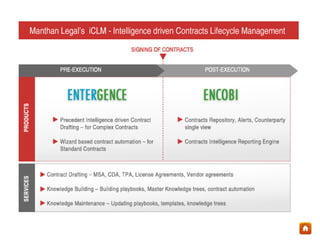
Entergence
What you get = Contract Authoring based on precedent intelligence +
Redlining + Contracts Automation + Sharing + Risk Management + Knowledge
Retention + Standardization across offices + mobility through iPad
About Entergence
•

Entergence is an enterprise contract authoring software that leverages
precedent intelligence

•

It handles drafting of standard and negotiated contracts; simple and complex
contracts

•

Based on “BICEPS” architecture – Base Intelligence Continually Enhancing
Platform Systems”

•

Is built of futuristic design
– Available in cloud, web, enterprise, tablet mode

•

Along with technology, Manthan’s services for contract drafting, contract
automation, knowledge tree building, negotiation rulebook (playbook)
authoring and ongoing maintenance is available for clients to leverage.
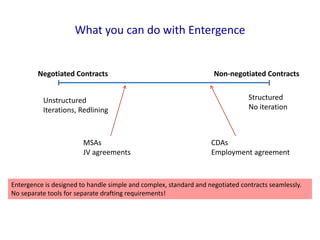
What you can do with Entergence

Negotiated Contracts
Unstructured
Iterations, Redlining

MSAs
JV agreements

Non-negotiated Contracts
Structured
No iteration

CDAs
Employment agreement

Entergence is designed to handle simple and complex, standard and negotiated contracts seamlessly.
No separate tools for separate drafting requirements!
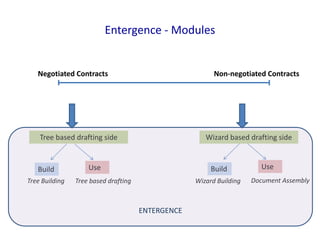
Entergence - Modules

Negotiated Contracts

Non-negotiated Contracts

Tree based drafting side

Build
Tree Building

Wizard based drafting side

Use

Build

Tree based drafting

Wizard Building

ENTERGENCE

Use
Document Assembly
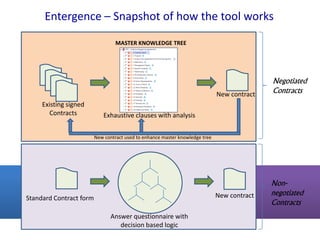
Entergence – Snapshot of how the tool works
MASTER KNOWLEDGE TREE

New contract
Existing signed
Contracts

Negotiated
Contracts

Exhaustive clauses with analysis
New contract used to enhance master knowledge tree

New contract

Standard Contract form
Answer questionnaire with
decision based logic

Nonnegotiated
Contracts
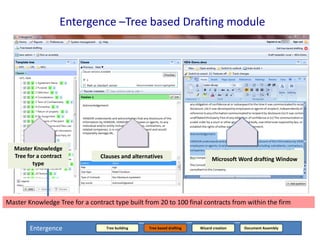
Entergence –Tree based Drafting module

Master Knowledge
Tree for a contract
type

Clauses and alternatives

Microsoft Word drafting Window

Master Knowledge Tree for a contract type built clauses, each having contracts from within the firm
Trees have exhaustive set of from 20 to 100 final several alternate versions`

Entergence

Tree building

Tree based drafting

Wizard creation

Document Assembly
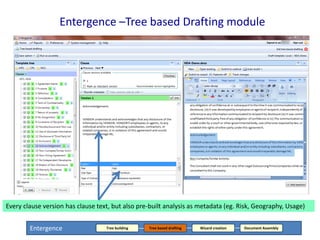
Entergence –Tree based Drafting module

Every clause version has clause text, but also pre-built analysis as metadata (eg. Risk, Geography, Usage)
Entergence

Tree building

Tree based drafting

Wizard creation

Document Assembly
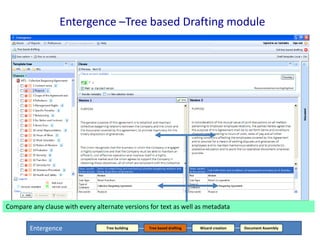
Entergence –Tree based Drafting module

Compare any clause with every alternate versions for text as well as metadata
Entergence

Tree building

Tree based drafting

Wizard creation

Document Assembly
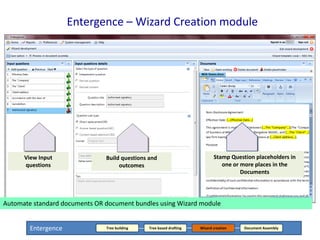
Entergence – Wizard Creation module

View Input
questions

Build questions and
outcomes

Stamp Question placeholders in
one or more places in the
Documents

Automate standard documents OR document bundles using Wizard module
Entergence

Tree building

Tree based drafting

Wizard creation

Document Assembly
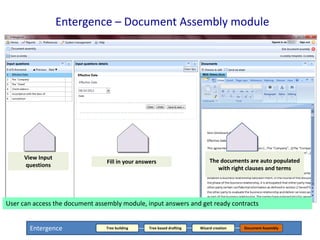
Entergence – Document Assembly module

View Input
questions

Fill in your answers

The documents are auto populated
with right clauses and terms

User can access the document assembly module, input answers and get ready contracts
Entergence

Tree building

Tree based drafting

Wizard creation

Document Assembly
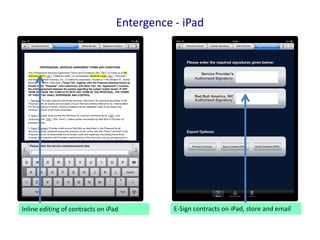
Entergence - iPad

Inline editing of contracts on iPad

E-Sign contracts on iPad, store and email
Post-signature Contracts Intelligence

Encobi
Contracts Intelligence platform
What you get = Contracts repository + Single view of counterparty + Alerts
+ Dynamic Reporting Engine + Business KPI reports + Collobaration
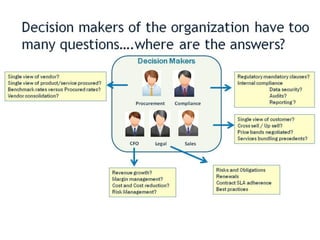
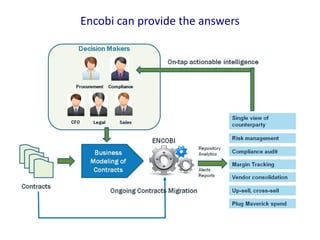
Encobi can provide the answers
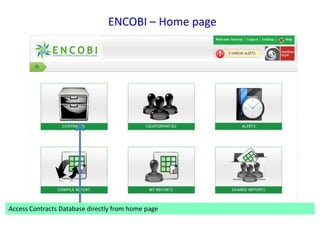
ENCOBI – Home page

Access Contracts Database directly from home page
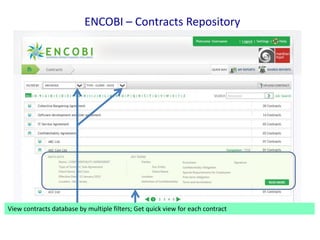
ENCOBI – Contracts Repository

Viewfilters to customize your view of filters; Get quick view for say “Type -> client -> date”
Use contracts database by multiple the contracts database – each contract
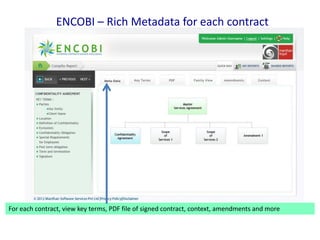
ENCOBI – Rich Metadata for each contract

For each contract, view key terms, PDF file of signed contract, context, amendments and more
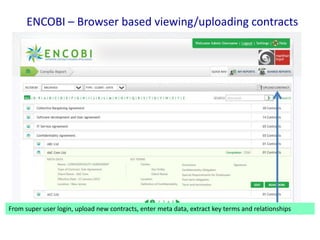
ENCOBI – Browser based viewing/uploading contracts

From super user login, upload new contracts, enter meta data, extract key terms and relationships
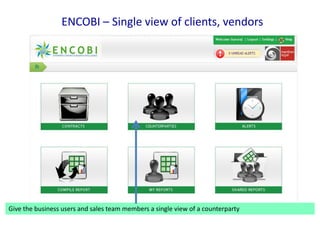
ENCOBI – Single view of clients, vendors

Give the business users and sales team members a single view of a counterparty
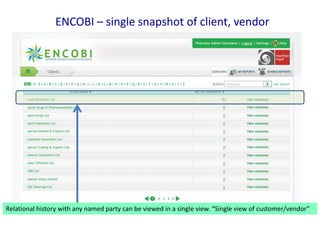
ENCOBI – single snapshot of client, vendor

Relational history with any named party can be viewed in a single view. “Single view of customer/vendor”
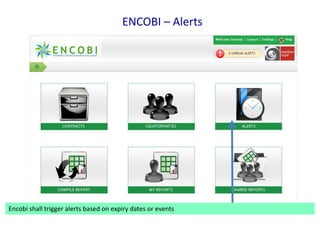
ENCOBI – Alerts

Encobi shall trigger alerts based on expiry dates or events
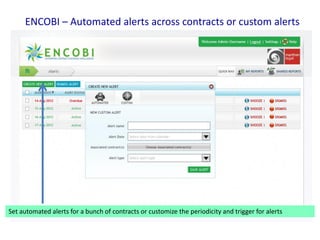
ENCOBI – Automated alerts across contracts or custom alerts

Set automated alerts for a bunch of contracts or customize the periodicity and trigger for alerts
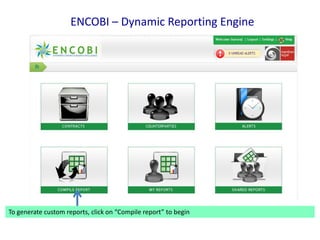
ENCOBI – Dynamic Reporting Engine

To generate custom reports, click on “Compile report” to begin
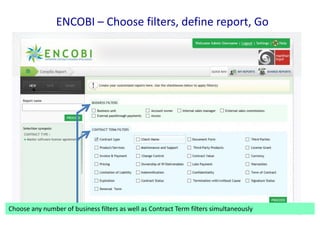
ENCOBI – Choose filters, define report, Go

Choose any number of business filters as well as Contract Term filters simultaneously
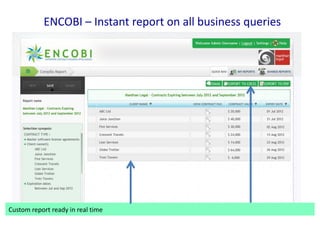
ENCOBI – Instant report on all business queries

Custom generated report can be saved, shared, emailed, exported to Excel or PDF
report ready in real time
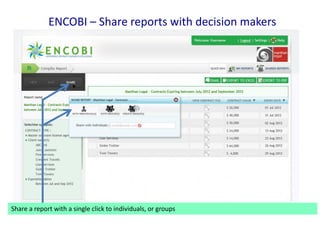
ENCOBI – Share reports with decision makers

Share a report with a single click to individuals, or groups
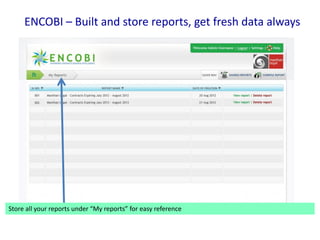
ENCOBI – Built and store reports, get fresh data always

Store all your reports under “My reports” for easy reference
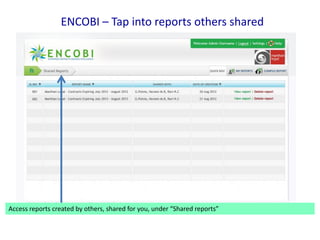
ENCOBI – Tap into reports others shared

Access reports created by others, shared for you, under “Shared reports”
Contact: +91 806 717 1838, piyush.tripathi@manthanlegal.com

Manthan Legal
US | India
www.manthanlegal.com

Manthan Legal's Intelligence driven Contracts Lifecycle Management

  • 1.
    Intelligence driven ContractsLifecycle Management (iCLM) Contact: Piyush Tripathi email : piyush.tripathi@manthanlegal.com Cell: +91 991 615 8658 P (US): 818.306.3814 P (India) : +91 806 717 1838 www.manthanlegal.com
  • 2.
    What was missingin Contracts Management was “Intelligence”, until now. Lets introduce iCLM.
  • 4.
    Pre-signature Contracts Intelligence Entergence Whatyou get = Contract Authoring based on precedent intelligence + Redlining + Contracts Automation + Sharing + Risk Management + Knowledge Retention + Standardization across offices + mobility through iPad
  • 5.
    About Entergence • Entergence isan enterprise contract authoring software that leverages precedent intelligence • It handles drafting of standard and negotiated contracts; simple and complex contracts • Based on “BICEPS” architecture – Base Intelligence Continually Enhancing Platform Systems” • Is built of futuristic design – Available in cloud, web, enterprise, tablet mode • Along with technology, Manthan’s services for contract drafting, contract automation, knowledge tree building, negotiation rulebook (playbook) authoring and ongoing maintenance is available for clients to leverage.
  • 6.
    What you cando with Entergence Negotiated Contracts Unstructured Iterations, Redlining MSAs JV agreements Non-negotiated Contracts Structured No iteration CDAs Employment agreement Entergence is designed to handle simple and complex, standard and negotiated contracts seamlessly. No separate tools for separate drafting requirements!
  • 7.
    Entergence - Modules NegotiatedContracts Non-negotiated Contracts Tree based drafting side Build Tree Building Wizard based drafting side Use Build Tree based drafting Wizard Building ENTERGENCE Use Document Assembly
  • 8.
    Entergence – Snapshotof how the tool works MASTER KNOWLEDGE TREE New contract Existing signed Contracts Negotiated Contracts Exhaustive clauses with analysis New contract used to enhance master knowledge tree New contract Standard Contract form Answer questionnaire with decision based logic Nonnegotiated Contracts
  • 9.
    Entergence –Tree basedDrafting module Master Knowledge Tree for a contract type Clauses and alternatives Microsoft Word drafting Window Master Knowledge Tree for a contract type built clauses, each having contracts from within the firm Trees have exhaustive set of from 20 to 100 final several alternate versions` Entergence Tree building Tree based drafting Wizard creation Document Assembly
  • 10.
    Entergence –Tree basedDrafting module Every clause version has clause text, but also pre-built analysis as metadata (eg. Risk, Geography, Usage) Entergence Tree building Tree based drafting Wizard creation Document Assembly
  • 11.
    Entergence –Tree basedDrafting module Compare any clause with every alternate versions for text as well as metadata Entergence Tree building Tree based drafting Wizard creation Document Assembly
  • 12.
    Entergence – WizardCreation module View Input questions Build questions and outcomes Stamp Question placeholders in one or more places in the Documents Automate standard documents OR document bundles using Wizard module Entergence Tree building Tree based drafting Wizard creation Document Assembly
  • 13.
    Entergence – DocumentAssembly module View Input questions Fill in your answers The documents are auto populated with right clauses and terms User can access the document assembly module, input answers and get ready contracts Entergence Tree building Tree based drafting Wizard creation Document Assembly
  • 14.
    Entergence - iPad Inlineediting of contracts on iPad E-Sign contracts on iPad, store and email
  • 15.
    Post-signature Contracts Intelligence Encobi ContractsIntelligence platform What you get = Contracts repository + Single view of counterparty + Alerts + Dynamic Reporting Engine + Business KPI reports + Collobaration
  • 17.
    Encobi can providethe answers
  • 18.
    ENCOBI – Homepage Access Contracts Database directly from home page
  • 19.
    ENCOBI – ContractsRepository Viewfilters to customize your view of filters; Get quick view for say “Type -> client -> date” Use contracts database by multiple the contracts database – each contract
  • 20.
    ENCOBI – RichMetadata for each contract For each contract, view key terms, PDF file of signed contract, context, amendments and more
  • 21.
    ENCOBI – Browserbased viewing/uploading contracts From super user login, upload new contracts, enter meta data, extract key terms and relationships
  • 22.
    ENCOBI – Singleview of clients, vendors Give the business users and sales team members a single view of a counterparty
  • 23.
    ENCOBI – singlesnapshot of client, vendor Relational history with any named party can be viewed in a single view. “Single view of customer/vendor”
  • 24.
    ENCOBI – Alerts Encobishall trigger alerts based on expiry dates or events
  • 25.
    ENCOBI – Automatedalerts across contracts or custom alerts Set automated alerts for a bunch of contracts or customize the periodicity and trigger for alerts
  • 26.
    ENCOBI – DynamicReporting Engine To generate custom reports, click on “Compile report” to begin
  • 27.
    ENCOBI – Choosefilters, define report, Go Choose any number of business filters as well as Contract Term filters simultaneously
  • 28.
    ENCOBI – Instantreport on all business queries Custom generated report can be saved, shared, emailed, exported to Excel or PDF report ready in real time
  • 29.
    ENCOBI – Sharereports with decision makers Share a report with a single click to individuals, or groups
  • 30.
    ENCOBI – Builtand store reports, get fresh data always Store all your reports under “My reports” for easy reference
  • 31.
    ENCOBI – Tapinto reports others shared Access reports created by others, shared for you, under “Shared reports”
  • 33.
    Contact: +91 806717 1838, piyush.tripathi@manthanlegal.com Manthan Legal US | India www.manthanlegal.com