‘Managing my time’
Year 11 Study Skills Seminar 2
Creating a study timetable
• When do you study best?
• 50 minutes study, 10 minute break
• Not just homework!
• Let’s create one now!
• Share it!
Work flow charts
• Handout
• Do you need to be accountable to someone?
Research Plan Write
You
review
Someone
else
reviews
Submit!
Why is it important to have a good
study space?
• It makes it easier to focus on your work
• It keeps you comfortable in the inevitable long
study sessions
• You associate a space with study (so don’t
study on your bed!)
• You limit your movement away from study
space (and avoid distractions)
Why is it important to have a good
study space?
• Everything you need within reach
• Good seating posture: feet on the ground, spine
straight, chair lower than desk (not on the bed or floor)
• Food and drink (water bottle, snack)
• Stationery – pens, pencil, paper, highlighters,
calculator, rubbish bin
• Good lighting, not in the dark with one bright light – no
shadows (also, use natural light as much as possible –
to assist later sleep)
• A neat and organised work space with only one school
subject in view at a time
Make sure you have…
ELIMINATING OR LIMITING
DISTRACTIONS
Distractions: “Be in control!”
• Manage/Limit
• Eliminate
Distractions
Distraction Limiting / Managing Eliminating
TV • Study away from the TV
• Have everything on your desk
to avoid walking past the TV
• Hide remote
• Lock-up power cord
Phone • Flight mode while studying
• Only check phone at the end
of the session/day
• Turn off and give it
to your folks to look
after
Facebook /
YouTube /
Twitter /
etc.
• Give yourself 5 minutes of this
as a reward, only after 25
minutes of solid work
• Use a timer
• Get rid of notifications
Try getcoldturkey.com
(free for PC) or
“Isolator” for MAC:
http://willmore.eu/sof
tware/isolator
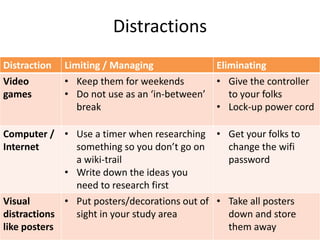
Distractions
Distraction Limiting / Managing Eliminating
Video
games
• Keep them for weekends
• Do not use as an ‘in-between’
break
• Give the controller
to your folks
• Lock-up power cord
Computer /
Internet
• Use a timer when researching
something so you don’t go on
a wiki-trail
• Write down the ideas you
need to research first
• Get your folks to
change the wifi
password
Visual
distractions
like posters
• Put posters/decorations out of
sight in your study area
• Take all posters
down and store
them away
Prioritising
• Wall planners
• To Do Lists
• A - Urgent
• B - Important
• C - Less important

Managing my time

  • 1.
    ‘Managing my time’ Year11 Study Skills Seminar 2
  • 2.
    Creating a studytimetable • When do you study best? • 50 minutes study, 10 minute break • Not just homework! • Let’s create one now! • Share it!
  • 3.
    Work flow charts •Handout • Do you need to be accountable to someone? Research Plan Write You review Someone else reviews Submit!
  • 4.
    Why is itimportant to have a good study space?
  • 5.
    • It makesit easier to focus on your work • It keeps you comfortable in the inevitable long study sessions • You associate a space with study (so don’t study on your bed!) • You limit your movement away from study space (and avoid distractions) Why is it important to have a good study space?
  • 6.
    • Everything youneed within reach • Good seating posture: feet on the ground, spine straight, chair lower than desk (not on the bed or floor) • Food and drink (water bottle, snack) • Stationery – pens, pencil, paper, highlighters, calculator, rubbish bin • Good lighting, not in the dark with one bright light – no shadows (also, use natural light as much as possible – to assist later sleep) • A neat and organised work space with only one school subject in view at a time Make sure you have…
  • 7.
  • 8.
    Distractions: “Be incontrol!” • Manage/Limit • Eliminate
  • 9.
    Distractions Distraction Limiting /Managing Eliminating TV • Study away from the TV • Have everything on your desk to avoid walking past the TV • Hide remote • Lock-up power cord Phone • Flight mode while studying • Only check phone at the end of the session/day • Turn off and give it to your folks to look after Facebook / YouTube / Twitter / etc. • Give yourself 5 minutes of this as a reward, only after 25 minutes of solid work • Use a timer • Get rid of notifications Try getcoldturkey.com (free for PC) or “Isolator” for MAC: http://willmore.eu/sof tware/isolator
  • 10.
    Distractions Distraction Limiting /Managing Eliminating Video games • Keep them for weekends • Do not use as an ‘in-between’ break • Give the controller to your folks • Lock-up power cord Computer / Internet • Use a timer when researching something so you don’t go on a wiki-trail • Write down the ideas you need to research first • Get your folks to change the wifi password Visual distractions like posters • Put posters/decorations out of sight in your study area • Take all posters down and store them away
  • 11.
    Prioritising • Wall planners •To Do Lists • A - Urgent • B - Important • C - Less important