About Me
• CEO of Inversoft
• Software Developer for 16 years
• Keyboard junky
• Agro-efficiency nut
– I take control of meetings when they go too slow
How can I do that?
Brian’s 7 Habits of Insane Productivity
Habit #1
NINJA SQUIRREL!!!
Distractions
• Close email
• Close IM/Skype
• Close web browsers (or hide them)
• Silence phones
– Put them out of reach
• Headphones
Habit #2
Avoid Spinning

• Where do I start?
• I’ll try this one thing
• But what about those other thing
• Really there are like 50 things
• I better plan for all of them (they might interact and overlap)
• Where do I start?
The Fix?
PLAN, PLAN, PLAN SOME MORE
BUT DON’T PLAN FOREVER
Parts, Steps, Pieces
• Always make a plan
• Use a planning tool (we use Pivotal Tracker)
• Break the plan into phases
• Outline as many steps as you can (and make sense)
• Avoid really fine detail
– “In phase 3, I’ll take a coffee break for 15 minutes after I set the
footer color to cornflower blue…”
Example (New Website)
• Phase 1: Pick multiple design tools, rank them and eval
– Build matrix of required and “nice to have” features
– Search for 10 tools
– Reduce set based on features
– Pick 2 tools to evaluate
– Build a single web page in both tools
• Phase 2: Build homepage
– Write copy
– Etc.
Example (New Website)
• Phase 3: Get feedback
– Ask people for feedback
– Capture feedback in matrix
• Phase 4: Implement feedback
– Make changes
• Phase 5: Verify plan is still accurate
– Make changes to plan based on feedback
– Maybe repeat Phase 1-5
• Phase 6: Launch
Habit #3
Meetings: Agenda
• Make an agenda
– Discuss last weeks email activity
– Call out current open leads
– Identify potential closeable leads for this week
– Brainstorm ideas to close leads
– List lost leads and why they are lost
– …
Meetings: Agenda (anal-retentive version)
• Make an agenda
– 0-5 minutes: Discuss last weeks email activity
– 5-7 minutes: Call out current open leads
– 7-10 minutes: Identify potential closeable leads for this week
– 10-12 minutes: Brainstorm ideas to close leads
– 12-15 minutes: List lost leads and why they are lost
– …
Meetings: Duration
• Set meeting duration based on agenda
– Try 15 or 30 minutes instead of 60
– Sometimes 25 minute meetings happen and are okay
– Don’t be afraid to end early
– Don’t be afraid to end late (but only if you have a good reason to)
Meetings: Invites
• Include the right people
– Avoid too many cooks in the kitchen
– Avoid haters (people you know will push back on everything without
cause)
– Think before you send
– Go over the agenda and ensure you have the right people
Meetings: 5 Minute Rule
• 5 minute rule
– After the first 5 minutes, stop
– Anyone who feels they shouldn’t be in the meeting can ask to leave
– The organizer can override only if they absolutely need that person
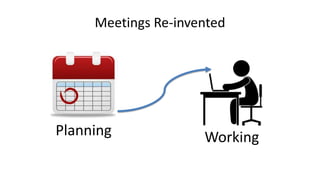
Meetings Re-invented
Planning Working
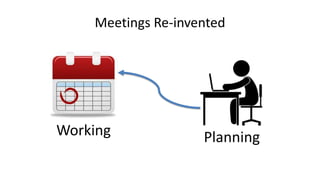
Meetings Re-invented
Working Planning
Sometimes Working
Meetings Work
Pun intended
Habit #4
WAIT FOR IT . . . AHHHHH!!!
Reminders Demo
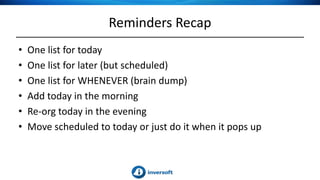
Reminders Recap
• One list for today
• One list for later (but scheduled)
• One list for WHENEVER (brain dump)
• Add today in the morning
• Re-org today in the evening
• Move scheduled to today or just do it when it pops up
Habit #5
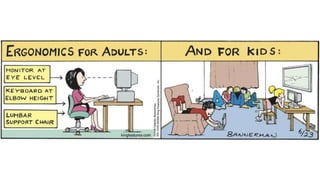
Ergonomics = Productivity
• Crappy chair = lost energy
• Low-res monitor = lost energy
• Bad monitor position = lost energy
• Lame keyboard = lost energy
• Lost energy = slow, tired, and busted
On sale right now for $7,500!!!
Habit #6
OR
In today’s episode of what the $*&@ is for dinner…
Remember this isn’t your last meal!
OR
Make Fast Decisions
• Go with your first thought
• Usually you can change
• Make it and move on
• Embrace the possibility of failure
Speaking of food
Don’t forget to eat!
Habit #7
Speed
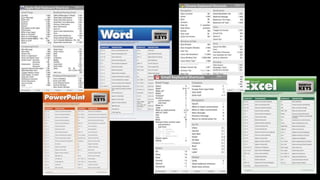
• Pick your tools
• Learn every shortcut
• Learn every menu item
• Learn every concept
• Learn how to be FAST
Mail Demo

Productivity Hacks

  • 4.
    About Me • CEOof Inversoft • Software Developer for 16 years • Keyboard junky • Agro-efficiency nut – I take control of meetings when they go too slow
  • 8.
    How can Ido that?
  • 9.
    Brian’s 7 Habitsof Insane Productivity
  • 10.
  • 12.
  • 15.
    Distractions • Close email •Close IM/Skype • Close web browsers (or hide them) • Silence phones – Put them out of reach • Headphones
  • 16.
  • 18.
    Avoid Spinning • Wheredo I start? • I’ll try this one thing • But what about those other thing • Really there are like 50 things • I better plan for all of them (they might interact and overlap) • Where do I start?
  • 19.
    The Fix? PLAN, PLAN,PLAN SOME MORE BUT DON’T PLAN FOREVER
  • 20.
    Parts, Steps, Pieces •Always make a plan • Use a planning tool (we use Pivotal Tracker) • Break the plan into phases • Outline as many steps as you can (and make sense) • Avoid really fine detail – “In phase 3, I’ll take a coffee break for 15 minutes after I set the footer color to cornflower blue…”
  • 23.
    Example (New Website) •Phase 1: Pick multiple design tools, rank them and eval – Build matrix of required and “nice to have” features – Search for 10 tools – Reduce set based on features – Pick 2 tools to evaluate – Build a single web page in both tools • Phase 2: Build homepage – Write copy – Etc.
  • 24.
    Example (New Website) •Phase 3: Get feedback – Ask people for feedback – Capture feedback in matrix • Phase 4: Implement feedback – Make changes • Phase 5: Verify plan is still accurate – Make changes to plan based on feedback – Maybe repeat Phase 1-5 • Phase 6: Launch
  • 25.
  • 27.
    Meetings: Agenda • Makean agenda – Discuss last weeks email activity – Call out current open leads – Identify potential closeable leads for this week – Brainstorm ideas to close leads – List lost leads and why they are lost – …
  • 28.
    Meetings: Agenda (anal-retentiveversion) • Make an agenda – 0-5 minutes: Discuss last weeks email activity – 5-7 minutes: Call out current open leads – 7-10 minutes: Identify potential closeable leads for this week – 10-12 minutes: Brainstorm ideas to close leads – 12-15 minutes: List lost leads and why they are lost – …
  • 29.
    Meetings: Duration • Setmeeting duration based on agenda – Try 15 or 30 minutes instead of 60 – Sometimes 25 minute meetings happen and are okay – Don’t be afraid to end early – Don’t be afraid to end late (but only if you have a good reason to)
  • 30.
    Meetings: Invites • Includethe right people – Avoid too many cooks in the kitchen – Avoid haters (people you know will push back on everything without cause) – Think before you send – Go over the agenda and ensure you have the right people
  • 31.
    Meetings: 5 MinuteRule • 5 minute rule – After the first 5 minutes, stop – Anyone who feels they shouldn’t be in the meeting can ask to leave – The organizer can override only if they absolutely need that person
  • 32.
  • 33.
  • 34.
  • 35.
  • 36.
    WAIT FOR IT. . . AHHHHH!!!
  • 37.
  • 38.
    Reminders Recap • Onelist for today • One list for later (but scheduled) • One list for WHENEVER (brain dump) • Add today in the morning • Re-org today in the evening • Move scheduled to today or just do it when it pops up
  • 39.
  • 41.
    Ergonomics = Productivity •Crappy chair = lost energy • Low-res monitor = lost energy • Bad monitor position = lost energy • Lame keyboard = lost energy • Lost energy = slow, tired, and busted
  • 43.
    On sale rightnow for $7,500!!!
  • 44.
  • 45.
    OR In today’s episodeof what the $*&@ is for dinner…
  • 46.
    Remember this isn’tyour last meal!
  • 47.
  • 48.
    Make Fast Decisions •Go with your first thought • Usually you can change • Make it and move on • Embrace the possibility of failure
  • 49.
  • 50.
  • 54.
    Speed • Pick yourtools • Learn every shortcut • Learn every menu item • Learn every concept • Learn how to be FAST
  • 55.