Making Presentations BetterHelpful pieces I’ve learned over the years giving several hundred presentations to a wide variety of audiences.http://bit.ly/randsprestipsBy Rand Fishkin, September 2011
Getting Good at PresentationsTakes Serious TimeRand really sucked when he started out.
I was at least this scared
Rule #1:No Bullet Point Slides!Bullet
Points
Kill
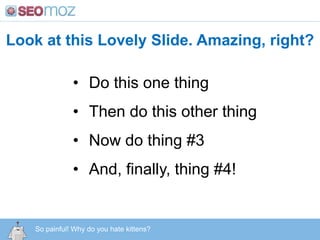
KittensLook at this Lovely Slide. Amazing, right?Do this one thing
Then do this other thing
Now do thing #3
And, finally, thing #4!http:/googleblog.blogspot.com/2010/06/our-new-search-index-caffeine.htmlSo painful! Why do you hate kittens?
Actually, you just pulled this triggerhttp:/googleblog.blogspot.com/2010/06/our-new-search-index-caffeine.htmlYou monster!
Next time, go with 4 separate slideslike these next 4:http:/googleblog.blogspot.com/2010/06/our-new-search-index-caffeine.html
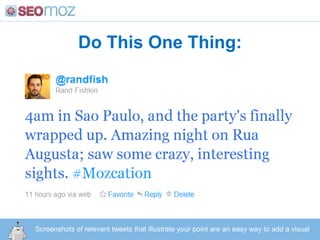
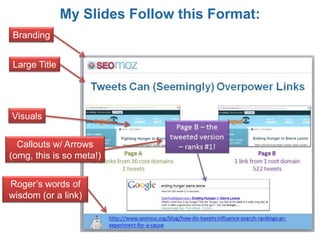
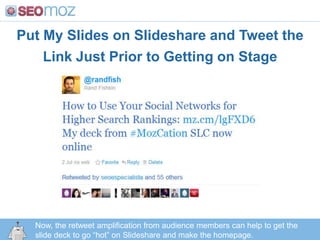
Do This One Thing:http:/googleblog.blogspot.com/2010/06/our-new-search-index-caffeine.htmlScreenshots of relevant tweets that illustrate your point are an easy way to add a visual
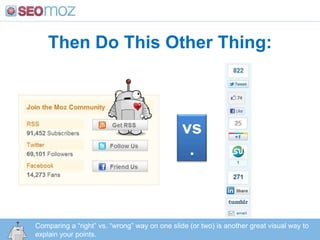
Then Do This Other Thing:vs.Comparing a “right” vs. “wrong” way on one slide (or two) is another great visual way to explain your points.http:/googleblog.blogspot.com/2010/06/our-new-search-index-caffeine.html
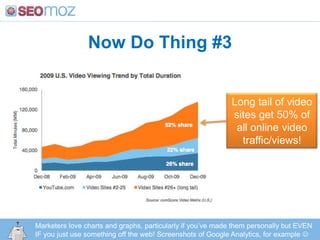
Now Do Thing #3Long tail of video sites get 50% of all online video traffic/views!Marketers love charts and graphs, particularly if you’ve made them personally but EVEN IF you just use something off the web! Screenshots of Google Analytics, for example http:/googleblog.blogspot.com/2010/06/our-new-search-index-caffeine.html
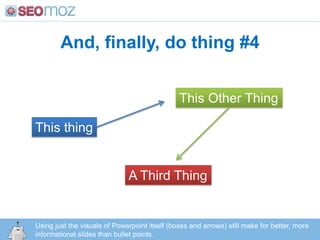
And, finally, do thing #4This Other ThingThis thingA Third ThingUsing just the visuals of Powerpoint itself (boxes and arrows) still make for better, more informational slides than bullet points.http:/googleblog.blogspot.com/2010/06/our-new-search-index-caffeine.html
Rule #2:Make It Actionable!Give me something I can do after seeing your slide that will improve my site/rankings/traffic/marketing
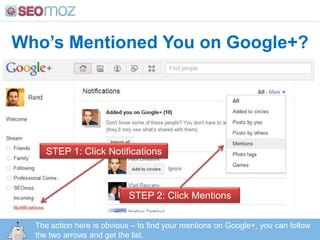
Who’s Mentioned You on Google+?STEP 1: Click NotificationsSTEP 2: Click MentionsThe action here is obvious – to find your mentions on Google+, you can follow the two arrows and get the list.http:/googleblog.blogspot.com/2010/06/our-new-search-index-caffeine.html
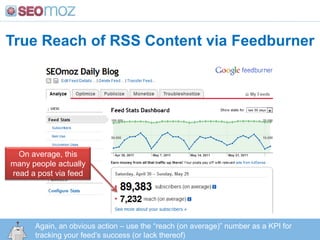
True Reach of RSS Content via FeedburnerOn average, this many people actually read a post via feedAgain, an obvious action – use the “reach (on average)” number as a KPI for tracking your feed’s success (or lack thereof)http:/googleblog.blogspot.com/2010/06/our-new-search-index-caffeine.html
Rule #3:Make the Content Fit the AudienceWhen in doubt, always go for too advanced over too basic (but make sure to research attendees before you make your outline).
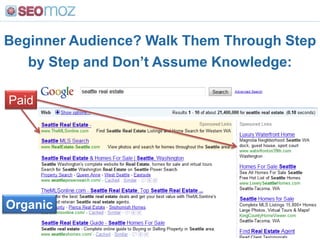
Beginner Audience? Walk Them Through Step by Step and Don’t Assume Knowledge:PaidOrganichttp:/googleblog.blogspot.com/2010/06/our-new-search-index-caffeine.html
Advanced Audience? Share Stuff They Haven’t Heard/Seen Before:http:/googleblog.blogspot.com/2010/06/our-new-search-index-caffeine.htmlMany social marketers won’t yet have seen http://www.findpeopleonplus.com/
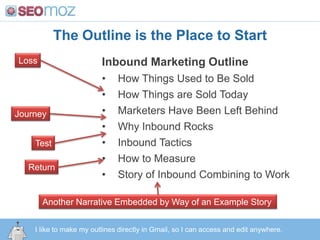
Rule #4:Craft a Narrative ArcLoss -> Journey -> Test -> Return.Just like middle school humanities class.
The Outline is the Place to StartInbound Marketing OutlineHow Things Used to Be Sold
How Things are Sold Today
Marketers Have Been Left Behind
Why Inbound Rocks
Inbound Tactics
How to Measure
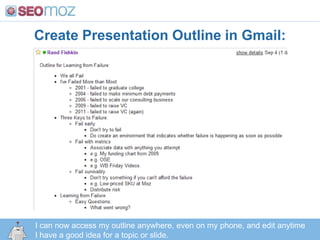
Story of Inbound Combining to WorkLossJourneyTestReturnAnother Narrative Embedded by Way of an Example Storyhttp:/googleblog.blogspot.com/2010/06/our-new-search-index-caffeine.htmlI like to make my outlines directly in Gmail, so I can access and edit anywhere.
Rule #5:Speak from the heart.When you’re passionate about a topic, and have real emotion behind your data/tips, it shines through!
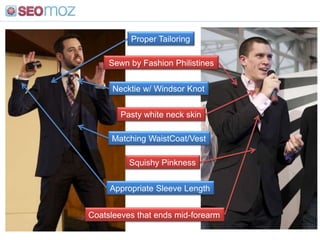
When you’re excited, they’re excited! (and no, you don’t need to wear a suit)
Rule #6:Making fun of the English = OKBollocks me MugglesHogswollop

Making Presentations Better

  • 1.
    Making Presentations BetterHelpfulpieces I’ve learned over the years giving several hundred presentations to a wide variety of audiences.http://bit.ly/randsprestipsBy Rand Fishkin, September 2011
  • 2.
    Getting Good atPresentationsTakes Serious TimeRand really sucked when he started out.
  • 3.
    I was atleast this scared
  • 4.
    Rule #1:No BulletPoint Slides!Bullet
  • 5.
  • 6.
  • 7.
    KittensLook at thisLovely Slide. Amazing, right?Do this one thing
  • 8.
    Then do thisother thing
  • 9.
  • 10.
    And, finally, thing#4!http:/googleblog.blogspot.com/2010/06/our-new-search-index-caffeine.htmlSo painful! Why do you hate kittens?
  • 11.
    Actually, you justpulled this triggerhttp:/googleblog.blogspot.com/2010/06/our-new-search-index-caffeine.htmlYou monster!
  • 12.
    Next time, gowith 4 separate slideslike these next 4:http:/googleblog.blogspot.com/2010/06/our-new-search-index-caffeine.html
  • 13.
    Do This OneThing:http:/googleblog.blogspot.com/2010/06/our-new-search-index-caffeine.htmlScreenshots of relevant tweets that illustrate your point are an easy way to add a visual
  • 14.
    Then Do ThisOther Thing:vs.Comparing a “right” vs. “wrong” way on one slide (or two) is another great visual way to explain your points.http:/googleblog.blogspot.com/2010/06/our-new-search-index-caffeine.html
  • 15.
    Now Do Thing#3Long tail of video sites get 50% of all online video traffic/views!Marketers love charts and graphs, particularly if you’ve made them personally but EVEN IF you just use something off the web! Screenshots of Google Analytics, for example http:/googleblog.blogspot.com/2010/06/our-new-search-index-caffeine.html
  • 16.
    And, finally, dothing #4This Other ThingThis thingA Third ThingUsing just the visuals of Powerpoint itself (boxes and arrows) still make for better, more informational slides than bullet points.http:/googleblog.blogspot.com/2010/06/our-new-search-index-caffeine.html
  • 17.
    Rule #2:Make ItActionable!Give me something I can do after seeing your slide that will improve my site/rankings/traffic/marketing
  • 18.
    Who’s Mentioned Youon Google+?STEP 1: Click NotificationsSTEP 2: Click MentionsThe action here is obvious – to find your mentions on Google+, you can follow the two arrows and get the list.http:/googleblog.blogspot.com/2010/06/our-new-search-index-caffeine.html
  • 19.
    True Reach ofRSS Content via FeedburnerOn average, this many people actually read a post via feedAgain, an obvious action – use the “reach (on average)” number as a KPI for tracking your feed’s success (or lack thereof)http:/googleblog.blogspot.com/2010/06/our-new-search-index-caffeine.html
  • 20.
    Rule #3:Make theContent Fit the AudienceWhen in doubt, always go for too advanced over too basic (but make sure to research attendees before you make your outline).
  • 21.
    Beginner Audience? WalkThem Through Step by Step and Don’t Assume Knowledge:PaidOrganichttp:/googleblog.blogspot.com/2010/06/our-new-search-index-caffeine.html
  • 22.
    Advanced Audience? ShareStuff They Haven’t Heard/Seen Before:http:/googleblog.blogspot.com/2010/06/our-new-search-index-caffeine.htmlMany social marketers won’t yet have seen http://www.findpeopleonplus.com/
  • 23.
    Rule #4:Craft aNarrative ArcLoss -> Journey -> Test -> Return.Just like middle school humanities class.
  • 24.
    The Outline isthe Place to StartInbound Marketing OutlineHow Things Used to Be Sold
  • 25.
    How Things areSold Today
  • 26.
  • 27.
  • 28.
  • 29.
  • 30.
    Story of InboundCombining to WorkLossJourneyTestReturnAnother Narrative Embedded by Way of an Example Storyhttp:/googleblog.blogspot.com/2010/06/our-new-search-index-caffeine.htmlI like to make my outlines directly in Gmail, so I can access and edit anywhere.
  • 31.
    Rule #5:Speak fromthe heart.When you’re passionate about a topic, and have real emotion behind your data/tips, it shines through!
  • 32.
    When you’re excited,they’re excited! (and no, you don’t need to wear a suit)
  • 33.
    Rule #6:Making funof the English = OKBollocks me MugglesHogswollop