Empowerment Technologies
Senior High School Applied - Academic
UNIT 2: ONLINE SAFETY AND ETHICS Quipper
LESSON
1
ENGAG EXPLOR
EXPLAIN EXTEND
EVALUAT
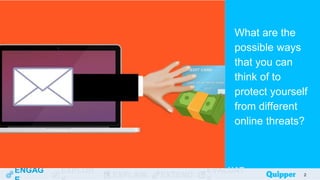
What are the
possible ways
that you can
think of to
protect yourself
from different
online threats?
2
Learning
Objectives
At the end of the
lesson, you should
be able to do the
following:
ENGAG EXPLOR
EXPLAIN EXTEND
EVALUAT 3
● Define the cyber world and its
features.
● Identify and examine different
online threats and dangers.
● Practice various ways to be safe
in the cyber world.
ENGAG EXPLOR
EXPLAIN EXTEND
EVALUAT
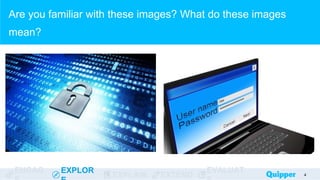
Are you familiar with these images? What do these images
mean?
4
ENGAG EXPLOR
EXPLAIN EXTEND
EVALUAT
What is a password?
● a combination of texts, numbers, and/or
special characters to secure accounts
● can be weak (e.g. names, common words,
birthdates, etc.) or strong (combination of all
characters)
5
ENGAG EXPLOR
EXPLAIN EXTEND
EVALUAT
1. Study the passwords in the succeeding slides.
2. Classify each password as either a weak password or a
strong password.
3. Write your answer in the table.
Classifying the Password
6
ENGAG EXPLOR
EXPLAIN EXTEND
EVALUAT
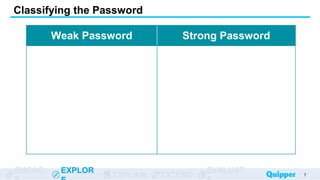
Classifying the Password
7
Weak Password Strong Password
ENGAG EXPLOR
EXPLAIN EXTEND
EVALUAT
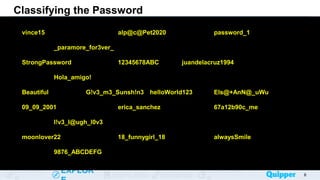
Classifying the Password
8
vince15 alp@c@Pet2020 password_1
_paramore_for3ver_
StrongPassword 12345678ABC juandelacruz1994
Hola_amigo!
Beautiful G!v3_m3_Sunsh!n3 helloWorld123 Els@+AnN@_uWu
09_09_2001 erica_sanchez 67a12b90c_me
l!v3_l@ugh_l0v3
moonlover22 18_funnygirl_18 alwaysSmile
9876_ABCDEFG
ENGAG EXPLOR
EXPLAIN EXTEND
EVALUAT
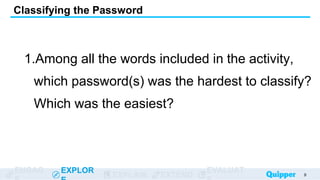
1.Among all the words included in the activity,
which password(s) was the hardest to classify?
Which was the easiest?
Classifying the Password
9
ENGAG EXPLOR
EXPLAIN EXTEND
EVALUAT
1.What suggestions can you give to protect
online accounts aside from creating a strong
password?
Classifying the Password
10
ENGAG EXPLOR
EXPLAIN EXTEND
EVALUAT
1.x
2.What would be the effect of not having strong
security and password for your online
accounts?
Classifying the Password
11
ENGAG EXPLOR
EXPLAIN EXTEND
EVALUAT
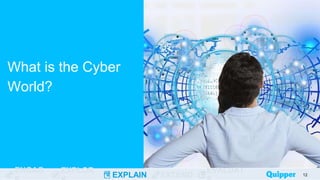
What is the Cyber
World?
12
ENGAG EXPLOR
EXPLAIN EXTEND
EVALUAT
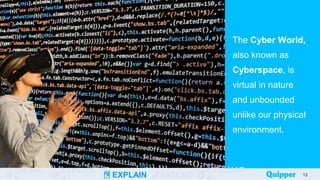
The Cyber World,
also known as
Cyberspace, is
virtual in nature
and unbounded
unlike our physical
environment.
13
ENGAG EXPLOR
EXPLAIN EXTEND
EVALUAT
What are the
features of the
Cyber World?
14
ENGAG EXPLOR
EXPLAIN EXTEND
EVALUAT
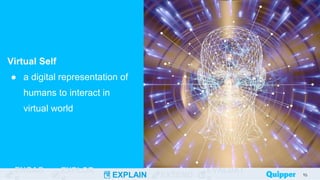
Virtual Self
● a digital representation of
humans to interact in
virtual world
15
15
ENGAG EXPLOR
EXPLAIN EXTEND
EVALUAT
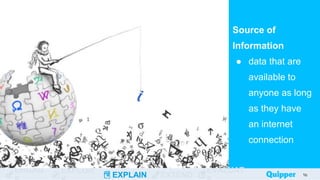
Source of
Information
● data that are
available to
anyone as long
as they have
an internet
connection
16
16
ENGAG EXPLOR
EXPLAIN EXTEND
EVALUAT
Social
Interaction
● digital
socialization
using chat,
blogs, vlogs,
online games,
etc.
17
ENGAG EXPLOR
EXPLAIN EXTEND
EVALUAT
Tools for Social
Interaction
● Facebook
● Twitter
● Tumblr
● Instagram
● Online games
(Mobile
Legends,
COL, etc.)
18
ENGAG EXPLOR
EXPLAIN EXTEND
EVALUAT
Dangers and
Threats on the
Internet
19
ENGAG EXPLOR
EXPLAIN EXTEND
EVALUAT
Hacking
● stealing and accessing
private information of
organizations such as
government systems,
business systems, etc.
20
ENGAG EXPLOR
EXPLAIN EXTEND
EVALUAT
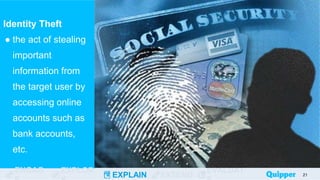
Identity Theft
● the act of stealing
important
information from
the target user by
accessing online
accounts such as
bank accounts,
etc.
21
ENGAG EXPLOR
EXPLAIN EXTEND
EVALUAT
Internet
Predators
● individuals who
lure children or
teenagers to
engage in
sexual acts or
relationships
online
22
22
ENGAG EXPLOR
EXPLAIN EXTEND
EVALUAT
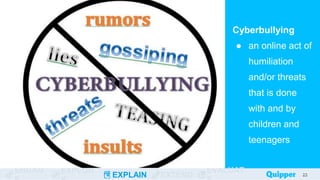
Cyberbullying
● an online act of
humiliation
and/or threats
that is done
with and by
children and
teenagers
23
23
ENGAG EXPLOR
EXPLAIN EXTEND
EVALUAT
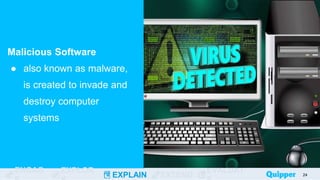
Malicious Software
● also known as malware,
is created to invade and
destroy computer
systems
24
ENGAG EXPLOR
EXPLAIN EXTEND
EVALUAT
Types of
Malware
● virus
● worms
● trojan
● spyware
● adware
● ransomware
● fileless
malware
25
26
About the dangers and threats you
may encounter in cyberspace, can
you think of any ways to avoid these
threats?
ENGAG EXPLOR
EXPLAIN EXTEND
EVALUAT
Stay Safe Online
How can you safeguard your virtual identity?
27
ENGAG EXPLOR
EXPLAIN EXTEND
EVALUAT
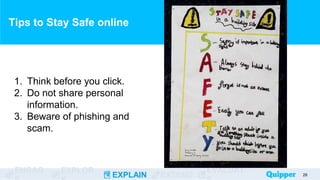
Tips to Stay Safe online
28
1. Think before you click.
2. Do not share personal
information.
3. Beware of phishing and
scam.
ENGAG EXPLOR
EXPLAIN EXTEND
EVALUAT
Tips to Stay Safe online
29
4. Keep your device secure.
5. Never share passwords.
6. Never agree to meet anyone
you just met online.
ENGAG EXPLOR
EXPLAIN EXTEND
EVALUAT
Tips to Stay Safe online
30
7. Tell your guardian if
something goes wrong online.
8. Cover your webcam when not
in used.
9. Use a strong password.
10.Make sure to logout your
account in public devices.
ENGAG EXPLOR
EXPLAIN EXTEND
EVALUAT
Practice 1
Listed on the next slide are
different dangers and threats on
the Internet. Classify the
following items as: unsuitable
content, crime-related, privacy-
related, or malicious software-
related.
31
ENGAG EXPLOR
EXPLAIN EXTEND
EVALUAT 32
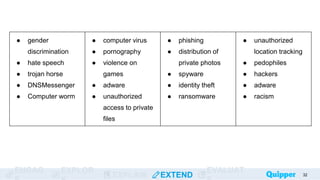
● gender
discrimination
● hate speech
● trojan horse
● DNSMessenger
● Computer worm
● computer virus
● pornography
● violence on
games
● adware
● unauthorized
access to private
files
● phishing
● distribution of
private photos
● spyware
● identity theft
● ransomware
● unauthorized
location tracking
● pedophiles
● hackers
● adware
● racism
ENGAG EXPLOR
EXPLAIN EXTEND
EVALUAT 33
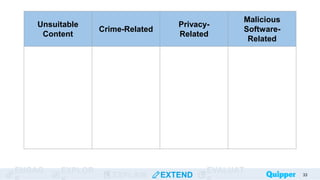
Unsuitable
Content
Crime-Related
Privacy-
Related
Malicious
Software-
Related
ENGAG EXPLOR
EXPLAIN EXTEND
EVALUAT 34
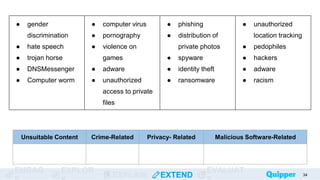
Unsuitable Content Crime-Related Privacy- Related Malicious Software-Related
● gender
discrimination
● hate speech
● trojan horse
● DNSMessenger
● Computer worm
● computer virus
● pornography
● violence on
games
● adware
● unauthorized
access to private
files
● phishing
● distribution of
private photos
● spyware
● identity theft
● ransomware
● unauthorized
location tracking
● pedophiles
● hackers
● adware
● racism
ENGAG EXPLOR
EXPLAIN EXTEND
EVALUAT
Practice 2
Study the situations on the
next slide. Choose two (2)
situations and describe
what you would do in each
in order to be safe.
35
ENGAG EXPLOR
EXPLAIN EXTEND
EVALUAT
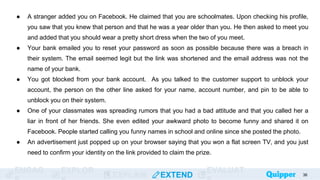
● A stranger added you on Facebook. He claimed that you are schoolmates. Upon checking his profile,
you saw that you knew that person and that he was a year older than you. He then asked to meet you
and added that you should wear a pretty short dress when the two of you meet.
● Your bank emailed you to reset your password as soon as possible because there was a breach in
their system. The email seemed legit but the link was shortened and the email address was not the
name of your bank.
● You got blocked from your bank account. As you talked to the customer support to unblock your
account, the person on the other line asked for your name, account number, and pin to be able to
unblock you on their system.
● One of your classmates was spreading rumors that you had a bad attitude and that you called her a
liar in front of her friends. She even edited your awkward photo to become funny and shared it on
Facebook. People started calling you funny names in school and online since she posted the photo.
● An advertisement just popped up on your browser saying that you won a flat screen TV, and you just
need to confirm your identity on the link provided to claim the prize.
36
ENGAG EXPLOR
EXPLAIN EXTEND
EVALUAT 37
Situation Your Response
ENGAG EXPLOR
EXPLAIN EXTEND
EVALUAT
ENGAG EXPLOR
EXPLAIN EXTEND
EVALUAT
Answer the following
completely in your own
words:
1. What is the cyber
world?
2. What are the main
features of the cyber
world and how can we
use these features?
38
ENGAG EXPLOR
EXPLAIN EXTEND
EVALUAT
ENGAG EXPLOR
EXPLAIN EXTEND
EVALUAT
Answer the following
completely in your own
words:
Give three (3) dangers on
the Internet and explain
how each one can harm
you.
39
ENGAG EXPLOR
EXPLAIN EXTEND
EVALUAT
ENGAG EXPLOR
EXPLAIN EXTEND
EVALUAT
Answer the following
comprehensively:
How useful is the Internet
in your daily life? Does it
always benefit you?
40
Wrap Up
The cyber world allows us to navigate through a
virtual world, interact with other people through
the use of the internet, and retrieve data from the
vast information available online.
The Internet is very powerful but along with these
advancements, we can encounter risks such as
exposure to unsuitable content, crime-related
dangers, privacy-related dangers, and
malicious software.
41
Wrap Up
Being a generation of technology-dependent
human beings, we need to be more careful on
the internet to avoid risks. We protect ourselves
by simply creating strong passwords, and by
avoiding sharing personal information with
others, especially with strangers.
42
Bibliography
43
“About the Cyber World.” ICT Connection. https://ictconnection.moe.edu.sg/cyber-
wellness/cyber-wellness-101/about-the-cyber-world (accessed February 21,
2020).
Ericksen, Kristina. “Your Digital Footprint: What Is It and How Can You Manage It?”
Your Digital Footprint: What Is It and How Can You Manage It? | Rasmussen
College, 16 May 2018. https://www.rasmussen.edu/student-experience/college-
life/what-is-digital-footprint/
“Guidelines for Strong Passwords.” Information Technology Services Guidelines for
Strong Passwords Comments.
https://its.lafayette.edu/policies/strongpasswords/ (accessed February 21,
2020).
“How to Stay Safe Online.” Bullying UK. https://www.bullying.co.uk/cyberbullying/how-
to-stay-safe-online/ (accessed February 22, 2020).
Bibliography
44
Kent, Germany. “You Are What You Tweet Quotes by Germany Kent.” Goodreads.
Goodreads. Accessed February 22, 2020.
https://www.goodreads.com/work/quotes/45331179-you-are-what-you-tweet-
harness-the-power-of-twitter-to-create-a-happier
Kim, Seungho, Seo, Seung-a, and Lee, Insook . “Essential Characteristics of
Cyberspace and Analysis of Cyber Educational Institutions”. Accessed February
21, 2020.
https://pdfs.semanticscholar.org/df41/ccc22e02a53f05613bbcb1ab5ecda71ef07
6.pdf
Sowells, Julia. “8 Different Types of Malware.” United States Cybersecurity Magazine,
3 Aug. 2018. https://www.uscybersecurity.net/malware/
“Staying Safe Online.” Childline. Accessed February 22, 2020.
https://www.childline.org.uk/info-advice/bullying-abuse-safety/online-mobile-
safety/staying-safe-online/
Volkmann, Matthew J. “Internet Dangers.” UIowa Wiki. Accessed February 21, 2020.
https://wiki.uiowa.edu/display/edtech/Internet+Dangers
Bibliography
45
“What Is Malware? - Definition and Examples.” Cisco. Cisco, January 8, 2020.
https://www.cisco.com/c/en/us/products/security/advanced-malware-
protection/what-is-malware.html#~related-topics

MAKING ONE SELF SAFE IN THE CYBER WORLD.

  • 1.
    Empowerment Technologies Senior HighSchool Applied - Academic UNIT 2: ONLINE SAFETY AND ETHICS Quipper LESSON 1
  • 2.
    ENGAG EXPLOR EXPLAIN EXTEND EVALUAT Whatare the possible ways that you can think of to protect yourself from different online threats? 2
  • 3.
    Learning Objectives At the endof the lesson, you should be able to do the following: ENGAG EXPLOR EXPLAIN EXTEND EVALUAT 3 ● Define the cyber world and its features. ● Identify and examine different online threats and dangers. ● Practice various ways to be safe in the cyber world.
  • 4.
    ENGAG EXPLOR EXPLAIN EXTEND EVALUAT Areyou familiar with these images? What do these images mean? 4
  • 5.
    ENGAG EXPLOR EXPLAIN EXTEND EVALUAT Whatis a password? ● a combination of texts, numbers, and/or special characters to secure accounts ● can be weak (e.g. names, common words, birthdates, etc.) or strong (combination of all characters) 5
  • 6.
    ENGAG EXPLOR EXPLAIN EXTEND EVALUAT 1.Study the passwords in the succeeding slides. 2. Classify each password as either a weak password or a strong password. 3. Write your answer in the table. Classifying the Password 6
  • 7.
    ENGAG EXPLOR EXPLAIN EXTEND EVALUAT Classifyingthe Password 7 Weak Password Strong Password
  • 8.
    ENGAG EXPLOR EXPLAIN EXTEND EVALUAT Classifyingthe Password 8 vince15 alp@c@Pet2020 password_1 _paramore_for3ver_ StrongPassword 12345678ABC juandelacruz1994 Hola_amigo! Beautiful G!v3_m3_Sunsh!n3 helloWorld123 Els@+AnN@_uWu 09_09_2001 erica_sanchez 67a12b90c_me l!v3_l@ugh_l0v3 moonlover22 18_funnygirl_18 alwaysSmile 9876_ABCDEFG
  • 9.
    ENGAG EXPLOR EXPLAIN EXTEND EVALUAT 1.Amongall the words included in the activity, which password(s) was the hardest to classify? Which was the easiest? Classifying the Password 9
  • 10.
    ENGAG EXPLOR EXPLAIN EXTEND EVALUAT 1.Whatsuggestions can you give to protect online accounts aside from creating a strong password? Classifying the Password 10
  • 11.
    ENGAG EXPLOR EXPLAIN EXTEND EVALUAT 1.x 2.Whatwould be the effect of not having strong security and password for your online accounts? Classifying the Password 11
  • 12.
  • 13.
    ENGAG EXPLOR EXPLAIN EXTEND EVALUAT TheCyber World, also known as Cyberspace, is virtual in nature and unbounded unlike our physical environment. 13
  • 14.
    ENGAG EXPLOR EXPLAIN EXTEND EVALUAT Whatare the features of the Cyber World? 14
  • 15.
    ENGAG EXPLOR EXPLAIN EXTEND EVALUAT VirtualSelf ● a digital representation of humans to interact in virtual world 15 15
  • 16.
    ENGAG EXPLOR EXPLAIN EXTEND EVALUAT Sourceof Information ● data that are available to anyone as long as they have an internet connection 16 16
  • 17.
    ENGAG EXPLOR EXPLAIN EXTEND EVALUAT Social Interaction ●digital socialization using chat, blogs, vlogs, online games, etc. 17
  • 18.
    ENGAG EXPLOR EXPLAIN EXTEND EVALUAT Toolsfor Social Interaction ● Facebook ● Twitter ● Tumblr ● Instagram ● Online games (Mobile Legends, COL, etc.) 18
  • 19.
    ENGAG EXPLOR EXPLAIN EXTEND EVALUAT Dangersand Threats on the Internet 19
  • 20.
    ENGAG EXPLOR EXPLAIN EXTEND EVALUAT Hacking ●stealing and accessing private information of organizations such as government systems, business systems, etc. 20
  • 21.
    ENGAG EXPLOR EXPLAIN EXTEND EVALUAT IdentityTheft ● the act of stealing important information from the target user by accessing online accounts such as bank accounts, etc. 21
  • 22.
    ENGAG EXPLOR EXPLAIN EXTEND EVALUAT Internet Predators ●individuals who lure children or teenagers to engage in sexual acts or relationships online 22 22
  • 23.
    ENGAG EXPLOR EXPLAIN EXTEND EVALUAT Cyberbullying ●an online act of humiliation and/or threats that is done with and by children and teenagers 23 23
  • 24.
    ENGAG EXPLOR EXPLAIN EXTEND EVALUAT MaliciousSoftware ● also known as malware, is created to invade and destroy computer systems 24
  • 25.
    ENGAG EXPLOR EXPLAIN EXTEND EVALUAT Typesof Malware ● virus ● worms ● trojan ● spyware ● adware ● ransomware ● fileless malware 25
  • 26.
    26 About the dangersand threats you may encounter in cyberspace, can you think of any ways to avoid these threats?
  • 27.
    ENGAG EXPLOR EXPLAIN EXTEND EVALUAT StaySafe Online How can you safeguard your virtual identity? 27
  • 28.
    ENGAG EXPLOR EXPLAIN EXTEND EVALUAT Tipsto Stay Safe online 28 1. Think before you click. 2. Do not share personal information. 3. Beware of phishing and scam.
  • 29.
    ENGAG EXPLOR EXPLAIN EXTEND EVALUAT Tipsto Stay Safe online 29 4. Keep your device secure. 5. Never share passwords. 6. Never agree to meet anyone you just met online.
  • 30.
    ENGAG EXPLOR EXPLAIN EXTEND EVALUAT Tipsto Stay Safe online 30 7. Tell your guardian if something goes wrong online. 8. Cover your webcam when not in used. 9. Use a strong password. 10.Make sure to logout your account in public devices.
  • 31.
    ENGAG EXPLOR EXPLAIN EXTEND EVALUAT Practice1 Listed on the next slide are different dangers and threats on the Internet. Classify the following items as: unsuitable content, crime-related, privacy- related, or malicious software- related. 31
  • 32.
    ENGAG EXPLOR EXPLAIN EXTEND EVALUAT32 ● gender discrimination ● hate speech ● trojan horse ● DNSMessenger ● Computer worm ● computer virus ● pornography ● violence on games ● adware ● unauthorized access to private files ● phishing ● distribution of private photos ● spyware ● identity theft ● ransomware ● unauthorized location tracking ● pedophiles ● hackers ● adware ● racism
  • 33.
    ENGAG EXPLOR EXPLAIN EXTEND EVALUAT33 Unsuitable Content Crime-Related Privacy- Related Malicious Software- Related
  • 34.
    ENGAG EXPLOR EXPLAIN EXTEND EVALUAT34 Unsuitable Content Crime-Related Privacy- Related Malicious Software-Related ● gender discrimination ● hate speech ● trojan horse ● DNSMessenger ● Computer worm ● computer virus ● pornography ● violence on games ● adware ● unauthorized access to private files ● phishing ● distribution of private photos ● spyware ● identity theft ● ransomware ● unauthorized location tracking ● pedophiles ● hackers ● adware ● racism
  • 35.
    ENGAG EXPLOR EXPLAIN EXTEND EVALUAT Practice2 Study the situations on the next slide. Choose two (2) situations and describe what you would do in each in order to be safe. 35
  • 36.
    ENGAG EXPLOR EXPLAIN EXTEND EVALUAT ●A stranger added you on Facebook. He claimed that you are schoolmates. Upon checking his profile, you saw that you knew that person and that he was a year older than you. He then asked to meet you and added that you should wear a pretty short dress when the two of you meet. ● Your bank emailed you to reset your password as soon as possible because there was a breach in their system. The email seemed legit but the link was shortened and the email address was not the name of your bank. ● You got blocked from your bank account. As you talked to the customer support to unblock your account, the person on the other line asked for your name, account number, and pin to be able to unblock you on their system. ● One of your classmates was spreading rumors that you had a bad attitude and that you called her a liar in front of her friends. She even edited your awkward photo to become funny and shared it on Facebook. People started calling you funny names in school and online since she posted the photo. ● An advertisement just popped up on your browser saying that you won a flat screen TV, and you just need to confirm your identity on the link provided to claim the prize. 36
  • 37.
    ENGAG EXPLOR EXPLAIN EXTEND EVALUAT37 Situation Your Response
  • 38.
    ENGAG EXPLOR EXPLAIN EXTEND EVALUAT ENGAGEXPLOR EXPLAIN EXTEND EVALUAT Answer the following completely in your own words: 1. What is the cyber world? 2. What are the main features of the cyber world and how can we use these features? 38
  • 39.
    ENGAG EXPLOR EXPLAIN EXTEND EVALUAT ENGAGEXPLOR EXPLAIN EXTEND EVALUAT Answer the following completely in your own words: Give three (3) dangers on the Internet and explain how each one can harm you. 39
  • 40.
    ENGAG EXPLOR EXPLAIN EXTEND EVALUAT ENGAGEXPLOR EXPLAIN EXTEND EVALUAT Answer the following comprehensively: How useful is the Internet in your daily life? Does it always benefit you? 40
  • 41.
    Wrap Up The cyberworld allows us to navigate through a virtual world, interact with other people through the use of the internet, and retrieve data from the vast information available online. The Internet is very powerful but along with these advancements, we can encounter risks such as exposure to unsuitable content, crime-related dangers, privacy-related dangers, and malicious software. 41
  • 42.
    Wrap Up Being ageneration of technology-dependent human beings, we need to be more careful on the internet to avoid risks. We protect ourselves by simply creating strong passwords, and by avoiding sharing personal information with others, especially with strangers. 42
  • 43.
    Bibliography 43 “About the CyberWorld.” ICT Connection. https://ictconnection.moe.edu.sg/cyber- wellness/cyber-wellness-101/about-the-cyber-world (accessed February 21, 2020). Ericksen, Kristina. “Your Digital Footprint: What Is It and How Can You Manage It?” Your Digital Footprint: What Is It and How Can You Manage It? | Rasmussen College, 16 May 2018. https://www.rasmussen.edu/student-experience/college- life/what-is-digital-footprint/ “Guidelines for Strong Passwords.” Information Technology Services Guidelines for Strong Passwords Comments. https://its.lafayette.edu/policies/strongpasswords/ (accessed February 21, 2020). “How to Stay Safe Online.” Bullying UK. https://www.bullying.co.uk/cyberbullying/how- to-stay-safe-online/ (accessed February 22, 2020).
  • 44.
    Bibliography 44 Kent, Germany. “YouAre What You Tweet Quotes by Germany Kent.” Goodreads. Goodreads. Accessed February 22, 2020. https://www.goodreads.com/work/quotes/45331179-you-are-what-you-tweet- harness-the-power-of-twitter-to-create-a-happier Kim, Seungho, Seo, Seung-a, and Lee, Insook . “Essential Characteristics of Cyberspace and Analysis of Cyber Educational Institutions”. Accessed February 21, 2020. https://pdfs.semanticscholar.org/df41/ccc22e02a53f05613bbcb1ab5ecda71ef07 6.pdf Sowells, Julia. “8 Different Types of Malware.” United States Cybersecurity Magazine, 3 Aug. 2018. https://www.uscybersecurity.net/malware/ “Staying Safe Online.” Childline. Accessed February 22, 2020. https://www.childline.org.uk/info-advice/bullying-abuse-safety/online-mobile- safety/staying-safe-online/ Volkmann, Matthew J. “Internet Dangers.” UIowa Wiki. Accessed February 21, 2020. https://wiki.uiowa.edu/display/edtech/Internet+Dangers
  • 45.
    Bibliography 45 “What Is Malware?- Definition and Examples.” Cisco. Cisco, January 8, 2020. https://www.cisco.com/c/en/us/products/security/advanced-malware- protection/what-is-malware.html#~related-topics

Editor's Notes

  • #3 Ano ang mga posibleng paraan na maiisip mo para protektahan ang iyong sarili mula sa iba't ibang banta sa online?
  • #5 note to teacher:
  • #14 Social networking sites such as Facebook, Twitter, and Instagram are examples of cyberspace where people can connect and communicate with each other, regardless of their physical location. Cyberspace is where online communication happens. If you've spent time chatting with friends on the Internet, you've been in cyberspace. Ang cyberspace ay kung saan nangyayari ang online na komunikasyon. Kung gumugol ka ng oras sa pakikipag-chat sa mga kaibigan sa Internet, ikaw ay nasa cyberspace.
  • #16 A virtual self is a computer based replica of a person's self which is the form, platform or profile used to explore the virtual world independently.
  • #17 data na available sa kahit sino basta may internet connection sila
  • #18 A blog is very similar to a website, where one can find content regarding any topic in a written/text format, along with images, gifs, etc. A vlog, on the other hand, consists of video content published on any topic. There are various blogging and vlogging platforms out there that support both paid and free domains.
  • #23 Lure – mang aakit
  • #29 Phishing is a type of social engineering attack often used to steal user data, including login credentials and credit card numbers. It occurs when an attacker, masquerading as a trusted entity, dupes a victim into opening an email, instant message, or text message.
  • #39 Sample answers: 1. The cyber world, also known as cyberspace, is composed of complex interconnected networks that provides a virtual environment for different users to interact with each other. 2. The main features of the Cyber World are virtual world, interaction, and information source. We can use the virtual world as a “second life space” where we can make a digital representation of ourselves. The interaction feature on the other hand lets us have social interactions such as chatting, sharing ideas on an online community, teaming up with players on an online-game, or finding people with similar interests. Lastly, the cyber world contains a lot of information that is readily available for us making it a major information source.
  • #40 Students answer may vary.
  • #41 Answers may vary but you may expect them to apply examples from the discussed lesson.