A Software requirements specification
On
Clean India Mission
Submitted in Partial Fulfillment for the Award of Degree of Bachelor of Technology in
Computer Science and Engineering from Rajasthan Technical University, Kota
MENTOR: SUBMITTED BY:
Mrs. Ponam Varshney Mangal (14ESKCS0)
(Dept. of Computer Science & Engineering) Panka Agarwal
COORDINATOR:
Mr. Basant Agarwal
(Dept. of Computer Science & Engineering)
DEPARTMENT OF COMPUTER SCIENCE & ENGINEERING
SWAMI KESHWANAND INSTITUTE OF TECHNOLOGY,
MANAGEMENT & GRAMOTHAN
Ramnagaria (Jagatpura), Jaipur – 302017
Table of Contents
1. Introduction
1.1 Methodology
1.2 Purpose
1.3 Scope
1.4 Definitions, Acronyms and Abbreviations
1.5 Tools Used
1.6 References
1.7 Technologies to be used
1.8 Overview
2. Overall Description
2.1 Product Perspective
2.2 Software Interface
2.3 Hardware Interface
2.4 Communication Interface
2.5 Constraints
2.6 E-R Diagram
2.7 Use-Case Model Survey
2.8 Architecture Design
2.9 Database Design
3. Specific Requirements
3.1 Use-Case Reports
3.2 Activity Diagrams
3.3 Sequence Diagrams
Introduction
1.1 Methodology
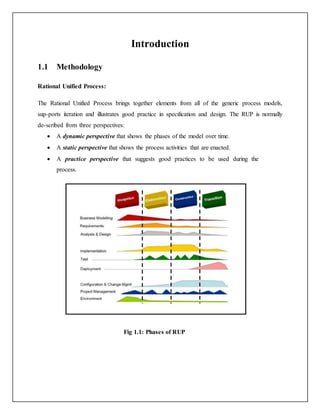
Rational Unified Process:
The Rational Unified Process brings together elements from all of the generic process models,
sup-ports iteration and illustrates good practice in specification and design. The RUP is normally
de-scribed from three perspectives:
 A dynamic perspective that shows the phases of the model over time.
 A static perspective that shows the process activities that are enacted.
 A practice perspective that suggests good practices to be used during the
process.
Fig 1.1: Phases of RUP
The different phases in RUP are:
 Inception
The goal of the inception phase is to establish a business case for the system. Identifying
all external entities that will interact with the system and defining these interactions. This
information is used to assess the contribution of system to business.
 Elaboration
The goals of the elaboration phase are to develop an understanding of the problem
domain, establish an architectural framework, develop project plan and identify key
project risks.
 Construction
This phase is concerned with system design, programming and testing. Parts of the
system are developed in parallel and integrated during this phase.
 Transition
This is the final phase of RUP and is concerned with moving the system from the
development com-munity to the user community and making it work in real environment.
1.2 Purpose
It is a platform in which many people can interact with officials of their particular areas
of Clean India mission and can upload images if they find any dirt nearby them so that officials
send their team for clean that area.
Scope
 There are three basic users –People, Admin(Official).
 All users have their own profiles.
 Interaction between people through comments.
 People can upload pictures of their area’s garbage.
 Ofiicials will get update via app knowing about complaints of people related to Clean
India mission.
1.3 Definitions, Acronyms and Abbreviations
 Admin (Administrator)
He has the authority to modify system interface and grant permisiion to various users.
 Firebase
It is a database management system that provides a flexible and efficient database
platform to maintain records of patient, student etc.
 UML (Unified Modeling Language)
It is a standard language for writing software blueprints. The UML may be used to
visualize, specify, construct and document
 XML (Extensible Markup Language)
It is a text based format that let developers describe, deliver and exchange structured data
between a range of applications to client for display and manipulation.
1.4 Tools Used
1.5.1
 ANDROID
One of the most widely used mobile OS these days is ANDROID. Android is a software
Bunch comprising not only operating system but also middleware and key
applications. Android Inc was founded in Palo Alto of California, U.S. by Andy Rubin,
Rich miner, Nick sears and Chris White in 2003. Later Android Inc. was acquired by
Google in 2005. After original release there have been number of updates in the original
version of Android. Android applications are written in java programming language.
Android is available as open source for developers to develop applications which can be
further used for selling in android market
 GENYMOTION
Genymotion will give us a very productive and efficient Android emulator to use
during development. Additionally, it will also give us an emulator that can be used
to run our applications after development. This is excellent for customer service
teams, demonstrations and a multitude of other uses.
1.5.2 Database platform – Firebase
Firebase provides a real time database and backend as a service. The service provides
application developers an API that allows application data to be synchronized across
clients and stored on Firebase's cloud.. Firebase Storage provides secure file uploads
and downloads for apps, regardless of network quality. The developer can use it to
store images, audio, video, or other user-generated content. Firebase Storage is
backed by Google Cloud Storage.
1.5.3 Design tool – Rational Software Modeler
IBM Rational Software Modeler, (RSM) made by IBM's Rational Software division, is a
Unified Modeling Language UML 2.0-based visual modeling and design tool. Rational Software
Modeler is built on the Eclipse open-source software framework and includes capabilities
focused on visual modeling and model-driven development (MDD) with the UML for creating
resilient, thought-out applications and web services.
1.6 References
 Object Oriented Modeling and Design with UML-Michael Blaha, James Rambaugh.
 Software Engineering, Seventh Edition, Ian Sommerville.
 Android App Development ,Third edition, Wiley publication
 IBM – www.ibm.in/developerworks.
 Android -
www.tutorialpoint.com/www.AndroidHive.info.in/https://www.javatpoint.com/android-
tutorial
 Wikipedia - www.wikipedia.com
1.7 Technologies to be used
 Firebase: Database management
 Rational Software Modeler.
 Android
1.8 Overview
Existing System:
 Registration for users
 Discussion forum
Drawbacks
 Remote area users and people who doesn't have knowledge of internet cannot use the
system
Proposed System:
 Registration for users
 Admins
 Text area interaction.
 Interaction through picture uploading.
Our Plan:
 Registration for users.
 Text area interaction through comments.
 Online compalint facility.
 People rating for their areas cleanliness.
 Pictures uploading facility.
Overall Description
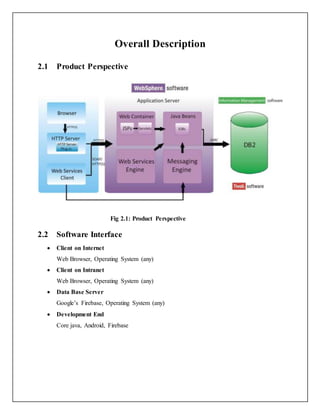
2.1 Product Perspective
Fig 2.1: Product Perspective
2.2 Software Interface
 Client on Internet
Web Browser, Operating System (any)
 Client on Intranet
Web Browser, Operating System (any)
 Data Base Server
Google’s Firebase, Operating System (any)
 Development End
Core java, Android, Firebase
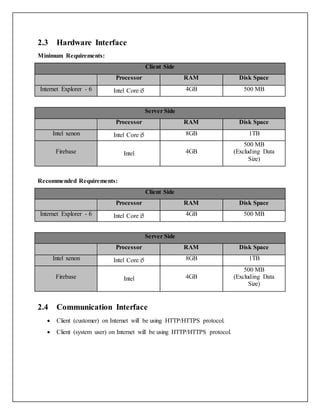
2.3 Hardware Interface
Minimum Requirements:
Client Side
Processor RAM Disk Space
Internet Explorer - 6 Intel Core i5 4GB 500 MB
Server Side
Processor RAM Disk Space
Intel xenon Intel Core i5 8GB 1TB
Firebase Intel 4GB
500 MB
(Excluding Data
Size)
Recommended Requirements:
Client Side
Processor RAM Disk Space
Internet Explorer - 6 Intel Core i5 4GB 500 MB
Server Side
Processor RAM Disk Space
Intel xenon Intel Core i5 8GB 1TB
Firebase Intel 4GB
500 MB
(Excluding Data
Size)
2.4 Communication Interface
 Client (customer) on Internet will be using HTTP/HTTPS protocol.
 Client (system user) on Internet will be using HTTP/HTTPS protocol.
2.5 Constraints
 GUI is only in English.
 Login and password is used for the identification of users.
 Only registered users will be authorized to use the services.
2.6 E-R Diagram
2.7 Use Case Model Survey
Specific Requirements
3.1 Use Case Reports

Major project srs

  • 1.
    A Software requirementsspecification On Clean India Mission Submitted in Partial Fulfillment for the Award of Degree of Bachelor of Technology in Computer Science and Engineering from Rajasthan Technical University, Kota MENTOR: SUBMITTED BY: Mrs. Ponam Varshney Mangal (14ESKCS0) (Dept. of Computer Science & Engineering) Panka Agarwal COORDINATOR: Mr. Basant Agarwal (Dept. of Computer Science & Engineering) DEPARTMENT OF COMPUTER SCIENCE & ENGINEERING SWAMI KESHWANAND INSTITUTE OF TECHNOLOGY, MANAGEMENT & GRAMOTHAN Ramnagaria (Jagatpura), Jaipur – 302017
  • 2.
    Table of Contents 1.Introduction 1.1 Methodology 1.2 Purpose 1.3 Scope 1.4 Definitions, Acronyms and Abbreviations 1.5 Tools Used 1.6 References 1.7 Technologies to be used 1.8 Overview 2. Overall Description 2.1 Product Perspective 2.2 Software Interface 2.3 Hardware Interface 2.4 Communication Interface 2.5 Constraints 2.6 E-R Diagram 2.7 Use-Case Model Survey 2.8 Architecture Design 2.9 Database Design 3. Specific Requirements 3.1 Use-Case Reports 3.2 Activity Diagrams 3.3 Sequence Diagrams
  • 3.
    Introduction 1.1 Methodology Rational UnifiedProcess: The Rational Unified Process brings together elements from all of the generic process models, sup-ports iteration and illustrates good practice in specification and design. The RUP is normally de-scribed from three perspectives:  A dynamic perspective that shows the phases of the model over time.  A static perspective that shows the process activities that are enacted.  A practice perspective that suggests good practices to be used during the process. Fig 1.1: Phases of RUP
  • 4.
    The different phasesin RUP are:  Inception The goal of the inception phase is to establish a business case for the system. Identifying all external entities that will interact with the system and defining these interactions. This information is used to assess the contribution of system to business.  Elaboration The goals of the elaboration phase are to develop an understanding of the problem domain, establish an architectural framework, develop project plan and identify key project risks.  Construction This phase is concerned with system design, programming and testing. Parts of the system are developed in parallel and integrated during this phase.  Transition This is the final phase of RUP and is concerned with moving the system from the development com-munity to the user community and making it work in real environment. 1.2 Purpose It is a platform in which many people can interact with officials of their particular areas of Clean India mission and can upload images if they find any dirt nearby them so that officials send their team for clean that area. Scope  There are three basic users –People, Admin(Official).  All users have their own profiles.  Interaction between people through comments.  People can upload pictures of their area’s garbage.  Ofiicials will get update via app knowing about complaints of people related to Clean India mission.
  • 5.
    1.3 Definitions, Acronymsand Abbreviations  Admin (Administrator) He has the authority to modify system interface and grant permisiion to various users.  Firebase It is a database management system that provides a flexible and efficient database platform to maintain records of patient, student etc.  UML (Unified Modeling Language) It is a standard language for writing software blueprints. The UML may be used to visualize, specify, construct and document  XML (Extensible Markup Language) It is a text based format that let developers describe, deliver and exchange structured data between a range of applications to client for display and manipulation. 1.4 Tools Used 1.5.1  ANDROID One of the most widely used mobile OS these days is ANDROID. Android is a software Bunch comprising not only operating system but also middleware and key applications. Android Inc was founded in Palo Alto of California, U.S. by Andy Rubin, Rich miner, Nick sears and Chris White in 2003. Later Android Inc. was acquired by Google in 2005. After original release there have been number of updates in the original version of Android. Android applications are written in java programming language. Android is available as open source for developers to develop applications which can be further used for selling in android market  GENYMOTION Genymotion will give us a very productive and efficient Android emulator to use during development. Additionally, it will also give us an emulator that can be used to run our applications after development. This is excellent for customer service teams, demonstrations and a multitude of other uses.
  • 6.
    1.5.2 Database platform– Firebase Firebase provides a real time database and backend as a service. The service provides application developers an API that allows application data to be synchronized across clients and stored on Firebase's cloud.. Firebase Storage provides secure file uploads and downloads for apps, regardless of network quality. The developer can use it to store images, audio, video, or other user-generated content. Firebase Storage is backed by Google Cloud Storage. 1.5.3 Design tool – Rational Software Modeler IBM Rational Software Modeler, (RSM) made by IBM's Rational Software division, is a Unified Modeling Language UML 2.0-based visual modeling and design tool. Rational Software Modeler is built on the Eclipse open-source software framework and includes capabilities focused on visual modeling and model-driven development (MDD) with the UML for creating resilient, thought-out applications and web services. 1.6 References  Object Oriented Modeling and Design with UML-Michael Blaha, James Rambaugh.  Software Engineering, Seventh Edition, Ian Sommerville.  Android App Development ,Third edition, Wiley publication  IBM – www.ibm.in/developerworks.  Android - www.tutorialpoint.com/www.AndroidHive.info.in/https://www.javatpoint.com/android- tutorial  Wikipedia - www.wikipedia.com 1.7 Technologies to be used  Firebase: Database management  Rational Software Modeler.  Android
  • 7.
    1.8 Overview Existing System: Registration for users  Discussion forum Drawbacks  Remote area users and people who doesn't have knowledge of internet cannot use the system Proposed System:  Registration for users  Admins  Text area interaction.  Interaction through picture uploading. Our Plan:  Registration for users.  Text area interaction through comments.  Online compalint facility.  People rating for their areas cleanliness.  Pictures uploading facility.
  • 8.
    Overall Description 2.1 ProductPerspective Fig 2.1: Product Perspective 2.2 Software Interface  Client on Internet Web Browser, Operating System (any)  Client on Intranet Web Browser, Operating System (any)  Data Base Server Google’s Firebase, Operating System (any)  Development End Core java, Android, Firebase
  • 9.
    2.3 Hardware Interface MinimumRequirements: Client Side Processor RAM Disk Space Internet Explorer - 6 Intel Core i5 4GB 500 MB Server Side Processor RAM Disk Space Intel xenon Intel Core i5 8GB 1TB Firebase Intel 4GB 500 MB (Excluding Data Size) Recommended Requirements: Client Side Processor RAM Disk Space Internet Explorer - 6 Intel Core i5 4GB 500 MB Server Side Processor RAM Disk Space Intel xenon Intel Core i5 8GB 1TB Firebase Intel 4GB 500 MB (Excluding Data Size) 2.4 Communication Interface  Client (customer) on Internet will be using HTTP/HTTPS protocol.  Client (system user) on Internet will be using HTTP/HTTPS protocol.
  • 10.
    2.5 Constraints  GUIis only in English.  Login and password is used for the identification of users.  Only registered users will be authorized to use the services. 2.6 E-R Diagram 2.7 Use Case Model Survey
  • 11.