






Maintaining a high load Python project:
typical mistakes
Viacheslav Kakovskyi
PyCon Poland 2016
Me!
@kakovskyi
Python Software Engineer at SoftServe
Contributor of Atlassian HipChat — Python 2, Twisted
Maintainer of KPIdata — Python 3, asyncio
2
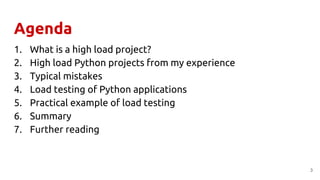
Agenda
1. What is a high load project?
2. High load Python projects from my experience
3. Typical mistakes
4. Load testing of Python applications
5. Practical example of load testing
6. Summary
7. Further reading
3
What is a high load project?
4
What is high load project?
● 2+ nodes?
● 10 000 connections?
● 200 000 RPS?
● 5 000 000 daily active users?
● monitoring?
● scalability?
● Multi-AZ?
● redundancy?
● fault tolerance?
● high availability?
● disaster recovery?
5
What is a high load project?
a project where an inefficient solution or a tiny bug
has a huge impact on your business
(due to a lack of resources)→
→ causes an increase of costs $$$ or loss of reputation
(due to performance degradation)
6
High load Python projects from my experience
● Instant messenger:
○ 100 000+ connected users
○ 100+ nodes
○ 100+ developers
● Embedded system for traffic analysis:
○ we can't scale and upgrade hardware
7
Typical mistakes
● Usage of a pure Python third-party dependency
instead of C-based implementation
8
Typical mistakes: Pure Python dependencies
● Usage of pure Python third-party dependency
● Example: JSON parsing
● Note: check out C-based libraries with Python binding
○ simplejson
○ ujson
○ python-rapidjson
● Note: run your own benchmarks
9
Typical mistakes
● Usage of JSON as a serialization format by default
10
Typical mistakes: JSON all the things
● Usage of JSON as a serialization format by default
● Note: Check out faster formats
○ MessagePack
○ Protocol Buffers
○ Apache Thrift
● Note: Run benchmarks, again!
● Note: Try using YAML for configuration files
11
Typical mistakes
● Coding your high load Python project only with Python
12
Typical mistakes: Pure Python codebase
● Coding your high load Python project only with Python
● Note: use multi language approach
○ Golang
○ NodeJS
○ Rust
● Note: fine tune performance of Python
○ Cython
○ CPython C/C++ extensions
○ PyPy and CFFI
13
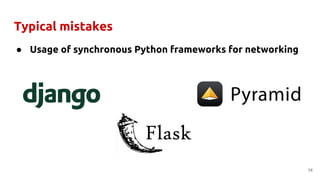
Typical mistakes
● Usage of synchronous Python frameworks for networking
14
Typical mistakes: synchronous Python
● High amount of concurrent connections
● Multithreaded approach isn't efficient due to overhead
● Requires usage of a select implementation on backend:
○ poll
○ epoll
○ kqueue
15
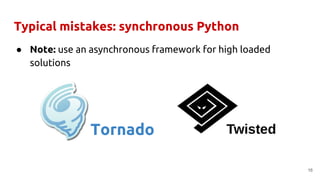
Typical mistakes: synchronous Python
● Note: use an asynchronous framework for high loaded
solutions
16
Tornado
The answer:
asyncio
&
aiohttp
17
Typical mistakes: synchronous Python
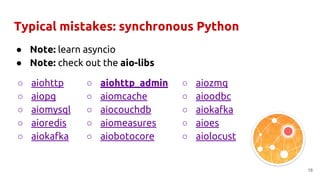
● Note: learn asyncio
● Note: check out the aio-libs
18
○ aiohttp_admin
○ aiomcache
○ aiocouchdb
○ aiomeasures
○ aiobotocore
○ aiozmq
○ aioodbc
○ aiokafka
○ aioes
○ aiolocust
○ aiohttp
○ aiopg
○ aiomysql
○ aioredis
○ aiokafka
Typical mistakes
● No usage of threads and processes in project's code
19
Typical mistakes: no threads and processes usage
● Note: use threads to split different streams of work for
IO-bound tasks
○ Flask
● Note: use processes to scale your IO-bound application inside
one node
○ gunicorn + aiohttp
● Note: use threads or processes to delegate blocking jobs for
CPU-bound tasks
○ ThreadPoolExecutor, ProcessPoolExecutor
20
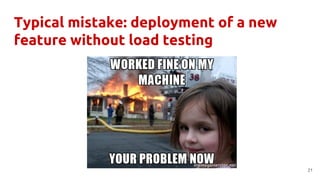
Typical mistake: deployment of a new
feature without load testing
21
Load testing of Python applications
● Purpose: predict when we fu*k production
● Must have for high load projects
● Helps to prevent the reputation losses
● Almost nobody does that
22
Load testing 101
● Identify how the load might grow up
○ More users
○ More data
○ More operations
○ Less servers
○ Unexpected edge cases
23
Load testing 101
● Define the most heavy and frequent operations
○ Insertions into data storages
■ PostgreSQL
■ ElasticSearch
■ Redis
○ Calculations and other CPU-bound tasks
○ Calls to external services
■ S3, etc.
24
Load testing 101
● Identify how to trigger the operations from a user's
perspective
○ REST API endpoints
○ Periodic processing of collected data
25
Load testing 101
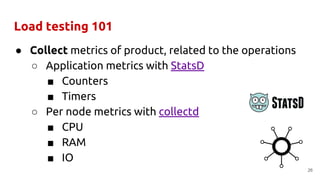
● Collect metrics of product, related to the operations
○ Application metrics with StatsD
■ Counters
■ Timers
○ Per node metrics with collectd
■ CPU
■ RAM
■ IO
26
Load testing 101
27
● Create a tool, which behaves like gazillion users
○ Establish network connections
○ Make HTTP requests
■ Send some data
■ Retrieve information from our server
Load testing in practice
28
Load testing in practice
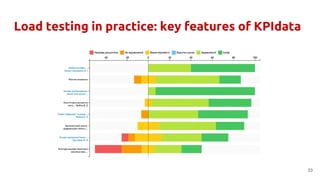
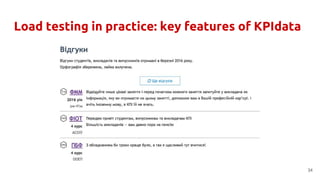
● KPIdata is an asyncio-based pet project for assessing the
quality of higher education
● KPI means Kyiv Polytechnic Institute
● Students and alumni use the web-site as Yelp for
choosing faculties, chairs, and specialities to study
● Check it out on kpidata.org
29
Load testing in practice
● LocustIO is a load testing tool written in Python
● Simulates millions of simultaneous users
● Runs load tests distributed over multiple hosts
● Supports HTTP, XMPP, XML-RPC
● Check it out on locust.io
● Note: it uses gevent under the hood
30
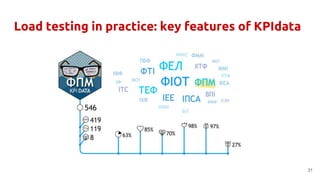
Load testing in practice: key features of KPIdata
31
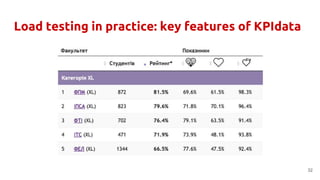
Load testing in practice: key features of KPIdata
32
Load testing in practice: key features of KPIdata
33
Load testing in practice: key features of KPIdata
34
Load testing in practice: identify the load
● More users
○ Admission campaign starts
○ More schoolchildren will know about the site
● More data
○ Semester ends and we will receive a lot of
feedbacks
○ New universities will be involved
35
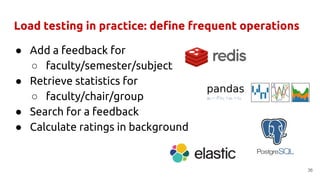
Load testing in practice: define frequent operations
● Add a feedback for
○ faculty/semester/subject
● Retrieve statistics for
○ faculty/chair/group
● Search for a feedback
● Calculate ratings in background
36
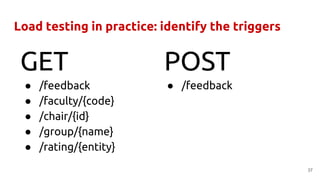
Load testing in practice: identify the triggers
● /feedback
● /faculty/{code}
● /chair/{id}
● /group/{name}
● /rating/{entity}
37
GET POST
● /feedback
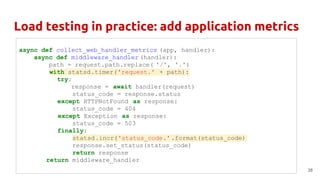
Load testing in practice: add application metrics
38
async def collect_web_handler_metrics (app, handler):
async def middleware_handler (handler):
path = request.path.replace( '/', '.')
with statsd.timer('request.' + path):
try:
response = await handler(request)
status_code = response.status
except HTTPNotFound as response:
status_code = 404
except Exception as response:
status_code = 503
finally:
statsd.incr('status_code.' .format(status_code)
response.set_status(status_code)
return response
return middleware_handler
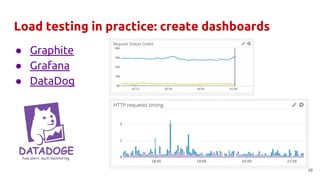
Load testing in practice: create dashboards
39
● Graphite
● Grafana
● DataDog
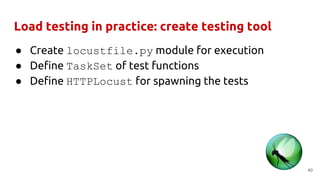
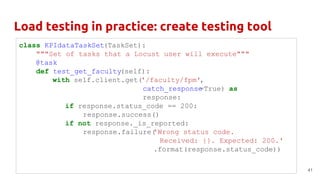
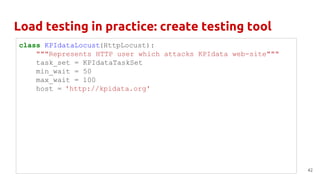
Load testing in practice: create testing tool
● Create locustfile.py module for execution
● Define TaskSet of test functions
● Define HTTPLocust for spawning the tests
40
Load testing in practice: create testing tool
41
class KPIdataTaskSet(TaskSet):
"""Set of tasks that a Locust user will execute"""
@task
def test_get_faculty(self):
with self.client.get('/faculty/fpm',
catch_response=True) as
response:
if response.status_code == 200:
response.success()
if not response._is_reported:
response.failure('Wrong status code.
Received: {}. Expected: 200.'
.format(response.status_code))
Load testing in practice: create testing tool
42
class KPIdataLocust(HttpLocust):
"""Represents HTTP user which attacks KPIdata web-site"""
task_set = KPIdataTaskSet
min_wait = 50
max_wait = 100
host = 'http://kpidata.org'
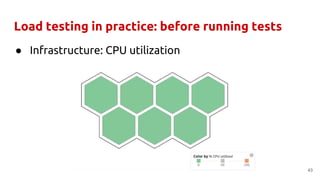
Load testing in practice: before running tests
● Infrastructure: CPU utilization
43
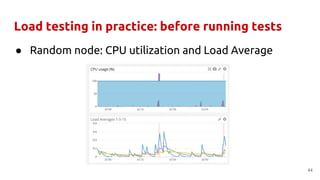
Load testing in practice: before running tests
● Random node: CPU utilization and Load Average
44
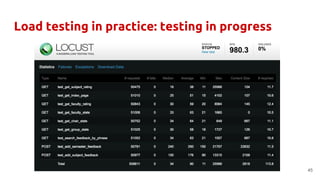
Load testing in practice: testing in progress
45
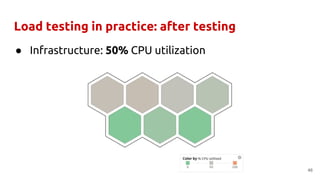
Load testing in practice: after testing
● Infrastructure: 50% CPU utilization
46
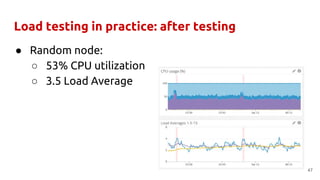
Load testing in practice: after testing
● Random node:
○ 53% CPU utilization
○ 3.5 Load Average
47
Results of load testing
● We know how many RPS we can serve with the environment
● We know what's going on when the limit is exceeded
● We know the bottlenecks of our platform
● We know if we can scale some part of the system
48
49
Summary
● Try to find C-based analogs of 3rd party dependencies
● Check out serialization formats which are faster than JSON
● Fine tune your Python project with C extension, Cython or
PyPy
● Write some services not in Python
50
Summary
● Use asyncio and aiohttp for networking applications
● Use ThreadPoolExecutor for blocking operations
● Use processes for scaling inside a node
● Perform load testing for new features before pushing
them to production
51
Further reading
● @kakovskyi: Maintaining a high load Python project for newcomers
● @kakovskyi: Instant messenger with Python. Back-end development
● Asyncio-stack for web development
● PEP8 is not enough
● How HipChat Stores and Indexes Billions of Messages Using
ElasticSearch
● A guide to analyzing Python performance
● Why Leading Companies Dark Launch - LaunchDarkly Blog
● What Is Async, How Does It Work, And When Should I Use It?
52
53
@kakovskyi
viach.kakovskyi@gmail.com
Questions?

PyCon Poland 2016: Maintaining a high load Python project: typical mistakes

  • 1.
    Maintaining a highload Python project: typical mistakes Viacheslav Kakovskyi PyCon Poland 2016
  • 2.
    Me! @kakovskyi Python Software Engineerat SoftServe Contributor of Atlassian HipChat — Python 2, Twisted Maintainer of KPIdata — Python 3, asyncio 2
  • 3.
    Agenda 1. What isa high load project? 2. High load Python projects from my experience 3. Typical mistakes 4. Load testing of Python applications 5. Practical example of load testing 6. Summary 7. Further reading 3
  • 4.
    What is ahigh load project? 4
  • 5.
    What is highload project? ● 2+ nodes? ● 10 000 connections? ● 200 000 RPS? ● 5 000 000 daily active users? ● monitoring? ● scalability? ● Multi-AZ? ● redundancy? ● fault tolerance? ● high availability? ● disaster recovery? 5
  • 6.
    What is ahigh load project? a project where an inefficient solution or a tiny bug has a huge impact on your business (due to a lack of resources)→ → causes an increase of costs $$$ or loss of reputation (due to performance degradation) 6
  • 7.
    High load Pythonprojects from my experience ● Instant messenger: ○ 100 000+ connected users ○ 100+ nodes ○ 100+ developers ● Embedded system for traffic analysis: ○ we can't scale and upgrade hardware 7
  • 8.
    Typical mistakes ● Usageof a pure Python third-party dependency instead of C-based implementation 8
  • 9.
    Typical mistakes: PurePython dependencies ● Usage of pure Python third-party dependency ● Example: JSON parsing ● Note: check out C-based libraries with Python binding ○ simplejson ○ ujson ○ python-rapidjson ● Note: run your own benchmarks 9
  • 10.
    Typical mistakes ● Usageof JSON as a serialization format by default 10
  • 11.
    Typical mistakes: JSONall the things ● Usage of JSON as a serialization format by default ● Note: Check out faster formats ○ MessagePack ○ Protocol Buffers ○ Apache Thrift ● Note: Run benchmarks, again! ● Note: Try using YAML for configuration files 11
  • 12.
    Typical mistakes ● Codingyour high load Python project only with Python 12
  • 13.
    Typical mistakes: PurePython codebase ● Coding your high load Python project only with Python ● Note: use multi language approach ○ Golang ○ NodeJS ○ Rust ● Note: fine tune performance of Python ○ Cython ○ CPython C/C++ extensions ○ PyPy and CFFI 13
  • 14.
    Typical mistakes ● Usageof synchronous Python frameworks for networking 14
  • 15.
    Typical mistakes: synchronousPython ● High amount of concurrent connections ● Multithreaded approach isn't efficient due to overhead ● Requires usage of a select implementation on backend: ○ poll ○ epoll ○ kqueue 15
  • 16.
    Typical mistakes: synchronousPython ● Note: use an asynchronous framework for high loaded solutions 16 Tornado
  • 17.
  • 18.
    Typical mistakes: synchronousPython ● Note: learn asyncio ● Note: check out the aio-libs 18 ○ aiohttp_admin ○ aiomcache ○ aiocouchdb ○ aiomeasures ○ aiobotocore ○ aiozmq ○ aioodbc ○ aiokafka ○ aioes ○ aiolocust ○ aiohttp ○ aiopg ○ aiomysql ○ aioredis ○ aiokafka
  • 19.
    Typical mistakes ● Nousage of threads and processes in project's code 19
  • 20.
    Typical mistakes: nothreads and processes usage ● Note: use threads to split different streams of work for IO-bound tasks ○ Flask ● Note: use processes to scale your IO-bound application inside one node ○ gunicorn + aiohttp ● Note: use threads or processes to delegate blocking jobs for CPU-bound tasks ○ ThreadPoolExecutor, ProcessPoolExecutor 20
  • 21.
    Typical mistake: deploymentof a new feature without load testing 21
  • 22.
    Load testing ofPython applications ● Purpose: predict when we fu*k production ● Must have for high load projects ● Helps to prevent the reputation losses ● Almost nobody does that 22
  • 23.
    Load testing 101 ●Identify how the load might grow up ○ More users ○ More data ○ More operations ○ Less servers ○ Unexpected edge cases 23
  • 24.
    Load testing 101 ●Define the most heavy and frequent operations ○ Insertions into data storages ■ PostgreSQL ■ ElasticSearch ■ Redis ○ Calculations and other CPU-bound tasks ○ Calls to external services ■ S3, etc. 24
  • 25.
    Load testing 101 ●Identify how to trigger the operations from a user's perspective ○ REST API endpoints ○ Periodic processing of collected data 25
  • 26.
    Load testing 101 ●Collect metrics of product, related to the operations ○ Application metrics with StatsD ■ Counters ■ Timers ○ Per node metrics with collectd ■ CPU ■ RAM ■ IO 26
  • 27.
    Load testing 101 27 ●Create a tool, which behaves like gazillion users ○ Establish network connections ○ Make HTTP requests ■ Send some data ■ Retrieve information from our server
  • 28.
    Load testing inpractice 28
  • 29.
    Load testing inpractice ● KPIdata is an asyncio-based pet project for assessing the quality of higher education ● KPI means Kyiv Polytechnic Institute ● Students and alumni use the web-site as Yelp for choosing faculties, chairs, and specialities to study ● Check it out on kpidata.org 29
  • 30.
    Load testing inpractice ● LocustIO is a load testing tool written in Python ● Simulates millions of simultaneous users ● Runs load tests distributed over multiple hosts ● Supports HTTP, XMPP, XML-RPC ● Check it out on locust.io ● Note: it uses gevent under the hood 30
  • 31.
    Load testing inpractice: key features of KPIdata 31
  • 32.
    Load testing inpractice: key features of KPIdata 32
  • 33.
    Load testing inpractice: key features of KPIdata 33
  • 34.
    Load testing inpractice: key features of KPIdata 34
  • 35.
    Load testing inpractice: identify the load ● More users ○ Admission campaign starts ○ More schoolchildren will know about the site ● More data ○ Semester ends and we will receive a lot of feedbacks ○ New universities will be involved 35
  • 36.
    Load testing inpractice: define frequent operations ● Add a feedback for ○ faculty/semester/subject ● Retrieve statistics for ○ faculty/chair/group ● Search for a feedback ● Calculate ratings in background 36
  • 37.
    Load testing inpractice: identify the triggers ● /feedback ● /faculty/{code} ● /chair/{id} ● /group/{name} ● /rating/{entity} 37 GET POST ● /feedback
  • 38.
    Load testing inpractice: add application metrics 38 async def collect_web_handler_metrics (app, handler): async def middleware_handler (handler): path = request.path.replace( '/', '.') with statsd.timer('request.' + path): try: response = await handler(request) status_code = response.status except HTTPNotFound as response: status_code = 404 except Exception as response: status_code = 503 finally: statsd.incr('status_code.' .format(status_code) response.set_status(status_code) return response return middleware_handler
  • 39.
    Load testing inpractice: create dashboards 39 ● Graphite ● Grafana ● DataDog
  • 40.
    Load testing inpractice: create testing tool ● Create locustfile.py module for execution ● Define TaskSet of test functions ● Define HTTPLocust for spawning the tests 40
  • 41.
    Load testing inpractice: create testing tool 41 class KPIdataTaskSet(TaskSet): """Set of tasks that a Locust user will execute""" @task def test_get_faculty(self): with self.client.get('/faculty/fpm', catch_response=True) as response: if response.status_code == 200: response.success() if not response._is_reported: response.failure('Wrong status code. Received: {}. Expected: 200.' .format(response.status_code))
  • 42.
    Load testing inpractice: create testing tool 42 class KPIdataLocust(HttpLocust): """Represents HTTP user which attacks KPIdata web-site""" task_set = KPIdataTaskSet min_wait = 50 max_wait = 100 host = 'http://kpidata.org'
  • 43.
    Load testing inpractice: before running tests ● Infrastructure: CPU utilization 43
  • 44.
    Load testing inpractice: before running tests ● Random node: CPU utilization and Load Average 44
  • 45.
    Load testing inpractice: testing in progress 45
  • 46.
    Load testing inpractice: after testing ● Infrastructure: 50% CPU utilization 46
  • 47.
    Load testing inpractice: after testing ● Random node: ○ 53% CPU utilization ○ 3.5 Load Average 47
  • 48.
    Results of loadtesting ● We know how many RPS we can serve with the environment ● We know what's going on when the limit is exceeded ● We know the bottlenecks of our platform ● We know if we can scale some part of the system 48
  • 49.
  • 50.
    Summary ● Try tofind C-based analogs of 3rd party dependencies ● Check out serialization formats which are faster than JSON ● Fine tune your Python project with C extension, Cython or PyPy ● Write some services not in Python 50
  • 51.
    Summary ● Use asyncioand aiohttp for networking applications ● Use ThreadPoolExecutor for blocking operations ● Use processes for scaling inside a node ● Perform load testing for new features before pushing them to production 51
  • 52.
    Further reading ● @kakovskyi:Maintaining a high load Python project for newcomers ● @kakovskyi: Instant messenger with Python. Back-end development ● Asyncio-stack for web development ● PEP8 is not enough ● How HipChat Stores and Indexes Billions of Messages Using ElasticSearch ● A guide to analyzing Python performance ● Why Leading Companies Dark Launch - LaunchDarkly Blog ● What Is Async, How Does It Work, And When Should I Use It? 52
  • 53.