Development Environment Juha Tukkinen / November 2007
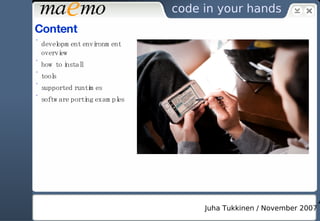
Content development environment overview how to install tools supported runtimes software porting examples
Development environment overview The problem: Open source projects use  GNU configure  build system a developer creates  GNU M4  macros configure  script gets generated by  GNU Automake  and  GNU Autoconf … which produce  Makefile s and a  config.h
Development environment overview So what’s wrong with this? configure  assumes that the  target  environment will be the same as the compilation  host  environment compilation natively on an Internet Tablet is not… optimal
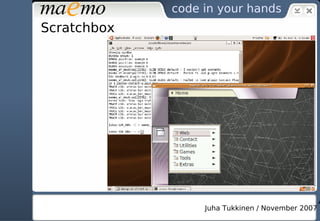
Development environment overview A solution: Scratchbox a cross-compilation environment a sandbox put together by wrappers, black magic and symbolic links makes use of  QEMU  as a machine emulator (not as a virtualizer)
Scratchbox
Scratchbox and maemo SDK Scratchbox provides a sandboxed cross-compilation development environment ( chroot  on steroids) maemo SDK is installed inside Scratchbox maemo SDK provides two  targets  for Scratchbox: X86 used for active development ARMEL for cross-compilation, QEMU also provides CPU transparency maemo SDK also provides closed Nokia binaries separately
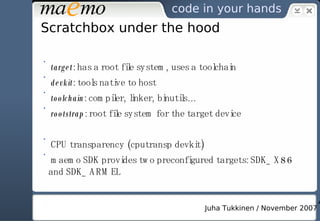
Scratchbox under the hood target : has a root file system, uses a toolchain devkit : tools native to host toolchain : compiler, linker, binutils… rootstrap : root file system for the target device CPU transparency (cputransp devkit) maemo SDK provides two preconfigured targets: SDK_X86 and SDK_ARMEL
Tools inside Scratchbox (to list some) GNU toolchain for ARM processors debugger: gdb tracing tools: strace, ltrace valgrind: suite of tools for debugging and profiling memcheck – memory management detector cachegrind – cache profiler callgrind – extra information of call graphs to the above massif – heap profiler helgrind – thread debugger
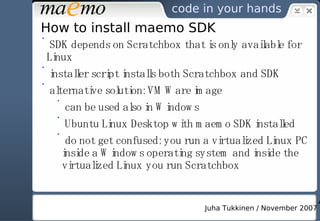
How to install maemo SDK SDK depends on Scratchbox that is only available for Linux installer script installs both Scratchbox and SDK alternative solution: VMWare image can be used also in Windows Ubuntu Linux Desktop with maemo SDK installed do not get confused: you run a virtualized Linux PC inside a Windows operating system and inside the virtualized Linux you run Scratchbox
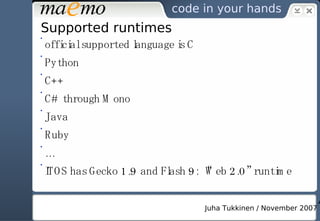
Supported runtimes official supported language is C Python C++ C# through Mono Java Ruby … ITOS has Gecko 1.9 and Flash 9: “Web 2.0” runtime
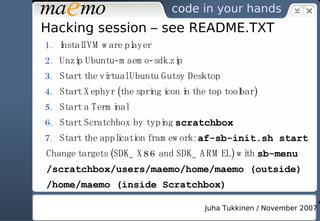
Hacking session – see README.TXT Install VMware player Unzip Ubuntu-maemo-sdk.zip  Start the virtual Ubuntu Gutsy Desktop Start Xephyr (the spring icon in the top toolbar) Start a Terminal Start Scratchbox by typing  scratchbox Start the application framework:  af-sb-init.sh start Change targets (SDK_X86 and SDK_ARMEL) with  sb-menu /scratchbox/users/maemo/home/maemo (outside) /home/maemo (inside Scratchbox)
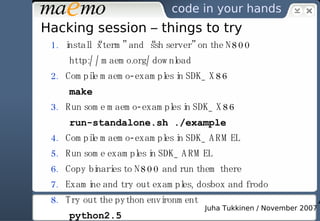
Hacking session – things to try install “xterm” and “ssh server” on the N800 http://maemo.org/download Compile maemo-examples in SDK_X86 make Run some maemo-examples in SDK_X86 run-standalone.sh ./example Compile maemo-examples in SDK_ARMEL Run some examples in SDK_ARMEL Copy binaries to N800 and run them there Examine and try out examples, dosbox and frodo Try out the python environment python2.5
Thank you!

Maemo Development Environment

  • 1.
    Development Environment JuhaTukkinen / November 2007
  • 2.
    Content development environmentoverview how to install tools supported runtimes software porting examples
  • 3.
    Development environment overviewThe problem: Open source projects use GNU configure build system a developer creates GNU M4 macros configure script gets generated by GNU Automake and GNU Autoconf … which produce Makefile s and a config.h
  • 4.
    Development environment overviewSo what’s wrong with this? configure assumes that the target environment will be the same as the compilation host environment compilation natively on an Internet Tablet is not… optimal
  • 5.
    Development environment overviewA solution: Scratchbox a cross-compilation environment a sandbox put together by wrappers, black magic and symbolic links makes use of QEMU as a machine emulator (not as a virtualizer)
  • 6.
  • 7.
    Scratchbox and maemoSDK Scratchbox provides a sandboxed cross-compilation development environment ( chroot on steroids) maemo SDK is installed inside Scratchbox maemo SDK provides two targets for Scratchbox: X86 used for active development ARMEL for cross-compilation, QEMU also provides CPU transparency maemo SDK also provides closed Nokia binaries separately
  • 8.
    Scratchbox under thehood target : has a root file system, uses a toolchain devkit : tools native to host toolchain : compiler, linker, binutils… rootstrap : root file system for the target device CPU transparency (cputransp devkit) maemo SDK provides two preconfigured targets: SDK_X86 and SDK_ARMEL
  • 9.
    Tools inside Scratchbox(to list some) GNU toolchain for ARM processors debugger: gdb tracing tools: strace, ltrace valgrind: suite of tools for debugging and profiling memcheck – memory management detector cachegrind – cache profiler callgrind – extra information of call graphs to the above massif – heap profiler helgrind – thread debugger
  • 10.
    How to installmaemo SDK SDK depends on Scratchbox that is only available for Linux installer script installs both Scratchbox and SDK alternative solution: VMWare image can be used also in Windows Ubuntu Linux Desktop with maemo SDK installed do not get confused: you run a virtualized Linux PC inside a Windows operating system and inside the virtualized Linux you run Scratchbox
  • 11.
    Supported runtimes officialsupported language is C Python C++ C# through Mono Java Ruby … ITOS has Gecko 1.9 and Flash 9: “Web 2.0” runtime
  • 12.
    Hacking session –see README.TXT Install VMware player Unzip Ubuntu-maemo-sdk.zip Start the virtual Ubuntu Gutsy Desktop Start Xephyr (the spring icon in the top toolbar) Start a Terminal Start Scratchbox by typing scratchbox Start the application framework: af-sb-init.sh start Change targets (SDK_X86 and SDK_ARMEL) with sb-menu /scratchbox/users/maemo/home/maemo (outside) /home/maemo (inside Scratchbox)
  • 13.
    Hacking session –things to try install “xterm” and “ssh server” on the N800 http://maemo.org/download Compile maemo-examples in SDK_X86 make Run some maemo-examples in SDK_X86 run-standalone.sh ./example Compile maemo-examples in SDK_ARMEL Run some examples in SDK_ARMEL Copy binaries to N800 and run them there Examine and try out examples, dosbox and frodo Try out the python environment python2.5
  • 14.