Contact: Sunny Web:www.lensen-tech.com Email:sunny@lensen-tech.com
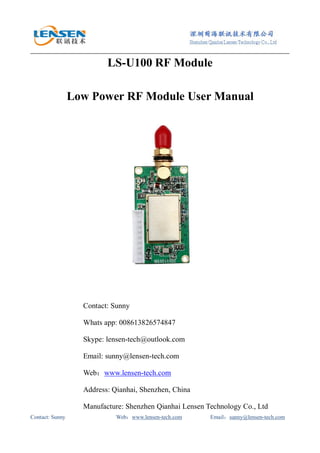
LS-U100 RF Module
Low Power RF Module User Manual
Contact: Sunny
Whats app: 008613826574847
Skype: lensen-tech@outlook.com
Email: sunny@lensen-tech.com
Web:www.lensen-tech.com
Address: Qianhai, Shenzhen, China
Manufacture: Shenzhen Qianhai Lensen Technology Co., Ltd
Contact: Sunny Web:www.lensen-tech.com Email:sunny@lensen-tech.com
1. General Introduction
LS-U100 rf module, designed with high efficiency FEC technology, good performance IC and
high speed MCU, is an excellent RF transceiver. Its power output is 100mW, transmission
distance reaches 1km LOS. It has the advantage of small size, low power consumption, long
transmission distance, and also, strong anti-interference ability. LS-U100 adopts transparent
transmission. Users don’t need any program knowledge.
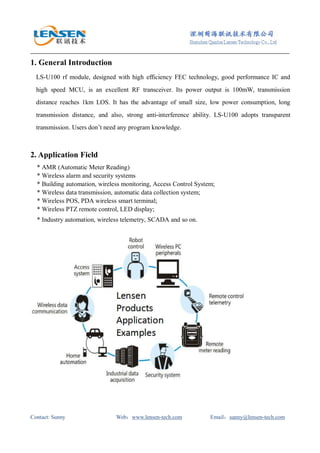
2. Application Field
* AMR (Automatic Meter Reading)
* Wireless alarm and security systems
* Building automation, wireless monitoring, Access Control System;
* Wireless data transmission, automatic data collection system;
* Wireless POS, PDA wireless smart terminal;
* Wireless PTZ remote control, LED display;
* Industry automation, wireless telemetry, SCADA and so on.
Contact: Sunny Web:www.lensen-tech.com Email:sunny@lensen-tech.com
3. Technical specification
PERFORMANCE
Power Output: 100mW
RF Line-of-sight Range: 1000m@1200bps; 600m@9600bps
RF Effective Rate: 1200/2400/4800/9600/19200bps
Space Channel: 1MHz(Default), (12.5/25KHz customization )
Bandwidth: <25KHz
Receiver Sensitivity: -120dBm@1200bps, -115dbm(9600bps)
Data format: 8N1, 8E1, 8O1 (customize)
COMPATIBILITY
LS-UN10, LS-U100, LS-U1000, LS-UN5000 series
POWER
Supply Voltage: 5V DC
Transmit Current: <40mA
Receive Current: <20mA
Sleep current: <20uA
GENERAL
Communication Mode: Half-duplex
Frequency Band: 400MHz, or 450MHz, 470MHz
Frequency modulation FSK/GFSK
Channel: 8(default),16/32/64(optional)
Interface: TTL, RS232, RS485 (choose one)
PHYSICAL PROPERTIES
Size:
47mm×26mm×10mm
(excluding antenna base and data pin)
Weight: 20g
Antenna Base: 50Ω, SMA
Operating Temperature: Industrial:-40℃~+85℃(TCXO)
Frequency Stability: ±2.5ppm Industrial
Contact: Sunny Web:www.lensen-tech.com Email:sunny@lensen-tech.com
4. How to Use It
1) Install Dimension
2) How to connect LS-U100 with PC.
PC RF Module
Contact: Sunny Web:www.lensen-tech.com Email:sunny@lensen-tech.com
3) Pin Definition (9 pin)
Pin No.
Signal
Name
Function Level
Connection
with terminal
Remarks
1 GND Grounding of power supply Ground
2 VCC Power supply DC +3V ~5.5V
3 RxD/TTL Data receiving TTL TxD
4 TxD/TTL Data transmitting TTL RxD
5 SGND Signal
6 A (TXD) A of RS-485 (TxD of RS-232) A(RxD)
7 B (RXD) B of RS-485 (RxD of RS-232) B(TxD)
8 SLEEP Sleep control TTL Sleep signal
Low level
valid
9 TEST Factory testing
LS-U100 can provide RS232, RS485 or TTL interface, please choose one when you place order.
4). The Function of LED indicator
a. The LED indicator flashes red for 0.5S when power supply on.
b. The LED indicator blinking blue when receiving data.
c. The LED indicator blinking Red when transmitting data.
d. The LED indicator keeps dark when the module is in sleep mode.
5). Parameter setting by our software
You can use our software Lensen.exe to read or set the parameter on computer. When you
connect RF module to PC by the testing cable, please remember to connect the DB9 as well as
USB port to computer.
Channel Configuration:
Each channel has its fixed frequency point which is pre-write to MCU in factory. The
following is the configuration table for our common module. If you need other frequency
points, please tell our sales when you place order.
Channel No. Frequency Channel No. Frequency
1 429.0325MHz 5 433.0325MHz
2 430.0325MHz 6 434.0325MHz
3 431.0325MHz 7 435.0325MHz
4 432.0325MHz 8 436.0325MHz
Contact: Sunny Web:www.lensen-tech.com Email:sunny@lensen-tech.com
5. Accessories
1) Antenna
2) Standard unit
a. LS-U100 RF module 1pc
b. 9-PIN cable 1pc
c. rubber antenna 1pc (A0)
3) Other accessories you may be interested
a. Power supply D.C.(5V, 1A)
b. RS232 program cable (for module with RS232 interface, use this to connect PC)
c. USB program cable (for module with USB interface, use this to connect PC)
d. RS232-RS485 converter (for module with RS485 interface, if you need to program module
on PC, you need a converter)
e. Higher gain antenna (to reach longer distance, you may need high gain antenna)
f. Antenna connector (to extend antenna connector)
g. Arrest (to Prevent Lightning Strikes)
Notes:
1.To keep good communication effects, please use power supply D.C. with lower ripple coefficient
whose max current need to be higher than 1.5*module’s max current. (Suggest 5V, 1A)
2. TTL, RS232, RS485 interface, please choose one when you place order.
3. Baud rate: interface rate are programmable by our software. Air rate is fixed; please indicate
when you place order.
4、When Pin8 is at low level, module will enter sleep mode. Under this mode, you cannot transmit
and receive data. When it is at high level or hang on for 150s, module will enter working mode.
(if you don’t need sleep function, please hang on PIN8)

LS-U1000 rf module

  • 1.
    Contact: Sunny Web:www.lensen-tech.comEmail:sunny@lensen-tech.com LS-U100 RF Module Low Power RF Module User Manual Contact: Sunny Whats app: 008613826574847 Skype: lensen-tech@outlook.com Email: sunny@lensen-tech.com Web:www.lensen-tech.com Address: Qianhai, Shenzhen, China Manufacture: Shenzhen Qianhai Lensen Technology Co., Ltd
  • 2.
    Contact: Sunny Web:www.lensen-tech.comEmail:sunny@lensen-tech.com 1. General Introduction LS-U100 rf module, designed with high efficiency FEC technology, good performance IC and high speed MCU, is an excellent RF transceiver. Its power output is 100mW, transmission distance reaches 1km LOS. It has the advantage of small size, low power consumption, long transmission distance, and also, strong anti-interference ability. LS-U100 adopts transparent transmission. Users don’t need any program knowledge. 2. Application Field * AMR (Automatic Meter Reading) * Wireless alarm and security systems * Building automation, wireless monitoring, Access Control System; * Wireless data transmission, automatic data collection system; * Wireless POS, PDA wireless smart terminal; * Wireless PTZ remote control, LED display; * Industry automation, wireless telemetry, SCADA and so on.
  • 3.
    Contact: Sunny Web:www.lensen-tech.comEmail:sunny@lensen-tech.com 3. Technical specification PERFORMANCE Power Output: 100mW RF Line-of-sight Range: 1000m@1200bps; 600m@9600bps RF Effective Rate: 1200/2400/4800/9600/19200bps Space Channel: 1MHz(Default), (12.5/25KHz customization ) Bandwidth: <25KHz Receiver Sensitivity: -120dBm@1200bps, -115dbm(9600bps) Data format: 8N1, 8E1, 8O1 (customize) COMPATIBILITY LS-UN10, LS-U100, LS-U1000, LS-UN5000 series POWER Supply Voltage: 5V DC Transmit Current: <40mA Receive Current: <20mA Sleep current: <20uA GENERAL Communication Mode: Half-duplex Frequency Band: 400MHz, or 450MHz, 470MHz Frequency modulation FSK/GFSK Channel: 8(default),16/32/64(optional) Interface: TTL, RS232, RS485 (choose one) PHYSICAL PROPERTIES Size: 47mm×26mm×10mm (excluding antenna base and data pin) Weight: 20g Antenna Base: 50Ω, SMA Operating Temperature: Industrial:-40℃~+85℃(TCXO) Frequency Stability: ±2.5ppm Industrial
  • 4.
    Contact: Sunny Web:www.lensen-tech.comEmail:sunny@lensen-tech.com 4. How to Use It 1) Install Dimension 2) How to connect LS-U100 with PC. PC RF Module
  • 5.
    Contact: Sunny Web:www.lensen-tech.comEmail:sunny@lensen-tech.com 3) Pin Definition (9 pin) Pin No. Signal Name Function Level Connection with terminal Remarks 1 GND Grounding of power supply Ground 2 VCC Power supply DC +3V ~5.5V 3 RxD/TTL Data receiving TTL TxD 4 TxD/TTL Data transmitting TTL RxD 5 SGND Signal 6 A (TXD) A of RS-485 (TxD of RS-232) A(RxD) 7 B (RXD) B of RS-485 (RxD of RS-232) B(TxD) 8 SLEEP Sleep control TTL Sleep signal Low level valid 9 TEST Factory testing LS-U100 can provide RS232, RS485 or TTL interface, please choose one when you place order. 4). The Function of LED indicator a. The LED indicator flashes red for 0.5S when power supply on. b. The LED indicator blinking blue when receiving data. c. The LED indicator blinking Red when transmitting data. d. The LED indicator keeps dark when the module is in sleep mode. 5). Parameter setting by our software You can use our software Lensen.exe to read or set the parameter on computer. When you connect RF module to PC by the testing cable, please remember to connect the DB9 as well as USB port to computer. Channel Configuration: Each channel has its fixed frequency point which is pre-write to MCU in factory. The following is the configuration table for our common module. If you need other frequency points, please tell our sales when you place order. Channel No. Frequency Channel No. Frequency 1 429.0325MHz 5 433.0325MHz 2 430.0325MHz 6 434.0325MHz 3 431.0325MHz 7 435.0325MHz 4 432.0325MHz 8 436.0325MHz
  • 6.
    Contact: Sunny Web:www.lensen-tech.comEmail:sunny@lensen-tech.com 5. Accessories 1) Antenna 2) Standard unit a. LS-U100 RF module 1pc b. 9-PIN cable 1pc c. rubber antenna 1pc (A0) 3) Other accessories you may be interested a. Power supply D.C.(5V, 1A) b. RS232 program cable (for module with RS232 interface, use this to connect PC) c. USB program cable (for module with USB interface, use this to connect PC) d. RS232-RS485 converter (for module with RS485 interface, if you need to program module on PC, you need a converter) e. Higher gain antenna (to reach longer distance, you may need high gain antenna) f. Antenna connector (to extend antenna connector) g. Arrest (to Prevent Lightning Strikes) Notes: 1.To keep good communication effects, please use power supply D.C. with lower ripple coefficient whose max current need to be higher than 1.5*module’s max current. (Suggest 5V, 1A) 2. TTL, RS232, RS485 interface, please choose one when you place order. 3. Baud rate: interface rate are programmable by our software. Air rate is fixed; please indicate when you place order. 4、When Pin8 is at low level, module will enter sleep mode. Under this mode, you cannot transmit and receive data. When it is at high level or hang on for 150s, module will enter working mode. (if you don’t need sleep function, please hang on PIN8)