Library Orientation
Owen Hall Learning Resource Center
Chattahoochee Valley Community College
Check-Out Guide
• CVCC students can check out up to 10 books at a
time
• Your library card is your Student ID
• If you do not return books on time, each book will
incur a $0.20 fine per day it is overdue.
• Unpaid library fines result in a hold on
your record, preventing you from:
registering, graduating, and
accessing official transcripts.
Fun fact!
You can also check out
books at CTC by signing
up for a CVCC/CTC
library card with us!
Need Help Finding a
Book?
If we don’t have the book you
need, you can request it from a
different library through ILL.
See a member of the library
staff for more information!
Resources Guide
Check-Out and Take With You
• Any circulating books from our
“main” collection.
• These can be found mostly on the
2nd floor, as well as on the bookcase
by the computers (bestsellers &
new releases).
Check-Out and Stay in the LRC
• Textbooks (located in the Reserve
room behind the circulation desk)
• Laptops
• DVDs
• You will need to leave a
photo ID at the desk.
BYOEB!
Bring your own
earbuds! We do
not check out
earbuds or
headphones.
Printing & Copying Guide
Printing
1. Use your student ID or buy a print card. Printing costs
$0.10 per page.
2. Add money to your card with the Equitrac machine. It
only accepts $1 bills.
3. After pressing File  Print, a window will pop up
asking for a release key. This can be anything that is
easy to remember (your initials, favorite number, etc.).
4. Find the release station next to the printer/copier.
Type in your release key.
5. Click on your document title, click Print, insert your
card into the pay station.
Copying
1. Use your student ID or buy a print card. Copies cost
$0.10 per page.
2. Put your original on the glass. Select number of copies.
Insert your card into the pay station.
3. Press the green “Copy” button.
NOTE: do not open the drawers or trays for any
reason. If there is an error, or if the machine is out
of paper, see a member of the library staff instead.
Searching the Stacks Guide
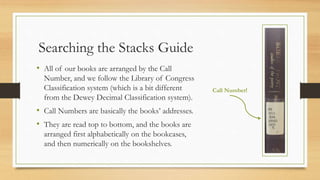
• All of our books are arranged by the Call
Number, and we follow the Library of Congress
Classification system (which is a bit different
from the Dewey Decimal Classification system).
• Call Numbers are basically the books’ addresses.
• They are read top to bottom, and the books are
arranged first alphabetically on the bookcases,
and then numerically on the bookshelves.
Call Number!
Searching the AVL Guide
• AVL stands for Alabama Virtual Library, and it is where you will get access
to databases full of scholarly articles.
• On campus, you do not need a username or password, but at home you
might. See the librarian for registration information!
• From the screen, click on Student Resources, then College & University, then
select a database from the list.
• Use limiters to help narrow down your search and to make sure you are only
getting results that fit within your assignment requirements.
Stay in Touch With Us!
• Hours: Monday – Thursday, 7:30 a.m. – 9:00 p.m.
Friday, 7:30 a.m. – 2:00 p.m.
Saturday, CLOSED
Sunday, 2:00 p.m. – 6:00 p.m.
• Phone: (334) 291-4978
• Virtual Chat: http://thelrcblog.blogspot.com
• Online: http://cv.edu.booksys.net/opac/cvcclib/index.html
Summer Hours
Monday – Thursday, 7:30 a.m. – 9:00 p.m.
Friday & Saturday, CLOSED
Sunday, 2:00 p.m. – 6:00 p.m.

LRC Orientation (ORI101 & ORI105)

  • 1.
    Library Orientation Owen HallLearning Resource Center Chattahoochee Valley Community College
  • 2.
    Check-Out Guide • CVCCstudents can check out up to 10 books at a time • Your library card is your Student ID • If you do not return books on time, each book will incur a $0.20 fine per day it is overdue. • Unpaid library fines result in a hold on your record, preventing you from: registering, graduating, and accessing official transcripts. Fun fact! You can also check out books at CTC by signing up for a CVCC/CTC library card with us! Need Help Finding a Book? If we don’t have the book you need, you can request it from a different library through ILL. See a member of the library staff for more information!
  • 3.
    Resources Guide Check-Out andTake With You • Any circulating books from our “main” collection. • These can be found mostly on the 2nd floor, as well as on the bookcase by the computers (bestsellers & new releases). Check-Out and Stay in the LRC • Textbooks (located in the Reserve room behind the circulation desk) • Laptops • DVDs • You will need to leave a photo ID at the desk. BYOEB! Bring your own earbuds! We do not check out earbuds or headphones.
  • 4.
    Printing & CopyingGuide Printing 1. Use your student ID or buy a print card. Printing costs $0.10 per page. 2. Add money to your card with the Equitrac machine. It only accepts $1 bills. 3. After pressing File  Print, a window will pop up asking for a release key. This can be anything that is easy to remember (your initials, favorite number, etc.). 4. Find the release station next to the printer/copier. Type in your release key. 5. Click on your document title, click Print, insert your card into the pay station. Copying 1. Use your student ID or buy a print card. Copies cost $0.10 per page. 2. Put your original on the glass. Select number of copies. Insert your card into the pay station. 3. Press the green “Copy” button. NOTE: do not open the drawers or trays for any reason. If there is an error, or if the machine is out of paper, see a member of the library staff instead.
  • 5.
    Searching the StacksGuide • All of our books are arranged by the Call Number, and we follow the Library of Congress Classification system (which is a bit different from the Dewey Decimal Classification system). • Call Numbers are basically the books’ addresses. • They are read top to bottom, and the books are arranged first alphabetically on the bookcases, and then numerically on the bookshelves. Call Number!
  • 6.
    Searching the AVLGuide • AVL stands for Alabama Virtual Library, and it is where you will get access to databases full of scholarly articles. • On campus, you do not need a username or password, but at home you might. See the librarian for registration information! • From the screen, click on Student Resources, then College & University, then select a database from the list. • Use limiters to help narrow down your search and to make sure you are only getting results that fit within your assignment requirements.
  • 7.
    Stay in TouchWith Us! • Hours: Monday – Thursday, 7:30 a.m. – 9:00 p.m. Friday, 7:30 a.m. – 2:00 p.m. Saturday, CLOSED Sunday, 2:00 p.m. – 6:00 p.m. • Phone: (334) 291-4978 • Virtual Chat: http://thelrcblog.blogspot.com • Online: http://cv.edu.booksys.net/opac/cvcclib/index.html Summer Hours Monday – Thursday, 7:30 a.m. – 9:00 p.m. Friday & Saturday, CLOSED Sunday, 2:00 p.m. – 6:00 p.m.