Low-code Development Platform
Nintex vs. PowerApp
Ehsan Hakimi Jan 2019
Agenda
-Programming language history
What is low code development?
-Low-code vs. No-code
-Review Nintex platform as a LCDP
-Nintex architecture
-Nintex versions and components
-Demo Nintex and PowerApp
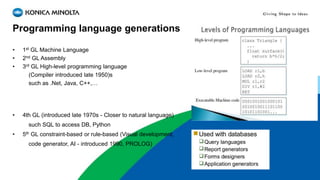
Programming language generations
• 1st GL Machine Language
• 2nd GL Assembly
• 3rd GL High-level programming language
(Compiler introduced late 1950)s
such as .Net, Java, C++,…
• 4th GL (introduced late 1970s - Closer to natural language)
such SQL to access DB, Python
• 5th GL constraint-based or rule-based (Visual development,
code generator, AI - introduced 1990, PROLOG)
Business Application Evolution
• Pre-packaged software
• Customizing multi-purpose pre-packaged software
ERP, CRM, ECM, MIS
• Low-code (no-code) development platforms
Application driven from 4-5th Generation Language and introduced on 2011
Forrester estimates the total market for low-code development will grow to
$15.5 billion by 2020
Enterprise Digital transformation
(Digitalize our workplace in 2020)
• Rapid App Development (RAD)
• BPMS
• eForms
• Mobile
• Cloud
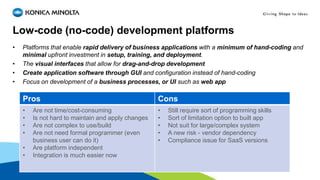
Low-code (no-code) development platforms
• Platforms that enable rapid delivery of business applications with a minimum of hand-coding and
minimal upfront investment in setup, training, and deployment.
• The visual interfaces that allow for drag-and-drop development
• Create application software through GUI and configuration instead of hand-coding
• Focus on development of a business processes, or UI such as web app
Pros Cons
• Are not time/cost-consuming
• Is not hard to maintain and apply changes
• Are not complex to use/build
• Are not need formal programmer (even
business user can do it)
• Are platform independent
• Integration is much easier now
• Still require sort of programming skills
• Sort of limitation option to built app
• Not suit for large/complex system
• A new risk - vendor dependency
• Compliance issue for SaaS versions
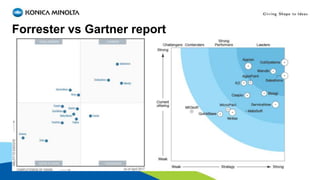
Forrester vs Gartner report
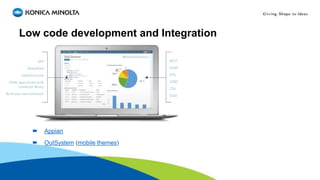
Low code development and Integration
 Appian
 OutSystem (mobile themes)
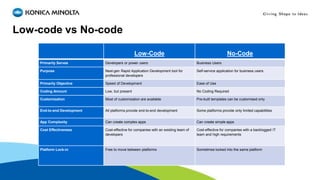
Low-code vs No-code
Low-Code No-Code
Primarily Serves Developers or power users Business Users
Purpose Next-gen Rapid Application Development tool for
professional developers
Self-service application for business users
Primarily Objective Speed of Development Ease of Use
Coding Amount Low, but present No Coding Required
Customization Most of customization are available Pre-built templates can be customised only
End-to-end Development All platforms provide end-to-end development Some platforms provide only limited capabilities
App Complexity Can create complex apps Can create simple apps
Cost Effectiveness Cost-effective for companies with an existing team of
developers
Cost-effective for companies with a backlogged IT
team and high requirements
Platform Lock-in Free to move between platforms Sometimes locked into the same platform
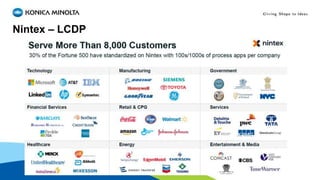
Nintex – LCDP
Business Use Case
3M+ workflow applications in production
Billions of process executions annually
Nintex components
Connectors:
-Salesforce
-Adobe
-DocuSign
-Box
-SharePoint Online
-Microsoft OneDrive
-Microsoft Dynamics CRM
-Dropbox
-Twilio
-Zendesk
-Slack
-Google Drive
-Azure Active Directory
-SQL
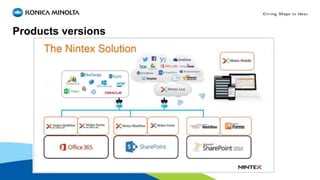
Products versions
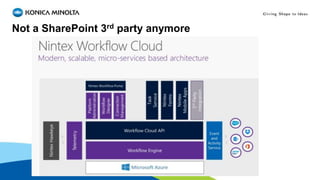
Not a SharePoint 3rd party anymore
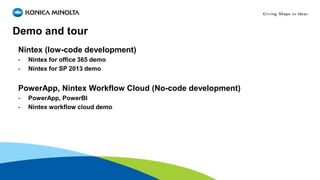
Demo and tour
Nintex (low-code development)
- Nintex for office 365 demo
- Nintex for SP 2013 demo
PowerApp, Nintex Workflow Cloud (No-code development)
- PowerApp, PowerBI
- Nintex workflow cloud demo

Low code development platform

  • 1.
    Low-code Development Platform Nintexvs. PowerApp Ehsan Hakimi Jan 2019
  • 2.
    Agenda -Programming language history Whatis low code development? -Low-code vs. No-code -Review Nintex platform as a LCDP -Nintex architecture -Nintex versions and components -Demo Nintex and PowerApp
  • 3.
    Programming language generations •1st GL Machine Language • 2nd GL Assembly • 3rd GL High-level programming language (Compiler introduced late 1950)s such as .Net, Java, C++,… • 4th GL (introduced late 1970s - Closer to natural language) such SQL to access DB, Python • 5th GL constraint-based or rule-based (Visual development, code generator, AI - introduced 1990, PROLOG)
  • 4.
    Business Application Evolution •Pre-packaged software • Customizing multi-purpose pre-packaged software ERP, CRM, ECM, MIS • Low-code (no-code) development platforms Application driven from 4-5th Generation Language and introduced on 2011 Forrester estimates the total market for low-code development will grow to $15.5 billion by 2020
  • 5.
    Enterprise Digital transformation (Digitalizeour workplace in 2020) • Rapid App Development (RAD) • BPMS • eForms • Mobile • Cloud
  • 6.
    Low-code (no-code) developmentplatforms • Platforms that enable rapid delivery of business applications with a minimum of hand-coding and minimal upfront investment in setup, training, and deployment. • The visual interfaces that allow for drag-and-drop development • Create application software through GUI and configuration instead of hand-coding • Focus on development of a business processes, or UI such as web app Pros Cons • Are not time/cost-consuming • Is not hard to maintain and apply changes • Are not complex to use/build • Are not need formal programmer (even business user can do it) • Are platform independent • Integration is much easier now • Still require sort of programming skills • Sort of limitation option to built app • Not suit for large/complex system • A new risk - vendor dependency • Compliance issue for SaaS versions
  • 7.
  • 8.
    Low code developmentand Integration  Appian  OutSystem (mobile themes)
  • 9.
    Low-code vs No-code Low-CodeNo-Code Primarily Serves Developers or power users Business Users Purpose Next-gen Rapid Application Development tool for professional developers Self-service application for business users Primarily Objective Speed of Development Ease of Use Coding Amount Low, but present No Coding Required Customization Most of customization are available Pre-built templates can be customised only End-to-end Development All platforms provide end-to-end development Some platforms provide only limited capabilities App Complexity Can create complex apps Can create simple apps Cost Effectiveness Cost-effective for companies with an existing team of developers Cost-effective for companies with a backlogged IT team and high requirements Platform Lock-in Free to move between platforms Sometimes locked into the same platform
  • 10.
  • 11.
  • 12.
    3M+ workflow applicationsin production Billions of process executions annually
  • 13.
    Nintex components Connectors: -Salesforce -Adobe -DocuSign -Box -SharePoint Online -MicrosoftOneDrive -Microsoft Dynamics CRM -Dropbox -Twilio -Zendesk -Slack -Google Drive -Azure Active Directory -SQL
  • 14.
  • 15.
    Not a SharePoint3rd party anymore
  • 16.
    Demo and tour Nintex(low-code development) - Nintex for office 365 demo - Nintex for SP 2013 demo PowerApp, Nintex Workflow Cloud (No-code development) - PowerApp, PowerBI - Nintex workflow cloud demo