Low code no code platforms for application development
1.
Low code –No
code
Jeevitha P
1MS23MC038
Under the guidance of
Dr. D Evangelin Geetha
Department of Master of Computer Applications
IV Semester MCA
Seminar : MCAS1
2.
1
Table Of Contents
1.Introduction
2. Objective
3. Definition
4. Scope
5. Literature Review
6. Methodology - Tools
7. Glide
8. Power BI
9. Results and Comparison
10.Conclusion
3.
Introducti
on
The modernera is defined by rapid digital
transformation across industries.
Businesses are under pressure to launch digital
products quickly to remain competitive.
Traditional software development often fails to
keep up with this demand due to long
development cycles and dependency on skilled
programmers.
This has led to the rise of No-Code and Low-Code
Development Platforms (NCLCDPs) tools that
empower users to build apps visually with minimal
or no coding skills.
4.
Provide acomprehensive understanding of
No-Code and Low-Code platforms.
Highlight the difference between the two
paradigms.
Evaluate popular tools like Glide, Power BI,
AppGyver, Bubble, and OutSystems.
Explore real-world use cases across sectors:
prototyping, workflow automation, internal
dashboards, and mobile/web applications.
Discuss the benefits, limitations, and future of
these platforms.
Objective
5.
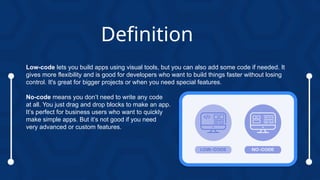
Low-code lets youbuild apps using visual tools, but you can also add some code if needed. It
gives more flexibility and is good for developers who want to build things faster without losing
control. It's great for bigger projects or when you need special features.
No-code means you don’t need to write any code
at all. You just drag and drop blocks to make an app.
It’s perfect for business users who want to quickly
make simple apps. But it’s not good if you need
very advanced or custom features.
Definition
6.
Scope
No-code/low-code platformsare versatile and are being adopted across many sectors:
Finance: Automating reporting systems, internal tools.
Healthcare: Patient record management, appointment scheduling.
Education: Building e-learning tools, quiz generators, student dashboards.
E-commerce: Creating inventory apps, customer portals.
Startups use them to build MVPs, while enterprises use them to streamline internal
processes.
Governments and NGOs are using them for citizen portals and data collection.
The technology scales from simple personal projects to complex enterprise-level
applications.
7.
Literature Review
CitizenDevelopers: No-code platforms empower non-technical users to build functional
apps, reducing reliance on IT teams.
Example: Logotec App Studio enables business users to create apps independently .
SME Collaboration: Low-code platforms accelerate development and foster IT-business
collaboration in SMEs, but vendor lock-in remains a concern.
Algorithmic Potential: No-code tools support research applications with visual scripting for
data workflows.
Challenges:
• Terminology confusion hinders standardization of low-code platforms.
• Less Flexibility : You can't always build exactly what you want.
• Not Good for Big Projects : These tools may not work well for large or complex apps
• Limited Connections : They may not easily work with older systems or certain
services.
Conclusion: No-code/low-code platforms transform development but face integration and
dependency issues.
8.
Methodology:
Tools
Glide: No-codemobile app development with Google Sheets.
Power BI: Low-code for data visualization.
AppGyver: Open-source no-code for web/mobile apps.
Budibase: Open-source low-code for internal tools.
N8n: Open-source low-code for workflow automation.
9.
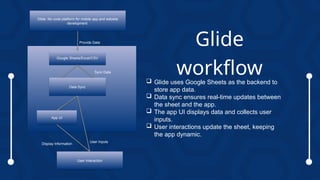
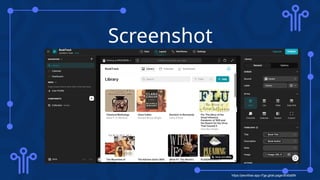
Glide usesGoogle Sheets as the backend to
store app data.
Data sync ensures real-time updates between
the sheet and the app.
The app UI displays data and collects user
inputs.
User interactions update the sheet, keeping
the app dynamic.
Glide
workflow
Glide: No code platform for mobile app and website
development
Google Sheets/Excel/CSV
Data Sync
App UI
User Interaction
Provide Data
Sync Data
Display Information
User Inputs
10.
GLIDE
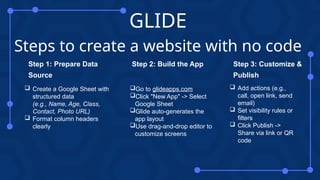
Steps to createa website with no code
Create a Google Sheet with
structured data
(e.g., Name, Age, Class,
Contact, Photo URL)
Format column headers
clearly
Step 1: Prepare Data
Source
Go to glideapps.com
Click "New App" -> Select
Google Sheet
Glide auto-generates the
app layout
Use drag-and-drop editor to
customize screens
Step 2: Build the App
Add actions (e.g.,
call, open link, send
email)
Set visibility rules or
filters
Click Publish ->
Share via link or QR
code
Step 3: Customize &
Publish
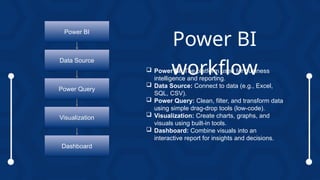
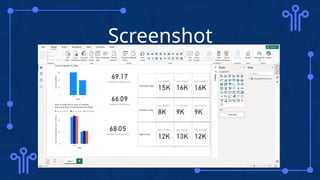
Power BI:The platform used for business
intelligence and reporting.
Data Source: Connect to data (e.g., Excel,
SQL, CSV).
Power Query: Clean, filter, and transform data
using simple drag-drop tools (low-code).
Visualization: Create charts, graphs, and
visuals using built-in tools.
Dashboard: Combine visuals into an
interactive report for insights and decisions.
Power BI
workflow
Power BI
Data Source
Power Query
Visualization
Dashboard
13.
Power BI
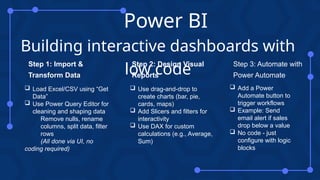
Building interactivedashboards with
low code
Load Excel/CSV using “Get
Data”
Use Power Query Editor for
cleaning and shaping data
Remove nulls, rename
columns, split data, filter
rows
(All done via UI, no
coding required)
Step 1: Import &
Transform Data
Use drag-and-drop to
create charts (bar, pie,
cards, maps)
Add Slicers and filters for
interactivity
Use DAX for custom
calculations (e.g., Average,
Sum)
Step 2: Design Visual
Reports
Add a Power
Automate button to
trigger workflows
Example: Send
email alert if sales
drop below a value
No code - just
configure with logic
blocks
Step 3: Automate with
Power Automate
Results and
Comparison
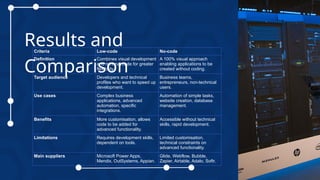
Criteria Low-codeNo-code
Definition Combines visual development
and minimal code for greater
flexibility.
A 100% visual approach
enabling applications to be
created without coding.
Target audience Developers and technical
profiles who want to speed up
development.
Business teams,
entrepreneurs, non-technical
users.
Use cases Complex business
applications, advanced
automation, specific
integrations.
Automation of simple tasks,
website creation, database
management.
Benefits More customisation, allows
code to be added for
advanced functionality.
Accessible without technical
skills, rapid development.
Limitations Requires development skills,
dependent on tools.
Limited customisation,
technical constraints on
advanced functionality.
Main suppliers Microsoft Power Apps,
Mendix, OutSystems, Appian.
Glide, Webflow, Bubble,
Zapier, Airtable, Adalo, Softr.
Conclusi
on
No-code/low-code platformsdemocratize
development.
Significant time and cost savings.
Challenges: Security, platform dependency.
Future
Work
Integrate AI/ML with no-code platforms.
Improve offline support for mobile apps.
Enhance governance and security.
Expand use cases in public sector/academia.
18.
References
1. Sufi, F.(2023). Algorithms in Low-Code-No-Code for Research Applications: A Practical Review. Algorithms, 16(2), 108.
https://doi.org/10.3390/a16020108
2. Moskal, M. (2021). NO-CODE APPLICATION DEVELOPMENT ON THE EXAMPLE OF LOGOTEC APP STUDIO
PLATFORM. Informatyka, Automatyka, Pomiary W Gospodarce I Ochronie Środowiska, 11(1), 54–57.
https://doi.org/10.35784/iapgos.2429
3. G. F. Hurlburt, "Low-Code, No-Code, What's Under the Hood?," in IT Professional, vol. 23, no. 6, pp. 4-7, 1 Nov.-Dec.
2021, doi: 10.1109/MITP.2021.3123415.
4. Bock, A.C., Frank, U. Low-Code Platform. Bus Inf Syst Eng 63, 733–740 (2021).
https://doi.org/10.1007/s12599-021-00726-8
5. https://hdl.handle.net/10125/103380
6. Prinz, Niculin; Rentrop, Christopher; and Huber, Melanie, "Low-Code Development Platforms – A Literature Review"
(2021). AMCIS 2021 Proceedings. 2. https://aisel.aisnet.org/amcis2021/adv_info_systems_general_track/
adv_info_systems_general_track/2