
Log Search Engine
Main Template


                Confidential
About Presenter


  Olena Matokhina
  Consulting & Development Team Lead


                                       Confidential   2
Agenda
     What are logs? How do you work with
     them?


     Review of possibilities to improve day-
     to-day work with logs and reports


     Log Aggregation Solutions


     GrayLog benefits and features


                                   Confidential   3
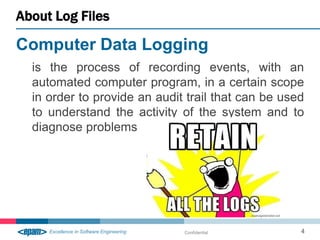
About Log Files

Computer Data Logging
  is the process of recording events, with an
  automated computer program, in a certain scope
  in order to provide an audit trail that can be used
  to understand the activity of the system and to
  diagnose problems


                              Confidential          4
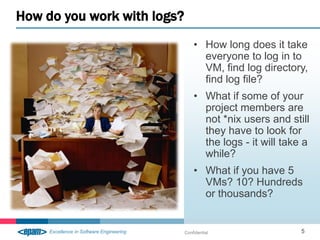
How do you work with logs?
                                 • How long does it take
                                   everyone to log in to
                                   VM, find log directory,
                                   find log file?
                                 • What if some of your
                                   project members are
                                   not *nix users and still
                                   they have to look for
                                   the logs - it will take a
                                   while?
                                 • What if you have 5
                                   VMs? 10? Hundreds
                                   or thousands?


                             Confidential                 5
How do we improve this?


A need to consolidate, centralize and provide tools
for search/notification mechanism

                              Confidential            6
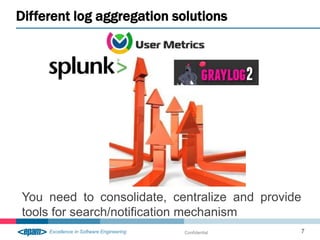
Different log aggregation solutions


You need to consolidate, centralize and provide
tools for search/notification mechanism
                           Confidential       7
GrayLog benefits


                       • Open-Source and
                         Free
                       • Enterprise-ready
                         solution
                       • What if you have 5
                         VMs? 10? Hundreds
                         or thousands?
                       • Simple log
                         management


                   Confidential             8
GrayLog features


                       • GELF
                       • Web Interface
                       • Stores logs in
                         ElasticSearch
                       • Simple log
                         management
                       • Open Source and
                         Free solution


                   Confidential            9
Basic GrayLog utilization


                            Confidential   10
GrayLog lab overview


• GrayLog2 Installation
• Log Aggregation workflow
• GrayLog2 feature list discussion
• GrayLog2 server installation and configuration
• System configuration for successful workflow


                                              Confidential   11
Our contacts

           SpecialEPM-CITConsulting@epam.com


           http://cloud.epam.com


           https://twitter.com/EPAM_Cloud


           http://epamcloud.blogspot.com/


           https://www.yammer.com/epam.com/


                                   Confidential   12

Log Search Service Introduction

  • 1.
    Log Search Engine MainTemplate Confidential
  • 2.
    About Presenter Olena Matokhina Consulting & Development Team Lead Confidential 2
  • 3.
    Agenda What are logs? How do you work with them? Review of possibilities to improve day- to-day work with logs and reports Log Aggregation Solutions GrayLog benefits and features Confidential 3
  • 4.
    About Log Files ComputerData Logging is the process of recording events, with an automated computer program, in a certain scope in order to provide an audit trail that can be used to understand the activity of the system and to diagnose problems Confidential 4
  • 5.
    How do youwork with logs? • How long does it take everyone to log in to VM, find log directory, find log file? • What if some of your project members are not *nix users and still they have to look for the logs - it will take a while? • What if you have 5 VMs? 10? Hundreds or thousands? Confidential 5
  • 6.
    How do weimprove this? A need to consolidate, centralize and provide tools for search/notification mechanism Confidential 6
  • 7.
    Different log aggregationsolutions You need to consolidate, centralize and provide tools for search/notification mechanism Confidential 7
  • 8.
    GrayLog benefits • Open-Source and Free • Enterprise-ready solution • What if you have 5 VMs? 10? Hundreds or thousands? • Simple log management Confidential 8
  • 9.
    GrayLog features • GELF • Web Interface • Stores logs in ElasticSearch • Simple log management • Open Source and Free solution Confidential 9
  • 10.
  • 11.
    GrayLog lab overview •GrayLog2 Installation • Log Aggregation workflow • GrayLog2 feature list discussion • GrayLog2 server installation and configuration • System configuration for successful workflow Confidential 11
  • 12.
    Our contacts SpecialEPM-CITConsulting@epam.com http://cloud.epam.com https://twitter.com/EPAM_Cloud http://epamcloud.blogspot.com/ https://www.yammer.com/epam.com/ Confidential 12

Editor's Notes

  • #5 Computer file in which a program records events, such as user access or data manipulation as they occur, to serve as an audit trail, diagnostic device, or security measure.
  • #7 An improvement of current process may come through usage of Log Aggregation Solutions. There is a variety of those to choose from and their main goal is to provide user with single entry point where they can find all logs from all sources sorted, combined, categorized and available for search trough. Logs are a very important resource for maintenance of application and investigation in what exactly went wrong and when. Collected logs and appropriate usage of those can help in preventing failures or, if something already failed, restore and fix the exact problem.
  • #8 To narrow the selection and explanation of each and every possible solution of those, we will end up with a few to tell about. Those will be GrayLog, Splunk and User Metrix. Each one of them has their own advantages and concerns. Let’s look at those closer. We should SplunkEnterprise collects, indexes and harnesses all of the fast-moving machine data generated by your applications, servers and devices—physical, virtual and in the cloud. Troubleshoot application problems and investigate security incidents in minutes instead of hours or days, avoid service degradation or outages, deliver compliance at lower cost and gain new business insights.UserMetrix combines application analytics with traditional error reporting, to determine the most likely reproduction steps for software issues. This allows software developers to focus on actually fixing problems, rather than reproducing them. This is a paid software.GrayLogenables you to unleash the power that lays inside your logs. Use it to run analytics, alerting, monitoring and powerful searches over your whole log base. Need to debug a failing request? Just run a quick filter search to find it and see what errors it produced. Want to see all messages a certain API consumer is consuming in real time? Create streams for every consumer and have them always only one click away. Graylog2 is free and open source.
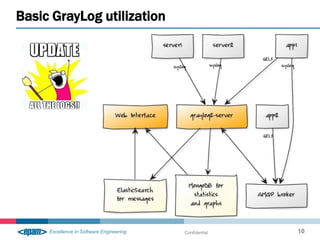
  • #10 The Graylog Extended Log Format (GELF) avoids the shortcomings of classic syslog. It is perfect for sending log messages from within your applications in an easy and structured way. There are libraries and log appenders for Ruby, PHP, Python and others. All data sent to Graylog2 will appear in the web interface. Use the web interface to search and filter your data. A core part of the web interface are streams: They basically are saved searches that allow you to quickly access an overview that is already pre-filtered to match for example specific parts of your application.ElasticSearch consists of a server written in Java that accepts your syslog messages via TCP, UDP or AMQP and stores it in the database.
  • #11 The main part of GrayLog utilization is GrayLog server. As you can see from the picture above, it is a main hub for all instances that need logs to be collected from.Server uses Elastic Search and Mongo DB to store some data, that helps in statistics and graphs + messages. Through that a Web Interface is able to display abovementioned materials.Except the standard log aggregation protocol, UDP, you can use the alternative AMQP to send logs. This is implemented through AMQP broker.
  • #12 During the next practical part of this presentation, we will perform the following actions in order to get familiar with some basic GrayLog2 features, system structure and architecture.