Live Chat Training
July 2013

Live Chat Administrator:
Saralynda Blackmon
Samuel Conway
Compliance is key on Chat
Be conservative in giving out Ashford and BPI
information.
 Refer to the web site and do the best you can!




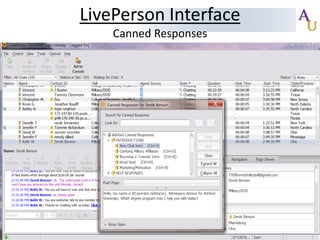
Canned Responses for these situations are located
under the +HELP RESPONSES section

 Never

estimate the web site numbers or
general information.
Everything is documented
 More conservative advisement over chat

Who is on Chat?






Military/DOD (Mil ACs transfer ED & Grad to UAs on Chat)
College of Education
College of Business, Health Services & Liberal Arts
Master’s Degrees
*Send Outlook Appt. reminder of shift switches if
you’re on vacation or extended leave to
live.chat@ashford.edu
Call Prompt Before the App Process
After 10 minutes or so in an Admissions live
chat conversation, ask if Visitor would like to
continue via phone call.
 It’s imperative to ask for a phone conversation
before talking about applying to AU.
 If phone call is not possible, ask ALL MAPS
and APPT related qualifiers must be covered
BEFORE advising toward an app.

MAPS
Treat All Prospective Students Like Any MAPS Call!
 Motivation

 Admissibility
 Payment

 Start

*We have Canned Responses for each*
Creating New Live Chat Lead




Need Full Name and One form of Contact
Advisor Generated




Lead Type




Live Chat
Choose appropriately

Lead Source


Choose appropriately
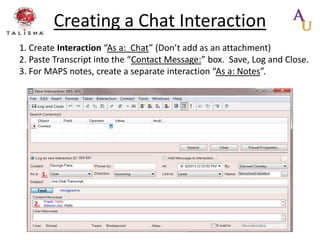
Creating a Chat Interaction
1. Create Interaction “As a: Chat” (Don’t add as an attachment)
2. Paste Transcript into the “Contact Message:” box. Save, Log and Close.
3. For MAPS notes, create a separate interaction “As a: Notes”.
Best Practices
 Best




Practices LivePerson Tips. Click Here!

Paste entire chat conversation in REAP
 Remove phone #’s and sensitive information
 Please include timestamp
SIT Transfers





Wait until chat conversation is complete before
requesting a SIT transfer
Put note, “Speaking to Student on Live Chat” in REAP file
More info on Policy later in slides
Taking a Chat!


You receive a NEW chat:
1. ‘New Chat Intro’ (Control + i) for New chats



You receive a TRANSFERRED chat:
1. ‘Receiving a Transfer Intro’ (Control + r) for Transferred chats



If Prospective student,
2. Military affiliation question (Control + o)



If Current student, assist as needed.

Please answer initial question from visitor! Use good
judgment!!
Please allow student to respond to each question!!!!


When you Finish a chat, use:
1. ‘End Chat’ canned response (Control + z)
National Campaign







Effectively immediately, please follow the
following SOP located on the QUAD
https://quad.bpiedu.com/docs/DOC-12603
One simple step of adding the URL to the
‘Phone/Live Chat Code’ line in Talisma
Please read in its entirety beforehand.
Aux Code 11




During your ENTIRE chat slot, i.e. 8 AM-10
AM, be in Aux Code 11.
When still chatting AFTER your chat slot, you
may choose the most appropriate aux code




Tip: If you’re in Online Status be in Aux code 11. Both
are compared side by side within 25% variance.

If chatting remotely, use VPN and utilize the
Aux Codes in the same manner
Compliance Score Cards
Conservative Scoring of Random Live Chats.
 Currently used for self improvement and chat
performance purposes only.
 Four Components:







Chat Obligations
Rapport Building
Opportunities
Compliance Components
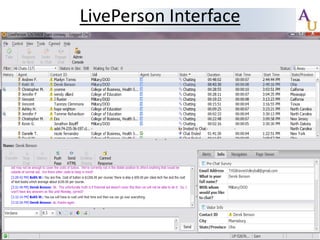
LivePerson Interface
Canned Responses
Offline Requests Emails
Upon receiving an Offline Live Chat email
from a LCA, review the prospective student
account in Talisma before contacting the
student
 If there’s no Talisma account , create one as
an Advisor Generated Live Chat account
 If it’s a current Talisma account, you have 24
hours from the timestamp on the Live Chat
Administrator email to make contact
 Account ownership may be in limbo

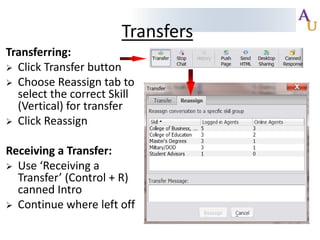
Transfers
Transferring:
 Click Transfer button
 Choose Reassign tab to
select the correct Skill
(Vertical) for transfer
 Click Reassign

Receiving a Transfer:
 Use ‘Receiving a
Transfer’ (Control + R)
canned Intro
 Continue where left off
Policy Guidelines
If a lead is assigned to a SIC, is in a SI status or not in
Talisma, the AC/UA can submit a SIT request to have
the lead transferred under their name or create the
lead in Talisma. When the prospective student
contacts an AC/UA through Live Chat or Live Ticket
email (a forwarded ticket to you doesn’t suffice
contact until you make contact), the AC/UA will be
allowed to work with that prospective student, with
the following exceptions:
Prospective & Existing Student Policy
Exception 1 - to earn three day protection from chat, the
prospective student is assigned to an AC/UA in SCHD
(scheduled) status with a scheduled appointment within three
business days of the SCHD status change, then the
prospective student is protected for the assigned AC/UA for
three business days. (Bach to Grad is 15 day protection)
Exception 2 – to earn three day protection from chat If the
prospective student is in APPT (appointment) or APND
(application needed) status, with an attempt-to-contact
within the last three business days (after contact has been
made by the owning AC/UA), then the prospective student is
protected for the assigned AC/UA for three business days.
(Bach to Grad 15 day protection)
Exception 3 – If the prospective student is a referral that has
been in Talisma for less than 120 hours.
Prospective & Existing Student Policy
Exception 4 – Live Chat AC/UAs will need to look up the
prospective or existing student in Talisma every time. If the
prospective student is assigned to an AC/UA and in a contacted
status, the AC/UA must ask, using the pre-written canned
verbiage: “I see you were working with an advisor, would you
like to continue working with them or would you like to work
with me going forward?” (Control + t for the shortcut)
This question must be asked regardless of the assigned AC/UAs
status: incorrect vertical, separated, transferred, etc
Variations or follow up phrases after the canned verbiage must
not be used. (Bach to Grad does NOT need to use this)
If the AC/UA fails to ask the question using the pre-written
canned verbiage, the student will be redistributed by the LDS
team to an AC/UA in the correct vertical off a rotation list.
Prospective & Existing Student Policy
Exception 5 – Customer Service
If the student states they would like to utilize the Live Chat
process, but the account is protected from Live Chat (due to
protections discussed in the Guidelines), then the Live Chat
AC/UA must continue advising the student to provide
customer service, but the student inquiry will not be eligible
for reassignment.
Exception 6 – Only students eligible for reapply may be
requested by a Live Chat AC/UA, unless there’s a
documented attempt-to-contact within the last three
business days.
FERPA and Compliance


Live Chat conversations are subject to the same
compliance rules and regulations as verbal contact.
These rules include FERPA rules and regulations,
Americans with Disabilities Act (ADA), finance, etc.
Failure to comply with federal and organizational
policies and regulations in Live Chat conversations is
subject to disciplinary action, up to and including
termination.

Live chat training, best practices and tips

  • 1.
    Live Chat Training July2013 Live Chat Administrator: Saralynda Blackmon Samuel Conway
  • 2.
    Compliance is keyon Chat Be conservative in giving out Ashford and BPI information.  Refer to the web site and do the best you can!   Canned Responses for these situations are located under the +HELP RESPONSES section  Never estimate the web site numbers or general information. Everything is documented  More conservative advisement over chat 
  • 3.
    Who is onChat?     Military/DOD (Mil ACs transfer ED & Grad to UAs on Chat) College of Education College of Business, Health Services & Liberal Arts Master’s Degrees *Send Outlook Appt. reminder of shift switches if you’re on vacation or extended leave to live.chat@ashford.edu
  • 4.
    Call Prompt Beforethe App Process After 10 minutes or so in an Admissions live chat conversation, ask if Visitor would like to continue via phone call.  It’s imperative to ask for a phone conversation before talking about applying to AU.  If phone call is not possible, ask ALL MAPS and APPT related qualifiers must be covered BEFORE advising toward an app. 
  • 5.
    MAPS Treat All ProspectiveStudents Like Any MAPS Call!  Motivation  Admissibility  Payment  Start *We have Canned Responses for each*
  • 6.
    Creating New LiveChat Lead   Need Full Name and One form of Contact Advisor Generated   Lead Type   Live Chat Choose appropriately Lead Source  Choose appropriately
  • 7.
    Creating a ChatInteraction 1. Create Interaction “As a: Chat” (Don’t add as an attachment) 2. Paste Transcript into the “Contact Message:” box. Save, Log and Close. 3. For MAPS notes, create a separate interaction “As a: Notes”.
  • 8.
    Best Practices  Best   PracticesLivePerson Tips. Click Here! Paste entire chat conversation in REAP  Remove phone #’s and sensitive information  Please include timestamp SIT Transfers    Wait until chat conversation is complete before requesting a SIT transfer Put note, “Speaking to Student on Live Chat” in REAP file More info on Policy later in slides
  • 9.
    Taking a Chat!  Youreceive a NEW chat: 1. ‘New Chat Intro’ (Control + i) for New chats  You receive a TRANSFERRED chat: 1. ‘Receiving a Transfer Intro’ (Control + r) for Transferred chats  If Prospective student, 2. Military affiliation question (Control + o)  If Current student, assist as needed. Please answer initial question from visitor! Use good judgment!! Please allow student to respond to each question!!!!  When you Finish a chat, use: 1. ‘End Chat’ canned response (Control + z)
  • 10.
    National Campaign     Effectively immediately,please follow the following SOP located on the QUAD https://quad.bpiedu.com/docs/DOC-12603 One simple step of adding the URL to the ‘Phone/Live Chat Code’ line in Talisma Please read in its entirety beforehand.
  • 11.
    Aux Code 11   Duringyour ENTIRE chat slot, i.e. 8 AM-10 AM, be in Aux Code 11. When still chatting AFTER your chat slot, you may choose the most appropriate aux code   Tip: If you’re in Online Status be in Aux code 11. Both are compared side by side within 25% variance. If chatting remotely, use VPN and utilize the Aux Codes in the same manner
  • 12.
    Compliance Score Cards ConservativeScoring of Random Live Chats.  Currently used for self improvement and chat performance purposes only.  Four Components:      Chat Obligations Rapport Building Opportunities Compliance Components
  • 13.
  • 14.
  • 15.
    Offline Requests Emails Uponreceiving an Offline Live Chat email from a LCA, review the prospective student account in Talisma before contacting the student  If there’s no Talisma account , create one as an Advisor Generated Live Chat account  If it’s a current Talisma account, you have 24 hours from the timestamp on the Live Chat Administrator email to make contact  Account ownership may be in limbo 
  • 16.
    Transfers Transferring:  Click Transferbutton  Choose Reassign tab to select the correct Skill (Vertical) for transfer  Click Reassign Receiving a Transfer:  Use ‘Receiving a Transfer’ (Control + R) canned Intro  Continue where left off
  • 17.
    Policy Guidelines If alead is assigned to a SIC, is in a SI status or not in Talisma, the AC/UA can submit a SIT request to have the lead transferred under their name or create the lead in Talisma. When the prospective student contacts an AC/UA through Live Chat or Live Ticket email (a forwarded ticket to you doesn’t suffice contact until you make contact), the AC/UA will be allowed to work with that prospective student, with the following exceptions:
  • 18.
    Prospective & ExistingStudent Policy Exception 1 - to earn three day protection from chat, the prospective student is assigned to an AC/UA in SCHD (scheduled) status with a scheduled appointment within three business days of the SCHD status change, then the prospective student is protected for the assigned AC/UA for three business days. (Bach to Grad is 15 day protection) Exception 2 – to earn three day protection from chat If the prospective student is in APPT (appointment) or APND (application needed) status, with an attempt-to-contact within the last three business days (after contact has been made by the owning AC/UA), then the prospective student is protected for the assigned AC/UA for three business days. (Bach to Grad 15 day protection) Exception 3 – If the prospective student is a referral that has been in Talisma for less than 120 hours.
  • 19.
    Prospective & ExistingStudent Policy Exception 4 – Live Chat AC/UAs will need to look up the prospective or existing student in Talisma every time. If the prospective student is assigned to an AC/UA and in a contacted status, the AC/UA must ask, using the pre-written canned verbiage: “I see you were working with an advisor, would you like to continue working with them or would you like to work with me going forward?” (Control + t for the shortcut) This question must be asked regardless of the assigned AC/UAs status: incorrect vertical, separated, transferred, etc Variations or follow up phrases after the canned verbiage must not be used. (Bach to Grad does NOT need to use this) If the AC/UA fails to ask the question using the pre-written canned verbiage, the student will be redistributed by the LDS team to an AC/UA in the correct vertical off a rotation list.
  • 20.
    Prospective & ExistingStudent Policy Exception 5 – Customer Service If the student states they would like to utilize the Live Chat process, but the account is protected from Live Chat (due to protections discussed in the Guidelines), then the Live Chat AC/UA must continue advising the student to provide customer service, but the student inquiry will not be eligible for reassignment. Exception 6 – Only students eligible for reapply may be requested by a Live Chat AC/UA, unless there’s a documented attempt-to-contact within the last three business days.
  • 21.
    FERPA and Compliance  LiveChat conversations are subject to the same compliance rules and regulations as verbal contact. These rules include FERPA rules and regulations, Americans with Disabilities Act (ADA), finance, etc. Failure to comply with federal and organizational policies and regulations in Live Chat conversations is subject to disciplinary action, up to and including termination.