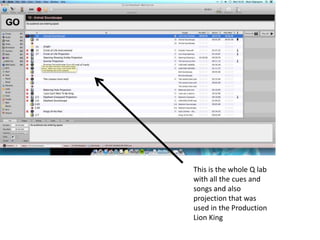
This is the whole Q lab
with all the cues and
songs and also
projection that was
used in the Production
Lion King
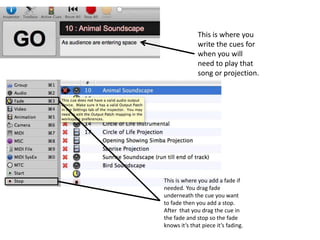
This is where you
write the cues for
when you will
need to play that
song or projection.
This is where you add a fade if
needed. You drag fade
underneath the cue you want
to fade then you add a stop.
After that you drag the cue in
the fade and stop so the fade
knows it’s that piece it’s fading.
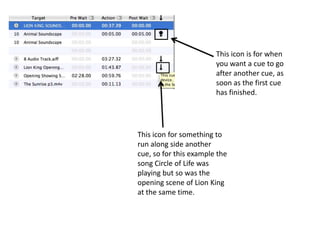
This icon is for when
you want a cue to go
after another cue, as
soon as the first cue
has finished.
This icon for something to
run along side another
cue, so for this example the
song Circle of Life was
playing but so was the
opening scene of Lion King
at the same time.
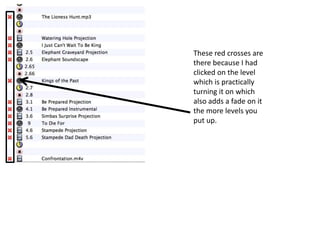
These red crosses are
there because I had
clicked on the level
which is practically
turning it on which
also adds a fade on it
the more levels you
put up.

Lion king screenshots

  • 1.
    This is thewhole Q lab with all the cues and songs and also projection that was used in the Production Lion King
  • 2.
    This is whereyou write the cues for when you will need to play that song or projection. This is where you add a fade if needed. You drag fade underneath the cue you want to fade then you add a stop. After that you drag the cue in the fade and stop so the fade knows it’s that piece it’s fading.
  • 3.
    This icon isfor when you want a cue to go after another cue, as soon as the first cue has finished. This icon for something to run along side another cue, so for this example the song Circle of Life was playing but so was the opening scene of Lion King at the same time.
  • 4.
    These red crossesare there because I had clicked on the level which is practically turning it on which also adds a fade on it the more levels you put up.