THE ONE PAGE LINUX MANUAL
                                      A summary of useful Linux commands
 Version 3.0                                             May 1999                          squadron@powerup.com.au

                                                                         rm name                        Remove a file or directory called
Starting & Stopping                                                                                     name
                                                                         rm -rf name                    Kill off an entire directory and all it’s
                                                                                                        includes files and subdirectories
 shutdown -h now          Shutdown the system now and do not
                          reboot                                         cp filename                    Copy the file called filename to the
 halt                     Stop all processes - same as above             /home/dirname                  /home/dirname directory

 shutdown -r 5            Shutdown the system in 5 minutes and
                          reboot                                         mv filename                    Move the file called filename to the
                                                                         /home/dirname                  /home/dirname directory
 shutdown -r now          Shutdown the system now and reboot
 reboot                   Stop all processes and then reboot - same
                          as above                                       cat filetoview                 Display the file called filetoview
 startx                   Start the X system                             man -k keyword                 Display man pages containing
                                                                                                        keyword
                                                                         more filetoview                Display the file called filetoview one
Accessing & mounting file systems                                                                       page at a time, proceed to next page
                                                                                                        using the spacebar
 mount -t iso9660 /dev/cdrom              Mount the device cdrom         head filetoview                Display the first 10 lines of the file
 /mnt/cdrom                               and call it cdrom under the                                   called filetoview
                                          /mnt directory
                                                                         head -20 filetoview            Display the first 20 lines of the file
 mount -t msdos /dev/hdd                  Mount hard disk “d” as a                                      called filetoview
 /mnt/ddrive                              msdos file system and call
                                          it ddrive under the /mnt       tail filetoview                Display the last 10 lines of the file
                                          directory                                                     called filetoview

 mount -t vfat /dev/hda1                  Mount hard disk “a” as a       tail -20 filetoview            Display the last 20 lines of the file
                                          VFAT file system and call it                                  called filetoview
 /mnt/cdrive
                                          cdrive under the /mnt
                                          directory                      Installing software for Linux
 umount /mnt/cdrom                        Unmount the cdrom
                                                                         rpm -ihv name.rpm               Install the rpm package called name
Finding files and text within files                                      rpm -Uhv name.rpm               Upgrade the rpm package called
                                                                                                         name
 find / -name fname          Starting with the root directory, look
                                                                         rpm -e package                  Delete the rpm package called
                             for the file called fname                                                   package
 find / -name ”*fname*”      Starting with the root directory, look
                                                                         rpm -l package                  List the files in the package called
                             for the file containing the string fname                                    package
 locate missingfilename      Find a file called missingfilename
                                                                         rpm -ql package                 List the files and state the installed
                             using the locate command - this                                             version of the package called
                             assumes you have already used the                                           package
                             command updatedb (see next)
                                                                         rpm -i --force package          Reinstall the rpm package called
 updatedb                    Create or update the database of files                                      name having deleted parts of it (not
                             on all file systems attached to the linux                                   deleting using rpm -e)
                             root directory
                                                                         tar -zxvf archive.tar.gz or     Decompress the files contained in
 which missingfilename       Show the subdirectory containing the        tar -zxvf archive.tgz           the zipped and tarred archive called
                             executable file called missingfilename                                      archive
 grep textstringtofind       Starting with the directory called dir ,    ./configure                     Execute the script preparing the
 /dir                        look for and list all files containing                                      installed files for compiling
                             textstringtofind

The X Window System                                                      User Administration
                                                                         adduser accountname           Create a new user call accountname
 xvidtune                Run the X graphics tuning utility
                                                                         passwd accountname            Give accountname a new password
 XF86Setup               Run the X configuration menu with
                         automatic probing of graphics cards             su                            Log in as superuser from current login
 Xconfigurator           Run another X configuration menu with           exit                          Stop being superuser and revert to
                         automatic probing of graphics cards                                           normal user
 xf86config              Run a text based X configuration menu

Moving, copying, deleting & viewing files                                Little known tips and tricks
                                                                         ifconfig                       List ip addresses for all devices on
 ls -l                         List files in current directory using
                               long format                                                              the machine
 ls -F                         List files in current directory and       apropos subject                List manual pages for subject
                               indicate the file type                    usermount                      Executes graphical application for
 ls -laC                       List all files in current directory in                                   mounting and unmounting file
                               long format and display in columns                                       systems
/sbin/e2fsck hda5            Execute the filesystem check utility
                             on partition hda5
                                                                            File permissions
fdformat /dev/fd0H1440       Format the floppy disk in device fd0
tar -cMf /dev/fd0            Backup the contents of the current
                             directory and subdirectories to
                             multiple floppy disks
tail -f /var/log/messages    Display the last 10 lines of the system
                             log.
cat /var/log/dmesg           Display the file containing the boot
                             time messages - useful for locating
                             problems. Alternatively, use the
                             dmesg command.
*                            wildcard - represents everything. eg.
                             cp from/* to will copy all files in the
                             from directory to the to directory
?                            Single character wildcard. eg.
                             cp config.? /configs will copy all files
                             beginning with the name config. in
                             the current directory to the directory         If the command ls -l is given, a long list of file names is
                             named configs.                                 displayed. The first column in this list details the permissions
                                                                            applying to the file. If a permission is missing for a owner,
[xyz]                        Choice of character wildcards. eg.
                                                                            group of other, it is represented by - eg. drwxr-x—x
                             ls [xyz]* will list all files in the current
                             directory starting with the letter x, y,       Read = 4                     File permissions are altered by giving the
                             or z.                                          Write = 2                    chmod command and the appropriate
                                                                                                         octal code for each user type. eg
linux single                 At the lilo prompt, start in single user       Execute = 1
                             mode. This is useful if you have                                            chmod 7 6 4 filename will make the file
                             forgotten your password. Boot in                                            called filename R+W+X for the owner,
                             single user mode, then run the                                              R+W for the group and R for others.
                             passwd command.                                chmod 7 5 5                  Full permission for the owner, read and
ps                           List current processes                                                      execute access for the group and others.
kill 123                     Kill a specific process eg. kill 123           chmod +x filename            Make the file called filename executable
                                                                                                         to all users.

Configuration files and what they do                                        X Shortcuts - (mainly for Redhat)
/etc/profile             System wide environment variables for
                         all users.                                         Control|Alt + or -                      Increase or decrease the screen
                                                                                                                    resolution. eg. from 640x480 to
/etc/fstab               List of devices and their associated mount                                                 800x600
                         points. Edit this file to add cdroms, DOS
                         partitions and floppy drives at startup.           Alt | escape                            Display list of active windows
/etc/motd                Message of the day broadcast to all users          Shift|Control F8                        Resize the selected window
                         at login.                                          Right click on desktop                  Display menu
etc/rc.d/rc.local        Bash script that is executed at the end of         background
                         login process. Similar to autoexec.bat in          Shift|Control Altr                      Refresh the screen
                         DOS.                                               Shift|Control Altx                      Start an xterm session
/etc/HOSTNAME            Conatins full hostname including domain.
/etc/cron.*              There are 4 directories that automatically         Printing
                         execute all scripts within the directory at
                         intervals of hour, day, week or month.
                                                                            /etc/rc.d/init.d/lpd start      Start the print daemon
/etc/hosts               A list of all know host names and IP
                         addresses on the machine.                          /etc/rc.d/init.d/lpd stop       Stop the print daemon
/etc/httpd/conf          Paramters for the Apache web server                /etc/rc.d/init.d/lpd            Display status of the print daemon
                                                                            status
/etc/inittab             Specifies the run level that the machine
                         should boot into.                                  lpq                             Display jobs in print queue
/etc/resolv.conf         Defines IP addresses of DNS servers.               lprm                            Remove jobs from queue
/etc/smb.conf            Config file for the SAMBA server. Allows           lpr                             Print a file
                         file and print sharing with Microsoft              lpc                             Printer control tool
                         clients.                                           man subject | lpr               Print the manual page called subject
~/.Xdefaults             Define configuration for some X-                                                   as plain text
                         applications. ~ refers to user’s home              man -t subject | lpr            Print the manual page called subject
                         directory.                                                                         as Postscript output
/etc/X11/XF86Confi       Config file for X-Windows.                         printtool                       Start X printer setup interface
g
~/.xinitrc               Defines the windows manager loaded by
                         X. ~ refers to user’s home directory.


                                                                                                 Get your own Official Linux Pocket Protector - includes
                                                                                                           handy command summary. Visit:
                                                                                                           www.powerup.com.au/~squadron

Linux manual

  • 1.
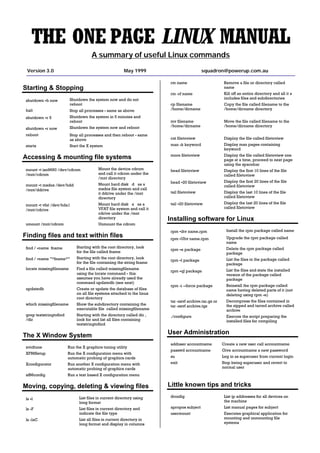
    THE ONE PAGELINUX MANUAL A summary of useful Linux commands Version 3.0 May 1999 squadron@powerup.com.au rm name Remove a file or directory called Starting & Stopping name rm -rf name Kill off an entire directory and all it’s includes files and subdirectories shutdown -h now Shutdown the system now and do not reboot cp filename Copy the file called filename to the halt Stop all processes - same as above /home/dirname /home/dirname directory shutdown -r 5 Shutdown the system in 5 minutes and reboot mv filename Move the file called filename to the /home/dirname /home/dirname directory shutdown -r now Shutdown the system now and reboot reboot Stop all processes and then reboot - same as above cat filetoview Display the file called filetoview startx Start the X system man -k keyword Display man pages containing keyword more filetoview Display the file called filetoview one Accessing & mounting file systems page at a time, proceed to next page using the spacebar mount -t iso9660 /dev/cdrom Mount the device cdrom head filetoview Display the first 10 lines of the file /mnt/cdrom and call it cdrom under the called filetoview /mnt directory head -20 filetoview Display the first 20 lines of the file mount -t msdos /dev/hdd Mount hard disk “d” as a called filetoview /mnt/ddrive msdos file system and call it ddrive under the /mnt tail filetoview Display the last 10 lines of the file directory called filetoview mount -t vfat /dev/hda1 Mount hard disk “a” as a tail -20 filetoview Display the last 20 lines of the file VFAT file system and call it called filetoview /mnt/cdrive cdrive under the /mnt directory Installing software for Linux umount /mnt/cdrom Unmount the cdrom rpm -ihv name.rpm Install the rpm package called name Finding files and text within files rpm -Uhv name.rpm Upgrade the rpm package called name find / -name fname Starting with the root directory, look rpm -e package Delete the rpm package called for the file called fname package find / -name ”*fname*” Starting with the root directory, look rpm -l package List the files in the package called for the file containing the string fname package locate missingfilename Find a file called missingfilename rpm -ql package List the files and state the installed using the locate command - this version of the package called assumes you have already used the package command updatedb (see next) rpm -i --force package Reinstall the rpm package called updatedb Create or update the database of files name having deleted parts of it (not on all file systems attached to the linux deleting using rpm -e) root directory tar -zxvf archive.tar.gz or Decompress the files contained in which missingfilename Show the subdirectory containing the tar -zxvf archive.tgz the zipped and tarred archive called executable file called missingfilename archive grep textstringtofind Starting with the directory called dir , ./configure Execute the script preparing the /dir look for and list all files containing installed files for compiling textstringtofind The X Window System User Administration adduser accountname Create a new user call accountname xvidtune Run the X graphics tuning utility passwd accountname Give accountname a new password XF86Setup Run the X configuration menu with automatic probing of graphics cards su Log in as superuser from current login Xconfigurator Run another X configuration menu with exit Stop being superuser and revert to automatic probing of graphics cards normal user xf86config Run a text based X configuration menu Moving, copying, deleting & viewing files Little known tips and tricks ifconfig List ip addresses for all devices on ls -l List files in current directory using long format the machine ls -F List files in current directory and apropos subject List manual pages for subject indicate the file type usermount Executes graphical application for ls -laC List all files in current directory in mounting and unmounting file long format and display in columns systems
  • 2.
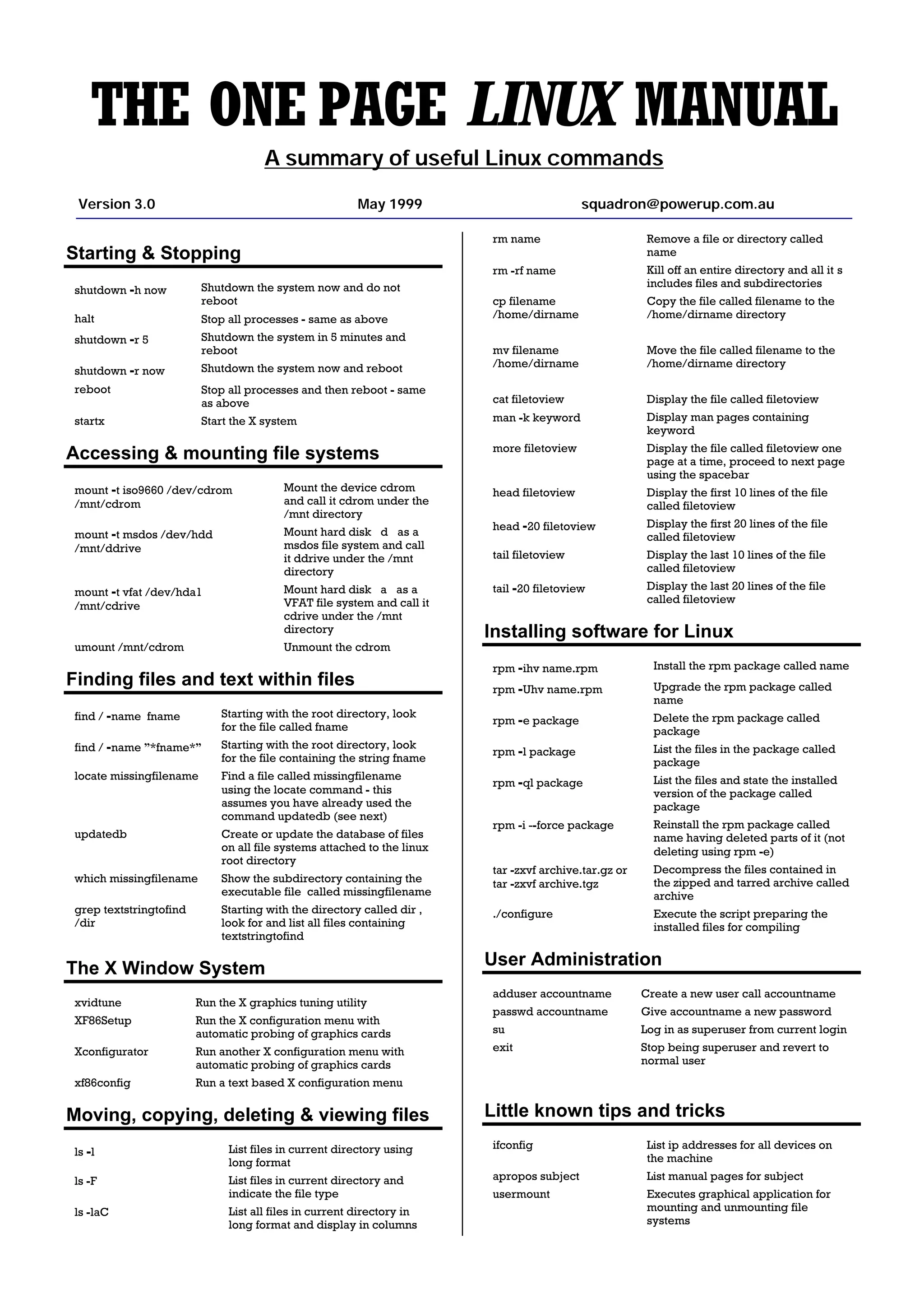
    /sbin/e2fsck hda5 Execute the filesystem check utility on partition hda5 File permissions fdformat /dev/fd0H1440 Format the floppy disk in device fd0 tar -cMf /dev/fd0 Backup the contents of the current directory and subdirectories to multiple floppy disks tail -f /var/log/messages Display the last 10 lines of the system log. cat /var/log/dmesg Display the file containing the boot time messages - useful for locating problems. Alternatively, use the dmesg command. * wildcard - represents everything. eg. cp from/* to will copy all files in the from directory to the to directory ? Single character wildcard. eg. cp config.? /configs will copy all files beginning with the name config. in the current directory to the directory If the command ls -l is given, a long list of file names is named configs. displayed. The first column in this list details the permissions applying to the file. If a permission is missing for a owner, [xyz] Choice of character wildcards. eg. group of other, it is represented by - eg. drwxr-x—x ls [xyz]* will list all files in the current directory starting with the letter x, y, Read = 4 File permissions are altered by giving the or z. Write = 2 chmod command and the appropriate octal code for each user type. eg linux single At the lilo prompt, start in single user Execute = 1 mode. This is useful if you have chmod 7 6 4 filename will make the file forgotten your password. Boot in called filename R+W+X for the owner, single user mode, then run the R+W for the group and R for others. passwd command. chmod 7 5 5 Full permission for the owner, read and ps List current processes execute access for the group and others. kill 123 Kill a specific process eg. kill 123 chmod +x filename Make the file called filename executable to all users. Configuration files and what they do X Shortcuts - (mainly for Redhat) /etc/profile System wide environment variables for all users. Control|Alt + or - Increase or decrease the screen resolution. eg. from 640x480 to /etc/fstab List of devices and their associated mount 800x600 points. Edit this file to add cdroms, DOS partitions and floppy drives at startup. Alt | escape Display list of active windows /etc/motd Message of the day broadcast to all users Shift|Control F8 Resize the selected window at login. Right click on desktop Display menu etc/rc.d/rc.local Bash script that is executed at the end of background login process. Similar to autoexec.bat in Shift|Control Altr Refresh the screen DOS. Shift|Control Altx Start an xterm session /etc/HOSTNAME Conatins full hostname including domain. /etc/cron.* There are 4 directories that automatically Printing execute all scripts within the directory at intervals of hour, day, week or month. /etc/rc.d/init.d/lpd start Start the print daemon /etc/hosts A list of all know host names and IP addresses on the machine. /etc/rc.d/init.d/lpd stop Stop the print daemon /etc/httpd/conf Paramters for the Apache web server /etc/rc.d/init.d/lpd Display status of the print daemon status /etc/inittab Specifies the run level that the machine should boot into. lpq Display jobs in print queue /etc/resolv.conf Defines IP addresses of DNS servers. lprm Remove jobs from queue /etc/smb.conf Config file for the SAMBA server. Allows lpr Print a file file and print sharing with Microsoft lpc Printer control tool clients. man subject | lpr Print the manual page called subject ~/.Xdefaults Define configuration for some X- as plain text applications. ~ refers to user’s home man -t subject | lpr Print the manual page called subject directory. as Postscript output /etc/X11/XF86Confi Config file for X-Windows. printtool Start X printer setup interface g ~/.xinitrc Defines the windows manager loaded by X. ~ refers to user’s home directory. Get your own Official Linux Pocket Protector - includes handy command summary. Visit: www.powerup.com.au/~squadron