Linkedin 101Welcome
Six Degrees of SeparationWho do you know?Who do they know?What can you offer?Keep our profile updatedDifferent accounts
Types of AccountsBasic Accounts are free of charges
Profile overviewCurrent/past employmentUpdate StatusKeeps your name in front of peopleWeb siteChange MY WEB SITE to a name – used in Google searchesYour public profileAdd a photoBrand your URLhttp://www.linkedin.com/in/LeslieMueller
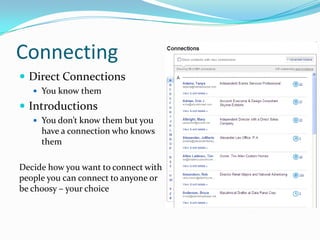
ConnectingDirect ConnectionsYou know themIntroductionsYou don’t know them but you have a connection who knows themDecide how you want to connect with people you can connect to anyone or be choosy – your choice
RecommendationsRecommending Otherssomeone shows people you value someone else’s work – be choosy.Receiving recommendationsshows people you what you sayMNCPA policies on recommendationsManagers and above are unable to recommend current or past employees.
GroupsWhy belong to a group?Expanding your networkLearn from othersDiscussions or resourcesTypes of groupsProfessional growthPersonal growthAreas of interest
Discussions	What are discussions?
Questions or statements from individuals who are looking to find answers and further a discussion
Why post?
Show your expertise
Look for advise
Gather information
Take a pollAnswersWhat you can doCreate a quick pollGet popular opinionsResearch a good topicIdeas for an articleTypes of answersBusiness DevelopmentMarketingSales techniques

Linkedin 101

Editor's Notes

  • #3 Purpose of this training is to help you get a better understanding of how you can use Linkedin to gain more exposure, connections, and resources for both your professional and personal use.The premise of Linkedin is to show you how you may be connected to someone through another connection. You will be amazed at who you know that a complete stranger may know and visa versa – the world is getting smaller every day.
  • #4 Purpose of this training is to help you get a better understanding of how you can use Linkedin to gain more exposure, connections, and resources for both your professional and personal use.The premise of Linkedin is to show you how you may be connected to someone through another connection. You will be amazed at who you know that a complete stranger may know and visa versa – the world is getting smaller every day.
  • #5 Keep your profile current with employment and datesUpdate your status – unlike facebook your status is not real-time so if you update your status and 2 seconds later update it again no one will see your last update it is only current by what is seen. Updates are sent out to you based on your settings.Default of MY WEB SITE change this to be the name of the web site (such as MNCPA) this field is searchable for google.If you are comfortable, add a picture. People like to see faces it becomes more personal. The times that I have utilized LinkedIn it is nice to know what the person I contacting looks like – gives a level of comfort. I have a few clients whom I have never personally met but I know what they look like because of their profile picture.Your public URL – use your name – own it.
  • #6 Put a personal note sometimes is better than using the DEFAULTWhy should you be introducedWhat you might want to say to the person you are asking to introduce you … I’m looking for an expert on the subject of X to write and article and I have heard that X is an expert…I would like to ask them if they would consider writing an article for the MNCPA.
  • #7 Be specificBe professionalCommon senseIt is ok to say no
  • #8 Look at what groups some of your connections belong to and see if you have a common interest