Light intensity/incident angle measurement
By
Rahit Nath
November 2019
Rahit Nath
Email: rahitnath1998dgp@gmail.com Page 2 of 13
ABSTRACT
This project aims to measure the angle at which light intensity is at its maximum using
an Arduino Uno, an LDR (Light Dependent Resistor), and an MPU6050 module. The
project leverages the Arduino Uno's capabilities to interface with these components
and gather the required data. The LDR is utilized to sense the ambient light intensity,
employing a voltage divider circuit to translate it into an analog voltage. The
MPU6050 module, equipped with a gyroscope and accelerometer, provides
orientation information such as roll, pitch, and yaw angles. The project's main focus
lies in determining the angle at which the light intensity reaches its peak.
The Arduino code facilitates the coordination of these components. It initializes both
the LDR and MPU6050 in the setup function, capturing analog data from the LDR
and orientation data from the MPU6050. By continuously integrating the gyroscope
readings, the Arduino calculates and updates the orientation angles over time.
Mapping the LDR's analog values to representative light intensit y levels enhances the
correlation between the orientation angles and the corresponding light intensities.
As a result, this project underscores the connection between physical orientation and
environmental conditions. Through the data collected, users can identify the angle at
which light intensity reaches its maximum, potentially offering insights into optimal
lighting conditions for specific applications. The project's output, displayed via the
Arduino's serial monitor, provides a real-time view of the relationship between
orientation angles and light intensity, contributing to a more nuanced understanding of
environmental interactions.
Rahit Nath
Email: rahitnath1998dgp@gmail.com Page 3 of 13
OBJECTIVE
The main aim of this project is to measure the angle with respect to the ground where
the intensity of a particular light source is maximum, using Arduino and Matlab ide.
It could give us a precise angle from the ground, at what angle the light intensity is
maximum, the high end implementation of the same embedded system is applicable to
the outer-space rovers where the main source of their energy is sunlight and
accordingly they have to tilt their solar panels incident to the sun rays to get maximum
of the flux intensity.
Whereas the low end implementation was observed in our smart phones as proximity
sensors and automatic screen brightness ability.
Rahit Nath
Email: rahitnath1998dgp@gmail.com Page 4 of 13
THEORY
MPU6050 (ADXL335- 3-axis)
MPU6050 has an integrated 3-axis MEMS (Micro Electrical Mechanical Systems)
accelerometer and 3-axis MEMS gyroscope. The MPU 6050 is a 6 DOF (Degree of
Freedom) or a 6-axis IMU (Inertia Measurement Unit) sensor i.e. it will give 6 values
in output. Three values from accelerometer and three from gyroscope. This sensor
uses 12C protocol for communication.
Accelerometer is an electromechanical device provides the information of force acting
on or experienced by the object. Once the acceleration of the object is obtained,
successive integral computation can be used to calculate the velocity and distance
covered by the object. The rate of change of velocity gives the acceleration which can
be interpreted as the tilt angle.
The basic and important application of accelerometer is tilt measurement, tilt is the
static measurement where the gravity of the acceleration is measured and this
measurement employed in positioning, aliasing, leveling and navigation.
One of the general method of sensing tilt angle is to integrate the output of gyroscope.
A. Measuring tilt using one axis
As in the case of a dual axis accelerometer(xy) is fixed and perpendicular to gravity,
the tilt algorithm is restricted to one axis of sensitivity. The accelerometer is tilted
along x-axis and y-axis remains at Og output during the full form rotation of y-axis If
x-axis is used to analyze the tilted angle of the accelerometer then:
VoFF = VoUTx+ S *SIN0
[Where,
VoFF = offset voltage, VoUTx = voltage output from x=axis, s= sensitivity of the
accelerometer. And 0= the tilt angle.] 0= sin inv((VoFr VoUTx)/s)
Rahit Nath
Email: rahitnath1998dgp@gmail.com Page 5 of 13
Disadvantages
In the above arrangement tilt sensitivity between -90 degree and - 45
degree and between +90 degree and +45 degree. The resolution problem
between these values makes the method calculation of the tilt angle
inaccurate when the accelerometer output is near + lg or -lg range.
Another disadvantage is it makes difficult to identify te variance between
two tilt angle that overcome in the similar sensor output.
B. Measuring tilt using two axis
The resolution problem and the tilt orientation problem can be addressed
by mounting the accelerometer vertically. So that the y-axis is parallel to
gravity or by using a tri-axis accelerometer using at least 2-3 axis. In the
the sine component along x=axis measure the inclination and that of the
y-axis is done by cosine component.
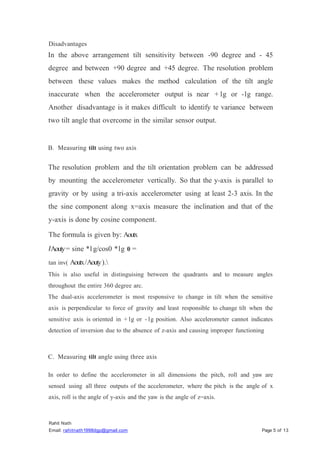
The formula is given by: Aoutx
IAouty= sine *l g/cos0 *lg 0 =
tan inv( Aoutx/Aouty).
This is also useful in distinguising between the quadrants and to measure angles
throughout the entire 360 degree arc.
The dual-axis accelerometer is most responsive to change in tilt when the sensitive
axis is perpendicular to force of gravity and least responsible to change tilt when the
sensitive axis is oriented in + lg or - lg position. Also accelerometer cannot indicates
detection of inversion due to the absence of z-axis and causing improper functioning
C. Measuring tilt angle using three axis
In order to define the accelerometer in all dimensions the pitch, roll and yaw are
sensed using all three outputs of the accelerometer, where the pitch is the angle of x
axis, roll is the angle of y-axis and the yaw is the angle of z=axis.
Rahit Nath
Email: rahitnath1998dgp@gmail.com Page 6 of 13
Rx = [((Vx
Ry = [((Vy
Rz = [((Vz
* Vref
* Vref
* Vref
)/2n -l) - Vzero] / Vsensitivity
)/2n -1) - Vzero] / Vsensitivity
R = sqrt(Rx2
+ Ry2
+ Rz2
+)
A= cos inv (Rx/R)
B= cos inv (Ry/R)
C== cos inv (Rz/R)
The value of VzERO, Yref, VsEN
S
ITNITY. Is measured
MPU6050.
from the data sheet of the
LDR
LDR stands fro light dependent resistor.
The working principle of an LDR is photo conductivity, that is nothing but an optical
phenomenon.When the light is absorbed by the material then the conductivity of the
material reduces. When the light falls on the LDR, then the electrons in the valence
band of the material are eager to the conduction band. But, the photons in the incident
light must have energy superior than the band gap of the material to make the
electrons jump from one band to another band (valance to conduction).
Hence, when light having ample energy, more electrons are excited to the conduction
band which grades in a large number of charge carriers. When the effect of this
process and the flow of current starts flowing more, the resistance of the device
decreases.
REQUIREMENTS
1. Arduino uno I nano
2. UART Cable
3. MPU6050 Module
4. Jumper wires
5. Bread board
6. LDR
7. lk Resistance
8. Arduino IDE
9. Matlab
10. 12C master/slave bus function
11. Arduino Hardware Package For Matlab
12. Bluetooth module - HC-05 13. 9V battery
Rahit Nath
Email: rahitnath1998dgp@gmail.com Page 7 of 13
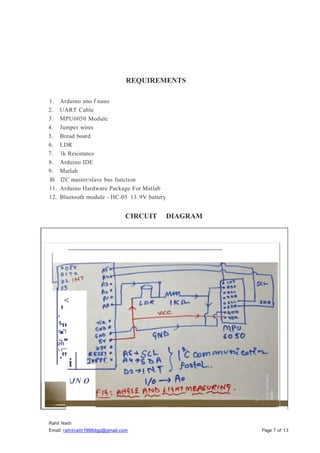
CIRCUIT DIAGRAM
<
'
0
1
-
."
o "I
.,.
.
on
1 l"'"
·"i
JN O
Rahit Nath
Email: rahitnath1998dgp@gmail.com Page 8 of 13
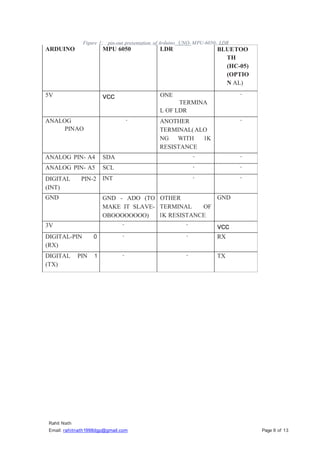
Figure 1: pin-out presentation of Arduino UNO- MPU-6050- LDR
ARDUINO MPU 6050 LDR BLUETOO
TH
(HC-05)
(OPTIO
N AL)
5V vcc ONE
TERMINA
L OF LDR
-
ANALOG
PINAO
- ANOTHER
TERMINAL(ALO
NG WITH lK
RESISTANCE
-
ANALOG PIN- A4 SDA - -
ANALOG PIN- A5 SCL - -
DIGITAL PIN-2
(INT)
INT - -
GND GND - ADO (TO
MAKE IT SLAVE-
OBOOOOOOOO)
OTHER
TERMINAL OF
lK RESISTANCE
GND
3V - -
vcc
DIGITAL-PIN 0
(RX)
- - RX
DIGITAL PIN 1
(TX)
- - TX
Rahit Nath
Email: rahitnath1998dgp@gmail.com Page 9 of 13
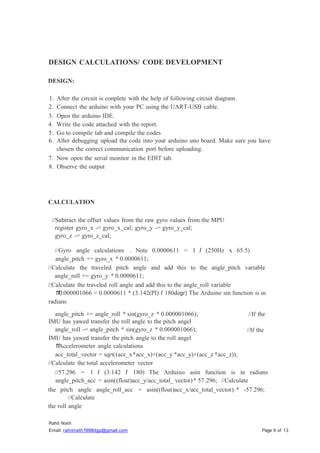
DESIGN CALCULATIONS/ CODE DEVELOPMENT
DESIGN:
1. After the circuit is conplete with the help of following circuit diagram.
2. Connect the arduino with your PC using the UART-USB cable.
3. Open the arduino IDE.
4. Write the code attached with the report.
5. Go to compile tab and compile the codes
6. After debugging upload the code into your arduino uno board. Make sure you have
chosen the correct communication port before uploading.
7. Now open the serial monitor in the EDIT tab.
8. Observe the output
CALCULATION
//Subtract the offset values from the raw gyro values from the MPU
register gyro_x -= gyro_x_cal; gyro_y -= gyro_y_cal;
gyro_z -= gyro_z_cal;
//Gyro angle calculations . Note 0.0000611 = 1 I (250Hz x 65.5)
angle_pitch += gyro_x * 0.0000611;
//Calculate the traveled pitch angle and add this to the angle_pitch variable
angle_roll += gyro_y * 0.0000611;
//Calculate the traveled roll angle and add this to the angle_roll variable
1
1
0.000001066 = 0.0000611 * (3.142(PI) I 180degr) The Arduino sin function is in
radians
angle_pitch += angle_roll * sin(gyro_z * 0.000001066);
IMU has yawed transfer the roll angle to the pitch angel
angle_roll -= angle_pitch * sin(gyro_z * 0.000001066);
IMU has yawed transfer the pitch angle to the roll angel
1
1
Accelerometer angle calculations
acc_total_vector = sqrt((acc_x*acc_x)+(acc_y *acc_y)+(acc_z *acc_z));
//Calculate the total accelerometer vector
//If the
//If the
//57.296 = 1 I (3.142 I 180) The Arduino asin function is in radians
angle_pitch_acc = asin((float)acc_y/acc_total_ vector)* 57.296; //Calculate
the pitch angle angle_roll_acc = asin((float)acc_x/acc_total_vector) * -57.296;
//Calculate
the roll angle
angle_pitch_acc -=0.0;
Rahit Nath
Email: rahitnath1998dgp@gmail.com Page 10 of 13
1
1
Accelerometer calibration value
angle_roll_acc -=0.0;
1
1
Accelerometer calibration value for roll
for pitch
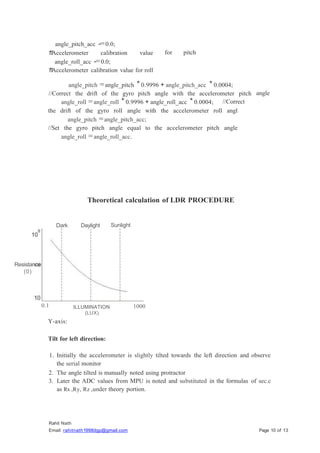
angle_pitch =angle_pitch *0.9996 + angle_pitch_acc *0.0004;
//Correct the drift of the gyro pitch angle with the accelerometer pitch angle
angle_roll =angle_roll *0.9996 + angle_roll_acc *0.0004; //Correct
the drift of the gyro roll angle with the accelerometer roll angl
angle_pitch =angle_pitch_acc;
//Set the gyro pitch angle equal to the accelerometer pitch angle
angle_roll =angle_roll_acc.
Theoretical calculation of LDR PROCEDURE
Dark Daylight Sunlight
Resistance
(0)
0.1 ILLUMINATION
(LUX)
1000
Y-axis:
Tilt for left direction:
1. Initially the accelerometer is slightly tilted towards the left direction and observe
the serial monitor
2. The angle tilted is manually noted using protractor
3. Later the ADC values from MPU is noted and substituted in the formulas of sec.c
as Rx ,Ry, Rz ,under theory portion.
4. The obtained R from the substituted value in further substituted in 'b' at the same
section to obtain the degree along y-axis
wor1ting of ldr
4.5 - - - - ,
- - , . - - - "-- - - . - - - - r -- , - - - - - ,
v
2.5
&
m
2
3.5
-:
Rahit Nath
Email: rahitnath1998dgp@gmail.com Page 11of 13
3
4 -
1.5
0.5 =
-
'
-f
o - -
- -
o 50 100 150 200
time
250
A. X-axis
Tilt measurement for forward direction.
1. Initially the accelerometer is slightly tilted towards the front direction and observe
the serial monitor
2. The angle tilted is manually noted using protractor
3. Later the ADC values from MPU is noted and substituted in the formulas of sec.c
as Rx ,Ry, Rz ,under theory portion.
4. The obtained R from the substituted value in further substituted in 'a' at the same
section to obtain the degree along x-axis
Tilt measurement for backward direction.
1. Initially the accelerometer is slightly tilted towards the front direction and observe
the serial monitor
2. The angle tilted is manually noted using protractor
3. Later the ADC values from MPU is noted and substituted in the formulas of sec.c
as Rx ,Ry, Rz ,under theory portion.
4. The obtained R from the substituted value in further substituted in 'a' at the same
section to obtain the degree along x-axis
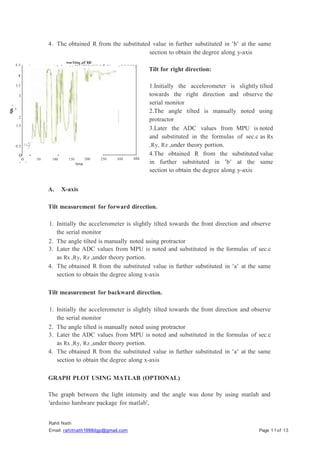
GRAPH PLOT USING MATLAB (OPTIONAL)
The graph between the light intensity and the angle was done by using matlab and
'arduino hardware package for matlab',
300
Tilt for right direction:
1.Initially the accelerometer is slightly tilted
towards the right direction and observe the
serial monitor
2.The angle tilted is manually noted using
protractor
3.Later the ADC values from MPU is noted
and substituted in the formulas of sec.c as Rx
,Ry, Rz ,under theory portion.
4.The obtained R from the substituted value
in further substituted in 'b' at the same
section to obtain the degree along y-axis
350
Rahit Nath
Email: rahitnath1998dgp@gmail.com Page 12of 13
We have to separate the LDR values and angle reading and bypass it through another
communication port using the bluetooth module- hc-05. By allowing a real time graph
plotter the plot can be done
OBSERVATIONS/RESULTS
OBSERVATION:
DISCUSSION OF RESULTS
)
;;;;- The left direction angle was measured to be 54 and theoretical angle was found to
be 53.05 and the displayed angle was found to be 52 with an error of 0.025.
The right direction angle was measured to be 67.5 and theoretical angle was found
to be 66.34 and the displayed angle was found to be 65.88 with an error of 0.019.
The forward direction angle was measured to be 63.5 and theoretical angle was
found to be 63.12 and the displayed angle was found to be 62.76 with an error of
0.011.
The backward direction angle was measured to be 56.5 and theoretical angle was
found to be 55.93 and the displayed angle was found to be 55.40 with an error of
0.019.
Correspondingly LDR value is displaying the amount of light intensity at that
angle with respect to the ground.
)
;;;;-
)
;;;;-
)
;;;;-
)
;;;;-
DIRECTIO
N
ACTUAL
ANGLE
(deg)
THEORETIC
AL
ANGLE(deg)
DISPLAYED
ANGLE (deg)
ERROR LDR
left 54 53.05 52.00 0.025 624
right 67.5 66.34 65.88 0.019 526
forward 63.5 63.12 62.76 0.011 500
backward 56.5 55.93 55.40 0.019 611
CONCLUSION:
The tilt of the accelerometer is compared with three different ways like actual value,
theoretical value and displayed value. As the theoretical value is calculated describes
the conversion of ADC output to the corresponding angle which is actually the micro
controller does, hence the error between the actual value is obtained. The error
obtained was acceptable ans is minimum. Hence, with the obtained result of 3-axis
accelerometer has proven that effective in measuring the tilt angle.
The LDR detect the light flux efficiently and the angle together with complete the task
to detect the maximum flux intensity at any angle.
REFERENCES:
hLLps://www.eleclrical4u.com/lighL-dependenL-resisLor-ldr-working-
pri nciple-of-ldr/ https://forum.arduino.cc/
https://componentslOl.com/sensors/mpu6050-module
Electrical and Electronic Measurement Lab Page 13

Light intensity/incident angle measurement.pptx

  • 1.
    Light intensity/incident anglemeasurement By Rahit Nath November 2019
  • 2.
    Rahit Nath Email: rahitnath1998dgp@gmail.comPage 2 of 13 ABSTRACT This project aims to measure the angle at which light intensity is at its maximum using an Arduino Uno, an LDR (Light Dependent Resistor), and an MPU6050 module. The project leverages the Arduino Uno's capabilities to interface with these components and gather the required data. The LDR is utilized to sense the ambient light intensity, employing a voltage divider circuit to translate it into an analog voltage. The MPU6050 module, equipped with a gyroscope and accelerometer, provides orientation information such as roll, pitch, and yaw angles. The project's main focus lies in determining the angle at which the light intensity reaches its peak. The Arduino code facilitates the coordination of these components. It initializes both the LDR and MPU6050 in the setup function, capturing analog data from the LDR and orientation data from the MPU6050. By continuously integrating the gyroscope readings, the Arduino calculates and updates the orientation angles over time. Mapping the LDR's analog values to representative light intensit y levels enhances the correlation between the orientation angles and the corresponding light intensities. As a result, this project underscores the connection between physical orientation and environmental conditions. Through the data collected, users can identify the angle at which light intensity reaches its maximum, potentially offering insights into optimal lighting conditions for specific applications. The project's output, displayed via the Arduino's serial monitor, provides a real-time view of the relationship between orientation angles and light intensity, contributing to a more nuanced understanding of environmental interactions.
  • 3.
    Rahit Nath Email: rahitnath1998dgp@gmail.comPage 3 of 13 OBJECTIVE The main aim of this project is to measure the angle with respect to the ground where the intensity of a particular light source is maximum, using Arduino and Matlab ide. It could give us a precise angle from the ground, at what angle the light intensity is maximum, the high end implementation of the same embedded system is applicable to the outer-space rovers where the main source of their energy is sunlight and accordingly they have to tilt their solar panels incident to the sun rays to get maximum of the flux intensity. Whereas the low end implementation was observed in our smart phones as proximity sensors and automatic screen brightness ability.
  • 4.
    Rahit Nath Email: rahitnath1998dgp@gmail.comPage 4 of 13 THEORY MPU6050 (ADXL335- 3-axis) MPU6050 has an integrated 3-axis MEMS (Micro Electrical Mechanical Systems) accelerometer and 3-axis MEMS gyroscope. The MPU 6050 is a 6 DOF (Degree of Freedom) or a 6-axis IMU (Inertia Measurement Unit) sensor i.e. it will give 6 values in output. Three values from accelerometer and three from gyroscope. This sensor uses 12C protocol for communication. Accelerometer is an electromechanical device provides the information of force acting on or experienced by the object. Once the acceleration of the object is obtained, successive integral computation can be used to calculate the velocity and distance covered by the object. The rate of change of velocity gives the acceleration which can be interpreted as the tilt angle. The basic and important application of accelerometer is tilt measurement, tilt is the static measurement where the gravity of the acceleration is measured and this measurement employed in positioning, aliasing, leveling and navigation. One of the general method of sensing tilt angle is to integrate the output of gyroscope. A. Measuring tilt using one axis As in the case of a dual axis accelerometer(xy) is fixed and perpendicular to gravity, the tilt algorithm is restricted to one axis of sensitivity. The accelerometer is tilted along x-axis and y-axis remains at Og output during the full form rotation of y-axis If x-axis is used to analyze the tilted angle of the accelerometer then: VoFF = VoUTx+ S *SIN0 [Where, VoFF = offset voltage, VoUTx = voltage output from x=axis, s= sensitivity of the accelerometer. And 0= the tilt angle.] 0= sin inv((VoFr VoUTx)/s)
  • 5.
    Rahit Nath Email: rahitnath1998dgp@gmail.comPage 5 of 13 Disadvantages In the above arrangement tilt sensitivity between -90 degree and - 45 degree and between +90 degree and +45 degree. The resolution problem between these values makes the method calculation of the tilt angle inaccurate when the accelerometer output is near + lg or -lg range. Another disadvantage is it makes difficult to identify te variance between two tilt angle that overcome in the similar sensor output. B. Measuring tilt using two axis The resolution problem and the tilt orientation problem can be addressed by mounting the accelerometer vertically. So that the y-axis is parallel to gravity or by using a tri-axis accelerometer using at least 2-3 axis. In the the sine component along x=axis measure the inclination and that of the y-axis is done by cosine component. The formula is given by: Aoutx IAouty= sine *l g/cos0 *lg 0 = tan inv( Aoutx/Aouty). This is also useful in distinguising between the quadrants and to measure angles throughout the entire 360 degree arc. The dual-axis accelerometer is most responsive to change in tilt when the sensitive axis is perpendicular to force of gravity and least responsible to change tilt when the sensitive axis is oriented in + lg or - lg position. Also accelerometer cannot indicates detection of inversion due to the absence of z-axis and causing improper functioning C. Measuring tilt angle using three axis In order to define the accelerometer in all dimensions the pitch, roll and yaw are sensed using all three outputs of the accelerometer, where the pitch is the angle of x axis, roll is the angle of y-axis and the yaw is the angle of z=axis.
  • 6.
    Rahit Nath Email: rahitnath1998dgp@gmail.comPage 6 of 13 Rx = [((Vx Ry = [((Vy Rz = [((Vz * Vref * Vref * Vref )/2n -l) - Vzero] / Vsensitivity )/2n -l) - Vzero] / Vsensitivity )/2n -1) - Vzero] / Vsensitivity R = sqrt(Rx2 + Ry2 + Rz2 +) A= cos inv (Rx/R) B= cos inv (Ry/R) C== cos inv (Rz/R) The value of VzERO, Yref, VsEN S ITNITY. Is measured MPU6050. from the data sheet of the LDR LDR stands fro light dependent resistor. The working principle of an LDR is photo conductivity, that is nothing but an optical phenomenon.When the light is absorbed by the material then the conductivity of the material reduces. When the light falls on the LDR, then the electrons in the valence band of the material are eager to the conduction band. But, the photons in the incident light must have energy superior than the band gap of the material to make the electrons jump from one band to another band (valance to conduction). Hence, when light having ample energy, more electrons are excited to the conduction band which grades in a large number of charge carriers. When the effect of this process and the flow of current starts flowing more, the resistance of the device decreases.
  • 7.
    REQUIREMENTS 1. Arduino unoI nano 2. UART Cable 3. MPU6050 Module 4. Jumper wires 5. Bread board 6. LDR 7. lk Resistance 8. Arduino IDE 9. Matlab 10. 12C master/slave bus function 11. Arduino Hardware Package For Matlab 12. Bluetooth module - HC-05 13. 9V battery Rahit Nath Email: rahitnath1998dgp@gmail.com Page 7 of 13 CIRCUIT DIAGRAM < ' 0 1 - ." o "I .,. . on 1 l"'" ·"i JN O
  • 8.
    Rahit Nath Email: rahitnath1998dgp@gmail.comPage 8 of 13 Figure 1: pin-out presentation of Arduino UNO- MPU-6050- LDR ARDUINO MPU 6050 LDR BLUETOO TH (HC-05) (OPTIO N AL) 5V vcc ONE TERMINA L OF LDR - ANALOG PINAO - ANOTHER TERMINAL(ALO NG WITH lK RESISTANCE - ANALOG PIN- A4 SDA - - ANALOG PIN- A5 SCL - - DIGITAL PIN-2 (INT) INT - - GND GND - ADO (TO MAKE IT SLAVE- OBOOOOOOOO) OTHER TERMINAL OF lK RESISTANCE GND 3V - - vcc DIGITAL-PIN 0 (RX) - - RX DIGITAL PIN 1 (TX) - - TX
  • 9.
    Rahit Nath Email: rahitnath1998dgp@gmail.comPage 9 of 13 DESIGN CALCULATIONS/ CODE DEVELOPMENT DESIGN: 1. After the circuit is conplete with the help of following circuit diagram. 2. Connect the arduino with your PC using the UART-USB cable. 3. Open the arduino IDE. 4. Write the code attached with the report. 5. Go to compile tab and compile the codes 6. After debugging upload the code into your arduino uno board. Make sure you have chosen the correct communication port before uploading. 7. Now open the serial monitor in the EDIT tab. 8. Observe the output CALCULATION //Subtract the offset values from the raw gyro values from the MPU register gyro_x -= gyro_x_cal; gyro_y -= gyro_y_cal; gyro_z -= gyro_z_cal; //Gyro angle calculations . Note 0.0000611 = 1 I (250Hz x 65.5) angle_pitch += gyro_x * 0.0000611; //Calculate the traveled pitch angle and add this to the angle_pitch variable angle_roll += gyro_y * 0.0000611; //Calculate the traveled roll angle and add this to the angle_roll variable 1 1 0.000001066 = 0.0000611 * (3.142(PI) I 180degr) The Arduino sin function is in radians angle_pitch += angle_roll * sin(gyro_z * 0.000001066); IMU has yawed transfer the roll angle to the pitch angel angle_roll -= angle_pitch * sin(gyro_z * 0.000001066); IMU has yawed transfer the pitch angle to the roll angel 1 1 Accelerometer angle calculations acc_total_vector = sqrt((acc_x*acc_x)+(acc_y *acc_y)+(acc_z *acc_z)); //Calculate the total accelerometer vector //If the //If the //57.296 = 1 I (3.142 I 180) The Arduino asin function is in radians angle_pitch_acc = asin((float)acc_y/acc_total_ vector)* 57.296; //Calculate the pitch angle angle_roll_acc = asin((float)acc_x/acc_total_vector) * -57.296; //Calculate the roll angle
  • 10.
    angle_pitch_acc -=0.0; Rahit Nath Email:rahitnath1998dgp@gmail.com Page 10 of 13 1 1 Accelerometer calibration value angle_roll_acc -=0.0; 1 1 Accelerometer calibration value for roll for pitch angle_pitch =angle_pitch *0.9996 + angle_pitch_acc *0.0004; //Correct the drift of the gyro pitch angle with the accelerometer pitch angle angle_roll =angle_roll *0.9996 + angle_roll_acc *0.0004; //Correct the drift of the gyro roll angle with the accelerometer roll angl angle_pitch =angle_pitch_acc; //Set the gyro pitch angle equal to the accelerometer pitch angle angle_roll =angle_roll_acc. Theoretical calculation of LDR PROCEDURE Dark Daylight Sunlight Resistance (0) 0.1 ILLUMINATION (LUX) 1000 Y-axis: Tilt for left direction: 1. Initially the accelerometer is slightly tilted towards the left direction and observe the serial monitor 2. The angle tilted is manually noted using protractor 3. Later the ADC values from MPU is noted and substituted in the formulas of sec.c as Rx ,Ry, Rz ,under theory portion.
  • 11.
    4. The obtainedR from the substituted value in further substituted in 'b' at the same section to obtain the degree along y-axis wor1ting of ldr 4.5 - - - - , - - , . - - - "-- - - . - - - - r -- , - - - - - , v 2.5 & m 2 3.5 -: Rahit Nath Email: rahitnath1998dgp@gmail.com Page 11of 13 3 4 - 1.5 0.5 = - ' -f o - - - - o 50 100 150 200 time 250 A. X-axis Tilt measurement for forward direction. 1. Initially the accelerometer is slightly tilted towards the front direction and observe the serial monitor 2. The angle tilted is manually noted using protractor 3. Later the ADC values from MPU is noted and substituted in the formulas of sec.c as Rx ,Ry, Rz ,under theory portion. 4. The obtained R from the substituted value in further substituted in 'a' at the same section to obtain the degree along x-axis Tilt measurement for backward direction. 1. Initially the accelerometer is slightly tilted towards the front direction and observe the serial monitor 2. The angle tilted is manually noted using protractor 3. Later the ADC values from MPU is noted and substituted in the formulas of sec.c as Rx ,Ry, Rz ,under theory portion. 4. The obtained R from the substituted value in further substituted in 'a' at the same section to obtain the degree along x-axis GRAPH PLOT USING MATLAB (OPTIONAL) The graph between the light intensity and the angle was done by using matlab and 'arduino hardware package for matlab', 300 Tilt for right direction: 1.Initially the accelerometer is slightly tilted towards the right direction and observe the serial monitor 2.The angle tilted is manually noted using protractor 3.Later the ADC values from MPU is noted and substituted in the formulas of sec.c as Rx ,Ry, Rz ,under theory portion. 4.The obtained R from the substituted value in further substituted in 'b' at the same section to obtain the degree along y-axis 350
  • 12.
    Rahit Nath Email: rahitnath1998dgp@gmail.comPage 12of 13 We have to separate the LDR values and angle reading and bypass it through another communication port using the bluetooth module- hc-05. By allowing a real time graph plotter the plot can be done OBSERVATIONS/RESULTS OBSERVATION: DISCUSSION OF RESULTS ) ;;;;- The left direction angle was measured to be 54 and theoretical angle was found to be 53.05 and the displayed angle was found to be 52 with an error of 0.025. The right direction angle was measured to be 67.5 and theoretical angle was found to be 66.34 and the displayed angle was found to be 65.88 with an error of 0.019. The forward direction angle was measured to be 63.5 and theoretical angle was found to be 63.12 and the displayed angle was found to be 62.76 with an error of 0.011. The backward direction angle was measured to be 56.5 and theoretical angle was found to be 55.93 and the displayed angle was found to be 55.40 with an error of 0.019. Correspondingly LDR value is displaying the amount of light intensity at that angle with respect to the ground. ) ;;;;- ) ;;;;- ) ;;;;- ) ;;;;- DIRECTIO N ACTUAL ANGLE (deg) THEORETIC AL ANGLE(deg) DISPLAYED ANGLE (deg) ERROR LDR left 54 53.05 52.00 0.025 624 right 67.5 66.34 65.88 0.019 526 forward 63.5 63.12 62.76 0.011 500 backward 56.5 55.93 55.40 0.019 611
  • 13.
    CONCLUSION: The tilt ofthe accelerometer is compared with three different ways like actual value, theoretical value and displayed value. As the theoretical value is calculated describes the conversion of ADC output to the corresponding angle which is actually the micro controller does, hence the error between the actual value is obtained. The error obtained was acceptable ans is minimum. Hence, with the obtained result of 3-axis accelerometer has proven that effective in measuring the tilt angle. The LDR detect the light flux efficiently and the angle together with complete the task to detect the maximum flux intensity at any angle. REFERENCES: hLLps://www.eleclrical4u.com/lighL-dependenL-resisLor-ldr-working- pri nciple-of-ldr/ https://forum.arduino.cc/ https://componentslOl.com/sensors/mpu6050-module Electrical and Electronic Measurement Lab Page 13