LIBRARY SYSTEMS: HOW
TO USE A DATABASE
JORDAN CHAPMAN
JORDAN.CHAPMAN@USM.EDU
WHAT IS A DATABASE?
• A collection of information
• Is organized so it’s easily accessed, managed, and updated
• Are accessed online
• Are usually free if used through a library
• Often features various types of content
10/24/2016Library Systems: How To Use A Database
2
TYPES OF MATERIALS FEATURED
• Abstracts
• Journals
• Magazines
• Newspapers
• Periodicals
• Even Images & Art
10/24/2016Library Systems: How To Use A Database
3
SELECTING THE RIGHT DATABASE
• Figure out what type of information & materials are needed
• Ex. Articles or images; artwork or videos; African American History or Government
cases
• University libraries most often have various types available
• Public libraries can as well depending on size & funding
• Once a database is selected a search can be conducted
10/24/2016Library Systems: How To Use A Database
4
SEARCHING
• These are done by using a keyword
• There are two types of searches
• Basic and Advance
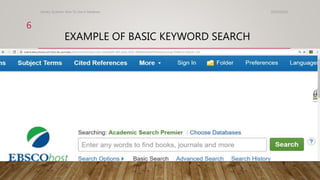
• Basic searches only use keywords
• Advance uses a number of different search options
10/24/2016Library Systems: How To Use A Database
5
EXAMPLE OF BASIC KEYWORD SEARCH
10/24/2016Library Systems: How To Use A Database
6
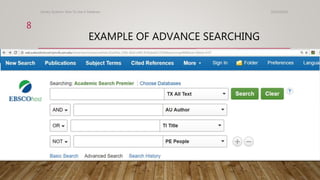
ADVANCE SEARCHING
10/24/2016Library Systems: How To Use A Database
7
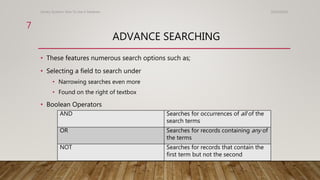
• These features numerous search options such as;
• Selecting a field to search under
• Narrowing searches even more
• Found on the right of textbox
• Boolean Operators
AND Searches for occurrences of all of the
search terms
OR Searches for records containing any of
the terms
NOT Searches for records that contain the
first term but not the second
EXAMPLE OF ADVANCE SEARCHING
10/24/2016Library Systems: How To Use A Database
8
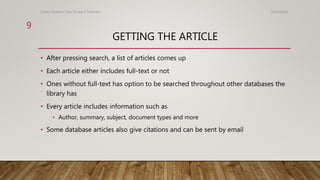
GETTING THE ARTICLE
• After pressing search, a list of articles comes up
• Each article either includes full-text or not
• Ones without full-text has option to be searched throughout other databases the
library has
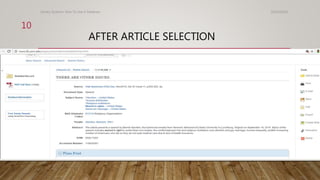
• Every article includes information such as
• Author, summary, subject, document types and more
• Some database articles also give citations and can be sent by email
10/24/2016Library Systems: How To Use A Database
9
AFTER ARTICLE SELECTION
10/24/2016Library Systems: How To Use A Database
10
THANK YOU FOR YOUR TIME & ATTENTION!
Is there any more questions about how to use
a database?
10/24/2016Library Systems: How To Use A Database
11
WORKS CITED
• http://www.lib.usm.edu/legacy/tutorials/module3frame.html
• http://www.ed.ac.uk/information-services/library-museum-gallery/finding-
resources/library-databases/library-databases-about
• http://web.a.ebscohost.com.lynx.lib.usm.edu/ehost/search/advanced?sid=62a342ac-230b-
45dd-b492-8142deeb5122%40sessionmgr4006&vid=6&hid=4107
10/24/2016Library Systems: How To Use A Database
12

Library systems

  • 1.
    LIBRARY SYSTEMS: HOW TOUSE A DATABASE JORDAN CHAPMAN JORDAN.CHAPMAN@USM.EDU
  • 2.
    WHAT IS ADATABASE? • A collection of information • Is organized so it’s easily accessed, managed, and updated • Are accessed online • Are usually free if used through a library • Often features various types of content 10/24/2016Library Systems: How To Use A Database 2
  • 3.
    TYPES OF MATERIALSFEATURED • Abstracts • Journals • Magazines • Newspapers • Periodicals • Even Images & Art 10/24/2016Library Systems: How To Use A Database 3
  • 4.
    SELECTING THE RIGHTDATABASE • Figure out what type of information & materials are needed • Ex. Articles or images; artwork or videos; African American History or Government cases • University libraries most often have various types available • Public libraries can as well depending on size & funding • Once a database is selected a search can be conducted 10/24/2016Library Systems: How To Use A Database 4
  • 5.
    SEARCHING • These aredone by using a keyword • There are two types of searches • Basic and Advance • Basic searches only use keywords • Advance uses a number of different search options 10/24/2016Library Systems: How To Use A Database 5
  • 6.
    EXAMPLE OF BASICKEYWORD SEARCH 10/24/2016Library Systems: How To Use A Database 6
  • 7.
    ADVANCE SEARCHING 10/24/2016Library Systems:How To Use A Database 7 • These features numerous search options such as; • Selecting a field to search under • Narrowing searches even more • Found on the right of textbox • Boolean Operators AND Searches for occurrences of all of the search terms OR Searches for records containing any of the terms NOT Searches for records that contain the first term but not the second
  • 8.
    EXAMPLE OF ADVANCESEARCHING 10/24/2016Library Systems: How To Use A Database 8
  • 9.
    GETTING THE ARTICLE •After pressing search, a list of articles comes up • Each article either includes full-text or not • Ones without full-text has option to be searched throughout other databases the library has • Every article includes information such as • Author, summary, subject, document types and more • Some database articles also give citations and can be sent by email 10/24/2016Library Systems: How To Use A Database 9
  • 10.
    AFTER ARTICLE SELECTION 10/24/2016LibrarySystems: How To Use A Database 10
  • 11.
    THANK YOU FORYOUR TIME & ATTENTION! Is there any more questions about how to use a database? 10/24/2016Library Systems: How To Use A Database 11
  • 12.
    WORKS CITED • http://www.lib.usm.edu/legacy/tutorials/module3frame.html •http://www.ed.ac.uk/information-services/library-museum-gallery/finding- resources/library-databases/library-databases-about • http://web.a.ebscohost.com.lynx.lib.usm.edu/ehost/search/advanced?sid=62a342ac-230b- 45dd-b492-8142deeb5122%40sessionmgr4006&vid=6&hid=4107 10/24/2016Library Systems: How To Use A Database 12