1
Lexical Analyzer Generator
Lex(Flex in recent implementation)
2
What is Lex?
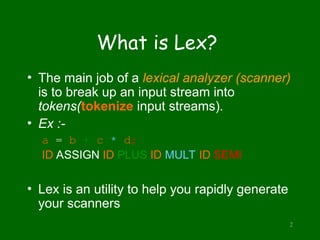
• The main job of a lexical analyzer (scanner)
is to break up an input stream into
tokens(tokenize input streams).
• Ex :-
a = b + c * d;
ID ASSIGN ID PLUS ID MULT ID SEMI
• Lex is an utility to help you rapidly generate
your scanners
PLLab, NTHU,Cs2403 Programming Languages 3
(optional)
(required)
Structure of Lex Program
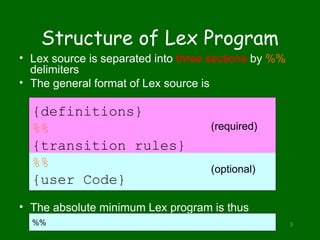
• Lex source is separated into three sections by %%
delimiters
• The general format of Lex source is
• The absolute minimum Lex program is thus
{definitions}
%%
{transition rules}
%%
{user Code}
%%
Definitions
• Declarations of ordinary C
variables ,constants and Libraries.
%{
#include <math.h>
#include <stdio.h>
#include <stdlib.h>
%}
• flex definitions :- name definition
Digit [0-9] (Regular Definition)
4
5
Operators
“  [ ] ^ - ? . * + | ( ) $ / { } % < >
• If they are to be used as text characters, an
escape should be used
$ = “$”
 = “”
• Every character but blank, tab (t), newline (n)
and the list above is always a text character
Translation Rules
• The form of rules are:
Pattern { action }
The actions are C/C++ code.
[0-9]+ { return(Integer); } // RE
{DIGIT}+ { return(Integer); } // RD
6
PLLab, NTHU,Cs2403 Programming Languages 7
User Subroutines Section
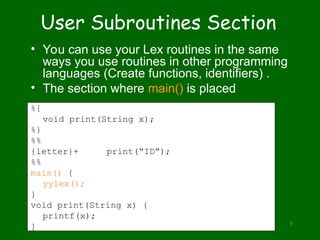
• You can use your Lex routines in the same
ways you use routines in other programming
languages (Create functions, identifiers) .
• The section where main() is placed
%{
void print(String x);
%}
%%
{letter}+ print(“ID”);
%%
main() {
yylex();
}
void print(String x) {
printf(x);
}
8
An Overview of Lex
Lex compiler
C compiler
a.out
Lex source
program
lex.yy.c
input
lex.yy.c
a.out
tokens
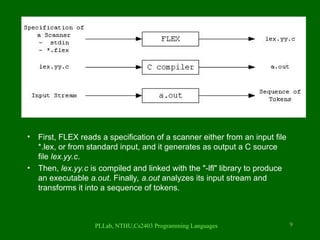
FLEX (Fast LEXical analyzer generator) is a tool for generating scanners. In stead
of writing a scanner from scratch, you only need to identify the vocabulary of a
certain language (e.g. Simple), write a specification of patterns using regular
expressions (e.g. DIGIT [0-9]), and FLEX will construct a scanner for you. FLEX is
generally used in the manner depicted here:
• First, FLEX reads a specification of a scanner either from an input file
*.lex, or from standard input, and it generates as output a C source
file lex.yy.c.
• Then, lex.yy.c is compiled and linked with the "-lfl" library to produce
an executable a.out. Finally, a.out analyzes its input stream and
transforms it into a sequence of tokens.
PLLab, NTHU,Cs2403 Programming Languages 9
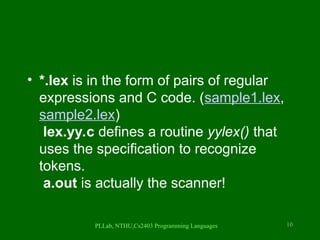
• *.lex is in the form of pairs of regular
expressions and C code. (sample1.lex,
sample2.lex)
lex.yy.c defines a routine yylex() that
uses the specification to recognize
tokens.
a.out is actually the scanner!
PLLab, NTHU,Cs2403 Programming Languages 10
11
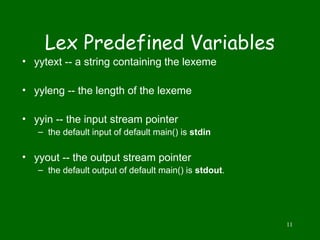
Lex Predefined Variables
• yytext -- a string containing the lexeme
• yyleng -- the length of the lexeme
• yyin -- the input stream pointer
– the default input of default main() is stdin
• yyout -- the output stream pointer
– the default output of default main() is stdout.
12
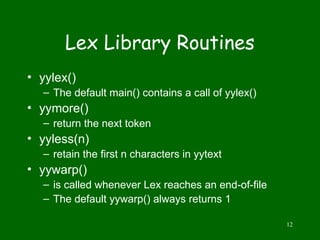
Lex Library Routines
• yylex()
– The default main() contains a call of yylex()
• yymore()
– return the next token
• yyless(n)
– retain the first n characters in yytext
• yywarp()
– is called whenever Lex reaches an end-of-file
– The default yywarp() always returns 1
PLLab, NTHU,Cs2403 Programming Languages 13
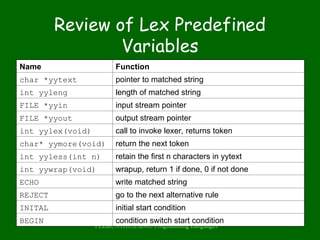
Review of Lex Predefined
Variables
Name Function
char *yytext pointer to matched string
int yyleng length of matched string
FILE *yyin input stream pointer
FILE *yyout output stream pointer
int yylex(void) call to invoke lexer, returns token
char* yymore(void) return the next token
int yyless(int n) retain the first n characters in yytext
int yywrap(void) wrapup, return 1 if done, 0 if not done
ECHO write matched string
REJECT go to the next alternative rule
INITAL initial start condition
BEGIN condition switch start condition
Installation & Usage
14
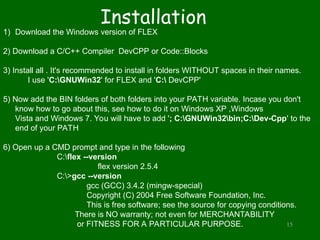
Installation
15
1) Download the Windows version of FLEX
2) Download a C/C++ Compiler DevCPP or Code::Blocks
3) Install all . It's recommended to install in folders WITHOUT spaces in their names.
I use 'C:GNUWin32' for FLEX and 'C: DevCPP'
5) Now add the BIN folders of both folders into your PATH variable. Incase you don't
know how to go about this, see how to do it on Windows XP ,Windows
Vista and Windows 7. You will have to add '; C:GNUWin32bin;C:Dev-Cpp' to the
end of your PATH
6) Open up a CMD prompt and type in the following
C:flex --version
flex version 2.5.4
C:>gcc --version
gcc (GCC) 3.4.2 (mingw-special)
Copyright (C) 2004 Free Software Foundation, Inc.
This is free software; see the source for copying conditions.
There is NO warranty; not even for MERCHANTABILITY
or FITNESS FOR A PARTICULAR PURPOSE.
16
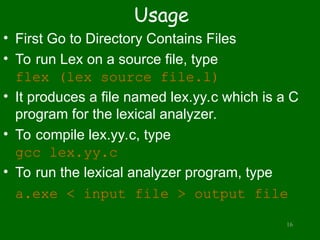
Usage
• First Go to Directory Contains Files
• To run Lex on a source file, type
flex (lex source file.l)
• It produces a file named lex.yy.c which is a C
program for the lexical analyzer.
• To compile lex.yy.c, type
gcc lex.yy.c
• To run the lexical analyzer program, type
a.exe < input file > output file
Examples
• Ex1
%{
int numChars = 0, numWords = 0, numLines = 0;
%}
%%
n {numLines++; numChars++;}
[^ tn]+ {numWords++; numChars += yyleng;}
. {numChars++;}
%%
int main() {
yylex();
printf("%dt%dt%dn", numChars, numWords, numLines);
}
int yywrap(){
return 1;
} 17
Example on Decaf
• Definitions Section
%{
/* need this for the call to atof() below */
#include <math.h>
#include <stdio.h>
#include <stdlib.h>
%}
DIGIT [0-9]
LITTER [a-zA-Z]
C [//]
S [ ]
L [n]
ID {LITTER}({LITTER}|{DIGIT}|_)*
double {DIGIT}+(.{DIGIT}+)?([Ee][+-]?{DIGIT}+)?
hex (0[xX])({DIGIT}|[a-fA-F])*
String ("({LITTER}|{S})*")
Sym [~!@#$%^&*()_+|><""''{}.,]
Comment (({LITTER}|{DIGIT}|{Sym}|{S}|{L})*)
Comment2 ({C}+({LITTER}|{DIGIT}|{Sym}|{S})*{L})
%%
18
Example on Decaf
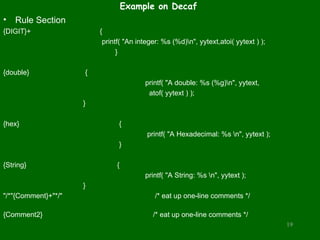
• Rule Section
{DIGIT}+ {
printf( "An integer: %s (%d)n", yytext,atoi( yytext ) );
}
{double} {
printf( "A double: %s (%g)n", yytext,
atof( yytext ) );
}
{hex} {
printf( "A Hexadecimal: %s n", yytext );
}
{String} {
printf( "A String: %s n", yytext );
}
"/*"{Comment}+"*/" /* eat up one-line comments */
{Comment2} /* eat up one-line comments */
19
Example on Decaf
• Rule Section Cont~
void|int|double|bool|string|class|interface|null|this|extends|implements|for|while|if|else|return|break
|new|NewArray|Print|ReadInteger|ReadLine|true|false
{ printf( "A keyword: %sn", yytext ); }
{ID} { printf( "An identifier: %sn", yytext ); }
"+"|"-"|"*"|"/"|"="|"=="|"<"|"<="|">"|">="|"!="|"&&"|"||"|"!"|";"|","|"."|"["|"]"|"("|")"|"{"|"}"
{ printf( "An operator: %sn", yytext ); }
"{"[^}n]*"}" /* eat up one-line comments */
[ tn]+ /* eat up whitespace */
. {printf( "Unrecognized character: %sn", yytext ); }
%%
20
Example on Decaf
• User Code Section
main( argc, argv )
int argc;
char **argv;
{
++argv, --argc; /* skip over program name */
if ( argc > 0 )
yyin = fopen( argv[0], "r" );
else
yyin = stdin;
yylex();
}
int yywrap(){
return 1;
}
21
Run The Decaf Example
Run It With Me 
22
23
Reference Books
• lex & yacc 2nd_edition John R.
Levine, Tony Mason, Doug
Brown, O’reilly
• Mastering Regular Expressions
– by Jeffrey E.F. Friedl
– O’Reilly
– ISBN: 1-56592-257-3

LEX lexical analyzer for compiler theory.ppt

  • 1.
    1 Lexical Analyzer Generator Lex(Flexin recent implementation)
  • 2.
    2 What is Lex? •The main job of a lexical analyzer (scanner) is to break up an input stream into tokens(tokenize input streams). • Ex :- a = b + c * d; ID ASSIGN ID PLUS ID MULT ID SEMI • Lex is an utility to help you rapidly generate your scanners
  • 3.
    PLLab, NTHU,Cs2403 ProgrammingLanguages 3 (optional) (required) Structure of Lex Program • Lex source is separated into three sections by %% delimiters • The general format of Lex source is • The absolute minimum Lex program is thus {definitions} %% {transition rules} %% {user Code} %%
  • 4.
    Definitions • Declarations ofordinary C variables ,constants and Libraries. %{ #include <math.h> #include <stdio.h> #include <stdlib.h> %} • flex definitions :- name definition Digit [0-9] (Regular Definition) 4
  • 5.
    5 Operators “ [] ^ - ? . * + | ( ) $ / { } % < > • If they are to be used as text characters, an escape should be used $ = “$” = “” • Every character but blank, tab (t), newline (n) and the list above is always a text character
  • 6.
    Translation Rules • Theform of rules are: Pattern { action } The actions are C/C++ code. [0-9]+ { return(Integer); } // RE {DIGIT}+ { return(Integer); } // RD 6
  • 7.
    PLLab, NTHU,Cs2403 ProgrammingLanguages 7 User Subroutines Section • You can use your Lex routines in the same ways you use routines in other programming languages (Create functions, identifiers) . • The section where main() is placed %{ void print(String x); %} %% {letter}+ print(“ID”); %% main() { yylex(); } void print(String x) { printf(x); }
  • 8.
    8 An Overview ofLex Lex compiler C compiler a.out Lex source program lex.yy.c input lex.yy.c a.out tokens FLEX (Fast LEXical analyzer generator) is a tool for generating scanners. In stead of writing a scanner from scratch, you only need to identify the vocabulary of a certain language (e.g. Simple), write a specification of patterns using regular expressions (e.g. DIGIT [0-9]), and FLEX will construct a scanner for you. FLEX is generally used in the manner depicted here:
  • 9.
    • First, FLEXreads a specification of a scanner either from an input file *.lex, or from standard input, and it generates as output a C source file lex.yy.c. • Then, lex.yy.c is compiled and linked with the "-lfl" library to produce an executable a.out. Finally, a.out analyzes its input stream and transforms it into a sequence of tokens. PLLab, NTHU,Cs2403 Programming Languages 9
  • 10.
    • *.lex isin the form of pairs of regular expressions and C code. (sample1.lex, sample2.lex) lex.yy.c defines a routine yylex() that uses the specification to recognize tokens. a.out is actually the scanner! PLLab, NTHU,Cs2403 Programming Languages 10
  • 11.
    11 Lex Predefined Variables •yytext -- a string containing the lexeme • yyleng -- the length of the lexeme • yyin -- the input stream pointer – the default input of default main() is stdin • yyout -- the output stream pointer – the default output of default main() is stdout.
  • 12.
    12 Lex Library Routines •yylex() – The default main() contains a call of yylex() • yymore() – return the next token • yyless(n) – retain the first n characters in yytext • yywarp() – is called whenever Lex reaches an end-of-file – The default yywarp() always returns 1
  • 13.
    PLLab, NTHU,Cs2403 ProgrammingLanguages 13 Review of Lex Predefined Variables Name Function char *yytext pointer to matched string int yyleng length of matched string FILE *yyin input stream pointer FILE *yyout output stream pointer int yylex(void) call to invoke lexer, returns token char* yymore(void) return the next token int yyless(int n) retain the first n characters in yytext int yywrap(void) wrapup, return 1 if done, 0 if not done ECHO write matched string REJECT go to the next alternative rule INITAL initial start condition BEGIN condition switch start condition
  • 14.
  • 15.
    Installation 15 1) Download theWindows version of FLEX 2) Download a C/C++ Compiler DevCPP or Code::Blocks 3) Install all . It's recommended to install in folders WITHOUT spaces in their names. I use 'C:GNUWin32' for FLEX and 'C: DevCPP' 5) Now add the BIN folders of both folders into your PATH variable. Incase you don't know how to go about this, see how to do it on Windows XP ,Windows Vista and Windows 7. You will have to add '; C:GNUWin32bin;C:Dev-Cpp' to the end of your PATH 6) Open up a CMD prompt and type in the following C:flex --version flex version 2.5.4 C:>gcc --version gcc (GCC) 3.4.2 (mingw-special) Copyright (C) 2004 Free Software Foundation, Inc. This is free software; see the source for copying conditions. There is NO warranty; not even for MERCHANTABILITY or FITNESS FOR A PARTICULAR PURPOSE.
  • 16.
    16 Usage • First Goto Directory Contains Files • To run Lex on a source file, type flex (lex source file.l) • It produces a file named lex.yy.c which is a C program for the lexical analyzer. • To compile lex.yy.c, type gcc lex.yy.c • To run the lexical analyzer program, type a.exe < input file > output file
  • 17.
    Examples • Ex1 %{ int numChars= 0, numWords = 0, numLines = 0; %} %% n {numLines++; numChars++;} [^ tn]+ {numWords++; numChars += yyleng;} . {numChars++;} %% int main() { yylex(); printf("%dt%dt%dn", numChars, numWords, numLines); } int yywrap(){ return 1; } 17
  • 18.
    Example on Decaf •Definitions Section %{ /* need this for the call to atof() below */ #include <math.h> #include <stdio.h> #include <stdlib.h> %} DIGIT [0-9] LITTER [a-zA-Z] C [//] S [ ] L [n] ID {LITTER}({LITTER}|{DIGIT}|_)* double {DIGIT}+(.{DIGIT}+)?([Ee][+-]?{DIGIT}+)? hex (0[xX])({DIGIT}|[a-fA-F])* String ("({LITTER}|{S})*") Sym [~!@#$%^&*()_+|><""''{}.,] Comment (({LITTER}|{DIGIT}|{Sym}|{S}|{L})*) Comment2 ({C}+({LITTER}|{DIGIT}|{Sym}|{S})*{L}) %% 18
  • 19.
    Example on Decaf •Rule Section {DIGIT}+ { printf( "An integer: %s (%d)n", yytext,atoi( yytext ) ); } {double} { printf( "A double: %s (%g)n", yytext, atof( yytext ) ); } {hex} { printf( "A Hexadecimal: %s n", yytext ); } {String} { printf( "A String: %s n", yytext ); } "/*"{Comment}+"*/" /* eat up one-line comments */ {Comment2} /* eat up one-line comments */ 19
  • 20.
    Example on Decaf •Rule Section Cont~ void|int|double|bool|string|class|interface|null|this|extends|implements|for|while|if|else|return|break |new|NewArray|Print|ReadInteger|ReadLine|true|false { printf( "A keyword: %sn", yytext ); } {ID} { printf( "An identifier: %sn", yytext ); } "+"|"-"|"*"|"/"|"="|"=="|"<"|"<="|">"|">="|"!="|"&&"|"||"|"!"|";"|","|"."|"["|"]"|"("|")"|"{"|"}" { printf( "An operator: %sn", yytext ); } "{"[^}n]*"}" /* eat up one-line comments */ [ tn]+ /* eat up whitespace */ . {printf( "Unrecognized character: %sn", yytext ); } %% 20
  • 21.
    Example on Decaf •User Code Section main( argc, argv ) int argc; char **argv; { ++argv, --argc; /* skip over program name */ if ( argc > 0 ) yyin = fopen( argv[0], "r" ); else yyin = stdin; yylex(); } int yywrap(){ return 1; } 21
  • 22.
    Run The DecafExample Run It With Me  22
  • 23.
    23 Reference Books • lex& yacc 2nd_edition John R. Levine, Tony Mason, Doug Brown, O’reilly • Mastering Regular Expressions – by Jeffrey E.F. Friedl – O’Reilly – ISBN: 1-56592-257-3