

Leveraging Automated .NET Analysis Techniques to Find Bugs
Outline Examples from real life Pattern-based static analysis Flow-based static analysis Testing methodologies
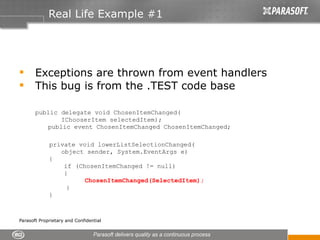
Real Life Example #1 Exceptions are thrown from event handlers  This bug is from the .TEST code base public delegate void ChosenItemChanged( IChooserItem selectedItem); public event ChosenItemChanged ChosenItemChanged; private void lowerListSelectionChanged( object sender, System.EventArgs e) { if (ChosenItemChanged != null) {   ChosenItemChanged(SelectedItem);   } }
Points to Note Exception is possibly thrown by code written by third party Exception is possibly thrown by code written much later—i.e. after this component is tested and certified Exception is possibly thrown from different threads Crashes are not easy to reproduce… so hard to debug and fix
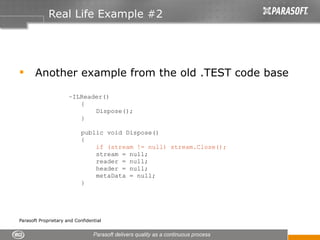
Real Life Example #2 Another example from the old .TEST code base ~ILReader() { Dispose();  } public void Dispose() { if (stream != null) stream.Close(); stream = null; reader = null; header = null; metaData = null; }
Points to Note The garbage collector runs in a separate thread The objects can get freed in a non-deterministic order… so managed resources used in the dtor may already be freed The bug can involve multiple methods Crashes are non-deterministic… so hard to debug and fix
Pattern-Based Static Analysis Checks for the presence or absence of code patterns Eliminates several classes of bugs completely—and with very little effort Prevents bugs  from entering the code base Enhances code readability and maintainability Source level analysis is critical for this Customization of rules Parameterization Creation of new rules Features and strategies for successful deployment Nightly runs Automatic task assignment Suppressions
Flow-Based Static Analysis Deep analysis involving symbolic simulation Analyzes a large number of potential execution paths Works across methods and across assemblies Points out critical bugs that are hard to reproduce and escape normal testing Provides details of the path leading to the bug— making it easy to understand and fix
Demo – Static Analysis Results from pattern-based static analysis Results from flow-based static analysis
Testing – Main Types Application-level tests – manual Application-level tests – automated Unit tests (individual class level)
Application-Level Automatic Tests Pros Absolutely necessary for most products Many manual tests can be automated at this level These usually represent the way the product gets used by the end user Cons Often takes more time to run Loosely coupled with the code—assertions have to be based on program outputs Failures are hard to debug
Unit Testing Pros Tightly coupled to code base—can assert on important internal state Efficient—can be run multiple times during development Bugs are found early and are easy to fix when they are found Cons Hard to create and maintain Some classes are hard to test; they require the entire application context for creation and proper functioning Classes get tested in artificial environments created solely for testing
Application-Hosted Testing Combines the strengths of application level-testing and unit testing Industry examples: Plugin test frameworks for IDEs Host adapters Unit tests are kicked off from different points inside the application The user controls the point from which tests are run Little or no change is made to the code base Can be used with any kind of application Plugins for MS project, VS, MS Office Windows forms ASP.NET
Demo – Application-Hosted Tests Configuring the tests Running the tests Reviewing one test - OpenPicTest
Other Important Features for Testing Stubs—test-specific and global Call Foo instead of Bar Application level or individual test level Automatic task assignment Nightly runs to keep tests under control Coverage to measure and guide testing Flexible data sources Pump data through the same test to cover different kinds of data
Creating Tests Quick creation of simple test suites to get started Easier test creation via application tracing Unit tests via application execution Realistic values (example – long strings, correlated integers, etc.) Automatic assertion generation (value based, behavior based) Good reports/graphs for tracking progress

Beyond Static Analysis: Integrating .NET Static Analysis with Unit Testing and More

  • 1.
    Leveraging Automated .NETAnalysis Techniques to Find Bugs
  • 2.
    Outline Examples fromreal life Pattern-based static analysis Flow-based static analysis Testing methodologies
  • 3.
    Real Life Example#1 Exceptions are thrown from event handlers This bug is from the .TEST code base public delegate void ChosenItemChanged( IChooserItem selectedItem); public event ChosenItemChanged ChosenItemChanged; private void lowerListSelectionChanged( object sender, System.EventArgs e) { if (ChosenItemChanged != null) { ChosenItemChanged(SelectedItem); } }
  • 4.
    Points to NoteException is possibly thrown by code written by third party Exception is possibly thrown by code written much later—i.e. after this component is tested and certified Exception is possibly thrown from different threads Crashes are not easy to reproduce… so hard to debug and fix
  • 5.
    Real Life Example#2 Another example from the old .TEST code base ~ILReader() { Dispose(); } public void Dispose() { if (stream != null) stream.Close(); stream = null; reader = null; header = null; metaData = null; }
  • 6.
    Points to NoteThe garbage collector runs in a separate thread The objects can get freed in a non-deterministic order… so managed resources used in the dtor may already be freed The bug can involve multiple methods Crashes are non-deterministic… so hard to debug and fix
  • 7.
    Pattern-Based Static AnalysisChecks for the presence or absence of code patterns Eliminates several classes of bugs completely—and with very little effort Prevents bugs from entering the code base Enhances code readability and maintainability Source level analysis is critical for this Customization of rules Parameterization Creation of new rules Features and strategies for successful deployment Nightly runs Automatic task assignment Suppressions
  • 8.
    Flow-Based Static AnalysisDeep analysis involving symbolic simulation Analyzes a large number of potential execution paths Works across methods and across assemblies Points out critical bugs that are hard to reproduce and escape normal testing Provides details of the path leading to the bug— making it easy to understand and fix
  • 9.
    Demo – StaticAnalysis Results from pattern-based static analysis Results from flow-based static analysis
  • 10.
    Testing – MainTypes Application-level tests – manual Application-level tests – automated Unit tests (individual class level)
  • 11.
    Application-Level Automatic TestsPros Absolutely necessary for most products Many manual tests can be automated at this level These usually represent the way the product gets used by the end user Cons Often takes more time to run Loosely coupled with the code—assertions have to be based on program outputs Failures are hard to debug
  • 12.
    Unit Testing ProsTightly coupled to code base—can assert on important internal state Efficient—can be run multiple times during development Bugs are found early and are easy to fix when they are found Cons Hard to create and maintain Some classes are hard to test; they require the entire application context for creation and proper functioning Classes get tested in artificial environments created solely for testing
  • 13.
    Application-Hosted Testing Combinesthe strengths of application level-testing and unit testing Industry examples: Plugin test frameworks for IDEs Host adapters Unit tests are kicked off from different points inside the application The user controls the point from which tests are run Little or no change is made to the code base Can be used with any kind of application Plugins for MS project, VS, MS Office Windows forms ASP.NET
  • 14.
    Demo – Application-HostedTests Configuring the tests Running the tests Reviewing one test - OpenPicTest
  • 15.
    Other Important Featuresfor Testing Stubs—test-specific and global Call Foo instead of Bar Application level or individual test level Automatic task assignment Nightly runs to keep tests under control Coverage to measure and guide testing Flexible data sources Pump data through the same test to cover different kinds of data
  • 16.
    Creating Tests Quickcreation of simple test suites to get started Easier test creation via application tracing Unit tests via application execution Realistic values (example – long strings, correlated integers, etc.) Automatic assertion generation (value based, behavior based) Good reports/graphs for tracking progress