Let's Auto It! A Free Functional Automation Tool Meir Bar-Tal SOLMAR Knowledge Networks Mobile: +972 50-6725929 http://www.AdvancedQTP.com
Part I: The  AutoIt Tool What is AutoIt? Evolution of AutoIt Main Features of AutoIt AutoIt vs.Commercial Tools Pros and Cons of AutoIt Part II: The  AutoIt Show Part III: The  AutoIt Community
What is AutoIt? Freeware BASIC-like scripting language designed for automating Windows GUI and general scripting.  Uses a combination of simulated keystrokes, mouse movement and window/control manipulation.  Enables to automate tasks in a way not possible or reliable with other languages (e.g. VBScript and SendKeys).  AutoIt is also very small, self-contained and will run on all versions of Windows out-of-the-box with no annoying "runtimes" required!
Evolution of AutoIt Initially designed for PC "roll out" situations to reliably automate and configure thousands of PCs.  Now can be used as a general purpose scripting language (with awesome automation as well of course!). Now supports complex expressions, user functions, loops and everything else – for senior scriptors.
Main Features of AutoIt Easy to learn BASIC-like syntax  Simulate keystrokes and mouse movements  Manipulate windows and processes  Interact with all standard windows controls  Scripts can be compiled into standalone executables  Create Graphical User Interfaces (GUIs)  COM support
Main Features of AutoIt (cont.) Regular expressions  Directly call external DLL and Windows API functions  Scriptable RunAs functions  Detailed help file and large community-based support forums  Compatible with Windows 95 thru Vista and 2008  Unicode and x64 support  Digitally signed for peace of mind  Works with Windows Vista's User Account Control (UAC)
Detailed Features of AutoIt Basic-like Syntax and Rich Function Set Most people who have ever written a script or used a high-level language should be able to pick it up easily. Language features include: High-level elements for functions, loops and expression parsing  Rich in string handling functions  and  a Perl compatible regular expression engine (using the  PCRE  library).
Detailed Features of AutoIt (cont.) COM support  Call Win32 and third-party DLL APIs Rich Built-in Editor with Syntax Highlighting and Intellisense Customized "light" version of SciTe that makes editing scripts easy  Users can also  download a complete version of SciTe   that includes additional tools
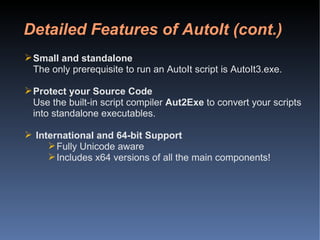
Detailed Features of AutoIt (cont.) Small and standalone The only prerequisite to run an AutoIt script is AutoIt3.exe. Protect your Source Code Use the built-in script compiler  Aut2Exe  to convert your scripts into standalone executables. International and 64-bit Support Fully Unicode aware Includes x64 versions of all the main components!
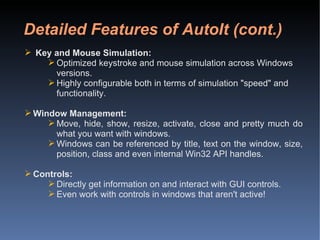
Detailed Features of AutoIt (cont.) Key and Mouse Simulation: Optimized keystroke and mouse simulation across Windows versions. Highly configurable both in terms of simulation "speed" and functionality. Window Management: Move, hide, show, resize, activate, close and pretty much do what you want with windows. Windows can be referenced by title, text on the window, size, position, class and even internal Win32 API handles. Controls: Directly get information on and interact with GUI controls. Even work with controls in windows that aren't active!
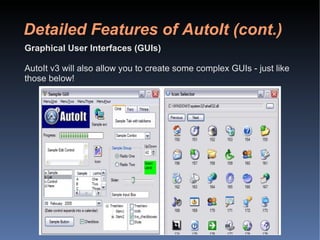
Detailed Features of AutoIt (cont.) Graphical User Interfaces (GUIs) AutoIt v3 will also allow you to create some complex GUIs - just like those below!
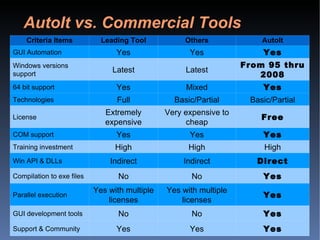
AutoIt vs. Commercial Tools Criteria Items Leading Tool Others AutoIt GUI Automation Yes Yes Yes Windows versions support Latest Latest From 95 thru 2008 64 bit support Yes Mixed Yes Technologies Full Basic/Partial Basic/Partial License Extremely expensive Very expensive to cheap Free COM support Yes Yes Yes Training investment High High High Win API & DLLs Indirect Indirect Direct Compilation to exe files No No Yes Parallel execution Yes with multiple licenses Yes with multiple licenses Yes GUI development tools No No Yes Support & Community Yes Yes Yes
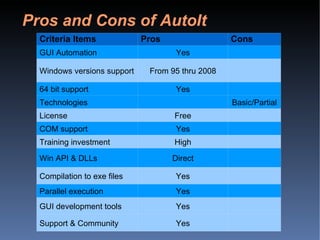
Pros and Cons of AutoIt Criteria Items Pros Cons GUI Automation Yes Windows versions support From 95 thru 2008 64 bit support Yes Technologies Basic/Partial License Free COM support Yes Training investment High Win API & DLLs Direct Compilation to exe files Yes Parallel execution Yes GUI development tools Yes Support & Community Yes
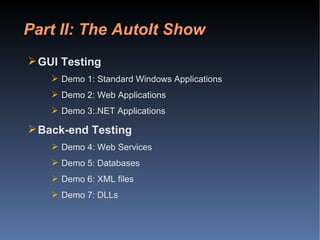
Part II: The AutoIt Show GUI Testing Demo 1: Standard Windows Applications Demo 2: Web Applications Demo 3:.NET Applications Back-end Testing Demo 4: Web Services Demo 5: Databases Demo 6: XML files Demo 7: DLLs
Part II: The AutoIt Show (cont.) GUI Testing Demo 1: Standard Windows Applications Demo 2: Web Applications Demo 3:.NET Applications
Part II: The AutoIt Show (cont.) Back-end Testing Demo 4: Web Services Demo 5: Databases Demo 6: XML files Demo 7: DLLs
Part III: The AutoIt Community Jonathan Bennett and the  AutoIt Team Releases Documentation Support and  Forums
Jonathan Bennett (born 1973) – Author and copyright owner An open community of contributors:  http://www.autoitscript.com/autoit3/docs/credits.htm Highly technically proficient Very dedicated Jonathan Bennett & the AutoIt Team
The AutoIt Team releases AutoIt versions from time to time The versions include both bug fixes and new features All releases are very well documented Last release (v3.3.0.0) is dated 24th December, 2008  Releases
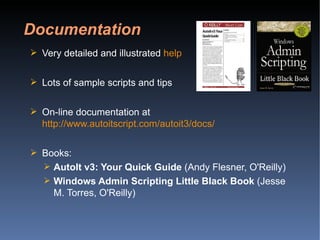
Very detailed and illustrated  help Lots of sample scripts and tips On-line documentation at  http://www.autoitscript.com/autoit3/docs/ Books: AutoIt v3: Your Quick Guide  (Andy Flesner, O'Reilly)  Windows Admin Scripting Little Black Book  (Jesse M. Torres, O'Reilly)  Documentation
Support is available at  [email_address] A community of tens of thousands of professionals Q&A Forum ( http://www.autoitscript.com/forum/ ) Support & Community
Cost-effective solution for Web, .NET and Standard Windows applications. Limited to the main Windows technologies Best used with a proven testing automation methodology and framework Enables maximizing ROI on automation by effective use of enterprise resources (parallel execution) Conclusions On AutoIt
Let's Auto It! A Free Functional Automation Tool THANK YOU! Meir Bar-Tal SOLMAR Knowledge Networks Mobile: +972 50-6725929 http://www.AdvancedQTP.com

Lets Auto It

  • 1.
    Let's Auto It!A Free Functional Automation Tool Meir Bar-Tal SOLMAR Knowledge Networks Mobile: +972 50-6725929 http://www.AdvancedQTP.com
  • 2.
    Part I: The AutoIt Tool What is AutoIt? Evolution of AutoIt Main Features of AutoIt AutoIt vs.Commercial Tools Pros and Cons of AutoIt Part II: The AutoIt Show Part III: The AutoIt Community
  • 3.
    What is AutoIt?Freeware BASIC-like scripting language designed for automating Windows GUI and general scripting. Uses a combination of simulated keystrokes, mouse movement and window/control manipulation. Enables to automate tasks in a way not possible or reliable with other languages (e.g. VBScript and SendKeys). AutoIt is also very small, self-contained and will run on all versions of Windows out-of-the-box with no annoying "runtimes" required!
  • 4.
    Evolution of AutoItInitially designed for PC "roll out" situations to reliably automate and configure thousands of PCs. Now can be used as a general purpose scripting language (with awesome automation as well of course!). Now supports complex expressions, user functions, loops and everything else – for senior scriptors.
  • 5.
    Main Features ofAutoIt Easy to learn BASIC-like syntax Simulate keystrokes and mouse movements Manipulate windows and processes Interact with all standard windows controls Scripts can be compiled into standalone executables Create Graphical User Interfaces (GUIs) COM support
  • 6.
    Main Features ofAutoIt (cont.) Regular expressions Directly call external DLL and Windows API functions Scriptable RunAs functions Detailed help file and large community-based support forums Compatible with Windows 95 thru Vista and 2008 Unicode and x64 support Digitally signed for peace of mind Works with Windows Vista's User Account Control (UAC)
  • 7.
    Detailed Features ofAutoIt Basic-like Syntax and Rich Function Set Most people who have ever written a script or used a high-level language should be able to pick it up easily. Language features include: High-level elements for functions, loops and expression parsing Rich in string handling functions and a Perl compatible regular expression engine (using the PCRE library).
  • 8.
    Detailed Features ofAutoIt (cont.) COM support Call Win32 and third-party DLL APIs Rich Built-in Editor with Syntax Highlighting and Intellisense Customized "light" version of SciTe that makes editing scripts easy Users can also download a complete version of SciTe that includes additional tools
  • 9.
    Detailed Features ofAutoIt (cont.) Small and standalone The only prerequisite to run an AutoIt script is AutoIt3.exe. Protect your Source Code Use the built-in script compiler Aut2Exe to convert your scripts into standalone executables. International and 64-bit Support Fully Unicode aware Includes x64 versions of all the main components!
  • 10.
    Detailed Features ofAutoIt (cont.) Key and Mouse Simulation: Optimized keystroke and mouse simulation across Windows versions. Highly configurable both in terms of simulation "speed" and functionality. Window Management: Move, hide, show, resize, activate, close and pretty much do what you want with windows. Windows can be referenced by title, text on the window, size, position, class and even internal Win32 API handles. Controls: Directly get information on and interact with GUI controls. Even work with controls in windows that aren't active!
  • 11.
    Detailed Features ofAutoIt (cont.) Graphical User Interfaces (GUIs) AutoIt v3 will also allow you to create some complex GUIs - just like those below!
  • 12.
    AutoIt vs. CommercialTools Criteria Items Leading Tool Others AutoIt GUI Automation Yes Yes Yes Windows versions support Latest Latest From 95 thru 2008 64 bit support Yes Mixed Yes Technologies Full Basic/Partial Basic/Partial License Extremely expensive Very expensive to cheap Free COM support Yes Yes Yes Training investment High High High Win API & DLLs Indirect Indirect Direct Compilation to exe files No No Yes Parallel execution Yes with multiple licenses Yes with multiple licenses Yes GUI development tools No No Yes Support & Community Yes Yes Yes
  • 13.
    Pros and Consof AutoIt Criteria Items Pros Cons GUI Automation Yes Windows versions support From 95 thru 2008 64 bit support Yes Technologies Basic/Partial License Free COM support Yes Training investment High Win API & DLLs Direct Compilation to exe files Yes Parallel execution Yes GUI development tools Yes Support & Community Yes
  • 14.
    Part II: TheAutoIt Show GUI Testing Demo 1: Standard Windows Applications Demo 2: Web Applications Demo 3:.NET Applications Back-end Testing Demo 4: Web Services Demo 5: Databases Demo 6: XML files Demo 7: DLLs
  • 15.
    Part II: TheAutoIt Show (cont.) GUI Testing Demo 1: Standard Windows Applications Demo 2: Web Applications Demo 3:.NET Applications
  • 16.
    Part II: TheAutoIt Show (cont.) Back-end Testing Demo 4: Web Services Demo 5: Databases Demo 6: XML files Demo 7: DLLs
  • 17.
    Part III: TheAutoIt Community Jonathan Bennett and the AutoIt Team Releases Documentation Support and Forums
  • 18.
    Jonathan Bennett (born1973) – Author and copyright owner An open community of contributors: http://www.autoitscript.com/autoit3/docs/credits.htm Highly technically proficient Very dedicated Jonathan Bennett & the AutoIt Team
  • 19.
    The AutoIt Teamreleases AutoIt versions from time to time The versions include both bug fixes and new features All releases are very well documented Last release (v3.3.0.0) is dated 24th December, 2008 Releases
  • 20.
    Very detailed andillustrated help Lots of sample scripts and tips On-line documentation at http://www.autoitscript.com/autoit3/docs/ Books: AutoIt v3: Your Quick Guide (Andy Flesner, O'Reilly) Windows Admin Scripting Little Black Book (Jesse M. Torres, O'Reilly) Documentation
  • 21.
    Support is availableat [email_address] A community of tens of thousands of professionals Q&A Forum ( http://www.autoitscript.com/forum/ ) Support & Community
  • 22.
    Cost-effective solution forWeb, .NET and Standard Windows applications. Limited to the main Windows technologies Best used with a proven testing automation methodology and framework Enables maximizing ROI on automation by effective use of enterprise resources (parallel execution) Conclusions On AutoIt
  • 23.
    Let's Auto It!A Free Functional Automation Tool THANK YOU! Meir Bar-Tal SOLMAR Knowledge Networks Mobile: +972 50-6725929 http://www.AdvancedQTP.com