COMPUTER SOFTWARE
•Computer hardware is useless without
software.
•Software is the set of instructions and
associated data that direct the
computer to do a task.
COMPUTER SOFTWARE
•Software can be divided into two
categories:
•System Software and Application
Software.
•System software helps the computer to
carry out its basic operating tasks.
•Application software helps the user
carry out a variety of tasks.
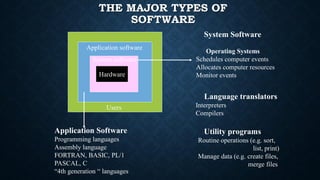
THE MAJOR TYPES OF
SOFTWARE
Application software
Hardware
System software
System Software
Operating Systems
Schedules computer events
Allocates computer resources
Monitor events
Application Software
Programming languages
Assembly language
FORTRAN, BASIC, PL/1
PASCAL, C
“4th generation “ languages
Users
Language translators
Interpreters
Compilers
Utility programs
Routine operations (e.g. sort,
list, print)
Manage data (e.g. create files,
merge files
•Manages the fundamental operations
of the computer, such as
- loading programs and data into
memory, executing programs, saving
data to disks, displaying information
on the monitor, and transmitting data
through a port to a peripheral device.
COMPUTER SOFTWARE
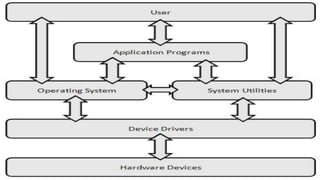
System Software:
•Operating Systems
•Utilities
•Device Drivers.
COMPUTER SOFTWARE
SOFTWARE:
•SYSTEM SOFTWARE
•APPLICATION SOFTWARE
APPLICATION SOFTWARE:
A.WORD PROCESSING SOFTWARE
B. SPREADSHEET SOFTWARE
C. DATABASE MANAGEMENT SOFTWARE
D. GRAPHIC SOFTWARE
E.WEB BROWSERS
System Software:
•Operating Systems
•Utilities
•Device Drivers
•Firmware
COMPUTER SOFTWARE
OPERATING SYSTEM
•Collection of computer programs
that control the interaction of the
user and the computer hardware.
•Responsible for directing all
computer operations and managing
all computer resources.
OPERATING SYSTEM
•Loading the operating
system into memory is
called booting the
computer.
UTILITIES
•Another category of system software.
•Augments the OS by taking over some
of its responsibility for allocating
hardware resources.
UTILITIES
•Utility Program - System software
consisting of programs for routine,
repetitive tasks ( e.g. copying,
clearing primary storage, computing a
square root, or sorting), which can be
shared by many users.
EXAMPLES OF UTILITY PROGRAM
•Some of the examples of the utility programs
(Utilities) include: Disk defragmenters, System
Profilers, Network Managers, Application
Launchers, Antivirus software, Backup software,
Disk repair, Disk Cleaners, Registry Cleaners, Disk
Space analyzer, file manager, File Compression,
Data Security and many more. In addition,
operating systems contains a number of utilities for
managing disk drives, printers, and other.
DEVICE DRIVER
•A computer program that can establish
communication because it contains
information about the characteristics
of your computer and of the device.
•Each peripheral device requires a
device driver.
FIRMWARE
•Firmware is data that is stored on a
computer or other hardware
device's ROM (read-only memory) that
provides instruction on how that device
should operate. Unlike normal
software, firmware cannot be changed
or deleted by an end-user without the
aid of special programs and remains on
that device whether or not it's on or off.
APPLICATION SOFTWARE
•Developed for a specific task , such as
word processing( MS Word/ WordPerfect),
accounting (Lotus 1-2-3/ Excel), or
database management (Access/ dBASE).
•We also use graphics and presentation
software.
APPLICATION SOFTWARE
•Most applications are purchased on
diskette or CD-ROM, downloadable
via bus.
•They are installed by copying the
programs from the diskettes/CD-ROM
to the hard disk.
A. WORD PROCESSING SOFTWARE:
.Creates, edits, saves, and prints
documents. Example: MS Word,
WordPerfect, Ami Pro, MacWrite
B. SPREADSHEET SOFTWARE:
•An electronic spreadsheet
consisting of rows and columns is
used to present and analyze data.
Example: MS Excel, Lotus 123,
Quattro Pro.
C. DATABASE MANAGEMENT
SOFTWARE:
•Used to structure a database, a large
collection of computer programs.
Data is organized as fields and
records for easy retrieval. Example:
MS Access, dBase, Fox Pro, Oracle.
D. GRAPHIC SOFTWARE:
•Graphics programs display results of
data manipulation for easier analysis
and presentation. Example: Adobe
Flash, Harvard Graphics, 3D Studio
Max, Adobe Photoshop
E. WEB BROWSERS
•Easy-to-use software tools for accessing
the World Wide Web and the Internet.
•It has a point-and click graphical user
interface.
•Using this interface, you can access and
display information stored in computers
at other Internet sites.
E. WEB BROWSERS
•You can display graphics, audio, and
video as well as text.
•Examples: Netscape Navigator (along
with Netscape Communicator) and MS
Internet Explorer are two popular Web
browsers.

Lesson 5 Understanding Computer Software.pdf

  • 1.
    COMPUTER SOFTWARE •Computer hardwareis useless without software. •Software is the set of instructions and associated data that direct the computer to do a task.
  • 2.
    COMPUTER SOFTWARE •Software canbe divided into two categories: •System Software and Application Software. •System software helps the computer to carry out its basic operating tasks. •Application software helps the user carry out a variety of tasks.
  • 3.
    THE MAJOR TYPESOF SOFTWARE Application software Hardware System software System Software Operating Systems Schedules computer events Allocates computer resources Monitor events Application Software Programming languages Assembly language FORTRAN, BASIC, PL/1 PASCAL, C “4th generation “ languages Users Language translators Interpreters Compilers Utility programs Routine operations (e.g. sort, list, print) Manage data (e.g. create files, merge files
  • 4.
    •Manages the fundamentaloperations of the computer, such as - loading programs and data into memory, executing programs, saving data to disks, displaying information on the monitor, and transmitting data through a port to a peripheral device. COMPUTER SOFTWARE
  • 5.
  • 6.
  • 7.
    APPLICATION SOFTWARE: A.WORD PROCESSINGSOFTWARE B. SPREADSHEET SOFTWARE C. DATABASE MANAGEMENT SOFTWARE D. GRAPHIC SOFTWARE E.WEB BROWSERS
  • 8.
  • 9.
    OPERATING SYSTEM •Collection ofcomputer programs that control the interaction of the user and the computer hardware. •Responsible for directing all computer operations and managing all computer resources.
  • 10.
    OPERATING SYSTEM •Loading theoperating system into memory is called booting the computer.
  • 11.
    UTILITIES •Another category ofsystem software. •Augments the OS by taking over some of its responsibility for allocating hardware resources.
  • 12.
    UTILITIES •Utility Program -System software consisting of programs for routine, repetitive tasks ( e.g. copying, clearing primary storage, computing a square root, or sorting), which can be shared by many users.
  • 13.
    EXAMPLES OF UTILITYPROGRAM •Some of the examples of the utility programs (Utilities) include: Disk defragmenters, System Profilers, Network Managers, Application Launchers, Antivirus software, Backup software, Disk repair, Disk Cleaners, Registry Cleaners, Disk Space analyzer, file manager, File Compression, Data Security and many more. In addition, operating systems contains a number of utilities for managing disk drives, printers, and other.
  • 14.
    DEVICE DRIVER •A computerprogram that can establish communication because it contains information about the characteristics of your computer and of the device. •Each peripheral device requires a device driver.
  • 18.
    FIRMWARE •Firmware is datathat is stored on a computer or other hardware device's ROM (read-only memory) that provides instruction on how that device should operate. Unlike normal software, firmware cannot be changed or deleted by an end-user without the aid of special programs and remains on that device whether or not it's on or off.
  • 19.
    APPLICATION SOFTWARE •Developed fora specific task , such as word processing( MS Word/ WordPerfect), accounting (Lotus 1-2-3/ Excel), or database management (Access/ dBASE). •We also use graphics and presentation software.
  • 20.
    APPLICATION SOFTWARE •Most applicationsare purchased on diskette or CD-ROM, downloadable via bus. •They are installed by copying the programs from the diskettes/CD-ROM to the hard disk.
  • 21.
    A. WORD PROCESSINGSOFTWARE: .Creates, edits, saves, and prints documents. Example: MS Word, WordPerfect, Ami Pro, MacWrite
  • 22.
    B. SPREADSHEET SOFTWARE: •Anelectronic spreadsheet consisting of rows and columns is used to present and analyze data. Example: MS Excel, Lotus 123, Quattro Pro.
  • 23.
    C. DATABASE MANAGEMENT SOFTWARE: •Usedto structure a database, a large collection of computer programs. Data is organized as fields and records for easy retrieval. Example: MS Access, dBase, Fox Pro, Oracle.
  • 24.
    D. GRAPHIC SOFTWARE: •Graphicsprograms display results of data manipulation for easier analysis and presentation. Example: Adobe Flash, Harvard Graphics, 3D Studio Max, Adobe Photoshop
  • 25.
    E. WEB BROWSERS •Easy-to-usesoftware tools for accessing the World Wide Web and the Internet. •It has a point-and click graphical user interface. •Using this interface, you can access and display information stored in computers at other Internet sites.
  • 26.
    E. WEB BROWSERS •Youcan display graphics, audio, and video as well as text. •Examples: Netscape Navigator (along with Netscape Communicator) and MS Internet Explorer are two popular Web browsers.