MAKING USB BOOTABLE
(USING RUFUS)
BY: ROLAND SEAN R. LAURE
RUFUS
REQUIREMENTS:
1. Flash Drive - recommended size is 8gb.
2. RUFUS - bootable flash drive creator.
3. Image file of Window Server 2008 R2.
4. Computer compatible with Windows Server
2008 R2 (Refer to your motherboard manual for
this)
5. Lot of time and patience.
STEPS:
Step 1
Save the image file of
Windows 7 and Rufus
inside a new folder.
STEPS:
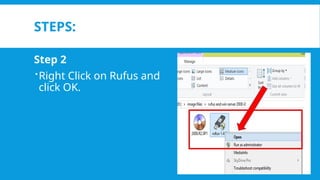
Step 2
Right Click on Rufus and
click OK.
STEPS:
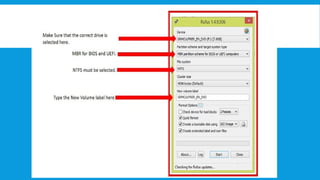
3.Make sure for the following:
Device selected must be the flash drive you will make as
bootable flash drive. Once it was created, I advise not to
use it as data storage.
MBR for BIOS and UEFI must be selected in Partition
scheme and target system type.
NTFS must be selected in File System
Type a new Volume Label f needed.
STEPS:
4. Click the ISO image file button and look for the image file
of Windows 7. Select it and click Open,
STEPS:
Step 5
Click Start and Click Ok if the
warning dialog box appear.
Make sure that no other
important file is save on that
flash drive.
STEPS:
Step 6
Next screen is Creating file
system. Just wait until the
next screen appear.
STEPS:
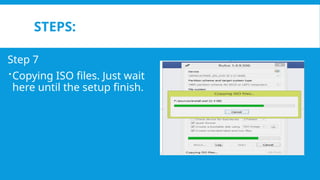
Step 7
Copying ISO files. Just wait
here until the setup finish.
STEPS:
Step 8
When the setup finish the
tasks, a Done message will
appear below.
STEPS:
Step 9
You may now safely remove
the flash drive from your
system.

LESSON 2 - Making USB Bootable (using Rufus).pptx

Editor's Notes

  • #7 Master boot record GUID Partition Table – Globally Unique Indentifiers