Server-side  Web Programming Lecture 5:  Java Servlets and the  Control-View Architecture
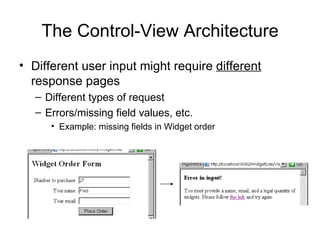
The Control-View Architecture Different user input might require  different  response pages Different types of request Errors/missing field values, etc. Example: missing fields in Widget order
The Control-View Architecture Bad solution: single JSP with lots of conditions <% if ( fields are valid ) { %> entire web page for normal response <% } else { %> entire web page for error message(s) <% } %>
Java Servlets Class  containing methods executed by Tomcat Not a web page (like a JSP) Methods invoked by a request for the servlet Usually  redirects  to a JSP  Tomcat Request for  servlet Servlet Servlet methods called JSP Redirect to appropriate response page html JSP converted to html Response
The Control-View Architecture Servlets usually act as  controls   Categorize request based on the parameters and possibly other factors (database info, etc.). Decide which JSP should be sent back as response. Forward control (and request data) to that JSP. request Control servlet JSP response JSPs  act  as  views JSP JSP
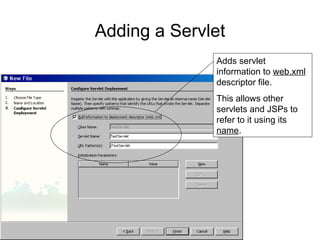
Adding a Servlet File    New File Choose Servlet type
Adding a Servlet Give it a name
Adding a Servlet Adds servlet information to  web.xml  descriptor file. This allows other servlets and JSPs to refer to it using its  name .
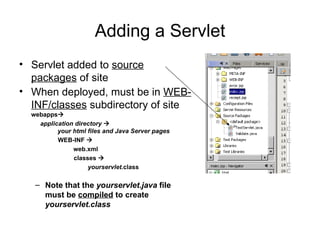
Adding a Servlet Servlet added to  source packages  of site When deployed, must be in  WEB-INF/classes  subdirectory of site webapps    application directory        your html files and Java Server pages WEB-INF       web.xml classes     yourservlet .class Note that the  yourservlet.java  file must be  compiled  to create  yourservlet.class
Basic Servlet Structure Key methods: void doGet(HttpServletRequest request,    HttpServletResponse response) Called if servlet invoked using  get  method void doPost(HttpServletRequest request,    HttpServletResponse response)  Called if servlet invoked using  post  method Have access to  request  object Can call  getParameter , etc.
Basic Servlet Structure Note that 99.9% both  doGet  and  doPost  do  same thing NetBeans generates code in both that just calls single  processRequest  method. doGet  and  doPost  hidden by editor
Importing Servlet Libraries Servlets libraries generally imported: import java.io.*; import javax.servlet.*; import javax.servlet.http.*; This is where request, response, etc. defined Note that NetBeans does not automatically import these (just specific classes) Should change code to include  all  of these
Invoking a Servlet from a JSP Use its  name  in the ACTION attribute of FORM
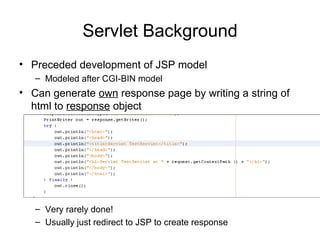
Servlet Background Preceded development of JSP model Modeled after CGI-BIN model Can generate  own  response page by writing a string of html to  response  object Very rarely done! Usually just redirect to JSP to create response
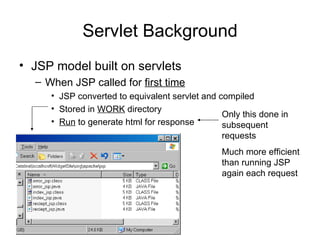
Servlet Background JSP model built on servlets When JSP called for  first time JSP converted to equivalent servlet and compiled Stored in  WORK  directory Run  to generate html for response Only this done in subsequent requests Much more efficient than running JSP again each request
Servlet Redirection Basic syntax (step 1): RequestDispatcher  dispatcherObject  = getServletContext().   getRequestDispatcher(&quot;/ MyJSP &quot;); dispatcherObject   is a new object that holds information about the redirection Forward control to this JSP on the same site The / tells Tomcat to look in the application root directory Get the location of the site (so can do a relative url forward)
Servlet Redirection Basic syntax (step 2): dispatcherObject .forward(request, response); Transfer control using the  dispatcherObject Both the request and response must be passed so the JSP has access to parameters, etc.
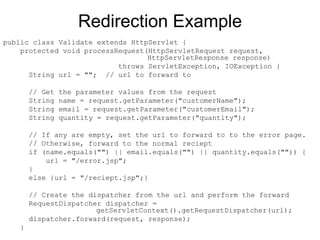
Redirection Example index.jsp  prompts for quantity, name, email Upon submit, invokes  Validate.java  servlet  If all information present, forward to receipt page Otherwise forward to error page Validate.java servlet
Redirection Example public class Validate extends HttpServlet {  protected void processRequest(HttpServletRequest request,    HttpServletResponse response) throws ServletException, IOException { String url = &quot;&quot;;  // url to forward to // Get the parameter values from the request String name = request.getParameter(&quot;customerName&quot;); String email = request.getParameter(&quot;customerEmail&quot;); String quantity = request.getParameter(&quot;quantity&quot;); // If any are empty, set the url to forward to to the error page. // Otherwise, forward to the normal reciept if (name.equals(&quot;&quot;) || email.equals(&quot;&quot;) || quantity.equals(&quot;&quot;)) { url = &quot;/error.jsp&quot;; } else {url = &quot;/reciept.jsp&quot;;} // Create the dispatcher from the url and perform the forward RequestDispatcher dispatcher =    getServletContext().getRequestDispatcher(url); dispatcher.forward(request, response); }
Passing Information to the JSP Information can be passed from a  servlet  to the JSP it forwards to Added to  request  object as an  attribute Like a parameter, has  name  and a  value Value can be  any Java object  (not just a string) servlet Request parameter=value parameter=value … JSP Request parameter=value parameter=value attribute=value …
Passing Information to the JSP Adding attribute in servlet: request.setAttribute(“ name ”,  some object ); Retrieving attribute in JSP: variable  = ( type )request.getAttribute(“ name ”);   Since attribute can be  any  type, must use casting to tell Java original type
Passing Information to the JSP Code in servlet to pass price per unit and total cost as strings
Passing Information to the JSP Code in JSP to retrieve price per unit and total cost as strings
Servlet Details Important note: Forward does  not  terminate servlet! Will run to end of  processRequest  even after forward Bad code: if ( somevalue  == null) { forward to error page } code that will crash if somevalue is null   Better code:   if ( somevalue  == null) { forward to error page } else { code that will crash if somevalue is null   }
Servlet Details Invoking one servlet from another: getRequestDispatcher(“/ sitename / servletname “); Note: may not need sitename in NetBeans, but may not work when deployed otherwise Often done for modular multistage redirection WidgetSite Validate request Validation servlet Error JSP response JSP for standard configuration JSP for custom configuration Servlet to choose computer type
Servlet Details Debugging servlets Can write  diagnostic messages  to  control screen System.out.println(“ message ”);

Lecture5

  • 1.
    Server-side WebProgramming Lecture 5: Java Servlets and the Control-View Architecture
  • 2.
    The Control-View ArchitectureDifferent user input might require different response pages Different types of request Errors/missing field values, etc. Example: missing fields in Widget order
  • 3.
    The Control-View ArchitectureBad solution: single JSP with lots of conditions <% if ( fields are valid ) { %> entire web page for normal response <% } else { %> entire web page for error message(s) <% } %>
  • 4.
    Java Servlets Class containing methods executed by Tomcat Not a web page (like a JSP) Methods invoked by a request for the servlet Usually redirects to a JSP Tomcat Request for servlet Servlet Servlet methods called JSP Redirect to appropriate response page html JSP converted to html Response
  • 5.
    The Control-View ArchitectureServlets usually act as controls Categorize request based on the parameters and possibly other factors (database info, etc.). Decide which JSP should be sent back as response. Forward control (and request data) to that JSP. request Control servlet JSP response JSPs act as views JSP JSP
  • 6.
    Adding a ServletFile  New File Choose Servlet type
  • 7.
    Adding a ServletGive it a name
  • 8.
    Adding a ServletAdds servlet information to web.xml descriptor file. This allows other servlets and JSPs to refer to it using its name .
  • 9.
    Adding a ServletServlet added to source packages of site When deployed, must be in WEB-INF/classes subdirectory of site webapps  application directory  your html files and Java Server pages WEB-INF  web.xml classes  yourservlet .class Note that the yourservlet.java file must be compiled to create yourservlet.class
  • 10.
    Basic Servlet StructureKey methods: void doGet(HttpServletRequest request, HttpServletResponse response) Called if servlet invoked using get method void doPost(HttpServletRequest request, HttpServletResponse response) Called if servlet invoked using post method Have access to request object Can call getParameter , etc.
  • 11.
    Basic Servlet StructureNote that 99.9% both doGet and doPost do same thing NetBeans generates code in both that just calls single processRequest method. doGet and doPost hidden by editor
  • 12.
    Importing Servlet LibrariesServlets libraries generally imported: import java.io.*; import javax.servlet.*; import javax.servlet.http.*; This is where request, response, etc. defined Note that NetBeans does not automatically import these (just specific classes) Should change code to include all of these
  • 13.
    Invoking a Servletfrom a JSP Use its name in the ACTION attribute of FORM
  • 14.
    Servlet Background Precededdevelopment of JSP model Modeled after CGI-BIN model Can generate own response page by writing a string of html to response object Very rarely done! Usually just redirect to JSP to create response
  • 15.
    Servlet Background JSPmodel built on servlets When JSP called for first time JSP converted to equivalent servlet and compiled Stored in WORK directory Run to generate html for response Only this done in subsequent requests Much more efficient than running JSP again each request
  • 16.
    Servlet Redirection Basicsyntax (step 1): RequestDispatcher dispatcherObject = getServletContext(). getRequestDispatcher(&quot;/ MyJSP &quot;); dispatcherObject is a new object that holds information about the redirection Forward control to this JSP on the same site The / tells Tomcat to look in the application root directory Get the location of the site (so can do a relative url forward)
  • 17.
    Servlet Redirection Basicsyntax (step 2): dispatcherObject .forward(request, response); Transfer control using the dispatcherObject Both the request and response must be passed so the JSP has access to parameters, etc.
  • 18.
    Redirection Example index.jsp prompts for quantity, name, email Upon submit, invokes Validate.java servlet If all information present, forward to receipt page Otherwise forward to error page Validate.java servlet
  • 19.
    Redirection Example publicclass Validate extends HttpServlet { protected void processRequest(HttpServletRequest request, HttpServletResponse response) throws ServletException, IOException { String url = &quot;&quot;; // url to forward to // Get the parameter values from the request String name = request.getParameter(&quot;customerName&quot;); String email = request.getParameter(&quot;customerEmail&quot;); String quantity = request.getParameter(&quot;quantity&quot;); // If any are empty, set the url to forward to to the error page. // Otherwise, forward to the normal reciept if (name.equals(&quot;&quot;) || email.equals(&quot;&quot;) || quantity.equals(&quot;&quot;)) { url = &quot;/error.jsp&quot;; } else {url = &quot;/reciept.jsp&quot;;} // Create the dispatcher from the url and perform the forward RequestDispatcher dispatcher = getServletContext().getRequestDispatcher(url); dispatcher.forward(request, response); }
  • 20.
    Passing Information tothe JSP Information can be passed from a servlet to the JSP it forwards to Added to request object as an attribute Like a parameter, has name and a value Value can be any Java object (not just a string) servlet Request parameter=value parameter=value … JSP Request parameter=value parameter=value attribute=value …
  • 21.
    Passing Information tothe JSP Adding attribute in servlet: request.setAttribute(“ name ”, some object ); Retrieving attribute in JSP: variable = ( type )request.getAttribute(“ name ”); Since attribute can be any type, must use casting to tell Java original type
  • 22.
    Passing Information tothe JSP Code in servlet to pass price per unit and total cost as strings
  • 23.
    Passing Information tothe JSP Code in JSP to retrieve price per unit and total cost as strings
  • 24.
    Servlet Details Importantnote: Forward does not terminate servlet! Will run to end of processRequest even after forward Bad code: if ( somevalue == null) { forward to error page } code that will crash if somevalue is null Better code: if ( somevalue == null) { forward to error page } else { code that will crash if somevalue is null }
  • 25.
    Servlet Details Invokingone servlet from another: getRequestDispatcher(“/ sitename / servletname “); Note: may not need sitename in NetBeans, but may not work when deployed otherwise Often done for modular multistage redirection WidgetSite Validate request Validation servlet Error JSP response JSP for standard configuration JSP for custom configuration Servlet to choose computer type
  • 26.
    Servlet Details Debuggingservlets Can write diagnostic messages to control screen System.out.println(“ message ”);