ECE 287 – Lecture 15
Finite State Machines - II
Announcements
• Next Quiz on Wednesday
• Exam II – Nov 15th
FSM Example
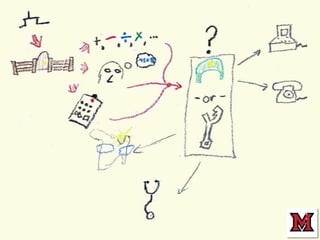
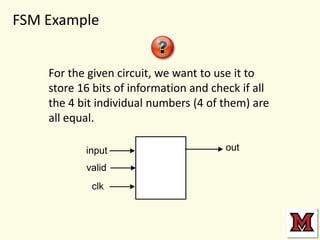
For the given circuit, we want to use it to
store 16 bits of information and check if all
the 4 bit individual numbers (4 of them) are
all equal.
input
valid
clk

out
Algorithm
State Diagram
State Table
State Machine Circuit
What if clock is fast?

How does the system start up?
Actual Comparison Circuit
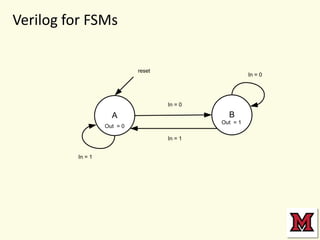
Verilog for FSMs
reset

In = 0

In = 0

B

A

Out = 1

Out = 0
In = 1
In = 1
Try and build the Verilog for bit
matching example at the start of class…
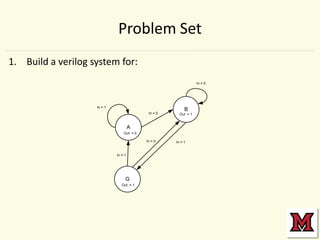
Problem Set
1. Build a verilog system for:
In = 0

In = 1
In = 0

B
Out = 1

A
Out = 0
In = 0

In = 1

G
Out = 1

In = 1
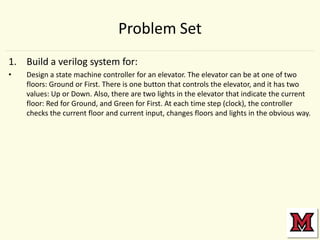
Problem Set
1. Build a verilog system for:
•

Design a state machine controller for an elevator. The elevator can be at one of two
floors: Ground or First. There is one button that controls the elevator, and it has two
values: Up or Down. Also, there are two lights in the elevator that indicate the current
floor: Red for Ground, and Green for First. At each time step (clock), the controller
checks the current floor and current input, changes floors and lights in the obvious way.

Lecture15 fsm i_ic

  • 1.
    ECE 287 –Lecture 15 Finite State Machines - II
  • 2.
    Announcements • Next Quizon Wednesday • Exam II – Nov 15th
  • 7.
    FSM Example For thegiven circuit, we want to use it to store 16 bits of information and check if all the 4 bit individual numbers (4 of them) are all equal. input valid clk out
  • 8.
  • 9.
  • 10.
  • 11.
  • 12.
    What if clockis fast? How does the system start up?
  • 13.
  • 14.
    Verilog for FSMs reset In= 0 In = 0 B A Out = 1 Out = 0 In = 1 In = 1
  • 15.
    Try and buildthe Verilog for bit matching example at the start of class…
  • 16.
    Problem Set 1. Builda verilog system for: In = 0 In = 1 In = 0 B Out = 1 A Out = 0 In = 0 In = 1 G Out = 1 In = 1
  • 17.
    Problem Set 1. Builda verilog system for: • Design a state machine controller for an elevator. The elevator can be at one of two floors: Ground or First. There is one button that controls the elevator, and it has two values: Up or Down. Also, there are two lights in the elevator that indicate the current floor: Red for Ground, and Green for First. At each time step (clock), the controller checks the current floor and current input, changes floors and lights in the obvious way.