{
System Software
Course Code: ICT-321
Course Title : Introduction to Computer
Instructor: Miss Omal Sahar
 System software is set of programs to control and manage the
actual operations of a computer hardware.
 It controls the usage and allocation of different hardware
components.
 Control the basic operations as follows:
 Saving data on disk
 Making computer to work for us
 Printing a document
System Software
1. Operating System
2. Utility Programs
3. Device Driver
4. Language Processor
Types of System Software
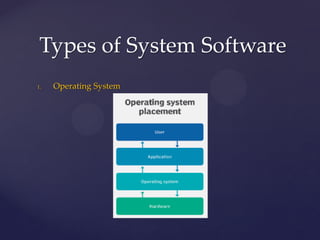
1. Operating System
 Set of Programs that manages all computer components ad
operations.
 Most important software that runs on the computer.
 Computer cannot do anything without an operating system.
 It must be installed on every computer.
 Acts as an interface between the computer user and the
hardware.
 The user interacts with the computer through operating system.
Types of System Software
1. Operating System
Types of System Software
Important tasks of Operating System
 It loads programs into memory and execute them.
 Controls the operations of all devices.
 Manage files and folders.
 It provide the facility to create passwords to make sure it is not
used by unauthorized persons.
 Identifies the hardware problems and display messages to solve
them.
Types of System Software
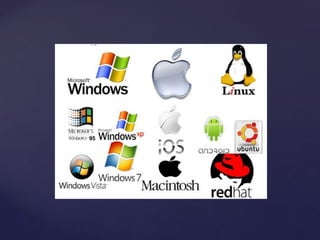
Examples of Operating System
 Microsoft Windows
 Linux
 Unix
 Mac OS etc.
Types of System Software
2. Utility Programs
 A utility programs a type of system software that is used for
effective management of computer system.
 User can use utility programs to perform maintenance tasks
related different devices and programs.
 Most Operating systems include different built in utility
programs.
Types of System Software
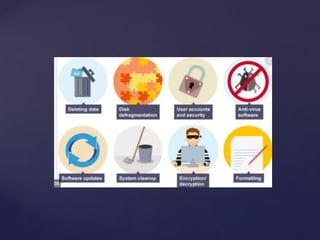
2. Utility Programs (Examples)
 File Viewer [Used to display and manage files and folders]
 Backup utility [ Used to take backup of data]
 File Compressor [ Used to reduce the size of the files]
 Diagnostic utility [Used to detect the hardware and software
problem]
 Antivirus Software [ Used to detect and remove virus]
Types of System Software
3. Device Driver
 Control the operations of a device.
 An operating system uses a device driver to communicate with
a device.
 Many device drivers automatically installed with windows.
Types of System Software
3. Device Driver
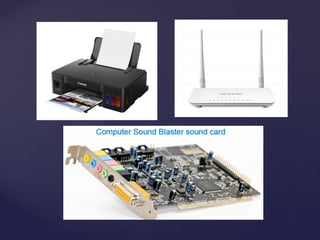
 All devices attached to the computer need the device drivers
such as printer, modem and sound card etc.
 A device cannot work properly if its device driver is not
installed properly.
 Device drivers provided by the device manufacturer.
Types of System Software
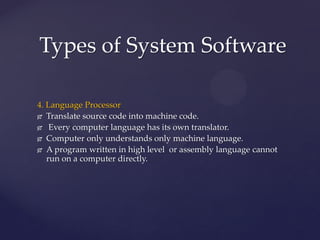
4. Language Processor
 Translate source code into machine code.
 Every computer language has its own translator.
 Computer only understands only machine language.
 A program written in high level or assembly language cannot
run on a computer directly.
Types of System Software
4. Language Processor
 It must be converted into machine language using language
processor.
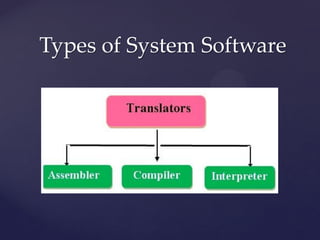
 Different types of language processors include compiler,
interpreter and assembly language.
Types of System Software
References
 Introduction to Computers by Peter Norton (Latest Edition)
 IT-Series The Concept of Information Technology (Latest
Edition)

Lecture # 11 System Software.pdf

  • 1.
    { System Software Course Code:ICT-321 Course Title : Introduction to Computer Instructor: Miss Omal Sahar
  • 2.
     System softwareis set of programs to control and manage the actual operations of a computer hardware.  It controls the usage and allocation of different hardware components.  Control the basic operations as follows:  Saving data on disk  Making computer to work for us  Printing a document System Software
  • 3.
    1. Operating System 2.Utility Programs 3. Device Driver 4. Language Processor Types of System Software
  • 4.
    1. Operating System Set of Programs that manages all computer components ad operations.  Most important software that runs on the computer.  Computer cannot do anything without an operating system.  It must be installed on every computer.  Acts as an interface between the computer user and the hardware.  The user interacts with the computer through operating system. Types of System Software
  • 5.
    1. Operating System Typesof System Software
  • 6.
    Important tasks ofOperating System  It loads programs into memory and execute them.  Controls the operations of all devices.  Manage files and folders.  It provide the facility to create passwords to make sure it is not used by unauthorized persons.  Identifies the hardware problems and display messages to solve them. Types of System Software
  • 7.
    Examples of OperatingSystem  Microsoft Windows  Linux  Unix  Mac OS etc. Types of System Software
  • 9.
    2. Utility Programs A utility programs a type of system software that is used for effective management of computer system.  User can use utility programs to perform maintenance tasks related different devices and programs.  Most Operating systems include different built in utility programs. Types of System Software
  • 10.
    2. Utility Programs(Examples)  File Viewer [Used to display and manage files and folders]  Backup utility [ Used to take backup of data]  File Compressor [ Used to reduce the size of the files]  Diagnostic utility [Used to detect the hardware and software problem]  Antivirus Software [ Used to detect and remove virus] Types of System Software
  • 12.
    3. Device Driver Control the operations of a device.  An operating system uses a device driver to communicate with a device.  Many device drivers automatically installed with windows. Types of System Software
  • 13.
    3. Device Driver All devices attached to the computer need the device drivers such as printer, modem and sound card etc.  A device cannot work properly if its device driver is not installed properly.  Device drivers provided by the device manufacturer. Types of System Software
  • 15.
    4. Language Processor Translate source code into machine code.  Every computer language has its own translator.  Computer only understands only machine language.  A program written in high level or assembly language cannot run on a computer directly. Types of System Software
  • 16.
    4. Language Processor It must be converted into machine language using language processor.  Different types of language processors include compiler, interpreter and assembly language. Types of System Software
  • 17.
  • 18.
    References  Introduction toComputers by Peter Norton (Latest Edition)  IT-Series The Concept of Information Technology (Latest Edition)