Introduction to Programming
授課老師: Chao-Lung Yang (楊朝龍)
Why do we need to learn
programming?
 When did you have your first computer?
 Did you learn programming or coding before?
 How is this world running under computing?
 Let’s look at how other people thinking?
 What most school don't teach
Introduction
 Basis of Programming Language
 Introduction of C#
Computer Program
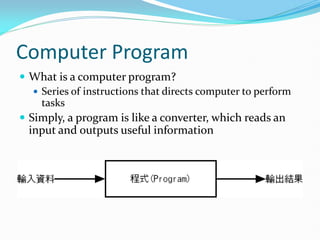
 What is a computer program?
 Series of instructions that directs computer to perform
tasks
 Simply, a program is like a converter, which reads an
input and outputs useful information
Windows Applications
 Windows Applications
 A Graphical User Interface (GUI)
 Allows you to interact with the software using text, graphics,
and visual images such as icons
 Controls how you enter data and instructions and how the
screen displays information
 Console Applications
 For DOS or UNIX/Linux
 Designed to be used by a text-only computer interface
(Command-line Interface)
 Interacts with a console application using only a keyboard
Types of Programming Languages
 Programming language: a notion for writing programs and
is used to communicate instructions.
 Programming languages can be divided into low-level
languages and high-level languages
 Low level languages
 Machine-dependent runs only on one type of computer
 Close to the language which computers can read
 Ex: Machine and Assembly Languages
 High level languages
 Often machine-independent can run on many different types of
computers and operating systems
 Close to the language which we can read
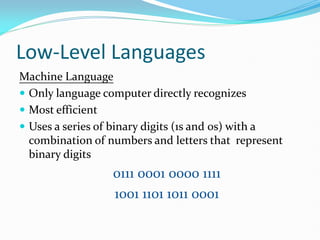
Low-Level Languages
Machine Language
 Only language computer directly recognizes
 Most efficient
 Uses a series of binary digits (1s and 0s) with a
combination of numbers and letters that represent
binary digits
0111 0001 0000 1111
1001 1101 1011 0001
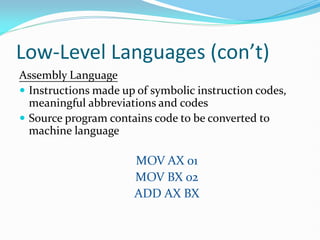
Low-Level Languages (con’t)
Assembly Language
 Instructions made up of symbolic instruction codes,
meaningful abbreviations and codes
 Source program contains code to be converted to
machine language
MOV AX 01
MOV BX 02
ADD AX BX
High-Level Languages
 High Level Languages are more close to our
human’s languages.
 They are also referred as Half-English
programming languages.
 The programs have to be converted or complied to
the machine languages.
 Less efficient but more programmer friendly
 Examples: Basic、C/C++、C#、Java、FORTRAN、
COBOL, Pascal and so on.
High-Level Languages (con’t)
There are two basic approaches to implementing a
program in a higher-level language:
Compilers
 A source program is converted into machine language
before being executed.
 A source program will be inspected the syntax before
being complied.
High-Level Languages (con’t)
Interpreters
 Translates and executes one program code statement
at a time
 Less efficient
 Easy to find errors and flexible
 Examples: Web programming languages -Scripts
(VBScript and JavaScript)
Execution of Programs
 When CPU executes a machine language program, it
read the instructions stored in memory (RAMs) and
execute (Fetch-and-execute).
 CPU fetches the instructions sequentially.
 CPU can NOT understand what a program wants to do.
It just computes very fast.
Central Processing Unit
The CPU consists of a variety of parts including:
 Control unit: directs the other parts of the
computer system to execute stored program
instructions.
 Arithmetic and Logic Unit (ALU): performs
mathematical operations as well as logical
operations.
 Registers: are temporary storage areas for data or
instructions. For example: to add two numbers
which are stored at registers.
Random-Access Memory
 Before the CPU can execute a program, program
instructions and data must be placed into memory
from an input device or storage device.
 Memory is the part of the computer that stores
data and program instructions for processing.
 Once the necessary data and instructions are in
memory, the CPU performs “Fetch and Execute”.
 Each location in memory is identified by an
address.
 The control unit can find data and instructions
based on these addresses.
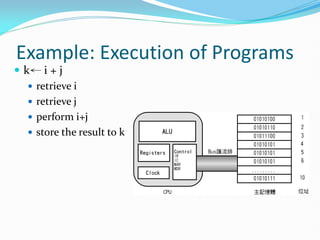
Example: Execution of Programs
 k← i + j
 retrieve i
 retrieve j
 perform i+j
 store the result to k
Introduction of C#
 .NET Framework
 C#
 Vision Studio 2010
.NET Framework
 .NET Framework is the latest programming develop
platform offered by Microsoft.
 The current version is 4.0.
 The class library and the Common Language Runtime
(CLR) together constitute the .NET Framework.
 Users can use Visual Basic, C++, and C# to write
programs based on .NET Framework.
 Programs developed on .NET Framework are not
complied to machine language, but intermediate byte-
code called “MSIL” (Microsoft Intermediate Language)。
.NET Framework (con’t)
 When execution of the byte-code, MSIL is JIT(Just
In Time) complied to machine language by CLR.
2010
7
C#
 C# (C Sharp) is developed by the team leaded by
Anders Hejlsberg
 C# is introduced on 2000 and released on 2002
 Object-oriented programming language based on C++
 Accepted as a standard for Web applications and XML-
based Web services
 Uses a JIT compiler
 Resulting code is called Microsoft Intermediate
Language (MSIL)
Visual Studio
 Development Environment
 A set of tools which provides programmers to build, edit,
compile, and maintain programs
 Currently, most of high-level languages have their own
development environment, which is referred to as IDE
(Integrated Development Environment).
 IDE is a software application which enables
programmers to edit source codes, compile, debug,
and manage programs throughout software
development.
Visual Studio (con’t)
 What is Visual Studio?
 .NET is set of technologies that allows program to run
on Internet
 Comprised of Visual Basic, Visual C++, Visual C#, and
Visual J#
 Visual Studio 2005/2008/2010 is an Integrated
Development Environment (IDE) from Microsoft
 Visual Studio 2005/2008/2010 is an IDE which
supports .NET Framework. It can be used to develop
various types of applications for Windows, ASP.NET,
console, and Web Services.
Visual Studio (con’t)
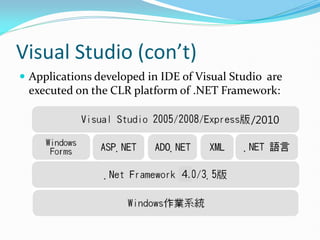
 Applications developed in IDE of Visual Studio are
executed on the CLR platform of .NET Framework:
/2010
4.
Visual Studio (con’t)
 The functions of Visual Studio
 IDE for multiple programming languages
 Powerful functions of project management
 Project templates are offered
 Visual program-developing GUI
 IntelliSense-autocompletion
 Complete functions of debugger

Introduction to Computer Programming (general background)

  • 1.
  • 2.
    Why do weneed to learn programming?  When did you have your first computer?  Did you learn programming or coding before?  How is this world running under computing?  Let’s look at how other people thinking?  What most school don't teach
  • 3.
    Introduction  Basis ofProgramming Language  Introduction of C#
  • 4.
    Computer Program  Whatis a computer program?  Series of instructions that directs computer to perform tasks  Simply, a program is like a converter, which reads an input and outputs useful information
  • 5.
    Windows Applications  WindowsApplications  A Graphical User Interface (GUI)  Allows you to interact with the software using text, graphics, and visual images such as icons  Controls how you enter data and instructions and how the screen displays information  Console Applications  For DOS or UNIX/Linux  Designed to be used by a text-only computer interface (Command-line Interface)  Interacts with a console application using only a keyboard
  • 6.
    Types of ProgrammingLanguages  Programming language: a notion for writing programs and is used to communicate instructions.  Programming languages can be divided into low-level languages and high-level languages  Low level languages  Machine-dependent runs only on one type of computer  Close to the language which computers can read  Ex: Machine and Assembly Languages  High level languages  Often machine-independent can run on many different types of computers and operating systems  Close to the language which we can read
  • 7.
    Low-Level Languages Machine Language Only language computer directly recognizes  Most efficient  Uses a series of binary digits (1s and 0s) with a combination of numbers and letters that represent binary digits 0111 0001 0000 1111 1001 1101 1011 0001
  • 8.
    Low-Level Languages (con’t) AssemblyLanguage  Instructions made up of symbolic instruction codes, meaningful abbreviations and codes  Source program contains code to be converted to machine language MOV AX 01 MOV BX 02 ADD AX BX
  • 9.
    High-Level Languages  HighLevel Languages are more close to our human’s languages.  They are also referred as Half-English programming languages.  The programs have to be converted or complied to the machine languages.  Less efficient but more programmer friendly  Examples: Basic、C/C++、C#、Java、FORTRAN、 COBOL, Pascal and so on.
  • 10.
    High-Level Languages (con’t) Thereare two basic approaches to implementing a program in a higher-level language: Compilers  A source program is converted into machine language before being executed.  A source program will be inspected the syntax before being complied.
  • 11.
    High-Level Languages (con’t) Interpreters Translates and executes one program code statement at a time  Less efficient  Easy to find errors and flexible  Examples: Web programming languages -Scripts (VBScript and JavaScript)
  • 12.
    Execution of Programs When CPU executes a machine language program, it read the instructions stored in memory (RAMs) and execute (Fetch-and-execute).  CPU fetches the instructions sequentially.  CPU can NOT understand what a program wants to do. It just computes very fast.
  • 13.
    Central Processing Unit TheCPU consists of a variety of parts including:  Control unit: directs the other parts of the computer system to execute stored program instructions.  Arithmetic and Logic Unit (ALU): performs mathematical operations as well as logical operations.  Registers: are temporary storage areas for data or instructions. For example: to add two numbers which are stored at registers.
  • 14.
    Random-Access Memory  Beforethe CPU can execute a program, program instructions and data must be placed into memory from an input device or storage device.  Memory is the part of the computer that stores data and program instructions for processing.  Once the necessary data and instructions are in memory, the CPU performs “Fetch and Execute”.  Each location in memory is identified by an address.  The control unit can find data and instructions based on these addresses.
  • 15.
    Example: Execution ofPrograms  k← i + j  retrieve i  retrieve j  perform i+j  store the result to k
  • 16.
    Introduction of C# .NET Framework  C#  Vision Studio 2010
  • 17.
    .NET Framework  .NETFramework is the latest programming develop platform offered by Microsoft.  The current version is 4.0.  The class library and the Common Language Runtime (CLR) together constitute the .NET Framework.  Users can use Visual Basic, C++, and C# to write programs based on .NET Framework.  Programs developed on .NET Framework are not complied to machine language, but intermediate byte- code called “MSIL” (Microsoft Intermediate Language)。
  • 18.
    .NET Framework (con’t) When execution of the byte-code, MSIL is JIT(Just In Time) complied to machine language by CLR. 2010 7
  • 19.
    C#  C# (CSharp) is developed by the team leaded by Anders Hejlsberg  C# is introduced on 2000 and released on 2002  Object-oriented programming language based on C++  Accepted as a standard for Web applications and XML- based Web services  Uses a JIT compiler  Resulting code is called Microsoft Intermediate Language (MSIL)
  • 20.
    Visual Studio  DevelopmentEnvironment  A set of tools which provides programmers to build, edit, compile, and maintain programs  Currently, most of high-level languages have their own development environment, which is referred to as IDE (Integrated Development Environment).  IDE is a software application which enables programmers to edit source codes, compile, debug, and manage programs throughout software development.
  • 21.
    Visual Studio (con’t) What is Visual Studio?  .NET is set of technologies that allows program to run on Internet  Comprised of Visual Basic, Visual C++, Visual C#, and Visual J#  Visual Studio 2005/2008/2010 is an Integrated Development Environment (IDE) from Microsoft  Visual Studio 2005/2008/2010 is an IDE which supports .NET Framework. It can be used to develop various types of applications for Windows, ASP.NET, console, and Web Services.
  • 22.
    Visual Studio (con’t) Applications developed in IDE of Visual Studio are executed on the CLR platform of .NET Framework: /2010 4.
  • 23.
    Visual Studio (con’t) The functions of Visual Studio  IDE for multiple programming languages  Powerful functions of project management  Project templates are offered  Visual program-developing GUI  IntelliSense-autocompletion  Complete functions of debugger