CS589-04 Digital ImageProcessing
CS589-04 Digital Image Processing
Lecture 8. Image Compression
Lecture 8. Image Compression
Spring 2008
Spring 2008
New Mexico Tech
New Mexico Tech
2.
08/27/25 2
Relative DataRedundancy
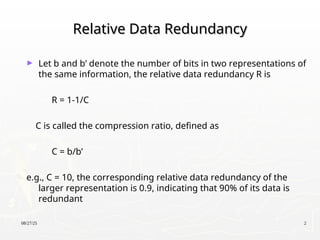
Relative Data Redundancy
► Let b and b’ denote the number of bits in two representations of
the same information, the relative data redundancy R is
R = 1-1/C
C is called the compression ratio, defined as
C = b/b’
e.g., C = 10, the corresponding relative data redundancy of the
larger representation is 0.9, indicating that 90% of its data is
redundant
3.
08/27/25 3
Why dowe need compression?
Why do we need compression?
► Data storage
► Data transmission
4.
08/27/25 4
How canwe implement compression?
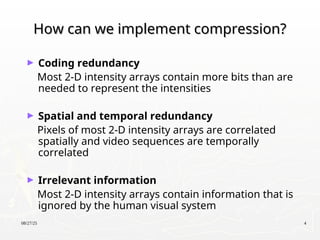
How can we implement compression?
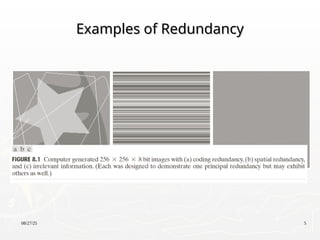
► Coding redundancy
Most 2-D intensity arrays contain more bits than are
needed to represent the intensities
► Spatial and temporal redundancy
Pixels of most 2-D intensity arrays are correlated
spatially and video sequences are temporally
correlated
► Irrelevant information
Most 2-D intensity arrays contain information that is
ignored by the human visual system
08/27/25 6
Coding Redundancy
CodingRedundancy
1
0
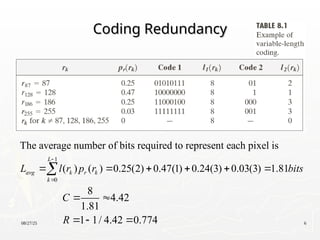
The average number of bits required to represent each pixel is
( ) ( ) 0.25(2) 0.47(1) 0.24(3) 0.03(3) 1.81
L
avg k r k
k
L l r p r bits
8
4.42
1.81
1 1/ 4.42 0.774
C
R
7.
08/27/25 7
Spatial andTemporal Redundancy
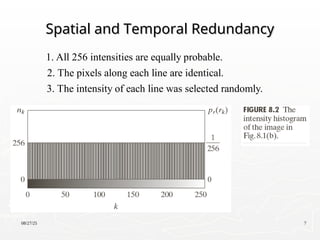
Spatial and Temporal Redundancy
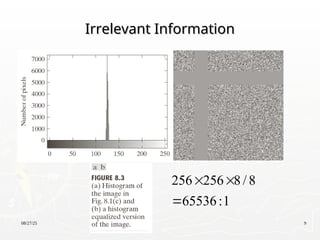
1. All 256 intensities are equally probable.
2. The pixels along each line are identical.
3. The intensity of each line was selected randomly.
8.
08/27/25 8
Spatial andTemporal Redundancy
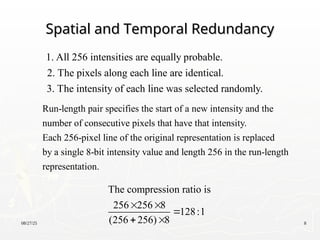
Spatial and Temporal Redundancy
1. All 256 intensities are equally probable.
2. The pixels along each line are identical.
3. The intensity of each line was selected randomly.
Run-length pair specifies the start of a new intensity and the
number of consecutive pixels that have that intensity.
Each 256-pixel line of the original representation is replaced
by a single 8-bit intensity value and length 256 in the run-length
representation.
The compression ratio is
256 256 8
128:1
(256 256) 8
08/27/25 10
Measuring ImageInformation
Measuring Image Information
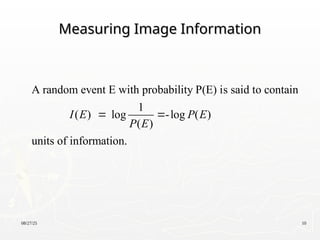
A random event E with probability P(E) is said to contain
1
( ) log -log ( )
( )
units of information.
I E P E
P E
11.
08/27/25 11
Measuring ImageInformation
Measuring Image Information
1 2
1 2
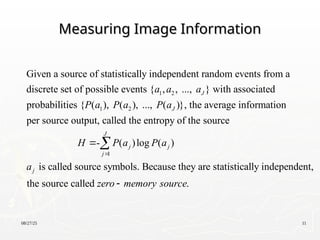
Given a source of statistically independent random events from a
discrete set of possible events { , , ..., } with associated
probabilities { ( ), ( ), ..., ( )}, the average information
per s
J
J
a a a
P a P a P a
1
ource output, called the entropy of the source
- ( )log ( )
is called source symbols. Because they are statistically independent,
the source called .
J
j j
j
j
H P a P a
a
zero memory source
12.
08/27/25 12
Measuring ImageInformation
Measuring Image Information
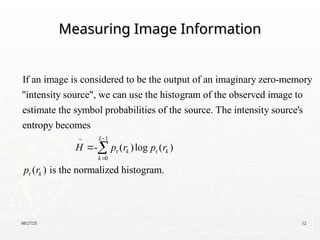
If an image is considered to be the output of an imaginary zero-memory
"intensity source", we can use the histogram of the observed image to
estimate the symbol probabilities of the source. The intensit
1
r r
0
r
y source's
entropy becomes
- ( )log ( )
( ) is the normalized histogram.
L
k k
k
k
H p r p r
p r
13.
08/27/25 13
Measuring ImageInformation
Measuring Image Information
2 2 2 2
For the fig.8.1(a),
[0.25log 0.25 0.47log 0.47 0.25log 0.25 0.03log 0.03]
1.6614 bits/pixel
H
14.
08/27/25 14
Fidelity Criteria
FidelityCriteria
1/2
2
1 1
0 0
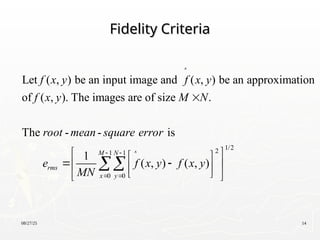
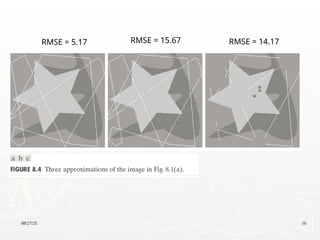
Let ( , ) be an input image and ( , ) be an approximation
of ( , ). The images are of size .
The - - is
1
( , ) ( , )
M N
rms
x y
f x y f x y
f x y M N
root mean square error
e f x y f x y
MN
15.
08/27/25 15
Fidelity Criteria
FidelityCriteria
ms
2
1 1
0 0
ms 2
1 1
0 0
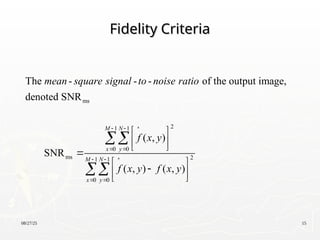
The - - - of the output image,
denoted SNR
( , )
SNR
( , ) ( , )
M N
x y
M N
x y
mean square signal to noise ratio
f x y
f x y f x y
08/27/25 22
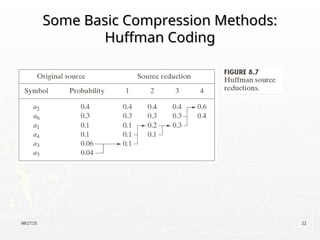
Some BasicCompression Methods:
Some Basic Compression Methods:
Huffman Coding
Huffman Coding
23.
08/27/25 23
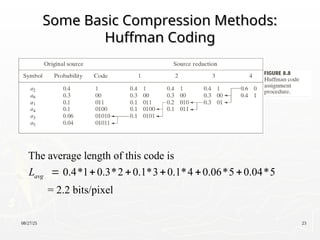
Some BasicCompression Methods:
Some Basic Compression Methods:
Huffman Coding
Huffman Coding
The average length of this code is
0.4*1 0.3*2 0.1*3 0.1*4 0.06*5 0.04*5
= 2.2 bits/pixel
avg
L
24.
08/27/25 24
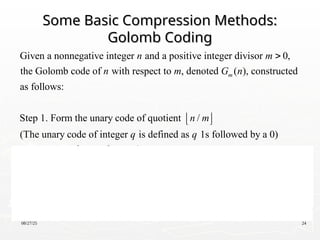
Some BasicCompression Methods:
Some Basic Compression Methods:
Golomb Coding
Golomb Coding
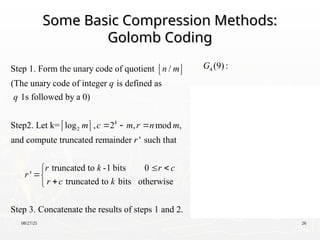
Given a nonnegative integer and a positive integer divisor 0,
the Golomb code of with respect to , denoted ( ), constructed
as follows:
Step 1. Form the unary code of quotient /
(The unary
m
n m
n m G n
n m
2
code of integer is defined as 1s followed by a 0)
Step2. Let k= log , 2 , mod ,and compute truncated
remainder ' such that
truncated to -1 bits 0
'
trunca
k
q q
m c m r n m
r
r k r c
r
r c
ted to bits otherwise
Step 3. Concatenate the results of steps 1 and 2.
k
25.
08/27/25 25
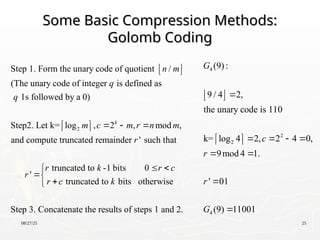
Some BasicCompression Methods:
Some Basic Compression Methods:
Golomb Coding
Golomb Coding
2
Step 1. Form the unary code of quotient /
(The unary code of integer is defined as
1s followed by a 0)
Step2. Let k= log , 2 , mod ,
and compute truncated remainder ' such that
k
n m
q
q
m c m r n m
r
r
truncated to -1 bits 0
'
truncated to bits otherwise
Step 3. Concatenate the results of steps 1 and 2.
r k r c
r c k
4
2
2
4
(9):
9 / 4 2,
the unary code is 110
k= log 4 2, 2 4 0,
9mod 4 1.
' 01
(9) 11001
G
c
r
r
G
26.
08/27/25 26
Some BasicCompression Methods:
Some Basic Compression Methods:
Golomb Coding
Golomb Coding
2
Step 1. Form the unary code of quotient /
(The unary code of integer is defined as
1s followed by a 0)
Step2. Let k= log , 2 , mod ,
and compute truncated remainder ' such that
k
n m
q
q
m c m r n m
r
r
truncated to -1 bits 0
'
truncated to bits otherwise
Step 3. Concatenate the results of steps 1 and 2.
r k r c
r c k
4
2
2
4
(9):
9 / 4 2,
the unary code is 110
k= log 4 2, 2 4 0,
9mod 4 1.
' 01
(9) 11001
G
c
r
r
G
27.
08/27/25 27
Some BasicCompression Methods:
Some Basic Compression Methods:
Golomb Coding
Golomb Coding
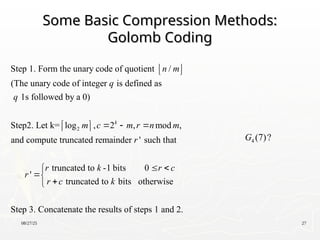
2
Step 1. Form the unary code of quotient /
(The unary code of integer is defined as
1s followed by a 0)
Step2. Let k= log , 2 , mod ,
and compute truncated remainder ' such that
k
n m
q
q
m c m r n m
r
r
truncated to -1 bits 0
'
truncated to bits otherwise
Step 3. Concatenate the results of steps 1 and 2.
r k r c
r c k
4 (7)?
G
28.
08/27/25 28
Some BasicCompression Methods:
Some Basic Compression Methods:
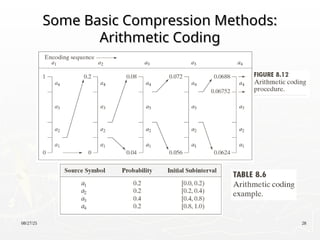
Arithmetic Coding
Arithmetic Coding
29.
08/27/25 29
Some BasicCompression Methods:
Some Basic Compression Methods:
Arithmetic Coding
Arithmetic Coding
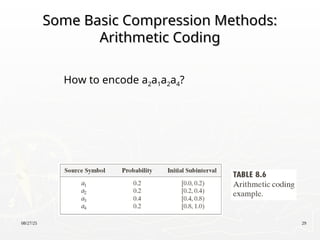
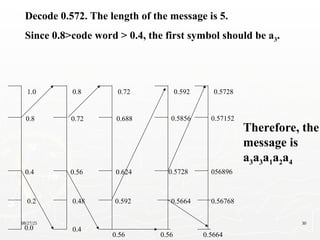
How to encode a2a1a2a4?
08/27/25 31
LZW (Dictionarycoding)
LZW (Dictionary coding)
LZW (Lempel-Ziv-Welch) coding, assigns fixed-length code
words to variable length sequences of source symbols, but
requires no a priori knowledge of the probability of the source
symbols.
LZW is used in:
•Tagged Image file format (TIFF)
•Graphic interchange format (GIF)
•Portable document format (PDF)
LZW was formulated in 1984
32.
08/27/25 32
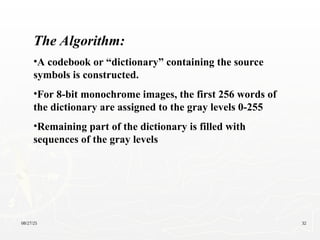
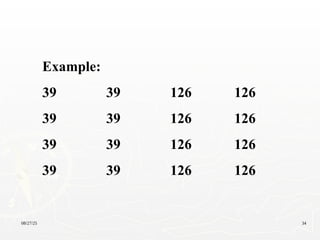
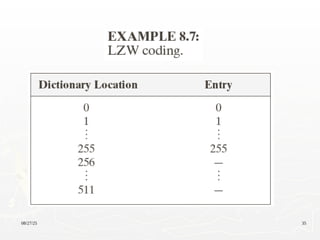
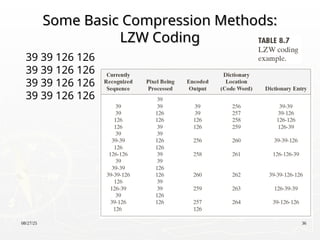
The Algorithm:
•Acodebook or “dictionary” containing the source
symbols is constructed.
•For 8-bit monochrome images, the first 256 words of
the dictionary are assigned to the gray levels 0-255
•Remaining part of the dictionary is filled with
sequences of the gray levels
33.
08/27/25 33
Important featuresof LZW
Important features of LZW
1. The dictionary is created while the data are being
encoded. So encoding can be done “on the fly”
2. The dictionary is not required to be transmitted. The
dictionary will be built up in the decoding
3. If the dictionary “overflows” then we have to reinitialize
the dictionary and add a bit to each one of the code words.
4. Choosing a large dictionary size avoids overflow, but
spoils compressions
08/27/25 37
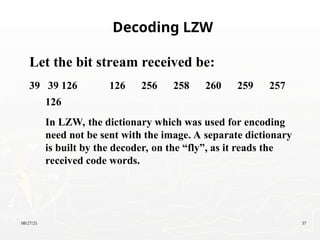
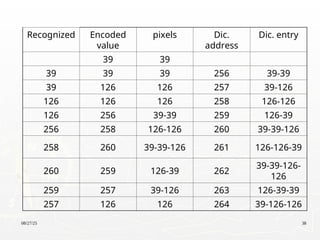
Let thebit stream received be:
39 39 126 126 256 258 260 259 257
126
In LZW, the dictionary which was used for encoding
need not be sent with the image. A separate dictionary
is built by the decoder, on the “fly”, as it reads the
received code words.
Decoding LZW
08/27/25 39
Some BasicCompression Methods:
Some Basic Compression Methods:
Run-Length Coding
Run-Length Coding
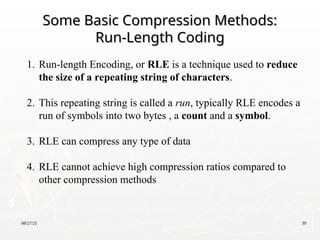
1. Run-length Encoding, or RLE is a technique used to reduce
the size of a repeating string of characters.
2. This repeating string is called a run, typically RLE encodes a
run of symbols into two bytes , a count and a symbol.
3. RLE can compress any type of data
4. RLE cannot achieve high compression ratios compared to
other compression methods
40.
08/27/25 40
Some BasicCompression Methods:
Some Basic Compression Methods:
Run-Length Coding
Run-Length Coding
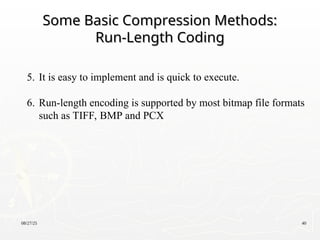
5. It is easy to implement and is quick to execute.
6. Run-length encoding is supported by most bitmap file formats
such as TIFF, BMP and PCX
41.
08/27/25 41
Some BasicCompression Methods:
Some Basic Compression Methods:
Run-Length Coding
Run-Length Coding
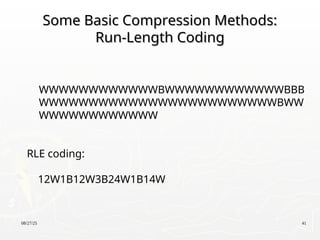
WWWWWWWWWWWWBWWWWWWWWWWWWBBB
WWWWWWWWWWWWWWWWWWWWWWWWBWW
WWWWWWWWWWWW
RLE coding:
12W1B12W3B24W1B14W
42.
08/27/25 42
Some BasicCompression Methods:
Some Basic Compression Methods:
Symbol-Based Coding
Symbol-Based Coding
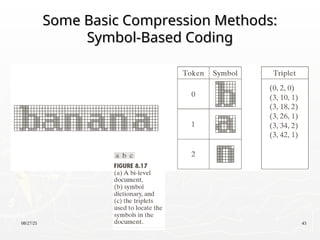
In symbol- or token-based coding, an image is
represented as a collection of frequently occurring
sub-images, called symbols.
Each symbol is stored in a symbol dictionary
Image is coded as a set of triplets
{(x1,y1,t1), (x2, y2, t2), …}
43.
08/27/25 43
Some BasicCompression Methods:
Some Basic Compression Methods:
Symbol-Based Coding
Symbol-Based Coding
44.
08/27/25 44
Some BasicCompression Methods:
Some Basic Compression Methods:
Bit-Plane Coding
Bit-Plane Coding
An m-bit gray scale image can be converted into m binary
images by bit-plane slicing. These individual images are
then encoded using run-length coding.
Code the bitplanes separately, using RLE (flatten
each plane row-wise into a 1D array), Golomb
coding, or any other lossless compression
technique.
• Let I be an image where every pixel value is n-bit long
• Express every pixel in binary using n bits
• Form n binary matrices (called bitplanes), where the i-th
matrix consists of the i-th bits of the pixels of I.
45.
08/27/25 45
Some BasicCompression Methods:
Some Basic Compression Methods:
Bit-Plane Coding
Bit-Plane Coding
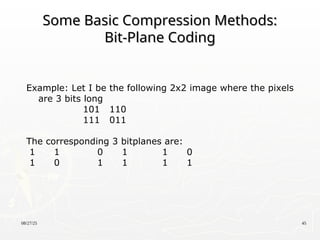
Example: Let I be the following 2x2 image where the pixels
are 3 bits long
101 110
111 011
The corresponding 3 bitplanes are:
1 1 0 1 1 0
1 0 1 1 1 1
46.
08/27/25 46
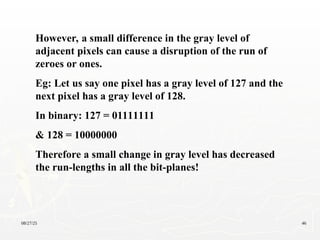
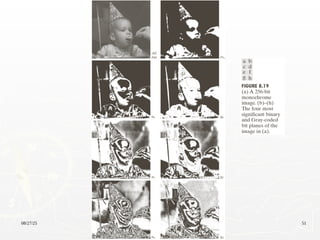
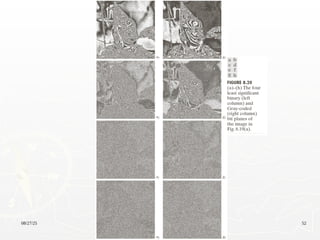
However, asmall difference in the gray level of
adjacent pixels can cause a disruption of the run of
zeroes or ones.
Eg: Let us say one pixel has a gray level of 127 and the
next pixel has a gray level of 128.
In binary: 127 = 01111111
& 128 = 10000000
Therefore a small change in gray level has decreased
the run-lengths in all the bit-planes!
47.
08/27/25 47
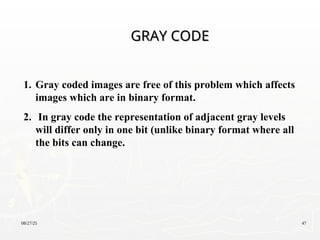
1. Graycoded images are free of this problem which affects
images which are in binary format.
2. In gray code the representation of adjacent gray levels
will differ only in one bit (unlike binary format where all
the bits can change.
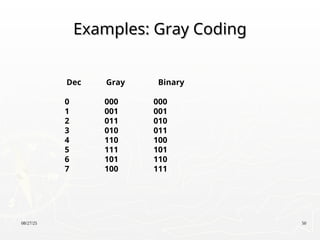
GRAY CODE
GRAY CODE
48.
08/27/25 48
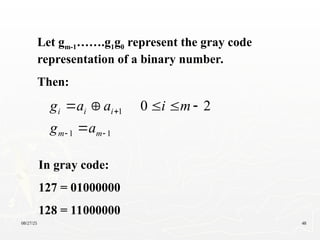
Let gm-1…….g1g0represent the gray code
representation of a binary number.
Then:
1
1
1 2
0
m
m
i
i
i
a
g
m
i
a
a
g
In gray code:
127 = 01000000
128 = 11000000
49.
08/27/25 49
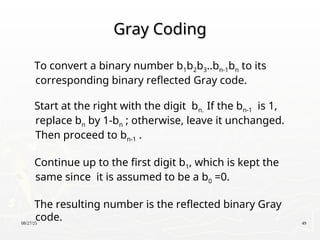
Gray Coding
GrayCoding
To convert a binary number b1b2b3..bn-1bn to its
corresponding binary reflected Gray code.
Start at the right with the digit bn. If the bn-1 is 1,
replace bn by 1-bn ; otherwise, leave it unchanged.
Then proceed to bn-1 .
Continue up to the first digit b1, which is kept the
same since it is assumed to be a b0 =0.
The resulting number is the reflected binary Gray
code.
08/27/25 53
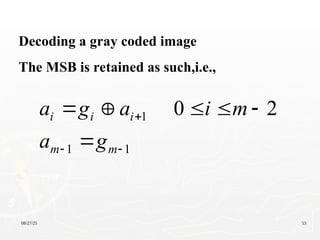
Decoding agray coded image
The MSB is retained as such,i.e.,
1
1
1 2
0
m
m
i
i
i
g
a
m
i
a
g
a
54.
08/27/25 54
Differential PulseCode Modulation (DPCM)
Differential Pulse Code Modulation (DPCM)
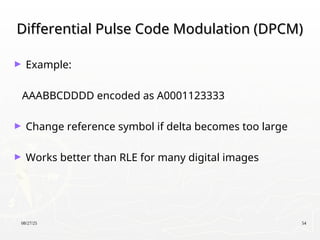
► Example:
AAABBCDDDD encoded as A0001123333
► Change reference symbol if delta becomes too large
► Works better than RLE for many digital images
08/27/25 56
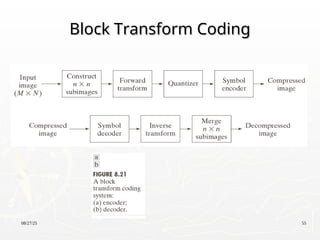
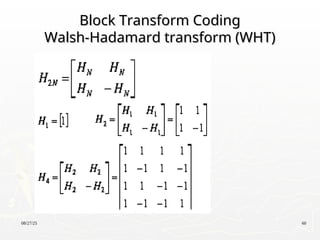
Block TransformCoding
Block Transform Coding
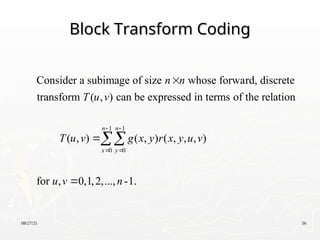
1 1
0 0
Consider a subimage of size whose forward, discrete
transform ( , ) can be expressed in terms of the relation
( , ) ( , ) ( , , , )
for , 0,1,2,..., -1.
n n
x y
n n
T u v
T u v g x y r x y u v
u v n
57.
08/27/25 57
Block TransformCoding
Block Transform Coding
1 1
0 0
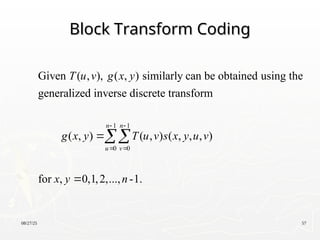
Given ( , ), ( , ) similarly can be obtained using the
generalized inverse discrete transform
( , ) ( , ) ( , , , )
for , 0,1,2,..., -1.
n n
u v
T u v g x y
g x y T u v s x y u v
x y n
58.
08/27/25 58
Image transform
Imagetransform
► Two main types:
-orthogonal transform:
e.g. Walsh-Hdamard transform, DCT
-subband transform:
e.g. Wavelet transform
59.
08/27/25 59
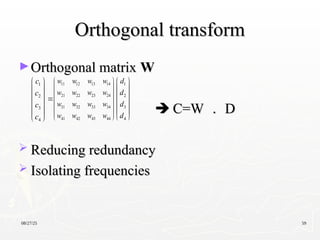
Orthogonal transform
Orthogonaltransform
►Orthogonal matrix
Orthogonal matrix W
W
C=W
C=W .
. D
D
Reducing redundancy
Reducing redundancy
Isolating frequencies
Isolating frequencies
11 12 13 14
21 22 23 24
31 32 33 34
41 42 43 44
w w w w
w w w w
w w w w
w w w w
1
2
3
4
c
c
c
c
1
2
3
4
d
d
d
d
08/27/25 61
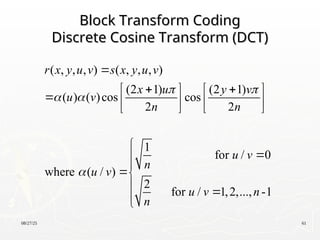
Block TransformCoding
Block Transform Coding
Discrete Cosine Transform (DCT)
Discrete Cosine Transform (DCT)
( , , , ) ( , , , )
(2 1) (2 1)
( ) ( )cos cos
2 2
1
for / 0
where ( / )
2
for / 1,2,..., -1
r x y u v s x y u v
x u y v
u v
n n
u v
n
u v
u v n
n
08/27/25 63
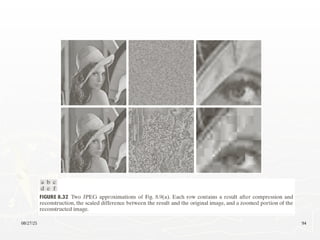
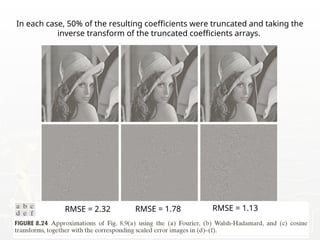
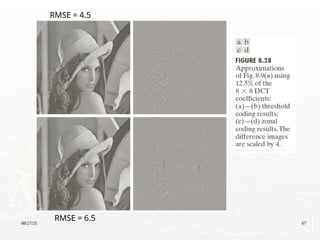
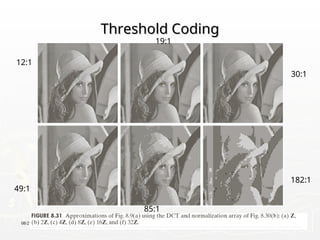
In eachcase, 50% of the resulting coefficients were truncated and taking the
inverse transform of the truncated coefficients arrays.
RMSE = 2.32 RMSE = 1.78 RMSE = 1.13
08/27/25 66
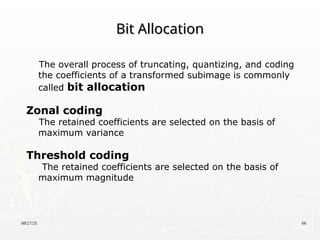
Bit Allocation
BitAllocation
The overall process of truncating, quantizing, and coding
the coefficients of a transformed subimage is commonly
called bit allocation
Zonal coding
The retained coefficients are selected on the basis of
maximum variance
Threshold coding
The retained coefficients are selected on the basis of
maximum magnitude
08/27/25 68
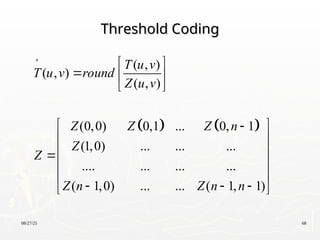
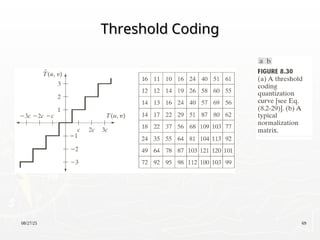
Threshold Coding
ThresholdCoding
( , )
( , )
( , )
(0,0) 0,1 ... 0, 1
(1,0) ... ... ...
.... ... ... ...
( 1,0) ... ... ( 1, 1)
T u v
T u v round
Z u v
Z Z Z n
Z
Z
Z n Z n n
08/27/25 71
Fact aboutJPEG Compression
Fact about JPEG Compression
► JPEG stands for Joint Photographic Experts Group
► Used on 24-bit color files.
► Works well on photographic images.
► Although it is a lossy compression technique, it yields
an excellent quality image with high compression rates.
72.
08/27/25 72
Fact aboutJPEG Compression
Fact about JPEG Compression
► It defines three different coding systems:
1. a lossy baseline coding system, adequate for most
compression applications
2. an extended coding system for greater compression,
higher precision, or progressive reconstruction
applications
3. A lossless independent coding system for reversible
compression
73.
08/27/25 73
Steps inJPEG Compression
Steps in JPEG Compression
1. (Optionally) If the color is represented in RGB mode, translate it
to YUV.
2. Divide the file into 8 X 8 blocks.
3. Transform the pixel information from the spatial domain to the
frequency domain with the Discrete Cosine Transform.
4. Quantize the resulting values by dividing each coefficient by an
integer value and rounding off to the nearest integer.
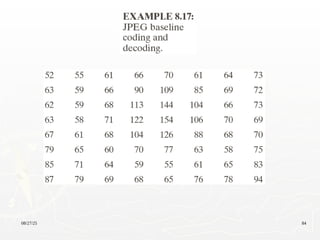
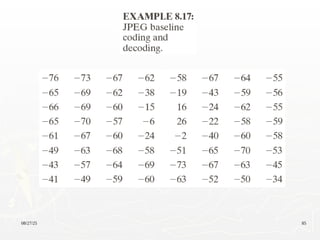
5. Look at the resulting coefficients in a zigzag order. Do a run-
length encoding of the coefficients ordered in this manner.
Follow by Huffman coding.
74.
08/27/25 74
Step 1a:Converting RGB to YUV
Step 1a: Converting RGB to YUV
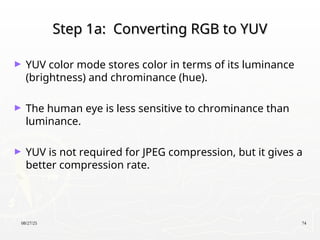
► YUV color mode stores color in terms of its luminance
(brightness) and chrominance (hue).
► The human eye is less sensitive to chrominance than
luminance.
► YUV is not required for JPEG compression, but it gives a
better compression rate.
75.
08/27/25 75
RGB vs.YUV
RGB vs. YUV
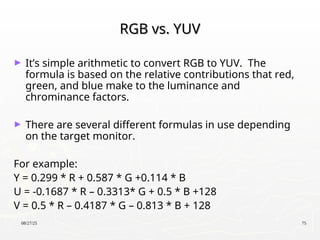
► It’s simple arithmetic to convert RGB to YUV. The
formula is based on the relative contributions that red,
green, and blue make to the luminance and
chrominance factors.
► There are several different formulas in use depending
on the target monitor.
For example:
Y = 0.299 * R + 0.587 * G +0.114 * B
U = -0.1687 * R – 0.3313* G + 0.5 * B +128
V = 0.5 * R – 0.4187 * G – 0.813 * B + 128
76.
08/27/25 76
Step 1b:Downsampling
Step 1b: Downsampling
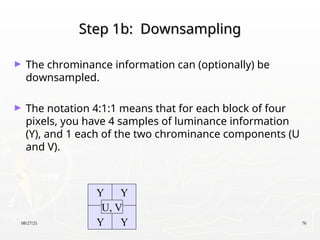
► The chrominance information can (optionally) be
downsampled.
► The notation 4:1:1 means that for each block of four
pixels, you have 4 samples of luminance information
(Y), and 1 each of the two chrominance components (U
and V).
Y Y
Y Y
U, V
77.
08/27/25 77
Step 2:Divide into 8 X 8 blocks
Step 2: Divide into 8 X 8 blocks
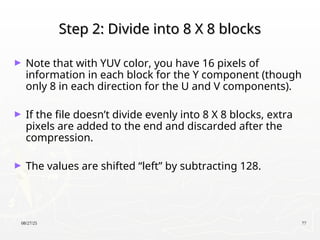
► Note that with YUV color, you have 16 pixels of
information in each block for the Y component (though
only 8 in each direction for the U and V components).
► If the file doesn’t divide evenly into 8 X 8 blocks, extra
pixels are added to the end and discarded after the
compression.
► The values are shifted “left” by subtracting 128.
78.
08/27/25 78
Discrete CosineTransform
Discrete Cosine Transform
► The DCT transforms the data from the spatial
domain to the frequency domain.
► The spatial domain shows the amplitude of the
color as you move through space
► The frequency domain shows how quickly the
amplitude of the color is changing from one pixel to
the next in an image file.
79.
08/27/25 79
Step 3:DCT
Step 3: DCT
► The frequency domain is a better representation for the
data because it makes it possible for you to separate
out – and throw away – information that isn’t very
important to human perception.
► The human eye is not very sensitive to high frequency
changes – especially in photographic images, so the
high frequency data can, to some extent, be discarded.
80.
08/27/25 80
Step 3:DCT
Step 3: DCT
► The color amplitude information can be thought of as a
wave (in two dimensions).
► You’re decomposing the wave into its component
frequencies.
► For the 8 X 8 matrix of color data, you’re getting an 8 X
8 matrix of coefficients for the frequency components.
81.
08/27/25 81
Step 4:Quantize the Coefficients
Step 4: Quantize the Coefficients
Computed by the DCT
Computed by the DCT
► The DCT is lossless in that the reverse DCT will give you
back exactly your initial information (ignoring the
rounding error that results from using floating point
numbers.)
► The values from the DCT are initially floating-point.
► They are changed to integers by quantization.
82.
08/27/25 82
Step 4:Quantization
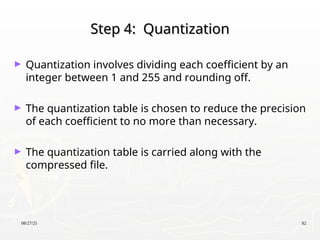
Step 4: Quantization
► Quantization involves dividing each coefficient by an
integer between 1 and 255 and rounding off.
► The quantization table is chosen to reduce the precision
of each coefficient to no more than necessary.
► The quantization table is carried along with the
compressed file.
83.
08/27/25 83
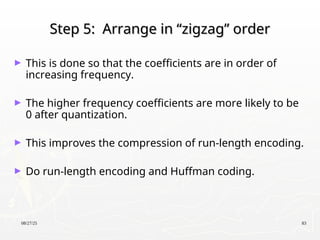
Step 5:Arrange in “zigzag” order
Step 5: Arrange in “zigzag” order
► This is done so that the coefficients are in order of
increasing frequency.
► The higher frequency coefficients are more likely to be
0 after quantization.
► This improves the compression of run-length encoding.
► Do run-length encoding and Huffman coding.
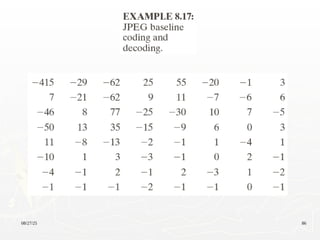
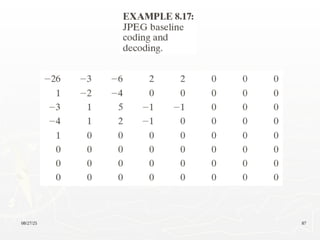
08/27/25 88
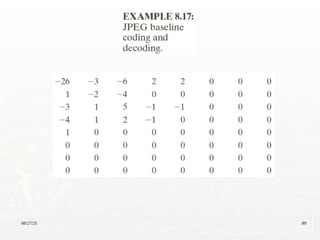
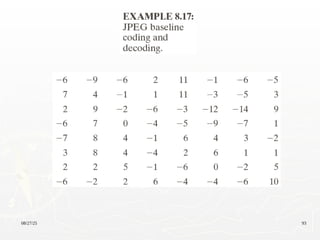
Assuming theDC coefficient of the transformed and quantized
subimage to its immediate left was -17.
The resulting of DPCM difference is [-26 – (-17)] = -9.

![08/27/25 13
Measuring Image Information
Measuring Image Information
2 2 2 2
For the fig.8.1(a),
[0.25log 0.25 0.47log 0.47 0.25log 0.25 0.03log 0.03]
1.6614 bits/pixel
H
](https://image.slidesharecdn.com/lect08-250827203528-31fa5ca5/85/Lect08-ppt-13-320.jpg)
![08/27/25 88
Assuming the DC coefficient of the transformed and quantized
subimage to its immediate left was -17.
The resulting of DPCM difference is [-26 – (-17)] = -9.](https://image.slidesharecdn.com/lect08-250827203528-31fa5ca5/85/Lect08-ppt-88-320.jpg)