Information system and
Business Analytics
Dr. Usman Javed
Riphah International University, Faisalabad.
Organising data in
traditional file system
• Data Hierarchy in Computer Systems
• Problems with the traditional file system
Effective Information Systems
• Deliver accurate, timely, and relevant information
• Accurate: Free from errors or inconsistencies
• Timely: Available when decision-makers need it
• Relevant: Useful for the task or decision at hand
The Challenge in Businesses
• Many businesses lack quality information
• Common issues: delayed, incorrect, or irrelevant data
• Root cause: poorly organized and maintained data
Why Data Management Matters
• Ensures data is structured, clean, and accessible
• Supports better decisions and efficiency
• Core to building reliable information systems
Traditional File Management Issues
• Data stored in isolated files
• Leads to duplication, inconsistency, and inefficiency
• Difficult to retrieve and analyze data effectively
* Data management is of paramount importance
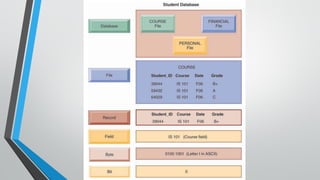
Data Hierarchy in Computer Systems
• Bit: Smallest data unit a computer can process
• Byte: Group of bits; represents a character (letter, number, symbol)
• Field: Group of characters (e.g., name, age)
• Record: Collection of related fields (e.g., student name, course, grade)
• File: Group of similar records (e.g., student course file)
• Database: Collection of related files (e.g., student records + financial data)
Key Concepts
• Entity: A person, place, thing, or event (e.g., student, course)
• Attribute: Characteristic of an entity (e.g., Student_ID, Course, Grade)
• FieldValues: Specific data stored for each attribute in a record
For example…
• Entity: COURSE
• Attributes: Student_ID, Course, Date, Grade
• Record: Specific student’s data for one course
• File:All course records
• Database: Combines course files with other student data
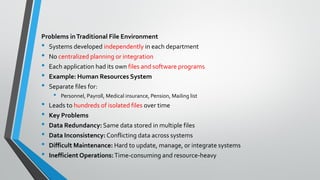
Problems inTraditional File Environment
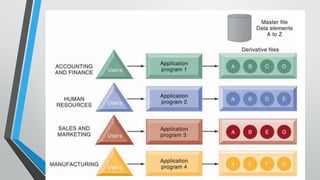
• Systems developed independently in each department
• No centralized planning or integration
• Each application had its own files and software programs
• Example: Human Resources System
• Separate files for:
• Personnel, Payroll, Medical insurance, Pension, Mailing list
• Leads to hundreds of isolated files over time
• Key Problems
• Data Redundancy: Same data stored in multiple files
• Data Inconsistency: Conflicting data across systems
• Difficult Maintenance: Hard to update, manage, or integrate systems
• Inefficient Operations:Time-consuming and resource-heavy
Data Redundancy and Inconsistency
• Data Redundancy:
• Duplicate data stored in multiple files
• Collected independently by different departments
• Wastes storage and resources
• Data Inconsistency:
• Same attribute shows different values in different systems
• Causes confusion and errors in decision-making
Examples of Inconsistency
• Course Data: Date updated in one system but not others
• Student_ID: Named differently across systems (e.g., Student_ID vs. ID)
• Coding Differences:
• Clothing size represented as “extra large” in one system, “XL” in another
• Leads to integration issues across departments
Impact on Business Systems
• Hard to build integrated systems like:
• Customer Relationship Management (CRM)
• Supply Chain Management (SCM)
• Enterprise Systems (ERP)
• Results in poor data quality and decision-making
Program-Data Dependence
• Data and programs are tightly linked
• Each program must define data format and location
Key Issues
• Any change in program may require changes to the data
• Data format changes can break multiple programs
• Example: Changing ZIP code from 5-digit to 9-digit
• Affects all programs using the old 5-digit format
Consequences
• High maintenance costs
• Lack of flexibility in updating systems
• Increases risk of errors and system failures
Lack of Flexibility
• Can generate routine, scheduled reports only
• Ad hoc reports are difficult and time-consuming to produce
• Cannot easily respond to unexpected information needs
Challenges
• Data is available but hard to access
• Requires extensive programming
• May take weeks of effort to compile needed data
Impact
• Slows down decision-making
• Increases costs and delays
• Limits the organization’s ability to be agile and responsive
Poor Security
• Lack of control over data access and usage
• Unauthorized access and data changes are possible
• No centralized way to track user activity
Key Risks
• Sensitive data may be exposed or altered
• No audit trail to monitor who accessed or modified information
• Increases chances of data breaches and internal misuse
Impact
• Compromises trust and data integrity
• Can lead to legal issues and financial losses
• Weakens overall information system security
Lack of Data Sharing and Availability
• Data is stored in isolated systems across departments
• No connection between different data files
• Makes data sharing across functions very difficult
Key Issues
• Slow access to required information
• Inconsistent data leads to distrust and confusion
• Users may avoid using systems due to unreliable data
Impact
• Breakdown in communication between departments
• Limits collaboration and informed decision-making
• Reduces overall efficiency and effectiveness
The database approach to data management
• Database management systems (DBMS)
• How DBMS solve the problems of traditional file system
• Relational DBMS
• Operations of relational DBMS
• Non-Relational databases in the Cloud
• The database approach to data management
• Querying and reporting
• Designing Databases
• Normalization and Entity relationship diagrams
Database Technology: A Better Approach
• Centralized collection of organized data
• Serves multiple applications efficiently
• Eliminates redundancy by storing data once
• Key Benefits
• Data appears to be in one location for all users
• Supports data sharing across departments
• Reduces data inconsistency and duplication
• Use one centralized Human Resources database
• Impact
• Improved accuracy, accessibility, and efficiency
• Easier maintenance and updates
• Enables better decision-making and integration
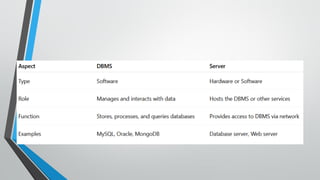
Database management system:What is a DBMS?
• Software that centralizes data and manages it efficiently
• Acts as an interface between applications and data files
• Provides easy access to data for multiple programs
Key Functions
• Retrieves data when requested by applications
• Separates logical and physical views of data
• Logical view: How users see the data
• Physical view: How data is stored
Benefits of DBMS
• Reduces programming effort
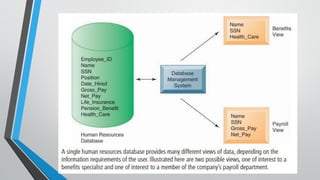
• Allows multiple users to access customized views
• Ensures data consistency and security
Example: Human Resources Database
• Benefits specialist sees: Name, SSN, Health Insurance, etc.
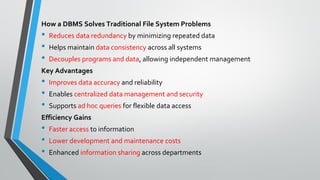
How a DBMS Solves Traditional File System Problems
• Reduces data redundancy by minimizing repeated data
• Helps maintain data consistency across all systems
• Decouples programs and data, allowing independent management
Key Advantages
• Improves data accuracy and reliability
• Enables centralized data management and security
• Supports ad hoc queries for flexible data access
Efficiency Gains
• Faster access to information
• Lower development and maintenance costs
• Enhanced information sharing across departments
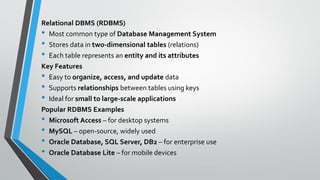
Relational DBMS (RDBMS)
• Most common type of Database Management System
• Stores data in two-dimensional tables (relations)
• Each table represents an entity and its attributes
Key Features
• Easy to organize, access, and update data
• Supports relationships between tables using keys
• Ideal for small to large-scale applications
Popular RDBMS Examples
• Microsoft Access – for desktop systems
• MySQL – open-source, widely used
• Oracle Database, SQL Server, DB2 – for enterprise use
• Oracle Database Lite – for mobile devices
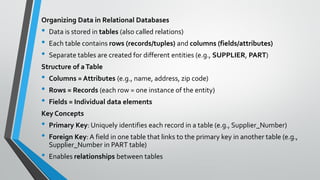
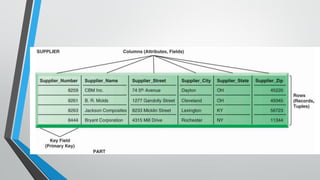
Organizing Data in Relational Databases
• Data is stored in tables (also called relations)
• Each table contains rows (records/tuples) and columns (fields/attributes)
• Separate tables are created for different entities (e.g., SUPPLIER, PART)
Structure of aTable
• Columns = Attributes (e.g., name, address, zip code)
• Rows = Records (each row = one instance of the entity)
• Fields = Individual data elements
Key Concepts
• Primary Key: Uniquely identifies each record in a table (e.g., Supplier_Number)
• Foreign Key: A field in one table that links to the primary key in another table (e.g.,
Supplier_Number in PART table)
• Enables relationships between tables
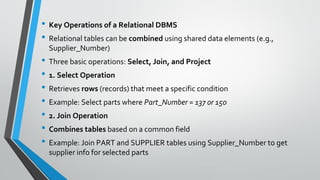
• Key Operations of a Relational DBMS
• Relational tables can be combined using shared data elements (e.g.,
Supplier_Number)
• Three basic operations: Select, Join, and Project
• 1. Select Operation
• Retrieves rows (records) that meet a specific condition
• Example: Select parts where Part_Number = 137 or 150
• 2. Join Operation
• Combines tables based on a common field
• Example: Join PART and SUPPLIER tables using Supplier_Number to get
supplier info for selected parts
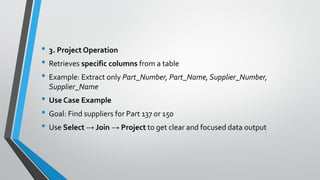
• 3. Project Operation
• Retrieves specific columns from a table
• Example: Extract only Part_Number, Part_Name, Supplier_Number,
Supplier_Name
• Use Case Example
• Goal: Find suppliers for Part 137 or 150
• Use Select → Join → Project to get clear and focused data output
📦 Non-Relational Databases & Cloud Databases
• Need for Alternatives toTraditional Databases
• Traditional relational databases: based on tables, columns, and rows
• Not ideal for big data, web services, and unstructured data
• Rise of cloud computing and massive data volumes demands flexible solutions
• What Are Non-Relational (NoSQL) Databases?
• Use a flexible data model (no fixed schema)
• Designed for large-scale, distributed data processing
• Handle structured + unstructured data (e.g., social media, web content, images)
• Examples:
• Oracle NoSQL Database
• Amazon SimpleDB
• Cloud-Based Relational Databases
• Offer traditional RDBMS features on a cloud platform
• Examples:
• Amazon RDS (MySQL, Oracle, SQL Server)
• Oracle Database Cloud Service
• Microsoft SQL Azure Database
• Private Cloud Databases
• Private cloud = secure, internal cloud infrastructure
• Example: Sabre Holdings (aviation industry SaaS provider)
• RunsOracle Database 11g; Supports 100+ projects & 700 users
• Reduces costs & improves performance
• Key Benefits
• Scalability (up or down as needed)
• Cost efficiency (pay-per-use model)
• Improved data management for web and mobile applications
• Better resource utilization through consolidation
🛠️ Core Capabilities of a DBMS
• Data Definition Language (DDL)
• Defines structure and content of the database
• Used to create tables, define fields, and their characteristics
• Examples of definitions: data type, field size, constraints
• Data Dictionary
• A repository of metadata (data about data)
• Stores details like:
• Field names & descriptions
• Data types & sizes
• Formats & validation rules
• Key fields (e.g., Supplier_Number in Access)
• Advanced Data Dictionary Functions (Large Systems)
• Tracks:
• Data usage and ownership
• Authorization and access levels
• Responsible users or departments
• Linked programs, reports, and business functions
• Example: Microsoft Access
• Offers basic data dictionary functionality
• Shows:
• Field names
• Formats
• Key fields (indicated by a key icon)
• 🔍Querying and Reporting with DBMS
• Data Manipulation Language (DML)
• Used to add, update, delete, and retrieve data
• Allows end users and developers to extract and work with data
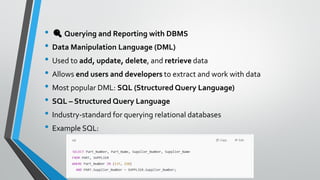
• Most popular DML: SQL (Structured Query Language)
• SQL – Structured Query Language
• Industry-standard for querying relational databases
• Example SQL:
• DBMSTools for Querying
• DB2, Oracle, SQL Server: use SQL
• MicrosoftAccess:
• Uses SQL behind the scenes
• Provides graphical tools for easy query building
• Users select tables, fields, and set conditions visually
• Reporting Features
• Organize retrieved data into polished reports
• Access simplifies reporting with built-in templates and layouts
6.3: USING DATABASESTO IMPROVE
BUSINESS PERFORMANCEAND DECISION
MAKING
• The challenge of big data
• Business intelligence infrastructure
• Data warehouse and marts; Hadoop; In-memory
computing;Analytic platforms
• ANALYTICALTOOLS: RELATIONSHIPS, PATTERNS,
TRENDS
• Online analytical processing
• Data mining
• Text mining and web mining
• Businesses use databases to keep track of basic transactions, such as paying
suppliers, processing orders, keeping track of customers, and paying
employees.
• But they also need databases to provide information that will help the
company run the business more efficiently, and help managers and
employees make better decisions.
• If a company wants to know which product is the most popular or who is its
most profitable customer, the answer lies in the data.
🌐The Challenge of Big Data
• Traditional Data Limitations
• Mostly transaction-based, fitting neatly in rows & columns
• Managed well by relational DBMS
• Examples: invoices, payments, payroll records
Explosion of New Data Sources
• Web traffic, social media posts (tweets, status updates)
• Email messages, sensor outputs, and machine-generated data
• Unstructured/semi-structured formats incompatible with traditional
DBMS
• What is Big Data?
• Massive volumes: petabytes to exabytes
• Data types: structured, semi-structured, and unstructured
• Produced rapidly and continuously
• E.g., 10 TB from one jet engine in 30 mins
• Why Big Data Matters
• Reveals deep patterns, trends, and anomalies
• Can drive insights into:
• Customer behavior; Weather trends; Market activity
• Need for New Tools & Technologies
• Big data requires:
• Advanced analytics; Non-relational systems; Cloud and distributed platforms
• Goal: Extract business value from complex, diverse data
🧠 Business Intelligence Infrastructure
• Goal of Business Intelligence (BI)
• Provide concise, reliable info about:
• Current operations
• Emerging trends
• Business changes
• Enable better decision-making across departments
• The Data Challenge
• Data spread across multiple systems:
• Sales, manufacturing, accounting
• External sources: demographics, competitors
• Big data often required for full insights
• 🛠️ BI Infrastructure Components
• DataWarehouses & Data Marts
• Centralized repositories for structured data
• Support reporting and analysis
• Hadoop
• Open-source framework for processing massive datasets
• Handles structured & unstructured data across distributed systems
• In-Memory Computing
• Analyzes big data instantly in RAM
• Speeds up complex calculations and queries
• Analytical Platforms
• High-performance systems for data mining, predictive analytics, and machine learning
• Handle large-scale structured/unstructured data analysis
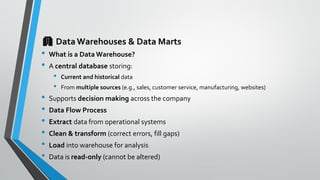
🏢 DataWarehouses & Data Marts
• What is a Data Warehouse?
• A central database storing:
• Current and historical data
• From multiple sources (e.g., sales, customer service, manufacturing, websites)
• Supports decision making across the company
• Data Flow Process
• Extract data from operational systems
• Clean & transform (correct errors, fill gaps)
• Load into warehouse for analysis
• Data is read-only (cannot be altered)
• Key Features
• Enterprise-wide access
• Supports queries and analysis
• Includes:
• Ad hoc queries
• Standardized reporting tools
• Graphical dashboards
• What is a Data Mart?
• A subset of a data warehouse
• Contains focused, summarized data
• Created for specific user groups or departments
⚙️ What is Hadoop?
• Open-source software framework
• Managed by Apache Software Foundation
• Designed for distributed parallel processing
• Handles structured, semi-structured, & unstructured big data
• Key Components
• HDFS (Hadoop Distributed File System)
Connects file systems across nodes to form a unified data system
• MapReduce
Breaks big data into sub-tasks, processes them in parallel, then aggregates results
• HBase
A non-relational database for fast access & real-time big data applications
• How Hadoop Works?
• Break down a large data problem
• Distribute across many low-cost servers
• Process in parallel
• Combine results into analyzable output
• Real-World Applications
• Facebook: Stores over 100 petabytes on Hadoop
• Yahoo: Uses Hadoop to track & personalize user experience
• NextBio: Supports genomic research with Hadoop + HBase
• Vendor Support
• Hadoop tools provided by:
• IBM; Oracle; HP; Microsoft
⚡ In-Memory Computing: Supercharging Big Data Analytics
• What is In-Memory Computing?
• Stores data in main memory (RAM) instead of disks
• Bypasses slow disk I/O bottlenecks
• Enables real-time data access and lightning-fast analytics
• Key Benefits
• Faster query responses — from hours to seconds
• Supports large datasets (e.g., data marts, small warehouses)
• Works even on handheld/mobile devices
• Ideal for complex business calculations
• Tech Enablers
• High-speed multicore processors
• Cheaper and more powerful RAM
• Advances in hardware optimization and parallel processing
• Leading In-Memory Solutions
• SAP HANA (High Performance Analytics Appliance)
• Oracle Exalytics
• Real-World Example: Centrica
• Energy utility uses SAP HANA to:
• Analyze smart meter data every 15 minutes
• Gain detailed insights by neighborhood, home size, business type
• Show customers real-time energy usage via web/mobile tools
• 📊 Analytic Platforms: Power Tools for Big Data Insights
• What Are Analytic Platforms?
• High-speed systems optimized for complex analytics
• Use relational + non-relational technologies
• Designed for large-scale data analysis
• Key Features
• Preconfigured hardware + software integration
• Faster query processing (10–100x vs traditional DBMS)
• Support for:
• In-memory computing
• NoSQL databases
• 🛠️ Leading Solutions
• IBM Netezza
• Integrated system for database, server, and storage
• Ideal for advanced analytic queries
• Oracle Exadata
• Engineered for enterprise-scale performance
• How It Fits in BI Infrastructure
• Integrates data from:
• Operational systems; Web & social media; Machines & sensors; External sources
• Outputs Delivered
• Interactive dashboards
• Standard and ad hoc reports
• Fast, data-driven business insights
📊AnalyticalTools: Discovering Insights in Data
• Purpose of AnalyticalTools
• Go beyond data storage to extract actionable insights
• Identify relationships, spot patterns, and track trends
• KeyTypes of AnalyticalTools
• DatabaseQuerying & Reporting
• Use SQL or visual query tools
• Generate summaries, reports, and answers to specific questions
• OLAP (Online Analytical Processing)
• Enables multidimensional analysis
• Analyze data across multiple dimensions (e.g., time, region, product)
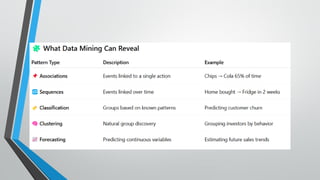
• Data Mining
• Uses AI and statistical methods to uncover hidden patterns
• Predict outcomes (e.g., customer churn, fraud)
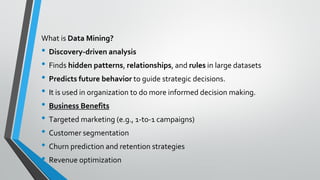
What is Data Mining?
• Discovery-driven analysis
• Finds hidden patterns, relationships, and rules in large datasets
• Predicts future behavior to guide strategic decisions.
• It is used in organization to do more informed decision making.
• Business Benefits
• Targeted marketing (e.g., 1-to-1 campaigns)
• Customer segmentation
• Churn prediction and retention strategies
• Revenue optimization
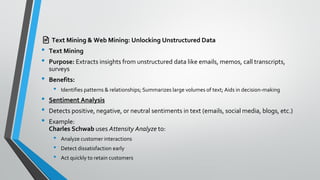
📄 Text Mining & Web Mining: Unlocking Unstructured Data
• Text Mining
• Purpose: Extracts insights from unstructured data like emails, memos, call transcripts,
surveys
• Benefits:
• Identifies patterns & relationships; Summarizes large volumes of text; Aids in decision-making
• Sentiment Analysis
• Detects positive, negative, or neutral sentiments in text (emails, social media, blogs, etc.)
• Example:
Charles Schwab uses Attensity Analyze to:
• Analyze customer interactions
• Detect dissatisfaction early
• Act quickly to retain customers
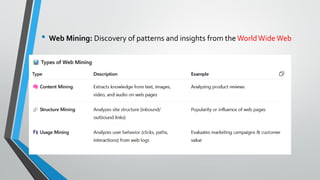
• Web Mining: Discovery of patterns and insights from the WorldWideWeb
6.4 Managing Data resources: establishing an information policy and
ensuring data quality (Page: 265)
Read yourself, write a note on it, and upload on Moelium.
Lect. 7 - MIS and business analytics.pdf
  • 1.
    Information system and BusinessAnalytics Dr. Usman Javed Riphah International University, Faisalabad.
  • 2.
    Organising data in traditionalfile system • Data Hierarchy in Computer Systems • Problems with the traditional file system
  • 3.
    Effective Information Systems •Deliver accurate, timely, and relevant information • Accurate: Free from errors or inconsistencies • Timely: Available when decision-makers need it • Relevant: Useful for the task or decision at hand The Challenge in Businesses • Many businesses lack quality information • Common issues: delayed, incorrect, or irrelevant data • Root cause: poorly organized and maintained data
  • 4.
    Why Data ManagementMatters • Ensures data is structured, clean, and accessible • Supports better decisions and efficiency • Core to building reliable information systems Traditional File Management Issues • Data stored in isolated files • Leads to duplication, inconsistency, and inefficiency • Difficult to retrieve and analyze data effectively * Data management is of paramount importance
  • 5.
    Data Hierarchy inComputer Systems • Bit: Smallest data unit a computer can process • Byte: Group of bits; represents a character (letter, number, symbol) • Field: Group of characters (e.g., name, age) • Record: Collection of related fields (e.g., student name, course, grade) • File: Group of similar records (e.g., student course file) • Database: Collection of related files (e.g., student records + financial data)
  • 6.
    Key Concepts • Entity:A person, place, thing, or event (e.g., student, course) • Attribute: Characteristic of an entity (e.g., Student_ID, Course, Grade) • FieldValues: Specific data stored for each attribute in a record For example… • Entity: COURSE • Attributes: Student_ID, Course, Date, Grade • Record: Specific student’s data for one course • File:All course records • Database: Combines course files with other student data
  • 8.
    Problems inTraditional FileEnvironment • Systems developed independently in each department • No centralized planning or integration • Each application had its own files and software programs • Example: Human Resources System • Separate files for: • Personnel, Payroll, Medical insurance, Pension, Mailing list • Leads to hundreds of isolated files over time • Key Problems • Data Redundancy: Same data stored in multiple files • Data Inconsistency: Conflicting data across systems • Difficult Maintenance: Hard to update, manage, or integrate systems • Inefficient Operations:Time-consuming and resource-heavy
  • 10.
    Data Redundancy andInconsistency • Data Redundancy: • Duplicate data stored in multiple files • Collected independently by different departments • Wastes storage and resources • Data Inconsistency: • Same attribute shows different values in different systems • Causes confusion and errors in decision-making
  • 11.
    Examples of Inconsistency •Course Data: Date updated in one system but not others • Student_ID: Named differently across systems (e.g., Student_ID vs. ID) • Coding Differences: • Clothing size represented as “extra large” in one system, “XL” in another • Leads to integration issues across departments Impact on Business Systems • Hard to build integrated systems like: • Customer Relationship Management (CRM) • Supply Chain Management (SCM) • Enterprise Systems (ERP) • Results in poor data quality and decision-making
  • 12.
    Program-Data Dependence • Dataand programs are tightly linked • Each program must define data format and location Key Issues • Any change in program may require changes to the data • Data format changes can break multiple programs • Example: Changing ZIP code from 5-digit to 9-digit • Affects all programs using the old 5-digit format Consequences • High maintenance costs • Lack of flexibility in updating systems • Increases risk of errors and system failures
  • 13.
    Lack of Flexibility •Can generate routine, scheduled reports only • Ad hoc reports are difficult and time-consuming to produce • Cannot easily respond to unexpected information needs Challenges • Data is available but hard to access • Requires extensive programming • May take weeks of effort to compile needed data Impact • Slows down decision-making • Increases costs and delays • Limits the organization’s ability to be agile and responsive
  • 14.
    Poor Security • Lackof control over data access and usage • Unauthorized access and data changes are possible • No centralized way to track user activity Key Risks • Sensitive data may be exposed or altered • No audit trail to monitor who accessed or modified information • Increases chances of data breaches and internal misuse Impact • Compromises trust and data integrity • Can lead to legal issues and financial losses • Weakens overall information system security
  • 15.
    Lack of DataSharing and Availability • Data is stored in isolated systems across departments • No connection between different data files • Makes data sharing across functions very difficult Key Issues • Slow access to required information • Inconsistent data leads to distrust and confusion • Users may avoid using systems due to unreliable data Impact • Breakdown in communication between departments • Limits collaboration and informed decision-making • Reduces overall efficiency and effectiveness
  • 16.
    The database approachto data management • Database management systems (DBMS) • How DBMS solve the problems of traditional file system • Relational DBMS • Operations of relational DBMS • Non-Relational databases in the Cloud • The database approach to data management • Querying and reporting • Designing Databases • Normalization and Entity relationship diagrams
  • 17.
    Database Technology: ABetter Approach • Centralized collection of organized data • Serves multiple applications efficiently • Eliminates redundancy by storing data once • Key Benefits • Data appears to be in one location for all users • Supports data sharing across departments • Reduces data inconsistency and duplication • Use one centralized Human Resources database • Impact • Improved accuracy, accessibility, and efficiency • Easier maintenance and updates • Enables better decision-making and integration
  • 18.
    Database management system:Whatis a DBMS? • Software that centralizes data and manages it efficiently • Acts as an interface between applications and data files • Provides easy access to data for multiple programs Key Functions • Retrieves data when requested by applications • Separates logical and physical views of data • Logical view: How users see the data • Physical view: How data is stored Benefits of DBMS • Reduces programming effort • Allows multiple users to access customized views • Ensures data consistency and security Example: Human Resources Database • Benefits specialist sees: Name, SSN, Health Insurance, etc.
  • 20.
    How a DBMSSolves Traditional File System Problems • Reduces data redundancy by minimizing repeated data • Helps maintain data consistency across all systems • Decouples programs and data, allowing independent management Key Advantages • Improves data accuracy and reliability • Enables centralized data management and security • Supports ad hoc queries for flexible data access Efficiency Gains • Faster access to information • Lower development and maintenance costs • Enhanced information sharing across departments
  • 22.
    Relational DBMS (RDBMS) •Most common type of Database Management System • Stores data in two-dimensional tables (relations) • Each table represents an entity and its attributes Key Features • Easy to organize, access, and update data • Supports relationships between tables using keys • Ideal for small to large-scale applications Popular RDBMS Examples • Microsoft Access – for desktop systems • MySQL – open-source, widely used • Oracle Database, SQL Server, DB2 – for enterprise use • Oracle Database Lite – for mobile devices
  • 23.
    Organizing Data inRelational Databases • Data is stored in tables (also called relations) • Each table contains rows (records/tuples) and columns (fields/attributes) • Separate tables are created for different entities (e.g., SUPPLIER, PART) Structure of aTable • Columns = Attributes (e.g., name, address, zip code) • Rows = Records (each row = one instance of the entity) • Fields = Individual data elements Key Concepts • Primary Key: Uniquely identifies each record in a table (e.g., Supplier_Number) • Foreign Key: A field in one table that links to the primary key in another table (e.g., Supplier_Number in PART table) • Enables relationships between tables
  • 25.
    • Key Operationsof a Relational DBMS • Relational tables can be combined using shared data elements (e.g., Supplier_Number) • Three basic operations: Select, Join, and Project • 1. Select Operation • Retrieves rows (records) that meet a specific condition • Example: Select parts where Part_Number = 137 or 150 • 2. Join Operation • Combines tables based on a common field • Example: Join PART and SUPPLIER tables using Supplier_Number to get supplier info for selected parts
  • 26.
    • 3. ProjectOperation • Retrieves specific columns from a table • Example: Extract only Part_Number, Part_Name, Supplier_Number, Supplier_Name • Use Case Example • Goal: Find suppliers for Part 137 or 150 • Use Select → Join → Project to get clear and focused data output
  • 27.
    📦 Non-Relational Databases& Cloud Databases • Need for Alternatives toTraditional Databases • Traditional relational databases: based on tables, columns, and rows • Not ideal for big data, web services, and unstructured data • Rise of cloud computing and massive data volumes demands flexible solutions • What Are Non-Relational (NoSQL) Databases? • Use a flexible data model (no fixed schema) • Designed for large-scale, distributed data processing • Handle structured + unstructured data (e.g., social media, web content, images) • Examples: • Oracle NoSQL Database • Amazon SimpleDB
  • 28.
    • Cloud-Based RelationalDatabases • Offer traditional RDBMS features on a cloud platform • Examples: • Amazon RDS (MySQL, Oracle, SQL Server) • Oracle Database Cloud Service • Microsoft SQL Azure Database • Private Cloud Databases • Private cloud = secure, internal cloud infrastructure • Example: Sabre Holdings (aviation industry SaaS provider) • RunsOracle Database 11g; Supports 100+ projects & 700 users • Reduces costs & improves performance • Key Benefits • Scalability (up or down as needed) • Cost efficiency (pay-per-use model) • Improved data management for web and mobile applications • Better resource utilization through consolidation
  • 29.
    🛠️ Core Capabilitiesof a DBMS • Data Definition Language (DDL) • Defines structure and content of the database • Used to create tables, define fields, and their characteristics • Examples of definitions: data type, field size, constraints • Data Dictionary • A repository of metadata (data about data) • Stores details like: • Field names & descriptions • Data types & sizes • Formats & validation rules • Key fields (e.g., Supplier_Number in Access)
  • 30.
    • Advanced DataDictionary Functions (Large Systems) • Tracks: • Data usage and ownership • Authorization and access levels • Responsible users or departments • Linked programs, reports, and business functions • Example: Microsoft Access • Offers basic data dictionary functionality • Shows: • Field names • Formats • Key fields (indicated by a key icon)
  • 31.
    • 🔍Querying andReporting with DBMS • Data Manipulation Language (DML) • Used to add, update, delete, and retrieve data • Allows end users and developers to extract and work with data • Most popular DML: SQL (Structured Query Language) • SQL – Structured Query Language • Industry-standard for querying relational databases • Example SQL:
  • 32.
    • DBMSTools forQuerying • DB2, Oracle, SQL Server: use SQL • MicrosoftAccess: • Uses SQL behind the scenes • Provides graphical tools for easy query building • Users select tables, fields, and set conditions visually • Reporting Features • Organize retrieved data into polished reports • Access simplifies reporting with built-in templates and layouts
  • 33.
    6.3: USING DATABASESTOIMPROVE BUSINESS PERFORMANCEAND DECISION MAKING • The challenge of big data • Business intelligence infrastructure • Data warehouse and marts; Hadoop; In-memory computing;Analytic platforms • ANALYTICALTOOLS: RELATIONSHIPS, PATTERNS, TRENDS • Online analytical processing • Data mining • Text mining and web mining
  • 34.
    • Businesses usedatabases to keep track of basic transactions, such as paying suppliers, processing orders, keeping track of customers, and paying employees. • But they also need databases to provide information that will help the company run the business more efficiently, and help managers and employees make better decisions. • If a company wants to know which product is the most popular or who is its most profitable customer, the answer lies in the data.
  • 35.
    🌐The Challenge ofBig Data • Traditional Data Limitations • Mostly transaction-based, fitting neatly in rows & columns • Managed well by relational DBMS • Examples: invoices, payments, payroll records Explosion of New Data Sources • Web traffic, social media posts (tweets, status updates) • Email messages, sensor outputs, and machine-generated data • Unstructured/semi-structured formats incompatible with traditional DBMS
  • 36.
    • What isBig Data? • Massive volumes: petabytes to exabytes • Data types: structured, semi-structured, and unstructured • Produced rapidly and continuously • E.g., 10 TB from one jet engine in 30 mins • Why Big Data Matters • Reveals deep patterns, trends, and anomalies • Can drive insights into: • Customer behavior; Weather trends; Market activity • Need for New Tools & Technologies • Big data requires: • Advanced analytics; Non-relational systems; Cloud and distributed platforms • Goal: Extract business value from complex, diverse data
  • 37.
    🧠 Business IntelligenceInfrastructure • Goal of Business Intelligence (BI) • Provide concise, reliable info about: • Current operations • Emerging trends • Business changes • Enable better decision-making across departments • The Data Challenge • Data spread across multiple systems: • Sales, manufacturing, accounting • External sources: demographics, competitors • Big data often required for full insights
  • 38.
    • 🛠️ BIInfrastructure Components • DataWarehouses & Data Marts • Centralized repositories for structured data • Support reporting and analysis • Hadoop • Open-source framework for processing massive datasets • Handles structured & unstructured data across distributed systems • In-Memory Computing • Analyzes big data instantly in RAM • Speeds up complex calculations and queries • Analytical Platforms • High-performance systems for data mining, predictive analytics, and machine learning • Handle large-scale structured/unstructured data analysis
  • 39.
    🏢 DataWarehouses &Data Marts • What is a Data Warehouse? • A central database storing: • Current and historical data • From multiple sources (e.g., sales, customer service, manufacturing, websites) • Supports decision making across the company • Data Flow Process • Extract data from operational systems • Clean & transform (correct errors, fill gaps) • Load into warehouse for analysis • Data is read-only (cannot be altered)
  • 40.
    • Key Features •Enterprise-wide access • Supports queries and analysis • Includes: • Ad hoc queries • Standardized reporting tools • Graphical dashboards • What is a Data Mart? • A subset of a data warehouse • Contains focused, summarized data • Created for specific user groups or departments
  • 41.
    ⚙️ What isHadoop? • Open-source software framework • Managed by Apache Software Foundation • Designed for distributed parallel processing • Handles structured, semi-structured, & unstructured big data • Key Components • HDFS (Hadoop Distributed File System) Connects file systems across nodes to form a unified data system • MapReduce Breaks big data into sub-tasks, processes them in parallel, then aggregates results • HBase A non-relational database for fast access & real-time big data applications
  • 42.
    • How HadoopWorks? • Break down a large data problem • Distribute across many low-cost servers • Process in parallel • Combine results into analyzable output • Real-World Applications • Facebook: Stores over 100 petabytes on Hadoop • Yahoo: Uses Hadoop to track & personalize user experience • NextBio: Supports genomic research with Hadoop + HBase • Vendor Support • Hadoop tools provided by: • IBM; Oracle; HP; Microsoft
  • 43.
    ⚡ In-Memory Computing:Supercharging Big Data Analytics • What is In-Memory Computing? • Stores data in main memory (RAM) instead of disks • Bypasses slow disk I/O bottlenecks • Enables real-time data access and lightning-fast analytics • Key Benefits • Faster query responses — from hours to seconds • Supports large datasets (e.g., data marts, small warehouses) • Works even on handheld/mobile devices • Ideal for complex business calculations
  • 44.
    • Tech Enablers •High-speed multicore processors • Cheaper and more powerful RAM • Advances in hardware optimization and parallel processing • Leading In-Memory Solutions • SAP HANA (High Performance Analytics Appliance) • Oracle Exalytics • Real-World Example: Centrica • Energy utility uses SAP HANA to: • Analyze smart meter data every 15 minutes • Gain detailed insights by neighborhood, home size, business type • Show customers real-time energy usage via web/mobile tools
  • 45.
    • 📊 AnalyticPlatforms: Power Tools for Big Data Insights • What Are Analytic Platforms? • High-speed systems optimized for complex analytics • Use relational + non-relational technologies • Designed for large-scale data analysis • Key Features • Preconfigured hardware + software integration • Faster query processing (10–100x vs traditional DBMS) • Support for: • In-memory computing • NoSQL databases
  • 46.
    • 🛠️ LeadingSolutions • IBM Netezza • Integrated system for database, server, and storage • Ideal for advanced analytic queries • Oracle Exadata • Engineered for enterprise-scale performance • How It Fits in BI Infrastructure • Integrates data from: • Operational systems; Web & social media; Machines & sensors; External sources • Outputs Delivered • Interactive dashboards • Standard and ad hoc reports • Fast, data-driven business insights
  • 47.
    📊AnalyticalTools: Discovering Insightsin Data • Purpose of AnalyticalTools • Go beyond data storage to extract actionable insights • Identify relationships, spot patterns, and track trends • KeyTypes of AnalyticalTools • DatabaseQuerying & Reporting • Use SQL or visual query tools • Generate summaries, reports, and answers to specific questions • OLAP (Online Analytical Processing) • Enables multidimensional analysis • Analyze data across multiple dimensions (e.g., time, region, product) • Data Mining • Uses AI and statistical methods to uncover hidden patterns • Predict outcomes (e.g., customer churn, fraud)
  • 48.
    What is DataMining? • Discovery-driven analysis • Finds hidden patterns, relationships, and rules in large datasets • Predicts future behavior to guide strategic decisions. • It is used in organization to do more informed decision making. • Business Benefits • Targeted marketing (e.g., 1-to-1 campaigns) • Customer segmentation • Churn prediction and retention strategies • Revenue optimization
  • 50.
    📄 Text Mining& Web Mining: Unlocking Unstructured Data • Text Mining • Purpose: Extracts insights from unstructured data like emails, memos, call transcripts, surveys • Benefits: • Identifies patterns & relationships; Summarizes large volumes of text; Aids in decision-making • Sentiment Analysis • Detects positive, negative, or neutral sentiments in text (emails, social media, blogs, etc.) • Example: Charles Schwab uses Attensity Analyze to: • Analyze customer interactions • Detect dissatisfaction early • Act quickly to retain customers
  • 51.
    • Web Mining:Discovery of patterns and insights from the WorldWideWeb
  • 52.
    6.4 Managing Dataresources: establishing an information policy and ensuring data quality (Page: 265) Read yourself, write a note on it, and upload on Moelium.