Unit 7
Database Management
System
Fundamentals of Computer Systems
Database
 A Database is an organized collection of data that is stored electronically
and can be accessed, managed, and updated efficiently.
 Serves as the backbone for storing information in a structured way,
enabling users to retrieve and manipulate data as needed.
 Purpose of Database
 To store data in a structured manner.
 To provide mechanisms for data retrieval and manipulation.
 To ensure data integrity and security.
 To support concurrent access by multiple users.
Data Concepts and Characteristics
 Data Concepts
 Data
 Refers to raw facts and figures that can be processed to produce meaningful
information.
 Information
 Is processed data that is meaningful and useful for decision-making.
 Metadata
 Data about data (e.g., file size, type, creation date).
Characteristics
 Accuracy: Data must be correct and free from errors.
 Consistency: Data should remain uniform across systems.
 Relevance: Data must meet the user’s needs.
 Timeliness: Data should be updated and available when required.
 Accessibility: Data should be easily accessible to authorized users.
 Security: Data should be protected from unauthorized access.
 Integrity: Data should maintain its integrity, meaning it should be accurate
and consistent over its lifecycle.
File System
 A File System is a traditional way of storing and managing data using files.
 It organizes data into directories and subdirectories, typically stored on a
hard drive or other storage medium.
 Files can be text, images, videos, or other formats.
 Each application accessing the data handles its own data processing and
storage.
 Example: A payroll system using separate text files for employee details,
salaries, and attendance.
Advantages of File System
 Simplicity: Easy to use for small-scale or single-user applications.
 Low Cost: No additional software is required; relies on the operating system.
 Familiarity: Users are already accustomed to file-based storage systems.
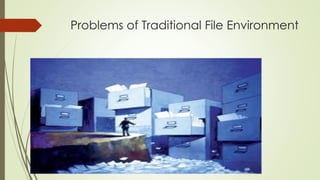
Problems of Traditional File Environment
 Data Redundancy
 Since each application has its own data file, the same data may have to be recorded
and stored in many files.
 Data Inconsistency
 Data redundancy leads to data inconsistency especially when data is to be updated.
Example Promotion of Employee
 Lack of Data Integration
 Since independent data file exists, users face difficulty in getting information.
 Program Dependence
 The reports produced by the file processing system are program dependent, which
means if any change in the format or structure of data and records in the file is to be
made, the programs have to modified correspondingly. Also, a new program will have
to be developed to produce a new report.
Problems of Traditional File Environment
 Limited Data Sharing
 There is limited data sharing possibilities with the traditional file system. Each
application has its own private files and users have little choice to share the data
outside their own applications
 Poor Data Control
 There was no centralized control at the data element level, hence a traditional
file system is decentralized in nature
 Problem of Security
 It is very difficult to enforce security checks and access rights in a traditional file
system
 Scalability Limits
 As data grows, retrieval and management become slow.
Database System
 A Database System uses a Database Management System (DBMS) to store,
manage, and retrieve data in a structured manner.
 The data is stored in tables, and relationships between data are defined to
maintain consistency and avoid redundancy.
 The DBMS ensures secure, consistent, and efficient access to the data.
 Example: A payroll system using a database to link employee details,
salaries, and attendance in a single system.
Advantages of Database System
 Reduced Redundancy: Normalization eliminates duplicate data.
 Centralized Control: Data is stored centrally, enabling easy access and sharing.
 Data Security: Provides encryption, user authentication, and role-based access.
 Integrity and Consistency: Enforces constraints and relationships to maintain
data quality.
 Backup and Recovery: Built-in mechanisms ensure data safety during failures.
 Concurrency Management: Allows multiple users to work on the same
database simultaneously.
 Fast response to information request: Provides faster response to request of an
user
 Scalability.
Disadvantages of Database System
 Larger Size
 Greater Complexity
 Greater Impact of system failure
 More complex Recovery Procedure.
 High initial and data processing cost.
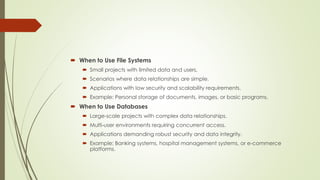
 When to Use File Systems
 Small projects with limited data and users.
 Scenarios where data relationships are simple.
 Applications with low security and scalability requirements.
 Example: Personal storage of documents, images, or basic programs.
 When to Use Databases
 Large-scale projects with complex data relationships.
 Multi-user environments requiring concurrent access.
 Applications demanding robust security and data integrity.
 Example: Banking systems, hospital management systems, or e-commerce
platforms.
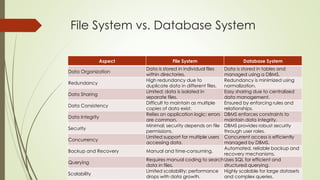
File System vs. Database System
Aspect File System Database System
Data Organization
Data is stored in individual files
within directories.
Data is stored in tables and
managed using a DBMS.
Redundancy
High redundancy due to
duplicate data in different files.
Redundancy is minimized using
normalization.
Data Sharing
Limited; data is isolated in
separate files.
Easy sharing due to centralized
data management.
Data Consistency
Difficult to maintain as multiple
copies of data exist.
Ensured by enforcing rules and
relationships.
Data Integrity
Relies on application logic; errors
are common.
DBMS enforces constraints to
maintain data integrity.
Security
Minimal; security depends on file
permissions.
DBMS provides robust security
through user roles.
Concurrency
Limited support for multiple users
accessing data.
Concurrent access is efficiently
managed by DBMS.
Backup and Recovery Manual and time-consuming.
Automated, reliable backup and
recovery mechanisms.
Querying
Requires manual coding to search
data in files.
Uses SQL for efficient and
structured querying.
Scalability
Limited scalability; performance
drops with data growth.
Highly scalable for large datasets
and complex queries.
File System vs. Database System
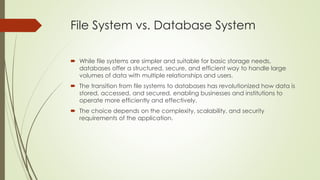
 While file systems are simpler and suitable for basic storage needs,
databases offer a structured, secure, and efficient way to handle large
volumes of data with multiple relationships and users.
 The transition from file systems to databases has revolutionized how data is
stored, accessed, and secured, enabling businesses and institutions to
operate more efficiently and effectively.
 The choice depends on the complexity, scalability, and security
requirements of the application.
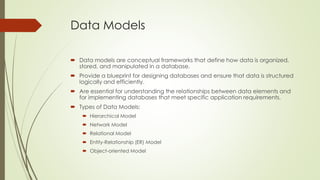
Data Models
 Data models are conceptual frameworks that define how data is organized,
stored, and manipulated in a database.
 Provide a blueprint for designing databases and ensure that data is structured
logically and efficiently.
 Are essential for understanding the relationships between data elements and
for implementing databases that meet specific application requirements.
 Types of Data Models:
 Hierarchical Model
 Network Model
 Relational Model
 Entity-Relationship (ER) Model
 Object-oriented Model
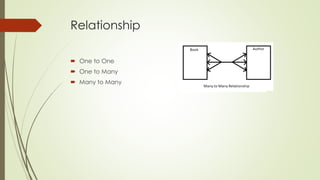
Relationship
 One to One
 One to Many
 Many to Many
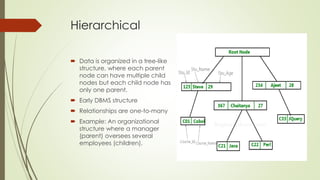
Hierarchical
 Data is organized in a tree-like
structure, where each parent
node can have multiple child
nodes but each child node has
only one parent.
 Early DBMS structure
 Relationships are one-to-many
 Example: An organizational
structure where a manager
(parent) oversees several
employees (children).
Advantages
 Parent/child relationship promotes conceptual simplicity.
 Parent/child relationship promotes data integrity.
 Fast data access due to parent-child relationships.
 It is efficient with 1:M relationships.
Disadvantages
 Complex to implement and modify.
 Not suitable for many-to-many relationships
 Deletion of parent node result in deletion of child node forcefully
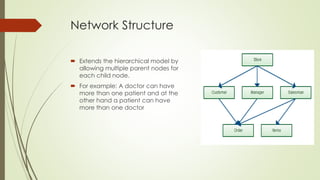
Network Structure
 Extends the hierarchical model by
allowing multiple parent nodes for
each child node.
 For example: A doctor can have
more than one patient and at the
other hand a patient can have
more than one doctor
Advantages
 More flexible than the hierarchical model.
 Supports many-to-many relationships.
 Provides flexibility in representing complex data.
 Ease of data access
 Data integrity
Disadvantages
 Complex to design and maintain.
 Requires a deep understanding of the data structure.
 Less intuitive than hierarchical model.
Entity Relationship Model (E-R Model)
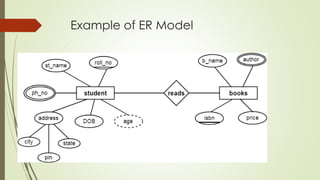
 An entity relationship diagram (ERD) shows the relationships of entity sets
stored in a database.
 An entity in this context is an object, a component of data.
 An entity set is a collection of similar entities.
 These entities can have attributes that define its properties.
 ER diagrams are used to sketch out the design of a database.
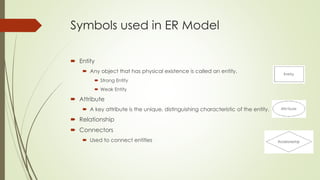
Symbols used in ER Model
 Entity
 Any object that has physical existence is called an entity.
 Strong Entity
 Weak Entity
 Attribute
 A key attribute is the unique, distinguishing characteristic of the entity.
 Relationship
 Connectors
 Used to connect entities
Example of ER Model
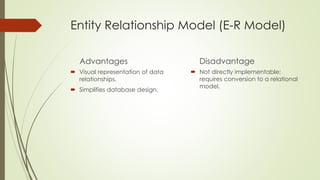
Entity Relationship Model (E-R Model)
Advantages
 Visual representation of data
relationships.
 Simplifies database design.
Disadvantage
 Not directly implementable;
requires conversion to a relational
model.
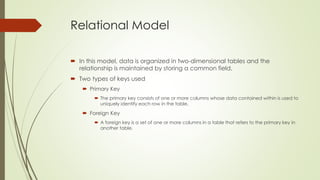
Relational Model
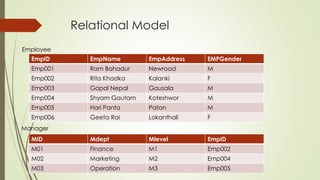
 In this model, data is organized in two-dimensional tables and the
relationship is maintained by storing a common field.
 Two types of keys used
 Primary Key
 The primary key consists of one or more columns whose data contained within is used to
uniquely identify each row in the table.
 Foreign Key
 A foreign key is a set of one or more columns in a table that refers to the primary key in
another table.
Relational Model
EmpID EmpName EmpAddress EMPGender
Emp001 Ram Bahadur Newroad M
Emp002 Rita Khadka Kalanki F
Emp003 Gopal Nepal Gausala M
Emp004 Shyam Gautam Koteshwor M
Emp005 Hari Panta Patan M
Emp006 Geeta Rai Lokanthali F
MID Mdept Mlevel EmpID
M01 Finance M1 Emp002
M02 Marketing M2 Emp004
M03 Operation M3 Emp005
Employee
Manager
Relational Model
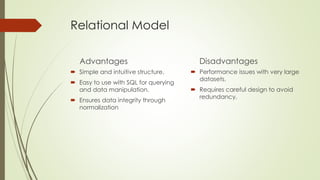
Advantages
 Simple and intuitive structure.
 Easy to use with SQL for querying
and data manipulation.
 Ensures data integrity through
normalization
Disadvantages
 Performance issues with very large
datasets.
 Requires careful design to avoid
redundancy.
Object Oriented Model
 Used in object-oriented database management systems (OODBMS)
 Data is stored as objects.
 Supports complex data types more efficiently than relational databases
 Example: graphic images, video clips, web pages, A multimedia database
where objects include images, videos, and their associated metadata.
Object Oriented Model
Advantage
 Supports complex data types and
multimedia applications.(e.g.,
images, videos).
Disadvantages
 Complex to design and
implement.
 Limited support for querying
compared to relational
databases.
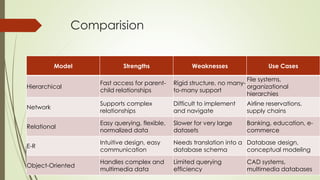
Comparision
Model Strengths Weaknesses Use Cases
Hierarchical
Fast access for parent-
child relationships
Rigid structure, no many-
to-many support
File systems,
organizational
hierarchies
Network
Supports complex
relationships
Difficult to implement
and navigate
Airline reservations,
supply chains
Relational
Easy querying, flexible,
normalized data
Slower for very large
datasets
Banking, education, e-
commerce
E-R
Intuitive design, easy
communication
Needs translation into a
database schema
Database design,
conceptual modeling
Object-Oriented
Handles complex and
multimedia data
Limited querying
efficiency
CAD systems,
multimedia databases
Database Management System (DBMS)
 Is a software that allows users to define, create, maintain, and manipulate a
database.
 It acts as an interface between the database and its users, ensuring that data is
consistently organized and easily accessible.
 DBMS systems are essential for managing large datasets efficiently and securely.
 It allows user to create maintain and share database.
 Defining involves specifying the data types, structure of the data to be sored on the
database.
 Creating involves storing the data on some storage medium that is controlled by
DBMS.
 Maintaining involves modification of database when ever necessary.
 Sharing involves accessing the database by multiple users.
 Software that manages the database.
Examples of DBMS
 MS-Access
 Oracle
 MS SQL Server
 MySQL
Functions of DBMS
 Data Storage and Retrieval: Efficiently manages large volumes of data.
 Data Security: Ensures restricted access to authorized users.
 Data Integrity: Maintains consistency and reliability.
 Backup and Recovery: Protects data from system failures.
 Concurrency Control: Allows multiple users to access data simultaneously.
Advantages of DBMS
 Reduced redundancy.
 Improved data sharing.
 Enhanced data Security.
 Data Integrity
 Scalability for large datasets.
Disadvantages of DBMS
 High Cost
 Complexity
 Performance Overhead
 Dependence on DBMS Vendor
Applications of DBMS
 Banking: Managing accounts, transactions, and loans.
 Healthcare: Storing patient records and medical histories.
 E-commerce: Managing product catalogs, orders, and customer data.
 Education: Storing student records, grades, and course information.
 Social Media: Handling user profiles, posts, and interactions.
Relational Database Management
System (RDBMS)
 Type of DBMS that organizes data into tables (or relations) consisting of rows
and columns.
 RDBMS has become the most widely used database system because of its
simplicity, flexibility, and efficiency.
Features of RDBMS
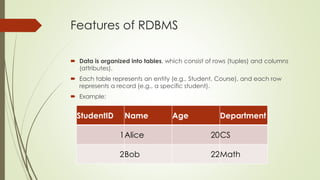
 Data is organized into tables, which consist of rows (tuples) and columns
(attributes).
 Each table represents an entity (e.g., Student, Course), and each row
represents a record (e.g., a specific student).
 Example:
StudentID Name Age Department
1Alice 20CS
2Bob 22Math
Features of RDBMS
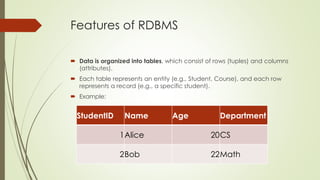
 Data is organized into tables, which consist of rows (tuples) and columns
(attributes).
 Each table represents an entity (e.g., Student, Course), and each row
represents a record (e.g., a specific student).
 Example:
StudentID Name Age Department
1Alice 20CS
2Bob 22Math
Features of RDBMS (Contd..)
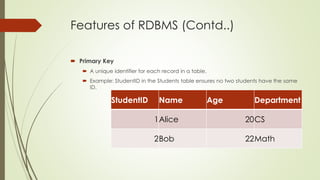
 Primary Key
 A unique identifier for each record in a table.
 Example: StudentID in the Students table ensures no two students have the same
ID.
StudentID Name Age Department
1Alice 20CS
2Bob 22Math
Features of RDBMS (Contd..)
 Foreign Key
 Establishes a relationship between two tables by referencing the primary key of
another table.
 Example: A table named Enrollments can have a StudentID column that
references the StudentID in the Students table.
Features of RDBMS (Contd..)
 Relationships
 One-to-One
 A single record in one table relates to one record in another table.
 Example: A student has one unique student ID.
 One-to-Many
 A single record in one table relates to multiple records in another table.
 Example: A department can have many students.
 Many-to-Many
 Multiple records in one table relate to multiple records in another table.
 Example: Students can enroll in multiple courses, and courses can have multiple
students.
Features of RDBMS (Contd..)
 ACID Properties
 Ensures reliable transaction processing
 Atomicity: Transactions are all-or-nothing.
 Consistency: The database remains in a valid state before and after a
transaction.
 Isolation: Transactions are executed independently.
 Durability: Committed transactions are permanent.
 Example: Transferring money between bank accounts.
Features of RDBMS (Contd..)
 SQL (Structured Query Language)
 A standard language for interacting with RDBMS.
 DDL (Data Definition Language): Defines the database structure (e.g., CREATE,
ALTER, DROP).
 DML (Data Manipulation Language): Manages data (e.g., INSERT, UPDATE,
DELETE, SELECT).
 DCL (Data Control Language): Manages access (e.g., GRANT, REVOKE).
 Example: SELECT * FROM Students WHERE Age > 20;
Features of RDBMS (Contd..)
 Data Integrity
 RDBMS enforces rules like entity integrity (no null primary keys) and referential
integrity (valid foreign key relationships).
 Scalability and Concurrency
 Supports multiple users accessing and modifying the database simultaneously
while maintaining data consistency.
Features of RDBMS (Contd..)
 Normalization
 A process of organizing data to reduce redundancy and improve integrity.
 Normal Forms:
 1NF (First Normal Form): Eliminate duplicate columns and ensure atomicity.
 2NF (Second Normal Form): Remove partial dependencies.
 3NF (Third Normal Form): Remove transitive dependencies.
 Example: Splitting a table with redundant data into multiple tables.
Advantages of RDBMS
 Data Integrity: Ensures accuracy and consistency through constraints like
primary keys, foreign key and normalization.
 Flexibility: Relationships between data can be easily established and
modified.
 Scalability: Handles large volumes of data efficiently.
 Security: Role-based access control and authentication ensure secure data
access.
 Ease of Use: The tabular format is fast and easy to understand.
Disadvantages of RDBMS
 Cost: High initial investment in software, hardware, and skilled personnel.
 Complexity: Designing and managing an RDBMS requires expertise.
 Performance Issues: Can struggle with very large datasets or complex
queries.
 Scalability Limitations: Horizontal scaling (adding more servers) can be
challenging.
Popular RDBMS Software
 Oracle
 MySQL
 SQL Server
Applications of RDBMS
 Banking: Managing accounts, transactions, and loans.
 E-commerce: Storing product catalogs, orders, and customer data.
 Healthcare: Managing patient records and medical histories.
 Education: Storing student records, grades, and course information.
 Social Media: Handling user profiles, posts, and interactions
Database Applications
 Database applications are software systems or tools designed to store,
retrieve, and manage data using a database system like a DBMS or RDBMS.
 They play a critical role in modern information systems across various
industries, enabling efficient data handling and processing.
 They are used across various industries and applications, from business and
healthcare to education and social media.
Characteristics of Database
Applications
 Centralized Data Management
 Efficient Data Access
 Data Integrity and Security
 Scalability
Types of Database Applications
 Online Transaction Processing (OLTP) Applications
 Focused on managing real-time transactions efficiently.
 Examples include e-commerce platforms, banking systems, and point-of-sale
(POS) systems.
 Online Analytical Processing (OLAP) Applications
 Used for analyzing large datasets and supporting decision-making.
 Examples include data warehouses and business intelligence tools.
Types of Database Applications
 Embedded Database Applications
 Databases integrated into other software applications.
 Examples: Mobile apps, video games, and IoT devices often use lightweight
embedded databases like SQLite.
 Desktop Applications
 Standalone applications for personal or organizational use.
 Example: Microsoft Access allows users to create and manage small-scale databases.
 Web-Based Applications
 Use databases to manage data dynamically for websites and web services.
 Example: Social media platforms like Facebook store and manage user profiles, posts,
and interactions.
Applications of Databases Across
Industries
 Business Applications
 Customer Relationship Management (CRM)
 Inventory Management
 Financial Management
 Healthcare
 Electronic Health Records (EHR)
 Medical Research
 Hospital Management Systems
Applications of Databases Across
Industries
 Education Applications
 Student Information System
 Learning Management System
 Library Management System
 E-commerce Applications
 Product Catalogs
 Order Management
 Customer Analytics
Applications of Databases Across
Industries
 Social Media Applications
 User Profiles
 Content Management
 Real Time Analytics
 Government Applications
 Citizen Record
 Public Services
 Resource Management
Benefits of Database Applications
 Data Consistency
 Improved Data Security
 High Efficiency
 Data Sharing
 Scalability
Challenges in Database Applications
 High Initial Cost
 Data Breaches
 Maintenance Overhead
 Complexity
Unit 7 Database Management System-1,,,,,,,,

  • 1.
  • 2.
    Database  A Databaseis an organized collection of data that is stored electronically and can be accessed, managed, and updated efficiently.  Serves as the backbone for storing information in a structured way, enabling users to retrieve and manipulate data as needed.  Purpose of Database  To store data in a structured manner.  To provide mechanisms for data retrieval and manipulation.  To ensure data integrity and security.  To support concurrent access by multiple users.
  • 3.
    Data Concepts andCharacteristics  Data Concepts  Data  Refers to raw facts and figures that can be processed to produce meaningful information.  Information  Is processed data that is meaningful and useful for decision-making.  Metadata  Data about data (e.g., file size, type, creation date).
  • 4.
    Characteristics  Accuracy: Datamust be correct and free from errors.  Consistency: Data should remain uniform across systems.  Relevance: Data must meet the user’s needs.  Timeliness: Data should be updated and available when required.  Accessibility: Data should be easily accessible to authorized users.  Security: Data should be protected from unauthorized access.  Integrity: Data should maintain its integrity, meaning it should be accurate and consistent over its lifecycle.
  • 5.
    File System  AFile System is a traditional way of storing and managing data using files.  It organizes data into directories and subdirectories, typically stored on a hard drive or other storage medium.  Files can be text, images, videos, or other formats.  Each application accessing the data handles its own data processing and storage.  Example: A payroll system using separate text files for employee details, salaries, and attendance.
  • 6.
    Advantages of FileSystem  Simplicity: Easy to use for small-scale or single-user applications.  Low Cost: No additional software is required; relies on the operating system.  Familiarity: Users are already accustomed to file-based storage systems.
  • 7.
    Problems of TraditionalFile Environment
  • 8.
    Problems of TraditionalFile Environment  Data Redundancy  Since each application has its own data file, the same data may have to be recorded and stored in many files.  Data Inconsistency  Data redundancy leads to data inconsistency especially when data is to be updated. Example Promotion of Employee  Lack of Data Integration  Since independent data file exists, users face difficulty in getting information.  Program Dependence  The reports produced by the file processing system are program dependent, which means if any change in the format or structure of data and records in the file is to be made, the programs have to modified correspondingly. Also, a new program will have to be developed to produce a new report.
  • 9.
    Problems of TraditionalFile Environment  Limited Data Sharing  There is limited data sharing possibilities with the traditional file system. Each application has its own private files and users have little choice to share the data outside their own applications  Poor Data Control  There was no centralized control at the data element level, hence a traditional file system is decentralized in nature  Problem of Security  It is very difficult to enforce security checks and access rights in a traditional file system  Scalability Limits  As data grows, retrieval and management become slow.
  • 10.
    Database System  ADatabase System uses a Database Management System (DBMS) to store, manage, and retrieve data in a structured manner.  The data is stored in tables, and relationships between data are defined to maintain consistency and avoid redundancy.  The DBMS ensures secure, consistent, and efficient access to the data.  Example: A payroll system using a database to link employee details, salaries, and attendance in a single system.
  • 11.
    Advantages of DatabaseSystem  Reduced Redundancy: Normalization eliminates duplicate data.  Centralized Control: Data is stored centrally, enabling easy access and sharing.  Data Security: Provides encryption, user authentication, and role-based access.  Integrity and Consistency: Enforces constraints and relationships to maintain data quality.  Backup and Recovery: Built-in mechanisms ensure data safety during failures.  Concurrency Management: Allows multiple users to work on the same database simultaneously.  Fast response to information request: Provides faster response to request of an user  Scalability.
  • 12.
    Disadvantages of DatabaseSystem  Larger Size  Greater Complexity  Greater Impact of system failure  More complex Recovery Procedure.  High initial and data processing cost.
  • 13.
     When toUse File Systems  Small projects with limited data and users.  Scenarios where data relationships are simple.  Applications with low security and scalability requirements.  Example: Personal storage of documents, images, or basic programs.  When to Use Databases  Large-scale projects with complex data relationships.  Multi-user environments requiring concurrent access.  Applications demanding robust security and data integrity.  Example: Banking systems, hospital management systems, or e-commerce platforms.
  • 14.
    File System vs.Database System Aspect File System Database System Data Organization Data is stored in individual files within directories. Data is stored in tables and managed using a DBMS. Redundancy High redundancy due to duplicate data in different files. Redundancy is minimized using normalization. Data Sharing Limited; data is isolated in separate files. Easy sharing due to centralized data management. Data Consistency Difficult to maintain as multiple copies of data exist. Ensured by enforcing rules and relationships. Data Integrity Relies on application logic; errors are common. DBMS enforces constraints to maintain data integrity. Security Minimal; security depends on file permissions. DBMS provides robust security through user roles. Concurrency Limited support for multiple users accessing data. Concurrent access is efficiently managed by DBMS. Backup and Recovery Manual and time-consuming. Automated, reliable backup and recovery mechanisms. Querying Requires manual coding to search data in files. Uses SQL for efficient and structured querying. Scalability Limited scalability; performance drops with data growth. Highly scalable for large datasets and complex queries.
  • 15.
    File System vs.Database System  While file systems are simpler and suitable for basic storage needs, databases offer a structured, secure, and efficient way to handle large volumes of data with multiple relationships and users.  The transition from file systems to databases has revolutionized how data is stored, accessed, and secured, enabling businesses and institutions to operate more efficiently and effectively.  The choice depends on the complexity, scalability, and security requirements of the application.
  • 16.
    Data Models  Datamodels are conceptual frameworks that define how data is organized, stored, and manipulated in a database.  Provide a blueprint for designing databases and ensure that data is structured logically and efficiently.  Are essential for understanding the relationships between data elements and for implementing databases that meet specific application requirements.  Types of Data Models:  Hierarchical Model  Network Model  Relational Model  Entity-Relationship (ER) Model  Object-oriented Model
  • 17.
    Relationship  One toOne  One to Many  Many to Many
  • 18.
    Hierarchical  Data isorganized in a tree-like structure, where each parent node can have multiple child nodes but each child node has only one parent.  Early DBMS structure  Relationships are one-to-many  Example: An organizational structure where a manager (parent) oversees several employees (children).
  • 19.
    Advantages  Parent/child relationshippromotes conceptual simplicity.  Parent/child relationship promotes data integrity.  Fast data access due to parent-child relationships.  It is efficient with 1:M relationships.
  • 20.
    Disadvantages  Complex toimplement and modify.  Not suitable for many-to-many relationships  Deletion of parent node result in deletion of child node forcefully
  • 21.
    Network Structure  Extendsthe hierarchical model by allowing multiple parent nodes for each child node.  For example: A doctor can have more than one patient and at the other hand a patient can have more than one doctor
  • 22.
    Advantages  More flexiblethan the hierarchical model.  Supports many-to-many relationships.  Provides flexibility in representing complex data.  Ease of data access  Data integrity
  • 23.
    Disadvantages  Complex todesign and maintain.  Requires a deep understanding of the data structure.  Less intuitive than hierarchical model.
  • 24.
    Entity Relationship Model(E-R Model)  An entity relationship diagram (ERD) shows the relationships of entity sets stored in a database.  An entity in this context is an object, a component of data.  An entity set is a collection of similar entities.  These entities can have attributes that define its properties.  ER diagrams are used to sketch out the design of a database.
  • 25.
    Symbols used inER Model  Entity  Any object that has physical existence is called an entity.  Strong Entity  Weak Entity  Attribute  A key attribute is the unique, distinguishing characteristic of the entity.  Relationship  Connectors  Used to connect entities
  • 26.
  • 27.
    Entity Relationship Model(E-R Model) Advantages  Visual representation of data relationships.  Simplifies database design. Disadvantage  Not directly implementable; requires conversion to a relational model.
  • 28.
    Relational Model  Inthis model, data is organized in two-dimensional tables and the relationship is maintained by storing a common field.  Two types of keys used  Primary Key  The primary key consists of one or more columns whose data contained within is used to uniquely identify each row in the table.  Foreign Key  A foreign key is a set of one or more columns in a table that refers to the primary key in another table.
  • 29.
    Relational Model EmpID EmpNameEmpAddress EMPGender Emp001 Ram Bahadur Newroad M Emp002 Rita Khadka Kalanki F Emp003 Gopal Nepal Gausala M Emp004 Shyam Gautam Koteshwor M Emp005 Hari Panta Patan M Emp006 Geeta Rai Lokanthali F MID Mdept Mlevel EmpID M01 Finance M1 Emp002 M02 Marketing M2 Emp004 M03 Operation M3 Emp005 Employee Manager
  • 30.
    Relational Model Advantages  Simpleand intuitive structure.  Easy to use with SQL for querying and data manipulation.  Ensures data integrity through normalization Disadvantages  Performance issues with very large datasets.  Requires careful design to avoid redundancy.
  • 31.
    Object Oriented Model Used in object-oriented database management systems (OODBMS)  Data is stored as objects.  Supports complex data types more efficiently than relational databases  Example: graphic images, video clips, web pages, A multimedia database where objects include images, videos, and their associated metadata.
  • 32.
    Object Oriented Model Advantage Supports complex data types and multimedia applications.(e.g., images, videos). Disadvantages  Complex to design and implement.  Limited support for querying compared to relational databases.
  • 33.
    Comparision Model Strengths WeaknessesUse Cases Hierarchical Fast access for parent- child relationships Rigid structure, no many- to-many support File systems, organizational hierarchies Network Supports complex relationships Difficult to implement and navigate Airline reservations, supply chains Relational Easy querying, flexible, normalized data Slower for very large datasets Banking, education, e- commerce E-R Intuitive design, easy communication Needs translation into a database schema Database design, conceptual modeling Object-Oriented Handles complex and multimedia data Limited querying efficiency CAD systems, multimedia databases
  • 34.
    Database Management System(DBMS)  Is a software that allows users to define, create, maintain, and manipulate a database.  It acts as an interface between the database and its users, ensuring that data is consistently organized and easily accessible.  DBMS systems are essential for managing large datasets efficiently and securely.  It allows user to create maintain and share database.  Defining involves specifying the data types, structure of the data to be sored on the database.  Creating involves storing the data on some storage medium that is controlled by DBMS.  Maintaining involves modification of database when ever necessary.  Sharing involves accessing the database by multiple users.  Software that manages the database.
  • 35.
    Examples of DBMS MS-Access  Oracle  MS SQL Server  MySQL
  • 36.
    Functions of DBMS Data Storage and Retrieval: Efficiently manages large volumes of data.  Data Security: Ensures restricted access to authorized users.  Data Integrity: Maintains consistency and reliability.  Backup and Recovery: Protects data from system failures.  Concurrency Control: Allows multiple users to access data simultaneously.
  • 37.
    Advantages of DBMS Reduced redundancy.  Improved data sharing.  Enhanced data Security.  Data Integrity  Scalability for large datasets.
  • 38.
    Disadvantages of DBMS High Cost  Complexity  Performance Overhead  Dependence on DBMS Vendor
  • 39.
    Applications of DBMS Banking: Managing accounts, transactions, and loans.  Healthcare: Storing patient records and medical histories.  E-commerce: Managing product catalogs, orders, and customer data.  Education: Storing student records, grades, and course information.  Social Media: Handling user profiles, posts, and interactions.
  • 40.
    Relational Database Management System(RDBMS)  Type of DBMS that organizes data into tables (or relations) consisting of rows and columns.  RDBMS has become the most widely used database system because of its simplicity, flexibility, and efficiency.
  • 41.
    Features of RDBMS Data is organized into tables, which consist of rows (tuples) and columns (attributes).  Each table represents an entity (e.g., Student, Course), and each row represents a record (e.g., a specific student).  Example: StudentID Name Age Department 1Alice 20CS 2Bob 22Math
  • 42.
    Features of RDBMS Data is organized into tables, which consist of rows (tuples) and columns (attributes).  Each table represents an entity (e.g., Student, Course), and each row represents a record (e.g., a specific student).  Example: StudentID Name Age Department 1Alice 20CS 2Bob 22Math
  • 43.
    Features of RDBMS(Contd..)  Primary Key  A unique identifier for each record in a table.  Example: StudentID in the Students table ensures no two students have the same ID. StudentID Name Age Department 1Alice 20CS 2Bob 22Math
  • 44.
    Features of RDBMS(Contd..)  Foreign Key  Establishes a relationship between two tables by referencing the primary key of another table.  Example: A table named Enrollments can have a StudentID column that references the StudentID in the Students table.
  • 45.
    Features of RDBMS(Contd..)  Relationships  One-to-One  A single record in one table relates to one record in another table.  Example: A student has one unique student ID.  One-to-Many  A single record in one table relates to multiple records in another table.  Example: A department can have many students.  Many-to-Many  Multiple records in one table relate to multiple records in another table.  Example: Students can enroll in multiple courses, and courses can have multiple students.
  • 46.
    Features of RDBMS(Contd..)  ACID Properties  Ensures reliable transaction processing  Atomicity: Transactions are all-or-nothing.  Consistency: The database remains in a valid state before and after a transaction.  Isolation: Transactions are executed independently.  Durability: Committed transactions are permanent.  Example: Transferring money between bank accounts.
  • 47.
    Features of RDBMS(Contd..)  SQL (Structured Query Language)  A standard language for interacting with RDBMS.  DDL (Data Definition Language): Defines the database structure (e.g., CREATE, ALTER, DROP).  DML (Data Manipulation Language): Manages data (e.g., INSERT, UPDATE, DELETE, SELECT).  DCL (Data Control Language): Manages access (e.g., GRANT, REVOKE).  Example: SELECT * FROM Students WHERE Age > 20;
  • 48.
    Features of RDBMS(Contd..)  Data Integrity  RDBMS enforces rules like entity integrity (no null primary keys) and referential integrity (valid foreign key relationships).  Scalability and Concurrency  Supports multiple users accessing and modifying the database simultaneously while maintaining data consistency.
  • 49.
    Features of RDBMS(Contd..)  Normalization  A process of organizing data to reduce redundancy and improve integrity.  Normal Forms:  1NF (First Normal Form): Eliminate duplicate columns and ensure atomicity.  2NF (Second Normal Form): Remove partial dependencies.  3NF (Third Normal Form): Remove transitive dependencies.  Example: Splitting a table with redundant data into multiple tables.
  • 50.
    Advantages of RDBMS Data Integrity: Ensures accuracy and consistency through constraints like primary keys, foreign key and normalization.  Flexibility: Relationships between data can be easily established and modified.  Scalability: Handles large volumes of data efficiently.  Security: Role-based access control and authentication ensure secure data access.  Ease of Use: The tabular format is fast and easy to understand.
  • 51.
    Disadvantages of RDBMS Cost: High initial investment in software, hardware, and skilled personnel.  Complexity: Designing and managing an RDBMS requires expertise.  Performance Issues: Can struggle with very large datasets or complex queries.  Scalability Limitations: Horizontal scaling (adding more servers) can be challenging.
  • 52.
    Popular RDBMS Software Oracle  MySQL  SQL Server
  • 53.
    Applications of RDBMS Banking: Managing accounts, transactions, and loans.  E-commerce: Storing product catalogs, orders, and customer data.  Healthcare: Managing patient records and medical histories.  Education: Storing student records, grades, and course information.  Social Media: Handling user profiles, posts, and interactions
  • 54.
    Database Applications  Databaseapplications are software systems or tools designed to store, retrieve, and manage data using a database system like a DBMS or RDBMS.  They play a critical role in modern information systems across various industries, enabling efficient data handling and processing.  They are used across various industries and applications, from business and healthcare to education and social media.
  • 55.
    Characteristics of Database Applications Centralized Data Management  Efficient Data Access  Data Integrity and Security  Scalability
  • 56.
    Types of DatabaseApplications  Online Transaction Processing (OLTP) Applications  Focused on managing real-time transactions efficiently.  Examples include e-commerce platforms, banking systems, and point-of-sale (POS) systems.  Online Analytical Processing (OLAP) Applications  Used for analyzing large datasets and supporting decision-making.  Examples include data warehouses and business intelligence tools.
  • 57.
    Types of DatabaseApplications  Embedded Database Applications  Databases integrated into other software applications.  Examples: Mobile apps, video games, and IoT devices often use lightweight embedded databases like SQLite.  Desktop Applications  Standalone applications for personal or organizational use.  Example: Microsoft Access allows users to create and manage small-scale databases.  Web-Based Applications  Use databases to manage data dynamically for websites and web services.  Example: Social media platforms like Facebook store and manage user profiles, posts, and interactions.
  • 58.
    Applications of DatabasesAcross Industries  Business Applications  Customer Relationship Management (CRM)  Inventory Management  Financial Management  Healthcare  Electronic Health Records (EHR)  Medical Research  Hospital Management Systems
  • 59.
    Applications of DatabasesAcross Industries  Education Applications  Student Information System  Learning Management System  Library Management System  E-commerce Applications  Product Catalogs  Order Management  Customer Analytics
  • 60.
    Applications of DatabasesAcross Industries  Social Media Applications  User Profiles  Content Management  Real Time Analytics  Government Applications  Citizen Record  Public Services  Resource Management
  • 61.
    Benefits of DatabaseApplications  Data Consistency  Improved Data Security  High Efficiency  Data Sharing  Scalability
  • 62.
    Challenges in DatabaseApplications  High Initial Cost  Data Breaches  Maintenance Overhead  Complexity