Network Edge
Access Networks and Physical Media

Engr. Abbas Abbasi
Important Terms Review
 Host or End System
 Communication Link
 Transmission rate
 Packet
 Packet Switching
 Route or Path
 Router
 Link Layer Switch

 ISP
 Protocol
 TCP
 IP
 RFC

 Distributed Application
 API
Chapter 1: roadmap
1.1 What is the Internet?
1.2 Network edge
1.3 Network core
Network access and physical media
Internet structure and ISPs
1.4 Delay & loss in packet-switched networks
1.5 Protocol layers, service models
1.6 Networks under attack: security (covered in Chap. 8)
1.7 History
A closer look at network structure:
 network edge: applications

and hosts
 network core:

 routers
 network of networks

 access networks, physical

media: communication links
End Systems or Hosts
 PCs
 Game Consoles (Xbox, Playstation)

 Internet Ready TVs (Google TV)
 Home Appliances
 IP enabled phones
 Cyber-Physical Systems

 Industrial Systems (ECS)
 Biomedical Devices (Body Area Network: BAN)
 GPS Device
Hosts
 They are called hosts because they host (run) applications
 Client
 Servers
 Data Centers
 Content Distribution Networks (CDNs)

 Write down five ways to connect to the Internet
The network edge:
 end systems (hosts):
 run application programs

 e.g. Web, email
 at “edge of network”

 client/server model
 client host requests, receives service from

always-on server
 e.g. Web browser/server; email
client/server

 peer-peer model:
 minimal (or no) use of dedicated servers
 e.g. Skype, BitTorrent, KaZaA
Access Networks


network—the network that physically connects an end system to the first router (Edge Router)

Home Network
 WAN Mobile Network
 Enterprise Network












DSL (Digital Subscriber Line)
Cable
FTTH (Fiber to the home)
Dial-Up
Satellite
Ethernet
WiFi (Wireless Fidelity)
3G (Third generation)
LTE (Long Term Evolution)
Network edge: connection-oriented service
Goal: data transfer between end
systems
 handshaking: setup (prepare
for) data transfer ahead of
time
 Hello, hello back -human

protocol
 set up “state” in two
communicating hosts

TCP service [RFC 793]
 reliable, in-order byte-stream data

transfer
 loss: acknowledgements and

retransmissions

 flow control:
 sender won’t overwhelm receiver

 TCP - Transmission Control  congestion control:
 senders “slow down sending rate”
Protocol
when network congested
 Internet’s connection-oriented
service
Network edge: connectionless service
Goal: data transfer between end
systems
 same as before!

 UDP - User Datagram Protocol

[RFC 768]:
connectionless
unreliable data transfer
no flow control
no congestion control

App’s using TCP:
 HTTP (Web), FTP (file

transfer), Telnet (remote
login), SMTP (email)

App’s using UDP:
 streaming media,

teleconferencing, DNS,
Internet telephony, Domain
Name lookup, Time lookup.
Access networks and physical media
Q: How to connect end systems to edge
router?
 residential access nets
 institutional access networks
(school, company)
 mobile access networks
Keep in mind:
 bandwidth (bits per second) of
access network?
 shared or dedicated?
Residential access
 Dialup via modem
 up to 56Kbps direct access to router

(often less)
 Can not surf and phone at same time:
can’t be “always on”
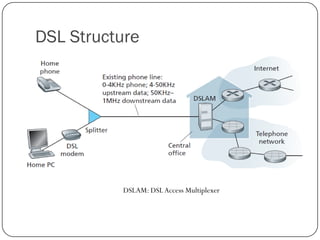
 DSL: digital subscriber line
 up to 1 Mbps upstream (today typically 500 kbps)
 up to 20 Mbps downstream (today typically 8 Mbps)
 FDM: 50 kHz - 1 MHz for downstream
4 kHz - 50 kHz for upstream
0 kHz - 4 kHz for ordinary telephone
DSL Structure

DSLAM: DSL Access Multiplexer
Cable Access

CMTS: Cable Modem Termination System
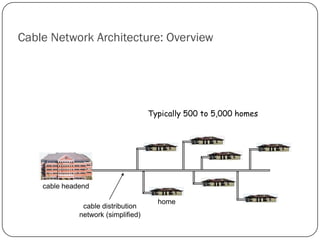
Cable Network Architecture: Overview

Typically 500 to 5,000 homes

cable headend
cable distribution
network (simplified)

home
Cable Network Architecture: Overview
FDM:

V
I
D
E
O

V
I
D
E
O

V
I
D
E
O

V
I
D
E
O

V
I
D
E
O

V
I
D
E
O

D
A
T
A

D
A
T
A

C
O
N
T
R
O
L

1

2

3

4

5

6

7

8

9

Channels

cable headend
cable distribution
network

home
Cable Network Architecture: Overview
server(s)

Fiber

Coax

cable headend
cable distribution
network

home
Cable Network Architecture: Overview

cable headend
cable distribution
network (simplified)

home
Fiber to the home (FTTH)
 Active Optical Network (AON) equivalent to Ethernet
 Passive Optical Network (PON)
PON
Downstream: 20Mbps
ONT: Optical Network Terminator
Splitter supports <100 ONT

OLT: Optical Line Terminator
converts optical signals to electrical
signals
Shared Fiber
Ethernet LAN
Wireless access networks
 shared wireless access network connects

end system to router

 via base station aka “access point”

 wireless LANs:
 802.11b/g (WiFi): 11 or 54 Mbps, @2.4
GHZ (range 100 m),
 802.11a 54 Mbps @ 5 GHz
 wider-area wireless access
 provided by telco operator
 3G ~ 384 kbps
 GPRS in Europe/US
 WiMax in US

router
base
station

mobile
hosts
Physical Media
 Bit: propagates between

transmitter/rcvr pairs
 physical link: what lies between
transmitter & receiver
 guided media:
 signals propagate in solid media:

copper, fiber, coax

 unguided media:
 signals propagate freely, e.g., radio

Twisted Pair (TP)
 two insulated copper wires
 Category 3: traditional phone wires, 10

(CAT-5)
Mbps Ethernet
 Category 5:
100 Mbps Ethernet
 Category 7
1 Gbps and 10 Gbps E'net
Physical Media: coax, fiber
Coaxial cable:
 two concentric copper

conductors
 bidirectional
 baseband:

 single channel on cable
 legacy Ethernet

 broadband:
 multiple channels on cable
 CATV HFC Fiber-Coax

Optical Fiber cable:

 glass fiber carrying light pulses,

each pulse a bit
 high-speed operation:
 high-speed point-to-point
transmission (e.g., 10’s-100’s Gps)
 low error rate: repeaters spaced
far apart ; immune to
electromagnetic noise
Lighted
Fiber
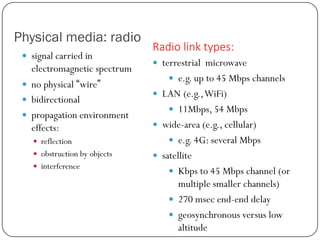
Physical media: radio
 signal carried in

electromagnetic spectrum
 no physical “wire”
 bidirectional
 propagation environment
effects:
 reflection
 obstruction by objects
 interference

Radio link types:
 terrestrial microwave
 e.g. up to 45 Mbps channels
 LAN (e.g., WiFi)
 11Mbps, 54 Mbps
 wide-area (e.g., cellular)

 e.g. 4G: several Mbps
 satellite
 Kbps to 45 Mbps channel (or

multiple smaller channels)
 270 msec end-end delay
 geosynchronous versus low
altitude
Important Terms
 DSL

 LAN

 DSLAM

 3G

 HFC

 LTE

 CMTS

 WiFi

 FTTH

 Physical Medium Types

 AON

 UTP

 PON

 Shared Medium

 ONT

 OC (Optical Carrier)

 OLT

 Geostationary Satellite

 LEO Satellite

Lec 2 and_3

  • 1.
    Network Edge Access Networksand Physical Media Engr. Abbas Abbasi
  • 2.
    Important Terms Review Host or End System  Communication Link  Transmission rate  Packet  Packet Switching  Route or Path  Router  Link Layer Switch  ISP  Protocol  TCP  IP  RFC  Distributed Application  API
  • 3.
    Chapter 1: roadmap 1.1What is the Internet? 1.2 Network edge 1.3 Network core Network access and physical media Internet structure and ISPs 1.4 Delay & loss in packet-switched networks 1.5 Protocol layers, service models 1.6 Networks under attack: security (covered in Chap. 8) 1.7 History
  • 4.
    A closer lookat network structure:  network edge: applications and hosts  network core:  routers  network of networks  access networks, physical media: communication links
  • 5.
    End Systems orHosts  PCs  Game Consoles (Xbox, Playstation)  Internet Ready TVs (Google TV)  Home Appliances  IP enabled phones  Cyber-Physical Systems  Industrial Systems (ECS)  Biomedical Devices (Body Area Network: BAN)  GPS Device
  • 6.
    Hosts  They arecalled hosts because they host (run) applications  Client  Servers  Data Centers  Content Distribution Networks (CDNs)  Write down five ways to connect to the Internet
  • 7.
    The network edge: end systems (hosts):  run application programs  e.g. Web, email  at “edge of network”  client/server model  client host requests, receives service from always-on server  e.g. Web browser/server; email client/server  peer-peer model:  minimal (or no) use of dedicated servers  e.g. Skype, BitTorrent, KaZaA
  • 8.
    Access Networks  network—the networkthat physically connects an end system to the first router (Edge Router) Home Network  WAN Mobile Network  Enterprise Network           DSL (Digital Subscriber Line) Cable FTTH (Fiber to the home) Dial-Up Satellite Ethernet WiFi (Wireless Fidelity) 3G (Third generation) LTE (Long Term Evolution)
  • 9.
    Network edge: connection-orientedservice Goal: data transfer between end systems  handshaking: setup (prepare for) data transfer ahead of time  Hello, hello back -human protocol  set up “state” in two communicating hosts TCP service [RFC 793]  reliable, in-order byte-stream data transfer  loss: acknowledgements and retransmissions  flow control:  sender won’t overwhelm receiver  TCP - Transmission Control  congestion control:  senders “slow down sending rate” Protocol when network congested  Internet’s connection-oriented service
  • 10.
    Network edge: connectionlessservice Goal: data transfer between end systems  same as before!  UDP - User Datagram Protocol [RFC 768]: connectionless unreliable data transfer no flow control no congestion control App’s using TCP:  HTTP (Web), FTP (file transfer), Telnet (remote login), SMTP (email) App’s using UDP:  streaming media, teleconferencing, DNS, Internet telephony, Domain Name lookup, Time lookup.
  • 11.
    Access networks andphysical media Q: How to connect end systems to edge router?  residential access nets  institutional access networks (school, company)  mobile access networks Keep in mind:  bandwidth (bits per second) of access network?  shared or dedicated?
  • 12.
    Residential access  Dialupvia modem  up to 56Kbps direct access to router (often less)  Can not surf and phone at same time: can’t be “always on”  DSL: digital subscriber line  up to 1 Mbps upstream (today typically 500 kbps)  up to 20 Mbps downstream (today typically 8 Mbps)  FDM: 50 kHz - 1 MHz for downstream 4 kHz - 50 kHz for upstream 0 kHz - 4 kHz for ordinary telephone
  • 13.
    DSL Structure DSLAM: DSLAccess Multiplexer
  • 14.
    Cable Access CMTS: CableModem Termination System
  • 15.
    Cable Network Architecture:Overview Typically 500 to 5,000 homes cable headend cable distribution network (simplified) home
  • 16.
    Cable Network Architecture:Overview FDM: V I D E O V I D E O V I D E O V I D E O V I D E O V I D E O D A T A D A T A C O N T R O L 1 2 3 4 5 6 7 8 9 Channels cable headend cable distribution network home
  • 17.
    Cable Network Architecture:Overview server(s) Fiber Coax cable headend cable distribution network home
  • 18.
    Cable Network Architecture:Overview cable headend cable distribution network (simplified) home
  • 19.
    Fiber to thehome (FTTH)  Active Optical Network (AON) equivalent to Ethernet  Passive Optical Network (PON)
  • 20.
    PON Downstream: 20Mbps ONT: OpticalNetwork Terminator Splitter supports <100 ONT OLT: Optical Line Terminator converts optical signals to electrical signals Shared Fiber
  • 21.
  • 22.
    Wireless access networks shared wireless access network connects end system to router  via base station aka “access point”  wireless LANs:  802.11b/g (WiFi): 11 or 54 Mbps, @2.4 GHZ (range 100 m),  802.11a 54 Mbps @ 5 GHz  wider-area wireless access  provided by telco operator  3G ~ 384 kbps  GPRS in Europe/US  WiMax in US router base station mobile hosts
  • 23.
    Physical Media  Bit:propagates between transmitter/rcvr pairs  physical link: what lies between transmitter & receiver  guided media:  signals propagate in solid media: copper, fiber, coax  unguided media:  signals propagate freely, e.g., radio Twisted Pair (TP)  two insulated copper wires  Category 3: traditional phone wires, 10 (CAT-5) Mbps Ethernet  Category 5: 100 Mbps Ethernet  Category 7 1 Gbps and 10 Gbps E'net
  • 24.
    Physical Media: coax,fiber Coaxial cable:  two concentric copper conductors  bidirectional  baseband:  single channel on cable  legacy Ethernet  broadband:  multiple channels on cable  CATV HFC Fiber-Coax Optical Fiber cable:  glass fiber carrying light pulses, each pulse a bit  high-speed operation:  high-speed point-to-point transmission (e.g., 10’s-100’s Gps)  low error rate: repeaters spaced far apart ; immune to electromagnetic noise Lighted Fiber
  • 25.
    Physical media: radio signal carried in electromagnetic spectrum  no physical “wire”  bidirectional  propagation environment effects:  reflection  obstruction by objects  interference Radio link types:  terrestrial microwave  e.g. up to 45 Mbps channels  LAN (e.g., WiFi)  11Mbps, 54 Mbps  wide-area (e.g., cellular)  e.g. 4G: several Mbps  satellite  Kbps to 45 Mbps channel (or multiple smaller channels)  270 msec end-end delay  geosynchronous versus low altitude
  • 26.
    Important Terms  DSL LAN  DSLAM  3G  HFC  LTE  CMTS  WiFi  FTTH  Physical Medium Types  AON  UTP  PON  Shared Medium  ONT  OC (Optical Carrier)  OLT  Geostationary Satellite  LEO Satellite