Computer Communication
Networks
3 - Internet Architecture
Instructor: Ashkan Farhangi
Email: ashkan.farhangi@ucf.edu
Outline
▪ Overview of the Internet
▪ Network Edge
▪ Access Network
▪ Network’s Core
2
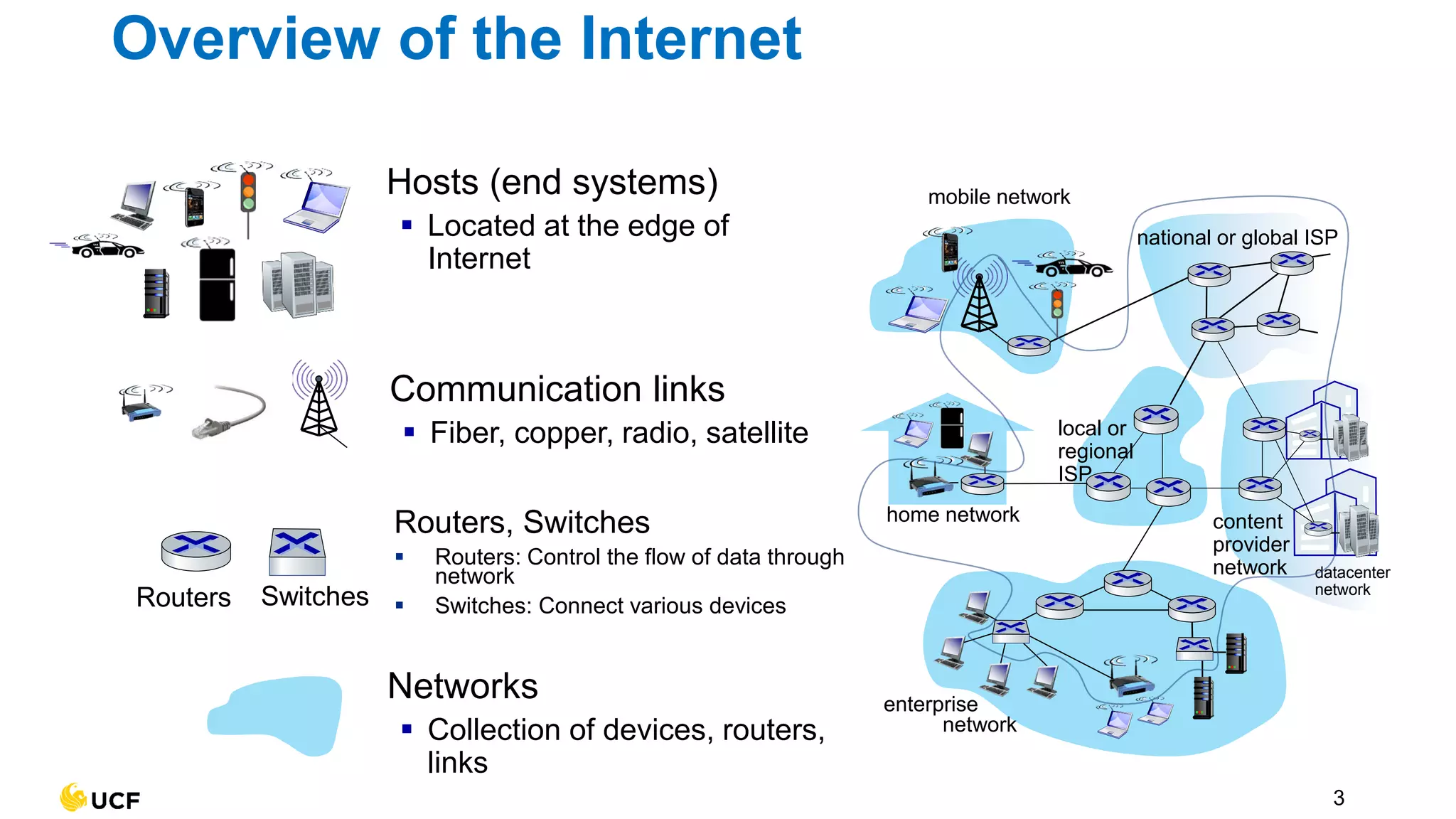
Internet
mobile network
home network
enterprise
network
national or global ISP
local or
regional
ISP
datacenter
network
content
provider
network
Communication links
▪ Fiber, copper, radio, satellite
Hosts (end systems)
▪ Located at the edge of
Internet
Networks
▪ Collection of devices, routers,
links
3
Overview of the Internet
Routers, Switches
▪ Routers: Control the flow of data through
network
▪ Switches: Connect various devices
Routers Switches
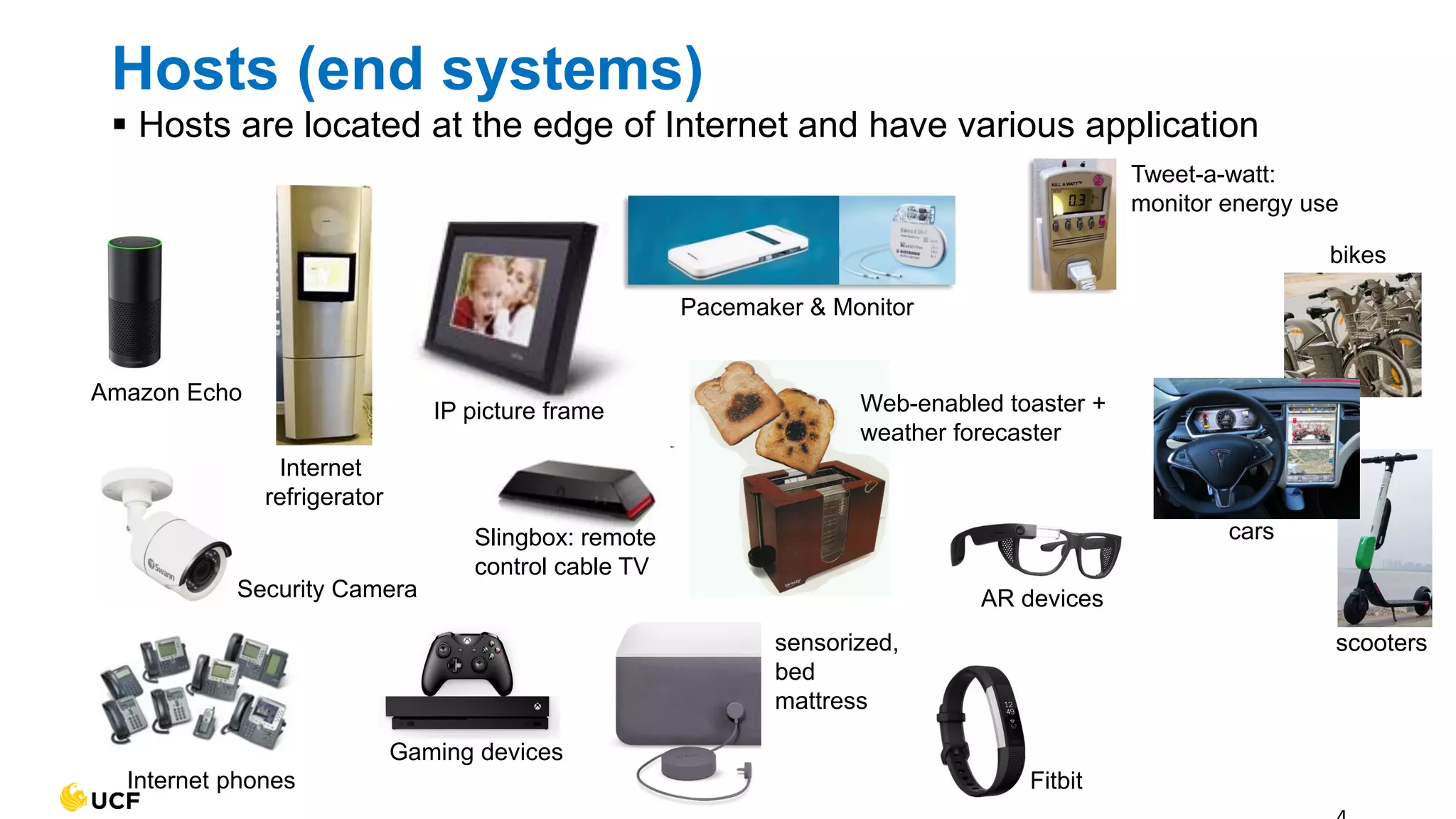
Web-enabled toaster +
weather forecaster
Internet phones
Slingbox: remote
control cable TV
Security Camera
IP picture frame
Internet
refrigerator
Tweet-a-watt:
monitor energy use
sensorized,
bed
mattress
Amazon Echo
Pacemaker & Monitor
AR devices
Fitbit
Gaming devices
cars
scooters
bikes
Hosts (end systems)
▪ Hosts are located at the edge of Internet and have various application
5
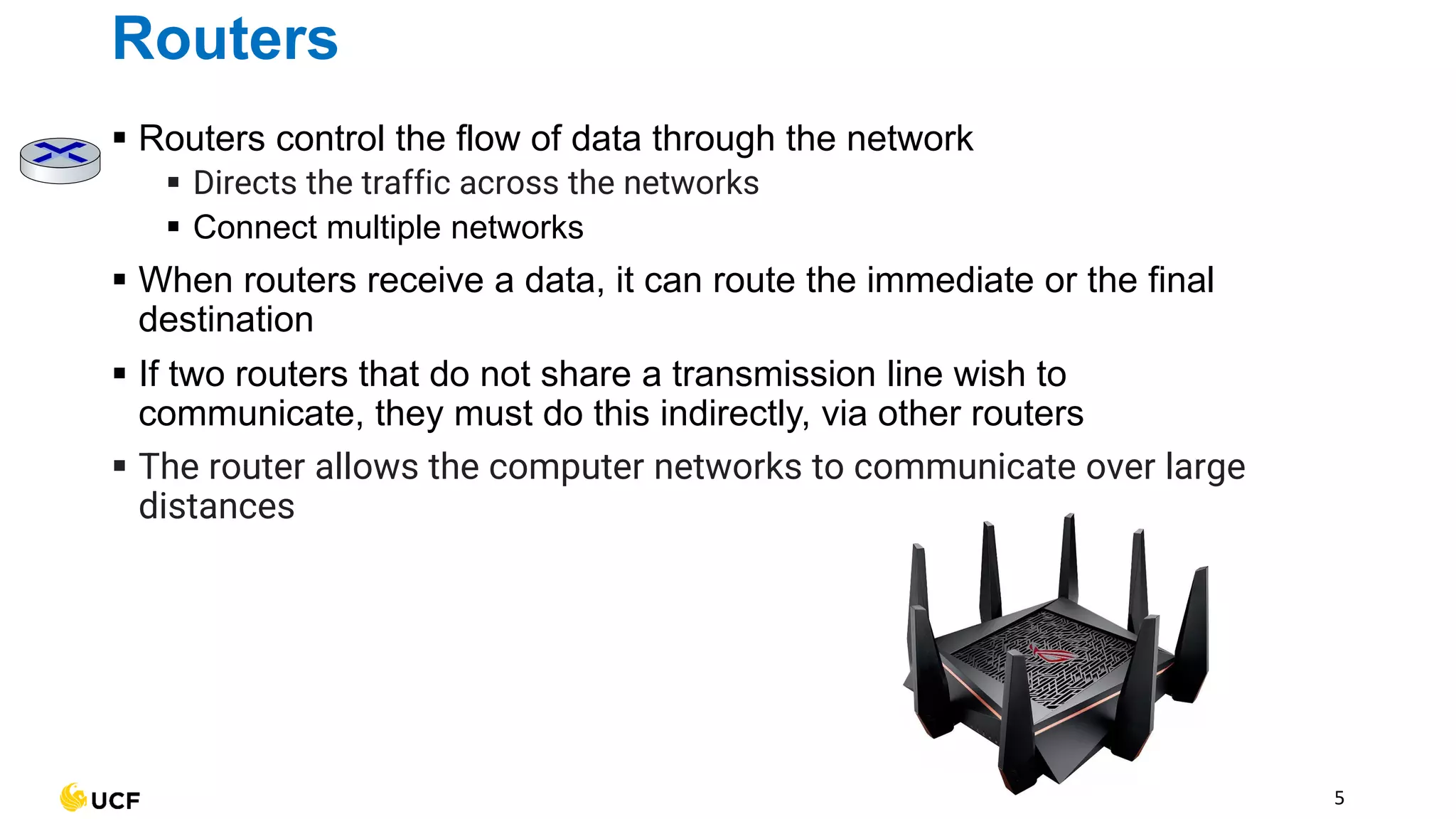
Routers
▪ Routers control the flow of data through the network
▪ Directs the traffic across the networks
▪ Connect multiple networks
▪ When routers receive a data, it can route the immediate or the final
destination
▪ If two routers that do not share a transmission line wish to
communicate, they must do this indirectly, via other routers
▪ The router allows the computer networks to communicate over large
distances
6
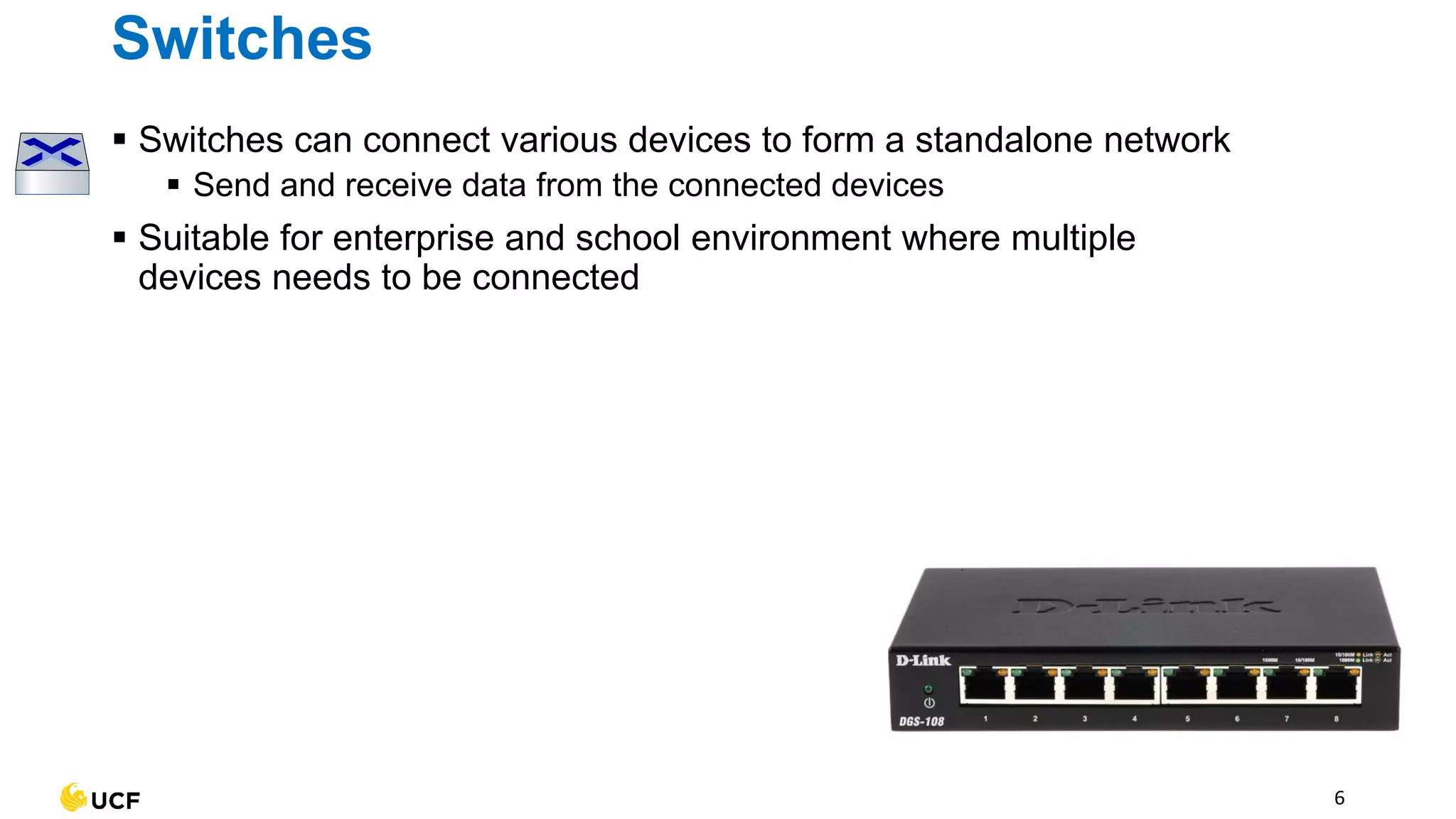
Switches
▪ Switches can connect various devices to form a standalone network
▪ Send and receive data from the connected devices
▪ Suitable for enterprise and school environment where multiple
devices needs to be connected
Can switches function as
routers?
9
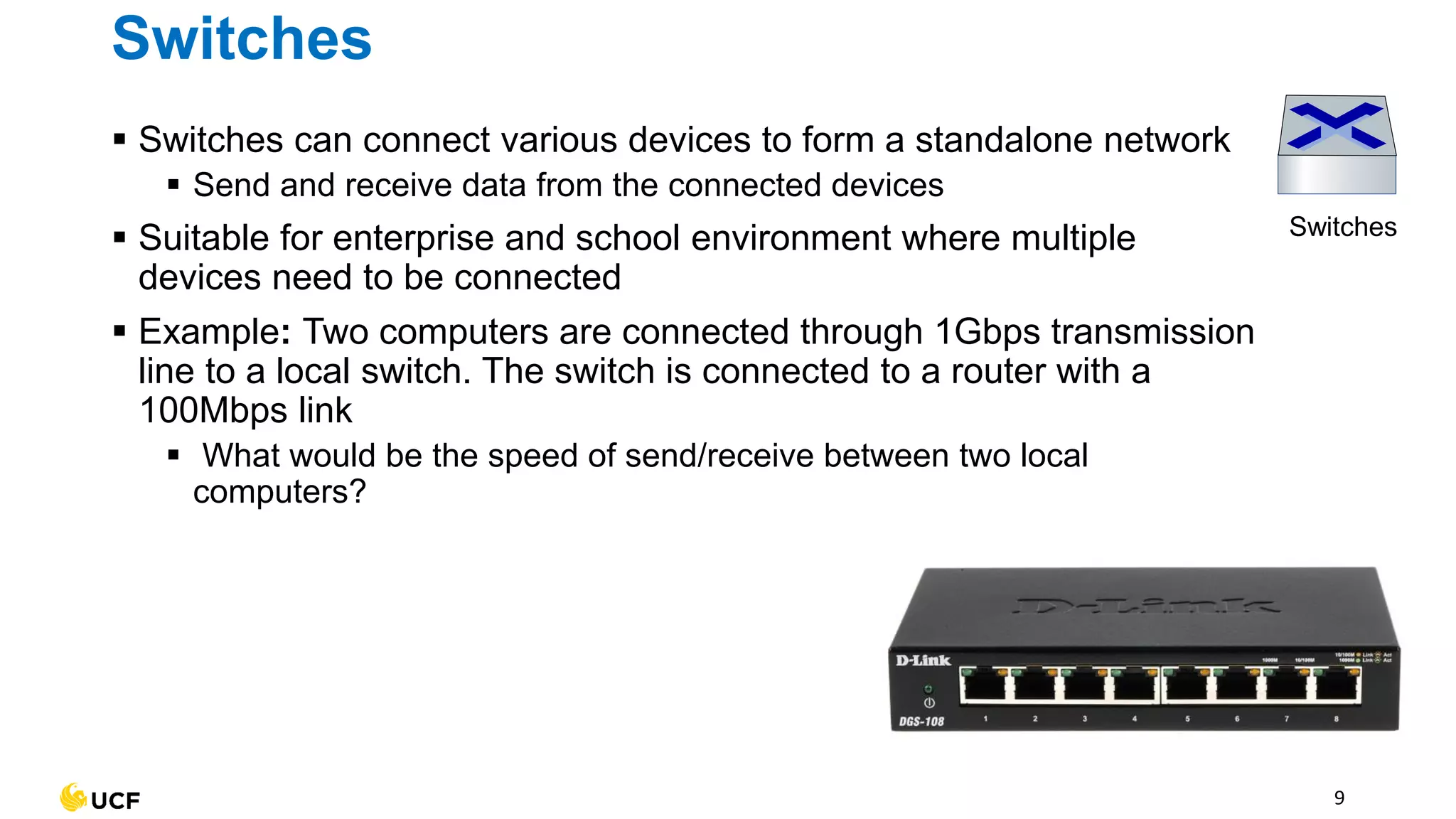
Switches
Switches
▪ Switches can connect various devices to form a standalone network
▪ Send and receive data from the connected devices
▪ Suitable for enterprise and school environment where multiple
devices need to be connected
▪ Example: Two computers are connected through 1Gbps transmission
line to a local switch. The switch is connected to a router with a
100Mbps link
▪ What would be the speed of send/receive between two local
computers?
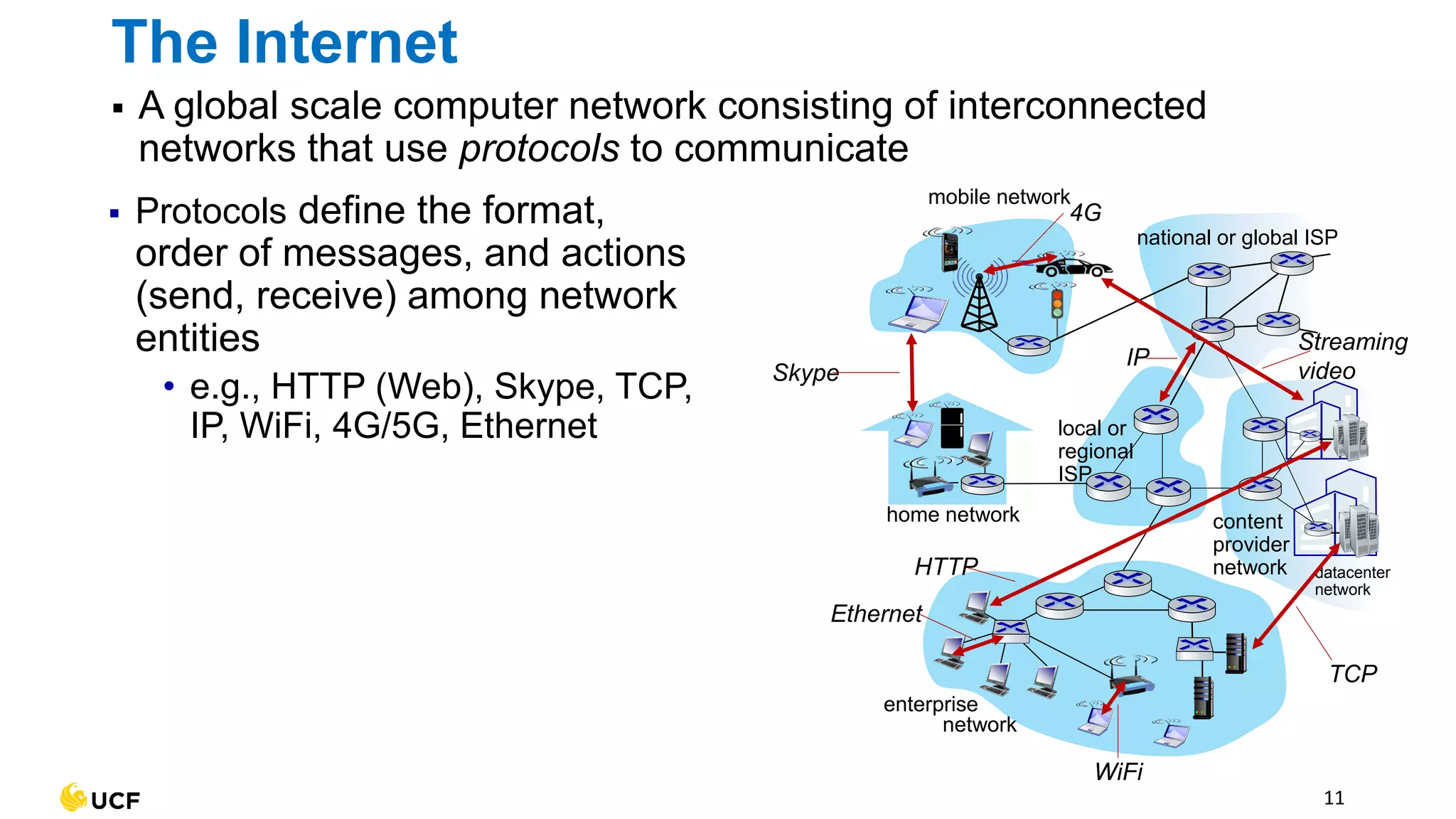
▪ A global scale computer network consisting of interconnected
networks that use protocols to communicate
11
The Internet
mobile network
home network
enterprise
network
national or global ISP
local or
regional
ISP
datacenter
network
content
provider
network
▪ Protocols define the format,
order of messages, and actions
(send, receive) among network
entities
• e.g., HTTP (Web), Skype, TCP,
IP, WiFi, 4G/5G, Ethernet
Ethernet
HTTP
Skype
IP
WiFi
4G
TCP
Streaming
video
A bigger network than the
Internet?
13
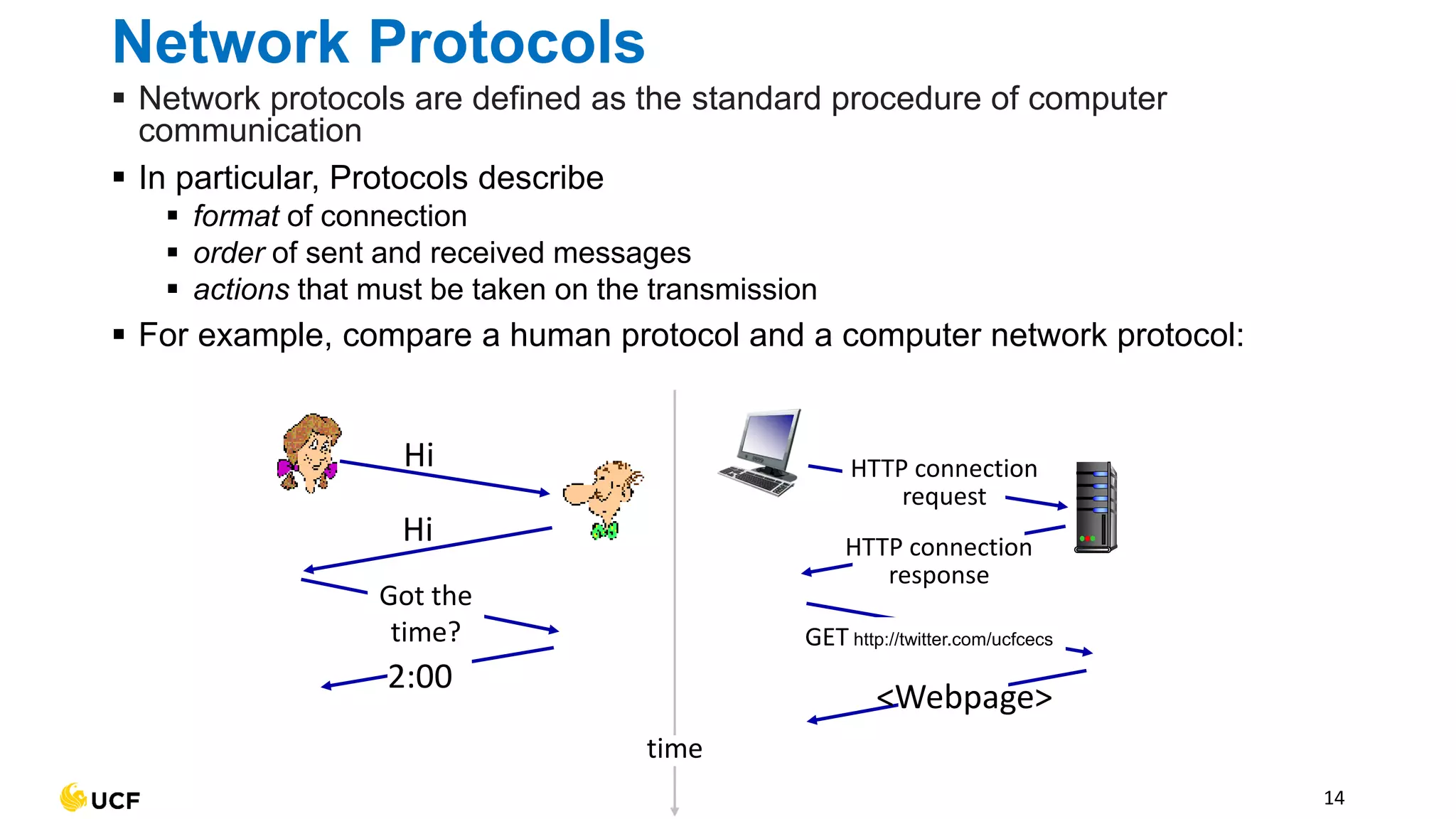
Network Protocols
Hi
Hi
Got the
time?
2:00
time
HTTP connection
response
<Webpage>
HTTP connection
request
GET http://twitter.com/ucfcecs
14
▪ Network protocols are defined as the standard procedure of computer
communication
▪ In particular, Protocols describe
▪ format of connection
▪ order of sent and received messages
▪ actions that must be taken on the transmission
▪ For example, compare a human protocol and a computer network protocol:
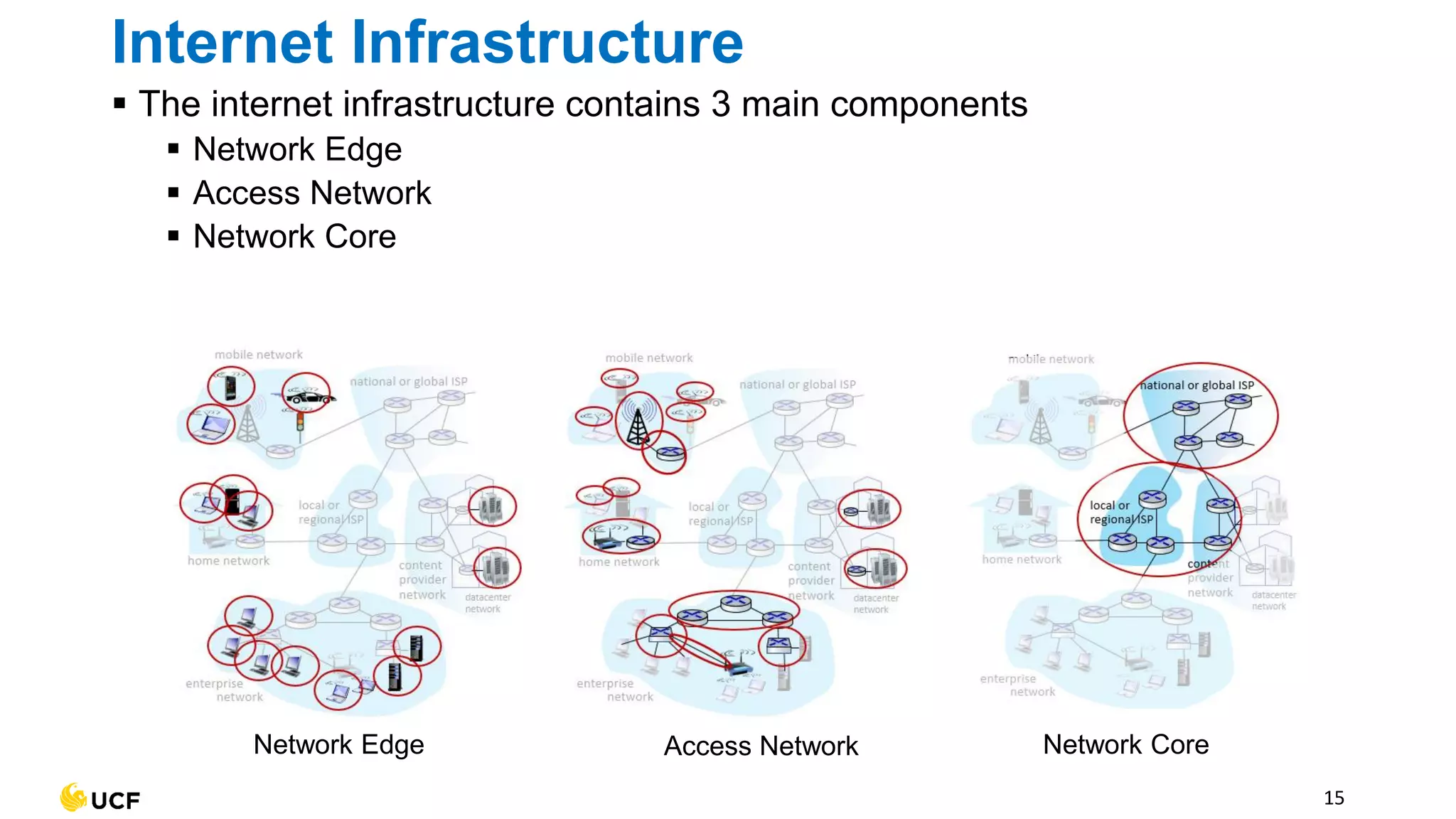
▪ The internet infrastructure contains 3 main components
▪ Network Edge
▪ Access Network
▪ Network Core
15
Internet Infrastructure
Network Edge Access Network Network Core
Network Edge
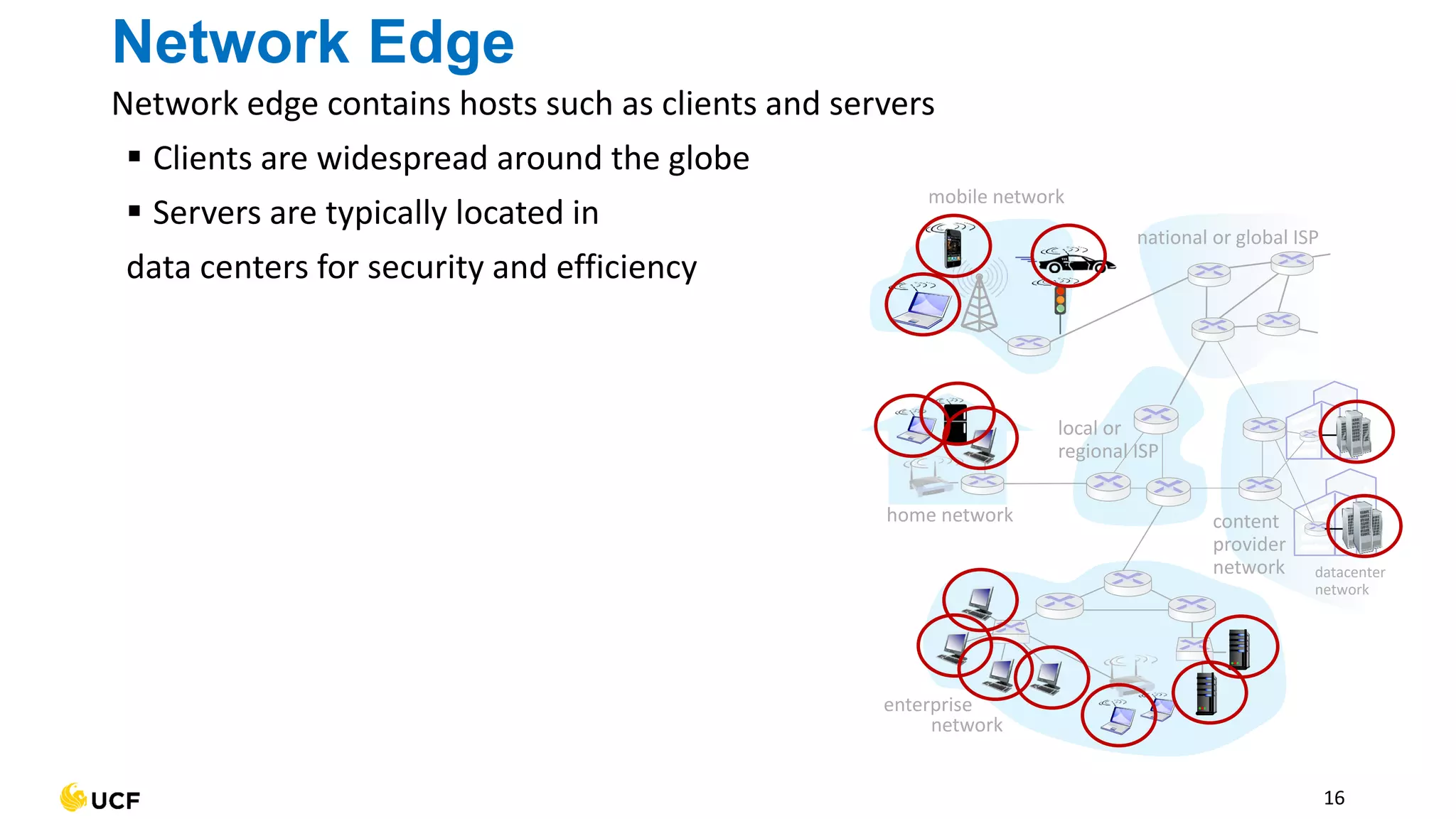
Network edge contains hosts such as clients and servers
▪ Clients are widespread around the globe
▪ Servers are typically located in
data centers for security and efficiency
16
mobile network
home network
enterprise
network
national or global ISP
local or
regional ISP
datacenter
network
content
provider
network
Access network
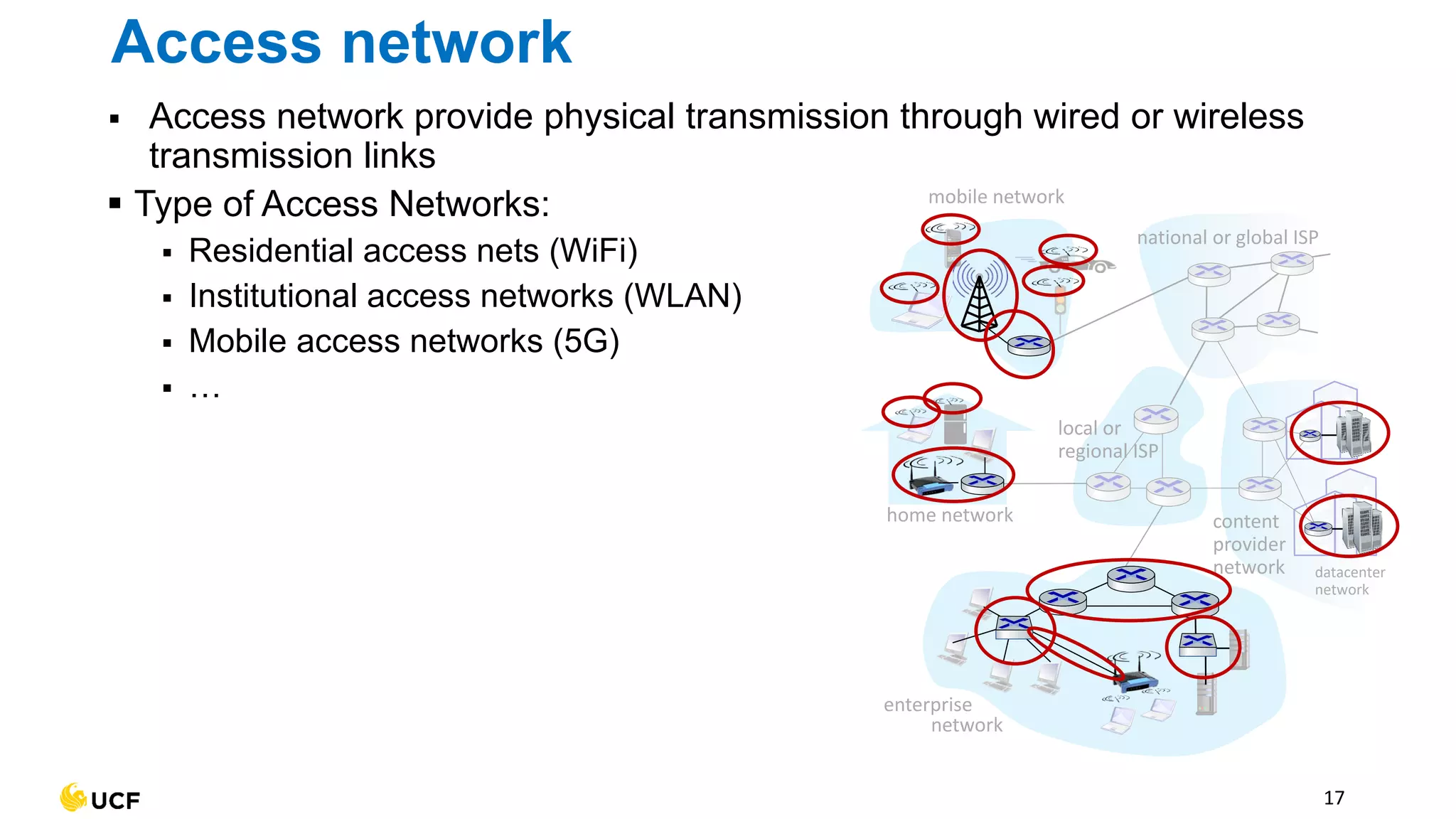
▪ Access network provide physical transmission through wired or wireless
transmission links
▪ Type of Access Networks:
▪ Residential access nets (WiFi)
▪ Institutional access networks (WLAN)
▪ Mobile access networks (5G)
▪ …
17
mobile network
home network
enterprise
network
national or global ISP
local or
regional ISP
datacenter
network
content
provider
network
Access networks and physical media
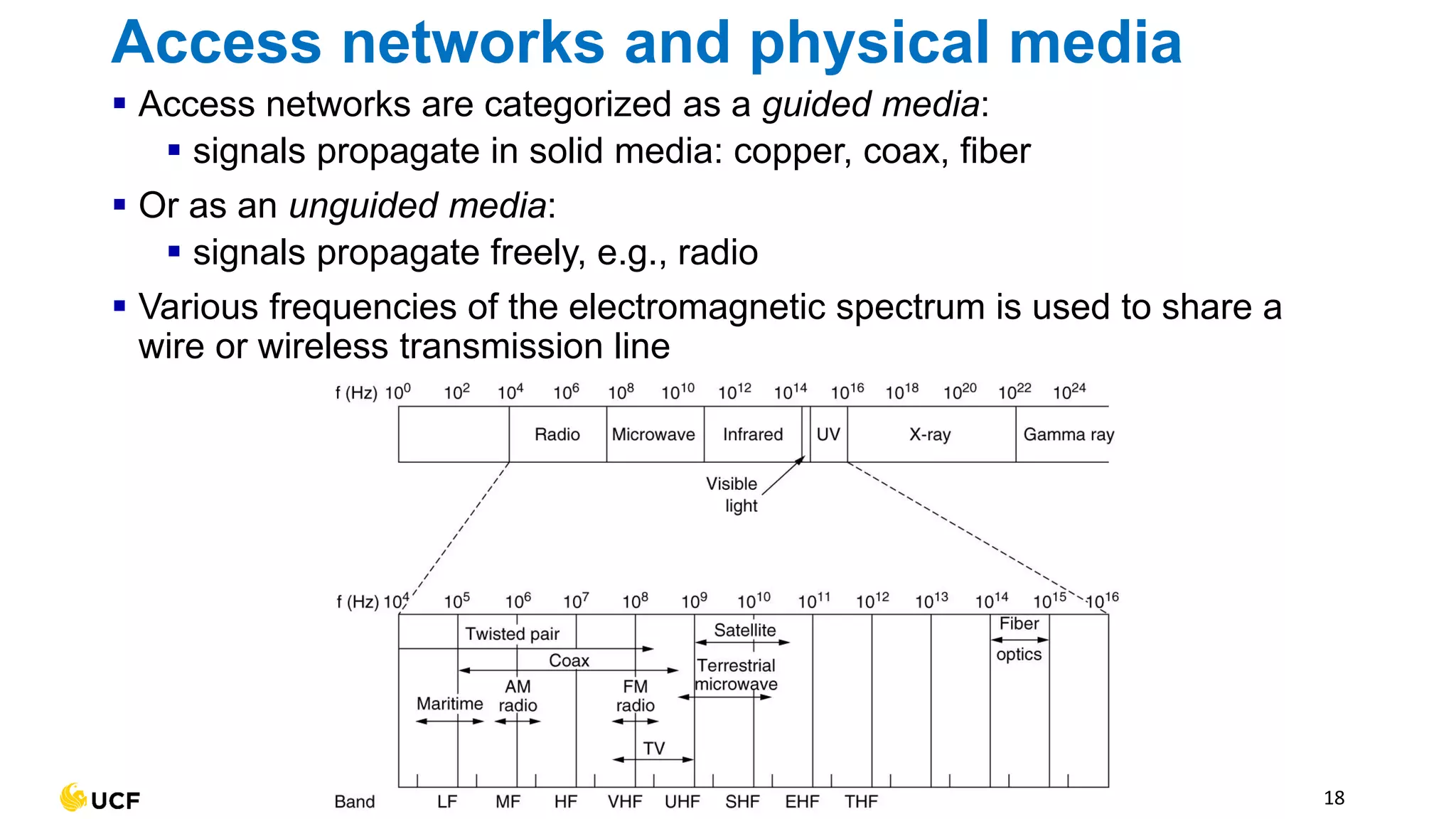
▪ Access networks are categorized as a guided media:
▪ signals propagate in solid media: copper, coax, fiber
▪ Or as an unguided media:
▪ signals propagate freely, e.g., radio
▪ Various frequencies of the electromagnetic spectrum is used to share a
wire or wireless transmission line
18
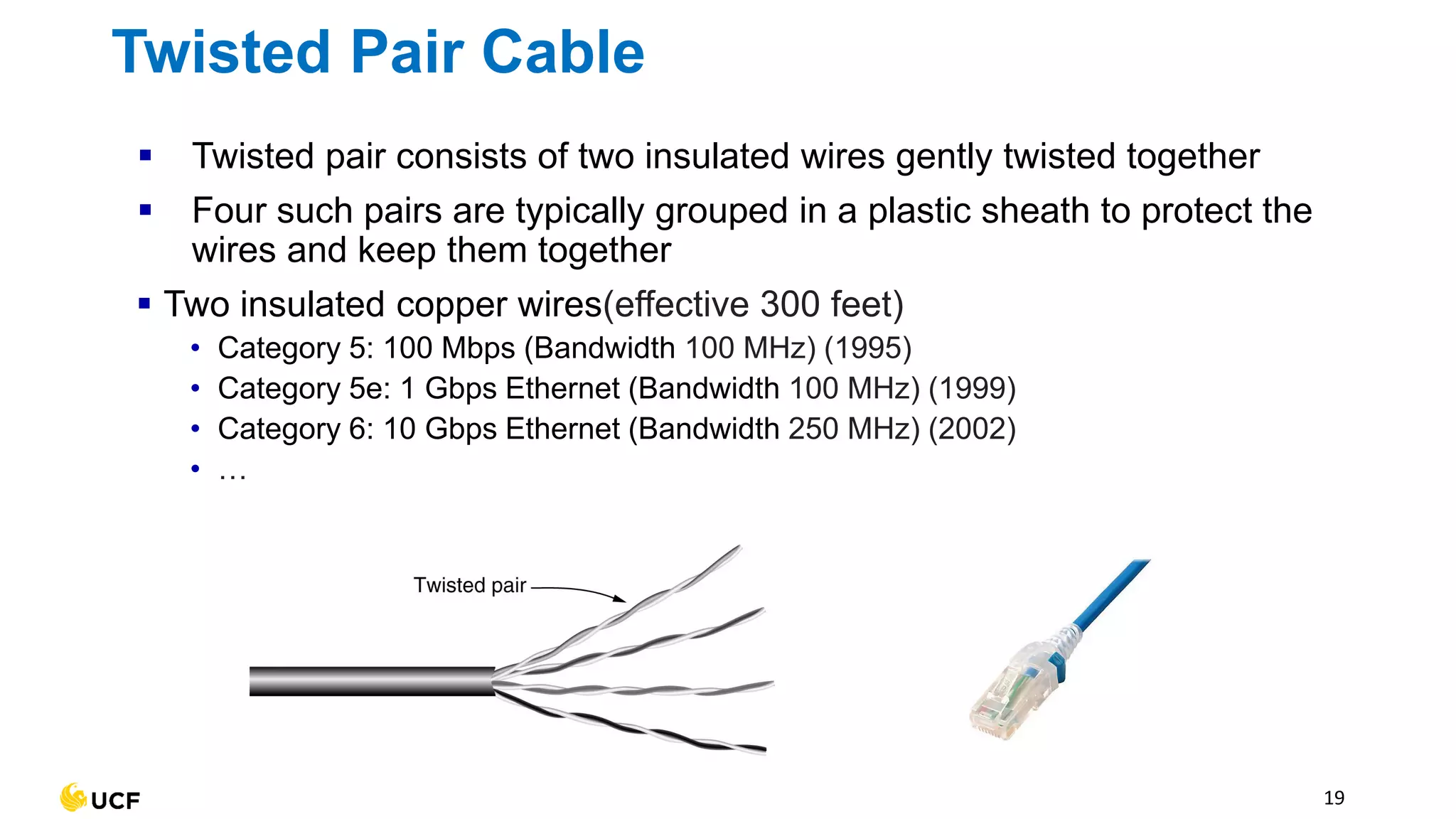
▪ Twisted pair consists of two insulated wires gently twisted together
▪ Four such pairs are typically grouped in a plastic sheath to protect the
wires and keep them together
▪ Two insulated copper wires(effective 300 feet)
• Category 5: 100 Mbps (Bandwidth 100 MHz) (1995)
• Category 5e: 1 Gbps Ethernet (Bandwidth 100 MHz) (1999)
• Category 6: 10 Gbps Ethernet (Bandwidth 250 MHz) (2002)
• …
19
Twisted Pair Cable
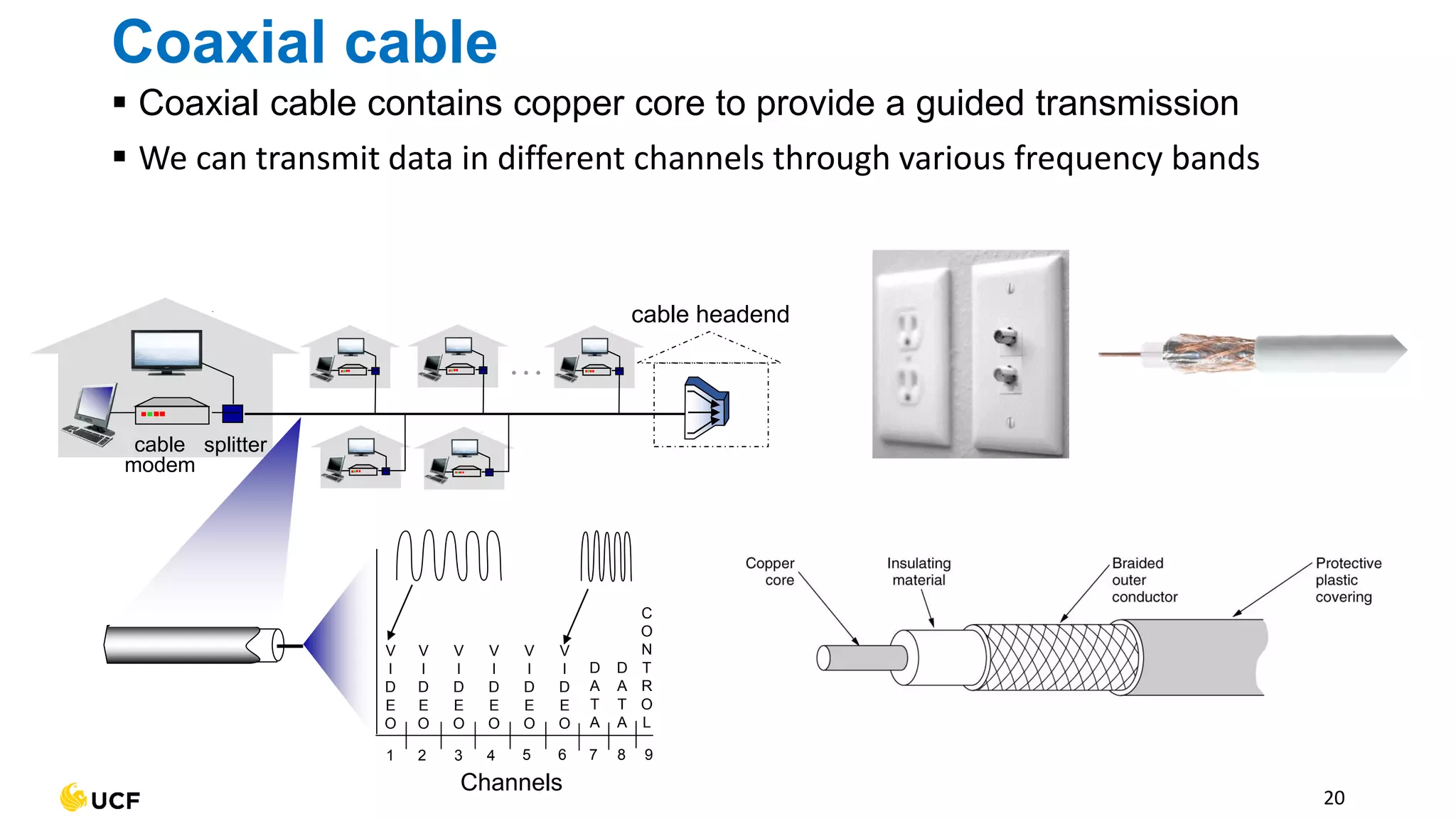
Coaxial cable
▪ Coaxial cable contains copper core to provide a guided transmission
▪ We can transmit data in different channels through various frequency bands
20
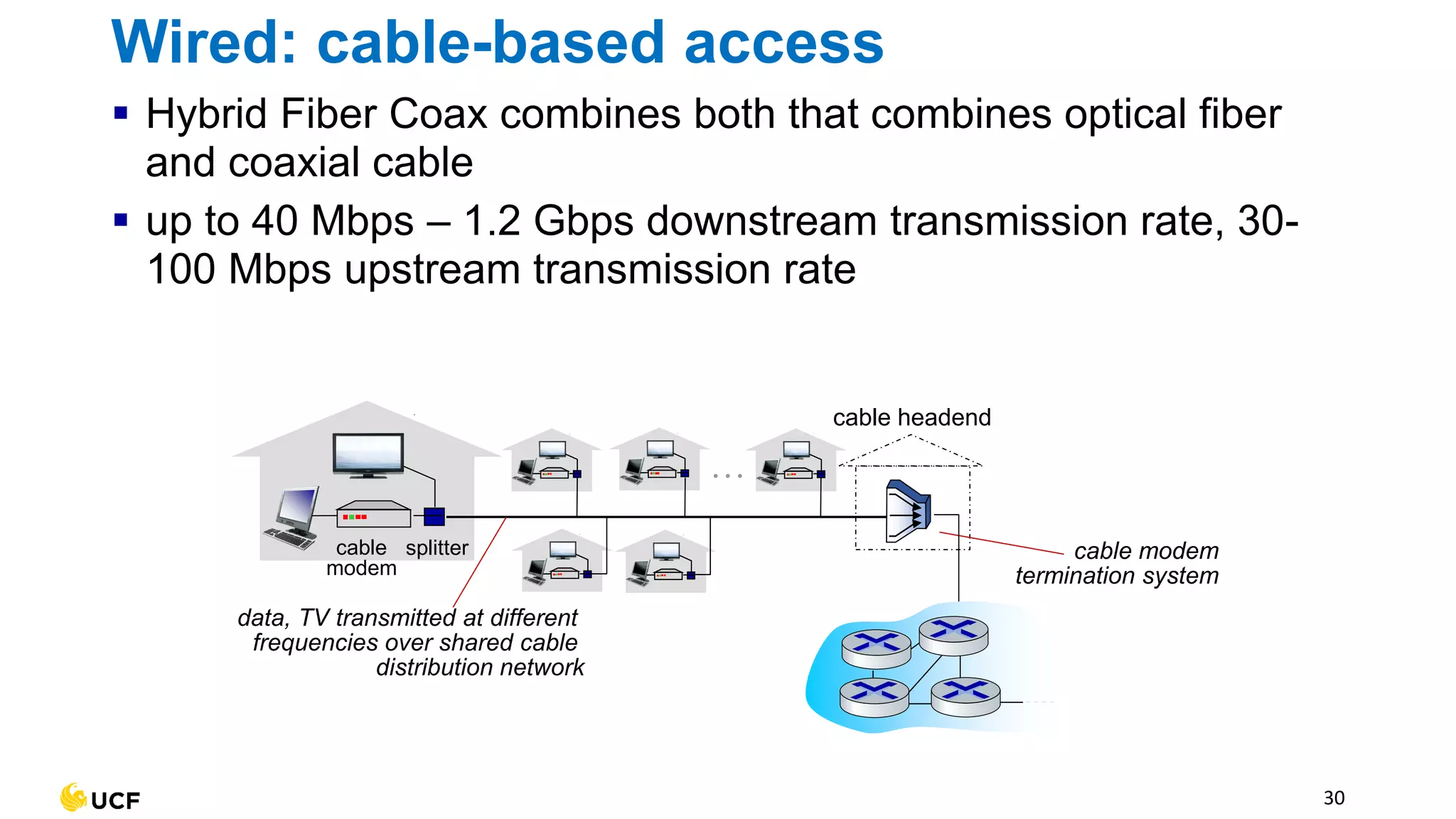
cable
modem
splitter
…
cable headend
Channels
V
I
D
E
O
V
I
D
E
O
V
I
D
E
O
V
I
D
E
O
V
I
D
E
O
V
I
D
E
O
D
A
T
A
D
A
T
A
C
O
N
T
R
O
L
1 2 3 4 5 6 7 8 9
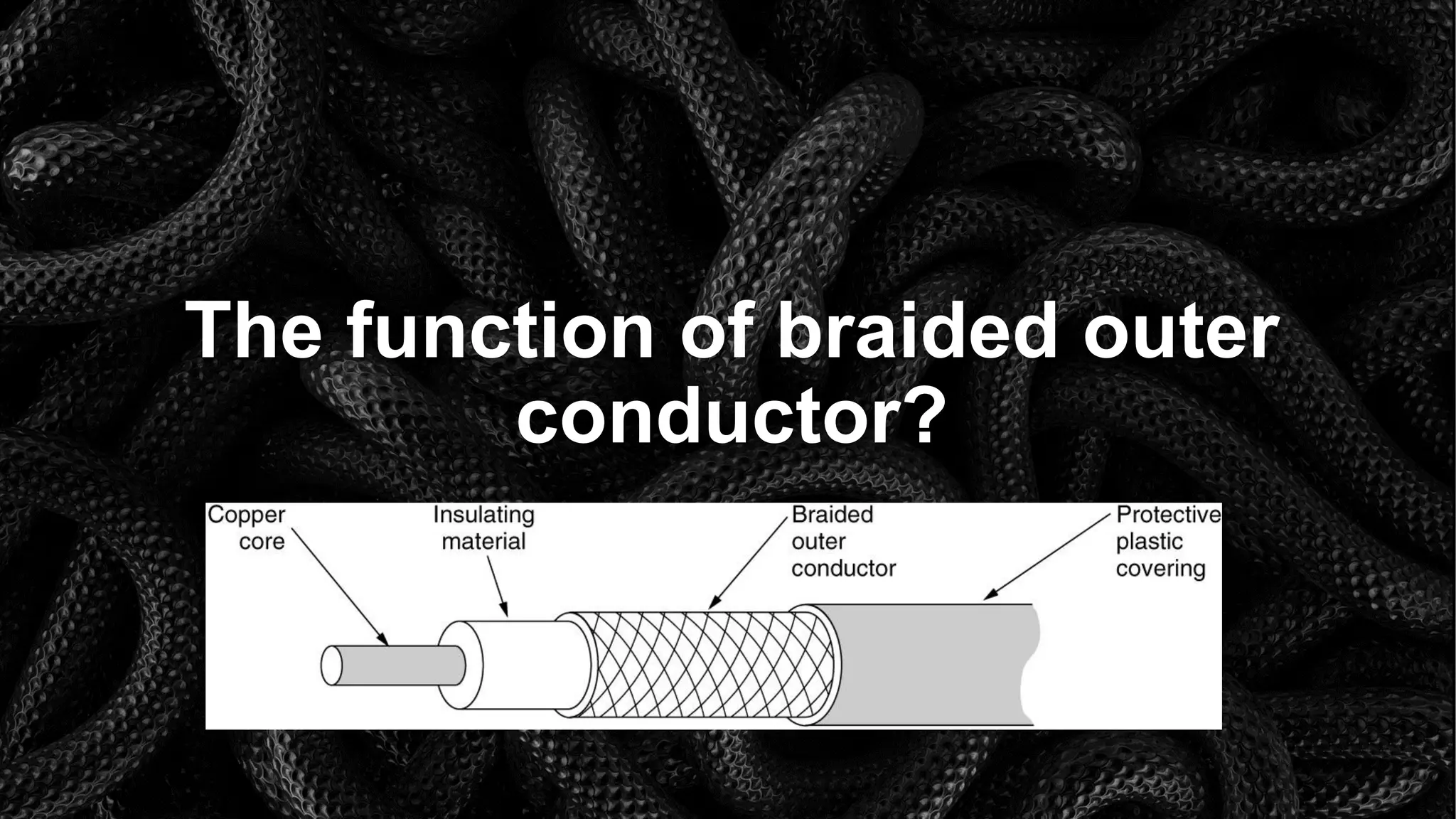
The function of braided outer
conductor?
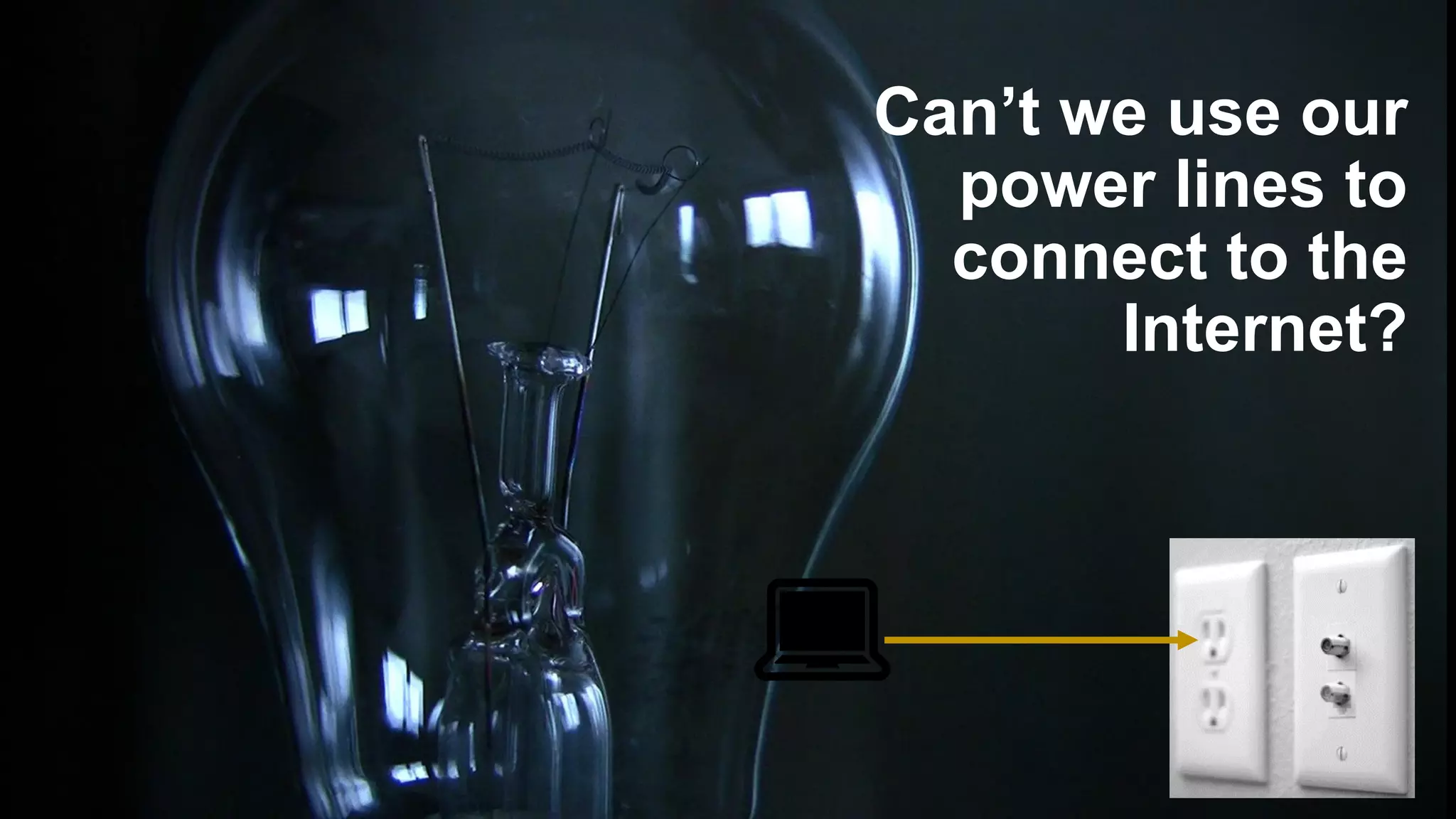
Can’t we use our
power lines to
connect to the
Internet?
💻
Power Lines
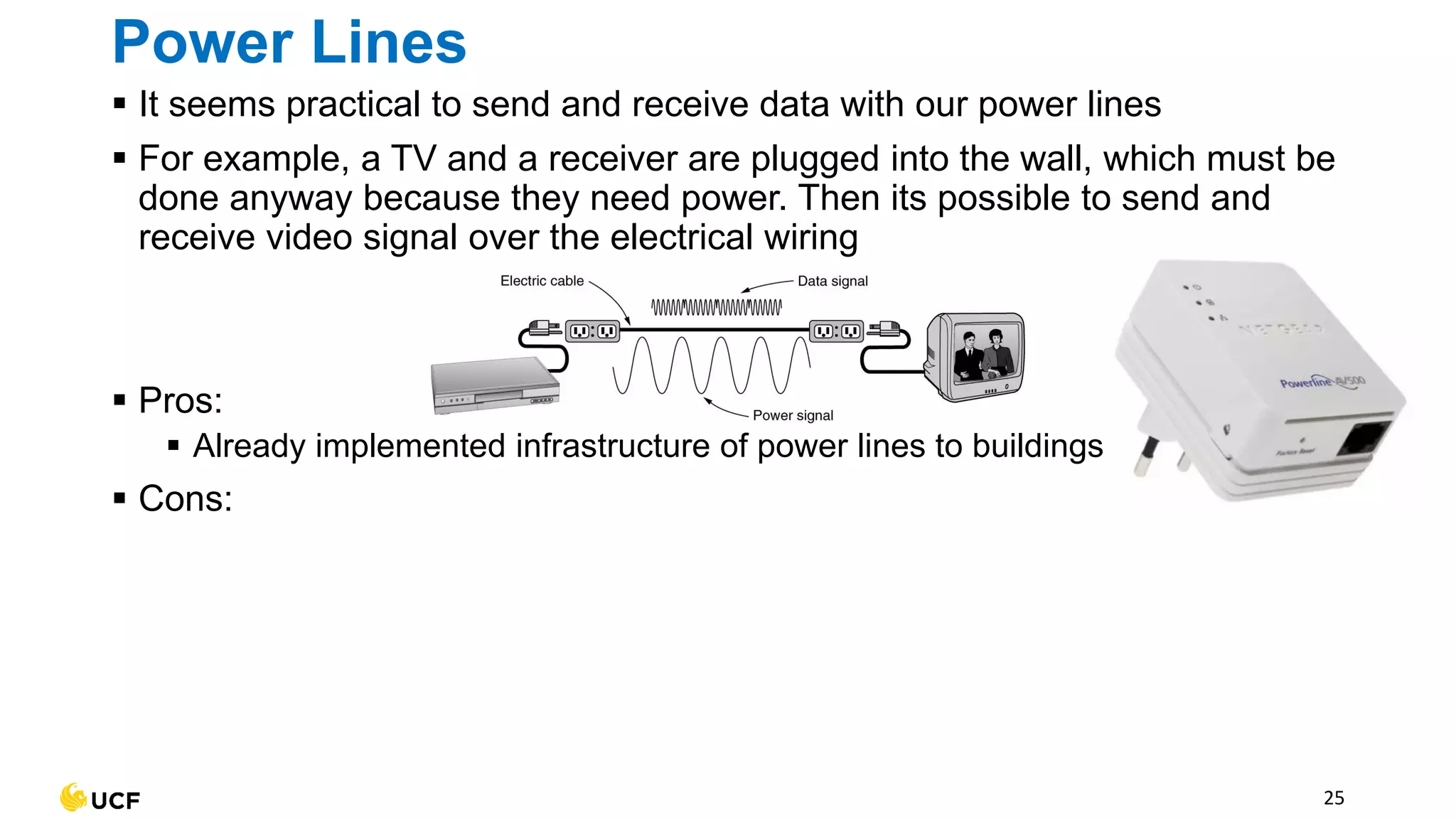
▪ It seems practical to send and receive data with our power lines
▪ For example, a TV and a receiver are plugged into the wall, which must be
done anyway because they need power. Then its possible to send and
receive video signal over the electrical wiring
▪ Pros:
▪ Already implemented infrastructure of power lines to buildings
▪ Cons:
25
Power Lines
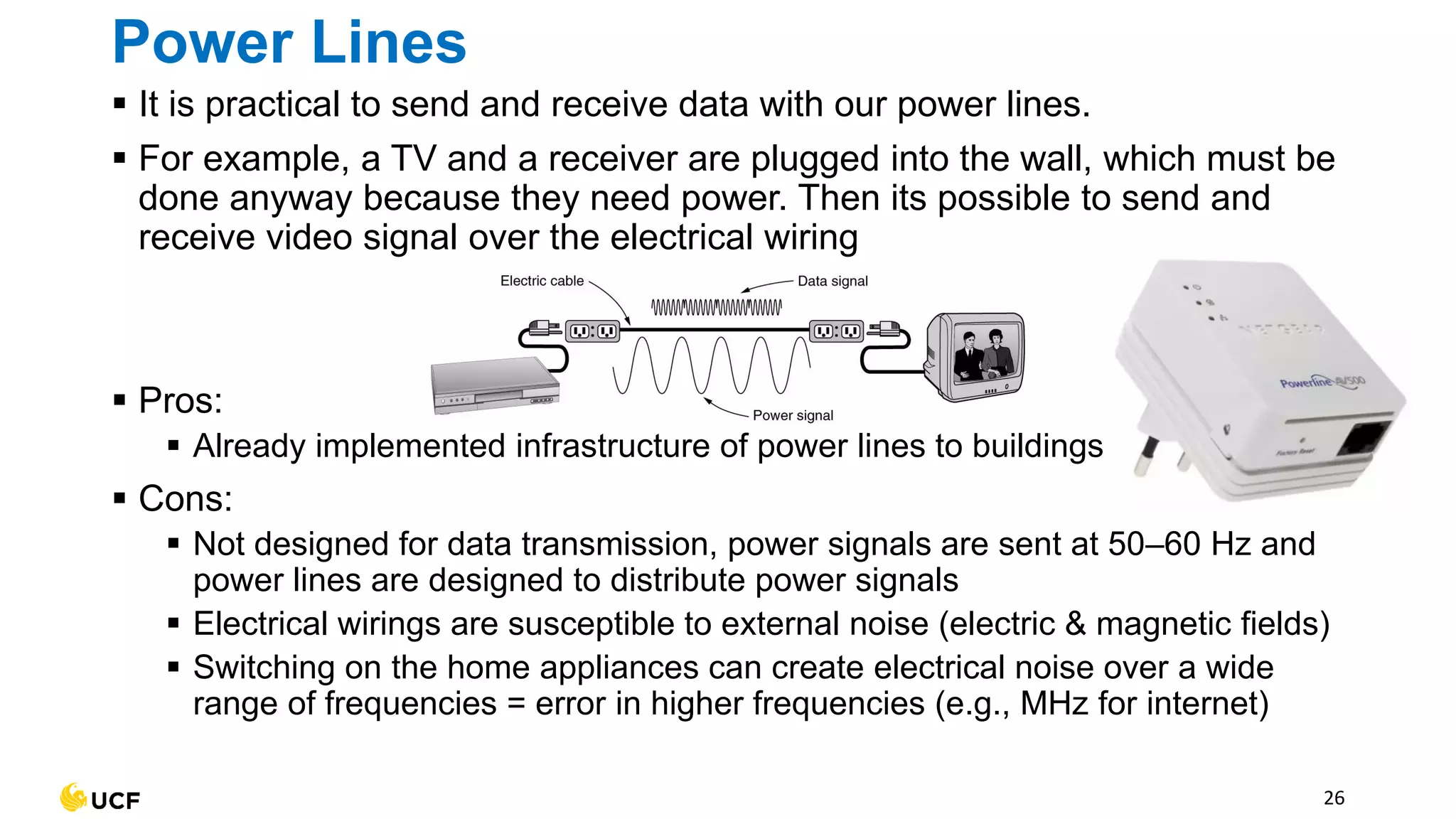
▪ It is practical to send and receive data with our power lines.
▪ For example, a TV and a receiver are plugged into the wall, which must be
done anyway because they need power. Then its possible to send and
receive video signal over the electrical wiring
▪ Pros:
▪ Already implemented infrastructure of power lines to buildings
▪ Cons:
▪ Not designed for data transmission, power signals are sent at 50–60 Hz and
power lines are designed to distribute power signals
▪ Electrical wirings are susceptible to external noise (electric & magnetic fields)
▪ Switching on the home appliances can create electrical noise over a wide
range of frequencies = error in higher frequencies (e.g., MHz for internet)
26
27
Fiber Optic Cable
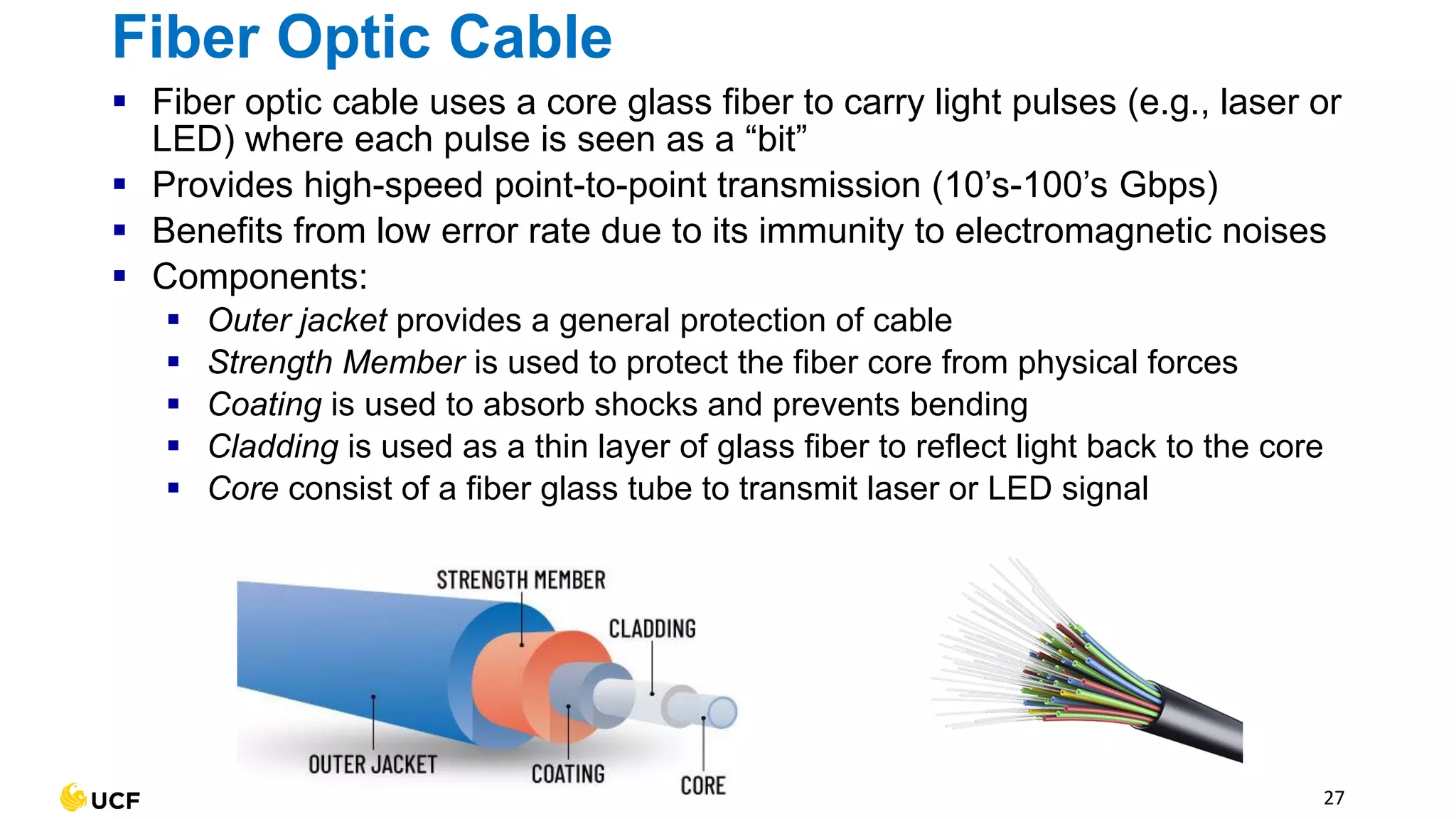
▪ Fiber optic cable uses a core glass fiber to carry light pulses (e.g., laser or
LED) where each pulse is seen as a “bit”
▪ Provides high-speed point-to-point transmission (10’s-100’s Gbps)
▪ Benefits from low error rate due to its immunity to electromagnetic noises
▪ Components:
▪ Outer jacket provides a general protection of cable
▪ Strength Member is used to protect the fiber core from physical forces
▪ Coating is used to absorb shocks and prevents bending
▪ Cladding is used as a thin layer of glass fiber to reflect light back to the core
▪ Core consist of a fiber glass tube to transmit laser or LED signal
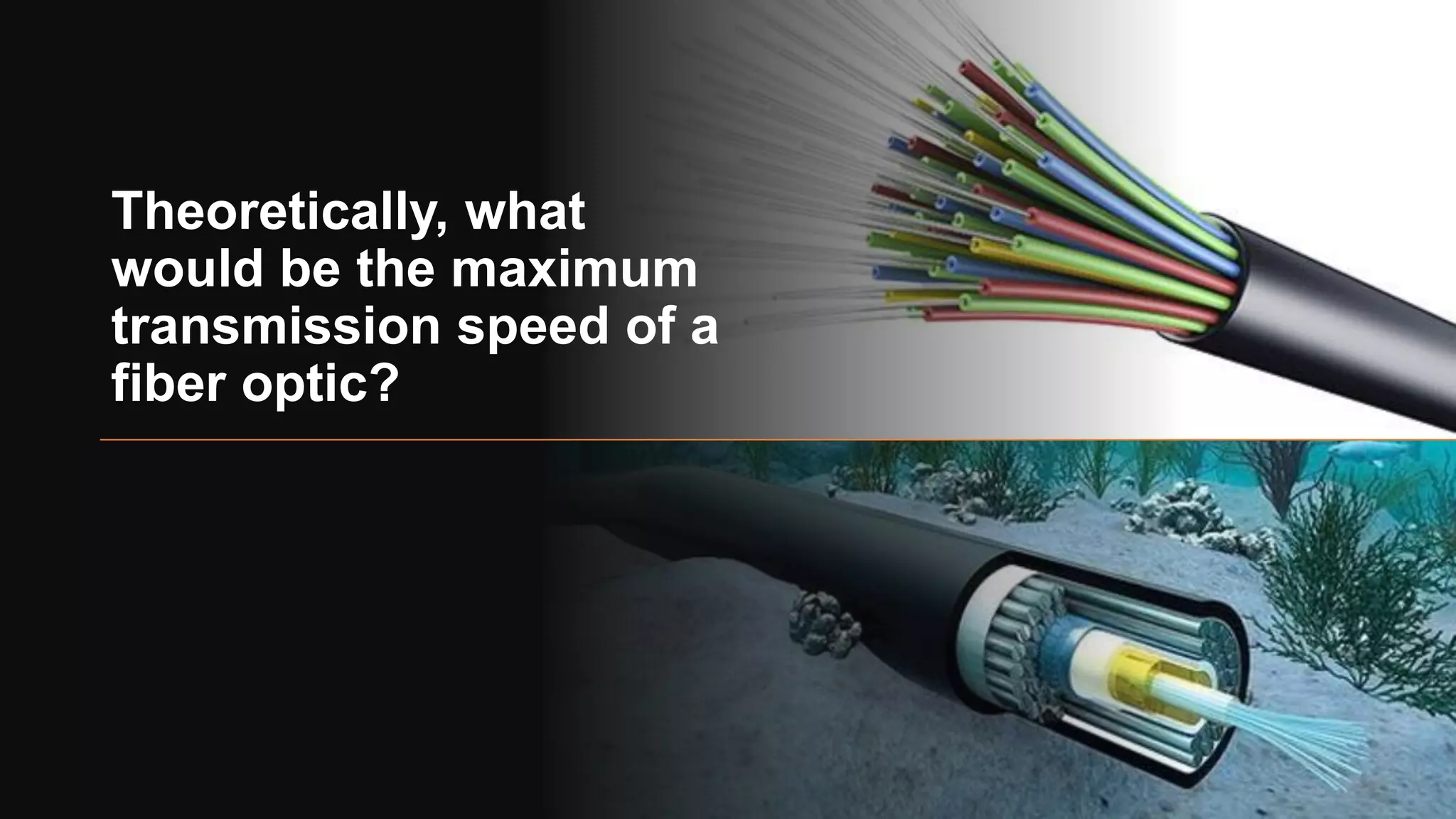
Theoretically, what
would be the maximum
transmission speed of a
fiber optic?
cable
modem
splitter
…
cable headend
data, TV transmitted at different
frequencies over shared cable
distribution network
cable modem
termination system
30
Wired: cable-based access
▪ Hybrid Fiber Coax combines both that combines optical fiber
and coaxial cable
▪ up to 40 Mbps – 1.2 Gbps downstream transmission rate, 30-
100 Mbps upstream transmission rate
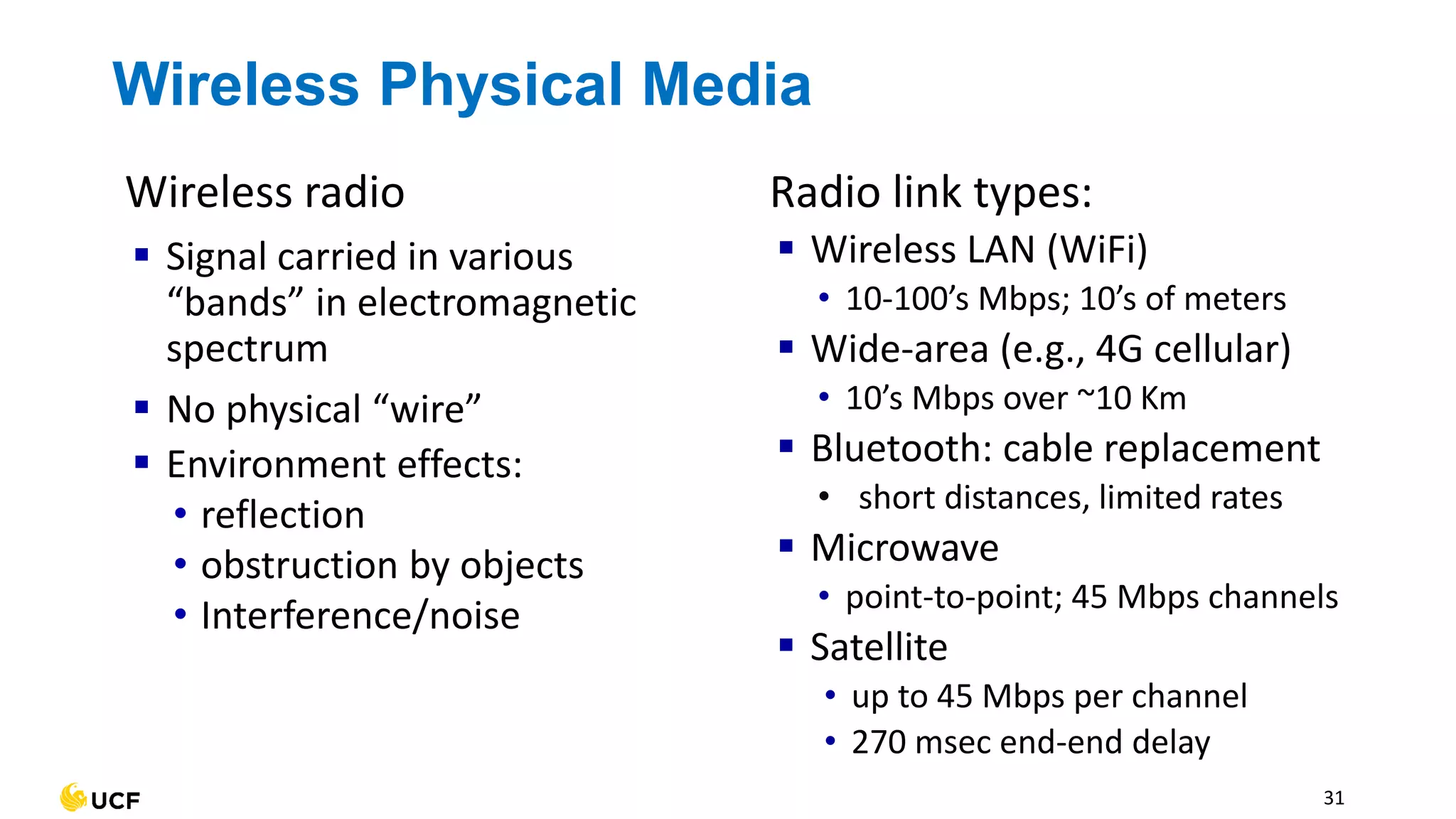
Wireless Physical Media
Wireless radio
▪ Signal carried in various
“bands” in electromagnetic
spectrum
▪ No physical “wire”
▪ Environment effects:
• reflection
• obstruction by objects
• Interference/noise
Radio link types:
▪ Wireless LAN (WiFi)
• 10-100’s Mbps; 10’s of meters
▪ Wide-area (e.g., 4G cellular)
• 10’s Mbps over ~10 Km
▪ Bluetooth: cable replacement
• short distances, limited rates
▪ Microwave
• point-to-point; 45 Mbps channels
▪ Satellite
• up to 45 Mbps per channel
• 270 msec end-end delay
31
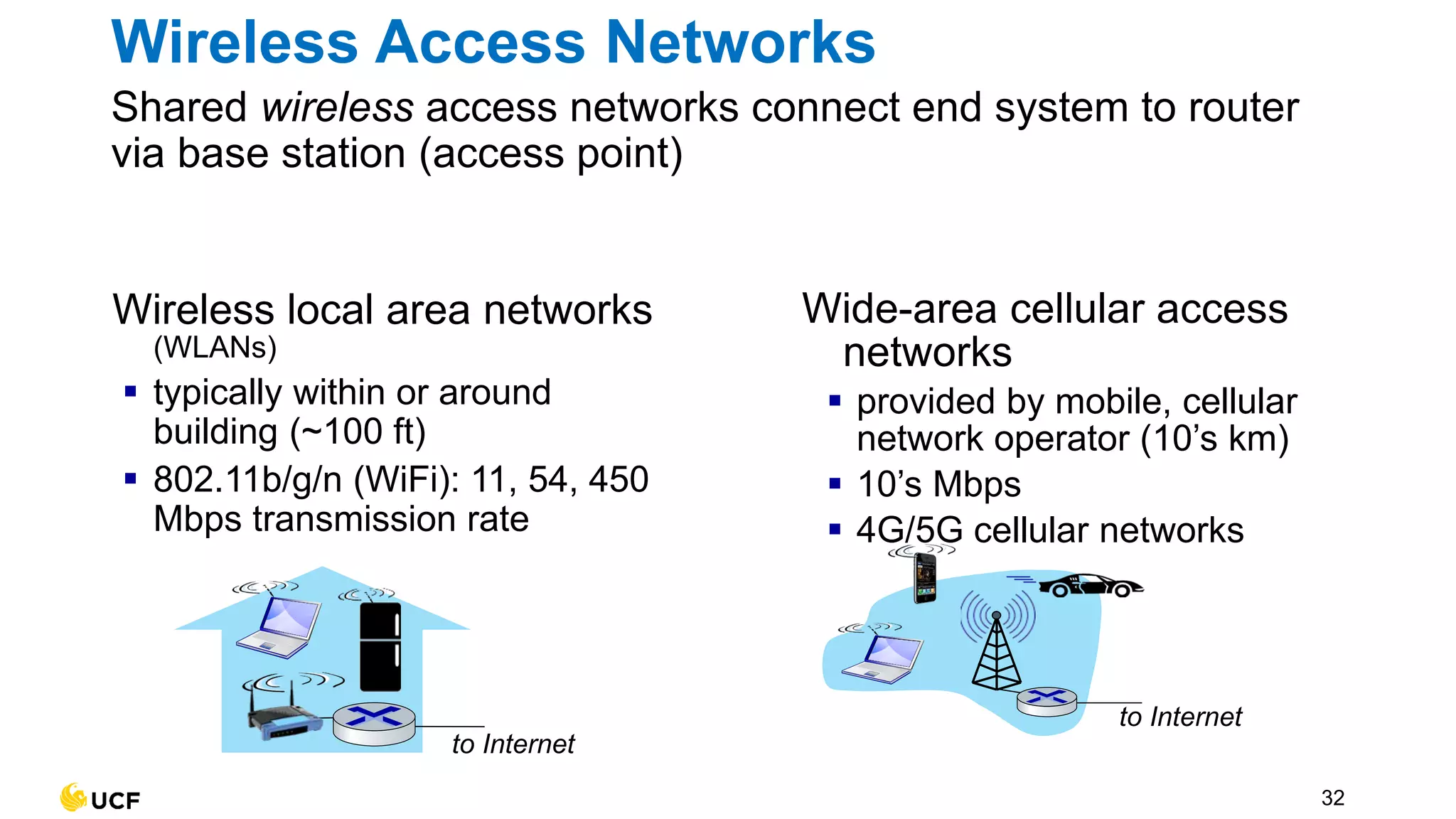
Wireless Access Networks
Shared wireless access networks connect end system to router
via base station (access point)
32
Wireless local area networks
(WLANs)
▪ typically within or around
building (~100 ft)
▪ 802.11b/g/n (WiFi): 11, 54, 450
Mbps transmission rate
to Internet
to Internet
Wide-area cellular access
networks
▪ provided by mobile, cellular
network operator (10’s km)
▪ 10’s Mbps
▪ 4G/5G cellular networks
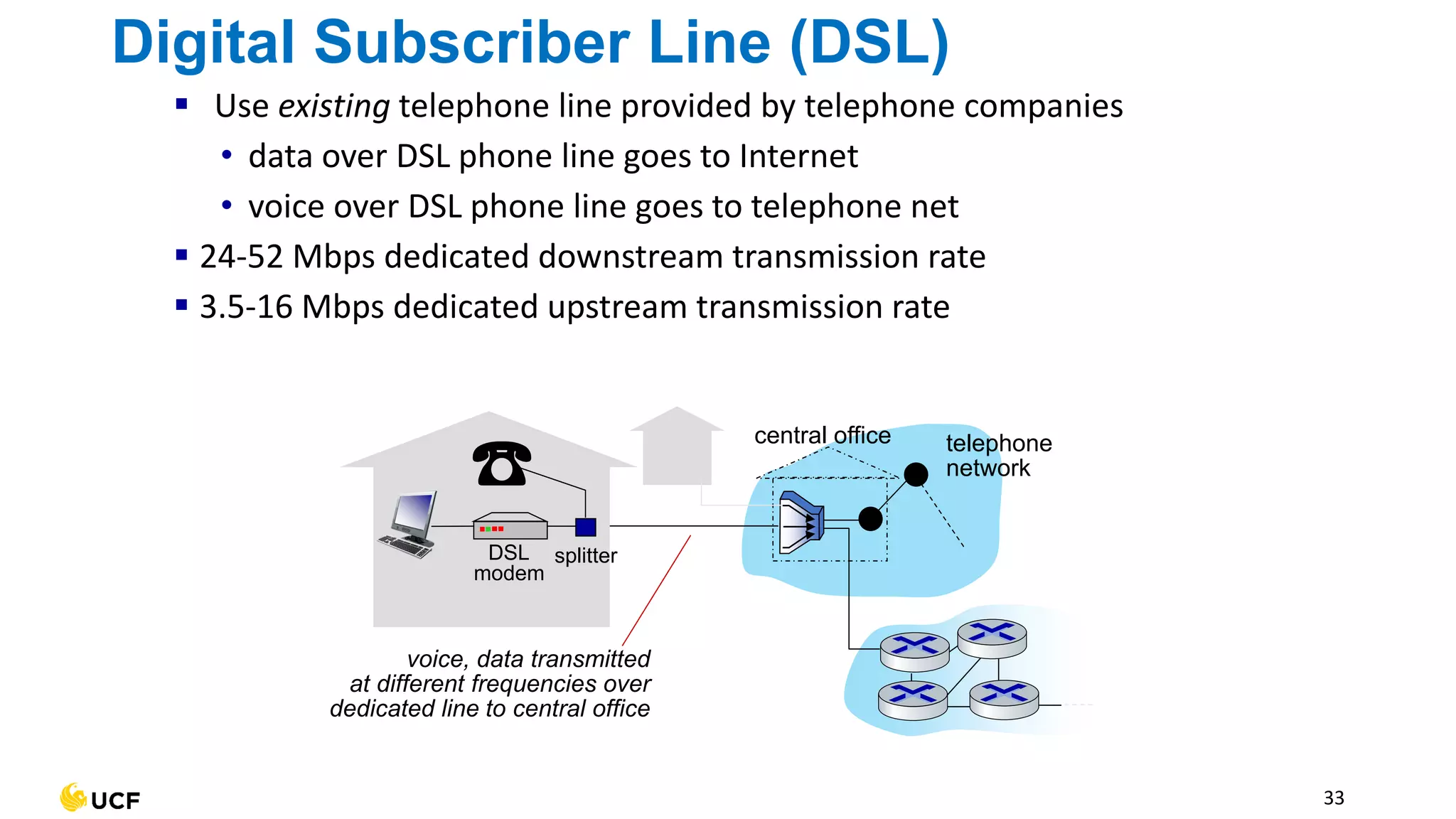
Digital Subscriber Line (DSL)
▪ Use existing telephone line provided by telephone companies
• data over DSL phone line goes to Internet
• voice over DSL phone line goes to telephone net
▪ 24-52 Mbps dedicated downstream transmission rate
▪ 3.5-16 Mbps dedicated upstream transmission rate
33
central office telephone
network
voice, data transmitted
at different frequencies over
dedicated line to central office
DSL
modem
splitter
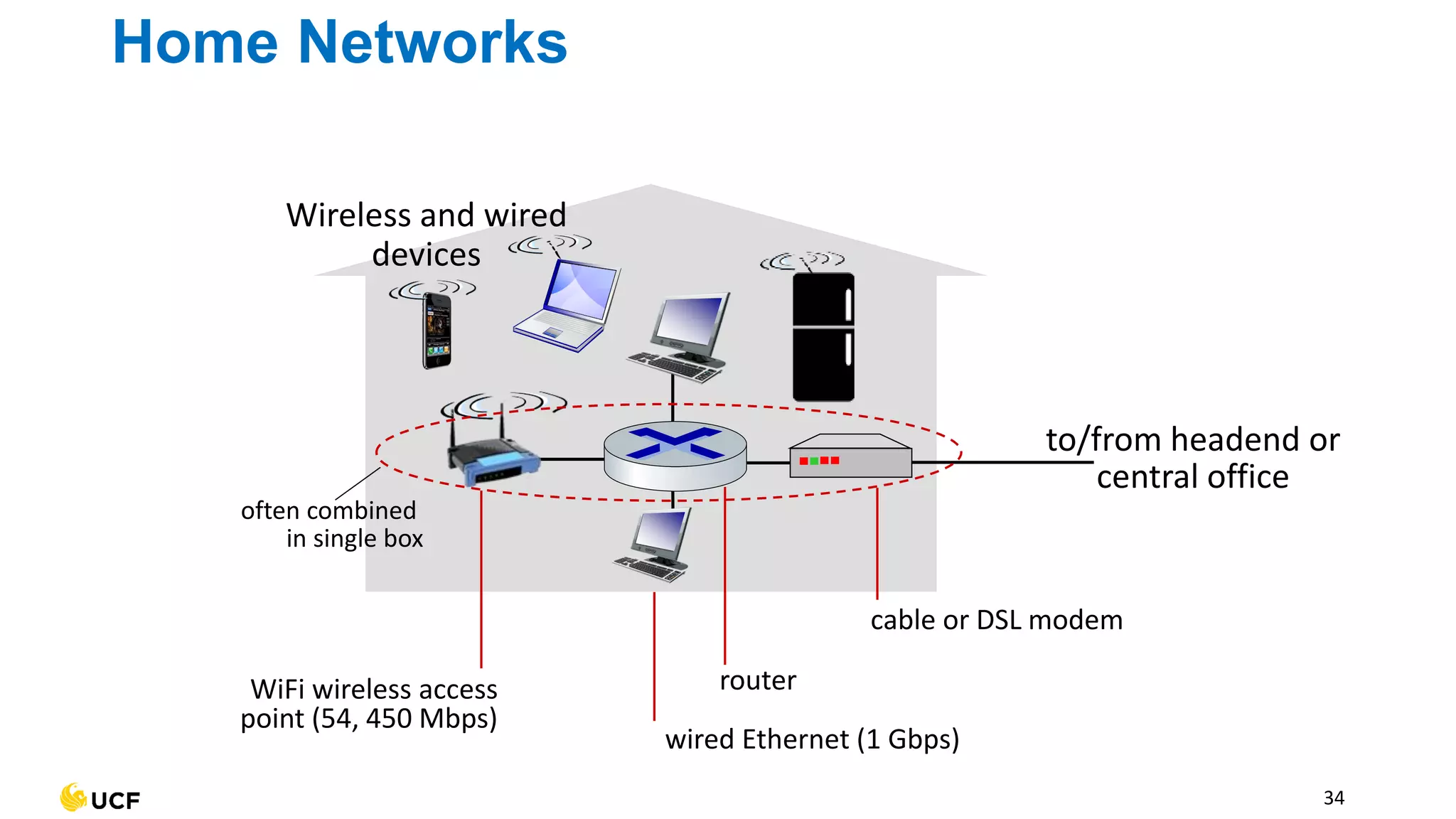
Home Networks
34
to/from headend or
central office
cable or DSL modem
router
wired Ethernet (1 Gbps)
WiFi wireless access
point (54, 450 Mbps)
Wireless and wired
devices
often combined
in single box
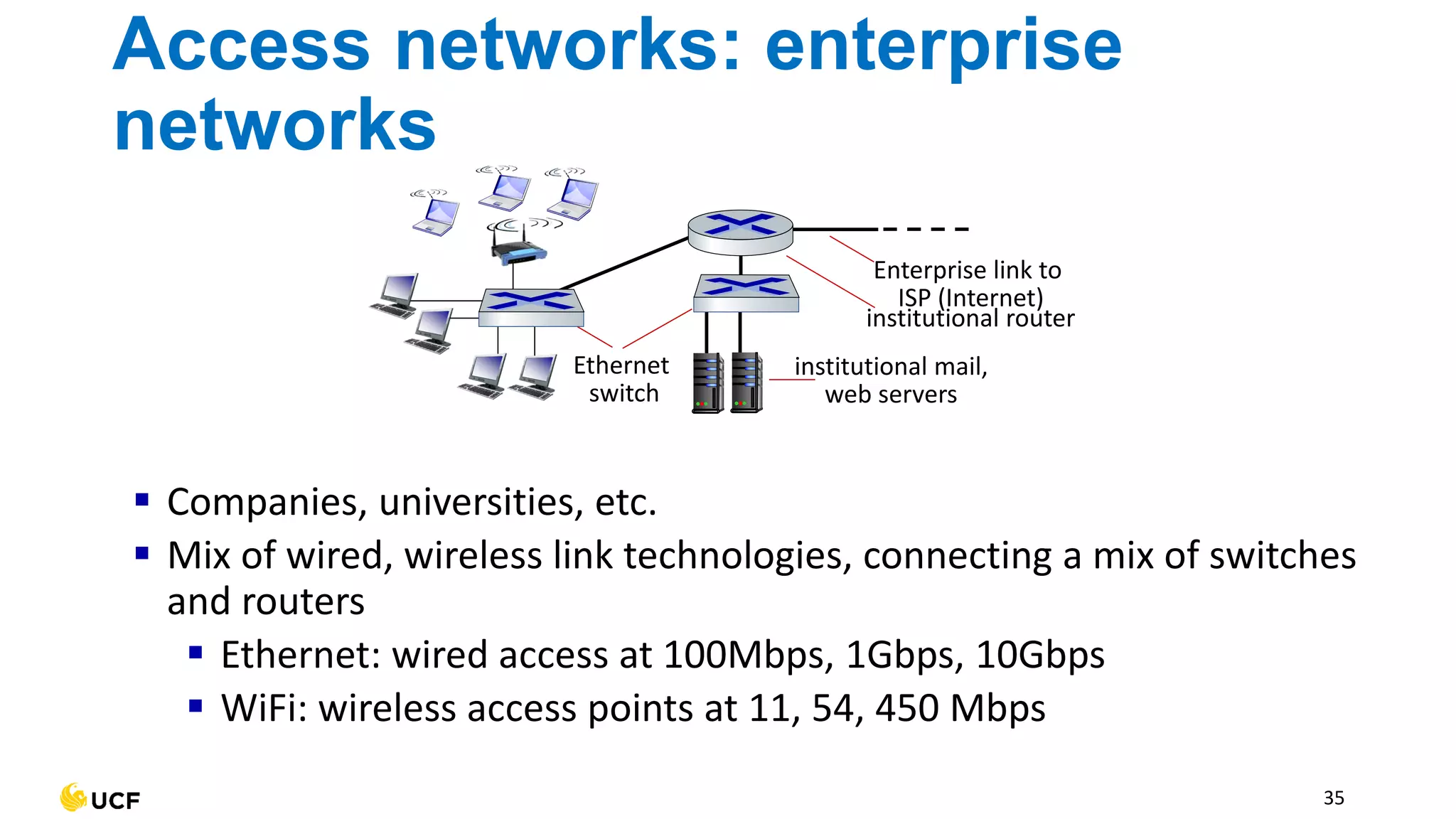
Access networks: enterprise
networks
▪ Companies, universities, etc.
▪ Mix of wired, wireless link technologies, connecting a mix of switches
and routers
▪ Ethernet: wired access at 100Mbps, 1Gbps, 10Gbps
▪ WiFi: wireless access points at 11, 54, 450 Mbps
Ethernet
switch
institutional mail,
web servers
institutional router
Enterprise link to
ISP (Internet)
35
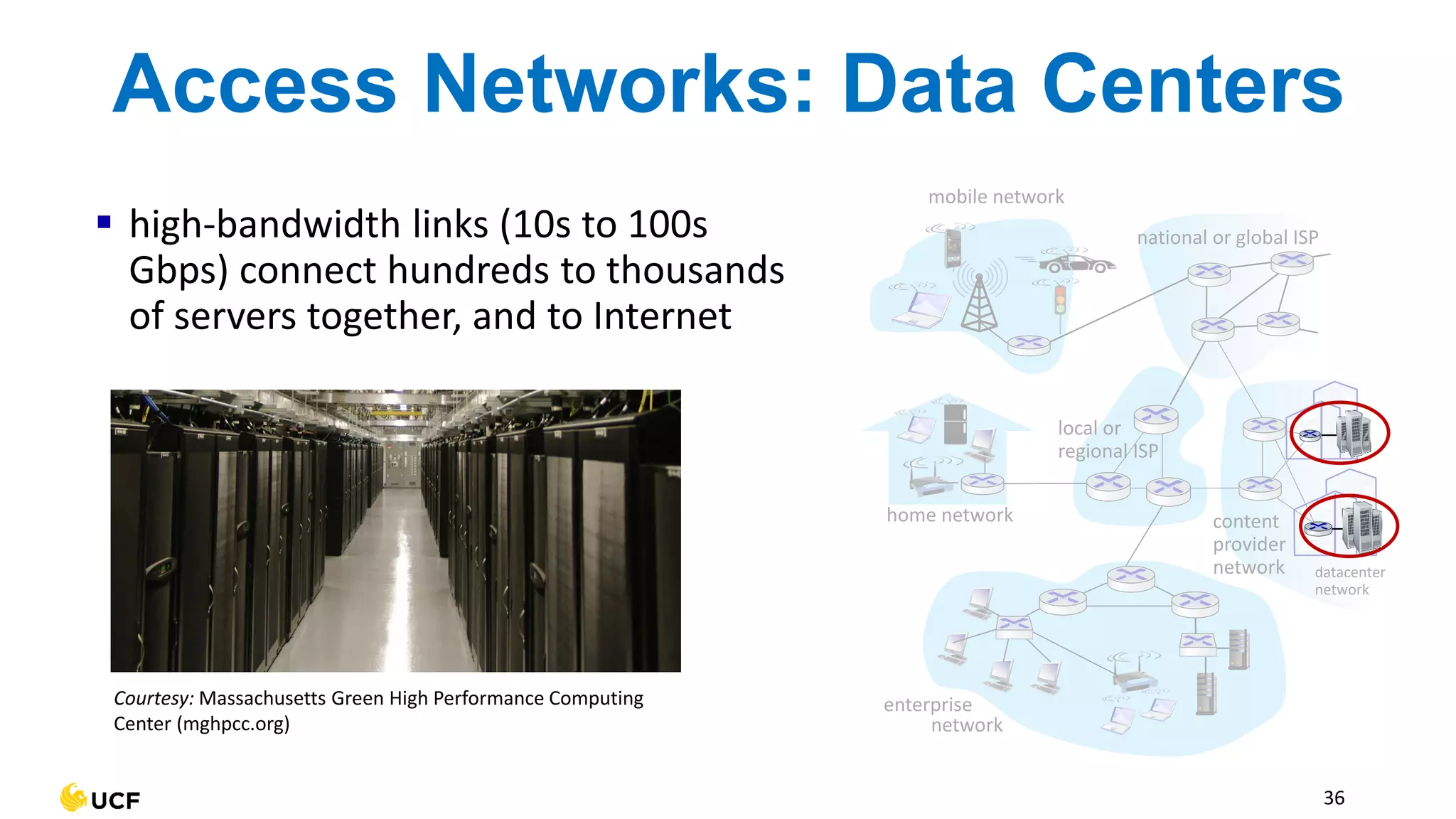
Access Networks: Data Centers
▪ high-bandwidth links (10s to 100s
Gbps) connect hundreds to thousands
of servers together, and to Internet
mobile network
home network
enterprise
network
national or global ISP
local or
regional ISP
datacenter
network
content
provider
network
Courtesy: Massachusetts Green High Performance Computing
Center (mghpcc.org)
36
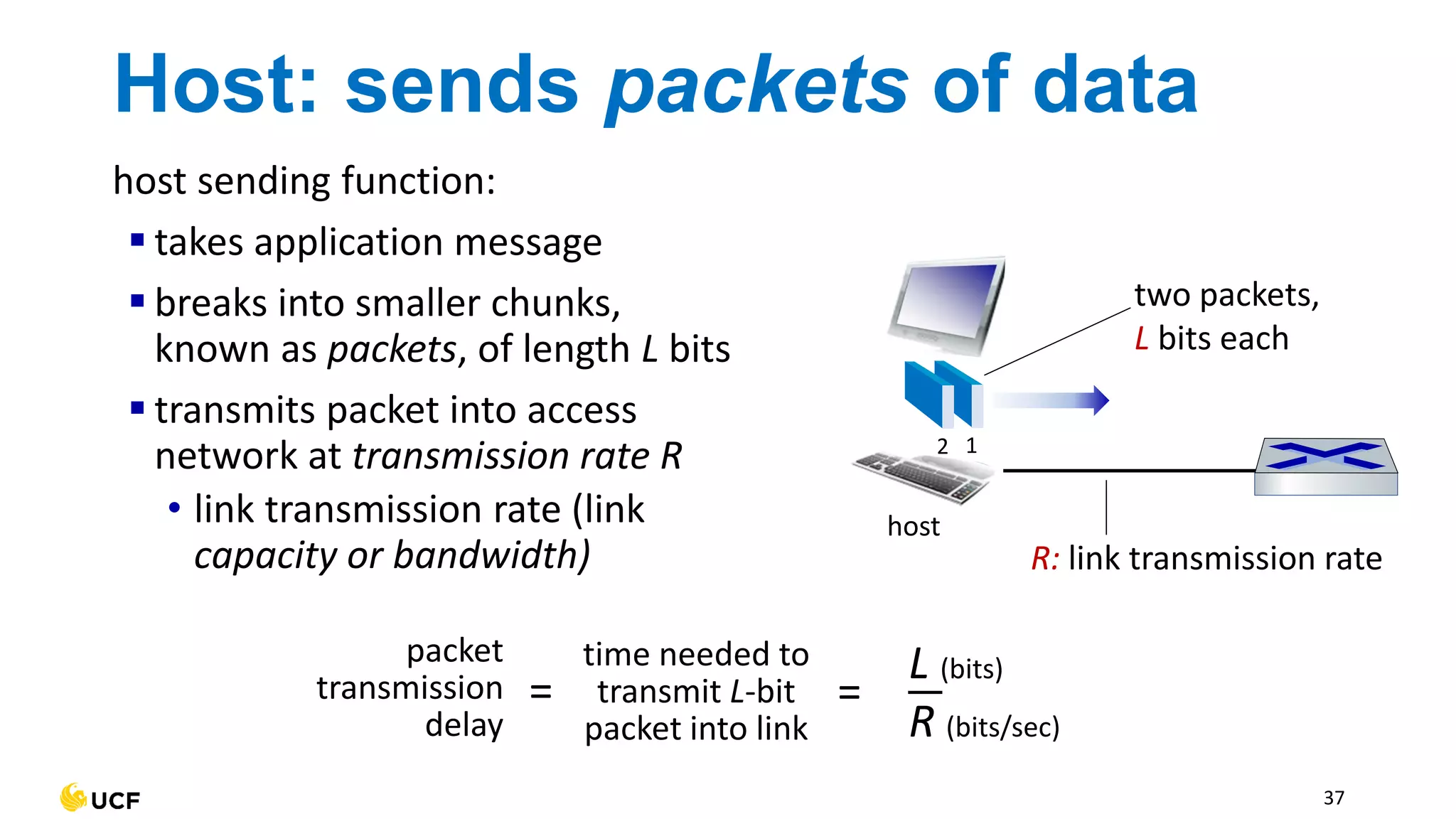
Host: sends packets of data
host sending function:
▪ takes application message
▪ breaks into smaller chunks,
known as packets, of length L bits
▪ transmits packet into access
network at transmission rate R
• link transmission rate (link
capacity or bandwidth) R: link transmission rate
host
1
2
two packets,
L bits each
packet
transmission
delay
time needed to
transmit L-bit
packet into link
L (bits)
R (bits/sec)
= =
37
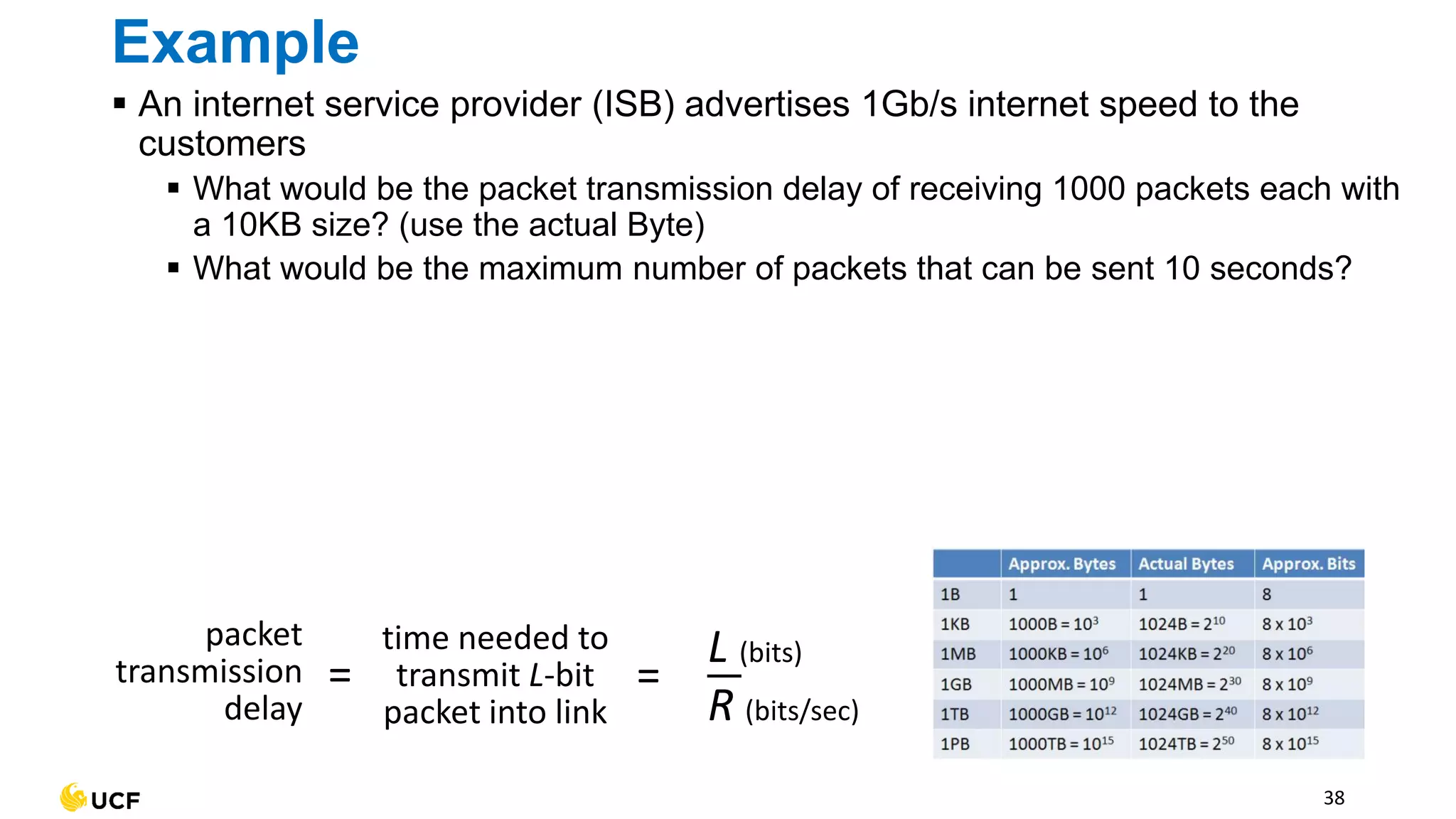
Example
▪ An internet service provider (ISB) advertises 1Gb/s internet speed to the
customers
▪ What would be the packet transmission delay of receiving 1000 packets each with
a 10KB size? (use the actual Byte)
▪ What would be the maximum number of packets that can be sent 10 seconds?
38
packet
transmission
delay
time needed to
transmit L-bit
packet into link
L (bits)
R (bits/sec)
= =
Reference
▪ Computer networks 5th Edition by Tanenbaum, A.S. and Wetherall, D.
▪ Computer Networking: A Top-Down Approach 7th Edition by Kurose, J. and
Ross, K.
55

3_Internet_Architecture (2).pdf

  • 1.
    Computer Communication Networks 3 -Internet Architecture Instructor: Ashkan Farhangi Email: ashkan.farhangi@ucf.edu
  • 2.
    Outline ▪ Overview ofthe Internet ▪ Network Edge ▪ Access Network ▪ Network’s Core 2
  • 3.
    Internet mobile network home network enterprise network nationalor global ISP local or regional ISP datacenter network content provider network Communication links ▪ Fiber, copper, radio, satellite Hosts (end systems) ▪ Located at the edge of Internet Networks ▪ Collection of devices, routers, links 3 Overview of the Internet Routers, Switches ▪ Routers: Control the flow of data through network ▪ Switches: Connect various devices Routers Switches
  • 4.
    Web-enabled toaster + weatherforecaster Internet phones Slingbox: remote control cable TV Security Camera IP picture frame Internet refrigerator Tweet-a-watt: monitor energy use sensorized, bed mattress Amazon Echo Pacemaker & Monitor AR devices Fitbit Gaming devices cars scooters bikes Hosts (end systems) ▪ Hosts are located at the edge of Internet and have various application
  • 5.
    5 Routers ▪ Routers controlthe flow of data through the network ▪ Directs the traffic across the networks ▪ Connect multiple networks ▪ When routers receive a data, it can route the immediate or the final destination ▪ If two routers that do not share a transmission line wish to communicate, they must do this indirectly, via other routers ▪ The router allows the computer networks to communicate over large distances
  • 6.
    6 Switches ▪ Switches canconnect various devices to form a standalone network ▪ Send and receive data from the connected devices ▪ Suitable for enterprise and school environment where multiple devices needs to be connected
  • 7.
  • 8.
    9 Switches Switches ▪ Switches canconnect various devices to form a standalone network ▪ Send and receive data from the connected devices ▪ Suitable for enterprise and school environment where multiple devices need to be connected ▪ Example: Two computers are connected through 1Gbps transmission line to a local switch. The switch is connected to a router with a 100Mbps link ▪ What would be the speed of send/receive between two local computers?
  • 9.
    ▪ A globalscale computer network consisting of interconnected networks that use protocols to communicate 11 The Internet mobile network home network enterprise network national or global ISP local or regional ISP datacenter network content provider network ▪ Protocols define the format, order of messages, and actions (send, receive) among network entities • e.g., HTTP (Web), Skype, TCP, IP, WiFi, 4G/5G, Ethernet Ethernet HTTP Skype IP WiFi 4G TCP Streaming video
  • 10.
    A bigger networkthan the Internet?
  • 11.
  • 12.
    Network Protocols Hi Hi Got the time? 2:00 time HTTPconnection response <Webpage> HTTP connection request GET http://twitter.com/ucfcecs 14 ▪ Network protocols are defined as the standard procedure of computer communication ▪ In particular, Protocols describe ▪ format of connection ▪ order of sent and received messages ▪ actions that must be taken on the transmission ▪ For example, compare a human protocol and a computer network protocol:
  • 13.
    ▪ The internetinfrastructure contains 3 main components ▪ Network Edge ▪ Access Network ▪ Network Core 15 Internet Infrastructure Network Edge Access Network Network Core
  • 14.
    Network Edge Network edgecontains hosts such as clients and servers ▪ Clients are widespread around the globe ▪ Servers are typically located in data centers for security and efficiency 16 mobile network home network enterprise network national or global ISP local or regional ISP datacenter network content provider network
  • 15.
    Access network ▪ Accessnetwork provide physical transmission through wired or wireless transmission links ▪ Type of Access Networks: ▪ Residential access nets (WiFi) ▪ Institutional access networks (WLAN) ▪ Mobile access networks (5G) ▪ … 17 mobile network home network enterprise network national or global ISP local or regional ISP datacenter network content provider network
  • 16.
    Access networks andphysical media ▪ Access networks are categorized as a guided media: ▪ signals propagate in solid media: copper, coax, fiber ▪ Or as an unguided media: ▪ signals propagate freely, e.g., radio ▪ Various frequencies of the electromagnetic spectrum is used to share a wire or wireless transmission line 18
  • 17.
    ▪ Twisted pairconsists of two insulated wires gently twisted together ▪ Four such pairs are typically grouped in a plastic sheath to protect the wires and keep them together ▪ Two insulated copper wires(effective 300 feet) • Category 5: 100 Mbps (Bandwidth 100 MHz) (1995) • Category 5e: 1 Gbps Ethernet (Bandwidth 100 MHz) (1999) • Category 6: 10 Gbps Ethernet (Bandwidth 250 MHz) (2002) • … 19 Twisted Pair Cable
  • 18.
    Coaxial cable ▪ Coaxialcable contains copper core to provide a guided transmission ▪ We can transmit data in different channels through various frequency bands 20 cable modem splitter … cable headend Channels V I D E O V I D E O V I D E O V I D E O V I D E O V I D E O D A T A D A T A C O N T R O L 1 2 3 4 5 6 7 8 9
  • 19.
    The function ofbraided outer conductor?
  • 20.
    Can’t we useour power lines to connect to the Internet? 💻
  • 21.
    Power Lines ▪ Itseems practical to send and receive data with our power lines ▪ For example, a TV and a receiver are plugged into the wall, which must be done anyway because they need power. Then its possible to send and receive video signal over the electrical wiring ▪ Pros: ▪ Already implemented infrastructure of power lines to buildings ▪ Cons: 25
  • 22.
    Power Lines ▪ Itis practical to send and receive data with our power lines. ▪ For example, a TV and a receiver are plugged into the wall, which must be done anyway because they need power. Then its possible to send and receive video signal over the electrical wiring ▪ Pros: ▪ Already implemented infrastructure of power lines to buildings ▪ Cons: ▪ Not designed for data transmission, power signals are sent at 50–60 Hz and power lines are designed to distribute power signals ▪ Electrical wirings are susceptible to external noise (electric & magnetic fields) ▪ Switching on the home appliances can create electrical noise over a wide range of frequencies = error in higher frequencies (e.g., MHz for internet) 26
  • 23.
    27 Fiber Optic Cable ▪Fiber optic cable uses a core glass fiber to carry light pulses (e.g., laser or LED) where each pulse is seen as a “bit” ▪ Provides high-speed point-to-point transmission (10’s-100’s Gbps) ▪ Benefits from low error rate due to its immunity to electromagnetic noises ▪ Components: ▪ Outer jacket provides a general protection of cable ▪ Strength Member is used to protect the fiber core from physical forces ▪ Coating is used to absorb shocks and prevents bending ▪ Cladding is used as a thin layer of glass fiber to reflect light back to the core ▪ Core consist of a fiber glass tube to transmit laser or LED signal
  • 24.
    Theoretically, what would bethe maximum transmission speed of a fiber optic?
  • 25.
    cable modem splitter … cable headend data, TVtransmitted at different frequencies over shared cable distribution network cable modem termination system 30 Wired: cable-based access ▪ Hybrid Fiber Coax combines both that combines optical fiber and coaxial cable ▪ up to 40 Mbps – 1.2 Gbps downstream transmission rate, 30- 100 Mbps upstream transmission rate
  • 26.
    Wireless Physical Media Wirelessradio ▪ Signal carried in various “bands” in electromagnetic spectrum ▪ No physical “wire” ▪ Environment effects: • reflection • obstruction by objects • Interference/noise Radio link types: ▪ Wireless LAN (WiFi) • 10-100’s Mbps; 10’s of meters ▪ Wide-area (e.g., 4G cellular) • 10’s Mbps over ~10 Km ▪ Bluetooth: cable replacement • short distances, limited rates ▪ Microwave • point-to-point; 45 Mbps channels ▪ Satellite • up to 45 Mbps per channel • 270 msec end-end delay 31
  • 27.
    Wireless Access Networks Sharedwireless access networks connect end system to router via base station (access point) 32 Wireless local area networks (WLANs) ▪ typically within or around building (~100 ft) ▪ 802.11b/g/n (WiFi): 11, 54, 450 Mbps transmission rate to Internet to Internet Wide-area cellular access networks ▪ provided by mobile, cellular network operator (10’s km) ▪ 10’s Mbps ▪ 4G/5G cellular networks
  • 28.
    Digital Subscriber Line(DSL) ▪ Use existing telephone line provided by telephone companies • data over DSL phone line goes to Internet • voice over DSL phone line goes to telephone net ▪ 24-52 Mbps dedicated downstream transmission rate ▪ 3.5-16 Mbps dedicated upstream transmission rate 33 central office telephone network voice, data transmitted at different frequencies over dedicated line to central office DSL modem splitter
  • 29.
    Home Networks 34 to/from headendor central office cable or DSL modem router wired Ethernet (1 Gbps) WiFi wireless access point (54, 450 Mbps) Wireless and wired devices often combined in single box
  • 30.
    Access networks: enterprise networks ▪Companies, universities, etc. ▪ Mix of wired, wireless link technologies, connecting a mix of switches and routers ▪ Ethernet: wired access at 100Mbps, 1Gbps, 10Gbps ▪ WiFi: wireless access points at 11, 54, 450 Mbps Ethernet switch institutional mail, web servers institutional router Enterprise link to ISP (Internet) 35
  • 31.
    Access Networks: DataCenters ▪ high-bandwidth links (10s to 100s Gbps) connect hundreds to thousands of servers together, and to Internet mobile network home network enterprise network national or global ISP local or regional ISP datacenter network content provider network Courtesy: Massachusetts Green High Performance Computing Center (mghpcc.org) 36
  • 32.
    Host: sends packetsof data host sending function: ▪ takes application message ▪ breaks into smaller chunks, known as packets, of length L bits ▪ transmits packet into access network at transmission rate R • link transmission rate (link capacity or bandwidth) R: link transmission rate host 1 2 two packets, L bits each packet transmission delay time needed to transmit L-bit packet into link L (bits) R (bits/sec) = = 37
  • 33.
    Example ▪ An internetservice provider (ISB) advertises 1Gb/s internet speed to the customers ▪ What would be the packet transmission delay of receiving 1000 packets each with a 10KB size? (use the actual Byte) ▪ What would be the maximum number of packets that can be sent 10 seconds? 38 packet transmission delay time needed to transmit L-bit packet into link L (bits) R (bits/sec) = =
  • 34.
    Reference ▪ Computer networks5th Edition by Tanenbaum, A.S. and Wetherall, D. ▪ Computer Networking: A Top-Down Approach 7th Edition by Kurose, J. and Ross, K. 55