© 2018 Cisco and/or its affiliates. All rights reserved. Cisco Public
Learning to Code with My
Dad
Learning Python through Minecraft
Alexander Preston along with Hank Preston (aka “Dad”)
© 2018 Cisco and/or its affiliates. All rights reserved. Cisco Public
• A little about Alexander
• Python + Minecraft = Awesome
• Connecting to Minecraft
• Program 1: Where is your player?
• Program 2: Teleporting around the world
• Program 3: Placing blocks
• Program 4: Building a wall!
• Program 5: Emergency Shelter Creation
• References and Resources
What we are going to talk about
© 2018 Cisco and/or its affiliates. All rights reserved. Cisco Public
A little about Alexander
© 2018 Cisco and/or its affiliates. All rights reserved. Cisco Public
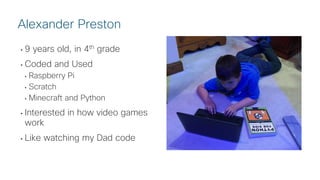
• 9 years old, in 4th grade
• Coded and Used
• Raspberry Pi
• Scratch
• Minecraft and Python
• Interested in how video games
work
• Like watching my Dad code
Alexander Preston
© 2018 Cisco and/or its affiliates. All rights reserved. Cisco Public
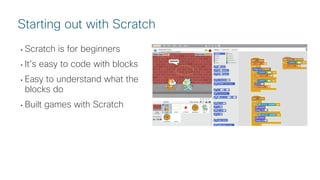
• Scratch is for beginners
• It’s easy to code with blocks
• Easy to understand what the
blocks do
• Built games with Scratch
Starting out with Scratch
© 2018 Cisco and/or its affiliates. All rights reserved. Cisco Public
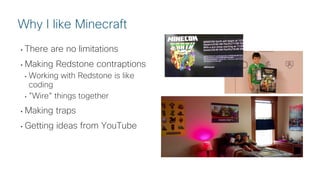
• There are no limitations
• Making Redstone contraptions
• Working with Redstone is like
coding
• ”Wire” things together
• Making traps
• Getting ideas from YouTube
Why I like Minecraft
© 2018 Cisco and/or its affiliates. All rights reserved. Cisco Public
Python + Minecraft =
Awesome
© 2018 Cisco and/or its affiliates. All rights reserved. Cisco Public
Python + Minecraft Step 1:
Connecting to Minecraft in
Code
© 2018 Cisco and/or its affiliates. All rights reserved. Cisco Public
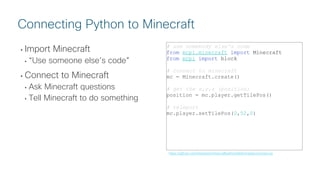
• Import Minecraft
• “Use someone else’s code”
• Connect to Minecraft
• Ask Minecraft questions
• Tell Minecraft to do something
# use somebody else's code
from mcpi.minecraft import Minecraft
from mcpi import block
# connect to minecraft
mc = Minecraft.create()
# get the x,y,z (position)
position = mc.player.getTilePos()
# teleport
mc.player.setTilePos(0,52,0)
Connecting Python to Minecraft
https://github.com/hpreston/minecraftpython/blob/master/connect.py
© 2018 Cisco and/or its affiliates. All rights reserved. Cisco Public
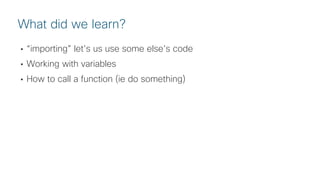
• “importing” let’s us use some else’s code
• Working with variables
• How to call a function (ie do something)
What did we learn?
© 2018 Cisco and/or its affiliates. All rights reserved. Cisco Public
Program 1:
Where is your player?
© 2018 Cisco and/or its affiliates. All rights reserved. Cisco Public
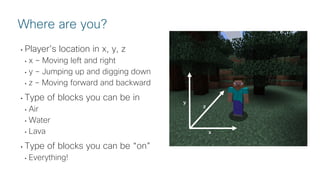
• Player’s location in x, y, z
• x – Moving left and right
• y – Jumping up and digging down
• z – Moving forward and backward
• Type of blocks you can be in
• Air
• Water
• Lava
• Type of blocks you can be “on”
• Everything!
Where are you?
x
z
y
© 2018 Cisco and/or its affiliates. All rights reserved. Cisco Public
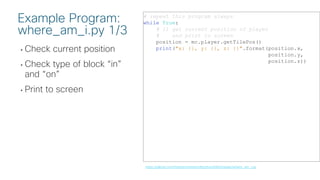
• Check current position
• Check type of block “in”
and “on”
• Print to screen
# repeat this program always
while True:
# 1) get current position of player
# and print to screen
position = mc.player.getTilePos()
print("x: {}, y: {}, z: {}".format(position.x,
position.y,
position.z))
Example Program:
where_am_i.py 1/3
https://github.com/hpreston/minecraftpython/blob/master/where_am_i.py
© 2018 Cisco and/or its affiliates. All rights reserved. Cisco Public
• Check current position
• Check type of block “in”
and “on”
• Print to screen
# 2) what block is player "in"
# "lists" of block ids types
air = [0]
water = [8,9]
lava = [10,11]
# get block id of "feet"
block_player_in = mc.getBlock(position)
# "test" if player standing in block types
if block_player_in in air:
print("Player is in air.")
elif block_player_in in water:
print("player is in water")
elif block_player_in in lava:
print("OW OW OW OW OW (You are in lava)")
else:
print("player is in block id {}".format(
block_player_in)
)
Example Program:
where_am_i.py 2/3
https://github.com/hpreston/minecraftpython/blob/master/where_am_i.py
AIR = Block(0)
STONE = Block(1)
GRASS = Block(2)
DIRT = Block(3)
COBBLESTONE = Block(4)
WATER_FLOWING = Block(8)
WATER = WATER_FLOWING
WATER_STATIONARY = Block(9)
LAVA_FLOWING = Block(10)
LAVA = LAVA_FLOWING
LAVA_STATIONARY = Block(11)
from mcpi.block
© 2018 Cisco and/or its affiliates. All rights reserved. Cisco Public
• Check current position
• Check type of block “in”
and “on”
• Print to screen
# 3) what block is player "on"
block_player_on = mc.getBlock(position.x,
position.y -1,
position.z)
# "list" of different types of stone
types_of_stone = [
block.STONE.id,
block.COBBLESTONE.id,
block.GRAVEL.id,
block.SANDSTONE.id
]
# "test" what type of block player standing on
if block_player_on in types_of_stone:
print("player is on stone")
elif block_player_on == block.GRASS.id:
print("player is on grass")
elif block_player_on ==block.AIR.id:
print("YOU ARE FLYING OMG!")
else:
print("player is on block id {}".format(
block_player_in))
# pause for 1 second
sleep(1)
Example Program:
where_am_i.py 3/3
https://github.com/hpreston/minecraftpython/blob/master/where_am_i.py
AIR = Block(0)
STONE = Block(1)
GRASS = Block(2)
DIRT = Block(3)
COBBLESTONE = Block(4)
WATER_FLOWING = Block(8)
WATER = WATER_FLOWING
WATER_STATIONARY = Block(9)
LAVA_FLOWING = Block(10)
LAVA = LAVA_FLOWING
LAVA_STATIONARY = Block(11)
from mcpi.block
© 2018 Cisco and/or its affiliates. All rights reserved. Cisco Public
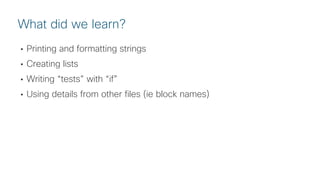
• Printing and formatting strings
• Creating lists
• Writing “tests” with “if”
• Using details from other files (ie block names)
What did we learn?
© 2018 Cisco and/or its affiliates. All rights reserved. Cisco Public
Program 2:
Moving your player around
the world!
© 2018 Cisco and/or its affiliates. All rights reserved. Cisco Public
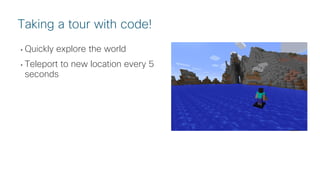
• Quickly explore the world
• Teleport to new location every 5
seconds
Taking a tour with code!
© 2018 Cisco and/or its affiliates. All rights reserved. Cisco Public
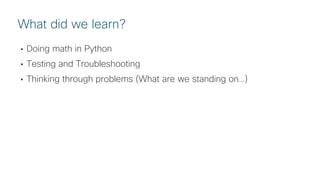
• Doing math in Python
• Testing and Troubleshooting
• Thinking through problems (What are we standing on…)
What did we learn?
© 2018 Cisco and/or its affiliates. All rights reserved. Cisco Public
Program 3:
Placing blocks
© 2018 Cisco and/or its affiliates. All rights reserved. Cisco Public
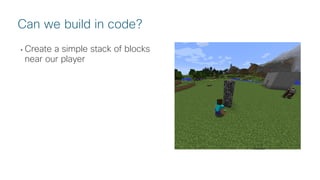
• Create a simple stack of blocks
near our player
Can we build in code?
© 2018 Cisco and/or its affiliates. All rights reserved. Cisco Public
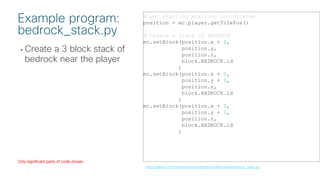
• Create a 3 block stack of
bedrock near the player
# get starting position coordinates
position = mc.player.getTilePos()
# Create a stack of BEDROCK
mc.setBlock(position.x + 2,
position.y,
position.z,
block.BEDROCK.id
)
mc.setBlock(position.x + 2,
position.y + 1,
position.z,
block.BEDROCK.id
)
mc.setBlock(position.x + 2,
position.y + 2,
position.z,
block.BEDROCK.id
)
Example program:
bedrock_stack.py
https://github.com/hpreston/minecraftpython/blob/master/bedrock_stack.py
Only significant parts of code shown
© 2018 Cisco and/or its affiliates. All rights reserved. Cisco Public
• Working with relative location
• Placing 1 block at a time is very boring and repetitive typing…
• What if we wanted a 50 block high stack…
What did we learn?
© 2018 Cisco and/or its affiliates. All rights reserved. Cisco Public
Program 4:
Building a wall!
© 2018 Cisco and/or its affiliates. All rights reserved. Cisco Public
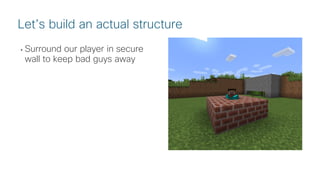
• Surround our player in secure
wall to keep bad guys away
Let’s build an actual structure
© 2018 Cisco and/or its affiliates. All rights reserved. Cisco Public
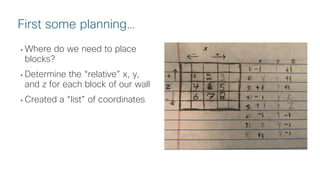
• Where do we need to place
blocks?
• Determine the “relative” x, y,
and z for each block of our wall
• Created a “list” of coordinates
First some planning…
© 2018 Cisco and/or its affiliates. All rights reserved. Cisco Public
• Create a list with [ ]
• How to access items in list
• Learned about counting from 0
• Learned how to repeat the
same code in a loop
# a favorite sandwich as a Python list
l = [
"bread",
"peanut butter",
"jelly",
"bread"
]
# giving instructions on creation
print("Now is time for {}".format(l[0]))
print("Now is time for {}".format(l[1]))
print("Now is time for {}".format(l[2]))
print("Now is time for {}".format(l[3]))
# simpler way to "loop" through a list
for i in l:
print("Now is time for {}".format(i))
Then… Learning about lists and loops with PB & J
https://github.com/hpreston/minecraftpython/blob/master/pbj.py
© 2018 Cisco and/or its affiliates. All rights reserved. Cisco Public
• Importance of planning first
• Really dove in to understand relative positioning
• Lots about creating and using lists in Python
• In programming we count from 0
• Using “loops” to repeat code
• Even with lists and loops, building a big structure a block at a time is
going to take a lot of time and code…
What did we learn?
© 2018 Cisco and/or its affiliates. All rights reserved. Cisco Public
Program 5:
Emergency Shelter Creation
© 2018 Cisco and/or its affiliates. All rights reserved. Cisco Public
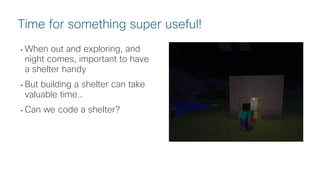
• When out and exploring, and
night comes, important to have
a shelter handy
• But building a shelter can take
valuable time…
• Can we code a shelter?
Time for something super useful!
© 2018 Cisco and/or its affiliates. All rights reserved. Cisco Public
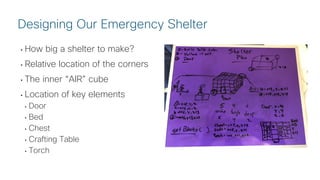
• How big a shelter to make?
• Relative location of the corners
• The inner “AIR” cube
• Location of key elements
• Door
• Bed
• Chest
• Crafting Table
• Torch
Designing Our Emergency Shelter
© 2018 Cisco and/or its affiliates. All rights reserved. Cisco Public
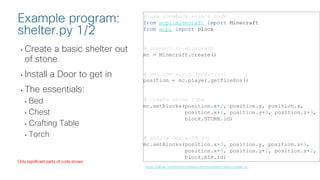
• Create a basic shelter out
of stone
• Install a Door to get in
• The essentials:
• Bed
• Chest
• Crafting Table
• Torch
# use somebody else's code
from mcpi.minecraft import Minecraft
from mcpi import block
# connect to minecraft
mc = Minecraft.create()
# get the x,y,z (position)
position = mc.player.getTilePos()
# create stone cube
mc.setBlocks(position.x+2, position.y, position.z,
position.x+6, position.y+3, position.z+3,
block.STONE.id)
# hollow out with air
mc.setBlocks(position.x+3, position.y, position.z+1,
position.x+5, position.y+2, position.z+2,
block.AIR.id)
Example program:
shelter.py 1/2
https://github.com/hpreston/minecraftpython/blob/master/shelter.py
Only significant parts of code shown
© 2018 Cisco and/or its affiliates. All rights reserved. Cisco Public
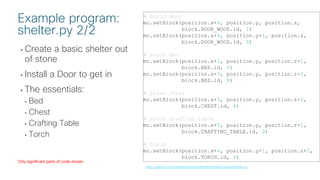
• Create a basic shelter out
of stone
• Install a Door to get in
• The essentials:
• Bed
• Chest
• Crafting Table
• Torch
# build door
mc.setBlock(position.x+4, position.y, position.z,
block.DOOR_WOOD.id, 1)
mc.setBlock(position.x+4, position.y+1, position.z,
block.DOOR_WOOD.id, 9)
# place bed
mc.setBlock(position.x+3, position.y, position.z+1,
block.BED.id, 0)
mc.setBlock(position.x+3, position.y, position.z+2,
block.BED.id, 8)
# place chest
mc.setBlock(position.x+5, position.y, position.z+2,
block.CHEST.id, 4)
# place crafting table
mc.setBlock(position.x+5, position.y, position.z+1,
block.CRAFTING_TABLE.id, 0)
# torch
mc.setBlock(position.x+4, position.y+1, position.z+2,
block.TORCH.id, 4)
Example program:
shelter.py 2/2
https://github.com/hpreston/minecraftpython/blob/master/shelter.py
Only significant parts of code shown
© 2018 Cisco and/or its affiliates. All rights reserved. Cisco Public
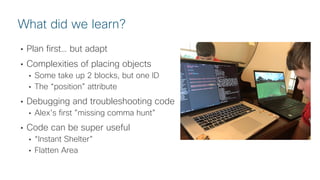
• Plan first… but adapt
• Complexities of placing objects
• Some take up 2 blocks, but one ID
• The “position” attribute
• Debugging and troubleshooting code
• Alex’s first ”missing comma hunt”
• Code can be super useful
• “Instant Shelter”
• Flatten Area
What did we learn?
© 2018 Cisco and/or its affiliates. All rights reserved. Cisco Public
References and Resources
© 2018 Cisco and/or its affiliates. All rights reserved. Cisco Public
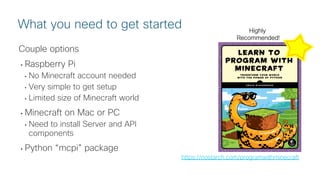
Couple options
• Raspberry Pi
• No Minecraft account needed
• Very simple to get setup
• Limited size of Minecraft world
• Minecraft on Mac or PC
• Need to install Server and API
components
• Python “mcpi” package
What you need to get started
https://nostarch.com/programwithminecraft
Highly
Recommended!
© 2018 Cisco and/or its affiliates. All rights reserved. Cisco Public
• https://github.com/martinohanlon/mcpi
• https://github.com/zhuowei/RaspberryJuice
• https://www.stuffaboutcode.com/p/minecraft-api-reference.html
Code Examples from this Session
• https://github.com/hpreston/minecraftpython
References and Handy Sites
© 2018 Cisco and/or its affiliates. All rights reserved. Cisco Public
Thanks!

Learning Python with Minecraft and my Dad - PyOhio 2018

  • 1.
    © 2018 Ciscoand/or its affiliates. All rights reserved. Cisco Public Learning to Code with My Dad Learning Python through Minecraft Alexander Preston along with Hank Preston (aka “Dad”)
  • 2.
    © 2018 Ciscoand/or its affiliates. All rights reserved. Cisco Public • A little about Alexander • Python + Minecraft = Awesome • Connecting to Minecraft • Program 1: Where is your player? • Program 2: Teleporting around the world • Program 3: Placing blocks • Program 4: Building a wall! • Program 5: Emergency Shelter Creation • References and Resources What we are going to talk about
  • 3.
    © 2018 Ciscoand/or its affiliates. All rights reserved. Cisco Public A little about Alexander
  • 4.
    © 2018 Ciscoand/or its affiliates. All rights reserved. Cisco Public • 9 years old, in 4th grade • Coded and Used • Raspberry Pi • Scratch • Minecraft and Python • Interested in how video games work • Like watching my Dad code Alexander Preston
  • 5.
    © 2018 Ciscoand/or its affiliates. All rights reserved. Cisco Public • Scratch is for beginners • It’s easy to code with blocks • Easy to understand what the blocks do • Built games with Scratch Starting out with Scratch
  • 6.
    © 2018 Ciscoand/or its affiliates. All rights reserved. Cisco Public • There are no limitations • Making Redstone contraptions • Working with Redstone is like coding • ”Wire” things together • Making traps • Getting ideas from YouTube Why I like Minecraft
  • 7.
    © 2018 Ciscoand/or its affiliates. All rights reserved. Cisco Public Python + Minecraft = Awesome
  • 8.
    © 2018 Ciscoand/or its affiliates. All rights reserved. Cisco Public Python + Minecraft Step 1: Connecting to Minecraft in Code
  • 9.
    © 2018 Ciscoand/or its affiliates. All rights reserved. Cisco Public • Import Minecraft • “Use someone else’s code” • Connect to Minecraft • Ask Minecraft questions • Tell Minecraft to do something # use somebody else's code from mcpi.minecraft import Minecraft from mcpi import block # connect to minecraft mc = Minecraft.create() # get the x,y,z (position) position = mc.player.getTilePos() # teleport mc.player.setTilePos(0,52,0) Connecting Python to Minecraft https://github.com/hpreston/minecraftpython/blob/master/connect.py
  • 10.
    © 2018 Ciscoand/or its affiliates. All rights reserved. Cisco Public • “importing” let’s us use some else’s code • Working with variables • How to call a function (ie do something) What did we learn?
  • 11.
    © 2018 Ciscoand/or its affiliates. All rights reserved. Cisco Public Program 1: Where is your player?
  • 12.
    © 2018 Ciscoand/or its affiliates. All rights reserved. Cisco Public • Player’s location in x, y, z • x – Moving left and right • y – Jumping up and digging down • z – Moving forward and backward • Type of blocks you can be in • Air • Water • Lava • Type of blocks you can be “on” • Everything! Where are you? x z y
  • 13.
    © 2018 Ciscoand/or its affiliates. All rights reserved. Cisco Public • Check current position • Check type of block “in” and “on” • Print to screen # repeat this program always while True: # 1) get current position of player # and print to screen position = mc.player.getTilePos() print("x: {}, y: {}, z: {}".format(position.x, position.y, position.z)) Example Program: where_am_i.py 1/3 https://github.com/hpreston/minecraftpython/blob/master/where_am_i.py
  • 14.
    © 2018 Ciscoand/or its affiliates. All rights reserved. Cisco Public • Check current position • Check type of block “in” and “on” • Print to screen # 2) what block is player "in" # "lists" of block ids types air = [0] water = [8,9] lava = [10,11] # get block id of "feet" block_player_in = mc.getBlock(position) # "test" if player standing in block types if block_player_in in air: print("Player is in air.") elif block_player_in in water: print("player is in water") elif block_player_in in lava: print("OW OW OW OW OW (You are in lava)") else: print("player is in block id {}".format( block_player_in) ) Example Program: where_am_i.py 2/3 https://github.com/hpreston/minecraftpython/blob/master/where_am_i.py AIR = Block(0) STONE = Block(1) GRASS = Block(2) DIRT = Block(3) COBBLESTONE = Block(4) WATER_FLOWING = Block(8) WATER = WATER_FLOWING WATER_STATIONARY = Block(9) LAVA_FLOWING = Block(10) LAVA = LAVA_FLOWING LAVA_STATIONARY = Block(11) from mcpi.block
  • 15.
    © 2018 Ciscoand/or its affiliates. All rights reserved. Cisco Public • Check current position • Check type of block “in” and “on” • Print to screen # 3) what block is player "on" block_player_on = mc.getBlock(position.x, position.y -1, position.z) # "list" of different types of stone types_of_stone = [ block.STONE.id, block.COBBLESTONE.id, block.GRAVEL.id, block.SANDSTONE.id ] # "test" what type of block player standing on if block_player_on in types_of_stone: print("player is on stone") elif block_player_on == block.GRASS.id: print("player is on grass") elif block_player_on ==block.AIR.id: print("YOU ARE FLYING OMG!") else: print("player is on block id {}".format( block_player_in)) # pause for 1 second sleep(1) Example Program: where_am_i.py 3/3 https://github.com/hpreston/minecraftpython/blob/master/where_am_i.py AIR = Block(0) STONE = Block(1) GRASS = Block(2) DIRT = Block(3) COBBLESTONE = Block(4) WATER_FLOWING = Block(8) WATER = WATER_FLOWING WATER_STATIONARY = Block(9) LAVA_FLOWING = Block(10) LAVA = LAVA_FLOWING LAVA_STATIONARY = Block(11) from mcpi.block
  • 16.
    © 2018 Ciscoand/or its affiliates. All rights reserved. Cisco Public • Printing and formatting strings • Creating lists • Writing “tests” with “if” • Using details from other files (ie block names) What did we learn?
  • 17.
    © 2018 Ciscoand/or its affiliates. All rights reserved. Cisco Public Program 2: Moving your player around the world!
  • 18.
    © 2018 Ciscoand/or its affiliates. All rights reserved. Cisco Public • Quickly explore the world • Teleport to new location every 5 seconds Taking a tour with code!
  • 19.
    © 2018 Ciscoand/or its affiliates. All rights reserved. Cisco Public • Doing math in Python • Testing and Troubleshooting • Thinking through problems (What are we standing on…) What did we learn?
  • 20.
    © 2018 Ciscoand/or its affiliates. All rights reserved. Cisco Public Program 3: Placing blocks
  • 21.
    © 2018 Ciscoand/or its affiliates. All rights reserved. Cisco Public • Create a simple stack of blocks near our player Can we build in code?
  • 22.
    © 2018 Ciscoand/or its affiliates. All rights reserved. Cisco Public • Create a 3 block stack of bedrock near the player # get starting position coordinates position = mc.player.getTilePos() # Create a stack of BEDROCK mc.setBlock(position.x + 2, position.y, position.z, block.BEDROCK.id ) mc.setBlock(position.x + 2, position.y + 1, position.z, block.BEDROCK.id ) mc.setBlock(position.x + 2, position.y + 2, position.z, block.BEDROCK.id ) Example program: bedrock_stack.py https://github.com/hpreston/minecraftpython/blob/master/bedrock_stack.py Only significant parts of code shown
  • 23.
    © 2018 Ciscoand/or its affiliates. All rights reserved. Cisco Public • Working with relative location • Placing 1 block at a time is very boring and repetitive typing… • What if we wanted a 50 block high stack… What did we learn?
  • 24.
    © 2018 Ciscoand/or its affiliates. All rights reserved. Cisco Public Program 4: Building a wall!
  • 25.
    © 2018 Ciscoand/or its affiliates. All rights reserved. Cisco Public • Surround our player in secure wall to keep bad guys away Let’s build an actual structure
  • 26.
    © 2018 Ciscoand/or its affiliates. All rights reserved. Cisco Public • Where do we need to place blocks? • Determine the “relative” x, y, and z for each block of our wall • Created a “list” of coordinates First some planning…
  • 27.
    © 2018 Ciscoand/or its affiliates. All rights reserved. Cisco Public • Create a list with [ ] • How to access items in list • Learned about counting from 0 • Learned how to repeat the same code in a loop # a favorite sandwich as a Python list l = [ "bread", "peanut butter", "jelly", "bread" ] # giving instructions on creation print("Now is time for {}".format(l[0])) print("Now is time for {}".format(l[1])) print("Now is time for {}".format(l[2])) print("Now is time for {}".format(l[3])) # simpler way to "loop" through a list for i in l: print("Now is time for {}".format(i)) Then… Learning about lists and loops with PB & J https://github.com/hpreston/minecraftpython/blob/master/pbj.py
  • 28.
    © 2018 Ciscoand/or its affiliates. All rights reserved. Cisco Public • Importance of planning first • Really dove in to understand relative positioning • Lots about creating and using lists in Python • In programming we count from 0 • Using “loops” to repeat code • Even with lists and loops, building a big structure a block at a time is going to take a lot of time and code… What did we learn?
  • 29.
    © 2018 Ciscoand/or its affiliates. All rights reserved. Cisco Public Program 5: Emergency Shelter Creation
  • 30.
    © 2018 Ciscoand/or its affiliates. All rights reserved. Cisco Public • When out and exploring, and night comes, important to have a shelter handy • But building a shelter can take valuable time… • Can we code a shelter? Time for something super useful!
  • 31.
    © 2018 Ciscoand/or its affiliates. All rights reserved. Cisco Public • How big a shelter to make? • Relative location of the corners • The inner “AIR” cube • Location of key elements • Door • Bed • Chest • Crafting Table • Torch Designing Our Emergency Shelter
  • 32.
    © 2018 Ciscoand/or its affiliates. All rights reserved. Cisco Public • Create a basic shelter out of stone • Install a Door to get in • The essentials: • Bed • Chest • Crafting Table • Torch # use somebody else's code from mcpi.minecraft import Minecraft from mcpi import block # connect to minecraft mc = Minecraft.create() # get the x,y,z (position) position = mc.player.getTilePos() # create stone cube mc.setBlocks(position.x+2, position.y, position.z, position.x+6, position.y+3, position.z+3, block.STONE.id) # hollow out with air mc.setBlocks(position.x+3, position.y, position.z+1, position.x+5, position.y+2, position.z+2, block.AIR.id) Example program: shelter.py 1/2 https://github.com/hpreston/minecraftpython/blob/master/shelter.py Only significant parts of code shown
  • 33.
    © 2018 Ciscoand/or its affiliates. All rights reserved. Cisco Public • Create a basic shelter out of stone • Install a Door to get in • The essentials: • Bed • Chest • Crafting Table • Torch # build door mc.setBlock(position.x+4, position.y, position.z, block.DOOR_WOOD.id, 1) mc.setBlock(position.x+4, position.y+1, position.z, block.DOOR_WOOD.id, 9) # place bed mc.setBlock(position.x+3, position.y, position.z+1, block.BED.id, 0) mc.setBlock(position.x+3, position.y, position.z+2, block.BED.id, 8) # place chest mc.setBlock(position.x+5, position.y, position.z+2, block.CHEST.id, 4) # place crafting table mc.setBlock(position.x+5, position.y, position.z+1, block.CRAFTING_TABLE.id, 0) # torch mc.setBlock(position.x+4, position.y+1, position.z+2, block.TORCH.id, 4) Example program: shelter.py 2/2 https://github.com/hpreston/minecraftpython/blob/master/shelter.py Only significant parts of code shown
  • 34.
    © 2018 Ciscoand/or its affiliates. All rights reserved. Cisco Public • Plan first… but adapt • Complexities of placing objects • Some take up 2 blocks, but one ID • The “position” attribute • Debugging and troubleshooting code • Alex’s first ”missing comma hunt” • Code can be super useful • “Instant Shelter” • Flatten Area What did we learn?
  • 35.
    © 2018 Ciscoand/or its affiliates. All rights reserved. Cisco Public References and Resources
  • 36.
    © 2018 Ciscoand/or its affiliates. All rights reserved. Cisco Public Couple options • Raspberry Pi • No Minecraft account needed • Very simple to get setup • Limited size of Minecraft world • Minecraft on Mac or PC • Need to install Server and API components • Python “mcpi” package What you need to get started https://nostarch.com/programwithminecraft Highly Recommended!
  • 37.
    © 2018 Ciscoand/or its affiliates. All rights reserved. Cisco Public • https://github.com/martinohanlon/mcpi • https://github.com/zhuowei/RaspberryJuice • https://www.stuffaboutcode.com/p/minecraft-api-reference.html Code Examples from this Session • https://github.com/hpreston/minecraftpython References and Handy Sites
  • 38.
    © 2018 Ciscoand/or its affiliates. All rights reserved. Cisco Public Thanks!