Python and Neo4j
Eric Lee

Silicon Cloud International Pte Ltd
2015.DEC.17

@Singapore Neo4j Meetup
About Me
Eric Lee
NoSQL
Silicon Cloud
International
:Love
:EMPLOYEE_OF
Secured
Private Cloud
:PROVIDES
Neo4j
Cassandra
:IS
:IS
Python Perl JavaScript
:PROGRAMMING_IN
:PROGRAMMING_IN
:PROGRAMMING_IN
Start Your Neo4j Server
• Install Oracle JDK 8
• Download Neo4j Enterprise or Community edition
• Unzip it
• In Neo4j directory, execute this command:

./bin/neo4j start
Python Libraries for Neo4j
• Py2neo

Good performance for great amounts of nodes.
• neo4j-rest-client

If only a few nodes, use this REST based client.
• neo4jdb-python

Mainly for Cypher syntax manipulation.
Py2neo
• Installation

pip install py2neo
Authentication
• Before Neo4j 2.2

from py2neo import graph

graph = Graph()


Default is “http://127.0.0.1:7474/db/data”
• Neo4j 2.2/2.3, you need authentication

from py2neo import graph

graph = Graph(“http://neo4j:test@127.0.0.1:7474/db/data”)

Username Password
neo4j-server.properties
Uncomment this line for remote access
Replace “true” by “false” to disable authentication
Create Node
• Create node with label and properties

from py2neo import Graph, Node

graph = Graph(…)


Node1 = Node(“User”, Name=“Eric”, Gender=“M”)


graph.create(Node1)
Label Properties
Create Relationship
• One to one relationship

from py2neo import Graph, Node, Relationship

graph = Graph(…)

eric = Node(“User”, Name=“Eric”, Gender=“M”)

sci = Node(“Company”, Name=“Silicon Cloud Intl”)

ericWorkInsci = Relationship(eric,”WORK_IN”,sci,Since=2015)

graph.create(ericWorkInsci)
 Relationship Name Relationship Property
CREATE (User{Name:”Eric”…})-[:WORK_IN{Since:2015}]->(Company{Name:”Silicon Cloud Intl”})
Search
• Find One Node

graph.find_one(“User”,”Name”,”Eric”)
• Return all Nodes

results = graph.find(“User”, “Name”,”Eric”)

# will return an object


for result in results:

print result
Label Property Value
Modify Properties
• Add Property

eric = graph.find_one(“User”, “Name”, “Eric”)


eric.properties[“Surname”] = “Lee”


eric.push()

Delete
• Specific Objects

eric = graph.find_one(“User”, “Name”, “Eric”)


eric.delete()
• All nodes and relationships

graph.delete_all()

Easy than “MATCH (n)-[r]-(q) DELETE n,r,q”
Uniqueness
• Unique nodes

graph.schema.create_uniqueness_constraint("User", “Employee_ID”)


#Set the constraint first


eric = graph.merge_one(“User”, “Employee_ID”, “0007” )
• Unique Paths

eric = graph.merge_one(“User”, “Employee_ID”, “0007” )


mojy = graph.merge_one(“User”, “Employee_ID”, “0001” )


graph.create_unique(Relationship(mojy,”RECRUITS”,eric))

Submit Cypher Queries
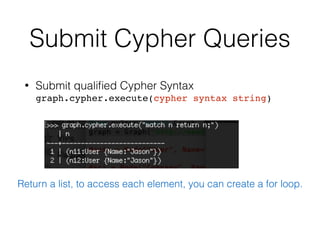
• Submit qualified Cypher Syntax

graph.cypher.execute(cypher syntax string)
Return a list, to access each element, you can create a for loop.
Reference
• http://py2neo.org/2.0/intro.html
• http://www.slideshare.net/fphhotchips/a-quick-
review-of-python-and-graph-databases
• http://www.slideshare.net/leezhenyu/introduction-
to-graph-database

Python and Neo4j

  • 1.
    Python and Neo4j EricLee
 Silicon Cloud International Pte Ltd 2015.DEC.17
 @Singapore Neo4j Meetup
  • 2.
    About Me Eric Lee NoSQL SiliconCloud International :Love :EMPLOYEE_OF Secured Private Cloud :PROVIDES Neo4j Cassandra :IS :IS Python Perl JavaScript :PROGRAMMING_IN :PROGRAMMING_IN :PROGRAMMING_IN
  • 3.
    Start Your Neo4jServer • Install Oracle JDK 8 • Download Neo4j Enterprise or Community edition • Unzip it • In Neo4j directory, execute this command:
 ./bin/neo4j start
  • 4.
    Python Libraries forNeo4j • Py2neo
 Good performance for great amounts of nodes. • neo4j-rest-client
 If only a few nodes, use this REST based client. • neo4jdb-python
 Mainly for Cypher syntax manipulation.
  • 5.
  • 6.
    Authentication • Before Neo4j2.2
 from py2neo import graph
 graph = Graph()
 
 Default is “http://127.0.0.1:7474/db/data” • Neo4j 2.2/2.3, you need authentication
 from py2neo import graph
 graph = Graph(“http://neo4j:test@127.0.0.1:7474/db/data”)
 Username Password
  • 7.
    neo4j-server.properties Uncomment this linefor remote access Replace “true” by “false” to disable authentication
  • 8.
    Create Node • Createnode with label and properties
 from py2neo import Graph, Node
 graph = Graph(…)
 
 
 Node1 = Node(“User”, Name=“Eric”, Gender=“M”)
 
 
 graph.create(Node1) Label Properties
  • 9.
    Create Relationship • Oneto one relationship
 from py2neo import Graph, Node, Relationship
 graph = Graph(…)
 eric = Node(“User”, Name=“Eric”, Gender=“M”)
 sci = Node(“Company”, Name=“Silicon Cloud Intl”)
 ericWorkInsci = Relationship(eric,”WORK_IN”,sci,Since=2015)
 graph.create(ericWorkInsci)
 Relationship Name Relationship Property CREATE (User{Name:”Eric”…})-[:WORK_IN{Since:2015}]->(Company{Name:”Silicon Cloud Intl”})
  • 10.
    Search • Find OneNode
 graph.find_one(“User”,”Name”,”Eric”) • Return all Nodes
 results = graph.find(“User”, “Name”,”Eric”)
 # will return an object
 
 for result in results:
 print result Label Property Value
  • 11.
    Modify Properties • AddProperty
 eric = graph.find_one(“User”, “Name”, “Eric”)
 
 eric.properties[“Surname”] = “Lee”
 
 eric.push()

  • 12.
    Delete • Specific Objects
 eric= graph.find_one(“User”, “Name”, “Eric”)
 
 eric.delete() • All nodes and relationships
 graph.delete_all()
 Easy than “MATCH (n)-[r]-(q) DELETE n,r,q”
  • 13.
    Uniqueness • Unique nodes
 graph.schema.create_uniqueness_constraint("User",“Employee_ID”)
 
 #Set the constraint first
 
 eric = graph.merge_one(“User”, “Employee_ID”, “0007” ) • Unique Paths
 eric = graph.merge_one(“User”, “Employee_ID”, “0007” )
 
 mojy = graph.merge_one(“User”, “Employee_ID”, “0001” )
 
 graph.create_unique(Relationship(mojy,”RECRUITS”,eric))

  • 14.
    Submit Cypher Queries •Submit qualified Cypher Syntax
 graph.cypher.execute(cypher syntax string) Return a list, to access each element, you can create a for loop.
  • 15.