How to get LBR contents
on Intel x86
Reading Last Branch Record MSRs using a
simple Linux kernel module
M.Golyani
(MAGMAG)
Table of contents
● What is LBR?
● What is a branch
instruction?
● What is MSR?
● Accessing LBR
● A little about rings
● Enabling LBR in Intel
● WRMSR, RDMSR
● Filtering LBR
● Address of LBR registers
● Reading LBR
● One MSR set for each CPU
● Entering ring-0
● LKM 4 LBR
What is LBR
● Intel says:
“Processors based on Intel micro-architecture (Nehalem) provide 16
pairs of MSR to
record last branch record information.”
● Nehalem??
Intel uses code names for it's products. Nehalem is the codename of Intel
micro-architecture. First CPU using this arch was core i7, released in 2008.
What is Branch
● From Wikipedia:
“A branch is an instruction in a computer program that may, when
executed by a computer, cause the computer to begin execution of a
different instruction sequence.”
● Instructions like: jmp, call, jz, jnz, …. are all branch instructions.
● When a branch instruction is executed, the execution flow, redirects from
where it was to a specific destination.
● Here, the term “Source” is the address where this instruction is located and
the term “Destination” is the address where it is redirecting to.
What is MSR
●
Wikipedia says:
“A model-specific register (MSR) is any of various control registers in the x86 instruction
set used for debugging, program execution tracing, computer performance monitoring,
and toggling certain CPU features”
● Intel says:
- “Most IA-32 processors (starting from Pentium processors) and Intel 64 processors
contain a model-specific registers (MSRs). A given MSR may not be supported across
all families and models for Intel 64 and IA-32 processors.
- Some MSRs are designated as architectural to simplify software programming; a
feature introduced by an architectural MSR is expected to be supported in future
processors. Non-architectural MSRs are not guaranteed to be supported or to have the
same functions on future processors.”
MSR_LASTBRANCH_1_FROM_IP
MSR_LASTBRANCH_14_FROM_IP
MSR_LASTBRANCH_15_FROM_IP
MSR_LASTBRANCH_0_FROM_IP
MSR_LASTBRANCH_1_TO_IP
MSR_LASTBRANCH_14_TO_IP
MSR_LASTBRANCH_15_TO_IP
MSR_LASTBRANCH_0_TO_IP
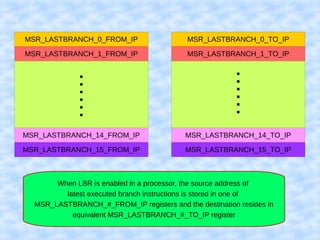
When LBR is enabled in a processor, the source address of
latest executed branch instructions is stored in one of
MSR_LASTBRANCH_#_FROM_IP registers and the destination resides in
equivalent MSR_LASTBRANCH_#_TO_IP register
Accessing LBR
● To access LBR in a processor, we should first enable this option
in desired processor.
● After enabling LBR, we can use Intel's “rdmsr” instruction to
read the contents of LBR model specific registers.
● Each MSR, has a number (Address) in every processor and to
access a LBR, we should use that address with rdmsr
instruction.
● The rdmsr instruction must be executed in ring 0 (kernel mode)
Kernel, the lord of the rings
● Wikipedia:
In computer science, hierarchical protection domains, often called protection rings, are
mechanisms to protect data and functionality from faults (by improving fault tolerance)
and malicious behavior (by providing computer security).
● Me!!:
Protection rings is an access control mechanism used in some
operating systems (Multics,...) and is implemented in some processors.
Read “operating system security” (Trent Jaeger) for further information.
Kernel, the lord of the rings
Ash nazg durbatulûk ,
Ash nazg gimbatul,
Ash nazg thrakatulûk
Agh burzum­ishi 
krimpatul.
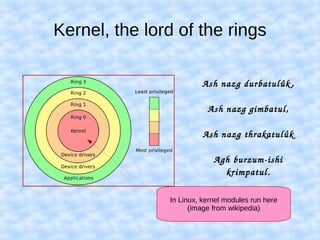
In Linux, kernel modules run here
(image from wikipedia)
Enabling LBR
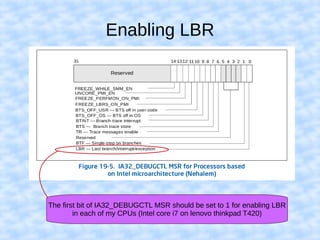
● To enable LBR, you should read Intel's data-sheet of your system's
processor (if it's Intel).
● In “Intel® 64 and IA-32 Architectures Software Developer’s Manual”, it
is mentioned that enabling LBR is done using a MSR with address of
01D9H.
● Take care in reading these data-sheets, the MSR addresses may vary
across different processors of Intel (although, usually are the same).
● My processor is an Intel core i7 (/proc/cpuinfo), so I used the
information listed in section 19.6 of this data-sheet.
Enabling LBR
The first bit of IA32_DEBUGCTL MSR should be set to 1 for enabling LBR
in each of my CPUs (Intel core i7 on lenovo thinkpad T420)
WRMSR,RDMSR
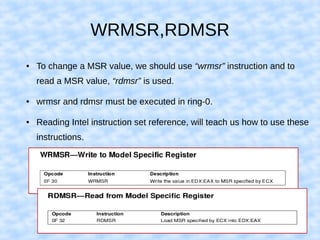
● To change a MSR value, we should use “wrmsr” instruction and to
read a MSR value, “rdmsr” is used.
● wrmsr and rdmsr must be executed in ring-0.
● Reading Intel instruction set reference, will teach us how to use these
instructions.
Enabling LBR
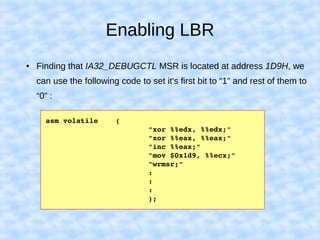
● Finding that IA32_DEBUGCTL MSR is located at address 1D9H, we
can use the following code to set it's first bit to “1” and rest of them to
“0” :
asm volatile    (
                        "xor %%edx, %%edx;"
                        "xor %%eax, %%eax;"
                        "inc %%eax;"
                        "mov $0x1d9, %%ecx;"
                        "wrmsr;"
                        :
                        :
                        :
                        );
Filtering LBR
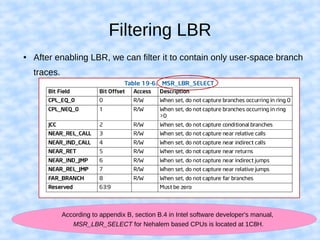
● After enabling LBR, we can filter it to contain only user-space branch
traces.
According to appendix B, section B.4 in Intel software developer's manual,
MSR_LBR_SELECT for Nehalem based CPUs is located at 1C8H.
Filtering LBR
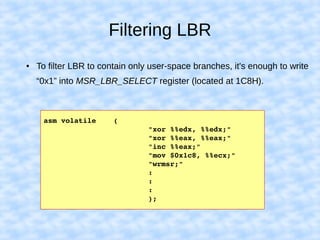
● To filter LBR to contain only user-space branches, it's enough to write
“0x1” into MSR_LBR_SELECT register (located at 1C8H).
asm volatile    (
                        "xor %%edx, %%edx;"
                        "xor %%eax, %%eax;"
                        "inc %%eax;"
                        "mov $0x1c8, %%ecx;"
                        "wrmsr;"
                        :
                        :
                        :
                        );
Address of LBR registers
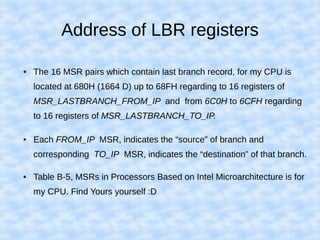
● The 16 MSR pairs which contain last branch record, for my CPU is
located at 680H (1664 D) up to 68FH regarding to 16 registers of
MSR_LASTBRANCH_FROM_IP and from 6C0H to 6CFH regarding
to 16 registers of MSR_LASTBRANCH_TO_IP.
● Each FROM_IP MSR, indicates the “source” of branch and
corresponding TO_IP MSR, indicates the “destination” of that branch.
● Table B-5, MSRs in Processors Based on Intel Microarchitecture is for
my CPU. Find Yours yourself :D
Reading LBR
  int ax1f,dx1f,ax1t,dx1t,msr_from_counter1,msr_to_counter1;
  for(msr_from_counter1=1664,msr_to_counter1=1728;msr_from_counter1<1680;msr_from_counter1++,
msr_to_counter1++)  
{
    asm volatile    (
                    "mov %4, %%ecx;"
                    "rdmsr;"
                    "mov %%eax, %0;"
                    "mov %%edx, %1;"
                    "mov %5, %%ecx;"
                    "rdmsr;"
                    "mov %%eax, %2;"
                    "mov %%edx, %3;"
                    : "=g" (ax1f), "=g" (dx1f), "=g" (ax1t), "=g" (dx1t)
                    : "g" (msr_from_counter1), "g" (msr_to_counter1)
                    : "%eax", "%ecx", "%edx"
                    );
   printk(KERN_INFO "On cpu %d, branch from: %8x (MSR: %X), to %8x (MSR: %X)n",
smp_processor_id(),ax1f,msr_from_counter1,ax1t,msr_to_counter1);
 }
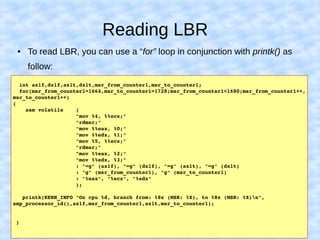
● To read LBR, you can use a “for” loop in conjunction with printk() as
follow:
One MSR set for each CPU
● Each CPU has it's own MSR registers, so it's very possible that you
enable LBR on one CPU and have it disabled on others.
● This could lead to lost of branch traces as the target application, will
probably run on all of existing CPUs (unless using processor affinity).
● To enable LBR on all CPUs, best way (AFAIK) is to write a multi-thread
code with number of threads equal to number of processors, then
binding each thread to one processor and finally enabling LBR on each
of them.
Entering ring-0
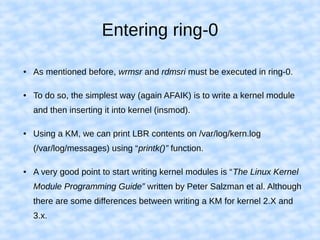
● As mentioned before, wrmsr and rdmsri must be executed in ring-0.
● To do so, the simplest way (again AFAIK) is to write a kernel module
and then inserting it into kernel (insmod).
● Using a KM, we can print LBR contents on /var/log/kern.log
(/var/log/messages) using “printk()” function.
● A very good point to start writing kernel modules is “The Linux Kernel
Module Programming Guide” written by Peter Salzman et al. Although
there are some differences between writing a KM for kernel 2.X and
3.x.
LKM 4 LBR
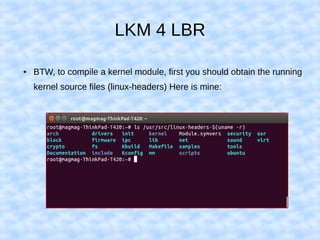
● BTW, to compile a kernel module, first you should obtain the running
kernel source files (linux-headers) Here is mine:
LKM 4 LBR
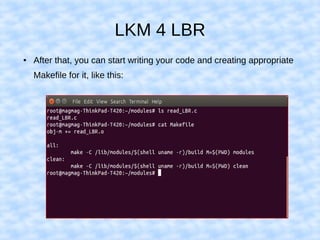
● After that, you can start writing your code and creating appropriate
Makefile for it, like this:
LKM 4 LBR
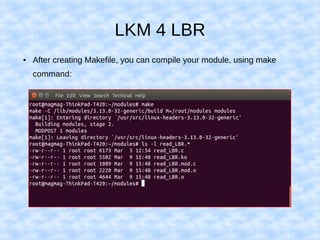
● After creating Makefile, you can compile your module, using make
command:
LKM 4 LBR
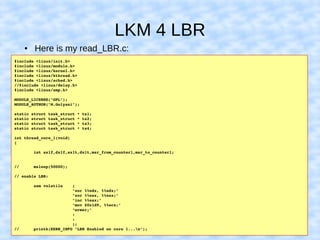
● Here is my read_LBR.c:
#include <linux/init.h>
#include <linux/module.h>
#include <linux/kernel.h>
#include <linux/kthread.h>
#include <linux/sched.h>
//#include <linux/delay.h>
#include <linux/smp.h>
MODULE_LICENSE("GPL");
MODULE_AUTHOR("M.Golyani");
static struct task_struct * ts1;
static struct task_struct * ts2;
static struct task_struct * ts3;
static struct task_struct * ts4;
int thread_core_1(void)
{
        int ax1f,dx1f,ax1t,dx1t,msr_from_counter1,msr_to_counter1;
//      msleep(50000);
// enable LBR:
        asm volatile    (
                        "xor %%edx, %%edx;"
                        "xor %%eax, %%eax;"
                        "inc %%eax;"
                        "mov $0x1d9, %%ecx;"
                        "wrmsr;"
                        :
                        :
                        );
//      printk(KERN_INFO "LBR Enabled on core 1...n");
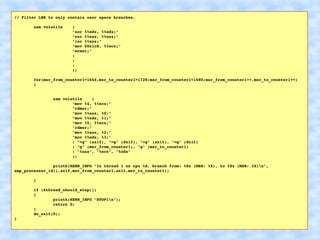
// Filter LBR to only contain user space branches.
        asm volatile    (
                        "xor %%edx, %%edx;"
                        "xor %%eax, %%eax;"
                        "inc %%eax;"
                        "mov $0x1c8, %%ecx;"
                        "wrmsr;"
                        :
                        :
                        :
                        );
        for(msr_from_counter1=1664,msr_to_counter1=1728;msr_from_counter1<1680;msr_from_counter1++,msr_to_counter1++)  
        {
                asm volatile    (
                        "mov %4, %%ecx;"
                        "rdmsr;"
                        "mov %%eax, %0;"
                        "mov %%edx, %1;"
                        "mov %5, %%ecx;"
                        "rdmsr;"
                        "mov %%eax, %2;"
                        "mov %%edx, %3;"
                        : "=g" (ax1f), "=g" (dx1f), "=g" (ax1t), "=g" (dx1t)
                        : "g" (msr_from_counter1), "g" (msr_to_counter1)
                        : "%eax", "%ecx", "%edx"
                        );
                printk(KERN_INFO "In thread 1 on cpu %d, branch from: %8x (MSR: %X), to %8x (MSR: %X)n",
smp_processor_id(),ax1f,msr_from_counter1,ax1t,msr_to_counter1);
        }
        if (kthread_should_stop())
        {
                printk(KERN_INFO "STOP1n");
                return 0;
        }
        do_exit(0);
}
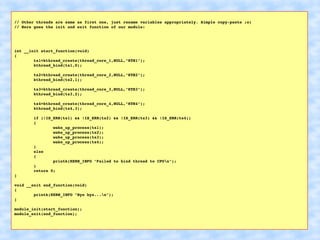
// Other threads are same as first one, just rename variables appropriately. Simple copy­paste ;o)
// Here goes the init and exit function of our module:
int __init start_function(void)
{
        ts1=kthread_create(thread_core_1,NULL,"KTH1");
        kthread_bind(ts1,0);
        ts2=kthread_create(thread_core_2,NULL,"KTH2");
        kthread_bind(ts2,1);
        ts3=kthread_create(thread_core_3,NULL,"KTH3");
        kthread_bind(ts3,2);
        ts4=kthread_create(thread_core_4,NULL,"KTH4");
        kthread_bind(ts4,3);
        if (!IS_ERR(ts1) && !IS_ERR(ts2) && !IS_ERR(ts3) && !IS_ERR(ts4))
        {
                wake_up_process(ts1);
                wake_up_process(ts2);
                wake_up_process(ts3);
                wake_up_process(ts4);
        }
        else
        {
                printk(KERN_INFO "Failed to bind thread to CPUn");
        }
        return 0;
}
void __exit end_function(void)
{
        printk(KERN_INFO "Bye bye...n");
}
module_init(start_function);
module_exit(end_function);
‫باشد‬ ‫همین‬ ‫و‬ ‫گفتیم‬ ‫معنی‬ ‫این‬ ‫از‬ ‫نکته‬ ‫یک‬

How to get LBR contents on Intel x86