Layar code examples
for developers
Creating augmented reality experiences for the world’s leading platform

August 2011
Note!

   •   Please note that the code examples in this presentation are
       based on Layar GetPOIs API version 6.0

   •   Please check our wiki for more information about the changes

   •   The Complete API version 6.0 can be found here


© Layar 2011
Introduction

   •   After you have gone through the steps as outlined in the
       presentation Layar introduction for developers, you can start
       creating your first layer

   •   This presentation provides a few code examples for the layer
       service, which will deliver POI content to the Layar app

   •   More code examples (and the latest updates) can be found on
       the Layar developer wiki


© Layar 2011
Content
   •   Layar Platform Architecture

   •   Layar Features Overview

   •   Developer API - getPOI API

   •   Feature highlights and sample code

   •   Interactive layers

   •   Third party tools

   •   Developer Support
© Layar 2011
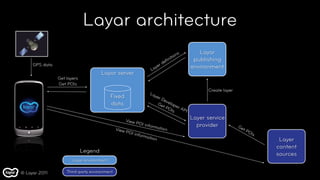
Layar architecture
                                                                                              ns      Layar
                                                                                      n  itio       publishing
                                                                                     fi
                                                                                  de
     GPS data                                                            y   er                    environment
                                                                      La
                                      Layar server
                Get layers
                Get POIs
                                                                                                         Create layer
                                                                      La
                                           Fixed                        yer
                                                                              De
                                                                                 v
                                           data                              Ge elop
                                                                               tP     e
                                                                                   OIs r AP
                                                                                            I

                                                     View
                                                                                                   Layer service
                                                             POI in
                                                                   forma
                                                                              tion
                                                                                                     provider           Ge
                                              View                                                                        tP
                                                     POI i                                                                   OI
                                                            nform                                                              s
                                                                 ation
                                                                                                                                    Layer
                                                                                                                                   content
                             Legend
                                                                                                                                   sources
                       Layar environment


© Layar 2011        Third-party environment
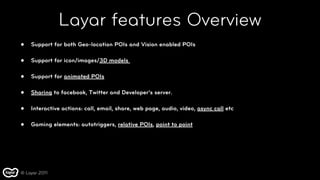
Layar features Overview
•   Support for both Geo-location POIs and Vision enabled POIs

•   Support for icon/images/3D models

•   Support for animated POIs

•   Sharing to facebook, Twitter and Developer’s server.

•   Interactive actions: call, email, share, web page, audio, video, async call etc

•   Gaming elements: autotriggers, relative POIs, point to point


© Layar 2011
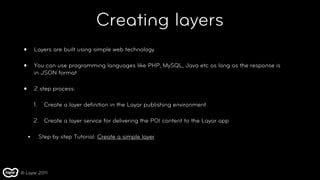
Creating layers
 •       Layers are built using simple web technology

 •       You can use programming languages like PHP, MySQL, Java etc as long as the response is
         in JSON format

 •       2 step process:

         1.     Create a layer definition in the Layar publishing environment

         2. Create a layer service for delivering the POI content to the Layar app

     •        Step by step Tutorial: Create a simple layer


© Layar 2011
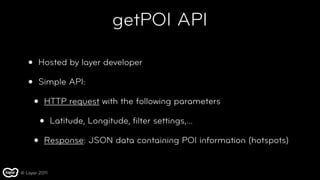
getPOI API

   •   Hosted by layer developer

   •   Simple API:

       •   HTTP request with the following parameters

           •   Latitude, Longitude, filter settings,...

       •   Response: JSON data containing POI information (hotspots)


© Layar 2011
Two types of POIs

   •       Geo-location POI

       •    POIs that are attached to a physical location with latitude, longitude & altitude.


   •       Vision POI

       •    Augments that are attached to a target object recognized by Layar Reality browser (v6.0 and
            above).


© Layar 2011
Request
http://devAPI.example.com/getPOIs/?countryCode=IN&lon=4.887339&timestamp=1249226148713
&userId=ed48067cda8e1b985dbb8ff3653a2da4fd490a37
&radius=6245&lat=52.377544&layerName=snowy4&accuracy=100

Response
{
 "hotspots": [{
   "id": "test_1",
   "anchor": { "geolocation": { "lat": 52.3729, "lon": 4.93 } }, // For Geo-location POI.
   "text": {
      "title": "The Layar Office",
      "description": "The Location of the Layar Office",
      "footnote": "Powered by Layar"
    },
  "imageURL": "http://custom.layar.nl/layarimage.jpeg"
 }],
 "layer": "snowy4",
 "errorString": "ok",
  "errorCode": 0
}


    © Layar 2011
•   Response for Vision enabled layers

 {
  "hotspots": [{
    "id": "test_1",
    "anchor": { "referenceImage": “my_Reference_Image” }, // For Vision enabled POI.
    "text": {
         "title": "The Layar Office",
         "description": "The Location of the Layar Office",
         "footnote": "Powered by Layar"
     },
   "imageURL": "http://custom.layar.nl/layarimage.jpeg"
  }],
  "layer": "snowy4",
  "errorString": "ok",
   "errorCode": 0
 }


© Layar 2011
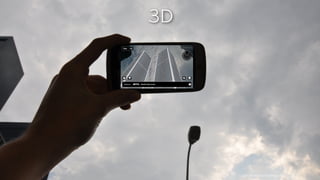
3D


© Layar 2011
                    Layer developed by Hoppala
Response
{
 "hotspots": [{
   "id": "test_1",
   "anchor": { "geolocation": { "lat": 52.3729, "lon": 4.93 } }, // For Geo-location POI.

    "text": {

      "title": "The Layar Office",
      "description": "The Location of the Layar Office",
      "footnote": "Powered by Layar"
    },
    "imageURL": "http://custom.layar.nl/layarimage.jpeg",
"object": {
   "contentType": "model/vnd.layar.l3d",
   "url": "http://example.com/example_full.l3d",  
   "reducedURL": "http://example_reduced.l3d",  
   "size": 2},
"transform":  {
   "rotate": {  
     "rel": true,    
     "axis": { "x": 0, "y": 0, "z": 1 },
     "angle": 0 },  
   "translate": { "x": 0, "y": -0.075, "z": 0 },  
   "scale": 0.01}
 }],
 "layer": "snowy4",
 "errorString": "ok",
 "errorCode": 0
} © Layar 2011
3D notes
   •   Base format is OBJ (WaveFront format)

   •   Good interchange format, most 3D programs can convert to OBJ

   •   Materials and Textures are supported

   •   For textures only diffuse color of the material is supported

   •   No multiple textures

   •   Transparency support (no blending with other objects though)

   •   Conversion to L3D (Layar binary format) required

© Layar 2011
More info on 3D POI
   •   Requirements and best practices on creating 3D model.

       •   Presentation: 3D Content Creation Tips & Tricks

       •   Manual: 3D in Layar v1.0 (pdf)

   •   Layar 3D model Converter

   •   Tutorial: Create texture-animated 3D models

   •   Tutorial: Positioning 3D model within Layar3D Model Converter

© Layar 2011
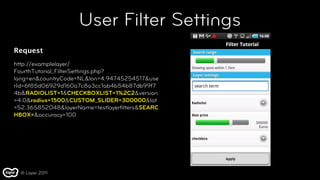
User Filter Settings
Request
http://examplelayer/
FourthTutorial_FilterSettings.php?
lang=en&countryCode=NL&lon=4.94745254517&use
rId=6f85d06929d160a7c8a3cc1ab4b54b87db99f7
4b&RADIOLIST=1&CHECKBOXLIST=1%2C2&version
=4.0&radius=1500&CUSTOM_SLIDER=300000&lat
=52.365852048&layerName=testlayerfilters&SEARC
HBOX=&accuracy=100


  © Layar 2011
More Info on Filter Settings


   •   Filter configuration on the Publishing site

   •   Filter definition in getPOI request

   •   Tutorial: Layer with filter settings


© Layar 2011
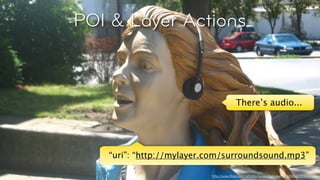
POI & Layer Actions


                                           There’s audio...


© Layar 2011
                              http://www.flickr.com/photos/suzanneandsimon/886401250/
POI & Layer Actions


                                                      There’s audio...


                  “uri”: “http://mylayer.com/surroundsound.mp3”
© Layar 2011
                                         http://www.flickr.com/photos/suzanneandsimon/886401250/
Response for Geo-location POI
"actions": [{" "    "label": "Contact Layar",
                    "uri": "http://layar.com/company/contact/",
                    "autoTriggerRange": 5000, // For Geo-location POI.
                    "autoTriggerOnly": false,
                    "contentType": "text/html",
                    "method": "GET",
                    "activityType": 1,
                    "params": [
                        "lat",
                        "lon",
                        "alt",
                        "lang",
                        "countrycode",
                        "localCountryCode",
                        "version"
                    ],
                    "closeBiw": false,
                    "showActivity": true,
                    "activityMessage": "contact layar"
                }]


 © Layar 2011
Response for Vision POI
"actions": [{" "    "label": "Contact Layar",
                    "uri": "http://layar.com/company/contact/",
                    "autoTrigger": true, // For Vision POI.
                    "autoTriggerOnly": false,
                    "contentType": "text/html",
                    "method": "GET",
                    "activityType": 1,
                    "params": [
                        "lat",
                        "lon",
                        "alt",
                        "lang",
                        "countrycode",
                        "localCountryCode",
                        "version"
                    ],
                    "closeBiw": false,
                    "showActivity": true,
                    "activityMessage": "contact layar"
                }]


 © Layar 2011
More Info on Actions


   •   Actions API specification

   •   Tutorial: Layer with Actions


© Layar 2011
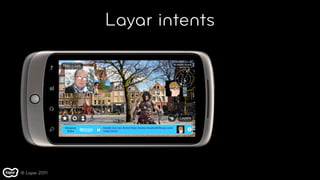
Layar intents


© Layar 2011
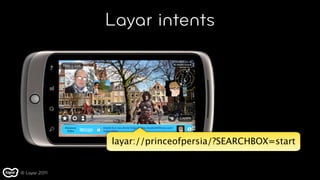
Layar intents


               layar://princeofpersia/?SEARCHBOX=start


© Layar 2011
Layar Intents
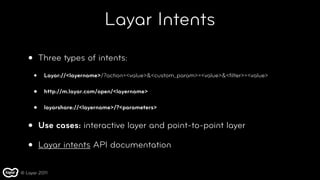
   •       Three types of intents:

       •    Layar://<layername>/?action=<value>&<custom_param>=<value>&<filter>=<value>

       •    http://m.layar.com/open/<layername>

       •    layarshare://<layername>/?<parameters>


   •       Use cases: interactive layer and point-to-point layer

   •       Layar intents API documentation

© Layar 2011
Animations


© Layar 2011
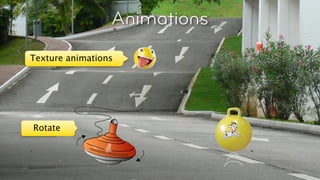
Animations
    Texture animations


© Layar 2011
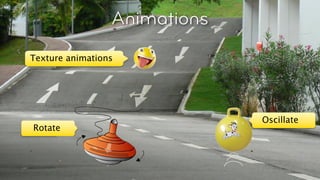
Animations
    Texture animations


     Rotate


© Layar 2011
Animations
    Texture animations


                                  Oscillate
     Rotate


© Layar 2011
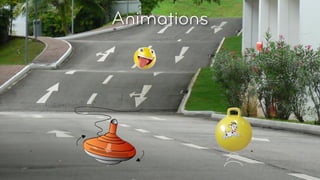
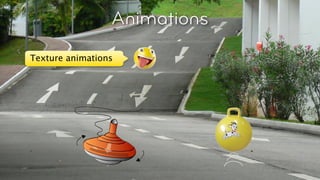
Animation API
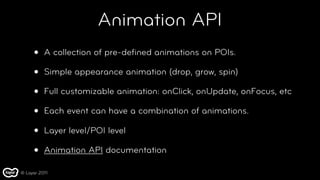
     •    A collection of pre-defined animations on POIs.

     •    Simple appearance animation (drop, grow, spin)

     •    Full customizable animation: onClick, onUpdate, onFocus, etc

     •    Each event can have a combination of animations.

     •    Layer level/POI level

     •    Animation API documentation

© Layar 2011
Response

"animations": { // "animations" on a POI level. This overwrites the "animations" parameter defined on the layer level.
  "onClick": [ // "onClick" event triggers the following animation.
         .{ //The object size is scaled by a decimal factor from 1 to 2 on X, Y and Z axises
          "interpolation": "linear",
             "type": "scale", // animation type, mandatory field.
             "axis": { // axis that the animation is applied to
                  "y": 1,
                  "x": 1,
                  "z": 1
             },
             "from": 1, // initial scale factor, default is to use the currently set POI state
             "to": 2, // eventual scale factor
             "length": 2000, // animation duration in milliseconds, mandatory field.
             "delay": 0, // delay in milliseconds before starting the animation
             "repeat": false, // specifies whether the animation is repeated in a loop
             "persist": true // indicates whether he end state of the animation is applied to the POI state
          }

    ]
}


    © Layar 2011
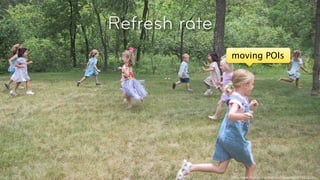
Refresh rate
               moving POIs


                                                 © 2010, Layar B.V.
               http://www.flickr.com/photos/whiteoakart/143472785/
Response

{"hotspots": [],
 "layer": "snowy4",
 "errorString": "ok",
 "morePages": false,
 "errorCode": 0,
 "nextPageKey": null,
 "refreshInterval": 2,//indicates how many seconds to wait until the next getPOI request is made.
 "refreshDistance": 10,//tells the client to refresh the layer if the user has moved by more than the
                       //distance specified.
 "fullRefresh": false, // indicates whether it is a full refresh or update.
 "actions":[]
}


Detailed explanation can be found here.


 © Layar 2011
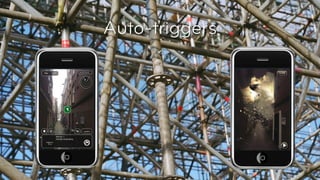
Auto-triggers


© Layar 2011
Auto-triggers

               “actions”: [{ “label”: “ Watch”,
                                “uri”: “http://splintercell.com
                                            /explosion.3gp”,
                “autoTriggerRange”: 50,
                 “autoTriggerOnly”: true}]


© Layar 2011
User authentication


Cookies!


                       http://www.flickr.com/photos/mache/166940673
User authentication
   •   Layar AR view behaves like a browser view

   •   Cookies belonging to the getPOI URL domain are stored and
       sent

   •   Implement your layer webservice like for a normal browser

   •   Alternatively: UserId is anonymous ID of user (linked to phone
       ID)

   •   User Authentication Documentation

© Layar 2011
Interactive layers

           •   Create Relative POIs

           •   User generated POIs

           •   User provided feedback, such as vote, comments, etc

           •   Sharing screenshots to developer’s server

           •   Treasure hunting (point to point)


© Layar 2011
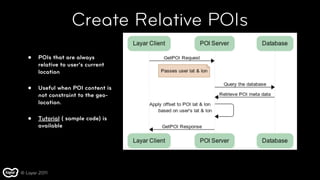
Create Relative POIs
   •   POIs that are always
       relative to user’s current
       location

   •   Useful when POI content is
       not constraint to the geo-
       location.

   •   Tutorial ( sample code) is
       available


© Layar 2011
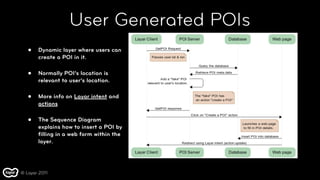
User Generated POIs
   •   Dynamic layer where users can
       create a POI in it.

   •   Normally POI’s location is
       relevant to user’s location.

   •   More info on Layar intent and
       actions

   •   The Sequence Diagram
       explains how to insert a POI by
       filling in a web form within the
       layer.


© Layar 2011
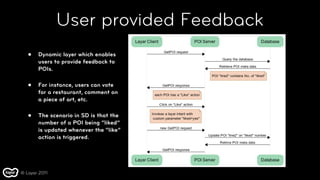
User provided Feedback
   •   Dynamic layer which enables
       users to provide feedback to
       POIs.

   •   For instance, users can vote
       for a restaurant, comment on
       a piece of art, etc.

   •   The scenario in SD is that the
       number of a POI being “liked”
       is updated whenever the “like”
       action is triggered.


© Layar 2011
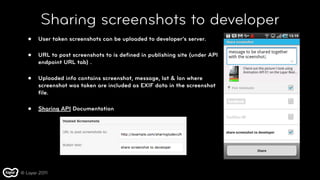
Sharing screenshots to developer
   •   User taken screenshots can be uploaded to developer’s server.

   •   URL to post screenshots to is defined in publishing site (under API
       endpoint URL tab) .

   •   Uploaded info contains screenshot, message, lat & lon where
       screenshot was taken are included as EXIF data in the screenshot
       file.

   •   Sharing API Documentation


© Layar 2011
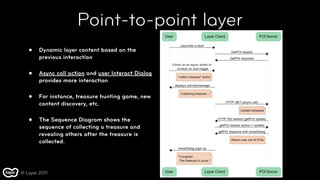
Point-to-point layer
   •    Dynamic layer content based on the
        previous interaction

   •    Async call action and user Interact Dialog
        provides more interaction

   •    For instance, treasure hunting game, new
        content discovery, etc.

   •    The Sequence Diagram shows the
        sequence of collecting a treasure and
        revealing others after the treasure is
        collected.


© Layar 2011
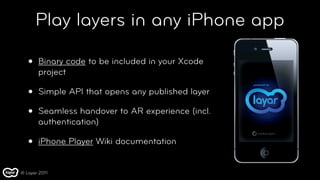
Play layers in any iPhone app

   •   Binary code to be included in your Xcode
       project

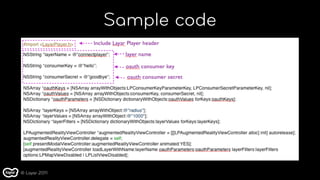
   •   Simple API that opens any published layer

   •   Seamless handover to AR experience (incl.
       authentication)

   •   iPhone Player Wiki documentation


© Layar 2011
Sample code


© Layar 2011
Third Party Tools
   •       Instead of creating your own layer service, you can use one of the third party tools developed
           by the community, e.g.:

       •     Porpoise
             Open source server software, requires programming skills, more control

       •     Hoppala Augmentation
             Hosted solution, easy to use, limited functionality

       •     LMS using Layar Connect, such as BuildAR, Poistr, Poiz, VISAR, etc.

       •     Others


© Layar 2011
Developer support
   •   The following support resources provide a wealth of information
       for developers:

       •   Layar developer wiki

       •   Layar developer support environment

           •   Discussion forums

           •   Support tickets

© Layar 2011
Thank you

Layar code examples for developers

  • 1.
    Layar code examples fordevelopers Creating augmented reality experiences for the world’s leading platform August 2011
  • 2.
    Note! • Please note that the code examples in this presentation are based on Layar GetPOIs API version 6.0 • Please check our wiki for more information about the changes • The Complete API version 6.0 can be found here © Layar 2011
  • 3.
    Introduction • After you have gone through the steps as outlined in the presentation Layar introduction for developers, you can start creating your first layer • This presentation provides a few code examples for the layer service, which will deliver POI content to the Layar app • More code examples (and the latest updates) can be found on the Layar developer wiki © Layar 2011
  • 4.
    Content • Layar Platform Architecture • Layar Features Overview • Developer API - getPOI API • Feature highlights and sample code • Interactive layers • Third party tools • Developer Support © Layar 2011
  • 5.
    Layar architecture ns Layar n itio publishing fi de GPS data y er environment La Layar server Get layers Get POIs Create layer La Fixed yer De v data Ge elop tP e OIs r AP I View Layer service POI in forma tion provider Ge View tP POI i OI nform s ation Layer content Legend sources Layar environment © Layar 2011 Third-party environment
  • 6.
    Layar features Overview • Support for both Geo-location POIs and Vision enabled POIs • Support for icon/images/3D models • Support for animated POIs • Sharing to facebook, Twitter and Developer’s server. • Interactive actions: call, email, share, web page, audio, video, async call etc • Gaming elements: autotriggers, relative POIs, point to point © Layar 2011
  • 7.
    Creating layers • Layers are built using simple web technology • You can use programming languages like PHP, MySQL, Java etc as long as the response is in JSON format • 2 step process: 1. Create a layer definition in the Layar publishing environment 2. Create a layer service for delivering the POI content to the Layar app • Step by step Tutorial: Create a simple layer © Layar 2011
  • 8.
    getPOI API • Hosted by layer developer • Simple API: • HTTP request with the following parameters • Latitude, Longitude, filter settings,... • Response: JSON data containing POI information (hotspots) © Layar 2011
  • 9.
    Two types ofPOIs • Geo-location POI • POIs that are attached to a physical location with latitude, longitude & altitude. • Vision POI • Augments that are attached to a target object recognized by Layar Reality browser (v6.0 and above). © Layar 2011
  • 10.
    Request http://devAPI.example.com/getPOIs/?countryCode=IN&lon=4.887339&timestamp=1249226148713 &userId=ed48067cda8e1b985dbb8ff3653a2da4fd490a37 &radius=6245&lat=52.377544&layerName=snowy4&accuracy=100 Response { "hotspots": [{ "id": "test_1",    "anchor": { "geolocation": { "lat": 52.3729, "lon": 4.93 } }, // For Geo-location POI.    "text": { "title": "The Layar Office", "description": "The Location of the Layar Office",   "footnote": "Powered by Layar" },   "imageURL": "http://custom.layar.nl/layarimage.jpeg"  }],  "layer": "snowy4",  "errorString": "ok", "errorCode": 0 } © Layar 2011
  • 11.
    Response for Vision enabled layers { "hotspots": [{ "id": "test_1",    "anchor": { "referenceImage": “my_Reference_Image” }, // For Vision enabled POI.    "text": { "title": "The Layar Office", "description": "The Location of the Layar Office",   "footnote": "Powered by Layar" },   "imageURL": "http://custom.layar.nl/layarimage.jpeg"  }],  "layer": "snowy4",  "errorString": "ok", "errorCode": 0 } © Layar 2011
  • 12.
    3D © Layar 2011 Layer developed by Hoppala
  • 13.
    Response { "hotspots": [{ "id": "test_1",    "anchor": { "geolocation": { "lat": 52.3729, "lon": 4.93 } }, // For Geo-location POI. "text": { "title": "The Layar Office", "description": "The Location of the Layar Office",   "footnote": "Powered by Layar" },   "imageURL": "http://custom.layar.nl/layarimage.jpeg", "object": {    "contentType": "model/vnd.layar.l3d",    "url": "http://example.com/example_full.l3d",      "reducedURL": "http://example_reduced.l3d",      "size": 2}, "transform":  {    "rotate": {        "rel": true,          "axis": { "x": 0, "y": 0, "z": 1 },      "angle": 0 },      "translate": { "x": 0, "y": -0.075, "z": 0 },      "scale": 0.01}  }],  "layer": "snowy4",  "errorString": "ok", "errorCode": 0 } © Layar 2011
  • 14.
    3D notes • Base format is OBJ (WaveFront format) • Good interchange format, most 3D programs can convert to OBJ • Materials and Textures are supported • For textures only diffuse color of the material is supported • No multiple textures • Transparency support (no blending with other objects though) • Conversion to L3D (Layar binary format) required © Layar 2011
  • 15.
    More info on3D POI • Requirements and best practices on creating 3D model. • Presentation: 3D Content Creation Tips & Tricks • Manual: 3D in Layar v1.0 (pdf) • Layar 3D model Converter • Tutorial: Create texture-animated 3D models • Tutorial: Positioning 3D model within Layar3D Model Converter © Layar 2011
  • 16.
  • 17.
    More Info onFilter Settings • Filter configuration on the Publishing site • Filter definition in getPOI request • Tutorial: Layer with filter settings © Layar 2011
  • 18.
    POI & LayerActions There’s audio... © Layar 2011 http://www.flickr.com/photos/suzanneandsimon/886401250/
  • 19.
    POI & LayerActions There’s audio... “uri”: “http://mylayer.com/surroundsound.mp3” © Layar 2011 http://www.flickr.com/photos/suzanneandsimon/886401250/
  • 20.
    Response for Geo-locationPOI "actions": [{" " "label": "Contact Layar",                     "uri": "http://layar.com/company/contact/",                     "autoTriggerRange": 5000, // For Geo-location POI.                     "autoTriggerOnly": false,                     "contentType": "text/html",                     "method": "GET",                     "activityType": 1,                     "params": [                         "lat",                         "lon",                         "alt",                         "lang",                         "countrycode",                         "localCountryCode",                         "version"                     ],                     "closeBiw": false,                     "showActivity": true,                     "activityMessage": "contact layar"                 }] © Layar 2011
  • 21.
    Response for VisionPOI "actions": [{" " "label": "Contact Layar",                     "uri": "http://layar.com/company/contact/",                     "autoTrigger": true, // For Vision POI.                     "autoTriggerOnly": false,                     "contentType": "text/html",                     "method": "GET",                     "activityType": 1,                     "params": [                         "lat",                         "lon",                         "alt",                         "lang",                         "countrycode",                         "localCountryCode",                         "version"                     ],                     "closeBiw": false,                     "showActivity": true,                     "activityMessage": "contact layar"                 }] © Layar 2011
  • 22.
    More Info onActions • Actions API specification • Tutorial: Layer with Actions © Layar 2011
  • 23.
  • 24.
    Layar intents layar://princeofpersia/?SEARCHBOX=start © Layar 2011
  • 25.
    Layar Intents • Three types of intents: • Layar://<layername>/?action=<value>&<custom_param>=<value>&<filter>=<value> • http://m.layar.com/open/<layername> • layarshare://<layername>/?<parameters> • Use cases: interactive layer and point-to-point layer • Layar intents API documentation © Layar 2011
  • 26.
  • 27.
    Animations Texture animations © Layar 2011
  • 28.
    Animations Texture animations Rotate © Layar 2011
  • 29.
    Animations Texture animations Oscillate Rotate © Layar 2011
  • 30.
    Animation API • A collection of pre-defined animations on POIs. • Simple appearance animation (drop, grow, spin) • Full customizable animation: onClick, onUpdate, onFocus, etc • Each event can have a combination of animations. • Layer level/POI level • Animation API documentation © Layar 2011
  • 31.
    Response "animations": { //"animations" on a POI level. This overwrites the "animations" parameter defined on the layer level. "onClick": [ // "onClick" event triggers the following animation. .{ //The object size is scaled by a decimal factor from 1 to 2 on X, Y and Z axises           "interpolation": "linear",              "type": "scale", // animation type, mandatory field.              "axis": { // axis that the animation is applied to                   "y": 1,                   "x": 1,                   "z": 1              },    "from": 1, // initial scale factor, default is to use the currently set POI state              "to": 2, // eventual scale factor              "length": 2000, // animation duration in milliseconds, mandatory field.              "delay": 0, // delay in milliseconds before starting the animation              "repeat": false, // specifies whether the animation is repeated in a loop              "persist": true // indicates whether he end state of the animation is applied to the POI state           } ] } © Layar 2011
  • 32.
    Refresh rate moving POIs © 2010, Layar B.V. http://www.flickr.com/photos/whiteoakart/143472785/
  • 33.
    Response {"hotspots": [],  "layer": "snowy4",  "errorString":"ok",  "morePages": false, "errorCode": 0, "nextPageKey": null,  "refreshInterval": 2,//indicates how many seconds to wait until the next getPOI request is made.  "refreshDistance": 10,//tells the client to refresh the layer if the user has moved by more than the //distance specified.  "fullRefresh": false, // indicates whether it is a full refresh or update.  "actions":[] } Detailed explanation can be found here. © Layar 2011
  • 34.
  • 35.
    Auto-triggers “actions”: [{ “label”: “ Watch”, “uri”: “http://splintercell.com /explosion.3gp”, “autoTriggerRange”: 50, “autoTriggerOnly”: true}] © Layar 2011
  • 36.
    User authentication Cookies! http://www.flickr.com/photos/mache/166940673
  • 37.
    User authentication • Layar AR view behaves like a browser view • Cookies belonging to the getPOI URL domain are stored and sent • Implement your layer webservice like for a normal browser • Alternatively: UserId is anonymous ID of user (linked to phone ID) • User Authentication Documentation © Layar 2011
  • 38.
    Interactive layers • Create Relative POIs • User generated POIs • User provided feedback, such as vote, comments, etc • Sharing screenshots to developer’s server • Treasure hunting (point to point) © Layar 2011
  • 39.
    Create Relative POIs • POIs that are always relative to user’s current location • Useful when POI content is not constraint to the geo- location. • Tutorial ( sample code) is available © Layar 2011
  • 40.
    User Generated POIs • Dynamic layer where users can create a POI in it. • Normally POI’s location is relevant to user’s location. • More info on Layar intent and actions • The Sequence Diagram explains how to insert a POI by filling in a web form within the layer. © Layar 2011
  • 41.
    User provided Feedback • Dynamic layer which enables users to provide feedback to POIs. • For instance, users can vote for a restaurant, comment on a piece of art, etc. • The scenario in SD is that the number of a POI being “liked” is updated whenever the “like” action is triggered. © Layar 2011
  • 42.
    Sharing screenshots todeveloper • User taken screenshots can be uploaded to developer’s server. • URL to post screenshots to is defined in publishing site (under API endpoint URL tab) . • Uploaded info contains screenshot, message, lat & lon where screenshot was taken are included as EXIF data in the screenshot file. • Sharing API Documentation © Layar 2011
  • 43.
    Point-to-point layer • Dynamic layer content based on the previous interaction • Async call action and user Interact Dialog provides more interaction • For instance, treasure hunting game, new content discovery, etc. • The Sequence Diagram shows the sequence of collecting a treasure and revealing others after the treasure is collected. © Layar 2011
  • 44.
    Play layers inany iPhone app • Binary code to be included in your Xcode project • Simple API that opens any published layer • Seamless handover to AR experience (incl. authentication) • iPhone Player Wiki documentation © Layar 2011
  • 45.
  • 46.
    Third Party Tools • Instead of creating your own layer service, you can use one of the third party tools developed by the community, e.g.: • Porpoise Open source server software, requires programming skills, more control • Hoppala Augmentation Hosted solution, easy to use, limited functionality • LMS using Layar Connect, such as BuildAR, Poistr, Poiz, VISAR, etc. • Others © Layar 2011
  • 47.
    Developer support • The following support resources provide a wealth of information for developers: • Layar developer wiki • Layar developer support environment • Discussion forums • Support tickets © Layar 2011
  • 48.

Editor's Notes

  • #2 \n
  • #3 \n
  • #4 \n
  • #5 \n
  • #6 \n
  • #7 \n
  • #8 \n
  • #9 \n
  • #10 Early Investment by Leading Developers\nEmerging Understanding of Business Models\nDeveloping services -&gt; developing Experiences\nLearning &amp; ongoing development \nDeveloper community\nPromoting &amp; curating what is working\nPayment platforms\nRicher AR modelling\nMore interaction, sharing &amp; engagement\nAnalytics &amp; reporting\nTechnology consolidation\n\n\n
  • #11 \n
  • #12 \n
  • #13 \n
  • #14 \n
  • #15 \n
  • #16 - Audio: Augmented reality isn&apos;t just about visual stuff. You can also augment reality using audio. We support actions on POIs to audio and video streams. This isn&apos;t used much and we&apos;re expecting more developers to take advantage of this. example (ar beatles, one of our first layers for puerto rico is using this)\n
  • #17 \n
  • #18 \n
  • #19 \n
  • #20 \n
  • #21 \n
  • #22 \n
  • #23 \n
  • #24 \n
  • #25 \n
  • #26 Example: a game where the people playing the game are part of the experience. You could now play Mr.X in AR.\n
  • #27 \n
  • #28 \n
  • #29 - User authentication: Layar behaves like a normal browser. It will correctly handle cookies set for the PoiURL domain, so if you set a cookie in your webview, you can track sessions even in the getPOI request. Example: layers with personal&amp;#xA0;\n\n
  • #30 \n
  • #31 \n
  • #32 \n
  • #33 \n
  • #34 \n
  • #35 \n
  • #36 \n
  • #37 \n
  • #38 \n
  • #39 \n
  • #40 \n
  • #41 \n
  • #42 \n
  • #43 \n
  • #44 \n